A multi-round co-design skill for publication-ready paper framework diagrams and method overview figures.
2,276
66 commits
updated Jul 10, 2026
paper-framework-figure-studio-pro 是面向计算机科学论文框架图的制图 skill。它的目标是为论文 method overview、architecture diagram、pipeline/process figure 和 agent workflow 提供多样化候选草案,方便作者后续筛选、对照、人工编辑和定稿。
当前 main 分支已更新为 v3.2.15f 包和示例,该版本是针对 ChatGPT 网页端设计的,只建议用于 ChatGPT 网页端的 chat 和 work 模式下(注意 work 模式下会受 token 额度限制影响),因为 Codex 里的 image gen(text)无法接受图片作为输入,而在 v3.2.15f 的 S5 阶段需要依赖 S2 阶段产生的图片作为参考;本周会提供 Cursor 和 ChatGPT chat 模式下的 subagents 协作版本。
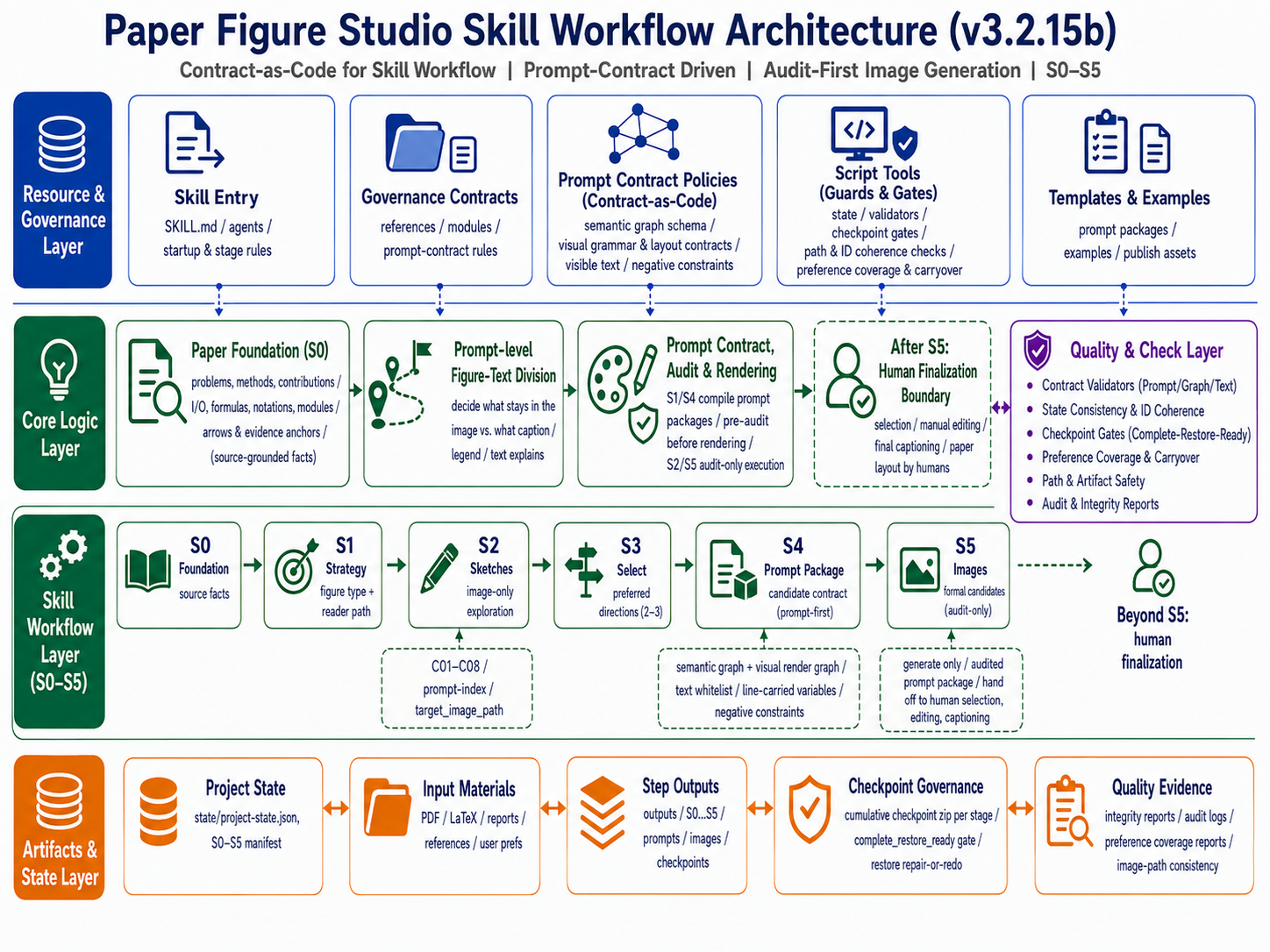
此外,本文档架构图依然沿用 v3.2.15b。旧版本已归档到对应 Git tags。感谢 Bristol 的刘欣阳同学提供协助。
本周也会提供 Cursor 和 ChatGPT chat 模式下的 subagents 协作版本,仍会侧重独立审计。
本版的主题:“契约规范下的随机之美”。
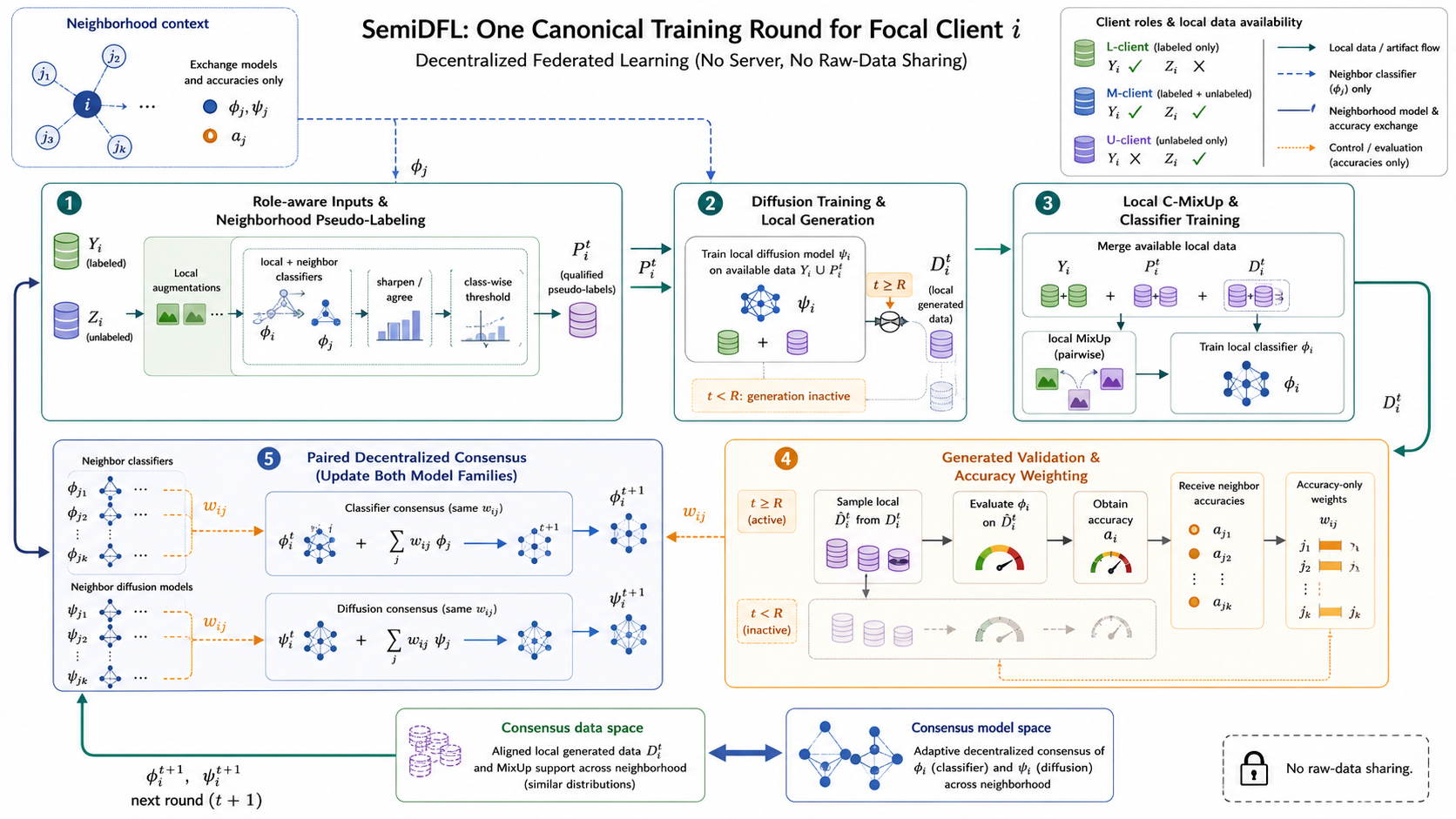
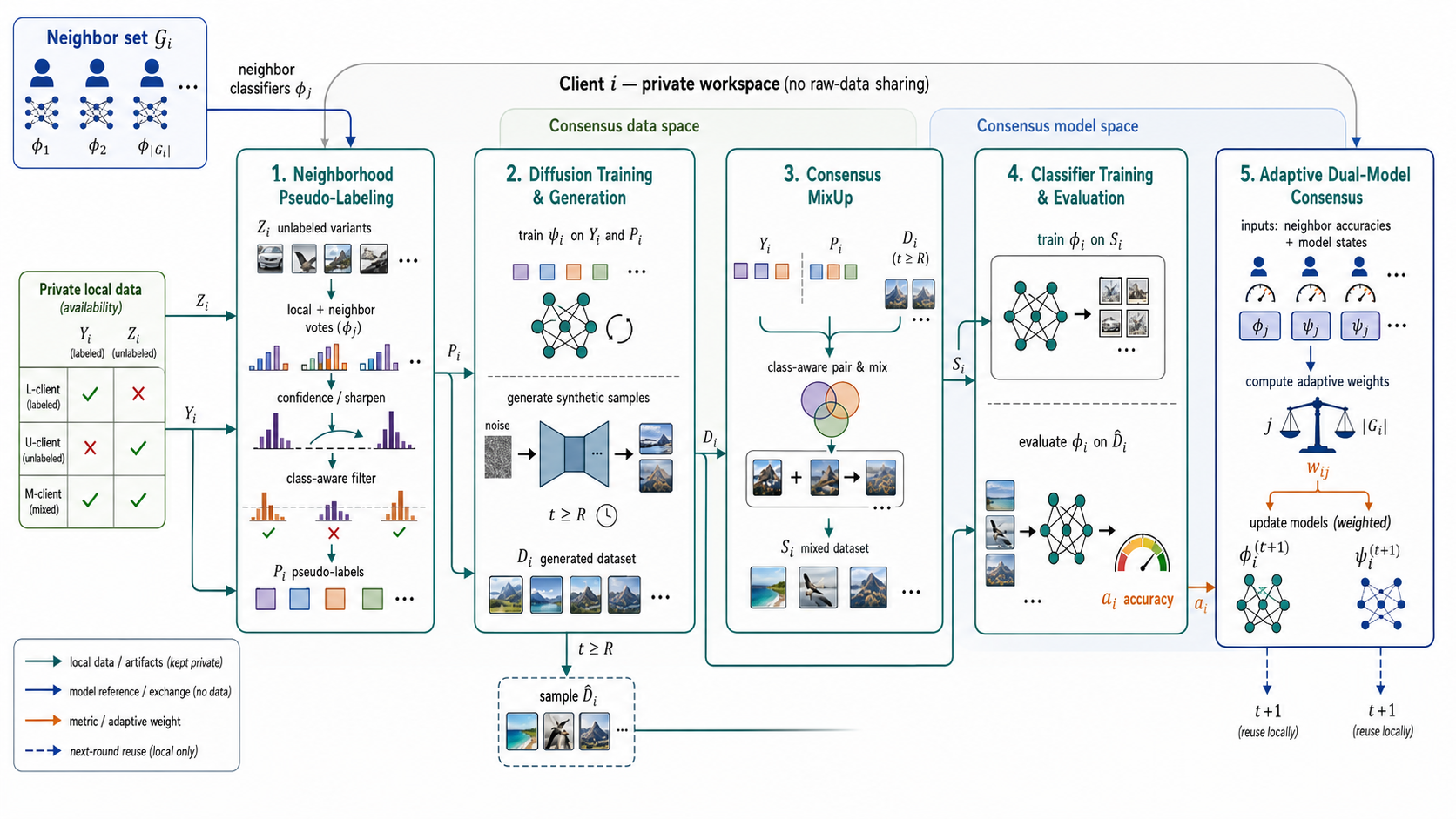
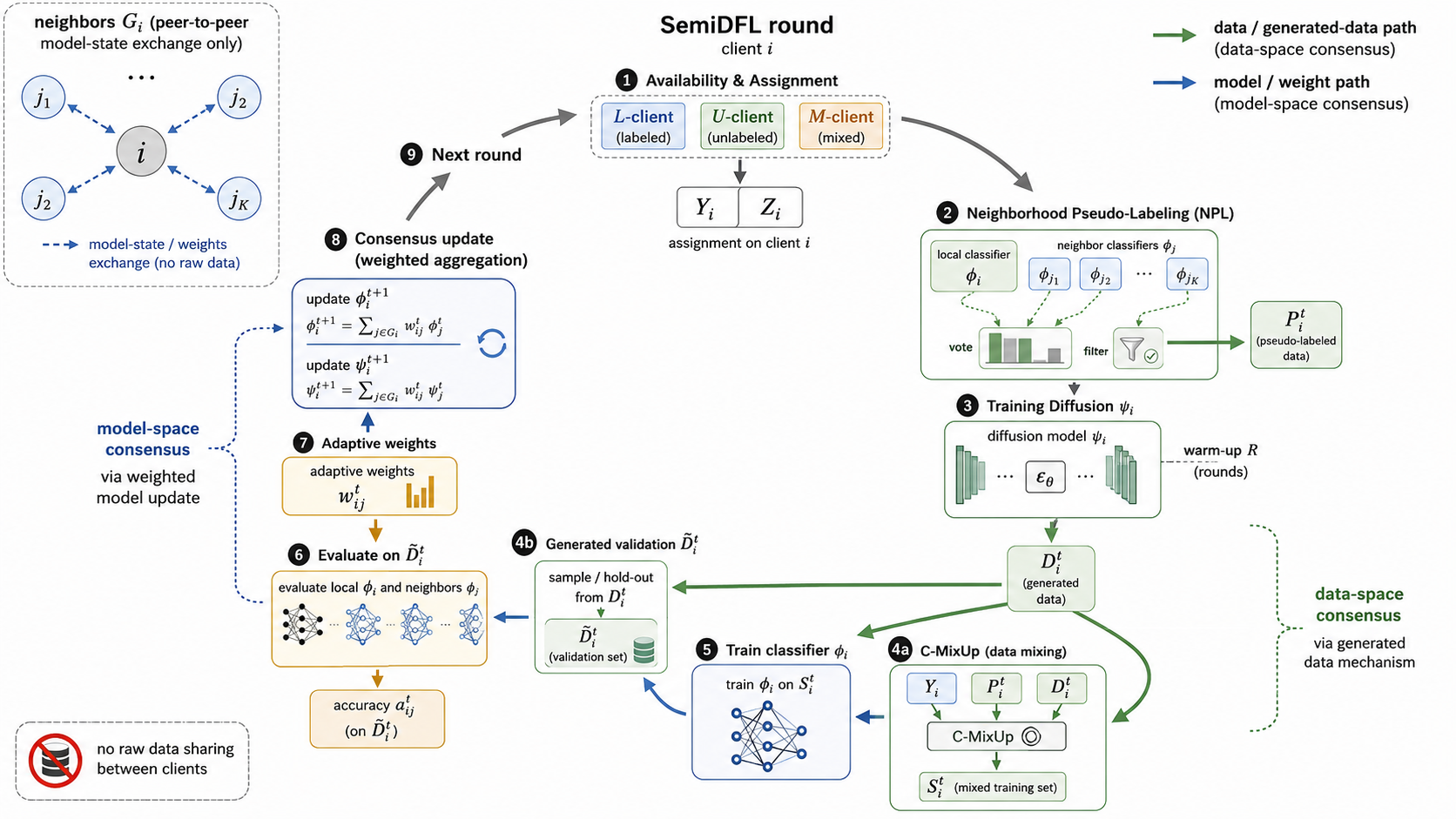
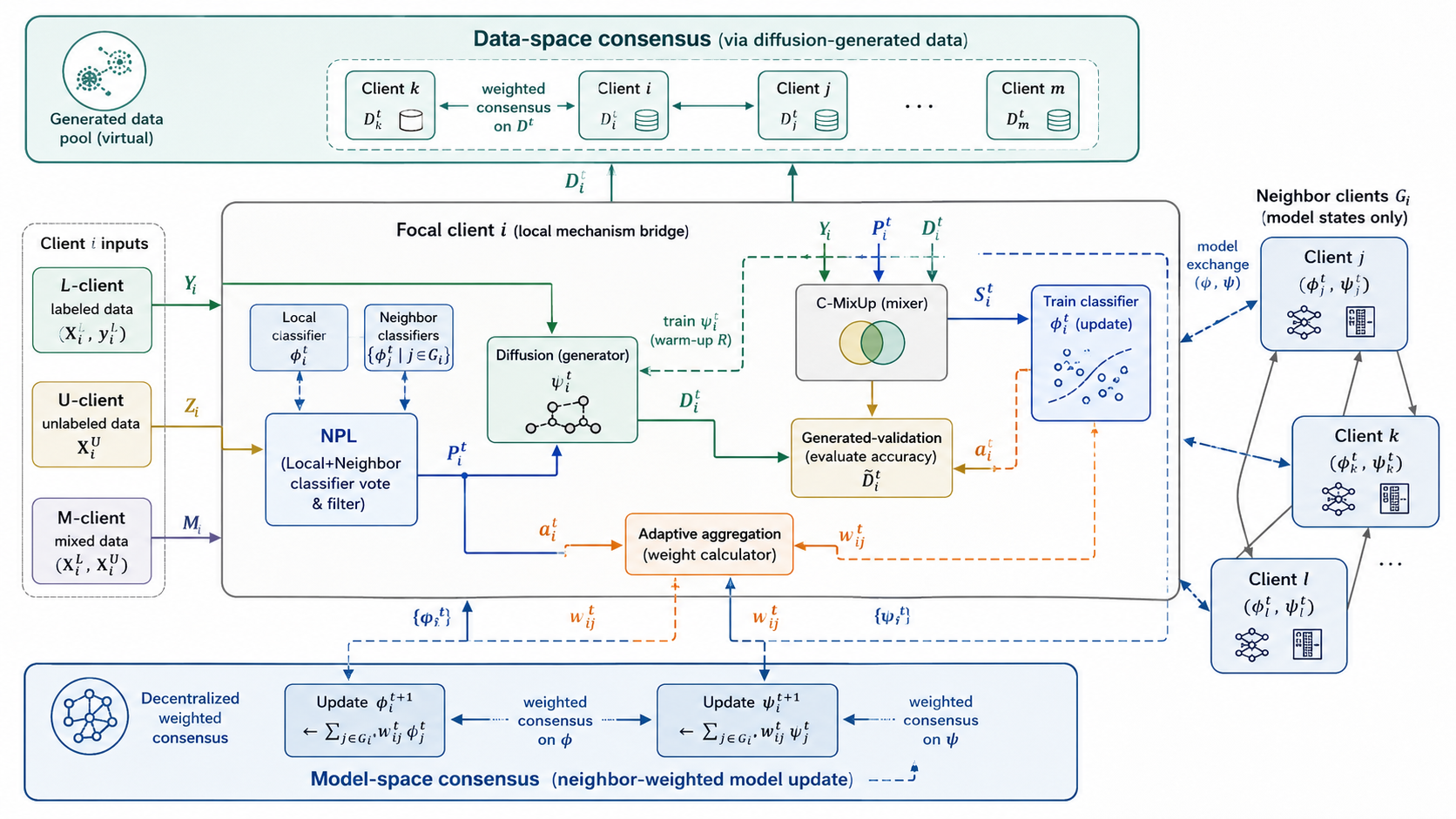
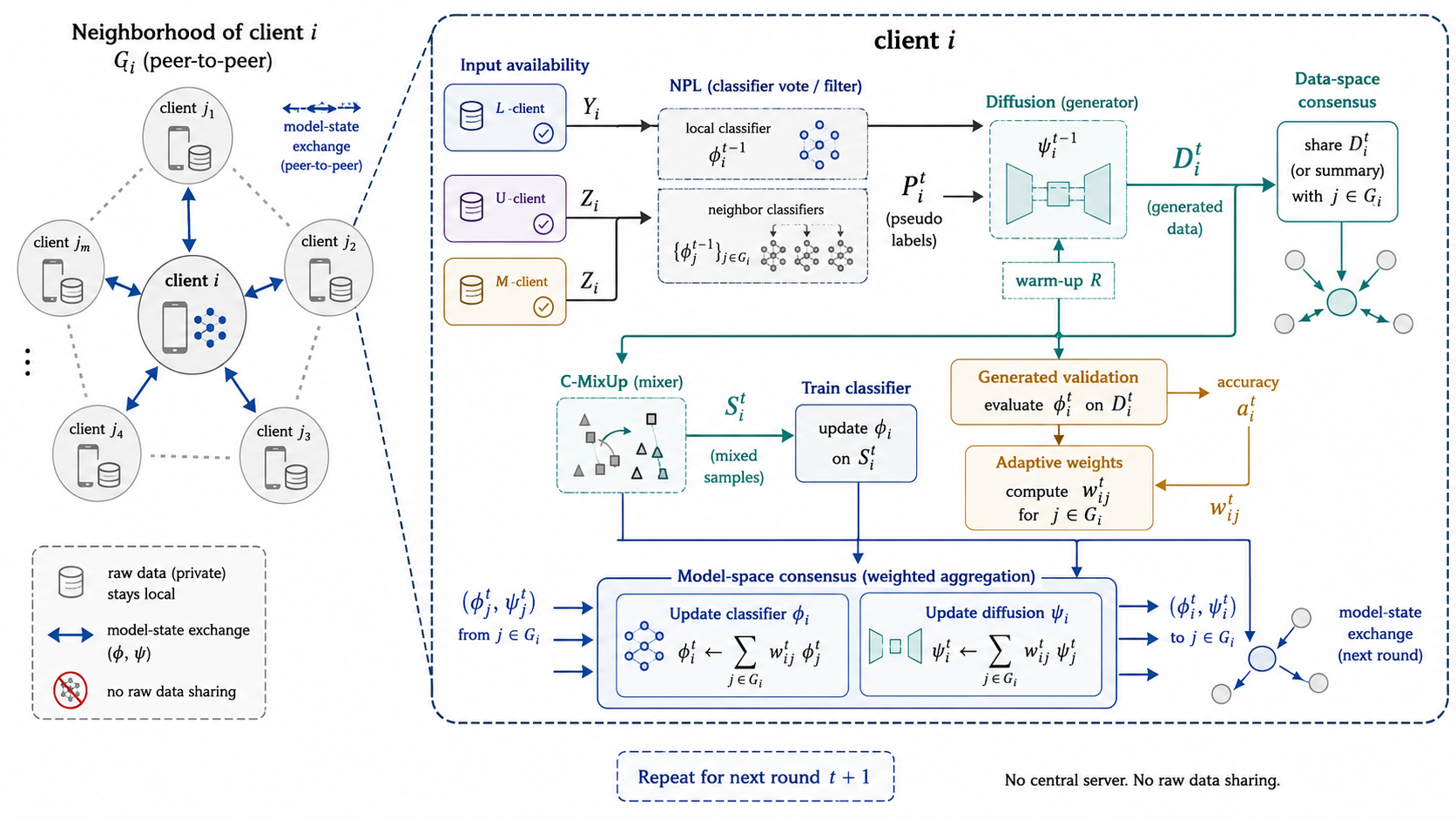
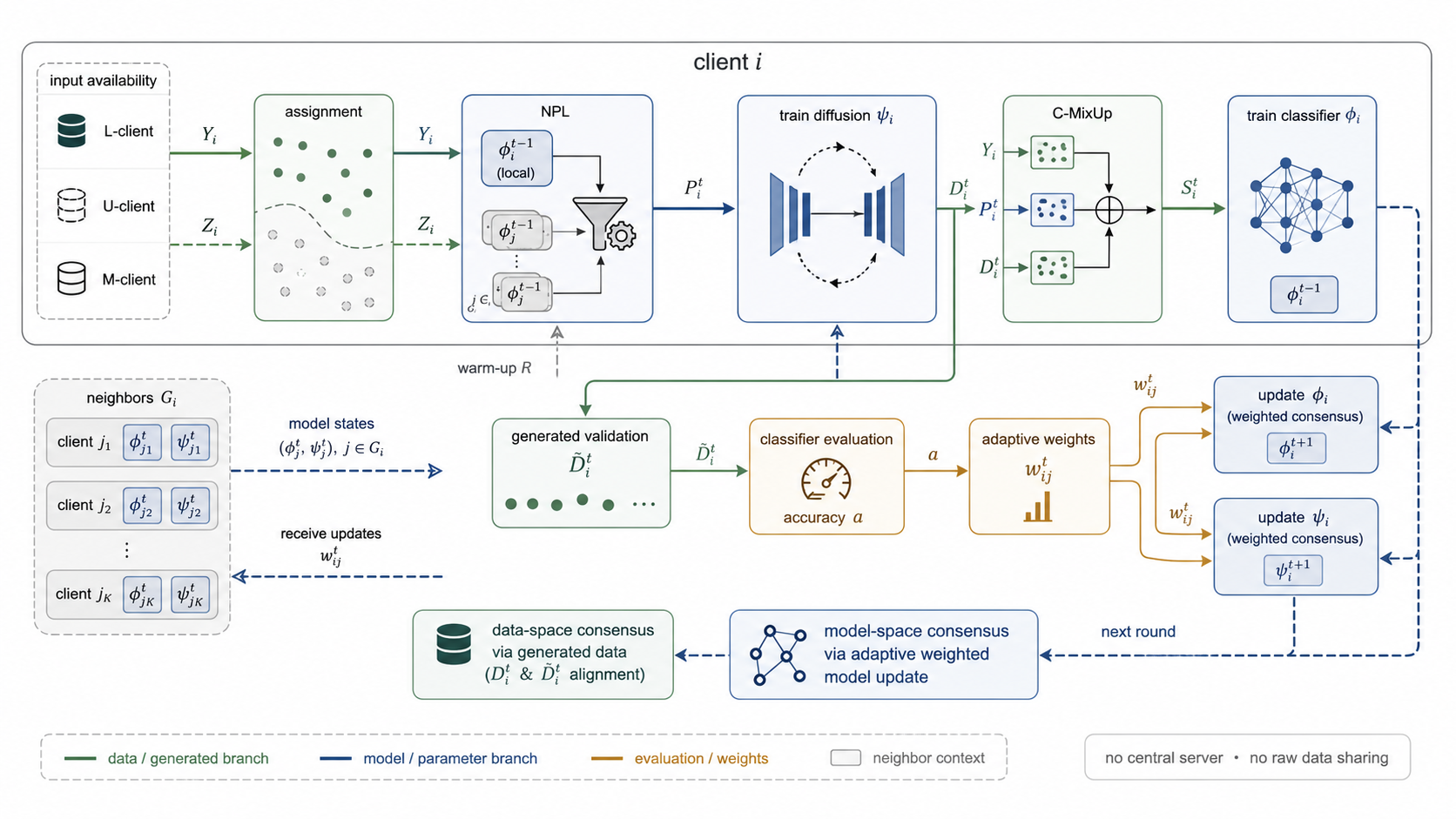
| v3.2.15f ChatGPT 网页端 chat 模式结果 ChatGPT 5.6 Sol,extra high | v3.2.15f ChatGPT 网页端 work 模式结果 ChatGPT 5.6 Sol,extra high |
|---|---|
 |  |
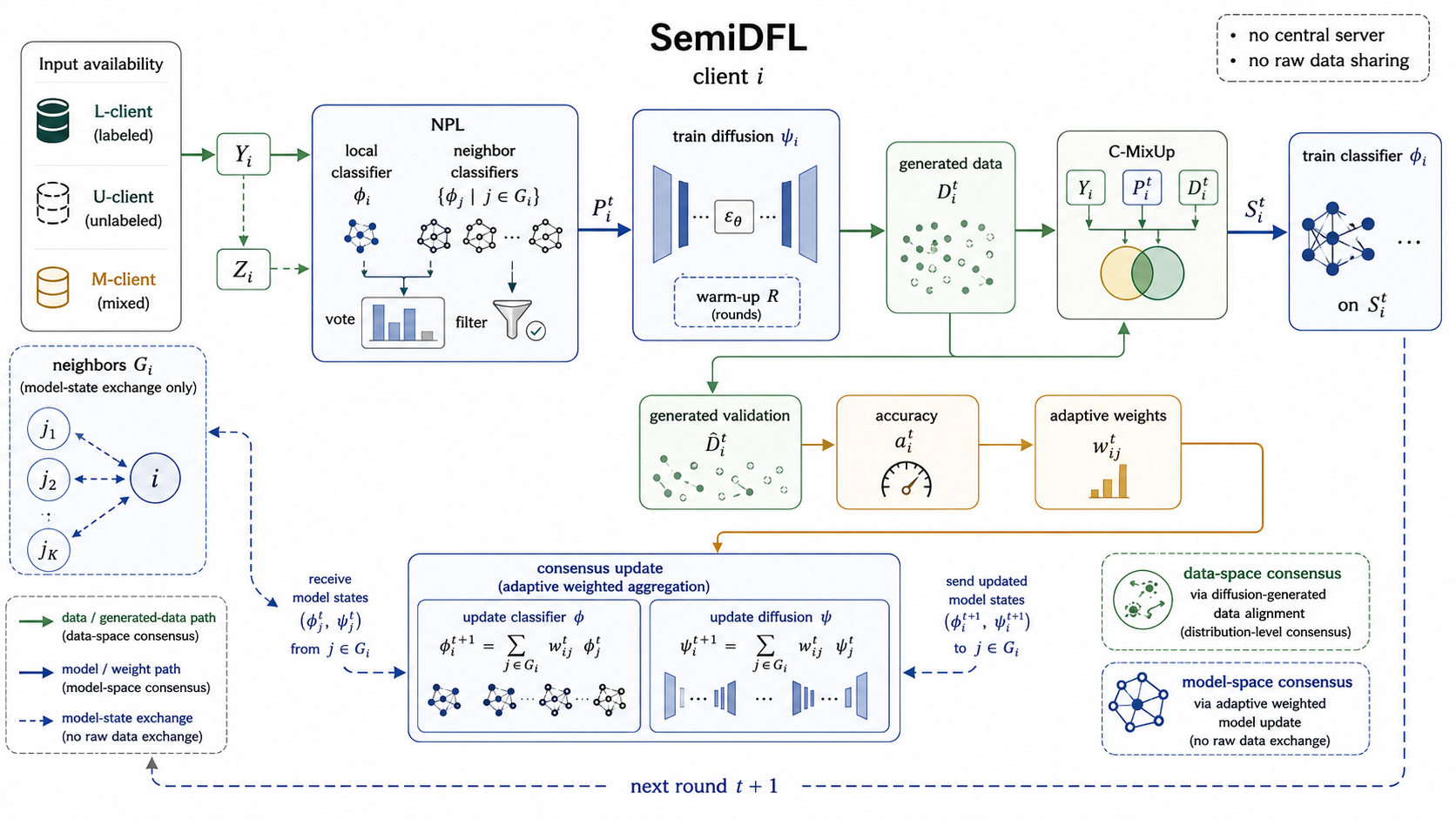
| v3.2.15f ChatGPT 网页端 gpt5.5 第二轮结果 F01 extra high | v3.2.15f ChatGPT 网页端 gpt5.5 第二轮结果 F02 extra high |
|---|---|
 | 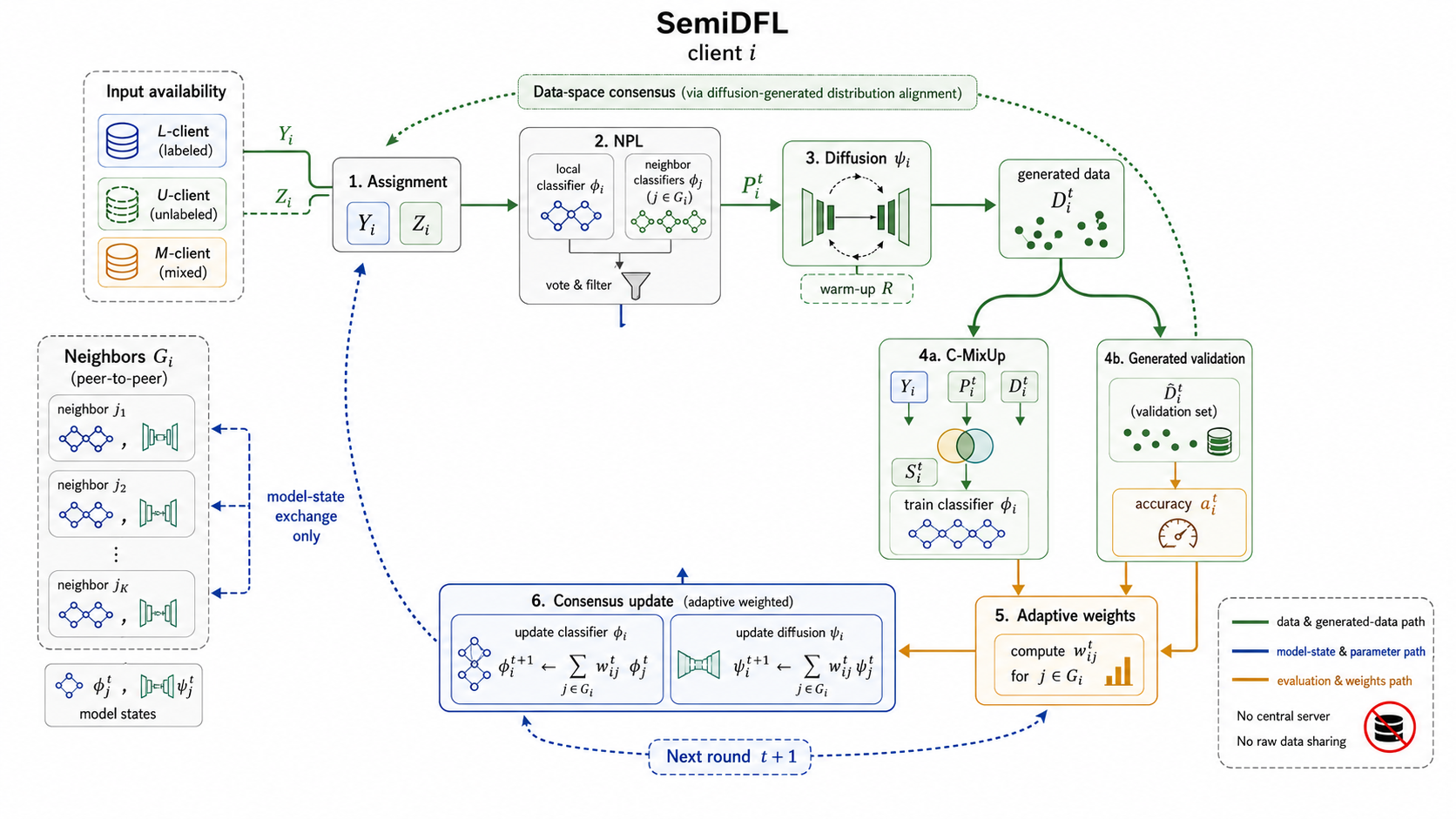 |
重要提示:非 Codex 用户、非计算机专业用户如果想改这个 skill,请直接看中文部分最后的指南。
如果觉得 README 不够全,可以这样问 AI:请帮我分析 zip 里的 skill,告诉我它提供功能、如何启动、如何使用、每步可以如何提问、有哪些用例,并列出提示词例子供我参考。
v3.2.15c 修正了 v3.2.15b skill安装后无法被codex查找到的问题。此外, v3.2.15c 新增了 ACM/IEEE/AAAI 双栏论文 line-art schematic 表面风格,可在在S1/S3结束时的建议提示词基础上,显式人工添加后自动注入到 S2/S5 prompt。添加例子为:“第一轮采用 <ACM/IEEE/AAAI 双栏论文 line-art schematic> 表面风格 ” 。 v3.2.15c 还规范了表面风格提醒的位置:风格选项放在非复制提示里。
main 分支使用 v3.2.15f,且仅面向 ChatGPT 网页端chat模式和work模式;架构图说明主要沿用 v3.2.15b。新版本的生图提示词审核更加严格。paper-framework-figure-studio-pro-v3.2.15f-skill.zip;由于 Codex 下的 image gen(text)无法接收参考图输入,当前不再发布 Codex 版本;v3.2.15c 包也在项目中。C01-C04;第二轮 S5 做正式候选,默认生成 F01-F02。这点和之前版本的“先发散、后收敛”逻辑一致。outputs 的 S2 和 S5 下,每个候选图的子文件夹中都给出了生图 prompt;如果后续要自行生成 SVG 图,可以用来借鉴。刚才中断了,请按照 paper-framework-figure-studio-pro skill 的要求,根据当前状态和已登记产物,继续执行下一步;不要重跑已经完成的步骤。| Step | 类型 | 作用 |
|---|---|---|
| Bootstrap / plan-only gate | TEXT_ONLY | 建立执行边界,避免一口气跑完整流程 |
| S0-PAPER-FOUNDATION | TEXT_ONLY | 梳理论文中的算法、模块、术语、公式、箭头关系、证据锚点和风险项 |
| S1-FIGURE-STRATEGY | TEXT_ONLY + PROMPT_PACKAGE_PREP | 诊断图类型、读者路径和视觉策略,并准备/预审 S2 prompt packages |
| S2-SKETCH-EXPLORE | IMAGE_GENERATION_ONLY | 按 S1 的 prompt-index 生成第一轮 C01-C04 候选图 |
| S3-DIRECTION-SELECT | TEXT_ONLY | 审阅 S2 候选,形成 issue ledger、方向选择、风格信号和用户偏好承接记录 |
| S4-CANDIDATE-BRIEF | TEXT_ONLY + PROMPT_PACKAGE_PREP | 生成正式候选矩阵、S5 prompt-index 和 prompt packages |
| S5-CANDIDATE-IMAGE | IMAGE_GENERATION_ONLY / TERMINAL | 生成第二轮正式候选图;assistant workflow 到此结束,后续由人类筛选和定稿 |
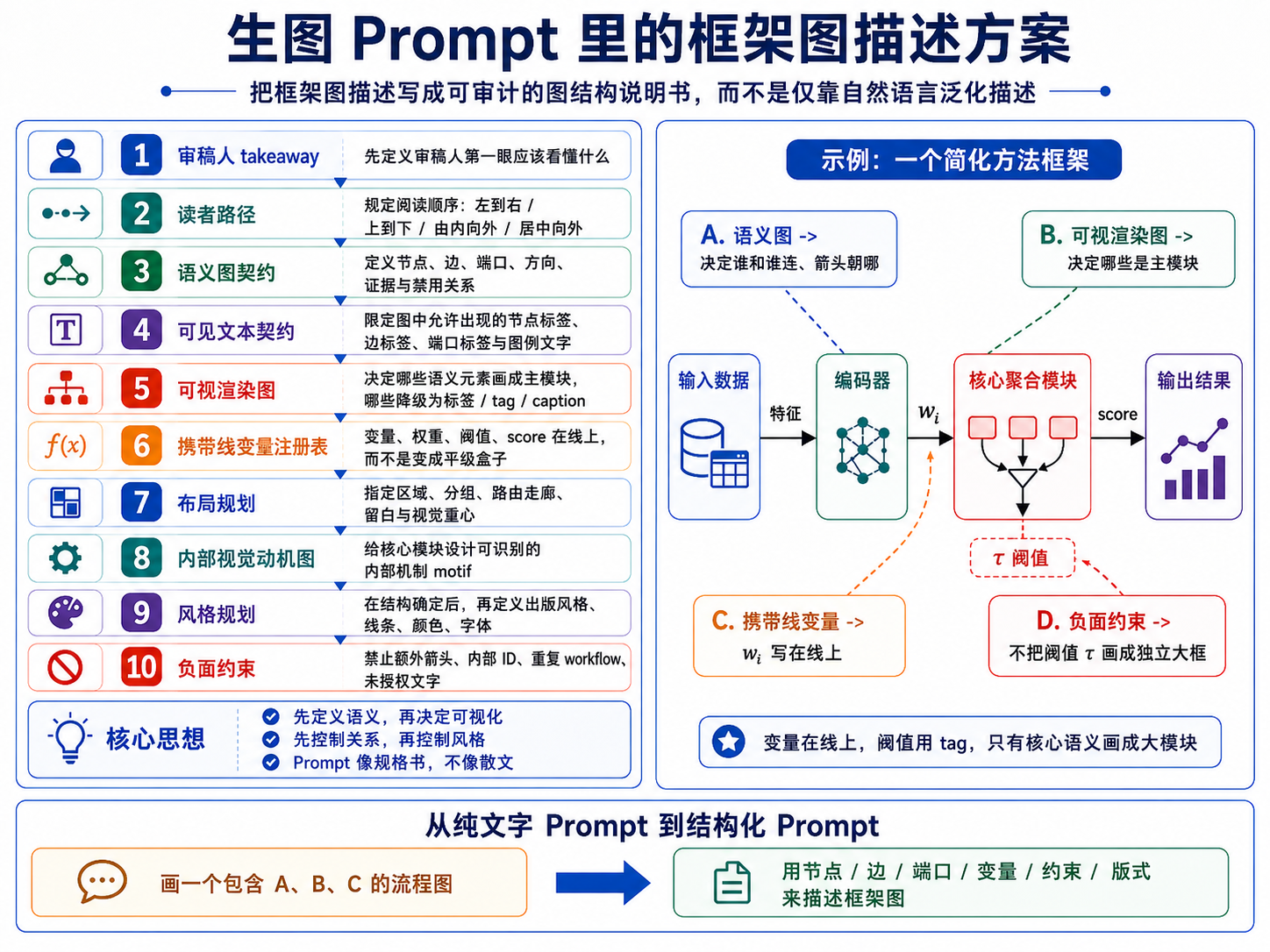
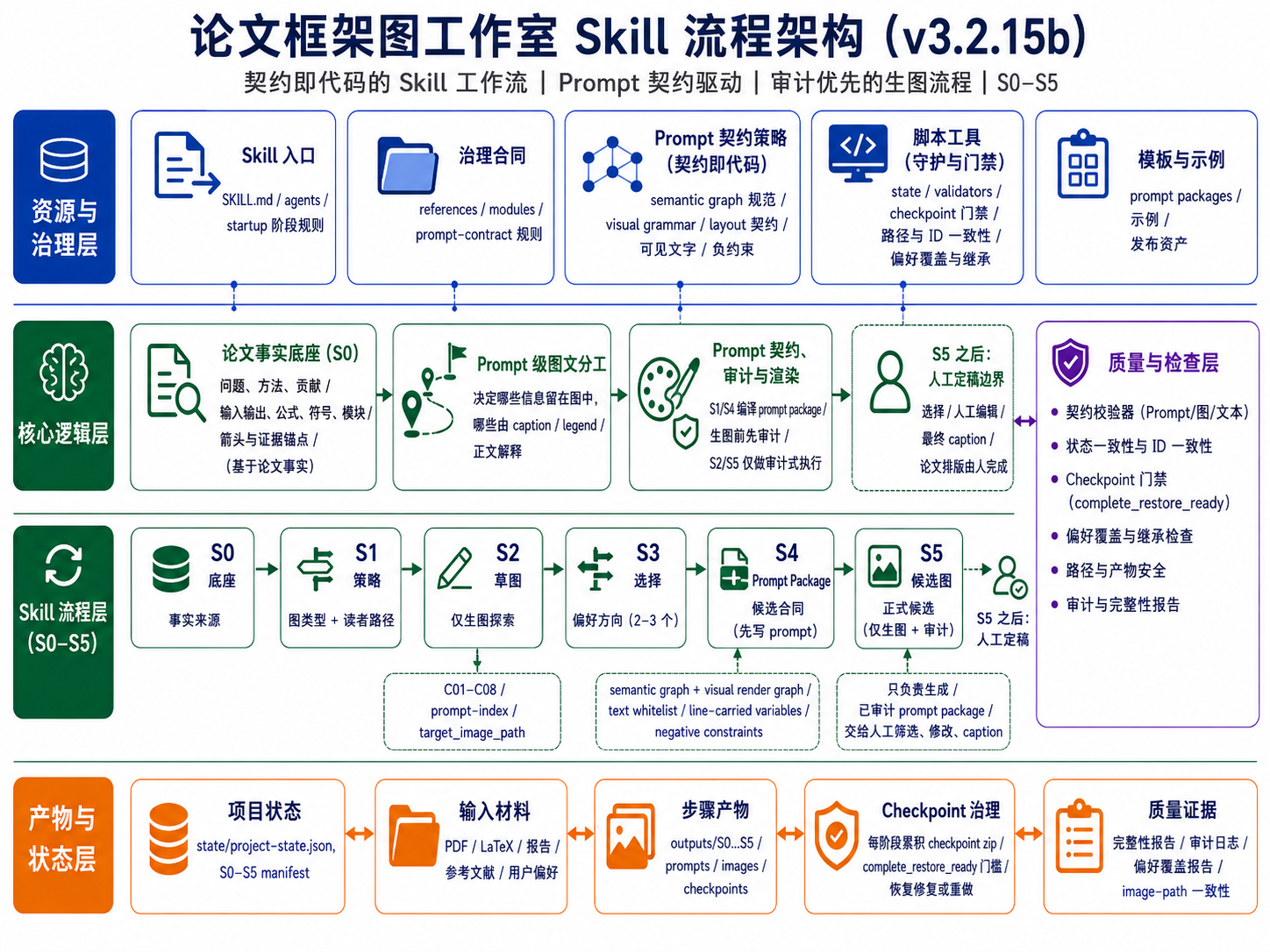
v3.2.15b 把“画一张框架图”拆成可检查的结构说明:审稿人第一眼应理解什么、读者路径如何安排、哪些节点和边必须出现、哪些文字允许出现在图内、变量应该在线上还是在图例/caption 中解释,以及哪些内容必须禁止。这样 prompt 更像规格书,而不是普通散文描述。
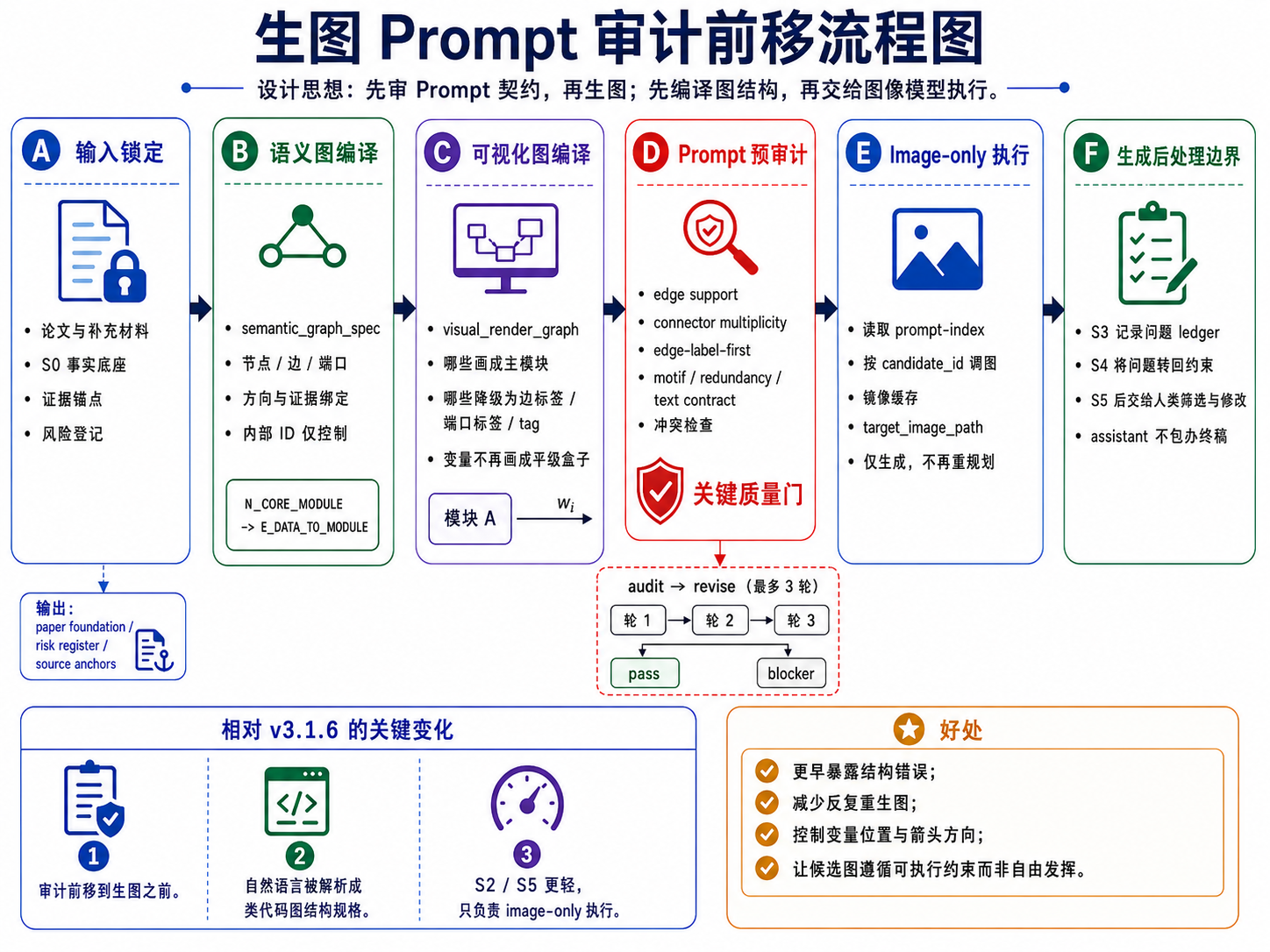
S2/S5 是 image-generation-only public stages,不承担重新规划、排序或终审。真正的修复发生在 S1/S4 的 prompt package 阶段:如果 prompt 契约中存在 source、箭头、变量位置、文字白名单、重复流程或负约束问题,先修 prompt,再进入生图。
偏好驱动的第二轮覆盖也必须在 S4 分配阶段落实。如果用户在 S3 指定了 C01、C02这类第一轮候选偏好,S4/S5 需要把它们转化为 formal candidate 的 local-essence refinement,而不是静默丢弃。
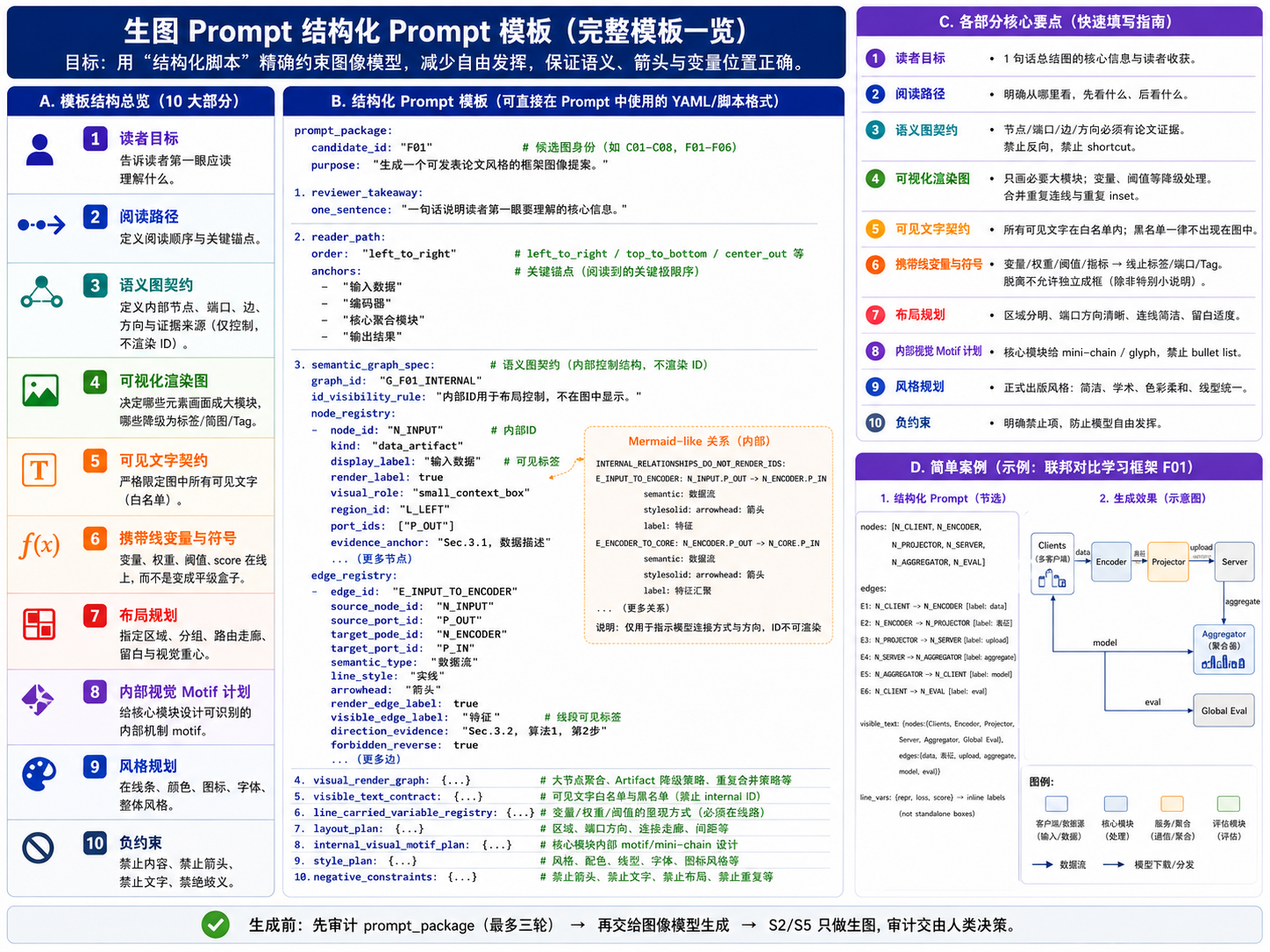
结构化 prompt 建议按候选身份、读者目标、语义图契约、可视化渲染规则、可见文字白名单、变量承载规则、布局、内部 motif、风格与负约束来组织。S2/S5 只负责执行这些已审计的 prompt,不在图像阶段补写结构逻辑。
paper-framework-figure-studio-pro-v3.2.15f-skill.zipexample_semiDFL_v3.2.15f/example_semiDFL_v3.2.15f/semiDFL.pdfexample_semiDFL_v3.2.15f/R2_results_chatgpt_web_v3.2.15_5.5eh/,C01.png 到 C04.pngexample_semiDFL_v3.2.15f/R1_results_chatgpt_web_v3.2.15_5.5eh/,F01.png 到 F02.pngexample_semiDFL_v3.2.15f/gptweb_chat_5.6sol_extrahigh/,F01.png 到 F02.pngexample_semiDFL_v3.2.15f/gptweb_work_5.6sol_extrahigh/,F01.png、F02.png 和 conversation.pngpaper-framework-figure-studio-pro-v3.2.15c-skill.zip3.2.15c_result/3.2.15c_result/chatgpt_web_conversation_acm_ieee_aaai_line_art_v3.2.15c.png3.2.15c_result/S1_prompt_annotated_acm_ieee_aaai_line_art_v3.2.15c.jpg 和 3.2.15c_result/S4_prompt_annotated_acm_ieee_aaai_line_art_v3.2.15c.jpg3.2.15c_result/R1_results_chatgpt_web_acm_ieee_aaai_line_art_v3.2.15c/,C01.png 到 C08.png3.2.15c_result/R1_results_codex_acm_ieee_aaai_line_art_v3.2.15c/,C01.png 到 C08.png3.2.15c_result/R2_results_chatgpt_web_acm_ieee_aaai_line_art_v3.2.15c/,F01.png 到 F06.png3.2.15c_result/R2_results_codex_acm_ieee_aaai_line_art_v3.2.15c/,F01.png 到 F06.png3.2.15b_figure/旧版本完整包和完整示例不在 main 当前目录中,请从对应 Git tag 查看:
| Tag | 内容 |
|---|---|
v2.5.0 | v2.5.0 包和示例 |
v3.0.9a | v3.0.9 / v3.0.9a 包和示例 |
v3.1.4 | v3.1.4 包和示例 |
v3.1.4a | v3.1.4a 包和示例 |
v3.1.6a | v3.1.6 / v3.1.6a 包、示例和使用视频 |
v3.2.15 | v3.2.15 包和示例 |
v3.2.15b | v3.2.15b 包、示例、架构图和使用视频 |
本项目采用 MIT-0 License 发布,便于他人复用、修改和再分发 skill 文本、示例与模板。
ChatGPT 网页版使用时,先把当前 main 中的 paper-framework-figure-studio-pro-v3.2.15f-skill.zip 和目标论文 PDF 放进项目 Sources;如需要参考当前示例,可使用 example_semiDFL_v3.2.15f/semiDFL.pdf。在需要图像生成的阶段,手动切换到 Create image。
如果你使用历史版本的 Codex 方案,把对应版本的 skill zip 和目标论文 PDF 放在当前工程目录中,或在 prompt 中写清楚相对路径。
如需 v3.2.15b 使用介绍视频,请查看 Git tag v3.2.15b 中的 chatgpt-web-usage-v3.2.15b.mp4 和 codex-usage-v3.2.15b.mp4。
ChatGPT 网页端启动提示词示例:
请严格按照sources里paper-framework-figure-studio-pro-v3.2.15f-skill.zip 里 skill 的人机交互步骤,对sources里semiDFL.pdf 绘制 diagram。不要查看semiDFL.pdf 里面已有的diagram;这里的“不要查看”不是说不能自己构思出类似图,而是不要被原图先入为主,应根据论文实际内容决定生成或不生成类似结构。
历史版本的 Codex 启动提示词示例:
请严格按照paper-framework-figure-studio-pro-v3.2.15f-skill.zip 里 skill 的人机交互步骤,对example_semiDFL_v3.2.15f/semiDFL.pdf 绘制 diagram。不要查看semiDFL.pdf 里面已有的diagram;这里的“不要查看”不是说不能自己构思出类似图,而是不要被原图先入为主,应根据论文实际内容决定生成或不生成类似结构。
中断后继续时,可以只要求下一步建议。ChatGPT 网页端示例:
刚才中断了,请使用 sources/paper-framework-figure-studio-pro-v3.2.15f-skill.zip 里的 skill 根据当前状态(见stage-S3.zip),只建议下一步提示词,不要自动执行下一步
Codex 示例:
刚才中断了,请使用 paper-framework-figure-studio-pro v3.2.15f skill 根据当前状态,只建议下一步提示词,不要自动执行下一步。
ChatGPT 网页端补全 zip 文件提示词:
我发现S*阶段的累加checkpoint zip文件里内容不全,不足以支撑新开session后基于zip文件内容断点继续,请完善里面内容,重新打包
保存 checkpoint 的 zip 文件可能有冗余,可以使用下面提示词清理:
“下载 S3 累加 checkpoint / restore bundle“ 里面有冗余重复内容,不应该包含前面stage的checkpoint打包文件。 请删除后,再给我。
S5 后风格转换提示词示例:
请按照下面要求,修改所有提示词先:ACM/IEEE/AAAI 双栏论文里手工绘制的 line-art schematic:白底、细线、少色、少图标、无渐变/阴影/大标题/设计原则面板/装饰性照片缩略图。
依据的科研绘图规则主要包括:IEEE 建议使用矢量或高分辨率原图,并用颜色之外的形状、线型、亮度等冗余编码表达含义;Nature 规格强调 Arial/Helvetica 等无衬线字体与小字号统一标注;PLOS 给出了 8 pt 字体和约 0.2 mm 线宽的实用基准;Wiley 将 flowcharts/diagrams 归入 line art,并偏好可出版处理的矢量/PDF 类图形。
产生完新的提示词后,再输入如下提示词:
基于这些新 prompt 重新执行 S5-CANDIDATE-IMAGE。
本节继续展示 v3.2.15f 在 ChatGPT 网页端使用 gpt5.5(extra high) 生成的第一轮全局探索候选 C01-C04,每行展示两张。第二轮正式候选 F01-F02 已移至架构图下方。
| C01 | C02 |
|---|---|
 |  |
| C03 | C04 |
 |  |
如果你不是计算机专业,但使用的是 Codex,可以让 Codex 参考这个 skill 的本地知识,倒推出构建过程,然后迁移到你的领域:
我是 ** 专业,但是这个 skill 是面向计算机专业的,因为它的内在知识来源于对计算机文献的阅读。现在请你参考 skill 里的本地知识,倒推出这个 skill 的建立过程,然后为我所在的 ** 领域构建类似的框架图 skill。我已经将相关文献 PDF 放在了 ** 文件夹里。
如果使用其他工具,例如 Trae 或 Claude Code,可以先说明当前环境的生图能力,让工具把 skill 调整到可用路线:
目前这个 skill 需要调用 ChatGPT Images 2.0,或者通过 image gen 调用 Images 2.0。我现在的环境里没有配置这个能力,使用的是 ***。请根据我目前的环境修改 skill。如果能直接使用当前环境的生图 skill,就直接使用;否则,如果需要调用 API,请向我询问相关信息。
paper-framework-figure-studio-pro is a skill for making computer-science paper framework diagrams. It provides diverse candidate drafts for method overviews, architecture diagrams, pipeline/process figures, and agent workflows so authors can screen, compare, manually edit, and finalize the figure later. The current main branch has been updated to the v3.2.15f package and examples. This version is designed for ChatGPT Web and is recommended only for ChatGPT Web chat and work modes, noting that work mode is affected by token limits. Codex image gen (text) cannot accept image inputs, while the S5 stage in v3.2.15f needs to use images produced in stage S2 as references. A Cursor version and a ChatGPT chat-mode subagents collaboration version will be provided this week. The workflow explanation in this document still follows v3.2.15b. Older versions are archived in their corresponding Git tags. Special thanks to Xinyang Liu from Bristol for the support.
A Cursor version and a ChatGPT chat-mode subagents collaboration version will also be provided this week, with continued emphasis on independent auditing.
Theme of this version: "Random Beauty Under Contractual Constraints."
| v3.2.15f ChatGPT Web chat-mode result ChatGPT 5.6 Sol, extra high | v3.2.15f ChatGPT Web work-mode result ChatGPT 5.6 Sol, extra high |
|---|---|
| |
| v3.2.15f ChatGPT Web gpt5.5 second-round result F01 extra high | v3.2.15f ChatGPT Web gpt5.5 second-round result F02 extra high |
|---|---|
| |
Important: 1. The v3.2.15b usage walkthrough videos are archived in the v3.2.15b tag. 2. If you are not using Codex, or if you are outside computer science and want to adapt this skill, see the guide at the end of the English section.
If this README does not feel complete enough, ask AI with: Please analyze the skill inside the zip file and tell me what functions it provides, how to start it, how to use it, how I can ask questions at each step, what use cases it supports, and prompt examples I can reference.
The preview image-post previously shared on Douyin used v3.2.15 outputs. That version is archived in the Git tag v3.2.15, but it is slightly less stable than v3.2.15b. If you prefer that version, use the corresponding tag.
The new v3.2.15c version fixes an issue where the v3.2.15b skill could not be found by Codex after installation. It also adds an ACM/IEEE/AAAI double-column-paper line-art schematic surface style. Based on the suggested prompt after S1/S3, users can explicitly add this style and it will be automatically injected into the S2/S5 prompt. Example addition: "Use <ACM/IEEE/AAAI double-column paper line-art schematic> surface style for the first round." v3.2.15c also standardizes where surface-style reminders appear: style options are placed in the non-copy prompt.
main branch uses v3.2.15f for ChatGPT Web only; the workflow explanation mostly follows v3.2.15b. Compared with v3.1.6a, the key change remains that quality control is moved from "audit after image generation" into the S1/S4 prompt package: semantic graph, visual render graph, visible text contract, line-carried variables, and negative constraints are audited before S2/S5 generate images.paper-framework-figure-studio-pro-v3.2.15f-skill.zip; because Codex image gen (text) cannot accept reference-image input, there is no current Codex release; the v3.2.15b skill package is archived in the Git tag v3.2.15b.C01-C08; S5 produces formal candidates and defaults to F01-F06. This keeps the earlier "diverge first, converge later" logic.outputs, each candidate figure subfolder includes its image-generation prompt. If you later want to generate SVG figures yourself, those prompts can be used as references.main branch directory. The v3.2.15c result archive and the v3.2.15b architecture figures remain available locally. Because aesthetic preference differs from person to person, some users may prefer earlier versions.The previous run was interrupted. Please continue with the next step according to the paper-framework-figure-studio-pro skill, based on the current state and registered artifacts. Do not rerun completed steps.| Step | Type | Purpose |
|---|---|---|
| Bootstrap / plan-only gate | TEXT_ONLY | Establish execution boundaries and prevent the full workflow from running in one pass |
| S0-PAPER-FOUNDATION | TEXT_ONLY | Extract algorithms, modules, terminology, formulas, arrow relationships, evidence anchors, and risks |
| S1-FIGURE-STRATEGY | TEXT_ONLY + PROMPT_PACKAGE_PREP | Diagnose figure type, reader path, and visual strategy; prepare and pre-audit S2 prompt packages |
| S2-SKETCH-EXPLORE | IMAGE_GENERATION_ONLY | Generate first-round C01-C08 candidates from the S1 prompt index |
| S3-DIRECTION-SELECT | TEXT_ONLY | Review S2 candidates, build an issue ledger, choose directions, and record style signals plus user preferences |
| S4-CANDIDATE-BRIEF | TEXT_ONLY + PROMPT_PACKAGE_PREP | Produce the formal candidate matrix, S5 prompt index, and prompt packages |
| S5-CANDIDATE-IMAGE | IMAGE_GENERATION_ONLY / TERMINAL | Generate second-round formal candidates; the assistant workflow ends here, and humans screen and finalize afterward |
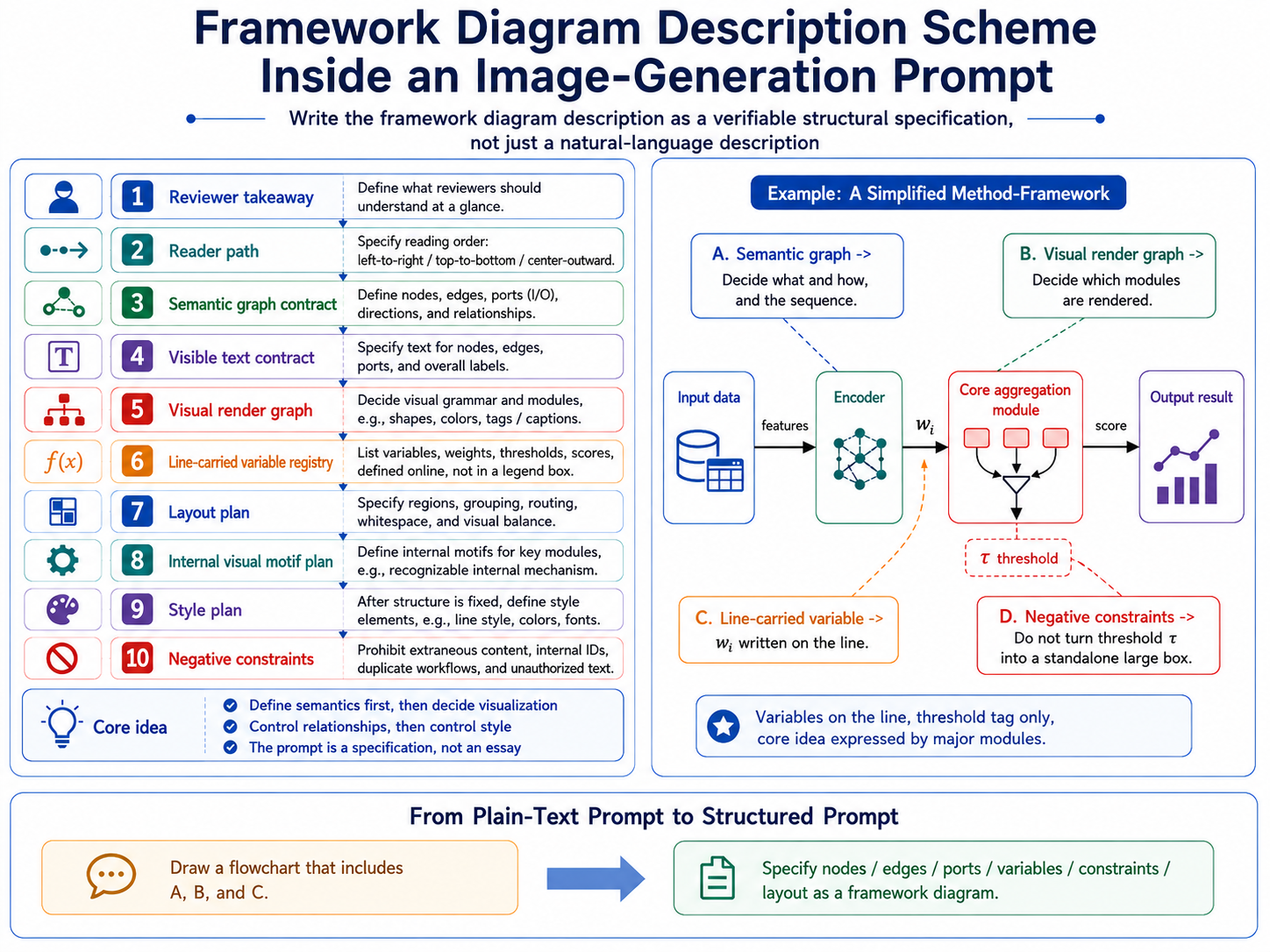
v3.2.15b turns "draw a framework figure" into a checkable structural specification: what reviewers should understand at a glance, how the reader path should flow, which nodes and edges must appear, which visible text is allowed, whether variables should sit on lines or be explained in the caption, and which content must be prohibited. The prompt behaves more like a specification than a prose request.
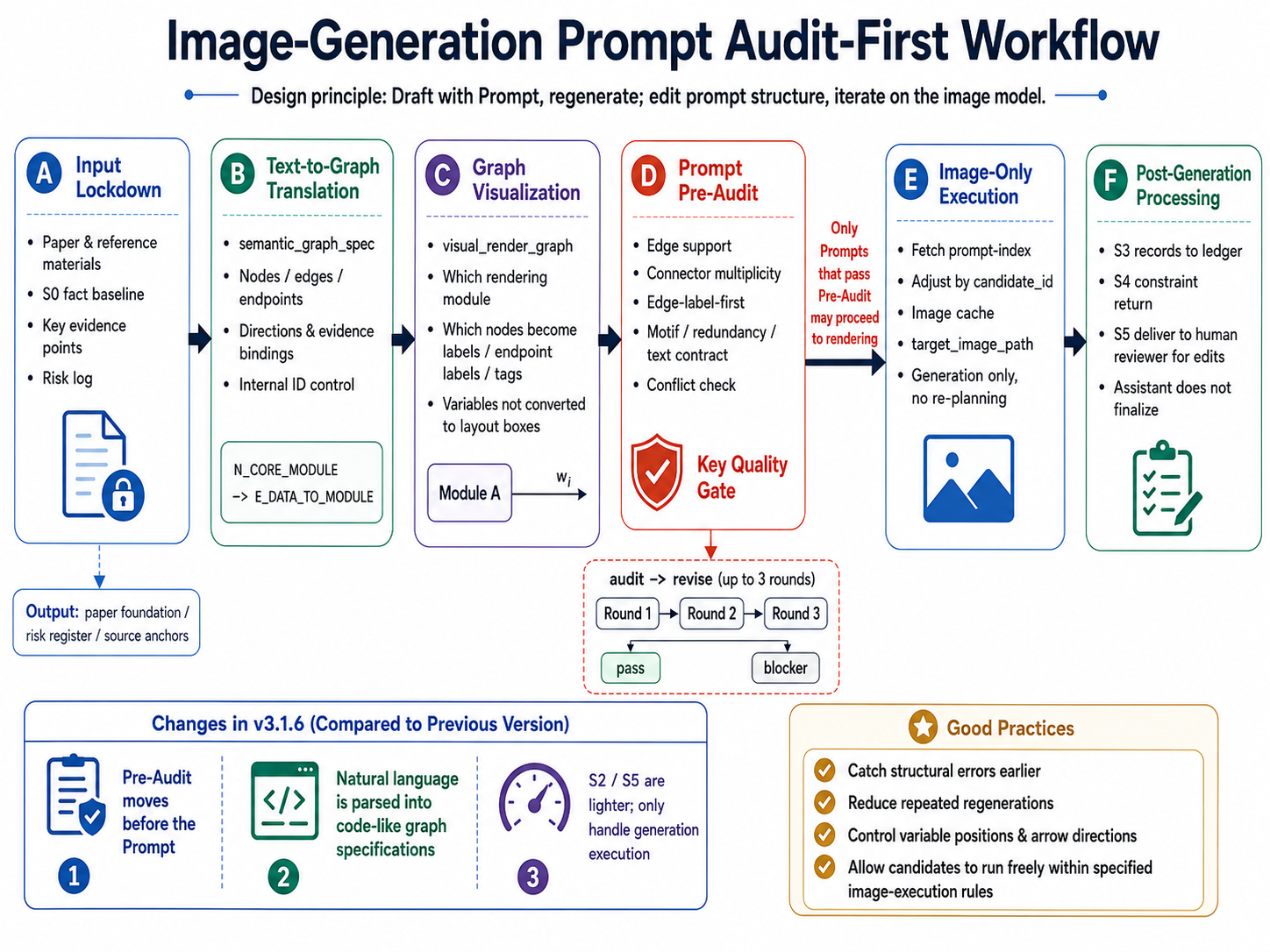
S2/S5 are image-generation-only public stages. They do not re-plan, rank, or terminally audit candidates. Repair happens during S1/S4 prompt-package preparation: if a prompt contract has source, arrow, variable-placement, visible-text, duplicate-workflow, or negative-constraint problems, the prompt is repaired before generation.
Preference-led second-round coverage must also be handled during S4 allocation. If users name preferred first-round candidates such as C01, C02, or C08 in S3, S4/S5 should translate them into formal candidates through local-essence refinement rather than silently dropping them.
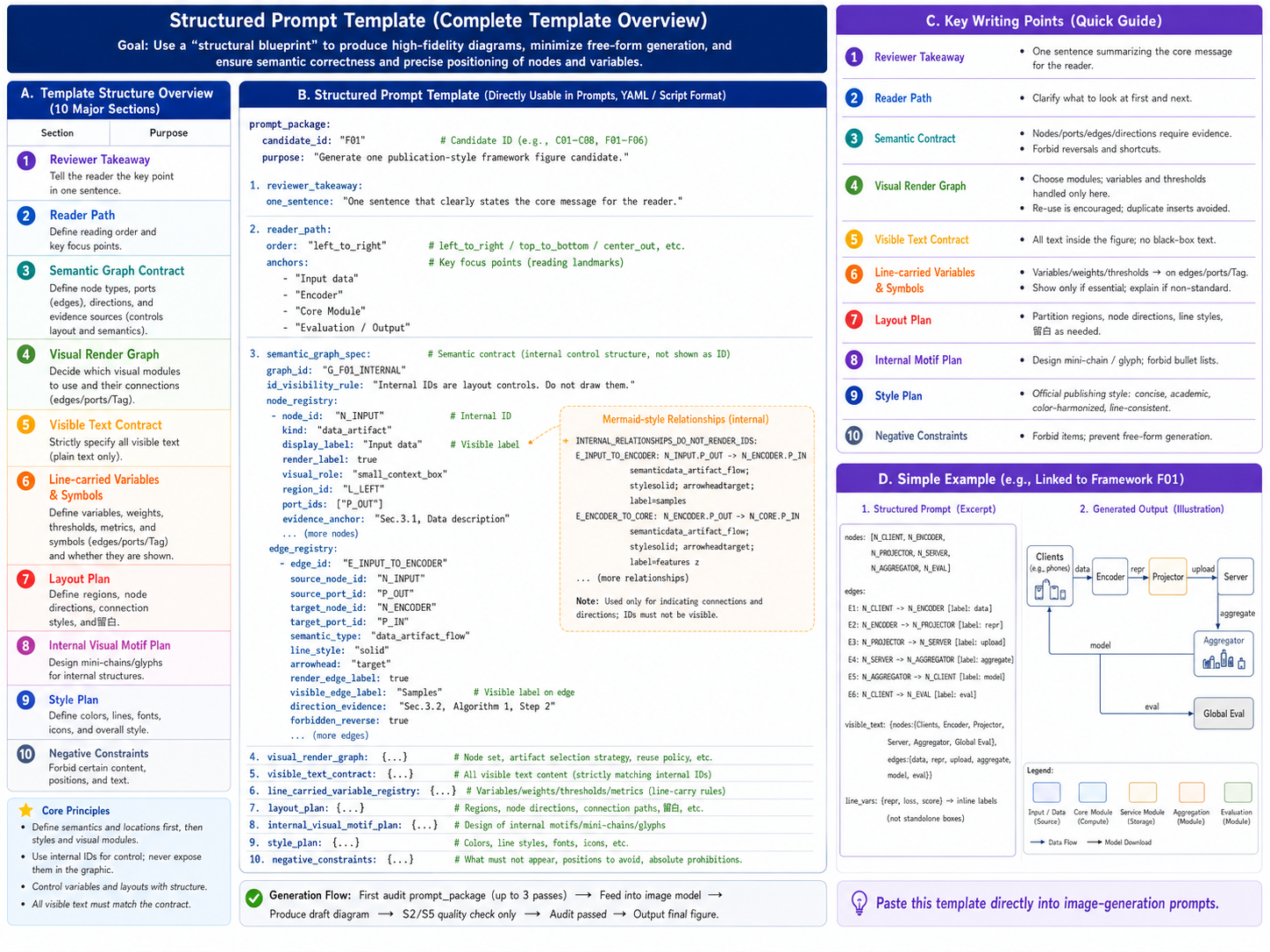
The recommended prompt structure covers candidate identity, reader goal, semantic graph contract, visual rendering rules, visible text allowlist, variable-carrying rules, layout, internal motifs, style, and negative constraints. S2/S5 execute these audited prompts instead of adding new structural logic in the image stage.
paper-framework-figure-studio-pro-v3.2.15f-skill.zipexample_semiDFL_v3.2.15f/example_semiDFL_v3.2.15f/semiDFL.pdfexample_semiDFL_v3.2.15f/R2_results_chatgpt_web_v3.2.15_5.5eh/, C01.png to C04.pngexample_semiDFL_v3.2.15f/R1_results_chatgpt_web_v3.2.15_5.5eh/, F01.png to F02.pngexample_semiDFL_v3.2.15f/gptweb_chat_5.6sol_extrahigh/, F01.png to F02.pngexample_semiDFL_v3.2.15f/gptweb_work_5.6sol_extrahigh/, F01.png, F02.png, and conversation.pngpaper-framework-figure-studio-pro-v3.2.15c-skill.zip3.2.15c_result/3.2.15c_result/chatgpt_web_conversation_acm_ieee_aaai_line_art_v3.2.15c.png3.2.15c_result/S1_prompt_annotated_acm_ieee_aaai_line_art_v3.2.15c.jpg and 3.2.15c_result/S4_prompt_annotated_acm_ieee_aaai_line_art_v3.2.15c.jpg3.2.15c_result/R1_results_chatgpt_web_acm_ieee_aaai_line_art_v3.2.15c/, C01.png to C08.png3.2.15c_result/R1_results_codex_acm_ieee_aaai_line_art_v3.2.15c/, C01.png to C08.png3.2.15c_result/R2_results_chatgpt_web_acm_ieee_aaai_line_art_v3.2.15c/, F01.png to F06.png3.2.15c_result/R2_results_codex_acm_ieee_aaai_line_art_v3.2.15c/, F01.png to F06.png3.2.15b_figure/Full older-version packages and complete examples are not in the current main directory. Use the corresponding Git tag:
| Tag | Contents |
|---|---|
v2.5.0 | v2.5.0 package and example |
v3.0.9a | v3.0.9 / v3.0.9a packages and examples |
v3.1.4 | v3.1.4 package and example |
v3.1.4a | v3.1.4a package and example |
v3.1.6a | v3.1.6 / v3.1.6a packages, examples, and walkthrough videos |
v3.2.15 | v3.2.15 package and example |
v3.2.15b | v3.2.15b package, examples, architecture figures, and walkthrough videos |
This project is released under the MIT-0 License, so the skill text, examples, and templates can be reused, modified, and redistributed.
In ChatGPT Web, add the current main paper-framework-figure-studio-pro-v3.2.15f-skill.zip and the target paper PDF to the project Sources. If you need an older example paper, use example_semiDFL_v3.2.15c/semiDFL.pdf. When the workflow reaches an image-generation stage, manually switch to Create image.
If you are using a historical Codex workflow, put the matching version's skill zip and target paper PDF in the current project directory, or specify the relative PDF path in the prompt.
For the v3.2.15b walkthrough videos, use chatgpt-web-usage-v3.2.15b.mp4 and codex-usage-v3.2.15b.mp4 from the Git tag v3.2.15b.
ChatGPT Web startup prompt example:
Please strictly follow the human-in-the-loop workflow steps in the skill inside sources/paper-framework-figure-studio-pro-v3.2.15f-skill.zip to draw a diagram for sources/semiDFL.pdf. Do not look at the existing diagram inside semiDFL.pdf. Here, "do not look" does not mean you cannot independently design a similar figure; it means you should not be anchored by the original figure, and should decide from the actual paper content whether to generate a similar structure or not.
Historical Codex startup prompt example:
Please strictly follow the human-in-the-loop workflow steps in paper-framework-figure-studio-pro-v3.2.15c-skill.zip to draw a diagram for example_semiDFL_v3.2.15c/semiDFL.pdf. Do not look at the existing diagram inside semiDFL.pdf. Here, "do not look" does not mean you cannot independently design a similar figure; it means you should not be anchored by the original figure, and should decide from the actual paper content whether to generate a similar structure or not.
When continuing after an interruption, ask only for the next suggested prompt. ChatGPT Web example:
The previous run was interrupted. Please use the skill in sources/paper-framework-figure-studio-pro-v3.2.15f-skill.zip and the current state (see stage-S3.zip) to suggest only the next prompt. Do not automatically execute the next step.
Codex example:
The previous run was interrupted. Please use the paper-framework-figure-studio-pro v3.2.15b skill and the current state to suggest only the next prompt. Do not automatically execute the next step.
ChatGPT Web prompt for completing a checkpoint zip file:
I found that the cumulative checkpoint zip file for stage S* is incomplete and is not sufficient to support resuming from the zip file in a new session. Please complete its contents and repackage it.
The checkpoint zip may contain redundant files. Use the following prompt to clean it:
The "download S3 cumulative checkpoint / restore bundle" contains redundant repeated content. It should not include checkpoint zip files from previous stages. Please remove them and give it to me again.
Post-S5 style-conversion prompt example:
Please first revise all prompts according to the following requirements: a hand-drawn-in-PPT-style line-art schematic suitable for ACM/IEEE/AAAI double-column papers: white background, thin lines, limited colors, few icons, no gradients/shadows/large titles/design-principle panels/decorative photo thumbnails.
The research-figure rules behind this include: IEEE recommends vector or high-resolution source artwork and redundant encodings beyond color, such as shape, line style, and brightness; Nature specifications emphasize Arial/Helvetica-style sans-serif fonts and consistent small-size labels; PLOS provides practical baselines such as 8 pt fonts and about 0.2 mm line width; Wiley classifies flowcharts/diagrams as line art and prefers publication-ready vector/PDF-style graphics.
After the new prompts are produced, enter the following prompt:
Re-run S5-CANDIDATE-IMAGE based on these new prompts.
This section continues with the Round 1 global-exploration candidates C01-C04 generated by v3.2.15f in ChatGPT Web with gpt5.5 (extra high), displayed two images per row. The Round 2 formal candidates F01-F02 have been moved below the architecture diagram.
| C01 | C02 |
|---|---|
| |
| C03 | C04 |
| |
If you are outside computer science but use Codex, ask Codex to infer the construction process from the local knowledge in this skill and migrate it to your field:
I am in **, but this skill is designed for computer science, because its internal knowledge comes from reading computer-science papers. Please use the local knowledge inside this skill as a reference, infer the process used to build it, and then build a similar framework-diagram skill for my ** field. I have put the relevant paper PDFs in the ** folder.
If you are using another tool such as Trae or Claude Code, first describe your current image-generation capability and ask the tool to adapt the skill to that route:
This skill currently needs to call ChatGPT Images 2.0, or to call Images 2.0 through image gen. My current environment does not have that configured; I am using *** instead. Please modify the skill according to my current environment. If the current environment has an image-generation skill that can be used directly, use it directly. Otherwise, if an API call is needed, ask me for the required information.
5,122 followers · starred May 2026
720 followers · starred May 2026
31 followers · starred May 2026
A multi-round co-design skill for publication-ready paper framework diagrams and method overview figures.
2,276
66 commits
updated Jul 10, 2026
paper-framework-figure-studio-pro 是面向计算机科学论文框架图的制图 skill。它的目标是为论文 method overview、architecture diagram、pipeline/process figure 和 agent workflow 提供多样化候选草案,方便作者后续筛选、对照、人工编辑和定稿。
当前 main 分支已更新为 v3.2.15f 包和示例,该版本是针对 ChatGPT 网页端设计的,只建议用于 ChatGPT 网页端的 chat 和 work 模式下(注意 work 模式下会受 token 额度限制影响),因为 Codex 里的 image gen(text)无法接受图片作为输入,而在 v3.2.15f 的 S5 阶段需要依赖 S2 阶段产生的图片作为参考;本周会提供 Cursor 和 ChatGPT chat 模式下的 subagents 协作版本。
此外,本文档架构图依然沿用 v3.2.15b。旧版本已归档到对应 Git tags。感谢 Bristol 的刘欣阳同学提供协助。
本周也会提供 Cursor 和 ChatGPT chat 模式下的 subagents 协作版本,仍会侧重独立审计。
本版的主题:“契约规范下的随机之美”。
| v3.2.15f ChatGPT 网页端 chat 模式结果 ChatGPT 5.6 Sol,extra high | v3.2.15f ChatGPT 网页端 work 模式结果 ChatGPT 5.6 Sol,extra high |
|---|---|
| |
| v3.2.15f ChatGPT 网页端 gpt5.5 第二轮结果 F01 extra high | v3.2.15f ChatGPT 网页端 gpt5.5 第二轮结果 F02 extra high |
|---|---|
| |
重要提示:非 Codex 用户、非计算机专业用户如果想改这个 skill,请直接看中文部分最后的指南。
如果觉得 README 不够全,可以这样问 AI:请帮我分析 zip 里的 skill,告诉我它提供功能、如何启动、如何使用、每步可以如何提问、有哪些用例,并列出提示词例子供我参考。
v3.2.15c 修正了 v3.2.15b skill安装后无法被codex查找到的问题。此外, v3.2.15c 新增了 ACM/IEEE/AAAI 双栏论文 line-art schematic 表面风格,可在在S1/S3结束时的建议提示词基础上,显式人工添加后自动注入到 S2/S5 prompt。添加例子为:“第一轮采用 <ACM/IEEE/AAAI 双栏论文 line-art schematic> 表面风格 ” 。 v3.2.15c 还规范了表面风格提醒的位置:风格选项放在非复制提示里。
main 分支使用 v3.2.15f,且仅面向 ChatGPT 网页端chat模式和work模式;架构图说明主要沿用 v3.2.15b。新版本的生图提示词审核更加严格。paper-framework-figure-studio-pro-v3.2.15f-skill.zip;由于 Codex 下的 image gen(text)无法接收参考图输入,当前不再发布 Codex 版本;v3.2.15c 包也在项目中。C01-C04;第二轮 S5 做正式候选,默认生成 F01-F02。这点和之前版本的“先发散、后收敛”逻辑一致。outputs 的 S2 和 S5 下,每个候选图的子文件夹中都给出了生图 prompt;如果后续要自行生成 SVG 图,可以用来借鉴。刚才中断了,请按照 paper-framework-figure-studio-pro skill 的要求,根据当前状态和已登记产物,继续执行下一步;不要重跑已经完成的步骤。| Step | 类型 | 作用 |
|---|---|---|
| Bootstrap / plan-only gate | TEXT_ONLY | 建立执行边界,避免一口气跑完整流程 |
| S0-PAPER-FOUNDATION | TEXT_ONLY | 梳理论文中的算法、模块、术语、公式、箭头关系、证据锚点和风险项 |
| S1-FIGURE-STRATEGY | TEXT_ONLY + PROMPT_PACKAGE_PREP | 诊断图类型、读者路径和视觉策略,并准备/预审 S2 prompt packages |
| S2-SKETCH-EXPLORE | IMAGE_GENERATION_ONLY | 按 S1 的 prompt-index 生成第一轮 C01-C04 候选图 |
| S3-DIRECTION-SELECT | TEXT_ONLY | 审阅 S2 候选,形成 issue ledger、方向选择、风格信号和用户偏好承接记录 |
| S4-CANDIDATE-BRIEF | TEXT_ONLY + PROMPT_PACKAGE_PREP | 生成正式候选矩阵、S5 prompt-index 和 prompt packages |
| S5-CANDIDATE-IMAGE | IMAGE_GENERATION_ONLY / TERMINAL | 生成第二轮正式候选图;assistant workflow 到此结束,后续由人类筛选和定稿 |
v3.2.15b 把“画一张框架图”拆成可检查的结构说明:审稿人第一眼应理解什么、读者路径如何安排、哪些节点和边必须出现、哪些文字允许出现在图内、变量应该在线上还是在图例/caption 中解释,以及哪些内容必须禁止。这样 prompt 更像规格书,而不是普通散文描述。
S2/S5 是 image-generation-only public stages,不承担重新规划、排序或终审。真正的修复发生在 S1/S4 的 prompt package 阶段:如果 prompt 契约中存在 source、箭头、变量位置、文字白名单、重复流程或负约束问题,先修 prompt,再进入生图。
偏好驱动的第二轮覆盖也必须在 S4 分配阶段落实。如果用户在 S3 指定了 C01、C02这类第一轮候选偏好,S4/S5 需要把它们转化为 formal candidate 的 local-essence refinement,而不是静默丢弃。
结构化 prompt 建议按候选身份、读者目标、语义图契约、可视化渲染规则、可见文字白名单、变量承载规则、布局、内部 motif、风格与负约束来组织。S2/S5 只负责执行这些已审计的 prompt,不在图像阶段补写结构逻辑。
paper-framework-figure-studio-pro-v3.2.15f-skill.zipexample_semiDFL_v3.2.15f/example_semiDFL_v3.2.15f/semiDFL.pdfexample_semiDFL_v3.2.15f/R2_results_chatgpt_web_v3.2.15_5.5eh/,C01.png 到 C04.pngexample_semiDFL_v3.2.15f/R1_results_chatgpt_web_v3.2.15_5.5eh/,F01.png 到 F02.pngexample_semiDFL_v3.2.15f/gptweb_chat_5.6sol_extrahigh/,F01.png 到 F02.pngexample_semiDFL_v3.2.15f/gptweb_work_5.6sol_extrahigh/,F01.png、F02.png 和 conversation.pngpaper-framework-figure-studio-pro-v3.2.15c-skill.zip3.2.15c_result/3.2.15c_result/chatgpt_web_conversation_acm_ieee_aaai_line_art_v3.2.15c.png3.2.15c_result/S1_prompt_annotated_acm_ieee_aaai_line_art_v3.2.15c.jpg 和 3.2.15c_result/S4_prompt_annotated_acm_ieee_aaai_line_art_v3.2.15c.jpg3.2.15c_result/R1_results_chatgpt_web_acm_ieee_aaai_line_art_v3.2.15c/,C01.png 到 C08.png3.2.15c_result/R1_results_codex_acm_ieee_aaai_line_art_v3.2.15c/,C01.png 到 C08.png3.2.15c_result/R2_results_chatgpt_web_acm_ieee_aaai_line_art_v3.2.15c/,F01.png 到 F06.png3.2.15c_result/R2_results_codex_acm_ieee_aaai_line_art_v3.2.15c/,F01.png 到 F06.png3.2.15b_figure/旧版本完整包和完整示例不在 main 当前目录中,请从对应 Git tag 查看:
| Tag | 内容 |
|---|---|
v2.5.0 | v2.5.0 包和示例 |
v3.0.9a | v3.0.9 / v3.0.9a 包和示例 |
v3.1.4 | v3.1.4 包和示例 |
v3.1.4a | v3.1.4a 包和示例 |
v3.1.6a | v3.1.6 / v3.1.6a 包、示例和使用视频 |
v3.2.15 | v3.2.15 包和示例 |
v3.2.15b | v3.2.15b 包、示例、架构图和使用视频 |
本项目采用 MIT-0 License 发布,便于他人复用、修改和再分发 skill 文本、示例与模板。
ChatGPT 网页版使用时,先把当前 main 中的 paper-framework-figure-studio-pro-v3.2.15f-skill.zip 和目标论文 PDF 放进项目 Sources;如需要参考当前示例,可使用 example_semiDFL_v3.2.15f/semiDFL.pdf。在需要图像生成的阶段,手动切换到 Create image。
如果你使用历史版本的 Codex 方案,把对应版本的 skill zip 和目标论文 PDF 放在当前工程目录中,或在 prompt 中写清楚相对路径。
如需 v3.2.15b 使用介绍视频,请查看 Git tag v3.2.15b 中的 chatgpt-web-usage-v3.2.15b.mp4 和 codex-usage-v3.2.15b.mp4。
ChatGPT 网页端启动提示词示例:
请严格按照sources里paper-framework-figure-studio-pro-v3.2.15f-skill.zip 里 skill 的人机交互步骤,对sources里semiDFL.pdf 绘制 diagram。不要查看semiDFL.pdf 里面已有的diagram;这里的“不要查看”不是说不能自己构思出类似图,而是不要被原图先入为主,应根据论文实际内容决定生成或不生成类似结构。
历史版本的 Codex 启动提示词示例:
请严格按照paper-framework-figure-studio-pro-v3.2.15f-skill.zip 里 skill 的人机交互步骤,对example_semiDFL_v3.2.15f/semiDFL.pdf 绘制 diagram。不要查看semiDFL.pdf 里面已有的diagram;这里的“不要查看”不是说不能自己构思出类似图,而是不要被原图先入为主,应根据论文实际内容决定生成或不生成类似结构。
中断后继续时,可以只要求下一步建议。ChatGPT 网页端示例:
刚才中断了,请使用 sources/paper-framework-figure-studio-pro-v3.2.15f-skill.zip 里的 skill 根据当前状态(见stage-S3.zip),只建议下一步提示词,不要自动执行下一步
Codex 示例:
刚才中断了,请使用 paper-framework-figure-studio-pro v3.2.15f skill 根据当前状态,只建议下一步提示词,不要自动执行下一步。
ChatGPT 网页端补全 zip 文件提示词:
我发现S*阶段的累加checkpoint zip文件里内容不全,不足以支撑新开session后基于zip文件内容断点继续,请完善里面内容,重新打包
保存 checkpoint 的 zip 文件可能有冗余,可以使用下面提示词清理:
“下载 S3 累加 checkpoint / restore bundle“ 里面有冗余重复内容,不应该包含前面stage的checkpoint打包文件。 请删除后,再给我。
S5 后风格转换提示词示例:
请按照下面要求,修改所有提示词先:ACM/IEEE/AAAI 双栏论文里手工绘制的 line-art schematic:白底、细线、少色、少图标、无渐变/阴影/大标题/设计原则面板/装饰性照片缩略图。
依据的科研绘图规则主要包括:IEEE 建议使用矢量或高分辨率原图,并用颜色之外的形状、线型、亮度等冗余编码表达含义;Nature 规格强调 Arial/Helvetica 等无衬线字体与小字号统一标注;PLOS 给出了 8 pt 字体和约 0.2 mm 线宽的实用基准;Wiley 将 flowcharts/diagrams 归入 line art,并偏好可出版处理的矢量/PDF 类图形。
产生完新的提示词后,再输入如下提示词:
基于这些新 prompt 重新执行 S5-CANDIDATE-IMAGE。
本节继续展示 v3.2.15f 在 ChatGPT 网页端使用 gpt5.5(extra high) 生成的第一轮全局探索候选 C01-C04,每行展示两张。第二轮正式候选 F01-F02 已移至架构图下方。
| C01 | C02 |
|---|---|
| |
| C03 | C04 |
| |
如果你不是计算机专业,但使用的是 Codex,可以让 Codex 参考这个 skill 的本地知识,倒推出构建过程,然后迁移到你的领域:
我是 ** 专业,但是这个 skill 是面向计算机专业的,因为它的内在知识来源于对计算机文献的阅读。现在请你参考 skill 里的本地知识,倒推出这个 skill 的建立过程,然后为我所在的 ** 领域构建类似的框架图 skill。我已经将相关文献 PDF 放在了 ** 文件夹里。
如果使用其他工具,例如 Trae 或 Claude Code,可以先说明当前环境的生图能力,让工具把 skill 调整到可用路线:
目前这个 skill 需要调用 ChatGPT Images 2.0,或者通过 image gen 调用 Images 2.0。我现在的环境里没有配置这个能力,使用的是 ***。请根据我目前的环境修改 skill。如果能直接使用当前环境的生图 skill,就直接使用;否则,如果需要调用 API,请向我询问相关信息。
paper-framework-figure-studio-pro is a skill for making computer-science paper framework diagrams. It provides diverse candidate drafts for method overviews, architecture diagrams, pipeline/process figures, and agent workflows so authors can screen, compare, manually edit, and finalize the figure later. The current main branch has been updated to the v3.2.15f package and examples. This version is designed for ChatGPT Web and is recommended only for ChatGPT Web chat and work modes, noting that work mode is affected by token limits. Codex image gen (text) cannot accept image inputs, while the S5 stage in v3.2.15f needs to use images produced in stage S2 as references. A Cursor version and a ChatGPT chat-mode subagents collaboration version will be provided this week. The workflow explanation in this document still follows v3.2.15b. Older versions are archived in their corresponding Git tags. Special thanks to Xinyang Liu from Bristol for the support.
A Cursor version and a ChatGPT chat-mode subagents collaboration version will also be provided this week, with continued emphasis on independent auditing.
Theme of this version: "Random Beauty Under Contractual Constraints."
| v3.2.15f ChatGPT Web chat-mode result ChatGPT 5.6 Sol, extra high | v3.2.15f ChatGPT Web work-mode result ChatGPT 5.6 Sol, extra high |
|---|---|
| |
| v3.2.15f ChatGPT Web gpt5.5 second-round result F01 extra high | v3.2.15f ChatGPT Web gpt5.5 second-round result F02 extra high |
|---|---|
| |
Important: 1. The v3.2.15b usage walkthrough videos are archived in the v3.2.15b tag. 2. If you are not using Codex, or if you are outside computer science and want to adapt this skill, see the guide at the end of the English section.
If this README does not feel complete enough, ask AI with: Please analyze the skill inside the zip file and tell me what functions it provides, how to start it, how to use it, how I can ask questions at each step, what use cases it supports, and prompt examples I can reference.
The preview image-post previously shared on Douyin used v3.2.15 outputs. That version is archived in the Git tag v3.2.15, but it is slightly less stable than v3.2.15b. If you prefer that version, use the corresponding tag.
The new v3.2.15c version fixes an issue where the v3.2.15b skill could not be found by Codex after installation. It also adds an ACM/IEEE/AAAI double-column-paper line-art schematic surface style. Based on the suggested prompt after S1/S3, users can explicitly add this style and it will be automatically injected into the S2/S5 prompt. Example addition: "Use <ACM/IEEE/AAAI double-column paper line-art schematic> surface style for the first round." v3.2.15c also standardizes where surface-style reminders appear: style options are placed in the non-copy prompt.
main branch uses v3.2.15f for ChatGPT Web only; the workflow explanation mostly follows v3.2.15b. Compared with v3.1.6a, the key change remains that quality control is moved from "audit after image generation" into the S1/S4 prompt package: semantic graph, visual render graph, visible text contract, line-carried variables, and negative constraints are audited before S2/S5 generate images.paper-framework-figure-studio-pro-v3.2.15f-skill.zip; because Codex image gen (text) cannot accept reference-image input, there is no current Codex release; the v3.2.15b skill package is archived in the Git tag v3.2.15b.C01-C08; S5 produces formal candidates and defaults to F01-F06. This keeps the earlier "diverge first, converge later" logic.outputs, each candidate figure subfolder includes its image-generation prompt. If you later want to generate SVG figures yourself, those prompts can be used as references.main branch directory. The v3.2.15c result archive and the v3.2.15b architecture figures remain available locally. Because aesthetic preference differs from person to person, some users may prefer earlier versions.The previous run was interrupted. Please continue with the next step according to the paper-framework-figure-studio-pro skill, based on the current state and registered artifacts. Do not rerun completed steps.| Step | Type | Purpose |
|---|---|---|
| Bootstrap / plan-only gate | TEXT_ONLY | Establish execution boundaries and prevent the full workflow from running in one pass |
| S0-PAPER-FOUNDATION | TEXT_ONLY | Extract algorithms, modules, terminology, formulas, arrow relationships, evidence anchors, and risks |
| S1-FIGURE-STRATEGY | TEXT_ONLY + PROMPT_PACKAGE_PREP | Diagnose figure type, reader path, and visual strategy; prepare and pre-audit S2 prompt packages |
| S2-SKETCH-EXPLORE | IMAGE_GENERATION_ONLY | Generate first-round C01-C08 candidates from the S1 prompt index |
| S3-DIRECTION-SELECT | TEXT_ONLY | Review S2 candidates, build an issue ledger, choose directions, and record style signals plus user preferences |
| S4-CANDIDATE-BRIEF | TEXT_ONLY + PROMPT_PACKAGE_PREP | Produce the formal candidate matrix, S5 prompt index, and prompt packages |
| S5-CANDIDATE-IMAGE | IMAGE_GENERATION_ONLY / TERMINAL | Generate second-round formal candidates; the assistant workflow ends here, and humans screen and finalize afterward |
v3.2.15b turns "draw a framework figure" into a checkable structural specification: what reviewers should understand at a glance, how the reader path should flow, which nodes and edges must appear, which visible text is allowed, whether variables should sit on lines or be explained in the caption, and which content must be prohibited. The prompt behaves more like a specification than a prose request.
S2/S5 are image-generation-only public stages. They do not re-plan, rank, or terminally audit candidates. Repair happens during S1/S4 prompt-package preparation: if a prompt contract has source, arrow, variable-placement, visible-text, duplicate-workflow, or negative-constraint problems, the prompt is repaired before generation.
Preference-led second-round coverage must also be handled during S4 allocation. If users name preferred first-round candidates such as C01, C02, or C08 in S3, S4/S5 should translate them into formal candidates through local-essence refinement rather than silently dropping them.
The recommended prompt structure covers candidate identity, reader goal, semantic graph contract, visual rendering rules, visible text allowlist, variable-carrying rules, layout, internal motifs, style, and negative constraints. S2/S5 execute these audited prompts instead of adding new structural logic in the image stage.
paper-framework-figure-studio-pro-v3.2.15f-skill.zipexample_semiDFL_v3.2.15f/example_semiDFL_v3.2.15f/semiDFL.pdfexample_semiDFL_v3.2.15f/R2_results_chatgpt_web_v3.2.15_5.5eh/, C01.png to C04.pngexample_semiDFL_v3.2.15f/R1_results_chatgpt_web_v3.2.15_5.5eh/, F01.png to F02.pngexample_semiDFL_v3.2.15f/gptweb_chat_5.6sol_extrahigh/, F01.png to F02.pngexample_semiDFL_v3.2.15f/gptweb_work_5.6sol_extrahigh/, F01.png, F02.png, and conversation.pngpaper-framework-figure-studio-pro-v3.2.15c-skill.zip3.2.15c_result/3.2.15c_result/chatgpt_web_conversation_acm_ieee_aaai_line_art_v3.2.15c.png3.2.15c_result/S1_prompt_annotated_acm_ieee_aaai_line_art_v3.2.15c.jpg and 3.2.15c_result/S4_prompt_annotated_acm_ieee_aaai_line_art_v3.2.15c.jpg3.2.15c_result/R1_results_chatgpt_web_acm_ieee_aaai_line_art_v3.2.15c/, C01.png to C08.png3.2.15c_result/R1_results_codex_acm_ieee_aaai_line_art_v3.2.15c/, C01.png to C08.png3.2.15c_result/R2_results_chatgpt_web_acm_ieee_aaai_line_art_v3.2.15c/, F01.png to F06.png3.2.15c_result/R2_results_codex_acm_ieee_aaai_line_art_v3.2.15c/, F01.png to F06.png3.2.15b_figure/Full older-version packages and complete examples are not in the current main directory. Use the corresponding Git tag:
| Tag | Contents |
|---|---|
v2.5.0 | v2.5.0 package and example |
v3.0.9a | v3.0.9 / v3.0.9a packages and examples |
v3.1.4 | v3.1.4 package and example |
v3.1.4a | v3.1.4a package and example |
v3.1.6a | v3.1.6 / v3.1.6a packages, examples, and walkthrough videos |
v3.2.15 | v3.2.15 package and example |
v3.2.15b | v3.2.15b package, examples, architecture figures, and walkthrough videos |
This project is released under the MIT-0 License, so the skill text, examples, and templates can be reused, modified, and redistributed.
In ChatGPT Web, add the current main paper-framework-figure-studio-pro-v3.2.15f-skill.zip and the target paper PDF to the project Sources. If you need an older example paper, use example_semiDFL_v3.2.15c/semiDFL.pdf. When the workflow reaches an image-generation stage, manually switch to Create image.
If you are using a historical Codex workflow, put the matching version's skill zip and target paper PDF in the current project directory, or specify the relative PDF path in the prompt.
For the v3.2.15b walkthrough videos, use chatgpt-web-usage-v3.2.15b.mp4 and codex-usage-v3.2.15b.mp4 from the Git tag v3.2.15b.
ChatGPT Web startup prompt example:
Please strictly follow the human-in-the-loop workflow steps in the skill inside sources/paper-framework-figure-studio-pro-v3.2.15f-skill.zip to draw a diagram for sources/semiDFL.pdf. Do not look at the existing diagram inside semiDFL.pdf. Here, "do not look" does not mean you cannot independently design a similar figure; it means you should not be anchored by the original figure, and should decide from the actual paper content whether to generate a similar structure or not.
Historical Codex startup prompt example:
Please strictly follow the human-in-the-loop workflow steps in paper-framework-figure-studio-pro-v3.2.15c-skill.zip to draw a diagram for example_semiDFL_v3.2.15c/semiDFL.pdf. Do not look at the existing diagram inside semiDFL.pdf. Here, "do not look" does not mean you cannot independently design a similar figure; it means you should not be anchored by the original figure, and should decide from the actual paper content whether to generate a similar structure or not.
When continuing after an interruption, ask only for the next suggested prompt. ChatGPT Web example:
The previous run was interrupted. Please use the skill in sources/paper-framework-figure-studio-pro-v3.2.15f-skill.zip and the current state (see stage-S3.zip) to suggest only the next prompt. Do not automatically execute the next step.
Codex example:
The previous run was interrupted. Please use the paper-framework-figure-studio-pro v3.2.15b skill and the current state to suggest only the next prompt. Do not automatically execute the next step.
ChatGPT Web prompt for completing a checkpoint zip file:
I found that the cumulative checkpoint zip file for stage S* is incomplete and is not sufficient to support resuming from the zip file in a new session. Please complete its contents and repackage it.
The checkpoint zip may contain redundant files. Use the following prompt to clean it:
The "download S3 cumulative checkpoint / restore bundle" contains redundant repeated content. It should not include checkpoint zip files from previous stages. Please remove them and give it to me again.
Post-S5 style-conversion prompt example:
Please first revise all prompts according to the following requirements: a hand-drawn-in-PPT-style line-art schematic suitable for ACM/IEEE/AAAI double-column papers: white background, thin lines, limited colors, few icons, no gradients/shadows/large titles/design-principle panels/decorative photo thumbnails.
The research-figure rules behind this include: IEEE recommends vector or high-resolution source artwork and redundant encodings beyond color, such as shape, line style, and brightness; Nature specifications emphasize Arial/Helvetica-style sans-serif fonts and consistent small-size labels; PLOS provides practical baselines such as 8 pt fonts and about 0.2 mm line width; Wiley classifies flowcharts/diagrams as line art and prefers publication-ready vector/PDF-style graphics.
After the new prompts are produced, enter the following prompt:
Re-run S5-CANDIDATE-IMAGE based on these new prompts.
This section continues with the Round 1 global-exploration candidates C01-C04 generated by v3.2.15f in ChatGPT Web with gpt5.5 (extra high), displayed two images per row. The Round 2 formal candidates F01-F02 have been moved below the architecture diagram.
| C01 | C02 |
|---|---|
| |
| C03 | C04 |
| |
If you are outside computer science but use Codex, ask Codex to infer the construction process from the local knowledge in this skill and migrate it to your field:
I am in **, but this skill is designed for computer science, because its internal knowledge comes from reading computer-science papers. Please use the local knowledge inside this skill as a reference, infer the process used to build it, and then build a similar framework-diagram skill for my ** field. I have put the relevant paper PDFs in the ** folder.
If you are using another tool such as Trae or Claude Code, first describe your current image-generation capability and ask the tool to adapt the skill to that route:
This skill currently needs to call ChatGPT Images 2.0, or to call Images 2.0 through image gen. My current environment does not have that configured; I am using *** instead. Please modify the skill according to my current environment. If the current environment has an image-generation skill that can be used directly, use it directly. Otherwise, if an API call is needed, ask me for the required information.
5,122 followers · starred May 2026
720 followers · starred May 2026
31 followers · starred May 2026



