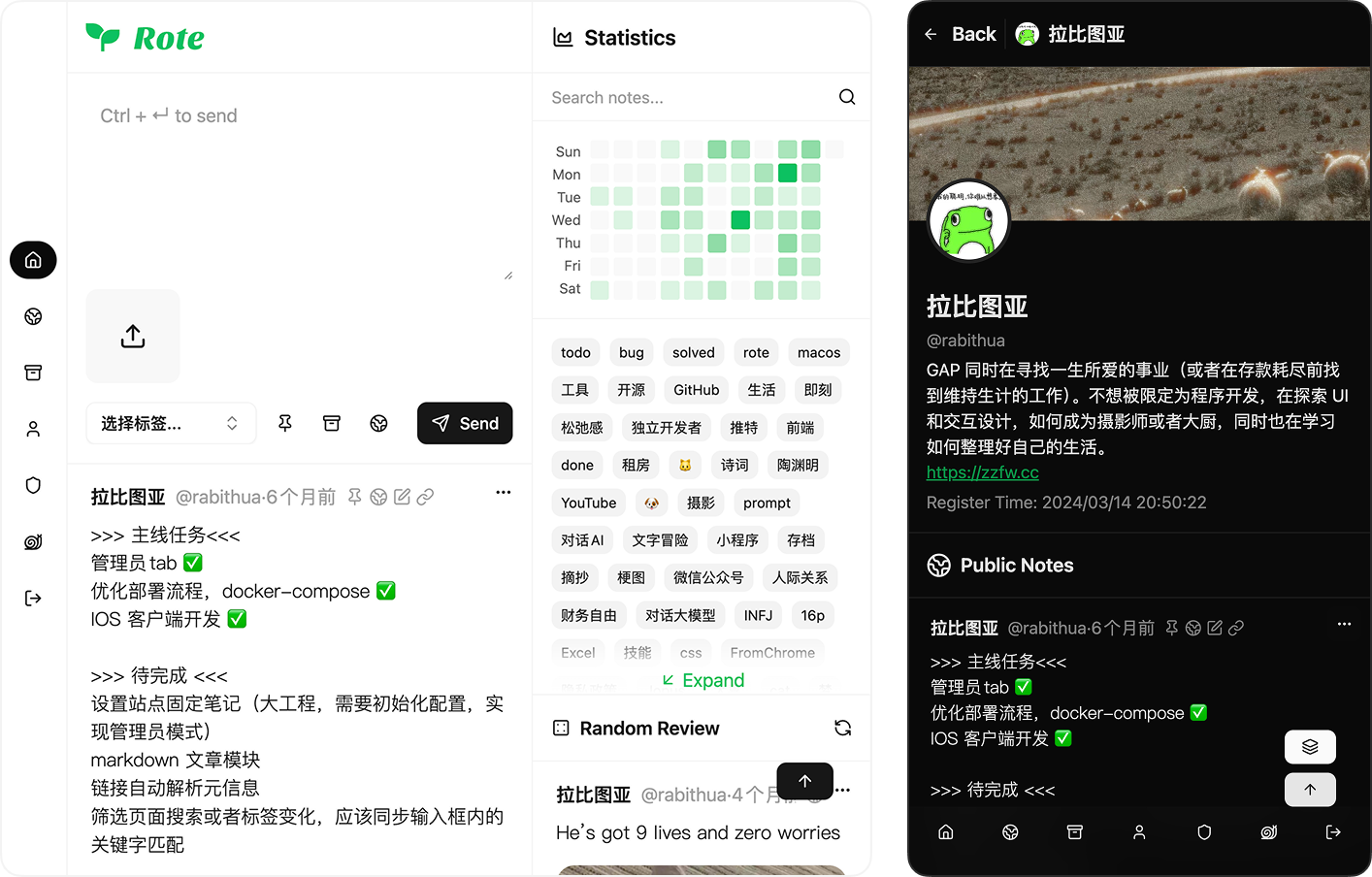
A personal note repository that looks different🤔
See the codeEnglish | 中文


Demo | Website | iOS APP | Explore | Rabithua
Open API, more than one way to record 🤩, supports Self-Hosted, take control of your own data, come and go freely, no data hostage 🙅🏻
Copy docker-compose.yml to your server with Docker and Docker Compose installed
Note: If you use a reverse proxy, VITE_API_BASE should be your backend address after the reverse proxy
Rote now uses
pgvector/pgvector:pg17-trixieby default. It behaves like PostgreSQL 17 and additionally supports the optional AI vector extension. Plainpostgres:17is only a temporary compatibility path and may not be supported by future Rote versions.
latestis the stable image. If you are reading the develop branch documentation or testing unreleased Memory features, useIMAGE_TAG=develop.
# 1. Create a .env file beside docker-compose.yml
cat > .env <<'EOF'
VITE_API_BASE=http://YOUR_SERVER_IP:18000
POSTGRES_PASSWORD=change_this_password
EOF

# 2. Replace YOUR_SERVER_IP and change_this_password before first start.
#    Use a strong URL-safe password. Avoid characters such as @ : / # % in POSTGRES_PASSWORD.
#    Keep this password unchanged after the database volume has been initialized.

# 3. Start Rote with the latest stable image
docker compose up -d
Optional .env values:
# Use a specific version
IMAGE_TAG=v1.0.0

# Use the develop branch image for testing unreleased features
IMAGE_TAG=develop

# Use plain PostgreSQL without pgvector.
# Compatibility-only; future Rote versions may require pgvector-capable PostgreSQL.
POSTGRES_IMAGE=postgres:17
After the containers are running:
http://<your-ip-address>:18001.Admin -> AI Settings to configure chat and embedding providers. Vector storage and automatic indexing default to on; confirming the first enabled AI configuration prepares pgvector and indexes existing notes/articles in the background.Dokploy is an open-source Docker deployment platform that provides a visual interface for application deployment and management. If you have Dokploy installed, you can deploy Rote with one click using the template.
The iOS app can connect to your self-hosted backend.
API Base to your public backend URL (or reverse-proxy URL).Memory is optional and disabled by default. It is available in the develop image and will be available in stable images after the next release that includes Memory. Administrators can enable it from Admin -> AI Settings after configuring chat and embedding providers. Rote supports OpenAI-compatible providers, including OpenAI, OpenRouter, Ollama / LM Studio, DeepSeek, SiliconFlow, DashScope / Qwen, Zhipu GLM, Moonshot / Kimi, Volcengine Ark, Tencent Hunyuan, Baidu Qianfan, and custom OpenAI-compatible endpoints.
AI access is controlled by the ai.chat permission, which administrators can grant by role or per user. AI conversations stay in the current browser session and are not persisted to the database. Notes and articles are indexed only for users with AI chat permission when AI vector storage and automatic indexing are enabled by an administrator.
For more deployment options and configuration instructions, please check the documentation in the doc/ directory:
82 followers · starred Mar 2026
149 followers · starred Jan 2026
1,136 followers · starred Dec 2025
66 followers · starred Jul 2026
A personal note repository that looks different🤔
See the codeEnglish | 中文
Demo | Website | iOS APP | Explore | Rabithua
Open API, more than one way to record 🤩, supports Self-Hosted, take control of your own data, come and go freely, no data hostage 🙅🏻
Copy docker-compose.yml to your server with Docker and Docker Compose installed
Note: If you use a reverse proxy, VITE_API_BASE should be your backend address after the reverse proxy
Rote now uses
pgvector/pgvector:pg17-trixieby default. It behaves like PostgreSQL 17 and additionally supports the optional AI vector extension. Plainpostgres:17is only a temporary compatibility path and may not be supported by future Rote versions.
latestis the stable image. If you are reading the develop branch documentation or testing unreleased Memory features, useIMAGE_TAG=develop.
# 1. Create a .env file beside docker-compose.yml
cat > .env <<'EOF'
VITE_API_BASE=http://YOUR_SERVER_IP:18000
POSTGRES_PASSWORD=change_this_password
EOF

# 2. Replace YOUR_SERVER_IP and change_this_password before first start.
#    Use a strong URL-safe password. Avoid characters such as @ : / # % in POSTGRES_PASSWORD.
#    Keep this password unchanged after the database volume has been initialized.

# 3. Start Rote with the latest stable image
docker compose up -d
Optional .env values:
# Use a specific version
IMAGE_TAG=v1.0.0

# Use the develop branch image for testing unreleased features
IMAGE_TAG=develop

# Use plain PostgreSQL without pgvector.
# Compatibility-only; future Rote versions may require pgvector-capable PostgreSQL.
POSTGRES_IMAGE=postgres:17
After the containers are running:
http://<your-ip-address>:18001.Admin -> AI Settings to configure chat and embedding providers. Vector storage and automatic indexing default to on; confirming the first enabled AI configuration prepares pgvector and indexes existing notes/articles in the background.Dokploy is an open-source Docker deployment platform that provides a visual interface for application deployment and management. If you have Dokploy installed, you can deploy Rote with one click using the template.
The iOS app can connect to your self-hosted backend.
API Base to your public backend URL (or reverse-proxy URL).Memory is optional and disabled by default. It is available in the develop image and will be available in stable images after the next release that includes Memory. Administrators can enable it from Admin -> AI Settings after configuring chat and embedding providers. Rote supports OpenAI-compatible providers, including OpenAI, OpenRouter, Ollama / LM Studio, DeepSeek, SiliconFlow, DashScope / Qwen, Zhipu GLM, Moonshot / Kimi, Volcengine Ark, Tencent Hunyuan, Baidu Qianfan, and custom OpenAI-compatible endpoints.
AI access is controlled by the ai.chat permission, which administrators can grant by role or per user. AI conversations stay in the current browser session and are not persisted to the database. Notes and articles are indexed only for users with AI chat permission when AI vector storage and automatic indexing are enabled by an administrator.
For more deployment options and configuration instructions, please check the documentation in the doc/ directory:
82 followers · starred Mar 2026
149 followers · starred Jan 2026
1,136 followers · starred Dec 2025
66 followers · starred Jul 2026



