Instant file search for Linux: a fast, lightweight Everything alternative. Finds files as you type across millions of files, with a live index, native GTK UI, global hotkey, tray icon and CLI. Written in Rust.
See the codeFile Minnow is an instant file search app for Linux. It works like Everything on Windows: it indexes your file and folder names once, keeps the index up to date in real time, and finds files as you type, across millions of files, in milliseconds. It is a small native app written in Rust with a compact GTK interface, a global hotkey and a tray icon.
If you have been looking for "Everything for Linux", a faster locate, or a
lightweight desktop file search for Linux Mint, Ubuntu, Debian, Fedora, Arch or openSUSE,
File Minnow is built for exactly that.
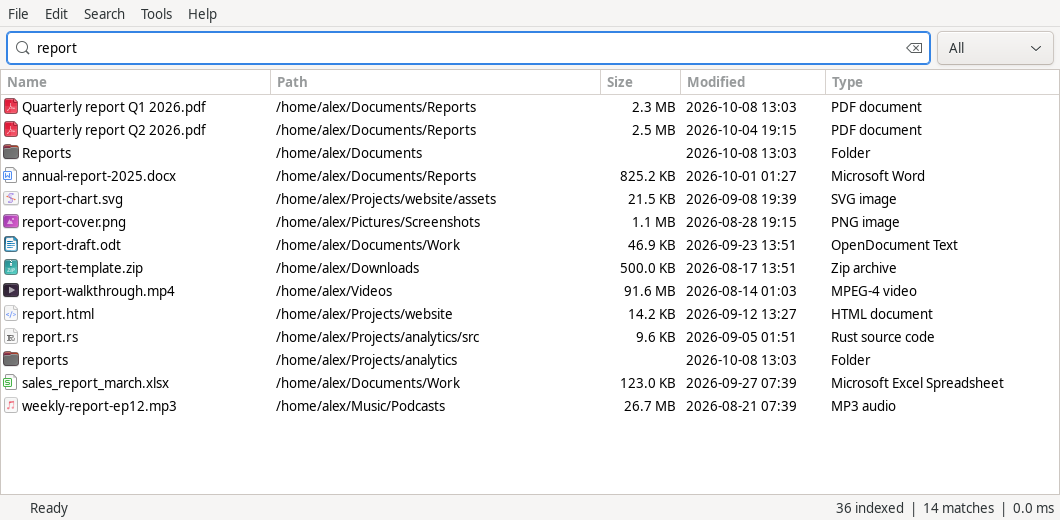
updatedb and no stale results.AND, | (OR), ! (NOT), wildcards, ext:, size:,
dm: (date modified), path:, regex:, and type filters like pic: and doc:.file-minnow search 'ext:pdf invoice' in scripts, with
NUL-safe output and exact Linux path bytes (non-UTF-8 names are preserved).Get the latest .deb or portable archive from
Releases, then:
sudo apt install ./file-minnow_*_amd64.deb
The .deb works on Ubuntu 22.04+, Linux Mint 21+, Debian 12+ and their derivatives. The
portable .tar.gz runs on other 64-bit glibc distributions with GTK 3 (Fedora, openSUSE,
Arch…).
Install Rust (via rustup) and the GTK 3 development files:
| Distribution | Command |
|---|---|
| Debian, Ubuntu, Linux Mint, Pop!_OS | sudo apt install build-essential pkg-config libgtk-3-dev |
| Fedora | sudo dnf install gcc pkg-config gtk3-devel |
| Arch, Manjaro, EndeavourOS | sudo pacman -S --needed base-devel gtk3 |
| openSUSE | sudo zypper install gcc pkg-config gtk3-devel |
Then build and run:
git clone https://github.com/Puddings22/File-Minnow-Linux.git
cd File-Minnow-Linux
cargo build --release --locked
./target/release/file-minnow gui --root "$HOME"
The folders you index are saved, so later starts only need file-minnow gui.
scripts/package.py builds a .deb (Debian, Ubuntu, Linux Mint) and a portable
.tar.gz for other glibc-based distributions. See docs/install.md for
packaging, desktop integration, autostart and the optional background service.
--root). The status bar shows indexing
progress. A large home folder takes seconds, not minutes.| Search | Finds |
|---|---|
invoice | names containing "invoice" |
invoice 2026 | both words (AND) |
report | invoice pdf | (report OR invoice) AND pdf: OR binds tighter, as in Everything |
<a b> | c | explicit grouping |
!draft | names without "draft" |
"hello world" | an exact phrase, including spaces |
*.pdf, IMG_????.jpg | wildcards on the whole name |
ext:pdf;docx | extensions |
pic: doc: audio: video: zip: | common file types |
file: / folder: | only files or only folders |
path:projects/src | match against the full path |
case:README | case-sensitive |
size:>100mb, size:1kb..2mb | file size |
dm:today, dm:2026-10-07, dm:>2026-01-01 | date modified (local time) |
regex:"^report.*\.pdf$" | regular expression (Rust syntax) |
More in the user manual.
| Key | Action |
|---|---|
| Your global shortcut | Show or hide File Minnow from anywhere |
| Ctrl+L | Focus the search box |
| ↓ / ↑ | Move into and through the results |
| Enter / Alt+Enter | Open / Properties |
| Ctrl+C / Ctrl+X | Copy / cut the selected files (paste in your file manager) |
| F2 / Delete | Rename / move to trash |
| Shift+F10 or Menu | Right-click menu |
| Ctrl+, | Options |
| F5 | Rescan |
| Escape | Hide the window (to the tray) |
Is there a version of Everything for Linux? voidtools Everything is Windows-only. File Minnow is an independent Linux app with the same idea: an instant filename index with Everything-style search syntax, a global hotkey and a tray icon.
How is it different from locate / plocate?
locate reads a database refreshed by updatedb, often daily, so new files are missing.
File Minnow watches your folders and updates instantly. It also has a desktop UI with
sorting, a type filter and file actions.
Does it search inside files? No. Like Everything, it searches file and folder names and paths, which is why it is so fast.
Does it need root, or does it index the whole disk?
No root. It indexes only the folders you add, with your own permissions. Pseudo
filesystems (/proc, /sys, /dev, /run) are always skipped.
Which desktops does it work on? Any Linux desktop with GTK 3: Cinnamon (primary test desktop), GNOME, KDE Plasma, Xfce, MATE, Budgie and others. The global hotkey and the tray work on X11. On Wayland the hotkey uses the GlobalShortcuts portal where the compositor provides it, and the tray needs a StatusNotifierItem host. Window show and hide on Wayland is still being improved.
How much memory does it use? Roughly 60–70 bytes per indexed entry plus the GTK window. For 1.6 million files that is about 100 MB of index and about 170 MB for the whole app. See docs/performance.md.
File Minnow is young (0.x). It is used daily on Linux Mint Cinnamon. Not yet available: file-content search, recursive folder sizes, search history and bookmarks in the UI, and network-share indexing beyond what a mounted folder offers. Bug reports and pull requests are welcome.
cargo fmt --all -- --check
cargo clippy --locked --all-targets -- -D warnings
cargo test --locked --all-targets
cargo build --locked --no-default-features   # CLI and daemon without GTK
Without system GTK development packages, scripts/with-gtk-sdk.sh cargo build can use an
extracted SDK in .dev/gtk-sdk. The desktop integration tests run on a private X server
and D-Bus session and never touch your desktop:
python3 scripts/test_ui.py --xvfb /path/to/Xvfb [--tray] [--portal] [--daemon-first] and
python3 scripts/test_focus.py --xvfb /path/to/Xvfb (runs Muffin inside Xvfb). See
CONTRIBUTING.md.
MIT. See LICENSE.
File Minnow is an independent project and is not affiliated with or endorsed by voidtools. "Everything" is the name of voidtools' Windows search tool. It is mentioned here only to describe what File Minnow is similar to.
432 followers · starred Oct 2026
Instant file search for Linux: a fast, lightweight Everything alternative. Finds files as you type across millions of files, with a live index, native GTK UI, global hotkey, tray icon and CLI. Written in Rust.
See the codeFile Minnow is an instant file search app for Linux. It works like Everything on Windows: it indexes your file and folder names once, keeps the index up to date in real time, and finds files as you type, across millions of files, in milliseconds. It is a small native app written in Rust with a compact GTK interface, a global hotkey and a tray icon.
If you have been looking for "Everything for Linux", a faster locate, or a
lightweight desktop file search for Linux Mint, Ubuntu, Debian, Fedora, Arch or openSUSE,
File Minnow is built for exactly that.
updatedb and no stale results.AND, | (OR), ! (NOT), wildcards, ext:, size:,
dm: (date modified), path:, regex:, and type filters like pic: and doc:.file-minnow search 'ext:pdf invoice' in scripts, with
NUL-safe output and exact Linux path bytes (non-UTF-8 names are preserved).Get the latest .deb or portable archive from
Releases, then:
sudo apt install ./file-minnow_*_amd64.deb
The .deb works on Ubuntu 22.04+, Linux Mint 21+, Debian 12+ and their derivatives. The
portable .tar.gz runs on other 64-bit glibc distributions with GTK 3 (Fedora, openSUSE,
Arch…).
Install Rust (via rustup) and the GTK 3 development files:
| Distribution | Command |
|---|---|
| Debian, Ubuntu, Linux Mint, Pop!_OS | sudo apt install build-essential pkg-config libgtk-3-dev |
| Fedora | sudo dnf install gcc pkg-config gtk3-devel |
| Arch, Manjaro, EndeavourOS | sudo pacman -S --needed base-devel gtk3 |
| openSUSE | sudo zypper install gcc pkg-config gtk3-devel |
Then build and run:
git clone https://github.com/Puddings22/File-Minnow-Linux.git
cd File-Minnow-Linux
cargo build --release --locked
./target/release/file-minnow gui --root "$HOME"
The folders you index are saved, so later starts only need file-minnow gui.
scripts/package.py builds a .deb (Debian, Ubuntu, Linux Mint) and a portable
.tar.gz for other glibc-based distributions. See docs/install.md for
packaging, desktop integration, autostart and the optional background service.
--root). The status bar shows indexing
progress. A large home folder takes seconds, not minutes.| Search | Finds |
|---|---|
invoice | names containing "invoice" |
invoice 2026 | both words (AND) |
report | invoice pdf | (report OR invoice) AND pdf: OR binds tighter, as in Everything |
<a b> | c | explicit grouping |
!draft | names without "draft" |
"hello world" | an exact phrase, including spaces |
*.pdf, IMG_????.jpg | wildcards on the whole name |
ext:pdf;docx | extensions |
pic: doc: audio: video: zip: | common file types |
file: / folder: | only files or only folders |
path:projects/src | match against the full path |
case:README | case-sensitive |
size:>100mb, size:1kb..2mb | file size |
dm:today, dm:2026-10-07, dm:>2026-01-01 | date modified (local time) |
regex:"^report.*\.pdf$" | regular expression (Rust syntax) |
More in the user manual.
| Key | Action |
|---|---|
| Your global shortcut | Show or hide File Minnow from anywhere |
| Ctrl+L | Focus the search box |
| ↓ / ↑ | Move into and through the results |
| Enter / Alt+Enter | Open / Properties |
| Ctrl+C / Ctrl+X | Copy / cut the selected files (paste in your file manager) |
| F2 / Delete | Rename / move to trash |
| Shift+F10 or Menu | Right-click menu |
| Ctrl+, | Options |
| F5 | Rescan |
| Escape | Hide the window (to the tray) |
Is there a version of Everything for Linux? voidtools Everything is Windows-only. File Minnow is an independent Linux app with the same idea: an instant filename index with Everything-style search syntax, a global hotkey and a tray icon.
How is it different from locate / plocate?
locate reads a database refreshed by updatedb, often daily, so new files are missing.
File Minnow watches your folders and updates instantly. It also has a desktop UI with
sorting, a type filter and file actions.
Does it search inside files? No. Like Everything, it searches file and folder names and paths, which is why it is so fast.
Does it need root, or does it index the whole disk?
No root. It indexes only the folders you add, with your own permissions. Pseudo
filesystems (/proc, /sys, /dev, /run) are always skipped.
Which desktops does it work on? Any Linux desktop with GTK 3: Cinnamon (primary test desktop), GNOME, KDE Plasma, Xfce, MATE, Budgie and others. The global hotkey and the tray work on X11. On Wayland the hotkey uses the GlobalShortcuts portal where the compositor provides it, and the tray needs a StatusNotifierItem host. Window show and hide on Wayland is still being improved.
How much memory does it use? Roughly 60–70 bytes per indexed entry plus the GTK window. For 1.6 million files that is about 100 MB of index and about 170 MB for the whole app. See docs/performance.md.
File Minnow is young (0.x). It is used daily on Linux Mint Cinnamon. Not yet available: file-content search, recursive folder sizes, search history and bookmarks in the UI, and network-share indexing beyond what a mounted folder offers. Bug reports and pull requests are welcome.
cargo fmt --all -- --check
cargo clippy --locked --all-targets -- -D warnings
cargo test --locked --all-targets
cargo build --locked --no-default-features   # CLI and daemon without GTK
Without system GTK development packages, scripts/with-gtk-sdk.sh cargo build can use an
extracted SDK in .dev/gtk-sdk. The desktop integration tests run on a private X server
and D-Bus session and never touch your desktop:
python3 scripts/test_ui.py --xvfb /path/to/Xvfb [--tray] [--portal] [--daemon-first] and
python3 scripts/test_focus.py --xvfb /path/to/Xvfb (runs Muffin inside Xvfb). See
CONTRIBUTING.md.
MIT. See LICENSE.
File Minnow is an independent project and is not affiliated with or endorsed by voidtools. "Everything" is the name of voidtools' Windows search tool. It is mentioned here only to describe what File Minnow is similar to.
432 followers · starred Oct 2026



