
AgentDeck: one local GUI to configure every AI coding agent. Tune behavior, permissions, token usage and cost, skills, subagents, MCP servers and hooks for Claude Code, Codex CLI, Gemini CLI, Cursor, OpenCode and 16 more. Zero dependencies.
JavaScript
0
6 commits
updated Oct 6, 2026
See what people are saying
README
AgentDeck
One control panel for every AI coding agent on your machine.
A local GUI to configure Claude Code, OpenAI Codex CLI, Gemini CLI, Cursor, OpenCode and 16 more: behavior, permissions, token usage and cost, skills, subagents, MCP servers and hooks.





Install · Features · Supported agents · FAQ · Contributing
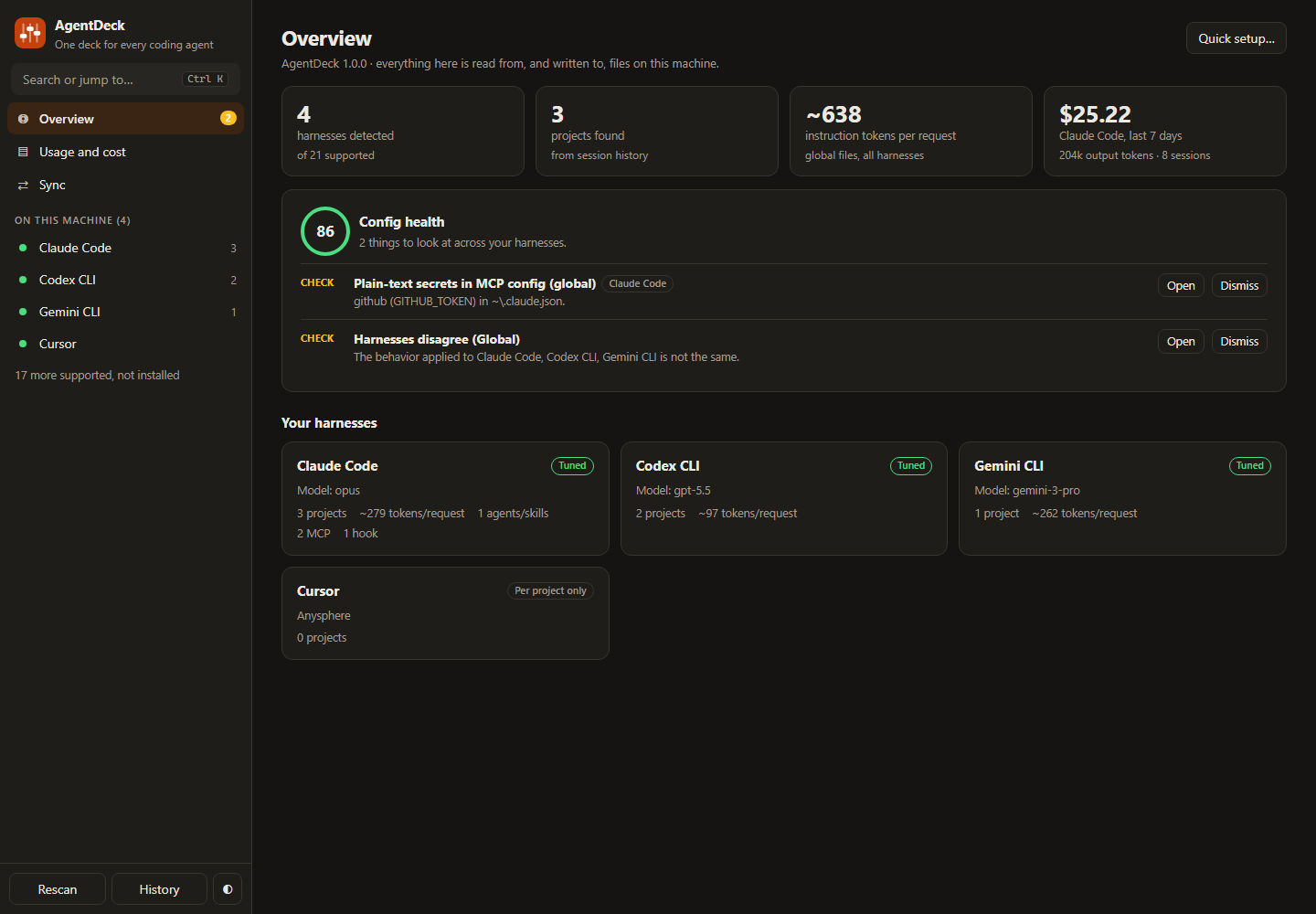
You run Claude Code, Codex, Gemini CLI, Cursor. Each keeps its behavior in a different file, in a different format, in a different folder. AgentDeck finds them all and gives you one window to tune how they talk, what they are allowed to do, what they cost, and whether they agree with each other.
npx github:PriyanshuGeTRekT/AI-harness-Character-creator
Local only. Zero dependencies. Every change is shown as a diff first and can be undone.
What you get
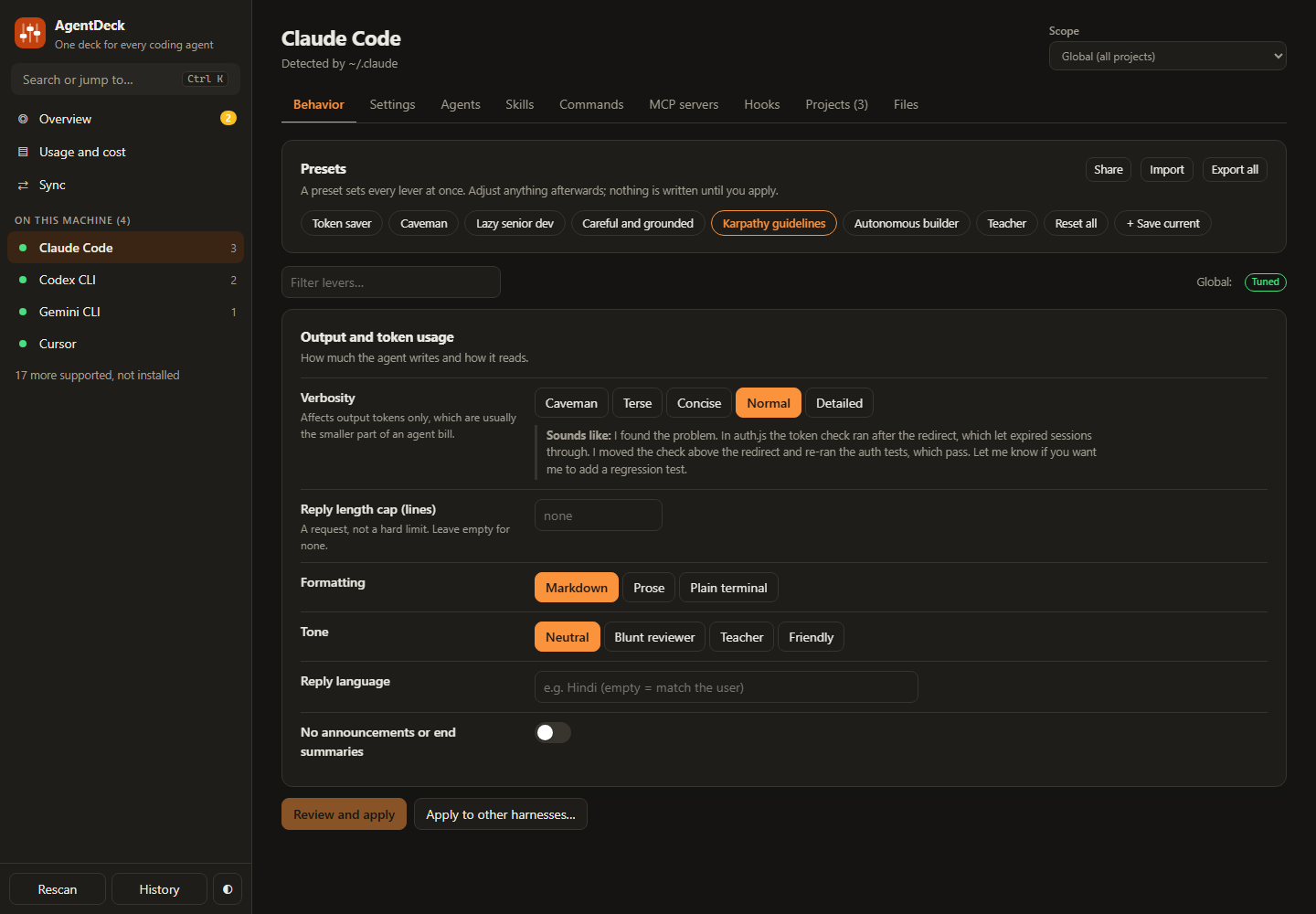
| Behavior levers | About 25 controls (verbosity, grounding, scope, code volume, planning, testing, autonomy) and presets such as Token saver, Caveman, Lazy senior dev and Karpathy guidelines. Apply to one harness or all of them in one diff. |
| Enforced settings | Model, reasoning effort, approval mode, sandbox, compaction and output caps, written to each harness's own config. |
| Permissions | Allow, ask and deny lists with one-click rule sets, so you stop approving git status forty times a day without switching safety off. |
| Hook recipes | Block destructive commands, keep the agent out of .env files, make tests pass before it may finish. Plain Node scripts, so they work on Windows too. |
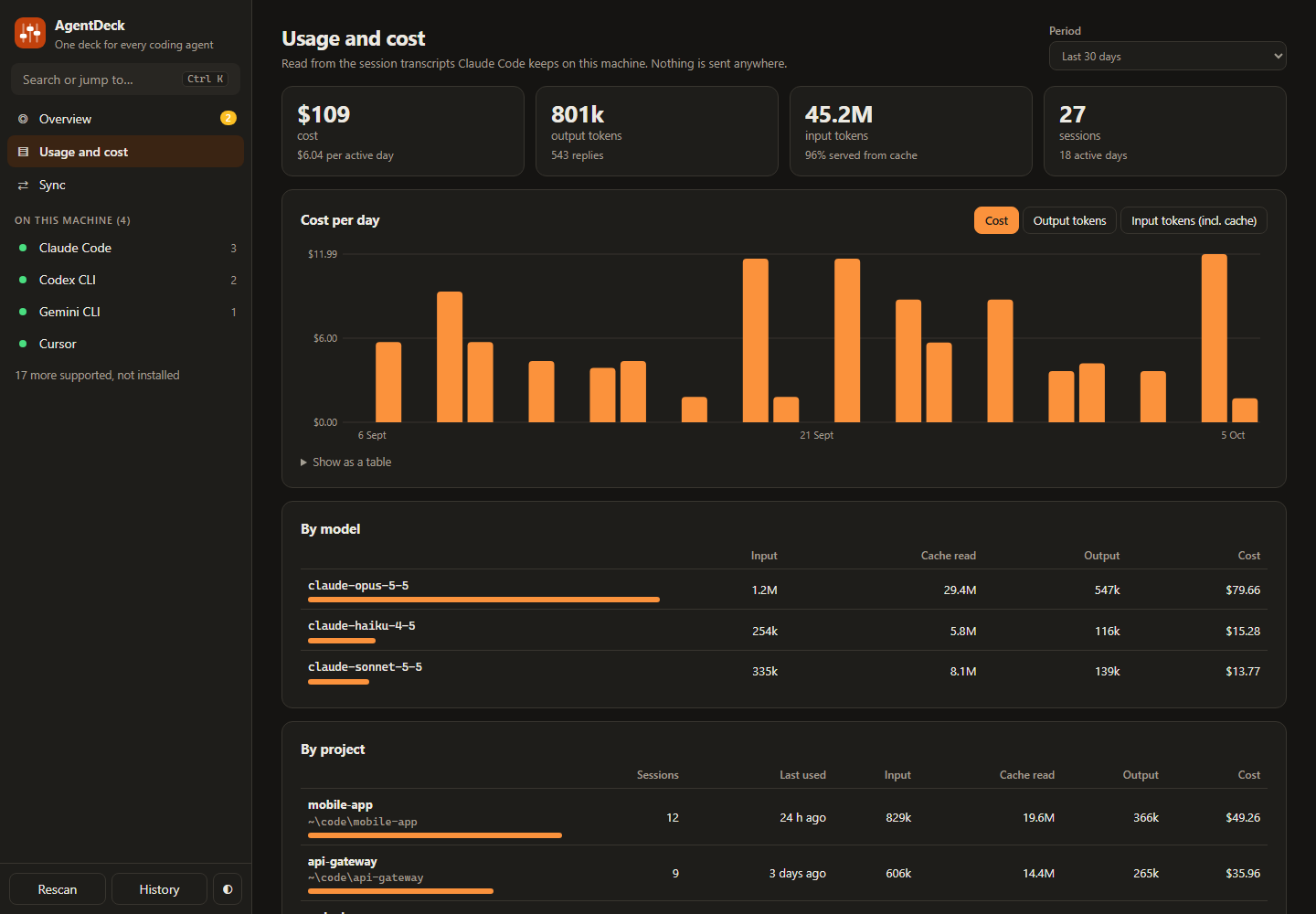
| Usage and cost | Tokens and cost by day, model and project, read from Claude Code's own transcripts. Nothing is uploaded. |
| Health check | Finds plain-text secrets in MCP configs, settings files that no longer parse, safety modes left off, hooks pointing at missing scripts, and instruction files that have outgrown their limit. |
| Sync | Shows where harnesses are being told different things, globally and per project, and makes them match. |
| Agents, skills, commands, MCP | Create from templates, edit, and copy one definition to several harnesses, each in its own location and format. |
| History and undo | A copy is saved before every write. Undo a whole action or restore one file. |
Install
You need Node.js 18 or later. Nothing else.
npx github:PriyanshuGeTRekT/AI-harness-Character-creator
or from a clone:
git clone https://github.com/PriyanshuGeTRekT/AI-harness-Character-creator.git
cd AI-harness-Character-creator
node server.js
AgentDeck opens in its own window (Chrome, Edge, Brave or Chromium in app mode) and stops when you close it. With none of those installed it opens a tab in your default browser.
- Windows: double-click
AgentDeck.vbsfor a window with no console.install-shortcuts.ps1adds Desktop and Start-menu shortcuts. - macOS: double-click
AgentDeck.command. - Linux: run
./agentdeck.sh.
Terminal commands
agentdeck                 open the app
agentdeck --browser       open in your default browser instead
agentdeck scan            list detected harnesses and their projects
agentdeck doctor          check your agent config for problems (exit 1 on serious ones)
agentdeck usage [days]    Claude Code tokens and cost, by model and project
agentdeck --port 5000     use another port (or set AGENTDECK_PORT)
agentdeck doctor is safe to run in CI or a pre-commit hook.
Supported harnesses
| Harness | Instruction file | Settings | Agents, skills, commands | MCP | Hooks | Finds projects |
|---|---|---|---|---|---|---|
| Claude Code | CLAUDE.md | yes | agents, skills, commands | yes | yes | yes |
| Codex CLI | AGENTS.md | yes | agents, skills | yes | yes | yes |
| Gemini CLI | GEMINI.md | yes | agents, skills, commands | yes | yes | yes |
| Pi | AGENTS.md | yes | skills, commands | yes | ||
| OpenCode | AGENTS.md | yes | agents, skills, commands | yes | yes | |
| Cursor | AGENTS.md | yes | agents, skills, commands | yes | yes | |
| Windsurf / Devin Desktop | global_rules.md / AGENTS.md | skills, commands | yes | yes | ||
| GitHub Copilot CLI | copilot-instructions.md | yes | agents, skills | yes | yes | |
| Qwen Code | QWEN.md | yes | agents, skills | yes | yes | |
| Factory Droid | AGENTS.md | yes | agents, skills, commands | yes | yes | yes |
| Codewhale (DeepSeek TUI) | AGENTS.md | yes | yes | |||
| Kilo Code | agentdeck.md | agents, skills, commands | ||||
| Cline | agentdeck.md / AGENTS.md | skills | yes | |||
| Kiro | agentdeck.md | skills | yes | |||
| Goose | .goosehints | skills | yes | |||
| Amp | AGENTS.md | skills | yes | |||
| Crush | CRUSH.md / AGENTS.md | skills | ||||
| Zed Agent | AGENTS.md | skills | ||||
| Continue | agentdeck.md | yes | ||||
| Aider | CONVENTIONS.md | |||||
| Roo Code (discontinued) | agentdeck.md |
Detection is by each tool's config folder, its binary on your PATH, or its editor extension. Harnesses that are not installed still appear, so you can prepare their files in advance. Adding one is a single entry in lib/adapters.js; see CONTRIBUTING.md.
What it writes, and where
AgentDeck only writes files that belong to a harness, and only when you click Apply on a diff.
-
Behavior levers go into a marked block at the end of the harness's instruction file (
CLAUDE.md,AGENTS.md,GEMINI.md...). Everything outside the markers is yours and is never touched:<!-- agentdeck:start (managed by AgentDeck: change it there, edits here are overwritten) --> # Working preferences ... <!-- agentdeck:end --> -
Settings, permissions, MCP servers and hooks go into the harness's own config file. Only the keys you changed are written; comments and unknown keys in TOML and frontmatter are preserved.
-
Agents, skills and commands are ordinary files in the harness's folders.
-
Hook recipes are small scripts saved in
~/.agentdeck/hooks/. -
AgentDeck's own data (presets, history, backups) lives in
~/.agentdeck/.
It only writes into project folders a harness has already worked in, or ones you add yourself.
Honest limits
- Behavior levers are instructions, not switches. The agent reads them and usually follows them; nothing forces it to. There is no real "hallucination rate" or "creativity" dial, and most current models no longer accept a temperature setting. For anything that must always happen, use Settings, Permissions or a Hook: those are enforced by the harness.
- Only Claude Code has been tested against a live install. The other adapters follow each tool's documentation. Hook recipes use Claude Code's hook protocol; Codex and Factory Droid document the same protocol but have not been run end to end.
- Usage and cost cover Claude Code only, because it is the only harness that records cost in its transcripts.
- Some tools do not document where they keep session history (Kiro, Cline, Amp, Zed, Crush, Kilo). Add their project folders by hand from the Projects tab. Goose and newer OpenCode builds store history in SQLite, which needs Node 22.13 or later to read.
- Config with comments is left alone. If a JSON settings file contains comments, AgentDeck will not rewrite it and sends you to the raw editor instead.
Security
AgentDeck is a local web server bound to 127.0.0.1. Each run generates a random session key that every request must carry. The key is handed only to the window AgentDeck opens (and kept in a file only your user can read, so a second launch can reopen a running copy); it is never served over HTTP, so another user on the same machine cannot fetch it. The Host header is checked to stop DNS-rebinding, and a content security policy blocks anything not served by the app itself. It makes no network requests.
MCP secrets you enter are stored where the harness expects them, in plain text, which is how those tools work; the health check flags them. The destructive-command hook recipe is a safety net against mistakes, not a sandbox: keep your harness's own sandbox and approval settings on.
FAQ
Is there a GUI for Claude Code settings?
Yes, that is what this is. AgentDeck edits ~/.claude/settings.json, CLAUDE.md, subagents, skills, slash commands, MCP servers, hooks and permission rules from one window, and covers 20 other tools as far as each one's config allows (see the table above).
How do I reduce Claude Code or Codex token usage? Use the Token saver or Caveman preset on the Behavior tab to shorten replies, lower the reasoning effort and shell-output cap on the Settings tab, and remove MCP servers you do not use (each one adds its tool list to every request). The Usage tab shows what you actually spent, per model and per project.
How do I stop Claude Code asking for permission all the time? Open Settings and add the Safe dev loop rule set: read-only git, listing files, tests and lint run without a prompt, while secrets and destructive commands stay blocked.
How do I keep CLAUDE.md, AGENTS.md and GEMINI.md in sync?
Apply one profile to several harnesses at once, then use the Sync view to see where they have drifted and make them match again.
Can I share one skill or MCP server across Claude Code, Codex, Cursor and Gemini CLI? Yes. Create it once and tick the other harnesses; each gets the file in its own location and format.
How do I see how much Claude Code costs me?
Run agentdeck usage, or open the Usage view: cost and tokens by day, model and project, read from the transcripts already on your disk.
Does it send my code or config anywhere?
No. It is a local server on 127.0.0.1 with no network requests and no telemetry.
Does it work on Windows, macOS and Linux? Yes. The test suite runs on all three, on Node 18 to 24.
Star history
If AgentDeck saves you time, a star helps other people find it.
Uninstall
Delete the ~/.agentdeck folder (presets, history, backups, hook scripts) and remove any shortcuts. To remove what AgentDeck applied, press Reset all then Apply on each Behavior tab, or delete the marked block from the instruction files by hand. Hooks installed from recipes should be removed from the Hooks tab first, since they point at scripts in ~/.agentdeck/hooks/.
Development
npm test          # 65 tests, each file against its own throwaway home folder
npm run demo      # the UI on sample data, without touching your real config
npm run docs      # regenerate the harness table above from the code
No build step, no dependencies: server.js and lib/ are plain Node, public/ is plain ES modules.
License
MIT
Similar repos


AgentDeck: one local GUI to configure every AI coding agent. Tune behavior, permissions, token usage and cost, skills, subagents, MCP servers and hooks for Claude Code, Codex CLI, Gemini CLI, Cursor, OpenCode and 16 more. Zero dependencies.
JavaScript
0
6 commits
updated Oct 6, 2026
See what people are saying
README
AgentDeck
One control panel for every AI coding agent on your machine.
A local GUI to configure Claude Code, OpenAI Codex CLI, Gemini CLI, Cursor, OpenCode and 16 more: behavior, permissions, token usage and cost, skills, subagents, MCP servers and hooks.
Install · Features · Supported agents · FAQ · Contributing
You run Claude Code, Codex, Gemini CLI, Cursor. Each keeps its behavior in a different file, in a different format, in a different folder. AgentDeck finds them all and gives you one window to tune how they talk, what they are allowed to do, what they cost, and whether they agree with each other.
npx github:PriyanshuGeTRekT/AI-harness-Character-creator
Local only. Zero dependencies. Every change is shown as a diff first and can be undone.
What you get
| Behavior levers | About 25 controls (verbosity, grounding, scope, code volume, planning, testing, autonomy) and presets such as Token saver, Caveman, Lazy senior dev and Karpathy guidelines. Apply to one harness or all of them in one diff. |
| Enforced settings | Model, reasoning effort, approval mode, sandbox, compaction and output caps, written to each harness's own config. |
| Permissions | Allow, ask and deny lists with one-click rule sets, so you stop approving git status forty times a day without switching safety off. |
| Hook recipes | Block destructive commands, keep the agent out of .env files, make tests pass before it may finish. Plain Node scripts, so they work on Windows too. |
| Usage and cost | Tokens and cost by day, model and project, read from Claude Code's own transcripts. Nothing is uploaded. |
| Health check | Finds plain-text secrets in MCP configs, settings files that no longer parse, safety modes left off, hooks pointing at missing scripts, and instruction files that have outgrown their limit. |
| Sync | Shows where harnesses are being told different things, globally and per project, and makes them match. |
| Agents, skills, commands, MCP | Create from templates, edit, and copy one definition to several harnesses, each in its own location and format. |
| History and undo | A copy is saved before every write. Undo a whole action or restore one file. |
Install
You need Node.js 18 or later. Nothing else.
npx github:PriyanshuGeTRekT/AI-harness-Character-creator
or from a clone:
git clone https://github.com/PriyanshuGeTRekT/AI-harness-Character-creator.git
cd AI-harness-Character-creator
node server.js
AgentDeck opens in its own window (Chrome, Edge, Brave or Chromium in app mode) and stops when you close it. With none of those installed it opens a tab in your default browser.
- Windows: double-click
AgentDeck.vbsfor a window with no console.install-shortcuts.ps1adds Desktop and Start-menu shortcuts. - macOS: double-click
AgentDeck.command. - Linux: run
./agentdeck.sh.
Terminal commands
agentdeck                 open the app
agentdeck --browser       open in your default browser instead
agentdeck scan            list detected harnesses and their projects
agentdeck doctor          check your agent config for problems (exit 1 on serious ones)
agentdeck usage [days]    Claude Code tokens and cost, by model and project
agentdeck --port 5000     use another port (or set AGENTDECK_PORT)
agentdeck doctor is safe to run in CI or a pre-commit hook.
Supported harnesses
| Harness | Instruction file | Settings | Agents, skills, commands | MCP | Hooks | Finds projects |
|---|---|---|---|---|---|---|
| Claude Code | CLAUDE.md | yes | agents, skills, commands | yes | yes | yes |
| Codex CLI | AGENTS.md | yes | agents, skills | yes | yes | yes |
| Gemini CLI | GEMINI.md | yes | agents, skills, commands | yes | yes | yes |
| Pi | AGENTS.md | yes | skills, commands | yes | ||
| OpenCode | AGENTS.md | yes | agents, skills, commands | yes | yes | |
| Cursor | AGENTS.md | yes | agents, skills, commands | yes | yes | |
| Windsurf / Devin Desktop | global_rules.md / AGENTS.md | skills, commands | yes | yes | ||
| GitHub Copilot CLI | copilot-instructions.md | yes | agents, skills | yes | yes | |
| Qwen Code | QWEN.md | yes | agents, skills | yes | yes | |
| Factory Droid | AGENTS.md | yes | agents, skills, commands | yes | yes | yes |
| Codewhale (DeepSeek TUI) | AGENTS.md | yes | yes | |||
| Kilo Code | agentdeck.md | agents, skills, commands | ||||
| Cline | agentdeck.md / AGENTS.md | skills | yes | |||
| Kiro | agentdeck.md | skills | yes | |||
| Goose | .goosehints | skills | yes | |||
| Amp | AGENTS.md | skills | yes | |||
| Crush | CRUSH.md / AGENTS.md | skills | ||||
| Zed Agent | AGENTS.md | skills | ||||
| Continue | agentdeck.md | yes | ||||
| Aider | CONVENTIONS.md | |||||
| Roo Code (discontinued) | agentdeck.md |
Detection is by each tool's config folder, its binary on your PATH, or its editor extension. Harnesses that are not installed still appear, so you can prepare their files in advance. Adding one is a single entry in lib/adapters.js; see CONTRIBUTING.md.
What it writes, and where
AgentDeck only writes files that belong to a harness, and only when you click Apply on a diff.
-
Behavior levers go into a marked block at the end of the harness's instruction file (
CLAUDE.md,AGENTS.md,GEMINI.md...). Everything outside the markers is yours and is never touched:<!-- agentdeck:start (managed by AgentDeck: change it there, edits here are overwritten) --> # Working preferences ... <!-- agentdeck:end --> -
Settings, permissions, MCP servers and hooks go into the harness's own config file. Only the keys you changed are written; comments and unknown keys in TOML and frontmatter are preserved.
-
Agents, skills and commands are ordinary files in the harness's folders.
-
Hook recipes are small scripts saved in
~/.agentdeck/hooks/. -
AgentDeck's own data (presets, history, backups) lives in
~/.agentdeck/.
It only writes into project folders a harness has already worked in, or ones you add yourself.
Honest limits
- Behavior levers are instructions, not switches. The agent reads them and usually follows them; nothing forces it to. There is no real "hallucination rate" or "creativity" dial, and most current models no longer accept a temperature setting. For anything that must always happen, use Settings, Permissions or a Hook: those are enforced by the harness.
- Only Claude Code has been tested against a live install. The other adapters follow each tool's documentation. Hook recipes use Claude Code's hook protocol; Codex and Factory Droid document the same protocol but have not been run end to end.
- Usage and cost cover Claude Code only, because it is the only harness that records cost in its transcripts.
- Some tools do not document where they keep session history (Kiro, Cline, Amp, Zed, Crush, Kilo). Add their project folders by hand from the Projects tab. Goose and newer OpenCode builds store history in SQLite, which needs Node 22.13 or later to read.
- Config with comments is left alone. If a JSON settings file contains comments, AgentDeck will not rewrite it and sends you to the raw editor instead.
Security
AgentDeck is a local web server bound to 127.0.0.1. Each run generates a random session key that every request must carry. The key is handed only to the window AgentDeck opens (and kept in a file only your user can read, so a second launch can reopen a running copy); it is never served over HTTP, so another user on the same machine cannot fetch it. The Host header is checked to stop DNS-rebinding, and a content security policy blocks anything not served by the app itself. It makes no network requests.
MCP secrets you enter are stored where the harness expects them, in plain text, which is how those tools work; the health check flags them. The destructive-command hook recipe is a safety net against mistakes, not a sandbox: keep your harness's own sandbox and approval settings on.
FAQ
Is there a GUI for Claude Code settings?
Yes, that is what this is. AgentDeck edits ~/.claude/settings.json, CLAUDE.md, subagents, skills, slash commands, MCP servers, hooks and permission rules from one window, and covers 20 other tools as far as each one's config allows (see the table above).
How do I reduce Claude Code or Codex token usage? Use the Token saver or Caveman preset on the Behavior tab to shorten replies, lower the reasoning effort and shell-output cap on the Settings tab, and remove MCP servers you do not use (each one adds its tool list to every request). The Usage tab shows what you actually spent, per model and per project.
How do I stop Claude Code asking for permission all the time? Open Settings and add the Safe dev loop rule set: read-only git, listing files, tests and lint run without a prompt, while secrets and destructive commands stay blocked.
How do I keep CLAUDE.md, AGENTS.md and GEMINI.md in sync?
Apply one profile to several harnesses at once, then use the Sync view to see where they have drifted and make them match again.
Can I share one skill or MCP server across Claude Code, Codex, Cursor and Gemini CLI? Yes. Create it once and tick the other harnesses; each gets the file in its own location and format.
How do I see how much Claude Code costs me?
Run agentdeck usage, or open the Usage view: cost and tokens by day, model and project, read from the transcripts already on your disk.
Does it send my code or config anywhere?
No. It is a local server on 127.0.0.1 with no network requests and no telemetry.
Does it work on Windows, macOS and Linux? Yes. The test suite runs on all three, on Node 18 to 24.
Star history
If AgentDeck saves you time, a star helps other people find it.
Uninstall
Delete the ~/.agentdeck folder (presets, history, backups, hook scripts) and remove any shortcuts. To remove what AgentDeck applied, press Reset all then Apply on each Behavior tab, or delete the marked block from the instruction files by hand. Hooks installed from recipes should be removed from the Hooks tab first, since they point at scripts in ~/.agentdeck/hooks/.
Development
npm test          # 65 tests, each file against its own throwaway home folder
npm run demo      # the UI on sample data, without touching your real config
npm run docs      # regenerate the harness table above from the code
No build step, no dependencies: server.js and lib/ are plain Node, public/ is plain ES modules.
License
MIT