This repository hosts Pokee’s state-of-the-art 7B DeepResearch Agent, which integrates web search and content reading capabilities to answer complex questions using the most up-to-date information available online.
We also offer an API hosting our proprietary deep research agent, which is up to 75% cheaper than OpenAI, Gemini, and Perplexity. It delivers comprehensive, citation-rich research reports with no hidden costs and no API key management required. (For more information about the API, visit pokee.ai/deepresearch-preview)
Pokee's state-of-the-art 7B DeepResearch Agent that leverages web search and content reading capabilities to answer complex questions using the most up-to-date information available online.
You will need the following API keys:
We provide a Docker image for easy deployment:
docker pull verlai/verl:app-verl0.5-transformers4.55.4-sglang0.4.10.post2-mcore0.13.0-te2.2
docker create --runtime=nvidia --gpus all --net=host --shm-size="80g"  -v .:/workspace/ --name pokeeresearch verlai/verl:app-verl0.5-transformers4.55.4-sglang0.4.10.post2-mcore0.13.0-te2.2 sleep infinity
docker start pokeeresearch
docker exec -it pokeeresearch  bash
ssh-keygen -t ed25519 -C <USER_NAME>
# copy /root/.ssh/id_ed25519.pub to github ssh keys
git clone [email protected]:Pokee-AI/PokeeResearchOSS.git --recursive
cd PokeeResearchOSS
pip install colorlog
pip install -U google-genai
hf auth login # enter your huggingface token, the tokens needs to have permission to use Pokee AI's models
cd verl
pip install -e .
cd ..
Create a .env file in the project root and add your API keys:
SERPER_API_KEY=your_serper_api_key_here
JINA_API_KEY=your_jina_api_key_here
GEMINI_API_KEY=your_gemini_api_key_here
run.sh to use more than one GPUs (optional)Running the experiment with more GPUs is faster. By default the experiment uses one GPU. If you want to use more GPUs, simply modify
trainer.n_gpus_per_node=1 \
in run.sh to
trainer.n_gpus_per_node=<NUM_GPUS_TO_USE> \
Step 1: Start the Tool Server
python start_tool_server.py \
--port <PORT_NUMBER> \ # to specify the port to listen to (default 8888)
--enable-cache # to enable caching tool results (recommended to save api credits)
Step 2: Run the Evaluation
Start a new terminal, then run the experiment.
docker exec -it pokeeresearch bash
cd PokeeResearchOSS
bash run.sh
Evaluation Details:
Detailed results are available in the val_results/ directory:
Users may synthesize the research threads saved in val_results/. To do so, replace xxxx.json in run_rts.sh by the result json file in val_results/.
Then run bash run_rts.sh.
We provide both a CLI app and a GUI app based on Gradio. Both apps support serving the LLM locally or via vLLM.
In order to use vLLM serving, new dependencies are needed that would change the existing packages. Therefore, we recommend creating a new docker container and redo installation as in step 1. After starting and enter this new container, do:
# We recommend using uv for installing vLLM. Consult https://docs.vllm.ai/en/latest/getting_started/installation/index.html for alternatives.
uv pip install vllm --torch-backend=auto --system
uv pip install httpx[http2] --system
Then, launch the vLLM server by running bash serve_model.sh.
❗️ You need to start the tool server first before using the CLI app. To do so, run
python start_tool_server.py --enable-cache.
We provide both a single-query mode and an interactive mode to use the CLI app.
python cli_app.py # interactive mode that keeps listening to queries until terminated by user
python cli_app.py --question <QUERY> # single-query mode that terminates after responding
Some additional options include
--verbose print the intermediate steps--serving-mode specify the model serving mode (local or vllm, default is local)--max-turns set the max number of turns (default 10)First, you need to install Gradio.
uv pip install --upgrade gradio --system
You don't need to launch a tool server in advance like in the CLI app. You will configure the credentials and start the tool server using the GUI once it's up. Then, the app will spawn a tool server as a subprocess. Launch the GUI app with
python gradio_app.py
Some additional options include
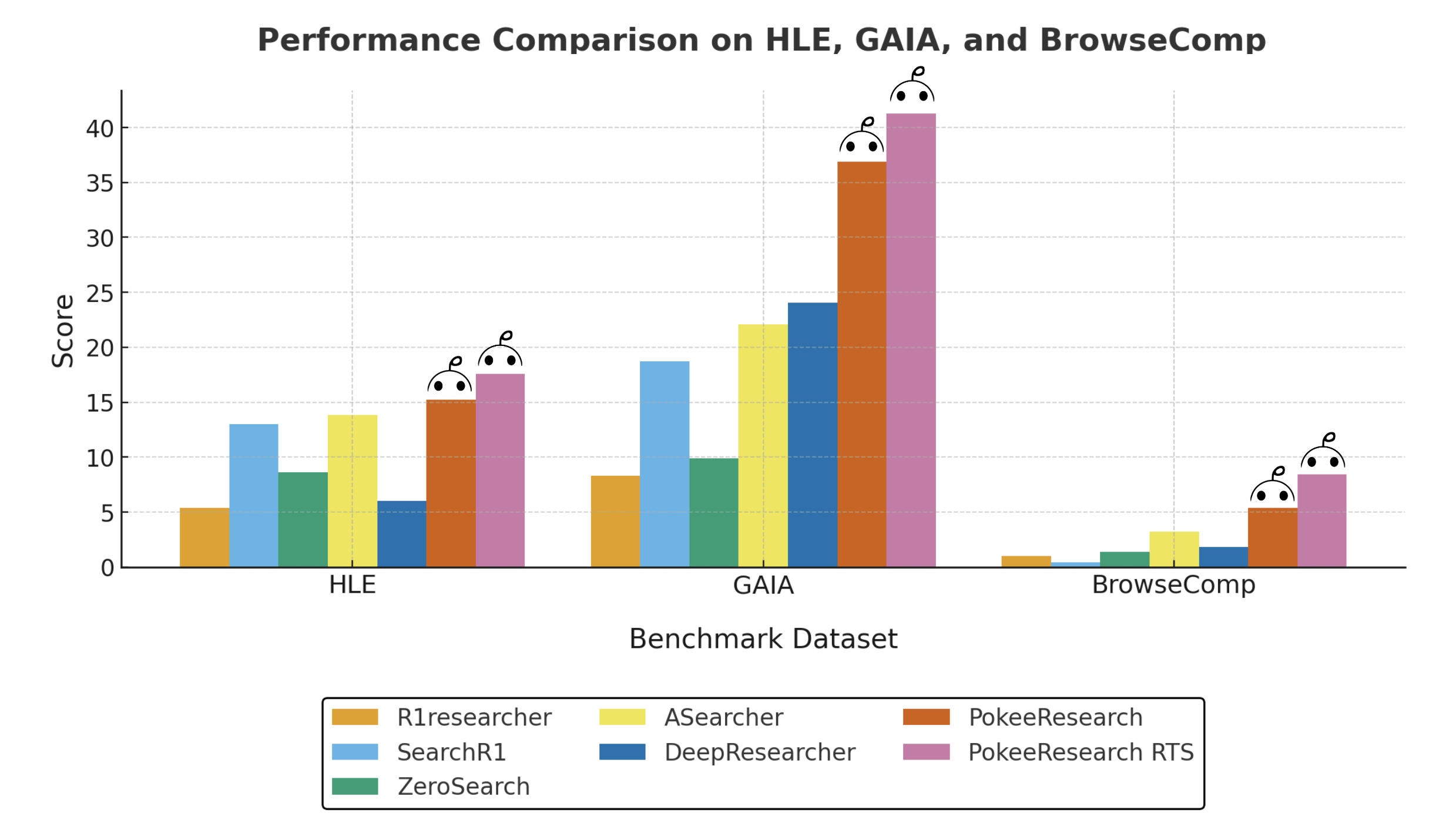
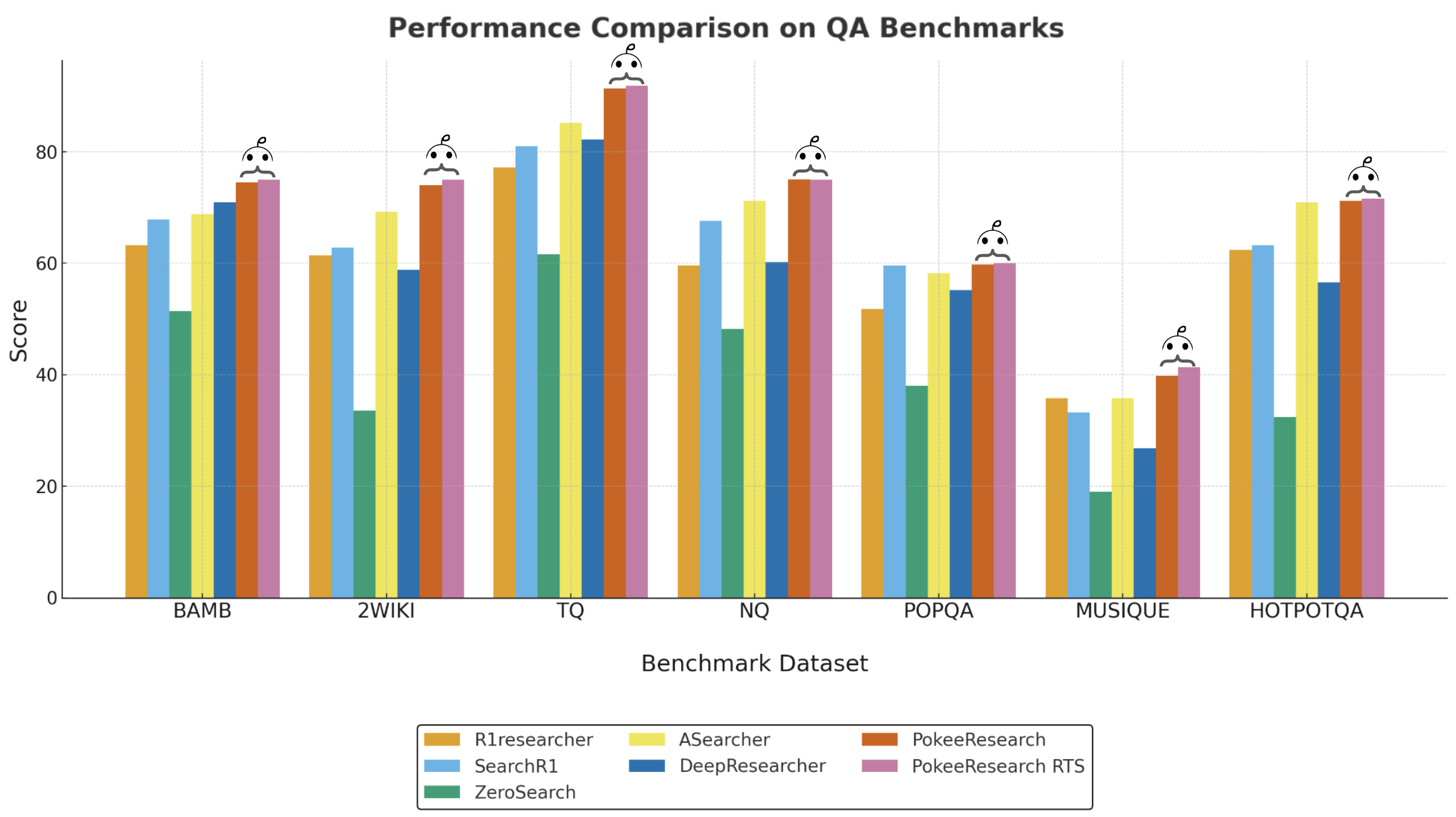
--serving-mode specify the model serving mode (local or vllm, default is local)--port specify the port the Gradio app runs onOur benchmark dataset includes data from 10 common deep research benchmarks:
This diverse dataset ensures comprehensive evaluation across various question types and domains, providing a robust assessment of the agent's capabilities.
| Method | HLE | GAIA | BrowseComp | BAMBOOGLE | 2WIKI | TQ | NQ | POPQA | MUSIQUE | HOTPOTQA |
|---|---|---|---|---|---|---|---|---|---|---|
| R1researcher | 5.4 | 8.3 | 1.0 | 63.2 | 61.4 | 77.2 | 59.6 | 51.8 | 35.8 | 62.4 |
| SearchR1 | 13.0 | 18.7 | 0.4 | 67.8 | 62.8 | 81.0 | 67.6 | 59.6 | 33.2 | 63.2 |
| ZeroSearch | 8.6 | 9.9 | 1.4 | 51.4 | 33.6 | 61.6 | 48.2 | 38.0 | 19.0 | 32.4 |
| ASearcher | 13.8 | 22.1 | 3.2 | 68.8 | 69.2 | 85.2 | 71.2 | 58.2 | 35.8 | 71 |
| DeepResearcher | 6.0 | 24.0 | 1.8 | 71 | 58.8 | 82.2 | 60.2 | 55.2 | 26.8 | 56.6 |
| PokeeResearch | 15.2 | 36.9 | 5.4 | 74.5 | 74.0 | 91.3 | 75.1 | 59.8 | 39.8 | 71.4 |
| PokeeResearch-RTS | 17.6 | 41.3 | 8.4 | 75.0 | 75.0 | 91.8 | 75.0 | 60.0 | 41.4 | 71.6 |
Table 1: Performance comparison across multiple benchmarks. PokeeResearch agent achieves state-of-the-art results across all benchmark datasets. For each question, 4 responses are generated. The agent's predicted answer is compared to the ground truth by Gemini-2.5-Flash-lite, which determines correctness. The accuracy over 4 responses across all questions by datasource is shown in the table.
@article{pokee2025deepresearch,
  title={PokeeResearch: Effective Deep Research via
          Reinforcement Learning from AI Feedback and Robust Reasoning Scaffold},
  author={Yi Wan* and Jiuqi Wang* and Liam Li
          and Jinsong Liu and Ruihao Zhu and Zheqing Zhu},
  journal={Pokee AI Technical Report},
  year={2025},
  url={https://arxiv.org/pdf/2510.15862}
}
This project is licensed under the Apache 2.0 license - see the LICENSE file for details.
For questions and support, please open an issue in this repository.
6,863 followers · starred Oct 2025
111 followers · starred Jan 2026
576 followers · starred Oct 2025
169 followers · starred Feb 2026
This repository hosts Pokee’s state-of-the-art 7B DeepResearch Agent, which integrates web search and content reading capabilities to answer complex questions using the most up-to-date information available online.
We also offer an API hosting our proprietary deep research agent, which is up to 75% cheaper than OpenAI, Gemini, and Perplexity. It delivers comprehensive, citation-rich research reports with no hidden costs and no API key management required. (For more information about the API, visit pokee.ai/deepresearch-preview)
Pokee's state-of-the-art 7B DeepResearch Agent that leverages web search and content reading capabilities to answer complex questions using the most up-to-date information available online.
You will need the following API keys:
We provide a Docker image for easy deployment:
docker pull verlai/verl:app-verl0.5-transformers4.55.4-sglang0.4.10.post2-mcore0.13.0-te2.2
docker create --runtime=nvidia --gpus all --net=host --shm-size="80g"  -v .:/workspace/ --name pokeeresearch verlai/verl:app-verl0.5-transformers4.55.4-sglang0.4.10.post2-mcore0.13.0-te2.2 sleep infinity
docker start pokeeresearch
docker exec -it pokeeresearch  bash
ssh-keygen -t ed25519 -C <USER_NAME>
# copy /root/.ssh/id_ed25519.pub to github ssh keys
git clone [email protected]:Pokee-AI/PokeeResearchOSS.git --recursive
cd PokeeResearchOSS
pip install colorlog
pip install -U google-genai
hf auth login # enter your huggingface token, the tokens needs to have permission to use Pokee AI's models
cd verl
pip install -e .
cd ..
Create a .env file in the project root and add your API keys:
SERPER_API_KEY=your_serper_api_key_here
JINA_API_KEY=your_jina_api_key_here
GEMINI_API_KEY=your_gemini_api_key_here
run.sh to use more than one GPUs (optional)Running the experiment with more GPUs is faster. By default the experiment uses one GPU. If you want to use more GPUs, simply modify
trainer.n_gpus_per_node=1 \
in run.sh to
trainer.n_gpus_per_node=<NUM_GPUS_TO_USE> \
Step 1: Start the Tool Server
python start_tool_server.py \
--port <PORT_NUMBER> \ # to specify the port to listen to (default 8888)
--enable-cache # to enable caching tool results (recommended to save api credits)
Step 2: Run the Evaluation
Start a new terminal, then run the experiment.
docker exec -it pokeeresearch bash
cd PokeeResearchOSS
bash run.sh
Evaluation Details:
Detailed results are available in the val_results/ directory:
Users may synthesize the research threads saved in val_results/. To do so, replace xxxx.json in run_rts.sh by the result json file in val_results/.
Then run bash run_rts.sh.
We provide both a CLI app and a GUI app based on Gradio. Both apps support serving the LLM locally or via vLLM.
In order to use vLLM serving, new dependencies are needed that would change the existing packages. Therefore, we recommend creating a new docker container and redo installation as in step 1. After starting and enter this new container, do:
# We recommend using uv for installing vLLM. Consult https://docs.vllm.ai/en/latest/getting_started/installation/index.html for alternatives.
uv pip install vllm --torch-backend=auto --system
uv pip install httpx[http2] --system
Then, launch the vLLM server by running bash serve_model.sh.
❗️ You need to start the tool server first before using the CLI app. To do so, run
python start_tool_server.py --enable-cache.
We provide both a single-query mode and an interactive mode to use the CLI app.
python cli_app.py # interactive mode that keeps listening to queries until terminated by user
python cli_app.py --question <QUERY> # single-query mode that terminates after responding
Some additional options include
--verbose print the intermediate steps--serving-mode specify the model serving mode (local or vllm, default is local)--max-turns set the max number of turns (default 10)First, you need to install Gradio.
uv pip install --upgrade gradio --system
You don't need to launch a tool server in advance like in the CLI app. You will configure the credentials and start the tool server using the GUI once it's up. Then, the app will spawn a tool server as a subprocess. Launch the GUI app with
python gradio_app.py
Some additional options include
--serving-mode specify the model serving mode (local or vllm, default is local)--port specify the port the Gradio app runs onOur benchmark dataset includes data from 10 common deep research benchmarks:
This diverse dataset ensures comprehensive evaluation across various question types and domains, providing a robust assessment of the agent's capabilities.
| Method | HLE | GAIA | BrowseComp | BAMBOOGLE | 2WIKI | TQ | NQ | POPQA | MUSIQUE | HOTPOTQA |
|---|---|---|---|---|---|---|---|---|---|---|
| R1researcher | 5.4 | 8.3 | 1.0 | 63.2 | 61.4 | 77.2 | 59.6 | 51.8 | 35.8 | 62.4 |
| SearchR1 | 13.0 | 18.7 | 0.4 | 67.8 | 62.8 | 81.0 | 67.6 | 59.6 | 33.2 | 63.2 |
| ZeroSearch | 8.6 | 9.9 | 1.4 | 51.4 | 33.6 | 61.6 | 48.2 | 38.0 | 19.0 | 32.4 |
| ASearcher | 13.8 | 22.1 | 3.2 | 68.8 | 69.2 | 85.2 | 71.2 | 58.2 | 35.8 | 71 |
| DeepResearcher | 6.0 | 24.0 | 1.8 | 71 | 58.8 | 82.2 | 60.2 | 55.2 | 26.8 | 56.6 |
| PokeeResearch | 15.2 | 36.9 | 5.4 | 74.5 | 74.0 | 91.3 | 75.1 | 59.8 | 39.8 | 71.4 |
| PokeeResearch-RTS | 17.6 | 41.3 | 8.4 | 75.0 | 75.0 | 91.8 | 75.0 | 60.0 | 41.4 | 71.6 |
Table 1: Performance comparison across multiple benchmarks. PokeeResearch agent achieves state-of-the-art results across all benchmark datasets. For each question, 4 responses are generated. The agent's predicted answer is compared to the ground truth by Gemini-2.5-Flash-lite, which determines correctness. The accuracy over 4 responses across all questions by datasource is shown in the table.
@article{pokee2025deepresearch,
  title={PokeeResearch: Effective Deep Research via
          Reinforcement Learning from AI Feedback and Robust Reasoning Scaffold},
  author={Yi Wan* and Jiuqi Wang* and Liam Li
          and Jinsong Liu and Ruihao Zhu and Zheqing Zhu},
  journal={Pokee AI Technical Report},
  year={2025},
  url={https://arxiv.org/pdf/2510.15862}
}
This project is licensed under the Apache 2.0 license - see the LICENSE file for details.
For questions and support, please open an issue in this repository.
6,863 followers · starred Oct 2025
111 followers · starred Jan 2026
576 followers · starred Oct 2025
169 followers · starred Feb 2026