PixelPlayerHQ/PixelPlayer

privacy-first Android music player built with Material 3 Expressive. Play offline, sync lyrics, fine-tune with equalizer presets, and cast to your devices.

Kotlin

6,680

3,872 commits

updated Sep 21, 2026

See the code

README

PixelPlayer 🎡

App Icon

PixelPlayerHQ%2FPixelPlayer | Trendshift

A beautiful, feature-rich music player for Android
Built with Jetpack Compose and Material Design 3
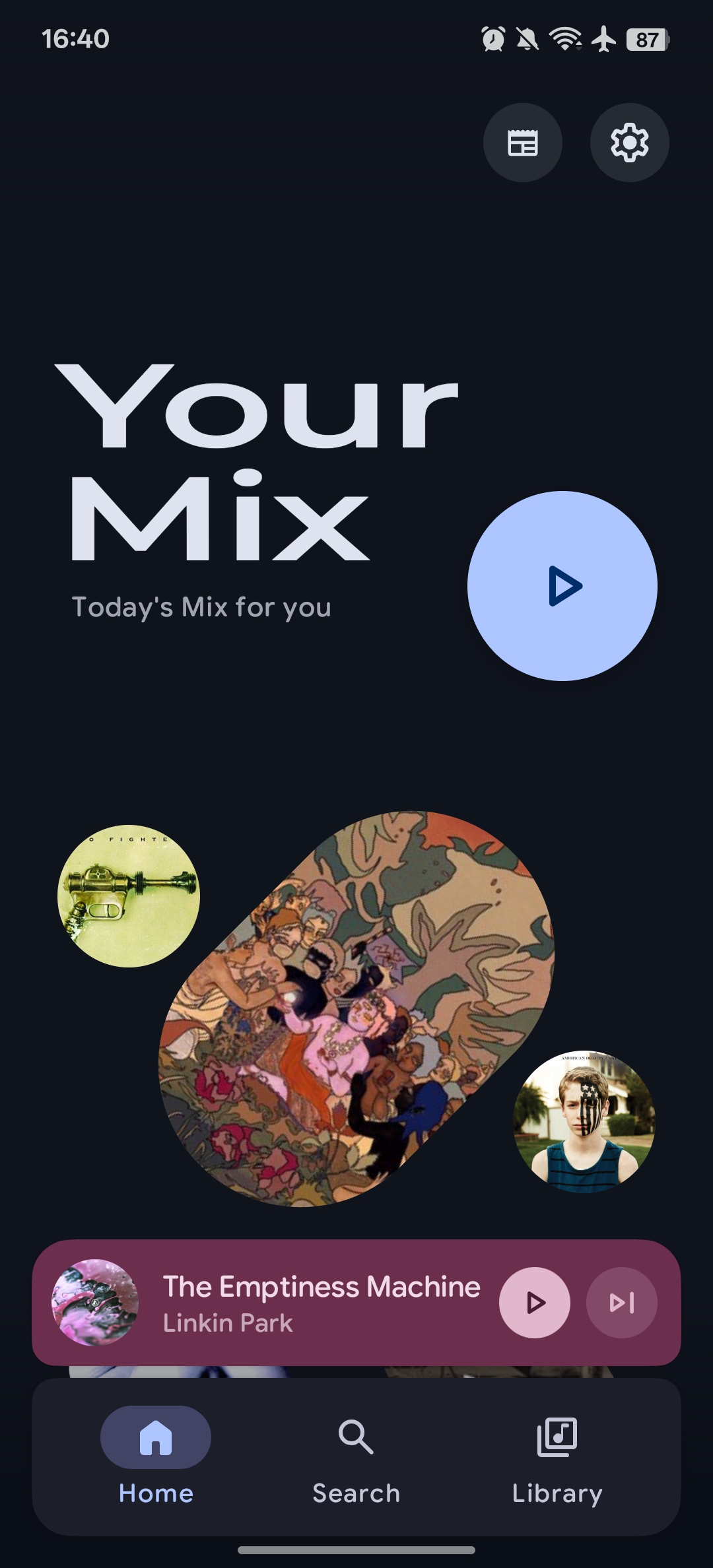
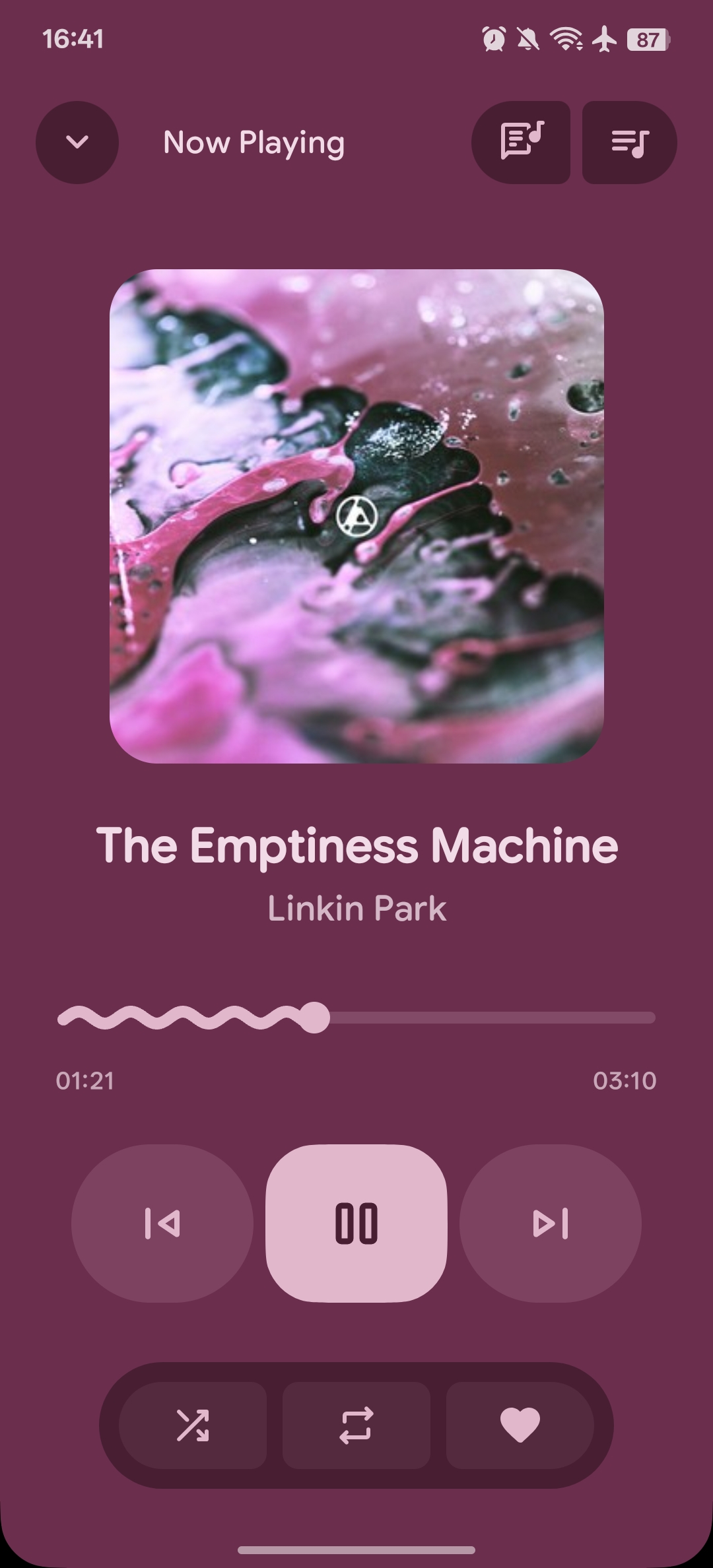
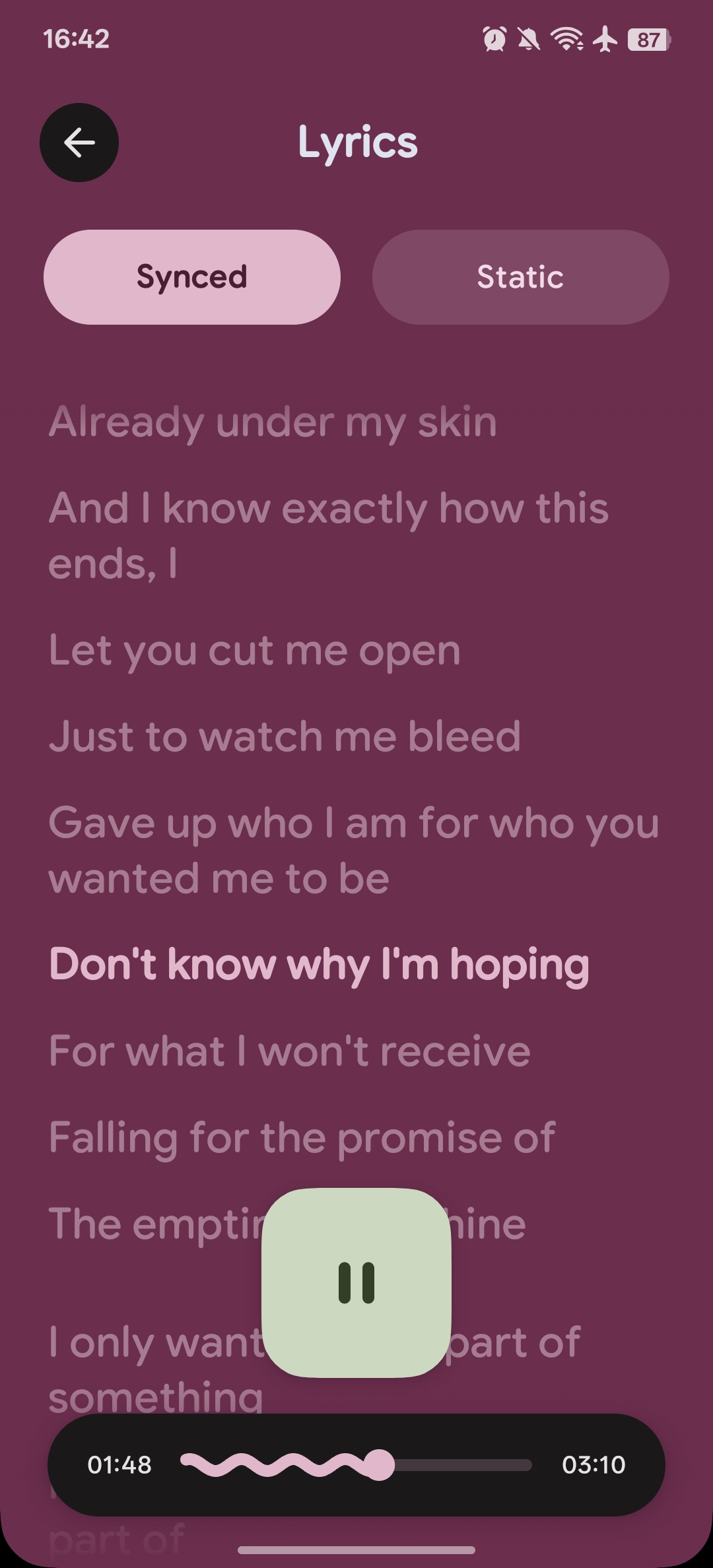
Screenshot 1 Screenshot 2 Screenshot 3 Screenshot 4

Latest Release Total Downloads Android 11+ Kotlin


‼️ DISCLAIMER

  • No fork of this project will recieve support, if you use a fork, ask the forker to support you.

✨ Features

🎨 Modern UI/UX

  • Material You - Dynamic color theming that adapts to your wallpaper
  • Smooth Animations - Fluid transitions and micro-interactions
  • Customizable UI - Adjustable corner radius and navigation bar settings
  • Dark/Light Theme - Automatic or manual theme switching
  • Album Art Colors - Dynamic color extraction from album artwork

🎡 Powerful Playback

  • Media3 ExoPlayer - Industry-leading audio engine with FFmpeg support
  • Background Playback - Full media session integration
  • Queue Management - Drag-and-drop reordering
  • Shuffle & Repeat - All playback modes supported
  • Gapless Playback - Seamless transitions between tracks
  • Custom Transitions - Configure crossfades between songs

πŸ“š Library Management

  • Multi-format Support - MP3, FLAC, AAC, OGG, WAV, and more
  • Browse By - Songs, Albums, Artists, Genres, Folders
  • Smart Artist Parsing - Configurable delimiters for multi-artist tracks
  • Album Artist Grouping - Proper album organization
  • Folder Filtering - Choose which directories to scan

πŸ” Discovery & Organization

  • Full-text Search - Search across your entire library
  • Daily Mix - AI-powered personalized playlist based on listening habits
  • Playlists - Create and manage custom playlists
  • Statistics - Track your listening history and habits

🎀 Lyrics

  • Synchronized Lyrics - LRC format via LRCLIB API
  • Lyrics Editing - Modify or add lyrics to your tracks
  • Scrolling Display - Follow along as you listen

πŸ–ΌοΈ Artist Artwork

  • Deezer Integration - Automatic artist images from Deezer API
  • Smart Caching - Memory (LRU) + database caching for offline access
  • Fallback Icons - Beautiful placeholders when images unavailable

πŸ“² Connectivity

  • Chromecast - Stream to your TV or smart speakers
  • Android Auto - Full Android Auto support for in-car playback (Soon)
  • Widgets - Home screen control with Glance widgets

βš™οΈ Advanced Features

  • Tag Editor - Edit metadata with TagLib (MP3, FLAC, M4A support)
  • AI Playlists - Generate playlists with AI (Supports Gemini, Deepseek, OpenAI, etc.)

πŸ› οΈ Tech Stack

CategoryTechnology
LanguageKotlin 100%
UI FrameworkJetpack Compose
Design SystemMaterial Design 3
Audio EngineMedia3 ExoPlayer + FFmpeg
ArchitectureMVVM with StateFlow/SharedFlow
DIHilt
DatabaseRoom
NetworkingRetrofit + OkHttp
Image LoadingCoil
AsyncKotlin Coroutines & Flow
Background TasksWorkManager
MetadataTagLib
WidgetsGlance

πŸ“± Requirements

  • Android 11 (API 30) or higher
  • 6GB RAM recommended for smooth performance

πŸš€ Getting Started

Prerequisites

  • Android Studio Ladybug | 2024.2.1 or newer
  • Android SDK 29+
  • JDK 11+

Installation

  1. Clone the repository

    git clone https://github.com/theovilardo/PixelPlayer.git
    
  2. Open in Android Studio

    • Open Android Studio
    • Select "Open an Existing Project"
    • Navigate to the cloned directory
  3. Sync and Build

    • Wait for Gradle to sync dependencies
    • Build the project (Build β†’ Make Project)
  4. Run

    • Connect a device or start an emulator
    • Click Run (▢️)

⬇️ Download

Get it on GitHub

Get it on Obtainium


πŸ“‚ Project Structure

app/src/main/java/com/theveloper/pixelplay/
β”œβ”€β”€ data/
β”‚   β”œβ”€β”€ database/       # Room entities, DAOs, migrations
β”‚   β”œβ”€β”€ model/          # Domain models (Song, Album, Artist, etc.)
β”‚   β”œβ”€β”€ network/        # API services (LRCLIB, Deezer)
β”‚   β”œβ”€β”€ preferences/    # DataStore preferences
β”‚   β”œβ”€β”€ repository/     # Data repositories
β”‚   β”œβ”€β”€ service/        # MusicService, HTTP server
β”‚   └── worker/         # WorkManager sync workers
β”œβ”€β”€ di/                 # Hilt dependency injection modules
β”œβ”€β”€ presentation/
β”‚   β”œβ”€β”€ components/     # Reusable Compose components
β”‚   β”œβ”€β”€ navigation/     # Navigation graph
β”‚   β”œβ”€β”€ screens/        # Screen composables
β”‚   └── viewmodel/      # ViewModels
β”œβ”€β”€ ui/
β”‚   β”œβ”€β”€ glancewidget/   # Home screen widgets
β”‚   └── theme/          # Colors, typography, theming
└── utils/              # Extensions and utilities

🀝 Contributing

Contributions are welcome! Please feel free to submit a Pull Request.

  1. Fork the Project
  2. Create your Feature Branch (git checkout -b feature/AmazingFeature)
  3. Commit your Changes (git commit -m 'Add some AmazingFeature')
  4. Push to the Branch (git push origin feature/AmazingFeature)
  5. Open a Pull Request

πŸ“„ License

This project is licensed under a Proprietary License - see the LICENSE file for details.

Portions contributed before 2026-05-12 remain available under the MIT License; see THIRD_PARTY_NOTICES.md.


Made with ❀️ by theovilardo

Logo designed by Aureal.

PixelPlayerHQ/PixelPlayer

privacy-first Android music player built with Material 3 Expressive. Play offline, sync lyrics, fine-tune with equalizer presets, and cast to your devices.

Kotlin

6,680

3,872 commits

updated Sep 21, 2026

See the code

README

PixelPlayer 🎡

App Icon

PixelPlayerHQ%2FPixelPlayer | Trendshift

A beautiful, feature-rich music player for Android
Built with Jetpack Compose and Material Design 3
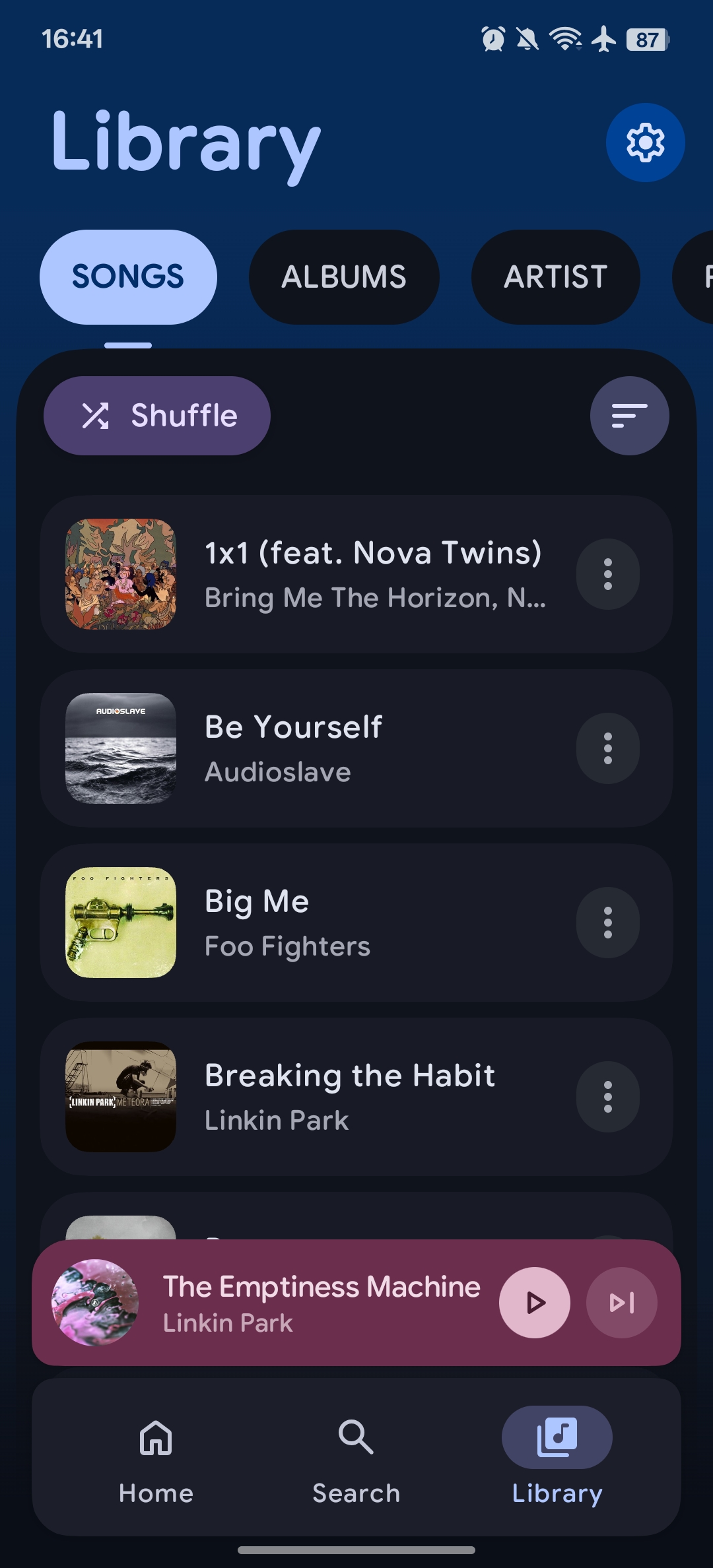
Screenshot 1 Screenshot 2 Screenshot 3 Screenshot 4

Latest Release Total Downloads Android 11+ Kotlin


‼️ DISCLAIMER

  • No fork of this project will recieve support, if you use a fork, ask the forker to support you.

✨ Features

🎨 Modern UI/UX

  • Material You - Dynamic color theming that adapts to your wallpaper
  • Smooth Animations - Fluid transitions and micro-interactions
  • Customizable UI - Adjustable corner radius and navigation bar settings
  • Dark/Light Theme - Automatic or manual theme switching
  • Album Art Colors - Dynamic color extraction from album artwork

🎡 Powerful Playback

  • Media3 ExoPlayer - Industry-leading audio engine with FFmpeg support
  • Background Playback - Full media session integration
  • Queue Management - Drag-and-drop reordering
  • Shuffle & Repeat - All playback modes supported
  • Gapless Playback - Seamless transitions between tracks
  • Custom Transitions - Configure crossfades between songs

πŸ“š Library Management

  • Multi-format Support - MP3, FLAC, AAC, OGG, WAV, and more
  • Browse By - Songs, Albums, Artists, Genres, Folders
  • Smart Artist Parsing - Configurable delimiters for multi-artist tracks
  • Album Artist Grouping - Proper album organization
  • Folder Filtering - Choose which directories to scan

πŸ” Discovery & Organization

  • Full-text Search - Search across your entire library
  • Daily Mix - AI-powered personalized playlist based on listening habits
  • Playlists - Create and manage custom playlists
  • Statistics - Track your listening history and habits

🎀 Lyrics

  • Synchronized Lyrics - LRC format via LRCLIB API
  • Lyrics Editing - Modify or add lyrics to your tracks
  • Scrolling Display - Follow along as you listen

πŸ–ΌοΈ Artist Artwork

  • Deezer Integration - Automatic artist images from Deezer API
  • Smart Caching - Memory (LRU) + database caching for offline access
  • Fallback Icons - Beautiful placeholders when images unavailable

πŸ“² Connectivity

  • Chromecast - Stream to your TV or smart speakers
  • Android Auto - Full Android Auto support for in-car playback (Soon)
  • Widgets - Home screen control with Glance widgets

βš™οΈ Advanced Features

  • Tag Editor - Edit metadata with TagLib (MP3, FLAC, M4A support)
  • AI Playlists - Generate playlists with AI (Supports Gemini, Deepseek, OpenAI, etc.)

πŸ› οΈ Tech Stack

CategoryTechnology
LanguageKotlin 100%
UI FrameworkJetpack Compose
Design SystemMaterial Design 3
Audio EngineMedia3 ExoPlayer + FFmpeg
ArchitectureMVVM with StateFlow/SharedFlow
DIHilt
DatabaseRoom
NetworkingRetrofit + OkHttp
Image LoadingCoil
AsyncKotlin Coroutines & Flow
Background TasksWorkManager
MetadataTagLib
WidgetsGlance

πŸ“± Requirements

  • Android 11 (API 30) or higher
  • 6GB RAM recommended for smooth performance

πŸš€ Getting Started

Prerequisites

  • Android Studio Ladybug | 2024.2.1 or newer
  • Android SDK 29+
  • JDK 11+

Installation

  1. Clone the repository

    git clone https://github.com/theovilardo/PixelPlayer.git
    
  2. Open in Android Studio

    • Open Android Studio
    • Select "Open an Existing Project"
    • Navigate to the cloned directory
  3. Sync and Build

    • Wait for Gradle to sync dependencies
    • Build the project (Build β†’ Make Project)
  4. Run

    • Connect a device or start an emulator
    • Click Run (▢️)

⬇️ Download

Get it on GitHub

Get it on Obtainium


πŸ“‚ Project Structure

app/src/main/java/com/theveloper/pixelplay/
β”œβ”€β”€ data/
β”‚   β”œβ”€β”€ database/       # Room entities, DAOs, migrations
β”‚   β”œβ”€β”€ model/          # Domain models (Song, Album, Artist, etc.)
β”‚   β”œβ”€β”€ network/        # API services (LRCLIB, Deezer)
β”‚   β”œβ”€β”€ preferences/    # DataStore preferences
β”‚   β”œβ”€β”€ repository/     # Data repositories
β”‚   β”œβ”€β”€ service/        # MusicService, HTTP server
β”‚   └── worker/         # WorkManager sync workers
β”œβ”€β”€ di/                 # Hilt dependency injection modules
β”œβ”€β”€ presentation/
β”‚   β”œβ”€β”€ components/     # Reusable Compose components
β”‚   β”œβ”€β”€ navigation/     # Navigation graph
β”‚   β”œβ”€β”€ screens/        # Screen composables
β”‚   └── viewmodel/      # ViewModels
β”œβ”€β”€ ui/
β”‚   β”œβ”€β”€ glancewidget/   # Home screen widgets
β”‚   └── theme/          # Colors, typography, theming
└── utils/              # Extensions and utilities

🀝 Contributing

Contributions are welcome! Please feel free to submit a Pull Request.

  1. Fork the Project
  2. Create your Feature Branch (git checkout -b feature/AmazingFeature)
  3. Commit your Changes (git commit -m 'Add some AmazingFeature')
  4. Push to the Branch (git push origin feature/AmazingFeature)
  5. Open a Pull Request

πŸ“„ License

This project is licensed under a Proprietary License - see the LICENSE file for details.

Portions contributed before 2026-05-12 remain available under the MIT License; see THIRD_PARTY_NOTICES.md.


Made with ❀️ by theovilardo

Logo designed by Aureal.

Significant stargazers

Daniele

17 followers Β· starred Mar 2026

ngocanhtve

42 followers Β· starred Sep 2025

AdriΓ  Arrufat

131 followers Β· starred Dec 2025

Dakkshesh

152 followers Β· starred Feb 2026