
CircuitPilot is an AI agent that translates natural language into production-ready KiCad PCB layouts using a multi-stage pipeline: an LLM Planner, an IPC-rules Critic for self-verification, and a Force-Directed physics router that generates expert-quality boards with 45-degree multi-layer trace routing.
Python
1
20 commits
updated Sep 22, 2026
See what people are saying (1)
README

CircuitPilot
Expert AI-Powered PCB Design · From Prompt to Physical Board








Overview
Stop manually placing components for simple IoT boards. Let physics and AI do it in seconds.
CircuitPilot is an open-source AI agent that translates natural language into production-ready KiCad PCB layouts using a multi-stage pipeline. Unlike wrappers that just output text, CircuitPilot includes a custom built Force-Directed Physics Router to generate expert-quality boards with 45-degree multi-layer trace routing.
👉 Read the Deep Dive: How the Force-Directed Physics Router Works
Application
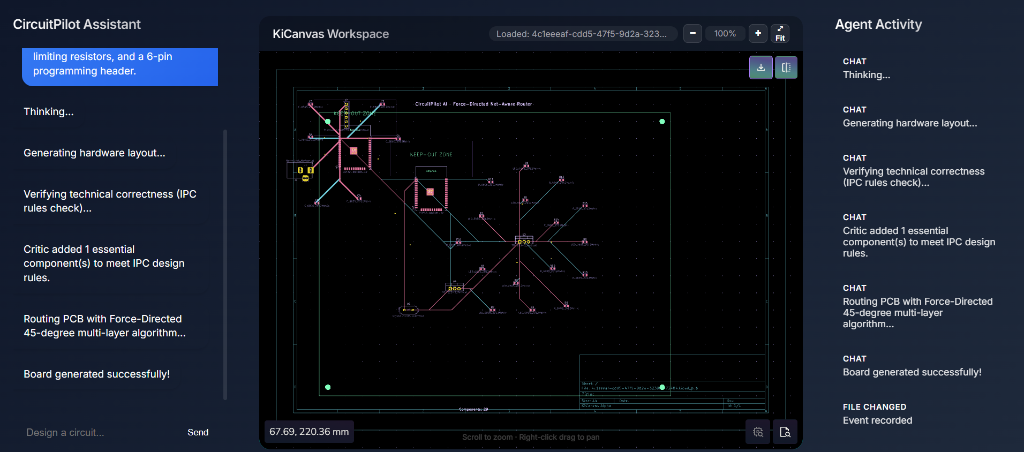
CircuitPilot UI — AI Chat, IPC Critic verification, real-time KiCanvas board viewer with zoom/pan controls.
PCB Output Example (KiCad Desktop)
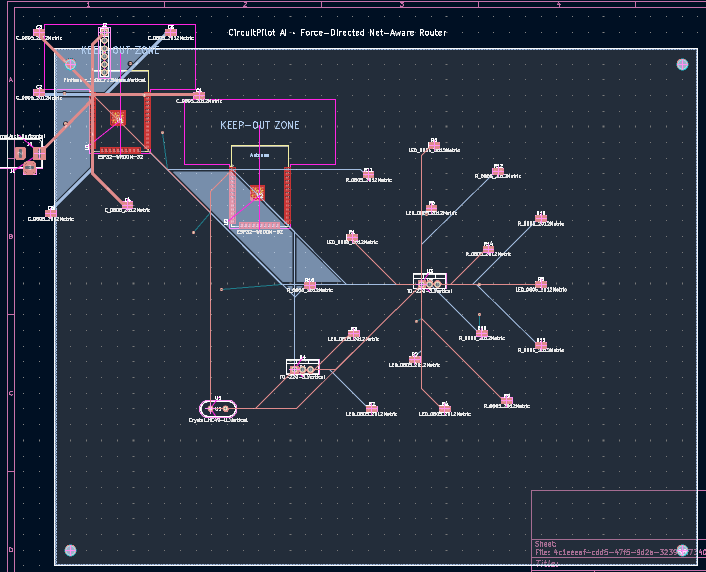
AI-generated PCB opened in KiCad — Force-Directed Net-Aware routing with 45-degree chamfers, multi-layer vias, copper ground pour, and M3 mounting holes. Generated entirely from a single text prompt.
How It Works
flowchart TD
    U(["User Prompt\n(Natural Language)"]):::user
    U --> P

    subgraph AI_PIPELINE ["AI Pipeline (3-Stage)"]
        direction TB
        P["Planner LLM\nExtracts categorized\ncomponent list"]:::llm
        P -->|"JSON: main_ics, decoupling_caps,\npassives, connectors"| C
        C["Critic LLM\nSelf-verification pass\nEnforces IPC rules"]:::critic
        C -->|"Corrected + IPC-compliant\ncomponent manifest"| R
    end

    subgraph ROUTER ["Native Python Router Engine"]
        direction TB
        R["Force-Directed\nPlacement Simulation\n(Physics-based clustering)"]:::engine
        R --> N["Net-Aware Ratsnest\nRouting\n(Shortest-first, per net)"]:::engine
        N --> T["45° Chamfered\nTrace Generator\nIPC-2152 width rules"]:::engine
        T --> G["KiCad PCB Builder\nMounting holes · GND pour\nMulti-layer vias"]:::engine
    end

    G -->|".kicad_pcb file"| WS
    WS["WebSocket Stream\nFastAPI Backend"]:::server --> KV
    KV["KiCanvas Viewer\nZoom · Pan · Download\nIn-browser PCB viewer"]:::frontend

    KV --> KD["KiCad Desktop\nFull DRC · 3D View\nGerber Export"]:::kicad

    classDef user fill:#6366f1,stroke:#4f46e5,color:#fff
    classDef llm fill:#0ea5e9,stroke:#0284c7,color:#fff
    classDef critic fill:#f59e0b,stroke:#d97706,color:#fff
    classDef engine fill:#10b981,stroke:#059669,color:#fff
    classDef server fill:#8b5cf6,stroke:#7c3aed,color:#fff
    classDef frontend fill:#334155,stroke:#475569,color:#fff
    classDef kicad fill:#1e40af,stroke:#1d4ed8,color:#fff
Features
- Prompt-to-PCB in seconds: Describe any circuit in plain English, get a physical board
- LLM Self-Verification (Critic): A second AI pass enforces IPC design rules before routing — adds missing decoupling caps, crystal oscillators, resistors for LEDs automatically
- Force-Directed Physics Placement: Components cluster organically by electrical connectivity, not rigid grids
- Net-Aware Ratsnest Routing: Routes shortest connections first per net, like a real EDA tool
- IPC-2152 Trace Widths: Power nets routed at 0.8mm, signal nets at 0.25mm automatically
- Multi-Layer Routing: Automatically switches between F.Cu and B.Cu with drill vias
- DFM Edge Clearances: 15mm margins enforced from board edge (fabrication safe)
- Provider-Agnostic AI: Switch between OpenAI, Gemini, Anthropic, or local Ollama via
.env - Interactive KiCanvas Viewer: Zoom, pan, and inspect the board before downloading
Architecture
Tech Stack
| Layer | Technology |
|---|---|
| Frontend | React 18, Vite, TypeScript, KiCanvas |
| Backend | Python 3.11, FastAPI, WebSockets |
| AI Layer | LiteLLM (OpenAI / Gemini / Anthropic / Ollama) |
| PCB Router | Custom Native Python Engine (Force-Directed + Net-Aware) |
| Containerization | Docker, Docker Compose |
| PCB Format | KiCad 10 .kicad_pcb |
Quick Start (Zero Friction)
The easiest way to run CircuitPilot is via Docker. You just need an LLM API key (OpenAI, Gemini, Anthropic, etc).
git clone https://github.com/Paramveersingh-S/CircuitPilot.git
cd CircuitPilot/backend
cp .env.example .env
# Add your OPENAI_API_KEY to .env, then run:
cd .. && docker-compose up --build
Then open http://localhost:5173 in your browser!
Local Development Setup
Prerequisites
- Node.js (v18+)
- Python (v3.11+)
- An LLM API key
1. Configure Environment
cd backend
cp .env.example .env
# Edit .env:
# OPENAI_API_KEY=your_key
# LLM_MODEL=openai/gpt-4o          # or gemini/gemini-2.0-flash
# OPENAI_API_BASE=http://localhost:11434  # for Ollama
2. Start the Backend
cd backend
python -m venv venv311
.\venv311\Scripts\Activate.ps1   # Windows
pip install -r requirements.txt
python -m uvicorn app.main:app --reload --port 8000
3. Start the Frontend
cd frontend
npm install
npm run dev
4. Docker (Full Stack)
docker compose up --build
Usage
- Navigate to
http://localhost:5173/ - Describe your circuit in the Chat Panel
- Watch: Planner extracts components → Critic verifies IPC rules → Router generates the board
- Use Scroll to zoom and Right-click drag to pan the board in the browser
- Download the
.kicad_pcbfile and open in KiCad Desktop for full DRC + 3D view + Gerber export
Contributors

20 commits
Similar repos


Languages
Python
98.2%
HTML
1.5%
CircuitPilot is an AI agent that translates natural language into production-ready KiCad PCB layouts using a multi-stage pipeline: an LLM Planner, an IPC-rules Critic for self-verification, and a Force-Directed physics router that generates expert-quality boards with 45-degree multi-layer trace routing.
Python
1
20 commits
updated Sep 22, 2026
See what people are saying (1)
README
CircuitPilot
Expert AI-Powered PCB Design · From Prompt to Physical Board
Overview
Stop manually placing components for simple IoT boards. Let physics and AI do it in seconds.
CircuitPilot is an open-source AI agent that translates natural language into production-ready KiCad PCB layouts using a multi-stage pipeline. Unlike wrappers that just output text, CircuitPilot includes a custom built Force-Directed Physics Router to generate expert-quality boards with 45-degree multi-layer trace routing.
👉 Read the Deep Dive: How the Force-Directed Physics Router Works
Application
CircuitPilot UI — AI Chat, IPC Critic verification, real-time KiCanvas board viewer with zoom/pan controls.
PCB Output Example (KiCad Desktop)
AI-generated PCB opened in KiCad — Force-Directed Net-Aware routing with 45-degree chamfers, multi-layer vias, copper ground pour, and M3 mounting holes. Generated entirely from a single text prompt.
How It Works
flowchart TD
    U(["User Prompt\n(Natural Language)"]):::user
    U --> P

    subgraph AI_PIPELINE ["AI Pipeline (3-Stage)"]
        direction TB
        P["Planner LLM\nExtracts categorized\ncomponent list"]:::llm
        P -->|"JSON: main_ics, decoupling_caps,\npassives, connectors"| C
        C["Critic LLM\nSelf-verification pass\nEnforces IPC rules"]:::critic
        C -->|"Corrected + IPC-compliant\ncomponent manifest"| R
    end

    subgraph ROUTER ["Native Python Router Engine"]
        direction TB
        R["Force-Directed\nPlacement Simulation\n(Physics-based clustering)"]:::engine
        R --> N["Net-Aware Ratsnest\nRouting\n(Shortest-first, per net)"]:::engine
        N --> T["45° Chamfered\nTrace Generator\nIPC-2152 width rules"]:::engine
        T --> G["KiCad PCB Builder\nMounting holes · GND pour\nMulti-layer vias"]:::engine
    end

    G -->|".kicad_pcb file"| WS
    WS["WebSocket Stream\nFastAPI Backend"]:::server --> KV
    KV["KiCanvas Viewer\nZoom · Pan · Download\nIn-browser PCB viewer"]:::frontend

    KV --> KD["KiCad Desktop\nFull DRC · 3D View\nGerber Export"]:::kicad

    classDef user fill:#6366f1,stroke:#4f46e5,color:#fff
    classDef llm fill:#0ea5e9,stroke:#0284c7,color:#fff
    classDef critic fill:#f59e0b,stroke:#d97706,color:#fff
    classDef engine fill:#10b981,stroke:#059669,color:#fff
    classDef server fill:#8b5cf6,stroke:#7c3aed,color:#fff
    classDef frontend fill:#334155,stroke:#475569,color:#fff
    classDef kicad fill:#1e40af,stroke:#1d4ed8,color:#fff
Features
- Prompt-to-PCB in seconds: Describe any circuit in plain English, get a physical board
- LLM Self-Verification (Critic): A second AI pass enforces IPC design rules before routing — adds missing decoupling caps, crystal oscillators, resistors for LEDs automatically
- Force-Directed Physics Placement: Components cluster organically by electrical connectivity, not rigid grids
- Net-Aware Ratsnest Routing: Routes shortest connections first per net, like a real EDA tool
- IPC-2152 Trace Widths: Power nets routed at 0.8mm, signal nets at 0.25mm automatically
- Multi-Layer Routing: Automatically switches between F.Cu and B.Cu with drill vias
- DFM Edge Clearances: 15mm margins enforced from board edge (fabrication safe)
- Provider-Agnostic AI: Switch between OpenAI, Gemini, Anthropic, or local Ollama via
.env - Interactive KiCanvas Viewer: Zoom, pan, and inspect the board before downloading
Architecture
Tech Stack
| Layer | Technology |
|---|---|
| Frontend | React 18, Vite, TypeScript, KiCanvas |
| Backend | Python 3.11, FastAPI, WebSockets |
| AI Layer | LiteLLM (OpenAI / Gemini / Anthropic / Ollama) |
| PCB Router | Custom Native Python Engine (Force-Directed + Net-Aware) |
| Containerization | Docker, Docker Compose |
| PCB Format | KiCad 10 .kicad_pcb |
Quick Start (Zero Friction)
The easiest way to run CircuitPilot is via Docker. You just need an LLM API key (OpenAI, Gemini, Anthropic, etc).
git clone https://github.com/Paramveersingh-S/CircuitPilot.git
cd CircuitPilot/backend
cp .env.example .env
# Add your OPENAI_API_KEY to .env, then run:
cd .. && docker-compose up --build
Then open http://localhost:5173 in your browser!
Local Development Setup
Prerequisites
- Node.js (v18+)
- Python (v3.11+)
- An LLM API key
1. Configure Environment
cd backend
cp .env.example .env
# Edit .env:
# OPENAI_API_KEY=your_key
# LLM_MODEL=openai/gpt-4o          # or gemini/gemini-2.0-flash
# OPENAI_API_BASE=http://localhost:11434  # for Ollama
2. Start the Backend
cd backend
python -m venv venv311
.\venv311\Scripts\Activate.ps1   # Windows
pip install -r requirements.txt
python -m uvicorn app.main:app --reload --port 8000
3. Start the Frontend
cd frontend
npm install
npm run dev
4. Docker (Full Stack)
docker compose up --build
Usage
- Navigate to
http://localhost:5173/ - Describe your circuit in the Chat Panel
- Watch: Planner extracts components → Critic verifies IPC rules → Router generates the board
- Use Scroll to zoom and Right-click drag to pan the board in the browser
- Download the
.kicad_pcbfile and open in KiCad Desktop for full DRC + 3D view + Gerber export
Similar repos
Contributors
20 commits
Languages
Python
98.2%
HTML
1.5%