
A set of Python/Rust tools to aid routing in KiCad
427
stars
3,948
commits
Python
primary language
Sep 14, 2026
updated
README

KiCad Routing Tools
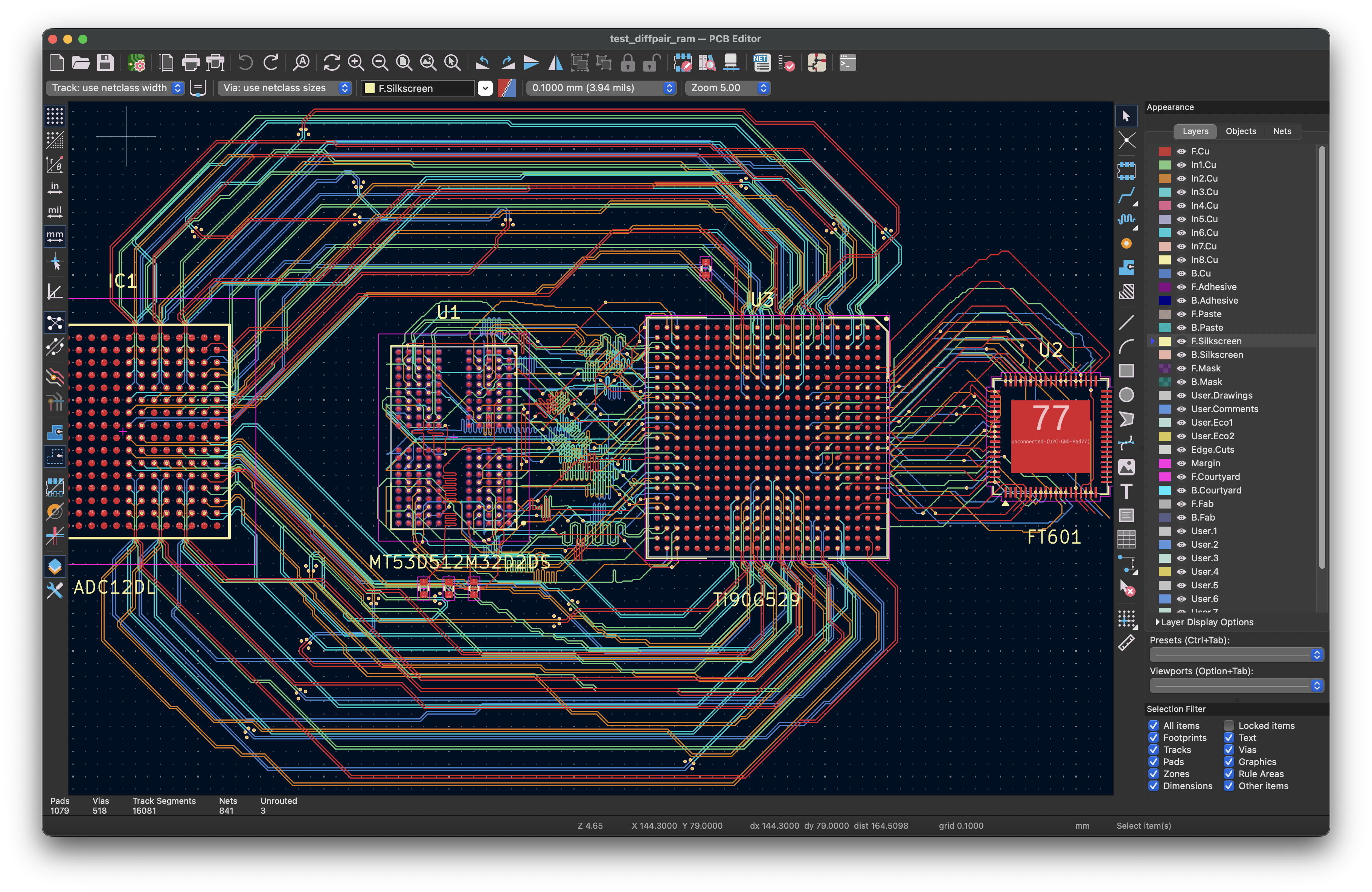
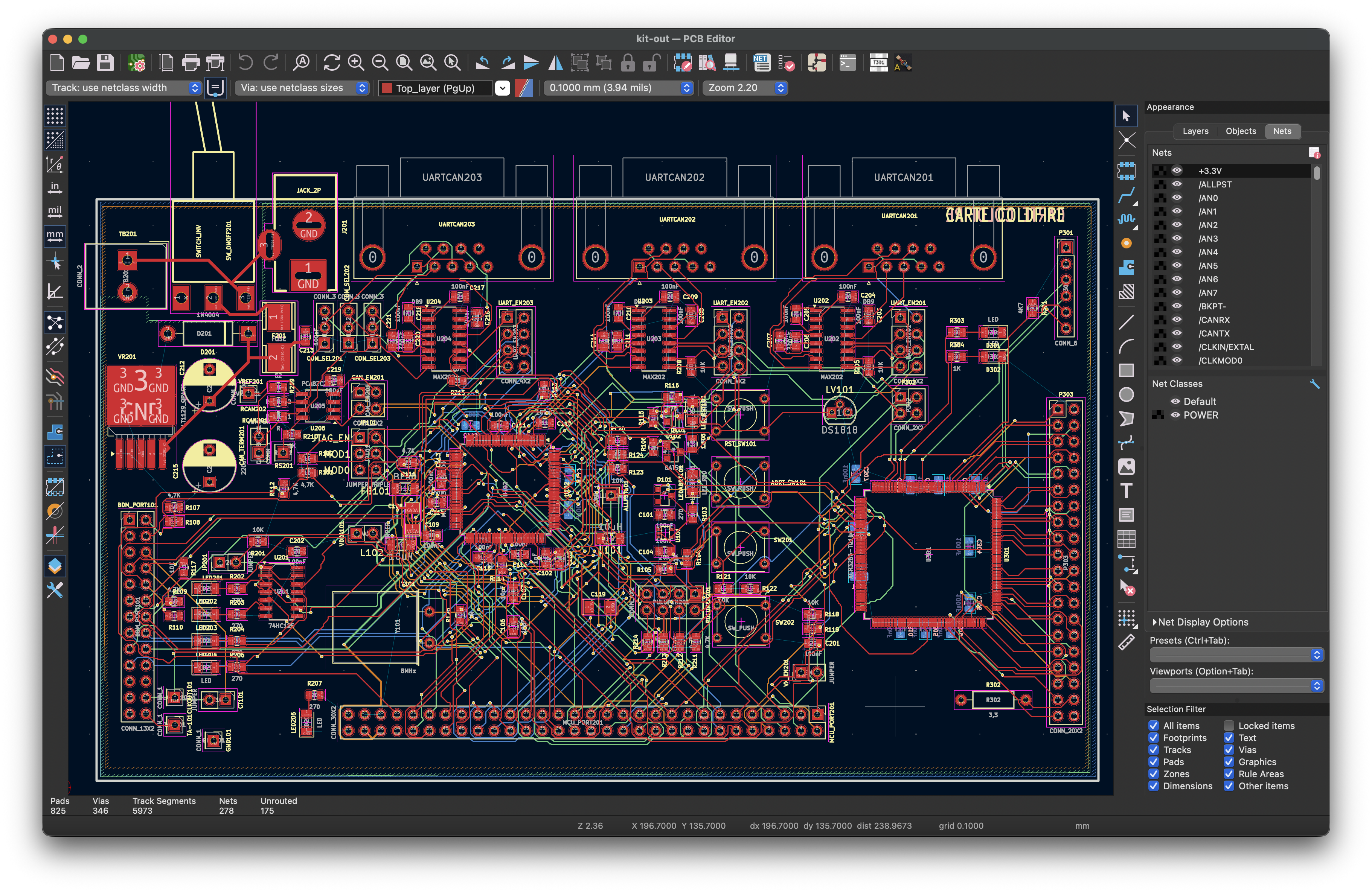
A fast Rust-accelerated A* autorouter for KiCad PCB files. Compatible with KiCad 9 and KiCad 10. Available as both a KiCad Plugin with full GUI and a Command-Line Interface for scripting and automation.
Contents
- Features
- Quick Start
- KiCad Plugin — GUI, the AI AI tab, installation
- Command-Line Interface — routing, planes, verification
- Documentation — full guide for every feature
- Project Structure & Module Overview
- Performance
- Command Reference — options per tool (full list:
--help/ configuration.md) - Requirements · Limitations · Contributing · License
Features
Fast, grid-based A* routing with a native Rust core (~10× faster than pure Python): octilinear (H/V/45°) multi-layer routing with automatic vias, and batch routing with incremental obstacle caching. Highlights below link to the full deep-dive docs.
Core routing
- Rust-accelerated A* pathfinding, multi-layer with automatic via insertion
- Rip-up and reroute — progressive N+1 blocker analysis, ripped-corridor avoidance
- Net ordering strategies — MPS (crossing-aware), inside-out, or original, with MPS layer swaps
- Stub layer switching, vertical track alignment, turn-cost straightening
- Board-edge (Edge.Cuts arcs/cutouts), keep-out rule areas, and auto BGA exclusion zones — see Configuration
- Direction-aware stub / BGA / track proximity penalties
Differential pairs — see Differential Pairs
- Pose-based A* with a Dubins heuristic and adaptive setback angles for orientation-aware centerlines
- Bare-pad, multi-point (3+ terminals), and hybrid (coupled middle + single-ended legs) routing
- Automatic polarity resolution (opt-in pad swaps), U-turn prevention, GND return-via placement
- Electrically-short legs auto-defer to single-ended; per-layer impedance-controlled widths
Power & planes — see Plane Routing and Power Nets
- Wider power-net routing with automatic neck-down at fine-pitch pads
- Plane pours (pads are welded by the route step, #562) and multi-net Voronoi plane layers with resistance / max-current reporting
- Disconnected-plane-region repair (region joins + pad taps) and GND return-via placement
Signal integrity
- Length matching — trombone meanders, auto DQ/DQS grouping, via-barrel aware
- Time matching — propagation delay, microstrip vs stripline
- Bus routing, plus guide corridors and keep-out zones drawn on a User layer
Placement, fanout & optimization
- Placement optimization for routability, before routing
- The design brief — state what the board is FOR, in a sibling the toolchain reads: which connectors are user-facing, which edge each belongs on and where along it
- Floorplan intent, graded — declare where parts belong and check the board against it, so "the render looks fine" stops being a verdict
- BGA / QFN fanout with decoupling-cap placement cleanup, Hungarian target-swap, and schematic sync
Cleanup & verification — see Utilities
- Post-route copper cleanup reconciled against the connectivity model (no orphaned or ripped-and-not-restored copper), with gap-snap connectors
- KiCad-oracle reconnect — routes the exact links KiCad's own DRC reports as unconnected
- Checkers for DRC, connectivity, orphan stubs, copper hygiene (
check_weird.py), and pad geometry
Interfaces
- Full KiCad plugin GUI (KiCad 9 & 10) and a scriptable CLI
- AI assistance — a AI tab that plans an entire routing workflow, per-field "Ask AI" helpers, and datasheet-driven power / high-speed / diff-pair analysis
- Board rendering & routing animation — fast geometry PNG renderer, plus a movie of the router laying/ripping/restoring copper (
make_movie.py, or the Advanced options tab's Make routing movie debug checkbox →.mp4/.gif) - Routing plans as files — save/load a whole routing chain as JSON: build one from a recorded command chain (
make_plan.py), run it headless through the real plugin (run_plan.py), or load it in the GUI
Quick Start
1. Get the Code
# Clone with git
git clone https://github.com/drandyhaas/KiCadRoutingTools.git
cd KiCadRoutingTools
Or download the ZIP and extract it.
2. Install the Rust Router
python build_router.py
By default this downloads a prebuilt binary for your OS from the project's GitHub Releases — no Rust toolchain required. Prebuilts are published for:
- Linux x86_64
- macOS arm64 (Apple Silicon)
- macOS x86_64 (Intel)
- Windows x86_64
If a prebuilt isn't available for your platform (e.g. Linux arm64) or the download fails, the script falls back to building locally with cargo.
Building from source (optional)
If you'd rather build locally — or you're on a platform without a prebuilt — install Rust from rustup.rs:
# macOS / Linux
curl --proto '=https' --tlsv1.2 -sSf https://sh.rustup.rs | sh

# Windows: Download and run rustup-init.exe from https://rustup.rs/
After installation, restart your terminal or run source ~/.cargo/env, then:
python build_router.py --from-source     # build locally instead of downloading
python build_router.py --tag v0.15.0     # download a specific release
python build_router.py --clean           # remove all build artifacts
3. Choose Your Interface
Option A: KiCad Plugin (Recommended for interactive use)
# Install the plugin
python install_plugin.py

# Then in KiCad: Tools → External Plugins → KiCadRoutingTools
Option B: Claude Code (AI-assisted routing)
Use Claude Code to analyze your PCB and generate a routing plan:
> /plan-pcb-routing kicad_files/my_board.kicad_pcb
Claude will:
- Analyze your board structure and identify components needing fanout (BGA/QFN/PGA)
- Detect differential pairs and DDR signals requiring length matching
- Identify power/ground nets and recommend plane vs trace routing
- Assess signal speeds and recommend GND return via placement
- Generate a step-by-step routing plan with explanations
- Run the commands and verify results
Other useful skills:
> /find-high-speed-nets kicad_files/my_board.kicad_pcb       # Identify high-speed nets via datasheet lookup
> /analyze-power-nets kicad_files/my_board.kicad_pcb         # Identify power nets and track widths
> /identify-diff-pairs kicad_files/my_board.kicad_pcb        # Find diff pairs by pin function, recommend gap/impedance
> /recommend-stackup kicad_files/my_board.kicad_pcb          # Stackup advice for impedance/time-matching accuracy
> /diagnose-routing-failures my_board.kicad_pcb /tmp/route_output.txt  # Root-cause failed routes, get a retry command
> /review-routed-board my_board_routed.kicad_pcb             # Post-route QA: DRC, connectivity, length match, GND vias
See Claude Skills for what each skill does and how they fit together.
All of these are also available inside KiCad without leaving the plugin - see AI assistance in the plugin below. The plugin can run the same skills through opencode instead of Claude Code (issue #503) - a Backend dropdown on the AI tab selects the agent CLI, and opencode's provider/model strings open the door to other model providers. The skills' output contracts are tuned on Claude models; smaller models may follow them less reliably.
Option C: Manual Command Line (For scripting and automation)
# Optionally optimize an existing placement for routability (before routing)
python py_placer/place_optimize.py my_board.kicad_pcb --max-displacement 3

# Pour the planes FIRST (#562): the fanout's plane-drop vias then land on
# real fill, and the route step welds plane pads into it.
python py_router/route_planes.py my_board.kicad_pcb poured.kicad_pcb --nets GND --plane-layers B.Cu

# Fan out a BGA, then tidy decoupling caps off the new vias (issue #130)
python py_router/bga_fanout.py poured.kicad_pcb -c U1 -o fanned.kicad_pcb --clearance 0.1
python py_placer/place_fanout_clearance.py fanned.kicad_pcb capclean.kicad_pcb --clearance 0.1

# Route differential pairs
python py_router/route_diff.py capclean.kicad_pcb -o diffed.kicad_pcb --nets "*lvds*"

# Route ALL remaining nets, plane nets included (their widths via --power-nets).
# This step ends with the in-run plane finalize that completes the planes.
python py_router/route.py diffed.kicad_pcb routed.kicad_pcb --nets "*" \
    --power-nets GND --power-nets-widths 0.3
KiCad Plugin
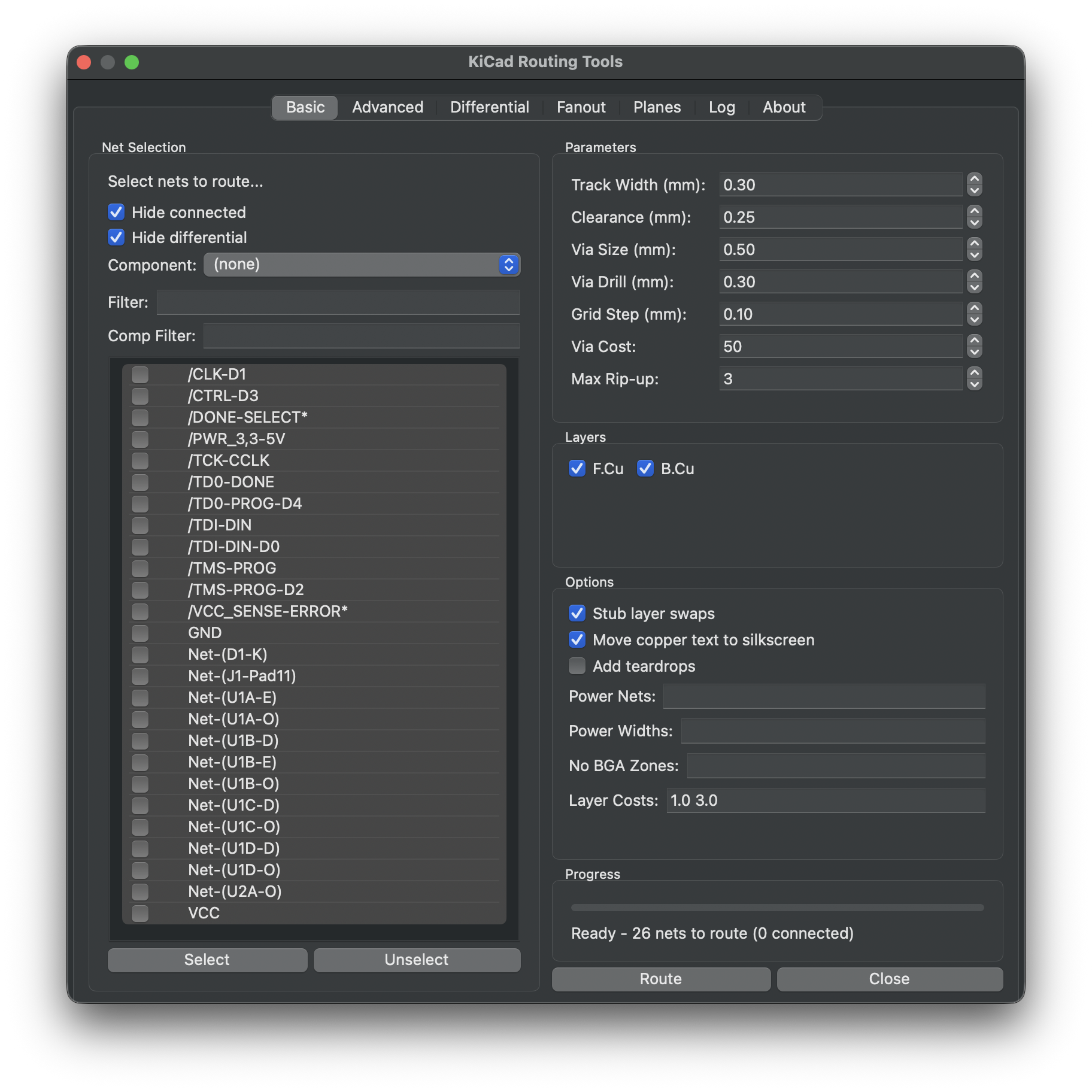
The plugin provides a full graphical interface for all routing features, running directly within KiCad 9 or 10.
AI assistance (AI tab)
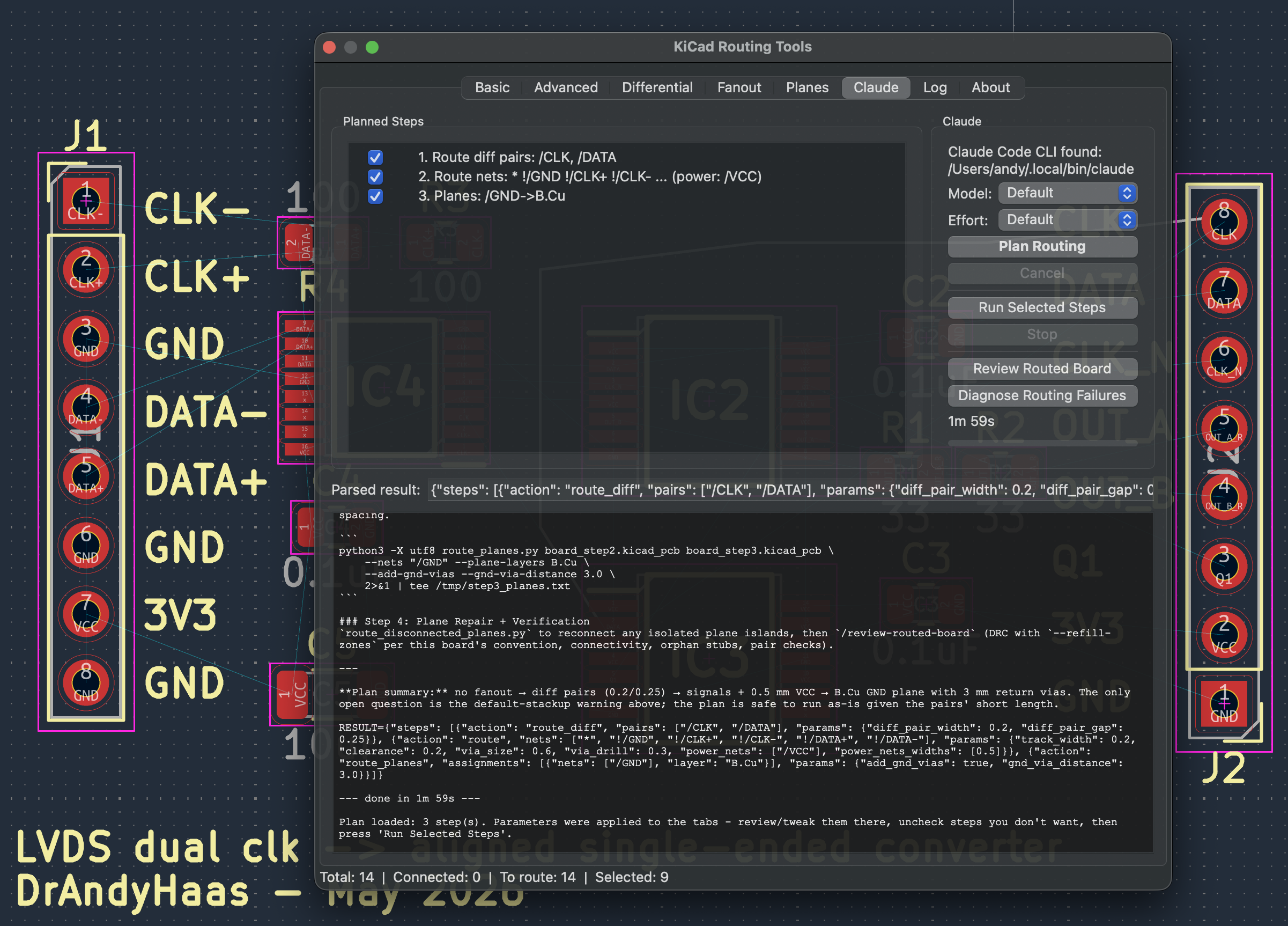
With Claude Code or opencode installed, the routing dialog gains AI assistance throughout (the plugin spawns the selected agent CLI headless, streams a live transcript, and fills GUI controls from the results). The Backend dropdown on the AI tab picks the CLI: Claude Code runs Anthropic models; opencode takes provider/model strings for many providers (including its built-in free tier), with opencode auth login adding provider accounts. Both discover the same .claude/skills/; opencode runs them under a read-only pcb-analysis agent defined in opencode.json (the equivalent of the Claude run's read-only tool allowlist). Neither grants a dedicated write tool, though both grant Bash, so neither is a sandbox — the allowlist states intent, and --allowedTools auto-approves rather than restricts. They are also not identical: the Claude list grants the subagent-dispatch tool, so an analysis skill there can dispatch an independent verifier (#552), which opencode's pinned agent has no per-run equivalent for. A caller asking opencode for a tool set naming Write/Edit is refused rather than silently downgraded.
- AI tab - Plan Routing runs
/plan-pcb-routing: the plan fills the parameter fields across the tabs and appears as a checkable step list, which Run Selected Steps executes sequentially in-process on the live board with per-step status marks. Review Routed Board and Diagnose Routing Failures give post-route QA and failure root-causing. Backend, model, and effort selectors control every AI run and persist with the dialog settings (model/effort remembered per backend). - Save / Load a plan - Save… writes the generated step list to a JSON file; Load… reads one back and runs it with no Claude call — handy for replaying a workflow that worked on another board. A recorded stress-test chain converts to a loadable plan too (
tests/stress/manifest_to_plan.py <board>/redo_commands.sh plan.json). - Per-field "Ask AI" buttons - power nets/widths (Route tab), stackup check (Layers), differential-pair verification by pin function (Differential tab), net-to-plane layer mappings and GND return via distance (Planes tab).
The full button-to-skill map is in Claude Skills - Plugin GUI Integration. Datasheet-based skills use web lookups and take a few minutes; every run shows a live transcript with cancel.
Installation
Three ways to install:
A. KiCad Plugin and Content Manager (PCM) — the recommended path for end users. Open the PCM from the KiCad main window, find KiCad Routing Tools, and click Install. (The package is in the process of being added to the official repository; once accepted, this will be available out-of-the-box.) On first launch, the plugin checks the Python packages listed in requirements.txt (currently scipy and shapely — KiCad already bundles numpy) and offers a one-click pip install for any that are missing into KiCad's Python.
B. PCM "Install from File…" using the release zip — works today, before the package lands in the official repository. Each GitHub Release ships a ready-to-install PCM package zip named KiCadRoutingTools-<version>.zip (a single cross-platform archive bundling the prebuilt Rust binaries for all platforms — not the auto-generated "Source code (zip)"). To install it:
- From the Release's Assets, download
KiCadRoutingTools-<version>.zip(e.g.KiCadRoutingTools-0.15.13.zip). - In KiCad, open Plugin and Content Manager from the main window.
- Click Install from File… (bottom of the PCM dialog) and select the downloaded zip.
- Click Apply Pending Changes, then restart KiCad if prompted.
The plugin appears under Tools → External Plugins in the PCB Editor. The same first-launch scipy/shapely dependency check described in (A) applies. This path keeps the plugin manageable from the PCM (you can update or uninstall it there), unlike the manual install below.
C. Manual install from source — for development or for using the CLI tools as well:
# Install the plugin (copies to KiCad plugins directory)
python install_plugin.py

# For development: create symlink instead of copying
python install_plugin.py --symlink

# Remove the plugin
python install_plugin.py --uninstall
The installer automatically detects your KiCad installation directory (supports KiCad 9.0 and 10.0):
- macOS:
~/Documents/KiCad/<version>/3rdparty/plugins/ - Linux:
~/.local/share/kicad/<version>/3rdparty/plugins/ - Windows:
~/Documents/KiCad/<version>/3rdparty/plugins/
If you previously installed this plugin through the Plugin & Content Manager, that copy sits next to the local install and would shadow it on sys.path (causing stale-code errors). The installer detects any such PCM copy and moves it aside to <kicad-base>/disabled_pcm_plugins/<version>/, leaving it recoverable. Pass --keep-pcm to skip this.
Releasing a new version (maintainers)
The full release flow — version bump, GitHub Release, and the merge request to the official KiCad PCM repository — is documented step by step in docs/release-pipeline.md.
Short version:
- Bump
VERSIONand theversions[]entry inmetadata.json. git tag v0.15.6 && git push --tags— CI builds all 4 platform binaries, packages a singleKiCadRoutingTools-<ver>.zip(the PCM validator rejects duplicate version strings, so we ship one cross-platform zip), patchesmetadata.jsonwith real sha256/size values, and attaches everything to the GitHub Release.- Append the new version to the metadata file in your fork of
gitlab.com/kicad/addons/metadataand open an MR. See the docs page for the exact commands.
To build a zip locally for testing:
python package_pcm.py --binary-dir ./path/to/release/artifacts
Usage
- Open KiCad (9.0 or later)
- Open a PCB in Pcbnew
- (Optional) Select one or more nets in the PCB editor first — for example by clicking tracks/pads, or right-clicking a track and choosing Select → All Tracks in Net. Any nets you have selected are automatically pre-checked for routing when the plugin opens.
- Go to Tools → External Plugins → KiCadRoutingTools
- Configure routing parameters and select (or adjust) the nets to route
- Click Route to run the router
Plugin Tabs
Route Tab:
- Net selection with filtering and component filtering
- Nets selected in the PCB editor before opening the plugin are pre-checked automatically (also applies to the Fanout, Planes, and Differential tabs)
- Option to separate nets by net class (organizes into tabs per class)
- Track width, clearance, via size/drill from net class or manual override
- Layer selection with per-layer cost multipliers
- Options: stub layer swaps, copper text moving, teardrops, power net widths, no-BGA zones
- Guide corridor - draw a polyline on a User layer (e.g.
User.1) and tick "Follow User-layer guide path" to route the selected nets along it (waypoints, avoiding obstacles, packed non-overlapping) - Keepout zones - draw one or more closed polygons on a User layer (e.g.
User.2) and tick "Keep out of User-layer polygon(s)" to keep routed tracks out of those areas (hard keepout, all routed nets) - Clear guide/keepout layers - optional "Clear guide layer after routing" / "Clear keepout layer after routing" checkboxes (unchecked by default) delete the drawn guide/keepout graphics from their User layer after a successful route, so you can draw fresh ones for the next run
Advanced options Tab:
- Swappable nets configuration for target swap optimization
- Routing parameters: iterations, heuristic weight, rip-up, probe iterations
- MPS ordering options, direction control, length matching
- Proximity settings: BGA, stub, track, via proximity costs
- Debug options
Differential Tab:
- Differential pair selection with filtering
- Pair gap, turning radius, setback angle configuration
- Options: polarity fix, GND vias, intra-pair length matching
Fanout Tab:
- BGA fanout with exit margin, escape direction, differential pair support
- Under-pad escape option for dense, fully-populated BGAs the channel router can't escape (issue #122) — see BGA Fanout
- "Optimize decoupling cap placement" option (off by default) — after fanout, nudges decoupling caps off foreign-net fanout vias and toward same-net balls (issue #130) — see Placement
- QFN fanout with extension length configuration
- Net selection for fanout operations
Planes Tab (pour creation only since #562 — plane repair runs inside every route, and the route step welds plane pads into the pour):
- Net-to-layer assignment for power/ground planes
- Create the pours (plus thermal via arrays under exposed pads)
- Area via stitching and GND return via placement near signal vias
- Via size/drill, zone clearance configuration
Log Tab:
- Real-time routing output display
- Color-coded messages (errors, warnings, success)
About Tab:
- Version information and credits
General Features:
- Settings persistence (parameters and selections preserved between sessions)
- Cancel button to stop routing operations mid-progress
- Results applied directly to the open PCB in KiCad
Command-Line Interface
Net Pattern Syntax
All --nets options support fnmatch-style wildcards and exclusion patterns:
| Pattern | Description |
|---|---|
* | All nets |
*DATA* | Nets containing "DATA" |
/* | Nets starting with "/" (hierarchical) |
Net-(U1-*) | Nets matching "Net-(U1-...)" |
!GND | Exclude net named "GND" |
!*VCC* | Exclude nets containing "VCC" |
"*" "!GND" "!VCC" | All nets except GND and VCC |
Notes:
- Exclusion patterns (starting with
!) remove matching nets from the result - Order matters: include patterns add nets, exclude patterns remove them
- Nets starting with "unconnected-" are automatically excluded
- Use quotes around patterns with special characters
Route Nets
# Route all nets (default) - outputs to input_routed.kicad_pcb
python py_router/route.py kicad_files/input.kicad_pcb

# Route all nets, overwrite input file
python py_router/route.py kicad_files/input.kicad_pcb --overwrite

# Route all nets to a specific output file
python py_router/route.py kicad_files/input.kicad_pcb kicad_files/output.kicad_pcb

# Route specific nets (using --nets option)
python py_router/route.py kicad_files/input.kicad_pcb kicad_files/output.kicad_pcb --nets "Net-(U2A-DATA_0)" "Net-(U2A-DATA_1)"

# Route with wildcard patterns
python py_router/route.py kicad_files/input.kicad_pcb kicad_files/output.kicad_pcb --nets "Net-(U2A-DATA_*)"

# Route all nets on a component (auto-excludes GND/VCC/VDD/unconnected)
python py_router/route.py kicad_files/input.kicad_pcb kicad_files/output.kicad_pcb --component U1

# Route specific patterns on a component (no auto-exclusion)
python py_router/route.py kicad_files/input.kicad_pcb kicad_files/output.kicad_pcb --nets "/DDAT*" --component U1

# Route ALL nets on a component including power (use "*" pattern)
python py_router/route.py kicad_files/input.kicad_pcb kicad_files/output.kicad_pcb --nets "*" --component U1

# Exclusion-pattern SYNTAX demo (! prefix). NOTE: in the #562 chain you do
# NOT exclude plane nets from the route step -- see the chain example below.
python py_router/route.py kicad_files/input.kicad_pcb kicad_files/output.kicad_pcb --nets "*" "!GND" "!VCC"

# Route one placement BLOCK -- a schematic sheet, a KiCad group, an IC and its decaps
# (see "Placement blocks" below for what --group-by can infer, and --list-groups)
python py_router/route.py kicad_files/input.kicad_pcb kicad_files/output.kicad_pcb \
  --group-by sheet --list-groups                      # what blocks exist?
python py_router/route.py kicad_files/input.kicad_pcb kicad_files/output.kicad_pcb \
  --group sheet:558c3023 --group-by sheet --group-scope internal

# PREVIEW any routing run: route it, report what it WOULD add, write no board
python py_router/route.py kicad_files/input.kicad_pcb kicad_files/output.kicad_pcb \
  --group sheet:558c3023 --group-by sheet --preview --preview-png preview.png

# UNDO: strip the scoped nets' copper back to unrouted (needs an explicit scope;
# defaults to --group-scope internal, since a block's "touching" nets include
# GND/VCC and undoing those would strip their copper across the whole board)
python py_router/route.py kicad_files/input.kicad_pcb kicad_files/undone.kicad_pcb \
  --group sheet:558c3023 --group-by sheet --undo

# Route differential pairs (use route_diff.py)
python py_router/route_diff.py kicad_files/input.kicad_pcb kicad_files/output.kicad_pcb --nets "*lvds*" --no-bga-zones

# Route with wider tracks for power nets
python py_router/route.py kicad_files/input.kicad_pcb kicad_files/output.kicad_pcb --nets "Net*" \
  --power-nets "*GND*" "*VCC*" "+3.3V" --power-nets-widths 0.4 0.5 0.3 --track-width 0.2

# Typical workflow: create GND plane first, then route all signals
python py_router/route_planes.py kicad_files/flat_hierarchy.kicad_pcb --nets GND --plane-layers B.Cu
python py_router/route.py kicad_files/flat_hierarchy_routed.kicad_pcb --overwrite
3. Create Power/Ground Planes
# Create GND zone on B.Cu with via connections to all GND pads (outputs to input_routed.kicad_pcb)
python py_router/route_planes.py kicad_files/input.kicad_pcb --nets GND --plane-layers B.Cu

# Create GND zone, overwrite input file
python py_router/route_planes.py kicad_files/input.kicad_pcb --overwrite --nets GND --plane-layers B.Cu

# Create GND zone to specific output file
python py_router/route_planes.py kicad_files/input.kicad_pcb kicad_files/output.kicad_pcb --nets GND --plane-layers B.Cu

# Create multiple planes at once (each net paired with corresponding plane layer)
python py_router/route_planes.py kicad_files/input.kicad_pcb --nets GND +3.3V --plane-layers In1.Cu In2.Cu

# Create VCC plane with larger vias
python py_router/route_planes.py kicad_files/input.kicad_pcb --nets VCC --plane-layers In2.Cu --via-size 0.5 --via-drill 0.4

# Pour planes (the pour places no taps: the route step welds plane pads)
python py_router/route_planes.py kicad_files/input.kicad_pcb --nets GND +3.3V --plane-layers In1.Cu In2.Cu

# Multiple nets sharing same layer via Voronoi partitioning (use | separator)
python py_router/route_planes.py kicad_files/input.kicad_pcb --nets GND "VA19|VA11" --plane-layers In4.Cu In5.Cu

# Dry run to see what would be placed
python py_router/route_planes.py kicad_files/input.kicad_pcb --nets GND --plane-layers B.Cu --dry-run
3b. Repair Disconnected Plane Regions
Since #562 you normally do not run this step. Every
route.pyrun finishes with an in-run plane finalize that applies this same engine (pad taps + region joins), the plane-copper cleanup, and a KiCad-oracle completion check — so a pours-first chain repairs its planes automatically.KICAD_PLANE_FINALIZE=0is the kill switch. Use the standalone script below for a board routed OUTSIDE that chain (e.g. hand-edited copper).
After creating power planes, regions may become split by vias and traces from other nets. Use repair_planes.py to reconnect them:
# Auto-detect all zones in PCB and repair disconnected regions (outputs to input_routed.kicad_pcb)
python py_router/repair_planes.py kicad_files/input.kicad_pcb

# Auto-detect all zones, overwrite input
python py_router/repair_planes.py kicad_files/input.kicad_pcb --overwrite

# Auto-detect all zones to specific output file
python py_router/repair_planes.py kicad_files/input.kicad_pcb kicad_files/output.kicad_pcb

# Specific nets and layers
python py_router/repair_planes.py kicad_files/input.kicad_pcb --nets GND --plane-layers B.Cu

# Customize track width and clearance
python py_router/repair_planes.py kicad_files/input.kicad_pcb kicad_files/output.kicad_pcb \
    --track-width 0.5 --clearance 0.2
3c. Review a Placement (issue #431)
Placement deltas are invisible in a board file; render them instead.
# what moved, and did it help? (ghosts at the seed poses, arrows, metrics caption)
python3 py_tools/render_placement.py placed.kicad_pcb --before seed.kicad_pcb -o delta.png

# zoom to one placement block; same block names as route.py --group
python3 py_tools/render_placement.py board.kicad_pcb --list-groups --group-by sheet
python3 py_tools/render_placement.py board.kicad_pcb --zoom-group sheet:58d913ec --per-side -o out/

# which parts should NOT be moved -- advice only, locks nothing, writes no board
python3 py_placer/place_optimize.py board.kicad_pcb --suggest-locks
Toggles for --borders / --labels / --ratsnest / --arrows / --ghosts;
--per-side gives F and B panels rather than one flattened projection.
The render is triage -- the verdict is the caption's crossings / hpwl.
4. Verify Results
# Check for DRC violations. With no -c, grades at the clearance the routing
# steps wrote into the sibling .kicad_pro (the smallest clearance any step
# actually used); falls back to 0.2mm if there's no project. Pass -c to override.
python py_router/check_drc.py kicad_files/output.kicad_pcb

# Cross-check with KiCad's own DRC engine (requires KiCad; --refill-zones avoids
# bogus zone-clearance errors from stale pours - see tests/README.md for details)
kicad-cli pcb drc --refill-zones --format json -o drc.json kicad_files/output.kicad_pcb

# ...because a routed board ships zone OUTLINES with no filled_polygon, so an
# unrefilled grade reports plane opens that are not real (#910). To ship a
# board that already carries its fills, add --write-fill to the route step, or:
python py_tools/fill_for_delivery.py kicad_files/output.kicad_pcb -o delivered.kicad_pcb

# Check connectivity (detects unrouted nets, broken routes, and T-junctions)
python py_router/check_connected.py kicad_files/output.kicad_pcb

# Check connectivity for specific nets
python py_router/check_connected.py kicad_files/output.kicad_pcb --nets "*DATA*"

# Check connectivity for all nets on a component
python py_router/check_connected.py kicad_files/output.kicad_pcb --component U1

# Only check routed nets (skip unrouted net detection)
python py_router/check_connected.py kicad_files/output.kicad_pcb --routed-only

# Check for orphan stubs (dead-end traces with no pad/via/trace at the loose end).
# Connection is judged by actual copper extent (via radius, pad size, trace
# half-width), so T-junction taps and copper-overlap joints are not miscounted.
python py_tools/check_orphan_stubs.py kicad_files/output.kicad_pcb

# Pad-geometry sanity check: flags same-footprint, different-net pads whose copper
# overlaps (a short). A non-zero result almost always means a pad's rotation/size
# is modelled wrong - the usual cause is a QFN/QFP/BGA placed at a non-orthogonal
# angle. The fanout tools run this automatically on their component first; run it
# yourself before fanout (or board-wide) as a standalone check:
python py_router/check_pads.py kicad_files/board.kicad_pcb                 # whole board, per footprint
python py_router/check_pads.py kicad_files/board.kicad_pcb --component U23 # one footprint
python py_router/check_pads.py kicad_files/board.kicad_pcb --cross-footprint  # also across parts

# Flag long non-orthonormal tracks. An on-grid router emits only 0/45/90-degree
# segments; the only legitimate non-orthonormal segment is a short (<=1 grid cell)
# terminal connector to an off-grid pad/ball. Anything longer is a routing defect
# (it can cut diagonally across foreign copper). qfn_fanout escape stubs are
# excluded automatically; bga_fanout's short stub-end jogs clear the 0.25mm default.
python py_tools/check_orthonormal.py kicad_files/output.kicad_pcb

# Copper hygiene (read-only): dangling stubs, same-net soft joints, redundant
# cycles, and removable / stacked / floating copper the routing left behind.
python py_router/check_weird.py kicad_files/output.kicad_pcb
See Utilities for every checker and its options.
5. Power Net Analysis
Use the /analyze-power-nets skill to identify power nets and get track width recommendations:
# Ask the AI to analyze your board with datasheet lookup
/analyze-power-nets kicad_files/my_board.kicad_pcb
The skill:
- Auto-classifies obvious components (resistors, capacitors, inductors, etc.)
- Uses WebSearch to look up datasheets for unknown components (ICs, connectors, transistors)
- Classifies each component's role (power source, current sink, pass-through, shunt)
- Traces power paths from sinks to sources
- Generates ready-to-use
--power-netsconfigurations
See Power Net Analysis for detailed documentation.
6. High-Speed Net Analysis
Use the /find-high-speed-nets skill to identify high-speed nets and get GND return via recommendations:
# Ask the AI to analyze signal speeds with datasheet lookup
/find-high-speed-nets kicad_files/my_board.kicad_pcb
The skill:
- Pre-classifies nets by name patterns (DDR, USB, SPI, CLK, etc.)
- Pre-classifies components by footprint (FPGA, DDR, PHY, etc.)
- Uses WebSearch to look up datasheets for ICs and extract max clock rates and rise times
- Traces high-speed signals through series passives (termination resistors, AC coupling caps)
- Generates a speed classification (ultra-high/high/medium/low) with recommended
--gnd-via-distance
The /plan-pcb-routing skill includes a lightweight version of this analysis (net name and
footprint pattern matching only, no datasheet lookup) and automatically includes a GND return
via step when GND planes are present. Run /find-high-speed-nets first for more accurate
recommendations based on actual component specifications.
7. Integration Tests
# Run full integration test (fanout + routing + checks)
python tests/test_fanout_and_route.py --all

# Quick mode for faster testing
python tests/test_fanout_and_route.py --all --quick
See tests/README.md for detailed documentation of all test scripts.
Documentation
| Document | Description |
|---|---|
| Routing Architecture | Module structure, obstacle maps, A* algorithm |
| Python API | Using the modules as a library: parser, writer, modification, config, net analysis, impedance — with runnable examples |
| Configuration | Command-line options, GridRouteConfig parameters |
| Differential Pairs | P/N pairing, polarity swaps, via handling |
| Net Ordering | MPS algorithm, inside-out ordering, strategy comparison |
| Rip-Up and Reroute | Blocking analysis, progressive N+1 escalation, reroute loop |
| Length Matching | Trombone meanders, via barrel lengths, DDR auto-grouping, time matching |
| Bus Routing | Bus detection, middle-out ordering, neighbor attraction |
| Guide Corridor | User-layer guide paths, waypoints, best-effort following |
| Power/Ground Planes | Copper zones with automatic via placement |
| Utilities | DRC checker, connectivity checker, fanout generators, layer switcher, DRC-settings fixer |
| Design Brief | Declare what the board IS -- the facts a board file cannot contain -- and compile them into the intent (<board>.design-brief.json) |
| Floorplan Intent | Declare the floorplan, grade the board against it (check_floorplan.py) |
| Placement Predictors | What actually predicts routed blocking, measured (#703) |
| Placement Calibration | Why P-close's routability threshold was withdrawn, and the rows it was withdrawn on (#803) |
| BGA Fanout | BGA escape routing generator |
| QFN Fanout | QFN/QFP escape routing generator |
| Rust Router | Building and using the Rust A* module |
| Power Net Analysis | Power net detection, AI analysis, track width guidelines |
| Claude Skills | All nine AI skills: routing plans, power/high-speed/diff-pair analysis, stackup, plane mappings, failure diagnosis, board review |
| Placement | Placement optimization for routability |
| Integration Tests | Test scripts and performance benchmarks |
| Release Pipeline | How to tag a release and submit it to the KiCad PCM (maintainers) |
Project Structure
KiCadRoutingTools/
├── py_router/                # Routing engine + CLI entry points (~100 modules)
│   ├── place_optimize.py         # Main CLI - placement optimization (quench)
│   ├── place_route_loop.py       # Main CLI - router-in-the-loop placement repair
│   ├── route.py                  # Main CLI - single-ended routing (ends with the in-run plane finalize, #562)
│   ├── route_diff.py             # Main CLI - differential pair routing
│   ├── route_planes.py           # Main CLI - power/ground plane pours
│   ├── repair_planes.py          # Standalone utility - repair disconnected plane regions (the chain step is absorbed into route.py's finalize, #562)
│   ├── plane_io.py               # Plane I/O utilities (zone extraction, output writing)
│   ├── plane_obstacle_builder.py # Obstacle map building for plane via placement
│   ├── plane_blocker_detection.py # Blocker detection and rip-up for plane vias
│   ├── plane_zone_geometry.py    # Voronoi zone computation for multi-net layers
│   ├── plane_resistance.py       # Plane resistance and current capacity calculations
│   ├── plane_region_connector.py # Detect and route between disconnected plane regions
│   ├── routing_config.py         # GridRouteConfig, GridCoord, DiffPair classes
│   ├── routing_defaults.py       # Default routing parameter values
│   ├── routing_state.py          # RoutingState class - tracks routing progress
│   ├── routing_common.py         # Shared utilities for route.py and route_diff.py
│   ├── obstacle_map.py           # Obstacle map building functions
│   ├── obstacle_cache.py         # Net obstacle caching for incremental builds
│   ├── diff_pair_loop.py         # Differential pair routing loop
│   ├── single_ended_loop.py      # Single-ended routing loop
│   ├── reroute_loop.py           # Reroute queue processing
│   ├── diff_pair_routing.py      # Diff pair A* routing implementation
│   ├── single_ended_routing.py   # Single-ended A* routing implementation
│   ├── net_ordering.py           # MPS, inside-out, and original ordering
│   ├── rip_up_reroute.py         # Rip-up and reroute logic
│   ├── length_matching.py        # Length matching with trombone meanders
│   ├── kicad_parser.py           # KiCad .kicad_pcb file parser
│   ├── kicad_writer.py           # KiCad S-expression generator
│   ├── output_writer.py          # Route output and swap application
│   ├── pcb_modification.py       # Add/remove routes from PCB data
│   ├── impedance.py              # Impedance calculation (microstrip/stripline formulas)
│   ├── check_drc.py              # DRC violation checker
│   ├── check_connected.py        # Connectivity checker (with T-junction detection)
│   ├── check_pads.py             # Pad-geometry sanity checker
│   ├── check_weird.py            # Copper hygiene checker
│   ├── fix_kicad_drc_settings.py # Make .kicad_pro DRC constraints consistent with the routed floors
│   ├── copy_board.py             # Copy a board WITH its sibling .kicad_pro/.kicad_dru
│   ├── list_nets.py              # List nets on a component
│   ├── startup_checks.py         # Startup checks (Python deps, Rust library version)
│   ├── bga_fanout.py             # BGA fanout CLI wrapper
│   ├── bga_fanout/               # BGA fanout package (escape, reroute, layer balance, under-pad escape, ...)
│   ├── qfn_fanout.py             # QFN/QFP fanout CLI wrapper
│   ├── qfn_fanout/               # QFN/QFP fanout package (layout, geometry, types)
│   ├── placement/                # Component placement package
│   │   ├── quench.py             # Placement optimizer
│   │   ├── fanout_clearance.py   # Fanout clearance evaluation
│   │   ├── parser.py             # Courtyard boundary extraction
│   │   ├── writer.py             # Footprint position modification
│   │   ├── groups.py             # Group-move support
│   │   ├── body.py               # THE footprint body model (#896)
│   │   ├── legality.py           # Placement legality checks
│   │   └── utility.py            # Shared placement utilities
│   └── ...                       # plus the rest of the engine modules — see Module Overview below
│
├── py_tools/                 # Leaf diagnostic / analysis tools
│   ├── check_impedance.py        # Verify impedance-controlled widths/gaps
│   ├── check_orphan_stubs.py     # Orphan stub detector
│   ├── check_cycles.py           # Redundant-loop (cycle) + overlapping-via checker
│   ├── check_orthonormal.py      # Long non-orthonormal track detector
│   ├── net_forensics.py          # Per-net copper forensics
│   ├── kicad_unconnected.py      # Unconnected-item listing
│   ├── validate_pcb_data.py      # PCBData validation
│   ├── extract_pcb_geometry.py   # Geometry extraction
│   ├── clean_ignored.py          # Remove ignored copper
│   ├── analyze_power_paths.py    # Power-path analysis (backs /analyze-power-nets)
│   ├── animate_fanout_clearance.py # Animate cap-placement repair
│   └── _path.py                  # sys.path bootstrap so the tools import py_router
│
├── tests/                    # Integration tests
│   ├── test_fanout_and_route.py  # Full integration test (fanout + route)
│   ├── test_kit_route.py         # Pad-to-pad routing test (no fanout)
│   ├── test_flat_hierarchy.py    # 2-layer board with GND plane test
│   ├── test_interf_u.py          # 2-layer board with non-rectangular outline test
│   ├── test_sonde_u.py           # Wide track routing test
│   ├── run_utils.py              # Shared test utilities
│   ├── gui_parity/               # CLI/GUI parity gates — see tests/gui_parity/README.md
│   └── stress/                   # Real-world-board stress-test harness (run_queue.sh) — see tests/README.md
│
├── rust_router/              # Rust A* implementation
├── kicad_routing_plugin/     # KiCad ActionPlugin
│   ├── action_plugin.py      # ActionPlugin entry point
│   ├── swig_gui.py           # Main routing dialog (Route/Advanced options tabs)
│   ├── differential_gui.py   # Differential pair routing tab
│   ├── fanout_gui.py         # BGA/QFN fanout tab and net selection panel
│   ├── planes_gui.py         # Power/ground planes tab
│   ├── ai_gui.py             # AI tab (spawns the agent CLI headless, streams transcript)
│   ├── ai_plan.py            # AI tab routing-plan orchestration
│   ├── ai_backend.py         # Agent CLI backend selection (Claude Code / opencode)
│   ├── movie_recorder.py     # Routing-movie capture for the GUI
│   ├── board_swaps.py        # Shared board pad/net swap helpers
│   ├── deps_check.py         # Plugin dependency checks
│   ├── about_tab.py          # About tab with version info
│   ├── gui_utils.py          # Shared GUI utilities
│   └── settings_persistence.py  # Save/restore dialog settings between sessions
├── build_router.py           # Rust module build script (--clean to remove artifacts)
├── install_plugin.py         # Plugin installer script
├── kicad_files/              # Example and test boards
├── docs/                     # Documentation
└── .claude/skills/           # Claude Code skills
    ├── analyze-power-nets/   # AI-powered power net analysis skill
    ├── find-high-speed-nets/ # AI-powered high-speed net identification skill
    ├── plan-pcb-routing/     # AI-powered routing plan generation skill (orchestrates the others)
    ├── identify-diff-pairs/  # Datasheet-based diff pair detection skill
    ├── recommend-stackup/    # Stackup review/recommendation skill
    ├── recommend-plane-mappings/  # Net-to-plane-layer assignment skill
    ├── diagnose-routing-failures/  # Failure root-cause and retry skill
    ├── review-routed-board/  # Post-route QA and sign-off skill
    └── stress-test-router/   # Batch stress-test on real-world boards + issue filing (dev/QA)
Module Overview
One-line summaries below (all of these modules live in py_router/); the
Python API documentation has full per-module references
(signatures, dataclass fields, gotchas) with runnable examples.
Core Routing
| Module | Purpose |
|---|---|
route.py | CLI for single-ended routing |
route_diff.py | CLI for differential pair routing |
route_planes.py | CLI for power/ground plane via connections |
repair_planes.py | CLI for repairing disconnected plane regions |
routing_config.py | Configuration dataclasses (GridRouteConfig, GridCoord, DiffPair) |
routing_state.py | RoutingState class tracking progress, results, and PCB modifications |
routing_context.py | Helper functions for building obstacles and recording success |
routing_common.py | Shared utilities for route.py and route_diff.py (BGA zones, net resolution, length matching) |
routing_utils.py | Shared utilities (build_layer_map, iter_pad_blocked_cells) |
obstacle_map.py | Obstacle map building from PCB data |
obstacle_cache.py | Net obstacle caching for incremental obstacle map builds |
obstacle_costs.py | Stub and track proximity cost calculations |
bresenham_utils.py | Bresenham line-walking utilities for grid-based segment operations |
geometry_utils.py | Shared geometry calculations (point-to-segment distance, segment intersection, UnionFind) |
routing_constants.py | Shared constants (default layer stack, power net patterns, tolerances) |
terminal_colors.py | ANSI color codes for terminal output |
Routing Loops
| Module | Purpose |
|---|---|
diff_pair_loop.py | Main loop for routing differential pairs |
single_ended_loop.py | Main loop for routing single-ended nets |
reroute_loop.py | Processes reroute queue for failed routes |
phase3_routing.py | Phase 3 multi-point tap routing (connects remaining pads after length matching) |
diff_pair_routing.py | Differential pair A* with centerline + offset and GND vias |
single_ended_routing.py | Single-ended net A* routing |
Net Analysis
| Module | Purpose |
|---|---|
net_ordering.py | MPS, inside-out, and original net ordering strategies |
net_queries.py | Net queries (diff pair detection, MPS ordering, power net detection, chip pad positions) |
connectivity.py | Stub endpoints, connected groups, multi-point net detection |
Key functions in net_queries.py:
identify_power_nets(pcb, patterns, widths)- Pattern-based power net detection for--power-netsCLI optioncompute_mps_net_ordering(pcb, net_ids)- MPS algorithm for optimal net orderingfind_differential_pairs(pcb, patterns)- Detect P/N pairs from net names (suffix-style aware:+/-nets only pair with each other, never with_P/_Nnets sharing the same base name)
Key functions in py_tools/analyze_power_paths.py (used by /analyze-power-nets skill):
analyze_pcb(filepath)- Load PCB and extract components for analysisget_components_needing_analysis(components)- Get components requiring AI classificationclassify_component(components, ref, role, current_ma, notes)- Set component classificationtrace_power_paths(pcb, components)- Trace current from sinks to sourcesget_power_net_recommendations(pcb, components, paths)- Get recommended track widths
Optimization
| Module | Purpose |
|---|---|
layer_swap_optimization.py | Upfront layer swap optimization before routing |
layer_swap_fallback.py | Try layer swap when route fails |
stub_layer_switching.py | Low-level stub layer swap utilities |
mps_layer_swap.py | MPS-aware layer swap for crossing conflicts |
polarity_swap.py | P/N polarity swap for differential pairs |
target_swap.py | Hungarian algorithm for optimal target assignment |
rip_up_reroute.py | Rip-up blocking routes and retry |
blocking_analysis.py | Analyze which nets are blocking |
length_matching.py | Length matching with trombone-style meanders |
I/O and Utilities
| Module | Purpose |
|---|---|
kicad_parser.py | KiCad .kicad_pcb file parser (extracts stackup, footprint values, pintypes) |
kicad_writer.py | KiCad S-expression generator |
output_writer.py | Write routed output with swaps and debug geometry |
pcb_modification.py | Add/remove routes from PCB data structure |
schematic_updater.py | Update .kicad_sch files with pad swaps from routing |
impedance.py | Impedance calculations (microstrip/stripline, width from target Z) |
memory_debug.py | Memory usage statistics and debugging |
Performance
Integration test results (tests/test_fanout_and_route.py):
| Stage | Nets | Time | Iterations |
|---|---|---|---|
| FTDI single-ended | 47/47 | 8.6s | 319K |
| LVDS diff pairs (batch 1) | 28/28 | 29.7s | 10.2M |
| LVDS diff pairs (batch 2) | 28/28 | 28.0s | 12.0M |
| DDR diff pairs | 5/5 | 0.3s | 25K |
| DDR single-ended | 51/51 | 6.2s | 565K |
Rust acceleration provides ~10x speedup vs pure Python.
Command Reference
Every tool prints its full option list with --help, and docs/configuration.md is the single source of truth for the flags — defaults, guidance, and which tool each applies to. The tool-specific guides go deeper on their area:
| Tool | Purpose | Guide |
|---|---|---|
route.py | Single-ended routing | Configuration |
route_diff.py | Differential-pair routing | Differential Pairs |
route_planes.py | Power/ground plane via connections | Plane Routing |
repair_planes.py | Plane region repair + pad taps | Plane Routing |
bga_fanout.py / qfn_fanout.py | BGA / QFN escape fanout | BGA · QFN · Utilities |
place_fanout_clearance.py | Move decoupling caps off fanout vias | Utilities |
place_optimize.py | Placement for routability | Placement Optimization |
board_brief.py | Assemble what a placement author needs to read, in one artifact | Design Brief |
check_floorplan.py | Grade a board against a declared floorplan intent | Floorplan Intent |
check_*.py | DRC / connectivity / hygiene / pad checks | Utilities |
make_movie.py | Movie of a routing run (.mp4/.gif) | Rendering & animation |
make_plan.py / run_plan.py | Build a GUI routing plan from a recorded chain / run one headless | Plans from the CLI |
# Full option list for any tool
python py_router/route.py --help

# A typical chain (#562 pours-first): pour, then diff pairs, then ONE route
# over ALL nets -- plane nets INCLUDED. The pour places no taps; the route
# step welds plane pads into the fill and its in-run finalize completes them,
# so do NOT exclude the plane nets here.
python py_router/route_planes.py board.kicad_pcb board.kicad_pcb --nets GND --plane-layers B.Cu
python py_router/route_diff.py board.kicad_pcb -O --nets "*_P" "*_N" --diff-pair-gap 0.15
python py_router/route.py board.kicad_pcb -O --nets "*" --power-nets GND --power-nets-widths 0.3
The shared option groups — geometry, power-net widths, algorithm/strategy, proximity penalties, length/time matching, post-route DRC settings, and debug layers — apply across the routing CLIs and are documented in full in Configuration.
Requirements
- Python 3.9+ (the router is built
abi3-py39whether it is downloaded or built from source, so building locally does not lower the floor — on 3.8 the module compiles and then fails to load withsymbol not found ... _PyCMethod_New) - numpy (
pip3 install numpy) - scipy (
pip3 install scipy) - used for optimal target assignment and Voronoi partitioning - shapely (
pip3 install shapely) - used for polygon union in multi-net plane layers - Rust toolchain — only needed if you build the router from source (
python build_router.py --from-source); not required when using the prebuilt binary
Limitations
- No push-and-shove (routes around obstacles, doesn't move them)
- No blind or buried vias
- No coarse grid assignment before detailed routing to plan overall topology
- No design rules by region/area support
Contributing
The most valuable contribution is routing a board we haven't seen: run
/plan-pcb-routing on your own design (or any open-hardware board), grade
the result with check_drc.py + check_connected.py, and file an issue for
anything that breaks — ideally with a pointer to the board file. Fixes and
pull requests for open issues are just as welcome. See
CONTRIBUTING.md for the full guide.
License
MIT License
Contributors


See what people are saying
Hacker News (1)
Similar repos


Languages
Python
98.7%
A set of Python/Rust tools to aid routing in KiCad
427
stars
3,948
commits
Python
primary language
Sep 14, 2026
updated
README
KiCad Routing Tools
A fast Rust-accelerated A* autorouter for KiCad PCB files. Compatible with KiCad 9 and KiCad 10. Available as both a KiCad Plugin with full GUI and a Command-Line Interface for scripting and automation.
Contents
- Features
- Quick Start
- KiCad Plugin — GUI, the AI AI tab, installation
- Command-Line Interface — routing, planes, verification
- Documentation — full guide for every feature
- Project Structure & Module Overview
- Performance
- Command Reference — options per tool (full list:
--help/ configuration.md) - Requirements · Limitations · Contributing · License
Features
Fast, grid-based A* routing with a native Rust core (~10× faster than pure Python): octilinear (H/V/45°) multi-layer routing with automatic vias, and batch routing with incremental obstacle caching. Highlights below link to the full deep-dive docs.
Core routing
- Rust-accelerated A* pathfinding, multi-layer with automatic via insertion
- Rip-up and reroute — progressive N+1 blocker analysis, ripped-corridor avoidance
- Net ordering strategies — MPS (crossing-aware), inside-out, or original, with MPS layer swaps
- Stub layer switching, vertical track alignment, turn-cost straightening
- Board-edge (Edge.Cuts arcs/cutouts), keep-out rule areas, and auto BGA exclusion zones — see Configuration
- Direction-aware stub / BGA / track proximity penalties
Differential pairs — see Differential Pairs
- Pose-based A* with a Dubins heuristic and adaptive setback angles for orientation-aware centerlines
- Bare-pad, multi-point (3+ terminals), and hybrid (coupled middle + single-ended legs) routing
- Automatic polarity resolution (opt-in pad swaps), U-turn prevention, GND return-via placement
- Electrically-short legs auto-defer to single-ended; per-layer impedance-controlled widths
Power & planes — see Plane Routing and Power Nets
- Wider power-net routing with automatic neck-down at fine-pitch pads
- Plane pours (pads are welded by the route step, #562) and multi-net Voronoi plane layers with resistance / max-current reporting
- Disconnected-plane-region repair (region joins + pad taps) and GND return-via placement
Signal integrity
- Length matching — trombone meanders, auto DQ/DQS grouping, via-barrel aware
- Time matching — propagation delay, microstrip vs stripline
- Bus routing, plus guide corridors and keep-out zones drawn on a User layer
Placement, fanout & optimization
- Placement optimization for routability, before routing
- The design brief — state what the board is FOR, in a sibling the toolchain reads: which connectors are user-facing, which edge each belongs on and where along it
- Floorplan intent, graded — declare where parts belong and check the board against it, so "the render looks fine" stops being a verdict
- BGA / QFN fanout with decoupling-cap placement cleanup, Hungarian target-swap, and schematic sync
Cleanup & verification — see Utilities
- Post-route copper cleanup reconciled against the connectivity model (no orphaned or ripped-and-not-restored copper), with gap-snap connectors
- KiCad-oracle reconnect — routes the exact links KiCad's own DRC reports as unconnected
- Checkers for DRC, connectivity, orphan stubs, copper hygiene (
check_weird.py), and pad geometry
Interfaces
- Full KiCad plugin GUI (KiCad 9 & 10) and a scriptable CLI
- AI assistance — a AI tab that plans an entire routing workflow, per-field "Ask AI" helpers, and datasheet-driven power / high-speed / diff-pair analysis
- Board rendering & routing animation — fast geometry PNG renderer, plus a movie of the router laying/ripping/restoring copper (
make_movie.py, or the Advanced options tab's Make routing movie debug checkbox →.mp4/.gif) - Routing plans as files — save/load a whole routing chain as JSON: build one from a recorded command chain (
make_plan.py), run it headless through the real plugin (run_plan.py), or load it in the GUI
Quick Start
1. Get the Code
# Clone with git
git clone https://github.com/drandyhaas/KiCadRoutingTools.git
cd KiCadRoutingTools
Or download the ZIP and extract it.
2. Install the Rust Router
python build_router.py
By default this downloads a prebuilt binary for your OS from the project's GitHub Releases — no Rust toolchain required. Prebuilts are published for:
- Linux x86_64
- macOS arm64 (Apple Silicon)
- macOS x86_64 (Intel)
- Windows x86_64
If a prebuilt isn't available for your platform (e.g. Linux arm64) or the download fails, the script falls back to building locally with cargo.
Building from source (optional)
If you'd rather build locally — or you're on a platform without a prebuilt — install Rust from rustup.rs:
# macOS / Linux
curl --proto '=https' --tlsv1.2 -sSf https://sh.rustup.rs | sh

# Windows: Download and run rustup-init.exe from https://rustup.rs/
After installation, restart your terminal or run source ~/.cargo/env, then:
python build_router.py --from-source     # build locally instead of downloading
python build_router.py --tag v0.15.0     # download a specific release
python build_router.py --clean           # remove all build artifacts
3. Choose Your Interface
Option A: KiCad Plugin (Recommended for interactive use)
# Install the plugin
python install_plugin.py

# Then in KiCad: Tools → External Plugins → KiCadRoutingTools
Option B: Claude Code (AI-assisted routing)
Use Claude Code to analyze your PCB and generate a routing plan:
> /plan-pcb-routing kicad_files/my_board.kicad_pcb
Claude will:
- Analyze your board structure and identify components needing fanout (BGA/QFN/PGA)
- Detect differential pairs and DDR signals requiring length matching
- Identify power/ground nets and recommend plane vs trace routing
- Assess signal speeds and recommend GND return via placement
- Generate a step-by-step routing plan with explanations
- Run the commands and verify results
Other useful skills:
> /find-high-speed-nets kicad_files/my_board.kicad_pcb       # Identify high-speed nets via datasheet lookup
> /analyze-power-nets kicad_files/my_board.kicad_pcb         # Identify power nets and track widths
> /identify-diff-pairs kicad_files/my_board.kicad_pcb        # Find diff pairs by pin function, recommend gap/impedance
> /recommend-stackup kicad_files/my_board.kicad_pcb          # Stackup advice for impedance/time-matching accuracy
> /diagnose-routing-failures my_board.kicad_pcb /tmp/route_output.txt  # Root-cause failed routes, get a retry command
> /review-routed-board my_board_routed.kicad_pcb             # Post-route QA: DRC, connectivity, length match, GND vias
See Claude Skills for what each skill does and how they fit together.
All of these are also available inside KiCad without leaving the plugin - see AI assistance in the plugin below. The plugin can run the same skills through opencode instead of Claude Code (issue #503) - a Backend dropdown on the AI tab selects the agent CLI, and opencode's provider/model strings open the door to other model providers. The skills' output contracts are tuned on Claude models; smaller models may follow them less reliably.
Option C: Manual Command Line (For scripting and automation)
# Optionally optimize an existing placement for routability (before routing)
python py_placer/place_optimize.py my_board.kicad_pcb --max-displacement 3

# Pour the planes FIRST (#562): the fanout's plane-drop vias then land on
# real fill, and the route step welds plane pads into it.
python py_router/route_planes.py my_board.kicad_pcb poured.kicad_pcb --nets GND --plane-layers B.Cu

# Fan out a BGA, then tidy decoupling caps off the new vias (issue #130)
python py_router/bga_fanout.py poured.kicad_pcb -c U1 -o fanned.kicad_pcb --clearance 0.1
python py_placer/place_fanout_clearance.py fanned.kicad_pcb capclean.kicad_pcb --clearance 0.1

# Route differential pairs
python py_router/route_diff.py capclean.kicad_pcb -o diffed.kicad_pcb --nets "*lvds*"

# Route ALL remaining nets, plane nets included (their widths via --power-nets).
# This step ends with the in-run plane finalize that completes the planes.
python py_router/route.py diffed.kicad_pcb routed.kicad_pcb --nets "*" \
    --power-nets GND --power-nets-widths 0.3
KiCad Plugin
The plugin provides a full graphical interface for all routing features, running directly within KiCad 9 or 10.
AI assistance (AI tab)
With Claude Code or opencode installed, the routing dialog gains AI assistance throughout (the plugin spawns the selected agent CLI headless, streams a live transcript, and fills GUI controls from the results). The Backend dropdown on the AI tab picks the CLI: Claude Code runs Anthropic models; opencode takes provider/model strings for many providers (including its built-in free tier), with opencode auth login adding provider accounts. Both discover the same .claude/skills/; opencode runs them under a read-only pcb-analysis agent defined in opencode.json (the equivalent of the Claude run's read-only tool allowlist). Neither grants a dedicated write tool, though both grant Bash, so neither is a sandbox — the allowlist states intent, and --allowedTools auto-approves rather than restricts. They are also not identical: the Claude list grants the subagent-dispatch tool, so an analysis skill there can dispatch an independent verifier (#552), which opencode's pinned agent has no per-run equivalent for. A caller asking opencode for a tool set naming Write/Edit is refused rather than silently downgraded.
- AI tab - Plan Routing runs
/plan-pcb-routing: the plan fills the parameter fields across the tabs and appears as a checkable step list, which Run Selected Steps executes sequentially in-process on the live board with per-step status marks. Review Routed Board and Diagnose Routing Failures give post-route QA and failure root-causing. Backend, model, and effort selectors control every AI run and persist with the dialog settings (model/effort remembered per backend). - Save / Load a plan - Save… writes the generated step list to a JSON file; Load… reads one back and runs it with no Claude call — handy for replaying a workflow that worked on another board. A recorded stress-test chain converts to a loadable plan too (
tests/stress/manifest_to_plan.py <board>/redo_commands.sh plan.json). - Per-field "Ask AI" buttons - power nets/widths (Route tab), stackup check (Layers), differential-pair verification by pin function (Differential tab), net-to-plane layer mappings and GND return via distance (Planes tab).
The full button-to-skill map is in Claude Skills - Plugin GUI Integration. Datasheet-based skills use web lookups and take a few minutes; every run shows a live transcript with cancel.
Installation
Three ways to install:
A. KiCad Plugin and Content Manager (PCM) — the recommended path for end users. Open the PCM from the KiCad main window, find KiCad Routing Tools, and click Install. (The package is in the process of being added to the official repository; once accepted, this will be available out-of-the-box.) On first launch, the plugin checks the Python packages listed in requirements.txt (currently scipy and shapely — KiCad already bundles numpy) and offers a one-click pip install for any that are missing into KiCad's Python.
B. PCM "Install from File…" using the release zip — works today, before the package lands in the official repository. Each GitHub Release ships a ready-to-install PCM package zip named KiCadRoutingTools-<version>.zip (a single cross-platform archive bundling the prebuilt Rust binaries for all platforms — not the auto-generated "Source code (zip)"). To install it:
- From the Release's Assets, download
KiCadRoutingTools-<version>.zip(e.g.KiCadRoutingTools-0.15.13.zip). - In KiCad, open Plugin and Content Manager from the main window.
- Click Install from File… (bottom of the PCM dialog) and select the downloaded zip.
- Click Apply Pending Changes, then restart KiCad if prompted.
The plugin appears under Tools → External Plugins in the PCB Editor. The same first-launch scipy/shapely dependency check described in (A) applies. This path keeps the plugin manageable from the PCM (you can update or uninstall it there), unlike the manual install below.
C. Manual install from source — for development or for using the CLI tools as well:
# Install the plugin (copies to KiCad plugins directory)
python install_plugin.py

# For development: create symlink instead of copying
python install_plugin.py --symlink

# Remove the plugin
python install_plugin.py --uninstall
The installer automatically detects your KiCad installation directory (supports KiCad 9.0 and 10.0):
- macOS:
~/Documents/KiCad/<version>/3rdparty/plugins/ - Linux:
~/.local/share/kicad/<version>/3rdparty/plugins/ - Windows:
~/Documents/KiCad/<version>/3rdparty/plugins/
If you previously installed this plugin through the Plugin & Content Manager, that copy sits next to the local install and would shadow it on sys.path (causing stale-code errors). The installer detects any such PCM copy and moves it aside to <kicad-base>/disabled_pcm_plugins/<version>/, leaving it recoverable. Pass --keep-pcm to skip this.
Releasing a new version (maintainers)
The full release flow — version bump, GitHub Release, and the merge request to the official KiCad PCM repository — is documented step by step in docs/release-pipeline.md.
Short version:
- Bump
VERSIONand theversions[]entry inmetadata.json. git tag v0.15.6 && git push --tags— CI builds all 4 platform binaries, packages a singleKiCadRoutingTools-<ver>.zip(the PCM validator rejects duplicate version strings, so we ship one cross-platform zip), patchesmetadata.jsonwith real sha256/size values, and attaches everything to the GitHub Release.- Append the new version to the metadata file in your fork of
gitlab.com/kicad/addons/metadataand open an MR. See the docs page for the exact commands.
To build a zip locally for testing:
python package_pcm.py --binary-dir ./path/to/release/artifacts
Usage
- Open KiCad (9.0 or later)
- Open a PCB in Pcbnew
- (Optional) Select one or more nets in the PCB editor first — for example by clicking tracks/pads, or right-clicking a track and choosing Select → All Tracks in Net. Any nets you have selected are automatically pre-checked for routing when the plugin opens.
- Go to Tools → External Plugins → KiCadRoutingTools
- Configure routing parameters and select (or adjust) the nets to route
- Click Route to run the router
Plugin Tabs
Route Tab:
- Net selection with filtering and component filtering
- Nets selected in the PCB editor before opening the plugin are pre-checked automatically (also applies to the Fanout, Planes, and Differential tabs)
- Option to separate nets by net class (organizes into tabs per class)
- Track width, clearance, via size/drill from net class or manual override
- Layer selection with per-layer cost multipliers
- Options: stub layer swaps, copper text moving, teardrops, power net widths, no-BGA zones
- Guide corridor - draw a polyline on a User layer (e.g.
User.1) and tick "Follow User-layer guide path" to route the selected nets along it (waypoints, avoiding obstacles, packed non-overlapping) - Keepout zones - draw one or more closed polygons on a User layer (e.g.
User.2) and tick "Keep out of User-layer polygon(s)" to keep routed tracks out of those areas (hard keepout, all routed nets) - Clear guide/keepout layers - optional "Clear guide layer after routing" / "Clear keepout layer after routing" checkboxes (unchecked by default) delete the drawn guide/keepout graphics from their User layer after a successful route, so you can draw fresh ones for the next run
Advanced options Tab:
- Swappable nets configuration for target swap optimization
- Routing parameters: iterations, heuristic weight, rip-up, probe iterations
- MPS ordering options, direction control, length matching
- Proximity settings: BGA, stub, track, via proximity costs
- Debug options
Differential Tab:
- Differential pair selection with filtering
- Pair gap, turning radius, setback angle configuration
- Options: polarity fix, GND vias, intra-pair length matching
Fanout Tab:
- BGA fanout with exit margin, escape direction, differential pair support
- Under-pad escape option for dense, fully-populated BGAs the channel router can't escape (issue #122) — see BGA Fanout
- "Optimize decoupling cap placement" option (off by default) — after fanout, nudges decoupling caps off foreign-net fanout vias and toward same-net balls (issue #130) — see Placement
- QFN fanout with extension length configuration
- Net selection for fanout operations
Planes Tab (pour creation only since #562 — plane repair runs inside every route, and the route step welds plane pads into the pour):
- Net-to-layer assignment for power/ground planes
- Create the pours (plus thermal via arrays under exposed pads)
- Area via stitching and GND return via placement near signal vias
- Via size/drill, zone clearance configuration
Log Tab:
- Real-time routing output display
- Color-coded messages (errors, warnings, success)
About Tab:
- Version information and credits
General Features:
- Settings persistence (parameters and selections preserved between sessions)
- Cancel button to stop routing operations mid-progress
- Results applied directly to the open PCB in KiCad
Command-Line Interface
Net Pattern Syntax
All --nets options support fnmatch-style wildcards and exclusion patterns:
| Pattern | Description |
|---|---|
* | All nets |
*DATA* | Nets containing "DATA" |
/* | Nets starting with "/" (hierarchical) |
Net-(U1-*) | Nets matching "Net-(U1-...)" |
!GND | Exclude net named "GND" |
!*VCC* | Exclude nets containing "VCC" |
"*" "!GND" "!VCC" | All nets except GND and VCC |
Notes:
- Exclusion patterns (starting with
!) remove matching nets from the result - Order matters: include patterns add nets, exclude patterns remove them
- Nets starting with "unconnected-" are automatically excluded
- Use quotes around patterns with special characters
Route Nets
# Route all nets (default) - outputs to input_routed.kicad_pcb
python py_router/route.py kicad_files/input.kicad_pcb

# Route all nets, overwrite input file
python py_router/route.py kicad_files/input.kicad_pcb --overwrite

# Route all nets to a specific output file
python py_router/route.py kicad_files/input.kicad_pcb kicad_files/output.kicad_pcb

# Route specific nets (using --nets option)
python py_router/route.py kicad_files/input.kicad_pcb kicad_files/output.kicad_pcb --nets "Net-(U2A-DATA_0)" "Net-(U2A-DATA_1)"

# Route with wildcard patterns
python py_router/route.py kicad_files/input.kicad_pcb kicad_files/output.kicad_pcb --nets "Net-(U2A-DATA_*)"

# Route all nets on a component (auto-excludes GND/VCC/VDD/unconnected)
python py_router/route.py kicad_files/input.kicad_pcb kicad_files/output.kicad_pcb --component U1

# Route specific patterns on a component (no auto-exclusion)
python py_router/route.py kicad_files/input.kicad_pcb kicad_files/output.kicad_pcb --nets "/DDAT*" --component U1

# Route ALL nets on a component including power (use "*" pattern)
python py_router/route.py kicad_files/input.kicad_pcb kicad_files/output.kicad_pcb --nets "*" --component U1

# Exclusion-pattern SYNTAX demo (! prefix). NOTE: in the #562 chain you do
# NOT exclude plane nets from the route step -- see the chain example below.
python py_router/route.py kicad_files/input.kicad_pcb kicad_files/output.kicad_pcb --nets "*" "!GND" "!VCC"

# Route one placement BLOCK -- a schematic sheet, a KiCad group, an IC and its decaps
# (see "Placement blocks" below for what --group-by can infer, and --list-groups)
python py_router/route.py kicad_files/input.kicad_pcb kicad_files/output.kicad_pcb \
  --group-by sheet --list-groups                      # what blocks exist?
python py_router/route.py kicad_files/input.kicad_pcb kicad_files/output.kicad_pcb \
  --group sheet:558c3023 --group-by sheet --group-scope internal

# PREVIEW any routing run: route it, report what it WOULD add, write no board
python py_router/route.py kicad_files/input.kicad_pcb kicad_files/output.kicad_pcb \
  --group sheet:558c3023 --group-by sheet --preview --preview-png preview.png

# UNDO: strip the scoped nets' copper back to unrouted (needs an explicit scope;
# defaults to --group-scope internal, since a block's "touching" nets include
# GND/VCC and undoing those would strip their copper across the whole board)
python py_router/route.py kicad_files/input.kicad_pcb kicad_files/undone.kicad_pcb \
  --group sheet:558c3023 --group-by sheet --undo

# Route differential pairs (use route_diff.py)
python py_router/route_diff.py kicad_files/input.kicad_pcb kicad_files/output.kicad_pcb --nets "*lvds*" --no-bga-zones

# Route with wider tracks for power nets
python py_router/route.py kicad_files/input.kicad_pcb kicad_files/output.kicad_pcb --nets "Net*" \
  --power-nets "*GND*" "*VCC*" "+3.3V" --power-nets-widths 0.4 0.5 0.3 --track-width 0.2

# Typical workflow: create GND plane first, then route all signals
python py_router/route_planes.py kicad_files/flat_hierarchy.kicad_pcb --nets GND --plane-layers B.Cu
python py_router/route.py kicad_files/flat_hierarchy_routed.kicad_pcb --overwrite
3. Create Power/Ground Planes
# Create GND zone on B.Cu with via connections to all GND pads (outputs to input_routed.kicad_pcb)
python py_router/route_planes.py kicad_files/input.kicad_pcb --nets GND --plane-layers B.Cu

# Create GND zone, overwrite input file
python py_router/route_planes.py kicad_files/input.kicad_pcb --overwrite --nets GND --plane-layers B.Cu

# Create GND zone to specific output file
python py_router/route_planes.py kicad_files/input.kicad_pcb kicad_files/output.kicad_pcb --nets GND --plane-layers B.Cu

# Create multiple planes at once (each net paired with corresponding plane layer)
python py_router/route_planes.py kicad_files/input.kicad_pcb --nets GND +3.3V --plane-layers In1.Cu In2.Cu

# Create VCC plane with larger vias
python py_router/route_planes.py kicad_files/input.kicad_pcb --nets VCC --plane-layers In2.Cu --via-size 0.5 --via-drill 0.4

# Pour planes (the pour places no taps: the route step welds plane pads)
python py_router/route_planes.py kicad_files/input.kicad_pcb --nets GND +3.3V --plane-layers In1.Cu In2.Cu

# Multiple nets sharing same layer via Voronoi partitioning (use | separator)
python py_router/route_planes.py kicad_files/input.kicad_pcb --nets GND "VA19|VA11" --plane-layers In4.Cu In5.Cu

# Dry run to see what would be placed
python py_router/route_planes.py kicad_files/input.kicad_pcb --nets GND --plane-layers B.Cu --dry-run
3b. Repair Disconnected Plane Regions
Since #562 you normally do not run this step. Every
route.pyrun finishes with an in-run plane finalize that applies this same engine (pad taps + region joins), the plane-copper cleanup, and a KiCad-oracle completion check — so a pours-first chain repairs its planes automatically.KICAD_PLANE_FINALIZE=0is the kill switch. Use the standalone script below for a board routed OUTSIDE that chain (e.g. hand-edited copper).
After creating power planes, regions may become split by vias and traces from other nets. Use repair_planes.py to reconnect them:
# Auto-detect all zones in PCB and repair disconnected regions (outputs to input_routed.kicad_pcb)
python py_router/repair_planes.py kicad_files/input.kicad_pcb

# Auto-detect all zones, overwrite input
python py_router/repair_planes.py kicad_files/input.kicad_pcb --overwrite

# Auto-detect all zones to specific output file
python py_router/repair_planes.py kicad_files/input.kicad_pcb kicad_files/output.kicad_pcb

# Specific nets and layers
python py_router/repair_planes.py kicad_files/input.kicad_pcb --nets GND --plane-layers B.Cu

# Customize track width and clearance
python py_router/repair_planes.py kicad_files/input.kicad_pcb kicad_files/output.kicad_pcb \
    --track-width 0.5 --clearance 0.2
3c. Review a Placement (issue #431)
Placement deltas are invisible in a board file; render them instead.
# what moved, and did it help? (ghosts at the seed poses, arrows, metrics caption)
python3 py_tools/render_placement.py placed.kicad_pcb --before seed.kicad_pcb -o delta.png

# zoom to one placement block; same block names as route.py --group
python3 py_tools/render_placement.py board.kicad_pcb --list-groups --group-by sheet
python3 py_tools/render_placement.py board.kicad_pcb --zoom-group sheet:58d913ec --per-side -o out/

# which parts should NOT be moved -- advice only, locks nothing, writes no board
python3 py_placer/place_optimize.py board.kicad_pcb --suggest-locks
Toggles for --borders / --labels / --ratsnest / --arrows / --ghosts;
--per-side gives F and B panels rather than one flattened projection.
The render is triage -- the verdict is the caption's crossings / hpwl.
4. Verify Results
# Check for DRC violations. With no -c, grades at the clearance the routing
# steps wrote into the sibling .kicad_pro (the smallest clearance any step
# actually used); falls back to 0.2mm if there's no project. Pass -c to override.
python py_router/check_drc.py kicad_files/output.kicad_pcb

# Cross-check with KiCad's own DRC engine (requires KiCad; --refill-zones avoids
# bogus zone-clearance errors from stale pours - see tests/README.md for details)
kicad-cli pcb drc --refill-zones --format json -o drc.json kicad_files/output.kicad_pcb

# ...because a routed board ships zone OUTLINES with no filled_polygon, so an
# unrefilled grade reports plane opens that are not real (#910). To ship a
# board that already carries its fills, add --write-fill to the route step, or:
python py_tools/fill_for_delivery.py kicad_files/output.kicad_pcb -o delivered.kicad_pcb

# Check connectivity (detects unrouted nets, broken routes, and T-junctions)
python py_router/check_connected.py kicad_files/output.kicad_pcb

# Check connectivity for specific nets
python py_router/check_connected.py kicad_files/output.kicad_pcb --nets "*DATA*"

# Check connectivity for all nets on a component
python py_router/check_connected.py kicad_files/output.kicad_pcb --component U1

# Only check routed nets (skip unrouted net detection)
python py_router/check_connected.py kicad_files/output.kicad_pcb --routed-only

# Check for orphan stubs (dead-end traces with no pad/via/trace at the loose end).
# Connection is judged by actual copper extent (via radius, pad size, trace
# half-width), so T-junction taps and copper-overlap joints are not miscounted.
python py_tools/check_orphan_stubs.py kicad_files/output.kicad_pcb

# Pad-geometry sanity check: flags same-footprint, different-net pads whose copper
# overlaps (a short). A non-zero result almost always means a pad's rotation/size
# is modelled wrong - the usual cause is a QFN/QFP/BGA placed at a non-orthogonal
# angle. The fanout tools run this automatically on their component first; run it
# yourself before fanout (or board-wide) as a standalone check:
python py_router/check_pads.py kicad_files/board.kicad_pcb                 # whole board, per footprint
python py_router/check_pads.py kicad_files/board.kicad_pcb --component U23 # one footprint
python py_router/check_pads.py kicad_files/board.kicad_pcb --cross-footprint  # also across parts

# Flag long non-orthonormal tracks. An on-grid router emits only 0/45/90-degree
# segments; the only legitimate non-orthonormal segment is a short (<=1 grid cell)
# terminal connector to an off-grid pad/ball. Anything longer is a routing defect
# (it can cut diagonally across foreign copper). qfn_fanout escape stubs are
# excluded automatically; bga_fanout's short stub-end jogs clear the 0.25mm default.
python py_tools/check_orthonormal.py kicad_files/output.kicad_pcb

# Copper hygiene (read-only): dangling stubs, same-net soft joints, redundant
# cycles, and removable / stacked / floating copper the routing left behind.
python py_router/check_weird.py kicad_files/output.kicad_pcb
See Utilities for every checker and its options.
5. Power Net Analysis
Use the /analyze-power-nets skill to identify power nets and get track width recommendations:
# Ask the AI to analyze your board with datasheet lookup
/analyze-power-nets kicad_files/my_board.kicad_pcb
The skill:
- Auto-classifies obvious components (resistors, capacitors, inductors, etc.)
- Uses WebSearch to look up datasheets for unknown components (ICs, connectors, transistors)
- Classifies each component's role (power source, current sink, pass-through, shunt)
- Traces power paths from sinks to sources
- Generates ready-to-use
--power-netsconfigurations
See Power Net Analysis for detailed documentation.
6. High-Speed Net Analysis
Use the /find-high-speed-nets skill to identify high-speed nets and get GND return via recommendations:
# Ask the AI to analyze signal speeds with datasheet lookup
/find-high-speed-nets kicad_files/my_board.kicad_pcb
The skill:
- Pre-classifies nets by name patterns (DDR, USB, SPI, CLK, etc.)
- Pre-classifies components by footprint (FPGA, DDR, PHY, etc.)
- Uses WebSearch to look up datasheets for ICs and extract max clock rates and rise times
- Traces high-speed signals through series passives (termination resistors, AC coupling caps)
- Generates a speed classification (ultra-high/high/medium/low) with recommended
--gnd-via-distance
The /plan-pcb-routing skill includes a lightweight version of this analysis (net name and
footprint pattern matching only, no datasheet lookup) and automatically includes a GND return
via step when GND planes are present. Run /find-high-speed-nets first for more accurate
recommendations based on actual component specifications.
7. Integration Tests
# Run full integration test (fanout + routing + checks)
python tests/test_fanout_and_route.py --all

# Quick mode for faster testing
python tests/test_fanout_and_route.py --all --quick
See tests/README.md for detailed documentation of all test scripts.
Documentation
| Document | Description |
|---|---|
| Routing Architecture | Module structure, obstacle maps, A* algorithm |
| Python API | Using the modules as a library: parser, writer, modification, config, net analysis, impedance — with runnable examples |
| Configuration | Command-line options, GridRouteConfig parameters |
| Differential Pairs | P/N pairing, polarity swaps, via handling |
| Net Ordering | MPS algorithm, inside-out ordering, strategy comparison |
| Rip-Up and Reroute | Blocking analysis, progressive N+1 escalation, reroute loop |
| Length Matching | Trombone meanders, via barrel lengths, DDR auto-grouping, time matching |
| Bus Routing | Bus detection, middle-out ordering, neighbor attraction |
| Guide Corridor | User-layer guide paths, waypoints, best-effort following |
| Power/Ground Planes | Copper zones with automatic via placement |
| Utilities | DRC checker, connectivity checker, fanout generators, layer switcher, DRC-settings fixer |
| Design Brief | Declare what the board IS -- the facts a board file cannot contain -- and compile them into the intent (<board>.design-brief.json) |
| Floorplan Intent | Declare the floorplan, grade the board against it (check_floorplan.py) |
| Placement Predictors | What actually predicts routed blocking, measured (#703) |
| Placement Calibration | Why P-close's routability threshold was withdrawn, and the rows it was withdrawn on (#803) |
| BGA Fanout | BGA escape routing generator |
| QFN Fanout | QFN/QFP escape routing generator |
| Rust Router | Building and using the Rust A* module |
| Power Net Analysis | Power net detection, AI analysis, track width guidelines |
| Claude Skills | All nine AI skills: routing plans, power/high-speed/diff-pair analysis, stackup, plane mappings, failure diagnosis, board review |
| Placement | Placement optimization for routability |
| Integration Tests | Test scripts and performance benchmarks |
| Release Pipeline | How to tag a release and submit it to the KiCad PCM (maintainers) |
Project Structure
KiCadRoutingTools/
├── py_router/                # Routing engine + CLI entry points (~100 modules)
│   ├── place_optimize.py         # Main CLI - placement optimization (quench)
│   ├── place_route_loop.py       # Main CLI - router-in-the-loop placement repair
│   ├── route.py                  # Main CLI - single-ended routing (ends with the in-run plane finalize, #562)
│   ├── route_diff.py             # Main CLI - differential pair routing
│   ├── route_planes.py           # Main CLI - power/ground plane pours
│   ├── repair_planes.py          # Standalone utility - repair disconnected plane regions (the chain step is absorbed into route.py's finalize, #562)
│   ├── plane_io.py               # Plane I/O utilities (zone extraction, output writing)
│   ├── plane_obstacle_builder.py # Obstacle map building for plane via placement
│   ├── plane_blocker_detection.py # Blocker detection and rip-up for plane vias
│   ├── plane_zone_geometry.py    # Voronoi zone computation for multi-net layers
│   ├── plane_resistance.py       # Plane resistance and current capacity calculations
│   ├── plane_region_connector.py # Detect and route between disconnected plane regions
│   ├── routing_config.py         # GridRouteConfig, GridCoord, DiffPair classes
│   ├── routing_defaults.py       # Default routing parameter values
│   ├── routing_state.py          # RoutingState class - tracks routing progress
│   ├── routing_common.py         # Shared utilities for route.py and route_diff.py
│   ├── obstacle_map.py           # Obstacle map building functions
│   ├── obstacle_cache.py         # Net obstacle caching for incremental builds
│   ├── diff_pair_loop.py         # Differential pair routing loop
│   ├── single_ended_loop.py      # Single-ended routing loop
│   ├── reroute_loop.py           # Reroute queue processing
│   ├── diff_pair_routing.py      # Diff pair A* routing implementation
│   ├── single_ended_routing.py   # Single-ended A* routing implementation
│   ├── net_ordering.py           # MPS, inside-out, and original ordering
│   ├── rip_up_reroute.py         # Rip-up and reroute logic
│   ├── length_matching.py        # Length matching with trombone meanders
│   ├── kicad_parser.py           # KiCad .kicad_pcb file parser
│   ├── kicad_writer.py           # KiCad S-expression generator
│   ├── output_writer.py          # Route output and swap application
│   ├── pcb_modification.py       # Add/remove routes from PCB data
│   ├── impedance.py              # Impedance calculation (microstrip/stripline formulas)
│   ├── check_drc.py              # DRC violation checker
│   ├── check_connected.py        # Connectivity checker (with T-junction detection)
│   ├── check_pads.py             # Pad-geometry sanity checker
│   ├── check_weird.py            # Copper hygiene checker
│   ├── fix_kicad_drc_settings.py # Make .kicad_pro DRC constraints consistent with the routed floors
│   ├── copy_board.py             # Copy a board WITH its sibling .kicad_pro/.kicad_dru
│   ├── list_nets.py              # List nets on a component
│   ├── startup_checks.py         # Startup checks (Python deps, Rust library version)
│   ├── bga_fanout.py             # BGA fanout CLI wrapper
│   ├── bga_fanout/               # BGA fanout package (escape, reroute, layer balance, under-pad escape, ...)
│   ├── qfn_fanout.py             # QFN/QFP fanout CLI wrapper
│   ├── qfn_fanout/               # QFN/QFP fanout package (layout, geometry, types)
│   ├── placement/                # Component placement package
│   │   ├── quench.py             # Placement optimizer
│   │   ├── fanout_clearance.py   # Fanout clearance evaluation
│   │   ├── parser.py             # Courtyard boundary extraction
│   │   ├── writer.py             # Footprint position modification
│   │   ├── groups.py             # Group-move support
│   │   ├── body.py               # THE footprint body model (#896)
│   │   ├── legality.py           # Placement legality checks
│   │   └── utility.py            # Shared placement utilities
│   └── ...                       # plus the rest of the engine modules — see Module Overview below
│
├── py_tools/                 # Leaf diagnostic / analysis tools
│   ├── check_impedance.py        # Verify impedance-controlled widths/gaps
│   ├── check_orphan_stubs.py     # Orphan stub detector
│   ├── check_cycles.py           # Redundant-loop (cycle) + overlapping-via checker
│   ├── check_orthonormal.py      # Long non-orthonormal track detector
│   ├── net_forensics.py          # Per-net copper forensics
│   ├── kicad_unconnected.py      # Unconnected-item listing
│   ├── validate_pcb_data.py      # PCBData validation
│   ├── extract_pcb_geometry.py   # Geometry extraction
│   ├── clean_ignored.py          # Remove ignored copper
│   ├── analyze_power_paths.py    # Power-path analysis (backs /analyze-power-nets)
│   ├── animate_fanout_clearance.py # Animate cap-placement repair
│   └── _path.py                  # sys.path bootstrap so the tools import py_router
│
├── tests/                    # Integration tests
│   ├── test_fanout_and_route.py  # Full integration test (fanout + route)
│   ├── test_kit_route.py         # Pad-to-pad routing test (no fanout)
│   ├── test_flat_hierarchy.py    # 2-layer board with GND plane test
│   ├── test_interf_u.py          # 2-layer board with non-rectangular outline test
│   ├── test_sonde_u.py           # Wide track routing test
│   ├── run_utils.py              # Shared test utilities
│   ├── gui_parity/               # CLI/GUI parity gates — see tests/gui_parity/README.md
│   └── stress/                   # Real-world-board stress-test harness (run_queue.sh) — see tests/README.md
│
├── rust_router/              # Rust A* implementation
├── kicad_routing_plugin/     # KiCad ActionPlugin
│   ├── action_plugin.py      # ActionPlugin entry point
│   ├── swig_gui.py           # Main routing dialog (Route/Advanced options tabs)
│   ├── differential_gui.py   # Differential pair routing tab
│   ├── fanout_gui.py         # BGA/QFN fanout tab and net selection panel
│   ├── planes_gui.py         # Power/ground planes tab
│   ├── ai_gui.py             # AI tab (spawns the agent CLI headless, streams transcript)
│   ├── ai_plan.py            # AI tab routing-plan orchestration
│   ├── ai_backend.py         # Agent CLI backend selection (Claude Code / opencode)
│   ├── movie_recorder.py     # Routing-movie capture for the GUI
│   ├── board_swaps.py        # Shared board pad/net swap helpers
│   ├── deps_check.py         # Plugin dependency checks
│   ├── about_tab.py          # About tab with version info
│   ├── gui_utils.py          # Shared GUI utilities
│   └── settings_persistence.py  # Save/restore dialog settings between sessions
├── build_router.py           # Rust module build script (--clean to remove artifacts)
├── install_plugin.py         # Plugin installer script
├── kicad_files/              # Example and test boards
├── docs/                     # Documentation
└── .claude/skills/           # Claude Code skills
    ├── analyze-power-nets/   # AI-powered power net analysis skill
    ├── find-high-speed-nets/ # AI-powered high-speed net identification skill
    ├── plan-pcb-routing/     # AI-powered routing plan generation skill (orchestrates the others)
    ├── identify-diff-pairs/  # Datasheet-based diff pair detection skill
    ├── recommend-stackup/    # Stackup review/recommendation skill
    ├── recommend-plane-mappings/  # Net-to-plane-layer assignment skill
    ├── diagnose-routing-failures/  # Failure root-cause and retry skill
    ├── review-routed-board/  # Post-route QA and sign-off skill
    └── stress-test-router/   # Batch stress-test on real-world boards + issue filing (dev/QA)
Module Overview
One-line summaries below (all of these modules live in py_router/); the
Python API documentation has full per-module references
(signatures, dataclass fields, gotchas) with runnable examples.
Core Routing
| Module | Purpose |
|---|---|
route.py | CLI for single-ended routing |
route_diff.py | CLI for differential pair routing |
route_planes.py | CLI for power/ground plane via connections |
repair_planes.py | CLI for repairing disconnected plane regions |
routing_config.py | Configuration dataclasses (GridRouteConfig, GridCoord, DiffPair) |
routing_state.py | RoutingState class tracking progress, results, and PCB modifications |
routing_context.py | Helper functions for building obstacles and recording success |
routing_common.py | Shared utilities for route.py and route_diff.py (BGA zones, net resolution, length matching) |
routing_utils.py | Shared utilities (build_layer_map, iter_pad_blocked_cells) |
obstacle_map.py | Obstacle map building from PCB data |
obstacle_cache.py | Net obstacle caching for incremental obstacle map builds |
obstacle_costs.py | Stub and track proximity cost calculations |
bresenham_utils.py | Bresenham line-walking utilities for grid-based segment operations |
geometry_utils.py | Shared geometry calculations (point-to-segment distance, segment intersection, UnionFind) |
routing_constants.py | Shared constants (default layer stack, power net patterns, tolerances) |
terminal_colors.py | ANSI color codes for terminal output |
Routing Loops
| Module | Purpose |
|---|---|
diff_pair_loop.py | Main loop for routing differential pairs |
single_ended_loop.py | Main loop for routing single-ended nets |
reroute_loop.py | Processes reroute queue for failed routes |
phase3_routing.py | Phase 3 multi-point tap routing (connects remaining pads after length matching) |
diff_pair_routing.py | Differential pair A* with centerline + offset and GND vias |
single_ended_routing.py | Single-ended net A* routing |
Net Analysis
| Module | Purpose |
|---|---|
net_ordering.py | MPS, inside-out, and original net ordering strategies |
net_queries.py | Net queries (diff pair detection, MPS ordering, power net detection, chip pad positions) |
connectivity.py | Stub endpoints, connected groups, multi-point net detection |
Key functions in net_queries.py:
identify_power_nets(pcb, patterns, widths)- Pattern-based power net detection for--power-netsCLI optioncompute_mps_net_ordering(pcb, net_ids)- MPS algorithm for optimal net orderingfind_differential_pairs(pcb, patterns)- Detect P/N pairs from net names (suffix-style aware:+/-nets only pair with each other, never with_P/_Nnets sharing the same base name)
Key functions in py_tools/analyze_power_paths.py (used by /analyze-power-nets skill):
analyze_pcb(filepath)- Load PCB and extract components for analysisget_components_needing_analysis(components)- Get components requiring AI classificationclassify_component(components, ref, role, current_ma, notes)- Set component classificationtrace_power_paths(pcb, components)- Trace current from sinks to sourcesget_power_net_recommendations(pcb, components, paths)- Get recommended track widths
Optimization
| Module | Purpose |
|---|---|
layer_swap_optimization.py | Upfront layer swap optimization before routing |
layer_swap_fallback.py | Try layer swap when route fails |
stub_layer_switching.py | Low-level stub layer swap utilities |
mps_layer_swap.py | MPS-aware layer swap for crossing conflicts |
polarity_swap.py | P/N polarity swap for differential pairs |
target_swap.py | Hungarian algorithm for optimal target assignment |
rip_up_reroute.py | Rip-up blocking routes and retry |
blocking_analysis.py | Analyze which nets are blocking |
length_matching.py | Length matching with trombone-style meanders |
I/O and Utilities
| Module | Purpose |
|---|---|
kicad_parser.py | KiCad .kicad_pcb file parser (extracts stackup, footprint values, pintypes) |
kicad_writer.py | KiCad S-expression generator |
output_writer.py | Write routed output with swaps and debug geometry |
pcb_modification.py | Add/remove routes from PCB data structure |
schematic_updater.py | Update .kicad_sch files with pad swaps from routing |
impedance.py | Impedance calculations (microstrip/stripline, width from target Z) |
memory_debug.py | Memory usage statistics and debugging |
Performance
Integration test results (tests/test_fanout_and_route.py):
| Stage | Nets | Time | Iterations |
|---|---|---|---|
| FTDI single-ended | 47/47 | 8.6s | 319K |
| LVDS diff pairs (batch 1) | 28/28 | 29.7s | 10.2M |
| LVDS diff pairs (batch 2) | 28/28 | 28.0s | 12.0M |
| DDR diff pairs | 5/5 | 0.3s | 25K |
| DDR single-ended | 51/51 | 6.2s | 565K |
Rust acceleration provides ~10x speedup vs pure Python.
Command Reference
Every tool prints its full option list with --help, and docs/configuration.md is the single source of truth for the flags — defaults, guidance, and which tool each applies to. The tool-specific guides go deeper on their area:
| Tool | Purpose | Guide |
|---|---|---|
route.py | Single-ended routing | Configuration |
route_diff.py | Differential-pair routing | Differential Pairs |
route_planes.py | Power/ground plane via connections | Plane Routing |
repair_planes.py | Plane region repair + pad taps | Plane Routing |
bga_fanout.py / qfn_fanout.py | BGA / QFN escape fanout | BGA · QFN · Utilities |
place_fanout_clearance.py | Move decoupling caps off fanout vias | Utilities |
place_optimize.py | Placement for routability | Placement Optimization |
board_brief.py | Assemble what a placement author needs to read, in one artifact | Design Brief |
check_floorplan.py | Grade a board against a declared floorplan intent | Floorplan Intent |
check_*.py | DRC / connectivity / hygiene / pad checks | Utilities |
make_movie.py | Movie of a routing run (.mp4/.gif) | Rendering & animation |
make_plan.py / run_plan.py | Build a GUI routing plan from a recorded chain / run one headless | Plans from the CLI |
# Full option list for any tool
python py_router/route.py --help

# A typical chain (#562 pours-first): pour, then diff pairs, then ONE route
# over ALL nets -- plane nets INCLUDED. The pour places no taps; the route
# step welds plane pads into the fill and its in-run finalize completes them,
# so do NOT exclude the plane nets here.
python py_router/route_planes.py board.kicad_pcb board.kicad_pcb --nets GND --plane-layers B.Cu
python py_router/route_diff.py board.kicad_pcb -O --nets "*_P" "*_N" --diff-pair-gap 0.15
python py_router/route.py board.kicad_pcb -O --nets "*" --power-nets GND --power-nets-widths 0.3
The shared option groups — geometry, power-net widths, algorithm/strategy, proximity penalties, length/time matching, post-route DRC settings, and debug layers — apply across the routing CLIs and are documented in full in Configuration.
Requirements
- Python 3.9+ (the router is built
abi3-py39whether it is downloaded or built from source, so building locally does not lower the floor — on 3.8 the module compiles and then fails to load withsymbol not found ... _PyCMethod_New) - numpy (
pip3 install numpy) - scipy (
pip3 install scipy) - used for optimal target assignment and Voronoi partitioning - shapely (
pip3 install shapely) - used for polygon union in multi-net plane layers - Rust toolchain — only needed if you build the router from source (
python build_router.py --from-source); not required when using the prebuilt binary
Limitations
- No push-and-shove (routes around obstacles, doesn't move them)
- No blind or buried vias
- No coarse grid assignment before detailed routing to plan overall topology
- No design rules by region/area support
Contributing
The most valuable contribution is routing a board we haven't seen: run
/plan-pcb-routing on your own design (or any open-hardware board), grade
the result with check_drc.py + check_connected.py, and file an issue for
anything that breaks — ideally with a pointer to the board file. Fixes and
pull requests for open issues are just as welcome. See
CONTRIBUTING.md for the full guide.
License
MIT License
See what people are saying
Hacker News (1)
Similar repos
Contributors
Languages
Python
98.7%