OpenHantek6022 is a DSO software for Hantek USB digital signal oscilloscopes 6022BE / BL. Development OS is Debian Linux, but the program also works on FreeBSD, MacOS, RaspberryPi and Windows. No support for non-Linux related issues unless a volunteer steps in!
C++
1,132
1,084 commits
updated Oct 11, 2026





OpenHantek6022 is a free software for Hantek DSO6022 USB digital signal oscilloscopes that is actively developed on github.com/OpenHantek/OpenHantek6022 - but only for Hantek 6022BE/BL and compatible scopes (Voltcraft, Darkwire, Protek, Acetech, etc.).
This project gives no support for its currently unmaintained predecessor openhantek.
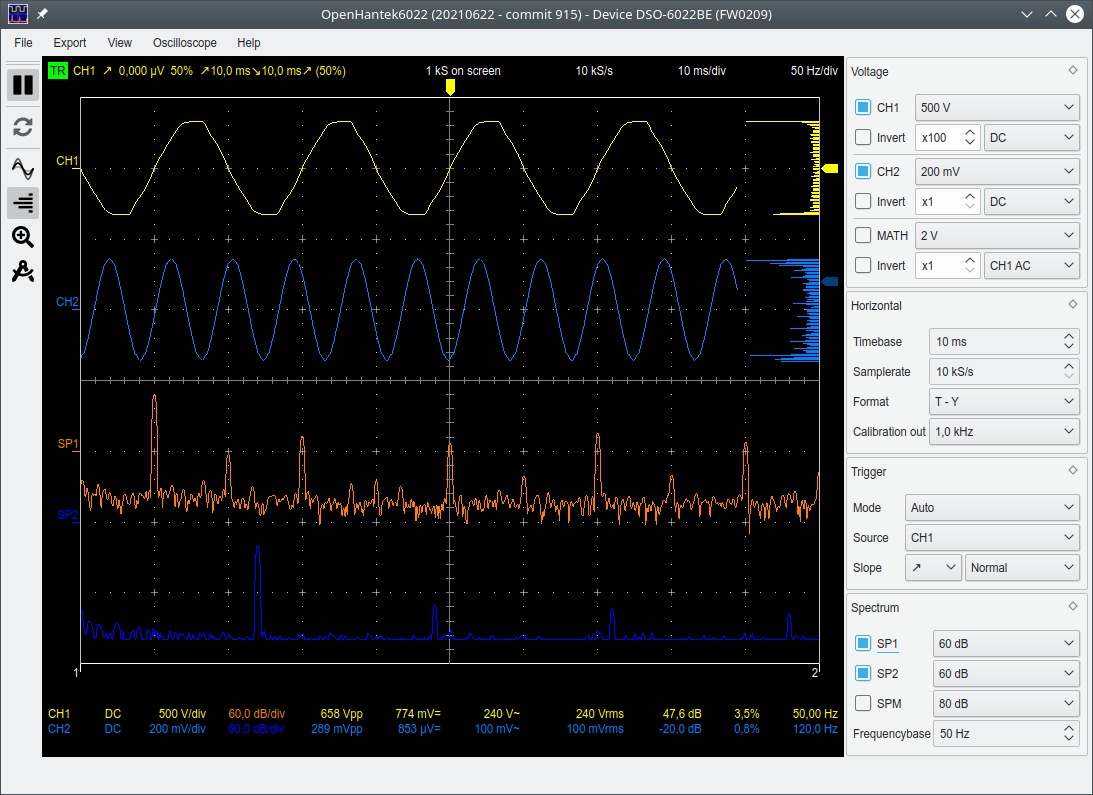
-d or --demoMode command line option.A little HW modification adds AC coupling. OpenHantek6022 supports this feature since v2.17-rc5 / FW0204.
Every commit triggers a workflow on GitHub Actions that builds and packages OpenHantek6022 for:
*_amd64.deb, *_arm64.deb, *.rpm, *.tar.gz)*_mingw_x64.zip, *_msvc_x64.zip)*_osx_arm64.dmg, *_osx_x86_64.dmg, *.tar.gz)
This status badge here (and on top) show the build status.
The preferred way to run OpenHantek6022 is to build it from source on your system, especially under Linux.
The easiest way to get an up-to-date working code base is to clone the code from here via
git clone https://github.com/OpenHantek/OpenHantek6022.git
and then build it locally, for this you will need the following software:
We have build instructions available for Linux, Raspberry Pi, FreeBSD, Apple macOS and Microsoft Windows.
For RPi4 see also issue #28.
To make building for Linux even easier, I provide two shell scripts:
LinuxSetup_AsRoot, which installs all build requirements. You only need to call this script once (as root) if you have cloned the project.LinuxBuild configures the build, builds the binary and finally creates the packages (deb, rpm and tgz) that can be installed as described in the next paragraph.If you make small changes to the local source code, it is sufficient to call make -j4 or fakeroot make -j4 package in the build directory.
 Download Linux (Ubuntu 2404 LTS), macOS (13) and Windows (MSVC2022) packages for your convenience from the Releases page.
 If you want to follow ongoing development, packages built from a fairly recent commit are available in the rolling
devdrop release.
Individual features or elements of the GUI may still change.
If you want to follow ongoing development, packages built from a fairly recent commit are available in the rolling
devdrop release.
Individual features or elements of the GUI may still change.*.deb.
The program itself and the *_amd64.deb package built on my local system is tested for completeness and correctness.
The precompiled packages are only randomly tested - if at all - and the installation of the *.rpm packages is untested.*.deb package, open a terminal window, go to the package directory and enter the command (as root) apt install ./openhantek_..._amd64.deb.
This command will automatically install all dependencies of the program as well.*.rpm packages follow similar rules, e.g. dnf install ./openhantek-...-1.x86_64.rpm.*.tar.gz achives contain the same files as the *.deb and *.rpm packages for quick testing.*.tar.gz!*_msvc_x64.zip or *_mingw_x64.zip and start OpenHantek.exe. Both archives are self-contained and need no installation; the MinGW one additionally ships the WinUSB driver files (driver/) and the documentation.workflow run and go to Artifacts.On a Linux system start the program via the menu entry OpenHantek (Digital Storage Oscilloscope) or from a terminal window as OpenHantek.
You can explore the look and feel of OpenHantek6022 without the need for real scope hardware by running it from the command line as: OpenHantek --demoMode.
Note: To use the 6022BL in scope mode, make sure the "H/P" button is pressed before plugging in.
The Hantek6022BL can either be used as oscilloscope or as logic analyzer, but not both at the same time - it is not a mixed-signal-oscilloscope (MSO). If you want to use the LA part, then sigrok is the way to go, it works (besides Linux) also for MacOS and Windows. There is no point in supporting the LA input from OpenHantek.
The oscilloscope has quite a large zero point error. To calibrate the offset quickly, simply proceed as follows:
The offset correction is now active and is also permanently saved in EEPROM or as an *.ini file when switched off.
OpenHantek6022 uses the OpenGL graphics library to display the data. It requires a graphics card that supports
3D rendering and runs on legacy HW/SW that supports at least OpenGL 2.1+ or OpenGL ES 1.2+.
OpenGL is selected by default, but if this does not work (i.e. the black scope window shows an error message
or closes immediately after startup), you can choose the less resource-hungry OpenGL ES variant as a fallback
by starting OpenHantek from the command line as follows: OpenHantek -e or OpenHantek --useGLES.
Especially on Windows, this option may be necessary to use the program.
It has been reported that the MINGW binary build on some Windows systems had problems with the graphical display and led to a black screen without traces. In these cases, the switch to the MSVC binary build can help.
Similar issues with Linux on ChromeOS (Crostini) can be solved by setting the environment variable LIBGL_ALWAYS_SOFTWARE=1 when using OpenHantek.
This could also be a solution for the above MINGW issue, see e.g. #360
and #388 - not yet confirmed.
The Raspberry Pi build uses OpenGL ES automatically, check also the graphics driver setup.
USB access for the device is required (unless using demo mode):
Starting with version 3.4.1 the program detects USB disconnections and tries to reconnect instead of terminating with an error.
Linux/Unix
You need to copy the file utils/udev_rules/60-openhantek.rules to /etc/udev/rules.d/ or /usr/lib/udev/rules.d/ and replug your device.
Note: If OpenHantek is installed from a *.deb or *.rpm package this file is installed automatically into /usr/lib/udev/rules.d/.
Windows
Caution: The original Hantek driver for Windows doesn't work!
You have to assign the correct WinUSB driver:
The signed .inf file OpenHantek.inf for all devices - provided by VictorEEV
and updated by gitguest0 -
is available in the openhantek_xxx_win_x64.zip binary distribution in directory driver.
Right-click on OpenHantek.inf and select "install" from the pull-down menu.
The Device Manager will show (under "Universal Serial Bus devices") the name and state according to the firmware loaded (e.g. Hantek 6022BE - Loader, Hantek 6022BE - OpenHantek).
The PulseView/sigrok-cli firmware is also recognized (e.g. Hantek 6022BE - Sigrok).
It is recommended to use the .inf file, but it is also possible to alternatively use the Zadig tool
and follow the good step-by-step tutorial provided by DaPa.
The scope doesn't store the firmware permanently in flash or eeprom, it must be uploaded after each power-up and is kept in ram 'til power-down. If the scope was used with a different software (old openhantek, sigrok or the windows software) the scope must be unplugged and replugged one-time before using it with OpenHantek6022 to enable the automatic loading of the correct firmware. The top line of the program must display the correct firmware version (FW0210).
I use this project mainly to explore how DSP software can improve and extend the limitations of this kind of low level hardware. It would have been easy to spend a few bucks more to buy a powerful scope - but it would be much less fun :) Please refer also to the developer info.
We welcome any reported GitHub issue if you have a problem with this software. Send us a pull request for enhancements and fixes. Some random notes:
make format or execute directly: clang-format -style=file -i *.cpp *.h.-s to append it automatically to your commit message:
git commit -s -m 'This is my good commit message'The program was initially developed by David Gräff and others on github.com/OpenHantek/openhantek, but David stopped maintaining the programm in December 2018 and I took over.
Openhantek6022 is a project where people from all over the world collaborate peacefully, regardless of where they live. If you are lucky enough to live in peace, please donate to the International Committee of the Red Cross.
571 followers · starred Oct 2023
339 followers · starred Apr 2019
94 followers · starred Nov 2023
78 followers · starred May 2019
OpenHantek6022 is a DSO software for Hantek USB digital signal oscilloscopes 6022BE / BL. Development OS is Debian Linux, but the program also works on FreeBSD, MacOS, RaspberryPi and Windows. No support for non-Linux related issues unless a volunteer steps in!
C++
1,132
1,084 commits
updated Oct 11, 2026
OpenHantek6022 is a free software for Hantek DSO6022 USB digital signal oscilloscopes that is actively developed on github.com/OpenHantek/OpenHantek6022 - but only for Hantek 6022BE/BL and compatible scopes (Voltcraft, Darkwire, Protek, Acetech, etc.).
This project gives no support for its currently unmaintained predecessor openhantek.
-d or --demoMode command line option.A little HW modification adds AC coupling. OpenHantek6022 supports this feature since v2.17-rc5 / FW0204.
Every commit triggers a workflow on GitHub Actions that builds and packages OpenHantek6022 for:
*_amd64.deb, *_arm64.deb, *.rpm, *.tar.gz)*_mingw_x64.zip, *_msvc_x64.zip)*_osx_arm64.dmg, *_osx_x86_64.dmg, *.tar.gz)
This status badge here (and on top) show the build status.
The preferred way to run OpenHantek6022 is to build it from source on your system, especially under Linux.
The easiest way to get an up-to-date working code base is to clone the code from here via
git clone https://github.com/OpenHantek/OpenHantek6022.git
and then build it locally, for this you will need the following software:
We have build instructions available for Linux, Raspberry Pi, FreeBSD, Apple macOS and Microsoft Windows.
For RPi4 see also issue #28.
To make building for Linux even easier, I provide two shell scripts:
LinuxSetup_AsRoot, which installs all build requirements. You only need to call this script once (as root) if you have cloned the project.LinuxBuild configures the build, builds the binary and finally creates the packages (deb, rpm and tgz) that can be installed as described in the next paragraph.If you make small changes to the local source code, it is sufficient to call make -j4 or fakeroot make -j4 package in the build directory.
Download Linux (Ubuntu 2404 LTS), macOS (13) and Windows (MSVC2022) packages for your convenience from the Releases page.
If you want to follow ongoing development, packages built from a fairly recent commit are available in the rolling
devdrop release.
Individual features or elements of the GUI may still change.*.deb.
The program itself and the *_amd64.deb package built on my local system is tested for completeness and correctness.
The precompiled packages are only randomly tested - if at all - and the installation of the *.rpm packages is untested.*.deb package, open a terminal window, go to the package directory and enter the command (as root) apt install ./openhantek_..._amd64.deb.
This command will automatically install all dependencies of the program as well.*.rpm packages follow similar rules, e.g. dnf install ./openhantek-...-1.x86_64.rpm.*.tar.gz achives contain the same files as the *.deb and *.rpm packages for quick testing.*.tar.gz!*_msvc_x64.zip or *_mingw_x64.zip and start OpenHantek.exe. Both archives are self-contained and need no installation; the MinGW one additionally ships the WinUSB driver files (driver/) and the documentation.workflow run and go to Artifacts.On a Linux system start the program via the menu entry OpenHantek (Digital Storage Oscilloscope) or from a terminal window as OpenHantek.
You can explore the look and feel of OpenHantek6022 without the need for real scope hardware by running it from the command line as: OpenHantek --demoMode.
Note: To use the 6022BL in scope mode, make sure the "H/P" button is pressed before plugging in.
The Hantek6022BL can either be used as oscilloscope or as logic analyzer, but not both at the same time - it is not a mixed-signal-oscilloscope (MSO). If you want to use the LA part, then sigrok is the way to go, it works (besides Linux) also for MacOS and Windows. There is no point in supporting the LA input from OpenHantek.
The oscilloscope has quite a large zero point error. To calibrate the offset quickly, simply proceed as follows:
The offset correction is now active and is also permanently saved in EEPROM or as an *.ini file when switched off.
OpenHantek6022 uses the OpenGL graphics library to display the data. It requires a graphics card that supports
3D rendering and runs on legacy HW/SW that supports at least OpenGL 2.1+ or OpenGL ES 1.2+.
OpenGL is selected by default, but if this does not work (i.e. the black scope window shows an error message
or closes immediately after startup), you can choose the less resource-hungry OpenGL ES variant as a fallback
by starting OpenHantek from the command line as follows: OpenHantek -e or OpenHantek --useGLES.
Especially on Windows, this option may be necessary to use the program.
It has been reported that the MINGW binary build on some Windows systems had problems with the graphical display and led to a black screen without traces. In these cases, the switch to the MSVC binary build can help.
Similar issues with Linux on ChromeOS (Crostini) can be solved by setting the environment variable LIBGL_ALWAYS_SOFTWARE=1 when using OpenHantek.
This could also be a solution for the above MINGW issue, see e.g. #360
and #388 - not yet confirmed.
The Raspberry Pi build uses OpenGL ES automatically, check also the graphics driver setup.
USB access for the device is required (unless using demo mode):
Starting with version 3.4.1 the program detects USB disconnections and tries to reconnect instead of terminating with an error.
Linux/Unix
You need to copy the file utils/udev_rules/60-openhantek.rules to /etc/udev/rules.d/ or /usr/lib/udev/rules.d/ and replug your device.
Note: If OpenHantek is installed from a *.deb or *.rpm package this file is installed automatically into /usr/lib/udev/rules.d/.
Windows
Caution: The original Hantek driver for Windows doesn't work!
You have to assign the correct WinUSB driver:
The signed .inf file OpenHantek.inf for all devices - provided by VictorEEV
and updated by gitguest0 -
is available in the openhantek_xxx_win_x64.zip binary distribution in directory driver.
Right-click on OpenHantek.inf and select "install" from the pull-down menu.
The Device Manager will show (under "Universal Serial Bus devices") the name and state according to the firmware loaded (e.g. Hantek 6022BE - Loader, Hantek 6022BE - OpenHantek).
The PulseView/sigrok-cli firmware is also recognized (e.g. Hantek 6022BE - Sigrok).
It is recommended to use the .inf file, but it is also possible to alternatively use the Zadig tool
and follow the good step-by-step tutorial provided by DaPa.
The scope doesn't store the firmware permanently in flash or eeprom, it must be uploaded after each power-up and is kept in ram 'til power-down. If the scope was used with a different software (old openhantek, sigrok or the windows software) the scope must be unplugged and replugged one-time before using it with OpenHantek6022 to enable the automatic loading of the correct firmware. The top line of the program must display the correct firmware version (FW0210).
I use this project mainly to explore how DSP software can improve and extend the limitations of this kind of low level hardware. It would have been easy to spend a few bucks more to buy a powerful scope - but it would be much less fun :) Please refer also to the developer info.
We welcome any reported GitHub issue if you have a problem with this software. Send us a pull request for enhancements and fixes. Some random notes:
make format or execute directly: clang-format -style=file -i *.cpp *.h.-s to append it automatically to your commit message:
git commit -s -m 'This is my good commit message'The program was initially developed by David Gräff and others on github.com/OpenHantek/openhantek, but David stopped maintaining the programm in December 2018 and I took over.
Openhantek6022 is a project where people from all over the world collaborate peacefully, regardless of where they live. If you are lucky enough to live in peace, please donate to the International Committee of the Red Cross.
571 followers · starred Oct 2023
339 followers · starred Apr 2019
94 followers · starred Nov 2023
78 followers · starred May 2019