Turn paper/text/topic into editable research figures, technical route diagrams, and presentation slides.
See the codeThe next-generation AI Office workspace from Paper2Any
Give an Agent a goal, your files, and a few constraints. Get back editable PowerPoint, Excel, Word, and visual assets in one persistent workspace.


English | 中文

Click the animated banner to open Nexus Office. Create editable PPTX, XLSX, DOCX, and AI visuals in the live workspace.
[!IMPORTANT] Repository status: legacy open-source snapshot. This repository preserves the original Apache-2.0 Paper2Any codebase, but it no longer receives new product features or architecture updates. The actively developed product is Nexus Office, rebuilt on a new stack and available as a hosted service. The hosted/commercial implementation is not included in this repository.
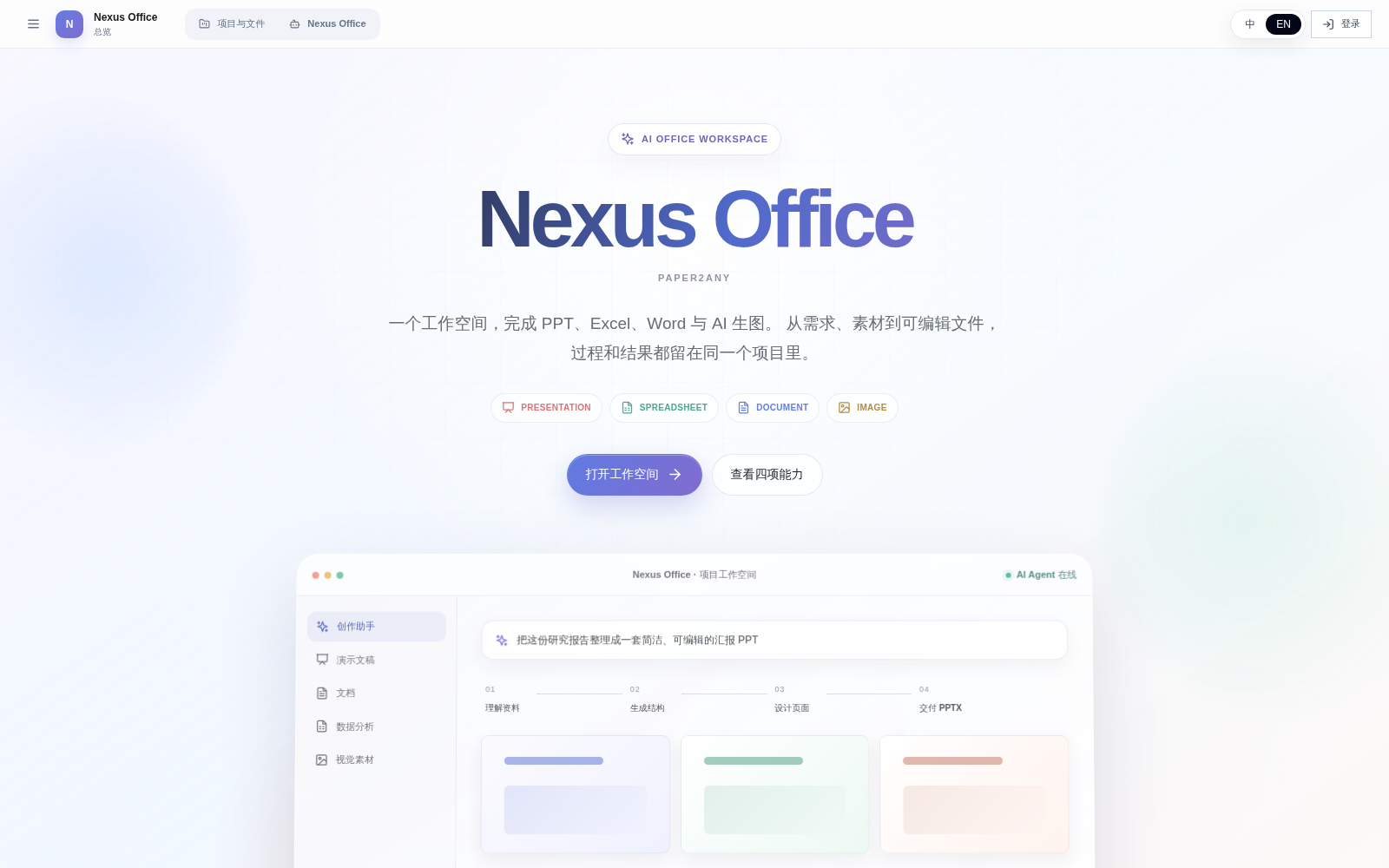
Nexus Office keeps the useful idea behind Paper2Any -- hand a complex document task to an Agent -- but focuses the product on everyday Office delivery instead of adding more isolated paper workflows.
| PowerPoint | Excel | Word | AI Visual Canvas |
|---|---|---|---|
| Create, rebuild, restyle, edit selected slides, apply a company template, and deliver native PPTX | Clean data, write formulas, merge sheets, build charts, and deliver editable XLSX | Turn notes and source files into structured reports, summaries, and editable DOCX | Generate, mask, cut out, reference, combine, and reuse visual elements |
All examples below come from real end-to-end runs. They are not static mockups: the Office files were structurally checked, rendered, and opened in the browser workspace.
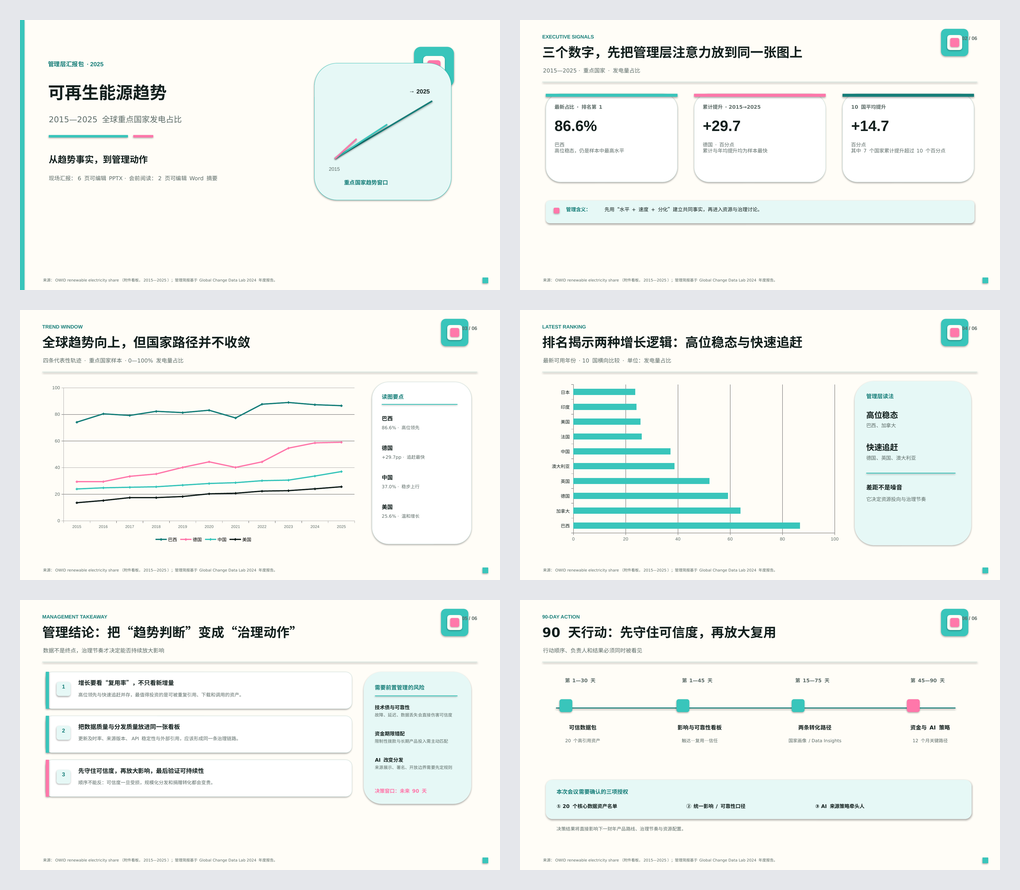
The Agent keeps the facts, numbers, charts, and page order from the content deck, while rebuilding the presentation with the visual language of the supplied template. The result remains natively editable.
Excel: data to an editable analysis dashboard7,585 public records become four connected sheets, 228 formulas, KPI cards, a trend chart, a ranking chart, and an insight summary. 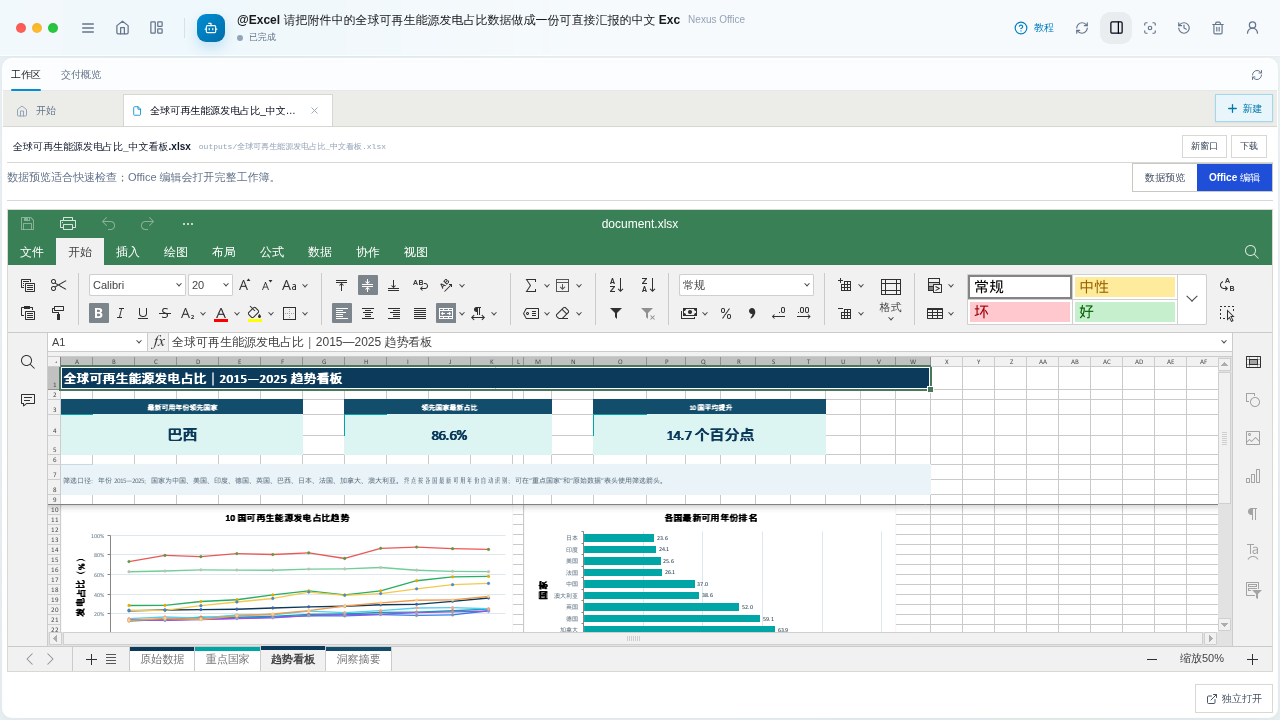
|
Word: rough meeting notes to a formal reportThe Agent extracts conclusions, metrics, discussion topics, owners, actions, and risks into a four-page DOCX that is ready to edit and archive. 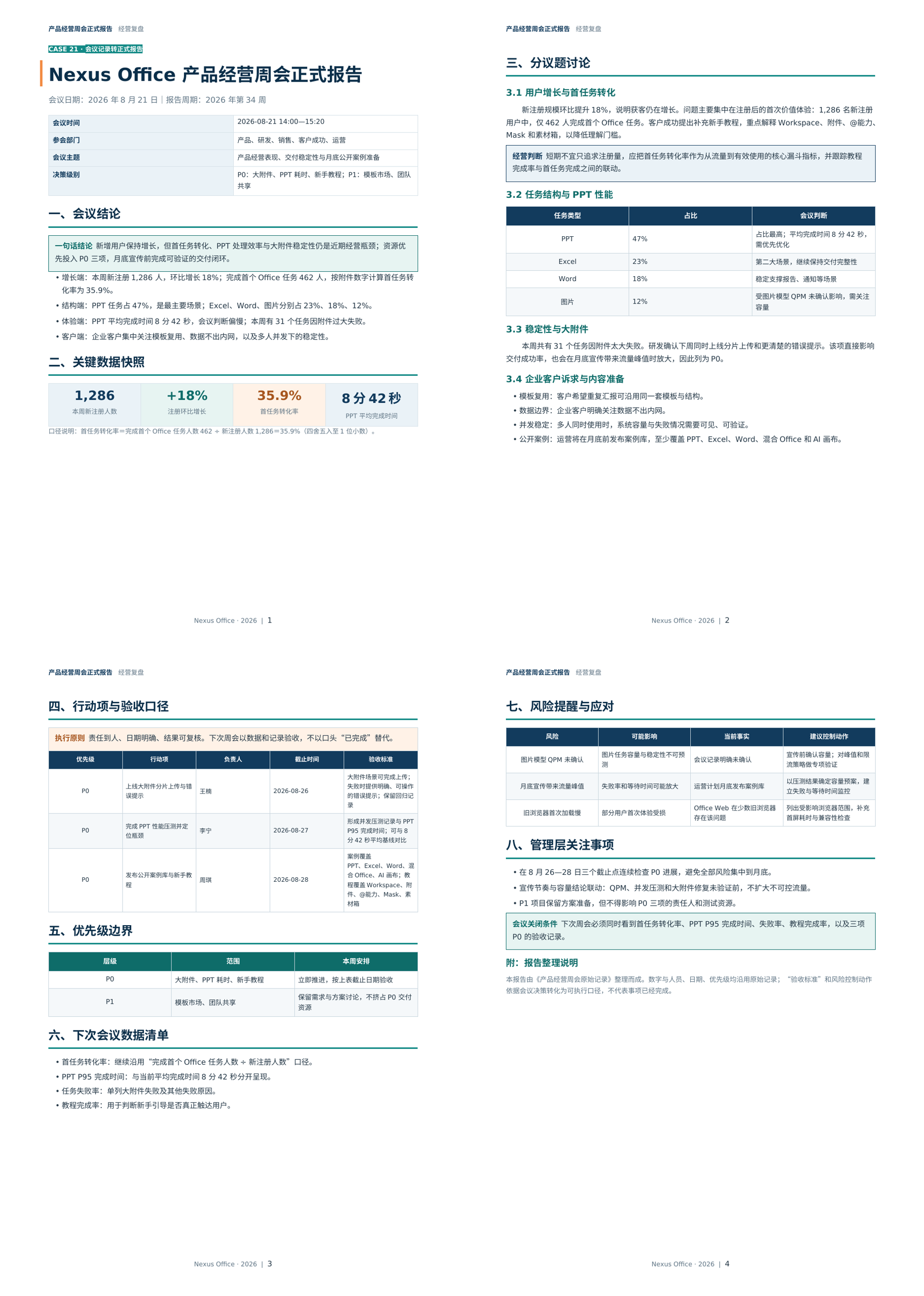
|
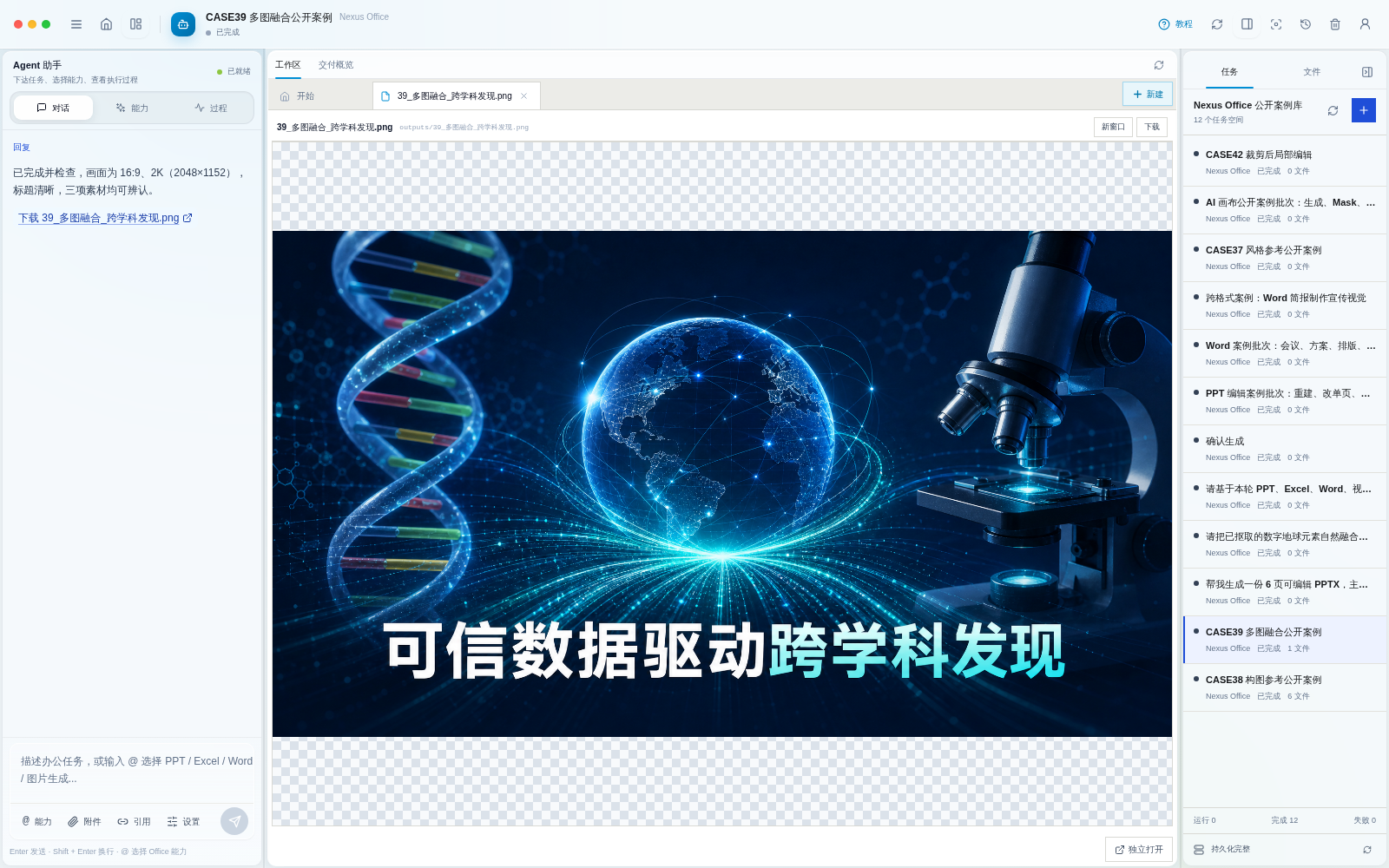
Select an object with local interactive segmentation, save it as a transparent asset, reference multiple canvas images in the prompt, and let the image model rebuild them into one coherent visual.
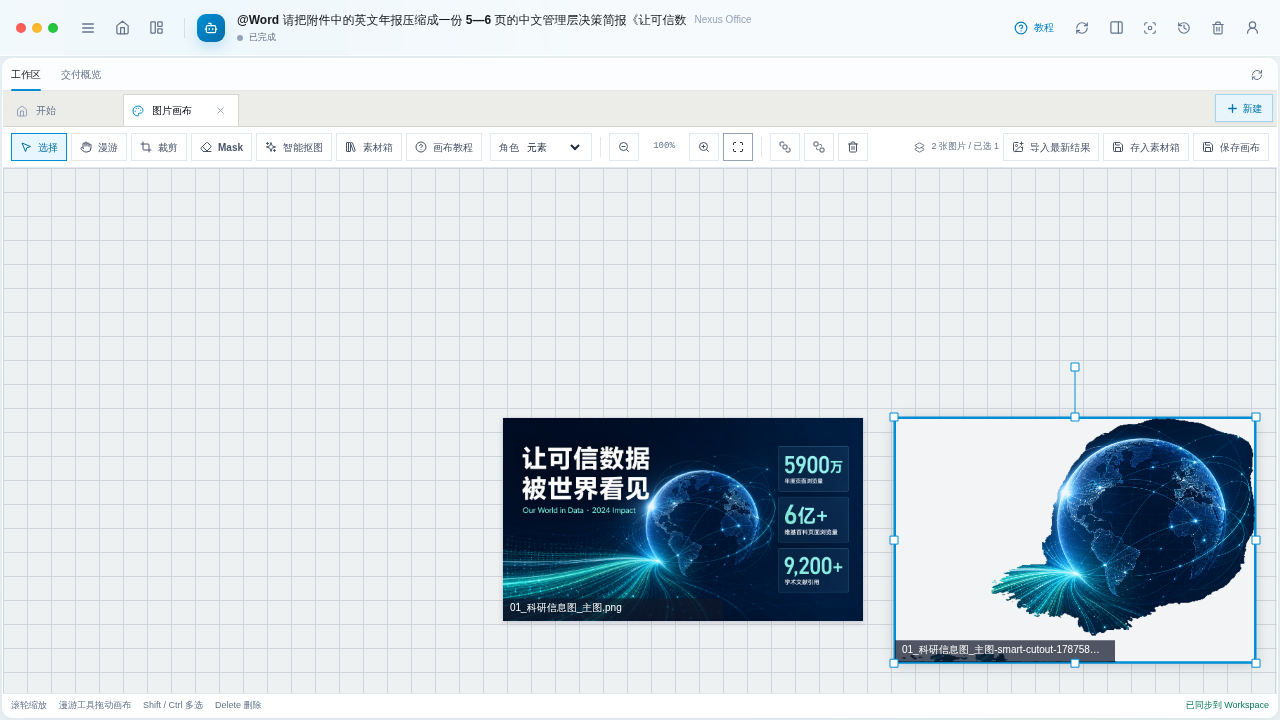
Click-to-cutout runs locally in the browser and does not consume image-generation credits. |

DNA, a transparent digital globe, and a microscope are recomposed with consistent lighting and perspective. |
Goal + source files
        -> Agent chooses the Office and visual tools
        -> editable PPTX / XLSX / DOCX / PNG
        -> structural checks and visual review
        -> open, revise, and continue in the same Workspace
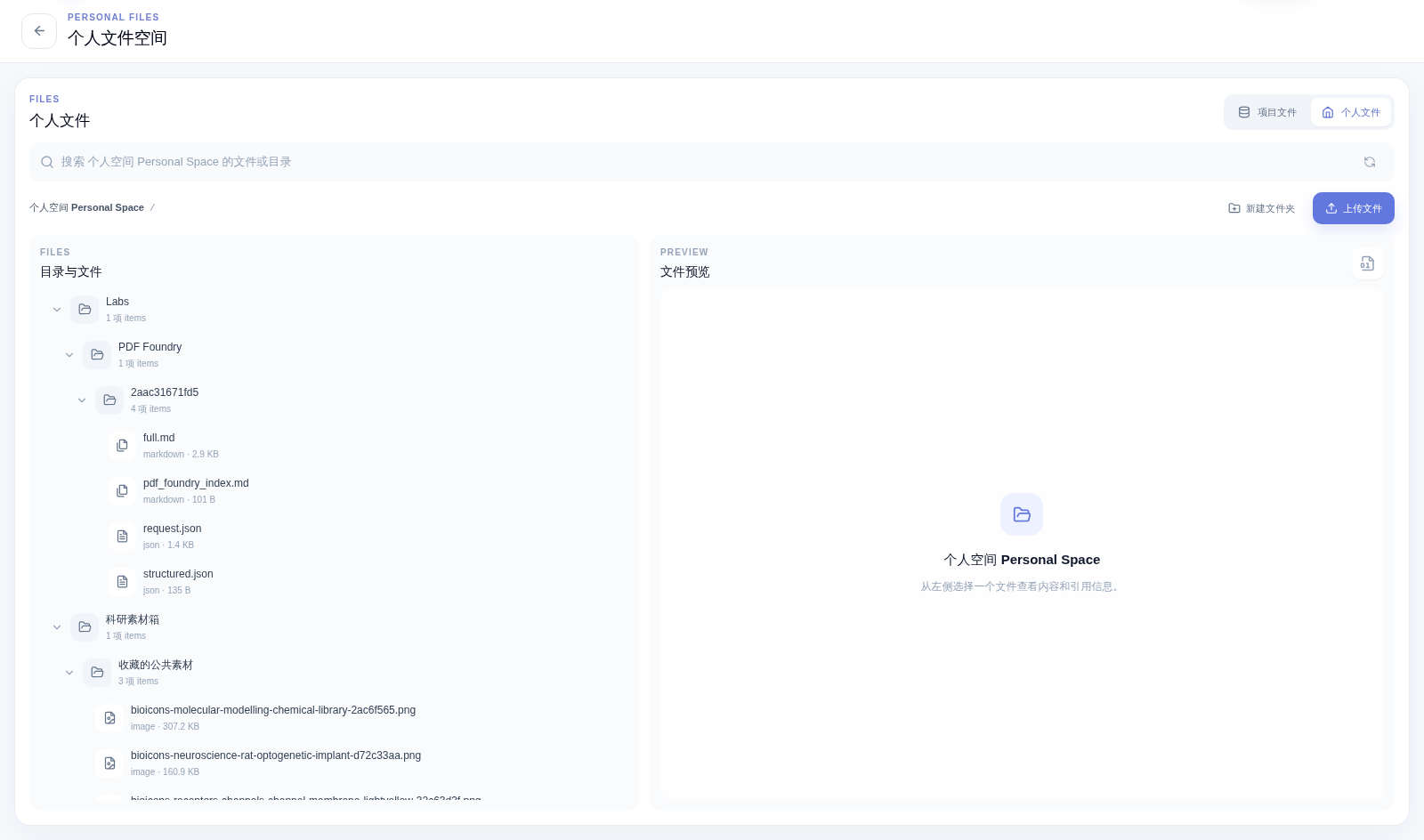
The same Workspace retains the conversation, execution trace, source files, deliverables, and follow-up edits. Users do not need to understand individual Skill names before starting.
| This repository | Nexus Office | |
|---|---|---|
| Positioning | Original paper-oriented Paper2Any codebase | AI-native Office workspace |
| Scope | Historical paper, figure, diagram, and presentation workflows | PowerPoint, Excel, Word, and AI visual creation/editing |
| Development status | Legacy snapshot; no new architecture or feature synchronization | Actively developed hosted product |
| Source availability | Apache-2.0 source code in this repository | Hosted/commercial implementation is not distributed here |
| Entry point | Continue reading the archived documentation below | Open Nexus Office |
[!NOTE] The Apache License 2.0 applies only to the code and assets distributed in this repository. It does not apply to the hosted Nexus Office implementation.

|
ZCloudAPIThanks to ZCloudAPI for providing API resource sponsorship for Nexus Office's online demos and capability evaluation. |
The original setup guide, feature catalog, screenshots, roadmap, and contribution notes remain available below for reproducibility and historical reference. They describe the legacy open-source implementation, not the hosted Nexus Office product.
[!IMPORTANT] 🆕 2026-06-13 · Paper to Any Studio / Nexus Upgrade
The online version is being upgraded to the new Paper to Any Studio experience, with a unified Studio workspace, Spaces for personal/project/team files, Labs apps, online Office previews, Credits visibility, and cleaner long-running workflows.
🌐 New public entry: https://paper2any-studio.cpolar.cn/
💻 Mac desktop releases: Paper2Any-Desktop-Releases · public DMG artifacts only; source code remains private/commercial.
⚠️ The public entry is a hosted Studio / Nexus experience and is not identical to the open-source code in this repository. The commercial Studio implementation is not fully open-sourced here.
📢 Full update notice: Paper to Any Studio New Version Update Notice
[!TIP] 🆕 2026-05-30 · Editable PPT Workflow Consolidation
The latest frontend editable PPT workflow is now integrated into Paper2Any, combining outline-assisted generation, canvas editing, gallery review, and paper / AI image insertion into editable decks.
HTML-based editable PPTX export and ONLYOFFICE online editing remain available as optional layers on top of the main editable export workflow.
[!TIP] 🆕 2026-04-24 · Image Model Playground Upgrade
Added a new Image Model Playground page for managed image generation across Nano Banana 2 / Nano Banana Pro / Image 2 / Image 2 All.
The workflow now supports language control, model-specific generation options, batch generation (1 / 2 / 4 / 8 / 16), compressed thumbnail previews, and one-click batch download.
[!TIP] 🆕 2026-04-15 · 2026 Paper Updates
Two Paper2Any-related papers are now listed in the 2026 cycle:
Paper2SysArch: Structure-Constrained System Architecture Generation from Scientific Papers · CVPR 2026 Findings
SciFlow-Bench: Evaluating Structure-Aware Scientific Diagram Generation via Inverse Parsing · ACL 2026 MainBibTeX
@article{guo2025paper2sysarch,
  title   = {Paper2SysArch: Structure-Constrained System Architecture Generation from Scientific Papers},
  author  = {Guo, Ziyi and Liu, Zhou and Zhang, Wentao},
  journal = {arXiv preprint arXiv:2511.18036},
  year    = {2025},
  note    = {CVPR 2026 Findings}
}

@article{zhang2026sciflowbench,
  title   = {SciFlow-Bench: Evaluating Structure-Aware Scientific Diagram Generation via Inverse Parsing},
  author  = {Zhang, Tong and Lin, Honglin and Liu, Zhou and Chen, Chong and Zhang, Wentao},
  journal = {arXiv preprint arXiv:2602.09809},
  year    = {2026},
  note    = {ACL 2026 Main}
}
[!TIP] 🆕 2026-03-28 · Editable PPT Showcase Refresh
Added two new editable PPT showcase screenshots for the frontend-deck workflow:
a generated multi-slide gallery view and the canvas editing workspace with deck theme lock.
[!TIP] 🆕 2026-03-26 · Workflow Showcase Update
Added showcase coverage for Paper2Video, Paper2Poster, and Paper2Citation.
The README now includes a compressed video demo plus refreshed English/Chinese workflow previews.
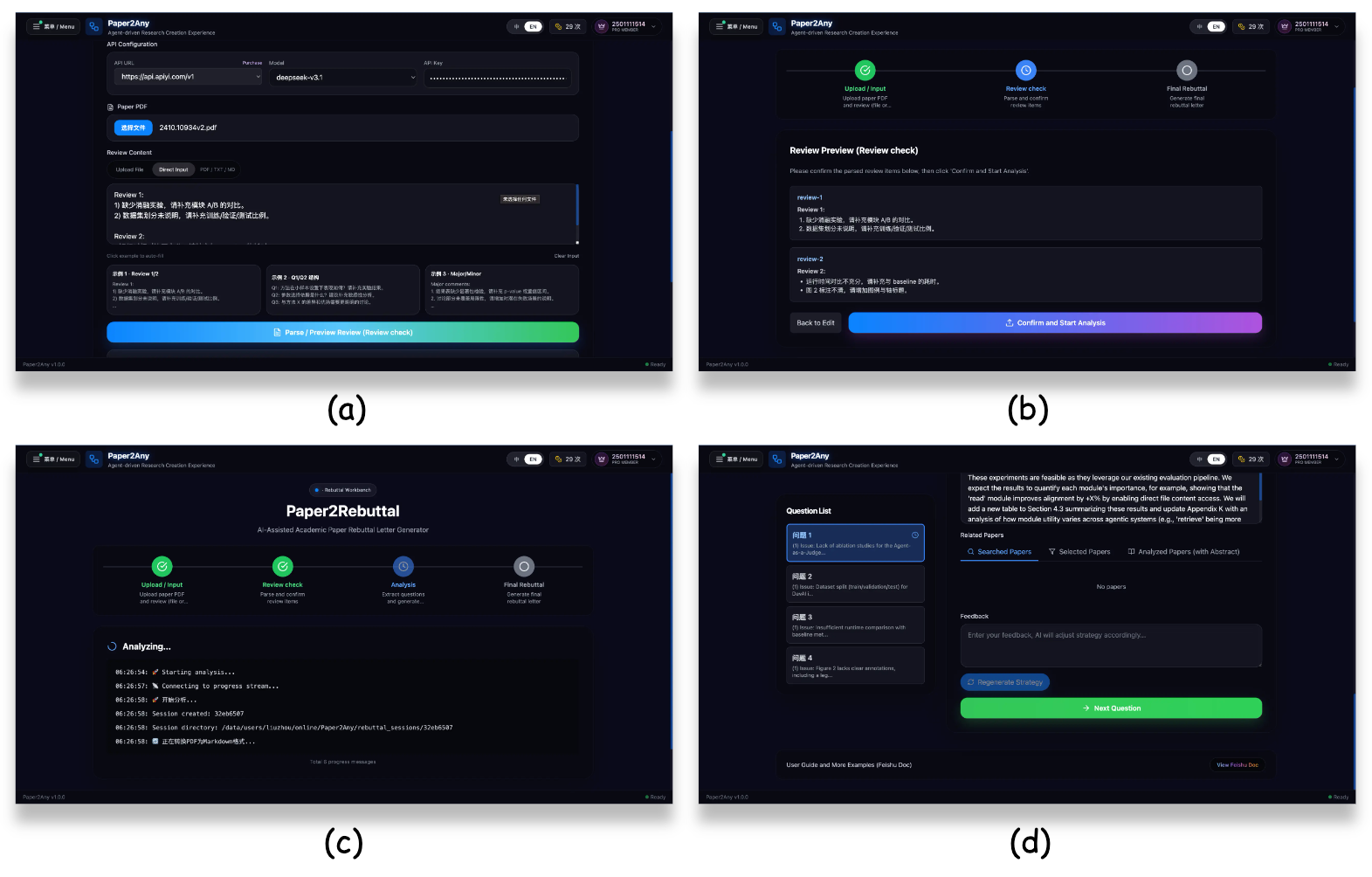
[!TIP] 🆕 2026-02-02 · Paper2Rebuttal
Added rebuttal drafting support with structured response guidance and image-aware revision prompts.
[!TIP] 🆕 2026-01-28 · Drawio Update
Added Drawio support for visual diagram creation and showcase-ready outputs in the workflow.
KB updates in one line: multi-file PPT generation with doc convert/merge, optional image injection, and embedding-assisted retrieval.
[!TIP] 🆕 2026-01-25 · New Features
Added AI-assisted outline editing, three-layer model configuration system for flexible model selection, and user points management with daily quota allocation.
🌐 Online Demo: https://paper2any-studio.cpolar.cn/
[!TIP] 🆕 2026-01-20 · Bug Fixes
Fixed bugs in experimental plot generation (image/text) and resolved the missing historical files issue.
🌐 Online Demo: https://paper2any-studio.cpolar.cn/
[!TIP] 🆕 2026-01-14 · Feature Updates & Backend Architecture Upgrade
- Feature Updates: Added Image2PPT, optimized Paper2Figure interaction, and improved PDF2PPT effects.
- Standardized API: Refactored backend interfaces with RESTful
/api/v1/structure, removing obsolete endpoints for better maintainability.- Dynamic Configuration: Supported dynamic model selection (e.g., GPT-4o, Qwen-VL) via API parameters, eliminating hardcoded model dependencies.
🌐 Online Demo: https://paper2any-studio.cpolar.cn/
0.1.0From paper PDFs / images / text to editable scientific figures, slide decks, video scripts, academic posters, and other multimodal content in one click.
Paper2Any currently includes the following sub-capabilities:
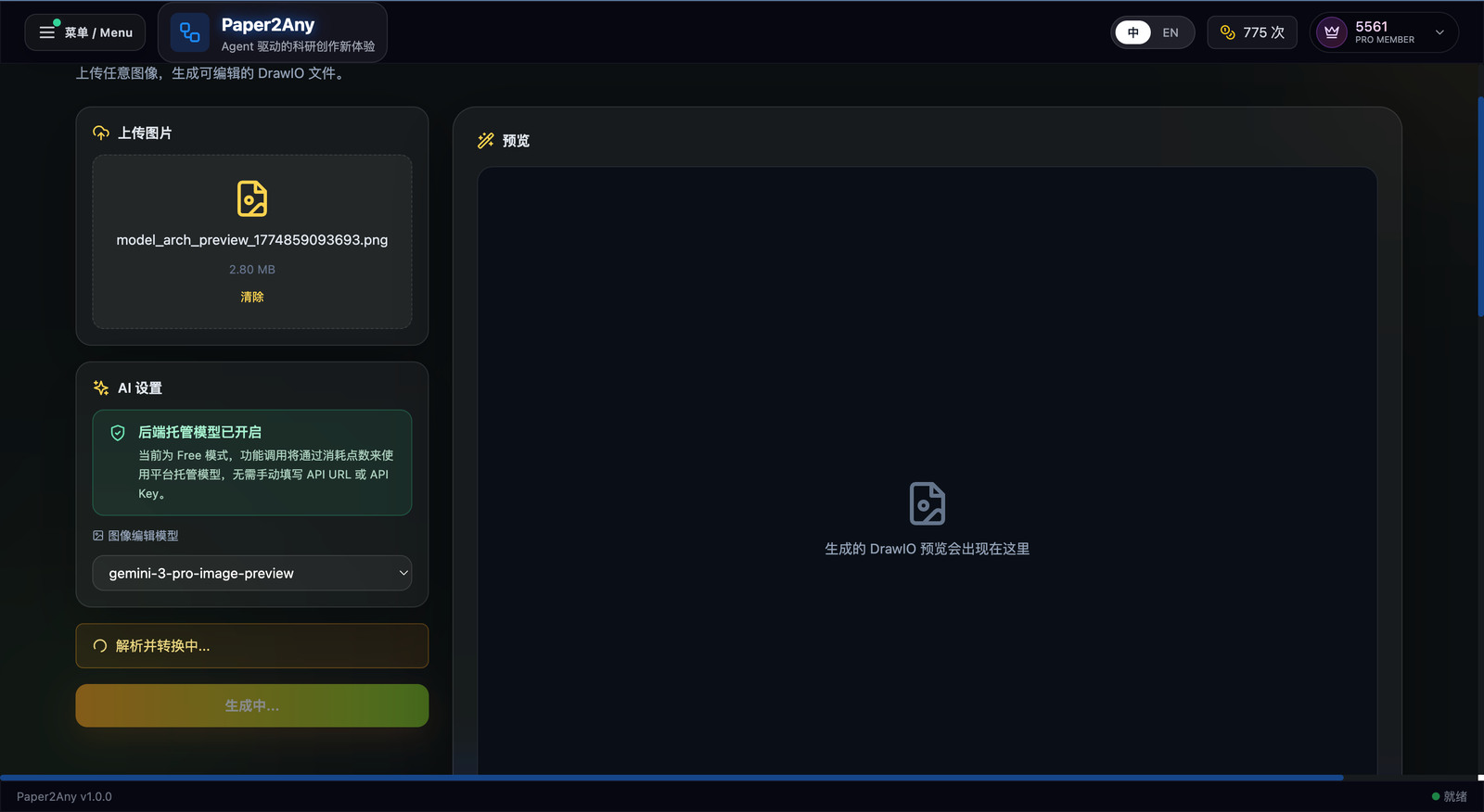
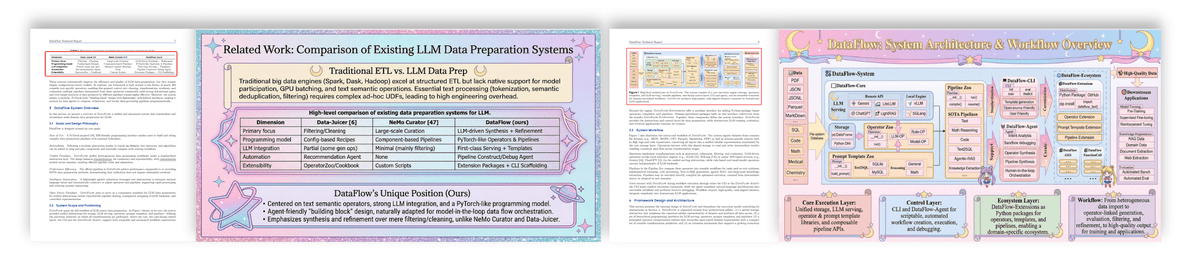
✨ Upload a paper figure or screenshot as the starting point |
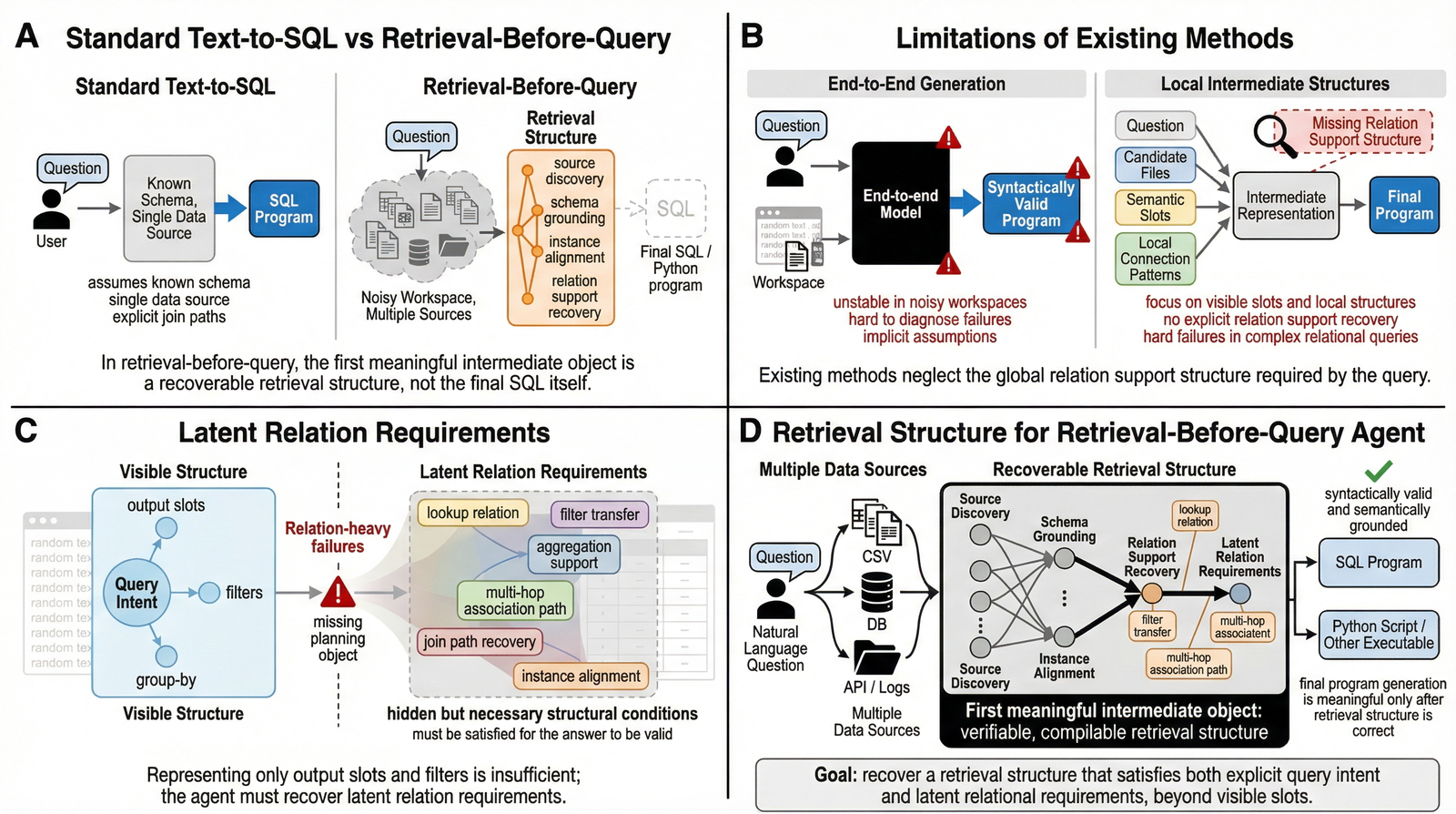
✨ Keep the source structure visible before conversion |
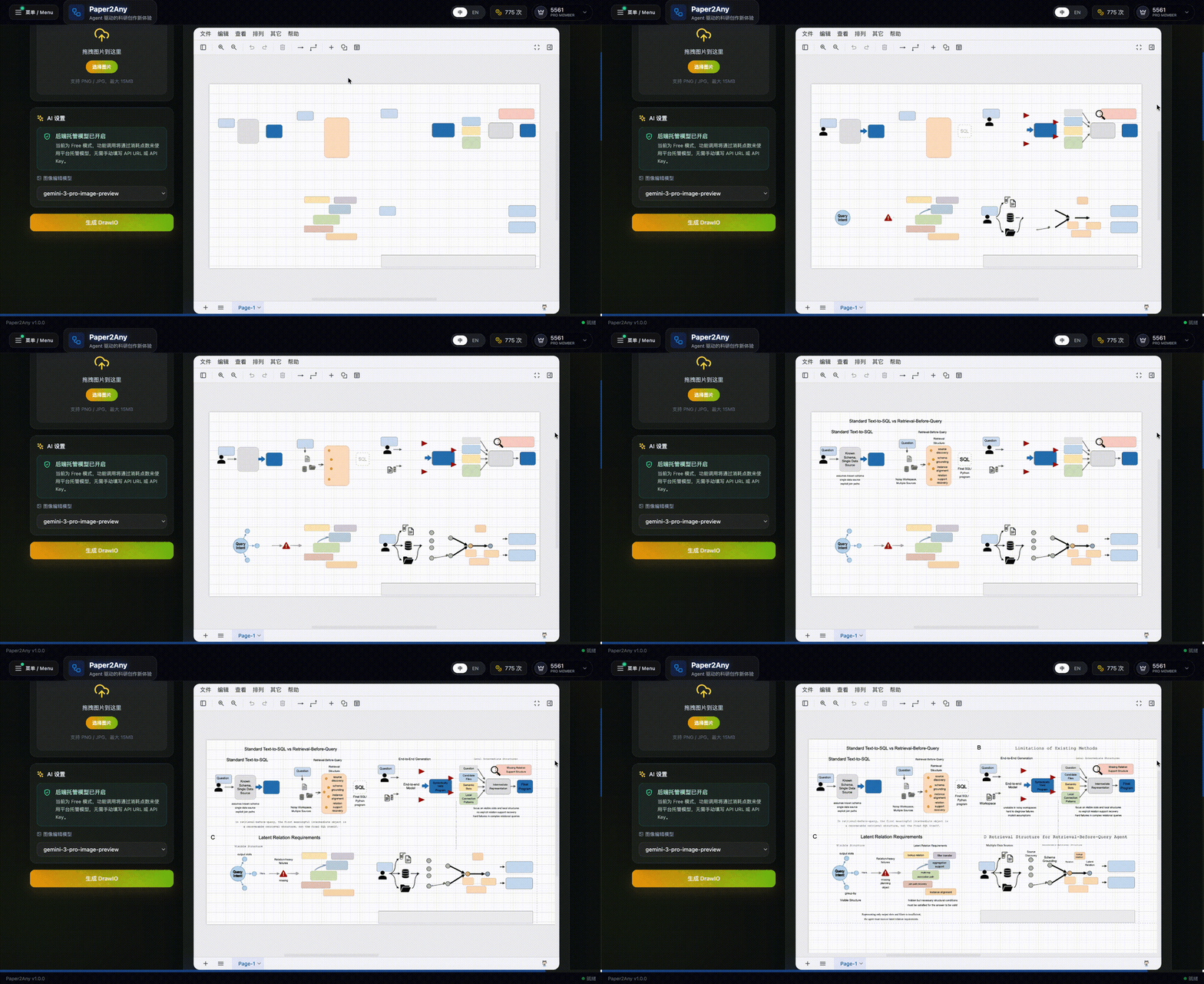
✨ Convert the image into an editable DrawIO canvas |
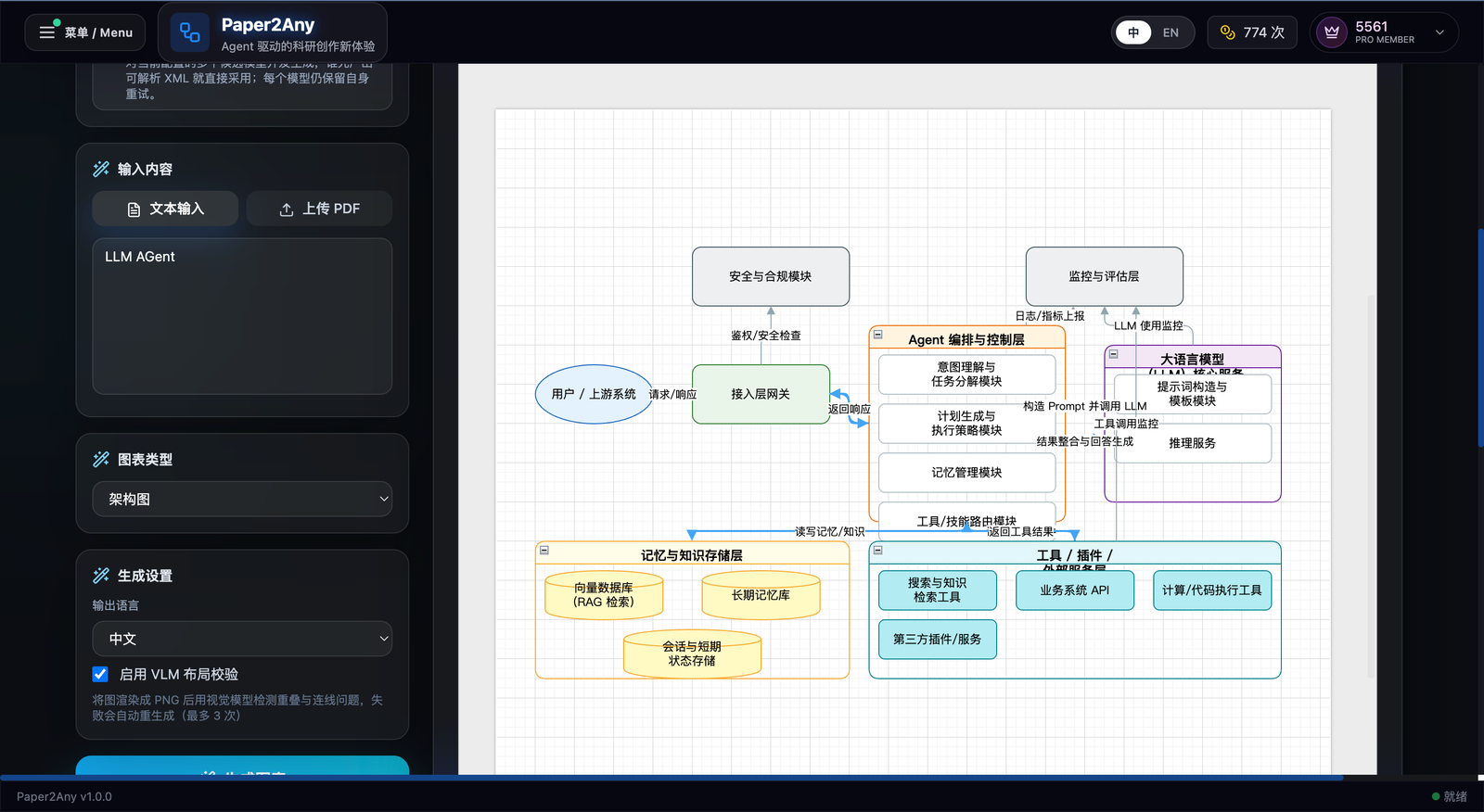
✨ Generate a model or system diagram directly inside the DrawIO workbench |
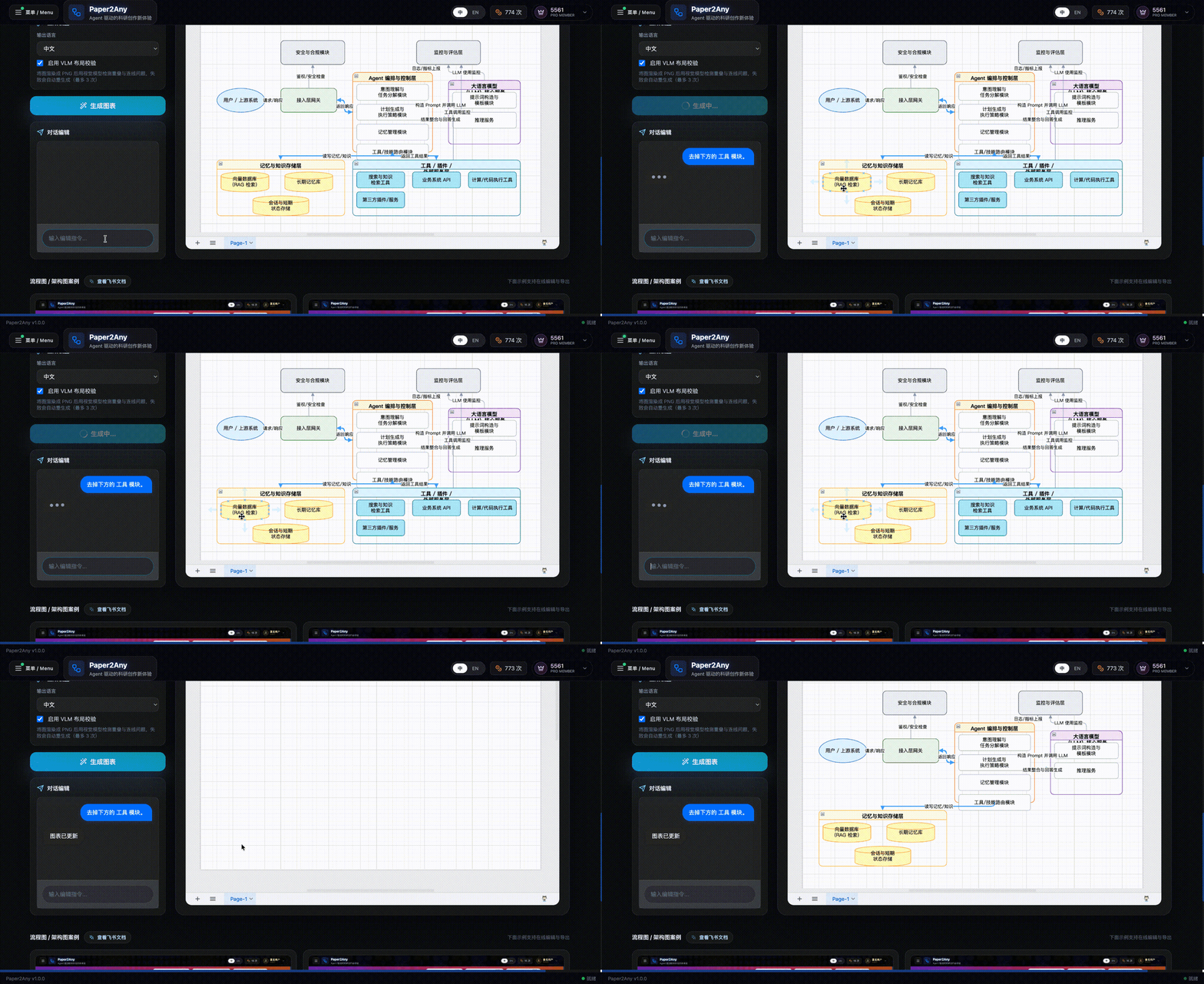
✨ Refine the generated architecture with chat editing and export-ready layout |
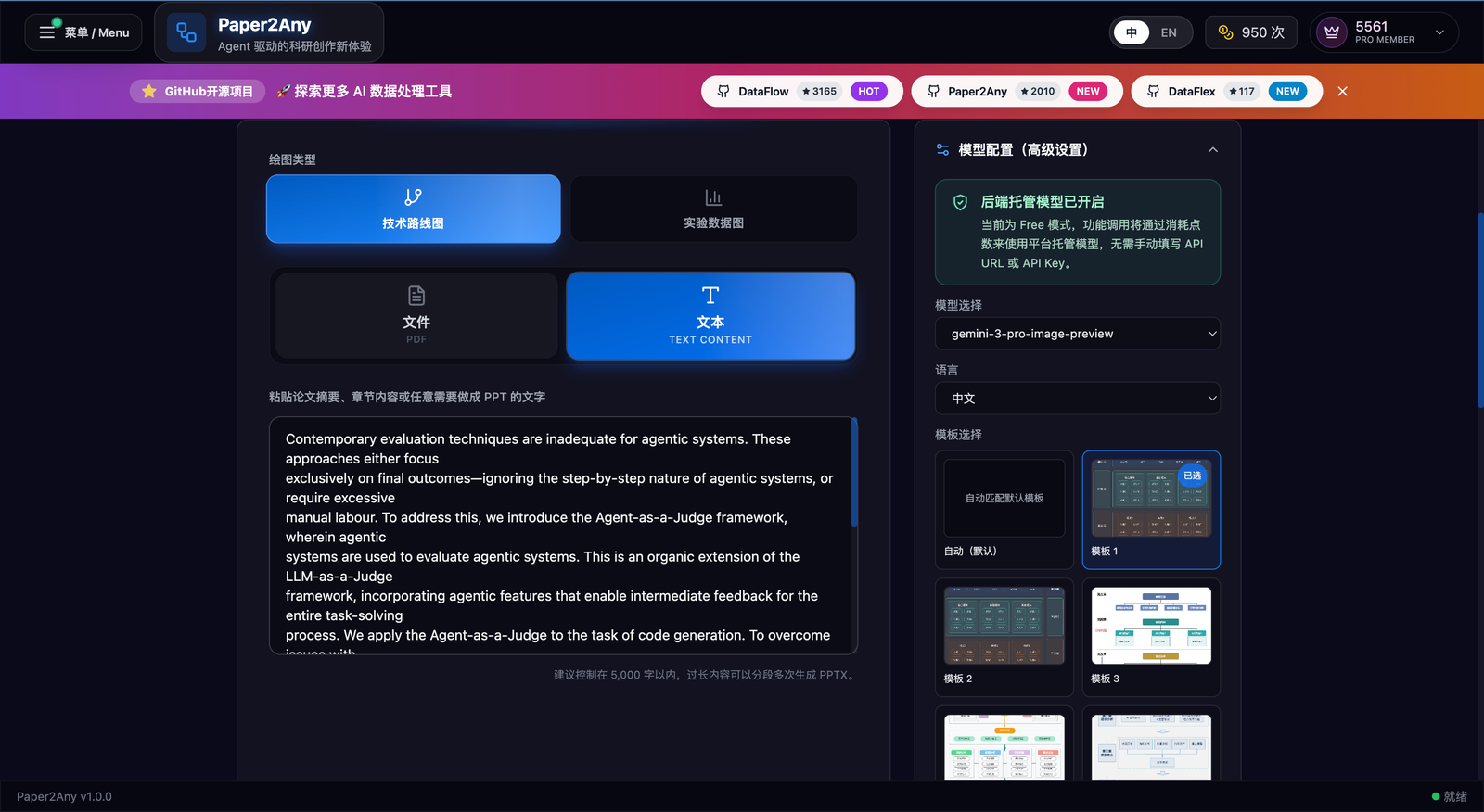
✨ Technical roadmap workbench: choose route type, input source, model config, and visual template |
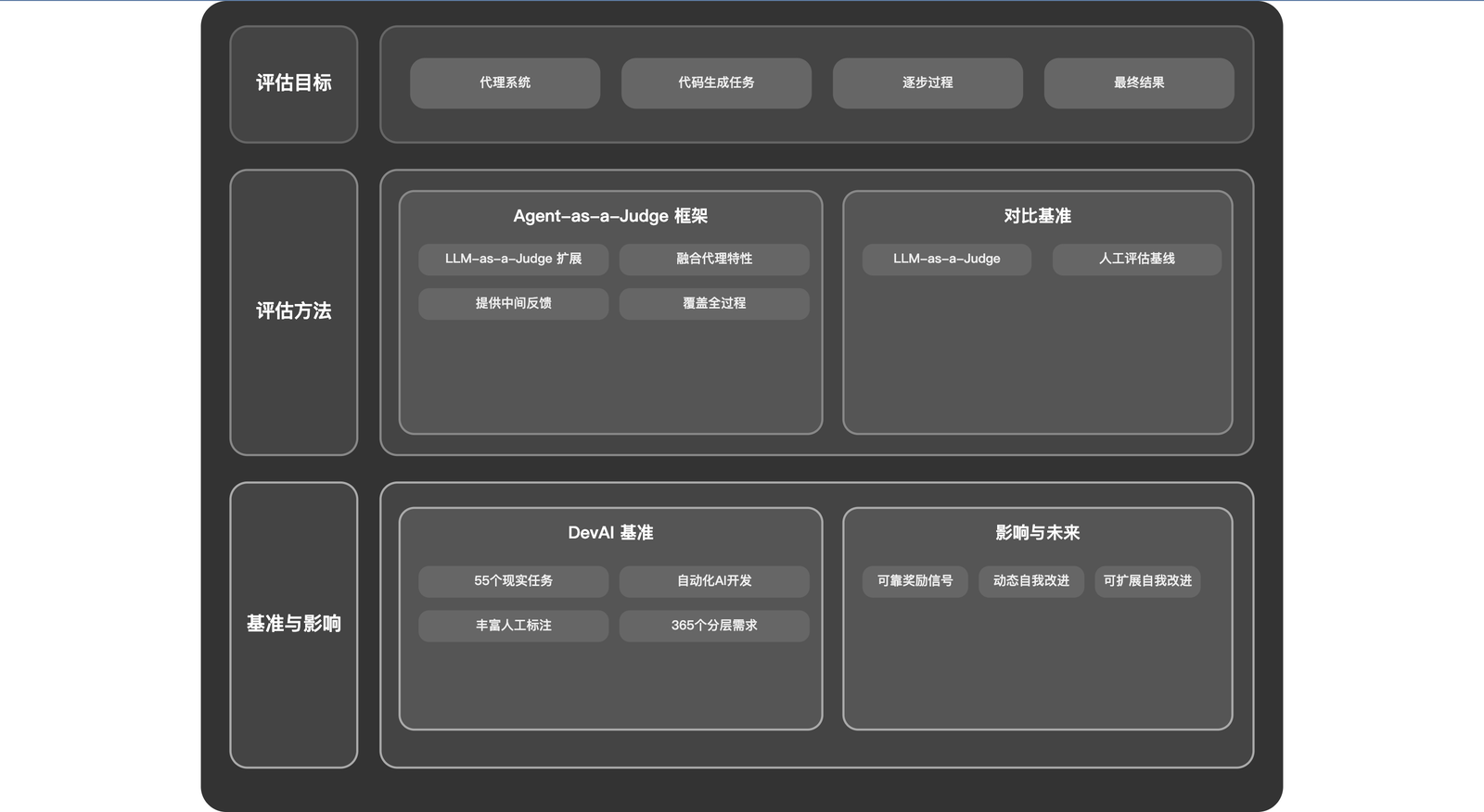
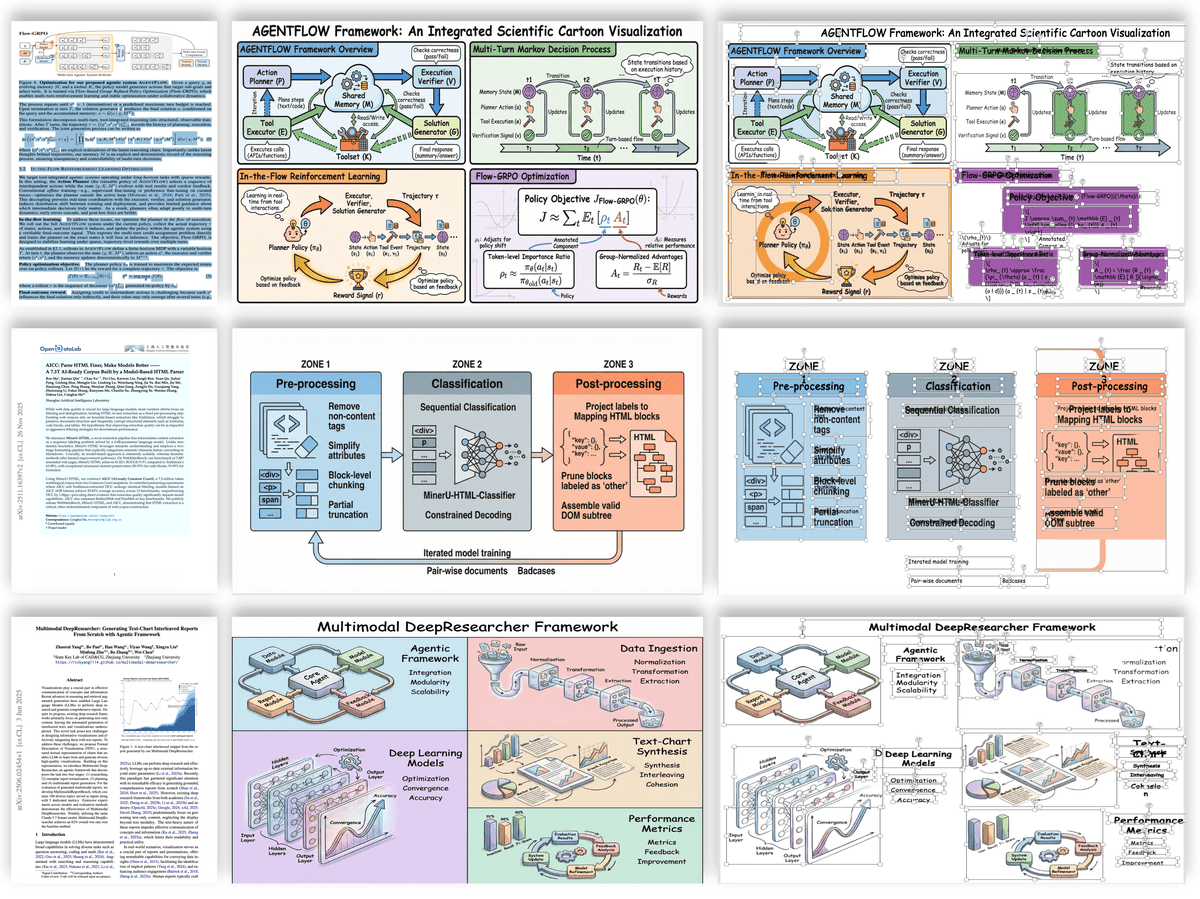
✨ Generated technical roadmap figure with structured dual-column layout |
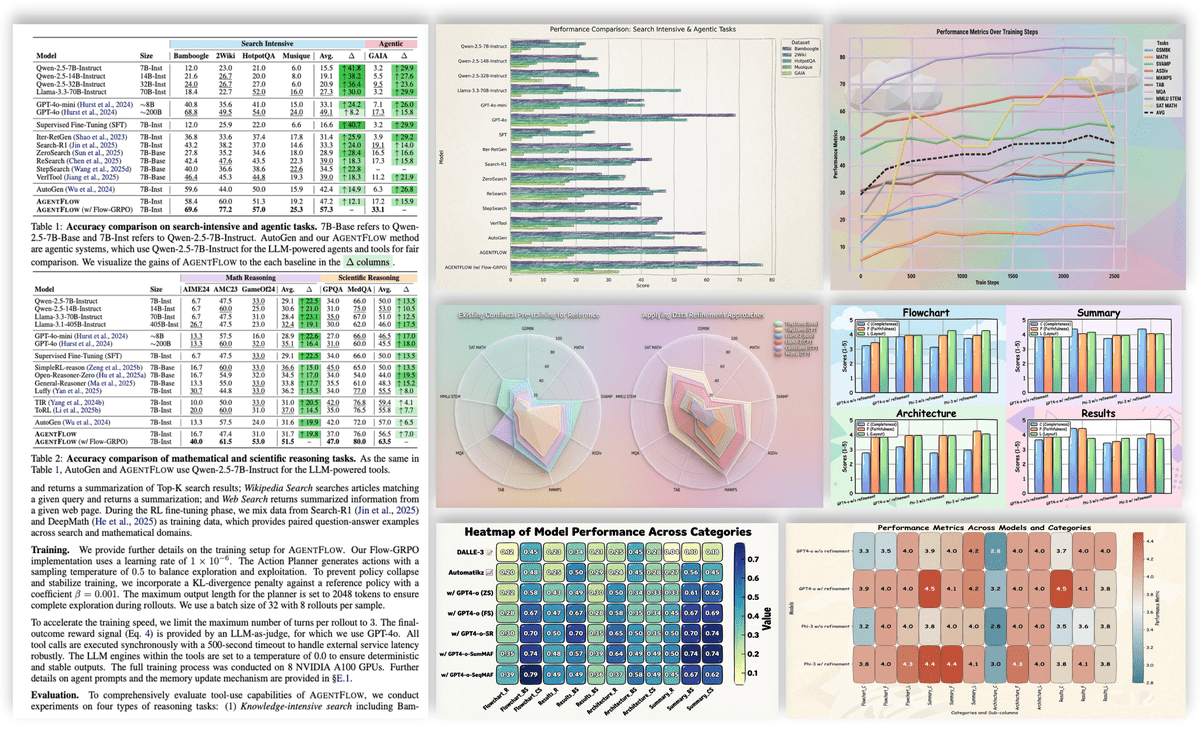
✨ Experimental Plot Generation (Multiple Styles)
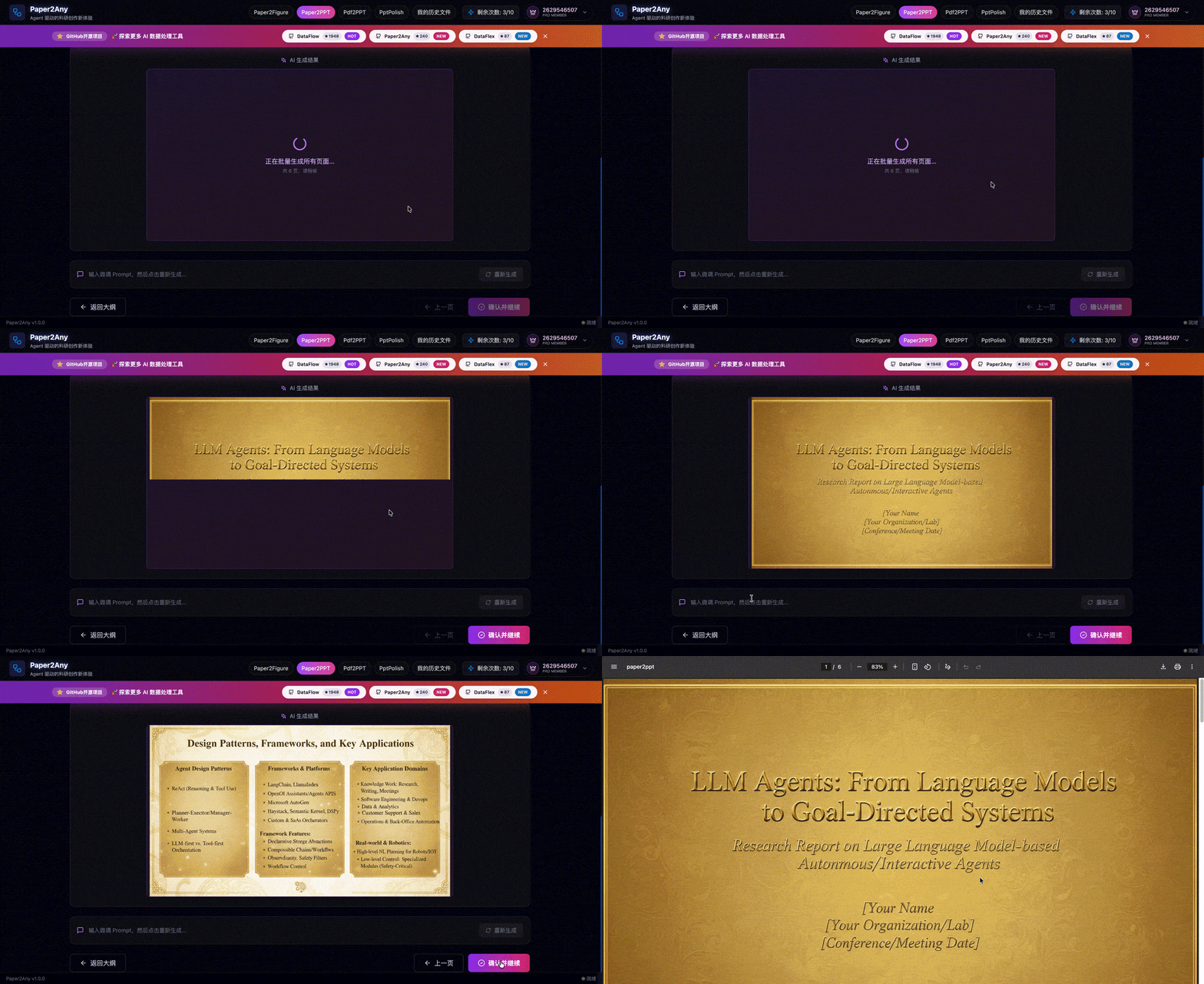
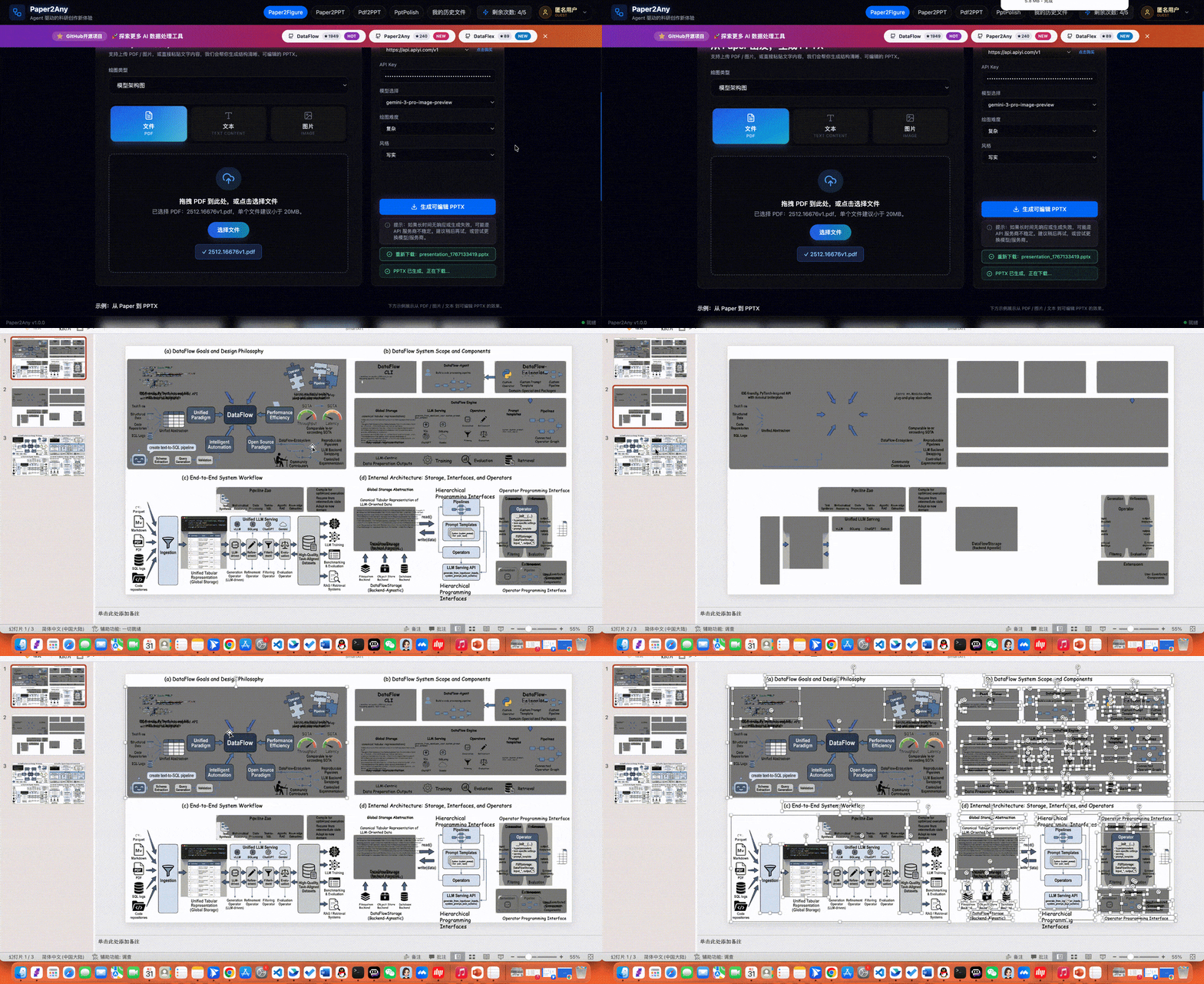
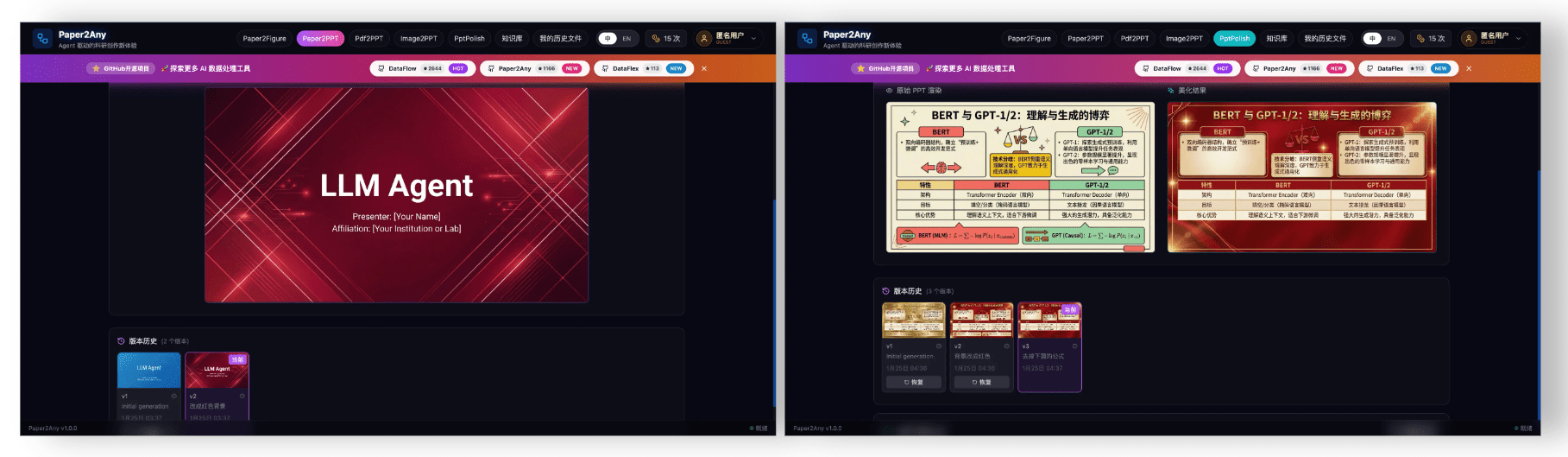
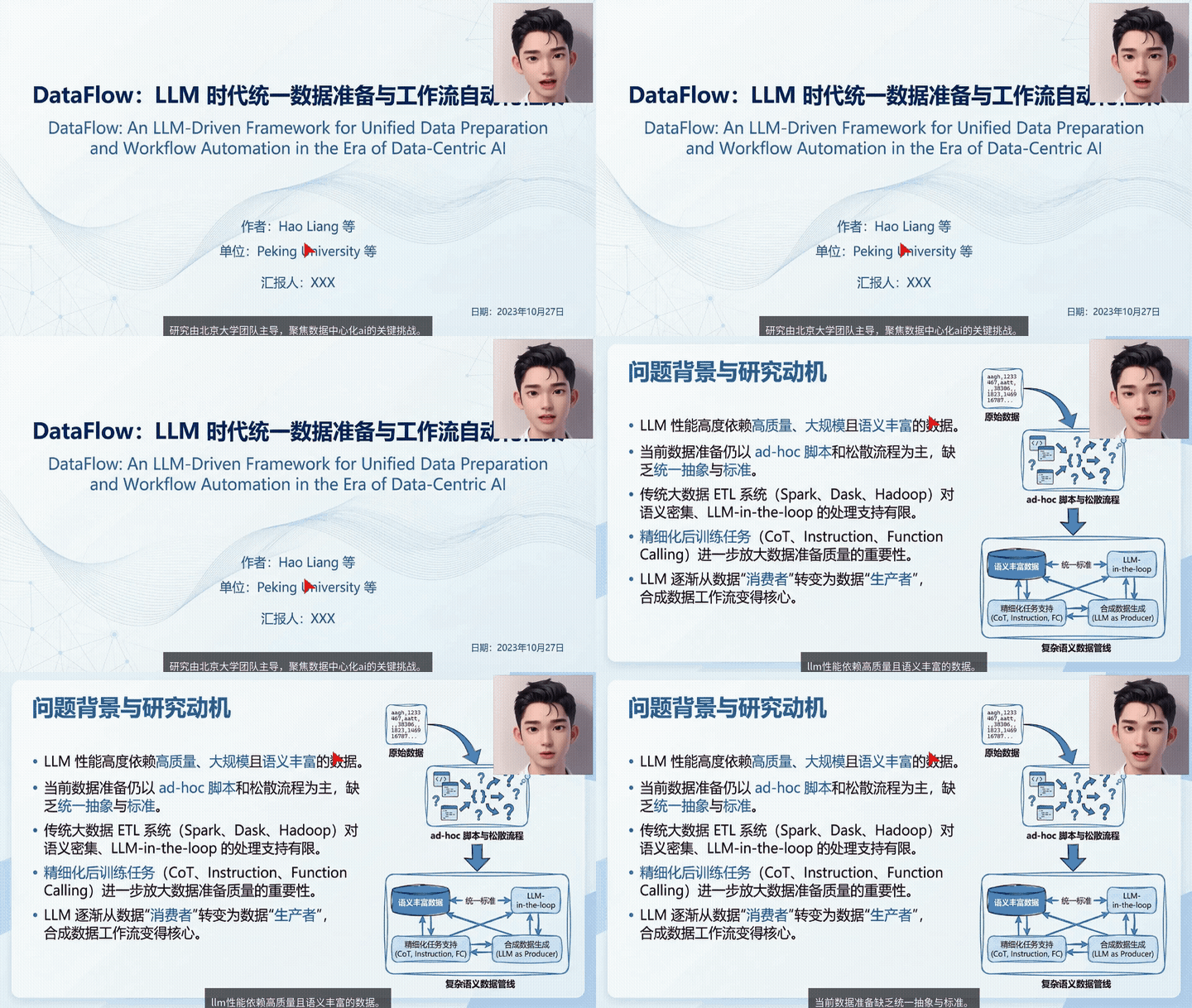
✨ End-to-end PPT generation demo |
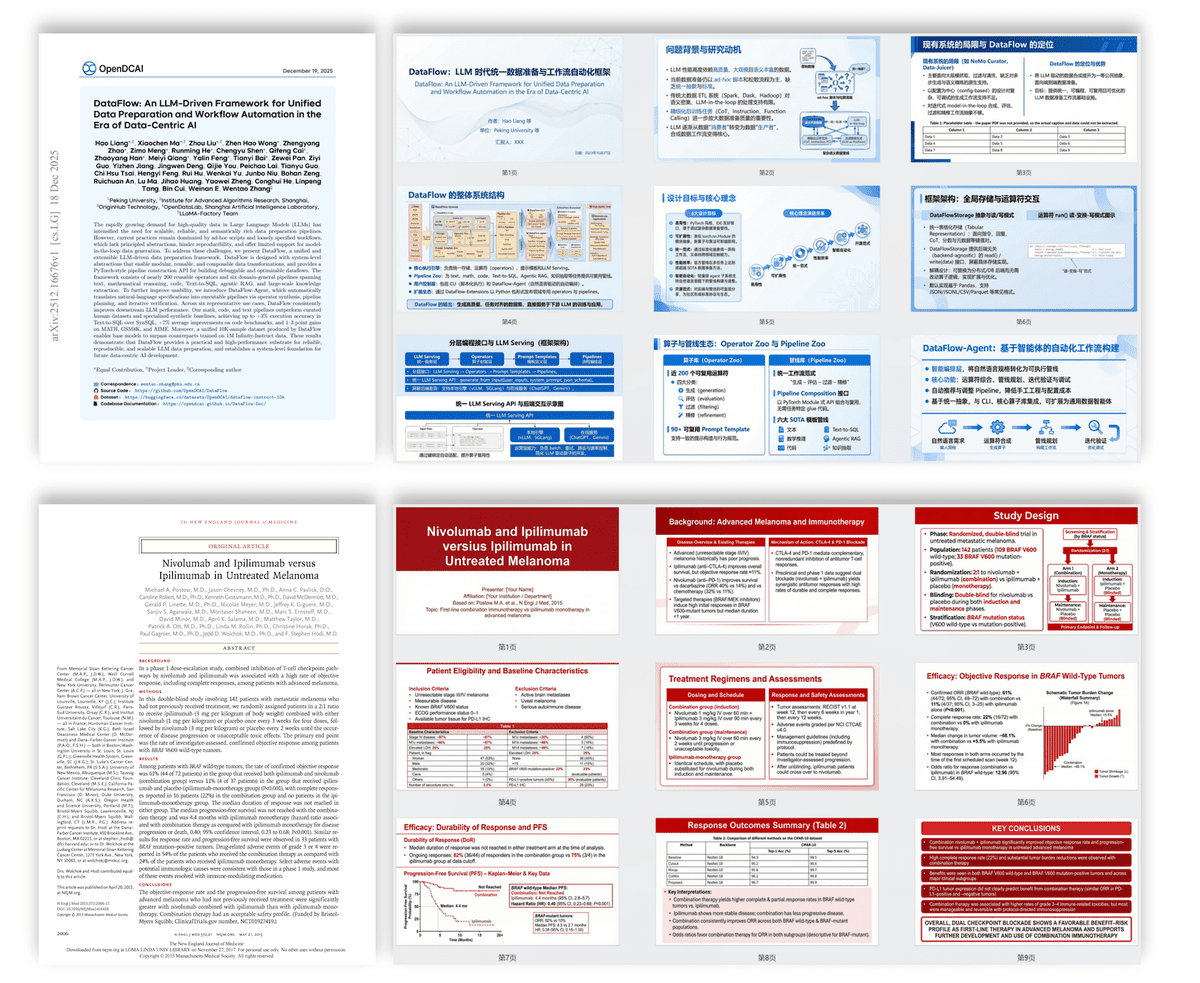
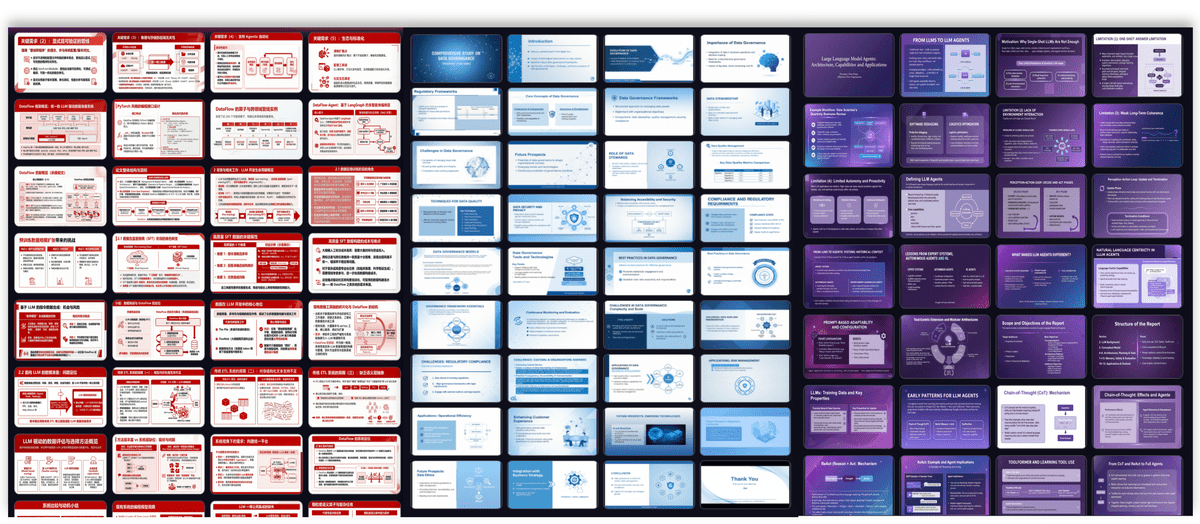
✨ Paper / text / topic to polished slide deck |
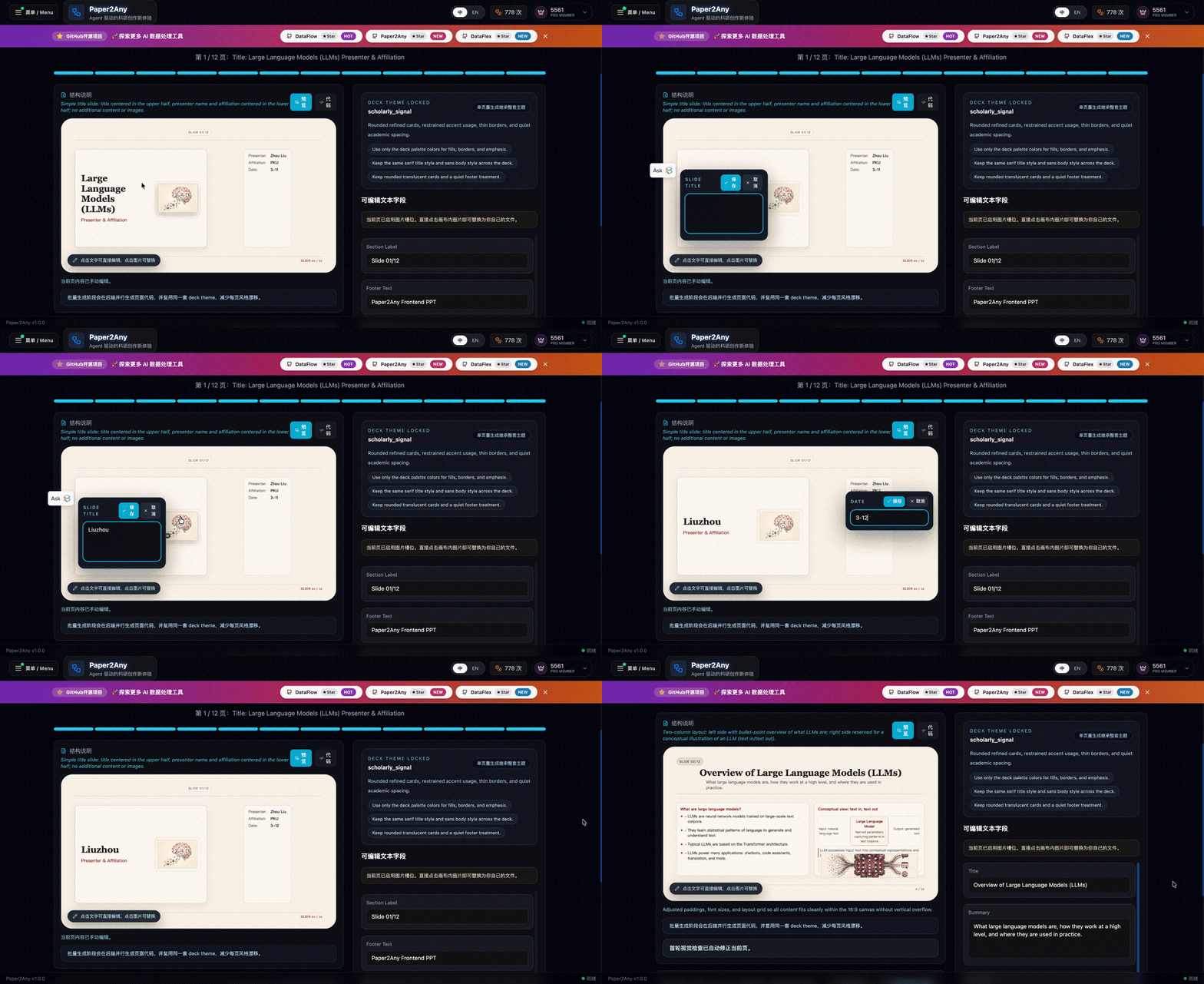
✨ Edit slide text directly on canvas while keeping the deck theme locked |
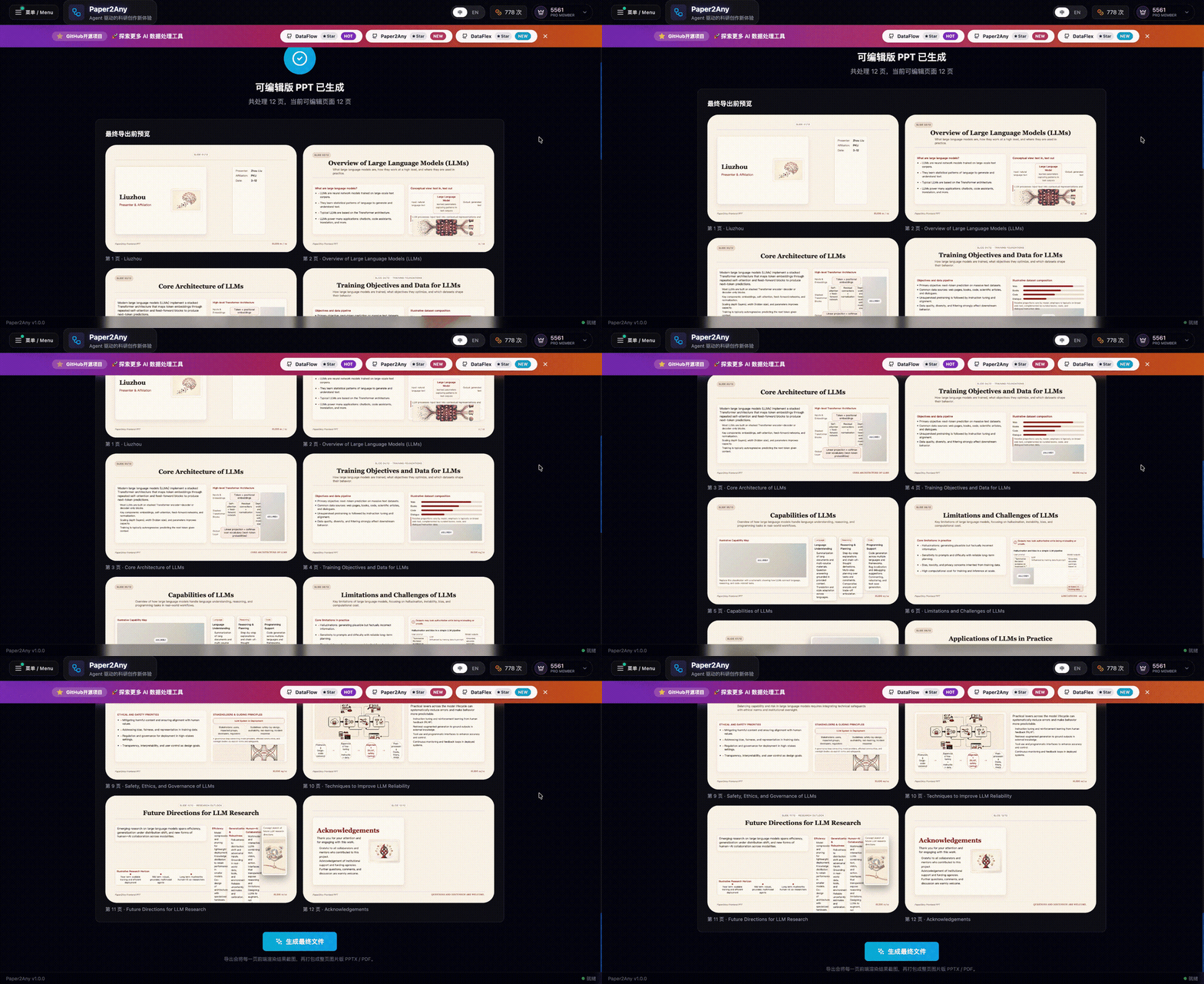
✨ Review the generated multi-page gallery before export |
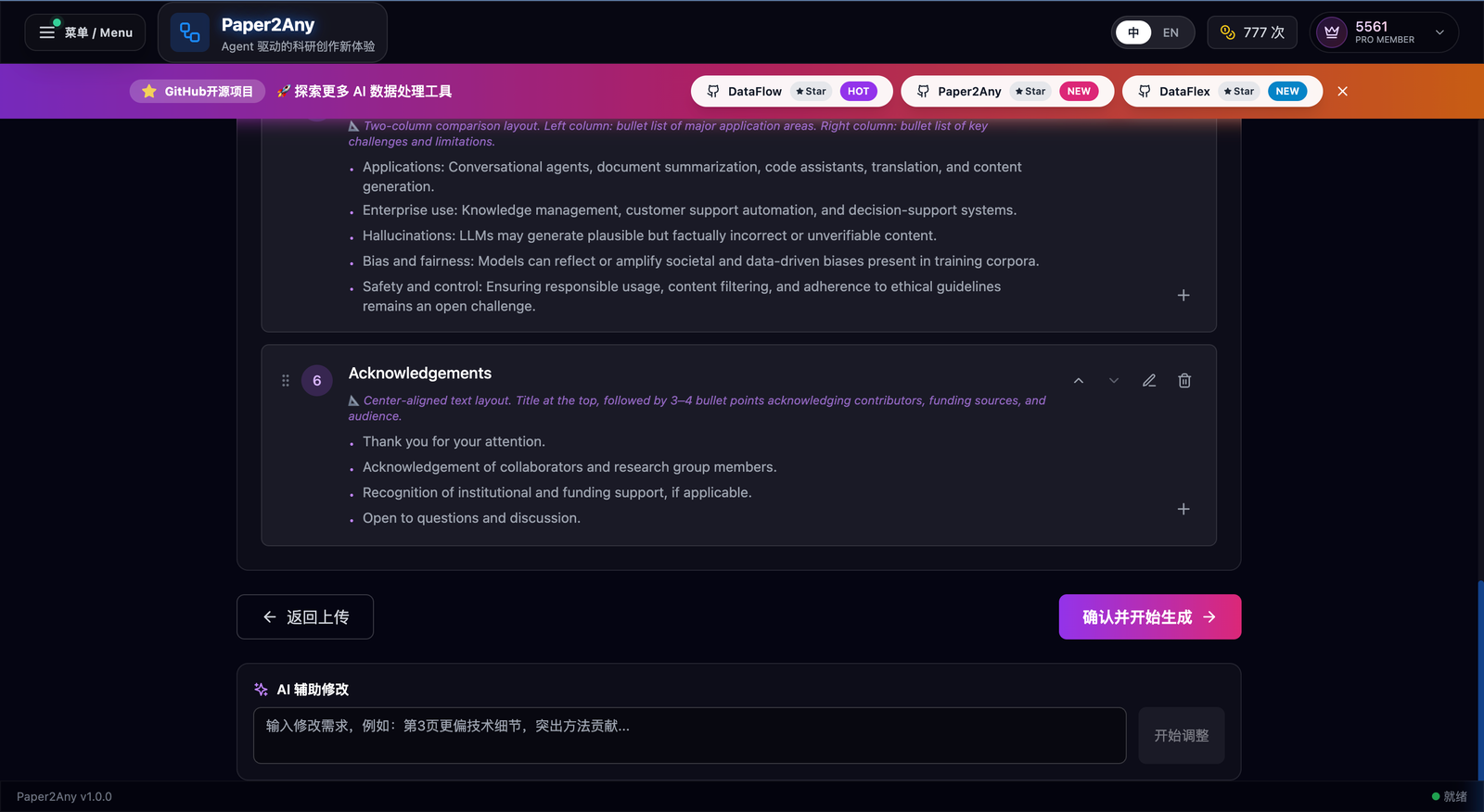
✨ AI-assisted outline refinement with targeted rewrite prompts |
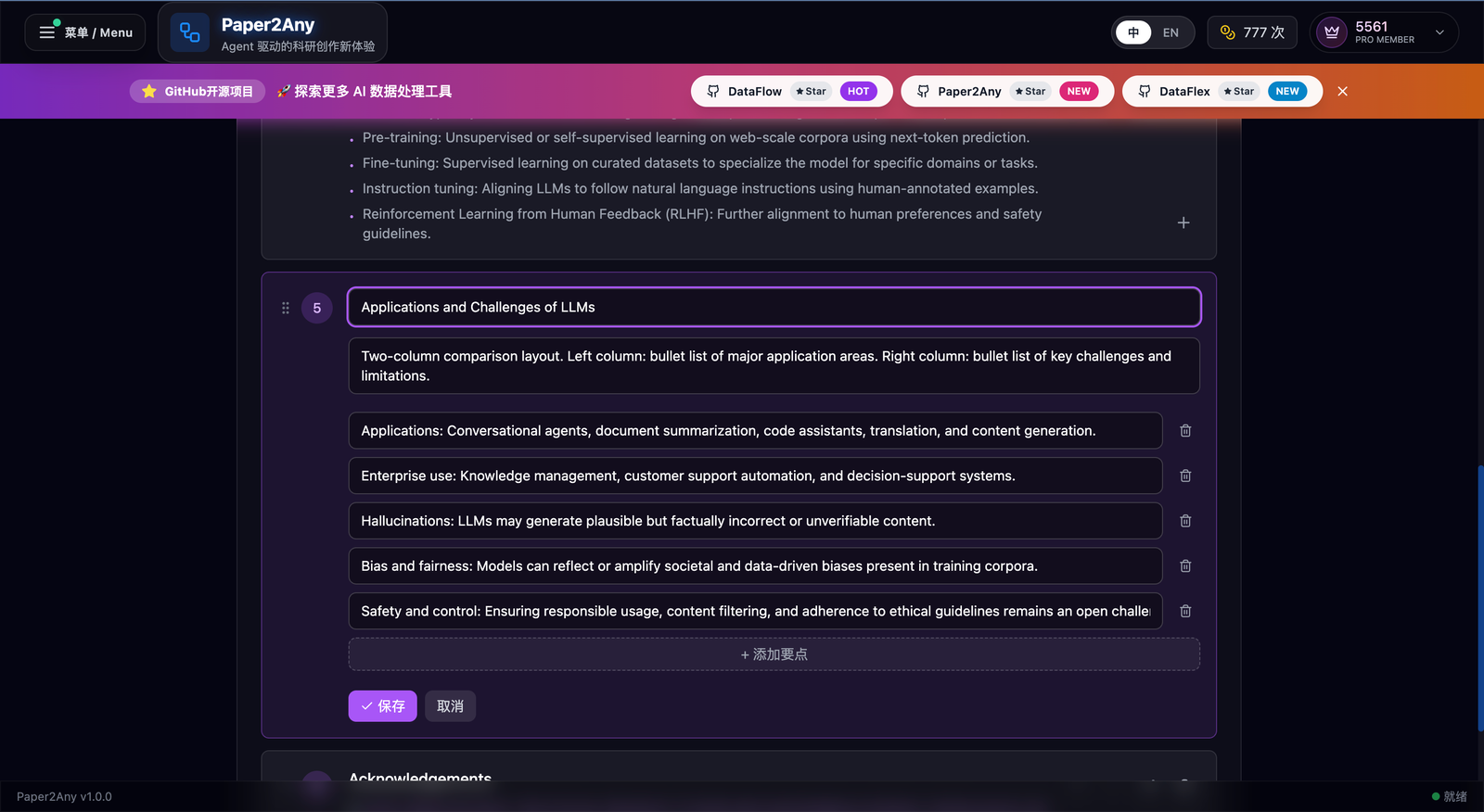
✨ Structured outline editing down to section and bullet detail |
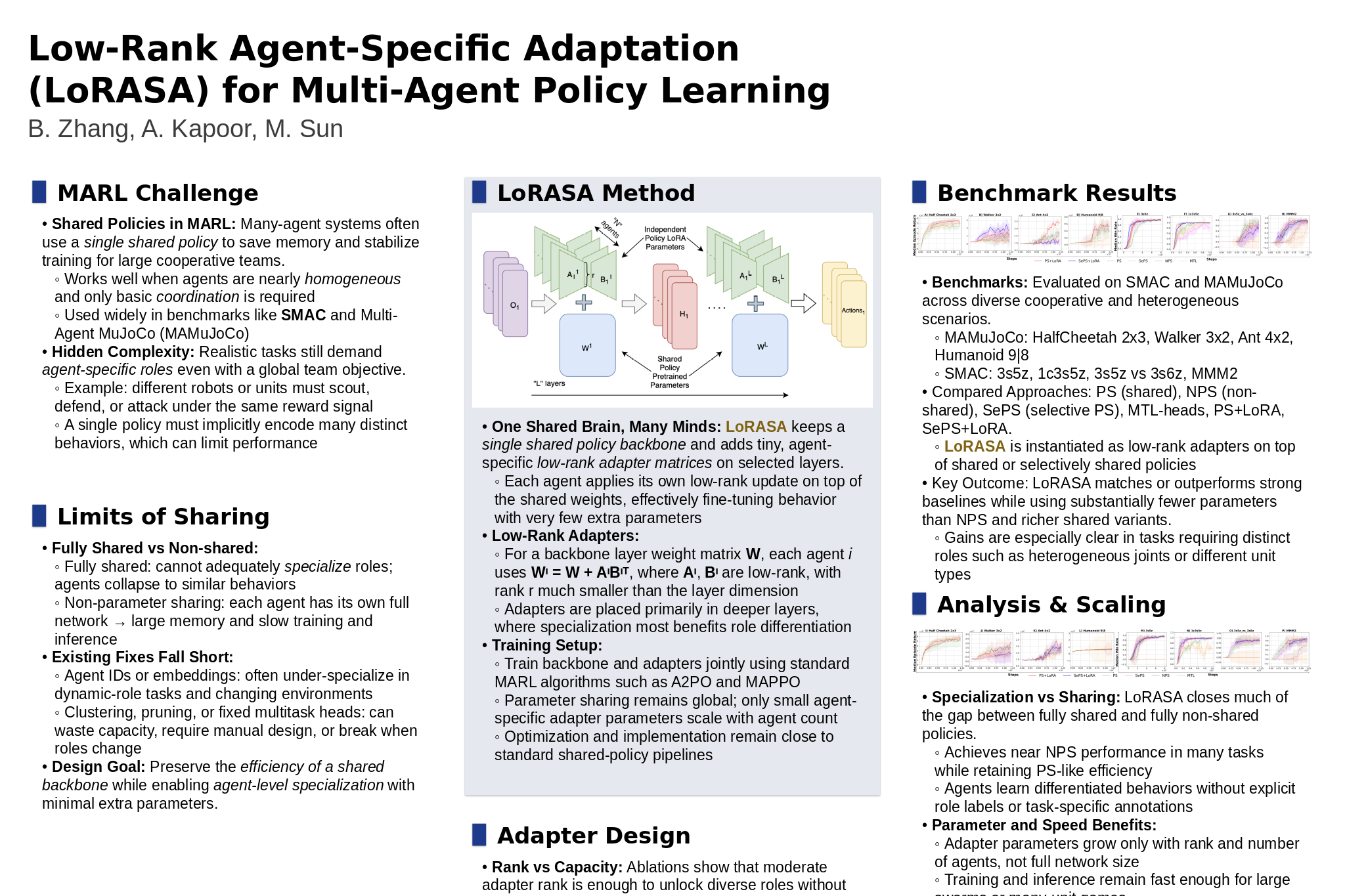
PNG poster result |
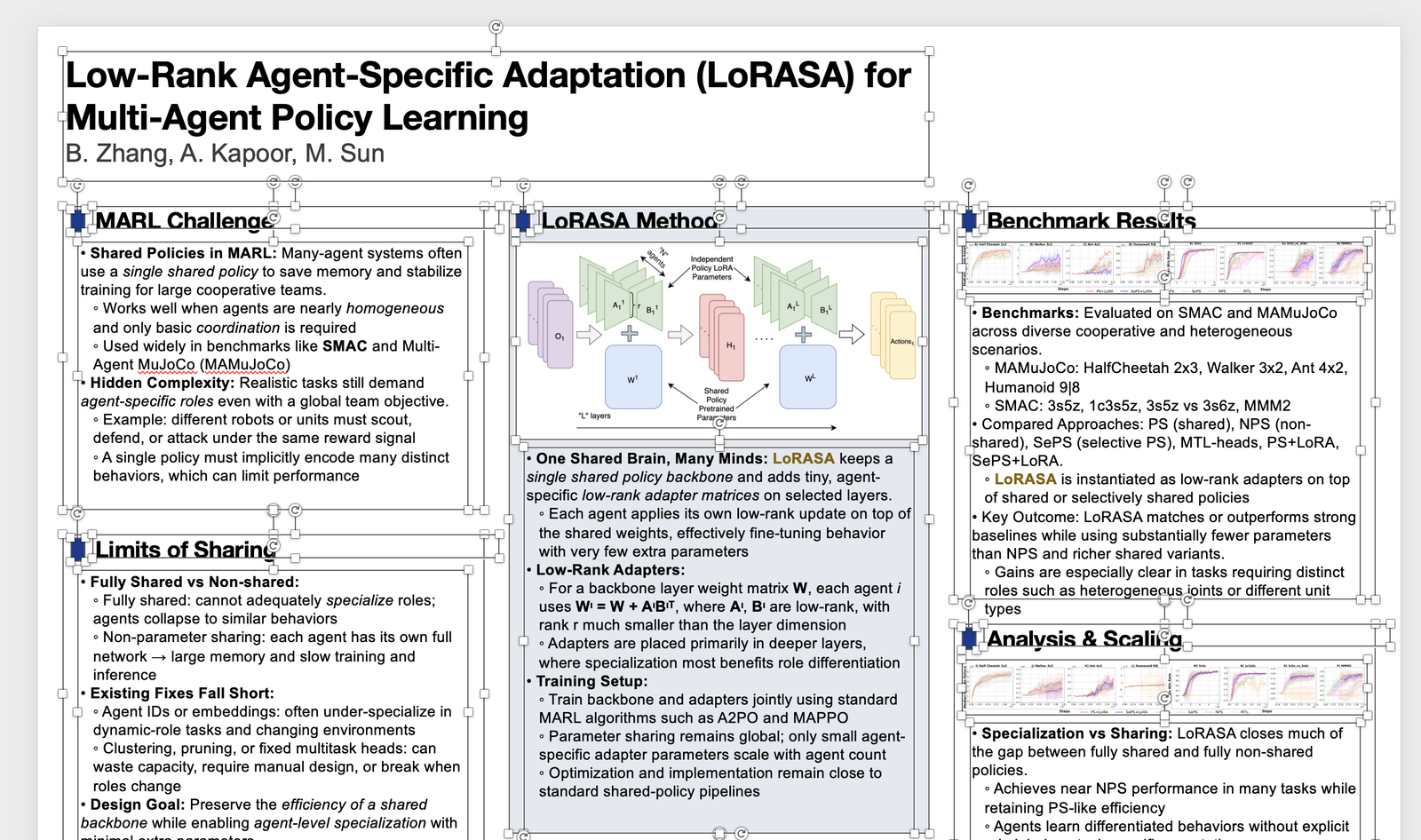
PPT poster result |
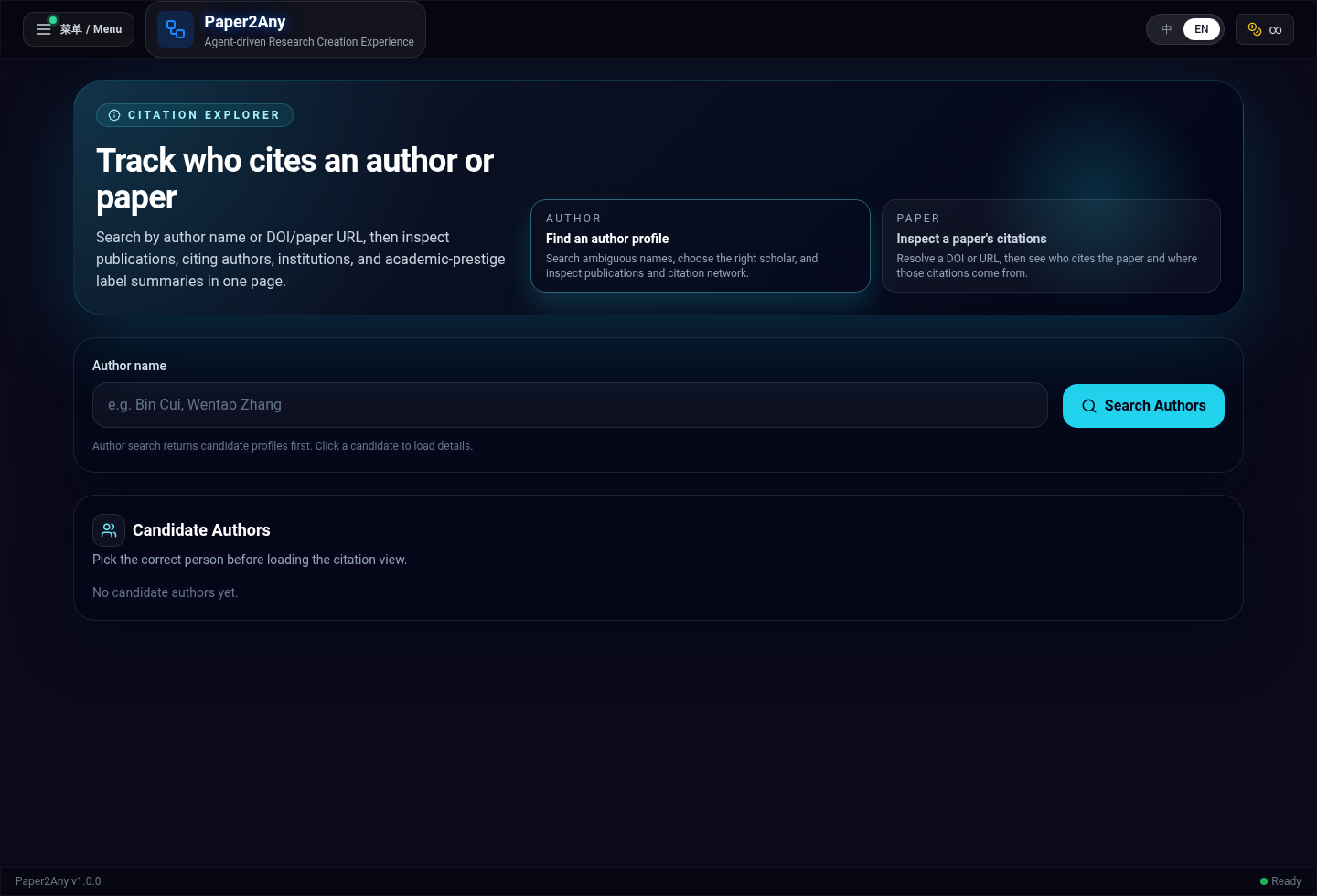
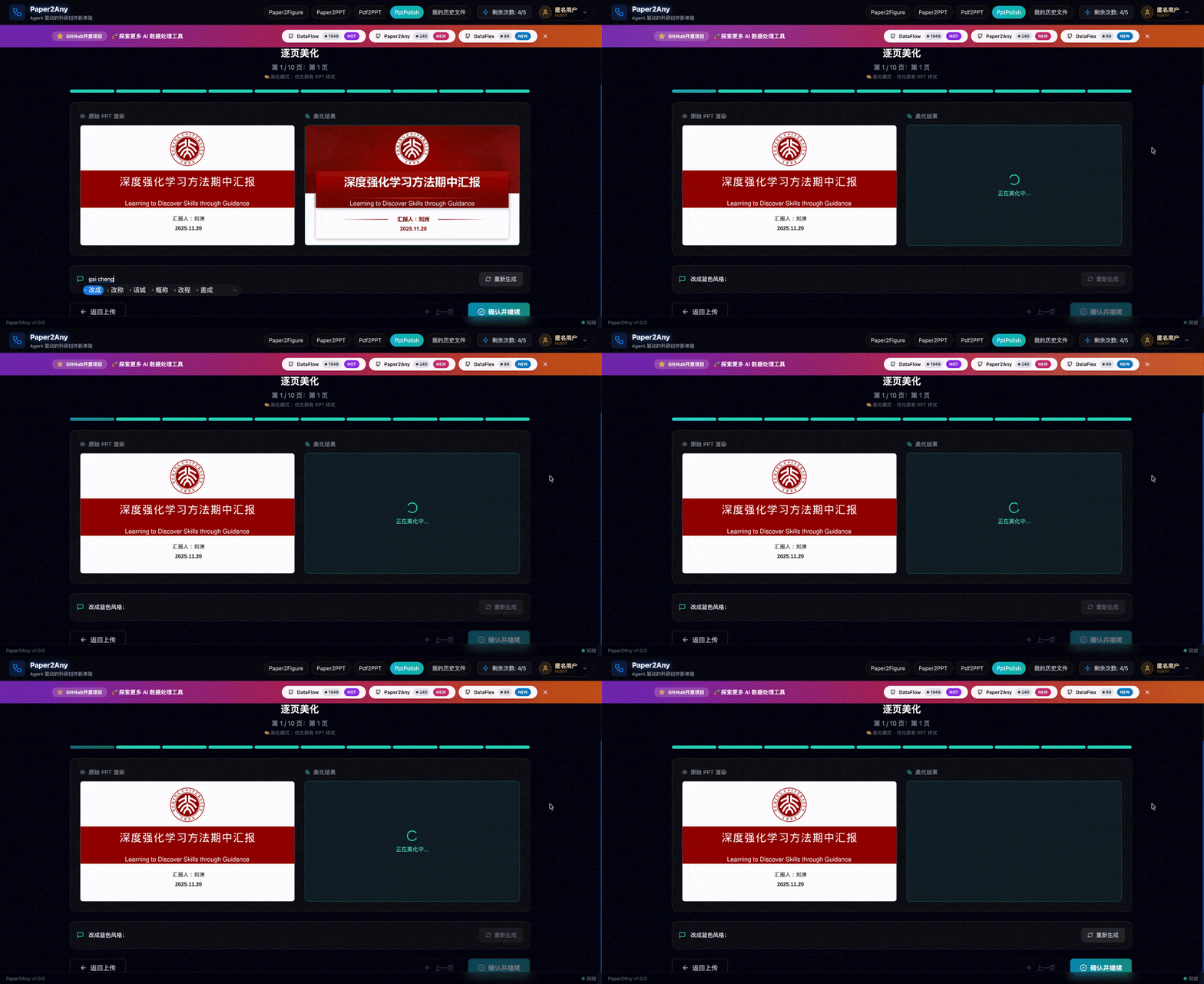

.env ModesPaper2Any now supports two configuration styles:
*.env.simple.example. Recommended for most self-hosted users.*.env.example. Use this only when you need workflow-specific model/provider overrides.Quick choice:
cp fastapi_app/.env.simple.example fastapi_app/.env
cp frontend-workflow/.env.simple.example frontend-workflow/.env
If you need fine-grained workflow overrides instead:
cp fastapi_app/.env.example fastapi_app/.env
cp frontend-workflow/.env.example frontend-workflow/.env
# 1. Clone
git clone https://github.com/OpenDCAI/Paper2Any.git
cd Paper2Any

# 2. Configure environment variables
cp fastapi_app/.env.simple.example fastapi_app/.env
cp frontend-workflow/.env.simple.example frontend-workflow/.env
cp deploy/docker.env.example deploy/docker.env
Required configuration:
fastapi_app/.env (backend):
# Internal API auth key. Must match frontend VITE_API_KEY.
BACKEND_API_KEY=your-backend-api-key

# Recommended: let backend own all workflow model choices
APP_BILLING_MODE=free
PAPER2ANY_CONFIG_MODE=simple

# Required: unified text entry
SIMPLE_TEXT_API_URL=https://your-text-gateway/v1
SIMPLE_TEXT_API_KEY=your_text_key

# Optional but recommended: unified image entry
SIMPLE_IMAGE_API_URL=https://your-image-gateway
SIMPLE_IMAGE_API_KEY=your_image_key

# Optional: DrawIO OCR / VLM service
SIMPLE_OCR_API_URL=https://dashscope.aliyuncs.com/compatible-mode/v1
SIMPLE_OCR_API_KEY=your_dashscope_key

# Optional: MinerU official remote API
MINERU_API_BASE_URL=https://mineru.net/api/v4
MINERU_API_KEY=your_mineru_api_key

# Optional: SAM3 segmentation service for PDF2PPT / Image2PPT / Image2Drawio
# SAM3_SERVER_URLS=http://GPU_MACHINE_IP:8001
# SAM3_SERVER_URLS=http://GPU1:8021,http://GPU2:8022

# Optional: Supabase (skip for no auth — core features still work)
# SUPABASE_URL=https://your-project-id.supabase.co
# SUPABASE_ANON_KEY=your_supabase_anon_key
frontend-workflow/.env (frontend):
# Must match BACKEND_API_KEY in fastapi_app/.env
VITE_API_KEY=your-backend-api-key

# Usually keep VITE_API_BASE_URL empty in Docker, because nginx proxies /api and /outputs
VITE_API_BASE_URL=

# Frontend display defaults only
VITE_DEFAULT_LLM_API_URL=https://your-text-gateway/v1
VITE_DEFAULT_LLM_MODEL=gpt-4o

# Optional: Supabase (keep consistent with backend)
# VITE_SUPABASE_URL=https://your-project-id.supabase.co
# VITE_SUPABASE_ANON_KEY=your_supabase_anon_key
deploy/docker.env (compose overrides):
BACKEND_PORT=8000
FRONTEND_PORT=3000
DOCKER_APP_WORKERS=1

# Optional: enable local SAM3 container by running DOCKER_WITH_SAM3=1 bash deploy/docker-up.sh
SAM3_PORT=8021
SAM3_SERVER_URLS=
# 3. Build + run
bash deploy/docker-up.sh
Open:
Optional ONLYOFFICE editable PPTX support:
Paper2PPT can export HTML-based editable PPTX files and open them in ONLYOFFICE for online editing. Start a local ONLYOFFICE Document Server first:
# Optional: load a pre-downloaded image tar if your deployment ships one
docker load -i /path/to/onlyoffice-documentserver-latest.tar

docker run -d --name paper2any-onlyoffice \
  -p 8082:80 \
  --add-host=host.docker.internal:host-gateway \
  -e JWT_ENABLED=false \
  -e ALLOW_PRIVATE_IP_ADDRESS=true \
  onlyoffice/documentserver:latest
Then configure backend environment variables:
ONLYOFFICE_DOCUMENT_SERVER_URL=/onlyoffice
ONLYOFFICE_THINKFLOW_PUBLIC_URL=http://host.docker.internal:8000
ONLYOFFICE_DOCUMENT_DOWNLOAD_BASE_URL=http://host.docker.internal:8000
ONLYOFFICE_SERVER_DOWNLOAD_URL_BASE=http://127.0.0.1:8082
ONLYOFFICE_JWT_SECRET=
For local Vite development, /onlyoffice is proxied to http://localhost:8082. If you access the frontend through an SSH forwarded port, set Document Server storage.externalHost to the browser-facing origin, for example http://localhost:13000/onlyoffice. See ONLYOFFICE editable PPTX deployment for the full setup, troubleshooting, and production notes.
GPU services note: Docker starts backend + frontend by default.
- Paper2PPT, Paper2Figure, Knowledge Base, etc. only need LLM APIs and work out of the box.
- PDF2PPT, Image2PPT, Image2Drawio require SAM3 segmentation.
- You can either point backend
.envto an external SAM3 service withSAM3_SERVER_URLS=..., or start the optional local SAM3 compose profile:DOCKER_WITH_SAM3=1 bash deploy/docker-up.shSee the "Advanced: Local Model Server Load Balancing" section below for details.
Modify & update:
.env, rebuild: bash deploy/docker-up.shgit pullbash deploy/docker-up.shCommon commands:
bash deploy/docker-logs.shbash deploy/docker-down.shbash deploy/docker-build.shNotes:
frontend-workflow/.env or deploy/docker.env, rebuild with bash deploy/docker-up.sh../outputs, ./models) for persistence.We recommend using Conda to create an isolated environment (Python 3.11).
# 0. Create and activate a conda environment
conda create -n paper2any python=3.11 -y
conda activate paper2any

# 1. Clone repository
git clone https://github.com/OpenDCAI/Paper2Any.git
cd Paper2Any

# 2. Install base dependencies
pip install -r requirements-base.txt

# 3. Install in editable (dev) mode
pip install -e .
Paper2Any involves LaTeX rendering, vector graphics processing as well as PPT/PDF conversion, which require extra dependencies.
The dependency boundary is now:
requirements-base.txt: shared cross-platform Python runtimerequirements-paper.txt: paper / PDF / figure extrasrequirements-cu12.txt: NVIDIA CUDA 12 Linux GPU extrasrequirements-system-ubuntu.txt: Ubuntu/Debian system packages, not Python packages# 1. Paper / PDF / figure Python extras
pip install -r requirements-paper.txt
# 2. NVIDIA GPU runtime extras (Linux + CUDA 12 only)
pip install -r requirements-cu12.txt
# 3. LaTeX engine (tectonic) - recommended via conda
conda install -c conda-forge tectonic -y
# 4. Resolve doclayout_yolo dependency conflicts (Important)
pip install doclayout_yolo --no-deps
# 5. System dependencies (Ubuntu example; full list is mirrored in requirements-system-ubuntu.txt)
sudo apt-get update
sudo apt-get install -y ffmpeg inkscape libreoffice poppler-utils wkhtmltopdf
[!IMPORTANT]
ffmpeg,libreoffice/soffice,inkscape,poppler-utils,wkhtmltopdf, andtectonicare external system tools. They are not installed bypip, anddeploy/start*.shdoes not auto-install them.
export DF_API_KEY=your_api_key_here
export DF_API_URL=xxx  # Optional: if you need a third-party API gateway
export MINERU_DEVICES="0,1,2,3" # Optional: MinerU task GPU resource pool
[!TIP] 📚 For detailed configuration guide, see Configuration Guide for step-by-step instructions on configuring models, environment variables, and starting services.
Paper2Any uses two .env files for configuration. Both are optional - you can run the application without them using default settings.
# Copy backend environment file
cp fastapi_app/.env.example fastapi_app/.env

# Copy frontend environment file
cp frontend-workflow/.env.example frontend-workflow/.env
fastapi_app/.env)Supabase (Optional) - Only needed if you want user authentication and cloud storage:
SUPABASE_URL=https://your-project-id.supabase.co
SUPABASE_ANON_KEY=your_supabase_anon_key
Model Configuration - Customize which models to use for different workflows:
# Default LLM API URL
DEFAULT_LLM_API_URL=http://123.129.219.111:3000/v1/

# Workflow-level defaults
PAPER2PPT_DEFAULT_MODEL=gpt-5.1
PAPER2PPT_DEFAULT_IMAGE_MODEL=gemini-3-pro-image-preview
PDF2PPT_DEFAULT_MODEL=gpt-4o
# ... see .env.example for full list
Service Integration Configuration - External or local services used by image/PDF workflows:
# DrawIO OCR / VLM
PAPER2DRAWIO_OCR_API_URL=https://dashscope.aliyuncs.com/compatible-mode/v1
PAPER2DRAWIO_OCR_API_KEY=your_dashscope_key

# MinerU official remote API; if MINERU_API_KEY is empty, backend falls back to local MINERU_PORT
MINERU_API_BASE_URL=https://mineru.net/api/v4
MINERU_API_KEY=your_mineru_api_key
MINERU_API_MODEL_VERSION=vlm

# SAM3 segmentation service for PDF2PPT / Image2PPT / Image2Drawio
# One endpoint:
SAM3_SERVER_URLS=http://127.0.0.1:8001
# Or multiple endpoints for load balancing:
# SAM3_SERVER_URLS=http://127.0.0.1:8021,http://127.0.0.1:8022
frontend-workflow/.env)LLM Provider Configuration - Controls the API endpoint dropdown in the UI:
# Default API URL shown in the UI
VITE_DEFAULT_LLM_API_URL=https://api.apiyi.com/v1

# Available API URLs in the dropdown (comma-separated)
VITE_LLM_API_URLS=https://api.apiyi.com/v1,http://b.apiyi.com:16888/v1,http://123.129.219.111:3000/v1
What happens when you modify VITE_LLM_API_URLS:
Supabase (Optional) - Uncomment these lines if you want user authentication:
VITE_SUPABASE_URL=https://your-project.supabase.co
VITE_SUPABASE_ANON_KEY=your-anon-key
If you skip Supabase configuration:
[!NOTE] Quick Start: You can skip the
.envconfiguration entirely and use CLI scripts directly with--api-keyparameter. See CLI Scripts section below.
If you are deploying in a high-concurrency local environment, you can use script/start_model_servers.sh to start a local model service cluster (MinerU / SAM / OCR).
Script location: /DataFlow-Agent/script/start_model_servers.sh
Main configuration items:
MinerU (PDF Parsing)
MINERU_MODEL_PATH: Model path (default models/MinerU2.5-2509-1.2B)MINERU_GPU_UTIL: GPU memory utilization (default 0.85)SAM3 (Segment Anything Model 3)
./models/sam3/sam3.pt and ./models/sam3/bpe_simple_vocab_16e6.txt.gz.OCR (PaddleOCR)
Before using, please modify
gpu_idand the number of instances in the script according to your actual GPU count and memory.
For local one-command development test on a single GPU (SAM3 + backend + frontend), run:
bash script/start_local_sam3_dev.sh
[!NOTE] We currently recommend trying Paper2Any on Linux / WSL. If you need to deploy on native Windows, please follow the steps below.
# 0. Create and activate a conda environment
conda create -n paper2any python=3.12 -y
conda activate paper2any

# 1. Clone repository
git clone https://github.com/OpenDCAI/Paper2Any.git
cd Paper2Any

# 2. Install base dependencies
pip install -r requirements-win-base.txt

# 3. Install in editable (dev) mode
pip install -e .
Paper2Any involves LaTeX rendering and vector graphics processing, which require extra dependencies:
# Python dependencies
pip install -r requirements-paper.txt

# NVIDIA GPU runtime extras (Linux only; skip on Windows)
# pip install -r requirements-cu12.txt

# tectonic: LaTeX engine (recommended via conda)
conda install -c conda-forge tectonic -y
🎨 Install Inkscape (SVG/Vector Graphics Processing | Recommended/Required)
C:\Program Files\Inkscape\bin\[!TIP] After configuring the Path, it is recommended to reopen the terminal (or restart VS Code / PowerShell) to ensure the environment variables take effect.
Release page: vllm-windows releases
Recommended version: 0.11.0
pip install vllm-0.11.0+cu124-cp312-cp312-win_amd64.whl
[!IMPORTANT] Please make sure the
.whlmatches your current environment:
- Python: cp312 (Python 3.12)
- Platform: win_amd64
- CUDA: cu124 (must match your local CUDA / driver)
Paper2Any - Paper Workflow Web Frontend (Recommended)
# Recommended one-click entrypoint on NVIDIA machines
bash deploy/start_nv.sh
Default local addresses:
Useful local deploy commands:
bash deploy/start_nv.shset -a && source deploy/profiles/nv.env && set +a && bash deploy/start.sh./deploy/stop.sh./deploy/restart.shNotes:
deploy/start.sh reads deploy/app_config.sh, but it does not load deploy/profiles/*.env by itself.deploy/start_nv.sh is the safe one-click entrypoint because it loads deploy/profiles/nv.env, prepares local models, starts model servers, then starts backend and frontend.APP_PORT, update the frontend proxy target in frontend-workflow/vite.config.ts as well.Configure Frontend Proxy
Modify server.proxy in frontend-workflow/vite.config.ts:
export default defineConfig({
  plugins: [react()],
  server: {
    port: 3000,
    open: true,
    allowedHosts: true,
    proxy: {
      '/api': {
        target: 'http://127.0.0.1:8000',  // FastAPI backend address
        changeOrigin: true,
      },
      '/outputs': {
        target: 'http://127.0.0.1:8000',
        changeOrigin: true,
      },
    },
  },
})
Visit http://localhost:3000.
Windows: Load MinerU Pre-trained Model
# Start in PowerShell
vllm serve opendatalab/MinerU2.5-2509-1.2B `
  --host 127.0.0.1 `
  --port 8010 `
  --logits-processors mineru_vl_utils:MinerULogitsProcessor `
  --gpu-memory-utilization 0.6 `
  --trust-remote-code `
  --enforce-eager
# Recommended one-click entrypoint on NVIDIA machines
bash deploy/start_nv.sh
Visit http://localhost:3000.
Backend health is available at http://127.0.0.1:8000/health by default.
Paper2Any provides standalone CLI scripts that accept command-line parameters for direct workflow execution without requiring the web frontend/backend.
Configure API access via environment variables (optional):
export DF_API_URL=https://api.openai.com/v1  # LLM API URL
export DF_API_KEY=sk-xxx                      # API key
export DF_MODEL=gpt-4o                        # Default model
1. Paper2Figure CLI - Generate scientific figures (3 types)
# Generate model architecture diagram from PDF
python script/run_paper2figure_cli.py \
  --input paper.pdf \
  --graph-type model_arch \
  --api-key sk-xxx

# Generate technical roadmap from text
python script/run_paper2figure_cli.py \
  --input "Transformer architecture with attention mechanism" \
  --input-type TEXT \
  --graph-type tech_route

# Generate experimental data visualization
python script/run_paper2figure_cli.py \
  --input paper.pdf \
  --graph-type exp_data
Graph types: model_arch (model architecture), tech_route (technical roadmap), exp_data (experimental plots)
2. Paper2PPT CLI - Convert papers to PPT presentations
# Basic usage
python script/run_paper2ppt_cli.py \
  --input paper.pdf \
  --api-key sk-xxx \
  --page-count 15

# With custom style
python script/run_paper2ppt_cli.py \
  --input paper.pdf \
  --style "Academic style; English; Modern design" \
  --language en
3. PDF2PPT CLI - One-click PDF to editable PPT
# Basic conversion (no AI enhancement)
python script/run_pdf2ppt_cli.py --input slides.pdf

# With AI enhancement
python script/run_pdf2ppt_cli.py \
  --input slides.pdf \
  --use-ai-edit \
  --api-key sk-xxx
4. Image2PPT CLI - Convert images to editable PPT
# Basic conversion
python script/run_image2ppt_cli.py --input screenshot.png

# With AI enhancement
python script/run_image2ppt_cli.py \
  --input diagram.jpg \
  --use-ai-edit \
  --api-key sk-xxx
5. PPT2Polish CLI - Beautify existing PPT files
# Basic beautification
python script/run_ppt2polish_cli.py \
  --input old_presentation.pptx \
  --style "Academic style, clean and elegant" \
  --api-key sk-xxx

# With reference image for style consistency
python script/run_ppt2polish_cli.py \
  --input old_presentation.pptx \
  --style "Modern minimalist style" \
  --ref-img reference_style.png \
  --api-key sk-xxx
[!NOTE] System Requirements for PPT2Polish:
- LibreOffice:
sudo apt-get install libreoffice(Ubuntu/Debian)- pdf2image:
pip install pdf2image- poppler-utils:
sudo apt-get install poppler-utils
All CLI scripts support these common options:
--api-url URL - LLM API URL (default: from DF_API_URL env var)--api-key KEY - API key (default: from DF_API_KEY env var)--model NAME - Text model name (default: varies by script)--output-dir DIR - Custom output directory (default: outputs/cli/{script_name}/{timestamp})--help - Show detailed help messageFor complete parameter documentation, run any script with --help:
python script/run_paper2figure_cli.py --help
Paper2Any/
├── dataflow_agent/          # Core codebase
│   ├── agentroles/         # Agent definitions
│   │   └── paper2any_agents/ # Paper2Any-specific agents
│   ├── workflow/           # Workflow definitions
│   ├── promptstemplates/   # Prompt templates
│   └── toolkits/           # Toolkits (drawing, PPT generation, etc.)
├── fastapi_app/            # Backend API service
├── frontend-workflow/      # Frontend web interface
├── static/                 # Static assets
├── script/                 # Script tools
└── tests/                  # Test cases
| Feature | Status | Sub-features |
|---|---|---|
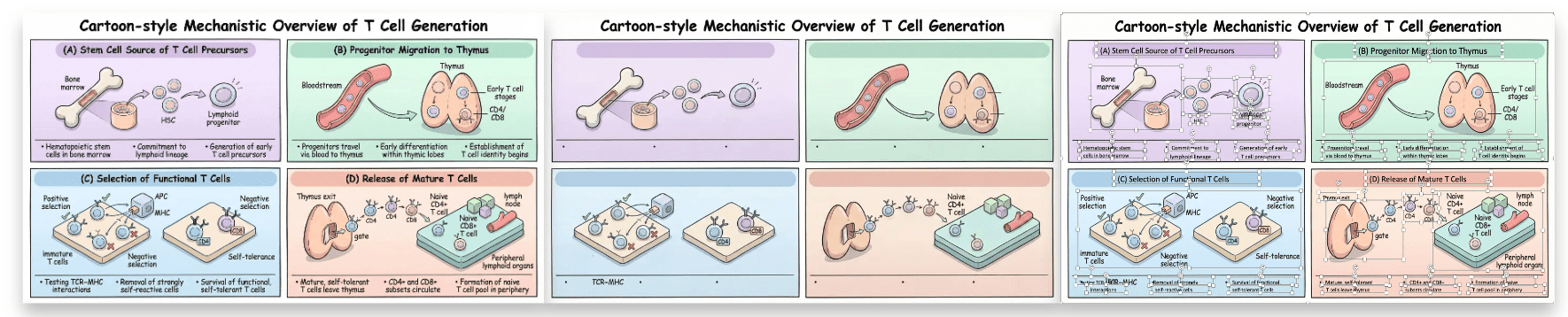
| 📊 Paper2Figure Editable Scientific Figures |  |
   
|
| 🧩 Paper2Diagram Drawio Diagrams |  |
   
|
| 🎬 Paper2PPT Editable Slide Decks |  |
     
|
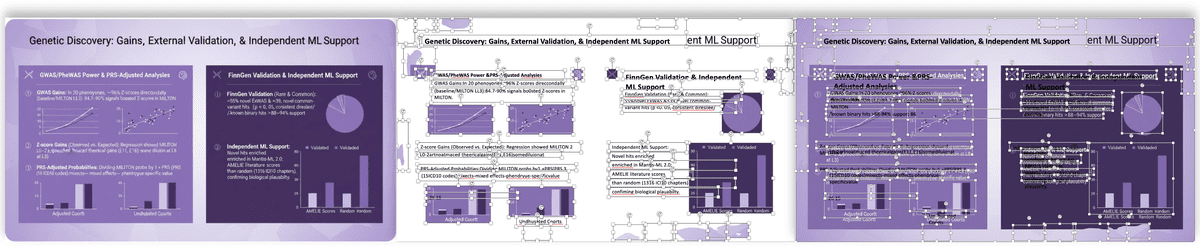
| 🖼️ PDF2PPT Layout-Preserving Conversion |  |
  
|
| 🖼️ Image2PPT Image to Slides | |
 
|
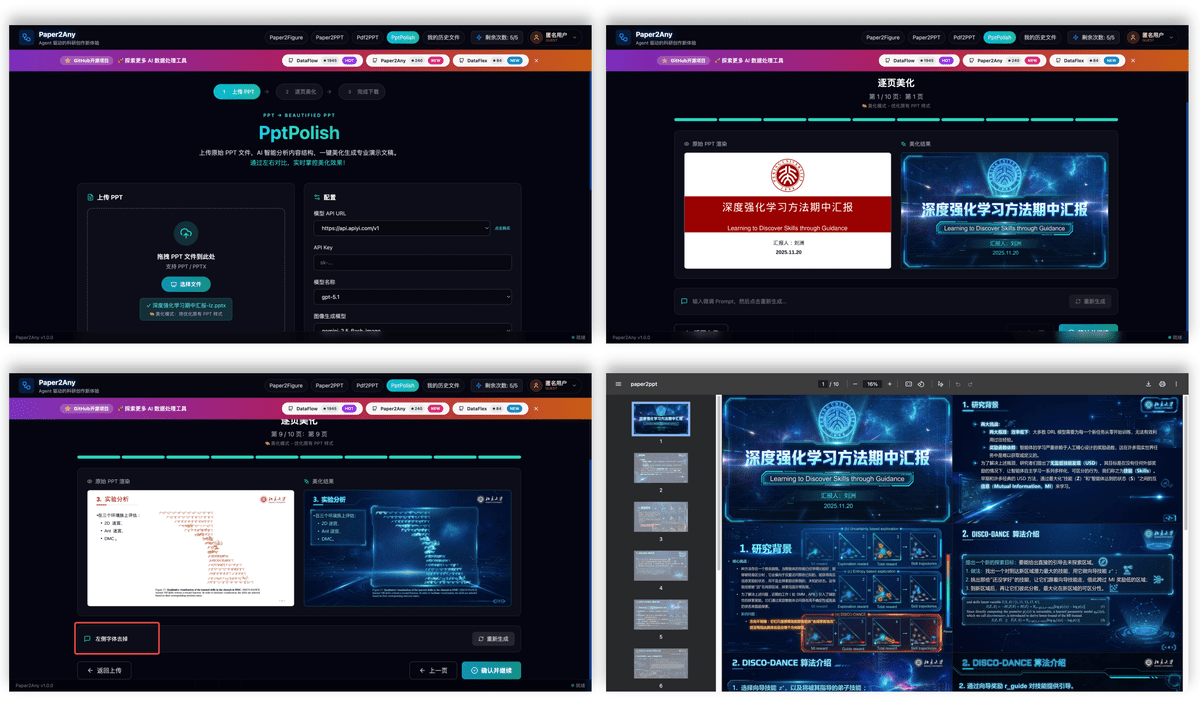
| 🎨 PPTPolish Smart Beautification |  |
  
|
| 📚 Knowledge Base KB Workflows |  |
  
|
| 🎬 Paper2Video Video Script Generation |  |
 
|
This is the historical contribution section for the legacy codebase. New product features and architecture changes are no longer synchronized to this repository, and new feature pull requests are not currently planned for review. Existing issues and discussions remain available as a community archive.

This project is licensed under Apache License 2.0.
46 followers · starred Jan 2026
15 followers · starred Feb 2026
161 followers · starred Dec 2025
21 followers · starred Mar 2026
Turn paper/text/topic into editable research figures, technical route diagrams, and presentation slides.
See the codeThe next-generation AI Office workspace from Paper2Any
Give an Agent a goal, your files, and a few constraints. Get back editable PowerPoint, Excel, Word, and visual assets in one persistent workspace.
English | 中文
Click the animated banner to open Nexus Office. Create editable PPTX, XLSX, DOCX, and AI visuals in the live workspace.
[!IMPORTANT] Repository status: legacy open-source snapshot. This repository preserves the original Apache-2.0 Paper2Any codebase, but it no longer receives new product features or architecture updates. The actively developed product is Nexus Office, rebuilt on a new stack and available as a hosted service. The hosted/commercial implementation is not included in this repository.
Nexus Office keeps the useful idea behind Paper2Any -- hand a complex document task to an Agent -- but focuses the product on everyday Office delivery instead of adding more isolated paper workflows.
| PowerPoint | Excel | Word | AI Visual Canvas |
|---|---|---|---|
| Create, rebuild, restyle, edit selected slides, apply a company template, and deliver native PPTX | Clean data, write formulas, merge sheets, build charts, and deliver editable XLSX | Turn notes and source files into structured reports, summaries, and editable DOCX | Generate, mask, cut out, reference, combine, and reuse visual elements |
All examples below come from real end-to-end runs. They are not static mockups: the Office files were structurally checked, rendered, and opened in the browser workspace.
The Agent keeps the facts, numbers, charts, and page order from the content deck, while rebuilding the presentation with the visual language of the supplied template. The result remains natively editable.
Excel: data to an editable analysis dashboard7,585 public records become four connected sheets, 228 formulas, KPI cards, a trend chart, a ranking chart, and an insight summary.
|
Word: rough meeting notes to a formal reportThe Agent extracts conclusions, metrics, discussion topics, owners, actions, and risks into a four-page DOCX that is ready to edit and archive.
|
Select an object with local interactive segmentation, save it as a transparent asset, reference multiple canvas images in the prompt, and let the image model rebuild them into one coherent visual.
|
Click-to-cutout runs locally in the browser and does not consume image-generation credits. |
DNA, a transparent digital globe, and a microscope are recomposed with consistent lighting and perspective. |
Goal + source files
        -> Agent chooses the Office and visual tools
        -> editable PPTX / XLSX / DOCX / PNG
        -> structural checks and visual review
        -> open, revise, and continue in the same Workspace
The same Workspace retains the conversation, execution trace, source files, deliverables, and follow-up edits. Users do not need to understand individual Skill names before starting.
| This repository | Nexus Office | |
|---|---|---|
| Positioning | Original paper-oriented Paper2Any codebase | AI-native Office workspace |
| Scope | Historical paper, figure, diagram, and presentation workflows | PowerPoint, Excel, Word, and AI visual creation/editing |
| Development status | Legacy snapshot; no new architecture or feature synchronization | Actively developed hosted product |
| Source availability | Apache-2.0 source code in this repository | Hosted/commercial implementation is not distributed here |
| Entry point | Continue reading the archived documentation below | Open Nexus Office |
[!NOTE] The Apache License 2.0 applies only to the code and assets distributed in this repository. It does not apply to the hosted Nexus Office implementation.
|
|
ZCloudAPIThanks to ZCloudAPI for providing API resource sponsorship for Nexus Office's online demos and capability evaluation. |
The original setup guide, feature catalog, screenshots, roadmap, and contribution notes remain available below for reproducibility and historical reference. They describe the legacy open-source implementation, not the hosted Nexus Office product.
[!IMPORTANT] 🆕 2026-06-13 · Paper to Any Studio / Nexus Upgrade
The online version is being upgraded to the new Paper to Any Studio experience, with a unified Studio workspace, Spaces for personal/project/team files, Labs apps, online Office previews, Credits visibility, and cleaner long-running workflows.
🌐 New public entry: https://paper2any-studio.cpolar.cn/
💻 Mac desktop releases: Paper2Any-Desktop-Releases · public DMG artifacts only; source code remains private/commercial.
⚠️ The public entry is a hosted Studio / Nexus experience and is not identical to the open-source code in this repository. The commercial Studio implementation is not fully open-sourced here.
📢 Full update notice: Paper to Any Studio New Version Update Notice
[!TIP] 🆕 2026-05-30 · Editable PPT Workflow Consolidation
The latest frontend editable PPT workflow is now integrated into Paper2Any, combining outline-assisted generation, canvas editing, gallery review, and paper / AI image insertion into editable decks.
HTML-based editable PPTX export and ONLYOFFICE online editing remain available as optional layers on top of the main editable export workflow.
[!TIP] 🆕 2026-04-24 · Image Model Playground Upgrade
Added a new Image Model Playground page for managed image generation across Nano Banana 2 / Nano Banana Pro / Image 2 / Image 2 All.
The workflow now supports language control, model-specific generation options, batch generation (1 / 2 / 4 / 8 / 16), compressed thumbnail previews, and one-click batch download.
[!TIP] 🆕 2026-04-15 · 2026 Paper Updates
Two Paper2Any-related papers are now listed in the 2026 cycle:
Paper2SysArch: Structure-Constrained System Architecture Generation from Scientific Papers · CVPR 2026 Findings
SciFlow-Bench: Evaluating Structure-Aware Scientific Diagram Generation via Inverse Parsing · ACL 2026 MainBibTeX
@article{guo2025paper2sysarch,
  title   = {Paper2SysArch: Structure-Constrained System Architecture Generation from Scientific Papers},
  author  = {Guo, Ziyi and Liu, Zhou and Zhang, Wentao},
  journal = {arXiv preprint arXiv:2511.18036},
  year    = {2025},
  note    = {CVPR 2026 Findings}
}

@article{zhang2026sciflowbench,
  title   = {SciFlow-Bench: Evaluating Structure-Aware Scientific Diagram Generation via Inverse Parsing},
  author  = {Zhang, Tong and Lin, Honglin and Liu, Zhou and Chen, Chong and Zhang, Wentao},
  journal = {arXiv preprint arXiv:2602.09809},
  year    = {2026},
  note    = {ACL 2026 Main}
}
[!TIP] 🆕 2026-03-28 · Editable PPT Showcase Refresh
Added two new editable PPT showcase screenshots for the frontend-deck workflow:
a generated multi-slide gallery view and the canvas editing workspace with deck theme lock.
[!TIP] 🆕 2026-03-26 · Workflow Showcase Update
Added showcase coverage for Paper2Video, Paper2Poster, and Paper2Citation.
The README now includes a compressed video demo plus refreshed English/Chinese workflow previews.
[!TIP] 🆕 2026-02-02 · Paper2Rebuttal
Added rebuttal drafting support with structured response guidance and image-aware revision prompts.
[!TIP] 🆕 2026-01-28 · Drawio Update
Added Drawio support for visual diagram creation and showcase-ready outputs in the workflow.
KB updates in one line: multi-file PPT generation with doc convert/merge, optional image injection, and embedding-assisted retrieval.
[!TIP] 🆕 2026-01-25 · New Features
Added AI-assisted outline editing, three-layer model configuration system for flexible model selection, and user points management with daily quota allocation.
🌐 Online Demo: https://paper2any-studio.cpolar.cn/
[!TIP] 🆕 2026-01-20 · Bug Fixes
Fixed bugs in experimental plot generation (image/text) and resolved the missing historical files issue.
🌐 Online Demo: https://paper2any-studio.cpolar.cn/
[!TIP] 🆕 2026-01-14 · Feature Updates & Backend Architecture Upgrade
- Feature Updates: Added Image2PPT, optimized Paper2Figure interaction, and improved PDF2PPT effects.
- Standardized API: Refactored backend interfaces with RESTful
/api/v1/structure, removing obsolete endpoints for better maintainability.- Dynamic Configuration: Supported dynamic model selection (e.g., GPT-4o, Qwen-VL) via API parameters, eliminating hardcoded model dependencies.
🌐 Online Demo: https://paper2any-studio.cpolar.cn/
0.1.0From paper PDFs / images / text to editable scientific figures, slide decks, video scripts, academic posters, and other multimodal content in one click.
Paper2Any currently includes the following sub-capabilities:
|
✨ Upload a paper figure or screenshot as the starting point |
✨ Keep the source structure visible before conversion |
✨ Convert the image into an editable DrawIO canvas |
|
✨ Generate a model or system diagram directly inside the DrawIO workbench |
✨ Refine the generated architecture with chat editing and export-ready layout |
|
✨ Technical roadmap workbench: choose route type, input source, model config, and visual template |
✨ Generated technical roadmap figure with structured dual-column layout |
✨ Experimental Plot Generation (Multiple Styles)
|
✨ End-to-end PPT generation demo |
✨ Paper / text / topic to polished slide deck |
|
✨ Edit slide text directly on canvas while keeping the deck theme locked |
✨ Review the generated multi-page gallery before export |
|
✨ AI-assisted outline refinement with targeted rewrite prompts |
✨ Structured outline editing down to section and bullet detail |
|
PNG poster result |
PPT poster result |
.env ModesPaper2Any now supports two configuration styles:
*.env.simple.example. Recommended for most self-hosted users.*.env.example. Use this only when you need workflow-specific model/provider overrides.Quick choice:
cp fastapi_app/.env.simple.example fastapi_app/.env
cp frontend-workflow/.env.simple.example frontend-workflow/.env
If you need fine-grained workflow overrides instead:
cp fastapi_app/.env.example fastapi_app/.env
cp frontend-workflow/.env.example frontend-workflow/.env
# 1. Clone
git clone https://github.com/OpenDCAI/Paper2Any.git
cd Paper2Any

# 2. Configure environment variables
cp fastapi_app/.env.simple.example fastapi_app/.env
cp frontend-workflow/.env.simple.example frontend-workflow/.env
cp deploy/docker.env.example deploy/docker.env
Required configuration:
fastapi_app/.env (backend):
# Internal API auth key. Must match frontend VITE_API_KEY.
BACKEND_API_KEY=your-backend-api-key

# Recommended: let backend own all workflow model choices
APP_BILLING_MODE=free
PAPER2ANY_CONFIG_MODE=simple

# Required: unified text entry
SIMPLE_TEXT_API_URL=https://your-text-gateway/v1
SIMPLE_TEXT_API_KEY=your_text_key

# Optional but recommended: unified image entry
SIMPLE_IMAGE_API_URL=https://your-image-gateway
SIMPLE_IMAGE_API_KEY=your_image_key

# Optional: DrawIO OCR / VLM service
SIMPLE_OCR_API_URL=https://dashscope.aliyuncs.com/compatible-mode/v1
SIMPLE_OCR_API_KEY=your_dashscope_key

# Optional: MinerU official remote API
MINERU_API_BASE_URL=https://mineru.net/api/v4
MINERU_API_KEY=your_mineru_api_key

# Optional: SAM3 segmentation service for PDF2PPT / Image2PPT / Image2Drawio
# SAM3_SERVER_URLS=http://GPU_MACHINE_IP:8001
# SAM3_SERVER_URLS=http://GPU1:8021,http://GPU2:8022

# Optional: Supabase (skip for no auth — core features still work)
# SUPABASE_URL=https://your-project-id.supabase.co
# SUPABASE_ANON_KEY=your_supabase_anon_key
frontend-workflow/.env (frontend):
# Must match BACKEND_API_KEY in fastapi_app/.env
VITE_API_KEY=your-backend-api-key

# Usually keep VITE_API_BASE_URL empty in Docker, because nginx proxies /api and /outputs
VITE_API_BASE_URL=

# Frontend display defaults only
VITE_DEFAULT_LLM_API_URL=https://your-text-gateway/v1
VITE_DEFAULT_LLM_MODEL=gpt-4o

# Optional: Supabase (keep consistent with backend)
# VITE_SUPABASE_URL=https://your-project-id.supabase.co
# VITE_SUPABASE_ANON_KEY=your_supabase_anon_key
deploy/docker.env (compose overrides):
BACKEND_PORT=8000
FRONTEND_PORT=3000
DOCKER_APP_WORKERS=1

# Optional: enable local SAM3 container by running DOCKER_WITH_SAM3=1 bash deploy/docker-up.sh
SAM3_PORT=8021
SAM3_SERVER_URLS=
# 3. Build + run
bash deploy/docker-up.sh
Open:
Optional ONLYOFFICE editable PPTX support:
Paper2PPT can export HTML-based editable PPTX files and open them in ONLYOFFICE for online editing. Start a local ONLYOFFICE Document Server first:
# Optional: load a pre-downloaded image tar if your deployment ships one
docker load -i /path/to/onlyoffice-documentserver-latest.tar

docker run -d --name paper2any-onlyoffice \
  -p 8082:80 \
  --add-host=host.docker.internal:host-gateway \
  -e JWT_ENABLED=false \
  -e ALLOW_PRIVATE_IP_ADDRESS=true \
  onlyoffice/documentserver:latest
Then configure backend environment variables:
ONLYOFFICE_DOCUMENT_SERVER_URL=/onlyoffice
ONLYOFFICE_THINKFLOW_PUBLIC_URL=http://host.docker.internal:8000
ONLYOFFICE_DOCUMENT_DOWNLOAD_BASE_URL=http://host.docker.internal:8000
ONLYOFFICE_SERVER_DOWNLOAD_URL_BASE=http://127.0.0.1:8082
ONLYOFFICE_JWT_SECRET=
For local Vite development, /onlyoffice is proxied to http://localhost:8082. If you access the frontend through an SSH forwarded port, set Document Server storage.externalHost to the browser-facing origin, for example http://localhost:13000/onlyoffice. See ONLYOFFICE editable PPTX deployment for the full setup, troubleshooting, and production notes.
GPU services note: Docker starts backend + frontend by default.
- Paper2PPT, Paper2Figure, Knowledge Base, etc. only need LLM APIs and work out of the box.
- PDF2PPT, Image2PPT, Image2Drawio require SAM3 segmentation.
- You can either point backend
.envto an external SAM3 service withSAM3_SERVER_URLS=..., or start the optional local SAM3 compose profile:DOCKER_WITH_SAM3=1 bash deploy/docker-up.shSee the "Advanced: Local Model Server Load Balancing" section below for details.
Modify & update:
.env, rebuild: bash deploy/docker-up.shgit pullbash deploy/docker-up.shCommon commands:
bash deploy/docker-logs.shbash deploy/docker-down.shbash deploy/docker-build.shNotes:
frontend-workflow/.env or deploy/docker.env, rebuild with bash deploy/docker-up.sh../outputs, ./models) for persistence.We recommend using Conda to create an isolated environment (Python 3.11).
# 0. Create and activate a conda environment
conda create -n paper2any python=3.11 -y
conda activate paper2any

# 1. Clone repository
git clone https://github.com/OpenDCAI/Paper2Any.git
cd Paper2Any

# 2. Install base dependencies
pip install -r requirements-base.txt

# 3. Install in editable (dev) mode
pip install -e .
Paper2Any involves LaTeX rendering, vector graphics processing as well as PPT/PDF conversion, which require extra dependencies.
The dependency boundary is now:
requirements-base.txt: shared cross-platform Python runtimerequirements-paper.txt: paper / PDF / figure extrasrequirements-cu12.txt: NVIDIA CUDA 12 Linux GPU extrasrequirements-system-ubuntu.txt: Ubuntu/Debian system packages, not Python packages# 1. Paper / PDF / figure Python extras
pip install -r requirements-paper.txt
# 2. NVIDIA GPU runtime extras (Linux + CUDA 12 only)
pip install -r requirements-cu12.txt
# 3. LaTeX engine (tectonic) - recommended via conda
conda install -c conda-forge tectonic -y
# 4. Resolve doclayout_yolo dependency conflicts (Important)
pip install doclayout_yolo --no-deps
# 5. System dependencies (Ubuntu example; full list is mirrored in requirements-system-ubuntu.txt)
sudo apt-get update
sudo apt-get install -y ffmpeg inkscape libreoffice poppler-utils wkhtmltopdf
[!IMPORTANT]
ffmpeg,libreoffice/soffice,inkscape,poppler-utils,wkhtmltopdf, andtectonicare external system tools. They are not installed bypip, anddeploy/start*.shdoes not auto-install them.
export DF_API_KEY=your_api_key_here
export DF_API_URL=xxx  # Optional: if you need a third-party API gateway
export MINERU_DEVICES="0,1,2,3" # Optional: MinerU task GPU resource pool
[!TIP] 📚 For detailed configuration guide, see Configuration Guide for step-by-step instructions on configuring models, environment variables, and starting services.
Paper2Any uses two .env files for configuration. Both are optional - you can run the application without them using default settings.
# Copy backend environment file
cp fastapi_app/.env.example fastapi_app/.env

# Copy frontend environment file
cp frontend-workflow/.env.example frontend-workflow/.env
fastapi_app/.env)Supabase (Optional) - Only needed if you want user authentication and cloud storage:
SUPABASE_URL=https://your-project-id.supabase.co
SUPABASE_ANON_KEY=your_supabase_anon_key
Model Configuration - Customize which models to use for different workflows:
# Default LLM API URL
DEFAULT_LLM_API_URL=http://123.129.219.111:3000/v1/

# Workflow-level defaults
PAPER2PPT_DEFAULT_MODEL=gpt-5.1
PAPER2PPT_DEFAULT_IMAGE_MODEL=gemini-3-pro-image-preview
PDF2PPT_DEFAULT_MODEL=gpt-4o
# ... see .env.example for full list
Service Integration Configuration - External or local services used by image/PDF workflows:
# DrawIO OCR / VLM
PAPER2DRAWIO_OCR_API_URL=https://dashscope.aliyuncs.com/compatible-mode/v1
PAPER2DRAWIO_OCR_API_KEY=your_dashscope_key

# MinerU official remote API; if MINERU_API_KEY is empty, backend falls back to local MINERU_PORT
MINERU_API_BASE_URL=https://mineru.net/api/v4
MINERU_API_KEY=your_mineru_api_key
MINERU_API_MODEL_VERSION=vlm

# SAM3 segmentation service for PDF2PPT / Image2PPT / Image2Drawio
# One endpoint:
SAM3_SERVER_URLS=http://127.0.0.1:8001
# Or multiple endpoints for load balancing:
# SAM3_SERVER_URLS=http://127.0.0.1:8021,http://127.0.0.1:8022
frontend-workflow/.env)LLM Provider Configuration - Controls the API endpoint dropdown in the UI:
# Default API URL shown in the UI
VITE_DEFAULT_LLM_API_URL=https://api.apiyi.com/v1

# Available API URLs in the dropdown (comma-separated)
VITE_LLM_API_URLS=https://api.apiyi.com/v1,http://b.apiyi.com:16888/v1,http://123.129.219.111:3000/v1
What happens when you modify VITE_LLM_API_URLS:
Supabase (Optional) - Uncomment these lines if you want user authentication:
VITE_SUPABASE_URL=https://your-project.supabase.co
VITE_SUPABASE_ANON_KEY=your-anon-key
If you skip Supabase configuration:
[!NOTE] Quick Start: You can skip the
.envconfiguration entirely and use CLI scripts directly with--api-keyparameter. See CLI Scripts section below.
If you are deploying in a high-concurrency local environment, you can use script/start_model_servers.sh to start a local model service cluster (MinerU / SAM / OCR).
Script location: /DataFlow-Agent/script/start_model_servers.sh
Main configuration items:
MinerU (PDF Parsing)
MINERU_MODEL_PATH: Model path (default models/MinerU2.5-2509-1.2B)MINERU_GPU_UTIL: GPU memory utilization (default 0.85)SAM3 (Segment Anything Model 3)
./models/sam3/sam3.pt and ./models/sam3/bpe_simple_vocab_16e6.txt.gz.OCR (PaddleOCR)
Before using, please modify
gpu_idand the number of instances in the script according to your actual GPU count and memory.
For local one-command development test on a single GPU (SAM3 + backend + frontend), run:
bash script/start_local_sam3_dev.sh
[!NOTE] We currently recommend trying Paper2Any on Linux / WSL. If you need to deploy on native Windows, please follow the steps below.
# 0. Create and activate a conda environment
conda create -n paper2any python=3.12 -y
conda activate paper2any

# 1. Clone repository
git clone https://github.com/OpenDCAI/Paper2Any.git
cd Paper2Any

# 2. Install base dependencies
pip install -r requirements-win-base.txt

# 3. Install in editable (dev) mode
pip install -e .
Paper2Any involves LaTeX rendering and vector graphics processing, which require extra dependencies:
# Python dependencies
pip install -r requirements-paper.txt

# NVIDIA GPU runtime extras (Linux only; skip on Windows)
# pip install -r requirements-cu12.txt

# tectonic: LaTeX engine (recommended via conda)
conda install -c conda-forge tectonic -y
🎨 Install Inkscape (SVG/Vector Graphics Processing | Recommended/Required)
C:\Program Files\Inkscape\bin\[!TIP] After configuring the Path, it is recommended to reopen the terminal (or restart VS Code / PowerShell) to ensure the environment variables take effect.
Release page: vllm-windows releases
Recommended version: 0.11.0
pip install vllm-0.11.0+cu124-cp312-cp312-win_amd64.whl
[!IMPORTANT] Please make sure the
.whlmatches your current environment:
- Python: cp312 (Python 3.12)
- Platform: win_amd64
- CUDA: cu124 (must match your local CUDA / driver)
Paper2Any - Paper Workflow Web Frontend (Recommended)
# Recommended one-click entrypoint on NVIDIA machines
bash deploy/start_nv.sh
Default local addresses:
Useful local deploy commands:
bash deploy/start_nv.shset -a && source deploy/profiles/nv.env && set +a && bash deploy/start.sh./deploy/stop.sh./deploy/restart.shNotes:
deploy/start.sh reads deploy/app_config.sh, but it does not load deploy/profiles/*.env by itself.deploy/start_nv.sh is the safe one-click entrypoint because it loads deploy/profiles/nv.env, prepares local models, starts model servers, then starts backend and frontend.APP_PORT, update the frontend proxy target in frontend-workflow/vite.config.ts as well.Configure Frontend Proxy
Modify server.proxy in frontend-workflow/vite.config.ts:
export default defineConfig({
  plugins: [react()],
  server: {
    port: 3000,
    open: true,
    allowedHosts: true,
    proxy: {
      '/api': {
        target: 'http://127.0.0.1:8000',  // FastAPI backend address
        changeOrigin: true,
      },
      '/outputs': {
        target: 'http://127.0.0.1:8000',
        changeOrigin: true,
      },
    },
  },
})
Visit http://localhost:3000.
Windows: Load MinerU Pre-trained Model
# Start in PowerShell
vllm serve opendatalab/MinerU2.5-2509-1.2B `
  --host 127.0.0.1 `
  --port 8010 `
  --logits-processors mineru_vl_utils:MinerULogitsProcessor `
  --gpu-memory-utilization 0.6 `
  --trust-remote-code `
  --enforce-eager
# Recommended one-click entrypoint on NVIDIA machines
bash deploy/start_nv.sh
Visit http://localhost:3000.
Backend health is available at http://127.0.0.1:8000/health by default.
Paper2Any provides standalone CLI scripts that accept command-line parameters for direct workflow execution without requiring the web frontend/backend.
Configure API access via environment variables (optional):
export DF_API_URL=https://api.openai.com/v1  # LLM API URL
export DF_API_KEY=sk-xxx                      # API key
export DF_MODEL=gpt-4o                        # Default model
1. Paper2Figure CLI - Generate scientific figures (3 types)
# Generate model architecture diagram from PDF
python script/run_paper2figure_cli.py \
  --input paper.pdf \
  --graph-type model_arch \
  --api-key sk-xxx

# Generate technical roadmap from text
python script/run_paper2figure_cli.py \
  --input "Transformer architecture with attention mechanism" \
  --input-type TEXT \
  --graph-type tech_route

# Generate experimental data visualization
python script/run_paper2figure_cli.py \
  --input paper.pdf \
  --graph-type exp_data
Graph types: model_arch (model architecture), tech_route (technical roadmap), exp_data (experimental plots)
2. Paper2PPT CLI - Convert papers to PPT presentations
# Basic usage
python script/run_paper2ppt_cli.py \
  --input paper.pdf \
  --api-key sk-xxx \
  --page-count 15

# With custom style
python script/run_paper2ppt_cli.py \
  --input paper.pdf \
  --style "Academic style; English; Modern design" \
  --language en
3. PDF2PPT CLI - One-click PDF to editable PPT
# Basic conversion (no AI enhancement)
python script/run_pdf2ppt_cli.py --input slides.pdf

# With AI enhancement
python script/run_pdf2ppt_cli.py \
  --input slides.pdf \
  --use-ai-edit \
  --api-key sk-xxx
4. Image2PPT CLI - Convert images to editable PPT
# Basic conversion
python script/run_image2ppt_cli.py --input screenshot.png

# With AI enhancement
python script/run_image2ppt_cli.py \
  --input diagram.jpg \
  --use-ai-edit \
  --api-key sk-xxx
5. PPT2Polish CLI - Beautify existing PPT files
# Basic beautification
python script/run_ppt2polish_cli.py \
  --input old_presentation.pptx \
  --style "Academic style, clean and elegant" \
  --api-key sk-xxx

# With reference image for style consistency
python script/run_ppt2polish_cli.py \
  --input old_presentation.pptx \
  --style "Modern minimalist style" \
  --ref-img reference_style.png \
  --api-key sk-xxx
[!NOTE] System Requirements for PPT2Polish:
- LibreOffice:
sudo apt-get install libreoffice(Ubuntu/Debian)- pdf2image:
pip install pdf2image- poppler-utils:
sudo apt-get install poppler-utils
All CLI scripts support these common options:
--api-url URL - LLM API URL (default: from DF_API_URL env var)--api-key KEY - API key (default: from DF_API_KEY env var)--model NAME - Text model name (default: varies by script)--output-dir DIR - Custom output directory (default: outputs/cli/{script_name}/{timestamp})--help - Show detailed help messageFor complete parameter documentation, run any script with --help:
python script/run_paper2figure_cli.py --help
Paper2Any/
├── dataflow_agent/          # Core codebase
│   ├── agentroles/         # Agent definitions
│   │   └── paper2any_agents/ # Paper2Any-specific agents
│   ├── workflow/           # Workflow definitions
│   ├── promptstemplates/   # Prompt templates
│   └── toolkits/           # Toolkits (drawing, PPT generation, etc.)
├── fastapi_app/            # Backend API service
├── frontend-workflow/      # Frontend web interface
├── static/                 # Static assets
├── script/                 # Script tools
└── tests/                  # Test cases
| Feature | Status | Sub-features |
|---|---|---|
| 📊 Paper2Figure Editable Scientific Figures | |
|
| 🧩 Paper2Diagram Drawio Diagrams | |
|
| 🎬 Paper2PPT Editable Slide Decks | |
|
| 🖼️ PDF2PPT Layout-Preserving Conversion | |
|
| 🖼️ Image2PPT Image to Slides | |
|
| 🎨 PPTPolish Smart Beautification | |
|
| 📚 Knowledge Base KB Workflows | |
|
| 🎬 Paper2Video Video Script Generation | |
|
This is the historical contribution section for the legacy codebase. New product features and architecture changes are no longer synchronized to this repository, and new feature pull requests are not currently planned for review. Existing issues and discussions remain available as a community archive.
This project is licensed under Apache License 2.0.
46 followers · starred Jan 2026
15 followers · starred Feb 2026
161 followers · starred Dec 2025
21 followers · starred Mar 2026