
Drivers and interface for the old AverTV Volar S (A865R)
Rust
0
3 commits
updated Sep 15, 2026
See what people are saying (1)
README

Open Volar S
A new life for the original AVerTV Volar S.
A Rust-based Windows TV toolkit with an open userspace receiver driver,
source-built firmware, diagnostics, and the native Live TV! application.
Windows 10 / 11 x64 · Rust + Win32 · Vulkan Video · 0.8.0-alpha.43
Interface · Features · Hardware · Getting started · Build · License
Open Volar S brings the original AVerTV Volar S (A865R) to a modern Rust-based software stack: a userspace driver, source-built firmware, diagnostic tools, and Live TV!, a native Windows television application.
Watch broadcasts in a dedicated viewing window, control playback from a hardware-inspired receiver panel, record the original transport stream, browse program information, and tune the image and audio path without relying on a browser-based UI.
Interface
The Orbit receiver panel
The receiver panel combines channel information, transport controls, direct access to the guide and recordings, and a dedicated rotary volume control. The interface supports Metal, Glass, and Plastic control materials.
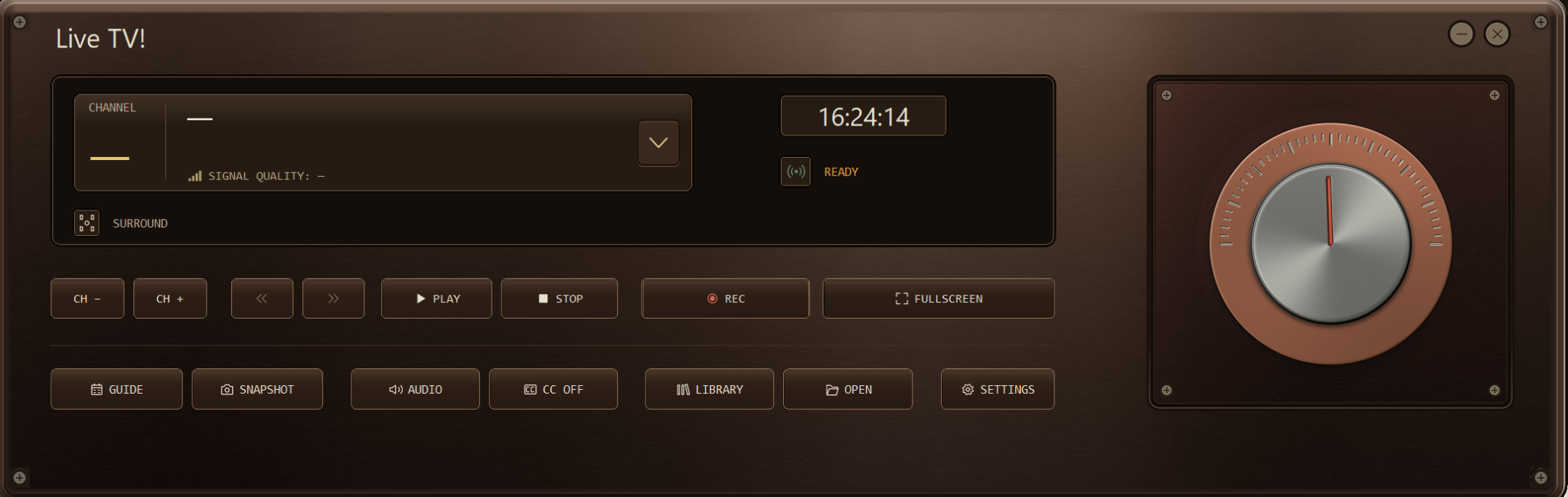
The DAC-inspired receiver panel, shown with neutral placeholders rather than a station name or channel number.
Live TV! viewing window
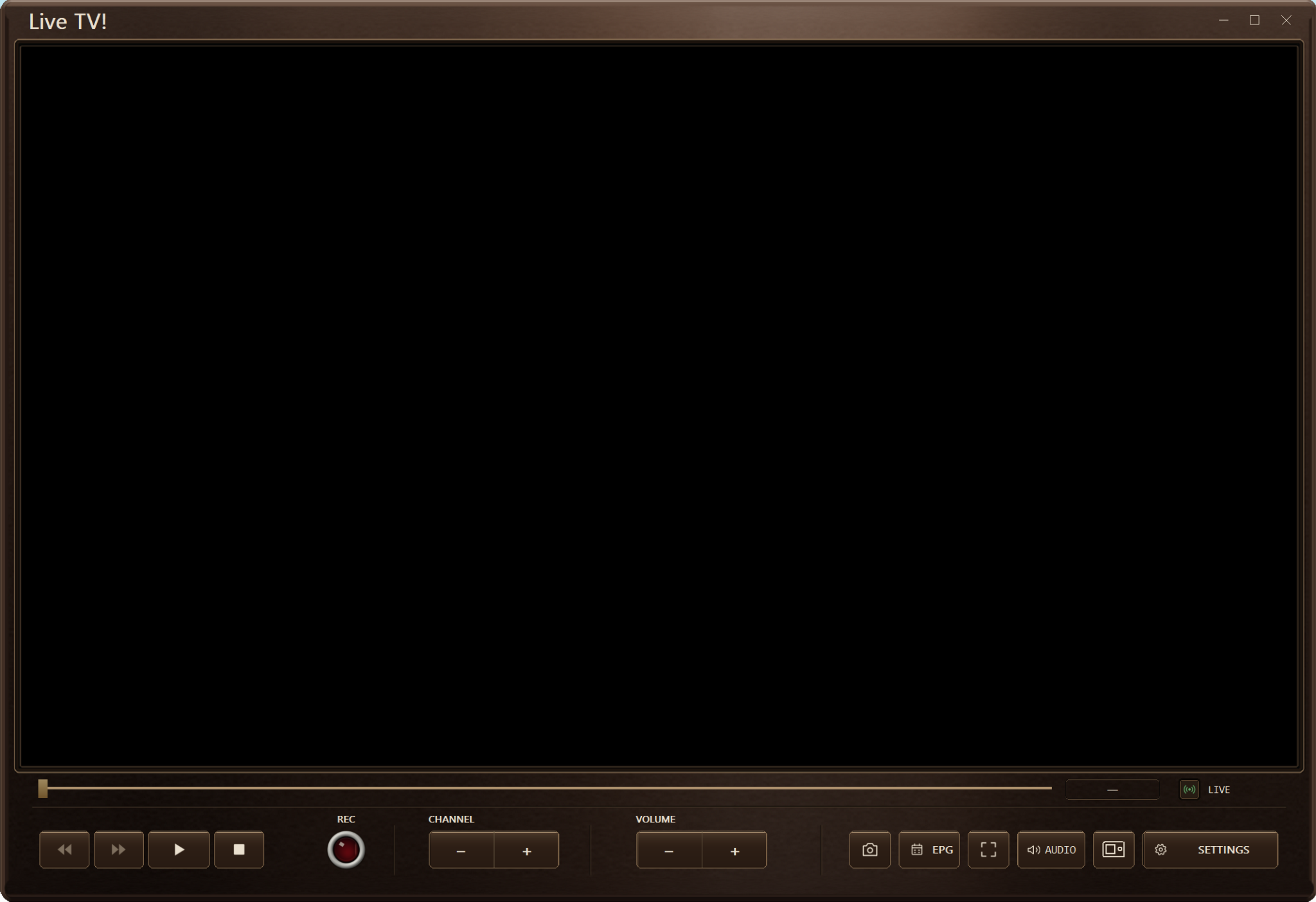
The viewing window keeps playback, recording, channel selection, volume, snapshots, the program guide, audio controls, and fullscreen access directly beneath the video surface.
Features
| Feature | What it offers |
|---|---|
| Native Windows interface | Rust and windows-rs, with no browser runtime. Metal, Glass, and Plastic button styles; English, Brazilian Portuguese, Spanish, and Greek interface languages. |
| Vulkan Video playback | Hardware-accelerated H.264 decoding through Vulkan Video where supported, with a selectable Microsoft decoder as an alternative backend. |
| Picture controls | Deinterlacing, scaling, aspect-ratio controls, picture adjustments, and ICC color-profile support. |
| Recording and time shift | Preserve the original broadcast transport stream; pause, seek, and step through a growing recording, or open a saved .ts file. |
| Guide and captions | Electronic program guide and supported ISDB closed captions using information supplied by the broadcaster. |
| Audio controls | Broadcast track selection, stereo/mono/left/right modes, and 5.1 output when supported by the broadcast and Windows audio configuration. |
| Open tuner stack | Rust receiver API, command-line utilities, Debug Desk, source-built firmware loaded into device RAM, and experimental BDA compatibility adapters. |
Alpha release: Open Volar S currently targets a specific Volar S hardware revision. It is not intended to be a universal TV-tuner driver.
Supported hardware
| Component | Requirement |
|---|---|
| Operating system | Windows 10 or Windows 11, 64-bit, with the required Windows media components. |
| Receiver | Original AVerTV Volar S A865R, USB ID 07CA:B865, IT9175 revision 1, tuner ID 0x70. Other revisions are not currently claimed to be supported. |
| Broadcast | 6 MHz ISDB-T UHF, with a suitable antenna and local coverage. A Brazil preset and custom scans are available. |
| USB access | The supported receiver must already use the project's WinUSB setup. Only one television or diagnostic client should own the tuner at a time. |
| Graphics | A compatible GPU and driver for the selected backend. Vulkan Video playback requires H.264 decode support for the broadcast profile and layout; Microsoft decoding is also selectable. |
Native live playback does not use mpv or an external FFmpeg video decoder. External FFmpeg is used for recording validation/repair and optional processed AVerTV adapter modes. Original broadcast captures are retained separately from any verified or repaired output.
Getting started
- Prepare the receiver. Connect the supported tuner and antenna, verify its existing WinUSB setup, and close other applications using the tuner. The application installer does not create a new USB binding or fresh BDA registration. See the WinUSB files and adapter documentation.
- Launch Live TV! and scan. Build the application as described below, or use a matching binary release when available. Open Settings → Channels, choose the appropriate scan profile, and scan for local services.
- Select a service and start playback. Choose a discovered service from the receiver panel and use Play to begin viewing.
- Tune the experience. Use Settings → Video for decoder, aspect ratio, and color profile; Storage for recording and snapshot folders; and Themes for control materials.
Time shifting requires an active recording or a saved recording. Ordinary live viewing does not create a rewind buffer. Guide, caption, and audio-track availability depend on the selected broadcast.
Building from source
Use Windows with the Rust MSVC toolchain, Visual Studio C++ Build Tools, and a Windows SDK. From the extracted repository root:
cargo build -p a865r-tv --release --locked
.\target\release\live-tv.exe
To preview the interface without opening the tuner:
.\target\release\live-tv.exe --ui-preview --profile-dir .\target\ui-preview-profile
The internal Cargo package is named a865r-tv; the application itself is Live TV!. The source archive includes artwork, shaders, the lockfile, and third-party notices, but not compiled applications or DLLs.
See BUILD-SOURCE.md for workspace builds, tests, and installer packaging.
Project structure
| Location | Purpose |
|---|---|
player/ | Live TV! interface, playback, graphics, audio, guide, captions, and recording. |
crates/liba865r/ | USB transport, tuner control, broadcast tables, and firmware support. |
crates/a865r-bda/ | Experimental Windows BDA/DirectShow compatibility. |
crates/a865rctl/ and debug/ | Command-line tools and the diagnostic application. |
firmware/, installer/, and docs/ | Firmware, packaging, and technical documentation. |
The Rust API reference and firmware documentation provide more technical detail.
Development history is kept separately in HISTORY.md.
License
Original, independently authored Open Volar S material is additionally offered under the MIT License, with its scope and full text in LICENSE.md.
The receiver also contains GPL-3.0-only code adapted from recfsusb2i, so the combined application remains distributed under GPL-3.0-only, as recorded in LICENSE and the workspace manifests. This is therefore not an MIT-only distribution.
Third-party code and assets retain their own terms. See THIRD_PARTY.md and third-party-licenses/.
Contributors

3 commits
Similar repos


Languages
Rust
86.8%
Python
9.9%
PowerShell
1.4%
Drivers and interface for the old AverTV Volar S (A865R)
Rust
0
3 commits
updated Sep 15, 2026
See what people are saying (1)
README
Open Volar S
A new life for the original AVerTV Volar S.
A Rust-based Windows TV toolkit with an open userspace receiver driver,
source-built firmware, diagnostics, and the native Live TV! application.
Windows 10 / 11 x64 · Rust + Win32 · Vulkan Video · 0.8.0-alpha.43
Interface · Features · Hardware · Getting started · Build · License
Open Volar S brings the original AVerTV Volar S (A865R) to a modern Rust-based software stack: a userspace driver, source-built firmware, diagnostic tools, and Live TV!, a native Windows television application.
Watch broadcasts in a dedicated viewing window, control playback from a hardware-inspired receiver panel, record the original transport stream, browse program information, and tune the image and audio path without relying on a browser-based UI.
Interface
The Orbit receiver panel
The receiver panel combines channel information, transport controls, direct access to the guide and recordings, and a dedicated rotary volume control. The interface supports Metal, Glass, and Plastic control materials.
The DAC-inspired receiver panel, shown with neutral placeholders rather than a station name or channel number.
Live TV! viewing window
The viewing window keeps playback, recording, channel selection, volume, snapshots, the program guide, audio controls, and fullscreen access directly beneath the video surface.
Features
| Feature | What it offers |
|---|---|
| Native Windows interface | Rust and windows-rs, with no browser runtime. Metal, Glass, and Plastic button styles; English, Brazilian Portuguese, Spanish, and Greek interface languages. |
| Vulkan Video playback | Hardware-accelerated H.264 decoding through Vulkan Video where supported, with a selectable Microsoft decoder as an alternative backend. |
| Picture controls | Deinterlacing, scaling, aspect-ratio controls, picture adjustments, and ICC color-profile support. |
| Recording and time shift | Preserve the original broadcast transport stream; pause, seek, and step through a growing recording, or open a saved .ts file. |
| Guide and captions | Electronic program guide and supported ISDB closed captions using information supplied by the broadcaster. |
| Audio controls | Broadcast track selection, stereo/mono/left/right modes, and 5.1 output when supported by the broadcast and Windows audio configuration. |
| Open tuner stack | Rust receiver API, command-line utilities, Debug Desk, source-built firmware loaded into device RAM, and experimental BDA compatibility adapters. |
Alpha release: Open Volar S currently targets a specific Volar S hardware revision. It is not intended to be a universal TV-tuner driver.
Supported hardware
| Component | Requirement |
|---|---|
| Operating system | Windows 10 or Windows 11, 64-bit, with the required Windows media components. |
| Receiver | Original AVerTV Volar S A865R, USB ID 07CA:B865, IT9175 revision 1, tuner ID 0x70. Other revisions are not currently claimed to be supported. |
| Broadcast | 6 MHz ISDB-T UHF, with a suitable antenna and local coverage. A Brazil preset and custom scans are available. |
| USB access | The supported receiver must already use the project's WinUSB setup. Only one television or diagnostic client should own the tuner at a time. |
| Graphics | A compatible GPU and driver for the selected backend. Vulkan Video playback requires H.264 decode support for the broadcast profile and layout; Microsoft decoding is also selectable. |
Native live playback does not use mpv or an external FFmpeg video decoder. External FFmpeg is used for recording validation/repair and optional processed AVerTV adapter modes. Original broadcast captures are retained separately from any verified or repaired output.
Getting started
- Prepare the receiver. Connect the supported tuner and antenna, verify its existing WinUSB setup, and close other applications using the tuner. The application installer does not create a new USB binding or fresh BDA registration. See the WinUSB files and adapter documentation.
- Launch Live TV! and scan. Build the application as described below, or use a matching binary release when available. Open Settings → Channels, choose the appropriate scan profile, and scan for local services.
- Select a service and start playback. Choose a discovered service from the receiver panel and use Play to begin viewing.
- Tune the experience. Use Settings → Video for decoder, aspect ratio, and color profile; Storage for recording and snapshot folders; and Themes for control materials.
Time shifting requires an active recording or a saved recording. Ordinary live viewing does not create a rewind buffer. Guide, caption, and audio-track availability depend on the selected broadcast.
Building from source
Use Windows with the Rust MSVC toolchain, Visual Studio C++ Build Tools, and a Windows SDK. From the extracted repository root:
cargo build -p a865r-tv --release --locked
.\target\release\live-tv.exe
To preview the interface without opening the tuner:
.\target\release\live-tv.exe --ui-preview --profile-dir .\target\ui-preview-profile
The internal Cargo package is named a865r-tv; the application itself is Live TV!. The source archive includes artwork, shaders, the lockfile, and third-party notices, but not compiled applications or DLLs.
See BUILD-SOURCE.md for workspace builds, tests, and installer packaging.
Project structure
| Location | Purpose |
|---|---|
player/ | Live TV! interface, playback, graphics, audio, guide, captions, and recording. |
crates/liba865r/ | USB transport, tuner control, broadcast tables, and firmware support. |
crates/a865r-bda/ | Experimental Windows BDA/DirectShow compatibility. |
crates/a865rctl/ and debug/ | Command-line tools and the diagnostic application. |
firmware/, installer/, and docs/ | Firmware, packaging, and technical documentation. |
The Rust API reference and firmware documentation provide more technical detail.
Development history is kept separately in HISTORY.md.
License
Original, independently authored Open Volar S material is additionally offered under the MIT License, with its scope and full text in LICENSE.md.
The receiver also contains GPL-3.0-only code adapted from recfsusb2i, so the combined application remains distributed under GPL-3.0-only, as recorded in LICENSE and the workspace manifests. This is therefore not an MIT-only distribution.
Third-party code and assets retain their own terms. See THIRD_PARTY.md and third-party-licenses/.
Similar repos
Contributors
3 commits
Languages
Rust
86.8%
Python
9.9%
PowerShell
1.4%