
A modern, high performance, installable, frame cycler and video playback tool forked from OpenRV
C++
23
988 commits
updated Sep 17, 2026
README
UTV


👉 Skip to Installation • ⭐️ Love OpenUTV? Give us a star in the top-right! 👈
A Player for the Masses
UTV is a highly performant, lightweight, and modern image and sequence viewer.
Originally forked from visual effects industry software OpenRV, UTV is designed to be a distributable framecycler that anyone can install and run instantly. We have stripped away massive legacy build times and enterprise reference platform constraints to build a streamlined, cutting-edge tool for artists, editors, supervisors, and studios alike.
Initial Release: We Need Your Help
UTV is currently in its initial public release. While our modern build architecture and core playback engine are moving quickly, there will be issues, edge cases, and rough edges as we scale across diverse studio workflows, operating systems, and media formats.
We need the community's help to stress-test UTV and report what you find:
- What is broken or crashing
- Which codecs or formats fail to decode, display incorrect colors, or exhibit visual glitches
- Performance bottlenecks, frame drops, or playback stutter
- UX behaviors or tools that do not work as expected
- New features, integrations, or workflows you want to see
All bug reports and feature requests are tracked publicly via GitHub Issues. If you run into any issue or have an idea, please submit an issue with details about your operating system, hardware, and sample file specifications.
- Star this repository: If you find OpenUTV useful or believe in our mission of modern, lightning-fast media playback for everyone, please star this repository (top-right corner of the page)! Every star helps boost visibility on GitHub, attracts more contributors, and accelerates our release roadmap.
Why OpenUTV?
- Fast Build Times: A clean build from scratch on an M4 MacBook Air takes just 4:30 minutes; cached incremental rebuilds take under 50 seconds (compared to hours for legacy enterprise VFX builds).
- Lightweight & Redistributable: We prioritize a zero-config, portable distribution with an intelligent native trampoline launcher that guides missing dependencies instead of crashing.
- Always-Current Dependencies: All libraries (OpenEXR, OpenColorIO, OpenTimelineIO, Qt, FFmpeg, Imath, LibRaw, Boost, etc.) track the latest published releases from their respective upstream authors. You get modern features, performance boosts, and critical security patches immediately—without waiting for multi-year enterprise reference platform cycles.
- Community-Driven Velocity: OpenUTV is built for and by the creative community. We prioritize rapid review and merging of community pull requests, shipping updates with agility and momentum.
Standing on the Shoulders of Giants
We want to express our sincere gratitude and deepest respect to the OpenRV team, Autodesk, and the Academy Software Foundation (ASWF).
The original RV engine is a triumph of engineering that has powered feature film and episodic visual effects for decades. We have the utmost respect for the OpenRV maintainers and the complex backwards-compatibility constraints under which enterprise pipelines operate.
OpenUTV is committed to being an active, positive part of the open-source visual effects ecosystem. We will continue to incorporate upstream fixes that OpenRV develops, and we actively hope the OpenRV project and the broader ASWF community benefit from our commits, performance improvements, and platform modernizations in return.
Key Features & Capabilities
- Modern 10-Bit Color Pipeline: Native 10-bit Metal presentation on macOS (Extended Dynamic Range / EDR) and 10-bit Vulkan presentation on Linux & Windows, plus an integrated 10-bit diagnostic test pattern suite.
- Hardware-Accelerated Video: Native Apple Silicon VideoToolbox hardware decoding enabled by default for silky-smooth high-bitrate 4K/8K playback.
- Native Apple ProRes RAW: Out-of-the-box 16-bit half-float ProRes RAW decoding via AVFoundation and FFmpeg.
- Multi-Page PDF Document Viewing: Review storyboards, scripts, lookbooks, and contact sheets natively alongside video and sequence assets, complete with automatic margin auto-cropping.
- Professional Video I/O: Dynamic runtime support for NDI 6, Blackmagic Design DeckLink, and AJA Video Systems without licensing lock-in or bloated SDK dependencies.
- Comprehensive Format Support: OpenEXR (multi-part & deep), DPX, Cineon, TIFF, PNG, JPEG, JPEG 2000 (HTJ2K), WebP, Targa, RAW camera files (CR2, NEF, ARW), and modern video containers.
Feature Comparison: OpenUTV vs. Upstream OpenRV
| Feature / Capability | Upstream OpenRV | OpenUTV (2026.6+) |
|---|---|---|
| macOS Distribution | Unsigned, manual build required, Gatekeeper blocks | Signed & Apple Notarized, instant brew install --cask utv |
| intelligent caching | User must select cache behavior | Intelligently sets cache behavior based on media metadata |
| Windows Installation | Complex manual setup, DLL missing errors | Self-contained MSVC CRT, zero-config OpenUTVDeps MSI |
| Linux Packaging | Requires compiling heavy VFX deps tree | Precompiled zero-config DEB & RPM (/usr/local/openutv-deps) |
| Hardware GPU Acceleration | Limited / platform-specific patchwork | Auto-detecting GPU across macOS (VideoToolbox), Linux (NVDEC/VAAPI), Windows (NVDECODE/D3D11VA) |
| CPU Fallback Architecture | Hard failure if GPU pipeline errors | Intelligent, zero-configuration fallback to multithreaded CPU decode |
| PNG Sequence Playback | Standard libpng (single-threaded / CPU bottleneck) | Ultra-fast SIMD libspng (3–4× faster FPS playback) with libpng fallback |
| Vector Graphics (SVG) | Unsupported | Native SVG vector rendering (io_svg) via NanoSVG |
| Video Codec Support | Basic broadcast formats | WebM, FLAC, Opus, AAC, M4A, WMA, VOB, TS, WMV, Y4M |
| Camera RAW & Modern Formats | Restricted RAW set | Panasonic RW2, Sony SR2, Hasselblad 3FR, Phase One IIQ, Samsung SRW, Nikon NRW, Canon/Sony HIF, QOI |
| Cinema RAW (BRAW, RED, ARRI) | Unsupported | Native dynamic runtime loading for Blackmagic RAW (.braw), RED Digital Cinema (.r3d), and ARRIRAW |
| Apple Silicon HEIC | Software / slow decode | Hardware-accelerated CoreGraphics/ImageIO with full P3/Rec.2020 |
| Media Information Panel | Non selectable, image overlay | secondary panel, Live playhead/viewport tracking, source clip dropdown, instant search filter, and 1-click export (Text/CSV/JSON) |
| Modern Tech Stack | Outdated Qt / Python 3.9–3.10 | Modern Qt 6.11, Python 3.14, OpenEXR 3.4, OIIO 3.1, FFmpeg 9+ |
| In-App Update Checking | None | Automated GitHub release checker (Help -> Check for Updates...) |
| Integrated Bug Reporting | None (manual GitHub issue filing) | Native 1-click Bug Reporter with auto-collected system specs |
| Build & CI Pipeline | Multi-hour brittle builds, hard-to-cache | 6-min macOS / 18-min Windows CI, auditable binary banking & sccache |
| Decoupled Dependencies | Monolithic tight coupling | Standalone OpenUTVDeps bundle reusable by other studio tools |
Installation
macOS (Homebrew Cask — Recommended)
Install the pre-compiled native macOS (Apple Silicon) binary directly from our custom Homebrew tap:
brew tap OpenUTV/utv https://github.com/OpenUTV/utv
brew trust OpenUTV/utv
brew install --cask utv
This automatically installs UTV.app along with all required multimedia dependencies (ffmpeg-full, qt, opencolorio, openimageio, openexr, etc.).
macOS (Standalone ZIP Release)
You can also download the standalone UTV-<version>-macOS-arm64.zip directly from our Releases page:
- Unzip
UTV.appand drag it to/Applications. - Launch
UTV.app. Official releases are signed with an Apple Developer ID certificate and notarized by Apple with a stapled ticket, opening seamlessly on macOS. - Note for source / development builds: If you build UTV from source (which is ad-hoc signed by default), macOS Gatekeeper may prompt that the app was blocked. Open System Settings -> Privacy & Security, scroll down to the Security section, and click Open Anyway:
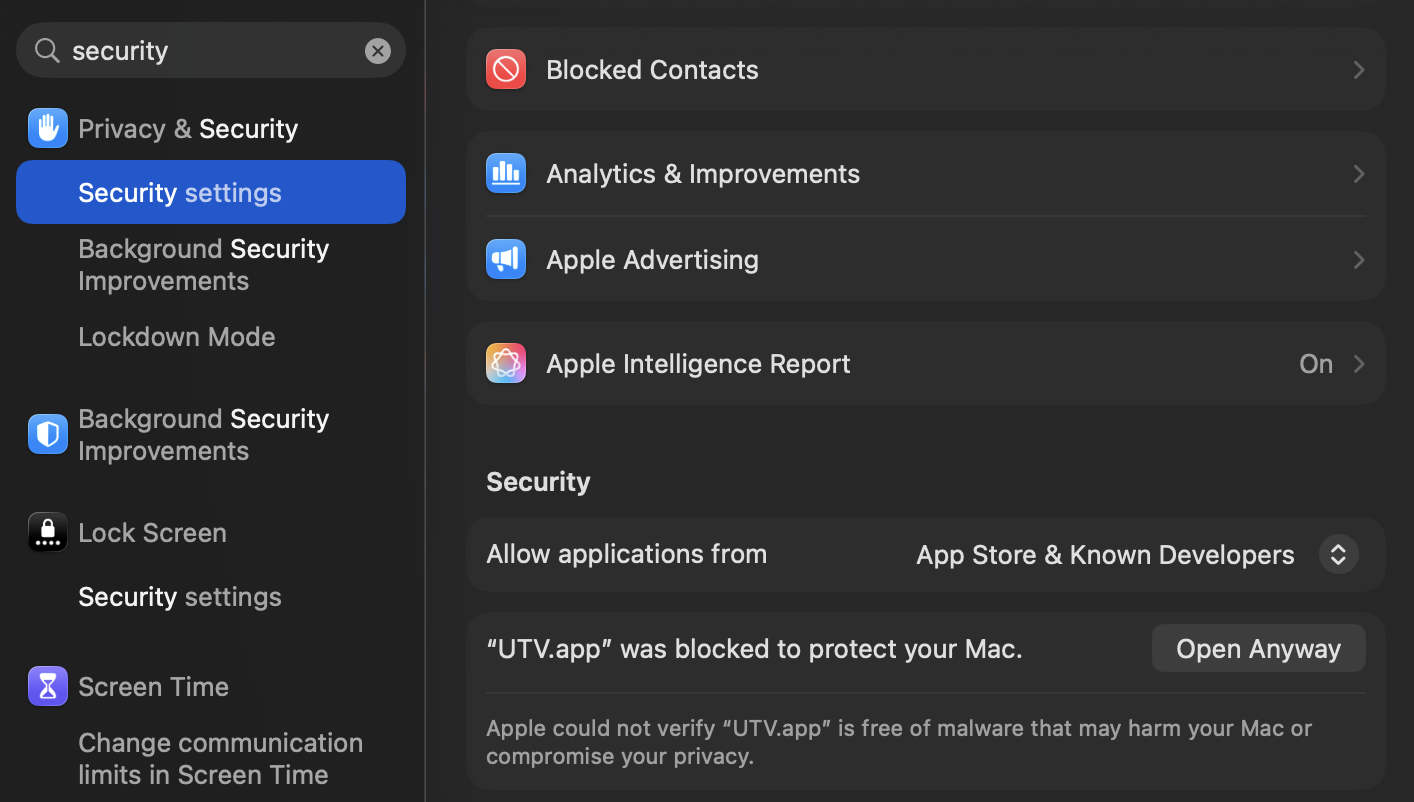
Alternatively, you can clear the quarantine attribute via Terminal:
xattr -cr /Applications/UTV.app
Windows (Standalone Release)
- Install the Dependencies Package:
Download and run the latest
OpenUTVDeps-*-win64.msiinstaller from OpenUTV Dependencies Releases. This automatically installs all multimedia libraries (FFmpeg, Qt, OpenColorIO, OpenEXR, OpenImageIO, etc.) and registers them with your systemPATH. - Download OpenUTV for Windows:
Download the latest Windows release archive
utv-windows-x64.zipfrom our Releases page. - Extract and Run:
Extract the archive to a folder of your choice (e.g.
C:\Program Files\OpenUTVor your user directory) and launchutv.exe(orUTV.bat).
Windows SmartScreen / Unsigned Executable Notice
When launching utv.exe for the first time, Windows Defender SmartScreen may display a warning ("Windows protected your PC – Microsoft Defender SmartScreen prevented an unrecognized app from starting"):
- Click More info.
- Click Run anyway.
[!NOTE] Why is the Windows binary unsigned? Microsoft requires an Extended Validation (EV) Code Signing Certificate or Azure Trusted Signing (~$10/month or several hundred dollars per year) to bypass SmartScreen warnings. As an independent open-source project, our binaries are 100% auditable, open-source, and built transparently on public GitHub Actions runners.
If an individual, studio, or corporate sponsor would like to fund a Windows code signing certificate for the project, please reach out via GitHub Discussions or sponsor us—we would be thrilled to set it up!
(Precompiled Linux .deb and .rpm packages are also available in our dependencies releases!)
Building from Source
If you want to build UTV from source or contribute to the project, the process is straightforward:
1. Install Dependencies (macOS)
brew install ninja readline sqlite3 xz zlib tcl-tk@8 python-tk autoconf automake libtool python@3.14 yasm clang-format black meson nasm pkg-config glew ccache qt ffmpeg-full openexr imath opencolorio libraw libtiff libpng boost openimageio openjpeg webp yaml-cpp spdlog icu4c openjph jpeg-turbo
2. Build the Application
git clone --recursive https://github.com/OpenUTV/utv.git
cd utv
./build.sh --release --clean
The compiled binary bundle will be placed in _build/stage/app/UTV.app.
Professional Video I/O
UTV dynamically supports professional video output using NDI, Blackmagic Design, and AJA Video Systems. Because we use dynamic runtime loading, UTV is completely unburdened by proprietary SDK restrictions.
If you have the appropriate drivers and runtimes installed on your machine, UTV will automatically detect them and enable the output features:
- NDI: Download and install the NDI Runtime from https://ndi.video/tools/ (or the NDI SDK macOS, Linux, Windows).
- Blackmagic Design: Download the "Desktop Video" driver from the Blackmagic Design Support Center.
- AJA Video Systems: Download the "Desktop Software" driver from the AJA Support Center.
Cinema Camera RAW Support (Blackmagic RAW, RED R3D, ARRI)
OpenUTV provides native out-of-the-box support for a wide array of camera formats including Panasonic Lumix (.rw2), Sony RAW (.sr2), Hasselblad (.3fr), Phase One (.iiq), Samsung (.srw), Nikon (.nrw), Canon/Sony (.hif), and Apple ProRes RAW.
Native Runtime Loading (No Recompilation Required!)
Just like our NDI and DeckLink integrations, OpenUTV uses zero-overhead dynamic runtime loading for cinema camera formats so that users and studios can enable playback without rebuilding OpenUTV:
- Blackmagic RAW (
.braw): Simply install the free Blackmagic RAW Player or DaVinci Resolve. OpenUTV automatically discovers the installed runtime framework and enables full hardware and multithreaded CPU debayering with full camera metadata. - RED Digital Cinema (
.r3d): OpenUTV includes the nativemio_r3dplugin supporting IPP2 color science, custom resolutions (Full, Half, Quarter), and multi-channel 16-bit float/integer decoding. OpenUTV automatically discovers the RED dynamic libraries if RED SDK or REDCINE-X PRO is installed, or via theRED_SDK_PATHenvironment variable. - ARRIRAW & ARRI MXF (
.ari,.arx,.mxf): Supported natively via OpenUTV's built-in decoding pipeline with automatic detection of ARRI LogC / ALEXA Wide Gamut color spaces and primaries.
FFmpeg & Codec Architecture
UTV dynamically links to FFmpeg at runtime to provide broad playback support across professional multimedia formats without licensing or redistribution restrictions. Because UTV resolves FFmpeg dynamically, updating or replacing your local FFmpeg installation directly enables hardware encoding/decoding and extended codec support without recompiling UTV:
- macOS: UTV leverages Homebrew's
ffmpeg-fullformula, automatically installed when usingbrew install --cask utv. This provides extensive codec support (H.264, H.265/HEVC, VP9, AV1, ProRes, DNxHD, etc.) without requiring custom compilation. In addition, Apple Silicon Macs benefit from native VideoToolbox hardware decoding and native AVFoundation ProRes RAW decoding out of the box. - Windows: The default distribution discovers FFmpeg DLLs via your system
PATHor directly alongsideUTV.exe.
Fully Loaded FFmpeg on Windows (Hardware Acceleration & Custom Codecs)
For Windows environments requiring full hardware acceleration (NVIDIA NVDEC/NVENC, Intel QSV, AMD AMF) and non-free codecs (such as FDK-AAC, x264, x265, and DeckLink I/O), you can supply a fully loaded FFmpeg build using either approach below:
Option A: Pre-Built Shared Build
- Download a pre-compiled shared release (e.g.,
ffmpeg-release-full-shared.7zfrom Gyan.dev or BtbN/FFmpeg-Builds). - Extract the archive and copy the
.dllfiles from thebin/directory directly into the folder whereUTV.exeis installed (or add thebin/directory to your systemPATH).
Option B: Compile via vcpkg
If you have Visual Studio Build Tools and vcpkg installed, you can compile a full-featured shared build with custom hardware modules:
vcpkg install ffmpeg[nvcodec,qsv,amf,decklink,fdk-aac,x264,x265]:x64-windows
Once complete, copy the .dll files from vcpkg/packages/ffmpeg_x64-windows/bin directly into your UTV installation directory.
Support OpenUTV
OpenUTV is completely free and open-source. If you use UTV in your studio pipeline or freelance workflows and want to support its ongoing development, you can help fund the project:
- GitHub Sponsors (Monthly or one-time)
- Support on Patreon
- Donate via Stripe (Credit Card / Apple Pay)
Cryptocurrency Addresses (BTC / ETH / SOL)
| Bitcoin (BTC) | Ethereum (ETH) | Solana (SOL) |
|---|---|---|
 |  |  |
- BTC:
bc1qwpd4nmz409xx3x5n9z76avnv7rqucu8w53aejy - ETH:
0xB9Ab3823a967804EdE427541F36E785912b67f98 - SOL:
9EdidyxKi9rwx35yvi5FVr7bDkFMPUUKMhFCdp4ASNG7
Contributing & Governance
We welcome community contributions! Please read our CONTRIBUTING.md and GOVERNANCE.md to get started.
Star History
About Third-Party Licenses
See THIRD-PARTY.md for license information about portions of UTV that have been imported from other projects.
Contributors
(top 30 of 45)


See what people are saying
Similar repos


Languages
C++
88.5%
mupad
4.2%
Python
3.2%
C
1.2%
CMake
1.1%
A modern, high performance, installable, frame cycler and video playback tool forked from OpenRV
C++
23
988 commits
updated Sep 17, 2026
README
UTV
👉 Skip to Installation • ⭐️ Love OpenUTV? Give us a star in the top-right! 👈
A Player for the Masses
UTV is a highly performant, lightweight, and modern image and sequence viewer.
Originally forked from visual effects industry software OpenRV, UTV is designed to be a distributable framecycler that anyone can install and run instantly. We have stripped away massive legacy build times and enterprise reference platform constraints to build a streamlined, cutting-edge tool for artists, editors, supervisors, and studios alike.
Initial Release: We Need Your Help
UTV is currently in its initial public release. While our modern build architecture and core playback engine are moving quickly, there will be issues, edge cases, and rough edges as we scale across diverse studio workflows, operating systems, and media formats.
We need the community's help to stress-test UTV and report what you find:
- What is broken or crashing
- Which codecs or formats fail to decode, display incorrect colors, or exhibit visual glitches
- Performance bottlenecks, frame drops, or playback stutter
- UX behaviors or tools that do not work as expected
- New features, integrations, or workflows you want to see
All bug reports and feature requests are tracked publicly via GitHub Issues. If you run into any issue or have an idea, please submit an issue with details about your operating system, hardware, and sample file specifications.
- Star this repository: If you find OpenUTV useful or believe in our mission of modern, lightning-fast media playback for everyone, please star this repository (top-right corner of the page)! Every star helps boost visibility on GitHub, attracts more contributors, and accelerates our release roadmap.
Why OpenUTV?
- Fast Build Times: A clean build from scratch on an M4 MacBook Air takes just 4:30 minutes; cached incremental rebuilds take under 50 seconds (compared to hours for legacy enterprise VFX builds).
- Lightweight & Redistributable: We prioritize a zero-config, portable distribution with an intelligent native trampoline launcher that guides missing dependencies instead of crashing.
- Always-Current Dependencies: All libraries (OpenEXR, OpenColorIO, OpenTimelineIO, Qt, FFmpeg, Imath, LibRaw, Boost, etc.) track the latest published releases from their respective upstream authors. You get modern features, performance boosts, and critical security patches immediately—without waiting for multi-year enterprise reference platform cycles.
- Community-Driven Velocity: OpenUTV is built for and by the creative community. We prioritize rapid review and merging of community pull requests, shipping updates with agility and momentum.
Standing on the Shoulders of Giants
We want to express our sincere gratitude and deepest respect to the OpenRV team, Autodesk, and the Academy Software Foundation (ASWF).
The original RV engine is a triumph of engineering that has powered feature film and episodic visual effects for decades. We have the utmost respect for the OpenRV maintainers and the complex backwards-compatibility constraints under which enterprise pipelines operate.
OpenUTV is committed to being an active, positive part of the open-source visual effects ecosystem. We will continue to incorporate upstream fixes that OpenRV develops, and we actively hope the OpenRV project and the broader ASWF community benefit from our commits, performance improvements, and platform modernizations in return.
Key Features & Capabilities
- Modern 10-Bit Color Pipeline: Native 10-bit Metal presentation on macOS (Extended Dynamic Range / EDR) and 10-bit Vulkan presentation on Linux & Windows, plus an integrated 10-bit diagnostic test pattern suite.
- Hardware-Accelerated Video: Native Apple Silicon VideoToolbox hardware decoding enabled by default for silky-smooth high-bitrate 4K/8K playback.
- Native Apple ProRes RAW: Out-of-the-box 16-bit half-float ProRes RAW decoding via AVFoundation and FFmpeg.
- Multi-Page PDF Document Viewing: Review storyboards, scripts, lookbooks, and contact sheets natively alongside video and sequence assets, complete with automatic margin auto-cropping.
- Professional Video I/O: Dynamic runtime support for NDI 6, Blackmagic Design DeckLink, and AJA Video Systems without licensing lock-in or bloated SDK dependencies.
- Comprehensive Format Support: OpenEXR (multi-part & deep), DPX, Cineon, TIFF, PNG, JPEG, JPEG 2000 (HTJ2K), WebP, Targa, RAW camera files (CR2, NEF, ARW), and modern video containers.
Feature Comparison: OpenUTV vs. Upstream OpenRV
| Feature / Capability | Upstream OpenRV | OpenUTV (2026.6+) |
|---|---|---|
| macOS Distribution | Unsigned, manual build required, Gatekeeper blocks | Signed & Apple Notarized, instant brew install --cask utv |
| intelligent caching | User must select cache behavior | Intelligently sets cache behavior based on media metadata |
| Windows Installation | Complex manual setup, DLL missing errors | Self-contained MSVC CRT, zero-config OpenUTVDeps MSI |
| Linux Packaging | Requires compiling heavy VFX deps tree | Precompiled zero-config DEB & RPM (/usr/local/openutv-deps) |
| Hardware GPU Acceleration | Limited / platform-specific patchwork | Auto-detecting GPU across macOS (VideoToolbox), Linux (NVDEC/VAAPI), Windows (NVDECODE/D3D11VA) |
| CPU Fallback Architecture | Hard failure if GPU pipeline errors | Intelligent, zero-configuration fallback to multithreaded CPU decode |
| PNG Sequence Playback | Standard libpng (single-threaded / CPU bottleneck) | Ultra-fast SIMD libspng (3–4× faster FPS playback) with libpng fallback |
| Vector Graphics (SVG) | Unsupported | Native SVG vector rendering (io_svg) via NanoSVG |
| Video Codec Support | Basic broadcast formats | WebM, FLAC, Opus, AAC, M4A, WMA, VOB, TS, WMV, Y4M |
| Camera RAW & Modern Formats | Restricted RAW set | Panasonic RW2, Sony SR2, Hasselblad 3FR, Phase One IIQ, Samsung SRW, Nikon NRW, Canon/Sony HIF, QOI |
| Cinema RAW (BRAW, RED, ARRI) | Unsupported | Native dynamic runtime loading for Blackmagic RAW (.braw), RED Digital Cinema (.r3d), and ARRIRAW |
| Apple Silicon HEIC | Software / slow decode | Hardware-accelerated CoreGraphics/ImageIO with full P3/Rec.2020 |
| Media Information Panel | Non selectable, image overlay | secondary panel, Live playhead/viewport tracking, source clip dropdown, instant search filter, and 1-click export (Text/CSV/JSON) |
| Modern Tech Stack | Outdated Qt / Python 3.9–3.10 | Modern Qt 6.11, Python 3.14, OpenEXR 3.4, OIIO 3.1, FFmpeg 9+ |
| In-App Update Checking | None | Automated GitHub release checker (Help -> Check for Updates...) |
| Integrated Bug Reporting | None (manual GitHub issue filing) | Native 1-click Bug Reporter with auto-collected system specs |
| Build & CI Pipeline | Multi-hour brittle builds, hard-to-cache | 6-min macOS / 18-min Windows CI, auditable binary banking & sccache |
| Decoupled Dependencies | Monolithic tight coupling | Standalone OpenUTVDeps bundle reusable by other studio tools |
Installation
macOS (Homebrew Cask — Recommended)
Install the pre-compiled native macOS (Apple Silicon) binary directly from our custom Homebrew tap:
brew tap OpenUTV/utv https://github.com/OpenUTV/utv
brew trust OpenUTV/utv
brew install --cask utv
This automatically installs UTV.app along with all required multimedia dependencies (ffmpeg-full, qt, opencolorio, openimageio, openexr, etc.).
macOS (Standalone ZIP Release)
You can also download the standalone UTV-<version>-macOS-arm64.zip directly from our Releases page:
- Unzip
UTV.appand drag it to/Applications. - Launch
UTV.app. Official releases are signed with an Apple Developer ID certificate and notarized by Apple with a stapled ticket, opening seamlessly on macOS. - Note for source / development builds: If you build UTV from source (which is ad-hoc signed by default), macOS Gatekeeper may prompt that the app was blocked. Open System Settings -> Privacy & Security, scroll down to the Security section, and click Open Anyway:
Alternatively, you can clear the quarantine attribute via Terminal:
xattr -cr /Applications/UTV.app
Windows (Standalone Release)
- Install the Dependencies Package:
Download and run the latest
OpenUTVDeps-*-win64.msiinstaller from OpenUTV Dependencies Releases. This automatically installs all multimedia libraries (FFmpeg, Qt, OpenColorIO, OpenEXR, OpenImageIO, etc.) and registers them with your systemPATH. - Download OpenUTV for Windows:
Download the latest Windows release archive
utv-windows-x64.zipfrom our Releases page. - Extract and Run:
Extract the archive to a folder of your choice (e.g.
C:\Program Files\OpenUTVor your user directory) and launchutv.exe(orUTV.bat).
Windows SmartScreen / Unsigned Executable Notice
When launching utv.exe for the first time, Windows Defender SmartScreen may display a warning ("Windows protected your PC – Microsoft Defender SmartScreen prevented an unrecognized app from starting"):
- Click More info.
- Click Run anyway.
[!NOTE] Why is the Windows binary unsigned? Microsoft requires an Extended Validation (EV) Code Signing Certificate or Azure Trusted Signing (~$10/month or several hundred dollars per year) to bypass SmartScreen warnings. As an independent open-source project, our binaries are 100% auditable, open-source, and built transparently on public GitHub Actions runners.
If an individual, studio, or corporate sponsor would like to fund a Windows code signing certificate for the project, please reach out via GitHub Discussions or sponsor us—we would be thrilled to set it up!
(Precompiled Linux .deb and .rpm packages are also available in our dependencies releases!)
Building from Source
If you want to build UTV from source or contribute to the project, the process is straightforward:
1. Install Dependencies (macOS)
brew install ninja readline sqlite3 xz zlib tcl-tk@8 python-tk autoconf automake libtool python@3.14 yasm clang-format black meson nasm pkg-config glew ccache qt ffmpeg-full openexr imath opencolorio libraw libtiff libpng boost openimageio openjpeg webp yaml-cpp spdlog icu4c openjph jpeg-turbo
2. Build the Application
git clone --recursive https://github.com/OpenUTV/utv.git
cd utv
./build.sh --release --clean
The compiled binary bundle will be placed in _build/stage/app/UTV.app.
Professional Video I/O
UTV dynamically supports professional video output using NDI, Blackmagic Design, and AJA Video Systems. Because we use dynamic runtime loading, UTV is completely unburdened by proprietary SDK restrictions.
If you have the appropriate drivers and runtimes installed on your machine, UTV will automatically detect them and enable the output features:
- NDI: Download and install the NDI Runtime from https://ndi.video/tools/ (or the NDI SDK macOS, Linux, Windows).
- Blackmagic Design: Download the "Desktop Video" driver from the Blackmagic Design Support Center.
- AJA Video Systems: Download the "Desktop Software" driver from the AJA Support Center.
Cinema Camera RAW Support (Blackmagic RAW, RED R3D, ARRI)
OpenUTV provides native out-of-the-box support for a wide array of camera formats including Panasonic Lumix (.rw2), Sony RAW (.sr2), Hasselblad (.3fr), Phase One (.iiq), Samsung (.srw), Nikon (.nrw), Canon/Sony (.hif), and Apple ProRes RAW.
Native Runtime Loading (No Recompilation Required!)
Just like our NDI and DeckLink integrations, OpenUTV uses zero-overhead dynamic runtime loading for cinema camera formats so that users and studios can enable playback without rebuilding OpenUTV:
- Blackmagic RAW (
.braw): Simply install the free Blackmagic RAW Player or DaVinci Resolve. OpenUTV automatically discovers the installed runtime framework and enables full hardware and multithreaded CPU debayering with full camera metadata. - RED Digital Cinema (
.r3d): OpenUTV includes the nativemio_r3dplugin supporting IPP2 color science, custom resolutions (Full, Half, Quarter), and multi-channel 16-bit float/integer decoding. OpenUTV automatically discovers the RED dynamic libraries if RED SDK or REDCINE-X PRO is installed, or via theRED_SDK_PATHenvironment variable. - ARRIRAW & ARRI MXF (
.ari,.arx,.mxf): Supported natively via OpenUTV's built-in decoding pipeline with automatic detection of ARRI LogC / ALEXA Wide Gamut color spaces and primaries.
FFmpeg & Codec Architecture
UTV dynamically links to FFmpeg at runtime to provide broad playback support across professional multimedia formats without licensing or redistribution restrictions. Because UTV resolves FFmpeg dynamically, updating or replacing your local FFmpeg installation directly enables hardware encoding/decoding and extended codec support without recompiling UTV:
- macOS: UTV leverages Homebrew's
ffmpeg-fullformula, automatically installed when usingbrew install --cask utv. This provides extensive codec support (H.264, H.265/HEVC, VP9, AV1, ProRes, DNxHD, etc.) without requiring custom compilation. In addition, Apple Silicon Macs benefit from native VideoToolbox hardware decoding and native AVFoundation ProRes RAW decoding out of the box. - Windows: The default distribution discovers FFmpeg DLLs via your system
PATHor directly alongsideUTV.exe.
Fully Loaded FFmpeg on Windows (Hardware Acceleration & Custom Codecs)
For Windows environments requiring full hardware acceleration (NVIDIA NVDEC/NVENC, Intel QSV, AMD AMF) and non-free codecs (such as FDK-AAC, x264, x265, and DeckLink I/O), you can supply a fully loaded FFmpeg build using either approach below:
Option A: Pre-Built Shared Build
- Download a pre-compiled shared release (e.g.,
ffmpeg-release-full-shared.7zfrom Gyan.dev or BtbN/FFmpeg-Builds). - Extract the archive and copy the
.dllfiles from thebin/directory directly into the folder whereUTV.exeis installed (or add thebin/directory to your systemPATH).
Option B: Compile via vcpkg
If you have Visual Studio Build Tools and vcpkg installed, you can compile a full-featured shared build with custom hardware modules:
vcpkg install ffmpeg[nvcodec,qsv,amf,decklink,fdk-aac,x264,x265]:x64-windows
Once complete, copy the .dll files from vcpkg/packages/ffmpeg_x64-windows/bin directly into your UTV installation directory.
Support OpenUTV
OpenUTV is completely free and open-source. If you use UTV in your studio pipeline or freelance workflows and want to support its ongoing development, you can help fund the project:
- GitHub Sponsors (Monthly or one-time)
- Support on Patreon
- Donate via Stripe (Credit Card / Apple Pay)
Cryptocurrency Addresses (BTC / ETH / SOL)
| Bitcoin (BTC) | Ethereum (ETH) | Solana (SOL) |
|---|---|---|
| | |
- BTC:
bc1qwpd4nmz409xx3x5n9z76avnv7rqucu8w53aejy - ETH:
0xB9Ab3823a967804EdE427541F36E785912b67f98 - SOL:
9EdidyxKi9rwx35yvi5FVr7bDkFMPUUKMhFCdp4ASNG7
Contributing & Governance
We welcome community contributions! Please read our CONTRIBUTING.md and GOVERNANCE.md to get started.
Star History
About Third-Party Licenses
See THIRD-PARTY.md for license information about portions of UTV that have been imported from other projects.
See what people are saying
Similar repos
Contributors
(top 30 of 45)
Languages
C++
88.5%
mupad
4.2%
Python
3.2%
C
1.2%
CMake
1.1%