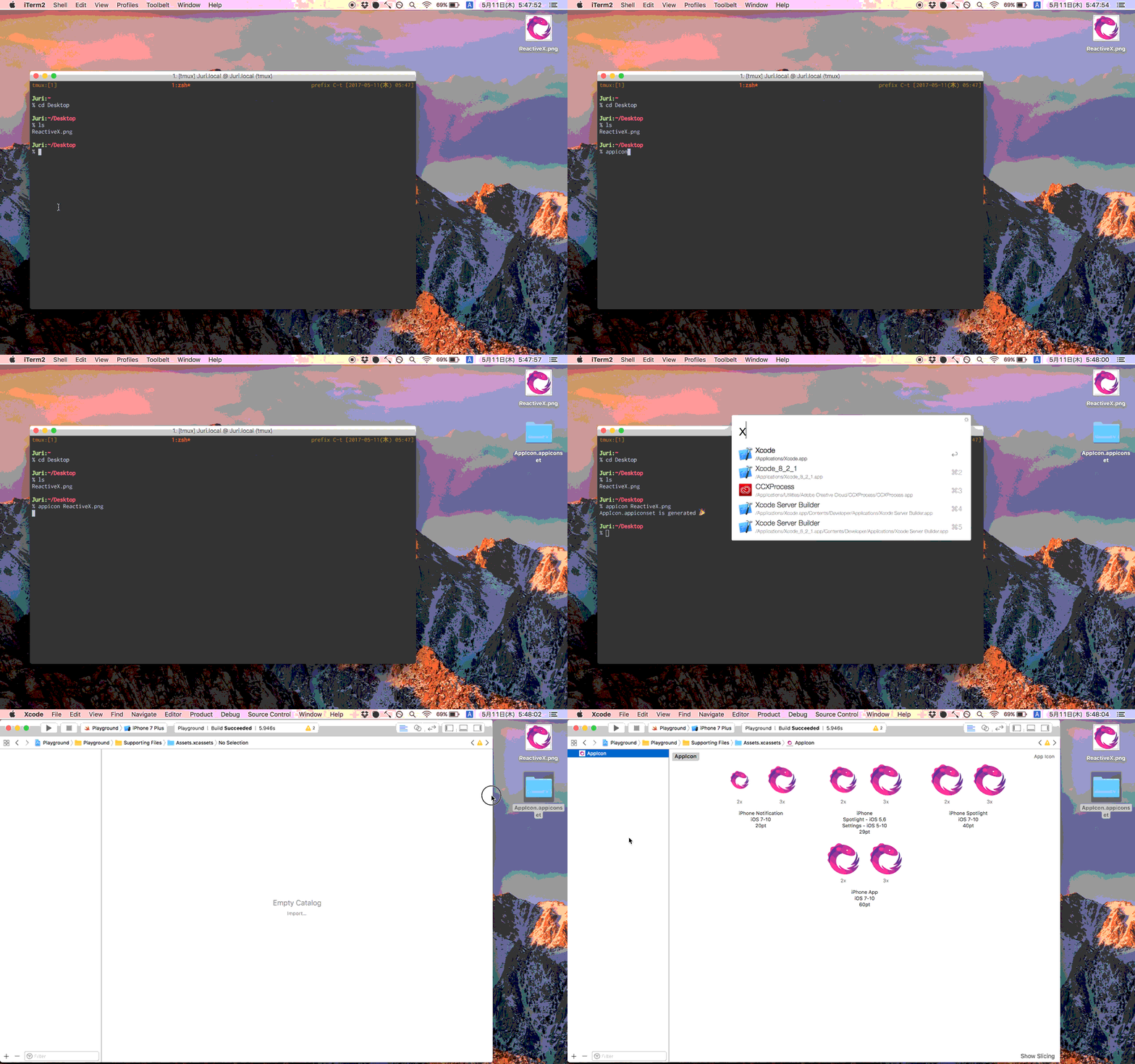
AppIcon generates *.appiconset contains each resolution image for iOS
See the code



AppIcon generates *.appiconset contains each resolution image for iOS, MacOS.
AppIcon.appiconset
├── Contents.json
├── AppIcon-20.0x20.0@2x.png
├── AppIcon-20.0x20.0@3x.png
├── AppIcon-29.0x29.0@2x.png
├── AppIcon-29.0x29.0@3x.png
├── AppIcon-40.0x40.0@2x.png
├── AppIcon-40.0x40.0@3x.png
├── AppIcon-60.0x60.0@2x.png
├── AppIcon-60.0x60.0@3x.png
└── AppIcon-1024.0x1024.0@1x.png
$ brew install Nonchalant/appicon/appicon
$ mint run nonchalant/appicon
Clone the master branch of the repository, then run make install.
$ git clone https://github.com/Nonchalant/AppIcon.git
$ make install
AppIcon needs path of base image(.png). The size of base image is 1024x1024 pixel preferably.
$ appicon iTunesIcon-1024x1024.png
You can see options by appicon --help.
Default: AppIcon
Default: ./AppIcon.appiconset
Default: false
Default: false
$ make debug
$ make build
$ make test
Takeshi Ihara afrontier829@gmail.com
Appicon is available under the MIT license. See the LICENSE file for more info.
238 followers · starred Apr 2022
128 followers · starred Jun 2024
69 followers · starred Aug 2020
112 followers · starred Apr 2018
AppIcon generates *.appiconset contains each resolution image for iOS
See the code
AppIcon generates *.appiconset contains each resolution image for iOS, MacOS.
AppIcon.appiconset
├── Contents.json
├── AppIcon-20.0x20.0@2x.png
├── AppIcon-20.0x20.0@3x.png
├── AppIcon-29.0x29.0@2x.png
├── AppIcon-29.0x29.0@3x.png
├── AppIcon-40.0x40.0@2x.png
├── AppIcon-40.0x40.0@3x.png
├── AppIcon-60.0x60.0@2x.png
├── AppIcon-60.0x60.0@3x.png
└── AppIcon-1024.0x1024.0@1x.png
$ brew install Nonchalant/appicon/appicon
$ mint run nonchalant/appicon
Clone the master branch of the repository, then run make install.
$ git clone https://github.com/Nonchalant/AppIcon.git
$ make install
AppIcon needs path of base image(.png). The size of base image is 1024x1024 pixel preferably.
$ appicon iTunesIcon-1024x1024.png
You can see options by appicon --help.
Default: AppIcon
Default: ./AppIcon.appiconset
Default: false
Default: false
$ make debug
$ make build
$ make test
Takeshi Ihara afrontier829@gmail.com
Appicon is available under the MIT license. See the LICENSE file for more info.
238 followers · starred Apr 2022
128 followers · starred Jun 2024
69 followers · starred Aug 2020
112 followers · starred Apr 2018