Easy and Efficient Transformer : Scalable Inference Solution For Large NLP model
Python
262
155 commits
updated Nov 30, 2024




EET(Easy and Efficient Transformer) is a friendly Pytorch inference plugin focus on Transformer-based models to make mega-size model affordable.
| model type | Transformers | Fairseq | Quantization | SpeedUp | Since version |
|---|---|---|---|---|---|
| GPT-3 | ✅ | ✅ | ✅ | 2~8x | 0.0.1 beta |
| Bert | ✅ | ✅ | X | 1~5x | 0.0.1 beta |
| ALBert | ✅ | ✅ | X | 1~5x | 0.0.1 beta |
| Roberta | ✅ | X | X | 1~5x | 0.0.1 beta |
| T5 | ✅ | X | X | 4~8x | 1.0 |
| ViT | ✅ | X | X | 1~5x | 1.0 |
| CLIP(GPT+ViT) | ✅ | X | X | 2~4x | 1.0 |
| Distillbert | ✅ | X | X | 1~2x | 1.0 |
| Baichuan | ✅ | X | ✅ | 1~2x | 2.0 |
| LLaMA | ✅ | X | ✅ | 1~2x | 2.0 |
The above environment is the minimum configuration, and it is best to use a newer version.
Recommend using docker images.
If you are installing from source, you will need install the necessary environment.Then proceed as follows:
$ git clone https://github.com/NetEase-FuXi/EET.git
$ pip install .
Recommend using nvcr.io/nvidia/pytorch:23.04-py3 and other series of images, you can also use the provided Dockerfile file.
$ git clone https://github.com/NetEase-FuXi/EET.git
$ docker build -t eet_docker:0.1 .
$ nvidia-docker run -it --net=host -v /your/project/directory/:/root/workspace  eet_docker:0.1 bash
The EET and its required environment have been installed in docker.
We provide three types of APIs:
Operators APIs are the intermediate representation of C++/CUDA and Python. We provide almost all the operators required for Transformer models. You can combine different OPs to build other model structures.
Operators API table
| operators | python API | Remarks |
|---|---|---|
| multi_head_attention | EETSelfAttention | self attention |
| masked_multi_head_attention | EETSelfMaskedAttention | causal attention |
| cross_multi_head_attention | EETCrossAttention | cross attention |
| ffn | EETFeedforward | feed forward network |
| embedding | EETBertEmbedding | correspondence to Fairseq and Transfomers |
| layernorm | EETLayerNorm | same as nn.LayerNorm |
How to use
The definition of these OPs is in the file EET/csrc/py11/eet2py.cpp and some using examples were show in the files under python/eet, which tell us how to use those OPs to make up classic models.
As an plugin, EET provides friendly model APIs(python/eet) to integrated into Fairseq and Transformers.
All you need to do is find the corresponding class according to the tables below (usually with a prefix of 'EET') and initialize an object with the from_torch and from_pretrained function.
Note: We now only support pre-padding for GPT-3.
EET and fairseq class comparison table :
| EET | fairseq | Remarks |
|---|---|---|
| EETTransformerDecoder | TransformerDecoder | |
| EETTransformerDecoderLayer | TransformerDecoderLayer | |
| EETTransformerAttention | MultiheadAttention | |
| EETTransformerFeedforward | TransformerDecoderLayer | fusion of multiple small operators |
| EETTransformerEmbedding | Embedding + PositionalEmbedding | |
| EETTransformerLayerNorm | nn.LayerNorm |
EET and Transformers class comparison table :
| EET | transformers | Remarks |
|---|---|---|
| EETBertModel | BertModel | |
| EETBertEmbedding | BertEmbeddings | |
| EETGPT2Model | GPT2Model | |
| EETGPT2Decoder | GPT2Model | Transformers has no GPT2Decoder |
| EETGPT2DecoderLayer | Block | |
| EETGPT2Attention | Attention | |
| EETGPT2Feedforward | MLP | |
| EETGPT2Embedding | nn.Embedding | |
| EETLayerNorm | nn.LayerNorm |
In addition to the basic model types above, we have extended some task-specific APIs to support different tasks. The table below is part of our task-specific model APIs :
| EET | transformers | Remarks |
|---|---|---|
| EETBertForPreTraining | BertForPreTraining | |
| EETBertLMHeadModel | BertLMHeadModel | |
| EETBertForMaskedLM | BertForMaskedLM | |
| EETBertForNextSentencePrediction | BertForNextSentencePrediction | |
| EETBertForSequenceClassification | BertForSequenceClassification | |
| EETBertForMultipleChoice | BertForMultipleChoice | |
| EETBertForTokenClassification | BertForTokenClassification | |
| EETBertForQuestionAnswering | BertForQuestionAnswering |
This is a code snip to show how to use model APIs :
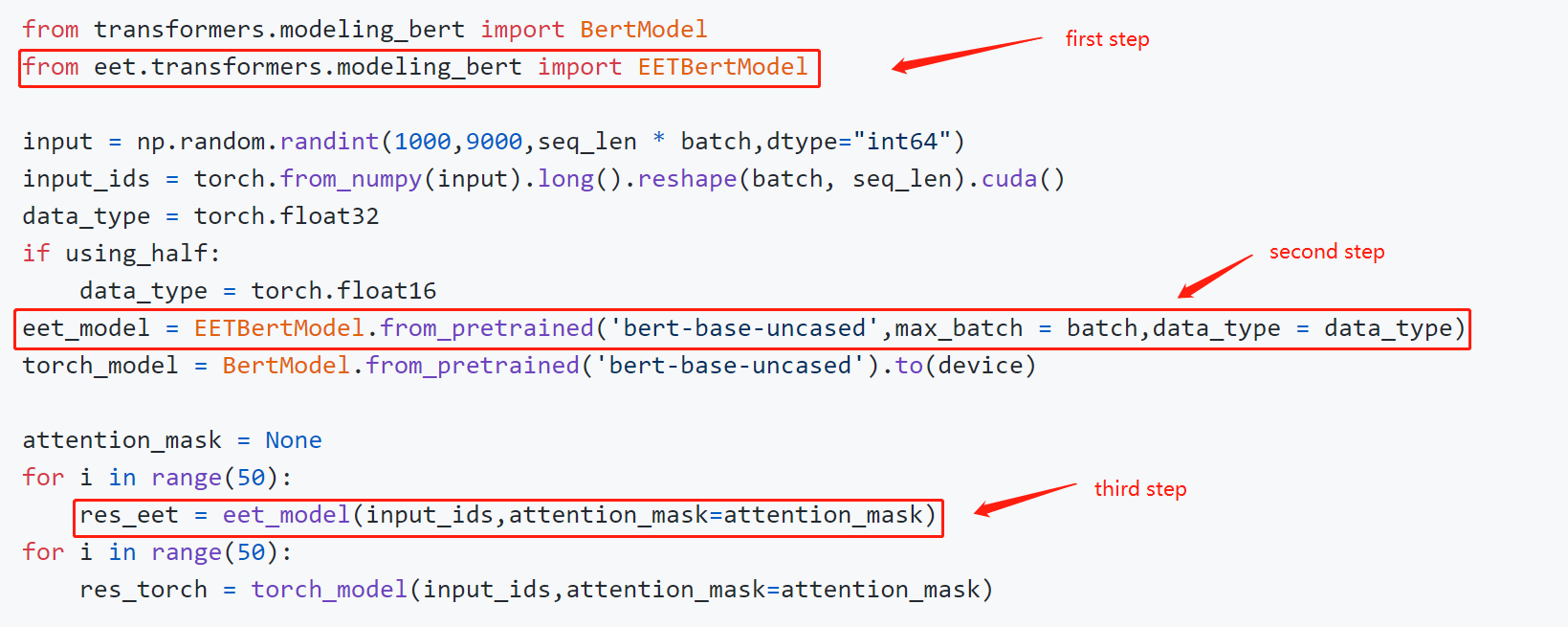
You can build your application with the model APIs directly with the task-specific APIs. There is an example of a fill-mask:
from eet import EETRobertaForMaskedLM
from transformers import RobertaTokenizer
input = ["My <mask> is Sarah and I live in London"]
tokenizer = RobertaTokenizer.from_pretrained('roberta-base')
eet_roberta_model = EETRobertaForMaskedLM.from_pretrained('roberta-base',max_batch = max_batch_size,data_type = data_type)
# first step: tokenize
model_inputs = tokenizer(input,return_tensors = 'pt')
masked_index = torch.nonzero(model_inputs['input_ids'][0] == tokenizer.mask_token_id, as_tuple=False).squeeze(-1)
# second step: predict
prediction_scores = eet_roberta_model(model_inputs['input_ids'].cuda(),attention_mask = model_inputs['attention_mask'])
# third step: argmax
predicted_index = torch.argmax(prediction_scores.logits[0, masked_index]).item()
predicted_token = tokenizer.convert_ids_to_tokens(predicted_index)
For more examples, please refer to example/python/models.
EET provides a ready-made pipelines approach to simplify your application building for different tasks without using the model APIs above.
Here is an example :
import torch
from eet import pipeline
max_batch_size = 1
model_path = 'roberta-base'
data_type = torch.float16
input = ["My <mask> is Sarah and I live in London"]
nlp = pipeline("fill-mask",model = model_path,data_type = data_type,max_batch_size = max_batch_size)
out = nlp(input)
Now we support these tasks:
| Task | Since version |
|---|---|
| text-classification | 1.0 |
| token-classification | 1.0 |
| question-answering | 1.0 |
| fill-mask | 1.0 |
| text-generation | 1.0 |
| image-classification | 1.0 |
| zero_shot_image_classification | 1.0 |
For more examples, please refer to example/python/pipelines.
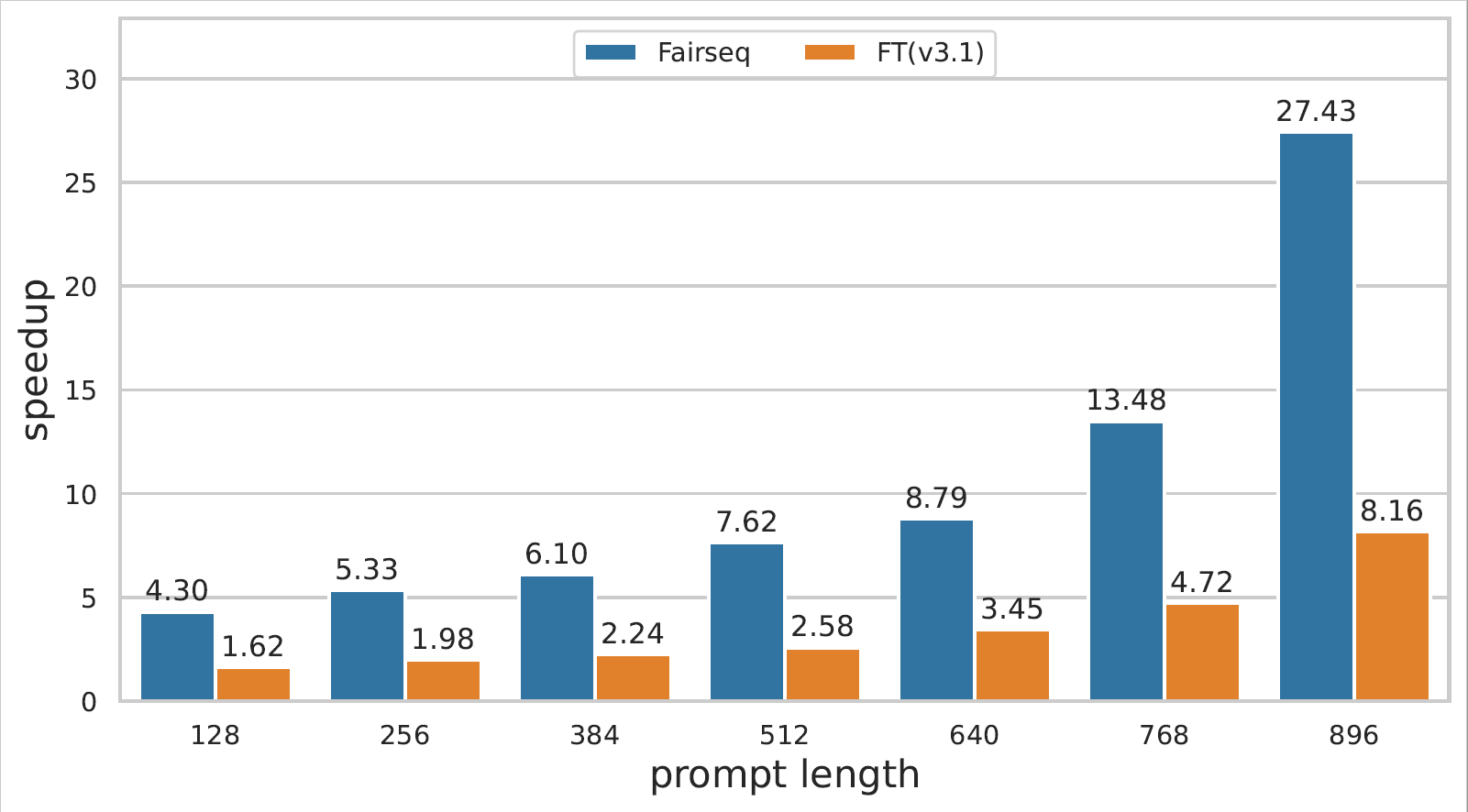
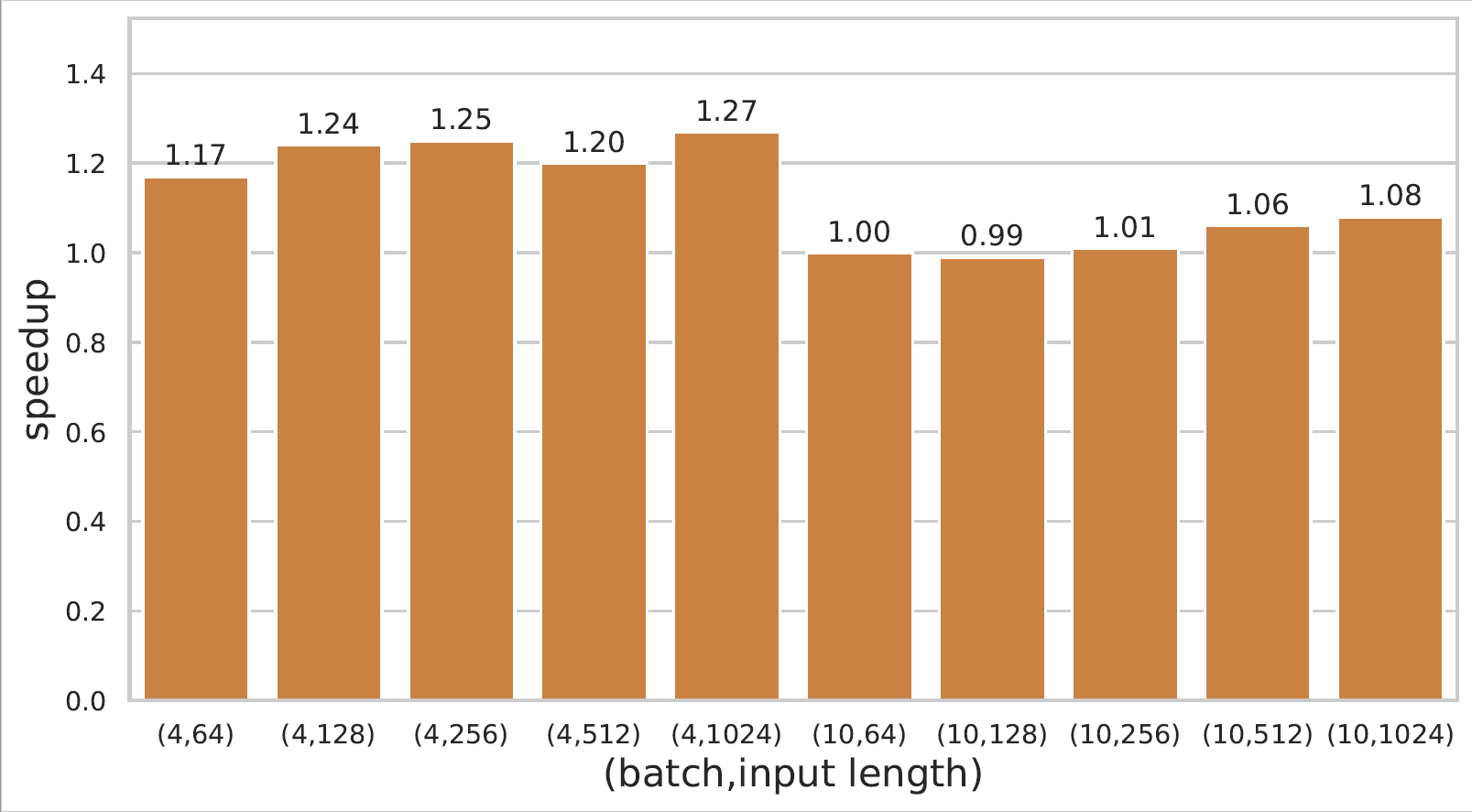
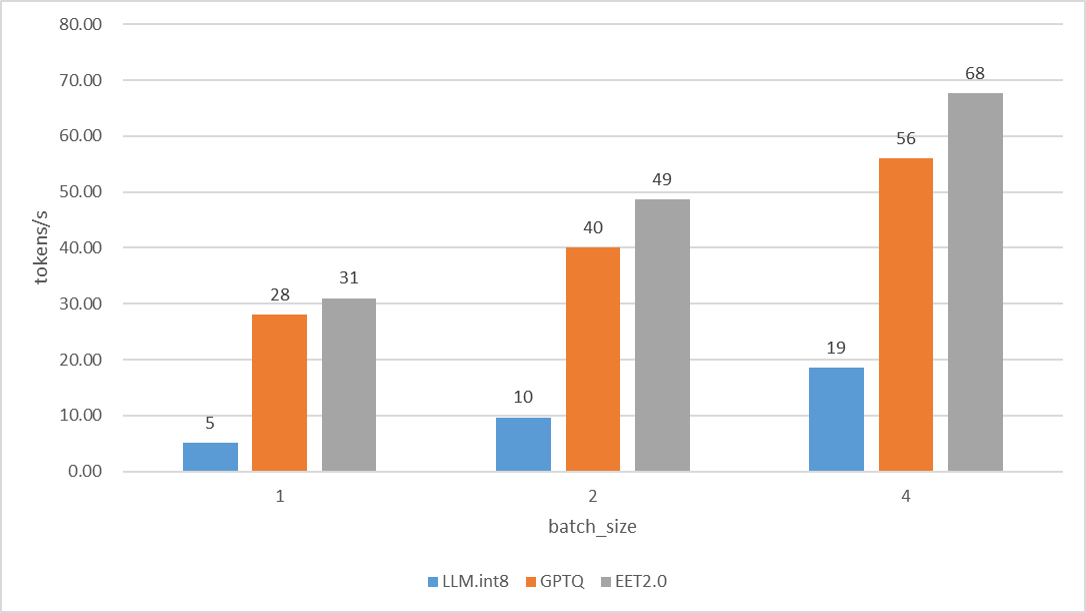
Detailed performance data of GPT-3 and Bert model inference can be viewed at link.
If you use EET in your research, please cite the following paper.
@misc{https://doi.org/10.48550/arxiv.2104.12470,
  doi = {10.48550/ARXIV.2104.12470},
  url = {https://arxiv.org/abs/2104.12470},
  author = {Li, Gongzheng and Xi, Yadong and Ding, Jingzhen and Wang, Duan and Liu, Bai and Fan, Changjie and Mao, Xiaoxi and Zhao, Zeng},
  keywords = {Computation and Language (cs.CL), FOS: Computer and information sciences, FOS: Computer and information sciences},
  title = {Easy and Efficient Transformer : Scalable Inference Solution For large NLP model},
We have a share on ZhiYuan LIVE, link: https://event.baai.ac.cn/activities/325.
You can post your problem with github issues.
You can also contact us by email :
149 followers · starred May 2022
Easy and Efficient Transformer : Scalable Inference Solution For Large NLP model
Python
262
155 commits
updated Nov 30, 2024
EET(Easy and Efficient Transformer) is a friendly Pytorch inference plugin focus on Transformer-based models to make mega-size model affordable.
| model type | Transformers | Fairseq | Quantization | SpeedUp | Since version |
|---|---|---|---|---|---|
| GPT-3 | ✅ | ✅ | ✅ | 2~8x | 0.0.1 beta |
| Bert | ✅ | ✅ | X | 1~5x | 0.0.1 beta |
| ALBert | ✅ | ✅ | X | 1~5x | 0.0.1 beta |
| Roberta | ✅ | X | X | 1~5x | 0.0.1 beta |
| T5 | ✅ | X | X | 4~8x | 1.0 |
| ViT | ✅ | X | X | 1~5x | 1.0 |
| CLIP(GPT+ViT) | ✅ | X | X | 2~4x | 1.0 |
| Distillbert | ✅ | X | X | 1~2x | 1.0 |
| Baichuan | ✅ | X | ✅ | 1~2x | 2.0 |
| LLaMA | ✅ | X | ✅ | 1~2x | 2.0 |
The above environment is the minimum configuration, and it is best to use a newer version.
Recommend using docker images.
If you are installing from source, you will need install the necessary environment.Then proceed as follows:
$ git clone https://github.com/NetEase-FuXi/EET.git
$ pip install .
Recommend using nvcr.io/nvidia/pytorch:23.04-py3 and other series of images, you can also use the provided Dockerfile file.
$ git clone https://github.com/NetEase-FuXi/EET.git
$ docker build -t eet_docker:0.1 .
$ nvidia-docker run -it --net=host -v /your/project/directory/:/root/workspace  eet_docker:0.1 bash
The EET and its required environment have been installed in docker.
We provide three types of APIs:
Operators APIs are the intermediate representation of C++/CUDA and Python. We provide almost all the operators required for Transformer models. You can combine different OPs to build other model structures.
Operators API table
| operators | python API | Remarks |
|---|---|---|
| multi_head_attention | EETSelfAttention | self attention |
| masked_multi_head_attention | EETSelfMaskedAttention | causal attention |
| cross_multi_head_attention | EETCrossAttention | cross attention |
| ffn | EETFeedforward | feed forward network |
| embedding | EETBertEmbedding | correspondence to Fairseq and Transfomers |
| layernorm | EETLayerNorm | same as nn.LayerNorm |
How to use
The definition of these OPs is in the file EET/csrc/py11/eet2py.cpp and some using examples were show in the files under python/eet, which tell us how to use those OPs to make up classic models.
As an plugin, EET provides friendly model APIs(python/eet) to integrated into Fairseq and Transformers.
All you need to do is find the corresponding class according to the tables below (usually with a prefix of 'EET') and initialize an object with the from_torch and from_pretrained function.
Note: We now only support pre-padding for GPT-3.
EET and fairseq class comparison table :
| EET | fairseq | Remarks |
|---|---|---|
| EETTransformerDecoder | TransformerDecoder | |
| EETTransformerDecoderLayer | TransformerDecoderLayer | |
| EETTransformerAttention | MultiheadAttention | |
| EETTransformerFeedforward | TransformerDecoderLayer | fusion of multiple small operators |
| EETTransformerEmbedding | Embedding + PositionalEmbedding | |
| EETTransformerLayerNorm | nn.LayerNorm |
EET and Transformers class comparison table :
| EET | transformers | Remarks |
|---|---|---|
| EETBertModel | BertModel | |
| EETBertEmbedding | BertEmbeddings | |
| EETGPT2Model | GPT2Model | |
| EETGPT2Decoder | GPT2Model | Transformers has no GPT2Decoder |
| EETGPT2DecoderLayer | Block | |
| EETGPT2Attention | Attention | |
| EETGPT2Feedforward | MLP | |
| EETGPT2Embedding | nn.Embedding | |
| EETLayerNorm | nn.LayerNorm |
In addition to the basic model types above, we have extended some task-specific APIs to support different tasks. The table below is part of our task-specific model APIs :
| EET | transformers | Remarks |
|---|---|---|
| EETBertForPreTraining | BertForPreTraining | |
| EETBertLMHeadModel | BertLMHeadModel | |
| EETBertForMaskedLM | BertForMaskedLM | |
| EETBertForNextSentencePrediction | BertForNextSentencePrediction | |
| EETBertForSequenceClassification | BertForSequenceClassification | |
| EETBertForMultipleChoice | BertForMultipleChoice | |
| EETBertForTokenClassification | BertForTokenClassification | |
| EETBertForQuestionAnswering | BertForQuestionAnswering |
This is a code snip to show how to use model APIs :
You can build your application with the model APIs directly with the task-specific APIs. There is an example of a fill-mask:
from eet import EETRobertaForMaskedLM
from transformers import RobertaTokenizer
input = ["My <mask> is Sarah and I live in London"]
tokenizer = RobertaTokenizer.from_pretrained('roberta-base')
eet_roberta_model = EETRobertaForMaskedLM.from_pretrained('roberta-base',max_batch = max_batch_size,data_type = data_type)
# first step: tokenize
model_inputs = tokenizer(input,return_tensors = 'pt')
masked_index = torch.nonzero(model_inputs['input_ids'][0] == tokenizer.mask_token_id, as_tuple=False).squeeze(-1)
# second step: predict
prediction_scores = eet_roberta_model(model_inputs['input_ids'].cuda(),attention_mask = model_inputs['attention_mask'])
# third step: argmax
predicted_index = torch.argmax(prediction_scores.logits[0, masked_index]).item()
predicted_token = tokenizer.convert_ids_to_tokens(predicted_index)
For more examples, please refer to example/python/models.
EET provides a ready-made pipelines approach to simplify your application building for different tasks without using the model APIs above.
Here is an example :
import torch
from eet import pipeline
max_batch_size = 1
model_path = 'roberta-base'
data_type = torch.float16
input = ["My <mask> is Sarah and I live in London"]
nlp = pipeline("fill-mask",model = model_path,data_type = data_type,max_batch_size = max_batch_size)
out = nlp(input)
Now we support these tasks:
| Task | Since version |
|---|---|
| text-classification | 1.0 |
| token-classification | 1.0 |
| question-answering | 1.0 |
| fill-mask | 1.0 |
| text-generation | 1.0 |
| image-classification | 1.0 |
| zero_shot_image_classification | 1.0 |
For more examples, please refer to example/python/pipelines.
Detailed performance data of GPT-3 and Bert model inference can be viewed at link.
If you use EET in your research, please cite the following paper.
@misc{https://doi.org/10.48550/arxiv.2104.12470,
  doi = {10.48550/ARXIV.2104.12470},
  url = {https://arxiv.org/abs/2104.12470},
  author = {Li, Gongzheng and Xi, Yadong and Ding, Jingzhen and Wang, Duan and Liu, Bai and Fan, Changjie and Mao, Xiaoxi and Zhao, Zeng},
  keywords = {Computation and Language (cs.CL), FOS: Computer and information sciences, FOS: Computer and information sciences},
  title = {Easy and Efficient Transformer : Scalable Inference Solution For large NLP model},
We have a share on ZhiYuan LIVE, link: https://event.baai.ac.cn/activities/325.
You can post your problem with github issues.
You can also contact us by email :
149 followers · starred May 2022