
Pixel Meter is a network speed monitor application designed specifically for Google Pixel and native Android devices.
See the codeREADME
Pixel Meter
Precise network speed monitoring for Pixel and native Android.




About
Pixel Meter is a lightweight network speed monitor designed for Google Pixel and native or near-stock Android devices.
Many speed monitors count traffic from both the physical network interface and the VPN virtual network, which can make the displayed speed approximately twice the real value. Pixel Meter uses ConnectivityManager.NetworkCallback to identify Wi-Fi, cellular and Ethernet networks, excludes networks with TRANSPORT_VPN, and reads per-interface counters through TrafficStats.
No fixed tun0 blacklist, Root access or Shizuku service is required.
Screenshots

Features
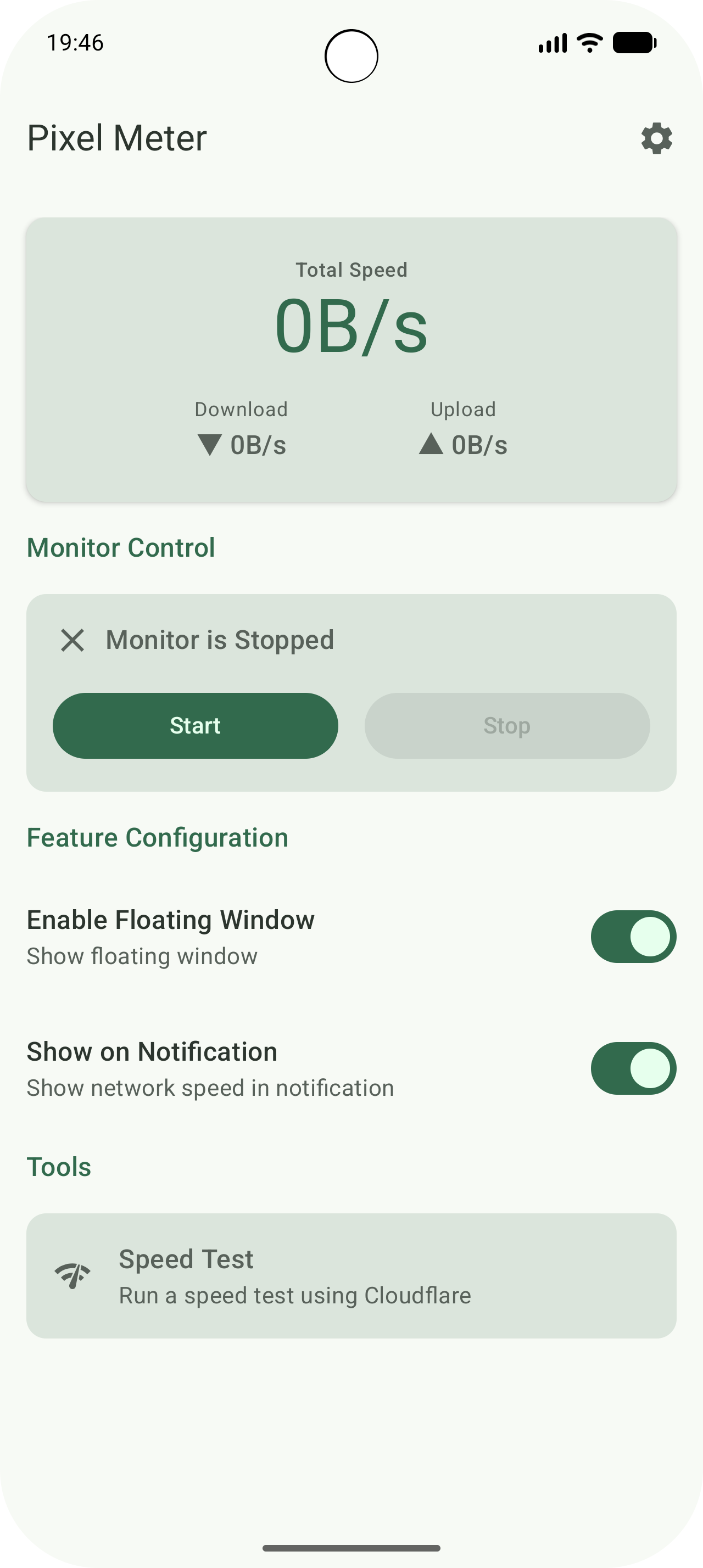
- Accurate physical-interface statistics: Excludes VPN transports and reads Wi-Fi, cellular and Ethernet counters directly.
- First-launch setup wizard: Choose notification speed, Android 16+ Live Update and the floating window with only the required permissions.
- Global rate units: Display speeds as bytes/s or decimal SI bits/s across the app.
- Notification speed display:
- Real-time Bitmap status bar icon with Total, Upload or Download content.
- Total, upload-only and download-only modes.
- Custom prefixes, display threshold, icon sizing and notification color.
- Android 16+ Live Update: Uses the promoted ongoing status bar presentation when enabled and supported.
- Floating window:
- Compose-based draggable Overlay with Upload and download, Upload, Download and Total modes.
- Horizontal or vertical layout, alignment, spacing, text size, padding, colors and corner radius.
- Position lock and persistence.
- Optional landscape, immersive-mode and sustained-low-traffic hiding.
- Quick Settings Tiles: Toggle notification speed and the floating window from System UI.
- Material You: Dynamic Color, configurable fixed theme color and optional AMOLED Black surfaces.
- Background controls: Optional boot start, battery optimization entry and screen-off sampling suspension.
- Cloudflare Speed Test: Opens
speed.cloudflare.comwith Chrome Custom Tabs. - Privacy focused: No analytics, advertising SDK or traffic upload.
Requirements
- Android 12 / API 31 or later.
- Google Pixel is the primary target; standard AOSP-style devices are also supported.
- Notification permission is required on Android 13+ to run the monitoring service.
- Overlay permission is required only for the floating window.
- Live Update requires Android 16 or later.
Android requires an ongoing notification for a Foreground Service. Disabling dynamic notification speed leaves a minimal service notification while monitoring is active.
Architecture
- Kotlin + Jetpack Compose + Material 3
- Single-module layered MVVM
- Repository + StateFlow
- Koin dependency injection
- Preferences DataStore
ConnectivityManager+TrafficStats
Detailed project documentation is available in docs/README.md.
Languages
The app currently includes English, Simplified Chinese, Portuguese, Brazilian Portuguese and Russian resources. Translations are managed on Weblate.
Contributing
Contributions are welcome. English is the primary engineering language for code comments, documentation, and new commit messages. English is recommended for Issues and Pull Requests, but other languages are welcome. See CONTRIBUTING.md.
Privacy
All traffic counters and settings are processed locally. See PRIVACY_POLICY.md.
License
Apache License 2.0. See LICENSE.
Similar repos


Languages
Kotlin
100.0%
Pixel Meter is a network speed monitor application designed specifically for Google Pixel and native Android devices.
See the codeREADME
Pixel Meter
Precise network speed monitoring for Pixel and native Android.
About
Pixel Meter is a lightweight network speed monitor designed for Google Pixel and native or near-stock Android devices.
Many speed monitors count traffic from both the physical network interface and the VPN virtual network, which can make the displayed speed approximately twice the real value. Pixel Meter uses ConnectivityManager.NetworkCallback to identify Wi-Fi, cellular and Ethernet networks, excludes networks with TRANSPORT_VPN, and reads per-interface counters through TrafficStats.
No fixed tun0 blacklist, Root access or Shizuku service is required.
Screenshots
Features
- Accurate physical-interface statistics: Excludes VPN transports and reads Wi-Fi, cellular and Ethernet counters directly.
- First-launch setup wizard: Choose notification speed, Android 16+ Live Update and the floating window with only the required permissions.
- Global rate units: Display speeds as bytes/s or decimal SI bits/s across the app.
- Notification speed display:
- Real-time Bitmap status bar icon with Total, Upload or Download content.
- Total, upload-only and download-only modes.
- Custom prefixes, display threshold, icon sizing and notification color.
- Android 16+ Live Update: Uses the promoted ongoing status bar presentation when enabled and supported.
- Floating window:
- Compose-based draggable Overlay with Upload and download, Upload, Download and Total modes.
- Horizontal or vertical layout, alignment, spacing, text size, padding, colors and corner radius.
- Position lock and persistence.
- Optional landscape, immersive-mode and sustained-low-traffic hiding.
- Quick Settings Tiles: Toggle notification speed and the floating window from System UI.
- Material You: Dynamic Color, configurable fixed theme color and optional AMOLED Black surfaces.
- Background controls: Optional boot start, battery optimization entry and screen-off sampling suspension.
- Cloudflare Speed Test: Opens
speed.cloudflare.comwith Chrome Custom Tabs. - Privacy focused: No analytics, advertising SDK or traffic upload.
Requirements
- Android 12 / API 31 or later.
- Google Pixel is the primary target; standard AOSP-style devices are also supported.
- Notification permission is required on Android 13+ to run the monitoring service.
- Overlay permission is required only for the floating window.
- Live Update requires Android 16 or later.
Android requires an ongoing notification for a Foreground Service. Disabling dynamic notification speed leaves a minimal service notification while monitoring is active.
Architecture
- Kotlin + Jetpack Compose + Material 3
- Single-module layered MVVM
- Repository + StateFlow
- Koin dependency injection
- Preferences DataStore
ConnectivityManager+TrafficStats
Detailed project documentation is available in docs/README.md.
Languages
The app currently includes English, Simplified Chinese, Portuguese, Brazilian Portuguese and Russian resources. Translations are managed on Weblate.
Contributing
Contributions are welcome. English is the primary engineering language for code comments, documentation, and new commit messages. English is recommended for Issues and Pull Requests, but other languages are welcome. See CONTRIBUTING.md.
Privacy
All traffic counters and settings are processed locally. See PRIVACY_POLICY.md.
License
Apache License 2.0. See LICENSE.
Similar repos
Languages
Kotlin
100.0%