
A light-weight & open-source menubar app that shows current upload & download speed plus the top apps using bandwidth
See the codeREADME
NetFluss



A native macOS menubar app showing real-time upload and download rates, router-wide bandwidth, historical traffic statistics, and built-in speed testing.
Latest release: NetFluss 2.6
New in 2.6
- VPN indicator in the menu bar — protected at a glance. An optional dot or shield right of the upload and download rates shows whether a VPN is up. It works with the VPN connections built into NetFluss and with external VPN clients — Tunnelblick, the WireGuard app, Mullvad, Tailscale, the macOS VPN settings and others: NetFluss detects any active tunnel, no matter which app started it.
- Pick the colour, and choose whether the indicator stays visible (dimmed) while no VPN is connected.
- Optionally add the flag of the country your public IP is in, so you see your exit location without opening the popover. It updates within seconds when a VPN connects or disconnects.
- Enable both under Preferences → Appearance. Detection is lightweight and only runs while one of the options is on.
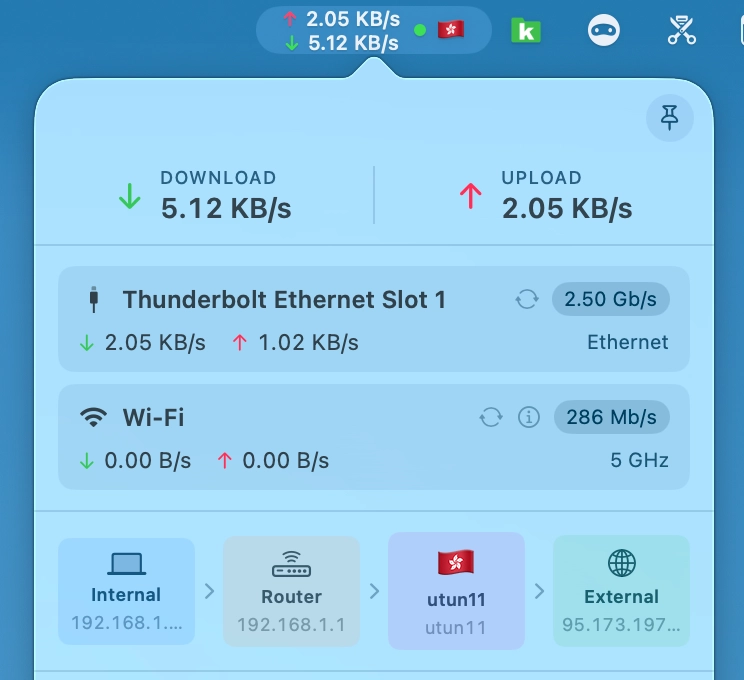
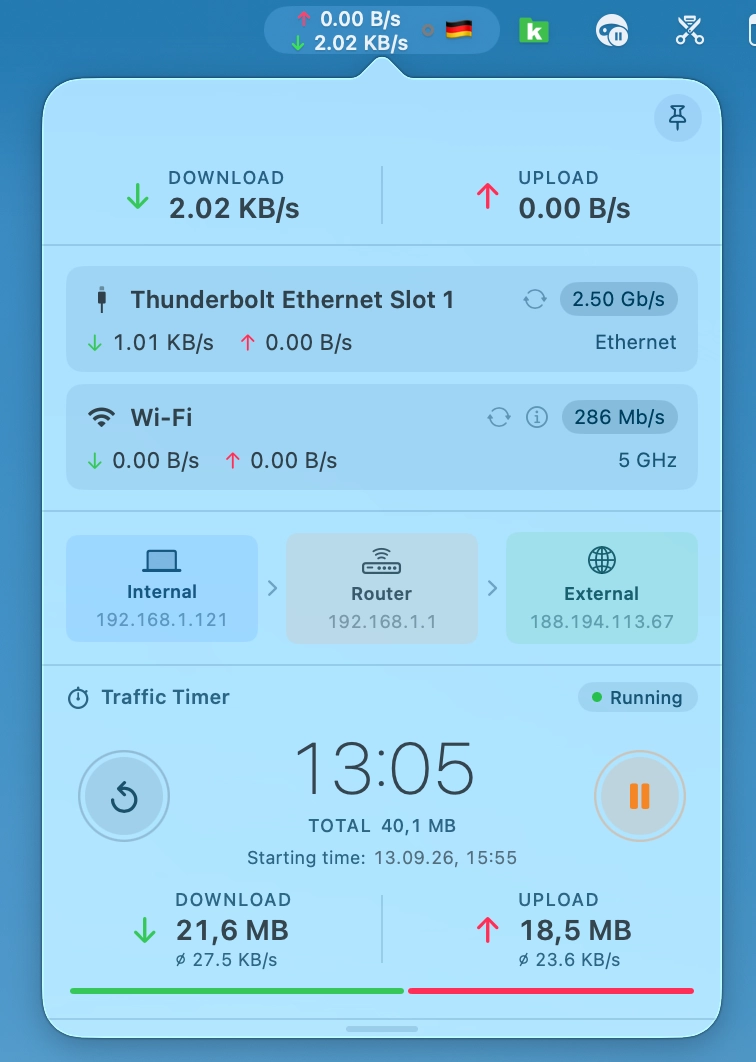
- Traffic Timer — measure traffic from start to stop. A new optional popover section that works like the stopwatch on your phone: press start and it adds up download and upload from that moment on — handy for checking how much a download, a backup or a video call really moves.
- Pause, resume and reset with round buttons; the elapsed time, the running total, the average download and upload rate and a download/upload split bar are always in view.
- The starting time (and, while paused, when you paused) is shown under the total.
- It keeps counting while the popover is closed and survives a restart (it comes back paused). Turn it on in Preferences → Appearance, in the popover sections list.
-
Auto-update — NetFluss now keeps itself up to date. Once a day it checks for a new version and shows you what's new; one click downloads, verifies and installs the update and relaunches NetFluss — or skip it, or get reminded later. Check for Updates… is also in the menu bar icon's right-click menu and in About, and the daily check can be switched off in Preferences → General. Every update is verified with an EdDSA signature and NetFluss's Apple Developer ID before it is installed. Coming from 2.5 or earlier? Download 2.6 once manually — from then on NetFluss updates itself.
-
Clearer router connection errors — OPNsense, OpenWRT and UniFi now say exactly what went wrong instead of a generic "cannot reach": HTTPS refused (with the
http://or port to enter instead), a TLS failure, or a changed router certificate — with a new Trust Current Certificate button in the OPNsense credential test. Addresses likerouter.lan:8443are accepted, and re-trusting a certificate now works for URL-form addresses too. (#56) -
Complete German, 简体中文 and 繁體中文 translations — every remaining dialog and message, including router, VPN and speed-test errors, is now translated.
New in 2.5
- Network Slice — see who your Mac is talking to, right now. A dedicated live-traffic window, opened from the menu bar icon's right-click menu. A rolling Traffic Rate chart at the top, and below it three linked columns — Network Hosts, Services, and Apps — each ranked by volume with a relative usage bar. Remote hosts are reverse-resolved to hostnames and tagged with a country flag, so a row reads
dns.google 🇺🇸instead of a bare IP.- Each column has a ⚡ live / Σ accumulated toggle: ⚡ shows only the last sample interval (what is moving this second), Σ shows the running total since you opened the window.
- Pause freezes the view so you can read a burst without it scrolling away.
- Built on the same lightweight
netstatdiffing NetFluss already uses — no packet capture, nonettopdaemon, no extra privileges, and sampling stops the moment you close the window.
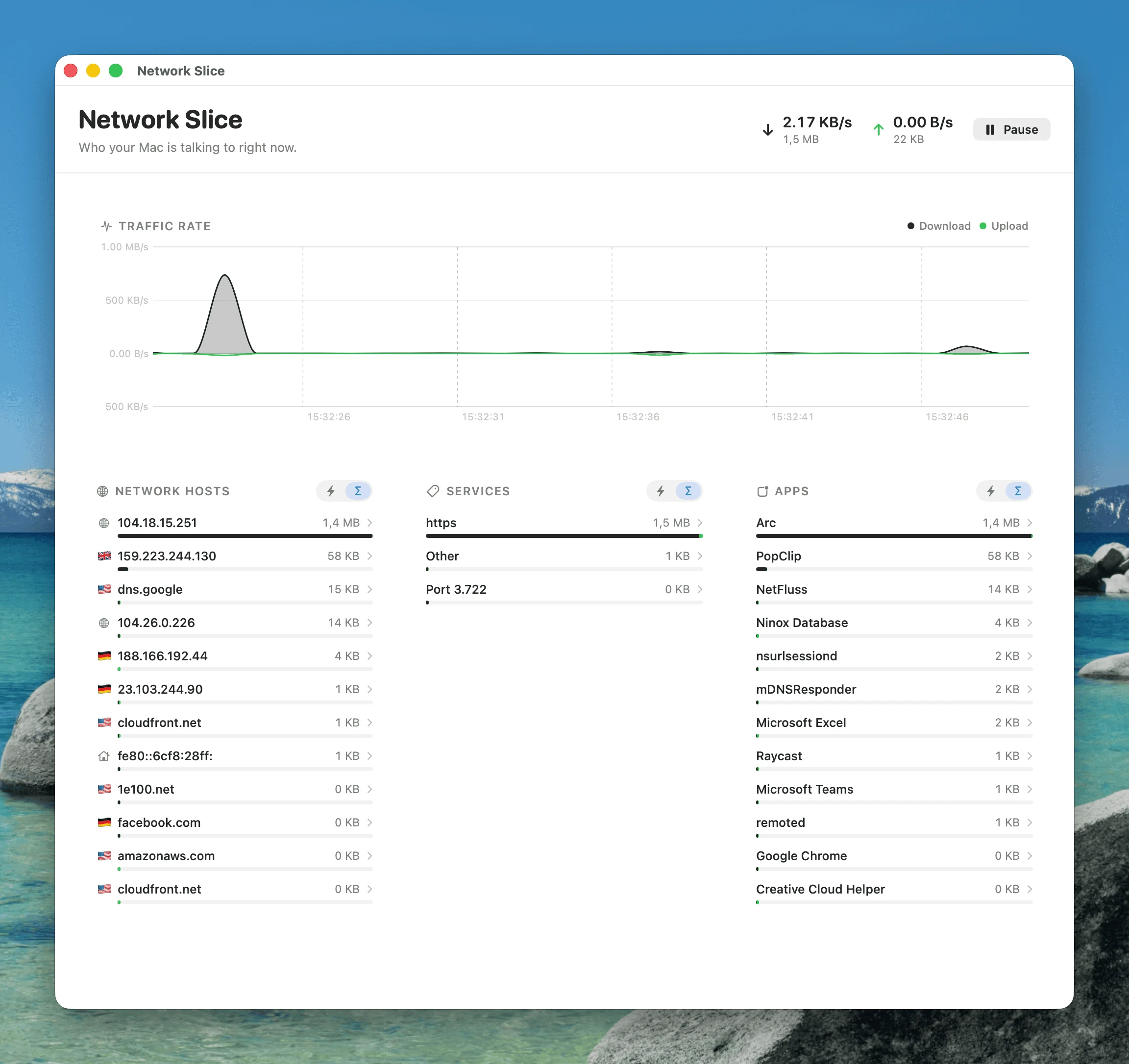
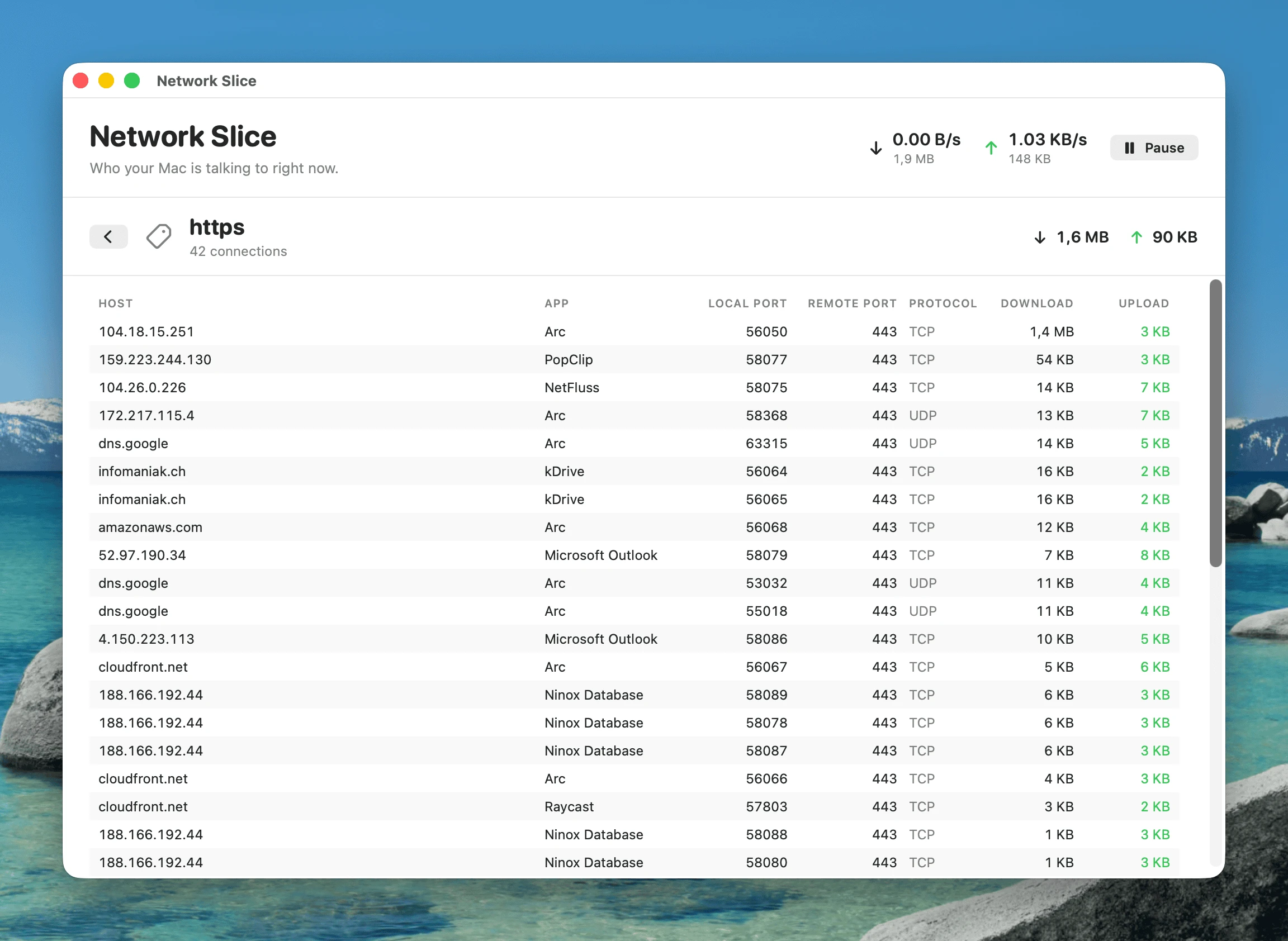
- Click any row to drill in. A host expands to every connection with it — which app, local and remote port, protocol, service, and per-connection download/upload.
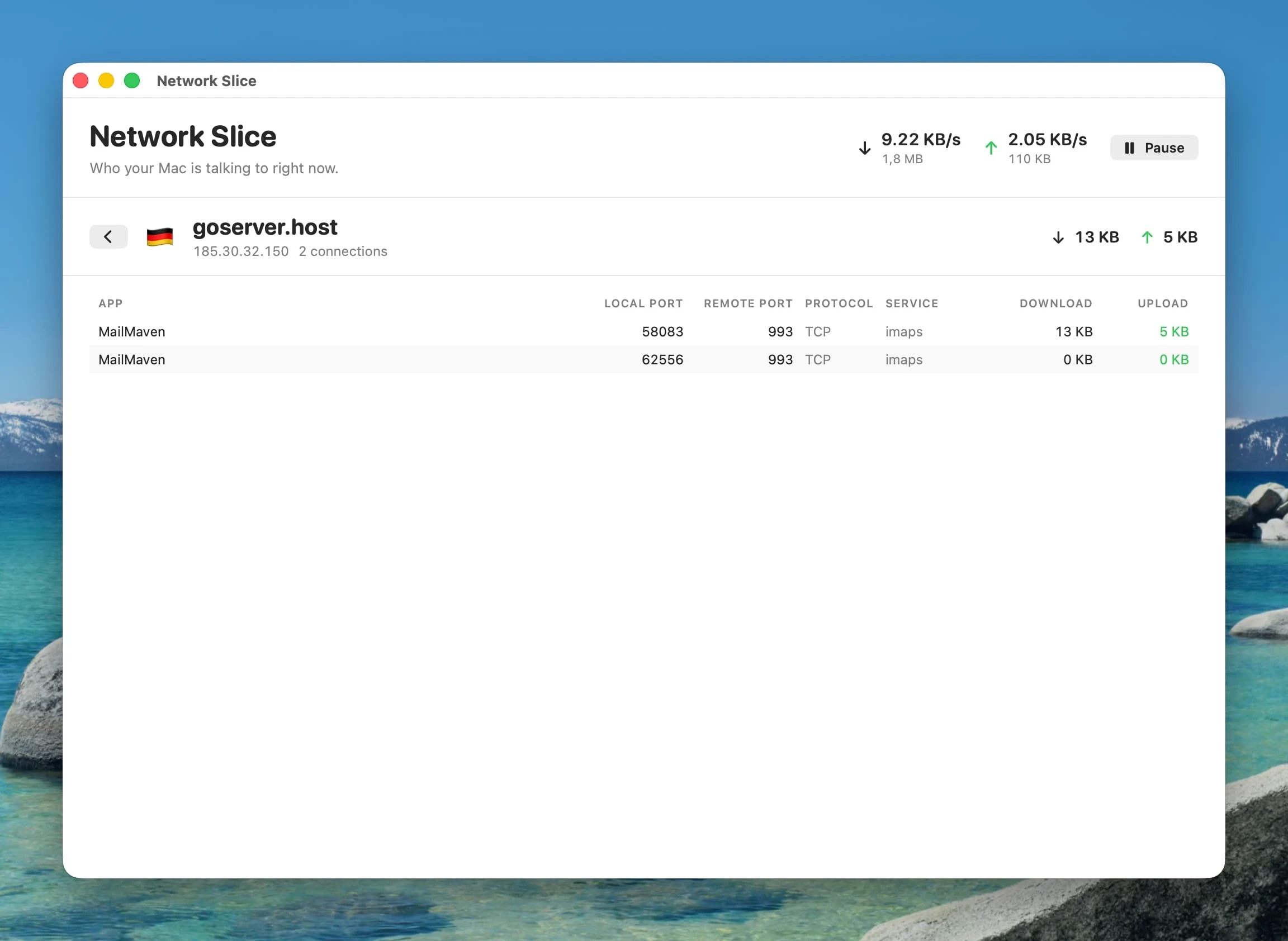
- A service (https, imaps, a bare port number…) expands to every host and app using it — useful for answering "what is all this HTTPS traffic, actually?"
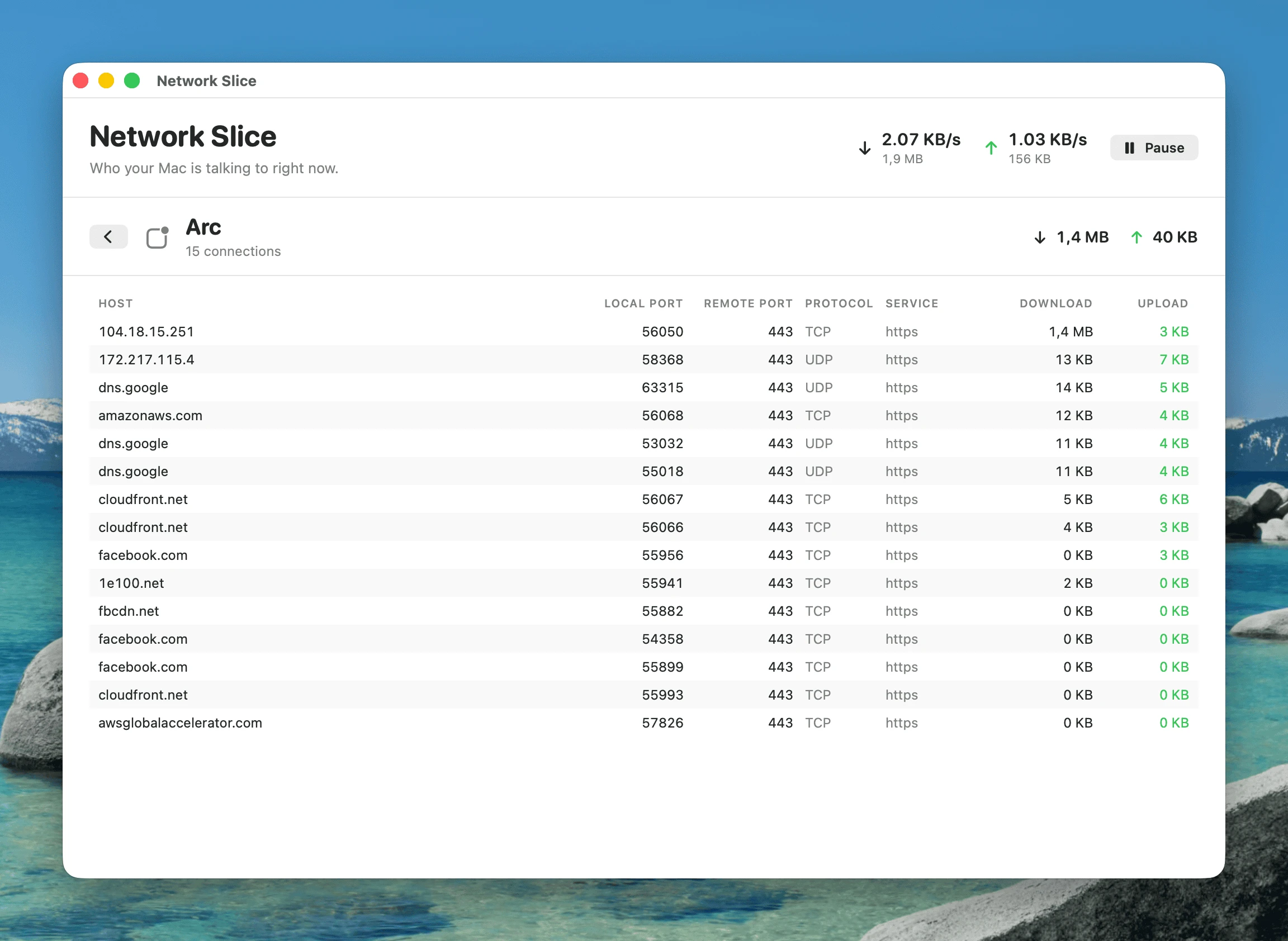
- An app expands to every host it is currently connected to, with the service and port for each.
-
Data Usage totals, right in the popover — a new section showing how much you have actually moved, without opening a separate window: Upload, Download, and an emphasised Total row, each split across a Today and a This Month column, read from the history NetFluss already collects. It updates live while the popover is open, and a chart button in its header jumps straight to the full Bandwidth Statistics window. Enable it under Preferences → Statistics (it needs historical statistics collection turned on); tunnel adapters can be excluded from the figures, and loopback and AirDrop always are. (Thanks to @truekasun.)
-
VPN fixes — WireGuard and Intel Macs. A round of fixes for issues reported against the 2.4 VPN client:
- Universal (Intel) VPN binaries are back. The bundled OpenVPN and WireGuard toolchain ships arm64 and x86_64 slices again, both targeting macOS 13, so VPN works on Intel Macs. The release build now hard-fails if either slice is missing, so it can't regress silently. (#48)
- WireGuard no longer corrupts your DNS.
wg-quick's orphan-prone DNS monitor is stopped, private tunnel DNS is routed through the tunnel, and NetFluss now tracks the realutuninterface instead of guessing. Teardown, file permissions, and stale-config cleanup were hardened. (#48, #50) - The real OpenVPN failure reason is surfaced instead of a generic error, and a new VPN Diagnostics log (Preferences → VPN) records the bundled tools, their architecture, and the connection tool's full output — copyable in one click for bug reports. (#49)
- Helper repair — "Install helper" now fixes a stale registration, and the helper re-registers itself when the app bundle moves.
-
Lower energy use and better stability
- Fixed a crash caused by a data race on the process-name cache behind Top Apps.
- Network diagnostics are only recorded while a capture is actually running; failing router monitors back off exponentially instead of retrying in a tight loop; statistics pruning is throttled and polling suspends on screen sleep/lock.
- Main-thread stalls were taken out of the DNS, VPN, and Preferences paths, the statistics archive loads off the main thread, and adapter drag-reordering no longer churns.
-
Security hardening — router monitors use TOFU certificate pinning with session reuse and never silently downgrade to HTTP; Keychain items are pinned to this device; OpenVPN configs are sanitized before use; the IKEv2 password is kept out of
argv; helper logs are openedO_NOFOLLOW. -
UniFi: UDR and API-key support — UniFi Dream Router is supported, and you can authenticate with a Network API key instead of a local admin account (API keys work with 2FA enabled and never expire), with clearer, more granular connection errors.
-
More accurate usage totals — loopback and AirDrop are excluded from totals, since they never carry internet traffic. (#54)
-
Complete German, 简体中文 and 繁體中文 translations for everything above.
New in 2.4
- Built-in VPN client — NetFluss now ships with a lean VPN client. Many VPN providers offer profiles for routers; you can now import them straight into NetFluss and connect from the menu bar, so you are no longer dependent on the provider's own client software. NetFluss supports the OpenVPN protocol, WireGuard, and native IKEv2 / IPsec / L2TP.
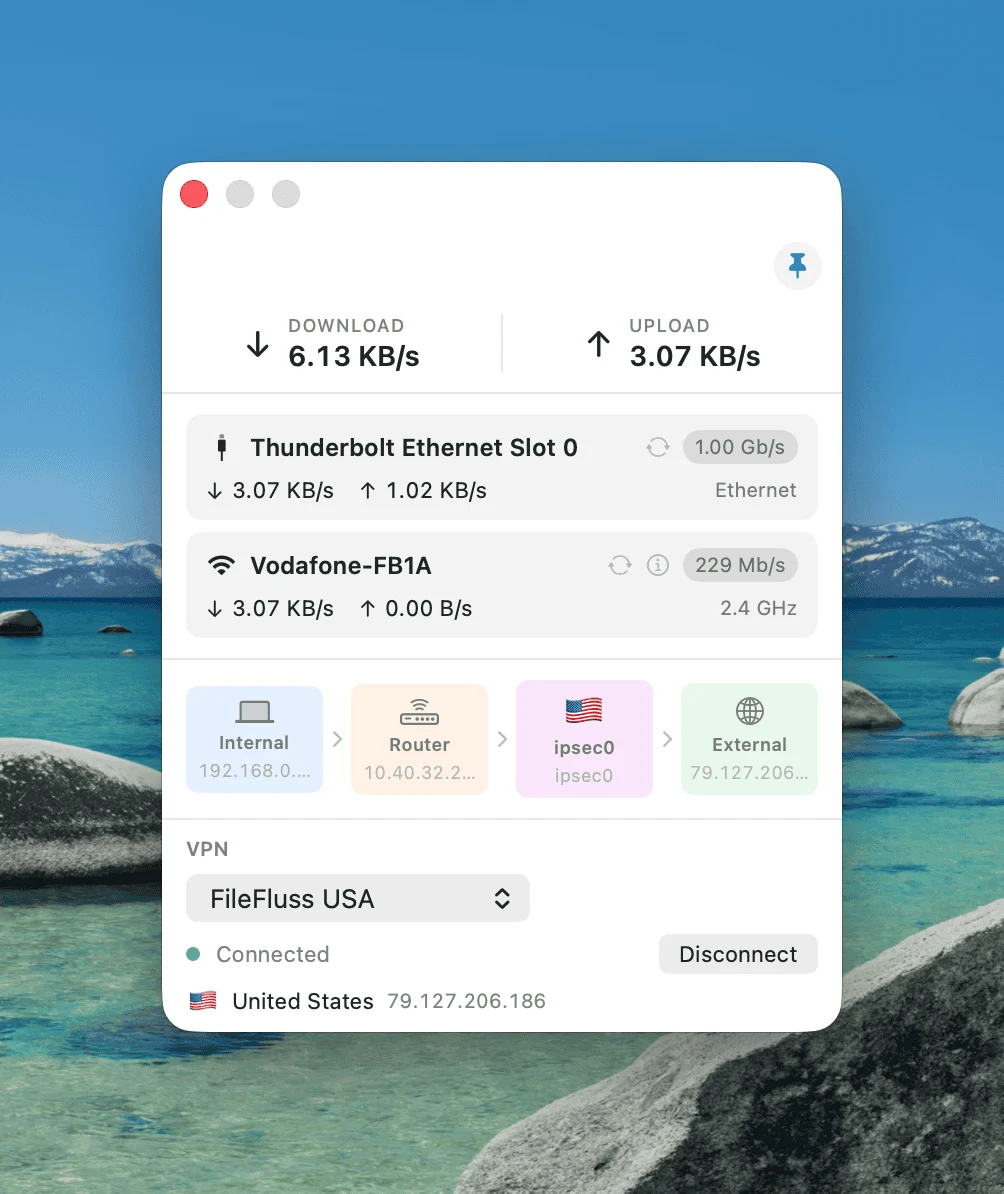
- Pick a profile and server, connect/disconnect, and see the connection status, exit country & flag, and public IP — right from the popover.
- Per-profile DNS — apply one of your NetFluss DNS presets while a VPN is connected; the previous resolver is restored automatically on disconnect.
- Auto-reconnect — automatically re-establish a tunnel that drops, with exponential backoff.
- Connect on launch — bring a chosen profile up when NetFluss starts.
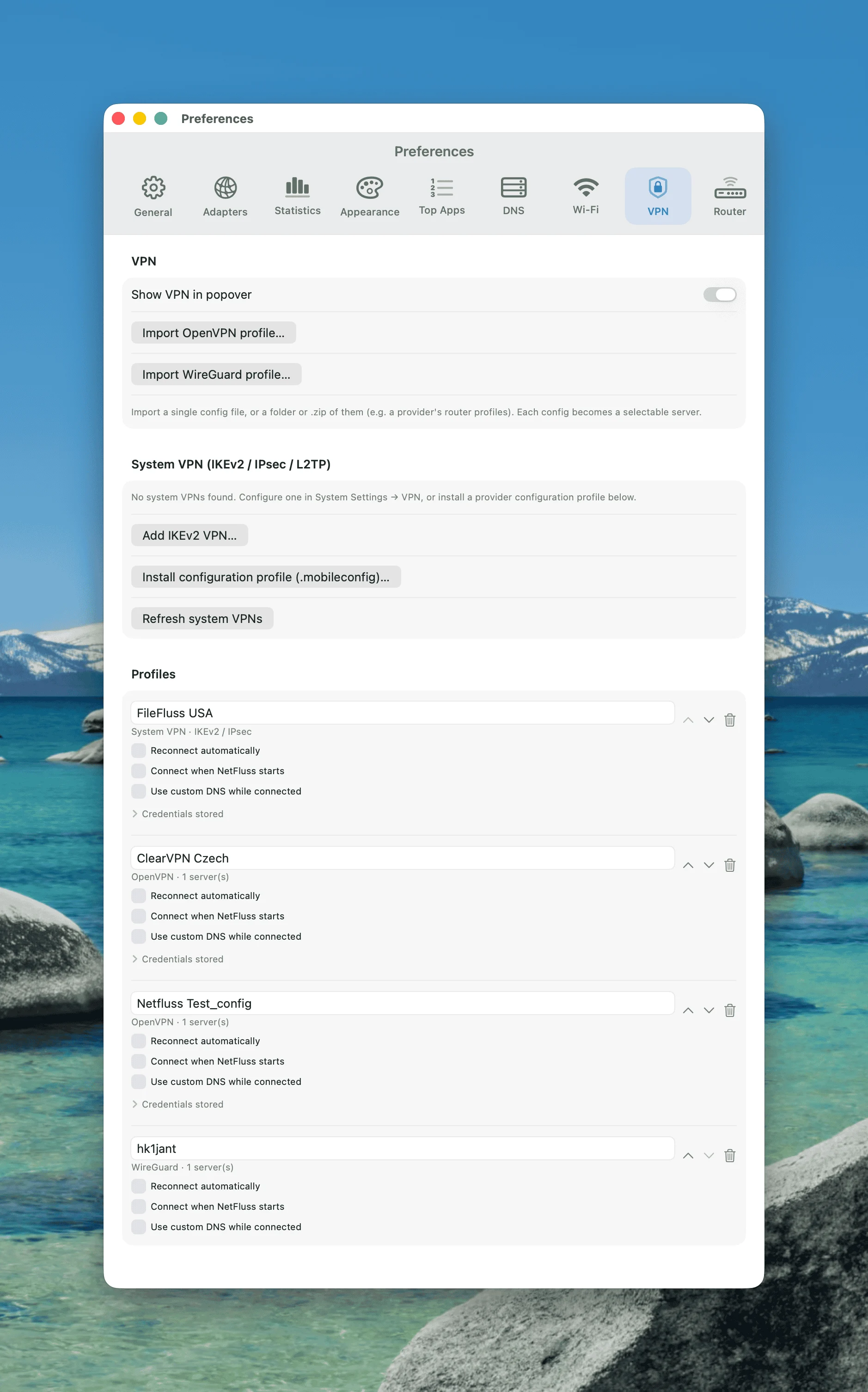
- Import, rename, reorder, and delete profiles in Preferences → VPN; credentials are stored in the macOS Keychain.
-
Much lower energy use — background sampling was reworked so NetFluss's Activity Monitor energy impact drops back to normal menu-bar-app levels (no more heavyweight per-process sampling running every few seconds).
-
Accurate download rate in every scenario — the macOS 26.5 fix for the frozen
ifi_ibytesinbound counter now reads a lightweight kernel-statistics source, so the download number and Bandwidth Statistics history stay correct without the earlier CPU cost. -
"System default" menu bar color — a new colour choice that follows the menu bar appearance automatically, staying legible when the wallpaper switches between light and dark. (Thanks to @mvanhorn.)
New in 2.3
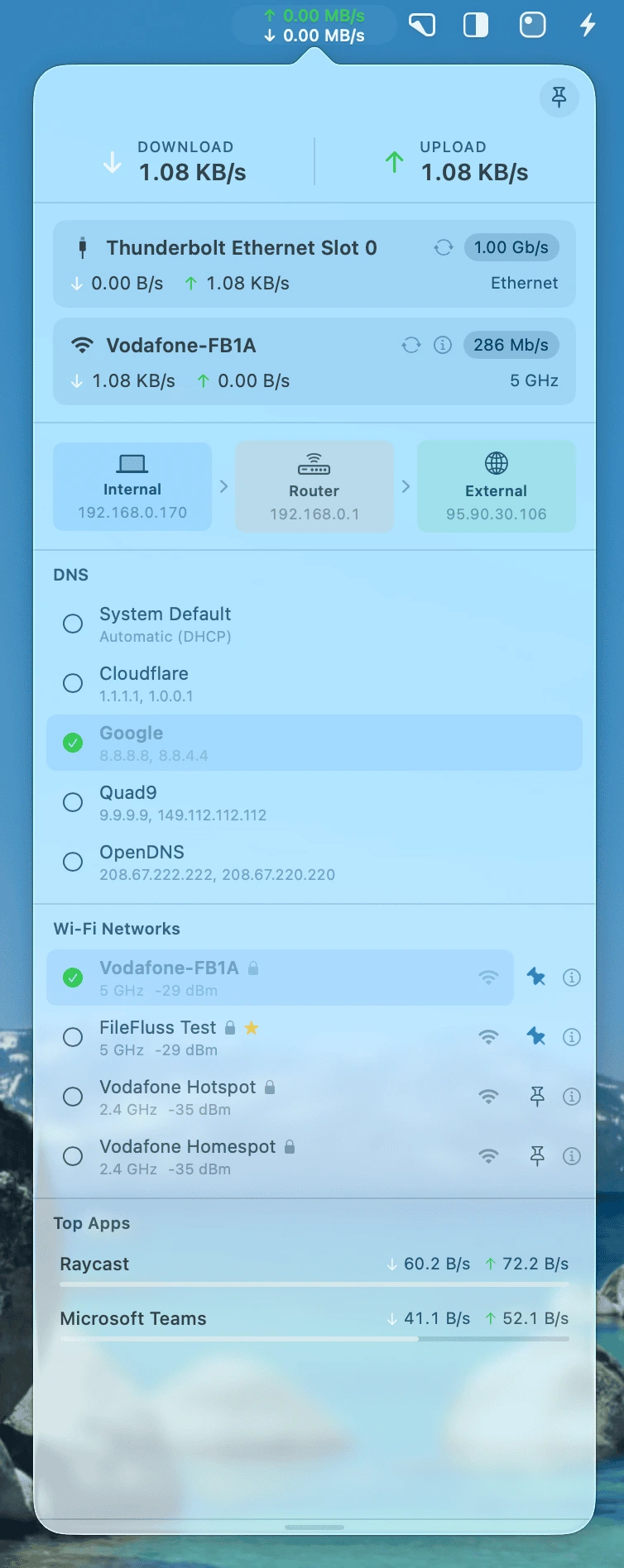
- Wi-Fi manager in the popover — see every nearby Wi-Fi network, switch with a click, pin SSIDs to the top of the list, and have temporarily out-of-range pinned networks stay visible until you unpin them. Passwords entered through NetFluss are written into macOS's Known Networks via the privileged helper, so the standard macOS Wi-Fi menu will reuse them later — even if NetFluss isn't running. Especially handy on travel or in environments with many SSIDs.
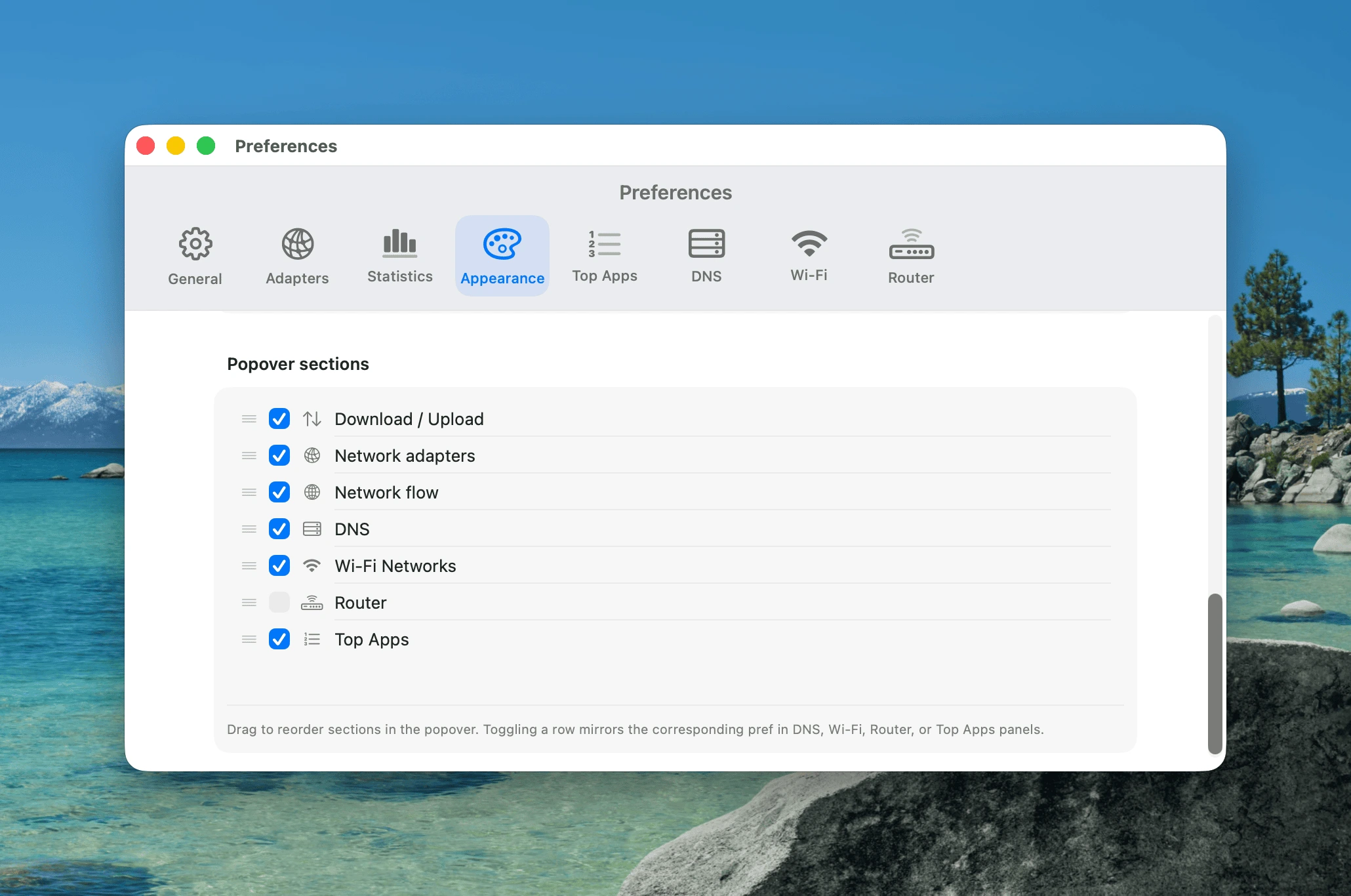
- Customisable popover sections — Preferences → Appearance now lets you drag the popover segments (Download / Upload, Network adapters, Network flow, DNS, Router, Wi-Fi Networks, Top Apps) into any order you like, and tick or untick each section right from the reorder list. The visibility toggles stay in sync with the existing per-section toggles elsewhere in Preferences.
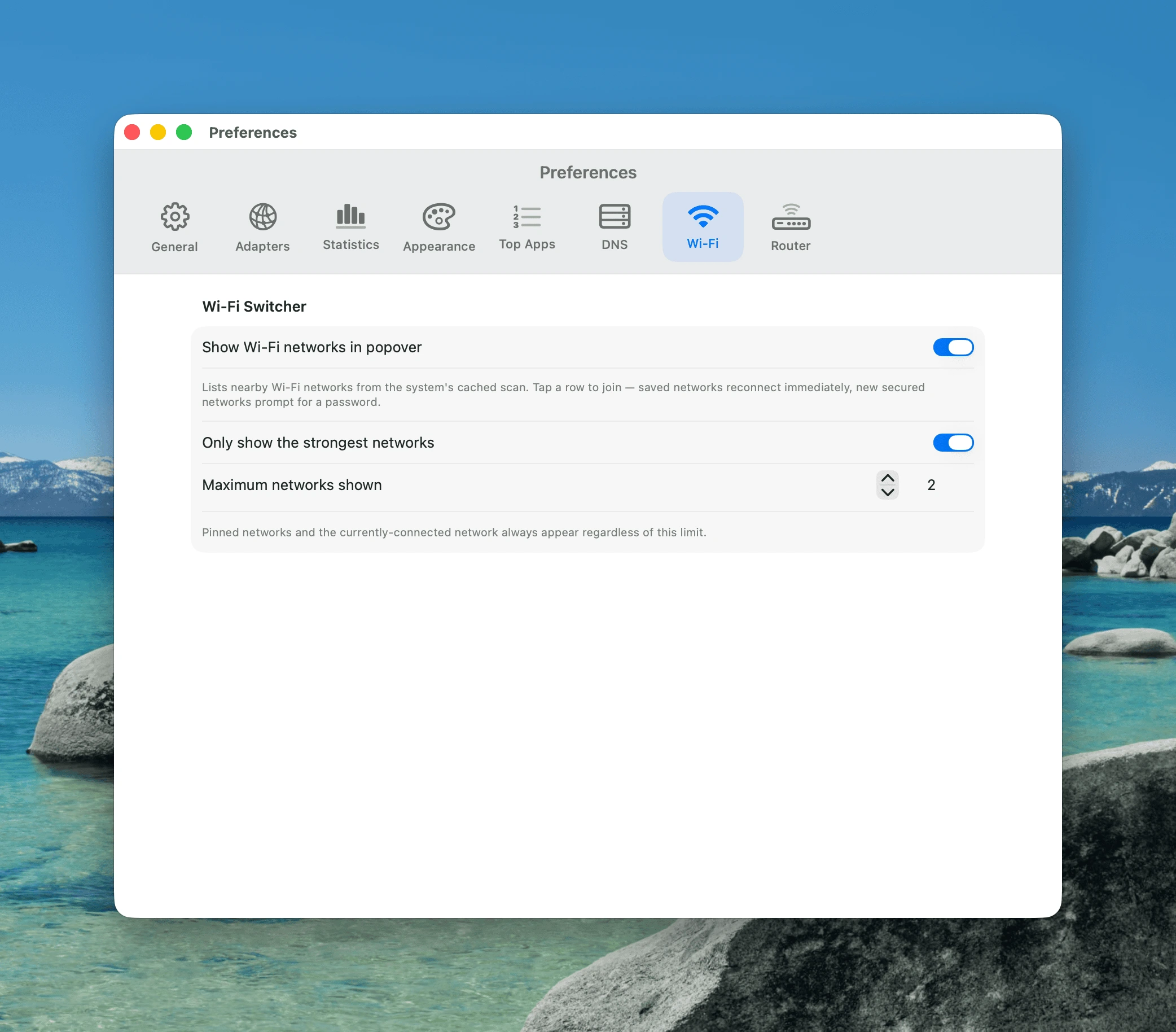
- Wi-Fi settings pane — new Preferences → Wi-Fi pane with a toggle to enable the section and an option to cap the list to the strongest N networks (pinned and currently-connected networks always show). Preferences → General now also exposes one-click buttons to grant Location access and install the privileged helper, so the user never has to hunt for the right pane in System Settings.
- Fix for Macs whose download counter stayed at 0.00 — on macOS 26.5 the kernel's
ifi_ibytescounter is frozen on the active physical Wi-Fi / Ethernet adapter for some configurations (often Macs with a managed profile or specific NetworkExtension-based security software). NetFluss now detects that and substitutes a per-process inbound rate fromnettopso both the menu-bar number and the Bandwidth Statistics history record correctly. Auto-pauses the helper subprocess when no real traffic is happening, so unaffected Macs see no extra CPU usage.
Features
Menubar
- Live upload ↑ and download ↓ rates displayed in the menu bar
- Four menu bar styles: Standard, Unified pill, Dashboard, and Icon
- Separate color choices for upload arrow, download arrow, upload number, and download number
- Monospaced digits for stable layout
- Configurable font size (8–16 pt), font style (Monospaced / System / Rounded), pinned unit, and decimal precision
- Icon mode — switch to a single symbol in the menu bar and choose between multiple icon options, including the NetFluss app-style icon
- VPN indicator & country flag — optional marks right of the rates: a VPN status dot or shield (custom colour, optionally dimmed when disconnected) that works with NetFluss' built-in VPN connections and with external VPN clients (Tunnelblick, WireGuard, Mullvad, Tailscale, macOS VPN settings, …), plus the flag of your public IP's country
- Launch at login — toggle in Preferences → Launch
Popover
- Header — total Download and Upload rates shown prominently at the top
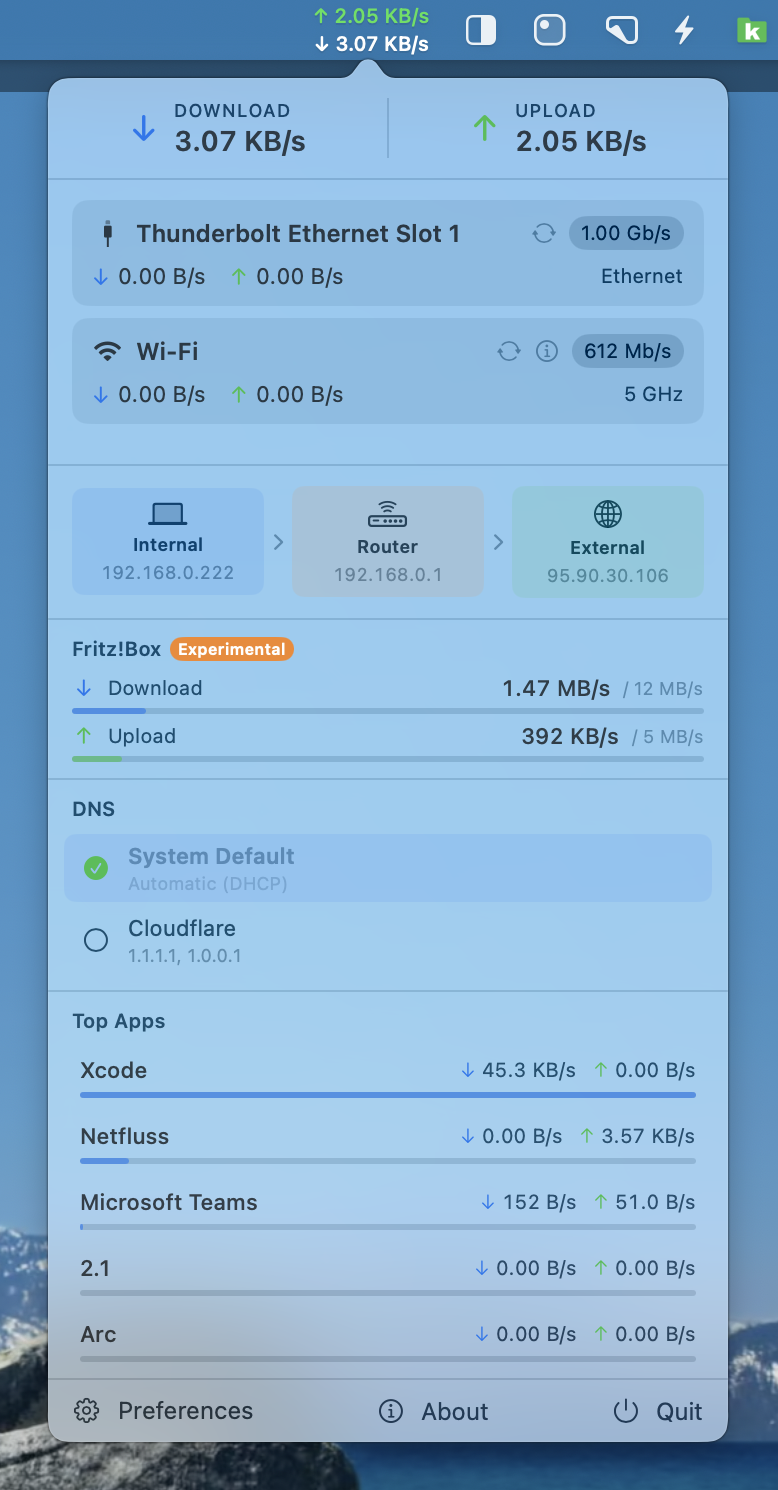
- Adapter cards — each active network interface as a card with:
- SF Symbol icon for Wi-Fi, Ethernet, or other adapters
- Link speed badge (Wi-Fi TX rate or Ethernet speed)
- Per-card DL/UL rates with coloured arrows
- Wi-Fi frequency band (2.4 GHz / 5 GHz / 6 GHz) or "Ethernet"
- ↺ reconnect button — cycles the adapter off and back on (Wi-Fi: no password needed; Ethernet: approved via the NetFluss helper)
- ℹ️ Wi-Fi detail popover — click the (i) button on any Wi-Fi card to see: Standard (e.g. Wi-Fi 6 / 802.11ax), Security (WPA3 Personal, etc.), Channel & Width, RSSI, Noise, SNR, ESSID, BSSID (with copy), and Tx Rate
- IP addresses — two display modes:
- List view — External, Internal, and Router IP, each with a one-click copy button
- Connection flow view — visual network path from your Mac through the router (and VPN, if active) to the internet, with country flag for VPN exit nodes
- DNS Switcher — switch between DNS providers directly from the popover (enable in Preferences):
- Built-in presets: System Default, Cloudflare, Google, Quad9, OpenDNS
- Add your own custom DNS presets with up to four DNS servers
- Shows the currently active DNS with a green checkmark
- Built on a bundled privileged helper for reliable DNS changes and Ethernet resets
- Wi-Fi Switcher — list nearby Wi-Fi networks and join them from the popover (enable in Preferences):
- Tap a known network to join silently; new secured networks prompt for a password
- Successful joins are written into macOS's Known Networks via the privileged helper, so the system Wi-Fi menu reuses the password later — even if NetFluss isn't running
- Pin SSIDs to the top of the list; pinned networks stay visible (marked "Not available") even when out of range, and a tap re-triggers a targeted scan to try reconnecting
- (i) details popover per row showing band, channel, RSSI, security, BSSID
- Optional "only show the N strongest" cap so the list stays short in crowded environments
- Router Bandwidth — shows total WAN download/upload rates from supported routers:
- Fritz!Box via TR-064 API
- UniFi via the UniFi OS / controller REST API
- OpenWRT via the ubus JSON-RPC API
- OPNsense via the OPNsense REST API
- Top Apps — optional section listing the top 5 processes by current network traffic, with a relative usage bar per app (enable in Preferences)
- Live updates while visible — app traffic refreshes live while the popup or pinned window is open
- App filtering — hide noisy background processes (e.g. mDNSResponder) from the list via Preferences or hover to hide directly
- Data Usage — optional section with Upload, Download, and Total rows across a Today and a This Month column, read from the collected history and updated live while the popover is open; a chart button opens the full Bandwidth Statistics window (enable in Preferences → Statistics)
- Traffic Timer — optional section styled like a phone stopwatch: start it and it adds up download and upload from that moment on, with average rates, a download/upload split bar, and the starting time; pause, resume, or reset at any time. It keeps measuring while the popover is closed and survives a relaunch (paused)
- Pin button — turn the popup into a movable floating window so NetFluss can stay open like a live widget
- Scrollable popover — the popover is scrollable and resizable for smaller screens, preventing overflow when many adapters or sections are active
- Edge-aware popover positioning — keeps the popover fully visible when the menu bar icon sits near the left or right screen border
- Footer — quick access to Preferences, About, and Quit
Network Slice
- Live traffic window — "who your Mac is talking to right now", opened from the menu bar icon's right-click menu
- Traffic Rate chart — rolling download/upload timeline across the last minute
- Three linked columns — Network Hosts, Services, and Apps, each ranked by volume with a relative usage bar
- Remote hosts are reverse-resolved to hostnames and tagged with a country flag
- Services are named where known (https, imaps, …) and fall back to
Port N
- ⚡ live / Σ accumulated toggle per column — the last sample interval only, or the running total since the window was opened
- Drill-down — click any host, service, or app to see its individual connections with app, local port, remote port, protocol, service, and per-connection download/upload
- Pause — freeze the view to read a burst of traffic
- No packet capture — built on the same lightweight
netstatdiffing used elsewhere in NetFluss; nonettopdaemon, no extra privileges, and sampling stops when the window closes
VPN
- Lean built-in VPN client — connect to your VPN without installing the provider's own client app
- Import provider profiles — single config files, a folder of them, or a
.zipbundle (e.g. a provider's router profiles); each config becomes a selectable server- OpenVPN (
.ovpn) and WireGuard (.conf) run via bundled, signed binaries through the NetFluss privileged helper - IKEv2 / IPsec / L2TP via the native macOS VPN stack (username/password / EAP)
- OpenVPN (
- Popover controls — choose a profile and server, connect/disconnect, and see the live status, exit-node country & flag, and public IP
- Per-profile DNS — apply a DNS preset while connected; the previous resolver is restored on disconnect
- Auto-reconnect — automatically re-establish a dropped tunnel, with exponential backoff
- Connect on launch — start a chosen profile automatically when NetFluss launches
- Profile management — import, rename, reorder, and delete profiles in Preferences → VPN; credentials stored securely in the macOS Keychain
- VPN Diagnostics — a log in Preferences → VPN recording the bundled tools, their architecture, and the connection tool's full output; copy it to the clipboard in one click for bug reports
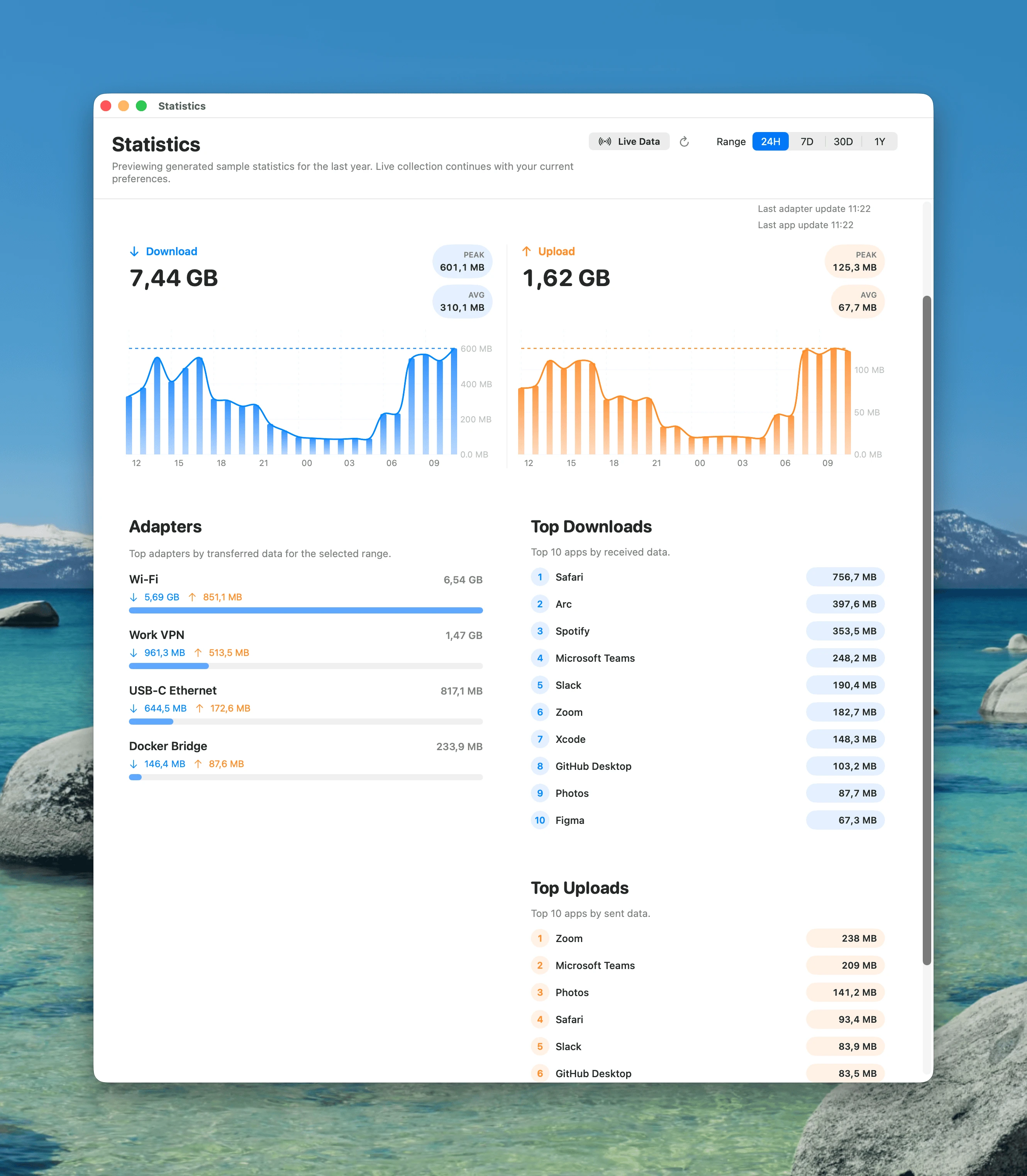
Statistics
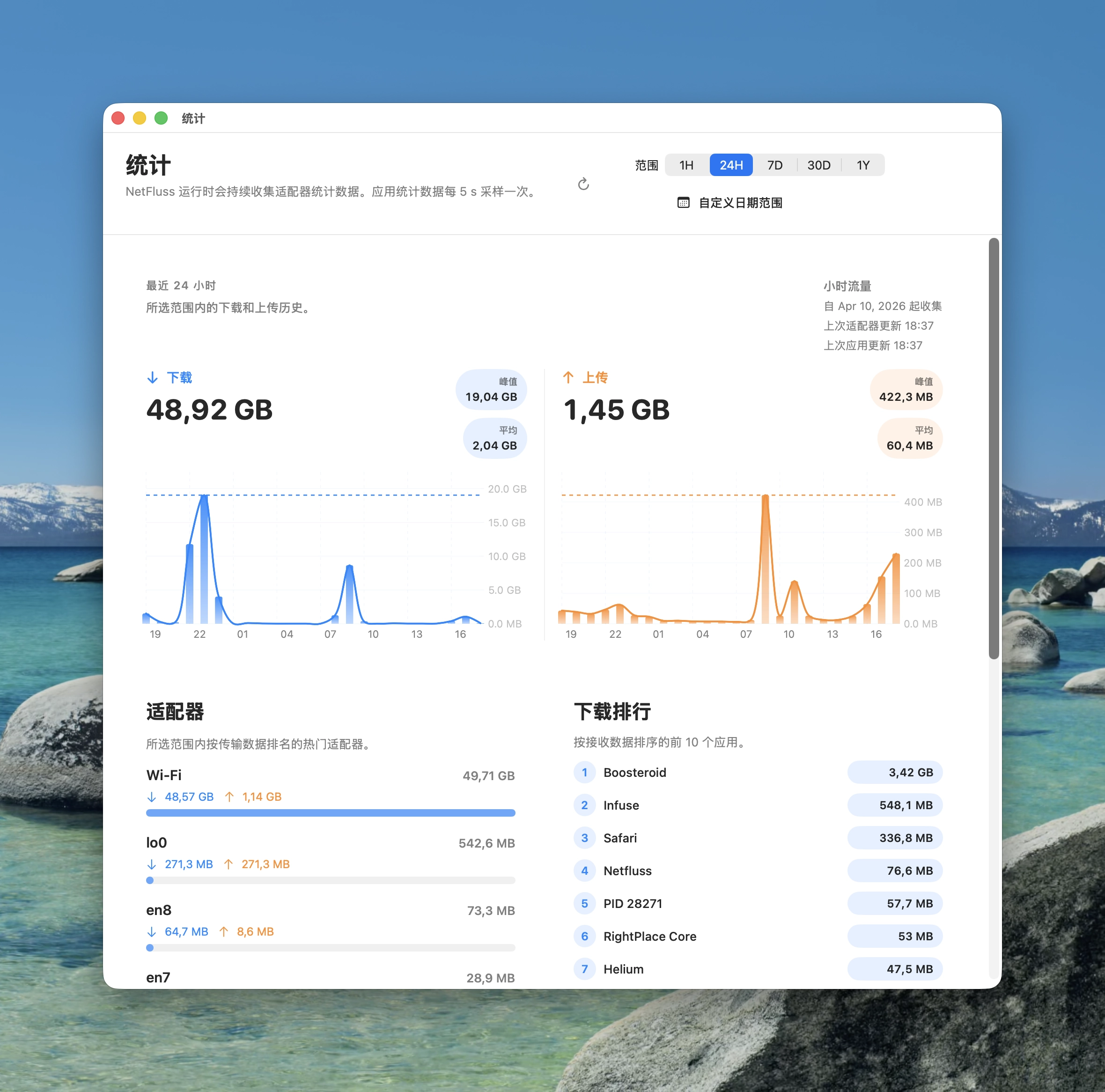
- Dedicated statistics window with
1H,24H,7D,30D, and1Yranges - Download and upload timelines, top adapters, and top apps
- Historical bandwidth analysis by adapter and by app
- Top adapter ranking with automatic
Othergrouping when many interfaces are active - Top 10 apps for download and upload over each selected range
- Minute-level detail for the
1Hview - Optional app statistics collection with energy-conscious background sampling
- Demo/sample data mode for previewing the interface before real history accumulates
- Improved app attribution for Safari/WebKit traffic and more reliable adapter accounting for LAN/NAS transfers
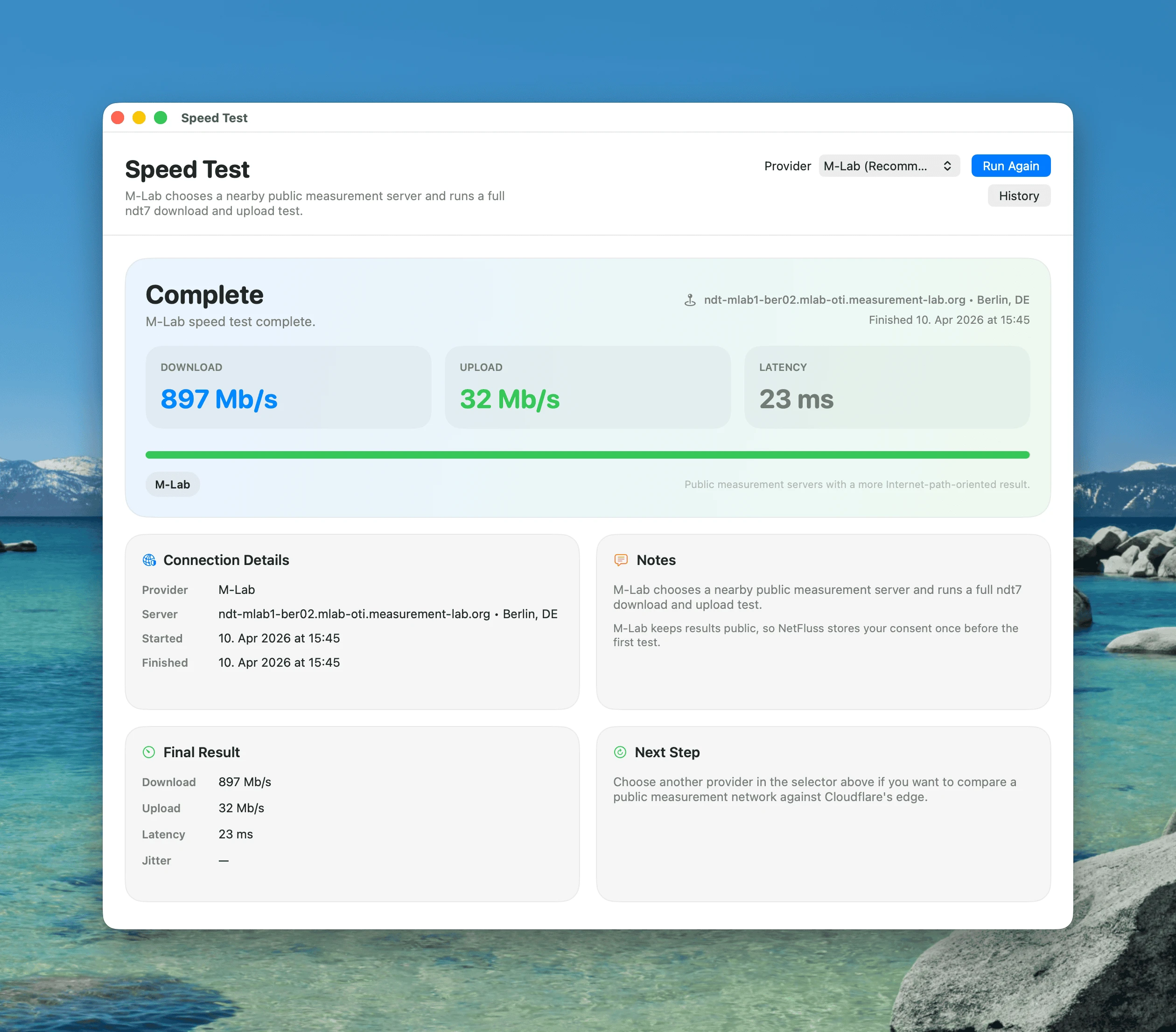
Speed Test
- Dedicated speed test window launched from the menu bar icon context menu
- Integrated M-Lab and Cloudflare speed tests
- Download, upload, latency, jitter, and server details in a dedicated window
- Provider selector remembered between runs
- Right-click the menu bar icon to start a test instantly
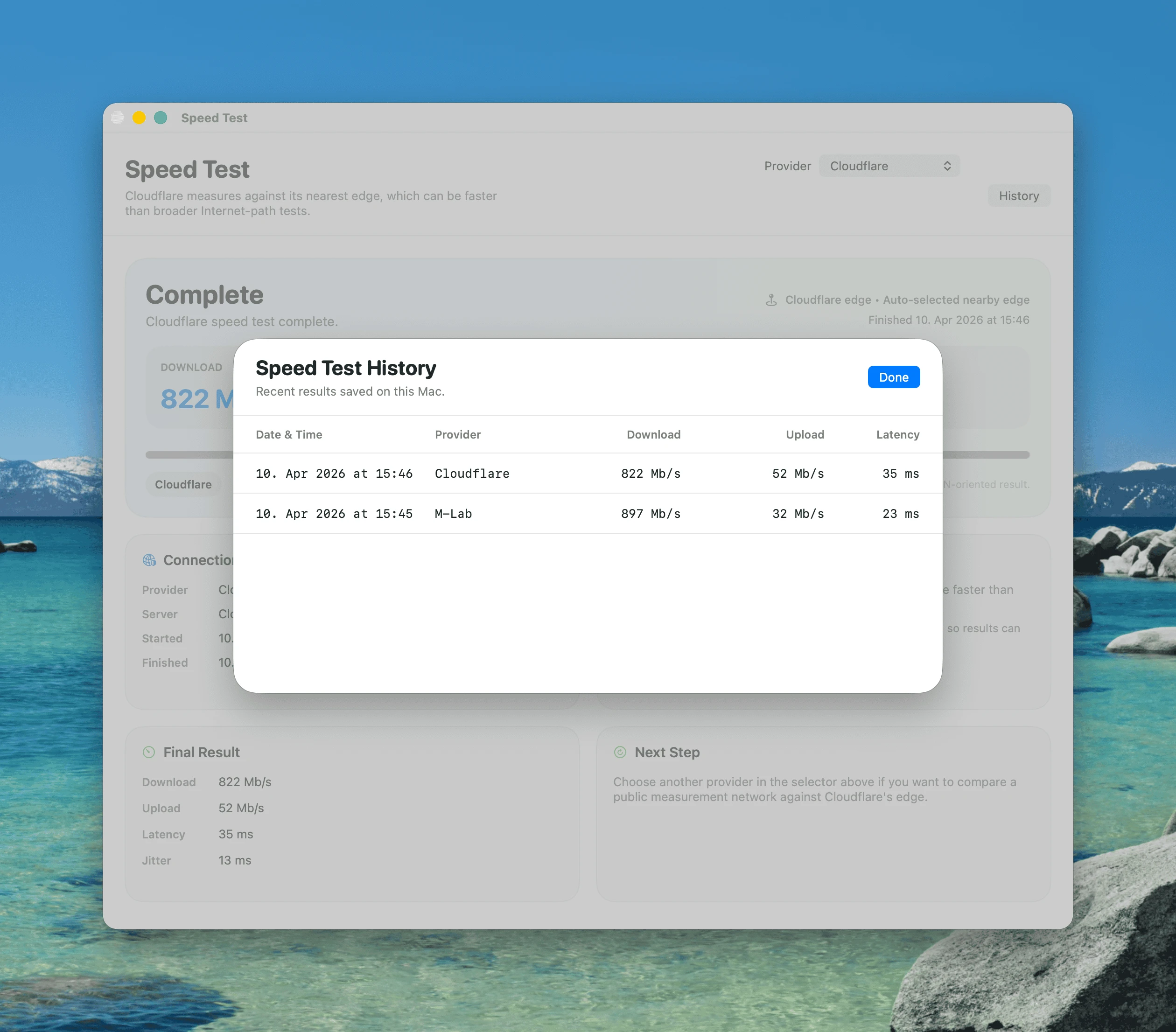
- Speed test history can be opened without automatically starting a new test
- Persistent speed test history stored locally on the Mac
- Notes field for each saved result, useful for remembering where or why the test was taken
- Compact locale-aware timestamps in speed test history
Speed Test History
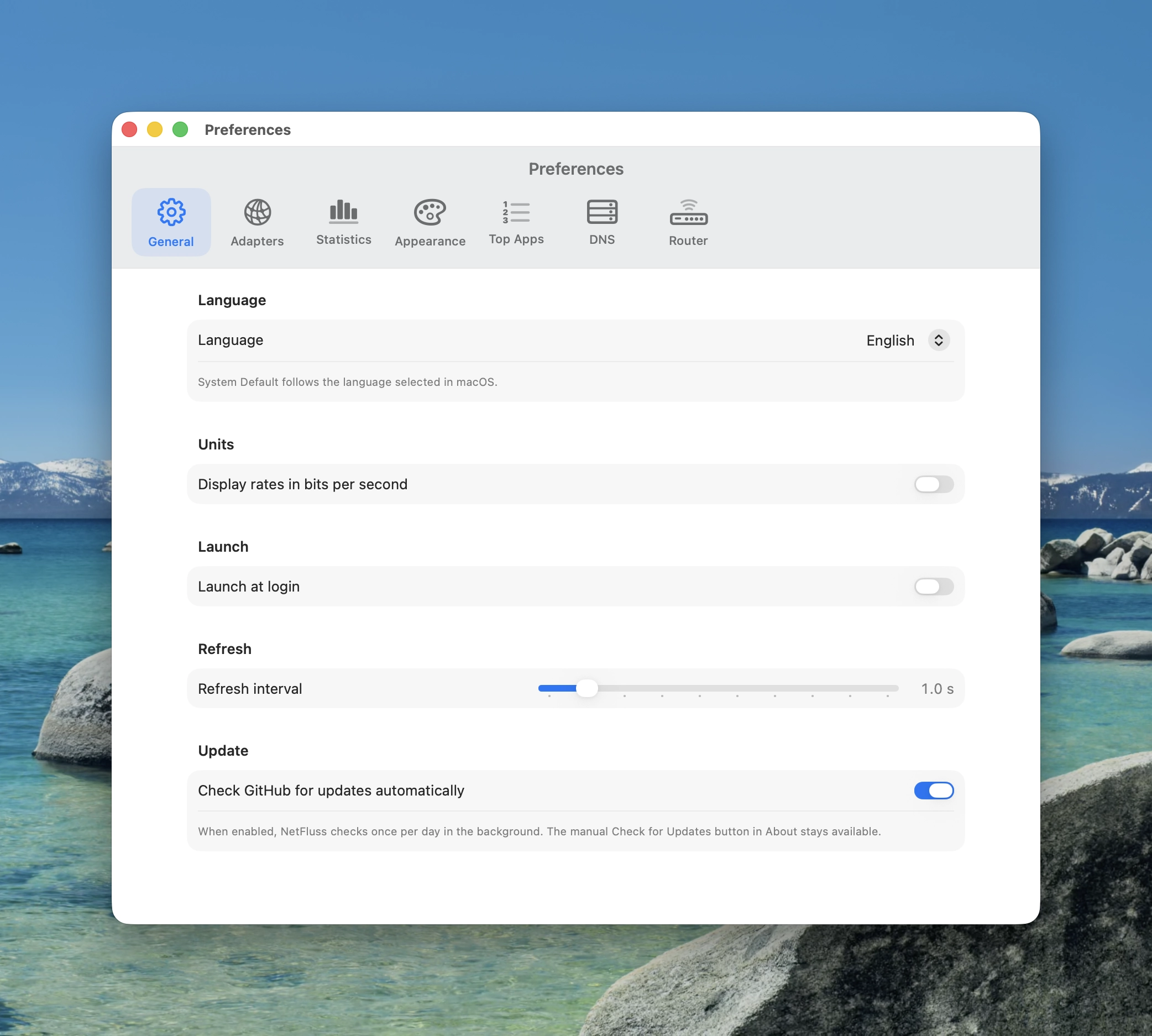
Preferences
- Clear pane-based Preferences window with sections for General, Adapters, Statistics, Appearance, Top Apps, DNS, Wi-Fi, and Router settings
- Language selector — choose English, German, Simplified Chinese, Traditional Chinese, or follow the macOS system language
- General — launch at login, refresh interval (0.5 – 5 seconds), display rates in bits or bytes, and automatic update checks once per day (can be switched off)
- Adapters — show/hide inactive adapters, show/hide other adapters (VPN, virtual interfaces), adapter grace period, per-adapter visibility toggles, custom names, and drag-to-reorder
- Statistics — toggle historical adapter statistics and app statistics separately
- Appearance — upload/download arrow colours, upload/download number colours, menu bar style, menu bar size, font style, pinned unit, decimal places, IP address display options, and drag-to-reorder popover sections with per-section visibility toggles
- General → System access — one-click buttons to grant Location access (required to list Wi-Fi networks) and to install the privileged helper used for DNS changes and Wi-Fi credential persistence
- IP addresses — choose List, Flow, or None for the popover IP section, plus IPv4/IPv6 external IP preference
- Top Apps — show/hide the section, configure the grace period, and filter noisy background apps from the live Top Apps list
- DNS Switcher — toggle the DNS picker in the popover; includes built-in presets plus editable custom presets with up to four server fields, visibility toggles, drag-to-reorder, and delete for each preset
- Wi-Fi Switcher — toggle the Wi-Fi networks picker in the popover and optionally cap the list to the strongest N networks; pinned and currently-connected networks are always shown regardless of the cap
- Router — configure Fritz!Box, UniFi, OpenWRT, and OPNsense bandwidth monitoring in one place, with credentials stored securely in macOS Keychain where needed
- Options to calculate total bandwidth from only visible adapters and to exclude VPN/tunnel adapters from totals while still showing them in the adapter list
About
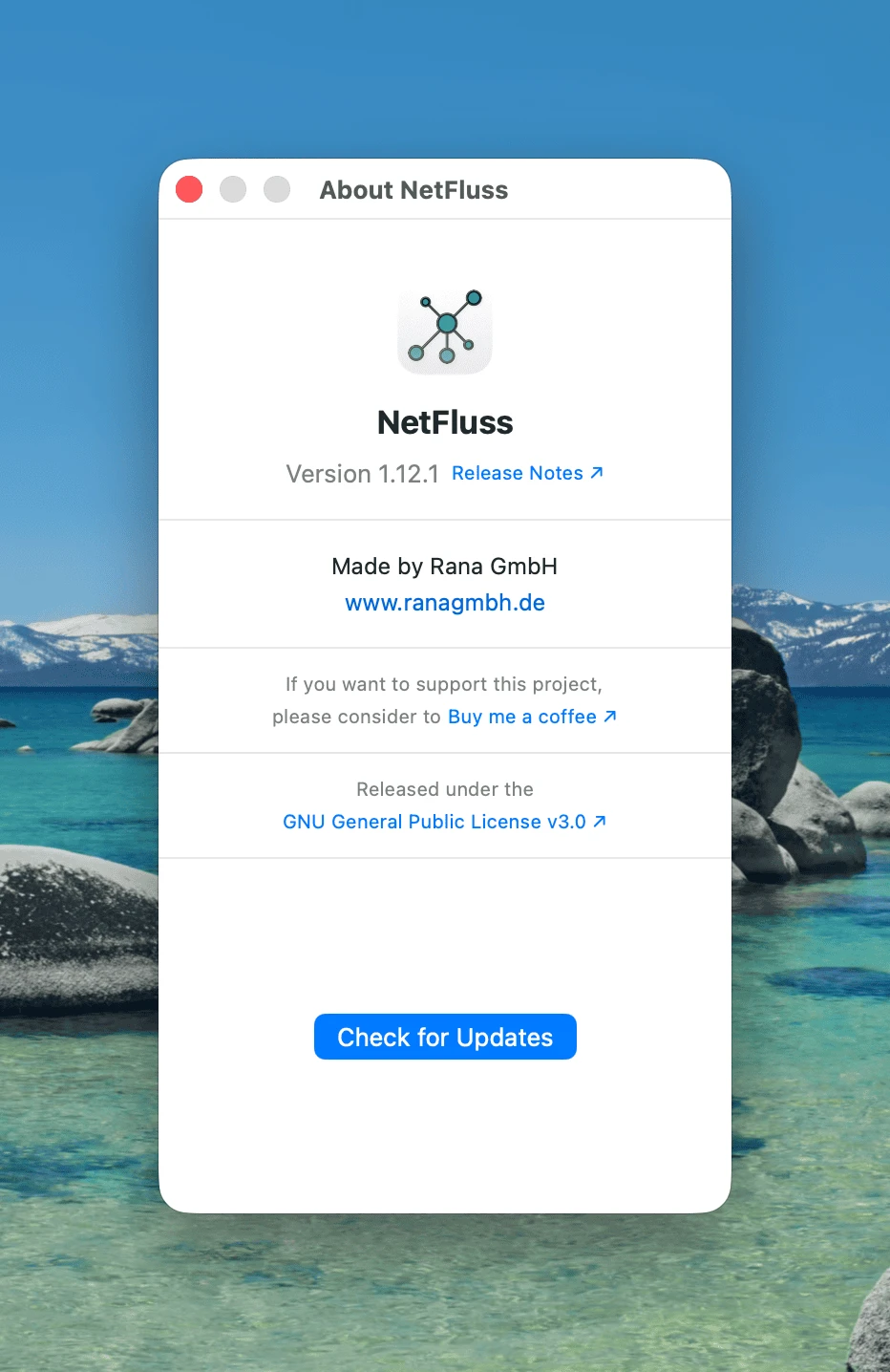
- Version number with link to release notes on GitHub
- Made by Rana GmbH — www.ranagmbh.de
- Refreshed app icon introduced with NetFluss 2.x
- Auto-update — Check for Updates (also in the menu bar icon's right-click menu) shows what's new and downloads, verifies, installs and relaunches the new version in one click; updates are verified with an EdDSA signature and the Apple Developer ID
- Optional daily background update check that offers new versions with Install / Skip / Remind Me Later
Requirements
- macOS 13 Ventura or later
- Xcode 15+ or Swift 5.10+ toolchain (to build from source)
Install
Download NetFluss-2.5.zip from the latest release, unzip it, and move NetFluss.app to /Applications.
NetFluss is notarized and signed with a Developer ID certificate, so Gatekeeper should clear it automatically on first launch.
You can also use Homebrew to install NetFluss:
brew tap rana-gmbh/netfluss
brew trust rana-gmbh/netfluss
brew install --cask netfluss
Homebrew requires third-party taps to be trusted before it will load them, so the brew trust step is needed once. Without it, the install stops with Error: Refusing to load cask rana-gmbh/netfluss/netfluss from untrusted tap. Later updates come through brew upgrade --cask netfluss.
Build from source
swift build -c release
Or open Package.swift in Xcode and run the executable scheme.
Notes
- Wi-Fi SSID and band use CoreWLAN. macOS may prompt for Location Services permission to expose SSID details.
- Ethernet link speed is read from
ifi_baudrateand may show—when unavailable. - External IP is fetched from
ipwho.is(withapi.ipify.orgas fallback). - Popup Top Apps uses live per-process sampling while visible; historical app statistics can be enabled separately in Preferences.
- DNS changes and Ethernet resets in the packaged app use the bundled NetFluss helper and may require one-time system approval.
- OpenWRT monitoring expects ubus access to be available on the router; a manual host can help when auto-detection resolves to a different gateway.
- OPNsense monitoring requires API credentials created in OPNsense and can use a manually configured host when auto-detection points to another router.
- Speed test adapter pinning is not implemented yet; tests currently follow the default active route.
Buy me a coffee
If you enjoy using NetFluss please consider supporting the project via this link: https://buymeacoffee.com/robertrudolph
License
NetFluss is released under the GNU General Public License v3.0. Copyright © 2026 Rana GmbH
Contributors


Similar repos


Languages
Swift
82.8%
JavaScript
13.7%
HTML
2.4%
A light-weight & open-source menubar app that shows current upload & download speed plus the top apps using bandwidth
See the codeREADME
NetFluss
A native macOS menubar app showing real-time upload and download rates, router-wide bandwidth, historical traffic statistics, and built-in speed testing.
Latest release: NetFluss 2.6
New in 2.6
- VPN indicator in the menu bar — protected at a glance. An optional dot or shield right of the upload and download rates shows whether a VPN is up. It works with the VPN connections built into NetFluss and with external VPN clients — Tunnelblick, the WireGuard app, Mullvad, Tailscale, the macOS VPN settings and others: NetFluss detects any active tunnel, no matter which app started it.
- Pick the colour, and choose whether the indicator stays visible (dimmed) while no VPN is connected.
- Optionally add the flag of the country your public IP is in, so you see your exit location without opening the popover. It updates within seconds when a VPN connects or disconnects.
- Enable both under Preferences → Appearance. Detection is lightweight and only runs while one of the options is on.
- Traffic Timer — measure traffic from start to stop. A new optional popover section that works like the stopwatch on your phone: press start and it adds up download and upload from that moment on — handy for checking how much a download, a backup or a video call really moves.
- Pause, resume and reset with round buttons; the elapsed time, the running total, the average download and upload rate and a download/upload split bar are always in view.
- The starting time (and, while paused, when you paused) is shown under the total.
- It keeps counting while the popover is closed and survives a restart (it comes back paused). Turn it on in Preferences → Appearance, in the popover sections list.
-
Auto-update — NetFluss now keeps itself up to date. Once a day it checks for a new version and shows you what's new; one click downloads, verifies and installs the update and relaunches NetFluss — or skip it, or get reminded later. Check for Updates… is also in the menu bar icon's right-click menu and in About, and the daily check can be switched off in Preferences → General. Every update is verified with an EdDSA signature and NetFluss's Apple Developer ID before it is installed. Coming from 2.5 or earlier? Download 2.6 once manually — from then on NetFluss updates itself.
-
Clearer router connection errors — OPNsense, OpenWRT and UniFi now say exactly what went wrong instead of a generic "cannot reach": HTTPS refused (with the
http://or port to enter instead), a TLS failure, or a changed router certificate — with a new Trust Current Certificate button in the OPNsense credential test. Addresses likerouter.lan:8443are accepted, and re-trusting a certificate now works for URL-form addresses too. (#56) -
Complete German, 简体中文 and 繁體中文 translations — every remaining dialog and message, including router, VPN and speed-test errors, is now translated.
New in 2.5
- Network Slice — see who your Mac is talking to, right now. A dedicated live-traffic window, opened from the menu bar icon's right-click menu. A rolling Traffic Rate chart at the top, and below it three linked columns — Network Hosts, Services, and Apps — each ranked by volume with a relative usage bar. Remote hosts are reverse-resolved to hostnames and tagged with a country flag, so a row reads
dns.google 🇺🇸instead of a bare IP.- Each column has a ⚡ live / Σ accumulated toggle: ⚡ shows only the last sample interval (what is moving this second), Σ shows the running total since you opened the window.
- Pause freezes the view so you can read a burst without it scrolling away.
- Built on the same lightweight
netstatdiffing NetFluss already uses — no packet capture, nonettopdaemon, no extra privileges, and sampling stops the moment you close the window.
- Click any row to drill in. A host expands to every connection with it — which app, local and remote port, protocol, service, and per-connection download/upload.
- A service (https, imaps, a bare port number…) expands to every host and app using it — useful for answering "what is all this HTTPS traffic, actually?"
- An app expands to every host it is currently connected to, with the service and port for each.
-
Data Usage totals, right in the popover — a new section showing how much you have actually moved, without opening a separate window: Upload, Download, and an emphasised Total row, each split across a Today and a This Month column, read from the history NetFluss already collects. It updates live while the popover is open, and a chart button in its header jumps straight to the full Bandwidth Statistics window. Enable it under Preferences → Statistics (it needs historical statistics collection turned on); tunnel adapters can be excluded from the figures, and loopback and AirDrop always are. (Thanks to @truekasun.)
-
VPN fixes — WireGuard and Intel Macs. A round of fixes for issues reported against the 2.4 VPN client:
- Universal (Intel) VPN binaries are back. The bundled OpenVPN and WireGuard toolchain ships arm64 and x86_64 slices again, both targeting macOS 13, so VPN works on Intel Macs. The release build now hard-fails if either slice is missing, so it can't regress silently. (#48)
- WireGuard no longer corrupts your DNS.
wg-quick's orphan-prone DNS monitor is stopped, private tunnel DNS is routed through the tunnel, and NetFluss now tracks the realutuninterface instead of guessing. Teardown, file permissions, and stale-config cleanup were hardened. (#48, #50) - The real OpenVPN failure reason is surfaced instead of a generic error, and a new VPN Diagnostics log (Preferences → VPN) records the bundled tools, their architecture, and the connection tool's full output — copyable in one click for bug reports. (#49)
- Helper repair — "Install helper" now fixes a stale registration, and the helper re-registers itself when the app bundle moves.
-
Lower energy use and better stability
- Fixed a crash caused by a data race on the process-name cache behind Top Apps.
- Network diagnostics are only recorded while a capture is actually running; failing router monitors back off exponentially instead of retrying in a tight loop; statistics pruning is throttled and polling suspends on screen sleep/lock.
- Main-thread stalls were taken out of the DNS, VPN, and Preferences paths, the statistics archive loads off the main thread, and adapter drag-reordering no longer churns.
-
Security hardening — router monitors use TOFU certificate pinning with session reuse and never silently downgrade to HTTP; Keychain items are pinned to this device; OpenVPN configs are sanitized before use; the IKEv2 password is kept out of
argv; helper logs are openedO_NOFOLLOW. -
UniFi: UDR and API-key support — UniFi Dream Router is supported, and you can authenticate with a Network API key instead of a local admin account (API keys work with 2FA enabled and never expire), with clearer, more granular connection errors.
-
More accurate usage totals — loopback and AirDrop are excluded from totals, since they never carry internet traffic. (#54)
-
Complete German, 简体中文 and 繁體中文 translations for everything above.
New in 2.4
- Built-in VPN client — NetFluss now ships with a lean VPN client. Many VPN providers offer profiles for routers; you can now import them straight into NetFluss and connect from the menu bar, so you are no longer dependent on the provider's own client software. NetFluss supports the OpenVPN protocol, WireGuard, and native IKEv2 / IPsec / L2TP.
- Pick a profile and server, connect/disconnect, and see the connection status, exit country & flag, and public IP — right from the popover.
- Per-profile DNS — apply one of your NetFluss DNS presets while a VPN is connected; the previous resolver is restored automatically on disconnect.
- Auto-reconnect — automatically re-establish a tunnel that drops, with exponential backoff.
- Connect on launch — bring a chosen profile up when NetFluss starts.
- Import, rename, reorder, and delete profiles in Preferences → VPN; credentials are stored in the macOS Keychain.
-
Much lower energy use — background sampling was reworked so NetFluss's Activity Monitor energy impact drops back to normal menu-bar-app levels (no more heavyweight per-process sampling running every few seconds).
-
Accurate download rate in every scenario — the macOS 26.5 fix for the frozen
ifi_ibytesinbound counter now reads a lightweight kernel-statistics source, so the download number and Bandwidth Statistics history stay correct without the earlier CPU cost. -
"System default" menu bar color — a new colour choice that follows the menu bar appearance automatically, staying legible when the wallpaper switches between light and dark. (Thanks to @mvanhorn.)
New in 2.3
- Wi-Fi manager in the popover — see every nearby Wi-Fi network, switch with a click, pin SSIDs to the top of the list, and have temporarily out-of-range pinned networks stay visible until you unpin them. Passwords entered through NetFluss are written into macOS's Known Networks via the privileged helper, so the standard macOS Wi-Fi menu will reuse them later — even if NetFluss isn't running. Especially handy on travel or in environments with many SSIDs.
- Customisable popover sections — Preferences → Appearance now lets you drag the popover segments (Download / Upload, Network adapters, Network flow, DNS, Router, Wi-Fi Networks, Top Apps) into any order you like, and tick or untick each section right from the reorder list. The visibility toggles stay in sync with the existing per-section toggles elsewhere in Preferences.
- Wi-Fi settings pane — new Preferences → Wi-Fi pane with a toggle to enable the section and an option to cap the list to the strongest N networks (pinned and currently-connected networks always show). Preferences → General now also exposes one-click buttons to grant Location access and install the privileged helper, so the user never has to hunt for the right pane in System Settings.
- Fix for Macs whose download counter stayed at 0.00 — on macOS 26.5 the kernel's
ifi_ibytescounter is frozen on the active physical Wi-Fi / Ethernet adapter for some configurations (often Macs with a managed profile or specific NetworkExtension-based security software). NetFluss now detects that and substitutes a per-process inbound rate fromnettopso both the menu-bar number and the Bandwidth Statistics history record correctly. Auto-pauses the helper subprocess when no real traffic is happening, so unaffected Macs see no extra CPU usage.
Features
Menubar
- Live upload ↑ and download ↓ rates displayed in the menu bar
- Four menu bar styles: Standard, Unified pill, Dashboard, and Icon
- Separate color choices for upload arrow, download arrow, upload number, and download number
- Monospaced digits for stable layout
- Configurable font size (8–16 pt), font style (Monospaced / System / Rounded), pinned unit, and decimal precision
- Icon mode — switch to a single symbol in the menu bar and choose between multiple icon options, including the NetFluss app-style icon
- VPN indicator & country flag — optional marks right of the rates: a VPN status dot or shield (custom colour, optionally dimmed when disconnected) that works with NetFluss' built-in VPN connections and with external VPN clients (Tunnelblick, WireGuard, Mullvad, Tailscale, macOS VPN settings, …), plus the flag of your public IP's country
- Launch at login — toggle in Preferences → Launch
Popover
- Header — total Download and Upload rates shown prominently at the top
- Adapter cards — each active network interface as a card with:
- SF Symbol icon for Wi-Fi, Ethernet, or other adapters
- Link speed badge (Wi-Fi TX rate or Ethernet speed)
- Per-card DL/UL rates with coloured arrows
- Wi-Fi frequency band (2.4 GHz / 5 GHz / 6 GHz) or "Ethernet"
- ↺ reconnect button — cycles the adapter off and back on (Wi-Fi: no password needed; Ethernet: approved via the NetFluss helper)
- ℹ️ Wi-Fi detail popover — click the (i) button on any Wi-Fi card to see: Standard (e.g. Wi-Fi 6 / 802.11ax), Security (WPA3 Personal, etc.), Channel & Width, RSSI, Noise, SNR, ESSID, BSSID (with copy), and Tx Rate
- IP addresses — two display modes:
- List view — External, Internal, and Router IP, each with a one-click copy button
- Connection flow view — visual network path from your Mac through the router (and VPN, if active) to the internet, with country flag for VPN exit nodes
- DNS Switcher — switch between DNS providers directly from the popover (enable in Preferences):
- Built-in presets: System Default, Cloudflare, Google, Quad9, OpenDNS
- Add your own custom DNS presets with up to four DNS servers
- Shows the currently active DNS with a green checkmark
- Built on a bundled privileged helper for reliable DNS changes and Ethernet resets
- Wi-Fi Switcher — list nearby Wi-Fi networks and join them from the popover (enable in Preferences):
- Tap a known network to join silently; new secured networks prompt for a password
- Successful joins are written into macOS's Known Networks via the privileged helper, so the system Wi-Fi menu reuses the password later — even if NetFluss isn't running
- Pin SSIDs to the top of the list; pinned networks stay visible (marked "Not available") even when out of range, and a tap re-triggers a targeted scan to try reconnecting
- (i) details popover per row showing band, channel, RSSI, security, BSSID
- Optional "only show the N strongest" cap so the list stays short in crowded environments
- Router Bandwidth — shows total WAN download/upload rates from supported routers:
- Fritz!Box via TR-064 API
- UniFi via the UniFi OS / controller REST API
- OpenWRT via the ubus JSON-RPC API
- OPNsense via the OPNsense REST API
- Top Apps — optional section listing the top 5 processes by current network traffic, with a relative usage bar per app (enable in Preferences)
- Live updates while visible — app traffic refreshes live while the popup or pinned window is open
- App filtering — hide noisy background processes (e.g. mDNSResponder) from the list via Preferences or hover to hide directly
- Data Usage — optional section with Upload, Download, and Total rows across a Today and a This Month column, read from the collected history and updated live while the popover is open; a chart button opens the full Bandwidth Statistics window (enable in Preferences → Statistics)
- Traffic Timer — optional section styled like a phone stopwatch: start it and it adds up download and upload from that moment on, with average rates, a download/upload split bar, and the starting time; pause, resume, or reset at any time. It keeps measuring while the popover is closed and survives a relaunch (paused)
- Pin button — turn the popup into a movable floating window so NetFluss can stay open like a live widget
- Scrollable popover — the popover is scrollable and resizable for smaller screens, preventing overflow when many adapters or sections are active
- Edge-aware popover positioning — keeps the popover fully visible when the menu bar icon sits near the left or right screen border
- Footer — quick access to Preferences, About, and Quit
Network Slice
- Live traffic window — "who your Mac is talking to right now", opened from the menu bar icon's right-click menu
- Traffic Rate chart — rolling download/upload timeline across the last minute
- Three linked columns — Network Hosts, Services, and Apps, each ranked by volume with a relative usage bar
- Remote hosts are reverse-resolved to hostnames and tagged with a country flag
- Services are named where known (https, imaps, …) and fall back to
Port N
- ⚡ live / Σ accumulated toggle per column — the last sample interval only, or the running total since the window was opened
- Drill-down — click any host, service, or app to see its individual connections with app, local port, remote port, protocol, service, and per-connection download/upload
- Pause — freeze the view to read a burst of traffic
- No packet capture — built on the same lightweight
netstatdiffing used elsewhere in NetFluss; nonettopdaemon, no extra privileges, and sampling stops when the window closes
VPN
- Lean built-in VPN client — connect to your VPN without installing the provider's own client app
- Import provider profiles — single config files, a folder of them, or a
.zipbundle (e.g. a provider's router profiles); each config becomes a selectable server- OpenVPN (
.ovpn) and WireGuard (.conf) run via bundled, signed binaries through the NetFluss privileged helper - IKEv2 / IPsec / L2TP via the native macOS VPN stack (username/password / EAP)
- OpenVPN (
- Popover controls — choose a profile and server, connect/disconnect, and see the live status, exit-node country & flag, and public IP
- Per-profile DNS — apply a DNS preset while connected; the previous resolver is restored on disconnect
- Auto-reconnect — automatically re-establish a dropped tunnel, with exponential backoff
- Connect on launch — start a chosen profile automatically when NetFluss launches
- Profile management — import, rename, reorder, and delete profiles in Preferences → VPN; credentials stored securely in the macOS Keychain
- VPN Diagnostics — a log in Preferences → VPN recording the bundled tools, their architecture, and the connection tool's full output; copy it to the clipboard in one click for bug reports
Statistics
- Dedicated statistics window with
1H,24H,7D,30D, and1Yranges - Download and upload timelines, top adapters, and top apps
- Historical bandwidth analysis by adapter and by app
- Top adapter ranking with automatic
Othergrouping when many interfaces are active - Top 10 apps for download and upload over each selected range
- Minute-level detail for the
1Hview - Optional app statistics collection with energy-conscious background sampling
- Demo/sample data mode for previewing the interface before real history accumulates
- Improved app attribution for Safari/WebKit traffic and more reliable adapter accounting for LAN/NAS transfers
Speed Test
- Dedicated speed test window launched from the menu bar icon context menu
- Integrated M-Lab and Cloudflare speed tests
- Download, upload, latency, jitter, and server details in a dedicated window
- Provider selector remembered between runs
- Right-click the menu bar icon to start a test instantly
- Speed test history can be opened without automatically starting a new test
- Persistent speed test history stored locally on the Mac
- Notes field for each saved result, useful for remembering where or why the test was taken
- Compact locale-aware timestamps in speed test history
Speed Test History
Preferences
- Clear pane-based Preferences window with sections for General, Adapters, Statistics, Appearance, Top Apps, DNS, Wi-Fi, and Router settings
- Language selector — choose English, German, Simplified Chinese, Traditional Chinese, or follow the macOS system language
- General — launch at login, refresh interval (0.5 – 5 seconds), display rates in bits or bytes, and automatic update checks once per day (can be switched off)
- Adapters — show/hide inactive adapters, show/hide other adapters (VPN, virtual interfaces), adapter grace period, per-adapter visibility toggles, custom names, and drag-to-reorder
- Statistics — toggle historical adapter statistics and app statistics separately
- Appearance — upload/download arrow colours, upload/download number colours, menu bar style, menu bar size, font style, pinned unit, decimal places, IP address display options, and drag-to-reorder popover sections with per-section visibility toggles
- General → System access — one-click buttons to grant Location access (required to list Wi-Fi networks) and to install the privileged helper used for DNS changes and Wi-Fi credential persistence
- IP addresses — choose List, Flow, or None for the popover IP section, plus IPv4/IPv6 external IP preference
- Top Apps — show/hide the section, configure the grace period, and filter noisy background apps from the live Top Apps list
- DNS Switcher — toggle the DNS picker in the popover; includes built-in presets plus editable custom presets with up to four server fields, visibility toggles, drag-to-reorder, and delete for each preset
- Wi-Fi Switcher — toggle the Wi-Fi networks picker in the popover and optionally cap the list to the strongest N networks; pinned and currently-connected networks are always shown regardless of the cap
- Router — configure Fritz!Box, UniFi, OpenWRT, and OPNsense bandwidth monitoring in one place, with credentials stored securely in macOS Keychain where needed
- Options to calculate total bandwidth from only visible adapters and to exclude VPN/tunnel adapters from totals while still showing them in the adapter list
About
- Version number with link to release notes on GitHub
- Made by Rana GmbH — www.ranagmbh.de
- Refreshed app icon introduced with NetFluss 2.x
- Auto-update — Check for Updates (also in the menu bar icon's right-click menu) shows what's new and downloads, verifies, installs and relaunches the new version in one click; updates are verified with an EdDSA signature and the Apple Developer ID
- Optional daily background update check that offers new versions with Install / Skip / Remind Me Later
Requirements
- macOS 13 Ventura or later
- Xcode 15+ or Swift 5.10+ toolchain (to build from source)
Install
Download NetFluss-2.5.zip from the latest release, unzip it, and move NetFluss.app to /Applications.
NetFluss is notarized and signed with a Developer ID certificate, so Gatekeeper should clear it automatically on first launch.
You can also use Homebrew to install NetFluss:
brew tap rana-gmbh/netfluss
brew trust rana-gmbh/netfluss
brew install --cask netfluss
Homebrew requires third-party taps to be trusted before it will load them, so the brew trust step is needed once. Without it, the install stops with Error: Refusing to load cask rana-gmbh/netfluss/netfluss from untrusted tap. Later updates come through brew upgrade --cask netfluss.
Build from source
swift build -c release
Or open Package.swift in Xcode and run the executable scheme.
Notes
- Wi-Fi SSID and band use CoreWLAN. macOS may prompt for Location Services permission to expose SSID details.
- Ethernet link speed is read from
ifi_baudrateand may show—when unavailable. - External IP is fetched from
ipwho.is(withapi.ipify.orgas fallback). - Popup Top Apps uses live per-process sampling while visible; historical app statistics can be enabled separately in Preferences.
- DNS changes and Ethernet resets in the packaged app use the bundled NetFluss helper and may require one-time system approval.
- OpenWRT monitoring expects ubus access to be available on the router; a manual host can help when auto-detection resolves to a different gateway.
- OPNsense monitoring requires API credentials created in OPNsense and can use a manually configured host when auto-detection points to another router.
- Speed test adapter pinning is not implemented yet; tests currently follow the default active route.
Buy me a coffee
If you enjoy using NetFluss please consider supporting the project via this link: https://buymeacoffee.com/robertrudolph
License
NetFluss is released under the GNU General Public License v3.0. Copyright © 2026 Rana GmbH
Similar repos
Contributors
Languages
Swift
82.8%
JavaScript
13.7%
HTML
2.4%