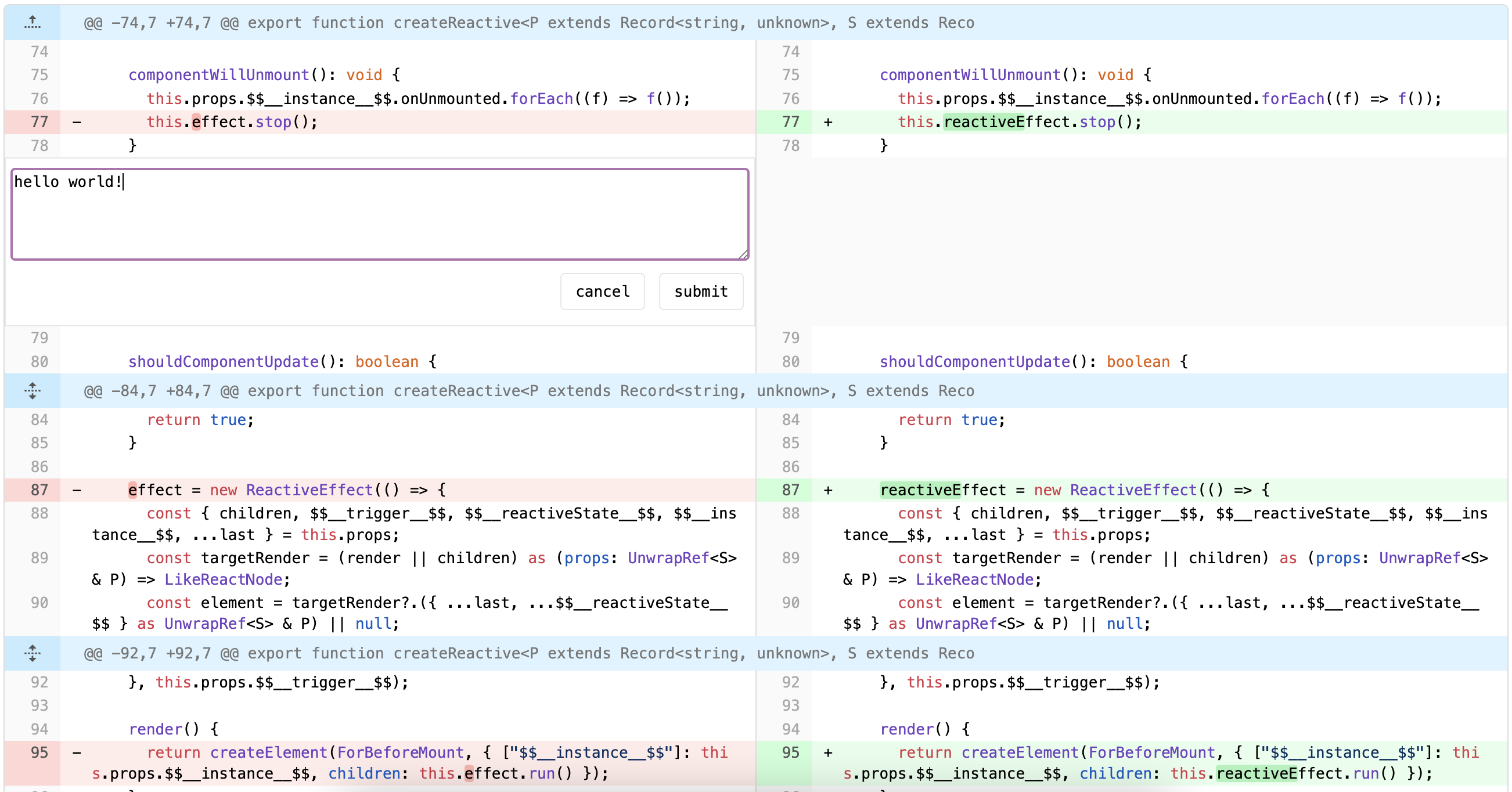
A Diff View component for React / Vue / Solid / Svelte / Ink, same as Github
See the code

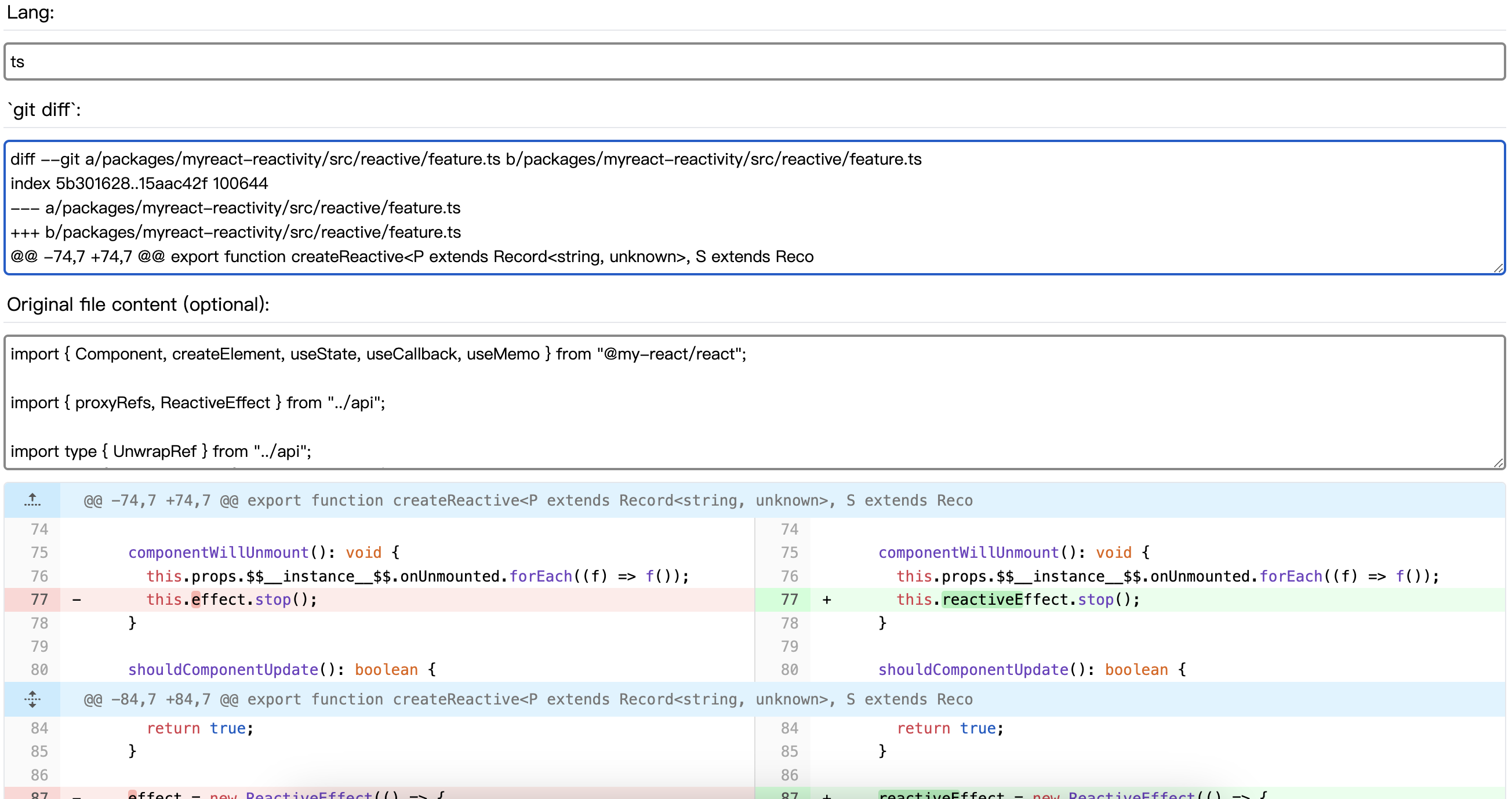
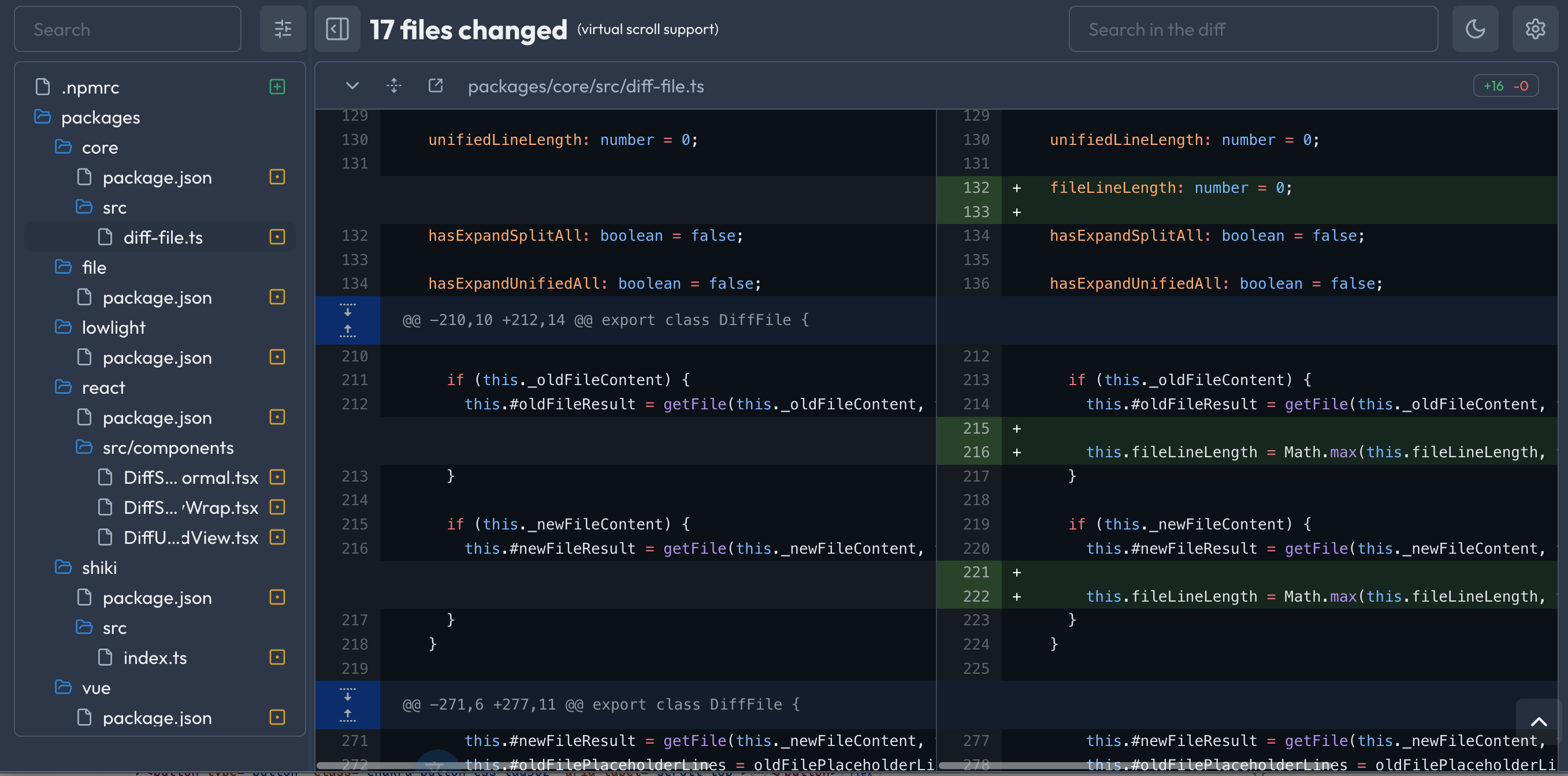
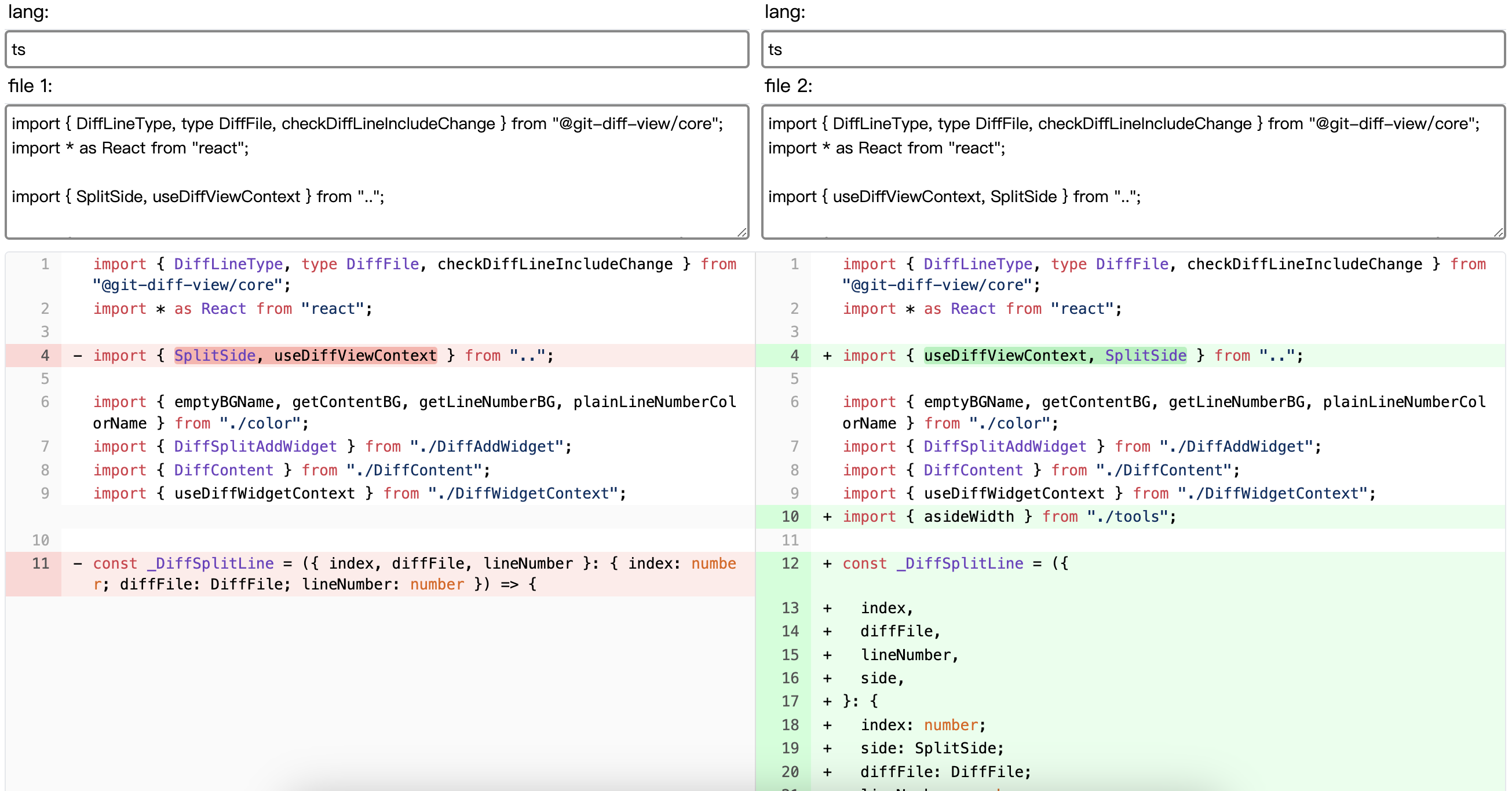
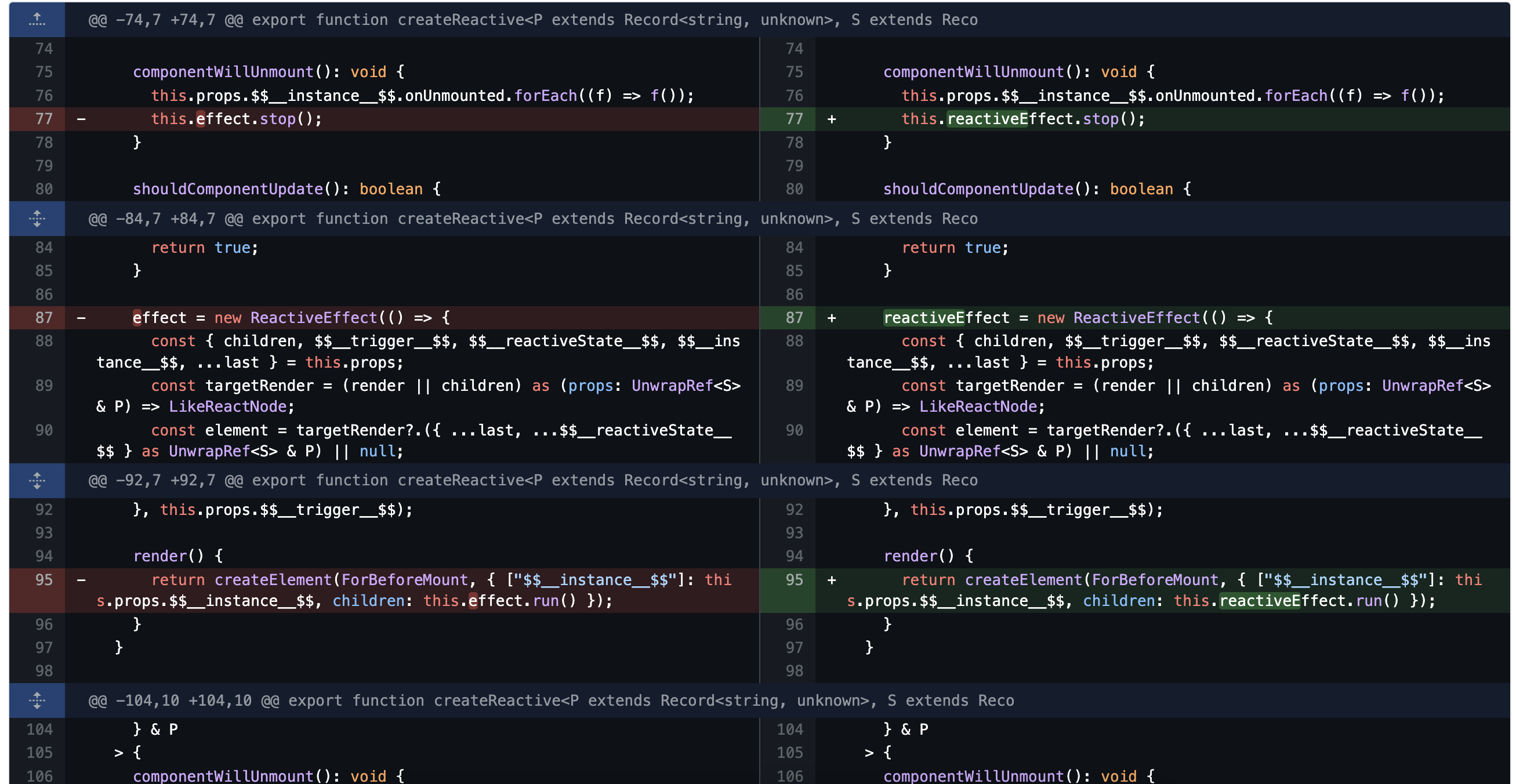
A high-performance, feature-rich diff view component for React / Vue / Solid / Svelte / Lynx


Try it online: Git Playground · File Playground · GitHub Style
# React
pnpm add @git-diff-view/react

# Vue
pnpm add @git-diff-view/vue

# Solid / Svelte
pnpm add @git-diff-view/solid
pnpm add @git-diff-view/svelte

# ReactLynx (Lynx)
pnpm add @git-diff-view/lynx

# CLI (terminal / Ink)
pnpm add @git-diff-view/cli
View Examples for React / Vue / Solid / Svelte / Lynx
import { DiffView, DiffModeEnum } from "@git-diff-view/react";
import "@git-diff-view/react/styles/diff-view.css";

<DiffView
  data={{
    oldFile: { fileName: "old.ts", content: "..." },
    newFile: { fileName: "new.ts", content: "..." },
    hunks: ["..."]
  }}
  diffViewMode={DiffModeEnum.Split}
  diffViewTheme="dark"
  diffViewHighlight
/>
import { DiffFile, generateDiffFile } from "@git-diff-view/file";

// File comparison mode
const file = generateDiffFile(
  "old.ts", oldContent,
  "new.ts", newContent,
  "typescript", "typescript"
);
file.initTheme('dark');
file.init();
file.buildSplitDiffLines();

<DiffView diffFile={file} />
More examples: React · Vue · Solid
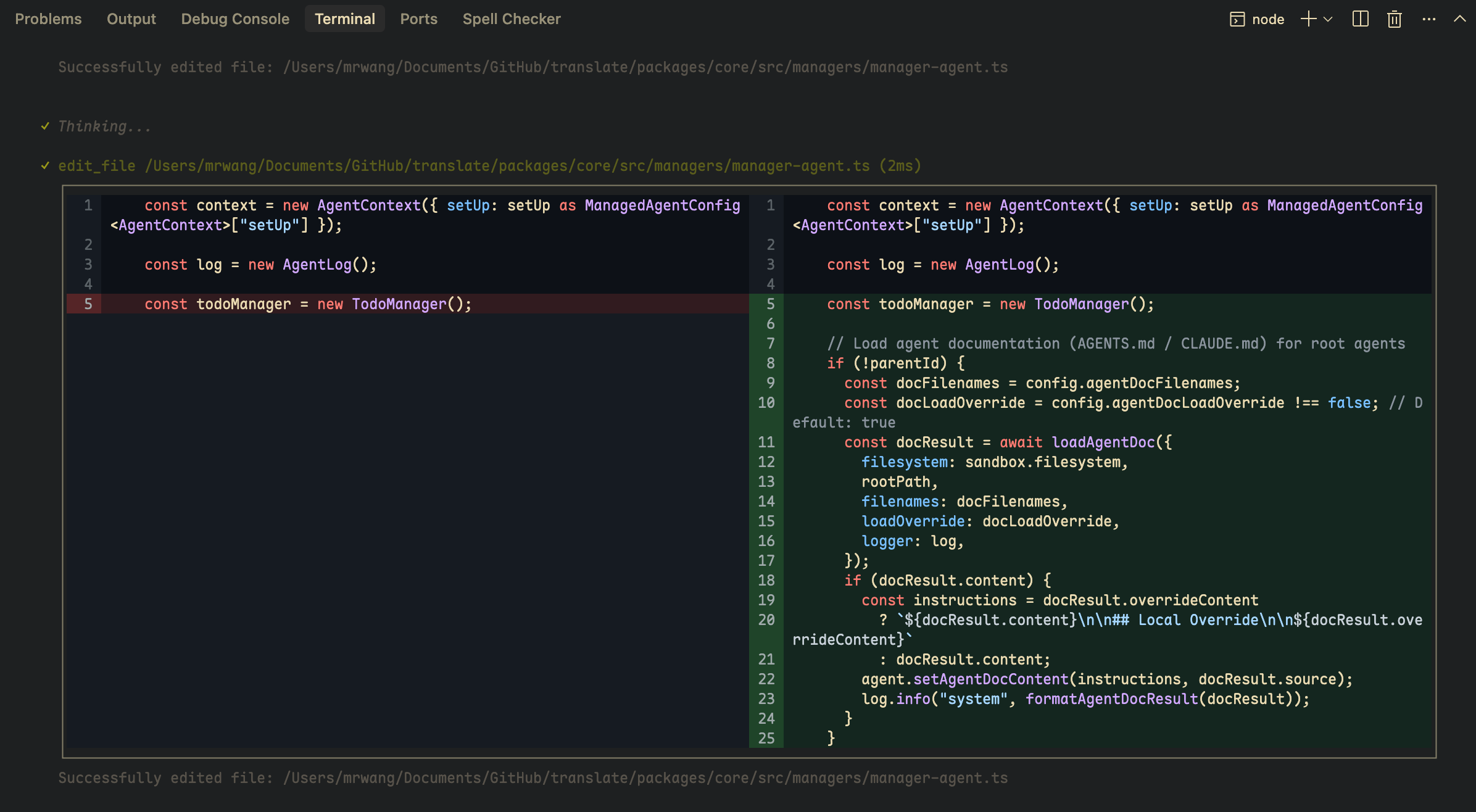
Terminal-based diff viewer built with Ink. Supports Split/Unified views, syntax highlighting, and fixed-height viewport scrolling.
pnpm add @git-diff-view/cli
import { DiffView, DiffModeEnum } from "@git-diff-view/cli";

<DiffView
  data={{ oldFile, newFile, hunks }}
  diffViewMode={DiffModeEnum.Split}
  diffViewTheme="dark"
  diffViewHighlight
  width={120}
  height={20}           // viewport height in visual rows (optional)
  onScrollChange={console.log}
/>
CodeView renders a single file; both components expose scroll ref methods (scrollToTop, scrollDown, getScrollState, etc.) when height is set.
Docs: packages/cli/readme.md · Scroll API · Implementation notes
UI Frameworks
@git-diff-view/react - React component@git-diff-view/vue - Vue component@git-diff-view/solid - Solid component@git-diff-view/svelte - Svelte component@git-diff-view/lynx - ReactLynx DiffView (wrap-first Split/Unified)@git-diff-view/cli - Terminal diff viewer (DiffView, CodeView, scroll API)Core Libraries
@git-diff-view/core - Core diff engine (git diff)@git-diff-view/file - File comparison engineSyntax Highlighters
@git-diff-view/lowlight - Built-in highlighter (highlight.js)@git-diff-view/shiki - Shiki / TextMate (VS Code quality)@git-diff-view/lezer - Lezer LR parsers (pure JS, no WASM)| Package | Engine | Best for |
|---|---|---|
lowlight | highlight.js | Default, broad language coverage |
shiki | TextMate / Shiki | Highest accuracy & VS Code themes |
lezer | CodeMirror Lezer | Constrained runtimes (e.g. Lynx), no WASM |
import { DiffFile } from "@git-diff-view/core";
import { getDiffViewHighlighter } from "@git-diff-view/shiki";
// or: import { highlighter } from "@git-diff-view/lezer";

const highlighter = await getDiffViewHighlighter();
diffFile.initSyntax({ registerHighlighter: highlighter });
Try switching engines in the live demo homepage example (lowlight / shiki / lezer menu).
@git-diff-view/cli)@git-diff-view/lynx)Enhanced line-by-line diff visualization for better readability.
import { setEnableFastDiffTemplate } from '@git-diff-view/core';

setEnableFastDiffTemplate(true);
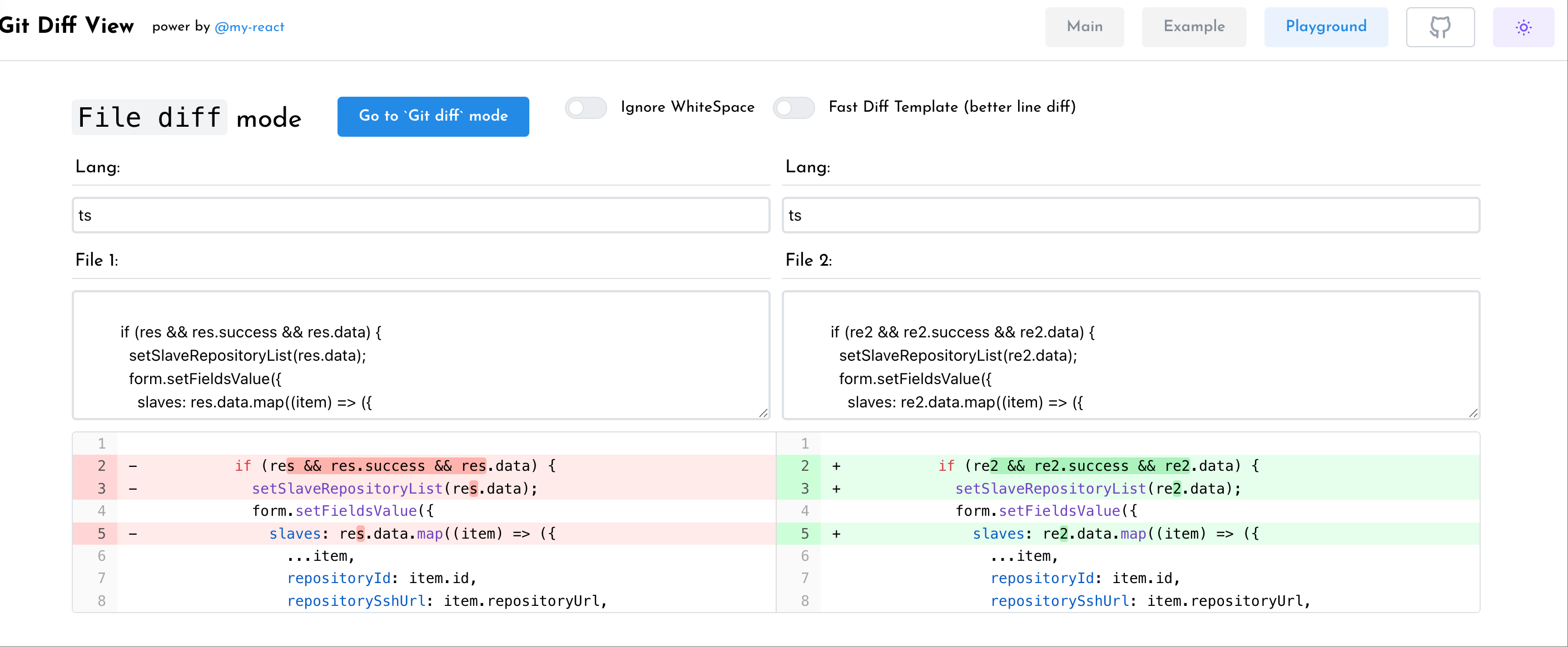
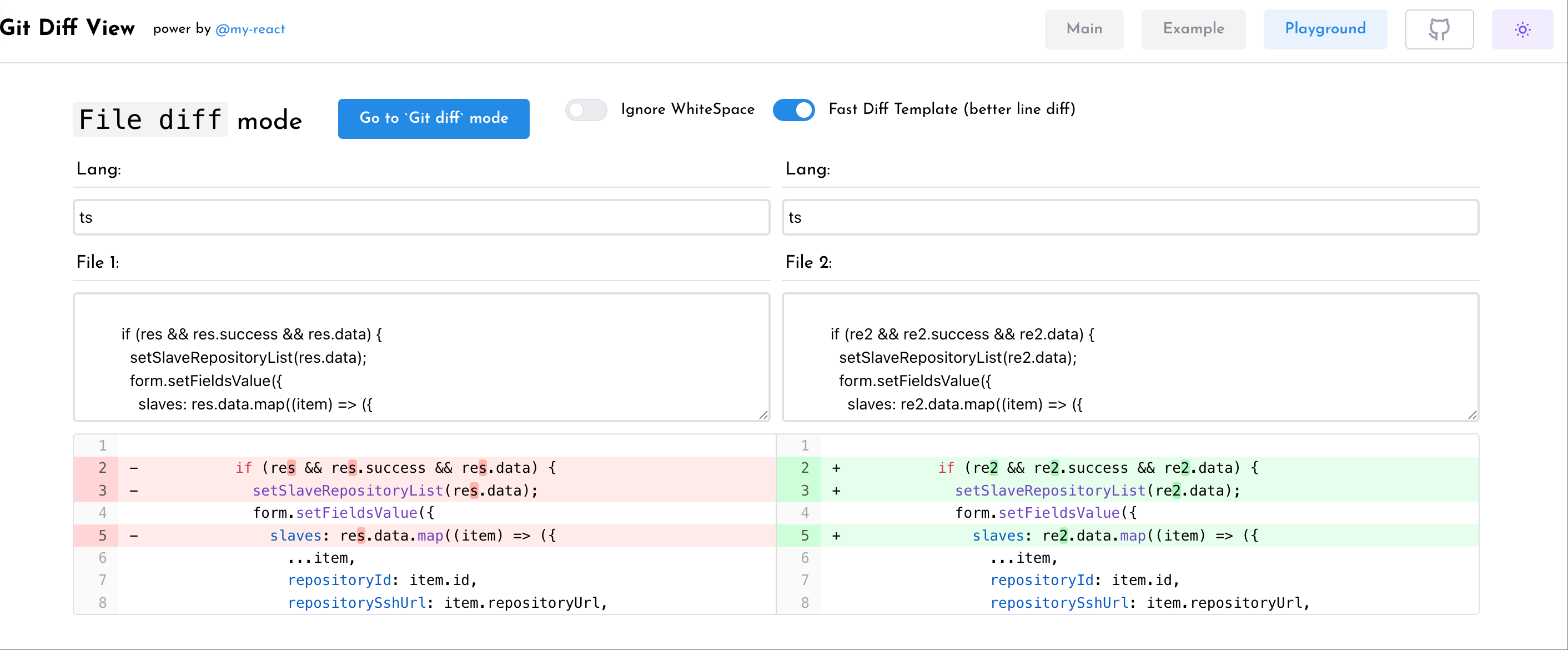
In FastDiff mode, adjacent small changes are merged by a semantic cleanup by default, so text without word boundaries (e.g. CJK) may be highlighted as a single block between the first and the last change. To highlight each change separately, keep FastDiff enabled and disable the semantic cleanup:
import { setEnableFastDiffTemplate, setEnableDiffSemanticCleanup } from '@git-diff-view/core';

setEnableFastDiffTemplate(true);
setEnableDiffSemanticCleanup(false);
Note:
setEnableDiffSemanticCleanuponly affects FastDiff mode (setEnableFastDiffTemplate(true)). It has no effect in the default (relative) mode, which always renders the whole changed span as one block.
setEnableDiffSemanticCleanup(false)is not a substitute forsetEnableFastDiffTemplate(true)— the two must be used together.
| Default | FastDiff |
|---|---|
 |  |
Display only a portion of the diff by specifying a line number range. This is useful when you want to focus on a specific section of a large diff.
import { DiffFile, SplitSide } from "@git-diff-view/core";

// Create the full diff instance
const diffFile = new DiffFile(/* ... */);
diffFile.init();
diffFile.buildSplitDiffLines();

// Generate a new instance containing only lines 10-50 (based on new file line numbers)
const rangeDiffFile = diffFile.generateInstanceFromLineNumberRange(10, 50);

// Or specify which side's line numbers to use
const rangeDiffFileOld = diffFile.generateInstanceFromLineNumberRange(10, 50, SplitSide.old);
const rangeDiffFileNew = diffFile.generateInstanceFromLineNumberRange(10, 50, SplitSide.new);

<DiffView diffFile={rangeDiffFile} />
API: generateInstanceFromLineNumberRange(start, end, side?)
| Parameter | Type | Default | Description |
|---|---|---|---|
start | number | - | Start line number (must be less than end) |
end | number | - | End line number |
side | SplitSide | SplitSide.new | Which file's line numbers to use (SplitSide.old or SplitSide.new) |
This method creates a new DiffFile instance containing only the diff lines within the specified range, making it ideal for:
Optimized rendering mode enabled by default for better performance. Learn more
| Prop | Type | Description |
|---|---|---|
data | DiffData | Diff data with oldFile, newFile, and hunks |
diffFile | DiffFile | Pre-processed diff file instance |
diffViewMode | Split | Unified | View mode (default: Split) |
diffViewTheme | light | dark | Theme (default: light) |
diffViewHighlight | boolean | Enable syntax highlighting |
diffViewWrap | boolean | Enable line wrapping |
diffViewFontSize | number | Font size in pixels |
diffViewAddWidget | boolean | Enable widget button |
renderWidgetLine | Function | Custom widget renderer |
renderExtendLine | Function | Custom extend data renderer |
extendData | ExtendData | Additional data per line |
onAddWidgetClick | Function | Widget button click handler |
// default style (Pure CSS)
import "@git-diff-view/react/styles/diff-view.css";

// same as diff-view.css
import "@git-diff-view/react/styles/diff-view-pure.css";
1. Direct Data Mode - Pass raw diff data
<DiffView data={{ oldFile, newFile, hunks }} />
2. DiffFile Instance Mode - Pre-process for better control
const file = new DiffFile(/* ... */);
file.init();
file.buildSplitDiffLines();
<DiffView diffFile={file} />
git clone https://github.com/MrWangJustToDo/git-diff-view.git
cd git-diff-view
pnpm install
pnpm run build:packages
pnpm run dev:react  # or dev:vue, dev:solid, dev:svelte, dev:cli
CLI scroll tests (after build:packages):
pnpm --filter @git-diff-view/cli test:scroll
pnpm --filter @git-diff-view/cli test:scroll:interactive:diffview
MIT © MrWangJustToDo
1,483 followers · starred Mar 2026
409 followers · starred Jul 2025
9,513 followers · starred Jul 2025
230 followers · starred Feb 2024
A Diff View component for React / Vue / Solid / Svelte / Ink, same as Github
See the code
A high-performance, feature-rich diff view component for React / Vue / Solid / Svelte / Lynx
Try it online: Git Playground · File Playground · GitHub Style
# React
pnpm add @git-diff-view/react

# Vue
pnpm add @git-diff-view/vue

# Solid / Svelte
pnpm add @git-diff-view/solid
pnpm add @git-diff-view/svelte

# ReactLynx (Lynx)
pnpm add @git-diff-view/lynx

# CLI (terminal / Ink)
pnpm add @git-diff-view/cli
View Examples for React / Vue / Solid / Svelte / Lynx
import { DiffView, DiffModeEnum } from "@git-diff-view/react";
import "@git-diff-view/react/styles/diff-view.css";

<DiffView
  data={{
    oldFile: { fileName: "old.ts", content: "..." },
    newFile: { fileName: "new.ts", content: "..." },
    hunks: ["..."]
  }}
  diffViewMode={DiffModeEnum.Split}
  diffViewTheme="dark"
  diffViewHighlight
/>
import { DiffFile, generateDiffFile } from "@git-diff-view/file";

// File comparison mode
const file = generateDiffFile(
  "old.ts", oldContent,
  "new.ts", newContent,
  "typescript", "typescript"
);
file.initTheme('dark');
file.init();
file.buildSplitDiffLines();

<DiffView diffFile={file} />
More examples: React · Vue · Solid
Terminal-based diff viewer built with Ink. Supports Split/Unified views, syntax highlighting, and fixed-height viewport scrolling.
pnpm add @git-diff-view/cli
import { DiffView, DiffModeEnum } from "@git-diff-view/cli";

<DiffView
  data={{ oldFile, newFile, hunks }}
  diffViewMode={DiffModeEnum.Split}
  diffViewTheme="dark"
  diffViewHighlight
  width={120}
  height={20}           // viewport height in visual rows (optional)
  onScrollChange={console.log}
/>
CodeView renders a single file; both components expose scroll ref methods (scrollToTop, scrollDown, getScrollState, etc.) when height is set.
Docs: packages/cli/readme.md · Scroll API · Implementation notes
UI Frameworks
@git-diff-view/react - React component@git-diff-view/vue - Vue component@git-diff-view/solid - Solid component@git-diff-view/svelte - Svelte component@git-diff-view/lynx - ReactLynx DiffView (wrap-first Split/Unified)@git-diff-view/cli - Terminal diff viewer (DiffView, CodeView, scroll API)Core Libraries
@git-diff-view/core - Core diff engine (git diff)@git-diff-view/file - File comparison engineSyntax Highlighters
@git-diff-view/lowlight - Built-in highlighter (highlight.js)@git-diff-view/shiki - Shiki / TextMate (VS Code quality)@git-diff-view/lezer - Lezer LR parsers (pure JS, no WASM)| Package | Engine | Best for |
|---|---|---|
lowlight | highlight.js | Default, broad language coverage |
shiki | TextMate / Shiki | Highest accuracy & VS Code themes |
lezer | CodeMirror Lezer | Constrained runtimes (e.g. Lynx), no WASM |
import { DiffFile } from "@git-diff-view/core";
import { getDiffViewHighlighter } from "@git-diff-view/shiki";
// or: import { highlighter } from "@git-diff-view/lezer";

const highlighter = await getDiffViewHighlighter();
diffFile.initSyntax({ registerHighlighter: highlighter });
Try switching engines in the live demo homepage example (lowlight / shiki / lezer menu).
@git-diff-view/cli)@git-diff-view/lynx)Enhanced line-by-line diff visualization for better readability.
import { setEnableFastDiffTemplate } from '@git-diff-view/core';

setEnableFastDiffTemplate(true);
In FastDiff mode, adjacent small changes are merged by a semantic cleanup by default, so text without word boundaries (e.g. CJK) may be highlighted as a single block between the first and the last change. To highlight each change separately, keep FastDiff enabled and disable the semantic cleanup:
import { setEnableFastDiffTemplate, setEnableDiffSemanticCleanup } from '@git-diff-view/core';

setEnableFastDiffTemplate(true);
setEnableDiffSemanticCleanup(false);
Note:
setEnableDiffSemanticCleanuponly affects FastDiff mode (setEnableFastDiffTemplate(true)). It has no effect in the default (relative) mode, which always renders the whole changed span as one block.
setEnableDiffSemanticCleanup(false)is not a substitute forsetEnableFastDiffTemplate(true)— the two must be used together.
| Default | FastDiff |
|---|---|
| |
Display only a portion of the diff by specifying a line number range. This is useful when you want to focus on a specific section of a large diff.
import { DiffFile, SplitSide } from "@git-diff-view/core";

// Create the full diff instance
const diffFile = new DiffFile(/* ... */);
diffFile.init();
diffFile.buildSplitDiffLines();

// Generate a new instance containing only lines 10-50 (based on new file line numbers)
const rangeDiffFile = diffFile.generateInstanceFromLineNumberRange(10, 50);

// Or specify which side's line numbers to use
const rangeDiffFileOld = diffFile.generateInstanceFromLineNumberRange(10, 50, SplitSide.old);
const rangeDiffFileNew = diffFile.generateInstanceFromLineNumberRange(10, 50, SplitSide.new);

<DiffView diffFile={rangeDiffFile} />
API: generateInstanceFromLineNumberRange(start, end, side?)
| Parameter | Type | Default | Description |
|---|---|---|---|
start | number | - | Start line number (must be less than end) |
end | number | - | End line number |
side | SplitSide | SplitSide.new | Which file's line numbers to use (SplitSide.old or SplitSide.new) |
This method creates a new DiffFile instance containing only the diff lines within the specified range, making it ideal for:
Optimized rendering mode enabled by default for better performance. Learn more
| Prop | Type | Description |
|---|---|---|
data | DiffData | Diff data with oldFile, newFile, and hunks |
diffFile | DiffFile | Pre-processed diff file instance |
diffViewMode | Split | Unified | View mode (default: Split) |
diffViewTheme | light | dark | Theme (default: light) |
diffViewHighlight | boolean | Enable syntax highlighting |
diffViewWrap | boolean | Enable line wrapping |
diffViewFontSize | number | Font size in pixels |
diffViewAddWidget | boolean | Enable widget button |
renderWidgetLine | Function | Custom widget renderer |
renderExtendLine | Function | Custom extend data renderer |
extendData | ExtendData | Additional data per line |
onAddWidgetClick | Function | Widget button click handler |
// default style (Pure CSS)
import "@git-diff-view/react/styles/diff-view.css";

// same as diff-view.css
import "@git-diff-view/react/styles/diff-view-pure.css";
1. Direct Data Mode - Pass raw diff data
<DiffView data={{ oldFile, newFile, hunks }} />
2. DiffFile Instance Mode - Pre-process for better control
const file = new DiffFile(/* ... */);
file.init();
file.buildSplitDiffLines();
<DiffView diffFile={file} />
git clone https://github.com/MrWangJustToDo/git-diff-view.git
cd git-diff-view
pnpm install
pnpm run build:packages
pnpm run dev:react  # or dev:vue, dev:solid, dev:svelte, dev:cli
CLI scroll tests (after build:packages):
pnpm --filter @git-diff-view/cli test:scroll
pnpm --filter @git-diff-view/cli test:scroll:interactive:diffview
MIT © MrWangJustToDo
1,483 followers · starred Mar 2026
409 followers · starred Jul 2025
9,513 followers · starred Jul 2025
230 followers · starred Feb 2024