Bringing the power of MCP to the web
See the code[!IMPORTANT] 🚨 The WebMCP API has been accepted as a W3C deliverable and is transitioning to official web standard development. The community and all related work has moved to the WebMCP explainer repository. Please join us there! 🚨
[!IMPORTANT] 📝 Repository Status: The MCP-B extension is no longer open source. This repository represents an older version of the codebase and is maintained for historical reference only. All open source content (transports, etc.) have been ported to the WebMCP Github Org.




🚀 Quick Start • ✨ Live Demo • 📚 Documentation • 🤝 Contributing
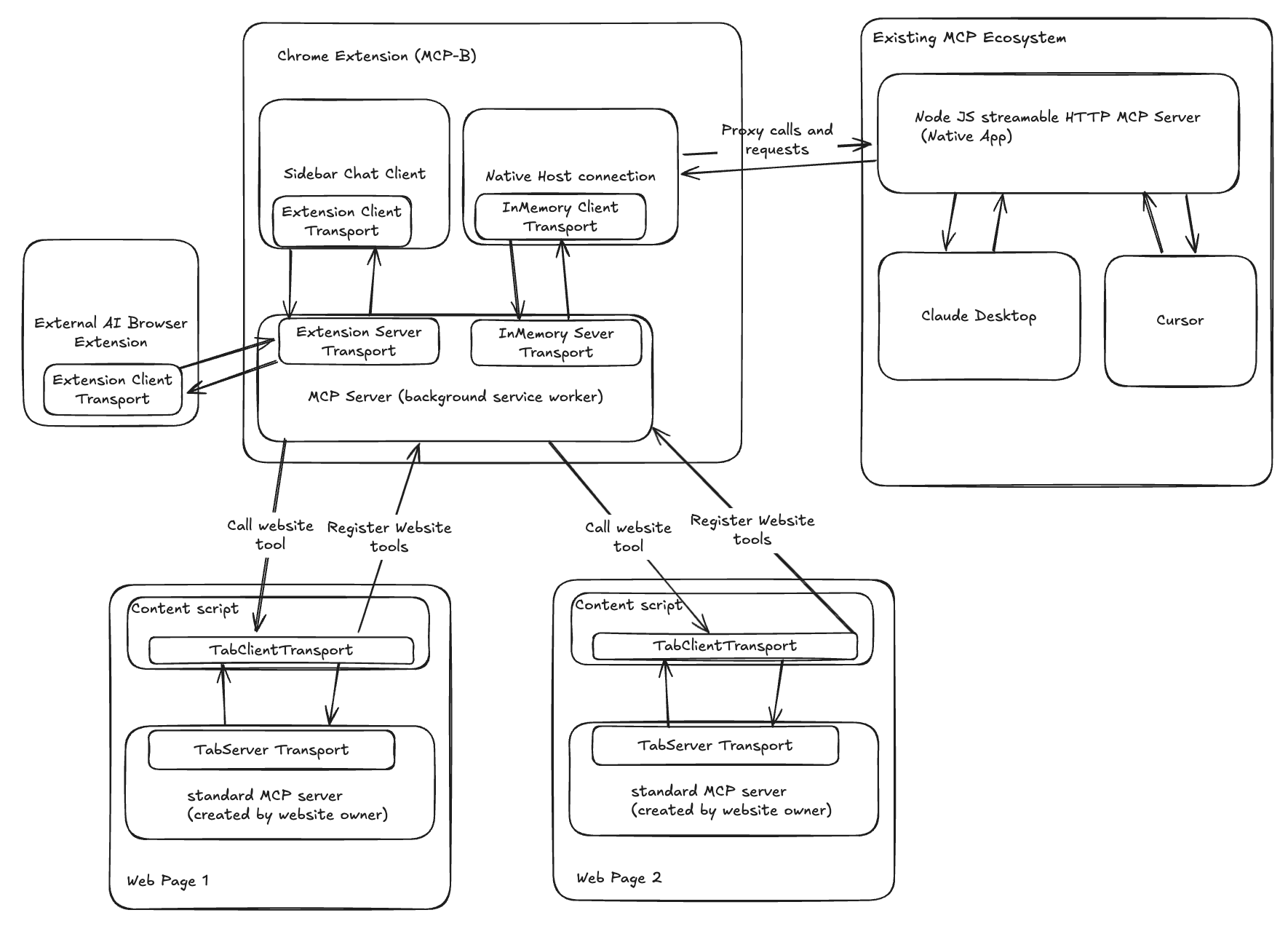
WebMCP is the underlying protocol which MCP-B implements. It is a protocol which exposes function in your browser javascript to LLM's as MCP tools.
For a more indepth understanding, refer here: https://mcp-b.ai/blogs
See MCP-B in action right away:
Check out our examples repository: MCP-B Examples
The examples repository contains:
These demos highlight how MCP-B integrates into websites without needing complex setups. Install the MCP-B Chrome Extension to interact with the tools via the extension's chat interface or tool inspector.
MCP-B extends the Model Context Protocol (MCP) with browser-specific transports, allowing your website to act as an MCP server. Websites expose existing functionality (e.g., APIs, forms, or state) as structured tools that AI agents can call directly.
Key components:
postMessage for communication between your website's MCP server and clients in the same tab.This setup enables AI to interact with your site deterministically, respecting user authentication (e.g., session cookies) and scoping tools to specific pages or user states.
Get MCP-B running on your website in minutes. This guide focuses on adding an MCP server to expose tools, using the examples as a blueprint.
node --version)npm install -g pnpm)If you want to contribute to MCP-B or run the examples locally:
Clone and install:
git clone https://github.com/MiguelsPizza/WebMCP.git
cd WebMCP
pnpm install
pnpm build:shared  # Build internal shared packages
Note: Some postinstall scripts may fail initially - this is normal.
Configure your development extension ID (optional):
# If your extension ID differs from the default
cp apps/native-server/.env.example apps/native-server/.env
# Edit apps/native-server/.env with your extension ID
Configure extension model provider and model name:
# Create a .dev.vars file in apps/backend from the example
cp apps/backend/.dev.vars.example apps/backend/.dev.vars
# Edit apps/extension/.env with Open AI or Anthropic API Keys
# ANTHROPIC_API_KEY="your_claude_api_key_here"
Start development:
pnpm dev
This automatically:
Find your extension ID (if needed):
chrome://extensions/apps/native-server/.env with DEV_EXTENSION_ID=your-extension-idpnpm devRun examples - See the MCP-B Examples Repository for example applications.
For adding MCP-B to your own project (recommended for most users):
npm install @mcp-b/transports @modelcontextprotocol/sdk zod
Create a single MCP server instance and connect it via Tab Transport. Expose tools that wrap your existing logic.
Example (vanilla JS/TypeScript):
import { TabServerTransport } from "@mcp-b/transports";
import { McpServer } from "@modelcontextprotocol/sdk/server/mcp.js";
import { z } from "zod";

// Create the server (one per site)
const server = new McpServer({
  name: "my-website",
  version: "1.0.0",
});

// Expose a tool (wrap your app's logic)
server.tool("getPageInfo", "Get current page info", {}, async () => {
  return {
    content: [
      {
        type: "text",
        text: JSON.stringify({
          title: document.title,
          url: window.location.href,
        }),
      },
    ],
  };
});

// Connect the transport
await server.connect(new TabServerTransport({ allowedOrigins: ["*"] })); // Adjust origins for security
getPageInfo become callable by AI.Check out the MCP-B Examples Repository for ready-to-run starters:
createTodo, getTodos, etc. Demonstrates dynamic tool registration and UI updates.Copy patterns from these examples to your site. Focus on wrapping client-side functions—e.g., use fetch with credentials: 'same-origin' for authenticated calls.
For more, see the documentation.
The MCP-B extension acts as a client that discovers and routes calls to your website's MCP tools. Users can interact via a chat interface or tool inspector.
Install the official release: MCP-B Extension.
Once installed:
For the latest features or custom modifications:
git clone https://github.com/MiguelsPizza/WebMCP.git.cd WebMCP && pnpm install && pnpm build:shared.pnpm --filter @mcp-b/extension build.chrome://extensions/, enable Developer Mode, and load ./apps/extension/.output/chrome-mv3 unpacked.Run in dev mode for hot reloading: pnpm --filter @mcp-b/extension dev.
To connect MCP-B to local MCP clients (e.g., Claude Desktop, Cursor) via a native server, bridging the browser to local processes:
IMPORTANT: You will need to disable the chrome webstore version of the extension if you have it downloaded. Failure to do so will cause port clashing when the dev and prod extension run
npm install -g @mcp-b/native-server.@mcp-b/native-server (starts a server on port 12306 by default).Add this configuration to your MCP client (e.g., in Claude's config or Cursor's .cursor/mcp.json):
{
  "type": "streamable-http",
  "url": "http://127.0.0.1:12306/mcp",
  "note": "For Streamable HTTP connections, add this URL directly in your MCP Client"
}
Test by running a local client (e.g., MCP Inspector) pointed at the URL, then calling tools from your site.
{ annotations: { cache: true } } to persist across tabs.WebMCP/
├── apps/ # Application packages
│ ├── extension/ # Browser extension
│ ├── backend/ # Backend server (Cloudflare Workers)
│ └── native-server/ # Native messaging host
├── shared/ # Internal shared packages
│ └── utils/ # Shared utility functions
└── e2e-tests/ # End-to-end tests
Git clone times out:
# If the initial clone fails, complete it manually:
git clone https://github.com/MiguelsPizza/WebMCP.git
cd WebMCP
git pull origin main
Native server postinstall errors:
# These errors during pnpm install are normal and can be ignored:
# "Cannot find module '/path/to/apps/native-server/dist/scripts/postinstall.js'"
# The packages will still build correctly.
Example won't start: See the MCP-B Examples Repository for proper setup instructions.
Import resolution errors:
For monorepo development:
# Ensure the workspace is properly built:
pnpm build:shared  # Build internal shared packages
pnpm build:apps     # Build all applications
# Or run from the root with workspace support:
pnpm dev
For examples: See the MCP-B Examples Repository.
Port conflicts:
Extension not detecting tools:
Tools not working:
TabServerTransport configurationallowedOrigins includes your domaingit clone https://github.com/MiguelsPizza/WebMCP.git
cd WebMCP
pnpm install
pnpm build:shared # Build internal shared packages first
pnpm dev # Runs all in dev mode
Contributions welcome! Focus on transports, examples, or docs. See CONTRIBUTING.md.
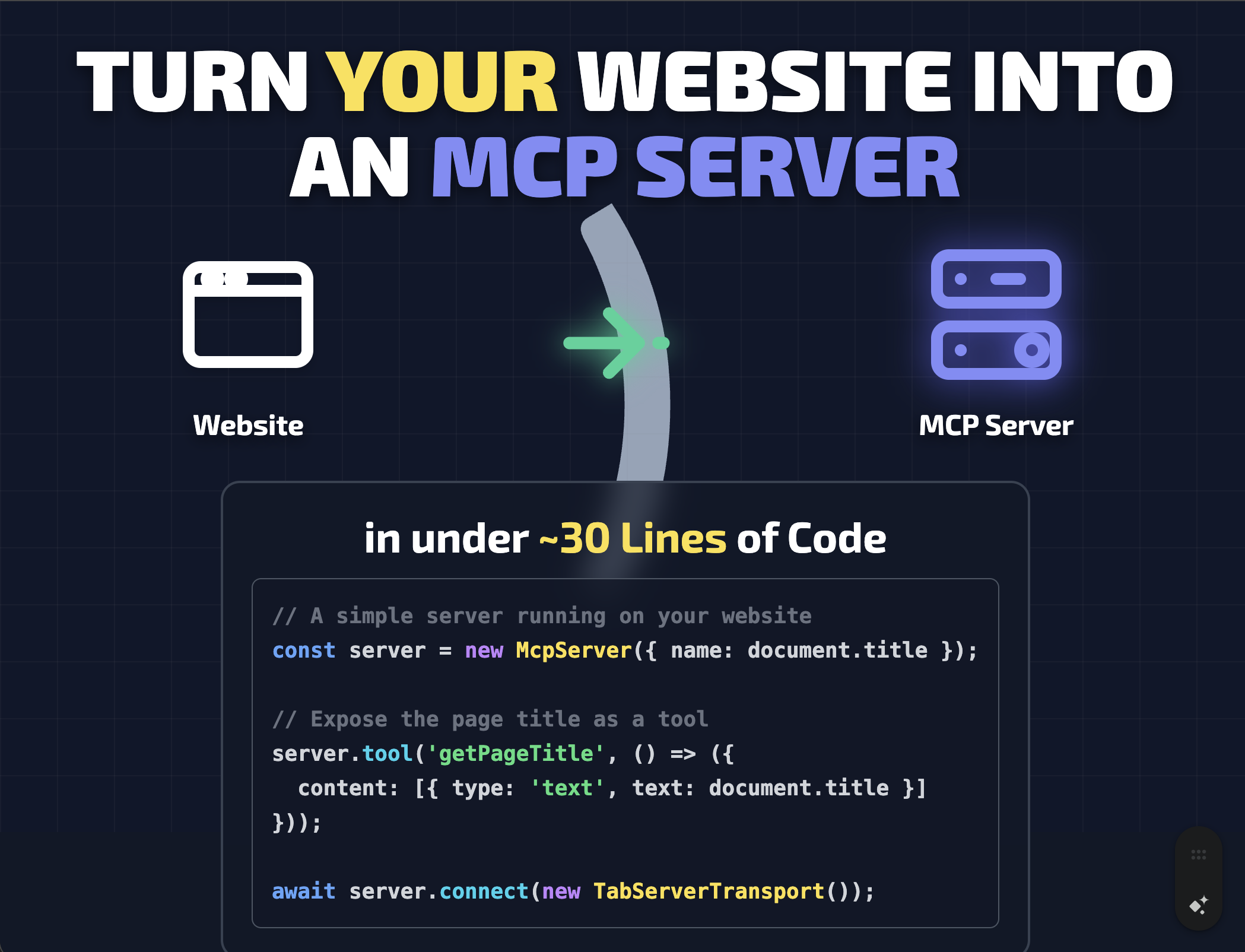
MCP-B lets your website become an MCP server, exposing functionality as tools that AI agents can call directly—using the browser's existing authentication and security model.
AGPL-3.0 - see LICENSE.
Created by Alexander Nahas (@miguelsPizza). Reach out: alexnahasdev@gmail.com.
434 followers · starred Oct 2025
3,240 followers · starred Jul 2025
1,303 followers · starred Jul 2025
458 followers · starred Jul 2025
Bringing the power of MCP to the web
See the code[!IMPORTANT] 🚨 The WebMCP API has been accepted as a W3C deliverable and is transitioning to official web standard development. The community and all related work has moved to the WebMCP explainer repository. Please join us there! 🚨
[!IMPORTANT] 📝 Repository Status: The MCP-B extension is no longer open source. This repository represents an older version of the codebase and is maintained for historical reference only. All open source content (transports, etc.) have been ported to the WebMCP Github Org.
🚀 Quick Start • ✨ Live Demo • 📚 Documentation • 🤝 Contributing
WebMCP is the underlying protocol which MCP-B implements. It is a protocol which exposes function in your browser javascript to LLM's as MCP tools.
For a more indepth understanding, refer here: https://mcp-b.ai/blogs
See MCP-B in action right away:
Check out our examples repository: MCP-B Examples
The examples repository contains:
These demos highlight how MCP-B integrates into websites without needing complex setups. Install the MCP-B Chrome Extension to interact with the tools via the extension's chat interface or tool inspector.
MCP-B extends the Model Context Protocol (MCP) with browser-specific transports, allowing your website to act as an MCP server. Websites expose existing functionality (e.g., APIs, forms, or state) as structured tools that AI agents can call directly.
Key components:
postMessage for communication between your website's MCP server and clients in the same tab.This setup enables AI to interact with your site deterministically, respecting user authentication (e.g., session cookies) and scoping tools to specific pages or user states.
Get MCP-B running on your website in minutes. This guide focuses on adding an MCP server to expose tools, using the examples as a blueprint.
node --version)npm install -g pnpm)If you want to contribute to MCP-B or run the examples locally:
Clone and install:
git clone https://github.com/MiguelsPizza/WebMCP.git
cd WebMCP
pnpm install
pnpm build:shared  # Build internal shared packages
Note: Some postinstall scripts may fail initially - this is normal.
Configure your development extension ID (optional):
# If your extension ID differs from the default
cp apps/native-server/.env.example apps/native-server/.env
# Edit apps/native-server/.env with your extension ID
Configure extension model provider and model name:
# Create a .dev.vars file in apps/backend from the example
cp apps/backend/.dev.vars.example apps/backend/.dev.vars
# Edit apps/extension/.env with Open AI or Anthropic API Keys
# ANTHROPIC_API_KEY="your_claude_api_key_here"
Start development:
pnpm dev
This automatically:
Find your extension ID (if needed):
chrome://extensions/apps/native-server/.env with DEV_EXTENSION_ID=your-extension-idpnpm devRun examples - See the MCP-B Examples Repository for example applications.
For adding MCP-B to your own project (recommended for most users):
npm install @mcp-b/transports @modelcontextprotocol/sdk zod
Create a single MCP server instance and connect it via Tab Transport. Expose tools that wrap your existing logic.
Example (vanilla JS/TypeScript):
import { TabServerTransport } from "@mcp-b/transports";
import { McpServer } from "@modelcontextprotocol/sdk/server/mcp.js";
import { z } from "zod";

// Create the server (one per site)
const server = new McpServer({
  name: "my-website",
  version: "1.0.0",
});

// Expose a tool (wrap your app's logic)
server.tool("getPageInfo", "Get current page info", {}, async () => {
  return {
    content: [
      {
        type: "text",
        text: JSON.stringify({
          title: document.title,
          url: window.location.href,
        }),
      },
    ],
  };
});

// Connect the transport
await server.connect(new TabServerTransport({ allowedOrigins: ["*"] })); // Adjust origins for security
getPageInfo become callable by AI.Check out the MCP-B Examples Repository for ready-to-run starters:
createTodo, getTodos, etc. Demonstrates dynamic tool registration and UI updates.Copy patterns from these examples to your site. Focus on wrapping client-side functions—e.g., use fetch with credentials: 'same-origin' for authenticated calls.
For more, see the documentation.
The MCP-B extension acts as a client that discovers and routes calls to your website's MCP tools. Users can interact via a chat interface or tool inspector.
Install the official release: MCP-B Extension.
Once installed:
For the latest features or custom modifications:
git clone https://github.com/MiguelsPizza/WebMCP.git.cd WebMCP && pnpm install && pnpm build:shared.pnpm --filter @mcp-b/extension build.chrome://extensions/, enable Developer Mode, and load ./apps/extension/.output/chrome-mv3 unpacked.Run in dev mode for hot reloading: pnpm --filter @mcp-b/extension dev.
To connect MCP-B to local MCP clients (e.g., Claude Desktop, Cursor) via a native server, bridging the browser to local processes:
IMPORTANT: You will need to disable the chrome webstore version of the extension if you have it downloaded. Failure to do so will cause port clashing when the dev and prod extension run
npm install -g @mcp-b/native-server.@mcp-b/native-server (starts a server on port 12306 by default).Add this configuration to your MCP client (e.g., in Claude's config or Cursor's .cursor/mcp.json):
{
  "type": "streamable-http",
  "url": "http://127.0.0.1:12306/mcp",
  "note": "For Streamable HTTP connections, add this URL directly in your MCP Client"
}
Test by running a local client (e.g., MCP Inspector) pointed at the URL, then calling tools from your site.
{ annotations: { cache: true } } to persist across tabs.WebMCP/
├── apps/ # Application packages
│ ├── extension/ # Browser extension
│ ├── backend/ # Backend server (Cloudflare Workers)
│ └── native-server/ # Native messaging host
├── shared/ # Internal shared packages
│ └── utils/ # Shared utility functions
└── e2e-tests/ # End-to-end tests
Git clone times out:
# If the initial clone fails, complete it manually:
git clone https://github.com/MiguelsPizza/WebMCP.git
cd WebMCP
git pull origin main
Native server postinstall errors:
# These errors during pnpm install are normal and can be ignored:
# "Cannot find module '/path/to/apps/native-server/dist/scripts/postinstall.js'"
# The packages will still build correctly.
Example won't start: See the MCP-B Examples Repository for proper setup instructions.
Import resolution errors:
For monorepo development:
# Ensure the workspace is properly built:
pnpm build:shared  # Build internal shared packages
pnpm build:apps     # Build all applications
# Or run from the root with workspace support:
pnpm dev
For examples: See the MCP-B Examples Repository.
Port conflicts:
Extension not detecting tools:
Tools not working:
TabServerTransport configurationallowedOrigins includes your domaingit clone https://github.com/MiguelsPizza/WebMCP.git
cd WebMCP
pnpm install
pnpm build:shared # Build internal shared packages first
pnpm dev # Runs all in dev mode
Contributions welcome! Focus on transports, examples, or docs. See CONTRIBUTING.md.
MCP-B lets your website become an MCP server, exposing functionality as tools that AI agents can call directly—using the browser's existing authentication and security model.
AGPL-3.0 - see LICENSE.
Created by Alexander Nahas (@miguelsPizza). Reach out: alexnahasdev@gmail.com.
434 followers · starred Oct 2025
3,240 followers · starred Jul 2025
1,303 followers · starred Jul 2025
458 followers · starred Jul 2025