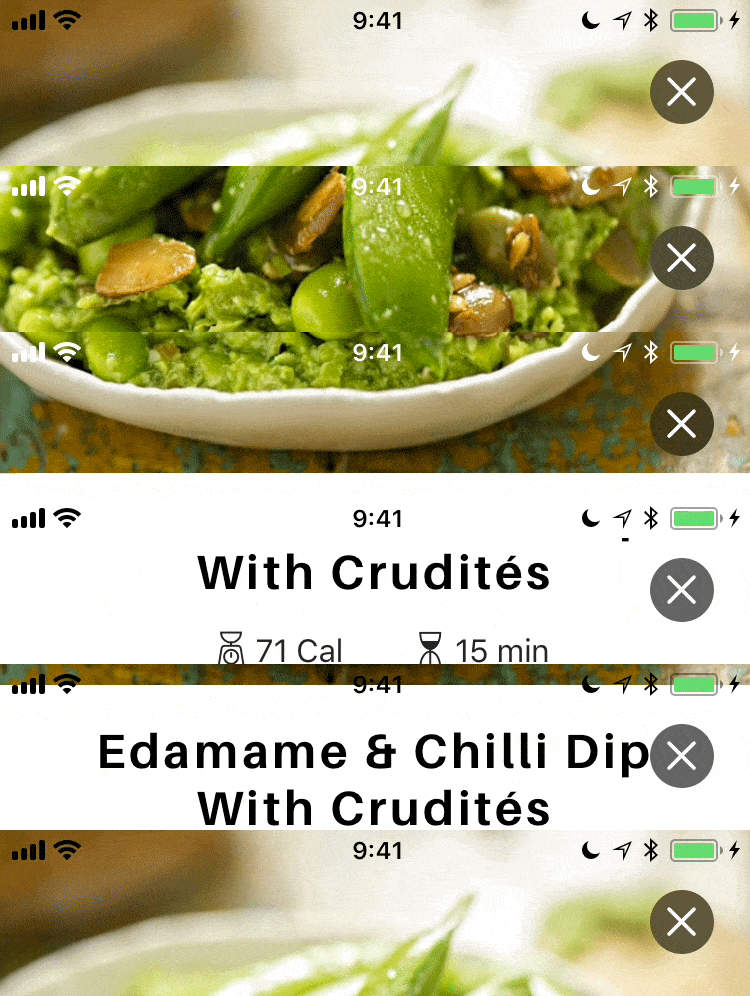
Dynamically changes status bar style depending on content behind it
Swift
1,699
37 commits
updated Jun 30, 2026



Status bar apperance manager that make your status bar readable by dynamically changing it's color depending on content behind.
Add
pod 'Bartinter'
to your podfile, and run
pod install
Set "View controller-based status bar appearance" (UIViewControllerBasedStatusBarAppearance) to YES in your Info.plist.
Set ViewController's updatesStatusBarAppearanceAutomatically = true
That's it.
By default, bartinter swizzles a couple methods for your convenience. (see: UIKitSwizzling.swift)
If you are not ok with method swizzling, you can disable it by following line:
Bartinter.isSwizzlingEnabled = false
Without swizzling you need to do some things manually:
Firstly, you need to provide childViewControllerForStatusBarStyle, in your ViewController subclass just add following:
override var childViewControllerForStatusBarStyle: UIViewController? {
    return statusBarUpdater
}
Secondly, you need to decide, when you need to refresh status bar style, for example on tableView scroll, so add:
func scrollViewDidScroll(_ scrollView: UIScrollView) {
    statusBarUpdater?.refreshStatusBarStyle()
}
7,875 followers · starred Jul 2018
129 followers · starred Jun 2019
95 followers · starred Apr 2020
13 followers · starred Mar 2020
Dynamically changes status bar style depending on content behind it
Swift
1,699
37 commits
updated Jun 30, 2026
Status bar apperance manager that make your status bar readable by dynamically changing it's color depending on content behind.
Add
pod 'Bartinter'
to your podfile, and run
pod install
Set "View controller-based status bar appearance" (UIViewControllerBasedStatusBarAppearance) to YES in your Info.plist.
Set ViewController's updatesStatusBarAppearanceAutomatically = true
That's it.
By default, bartinter swizzles a couple methods for your convenience. (see: UIKitSwizzling.swift)
If you are not ok with method swizzling, you can disable it by following line:
Bartinter.isSwizzlingEnabled = false
Without swizzling you need to do some things manually:
Firstly, you need to provide childViewControllerForStatusBarStyle, in your ViewController subclass just add following:
override var childViewControllerForStatusBarStyle: UIViewController? {
    return statusBarUpdater
}
Secondly, you need to decide, when you need to refresh status bar style, for example on tableView scroll, so add:
func scrollViewDidScroll(_ scrollView: UIScrollView) {
    statusBarUpdater?.refreshStatusBarStyle()
}
7,875 followers · starred Jul 2018
129 followers · starred Jun 2019
95 followers · starred Apr 2020
13 followers · starred Mar 2020



