A personal desktop assistant designed to automate workflows, control applications, and provide voice-based interaction.
See the code
Version 4.0.0-beta · Windows · Python 3.12 · .NET 9 · Apache-2.0
Rina Assistant listens, works out what you asked for, and does it: opens the program you named even if you named it in the wrong alphabet, sets a timer, changes the volume, does the arithmetic, searches the web, or — if you switch it on — answers with a language model running on your own machine.
Everything runs on your computer. No account, and nothing goes out on its own: the online voices, the web search and the weather and exchange-rate plugins reach the network only once you switch them on, and each says what it sends. The beta has telemetry that is off until you switch it on: numbers once a day, never what you said, and gone in 4.0.0 Stable. There is a page inside the program that lists everything it keeps about you — including its journals and the copies it made before updating its storage — and a button to make it forget any of it.
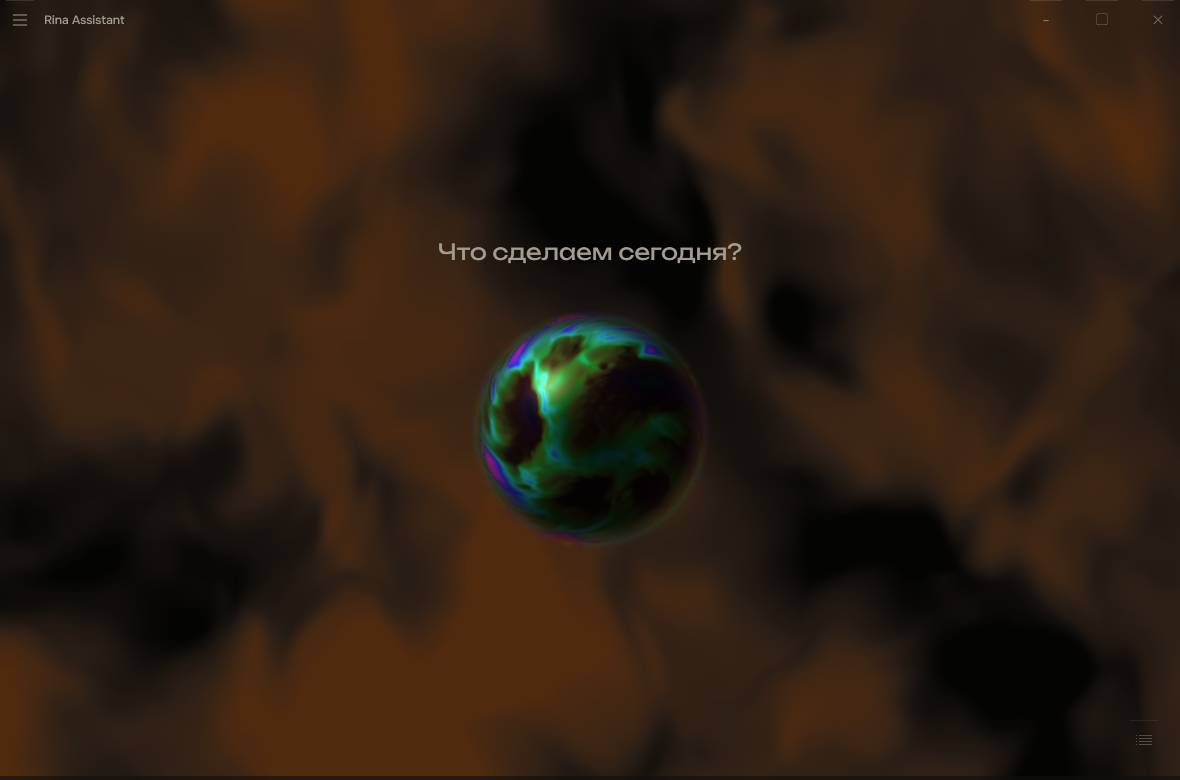
She is one shape when waiting, another when listening, another when
answering — the window says what is happening without a word for it.
The installer — Windows 10 (2004 or newer) or 11, 64-bit. Download
RinaAssistant-4.0.0-beta-setup.exe from the
latest release
and run it. It installs into your user profile: no administrator rights, no
changes to PATH, no service, no autostart unless you switch it on. The beta
is not code-signed yet, so Windows warns about an unknown publisher: choose
More info → Run anyway. The SHA-256 is on the release page.
From source — for developers. Requires Windows, Python 3.12 and .NET 9.
git clone https://github.com/Luna-coreX/RinaAssistant.git
cd RinaAssistant
python -m venv venv
venv\Scripts\python -m pip install -r requirements.txt
dotnet run --project shell/Rina.Shell -c Release
requirements.txt is the core's list, with the same pinned versions the
installer ships; the shell finds the venv by itself.
-c Release matters: the living background and the figure are computed on
the processor, and a Debug build does that three to four times slower —
about three cores busy instead of one. Debug is for stepping through code.
The shell starts the core itself — you never run it separately. On the first launch a short wizard asks which voice and which recognition you want and downloads only those.
Then say — or type — «открой блокнот», «поставь таймер на 5 минут», «сколько будет 17 на 23».
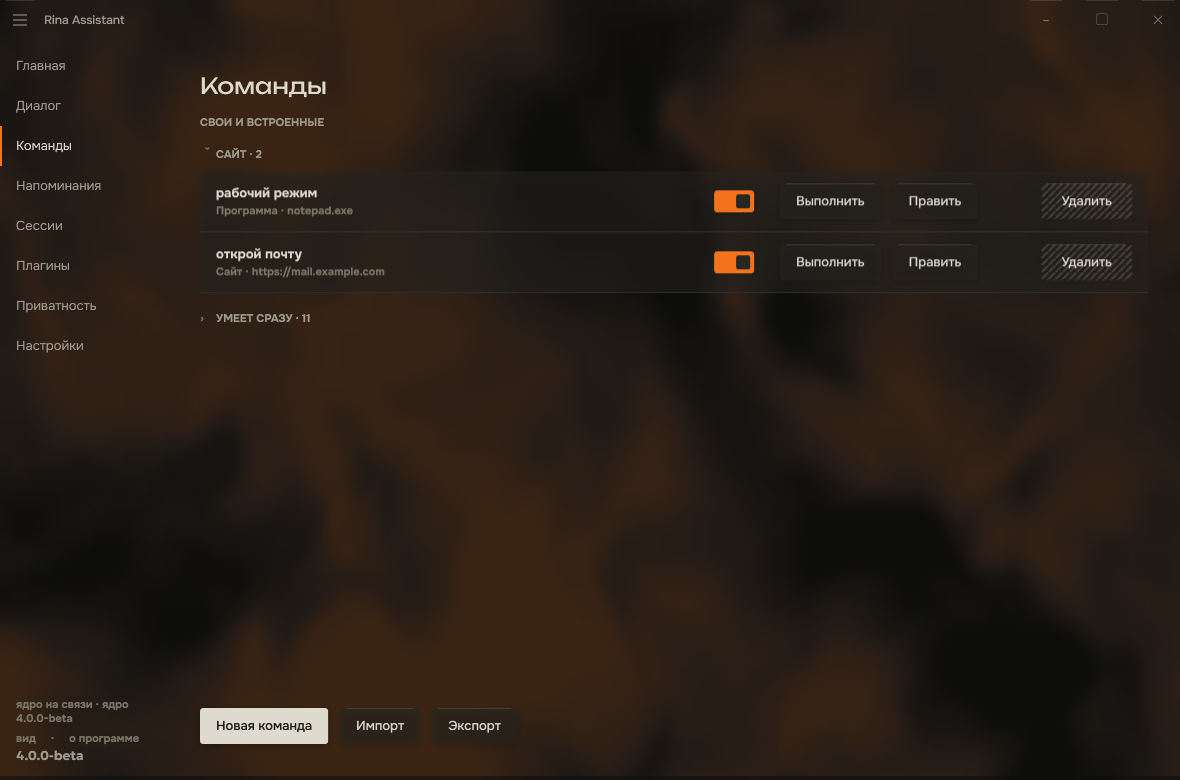 | 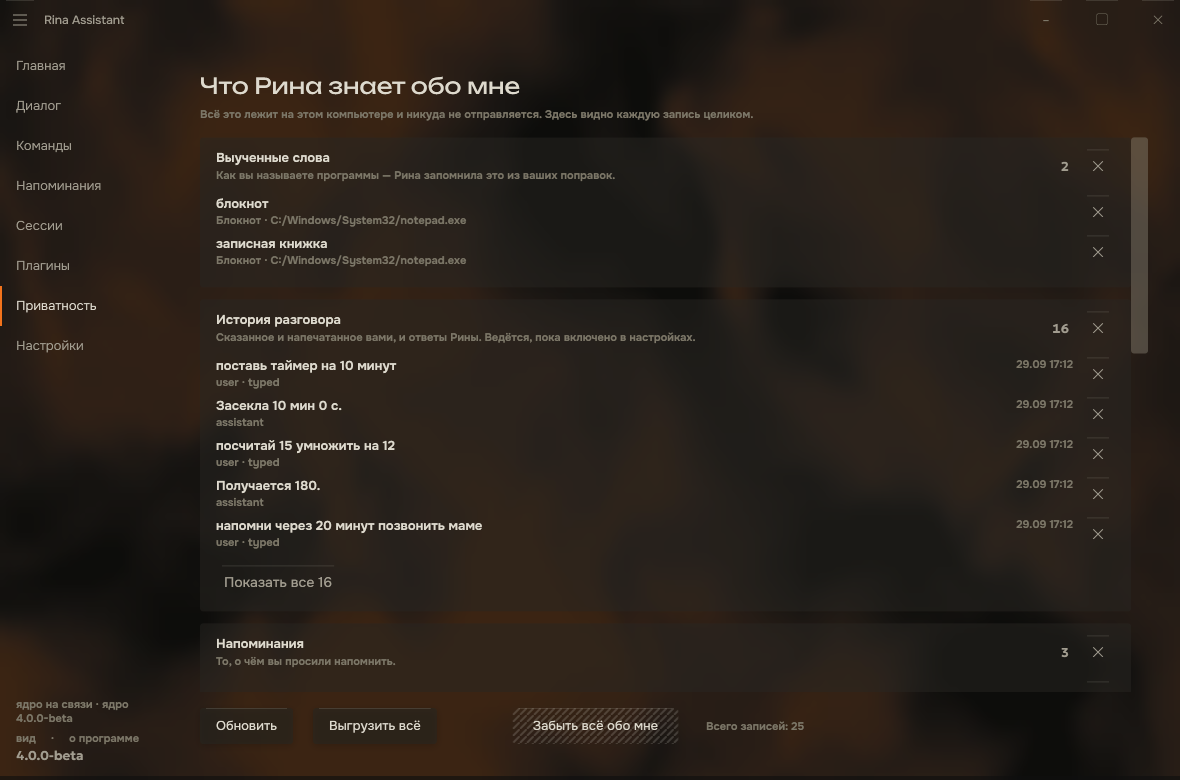 |
| Commands — your own, grouped by kind; the built-in ones folded away | What Rina knows about me — every stored thing, and a way to forget it |
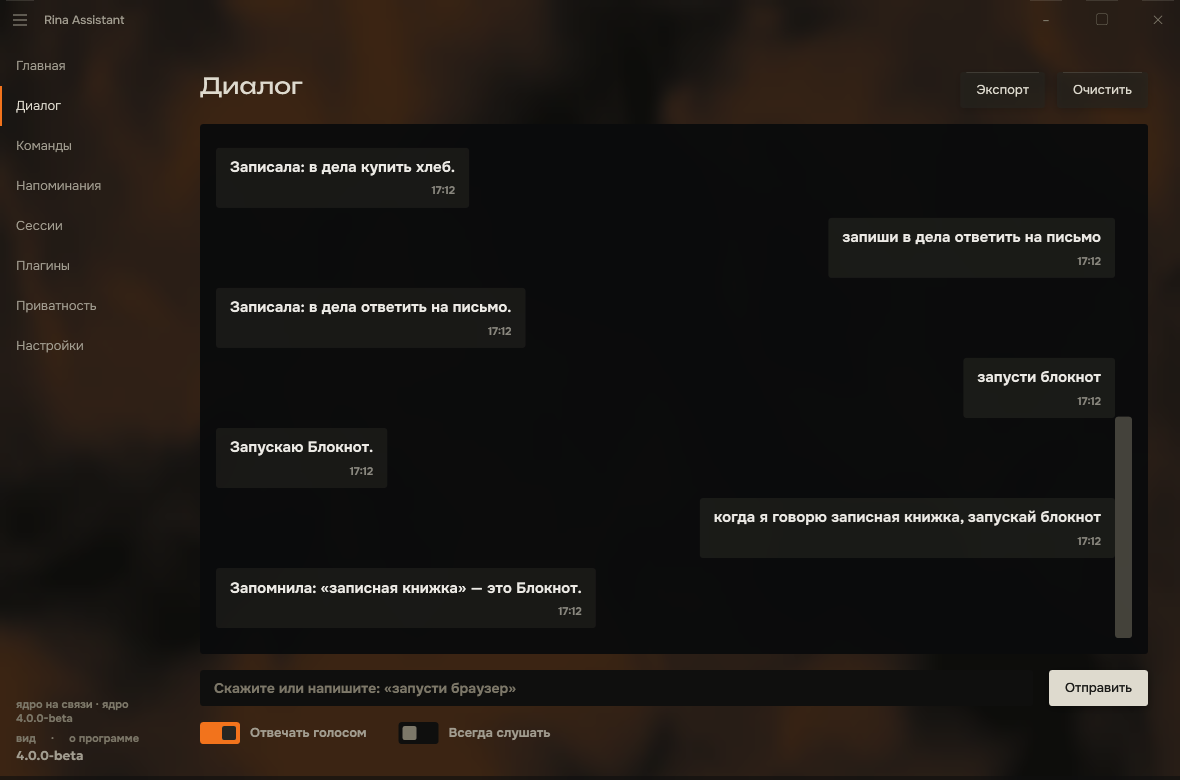 | 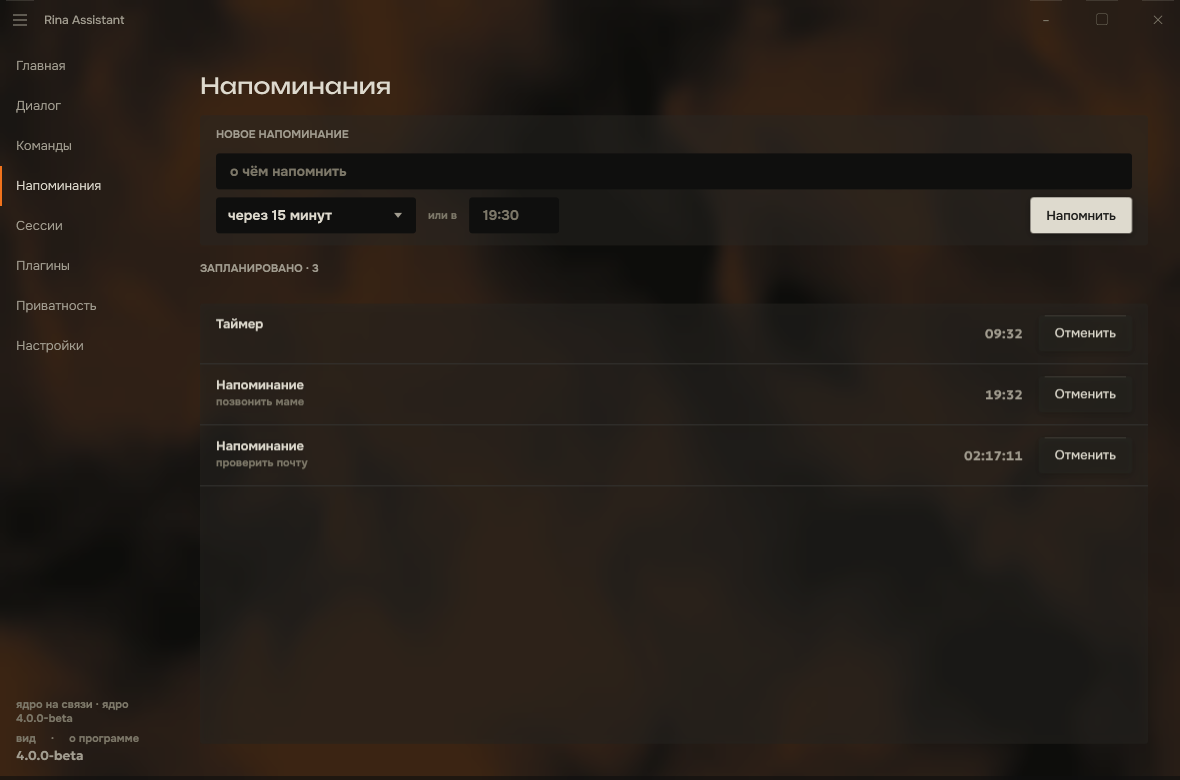 |
| Dialogue — the conversation, with who said what and when | Reminders — timers, alarms, and reminders tied to a program |
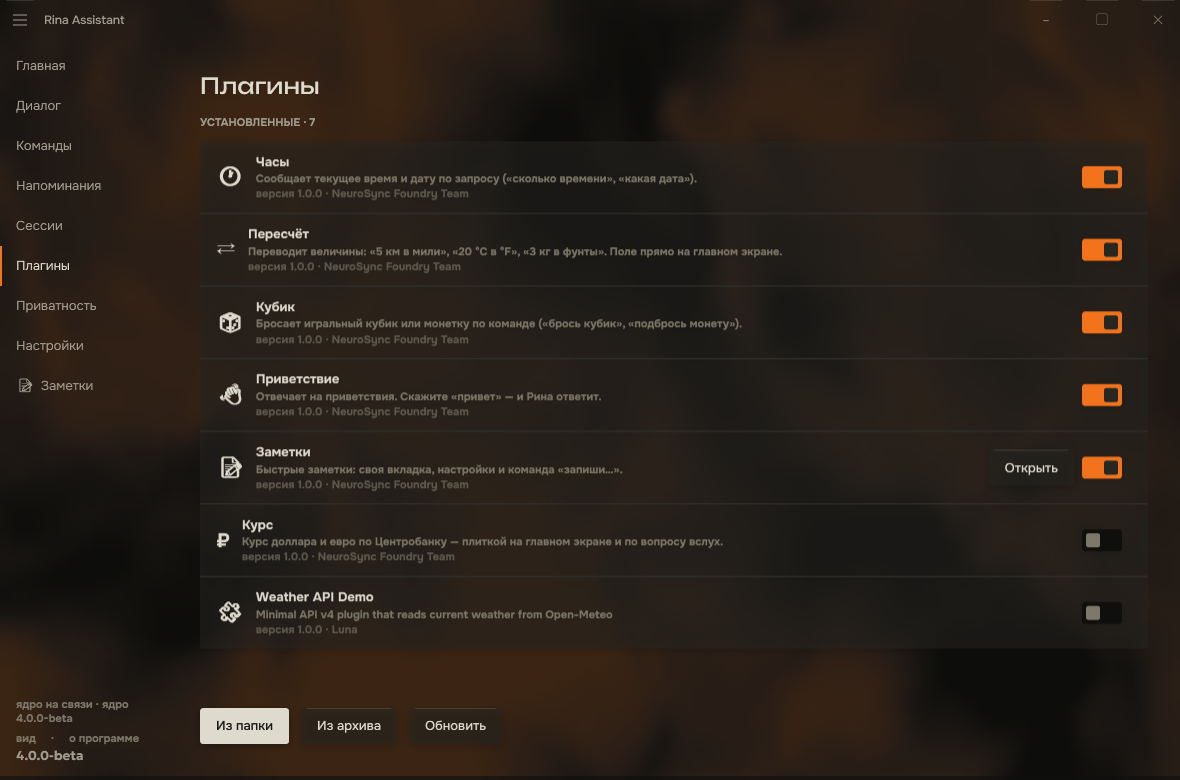 | 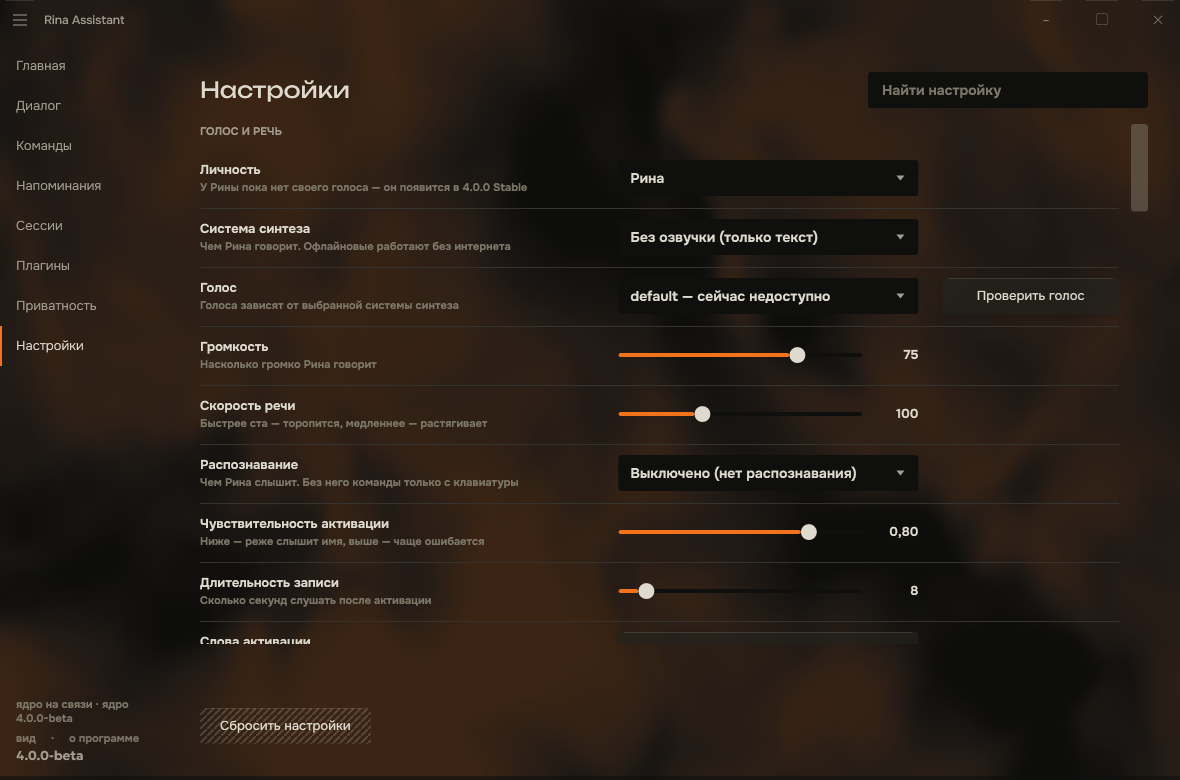 |
| Plugins — install, switch on, each with a page of its own | Settings — the core sends the meaning, the shell decides the look |
Rina became two programs. The core on Python thinks; the shell on C# (WPF) shows and touches the machine. Between them — a protocol with two channels.
This is not a rearrangement of folders. It is what makes the rest possible:
The move itself added nothing and lost nothing: the port was bound to keep every behaviour of 3.1.0 and asked for nothing more, and that behaviour is pinned by 164 recorded utterances and seven recorded sessions. New things came with the beta, on that ground: work sessions, reminders tied to a program, learning from corrections, a focus mode, a to-do list, a visual command builder, a new home tab and a first-run setup.
See docs/ARCHITECTURE.md.
Rina indexes what is actually installed on the machine — Start Menu shortcuts, the registry, Store (UWP) apps, and any portable folders you point her at. You do not register programs by hand.
Speech synthesis and recognition are pluggable — pick what suits the machine.
Text to speech: silent (text only), pyttsx3 (offline, system voices), Edge Neural TTS (online, best quality), gTTS (online), Piper (offline neural, needs an .onnx model).
Speech to text: disabled, Vosk (offline), Whisper (offline) — and only those. An engine that opens a microphone of its own is not offered here: the sound arrives from the shell (4.0-E05).
The models live in the core, the microphone and the speaker in the shell — the sound travels between them over a channel of its own, so a second of speech never queues behind a button press.
A command is a graph: steps stand as nodes with wires between them, and a simple command is a graph of one node. Six kinds of thing can happen — launch an app, open a folder, open a website, say something, run a system action, run a sequence — and seven more exist only as steps inside one: wait, repeat N times, repeat while, if/else, stop the scenario, call another command, remember a value.
Conditions can ask about the world as well as the clock: which program is in front, whether one is running, whether a file exists, whether Ollama answers, the time, the day, a value you set earlier in the same run.
Nodes are dragged onto the ports between other nodes, and «Проверить» runs the graph without saving it — lighting each step green as it goes and red where it stops.
Commands can be exported and imported between machines; anything imported arrives disabled, so nothing runs before you have looked at it.
Timers, alarms and reminders in plain language — "поставь таймер на 10 минут", "напомни через полчаса позвонить маме", "разбуди в 7:30". They survive restarts and fire from a background scheduler, with the window closed and from the tray.
Nineteen actions: volume up/down/mute, media next/previous/play-pause, lock, screenshot, sleep, restart, shutdown, minimise, restore or close every window, and the ones that move Rina's own window. Destructive ones always ask first, and the question shows what will happen rather than the action's name — a single misheard phrase can never power off the machine.
Other programs' windows by name or the one in front: "закрой Discord", "сверни телеграм", "разверни хром на весь экран", or just "закрой". A window is closed the way its own close button closes it, so a program with unsaved work asks about it itself, and one that lives in the tray is said to have gone there. Closing every window at once asks first.
eval.llama-server, anything unparsed can be answered by a model on your own computer — or by OpenRouter in the cloud, if you choose it and give it a key, which is kept in the Windows Credential Manager rather than in the settings. Off by default; when on, requests go only to the address in settings, and the settings page tells you plainly if that address is not local — or if the chosen model is one Ollama runs in its cloud rather than on this computer. A model that does not answer is left alone for a while instead of being waited for on every phrase, and small talk — a greeting, a thank-you — Rina answers herself.Plugins add commands, settings and their own section in the column. A plugin declares rather than does: its tools go into the core's registry and get the same gates as the built-in ones — permissions, confirmation of the irreversible, an entry in the journal.
Pages are declarative: a plugin describes its interface as data and never touches the UI toolkit. That is why not one bundled plugin had to be rewritten when the entire shell changed language.
See docs/plugins/WRITING-PLUGINS.md.
Three finishes (silver, black and graphite) with a choice of accent, two interface languages (Русский, English — Rina’s character included), a floating command bar, tray integration, autostart, global hotkeys, and a full history with export.
The design is a document, not a mood: docs/design/SYSTEM.md. Every colour pair is checked for contrast, and the drawn window is compared with the tokens pixel by pixel.
     shell/Rina.Shell (C#, WPF)      windows, microphone, speaker,
              │                      app index, process launching,
              │                      signatures, tray, hotkeys
     ┌────────┴────────┐
     │  control (JSON) │             commands, settings, events,
     │  data (bytes)   │             permissions, audio both ways
     └────────┬────────┘
              │
     core/ + voice/ (Python)         parsing, tool registry, permissions,
                                     confirmations, recognition, synthesis,
                                     reminders, storage, Rina's own words
              │
     plugins/ (Python)               one process per plugin
Three boundaries explain nearly everything else:
Everything that changes the world goes through one registry (core/toolrunner.py), and that is an invariant checked across every file of the core, not a convention.
RinaAssistant/
│
├── core/         headless core: engine, router, registry, protocol, storage
│   └── wire/     the protocol: envelope, handshake, events, channels, errors
├── voice/        speech, recognition, reminders, user commands, app index
├── plugins/      plugin API, manager, plugin process and the plugins that ship
├── examples/     example plugins for plugin authors; not part of the release
├── shell/
│   ├── Rina.Shell/     window, pages, styles, system layer (C#, WPF)
│   └── Rina.Protocol/  the client half of the protocol (C#)
├── tools/        checks, runners, generators
├── docs/         plan, specification, decisions, design system, guides
├── archive/      the 3.1.0 single-process application, kept for reference
│
└── rina_core.py  the core's entry point
The 3.1.0 application is in archive/ and no longer
runs from the tree: it was one process with the interface and the core in
shared memory, and 4.0 replaced it with two programs. It is kept because
the port promised not to lose behaviour, and reading how something worked
is cheaper than reconstructing it from the log.
The short version is at the top. What is worth knowing beyond it:
The shell takes the Python from the project's environment if there is one, and
only then whatever is in PATH. The voices and the recognition models are
installed in the environment, so a core started with "just python" comes up
and honestly reports that it has no engines.
requirements.txt brings recognition (faster-whisper) and one online voice
(Edge, off until you choose it). The other engines are optional and not in
it: the first-run wizard installs the ones you pick. Some (Vosk, Piper) need
a model file, which the wizard downloads too.
Install Ollama, pull a model, then enable it in Settings:
ollama pull llama3.1:8b
Rina talks to http://localhost:11434 by default and warns you plainly if you point her anywhere that is not local.
python tools/regress.py          # 96 checks, about six minutes
python tools/regress.py --list   # what they are
Behaviour is pinned by a golden set of 164 utterances and seven recorded sessions; the protocol by a conformance suite that lets both sides see only bytes; the design by comparing the drawn window with the tokens.
How to debug two processes at once — docs/DEBUGGING.md.
Nothing, and the part you are using now will go on costing nothing.
Said once, plainly, because the alternative is saying it later and having it read as a change of mind:
What is open stays open, and that is decided rather than hoped: the code that handles audio and your data, the safe launching of programs, the confirmation of dangerous actions, the security journal, the protocol, and the base functionality. What could reasonably close later is a licence server, billing, and paid connectors — none of which is on your computer.
There is no account. Telemetry exists only in the beta and only if you switch it on — in the setup wizard or in settings. A report is counts and the program's own vocabulary: which features ran, error codes, how long recognition took; no phrase, path or name. Every report that left is shown in full on the privacy page. 4.0.0 Stable removes it entirely.
4.0.0-port — separation and redesign. Done: the core is a standalone service, the shell and system layer are C#, the protocol is between them, the interface is redesigned, and there is an installer.
4.0-beta — public free beta. Whether the product is useful, and real scenarios. Built: conversation with a local model, speech that starts with the first sentence and can be interrupted, work sessions, the privacy page. What remains is publishing it.
5.0.0 — platform. End-to-end streaming (speech starts while the model is still writing the answer, and she can be interrupted by voice), persistent memory, controlling the computer under granular permissions.
Full plan: docs/ROADMAP.md.
What we defend against, from whom, and with what — docs/security/THREAT-MODEL.md. Six surfaces, twenty-eight threats, and for each of them the residual risk
written down, because a defence without one has stopped being thought about.
The sweep that walks that document rather than a list somebody maintains is
tools/test_security.py.
Reporting a vulnerability: SECURITY.md.
Privacy: what stays on your computer and what leaves it, and by whose choice —
PRIVACY.md (English), PRIVACY.ru.md (русский).
Licence agreement for using the program, on top of Apache-2.0 and never
narrower than it — EULA.md (English), EULA.ru.md
(русский, prevails).
Issues and pull requests are welcome — see CONTRIBUTING.md.
SECURITY.md.What happens to something once it arrives — who reads it, in what time, and
what the four possible outcomes are — is written down in
docs/TRIAGE.md, so that "no answer yet" can be told from
"nobody is reading". When reporting a bug, attach a diagnostic package: About → Diagnostics → Collect. It gathers the logs of both layers, the versions and the state of the link, and says inside exactly what it left out.
See CHANGELOG.md.
Apache License 2.0 — see LICENSE and NOTICE.
Releases up to and including 3.1.0 were published under the MIT licence; copies obtained under those terms keep them. Contributions are accepted under Apache-2.0 with no separate agreement — see CONTRIBUTING.md and ADR 0001.
Made with Python and C#
A personal desktop assistant designed to automate workflows, control applications, and provide voice-based interaction.
See the code
Version 4.0.0-beta · Windows · Python 3.12 · .NET 9 · Apache-2.0
Rina Assistant listens, works out what you asked for, and does it: opens the program you named even if you named it in the wrong alphabet, sets a timer, changes the volume, does the arithmetic, searches the web, or — if you switch it on — answers with a language model running on your own machine.
Everything runs on your computer. No account, and nothing goes out on its own: the online voices, the web search and the weather and exchange-rate plugins reach the network only once you switch them on, and each says what it sends. The beta has telemetry that is off until you switch it on: numbers once a day, never what you said, and gone in 4.0.0 Stable. There is a page inside the program that lists everything it keeps about you — including its journals and the copies it made before updating its storage — and a button to make it forget any of it.
She is one shape when waiting, another when listening, another when
answering — the window says what is happening without a word for it.
The installer — Windows 10 (2004 or newer) or 11, 64-bit. Download
RinaAssistant-4.0.0-beta-setup.exe from the
latest release
and run it. It installs into your user profile: no administrator rights, no
changes to PATH, no service, no autostart unless you switch it on. The beta
is not code-signed yet, so Windows warns about an unknown publisher: choose
More info → Run anyway. The SHA-256 is on the release page.
From source — for developers. Requires Windows, Python 3.12 and .NET 9.
git clone https://github.com/Luna-coreX/RinaAssistant.git
cd RinaAssistant
python -m venv venv
venv\Scripts\python -m pip install -r requirements.txt
dotnet run --project shell/Rina.Shell -c Release
requirements.txt is the core's list, with the same pinned versions the
installer ships; the shell finds the venv by itself.
-c Release matters: the living background and the figure are computed on
the processor, and a Debug build does that three to four times slower —
about three cores busy instead of one. Debug is for stepping through code.
The shell starts the core itself — you never run it separately. On the first launch a short wizard asks which voice and which recognition you want and downloads only those.
Then say — or type — «открой блокнот», «поставь таймер на 5 минут», «сколько будет 17 на 23».
| |
| Commands — your own, grouped by kind; the built-in ones folded away | What Rina knows about me — every stored thing, and a way to forget it |
| |
| Dialogue — the conversation, with who said what and when | Reminders — timers, alarms, and reminders tied to a program |
| |
| Plugins — install, switch on, each with a page of its own | Settings — the core sends the meaning, the shell decides the look |
Rina became two programs. The core on Python thinks; the shell on C# (WPF) shows and touches the machine. Between them — a protocol with two channels.
This is not a rearrangement of folders. It is what makes the rest possible:
The move itself added nothing and lost nothing: the port was bound to keep every behaviour of 3.1.0 and asked for nothing more, and that behaviour is pinned by 164 recorded utterances and seven recorded sessions. New things came with the beta, on that ground: work sessions, reminders tied to a program, learning from corrections, a focus mode, a to-do list, a visual command builder, a new home tab and a first-run setup.
See docs/ARCHITECTURE.md.
Rina indexes what is actually installed on the machine — Start Menu shortcuts, the registry, Store (UWP) apps, and any portable folders you point her at. You do not register programs by hand.
Speech synthesis and recognition are pluggable — pick what suits the machine.
Text to speech: silent (text only), pyttsx3 (offline, system voices), Edge Neural TTS (online, best quality), gTTS (online), Piper (offline neural, needs an .onnx model).
Speech to text: disabled, Vosk (offline), Whisper (offline) — and only those. An engine that opens a microphone of its own is not offered here: the sound arrives from the shell (4.0-E05).
The models live in the core, the microphone and the speaker in the shell — the sound travels between them over a channel of its own, so a second of speech never queues behind a button press.
A command is a graph: steps stand as nodes with wires between them, and a simple command is a graph of one node. Six kinds of thing can happen — launch an app, open a folder, open a website, say something, run a system action, run a sequence — and seven more exist only as steps inside one: wait, repeat N times, repeat while, if/else, stop the scenario, call another command, remember a value.
Conditions can ask about the world as well as the clock: which program is in front, whether one is running, whether a file exists, whether Ollama answers, the time, the day, a value you set earlier in the same run.
Nodes are dragged onto the ports between other nodes, and «Проверить» runs the graph without saving it — lighting each step green as it goes and red where it stops.
Commands can be exported and imported between machines; anything imported arrives disabled, so nothing runs before you have looked at it.
Timers, alarms and reminders in plain language — "поставь таймер на 10 минут", "напомни через полчаса позвонить маме", "разбуди в 7:30". They survive restarts and fire from a background scheduler, with the window closed and from the tray.
Nineteen actions: volume up/down/mute, media next/previous/play-pause, lock, screenshot, sleep, restart, shutdown, minimise, restore or close every window, and the ones that move Rina's own window. Destructive ones always ask first, and the question shows what will happen rather than the action's name — a single misheard phrase can never power off the machine.
Other programs' windows by name or the one in front: "закрой Discord", "сверни телеграм", "разверни хром на весь экран", or just "закрой". A window is closed the way its own close button closes it, so a program with unsaved work asks about it itself, and one that lives in the tray is said to have gone there. Closing every window at once asks first.
eval.llama-server, anything unparsed can be answered by a model on your own computer — or by OpenRouter in the cloud, if you choose it and give it a key, which is kept in the Windows Credential Manager rather than in the settings. Off by default; when on, requests go only to the address in settings, and the settings page tells you plainly if that address is not local — or if the chosen model is one Ollama runs in its cloud rather than on this computer. A model that does not answer is left alone for a while instead of being waited for on every phrase, and small talk — a greeting, a thank-you — Rina answers herself.Plugins add commands, settings and their own section in the column. A plugin declares rather than does: its tools go into the core's registry and get the same gates as the built-in ones — permissions, confirmation of the irreversible, an entry in the journal.
Pages are declarative: a plugin describes its interface as data and never touches the UI toolkit. That is why not one bundled plugin had to be rewritten when the entire shell changed language.
See docs/plugins/WRITING-PLUGINS.md.
Three finishes (silver, black and graphite) with a choice of accent, two interface languages (Русский, English — Rina’s character included), a floating command bar, tray integration, autostart, global hotkeys, and a full history with export.
The design is a document, not a mood: docs/design/SYSTEM.md. Every colour pair is checked for contrast, and the drawn window is compared with the tokens pixel by pixel.
     shell/Rina.Shell (C#, WPF)      windows, microphone, speaker,
              │                      app index, process launching,
              │                      signatures, tray, hotkeys
     ┌────────┴────────┐
     │  control (JSON) │             commands, settings, events,
     │  data (bytes)   │             permissions, audio both ways
     └────────┬────────┘
              │
     core/ + voice/ (Python)         parsing, tool registry, permissions,
                                     confirmations, recognition, synthesis,
                                     reminders, storage, Rina's own words
              │
     plugins/ (Python)               one process per plugin
Three boundaries explain nearly everything else:
Everything that changes the world goes through one registry (core/toolrunner.py), and that is an invariant checked across every file of the core, not a convention.
RinaAssistant/
│
├── core/         headless core: engine, router, registry, protocol, storage
│   └── wire/     the protocol: envelope, handshake, events, channels, errors
├── voice/        speech, recognition, reminders, user commands, app index
├── plugins/      plugin API, manager, plugin process and the plugins that ship
├── examples/     example plugins for plugin authors; not part of the release
├── shell/
│   ├── Rina.Shell/     window, pages, styles, system layer (C#, WPF)
│   └── Rina.Protocol/  the client half of the protocol (C#)
├── tools/        checks, runners, generators
├── docs/         plan, specification, decisions, design system, guides
├── archive/      the 3.1.0 single-process application, kept for reference
│
└── rina_core.py  the core's entry point
The 3.1.0 application is in archive/ and no longer
runs from the tree: it was one process with the interface and the core in
shared memory, and 4.0 replaced it with two programs. It is kept because
the port promised not to lose behaviour, and reading how something worked
is cheaper than reconstructing it from the log.
The short version is at the top. What is worth knowing beyond it:
The shell takes the Python from the project's environment if there is one, and
only then whatever is in PATH. The voices and the recognition models are
installed in the environment, so a core started with "just python" comes up
and honestly reports that it has no engines.
requirements.txt brings recognition (faster-whisper) and one online voice
(Edge, off until you choose it). The other engines are optional and not in
it: the first-run wizard installs the ones you pick. Some (Vosk, Piper) need
a model file, which the wizard downloads too.
Install Ollama, pull a model, then enable it in Settings:
ollama pull llama3.1:8b
Rina talks to http://localhost:11434 by default and warns you plainly if you point her anywhere that is not local.
python tools/regress.py          # 96 checks, about six minutes
python tools/regress.py --list   # what they are
Behaviour is pinned by a golden set of 164 utterances and seven recorded sessions; the protocol by a conformance suite that lets both sides see only bytes; the design by comparing the drawn window with the tokens.
How to debug two processes at once — docs/DEBUGGING.md.
Nothing, and the part you are using now will go on costing nothing.
Said once, plainly, because the alternative is saying it later and having it read as a change of mind:
What is open stays open, and that is decided rather than hoped: the code that handles audio and your data, the safe launching of programs, the confirmation of dangerous actions, the security journal, the protocol, and the base functionality. What could reasonably close later is a licence server, billing, and paid connectors — none of which is on your computer.
There is no account. Telemetry exists only in the beta and only if you switch it on — in the setup wizard or in settings. A report is counts and the program's own vocabulary: which features ran, error codes, how long recognition took; no phrase, path or name. Every report that left is shown in full on the privacy page. 4.0.0 Stable removes it entirely.
4.0.0-port — separation and redesign. Done: the core is a standalone service, the shell and system layer are C#, the protocol is between them, the interface is redesigned, and there is an installer.
4.0-beta — public free beta. Whether the product is useful, and real scenarios. Built: conversation with a local model, speech that starts with the first sentence and can be interrupted, work sessions, the privacy page. What remains is publishing it.
5.0.0 — platform. End-to-end streaming (speech starts while the model is still writing the answer, and she can be interrupted by voice), persistent memory, controlling the computer under granular permissions.
Full plan: docs/ROADMAP.md.
What we defend against, from whom, and with what — docs/security/THREAT-MODEL.md. Six surfaces, twenty-eight threats, and for each of them the residual risk
written down, because a defence without one has stopped being thought about.
The sweep that walks that document rather than a list somebody maintains is
tools/test_security.py.
Reporting a vulnerability: SECURITY.md.
Privacy: what stays on your computer and what leaves it, and by whose choice —
PRIVACY.md (English), PRIVACY.ru.md (русский).
Licence agreement for using the program, on top of Apache-2.0 and never
narrower than it — EULA.md (English), EULA.ru.md
(русский, prevails).
Issues and pull requests are welcome — see CONTRIBUTING.md.
SECURITY.md.What happens to something once it arrives — who reads it, in what time, and
what the four possible outcomes are — is written down in
docs/TRIAGE.md, so that "no answer yet" can be told from
"nobody is reading". When reporting a bug, attach a diagnostic package: About → Diagnostics → Collect. It gathers the logs of both layers, the versions and the state of the link, and says inside exactly what it left out.
See CHANGELOG.md.
Apache License 2.0 — see LICENSE and NOTICE.
Releases up to and including 3.1.0 were published under the MIT licence; copies obtained under those terms keep them. Contributions are accepted under Apache-2.0 with no separate agreement — see CONTRIBUTING.md and ADR 0001.
Made with Python and C#



