Native PC port of P.T. (runs from your own PS4 game files)
C++
1,997
30 commits
updated Oct 19, 2026
If the port is worth something to you, you can buy me a coffee: patreon.com/loreanxavier. It keeps the testing hardware and the releases coming.
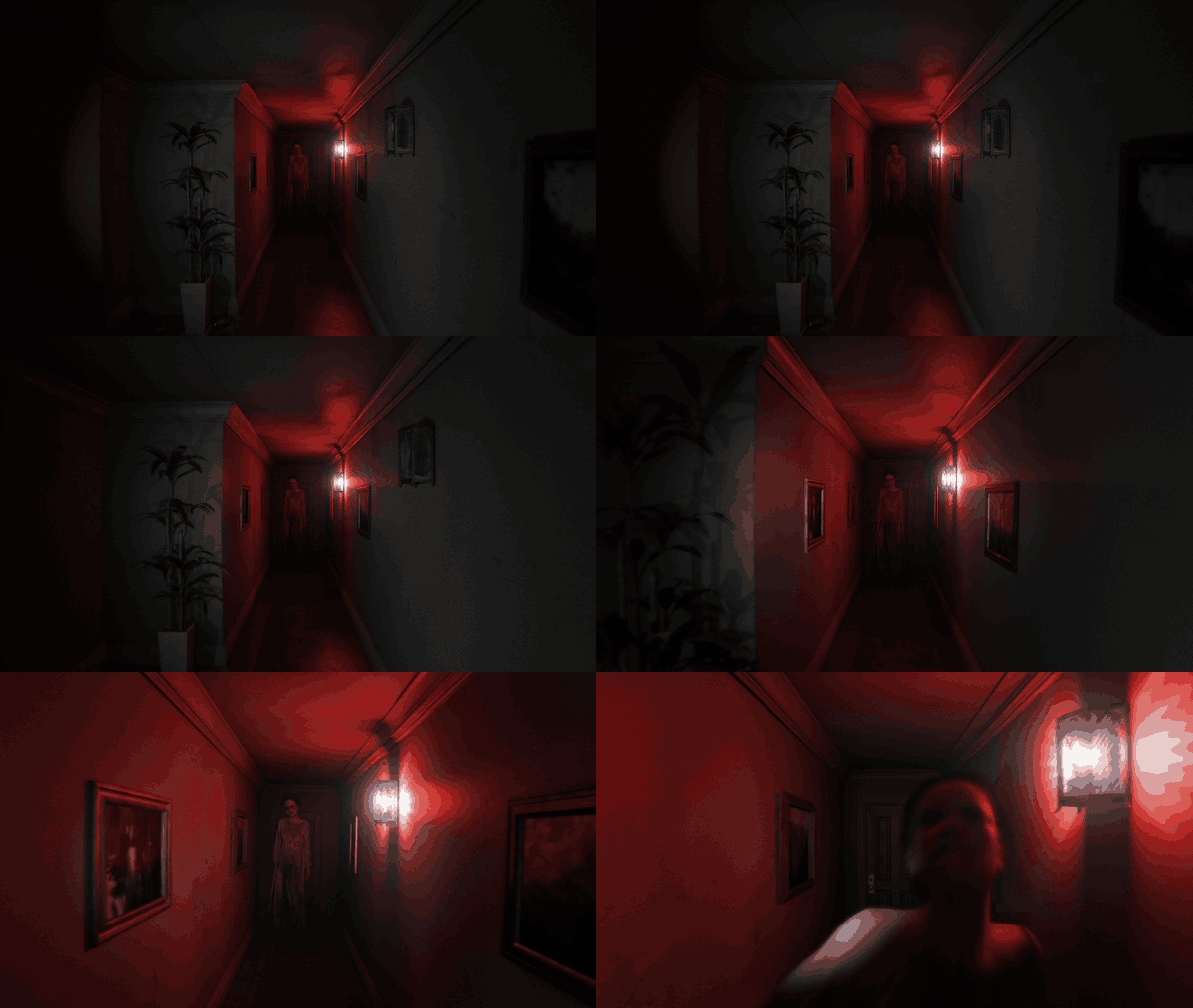
This is a native PC port of P.T., the 2014 PS4 teaser by Kojima Productions. It is not an emulator. The game logic was rebuilt in C++ from the original's behaviour and the renderer is written on Vulkan; every level, model, texture, sound, script and cutscene is read at run time from your own copy of the PS4 game. There is no game data in this repository and none in the installer.
I made this in my spare time, with AI tools (see AI Disclosure at the end), because P.T. deserved to keep existing somewhere other than on consoles that still have it installed. It plays the whole teaser from the first wake-up to the street, with the voice part included.
Download the installer from the Releases page: P.T.PC.Port.Setup.exe on Windows, the Linux setup binary on Linux.
Point it at your dump folder or fake PKG and at a destination folder (the default on Windows is
%LocalAppData%\Programs\P.T. PC Port). It copies the three game archives it needs (chunk1.psarc,
texture.qar, pathid_list_ps4.bin) next to the port and makes a desktop shortcut if you want one. The shortcut
uses icon0.png from your own copy, the icon the PS4 shows for the game. This repository does not contain the
package or that image: the installer reads it from the PKG or dump you select. The eboot, modules and the rest of
sce_sys are not used.
Linux: chmod +x the setup and run it, from a terminal or from the file manager (it uses zenity or kdialog for its windows). The game needs only glibc and the system's Vulkan driver. On a Steam Deck
install from desktop mode and add pt as a non-Steam game; it runs on SteamOS as it is.
macOS: download P.T.PC.Port-macOS-arm64.zip (M1 and later) or P.T.PC.Port-macOS-x64.zip (Intel), unzip P.T. PC Port.app,
open it once and allow it under System Settings > Privacy & Security (it is not signed with a Developer ID), then pick your
dump folder when it asks. A fake PKG has to be extracted on Windows or Linux first. Intel Macs need a GPU that MoltenVK can
run the renderer on; the port was written without a Mac at hand and the Intel app has not been run on one yet. More in
docs/macos.md.
Portable downloads: P.T.PC.Port-portable-windows.zip and P.T.PC.Port-portable-linux.zip hold the same files the
setups install. Unpack one anywhere you can write to, then either put your extracted CUSA01127 folder next to pt.exe
(pt on Linux) or pick the folder when the game asks at the first start. The macOS app zips work the same way. Game
archives are never included; the setups also accept a fake PKG, the portable zips need the extracted folder.
Settings, saves, logs and caches live in data/ beside the executable on Windows and Linux, so a whole game folder can
be moved or copied; an older profile is migrated once without overwriting newer files. On macOS they stay in
~/Library/Application Support/pt-port/pt/. The game checks GitHub Releases for a newer version at startup;
[network] check_updates = 0 disables that check.
Thanks to ahm3texe for the Apple silicon port(even though he is an easy ragebaitted dumbass), totsu0jv for Czech translation, GrzybDev for Polish translation, and yewhochen for the Linux library-loading and startup-focus fixes. Their contributions are incorporated here, with platform and release changes adapted for 1.0.2.
Mouse and WASD, right mouse button to zoom, left button, Enter or E to interact, Esc for the pause menu, Alt+Enter for fullscreen, F10 for the PC settings. Any gamepad works as the PS4 pad; the button prompts follow whatever you used last (keyboard, PlayStation, Xbox or Switch). Vibration follows the original's patterns. The in-game options (brightness, subtitles, camera inversion) are the original ones, and as on the PS4 the option screen and the preface only play on a first start.
Everything below is off or set to the original's behaviour by default. The PS4 look is the baseline; the extras are there if you want them.
Display and image
Extras
Languages
Mods
mods folder next to the executable: add or replace models with your own glTF (.glb) files, Lisa included, edit
levels with a level.json (hide, move, replace, relight), replace textures and sounds, and run Lua scripts. Start with
docs/modding-quickstart.md and the working examples in examples/mods.Windows: Visual Studio 2022 Build Tools, LLVM (clang-cl), the Vulkan SDK, CMake 3.28 and Ninja. Then
tools\build_pt.bat release
gives build\release\pt.exe. CMake fetches the dependencies (SDL3, zlib, volk, VMA, glm, Dear ImGui, stb, Lua 5.1,
libogg, libvorbis, whisper.cpp) and downloads the Whisper and Silero models and the upscaler SDK files, each checked by
SHA-256. A failed SDK download leaves that upscaler out; -DPT_UPSCALERS=OFF builds without any. python tools\package.py turns the build into the portable folder and zip.
Linux: cmake -G Ninja -B build/linux -DCMAKE_BUILD_TYPE=RelWithDebInfo && cmake --build build/linux --target pt.
GCC 13 or clang 17, the Vulkan headers and glslc. The upscalers are Windows-only SDKs and are left out there.
tools/linux/ has the cross build I use from Windows. More in docs/linux.md.
macOS (Apple silicon or Intel, built for the CPU it runs on): the command line tools, then brew install cmake ninja shaderc vulkan-headers vulkan-loader and cmake -G Ninja -B build/macos -DCMAKE_BUILD_TYPE=RelWithDebInfo && cmake --build build/macos --target pt. python3 tools/macos/make_app.py makes the app bundle and its zip. The Windows upscalers and the
VR mode are left out there too, and MoltenVK has no ray queries. The macOS build upscales with Apple MetalFX; on Apple silicon
with macOS 26 or newer it can also interpolate one frame between rendered frames (experimental). -DPT_METALFX=OFF leaves
both out. More in docs/macos.md.
The unit tests are CMake targets (pt_tests, pt_mods_test and the others in CMakeLists.txt). python tools/walkthrough.py --exe build/release/pt.exe --game <folder> plays the whole game without a window through the
scripted routes in tests/walkthrough/ and checks the log; it is how I make sure a change did not break a loop.
The installer is installer/: a native C++ setup (pt_setup, built when a payload exists) and a small LGPL extraction
helper in C# that reads fake PKGs with LibOrbisPkg. docs/installer.md describes how it decides what it accepts.
Other docs: docs/upscaling.md, docs/vr.md, docs/updates.md, and the file format notes in docs/formats/ that came out of reverse engineering the game data, with the tools in tools/ that read those formats.
P.T. is the work of Kojima Productions and is owned by Konami. This project is not affiliated with, endorsed by or connected to either of them. It contains none of their assets and does nothing without your own copy of the game.
The shadPS4 emulator was my reference for how the original behaves on the PS4 and for checking the port's frames against it. Thanks to its developers.
The port is built on SDL3, Vulkan (volk, VMA), glm, Dear ImGui, stb, Lua 5.1, libogg and libvorbis, whisper.cpp with
OpenAI's Whisper model and the Silero VAD for the voice part, Real-ESRGAN with ncnn for the enhanced textures, AMD
FidelityFX, NVIDIA DLSS and Intel XeSS for the upscalers, the Khronos OpenXR loader for VR, HarfBuzz on Linux and the
Noto fonts for the added languages, and LibOrbisPkg in the installer. Their notices ship in licenses/ next to the
executable.
The port's own code is under the MIT license (see LICENSE). The third-party pieces listed above keep their own licenses.
AI coding tools were used in developing and debugging this port. My focus has been on matching the original P.T.: comparing builds with PS4 references, identifying discrepancies, testing gameplay and prioritizing fixes.
The project uses the original game assets from the player's own PS4 copy. Optional enhanced textures use machine-learning upscaling on existing textures.
322 followers · starred Oct 2026
1,129 followers · starred Oct 2026
106 followers · starred Oct 2026
186 followers · starred Oct 2026
Native PC port of P.T. (runs from your own PS4 game files)
C++
1,997
30 commits
updated Oct 19, 2026
If the port is worth something to you, you can buy me a coffee: patreon.com/loreanxavier. It keeps the testing hardware and the releases coming.
This is a native PC port of P.T., the 2014 PS4 teaser by Kojima Productions. It is not an emulator. The game logic was rebuilt in C++ from the original's behaviour and the renderer is written on Vulkan; every level, model, texture, sound, script and cutscene is read at run time from your own copy of the PS4 game. There is no game data in this repository and none in the installer.
I made this in my spare time, with AI tools (see AI Disclosure at the end), because P.T. deserved to keep existing somewhere other than on consoles that still have it installed. It plays the whole teaser from the first wake-up to the street, with the voice part included.
Download the installer from the Releases page: P.T.PC.Port.Setup.exe on Windows, the Linux setup binary on Linux.
Point it at your dump folder or fake PKG and at a destination folder (the default on Windows is
%LocalAppData%\Programs\P.T. PC Port). It copies the three game archives it needs (chunk1.psarc,
texture.qar, pathid_list_ps4.bin) next to the port and makes a desktop shortcut if you want one. The shortcut
uses icon0.png from your own copy, the icon the PS4 shows for the game. This repository does not contain the
package or that image: the installer reads it from the PKG or dump you select. The eboot, modules and the rest of
sce_sys are not used.
Linux: chmod +x the setup and run it, from a terminal or from the file manager (it uses zenity or kdialog for its windows). The game needs only glibc and the system's Vulkan driver. On a Steam Deck
install from desktop mode and add pt as a non-Steam game; it runs on SteamOS as it is.
macOS: download P.T.PC.Port-macOS-arm64.zip (M1 and later) or P.T.PC.Port-macOS-x64.zip (Intel), unzip P.T. PC Port.app,
open it once and allow it under System Settings > Privacy & Security (it is not signed with a Developer ID), then pick your
dump folder when it asks. A fake PKG has to be extracted on Windows or Linux first. Intel Macs need a GPU that MoltenVK can
run the renderer on; the port was written without a Mac at hand and the Intel app has not been run on one yet. More in
docs/macos.md.
Portable downloads: P.T.PC.Port-portable-windows.zip and P.T.PC.Port-portable-linux.zip hold the same files the
setups install. Unpack one anywhere you can write to, then either put your extracted CUSA01127 folder next to pt.exe
(pt on Linux) or pick the folder when the game asks at the first start. The macOS app zips work the same way. Game
archives are never included; the setups also accept a fake PKG, the portable zips need the extracted folder.
Settings, saves, logs and caches live in data/ beside the executable on Windows and Linux, so a whole game folder can
be moved or copied; an older profile is migrated once without overwriting newer files. On macOS they stay in
~/Library/Application Support/pt-port/pt/. The game checks GitHub Releases for a newer version at startup;
[network] check_updates = 0 disables that check.
Thanks to ahm3texe for the Apple silicon port(even though he is an easy ragebaitted dumbass), totsu0jv for Czech translation, GrzybDev for Polish translation, and yewhochen for the Linux library-loading and startup-focus fixes. Their contributions are incorporated here, with platform and release changes adapted for 1.0.2.
Mouse and WASD, right mouse button to zoom, left button, Enter or E to interact, Esc for the pause menu, Alt+Enter for fullscreen, F10 for the PC settings. Any gamepad works as the PS4 pad; the button prompts follow whatever you used last (keyboard, PlayStation, Xbox or Switch). Vibration follows the original's patterns. The in-game options (brightness, subtitles, camera inversion) are the original ones, and as on the PS4 the option screen and the preface only play on a first start.
Everything below is off or set to the original's behaviour by default. The PS4 look is the baseline; the extras are there if you want them.
Display and image
Extras
Languages
Mods
mods folder next to the executable: add or replace models with your own glTF (.glb) files, Lisa included, edit
levels with a level.json (hide, move, replace, relight), replace textures and sounds, and run Lua scripts. Start with
docs/modding-quickstart.md and the working examples in examples/mods.Windows: Visual Studio 2022 Build Tools, LLVM (clang-cl), the Vulkan SDK, CMake 3.28 and Ninja. Then
tools\build_pt.bat release
gives build\release\pt.exe. CMake fetches the dependencies (SDL3, zlib, volk, VMA, glm, Dear ImGui, stb, Lua 5.1,
libogg, libvorbis, whisper.cpp) and downloads the Whisper and Silero models and the upscaler SDK files, each checked by
SHA-256. A failed SDK download leaves that upscaler out; -DPT_UPSCALERS=OFF builds without any. python tools\package.py turns the build into the portable folder and zip.
Linux: cmake -G Ninja -B build/linux -DCMAKE_BUILD_TYPE=RelWithDebInfo && cmake --build build/linux --target pt.
GCC 13 or clang 17, the Vulkan headers and glslc. The upscalers are Windows-only SDKs and are left out there.
tools/linux/ has the cross build I use from Windows. More in docs/linux.md.
macOS (Apple silicon or Intel, built for the CPU it runs on): the command line tools, then brew install cmake ninja shaderc vulkan-headers vulkan-loader and cmake -G Ninja -B build/macos -DCMAKE_BUILD_TYPE=RelWithDebInfo && cmake --build build/macos --target pt. python3 tools/macos/make_app.py makes the app bundle and its zip. The Windows upscalers and the
VR mode are left out there too, and MoltenVK has no ray queries. The macOS build upscales with Apple MetalFX; on Apple silicon
with macOS 26 or newer it can also interpolate one frame between rendered frames (experimental). -DPT_METALFX=OFF leaves
both out. More in docs/macos.md.
The unit tests are CMake targets (pt_tests, pt_mods_test and the others in CMakeLists.txt). python tools/walkthrough.py --exe build/release/pt.exe --game <folder> plays the whole game without a window through the
scripted routes in tests/walkthrough/ and checks the log; it is how I make sure a change did not break a loop.
The installer is installer/: a native C++ setup (pt_setup, built when a payload exists) and a small LGPL extraction
helper in C# that reads fake PKGs with LibOrbisPkg. docs/installer.md describes how it decides what it accepts.
Other docs: docs/upscaling.md, docs/vr.md, docs/updates.md, and the file format notes in docs/formats/ that came out of reverse engineering the game data, with the tools in tools/ that read those formats.
P.T. is the work of Kojima Productions and is owned by Konami. This project is not affiliated with, endorsed by or connected to either of them. It contains none of their assets and does nothing without your own copy of the game.
The shadPS4 emulator was my reference for how the original behaves on the PS4 and for checking the port's frames against it. Thanks to its developers.
The port is built on SDL3, Vulkan (volk, VMA), glm, Dear ImGui, stb, Lua 5.1, libogg and libvorbis, whisper.cpp with
OpenAI's Whisper model and the Silero VAD for the voice part, Real-ESRGAN with ncnn for the enhanced textures, AMD
FidelityFX, NVIDIA DLSS and Intel XeSS for the upscalers, the Khronos OpenXR loader for VR, HarfBuzz on Linux and the
Noto fonts for the added languages, and LibOrbisPkg in the installer. Their notices ship in licenses/ next to the
executable.
The port's own code is under the MIT license (see LICENSE). The third-party pieces listed above keep their own licenses.
AI coding tools were used in developing and debugging this port. My focus has been on matching the original P.T.: comparing builds with PS4 references, identifying discrepancies, testing gameplay and prioritizing fixes.
The project uses the original game assets from the player's own PS4 copy. Optional enhanced textures use machine-learning upscaling on existing textures.
322 followers · starred Oct 2026
1,129 followers · starred Oct 2026
106 followers · starred Oct 2026
186 followers · starred Oct 2026