
See what people are saying
README






LeadGen.tools skill for AI agents
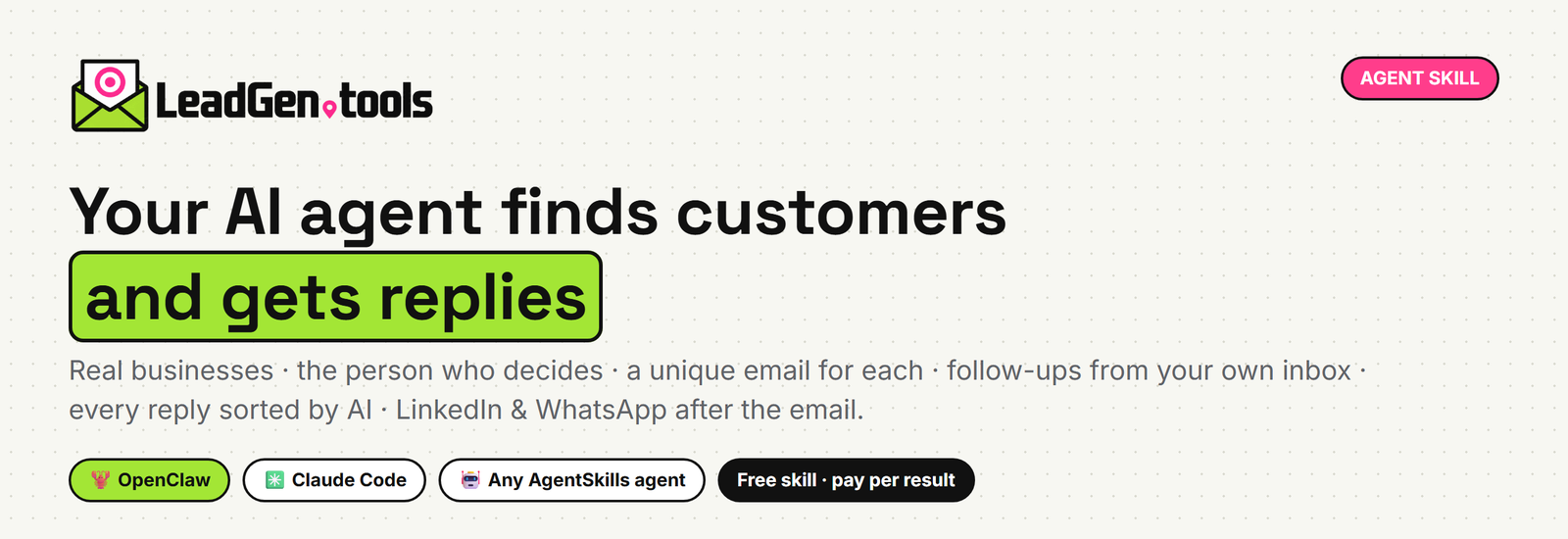
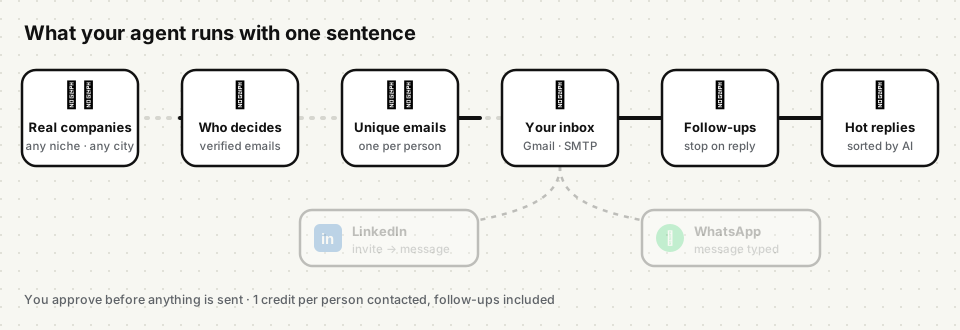
Give your AI agent the whole outbound pipeline in one skill. It finds real businesses in any niche and city and the person who decides at each one, with a verified email. Then it writes a different email for every prospect and sends them from your own inbox, with follow-ups that stop when someone answers. Every reply is sorted by AI, so you only read the ones that matter. After the email, LinkedIn and WhatsApp are ready too.
Works with OpenClaw, Claude Code and any agent that reads SKILL.md files
(AgentSkills format).
✨ What your agent can do with it
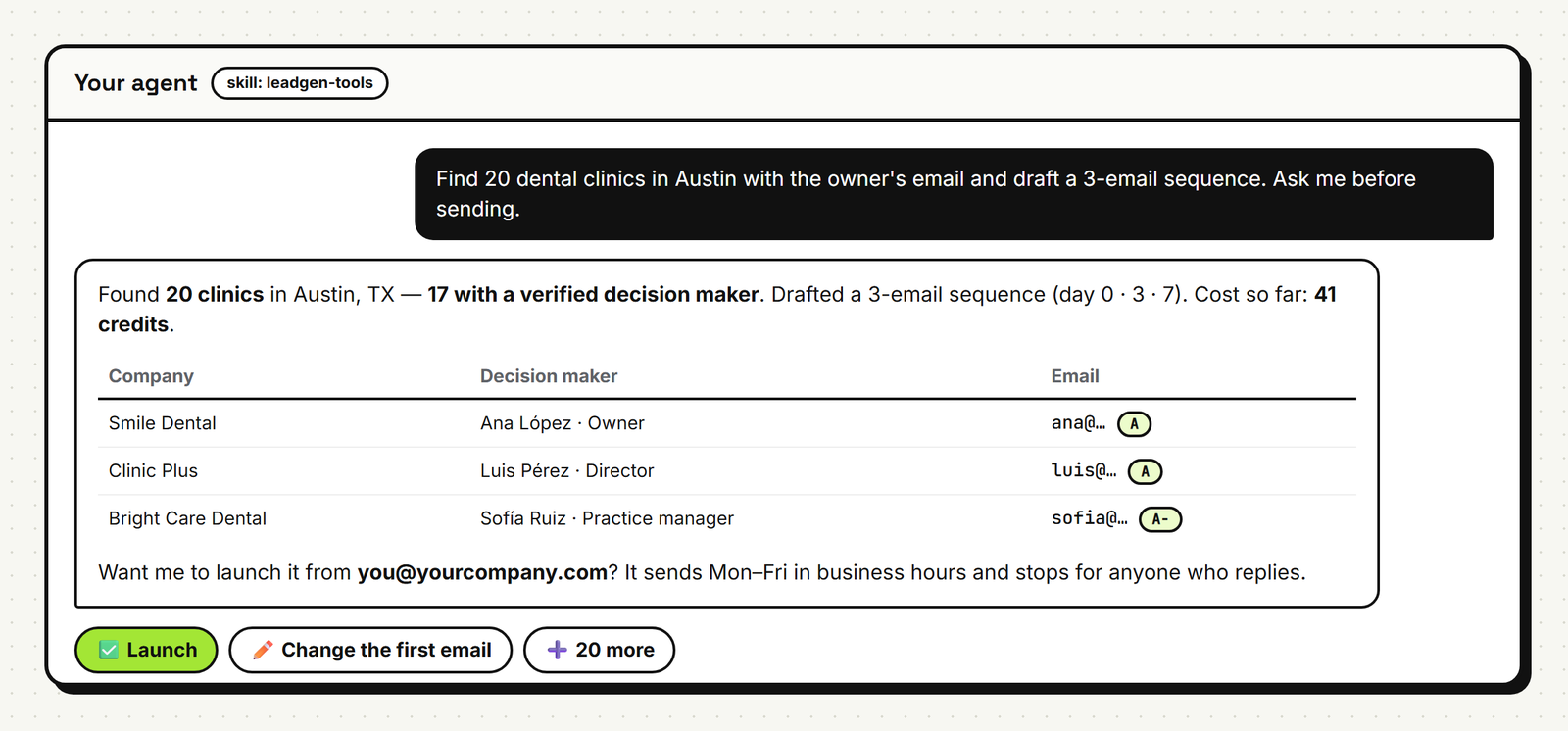
Just ask, in plain words:
| You say | The agent does |
|---|---|
| “Find 50 dental clinics in Austin with the owner's email.” | Real businesses from maps data, crawls their websites, finds the decision maker with a verified email |
| “Every Monday, find 40 new real estate agencies in Madrid, write the emails and ask me before sending.” | A weekly routine that never contacts the same company twice |
| “Who answered my campaigns? Draft replies for the interested ones.” | Reads every reply already classified (interested · meeting · question · not interested · out of office…) |
| “Here are 30 target accounts. Find the marketing head at each and start a 3-email sequence.” | Account-based outreach with the right person at each company |
| “Which plumbers are running Google ads in Miami this week? Contact them.” | Companies spending on ads (they have budget) |
| “Brief me on this company before my 3 pm call.” | Website, emails, phones, socials and who's who |
| “Do today's LinkedIn follow-up for my campaign.” | Invitations with a note, one message to those who accept, replies back into the campaign, in your own browser, with safe limits |
Twelve ready-made automations: playbooks.md · step-by-step recipes:
workflows.md.
🎬 See how it works, with an example conversation: https://leadgen.tools/v2/try/agents
🚀 Get started in 3 steps
1. Install the skill
# OpenClaw, from GitHub
openclaw skills install git:LeadGenTools/leadgen-tools-skill@main
Other agents / manual install
Copy the leadgen-tools folder into your agent's skills folder:
| Agent | Folder |
|---|---|
| OpenClaw (all agents) | ~/.openclaw/skills/leadgen-tools |
| OpenClaw (one workspace) | <workspace>/skills/leadgen-tools |
| Claude Code | ~/.claude/skills/leadgen-tools or <project>/.claude/skills/leadgen-tools |
| Other AgentSkills agents | their skills directory |
git clone https://github.com/LeadGenTools/leadgen-tools-skill.git
cp -r leadgen-tools-skill/leadgen-tools ~/.claude/skills/leadgen-tools   # e.g. Claude Code
2. Create your API key in one click
Create a free account at leadgen.tools, then open API & Agents → Create API key.
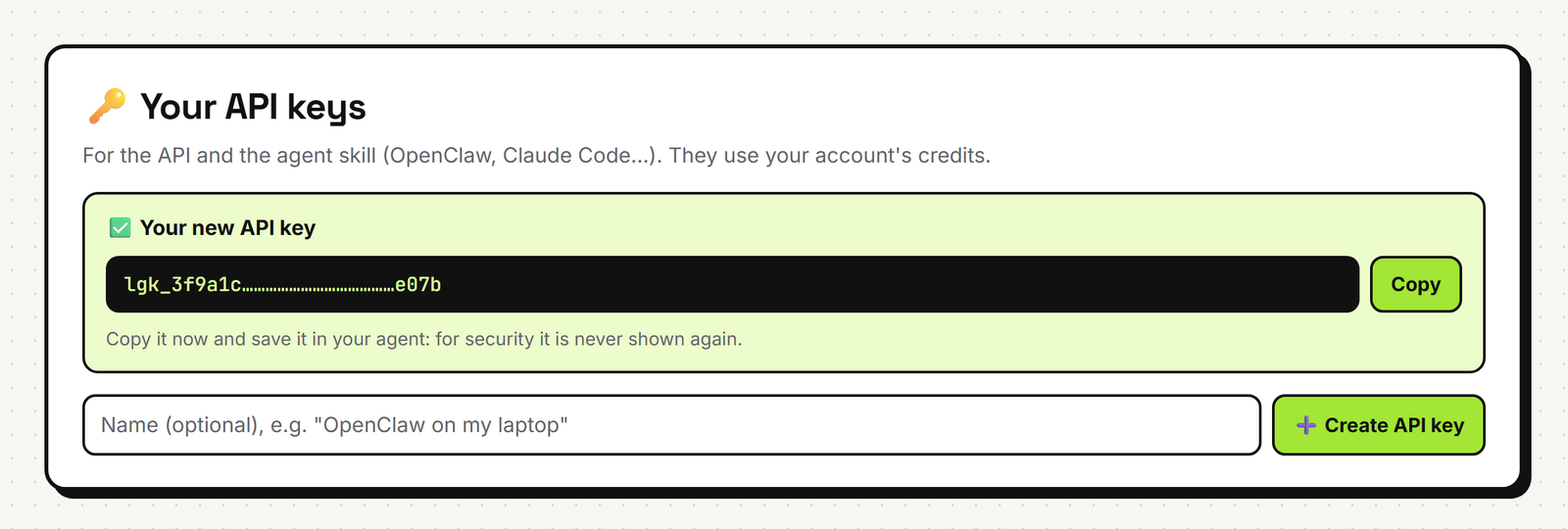
The key starts with lgk_ and is shown once, so copy it right away. You can revoke it and create another
whenever you want (up to 5 per account).
3. Give it to the skill
OpenClaw: ~/.openclaw/openclaw.json
{
  skills: {
    entries: {
      "leadgen-tools": { enabled: true, apiKey: "lgk_your_key" }
    }
  }
}
Any other agent: environment variable
export LEADGEN_API_KEY="lgk_your_key"
Try it: “Use LeadGen.tools to find 10 coffee shops in Denver with emails.”
To send campaigns from LeadGen.tools, connect at least one Gmail or SMTP inbox in the app (My email). You don't need one if you only want data, or if you send with your own tool.
💼 LinkedIn & WhatsApp after the email
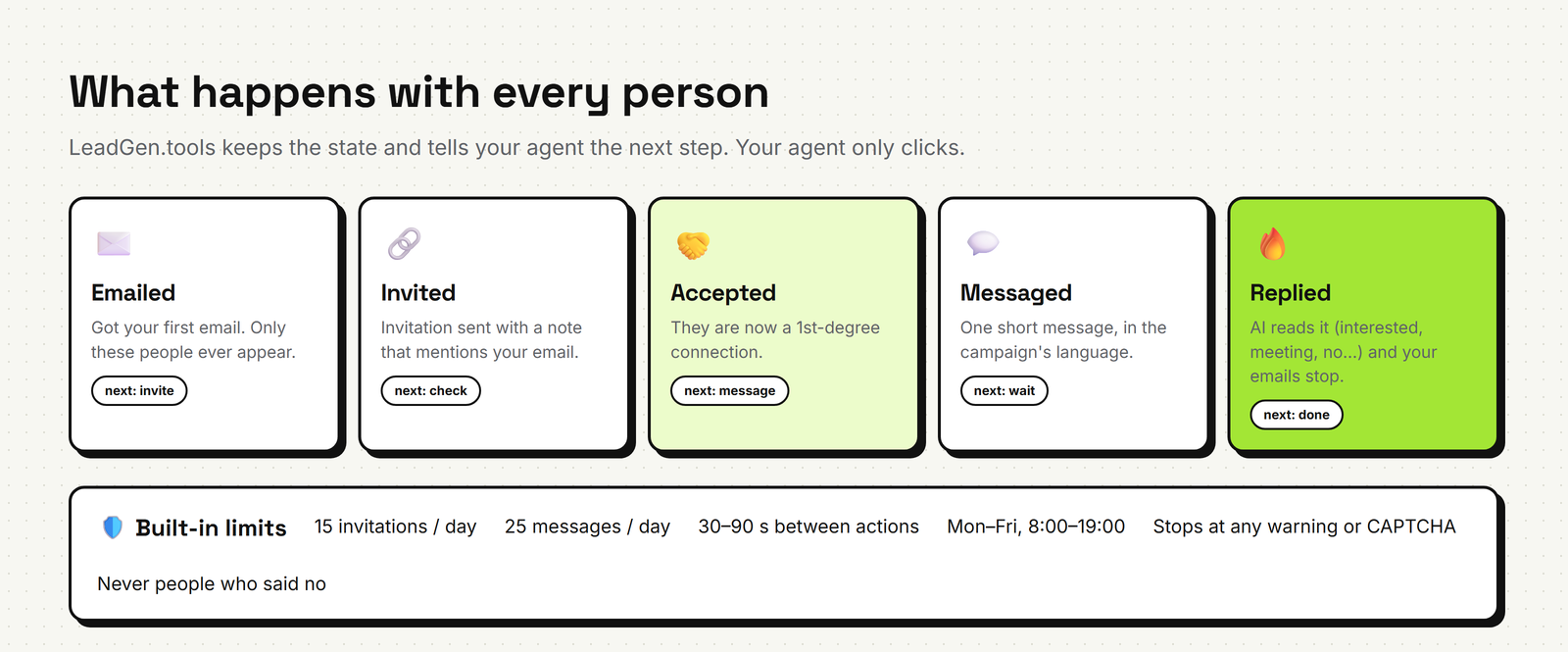
The API keeps track of each person, and your agent does the clicks in your own signed-in browser:
- An invitation with a note that mentions your email.
- One message once they accept.
- Their reply goes back into the campaign. It is classified, and the emails stop.
Built-in limits (15 invitations and 25 messages a day, 30–90 s apart, weekdays) and stop rules come from the API, so every agent follows the same rules. WhatsApp works the same way: decision makers' phones, whether they're on WhatsApp, and a link that opens the chat with the message already typed. Step by step: the blog tutorial.
LinkedIn doesn't allow automated activity on its site. Keep volume low, use only your own account, and stop at any warning. The skill tells the agent to do exactly that.
🪙 Pricing
The skill is free. API calls use your LeadGen.tools credits, and every response says exactly what it cost.
| Action | Credits |
|---|---|
| Companies (a page of ~20) | 2 |
| An email found on their website | 1 |
| A verified email | 2 |
| A decision maker with a verified email | 2 |
| A decision maker without an email (name & title only) | 1 |
| Contacting a prospect (all follow-ups included) | 1 |
| Verifying emails, storing prospects, managing campaigns, LinkedIn & WhatsApp follow-up | free |
Details: API docs → credits & pricing.
📦 What's inside
leadgen-tools/
├── SKILL.md                 what the agent reads first: capabilities, rules, pipeline, credits, errors
├── references/
│   ├── api.md               every endpoint, parameter and response field
│   ├── workflows.md         step-by-step recipes with exact calls (incl. the LinkedIn daily routine)
│   └── playbooks.md         12 business automations
└── scripts/
    └── leadgen.sh           tiny curl client (keeps your key out of the process list)
Requirements: curl and bash (macOS, Linux, or Git Bash on Windows). The agent can also call the API with
its own HTTP tools.
🔒 Security & control
- The key only goes to
leadgen.toolsover HTTPS. The script passes it to curl through stdin, so it never shows up in the process list or your shell history. - The agent asks before spending a lot of credits, and it never launches a campaign or sends email without your approval (unless you set a standing rule with a cap).
- Every email goes out from your own inbox, Mon–Fri in business hours, with daily limits. Anyone who opts out is never contacted again.
- Leaked key? Revoke it on API & Agents and create a new one in one click.
🔗 Links
- Website: https://leadgen.tools
- API documentation: https://leadgen.tools/v2/api/v1/
- Create an API key: https://leadgen.tools/v2/app/core.php?section=api&new=1
- Blog: https://leadgen.tools/blog/
- Changelog: CHANGELOG.md
License
MIT, see LICENSE. LeadGen.tools is a Cerebro Digital company.
Similar repos


See what people are saying
README
LeadGen.tools skill for AI agents
Give your AI agent the whole outbound pipeline in one skill. It finds real businesses in any niche and city and the person who decides at each one, with a verified email. Then it writes a different email for every prospect and sends them from your own inbox, with follow-ups that stop when someone answers. Every reply is sorted by AI, so you only read the ones that matter. After the email, LinkedIn and WhatsApp are ready too.
Works with OpenClaw, Claude Code and any agent that reads SKILL.md files
(AgentSkills format).
✨ What your agent can do with it
Just ask, in plain words:
| You say | The agent does |
|---|---|
| “Find 50 dental clinics in Austin with the owner's email.” | Real businesses from maps data, crawls their websites, finds the decision maker with a verified email |
| “Every Monday, find 40 new real estate agencies in Madrid, write the emails and ask me before sending.” | A weekly routine that never contacts the same company twice |
| “Who answered my campaigns? Draft replies for the interested ones.” | Reads every reply already classified (interested · meeting · question · not interested · out of office…) |
| “Here are 30 target accounts. Find the marketing head at each and start a 3-email sequence.” | Account-based outreach with the right person at each company |
| “Which plumbers are running Google ads in Miami this week? Contact them.” | Companies spending on ads (they have budget) |
| “Brief me on this company before my 3 pm call.” | Website, emails, phones, socials and who's who |
| “Do today's LinkedIn follow-up for my campaign.” | Invitations with a note, one message to those who accept, replies back into the campaign, in your own browser, with safe limits |
Twelve ready-made automations: playbooks.md · step-by-step recipes:
workflows.md.
🎬 See how it works, with an example conversation: https://leadgen.tools/v2/try/agents
🚀 Get started in 3 steps
1. Install the skill
# OpenClaw, from GitHub
openclaw skills install git:LeadGenTools/leadgen-tools-skill@main
Other agents / manual install
Copy the leadgen-tools folder into your agent's skills folder:
| Agent | Folder |
|---|---|
| OpenClaw (all agents) | ~/.openclaw/skills/leadgen-tools |
| OpenClaw (one workspace) | <workspace>/skills/leadgen-tools |
| Claude Code | ~/.claude/skills/leadgen-tools or <project>/.claude/skills/leadgen-tools |
| Other AgentSkills agents | their skills directory |
git clone https://github.com/LeadGenTools/leadgen-tools-skill.git
cp -r leadgen-tools-skill/leadgen-tools ~/.claude/skills/leadgen-tools   # e.g. Claude Code
2. Create your API key in one click
Create a free account at leadgen.tools, then open API & Agents → Create API key.
The key starts with lgk_ and is shown once, so copy it right away. You can revoke it and create another
whenever you want (up to 5 per account).
3. Give it to the skill
OpenClaw: ~/.openclaw/openclaw.json
{
  skills: {
    entries: {
      "leadgen-tools": { enabled: true, apiKey: "lgk_your_key" }
    }
  }
}
Any other agent: environment variable
export LEADGEN_API_KEY="lgk_your_key"
Try it: “Use LeadGen.tools to find 10 coffee shops in Denver with emails.”
To send campaigns from LeadGen.tools, connect at least one Gmail or SMTP inbox in the app (My email). You don't need one if you only want data, or if you send with your own tool.
💼 LinkedIn & WhatsApp after the email
The API keeps track of each person, and your agent does the clicks in your own signed-in browser:
- An invitation with a note that mentions your email.
- One message once they accept.
- Their reply goes back into the campaign. It is classified, and the emails stop.
Built-in limits (15 invitations and 25 messages a day, 30–90 s apart, weekdays) and stop rules come from the API, so every agent follows the same rules. WhatsApp works the same way: decision makers' phones, whether they're on WhatsApp, and a link that opens the chat with the message already typed. Step by step: the blog tutorial.
LinkedIn doesn't allow automated activity on its site. Keep volume low, use only your own account, and stop at any warning. The skill tells the agent to do exactly that.
🪙 Pricing
The skill is free. API calls use your LeadGen.tools credits, and every response says exactly what it cost.
| Action | Credits |
|---|---|
| Companies (a page of ~20) | 2 |
| An email found on their website | 1 |
| A verified email | 2 |
| A decision maker with a verified email | 2 |
| A decision maker without an email (name & title only) | 1 |
| Contacting a prospect (all follow-ups included) | 1 |
| Verifying emails, storing prospects, managing campaigns, LinkedIn & WhatsApp follow-up | free |
Details: API docs → credits & pricing.
📦 What's inside
leadgen-tools/
├── SKILL.md                 what the agent reads first: capabilities, rules, pipeline, credits, errors
├── references/
│   ├── api.md               every endpoint, parameter and response field
│   ├── workflows.md         step-by-step recipes with exact calls (incl. the LinkedIn daily routine)
│   └── playbooks.md         12 business automations
└── scripts/
    └── leadgen.sh           tiny curl client (keeps your key out of the process list)
Requirements: curl and bash (macOS, Linux, or Git Bash on Windows). The agent can also call the API with
its own HTTP tools.
🔒 Security & control
- The key only goes to
leadgen.toolsover HTTPS. The script passes it to curl through stdin, so it never shows up in the process list or your shell history. - The agent asks before spending a lot of credits, and it never launches a campaign or sends email without your approval (unless you set a standing rule with a cap).
- Every email goes out from your own inbox, Mon–Fri in business hours, with daily limits. Anyone who opts out is never contacted again.
- Leaked key? Revoke it on API & Agents and create a new one in one click.
🔗 Links
- Website: https://leadgen.tools
- API documentation: https://leadgen.tools/v2/api/v1/
- Create an API key: https://leadgen.tools/v2/app/core.php?section=api&new=1
- Blog: https://leadgen.tools/blog/
- Changelog: CHANGELOG.md
License
MIT, see LICENSE. LeadGen.tools is a Cerebro Digital company.