
An agent distro for continual customer discovery: qualify prospects, personalize outreach, and learn from response feedback with exploration.
Python
0
23 commits
updated Oct 1, 2026
See what people are saying
README




What it is
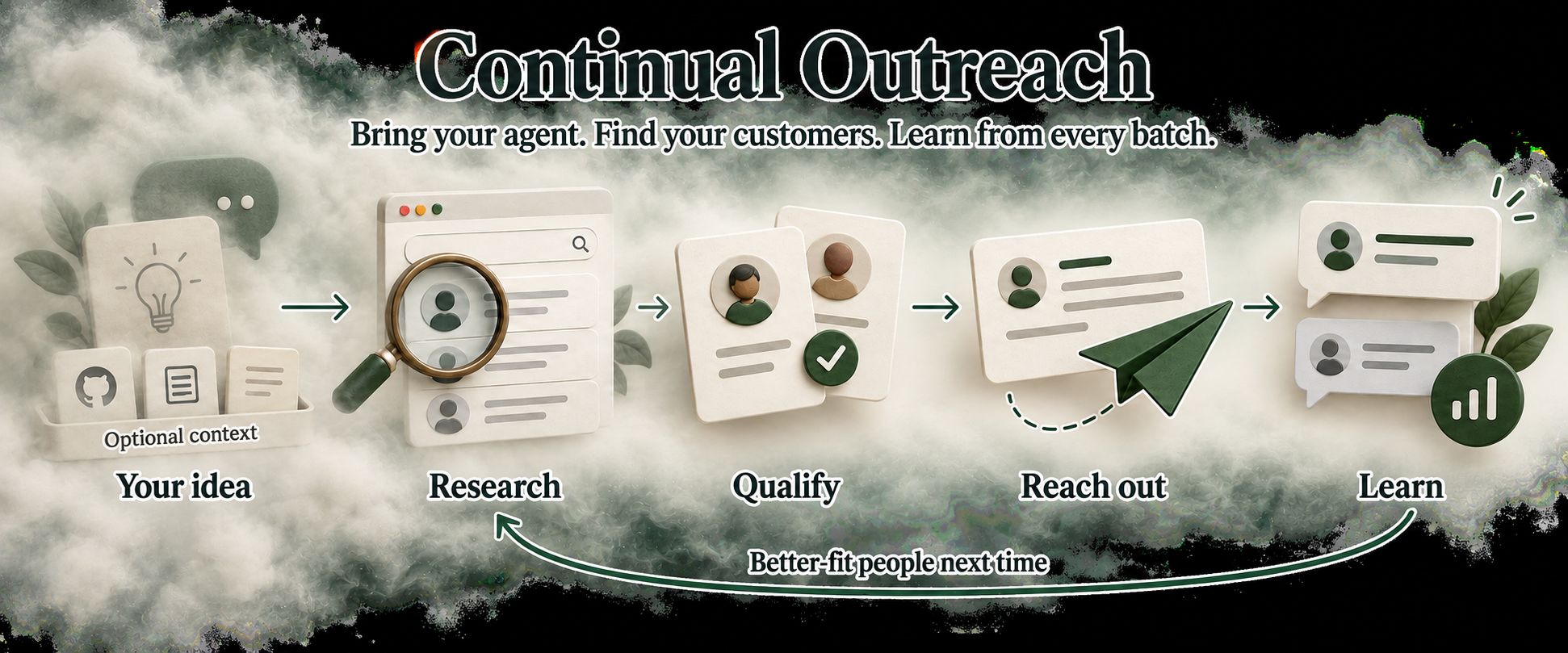
Continual Outreach is an agent distro for customer discovery and outreach. Tell it your product idea and who you want to learn from. It helps sharpen your ideal customer profile, researches people on the internet, personalizes outreach, tracks responses, and uses what it learns to improve the next batch.
An agent distro is a portable package that gives a general-purpose AI agent a specialized job: instructions define how it works, skills handle particular tasks, scripts make repeated operations reliable, and state conventions let it resume later.
This repository is that package. Open Codex, Claude Code or another harness in it—or load its instructions from your existing workspace—and that agent follows the continual-outreach workflow. Your chosen agent supplies the model, browser access and connected tools. This repo supplies the outreach expertise, campaign tracking, scheduling helpers and feedback loop. Private campaign data stays separate from the reusable package.
The agent distro approach is inspired by Firstmate, created by kunchenguid.
Start with a hypothetical idea or an existing product. Optionally add GitHub repos, documents or interview notes as context. You approve the outreach scope; the agent works within it and keeps exploring new profiles alongside those that get useful responses.
See it in action
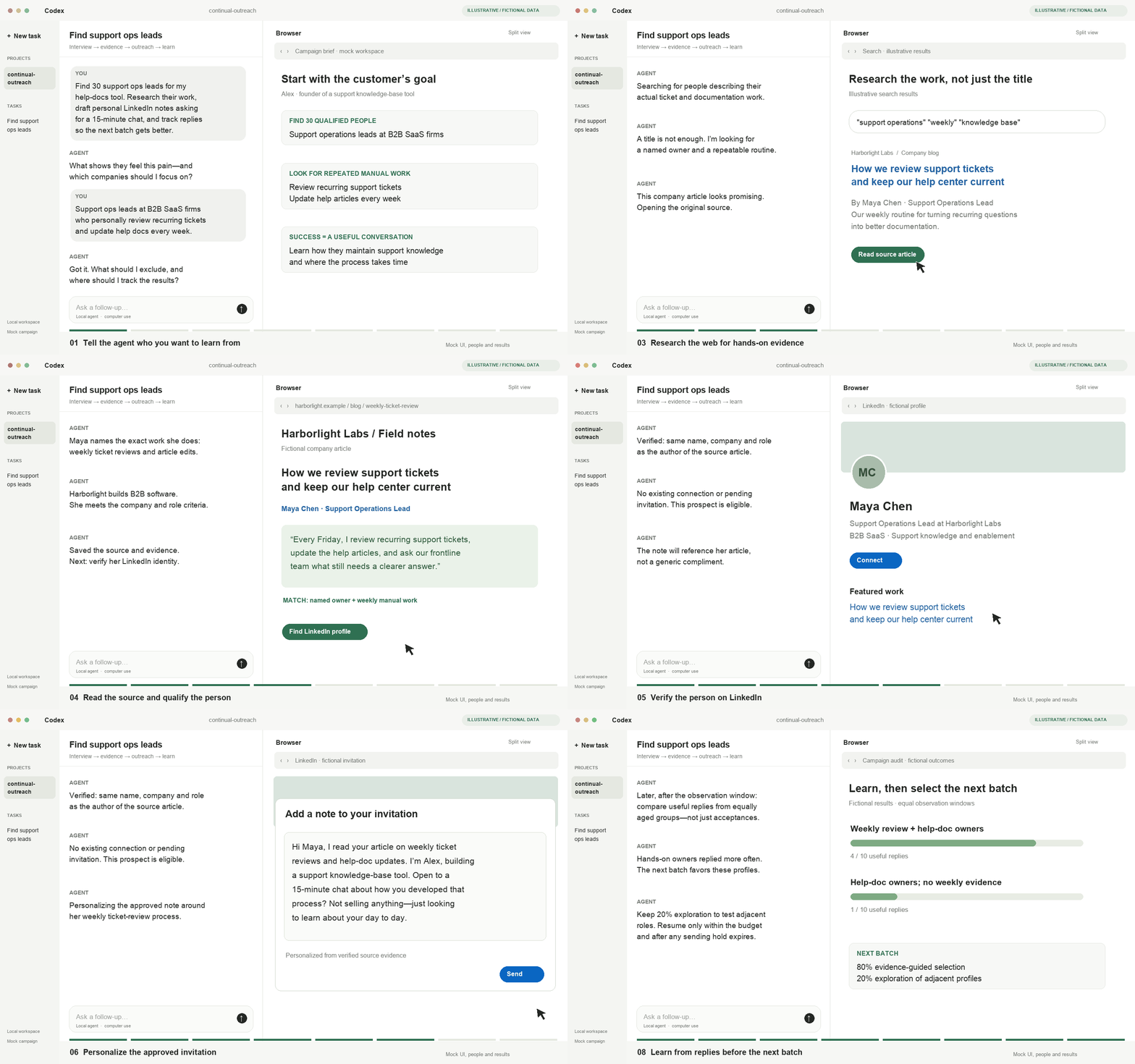
Open video with pause and scrub controls
Mock Codex-style workspace. Fictional people and data; no real outreach.
The example: a founder building a support documentation tool wants 15-minute interviews with support operations leads at B2B SaaS companies who personally review recurring tickets and update help articles every week. The agent turns that brief into qualification criteria, researches candidates on the internet, verifies a LinkedIn profile and prepares an approved, specific invitation.
Start · Architecture · Feedback loop · Scheduling · Exports
Start
Clone or fork the repo, open your preferred agent in it, and say:
Help me figure out who to reach out to for my product idea.
Or bring context:
I’m exploring a product for support teams. Use this GitHub repo and these interview notes to help sharpen the ICP, then find people I can learn from.
That is the front door. The agent asks about your goal, offers useful starting directions and handles its internal skills, campaign files and optional scheduling. There is no mandatory codebase selection or setup questionnaire.
Already working in another workspace? Tell your agent to read this clone's
OUTREACH.md. It takes on the same outreach role while preserving that workspace's
instructions. Optional workspace integration makes it discoverable
in later sessions; it is not required to begin.
The agent helps you define:
| Decision | What you work out together |
|---|---|
| Ideal customers | Product, painful workflow, ownership evidence and disqualifiers |
| Outreach | Channel, account, existing contacts, authorization and sending budget |
| Messaging | Your voice, verified work references and call to action |
| Tracking | Google Sheets, local CSV or another available export connector |
| Learning | What counts as a useful response, observation window and exploration budget |
Once your ICP and messaging direction are clear, the agent opens its own supported computer-use browser session and researches the web to find leads. It follows sources, verifies who actually owns the relevant work, saves a private campaign and shows personalized drafts. It also checks export access. Sending begins only within your authorization; that authorization carries forward within its scope.
No specific agent runtime is required. OUTREACH.md is the portable entrypoint. In the distro itself, AGENTS.md and CLAUDE.md route to it. Every instruction is ordinary Markdown, so agents without skill discovery can read the same workflow directly.
Architecture
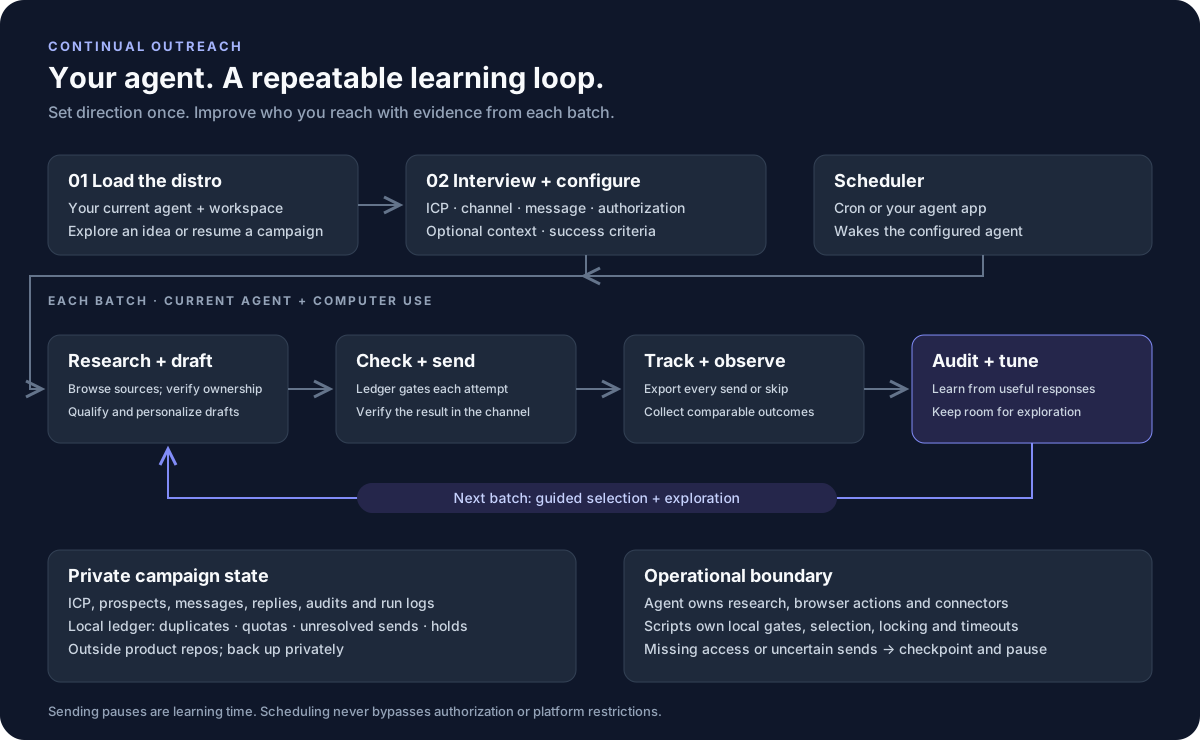
Computer use is the default: the current agent navigates the web to research prospects, verify their work and interact with the chosen channel. Search tools and export connectors complement that browser workflow. Local scripts keep state and enforce operational gates. A scheduler wakes the agent; it does not send messages itself. During sending pauses, the agent audits outcomes and prepares the next batch.
| Component | Responsibility |
|---|---|
| Agent instructions | Interview, research, qualification, messaging and recovery |
| Your agent and tools | Web research, supported computer use and export connectors |
| Campaign ledger | Duplicate protection, reservations, send caps and audit holds |
| Selection planner | Rank qualified segments using observed outcomes and exploration |
| Scheduled runner | Deliver prompts, serialize local runs, enforce timeouts and save logs |
| Private campaign and exports | Preserve prospects, exact messages, outcomes and policy changes |
The feedback loop
Research → qualify → personalize → send → observe → audit → tune.
Success means a useful response defined during onboarding. Acceptance, relevant replies, booked conversations and substantive feedback remain separate outcomes, so optimizing for connections does not silently replace learning from customers.
The initial policy uses 80% posterior-guided selection and 20% exploration among qualified profiles. The planner uses segment-level Thompson sampling with Beta posteriors. It learns only from comparable, fully observed windows; recent and unknown outcomes remain unobserved rather than becoming failures.
The agent interprets conversation feedback, researches similar profiles and records selection changes. This is a delayed-feedback bandit approximation, not a trained model over individual prospects. The planner proposes a batch; authorization and send gates still decide whether it can run.
Scheduling
Tell your agent:
Keep this campaign running. Set up the schedule for me.
The agent discovers its runtime, checks the tools available to scheduled sessions and sets up the appropriate scheduler. It reuses an existing schedule or configures its own launch command, writes the private runner configuration and verifies setup. You choose the cadence; you do not need to assemble commands or edit configuration files.
When available, an app scheduler can retain the current session's tools. For CLI-based scheduling, the included runner supplies prompts, serializes local runs, saves logs and enforces timeouts. Failed runs are not automatically retried.
If authentication or a required tool is missing, the agent asks for that specific step. See Scheduling for the agent setup procedure and manual reference.
Capabilities and limits
- The agent handles browser startup. It discovers and starts the computer-use tools in its environment. If access or login is missing, it asks for that specific step and continues any available read-only research. Cloning the repo does not install a browser integration.
- Channel support is explicit. The included send guard supports LinkedIn profile identity. Other channels can be researched and drafted, but need a tested identity adapter before automated sending.
- Pacing is not platform permission. LinkedIn prohibits third-party automated activity. Use manual sending when appropriate and stop on platform warnings.
- Scheduled access can differ. A cron-launched CLI may lack desktop browser tools. The POSIX runner supports Linux/macOS; unavailable capabilities produce a checkpoint.
- Local locks are local. Reconcile account-wide sends and serialize senders across campaigns and machines. An uncertain send stops further sending until reconciled.
Private state and tracking
Portable campaigns keep configuration, prospects, messages, replies, audits and run logs
outside the product workspace, by default under ~/.local/share/continual-outreach/.
Standalone campaigns can use ignored campaigns/ in the distro. Keep a private backup:
these records are not included in your fork.
The repository contains only a generic, draft-mode example.
Each campaign has its own campaign.json with four core settings:
| Setting | Field | Purpose |
|---|---|---|
| ICP profile | icp | Qualification criteria and target profiles; icp.md holds supporting rationale |
| Outreach message | message_template | The approved template personalized for each prospect |
| Tracker | tracker | The campaign's sheet/tab, local file or other export destination |
| Outreach channel | channel | For example, linkedin; selected during onboarding |
The agent saves these during the interview. Separate campaigns keep separate settings, prospect records, sent messages and outcomes. When campaigns share a sender account, account-wide limits and duplicate checks still need reconciliation across campaigns.
Exports use stable IDs and are verified after each send or skip. If synchronization fails, sending pauses until the tracker is repaired. See Exports.
# Inspect your campaign
python3 scripts/campaign.py --campaign campaigns/my-campaign status

# Run the offline checks; no real outreach is sent
python3 -m unittest discover -s tests -v
Contributing
See CONTRIBUTING.md for setup, validation and pull-request guidelines.
Similar repos


Languages
Python
100.0%
An agent distro for continual customer discovery: qualify prospects, personalize outreach, and learn from response feedback with exploration.
Python
0
23 commits
updated Oct 1, 2026
See what people are saying
README
What it is
Continual Outreach is an agent distro for customer discovery and outreach. Tell it your product idea and who you want to learn from. It helps sharpen your ideal customer profile, researches people on the internet, personalizes outreach, tracks responses, and uses what it learns to improve the next batch.
An agent distro is a portable package that gives a general-purpose AI agent a specialized job: instructions define how it works, skills handle particular tasks, scripts make repeated operations reliable, and state conventions let it resume later.
This repository is that package. Open Codex, Claude Code or another harness in it—or load its instructions from your existing workspace—and that agent follows the continual-outreach workflow. Your chosen agent supplies the model, browser access and connected tools. This repo supplies the outreach expertise, campaign tracking, scheduling helpers and feedback loop. Private campaign data stays separate from the reusable package.
The agent distro approach is inspired by Firstmate, created by kunchenguid.
Start with a hypothetical idea or an existing product. Optionally add GitHub repos, documents or interview notes as context. You approve the outreach scope; the agent works within it and keeps exploring new profiles alongside those that get useful responses.
See it in action
Open video with pause and scrub controls
Mock Codex-style workspace. Fictional people and data; no real outreach.
The example: a founder building a support documentation tool wants 15-minute interviews with support operations leads at B2B SaaS companies who personally review recurring tickets and update help articles every week. The agent turns that brief into qualification criteria, researches candidates on the internet, verifies a LinkedIn profile and prepares an approved, specific invitation.
Start · Architecture · Feedback loop · Scheduling · Exports
Start
Clone or fork the repo, open your preferred agent in it, and say:
Help me figure out who to reach out to for my product idea.
Or bring context:
I’m exploring a product for support teams. Use this GitHub repo and these interview notes to help sharpen the ICP, then find people I can learn from.
That is the front door. The agent asks about your goal, offers useful starting directions and handles its internal skills, campaign files and optional scheduling. There is no mandatory codebase selection or setup questionnaire.
Already working in another workspace? Tell your agent to read this clone's
OUTREACH.md. It takes on the same outreach role while preserving that workspace's
instructions. Optional workspace integration makes it discoverable
in later sessions; it is not required to begin.
The agent helps you define:
| Decision | What you work out together |
|---|---|
| Ideal customers | Product, painful workflow, ownership evidence and disqualifiers |
| Outreach | Channel, account, existing contacts, authorization and sending budget |
| Messaging | Your voice, verified work references and call to action |
| Tracking | Google Sheets, local CSV or another available export connector |
| Learning | What counts as a useful response, observation window and exploration budget |
Once your ICP and messaging direction are clear, the agent opens its own supported computer-use browser session and researches the web to find leads. It follows sources, verifies who actually owns the relevant work, saves a private campaign and shows personalized drafts. It also checks export access. Sending begins only within your authorization; that authorization carries forward within its scope.
No specific agent runtime is required. OUTREACH.md is the portable entrypoint. In the distro itself, AGENTS.md and CLAUDE.md route to it. Every instruction is ordinary Markdown, so agents without skill discovery can read the same workflow directly.
Architecture
Computer use is the default: the current agent navigates the web to research prospects, verify their work and interact with the chosen channel. Search tools and export connectors complement that browser workflow. Local scripts keep state and enforce operational gates. A scheduler wakes the agent; it does not send messages itself. During sending pauses, the agent audits outcomes and prepares the next batch.
| Component | Responsibility |
|---|---|
| Agent instructions | Interview, research, qualification, messaging and recovery |
| Your agent and tools | Web research, supported computer use and export connectors |
| Campaign ledger | Duplicate protection, reservations, send caps and audit holds |
| Selection planner | Rank qualified segments using observed outcomes and exploration |
| Scheduled runner | Deliver prompts, serialize local runs, enforce timeouts and save logs |
| Private campaign and exports | Preserve prospects, exact messages, outcomes and policy changes |
The feedback loop
Research → qualify → personalize → send → observe → audit → tune.
Success means a useful response defined during onboarding. Acceptance, relevant replies, booked conversations and substantive feedback remain separate outcomes, so optimizing for connections does not silently replace learning from customers.
The initial policy uses 80% posterior-guided selection and 20% exploration among qualified profiles. The planner uses segment-level Thompson sampling with Beta posteriors. It learns only from comparable, fully observed windows; recent and unknown outcomes remain unobserved rather than becoming failures.
The agent interprets conversation feedback, researches similar profiles and records selection changes. This is a delayed-feedback bandit approximation, not a trained model over individual prospects. The planner proposes a batch; authorization and send gates still decide whether it can run.
Scheduling
Tell your agent:
Keep this campaign running. Set up the schedule for me.
The agent discovers its runtime, checks the tools available to scheduled sessions and sets up the appropriate scheduler. It reuses an existing schedule or configures its own launch command, writes the private runner configuration and verifies setup. You choose the cadence; you do not need to assemble commands or edit configuration files.
When available, an app scheduler can retain the current session's tools. For CLI-based scheduling, the included runner supplies prompts, serializes local runs, saves logs and enforces timeouts. Failed runs are not automatically retried.
If authentication or a required tool is missing, the agent asks for that specific step. See Scheduling for the agent setup procedure and manual reference.
Capabilities and limits
- The agent handles browser startup. It discovers and starts the computer-use tools in its environment. If access or login is missing, it asks for that specific step and continues any available read-only research. Cloning the repo does not install a browser integration.
- Channel support is explicit. The included send guard supports LinkedIn profile identity. Other channels can be researched and drafted, but need a tested identity adapter before automated sending.
- Pacing is not platform permission. LinkedIn prohibits third-party automated activity. Use manual sending when appropriate and stop on platform warnings.
- Scheduled access can differ. A cron-launched CLI may lack desktop browser tools. The POSIX runner supports Linux/macOS; unavailable capabilities produce a checkpoint.
- Local locks are local. Reconcile account-wide sends and serialize senders across campaigns and machines. An uncertain send stops further sending until reconciled.
Private state and tracking
Portable campaigns keep configuration, prospects, messages, replies, audits and run logs
outside the product workspace, by default under ~/.local/share/continual-outreach/.
Standalone campaigns can use ignored campaigns/ in the distro. Keep a private backup:
these records are not included in your fork.
The repository contains only a generic, draft-mode example.
Each campaign has its own campaign.json with four core settings:
| Setting | Field | Purpose |
|---|---|---|
| ICP profile | icp | Qualification criteria and target profiles; icp.md holds supporting rationale |
| Outreach message | message_template | The approved template personalized for each prospect |
| Tracker | tracker | The campaign's sheet/tab, local file or other export destination |
| Outreach channel | channel | For example, linkedin; selected during onboarding |
The agent saves these during the interview. Separate campaigns keep separate settings, prospect records, sent messages and outcomes. When campaigns share a sender account, account-wide limits and duplicate checks still need reconciliation across campaigns.
Exports use stable IDs and are verified after each send or skip. If synchronization fails, sending pauses until the tracker is repaired. See Exports.
# Inspect your campaign
python3 scripts/campaign.py --campaign campaigns/my-campaign status

# Run the offline checks; no real outreach is sent
python3 -m unittest discover -s tests -v
Contributing
See CONTRIBUTING.md for setup, validation and pull-request guidelines.
Similar repos
Languages
Python
100.0%