
Neural latent upscaler for Minimax H3 (24ch). Bypasses costly 5B-param VAE decode/encode. Upscale low-res latents directly, then refine. Accelerates high-res video gen, outperforms naive interp.
Python
719
49 commits
updated Sep 17, 2026
README
ComfyUI Minimax H3 Latent Upscaler
Neural Latent Upscaler for Minimax H3 Video Generation Learned · High-fidelity · 2D & 3D Variants
📰 News
- [2026-08-28] 🚀 New node combo — MMH3 Split Upscale: three new nodes (
MMH3 Temporal Split Params,MMH3 Spatial Split Params,MMH3 Split Upscale) perform a tiled, hires-fix style latent re-sampling upscale for H3 video. Decomposed and optimized from the Comfyui-MMH3-UltimateUpscale project — splitting the AV latent into temporal chunks and spatial tiles, resampling each piece, and stitching with seam denoise, two-level color matching and temporal anchors. Key upgrades vs. original: more stable seams (seam_denoise+ probe-gated seam polish), zero color drift (two-level matching + first-block/every-chunk pin-source), triple temporal anchors (frame-0/motion/identity), easier use (spatial params simplified to overlap/fade percentages snapping to the latent grid), and a lighter footprint (built-in upscale model removed in favor of an external pre-upscaled latent). - [2026-08-26] 🚀 3D node memory & UX optimizations: zero-copy model loading plus ComfyUI's native
soft_empty_cacheand explicit.contiguous()calls reduce RAM/VRAM spikes during load and inference; the post-inference CPU offload is now an optionalforce_unloadtoggle (default on);enable_chunkingis renamed toenable_temporal_chunkingand its effective chunk stride raised from 24 to 32; model files can now live in subfolders (PR #30);target dimensionsandmegapixelsupper limits raised to 8192 px and 16 MP. - [2026-08-23] 🚀 3D node improvements: added an
enable_chunkingtoggle (turn off for short clips to use full-context inference); fixed temporal-chunk edge artifacts with replicate padding and weighted overlap blending, eliminating end-frame flicker; added ROCm (AMD GPU) backend support via the newrocmdevice option. - [2026-08-21] 🚀 3D node optimization: The model is automatically offloaded to CPU after execution to free VRAM for subsequent second-pass sampling; width and height are independently aligned to the align grid (default 32), fixing the bottom light band issue; normalization/denormalization is changed from in-place operations to standard operations; temporal chunking is retained to support long videos.
- [2026-08-19] 🚀 3D node overhaul: all three resize modes (
scale by multiplier,target dimensions,megapixels) merged into a single node; fixed aspect-ratio mismatch in certain modes and edge artifacts at specific sizes; added a new example workflow and expanded the usage notes. - [2026-08-18] 🔥 Precision selector: both 2D and 3D nodes now support
fp32/fp16/bf16inference. - [2026-08-17] 🎉 Initial release: Minimax H3 Latent Upscaler 2D + 3D nodes with bilingual README and inline examples.
A custom ComfyUI node that upscales Minimax H3 VAE latents (24 channels) with a trained neural network instead of naive interpolation. Its main purpose is to accelerate high-resolution video generation and improve quality:
- Skip the slow decode → pixel-upscale → encode round-trip. Minimax H3 ships a heavy ~5B-parameter VAE, so decoding and re-encoding latents is expensive. Upscaling directly in latent space avoids that costly round-trip entirely.
- Enable a faster generation pipeline: generate at low resolution (far fewer latent tokens), upscale the latent with this node, then refine at the target resolution.
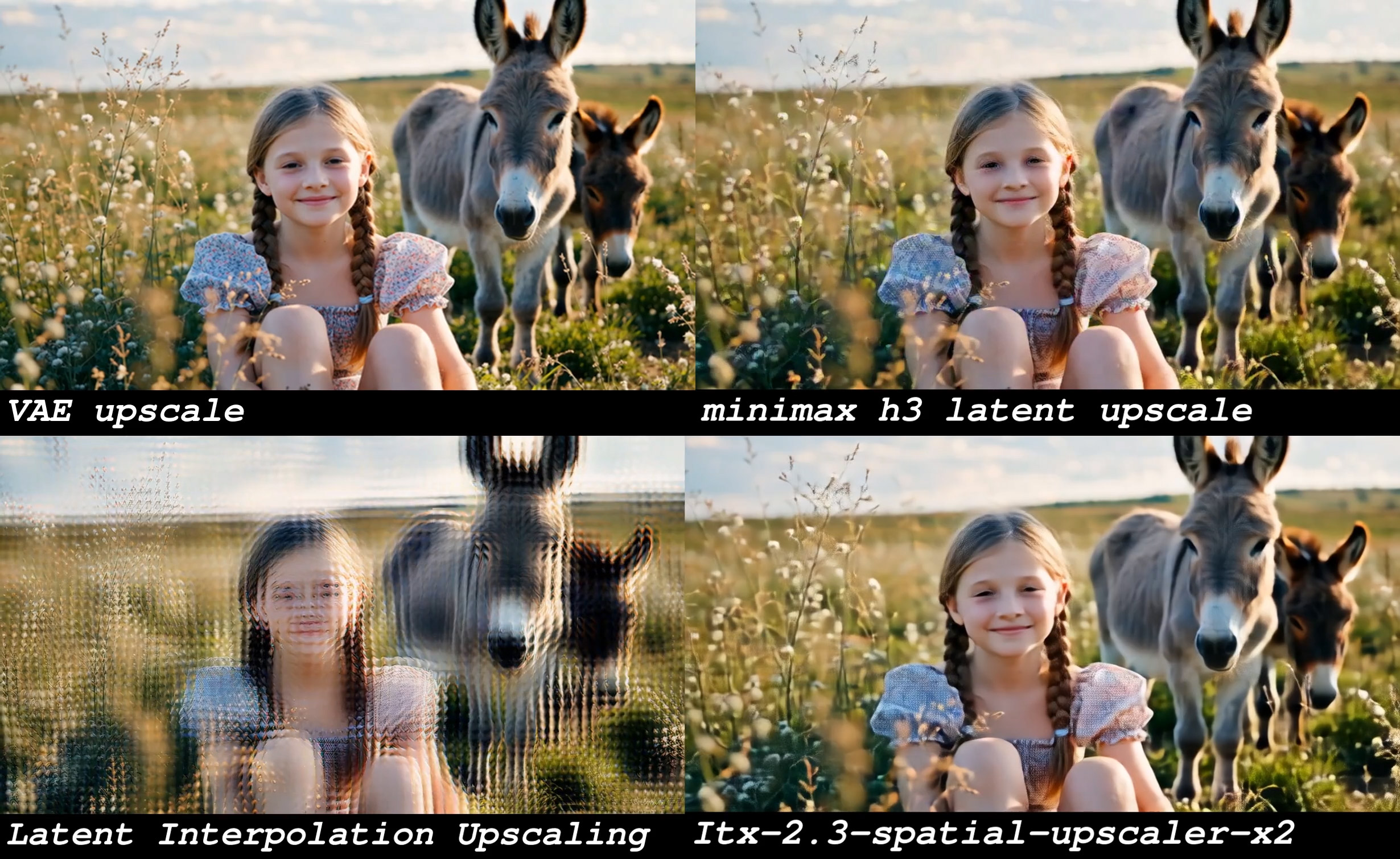
It also avoids the ghosting / double-image artifacts that naive latent interpolation (bilinear/bicubic) introduces, and plays a role similar to the latent upscaler in LTX2.3.
⚠️ This saves time, not VRAM — the refinement pass still runs at the target resolution, so peak memory is comparable to generating high-res directly. The win is purely speed.
Two node variants are provided, both registered under the video/MinimaxH3 category:
- Minimax H3 Latent Upscaler (2D) — a 2D ResBlock backbone with Temporal 3D-Conv layers
inserted for temporal consistency. Spatial (H×W) upscaling; the time dimension is preserved.
Lightweight and fast. Uses a simple
scalefactor (1.0×–4.0×). - Minimax H3 Latent Upscaler (3D) — a fully 3D-convolution backbone (3D ResBlocks +
TemporalConv + trilinear interpolation). Processes the spatiotemporal volume jointly for
stronger temporal coherence; heavier on compute/memory. Supports three resize modes in one
node:
scale by multiplier— classicscalefactor (1.0×–4.0×).target dimensions— directly set target pixelwidth/height.megapixels— set a target total pixel count in megapixels (e.g.1.2); keeps aspect ratio. Bothtarget dimensionsandmegapixelsmodes align the output to a configurable pixel grid and derive the effective scale automatically.
The 3D node computes the equivalent
scaleinternally for the size-based modes and feeds it to the same trained model, so any target between 1.0×–4.0× works.
Both nodes support upscaling only (
effective scale >= 1.0).scale = 1.0returns the input unchanged; an effective scale below1.0raises an error.
MMH3 Split Upscale (combo)
Origin: this combo is a decomposed and re-optimized version of the Comfyui-MMH3-UltimateUpscale project. The original monolithic node was broken into three composable nodes (temporal split / spatial split / main upscaler), and the enhancements below were layered on top of the original tiling logic to improve seam stability, color consistency, temporal coherence, usability, and footprint.
A separate three-node combo that does a tiled, hires-fix style re-sampling upscale directly
inside the diffusion sampler — instead of a pre-trained upscaler network. It takes the H3 AV
latent (nested video 24ch + audio 32ch), splits it into temporal chunks and spatial tiles,
runs the sampler on each piece, then stitches them back seamlessly with seam-denoise, two-level color
matching and temporal anchors so seams and ghosting don't appear. The two * Split Params nodes
configure the splitting and feed the main MMH3 Split Upscale node (both optional — leave them
unconnected for a single full-frame pass). It requires a model + conditioning + sampler/sigmas,
i.e. it re-runs sampling at the higher resolution.
Key enhancements vs. the original project:
- 🧩 More stable seams (Seam / Ghosting): a seam-neighborhood denoise cap (
seam_denoise) plus a probe-gated second-pass seam polish (seam_polish) remove seams and ghosting; even under high denoise + fast motion, moving objects are no longer sliced ("broken limbs"). - 🎨 Zero color drift (Color Zero-Drift): spatial + temporal two-level color matching, with a global color reference pinned to the first block and to every chunk (
grade_pin) — eliminates inter-tile flicker and the localized cyan/green tint (e.g. top-left corner). - ⏱️ Stronger temporal continuity: a triple temporal anchor —
frame-0 anchor+motion anchor+identity anchor— automatically backs up identity consistency under high denoise, so subjects don't drift. - 🖱️ Easier to use: spatial parameters cut from 9 fields down to percentages (overlap ratio / fade ratio) that auto-snap to the latent grid;
negativesits right next toconditioningfor a more intuitive layout. - 🪶 Lighter footprint: the built-in upscale model was removed in favor of an external pre-upscaled latent input — more controllable VRAM, and a node that stays focused on its job.
Modules added / optimized (relative to the original project):
| Module | What it adds / optimizes |
|---|---|
| Prevention (预防) | Freeze-prefill overlap band + triple temporal anchors (frame-0 anchor + motion anchor + identity anchor) + cross-fade stitching — stops seams and forks from forming in the first place. |
| Correction (校正) | Two-level (spatial + temporal) color matching + first-block source reference + per-chunk global pin-source (grade_pin) — keeps color & brightness consistent across tiles and chunks, killing inter-tile flicker and localized cyan/green tint. |
| Anti-forking (抗分叉) | seam_denoise cap — under high denoise + fast motion, the seam neighborhood is re-sampled at medium denoise so moving objects aren't sliced ("broken limbs"); combined with the probe-gated second-pass seam polish, seams and ghosting are both eliminated (suggested 0.5–0.8; 1.0 = off). |
| Fixes (修复) | Per-tile independent Guider + cropped keyframes, and a fixed probe-gated seam polish (seam_polish) — each tile gets correctly-scoped conditioning/keyframes, and the polish gating no longer over/under-applies. |
| Simplification (简化) | overlap / fade are now percentage parameters (overlap ratio / fade ratio, resolution-independent) instead of absolute pixels, and auto-snap to the latent grid; negative sits next to conditioning for a more intuitive layout. |
📸 Examples
Video upscale comparison
Image upscale comparison
📁 Project Structure
Comfyui_Minimax_h3_latent_Upscaler/
├── examples/
│   ├── Minimax_h3_latent_Upscaler_001.mp4
│   └── Minimax_h3_latent_Upscaler_002.jpg
├── workflow_templates/
│   └── minimax_h3_r2v_Latent Upscaler example workflow.json  # example workflow for ComfyUI templates
├── nodes/
│   ├── __init__.py                       # merges 2D/3D/Split node mappings
│   ├── minimax_h3_latent_upscaler_2d.py  # 2D backbone + Temporal 3D Conv (scale mode)
│   ├── minimax_h3_latent_upscaler_3d.py  # pure 3D convolution with 3 resize modes
│   └── MMH3_Split_Upscale.py             # MMH3 Split Upscale combo (decomposed from Comfyui-MMH3-UltimateUpscale)
├── README.md
├── README_zh.md
└── __init__.py
The model weights are not included in this repo. Place them in your ComfyUI models folder (see Model Placement below).
🚀 Key Features
- ✅ Learned latent upscaling — neural network trained for Minimax H3 latents, far sharper than bilinear/bicubic interpolation.
- ✅ Two backbones — pick the fast 2D variant or the temporally-coherent 3D variant.
- ✅ Three ways to set output size on the 3D node —
scale by multiplier,target dimensions, ormegapixels, all with pixel-grid alignment and aspect-ratio lock. - ✅ Tiled hires-fix upscaler (MMH3 Split Upscale combo) — re-sample the H3 AV latent at higher resolution by splitting into temporal chunks + spatial tiles, with seam-denoise, two-level color matching and temporal anchors to avoid seams and ghosting.
- ✅ 24-channel Minimax H3 latent — uses the exact per-channel mean/std normalization from training.
- ✅ Auto architecture detection — reads
in_channels, block counts, temporal config and kernel size straight from the checkpoint; no manual config needed. - ✅ Robust weight loader — supports
.safetensorsand.pth; auto-converts FP8→FP16; tolerates theupscaler.prefix in merged checkpoints. - ✅ Flexible precision/device —
cuda/cpuand fp32/fp16/bf16 options. - ✅ Plug-and-play — standard ComfyUI node, no changes to your existing workflow.
Inference forces attention off (attn=False) for speed and stability. Loaded models are
cached by (name, device, precision) so repeated runs stay cheap.
📦 Installation
-
Clone this repository into ComfyUI's
custom_nodesfolder:cd ComfyUI/custom_nodes git clone https://github.com/LBH-123-AI/Comfyui_Minimax_h3_latent_Upscaler.git -
Required dependencies (
torch,einops,safetensors) are already present in a standard ComfyUI environment — no extra install needed. -
Restart ComfyUI.
🤖 Model Placement
The nodes scan and load weights from:
ComfyUI/models/latent_upscale_models/
Put your Minimax H3 latent upscaler checkpoint (.safetensors or .pth) there. It will appear
automatically in the node's model_name dropdown.
Pre-trained checkpoints are available at: huggingface.co/LBH-123-AI/Minimax_h3_latent_Upscaler
The loader auto-detects the architecture, so a single checkpoint works for both the 2D and 3D nodes as long as the stored structure matches.
🧩 Usage
Add the node you need from the video/MinimaxH3 menu, connect a LATENT, pick the model, set the
resize mode / scale, and decode.
Typical workflow:
- Quick preview:
[Minimax H3 Latent] → [H3 Latent Upscaler] → [VAE Decode] - High quality / time-saving (recommended):
[Low-res Latent] → [H3 Latent Upscaler] → [Refine / Re-sample] → [VAE Decode]
Compared to the naive approach [Latent] → [VAE Decode] → [Pixel Upscaler] → [VAE Encode] → …,
upscaling directly in latent space skips the expensive VAE decode/encode round-trip. Minimax H3's
~5B-parameter VAE makes decode and re-encode notably slow, so this is where most of the time is
saved. It also avoids the ghosting / double-image artifacts that direct latent interpolation
(bilinear/bicubic) causes.
⚠️ Saves time, not VRAM: the refinement still runs at the target resolution, so peak memory is roughly the same as generating high-res directly. The benefit is purely faster turnaround.
Node Reference — 2D
| Parameter | Type | Default | Range / Options | Description |
|---|---|---|---|---|
latent | LATENT | — | — | Input Minimax H3 latent (B,C,T,H,W) or (B,C,H,W) |
model_name | dropdown | auto | scanned files | Checkpoint in latent_upscale_models/ |
scale | FLOAT | 2.0 | 1.0 – 4.0 (step 0.1) | Spatial upscale factor |
device | dropdown | cuda | cuda / cpu | Inference device |
precision | dropdown | fp32 | fp32 / fp16 / bf16 | Inference precision |
Output: LATENT — the upscaled latent, ready for VAE decode.
Node Reference — 3D
| Parameter | Type | Default | Range / Options | Description |
|---|---|---|---|---|
latent | LATENT | — | — | Input Minimax H3 latent (B,C,T,H,W) or (B,C,H,W) |
model_name | dropdown | auto | scanned files | Checkpoint in latent_upscale_models/ |
mode | dropdown | scale by multiplier | scale by multiplier / target dimensions / megapixels | How the output size is chosen |
scale | FLOAT | 2.0 | 1.0 – 4.0 (step 0.05) | Used when mode is scale by multiplier |
width | INT | 1280 | 64 – 8192 (step 8) | Target pixel width (used by target dimensions) |
height | INT | 704 | 64 – 8192 (step 8) | Target pixel height (used by target dimensions) |
megapixels | FLOAT | 1.0 | 0.1 – 16.0 (step 0.1) | Target total megapixels (used by megapixels); keeps aspect ratio |
align | INT | 32 | 1 – 512 | Pixel-grid alignment: output W/H are independently rounded to multiples of this value (e.g. 16/32/64) |
enable_temporal_chunking | BOOLEAN | True | True / False | Split long videos into temporal chunks to cap VRAM; disable for short clips for full-context inference |
force_unload | BOOLEAN | True | True / False | Unload model to CPU after inference to free VRAM for subsequent nodes; disable if you reuse this node repeatedly to avoid reload overhead |
device | dropdown | cuda | cuda / rocm / cpu | Inference backend (ROCm needs a HIP-enabled PyTorch build) |
precision | dropdown | fp32 | fp32 / fp16 / bf16 | Inference precision |
Output: LATENT — the upscaled latent.
Which node to pick? Use 2D for speed and when frames are already temporally stable; use 3D when you need stronger motion/temporal coherence or prefer specifying output size by
target dimensions/megapixels.
Node Reference — MMH3 Split Upscale (combo)
A tiled, hires-fix style re-sampling upscaler for H3 video, decomposed and optimized from the
Comfyui-MMH3-UltimateUpscale project. Unlike the 2D/3D nodes (which use a
pre-trained upscaler network), this combo re-runs the diffusion sampler on a higher-resolution
version of the latent, split into pieces so it fits in VRAM. It operates on the H3 AV latent
(nested video 24ch + audio 32ch) and requires model + conditioning + sampler/sigmas.
MMH3 Temporal Split Params — how to cut the clip along time (H3's native 5+17·m frame/token grid):
| Parameter | Type | Default | Range / Options | Description |
|---|---|---|---|---|
chunk_frames | INT | 73 | 5 – 100000 | Chunk length in frames (snapped to H3 token grid) |
temporal_overlap_frames | INT | 22 | 0 – 100000 | Overlap between consecutive chunks |
anchor_strength | FLOAT | 0.999 | 0.0 – 1.0 | Temporal anchor strength |
motion_anchor_frames | dropdown | 22 | 0 / 5 / 22 / 39 | Motion anchor length in frames |
identity_anchor_frames | INT | 24 | 0 – 240 | Spacing of identity anchors |
Output: temporal_split_param (custom type, feeds the main node).
MMH3 Spatial Split Params — how to cut each frame into tiles:
| Parameter | Type | Default | Range / Options | Description |
|---|---|---|---|---|
tile_width | INT | 512 | 64 – 16384 (step 32) | Tile width in pixels |
tile_height | INT | 512 | 64 – 16384 (step 32) | Tile height in pixels |
overlap_ratio | FLOAT | 0.25 | 0.0 – 0.90 | Overlap as a fraction of the tile |
fade_ratio | FLOAT | 0.50 | 0.0 – 1.0 | Fade band width within the overlap |
min_tile_size | INT | 256 | 0 – 16384 (step 32) | Minimum tile edge; avoids tiny edge tiles |
seam_denoise | FLOAT | 1.0 | 0.1 – 1.0 | Seam-neighborhood denoise cap; <1 prevents fast objects being cut at seams (suggest 0.5–0.8) |
Outputs: spatial_split_param (custom type) + grid_preview (string, shows the computed tile/overlap grid).
MMH3 Split Upscale — the main orchestrator:
| Parameter | Type | Default | Range / Options | Description |
|---|---|---|---|---|
model | MODEL | — | — | Diffusion model used for re-sampling |
conditioning | CONDITIONING | — | — | Positive conditioning |
negative | CONDITIONING | — | optional | Negative conditioning |
latent | LATENT | — | — | Input H3 AV latent (nested video 24ch + audio 32ch); batch 1 only |
noise | NOISE | — | — | Noise source for the sampler |
sampler | SAMPLER | — | — | Sampler |
sigmas | SIGMAS | — | — | Sigma schedule |
cfg | FLOAT | 1.0 | 0.0 – 100.0 | Classifier-free guidance scale |
temporal_split_param | custom | — | optional | From MMH3 Temporal Split Params |
spatial_split_param | custom | — | optional | From MMH3 Spatial Split Params |
seam_polish | dropdown | off | off / auto / all | Extra de-seam pass on detected seams |
color_match | BOOLEAN | True | True / False | Two-level color matching across tiles/chunks |
Output: LATENT — the upscaled H3 AV latent, ready for VAE decode.
Notes: Both
* Split Paramsnodes are optional — leave them unconnected for a single full-frame pass (no temporal/spatial splitting). The combo re-runs the sampler at the higher resolution, so it trades extra compute for VRAM headroom on long / high-res clips.
🧪 Model / Architecture
- Latent format: 24-channel Minimax H3 VAE latent, normalized per-channel with the training mean/std before inference and de-normalized after.
- Default detected architecture (overridden automatically if the checkpoint differs):
in_channels=24,in_blocks=12,out_blocks=12,base_channels=512,dropout=0.1,temporal_every=2,temporal_kernel=5,attn=False. - Interpolation: the 2D node uses bilinear feature interpolation; the 3D node uses trilinear.
- Temporal handling: both variants preserve the time dimension (only H×W are scaled).
📊 Training Data
The upscaler was trained on ~80,000 paired samples (a low-resolution latent paired with its high-resolution target), balanced across modalities and scale factors to maximize generalization.
By data modality:
| Modality | Pairs | Share |
|---|---|---|
| Video clips | ~70,000 | ~87.5% |
| 2K images | ~8,000 | ~10% |
By upscale factor (scale distribution, approximate):
| Scale | Share | Note |
|---|---|---|
| 2× | 40% | Dominant factor — the most common real-world case |
| 1.5× | 10% | — |
| 2.5× | 10% | — |
| 3× | 10% | — |
| 4× | 10% | — |
| 1.0×–4.0× (arbitrary decimals) | 10% | Improves generalization to in-between / non-fixed scales |
The heavy emphasis on 2× (40%) matches the most common practical use case, while the 10% spread
of arbitrary decimal scales between 1 and 4 prevents overfitting to the fixed 1.5×/2×/2.5×/3×/4×
buckets — letting the model handle any continuous scale in the 1.0×–4.0× range at inference time.
🙏 Acknowledgments
This node follows the neural-latent-upscaling approach pioneered by
ComfyUi_NNLatentUpscale by Ttl
(https://github.com/Ttl). The model architecture also draws on and references the
LTX 2.3 Spatial Upscaler (ltx-2.3-spatial-upscaler-x2-1.1.safetensors).
Thanks to both projects for the open-source foundation this work builds upon.
Similar repos




Neural latent upscaler for Minimax H3 (24ch). Bypasses costly 5B-param VAE decode/encode. Upscale low-res latents directly, then refine. Accelerates high-res video gen, outperforms naive interp.
Python
719
49 commits
updated Sep 17, 2026
README
ComfyUI Minimax H3 Latent Upscaler
Neural Latent Upscaler for Minimax H3 Video Generation Learned · High-fidelity · 2D & 3D Variants
📰 News
- [2026-08-28] 🚀 New node combo — MMH3 Split Upscale: three new nodes (
MMH3 Temporal Split Params,MMH3 Spatial Split Params,MMH3 Split Upscale) perform a tiled, hires-fix style latent re-sampling upscale for H3 video. Decomposed and optimized from the Comfyui-MMH3-UltimateUpscale project — splitting the AV latent into temporal chunks and spatial tiles, resampling each piece, and stitching with seam denoise, two-level color matching and temporal anchors. Key upgrades vs. original: more stable seams (seam_denoise+ probe-gated seam polish), zero color drift (two-level matching + first-block/every-chunk pin-source), triple temporal anchors (frame-0/motion/identity), easier use (spatial params simplified to overlap/fade percentages snapping to the latent grid), and a lighter footprint (built-in upscale model removed in favor of an external pre-upscaled latent). - [2026-08-26] 🚀 3D node memory & UX optimizations: zero-copy model loading plus ComfyUI's native
soft_empty_cacheand explicit.contiguous()calls reduce RAM/VRAM spikes during load and inference; the post-inference CPU offload is now an optionalforce_unloadtoggle (default on);enable_chunkingis renamed toenable_temporal_chunkingand its effective chunk stride raised from 24 to 32; model files can now live in subfolders (PR #30);target dimensionsandmegapixelsupper limits raised to 8192 px and 16 MP. - [2026-08-23] 🚀 3D node improvements: added an
enable_chunkingtoggle (turn off for short clips to use full-context inference); fixed temporal-chunk edge artifacts with replicate padding and weighted overlap blending, eliminating end-frame flicker; added ROCm (AMD GPU) backend support via the newrocmdevice option. - [2026-08-21] 🚀 3D node optimization: The model is automatically offloaded to CPU after execution to free VRAM for subsequent second-pass sampling; width and height are independently aligned to the align grid (default 32), fixing the bottom light band issue; normalization/denormalization is changed from in-place operations to standard operations; temporal chunking is retained to support long videos.
- [2026-08-19] 🚀 3D node overhaul: all three resize modes (
scale by multiplier,target dimensions,megapixels) merged into a single node; fixed aspect-ratio mismatch in certain modes and edge artifacts at specific sizes; added a new example workflow and expanded the usage notes. - [2026-08-18] 🔥 Precision selector: both 2D and 3D nodes now support
fp32/fp16/bf16inference. - [2026-08-17] 🎉 Initial release: Minimax H3 Latent Upscaler 2D + 3D nodes with bilingual README and inline examples.
A custom ComfyUI node that upscales Minimax H3 VAE latents (24 channels) with a trained neural network instead of naive interpolation. Its main purpose is to accelerate high-resolution video generation and improve quality:
- Skip the slow decode → pixel-upscale → encode round-trip. Minimax H3 ships a heavy ~5B-parameter VAE, so decoding and re-encoding latents is expensive. Upscaling directly in latent space avoids that costly round-trip entirely.
- Enable a faster generation pipeline: generate at low resolution (far fewer latent tokens), upscale the latent with this node, then refine at the target resolution.
It also avoids the ghosting / double-image artifacts that naive latent interpolation (bilinear/bicubic) introduces, and plays a role similar to the latent upscaler in LTX2.3.
⚠️ This saves time, not VRAM — the refinement pass still runs at the target resolution, so peak memory is comparable to generating high-res directly. The win is purely speed.
Two node variants are provided, both registered under the video/MinimaxH3 category:
- Minimax H3 Latent Upscaler (2D) — a 2D ResBlock backbone with Temporal 3D-Conv layers
inserted for temporal consistency. Spatial (H×W) upscaling; the time dimension is preserved.
Lightweight and fast. Uses a simple
scalefactor (1.0×–4.0×). - Minimax H3 Latent Upscaler (3D) — a fully 3D-convolution backbone (3D ResBlocks +
TemporalConv + trilinear interpolation). Processes the spatiotemporal volume jointly for
stronger temporal coherence; heavier on compute/memory. Supports three resize modes in one
node:
scale by multiplier— classicscalefactor (1.0×–4.0×).target dimensions— directly set target pixelwidth/height.megapixels— set a target total pixel count in megapixels (e.g.1.2); keeps aspect ratio. Bothtarget dimensionsandmegapixelsmodes align the output to a configurable pixel grid and derive the effective scale automatically.
The 3D node computes the equivalent
scaleinternally for the size-based modes and feeds it to the same trained model, so any target between 1.0×–4.0× works.
Both nodes support upscaling only (
effective scale >= 1.0).scale = 1.0returns the input unchanged; an effective scale below1.0raises an error.
MMH3 Split Upscale (combo)
Origin: this combo is a decomposed and re-optimized version of the Comfyui-MMH3-UltimateUpscale project. The original monolithic node was broken into three composable nodes (temporal split / spatial split / main upscaler), and the enhancements below were layered on top of the original tiling logic to improve seam stability, color consistency, temporal coherence, usability, and footprint.
A separate three-node combo that does a tiled, hires-fix style re-sampling upscale directly
inside the diffusion sampler — instead of a pre-trained upscaler network. It takes the H3 AV
latent (nested video 24ch + audio 32ch), splits it into temporal chunks and spatial tiles,
runs the sampler on each piece, then stitches them back seamlessly with seam-denoise, two-level color
matching and temporal anchors so seams and ghosting don't appear. The two * Split Params nodes
configure the splitting and feed the main MMH3 Split Upscale node (both optional — leave them
unconnected for a single full-frame pass). It requires a model + conditioning + sampler/sigmas,
i.e. it re-runs sampling at the higher resolution.
Key enhancements vs. the original project:
- 🧩 More stable seams (Seam / Ghosting): a seam-neighborhood denoise cap (
seam_denoise) plus a probe-gated second-pass seam polish (seam_polish) remove seams and ghosting; even under high denoise + fast motion, moving objects are no longer sliced ("broken limbs"). - 🎨 Zero color drift (Color Zero-Drift): spatial + temporal two-level color matching, with a global color reference pinned to the first block and to every chunk (
grade_pin) — eliminates inter-tile flicker and the localized cyan/green tint (e.g. top-left corner). - ⏱️ Stronger temporal continuity: a triple temporal anchor —
frame-0 anchor+motion anchor+identity anchor— automatically backs up identity consistency under high denoise, so subjects don't drift. - 🖱️ Easier to use: spatial parameters cut from 9 fields down to percentages (overlap ratio / fade ratio) that auto-snap to the latent grid;
negativesits right next toconditioningfor a more intuitive layout. - 🪶 Lighter footprint: the built-in upscale model was removed in favor of an external pre-upscaled latent input — more controllable VRAM, and a node that stays focused on its job.
Modules added / optimized (relative to the original project):
| Module | What it adds / optimizes |
|---|---|
| Prevention (预防) | Freeze-prefill overlap band + triple temporal anchors (frame-0 anchor + motion anchor + identity anchor) + cross-fade stitching — stops seams and forks from forming in the first place. |
| Correction (校正) | Two-level (spatial + temporal) color matching + first-block source reference + per-chunk global pin-source (grade_pin) — keeps color & brightness consistent across tiles and chunks, killing inter-tile flicker and localized cyan/green tint. |
| Anti-forking (抗分叉) | seam_denoise cap — under high denoise + fast motion, the seam neighborhood is re-sampled at medium denoise so moving objects aren't sliced ("broken limbs"); combined with the probe-gated second-pass seam polish, seams and ghosting are both eliminated (suggested 0.5–0.8; 1.0 = off). |
| Fixes (修复) | Per-tile independent Guider + cropped keyframes, and a fixed probe-gated seam polish (seam_polish) — each tile gets correctly-scoped conditioning/keyframes, and the polish gating no longer over/under-applies. |
| Simplification (简化) | overlap / fade are now percentage parameters (overlap ratio / fade ratio, resolution-independent) instead of absolute pixels, and auto-snap to the latent grid; negative sits next to conditioning for a more intuitive layout. |
📸 Examples
Video upscale comparison
Image upscale comparison
📁 Project Structure
Comfyui_Minimax_h3_latent_Upscaler/
├── examples/
│   ├── Minimax_h3_latent_Upscaler_001.mp4
│   └── Minimax_h3_latent_Upscaler_002.jpg
├── workflow_templates/
│   └── minimax_h3_r2v_Latent Upscaler example workflow.json  # example workflow for ComfyUI templates
├── nodes/
│   ├── __init__.py                       # merges 2D/3D/Split node mappings
│   ├── minimax_h3_latent_upscaler_2d.py  # 2D backbone + Temporal 3D Conv (scale mode)
│   ├── minimax_h3_latent_upscaler_3d.py  # pure 3D convolution with 3 resize modes
│   └── MMH3_Split_Upscale.py             # MMH3 Split Upscale combo (decomposed from Comfyui-MMH3-UltimateUpscale)
├── README.md
├── README_zh.md
└── __init__.py
The model weights are not included in this repo. Place them in your ComfyUI models folder (see Model Placement below).
🚀 Key Features
- ✅ Learned latent upscaling — neural network trained for Minimax H3 latents, far sharper than bilinear/bicubic interpolation.
- ✅ Two backbones — pick the fast 2D variant or the temporally-coherent 3D variant.
- ✅ Three ways to set output size on the 3D node —
scale by multiplier,target dimensions, ormegapixels, all with pixel-grid alignment and aspect-ratio lock. - ✅ Tiled hires-fix upscaler (MMH3 Split Upscale combo) — re-sample the H3 AV latent at higher resolution by splitting into temporal chunks + spatial tiles, with seam-denoise, two-level color matching and temporal anchors to avoid seams and ghosting.
- ✅ 24-channel Minimax H3 latent — uses the exact per-channel mean/std normalization from training.
- ✅ Auto architecture detection — reads
in_channels, block counts, temporal config and kernel size straight from the checkpoint; no manual config needed. - ✅ Robust weight loader — supports
.safetensorsand.pth; auto-converts FP8→FP16; tolerates theupscaler.prefix in merged checkpoints. - ✅ Flexible precision/device —
cuda/cpuand fp32/fp16/bf16 options. - ✅ Plug-and-play — standard ComfyUI node, no changes to your existing workflow.
Inference forces attention off (attn=False) for speed and stability. Loaded models are
cached by (name, device, precision) so repeated runs stay cheap.
📦 Installation
-
Clone this repository into ComfyUI's
custom_nodesfolder:cd ComfyUI/custom_nodes git clone https://github.com/LBH-123-AI/Comfyui_Minimax_h3_latent_Upscaler.git -
Required dependencies (
torch,einops,safetensors) are already present in a standard ComfyUI environment — no extra install needed. -
Restart ComfyUI.
🤖 Model Placement
The nodes scan and load weights from:
ComfyUI/models/latent_upscale_models/
Put your Minimax H3 latent upscaler checkpoint (.safetensors or .pth) there. It will appear
automatically in the node's model_name dropdown.
Pre-trained checkpoints are available at: huggingface.co/LBH-123-AI/Minimax_h3_latent_Upscaler
The loader auto-detects the architecture, so a single checkpoint works for both the 2D and 3D nodes as long as the stored structure matches.
🧩 Usage
Add the node you need from the video/MinimaxH3 menu, connect a LATENT, pick the model, set the
resize mode / scale, and decode.
Typical workflow:
- Quick preview:
[Minimax H3 Latent] → [H3 Latent Upscaler] → [VAE Decode] - High quality / time-saving (recommended):
[Low-res Latent] → [H3 Latent Upscaler] → [Refine / Re-sample] → [VAE Decode]
Compared to the naive approach [Latent] → [VAE Decode] → [Pixel Upscaler] → [VAE Encode] → …,
upscaling directly in latent space skips the expensive VAE decode/encode round-trip. Minimax H3's
~5B-parameter VAE makes decode and re-encode notably slow, so this is where most of the time is
saved. It also avoids the ghosting / double-image artifacts that direct latent interpolation
(bilinear/bicubic) causes.
⚠️ Saves time, not VRAM: the refinement still runs at the target resolution, so peak memory is roughly the same as generating high-res directly. The benefit is purely faster turnaround.
Node Reference — 2D
| Parameter | Type | Default | Range / Options | Description |
|---|---|---|---|---|
latent | LATENT | — | — | Input Minimax H3 latent (B,C,T,H,W) or (B,C,H,W) |
model_name | dropdown | auto | scanned files | Checkpoint in latent_upscale_models/ |
scale | FLOAT | 2.0 | 1.0 – 4.0 (step 0.1) | Spatial upscale factor |
device | dropdown | cuda | cuda / cpu | Inference device |
precision | dropdown | fp32 | fp32 / fp16 / bf16 | Inference precision |
Output: LATENT — the upscaled latent, ready for VAE decode.
Node Reference — 3D
| Parameter | Type | Default | Range / Options | Description |
|---|---|---|---|---|
latent | LATENT | — | — | Input Minimax H3 latent (B,C,T,H,W) or (B,C,H,W) |
model_name | dropdown | auto | scanned files | Checkpoint in latent_upscale_models/ |
mode | dropdown | scale by multiplier | scale by multiplier / target dimensions / megapixels | How the output size is chosen |
scale | FLOAT | 2.0 | 1.0 – 4.0 (step 0.05) | Used when mode is scale by multiplier |
width | INT | 1280 | 64 – 8192 (step 8) | Target pixel width (used by target dimensions) |
height | INT | 704 | 64 – 8192 (step 8) | Target pixel height (used by target dimensions) |
megapixels | FLOAT | 1.0 | 0.1 – 16.0 (step 0.1) | Target total megapixels (used by megapixels); keeps aspect ratio |
align | INT | 32 | 1 – 512 | Pixel-grid alignment: output W/H are independently rounded to multiples of this value (e.g. 16/32/64) |
enable_temporal_chunking | BOOLEAN | True | True / False | Split long videos into temporal chunks to cap VRAM; disable for short clips for full-context inference |
force_unload | BOOLEAN | True | True / False | Unload model to CPU after inference to free VRAM for subsequent nodes; disable if you reuse this node repeatedly to avoid reload overhead |
device | dropdown | cuda | cuda / rocm / cpu | Inference backend (ROCm needs a HIP-enabled PyTorch build) |
precision | dropdown | fp32 | fp32 / fp16 / bf16 | Inference precision |
Output: LATENT — the upscaled latent.
Which node to pick? Use 2D for speed and when frames are already temporally stable; use 3D when you need stronger motion/temporal coherence or prefer specifying output size by
target dimensions/megapixels.
Node Reference — MMH3 Split Upscale (combo)
A tiled, hires-fix style re-sampling upscaler for H3 video, decomposed and optimized from the
Comfyui-MMH3-UltimateUpscale project. Unlike the 2D/3D nodes (which use a
pre-trained upscaler network), this combo re-runs the diffusion sampler on a higher-resolution
version of the latent, split into pieces so it fits in VRAM. It operates on the H3 AV latent
(nested video 24ch + audio 32ch) and requires model + conditioning + sampler/sigmas.
MMH3 Temporal Split Params — how to cut the clip along time (H3's native 5+17·m frame/token grid):
| Parameter | Type | Default | Range / Options | Description |
|---|---|---|---|---|
chunk_frames | INT | 73 | 5 – 100000 | Chunk length in frames (snapped to H3 token grid) |
temporal_overlap_frames | INT | 22 | 0 – 100000 | Overlap between consecutive chunks |
anchor_strength | FLOAT | 0.999 | 0.0 – 1.0 | Temporal anchor strength |
motion_anchor_frames | dropdown | 22 | 0 / 5 / 22 / 39 | Motion anchor length in frames |
identity_anchor_frames | INT | 24 | 0 – 240 | Spacing of identity anchors |
Output: temporal_split_param (custom type, feeds the main node).
MMH3 Spatial Split Params — how to cut each frame into tiles:
| Parameter | Type | Default | Range / Options | Description |
|---|---|---|---|---|
tile_width | INT | 512 | 64 – 16384 (step 32) | Tile width in pixels |
tile_height | INT | 512 | 64 – 16384 (step 32) | Tile height in pixels |
overlap_ratio | FLOAT | 0.25 | 0.0 – 0.90 | Overlap as a fraction of the tile |
fade_ratio | FLOAT | 0.50 | 0.0 – 1.0 | Fade band width within the overlap |
min_tile_size | INT | 256 | 0 – 16384 (step 32) | Minimum tile edge; avoids tiny edge tiles |
seam_denoise | FLOAT | 1.0 | 0.1 – 1.0 | Seam-neighborhood denoise cap; <1 prevents fast objects being cut at seams (suggest 0.5–0.8) |
Outputs: spatial_split_param (custom type) + grid_preview (string, shows the computed tile/overlap grid).
MMH3 Split Upscale — the main orchestrator:
| Parameter | Type | Default | Range / Options | Description |
|---|---|---|---|---|
model | MODEL | — | — | Diffusion model used for re-sampling |
conditioning | CONDITIONING | — | — | Positive conditioning |
negative | CONDITIONING | — | optional | Negative conditioning |
latent | LATENT | — | — | Input H3 AV latent (nested video 24ch + audio 32ch); batch 1 only |
noise | NOISE | — | — | Noise source for the sampler |
sampler | SAMPLER | — | — | Sampler |
sigmas | SIGMAS | — | — | Sigma schedule |
cfg | FLOAT | 1.0 | 0.0 – 100.0 | Classifier-free guidance scale |
temporal_split_param | custom | — | optional | From MMH3 Temporal Split Params |
spatial_split_param | custom | — | optional | From MMH3 Spatial Split Params |
seam_polish | dropdown | off | off / auto / all | Extra de-seam pass on detected seams |
color_match | BOOLEAN | True | True / False | Two-level color matching across tiles/chunks |
Output: LATENT — the upscaled H3 AV latent, ready for VAE decode.
Notes: Both
* Split Paramsnodes are optional — leave them unconnected for a single full-frame pass (no temporal/spatial splitting). The combo re-runs the sampler at the higher resolution, so it trades extra compute for VRAM headroom on long / high-res clips.
🧪 Model / Architecture
- Latent format: 24-channel Minimax H3 VAE latent, normalized per-channel with the training mean/std before inference and de-normalized after.
- Default detected architecture (overridden automatically if the checkpoint differs):
in_channels=24,in_blocks=12,out_blocks=12,base_channels=512,dropout=0.1,temporal_every=2,temporal_kernel=5,attn=False. - Interpolation: the 2D node uses bilinear feature interpolation; the 3D node uses trilinear.
- Temporal handling: both variants preserve the time dimension (only H×W are scaled).
📊 Training Data
The upscaler was trained on ~80,000 paired samples (a low-resolution latent paired with its high-resolution target), balanced across modalities and scale factors to maximize generalization.
By data modality:
| Modality | Pairs | Share |
|---|---|---|
| Video clips | ~70,000 | ~87.5% |
| 2K images | ~8,000 | ~10% |
By upscale factor (scale distribution, approximate):
| Scale | Share | Note |
|---|---|---|
| 2× | 40% | Dominant factor — the most common real-world case |
| 1.5× | 10% | — |
| 2.5× | 10% | — |
| 3× | 10% | — |
| 4× | 10% | — |
| 1.0×–4.0× (arbitrary decimals) | 10% | Improves generalization to in-between / non-fixed scales |
The heavy emphasis on 2× (40%) matches the most common practical use case, while the 10% spread
of arbitrary decimal scales between 1 and 4 prevents overfitting to the fixed 1.5×/2×/2.5×/3×/4×
buckets — letting the model handle any continuous scale in the 1.0×–4.0× range at inference time.
🙏 Acknowledgments
This node follows the neural-latent-upscaling approach pioneered by
ComfyUi_NNLatentUpscale by Ttl
(https://github.com/Ttl). The model architecture also draws on and references the
LTX 2.3 Spatial Upscaler (ltx-2.3-spatial-upscaler-x2-1.1.safetensors).
Thanks to both projects for the open-source foundation this work builds upon.