Knaackee/hometwin

Interactive 3D home dashboard for Home Assistant with a community object library and floor-plan editor

JavaScript

9

13 commits

updated Oct 19, 2026

See the code

See what people are saying

SourceMessageScoreDate

HomeTwin: an open-source 3D home, with a shared library you can help build with Claude (r/ClaudeAI)

I've wanted a 3D view of my home on a wall display for years. Tap a light where it actually is, see what's happening in a room, control it from there. So I built HomeTwin. Claude built most of HomeTwin: the initial architecture, the editor, the user-facing UI, and the asset contribution skill. I…

1

Oct 18, 2026

README

HomeTwin logo

HomeTwin

Your home in 3D for Home Assistant.
Upload your floor plan, let AI read the rooms, control every device right where it is.

Status: beta Release HACS custom repository License MIT Library CC0 GitHub stars

▶️ Live demo · 🌐 Website · 🚀 Install · 🧩 Contribute · 🇩🇪 Deutsch

HomeTwin: an illuminated room in the interactive 3D view

[!WARNING] HomeTwin is a public beta. It runs in daily use, but data formats can still change. Export a backup now and then (Edit → House → Backup). HomeTwin currently supports English and German. The interface defaults to English; choose German in the integration options. For setup help, see Installation. Want to improve HomeTwin? See Contribute in 5 minutes.

✨ What it does

  • 🏠 Your house in 3D: storeys, rooms, walls, windows, doors, stairs, roofs, garden. Built from your floor plan or drawn by hand.
  • 💡 Live devices: lights glow in their colour, blinds and garage doors move, open windows light up, PV panels shine with your solar output. Tap to toggle, long-press for Home Assistant's detail dialog.
  • ☀️ Real sun and shadows for your location and time of day.
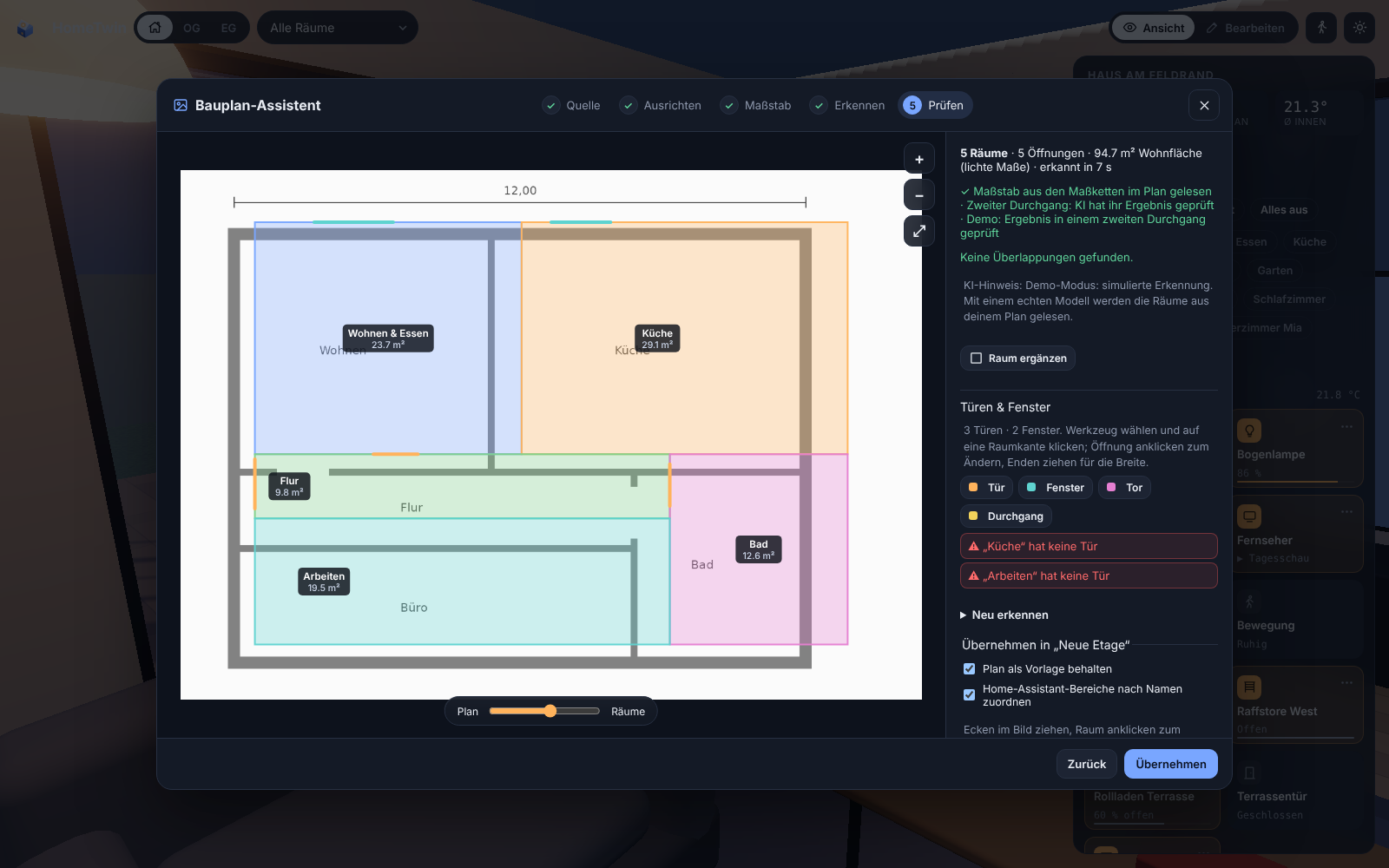
  • 🤖 Floor-plan AI: rooms, doors, windows and the scale are read from an architect's plan, including a self-check pass.
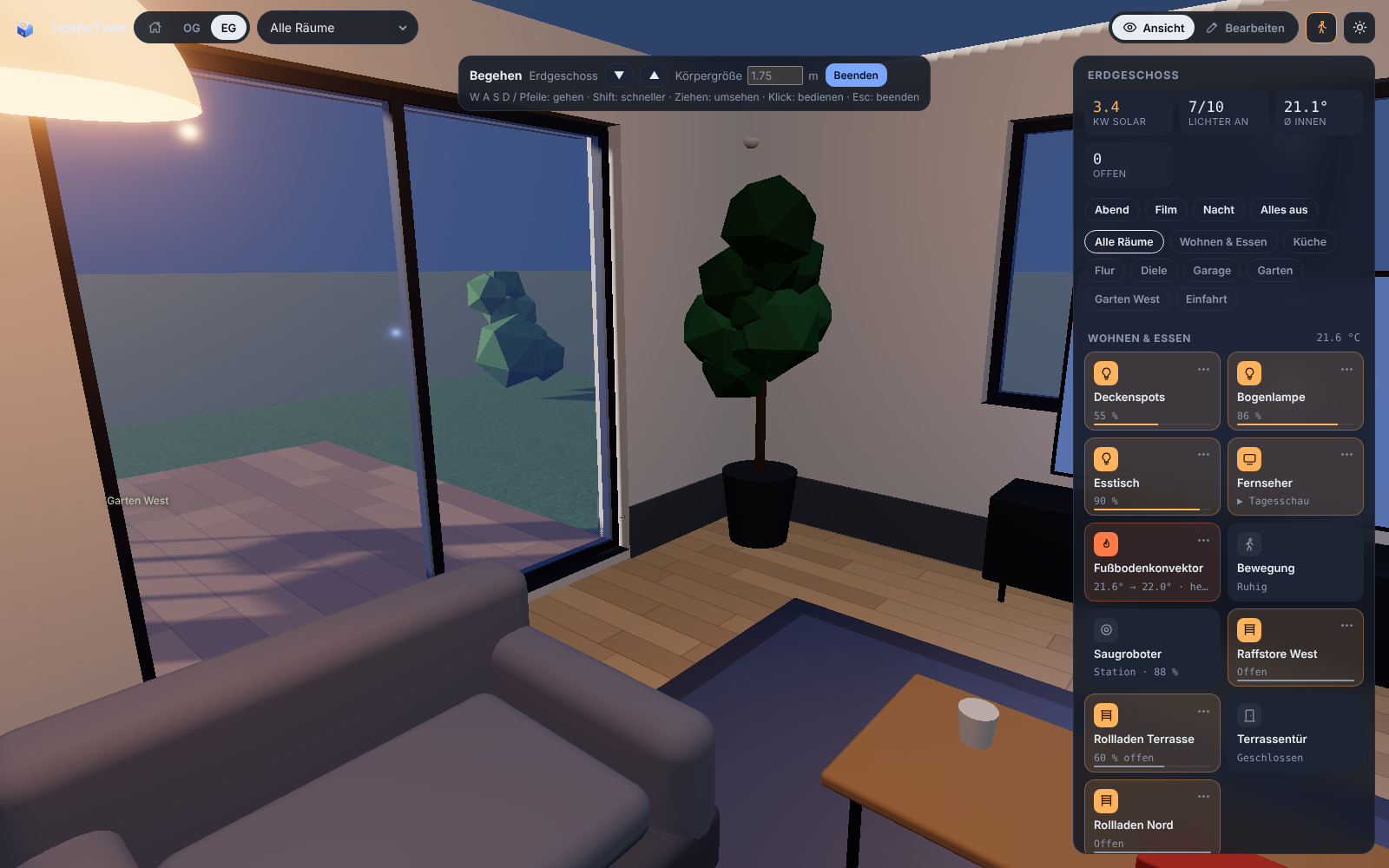
  • 🚶 Walk through your home at eye level and operate or rearrange things on the way.
  • 🏡 Several roofs: gable, hip, shed or flat, plus garage, carport or garden house with their own roof. Add dormers and roof windows.
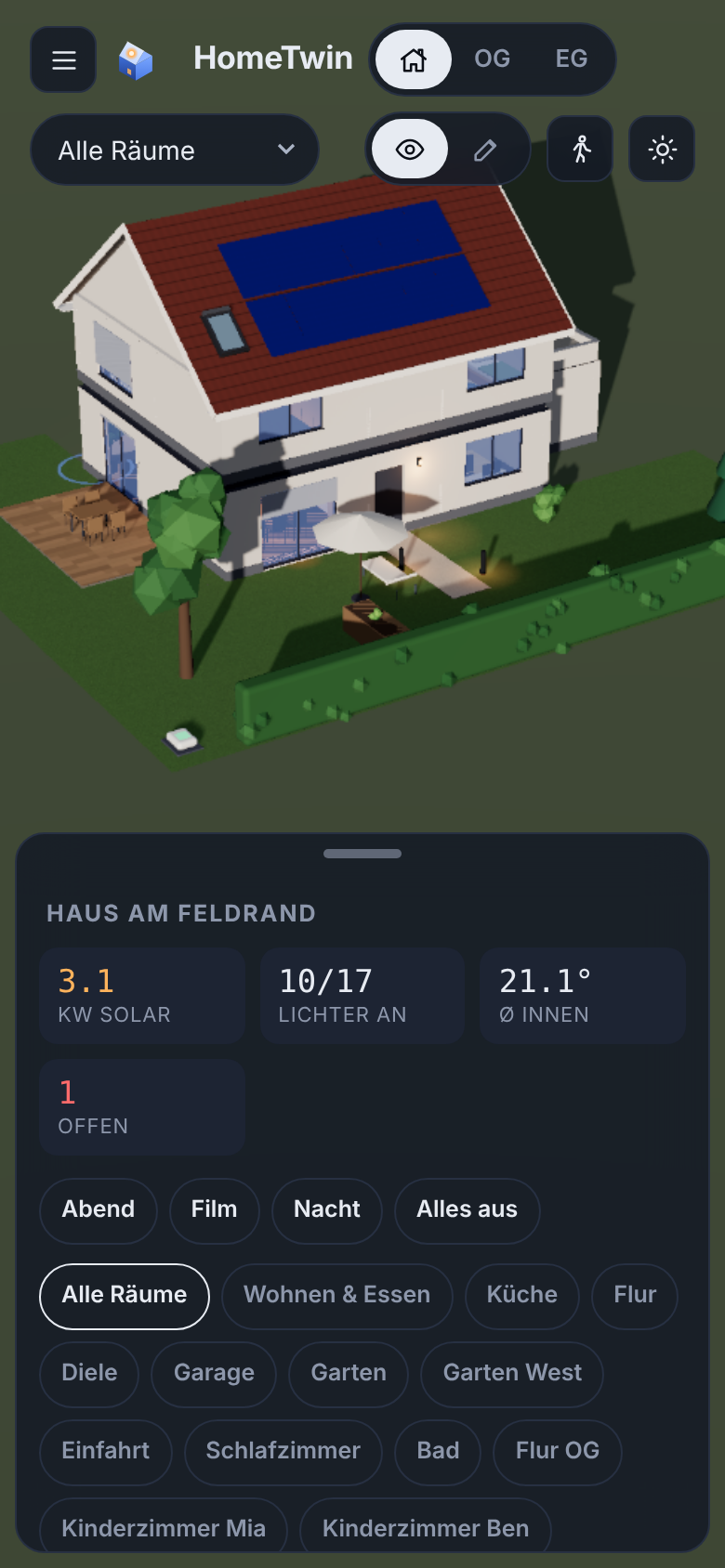
  • 📱 Phone and wall tablet ready: bottom-sheet controls, room picker, touch gestures, performance mode.
  • 🧩 Community object library: real products and generic furniture, modelled from real dimensions, updated live when new objects are merged.
  • 💾 Backup: export and import the complete configuration as one file.
Room viewFloor-plan assistantWalkthroughPhone

⚡ From floor plan to 3D in about 2 minutes

In our own test, a real architect's plan with 12 rooms and 16 openings was read in about two minutes with google/gemini-3.8-flash. The AI found the rooms, doors and windows and took the scale from the printed dimension chains, so no measuring was needed.

  1. Source: image, PDF, phone photo or clipboard.
  2. Align: crop, rotate, straighten.
  3. Scale: read from the dimension chains automatically, or measure one line.
  4. Recognise: two passes. In the second, the AI checks its own result drawn on the plan.
  5. Review: area warnings against the printed m², drag corners, add doors and windows by click. Then add the next storey and the roof, and watch the walls rise.

You don't need AI: the same assistant lets you trace the rooms yourself.

🚀 Installation

HACS (recommended)

  1. HACS → ⋮ → Custom repositories → add knaackee/hometwin as Integration.
  2. Install HomeTwin, then restart Home Assistant.
  3. Settings → Devices & services → Add integration → HomeTwin.
  4. Open HomeTwin in the sidebar and start with the demo house or your floor plan.

Manual: copy custom_components/hometwin into /config/custom_components/, or unpack hometwin.zip from the latest release into /config/custom_components/hometwin/. Then restart.

AI (optional): in the integration options, set any OpenAI-compatible endpoint with image input. We recommend Opus 5.5 or a comparably capable model with image understanding.

Coming from the preview called Raumwerk? HomeTwin takes over your plan, floor-plan images and AI settings automatically on first start. You can also use Backup → export/import. Remove Raumwerk afterwards.

UI language: Settings → Devices & services → HomeTwin → Configure → UI language. English is the default; German is also available. The choice applies to the HomeTwin panel independently of your Home Assistant profile language. Existing room and device names stay unchanged.

🧩 Contribute in 5 minutes

You don't need 3D skills to add objects. Give your coding agent (Claude, Codex or any agent that supports the open skill format) the skill skills/add-object/SKILL.md and a product name or a photo. The agent:

  1. identifies the product (or picks a generic object if the exact model isn't clear),
  2. researches the real dimensions,
  3. models it as a small recipe of shapes,
  4. renders a preview sheet and asks you to confirm,
  5. opens the pull request.

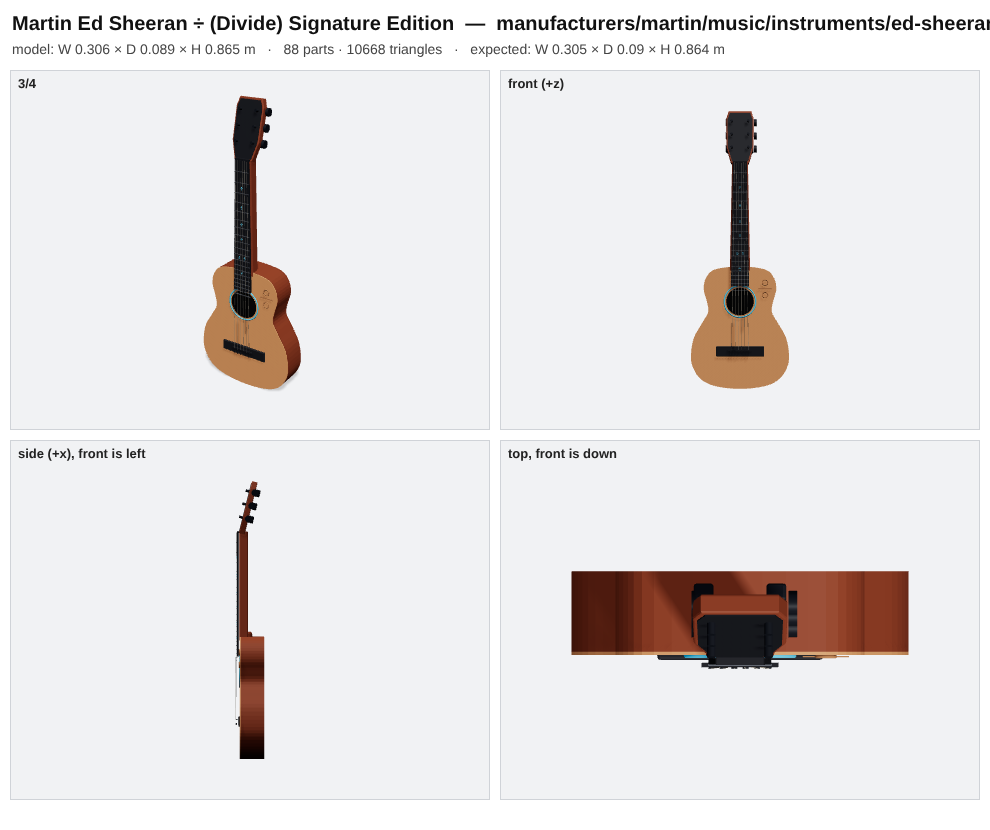
Preview sheet of the Martin Ed Sheeran ÷ guitar object

From a single phone photo the skill recognised a Martin Ed Sheeran ÷ (Divide) Signature Edition, researched it and built this object: 20 frets at their real positions, ÷ inlays, rosette, bridge and six tuners, in about five minutes.

Got some tokens to spare? Put them to work for the community. Look around your home: what furniture or devices are missing from HomeTwin? Grab some product photos and use our contribution guide with Opus 5.5 or a comparably capable model. Bring a whole room’s collection if you like, and bundle it in one pull request. Let’s make HomeTwin better together.

Recommended model for asset generation: Opus 5.5 or a comparably capable model with image understanding. Include the model used to generate each asset in the pull request. Translations welcome: English and German are supported. AI-assisted translations are welcome only after a native speaker manually reviews every string and checks the UI. See the translation contribution guide for files, checks and review requirements.

🗺️ Roadmap

  • 🌍 Community translations beyond English and German
  • 🔔 Needs attention: low batteries, offline devices, leaks and alarms, pulsing where they are
  • 🎛️ Device sheets: colour wheel, blind tilt, thermostat, media controls
  • 🛋️ Parametric generic objects: resize and restyle, later "adjust from photo"
  • 🖥️ Kiosk mode for wall tablets
  • 🏗️ Free-standing walls, per-wall rise animation, more roof shapes

Ideas and bugs: issues.

🤖 For developers and agents

Architecture, build, test and release steps are in AGENTS.md, written for humans and coding agents alike. Short version:

cd frontend && npm install && node build.mjs   # panel bundle + docs/demo/index.html
npm install && npm run validate                 # library checks (repo root)

📜 License and credits

  • Code: MIT. Object library: CC0-1.0 unless an object states CC-BY-4.0.
  • Built with three.js and pdf.js.
  • HomeTwin is an independent community project and not affiliated with Home Assistant or the Open Home Foundation. Product and brand names in the library are used only to describe objects.
3d
hacs
home-assistant
smart-home
threejs

Knaackee/hometwin

Interactive 3D home dashboard for Home Assistant with a community object library and floor-plan editor

JavaScript

9

13 commits

updated Oct 19, 2026

See the code

See what people are saying

SourceMessageScoreDate

HomeTwin: an open-source 3D home, with a shared library you can help build with Claude (r/ClaudeAI)

I've wanted a 3D view of my home on a wall display for years. Tap a light where it actually is, see what's happening in a room, control it from there. So I built HomeTwin. Claude built most of HomeTwin: the initial architecture, the editor, the user-facing UI, and the asset contribution skill. I…

1

Oct 18, 2026

README

HomeTwin logo

HomeTwin

Your home in 3D for Home Assistant.
Upload your floor plan, let AI read the rooms, control every device right where it is.

Status: beta Release HACS custom repository License MIT Library CC0 GitHub stars

▶️ Live demo · 🌐 Website · 🚀 Install · 🧩 Contribute · 🇩🇪 Deutsch
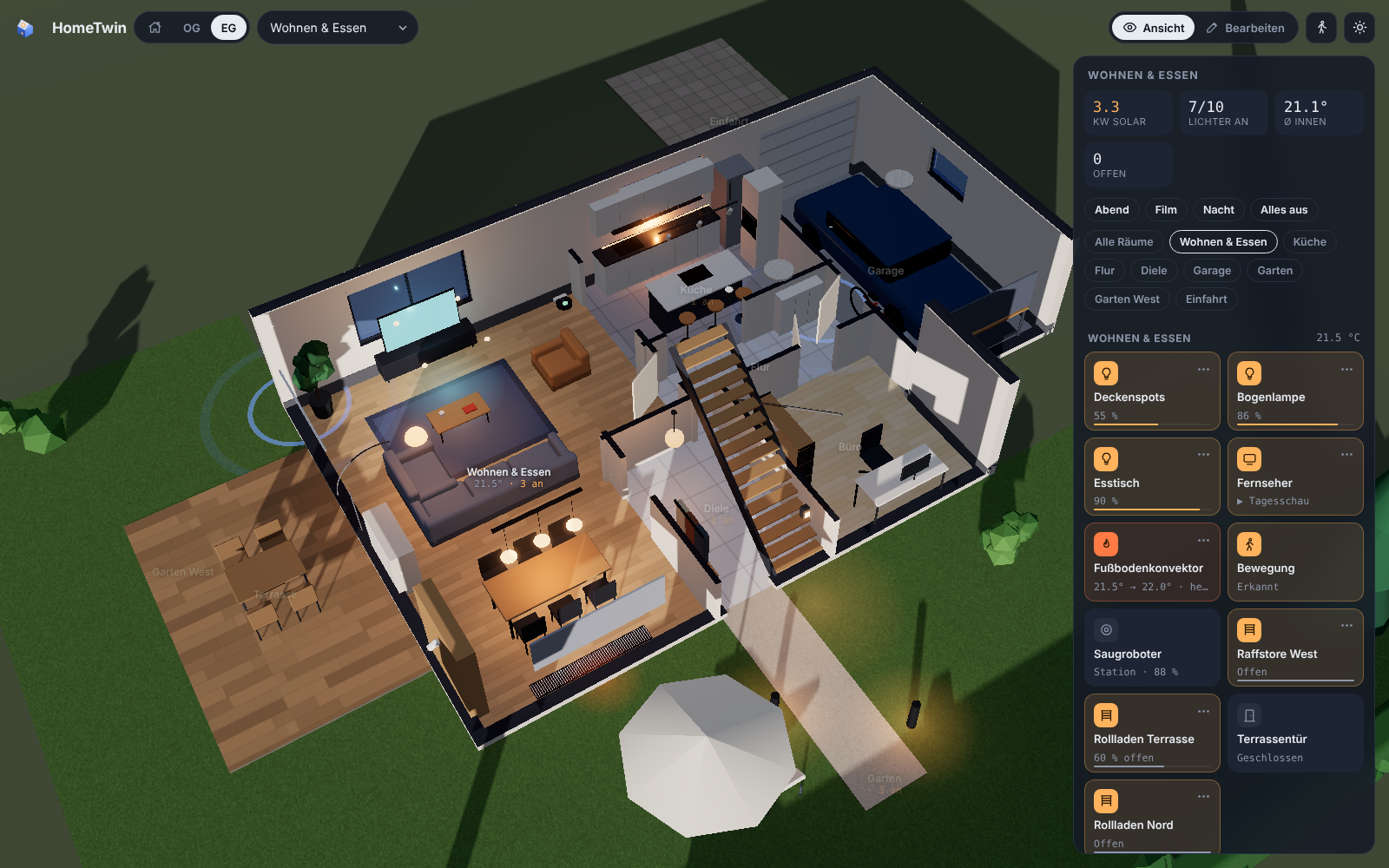
HomeTwin: an illuminated room in the interactive 3D view

[!WARNING] HomeTwin is a public beta. It runs in daily use, but data formats can still change. Export a backup now and then (Edit → House → Backup). HomeTwin currently supports English and German. The interface defaults to English; choose German in the integration options. For setup help, see Installation. Want to improve HomeTwin? See Contribute in 5 minutes.

✨ What it does

  • 🏠 Your house in 3D: storeys, rooms, walls, windows, doors, stairs, roofs, garden. Built from your floor plan or drawn by hand.
  • 💡 Live devices: lights glow in their colour, blinds and garage doors move, open windows light up, PV panels shine with your solar output. Tap to toggle, long-press for Home Assistant's detail dialog.
  • ☀️ Real sun and shadows for your location and time of day.
  • 🤖 Floor-plan AI: rooms, doors, windows and the scale are read from an architect's plan, including a self-check pass.
  • 🚶 Walk through your home at eye level and operate or rearrange things on the way.
  • 🏡 Several roofs: gable, hip, shed or flat, plus garage, carport or garden house with their own roof. Add dormers and roof windows.
  • 📱 Phone and wall tablet ready: bottom-sheet controls, room picker, touch gestures, performance mode.
  • 🧩 Community object library: real products and generic furniture, modelled from real dimensions, updated live when new objects are merged.
  • 💾 Backup: export and import the complete configuration as one file.
Room viewFloor-plan assistantWalkthroughPhone

⚡ From floor plan to 3D in about 2 minutes

In our own test, a real architect's plan with 12 rooms and 16 openings was read in about two minutes with google/gemini-3.8-flash. The AI found the rooms, doors and windows and took the scale from the printed dimension chains, so no measuring was needed.

  1. Source: image, PDF, phone photo or clipboard.
  2. Align: crop, rotate, straighten.
  3. Scale: read from the dimension chains automatically, or measure one line.
  4. Recognise: two passes. In the second, the AI checks its own result drawn on the plan.
  5. Review: area warnings against the printed m², drag corners, add doors and windows by click. Then add the next storey and the roof, and watch the walls rise.

You don't need AI: the same assistant lets you trace the rooms yourself.

🚀 Installation

HACS (recommended)

  1. HACS → ⋮ → Custom repositories → add knaackee/hometwin as Integration.
  2. Install HomeTwin, then restart Home Assistant.
  3. Settings → Devices & services → Add integration → HomeTwin.
  4. Open HomeTwin in the sidebar and start with the demo house or your floor plan.

Manual: copy custom_components/hometwin into /config/custom_components/, or unpack hometwin.zip from the latest release into /config/custom_components/hometwin/. Then restart.

AI (optional): in the integration options, set any OpenAI-compatible endpoint with image input. We recommend Opus 5.5 or a comparably capable model with image understanding.

Coming from the preview called Raumwerk? HomeTwin takes over your plan, floor-plan images and AI settings automatically on first start. You can also use Backup → export/import. Remove Raumwerk afterwards.

UI language: Settings → Devices & services → HomeTwin → Configure → UI language. English is the default; German is also available. The choice applies to the HomeTwin panel independently of your Home Assistant profile language. Existing room and device names stay unchanged.

🧩 Contribute in 5 minutes

You don't need 3D skills to add objects. Give your coding agent (Claude, Codex or any agent that supports the open skill format) the skill skills/add-object/SKILL.md and a product name or a photo. The agent:
  1. identifies the product (or picks a generic object if the exact model isn't clear),
  2. researches the real dimensions,
  3. models it as a small recipe of shapes,
  4. renders a preview sheet and asks you to confirm,
  5. opens the pull request.

Preview sheet of the Martin Ed Sheeran ÷ guitar object

From a single phone photo the skill recognised a Martin Ed Sheeran ÷ (Divide) Signature Edition, researched it and built this object: 20 frets at their real positions, ÷ inlays, rosette, bridge and six tuners, in about five minutes.

Got some tokens to spare? Put them to work for the community. Look around your home: what furniture or devices are missing from HomeTwin? Grab some product photos and use our contribution guide with Opus 5.5 or a comparably capable model. Bring a whole room’s collection if you like, and bundle it in one pull request. Let’s make HomeTwin better together.

Recommended model for asset generation: Opus 5.5 or a comparably capable model with image understanding. Include the model used to generate each asset in the pull request. Translations welcome: English and German are supported. AI-assisted translations are welcome only after a native speaker manually reviews every string and checks the UI. See the translation contribution guide for files, checks and review requirements.

🗺️ Roadmap

  • 🌍 Community translations beyond English and German
  • 🔔 Needs attention: low batteries, offline devices, leaks and alarms, pulsing where they are
  • 🎛️ Device sheets: colour wheel, blind tilt, thermostat, media controls
  • 🛋️ Parametric generic objects: resize and restyle, later "adjust from photo"
  • 🖥️ Kiosk mode for wall tablets
  • 🏗️ Free-standing walls, per-wall rise animation, more roof shapes

Ideas and bugs: issues.

🤖 For developers and agents

Architecture, build, test and release steps are in AGENTS.md, written for humans and coding agents alike. Short version:

cd frontend && npm install && node build.mjs   # panel bundle + docs/demo/index.html
npm install && npm run validate                 # library checks (repo root)

📜 License and credits

  • Code: MIT. Object library: CC0-1.0 unless an object states CC-BY-4.0.
  • Built with three.js and pdf.js.
  • HomeTwin is an independent community project and not affiliated with Home Assistant or the Open Home Foundation. Product and brand names in the library are used only to describe objects.
3d
hacs
home-assistant
smart-home
threejs