
A desktop image editor written in C++, powered by Vulkan.
C++
9
7 commits
updated Sep 29, 2026
See what people are saying
README
Vulkana Image Editor
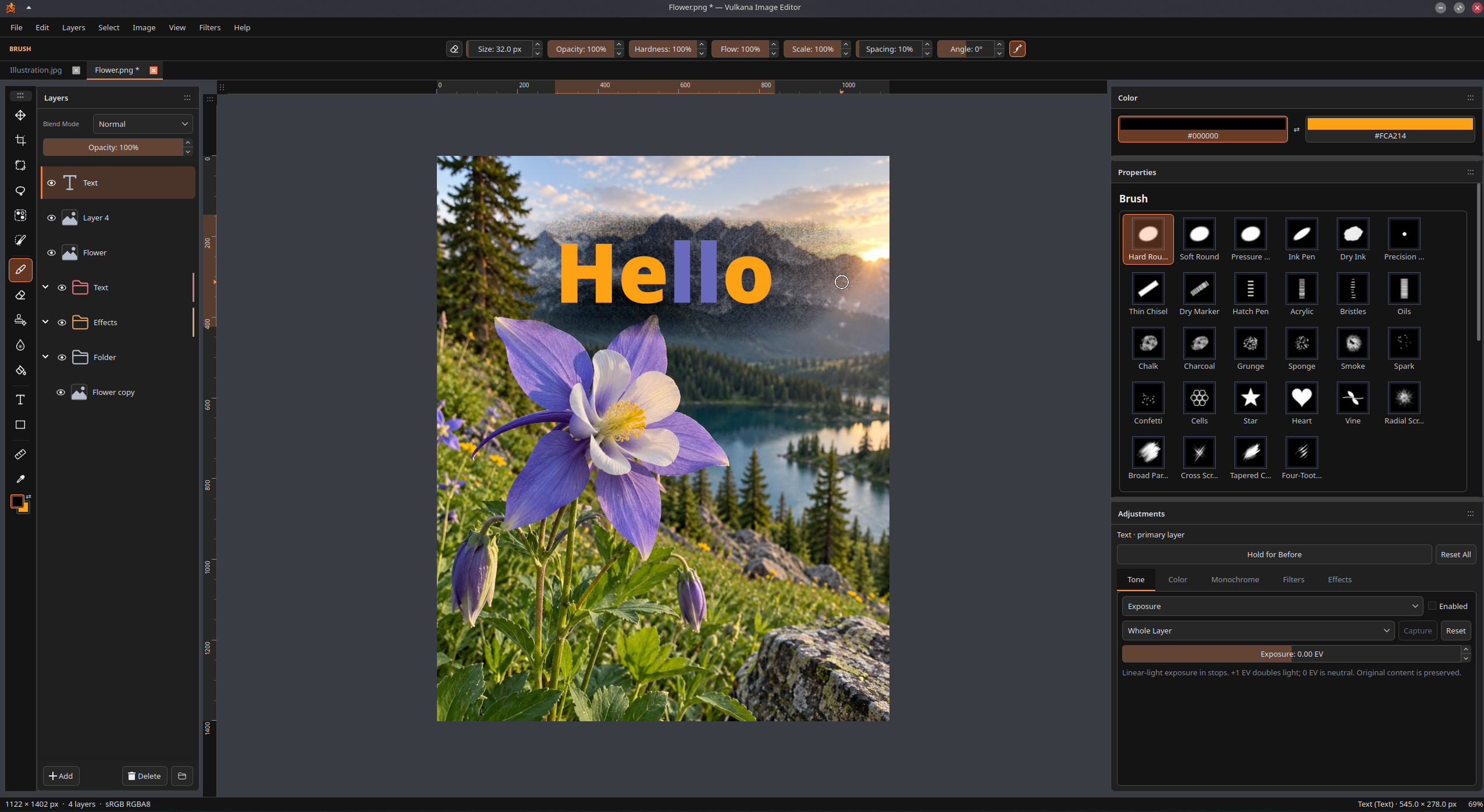
A Linux-first image editor for painting, retouching and layered composition, with a Qt workspace and Vulkan-accelerated canvas.
Features
- Layered editing: raster, editable text and shapes; folders, multi-selection, blend modes, duplication, merging and explicit rasterization.
- Painting and retouching: pressure-sensitive brushes, procedural and textured presets, erasing, fill, local blur, Clone Stamp, Heal and automatic Spot Heal.
- Selections: rectangle, ellipse, freehand/polygon/magnetic lasso, select by color and smart selection, with grow/shrink, inversion and reselect.
- Transforms: move, scale, rotate, flip and corner distortion; transform selection boundaries or selected pixels, with snapping and alignment guides.
- Non-destructive adjustments: exposure, levels, curves, hue/saturation, vibrance, color balance, warmth/tint, monochrome conversion and inversion.
- Filters and layer effects: Gaussian, Motion and Lens Blur; Stroke, Drop/Inner Shadow, Outer/Inner Glow, Color Overlay and Gradient Overlay.
- Multiple documents: tabs with independent history, selections and view state, plus editable layer copying between documents.
- PDF import: selected pages at your chosen PPI, as raster layers or separate documents, with transparent or white backgrounds.
- PDF export: a composite or layers/groups as pages, custom page selection, canvas/fitted sizes and selectable text where supported.
- Workspace and output: dockable panels, themes, editable shortcuts, rulers,
Pixel Preview, native
.vulkanaprojects and PNG/JPEG/WebP export.
Actively developed beta. Please keep backups of important projects.
Build and run
Requires Linux, a C++20 compiler, Ninja, pkg-config, and these development libraries:
- CMake 3.28+ for the supplied presets.
- Qt 6.8+: Core, Gui, Widgets, Network and PDF; Qt Test for tests.
- qpdf 11+ development library (PDF import/export; not the command-line tool).
- Vulkan 1.2+ headers/loader, a working Vulkan driver, and
glslc. - minizip-ng 4.x (the
minizippkg-config module, not legacy minizip). - libwebp and libwebpmux 1.2+.
Install Qt's platform plugins for your desktop, SVG support and image-format
plugins. Point CMAKE_PREFIX_PATH at your Qt installation if it is outside the
system search path.
Qt PDF is a separate development package on many distributions (for example,
qt6-qtpdf-devel on Fedora, qt6-pdf-dev on Ubuntu). It does not require a
WebEngine browser in Vulkana's runtime.
From the repository root:
cmake --preset release -DIMAGEEDITOR_BUILD_TESTS=OFF
cmake --build --preset release --parallel
./build/release/src/app/imageeditor
Projects and images can also be passed as arguments:
./build/release/src/app/imageeditor "project.vulkana" "photo.webp"
Qt selects Wayland or X11 from the session. Preferences and custom presets live in per-user storage. Online services are optional; without service configuration, updates and feedback stay disabled.
For development and tests:
cmake --preset debug
cmake --build --preset debug --parallel
ctest --preset debug
Debug/native rendering checks need Vulkan validation layers. Some interaction tests require a running Wayland/X11 desktop.
Architecture
src/core— platform-neutral documents, layers, geometry, image algorithms and undoable transactions.src/render— shared Vulkan canvas, composition, overlays and bounded GPU caches.src/ui— Qt panels, tools, document tabs, text/shape preparation and file I/O.src/platform— resource lookup, desktop integration and optional services.src/app— application entry point;shaders— Vulkan shader sources.
Each document owns its content and history; tabs share one workspace and Vulkan renderer. Editable source data stays separate from render caches. Canvas, Pixel Preview and export share the same composition rules.
See the developer docs and architecture guide.
License
Vulkana-owned code, documentation and assets are MIT licensed. Third-party material retains its own licenses; see third-party notices.
Similar repos


Languages
C++
97.7%
CMake
1.7%
A desktop image editor written in C++, powered by Vulkan.
C++
9
7 commits
updated Sep 29, 2026
See what people are saying
README
Vulkana Image Editor
A Linux-first image editor for painting, retouching and layered composition, with a Qt workspace and Vulkan-accelerated canvas.
Features
- Layered editing: raster, editable text and shapes; folders, multi-selection, blend modes, duplication, merging and explicit rasterization.
- Painting and retouching: pressure-sensitive brushes, procedural and textured presets, erasing, fill, local blur, Clone Stamp, Heal and automatic Spot Heal.
- Selections: rectangle, ellipse, freehand/polygon/magnetic lasso, select by color and smart selection, with grow/shrink, inversion and reselect.
- Transforms: move, scale, rotate, flip and corner distortion; transform selection boundaries or selected pixels, with snapping and alignment guides.
- Non-destructive adjustments: exposure, levels, curves, hue/saturation, vibrance, color balance, warmth/tint, monochrome conversion and inversion.
- Filters and layer effects: Gaussian, Motion and Lens Blur; Stroke, Drop/Inner Shadow, Outer/Inner Glow, Color Overlay and Gradient Overlay.
- Multiple documents: tabs with independent history, selections and view state, plus editable layer copying between documents.
- PDF import: selected pages at your chosen PPI, as raster layers or separate documents, with transparent or white backgrounds.
- PDF export: a composite or layers/groups as pages, custom page selection, canvas/fitted sizes and selectable text where supported.
- Workspace and output: dockable panels, themes, editable shortcuts, rulers,
Pixel Preview, native
.vulkanaprojects and PNG/JPEG/WebP export.
Actively developed beta. Please keep backups of important projects.
Build and run
Requires Linux, a C++20 compiler, Ninja, pkg-config, and these development libraries:
- CMake 3.28+ for the supplied presets.
- Qt 6.8+: Core, Gui, Widgets, Network and PDF; Qt Test for tests.
- qpdf 11+ development library (PDF import/export; not the command-line tool).
- Vulkan 1.2+ headers/loader, a working Vulkan driver, and
glslc. - minizip-ng 4.x (the
minizippkg-config module, not legacy minizip). - libwebp and libwebpmux 1.2+.
Install Qt's platform plugins for your desktop, SVG support and image-format
plugins. Point CMAKE_PREFIX_PATH at your Qt installation if it is outside the
system search path.
Qt PDF is a separate development package on many distributions (for example,
qt6-qtpdf-devel on Fedora, qt6-pdf-dev on Ubuntu). It does not require a
WebEngine browser in Vulkana's runtime.
From the repository root:
cmake --preset release -DIMAGEEDITOR_BUILD_TESTS=OFF
cmake --build --preset release --parallel
./build/release/src/app/imageeditor
Projects and images can also be passed as arguments:
./build/release/src/app/imageeditor "project.vulkana" "photo.webp"
Qt selects Wayland or X11 from the session. Preferences and custom presets live in per-user storage. Online services are optional; without service configuration, updates and feedback stay disabled.
For development and tests:
cmake --preset debug
cmake --build --preset debug --parallel
ctest --preset debug
Debug/native rendering checks need Vulkan validation layers. Some interaction tests require a running Wayland/X11 desktop.
Architecture
src/core— platform-neutral documents, layers, geometry, image algorithms and undoable transactions.src/render— shared Vulkan canvas, composition, overlays and bounded GPU caches.src/ui— Qt panels, tools, document tabs, text/shape preparation and file I/O.src/platform— resource lookup, desktop integration and optional services.src/app— application entry point;shaders— Vulkan shader sources.
Each document owns its content and history; tabs share one workspace and Vulkan renderer. Editable source data stays separate from render caches. Canvas, Pixel Preview and export share the same composition rules.
See the developer docs and architecture guide.
License
Vulkana-owned code, documentation and assets are MIT licensed. Third-party material retains its own licenses; see third-party notices.
Similar repos
Languages
C++
97.7%
CMake
1.7%