
See what people are saying
README
Just Dashboard
One authenticated UI for one Linux server. Metrics, Docker, processes, logs, a real shell, files, git, databases, the reverse proxy, the firewall, backups and deploys, behind a login that lives on your private network.
Version 0.7.0 · Go backend · Next.js frontend · one docker compose stack
Install · Security · Support · The tour · Configuration · Licence
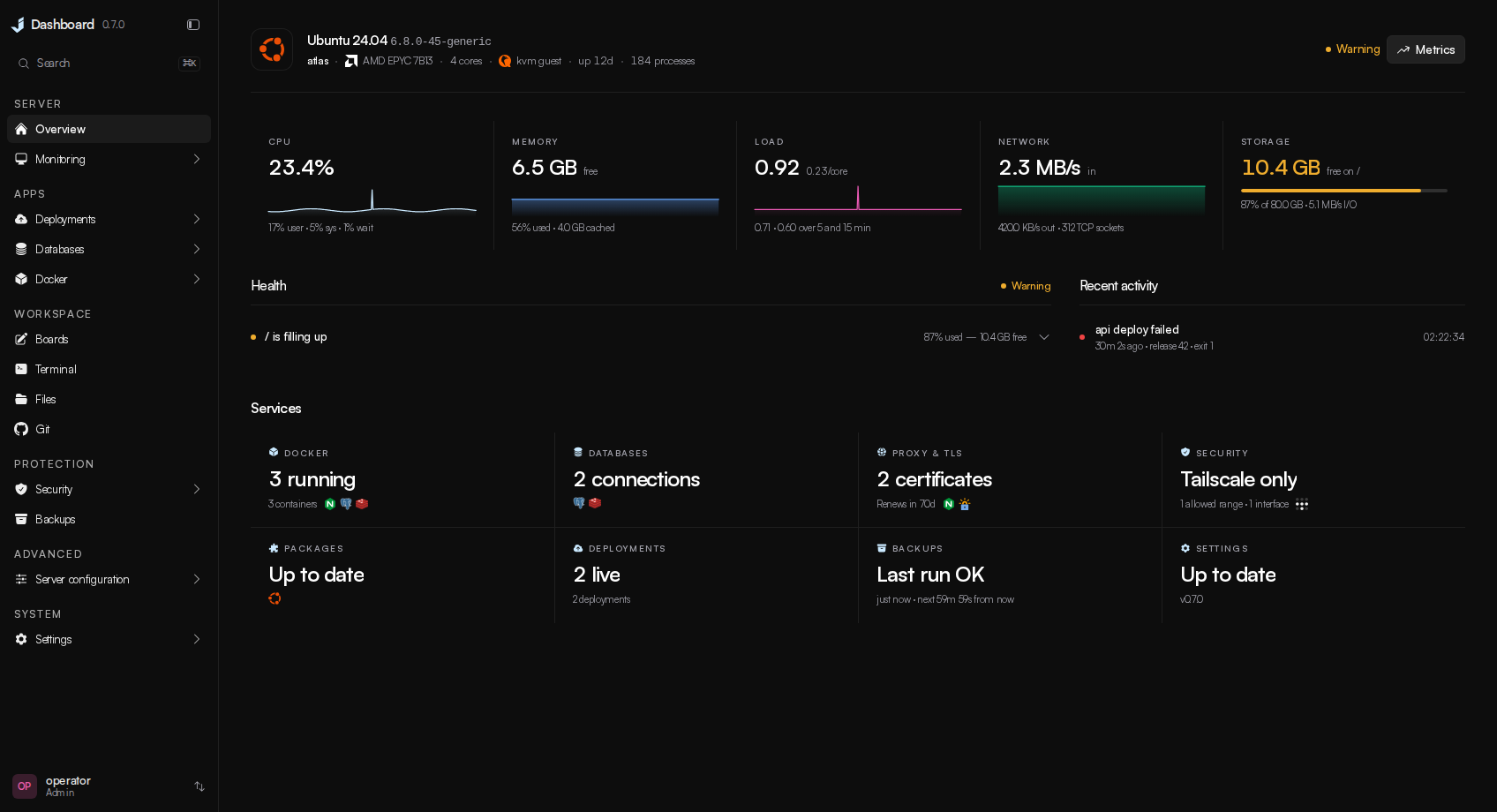
Screenshots show version 0.7.0 with example data.
Why
Most panels show you a number and leave the reading to you: 68% CPU, exit code 137, restarted 12 times. Just Dashboard tries to answer the next question instead. It says the server is waiting rather than merely busy, that a container was killed for its memory limit and what the limit was, and where the dashboard can fix a finding, the finding comes with a button.
It manages exactly one machine. There is no fleet view, no agents to enrol, no cluster.
What it does
- Deploys from a repository, an image, a template or a Compose file. Detection fills the form in for Node, Bun and Deno, Python, PHP, Go, Rust, Java and Kotlin, .NET, Ruby, Elixir, Scala, Clojure, Dart, Gleam and static site generators: it picks the application out of a repository's examples, docs and tooling, reads lockfiles to choose the package manager and runtime, plans a volume for the SQLite file, uploads or key ring an app would otherwise lose on its next release, and says before you deploy what it will not run. Every deployment is checked against the commit it builds before it builds, what would stop it or deserves a look is shown before Deploy is pressed, and a build that still fails names its cause and the setting that fixes it. Every release is immutable, so rollback reactivates what ran before. Web services get a health-gated cutover.
- Databases you can hand out. Eight engines browsed, queried and diagrammed from one place. A database started here gets a connection string, and one press opens it to the internet or closes it again.
- Boards for the server you run. Sketch with the bundled Excalidraw editor, keep multiple boards in the dashboard's own database, and place linked cards for this host, deployment projects and database connections. Changes save automatically; an older tab cannot silently replace a newer save.
- Fifty-seven reviewed templates, each one saying how you get in. PostgreSQL, Redis, n8n, Grafana, Uptime Kuma, Vaultwarden, Nextcloud, Jellyfin, code-server, Ollama, Open WebUI, ntfy, Qdrant, NocoDB and more, one click each — and every card says whether you create the first account yourself, sign in with a password this server generated, or find no sign-in page at all.
- Automatic Git deployments, previews and notifications. Push to deploy, approved previews per pull request — test one from the Git page or a project's overview at an address only your tailnet can reach — and every run reported to Discord, Slack, Telegram, e-mail, a webhook and the commit's status on GitHub.
- Backups that know what is not backed up. Every volume, stack, deployment, repository and database listed, one press from a job, with writers frozen while the archive is taken.
- A real shell, a real file manager, the repositories on the disk. Host shells that survive the tab closing, a file manager with previews and an editor, and every Git checkout with staging, history, branches and pull requests.
Install
git clone https://github.com/JustDashboard/Just-Dashboard.git
cd Just-Dashboard && sudo ./install.sh
The installer asks how you intend to reach it. Tailscale is the default: the machine stays
invisible to the internet and the dashboard answers at https://your-box.tailnet-name.ts.net:8443
with a real certificate. An SSH tunnel is the fallback, served on loopback. It then generates
the master key and a first password, builds the stack and prints the command to get in.
Four labeled stages show progress; the completion guide includes terminal admin commands.
Use ./install.sh --help to preview the steps or sudo NO_COLOR=1 ./install.sh for plain output.
Everything it asked is editable afterwards under Settings → Configuration. It also installs
the host tools the web terminal and the dashboard's pages run on the server itself — gh from
GitHub's own repository, git-lfs, whois and traceroute — where they are missing, so a GitHub
sign-in on the Git page works from the terminal and over ssh too.
To upgrade, git pull and docker compose up -d --build, use the in-app update, or run
sudo ./install.sh again. All three keep your .env, database, accounts and sessions; only
the installer adds host tools a newer release relies on.
Terminal admin tools
Run these on the server from your checkout. They manage dashboard accounts, separate from Linux users, and use the built backend image, so Go and a browser login are not needed. Account commands also work when the backend is stopped; Docker must be running and installation must be complete.
sudo ./scripts/reset-password.sh admin         # recover an account with a temporary password
sudo ./scripts/create-user.sh alice limited    # readonly, limited or admin; default is readonly
sudo ./scripts/manage.sh users                 # list accounts, roles and two-factor status
sudo ./scripts/manage.sh revoke-sessions alice # sign out all browser sessions
sudo ./scripts/manage.sh status                # show containers and health
sudo ./scripts/manage.sh logs                  # follow backend logs; Ctrl+C exits
sudo ./scripts/manage.sh logs proxy            # backend, frontend or proxy
sudo ./scripts/manage.sh restart               # recreate containers to apply .env edits
./scripts/manage.sh --help                     # usage without sudo
Passwords are entered twice with hidden input and must meet the dashboard's strength rules. New and
reset passwords are temporary: the account holder must change them at sign-in, after completing any
required two-factor step. A reset clears failed-login lockout and revokes that account's sessions and
API tokens, while keeping two-factor enrollment, recovery codes, role and disabled state. Account
changes are audited as local root. revoke-sessions leaves API tokens unchanged.
For automation, append --password-stdin to either password command and pipe one password line from
a trusted source. Never put passwords in command arguments or shell history. The scripts locate the
checkout from their own path and let Compose read .env; they do not execute it as shell code.
Run a stack restart from SSH because it disconnects the web terminal. The restart command recreates
containers with current settings; docker compose restart alone keeps their previous environment.
Read this before you expose it
This dashboard is root-equivalent. Anyone who reaches it with a valid session has root on the machine. It is built to sit behind a VPN or an SSH tunnel, and that is enforced:
- The backend refuses to start on a non-loopback address without a
JD_ALLOWED_CIDRSallowlist, and the allowlist is checked before authentication. - Two-factor is enforced for every account that has enrolled.
JD_REQUIRE_2FAdecides whether an account must enrol. - Destructive actions are capability checked and audited. Deleting a deployment project, database, or Docker stack requires a typed phrase checked on the server; other risky actions use ordinary confirmation.
- Every state-changing request lands in an audit log.
Who makes this
Just Dashboard is built by one person, Wayy01, under the JustDashboard organisation. The dashboard is free and every feature stays free. If it has saved you an evening, there is a Buy Me a Coffee page — entirely optional.
Sponsors. Companies and individuals who would like to sponsor the project can write to ionmoisei755@gmail.com and will be listed here with a logo and a link. No sponsors yet — the space is open.
The tour
Everything is one keystroke away
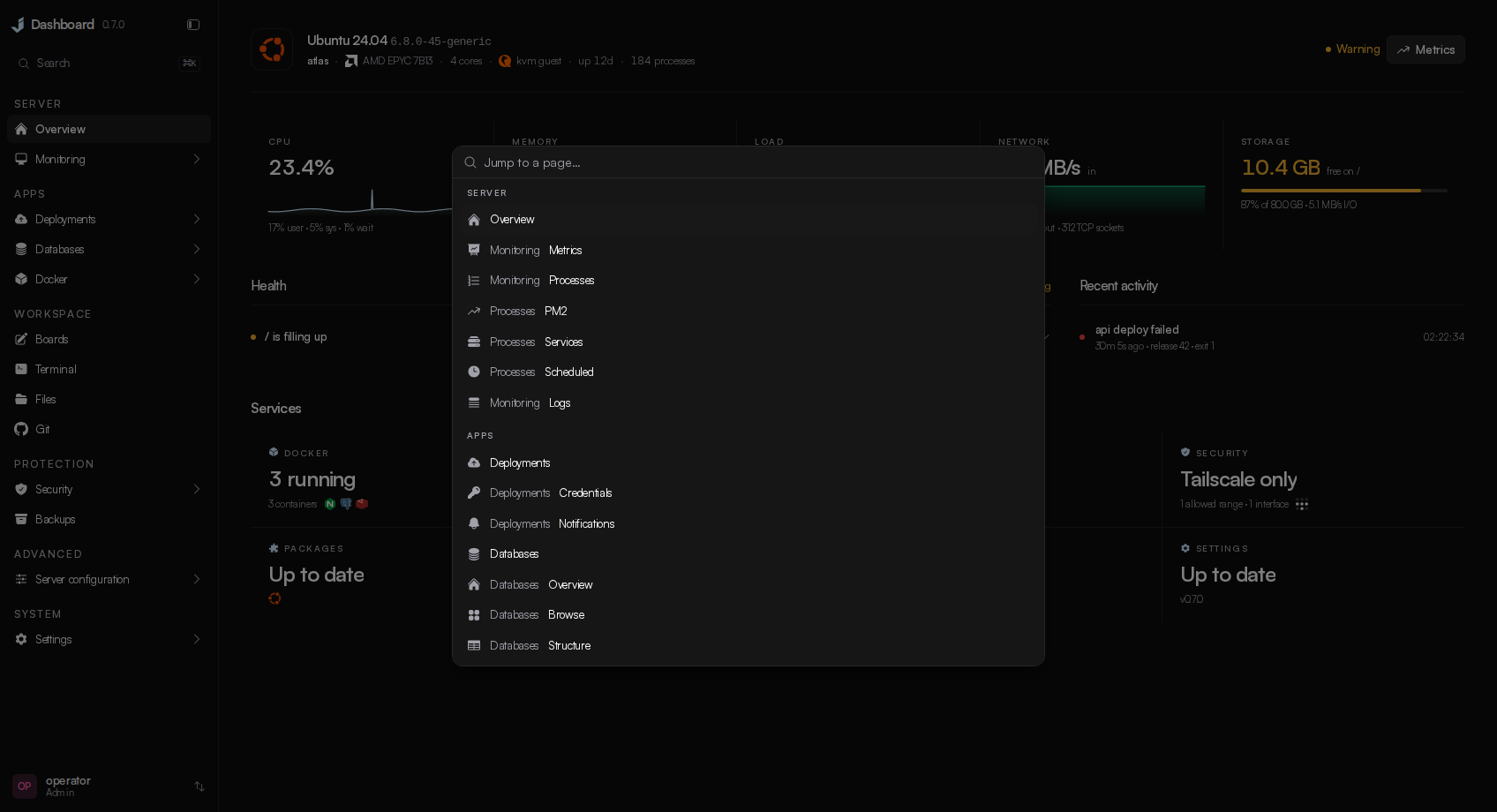
⌘K from anywhere. The sidebar drills into a section — Docker, Databases, Security, one deployment — and every page comes back the way you left it.
Docker
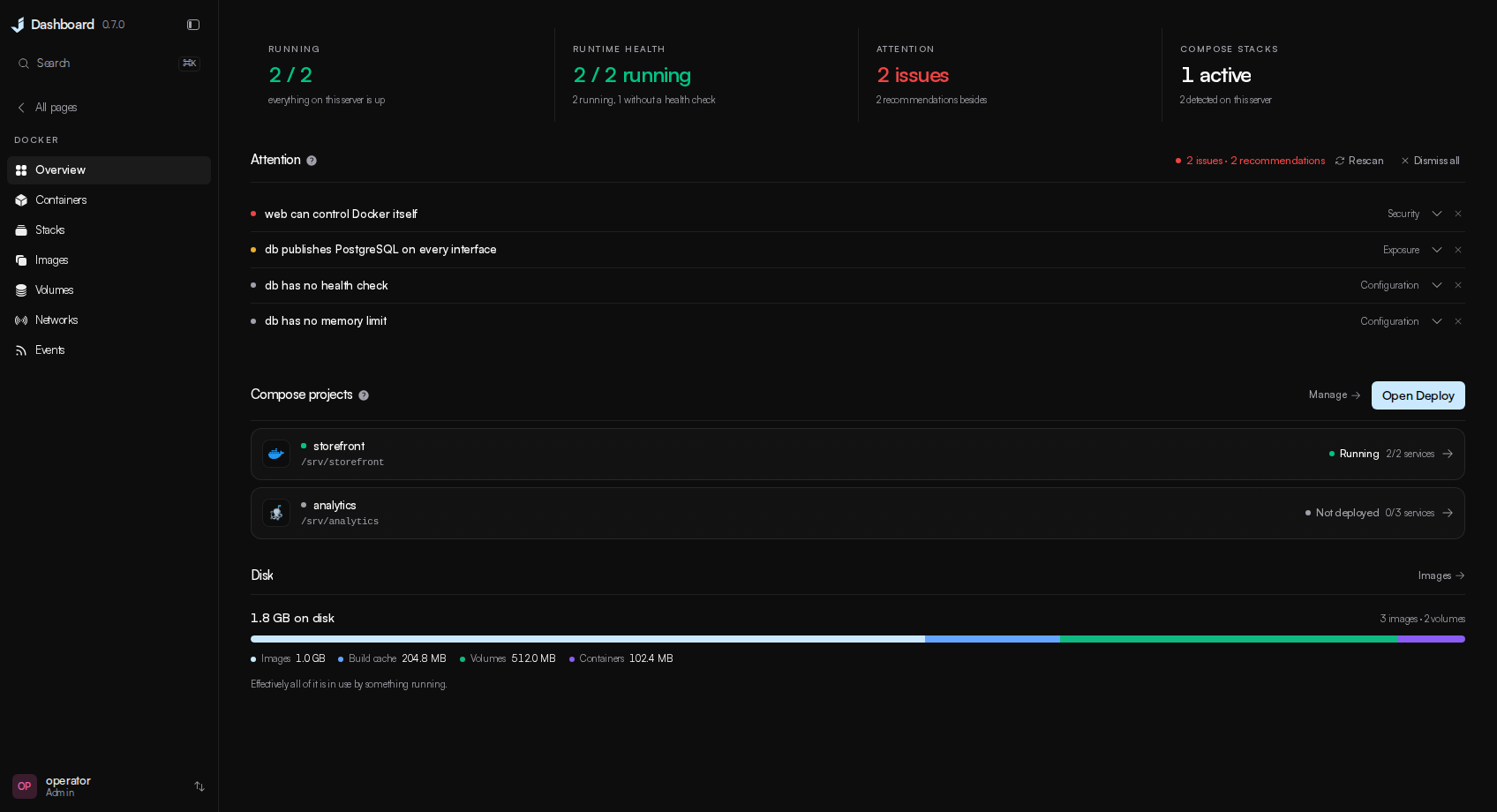
Create containers from a template, a pasted docker run or a form, with the command rendered
before it runs. Two verdicts: what Docker reports, and what needs attention — exposure, disk,
memory limits, security posture — each with an explanation and, where possible, a button.
Stacks deploy, rebuild and roll back with the compose diff shown first.
Each container's Usage tab combines live CPU, memory, network and block I/O readings with recorded
history. Inspect per-interface transfer rates, totals, packet errors and drops, memory cache and CPU
throttling; unavailable readings stay distinct from zero activity.
Terminal
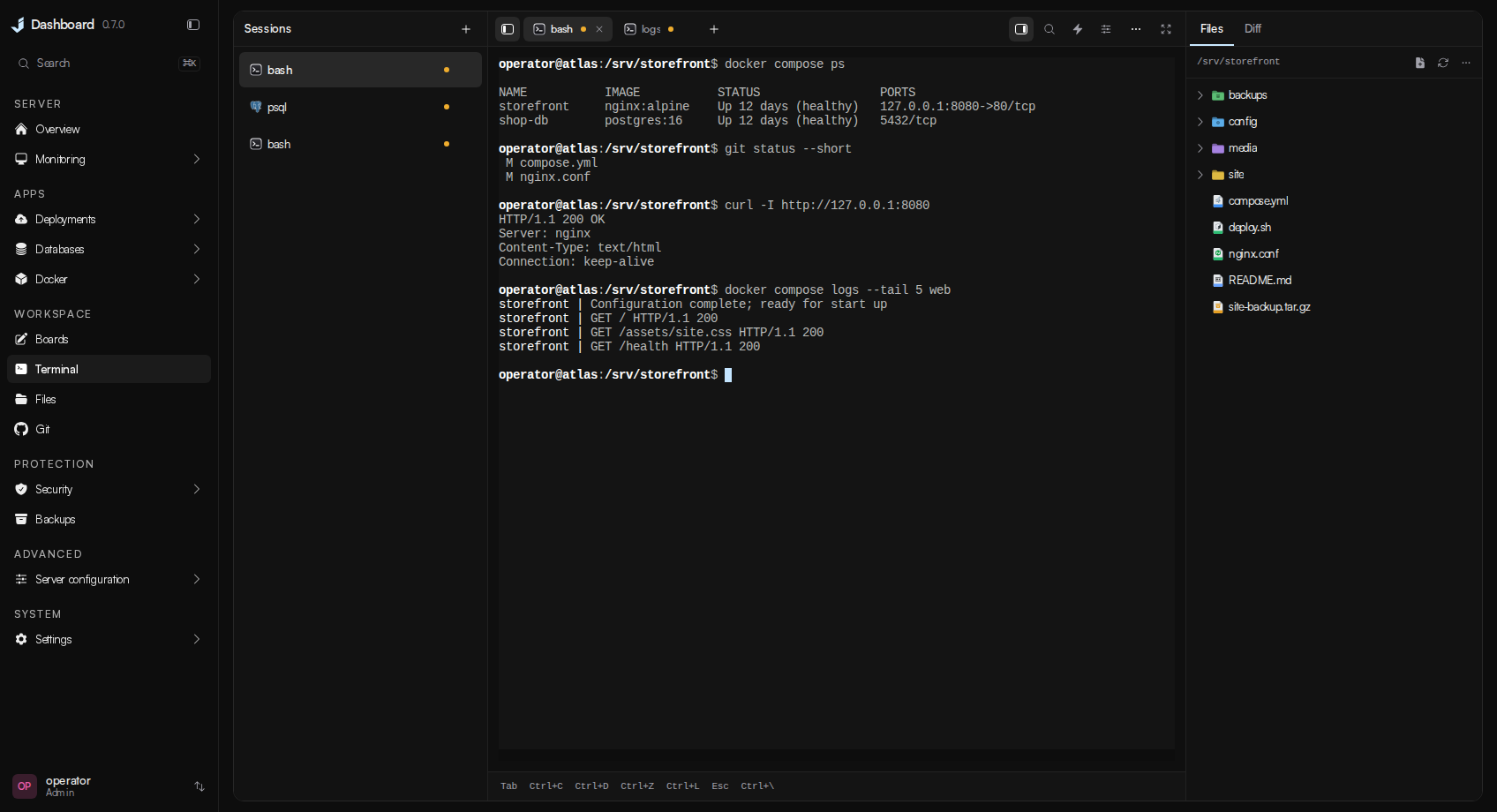
A real PTY into a host account. Sessions group windows, each named after what it is running, and they keep running on the server until you close them — with the tab closed, and across dashboard restarts and upgrades — so an agent left working is still working when you come back. Files and Git sit beside the shell.
Boards
Open Boards in Workspace to create a drawing. Each board has its own address and is saved in
JD_DATA_DIR with the dashboard's other state. Add server item inserts a linked host, project or
database card. The card shows the resource's name and status when inserted; its link opens the current
resource page. Board editing needs service.control, and deletion asks for the board's name.
Files
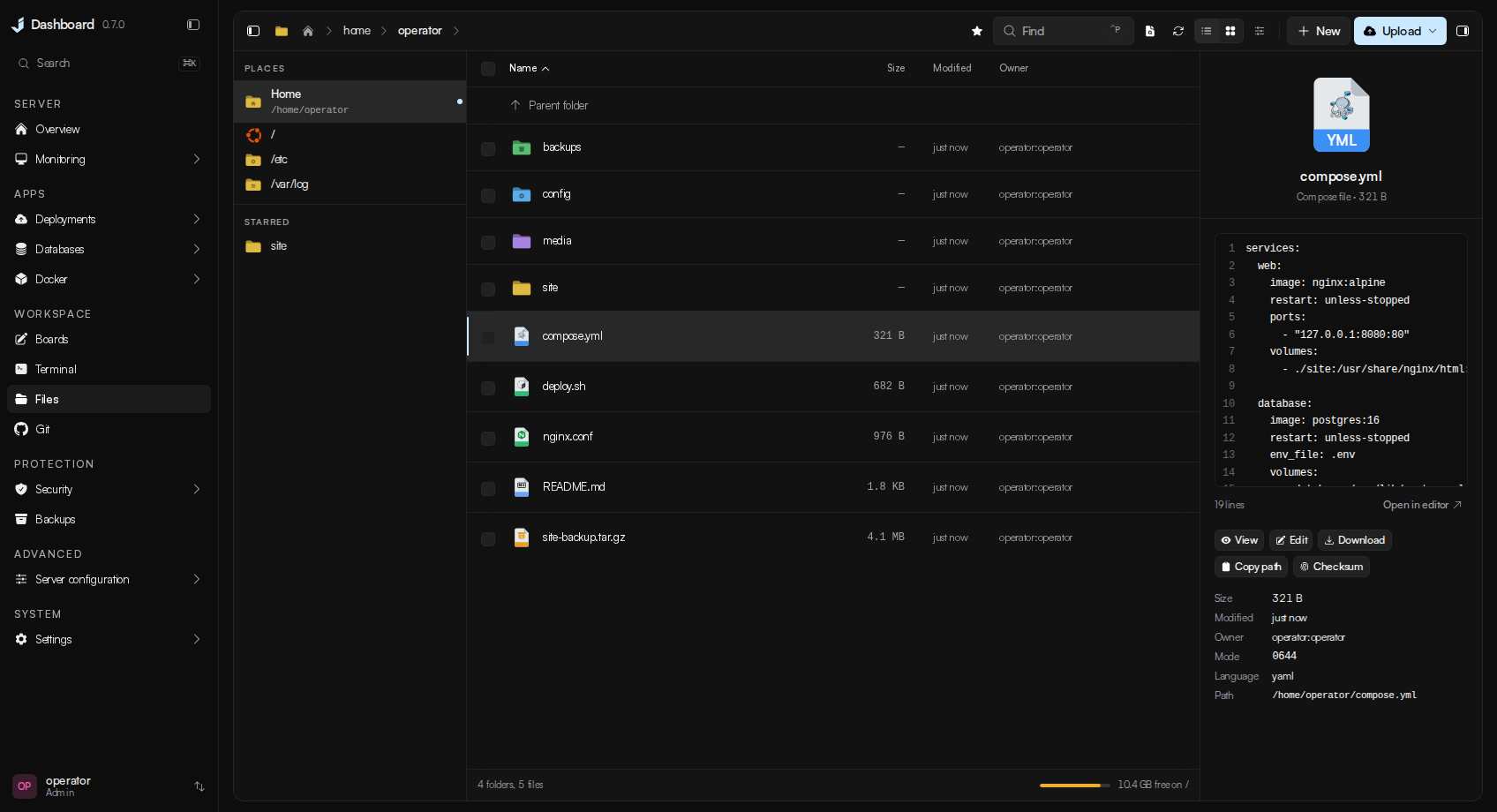
Browse, preview, edit with a diff before saving, drag and drop, upload whole folders, crop
pictures, chmod, search by content, archive and extract. Every path is checked against
JD_FILE_ROOTS before anything happens.
The folder button in the toolbar changes every folder's colour. The inspector and folder menus can
then set a different colour for one folder.
Git
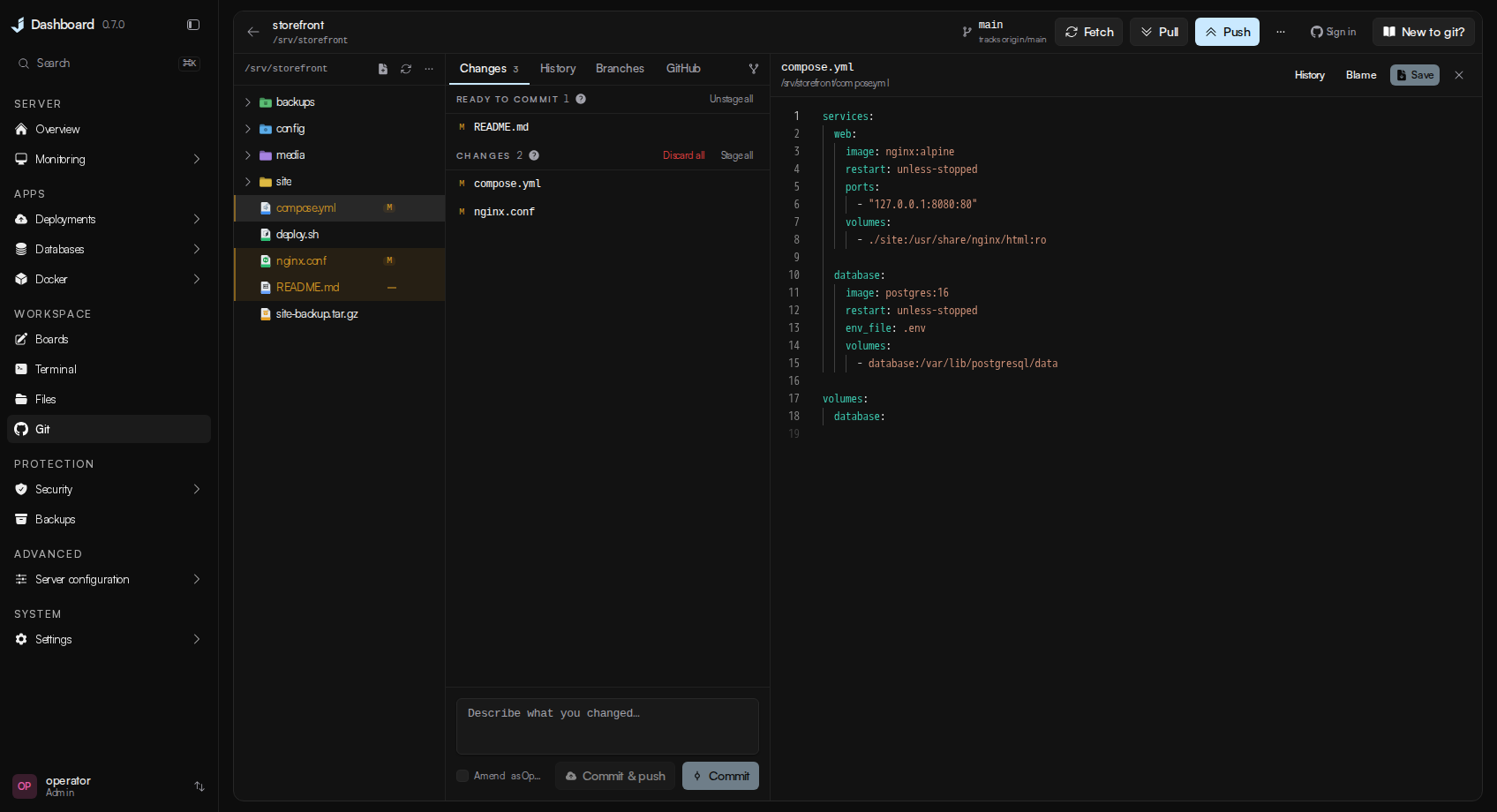
Every repository under the configured roots. Stage, commit, push, stash, branch, merge, tag, and
open pull requests from the page, signed in to GitHub with the same device flow gh uses.
Stage individual lines or chunks, resolve conflicts, compare branches, inspect blame and signatures,
recover commits, and edit local history with a recovery branch. Worktrees, submodules, Git LFS and
patch import/export open in the same workspace. Review GitHub pull requests and Actions job logs,
or connect a GitLab/Gitea token for requests on those providers.
Pull establishes missing upstream tracking when the same branch has one unambiguous remote match or
a configured remote preference. If it needs a choice, use Branches → Set upstream. Pull remains
fast-forward-only and refuses to overwrite local work.
Deployments
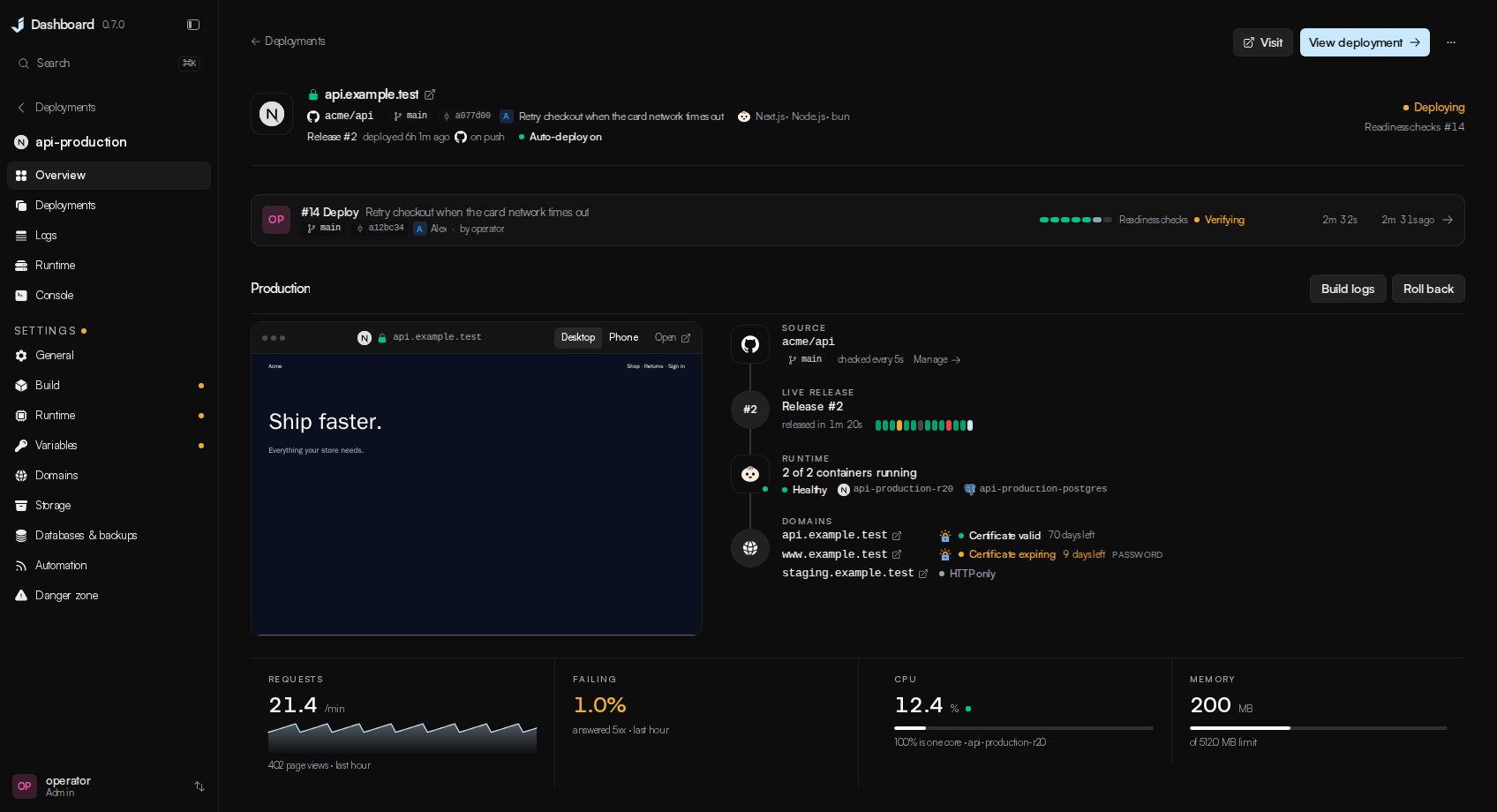
Point it at a repository, an image, a template, a Compose stack or something already running. It says what it found, shows the plan, and runs it as a job with a permanent URL. Each project has an overview with a live preview, deployments with rollback, logs, runtime, a console and settings. Setup can generate template credentials and suggest a public address, create and connect a private database on this server, or use an external database connection. Build commands, variables, storage, health checks and runtime limits remain editable before the first deployment.
Databases
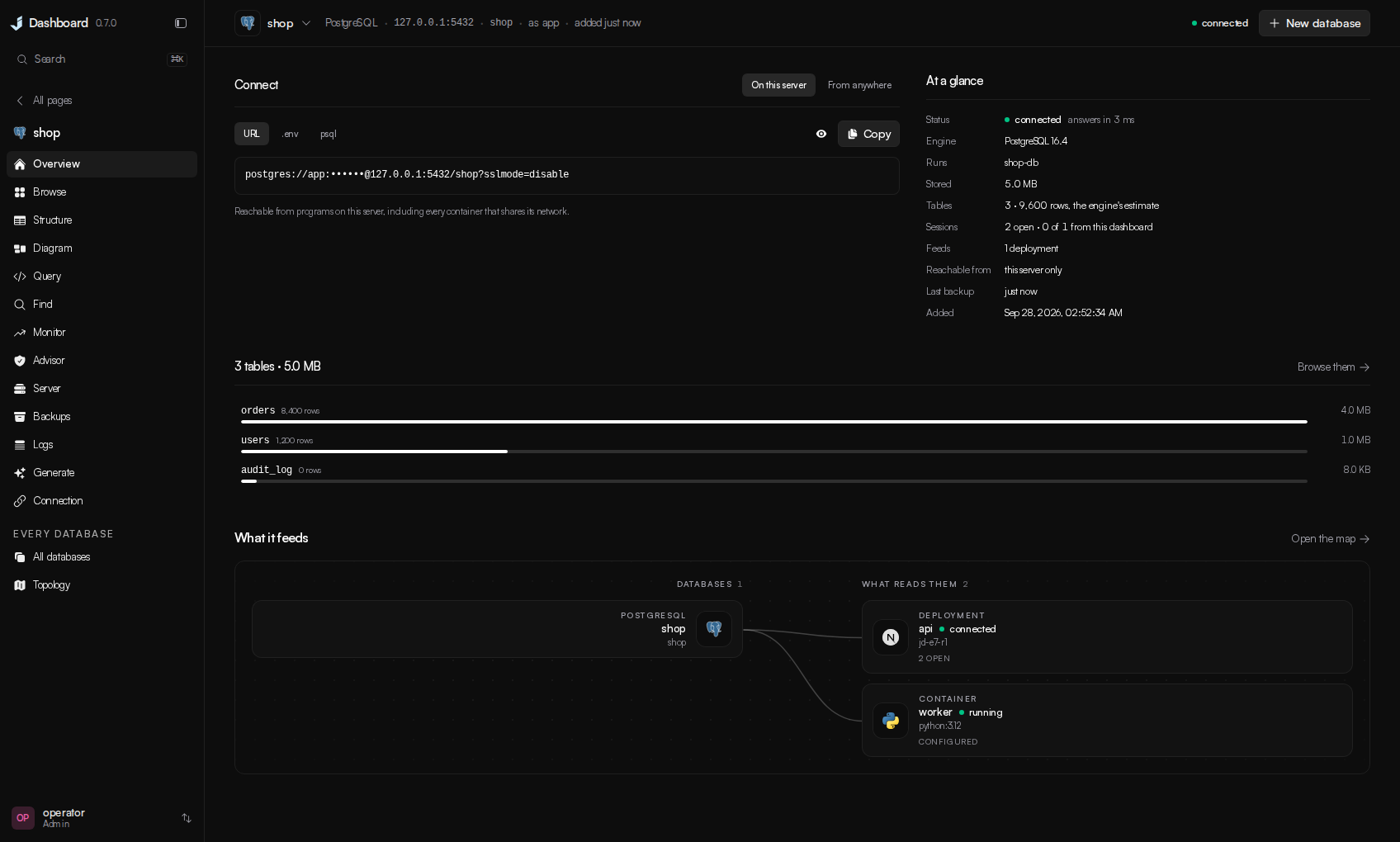
PostgreSQL, MySQL and MariaDB, SQLite, SQL Server, ClickHouse, Oracle, MongoDB and Redis. The
section opens on every database at once — which answer, what they take, who is connected, what
each one feeds — with a map of the deployments, containers and machines reading them, and a
database opens on its connection string, as the URL, the .env line or the shell command, on
this server or, with one press, from anywhere. Browse and edit rows, change the structure, run
queries, draw the schema, read the advisor's findings with their fixes, manage the server's
accounts, databases and extensions, keep and restore dumps, and read the server's own log and the
statements it recorded as slow. A database installed on the machine itself is connected by letting the
dashboard make its own account on it.
And the rest
| Metrics | CPU split by user, system, iowait and steal; memory judged on what is available; pressure, disks, inodes, sockets and interfaces, with seven days of history the backend records itself. |
| Processes | Live table, PM2, systemd services and cron jobs, each with its verbs as words. |
| Logs | Files, container output, compose stacks, PM2 and the journal in one viewer, filtered on the server, each read as what it is — Postgres's slow statements and auth failures, nginx's requests and upstream errors, sshd's logins and attackers — with quick views and insights. Every service's page shows its own log the same way, where the service is. |
| Proxy & TLS | Sites written as ordinary nginx, streams, certificates through certbot including DNS wildcards, and a live TLS report. |
| Security | A verdict on the host: firewall (ufw or firewalld), sshd, fail2ban, open ports, connections, logins and who is attacking. |
| Backups | Scheduled archives to disk, S3 or B2, native database dumps, single-file and in-place restore, and a list of what is not covered. |
| Updates | The dashboard updates itself in one click; host packages on apt, dnf, yum, zypper, pacman or apk. |
| Settings | The panel's own address, certificate, allowlist, two-factor policy and ports, applied with automatic rollback if the new configuration does not come up. |
Version, and updating
This is 0.7.0. It is not 1.0 because the API is still moving. Every release is in
CHANGELOG.md and in the dashboard itself, where Update now pulls, rebuilds
and restarts from a container that outlives the restart. The update check is one unauthenticated
GET of one file from GitHub; JD_UPDATE_CHECK=false turns it off.
Cutting a release: write the notes in backend/internal/selfupdate/changelog.json, then run
scripts/release.sh <version>. It bumps the version everywhere and regenerates the changelog.
Roles
readonly | limited | admin | |
|---|---|---|---|
| View everything | ✅ | ✅ | ✅ |
| Start / stop / restart, git, edit files | ✅ | ✅ | |
| Terminal, delete, prune, restore, updates, accounts, firewall | ✅ |
Capabilities are checked on the route, never in the UI alone. readonly reads any file inside
JD_FILE_ROOTS, so give it to someone you would let read the disk.
Configuration
Every environment variable the backend reads
The installer writes the ones that matter. These are for tuning afterwards.
Required
| Variable | Description |
|---|---|
JD_MASTER_KEY | 64 hex characters. Encrypts every stored secret. openssl rand -hex 32. |
Network perimeter
| Variable | Default | Description |
|---|---|---|
JD_SITE | localhost | The address the stack answers on and the name on its certificate. Your machine's MagicDNS name (box.tailnet-name.ts.net) is the recommended value. Loopback is bound alongside it either way, so an SSH tunnel always works. Never 0.0.0.0. |
JD_BIND | none | What the proxy listens on, when that is not the same string as JD_SITE. Blank uses JD_SITE. A Tailscale install answers for a MagicDNS name and binds the tailnet IP behind it, because the proxy container resolves names through Docker's resolver rather than the host's. |
JD_TLS | internal | How the connection is trusted. tailscale serves the certificate tailscale cert issues for JD_SITE — publicly trusted, no browser warning, renewed automatically. internal is Caddy's own CA, which is what produces "not secure". off is plain HTTP and is refused on anything but loopback; the API also accepts same-origin HTTP WebSockets for live features in this mode. |
JD_ALLOWED_CIDRS | 127.0.0.1/32,::1/128 | Who may reach the API at all, checked before authentication. Use 100.64.0.0/10,127.0.0.1/32,::1/128 for Tailscale, and keep loopback or you lose the tunnel. |
JD_TRUSTED_PROXIES | none | Addresses allowed to set X-Forwarded-For. Without it a client could spoof its way past the allowlist. One hop is supported: the bundled Caddy replaces the header with the client's real address, so anything placed in front of Caddy becomes the client as far as the allowlist is concerned. |
JD_PORT | 8443 | The port you connect to — the only one the proxy publishes. |
JD_BACKEND_PORT | 8080 | The API's loopback port, behind the proxy. install.sh picks a random high port on a new install so nothing collides with it. |
JD_FRONTEND_PORT | 3000 | The UI's loopback port, behind the proxy. Likewise randomised at install time. |
JD_ADDR | 127.0.0.1:$JD_BACKEND_PORT | Where the API binds, if you need to override the host as well as the port. Leave it on loopback; the proxy is the entry point. |
JD_ALLOWED_ORIGINS | none | Complete browser origins allowed to open WebSockets. Scheme, host, and port must match; only needed if the UI is served from a different origin. |
Behaviour
| Variable | Default | Description |
|---|---|---|
JD_REQUIRE_2FA | false | Whether an account with no authenticator may sign in. An account that has enrolled is always asked for its code, whatever this says. |
JD_TERMINAL_ENABLED | true | The web terminal. |
JD_TERMINAL_SHELL | account's shell | The shell the web terminal opens. Empty honours chsh. install.sh sets it to the host's zsh, which the bundled startup gives inline history suggestions and command colouring; ssh is unaffected. |
JD_TERMINAL_USER | lowest regular account | Host account a terminal session logs in as. |
JD_SESSION_TTL | 12h | Absolute session lifetime. |
JD_SESSION_IDLE_TTL | 60m | Idle timeout. |
JD_DOCKER_HOST | unix:///var/run/docker.sock | Docker Engine endpoint. |
JD_DEPLOY_HEAVY_SLOTS | 1 | Concurrent deployment build/activation workers. Valid range: 1–8. |
JD_DEPLOY_LIGHT_SLOTS | 2 | Concurrent validation/metadata deployment workers. Valid range: 1–8. |
JD_DEPLOY_LEASE_TTL | 30s | Time before a silent deployment worker claim is reconciled after a crash. Valid range: 5s–5m. |
JD_METRICS_INTERVAL | 15s | How often the backend samples the host, and every running container, into its own history. Clamped to 5s and 5m. |
JD_METRICS_RETENTION | 7d | How long that history is kept. Accepts days. 0 records nothing and leaves only the live feed. |
JD_UPDATE_CHECK | true | Whether the dashboard may ask GitHub whether a newer version of itself exists — one unauthenticated GET of one file, four times a day, carrying nothing but a version number. false turns it off; the release notes for the version you run stay readable, since they are compiled in. |
JD_ACME_DIRECTORY | Let's Encrypt | Another ACME directory to order deployment certificates from: Let's Encrypt's staging endpoint for a rehearsal that spends no rate limit, or a private authority on a network that never sees the internet. Both the managed Caddy and certbot follow it. |
JD_ACME_CA_ROOT | system roots | A PEM bundle to trust when that authority signs with its own roots — its issuing roots, and the root behind its directory's TLS listener if that is private too. With it set, the public-DNS check before an order is skipped, because a private authority validates however it was set up to. |
JD_UPDATE_REPO | JustDashboard/Just-Dashboard | The repository releases are read from. Change it to follow a fork. |
JD_UPDATE_BRANCH | main | The branch whose changelog decides what "newest" means, and which an in-app update fast-forwards to. |
JD_UPDATE_DIR | discovered | The directory you cloned into. Normally empty: the dashboard asks Docker where its own stack was deployed from. Set it only if the Updates page says that failed. |
JD_AGENT_MODE | false | Run as an agent managed by a hub: no login, mutual TLS only. Not useful on its own yet. |
JD_DEV | false | Development only. Drops Secure from the session cookie so the UI works over plain HTTP. Never set it on a real host. |
JD_LOG_LEVEL | info | debug for verbose logs. |
Where it looks
| Variable | Default | Description |
|---|---|---|
JD_FILE_ROOTS | / | Directories the file manager may reach. |
JD_LOG_ROOTS | /var/log | Directories the log viewer may read. |
JD_COMPOSE_ROOTS | /opt,/srv,/home | Where compose stacks are discovered. |
JD_GIT_ROOTS | /opt,/srv,/home,/root | Where the Git page looks for repositories. |
JD_DEPLOY_ROOTS | /opt,/srv,/home,/root | Where a deploy project's repository may live. A project outside these is refused. |
JD_NGINX_DIR | /etc/nginx | nginx configuration root. |
JD_CADDYFILE | /etc/caddy/Caddyfile | Caddy configuration file. |
JD_BACKUP_DIR | /var/backups/just-dashboard | Local backup destination and staging. |
JD_DATA_DIR | /var/lib/just-dashboard | The dashboard's own database. Back this up. |
First run only
| Variable | Default | Description |
|---|---|---|
JD_BOOTSTRAP_USER | admin | Account created on an empty database. |
JD_BOOTSTRAP_PASSWORD | none | Leave empty for a generated one, logged once and replaced at first sign-in. A password set here is kept as is. |
Durations take a unit (12h, 60m, and the metrics settings also accept 7d); booleans
take true or false. A value that cannot be parsed stops the dashboard at startup rather
than falling back to the default, so a typo is visible instead of silently in effect.
Running it locally, and setting it up by hand
cd backend && go run ./cmd/server      # API on :8080
cd frontend && bun install && bun dev  # UI on :3000
Set NEXT_PUBLIC_WS_BASE=http://localhost:8080 for WebSockets and JD_ALLOWED_ORIGINS=http://localhost:3000
on the backend. Before a pull request, run the checks your change can reach:
scripts/test-changed.sh
Without the installer: cp .env.example .env, set JD_MASTER_KEY (openssl rand -hex 32),
JD_SITE and JD_TLS, then docker compose up -d --build. The generated admin password is
printed once in docker compose logs backend.
Backing it up
The dashboard's own state is a SQLite database in JD_DATA_DIR (/var/lib/just-dashboard).
Back up that directory and keep JD_MASTER_KEY somewhere separate; either alone will not
restore. The Backups page lists the dashboard itself under Coverage and writes that job for you.
Licence
AGPL-3.0. Run it, change it, distribute it, but if you run a modified version as a
network service, publish your changes. Contributions are welcome under the terms in
CONTRIBUTING.md. The product logos bundled in frontend/public/logos/ are their
owners' trademarks and keep their own licences, listed in that directory's NOTICE.
Similar repos


Languages
Go
60.0%
TypeScript
37.0%
JavaScript
2.4%
See what people are saying
README
Just Dashboard
One authenticated UI for one Linux server. Metrics, Docker, processes, logs, a real shell, files, git, databases, the reverse proxy, the firewall, backups and deploys, behind a login that lives on your private network.
Version 0.7.0 · Go backend · Next.js frontend · one docker compose stack
Install · Security · Support · The tour · Configuration · Licence
Screenshots show version 0.7.0 with example data.
Why
Most panels show you a number and leave the reading to you: 68% CPU, exit code 137, restarted 12 times. Just Dashboard tries to answer the next question instead. It says the server is waiting rather than merely busy, that a container was killed for its memory limit and what the limit was, and where the dashboard can fix a finding, the finding comes with a button.
It manages exactly one machine. There is no fleet view, no agents to enrol, no cluster.
What it does
- Deploys from a repository, an image, a template or a Compose file. Detection fills the form in for Node, Bun and Deno, Python, PHP, Go, Rust, Java and Kotlin, .NET, Ruby, Elixir, Scala, Clojure, Dart, Gleam and static site generators: it picks the application out of a repository's examples, docs and tooling, reads lockfiles to choose the package manager and runtime, plans a volume for the SQLite file, uploads or key ring an app would otherwise lose on its next release, and says before you deploy what it will not run. Every deployment is checked against the commit it builds before it builds, what would stop it or deserves a look is shown before Deploy is pressed, and a build that still fails names its cause and the setting that fixes it. Every release is immutable, so rollback reactivates what ran before. Web services get a health-gated cutover.
- Databases you can hand out. Eight engines browsed, queried and diagrammed from one place. A database started here gets a connection string, and one press opens it to the internet or closes it again.
- Boards for the server you run. Sketch with the bundled Excalidraw editor, keep multiple boards in the dashboard's own database, and place linked cards for this host, deployment projects and database connections. Changes save automatically; an older tab cannot silently replace a newer save.
- Fifty-seven reviewed templates, each one saying how you get in. PostgreSQL, Redis, n8n, Grafana, Uptime Kuma, Vaultwarden, Nextcloud, Jellyfin, code-server, Ollama, Open WebUI, ntfy, Qdrant, NocoDB and more, one click each — and every card says whether you create the first account yourself, sign in with a password this server generated, or find no sign-in page at all.
- Automatic Git deployments, previews and notifications. Push to deploy, approved previews per pull request — test one from the Git page or a project's overview at an address only your tailnet can reach — and every run reported to Discord, Slack, Telegram, e-mail, a webhook and the commit's status on GitHub.
- Backups that know what is not backed up. Every volume, stack, deployment, repository and database listed, one press from a job, with writers frozen while the archive is taken.
- A real shell, a real file manager, the repositories on the disk. Host shells that survive the tab closing, a file manager with previews and an editor, and every Git checkout with staging, history, branches and pull requests.
Install
git clone https://github.com/JustDashboard/Just-Dashboard.git
cd Just-Dashboard && sudo ./install.sh
The installer asks how you intend to reach it. Tailscale is the default: the machine stays
invisible to the internet and the dashboard answers at https://your-box.tailnet-name.ts.net:8443
with a real certificate. An SSH tunnel is the fallback, served on loopback. It then generates
the master key and a first password, builds the stack and prints the command to get in.
Four labeled stages show progress; the completion guide includes terminal admin commands.
Use ./install.sh --help to preview the steps or sudo NO_COLOR=1 ./install.sh for plain output.
Everything it asked is editable afterwards under Settings → Configuration. It also installs
the host tools the web terminal and the dashboard's pages run on the server itself — gh from
GitHub's own repository, git-lfs, whois and traceroute — where they are missing, so a GitHub
sign-in on the Git page works from the terminal and over ssh too.
To upgrade, git pull and docker compose up -d --build, use the in-app update, or run
sudo ./install.sh again. All three keep your .env, database, accounts and sessions; only
the installer adds host tools a newer release relies on.
Terminal admin tools
Run these on the server from your checkout. They manage dashboard accounts, separate from Linux users, and use the built backend image, so Go and a browser login are not needed. Account commands also work when the backend is stopped; Docker must be running and installation must be complete.
sudo ./scripts/reset-password.sh admin         # recover an account with a temporary password
sudo ./scripts/create-user.sh alice limited    # readonly, limited or admin; default is readonly
sudo ./scripts/manage.sh users                 # list accounts, roles and two-factor status
sudo ./scripts/manage.sh revoke-sessions alice # sign out all browser sessions
sudo ./scripts/manage.sh status                # show containers and health
sudo ./scripts/manage.sh logs                  # follow backend logs; Ctrl+C exits
sudo ./scripts/manage.sh logs proxy            # backend, frontend or proxy
sudo ./scripts/manage.sh restart               # recreate containers to apply .env edits
./scripts/manage.sh --help                     # usage without sudo
Passwords are entered twice with hidden input and must meet the dashboard's strength rules. New and
reset passwords are temporary: the account holder must change them at sign-in, after completing any
required two-factor step. A reset clears failed-login lockout and revokes that account's sessions and
API tokens, while keeping two-factor enrollment, recovery codes, role and disabled state. Account
changes are audited as local root. revoke-sessions leaves API tokens unchanged.
For automation, append --password-stdin to either password command and pipe one password line from
a trusted source. Never put passwords in command arguments or shell history. The scripts locate the
checkout from their own path and let Compose read .env; they do not execute it as shell code.
Run a stack restart from SSH because it disconnects the web terminal. The restart command recreates
containers with current settings; docker compose restart alone keeps their previous environment.
Read this before you expose it
This dashboard is root-equivalent. Anyone who reaches it with a valid session has root on the machine. It is built to sit behind a VPN or an SSH tunnel, and that is enforced:
- The backend refuses to start on a non-loopback address without a
JD_ALLOWED_CIDRSallowlist, and the allowlist is checked before authentication. - Two-factor is enforced for every account that has enrolled.
JD_REQUIRE_2FAdecides whether an account must enrol. - Destructive actions are capability checked and audited. Deleting a deployment project, database, or Docker stack requires a typed phrase checked on the server; other risky actions use ordinary confirmation.
- Every state-changing request lands in an audit log.
Who makes this
Just Dashboard is built by one person, Wayy01, under the JustDashboard organisation. The dashboard is free and every feature stays free. If it has saved you an evening, there is a Buy Me a Coffee page — entirely optional.
Sponsors. Companies and individuals who would like to sponsor the project can write to ionmoisei755@gmail.com and will be listed here with a logo and a link. No sponsors yet — the space is open.
The tour
Everything is one keystroke away
⌘K from anywhere. The sidebar drills into a section — Docker, Databases, Security, one deployment — and every page comes back the way you left it.
Docker
Create containers from a template, a pasted docker run or a form, with the command rendered
before it runs. Two verdicts: what Docker reports, and what needs attention — exposure, disk,
memory limits, security posture — each with an explanation and, where possible, a button.
Stacks deploy, rebuild and roll back with the compose diff shown first.
Each container's Usage tab combines live CPU, memory, network and block I/O readings with recorded
history. Inspect per-interface transfer rates, totals, packet errors and drops, memory cache and CPU
throttling; unavailable readings stay distinct from zero activity.
Terminal
A real PTY into a host account. Sessions group windows, each named after what it is running, and they keep running on the server until you close them — with the tab closed, and across dashboard restarts and upgrades — so an agent left working is still working when you come back. Files and Git sit beside the shell.
Boards
Open Boards in Workspace to create a drawing. Each board has its own address and is saved in
JD_DATA_DIR with the dashboard's other state. Add server item inserts a linked host, project or
database card. The card shows the resource's name and status when inserted; its link opens the current
resource page. Board editing needs service.control, and deletion asks for the board's name.
Files
Browse, preview, edit with a diff before saving, drag and drop, upload whole folders, crop
pictures, chmod, search by content, archive and extract. Every path is checked against
JD_FILE_ROOTS before anything happens.
The folder button in the toolbar changes every folder's colour. The inspector and folder menus can
then set a different colour for one folder.
Git
Every repository under the configured roots. Stage, commit, push, stash, branch, merge, tag, and
open pull requests from the page, signed in to GitHub with the same device flow gh uses.
Stage individual lines or chunks, resolve conflicts, compare branches, inspect blame and signatures,
recover commits, and edit local history with a recovery branch. Worktrees, submodules, Git LFS and
patch import/export open in the same workspace. Review GitHub pull requests and Actions job logs,
or connect a GitLab/Gitea token for requests on those providers.
Pull establishes missing upstream tracking when the same branch has one unambiguous remote match or
a configured remote preference. If it needs a choice, use Branches → Set upstream. Pull remains
fast-forward-only and refuses to overwrite local work.
Deployments
Point it at a repository, an image, a template, a Compose stack or something already running. It says what it found, shows the plan, and runs it as a job with a permanent URL. Each project has an overview with a live preview, deployments with rollback, logs, runtime, a console and settings. Setup can generate template credentials and suggest a public address, create and connect a private database on this server, or use an external database connection. Build commands, variables, storage, health checks and runtime limits remain editable before the first deployment.
Databases
PostgreSQL, MySQL and MariaDB, SQLite, SQL Server, ClickHouse, Oracle, MongoDB and Redis. The
section opens on every database at once — which answer, what they take, who is connected, what
each one feeds — with a map of the deployments, containers and machines reading them, and a
database opens on its connection string, as the URL, the .env line or the shell command, on
this server or, with one press, from anywhere. Browse and edit rows, change the structure, run
queries, draw the schema, read the advisor's findings with their fixes, manage the server's
accounts, databases and extensions, keep and restore dumps, and read the server's own log and the
statements it recorded as slow. A database installed on the machine itself is connected by letting the
dashboard make its own account on it.
And the rest
| Metrics | CPU split by user, system, iowait and steal; memory judged on what is available; pressure, disks, inodes, sockets and interfaces, with seven days of history the backend records itself. |
| Processes | Live table, PM2, systemd services and cron jobs, each with its verbs as words. |
| Logs | Files, container output, compose stacks, PM2 and the journal in one viewer, filtered on the server, each read as what it is — Postgres's slow statements and auth failures, nginx's requests and upstream errors, sshd's logins and attackers — with quick views and insights. Every service's page shows its own log the same way, where the service is. |
| Proxy & TLS | Sites written as ordinary nginx, streams, certificates through certbot including DNS wildcards, and a live TLS report. |
| Security | A verdict on the host: firewall (ufw or firewalld), sshd, fail2ban, open ports, connections, logins and who is attacking. |
| Backups | Scheduled archives to disk, S3 or B2, native database dumps, single-file and in-place restore, and a list of what is not covered. |
| Updates | The dashboard updates itself in one click; host packages on apt, dnf, yum, zypper, pacman or apk. |
| Settings | The panel's own address, certificate, allowlist, two-factor policy and ports, applied with automatic rollback if the new configuration does not come up. |
Version, and updating
This is 0.7.0. It is not 1.0 because the API is still moving. Every release is in
CHANGELOG.md and in the dashboard itself, where Update now pulls, rebuilds
and restarts from a container that outlives the restart. The update check is one unauthenticated
GET of one file from GitHub; JD_UPDATE_CHECK=false turns it off.
Cutting a release: write the notes in backend/internal/selfupdate/changelog.json, then run
scripts/release.sh <version>. It bumps the version everywhere and regenerates the changelog.
Roles
readonly | limited | admin | |
|---|---|---|---|
| View everything | ✅ | ✅ | ✅ |
| Start / stop / restart, git, edit files | ✅ | ✅ | |
| Terminal, delete, prune, restore, updates, accounts, firewall | ✅ |
Capabilities are checked on the route, never in the UI alone. readonly reads any file inside
JD_FILE_ROOTS, so give it to someone you would let read the disk.
Configuration
Every environment variable the backend reads
The installer writes the ones that matter. These are for tuning afterwards.
Required
| Variable | Description |
|---|---|
JD_MASTER_KEY | 64 hex characters. Encrypts every stored secret. openssl rand -hex 32. |
Network perimeter
| Variable | Default | Description |
|---|---|---|
JD_SITE | localhost | The address the stack answers on and the name on its certificate. Your machine's MagicDNS name (box.tailnet-name.ts.net) is the recommended value. Loopback is bound alongside it either way, so an SSH tunnel always works. Never 0.0.0.0. |
JD_BIND | none | What the proxy listens on, when that is not the same string as JD_SITE. Blank uses JD_SITE. A Tailscale install answers for a MagicDNS name and binds the tailnet IP behind it, because the proxy container resolves names through Docker's resolver rather than the host's. |
JD_TLS | internal | How the connection is trusted. tailscale serves the certificate tailscale cert issues for JD_SITE — publicly trusted, no browser warning, renewed automatically. internal is Caddy's own CA, which is what produces "not secure". off is plain HTTP and is refused on anything but loopback; the API also accepts same-origin HTTP WebSockets for live features in this mode. |
JD_ALLOWED_CIDRS | 127.0.0.1/32,::1/128 | Who may reach the API at all, checked before authentication. Use 100.64.0.0/10,127.0.0.1/32,::1/128 for Tailscale, and keep loopback or you lose the tunnel. |
JD_TRUSTED_PROXIES | none | Addresses allowed to set X-Forwarded-For. Without it a client could spoof its way past the allowlist. One hop is supported: the bundled Caddy replaces the header with the client's real address, so anything placed in front of Caddy becomes the client as far as the allowlist is concerned. |
JD_PORT | 8443 | The port you connect to — the only one the proxy publishes. |
JD_BACKEND_PORT | 8080 | The API's loopback port, behind the proxy. install.sh picks a random high port on a new install so nothing collides with it. |
JD_FRONTEND_PORT | 3000 | The UI's loopback port, behind the proxy. Likewise randomised at install time. |
JD_ADDR | 127.0.0.1:$JD_BACKEND_PORT | Where the API binds, if you need to override the host as well as the port. Leave it on loopback; the proxy is the entry point. |
JD_ALLOWED_ORIGINS | none | Complete browser origins allowed to open WebSockets. Scheme, host, and port must match; only needed if the UI is served from a different origin. |
Behaviour
| Variable | Default | Description |
|---|---|---|
JD_REQUIRE_2FA | false | Whether an account with no authenticator may sign in. An account that has enrolled is always asked for its code, whatever this says. |
JD_TERMINAL_ENABLED | true | The web terminal. |
JD_TERMINAL_SHELL | account's shell | The shell the web terminal opens. Empty honours chsh. install.sh sets it to the host's zsh, which the bundled startup gives inline history suggestions and command colouring; ssh is unaffected. |
JD_TERMINAL_USER | lowest regular account | Host account a terminal session logs in as. |
JD_SESSION_TTL | 12h | Absolute session lifetime. |
JD_SESSION_IDLE_TTL | 60m | Idle timeout. |
JD_DOCKER_HOST | unix:///var/run/docker.sock | Docker Engine endpoint. |
JD_DEPLOY_HEAVY_SLOTS | 1 | Concurrent deployment build/activation workers. Valid range: 1–8. |
JD_DEPLOY_LIGHT_SLOTS | 2 | Concurrent validation/metadata deployment workers. Valid range: 1–8. |
JD_DEPLOY_LEASE_TTL | 30s | Time before a silent deployment worker claim is reconciled after a crash. Valid range: 5s–5m. |
JD_METRICS_INTERVAL | 15s | How often the backend samples the host, and every running container, into its own history. Clamped to 5s and 5m. |
JD_METRICS_RETENTION | 7d | How long that history is kept. Accepts days. 0 records nothing and leaves only the live feed. |
JD_UPDATE_CHECK | true | Whether the dashboard may ask GitHub whether a newer version of itself exists — one unauthenticated GET of one file, four times a day, carrying nothing but a version number. false turns it off; the release notes for the version you run stay readable, since they are compiled in. |
JD_ACME_DIRECTORY | Let's Encrypt | Another ACME directory to order deployment certificates from: Let's Encrypt's staging endpoint for a rehearsal that spends no rate limit, or a private authority on a network that never sees the internet. Both the managed Caddy and certbot follow it. |
JD_ACME_CA_ROOT | system roots | A PEM bundle to trust when that authority signs with its own roots — its issuing roots, and the root behind its directory's TLS listener if that is private too. With it set, the public-DNS check before an order is skipped, because a private authority validates however it was set up to. |
JD_UPDATE_REPO | JustDashboard/Just-Dashboard | The repository releases are read from. Change it to follow a fork. |
JD_UPDATE_BRANCH | main | The branch whose changelog decides what "newest" means, and which an in-app update fast-forwards to. |
JD_UPDATE_DIR | discovered | The directory you cloned into. Normally empty: the dashboard asks Docker where its own stack was deployed from. Set it only if the Updates page says that failed. |
JD_AGENT_MODE | false | Run as an agent managed by a hub: no login, mutual TLS only. Not useful on its own yet. |
JD_DEV | false | Development only. Drops Secure from the session cookie so the UI works over plain HTTP. Never set it on a real host. |
JD_LOG_LEVEL | info | debug for verbose logs. |
Where it looks
| Variable | Default | Description |
|---|---|---|
JD_FILE_ROOTS | / | Directories the file manager may reach. |
JD_LOG_ROOTS | /var/log | Directories the log viewer may read. |
JD_COMPOSE_ROOTS | /opt,/srv,/home | Where compose stacks are discovered. |
JD_GIT_ROOTS | /opt,/srv,/home,/root | Where the Git page looks for repositories. |
JD_DEPLOY_ROOTS | /opt,/srv,/home,/root | Where a deploy project's repository may live. A project outside these is refused. |
JD_NGINX_DIR | /etc/nginx | nginx configuration root. |
JD_CADDYFILE | /etc/caddy/Caddyfile | Caddy configuration file. |
JD_BACKUP_DIR | /var/backups/just-dashboard | Local backup destination and staging. |
JD_DATA_DIR | /var/lib/just-dashboard | The dashboard's own database. Back this up. |
First run only
| Variable | Default | Description |
|---|---|---|
JD_BOOTSTRAP_USER | admin | Account created on an empty database. |
JD_BOOTSTRAP_PASSWORD | none | Leave empty for a generated one, logged once and replaced at first sign-in. A password set here is kept as is. |
Durations take a unit (12h, 60m, and the metrics settings also accept 7d); booleans
take true or false. A value that cannot be parsed stops the dashboard at startup rather
than falling back to the default, so a typo is visible instead of silently in effect.
Running it locally, and setting it up by hand
cd backend && go run ./cmd/server      # API on :8080
cd frontend && bun install && bun dev  # UI on :3000
Set NEXT_PUBLIC_WS_BASE=http://localhost:8080 for WebSockets and JD_ALLOWED_ORIGINS=http://localhost:3000
on the backend. Before a pull request, run the checks your change can reach:
scripts/test-changed.sh
Without the installer: cp .env.example .env, set JD_MASTER_KEY (openssl rand -hex 32),
JD_SITE and JD_TLS, then docker compose up -d --build. The generated admin password is
printed once in docker compose logs backend.
Backing it up
The dashboard's own state is a SQLite database in JD_DATA_DIR (/var/lib/just-dashboard).
Back up that directory and keep JD_MASTER_KEY somewhere separate; either alone will not
restore. The Backups page lists the dashboard itself under Coverage and writes that job for you.
Licence
AGPL-3.0. Run it, change it, distribute it, but if you run a modified version as a
network service, publish your changes. Contributions are welcome under the terms in
CONTRIBUTING.md. The product logos bundled in frontend/public/logos/ are their
owners' trademarks and keep their own licences, listed in that directory's NOTICE.
Similar repos
Languages
Go
60.0%
TypeScript
37.0%
JavaScript
2.4%