
A unified, developer-first homelab dashboard. Monitor and orchestrate your infrastructure, containers, and media from a single pane of glass.
PHP
125
9 commits
updated Sep 29, 2026
See what people are saying
README
Muraqib
[!CAUTION] This is NOT a production-ready release. Muraqib is still a work in progress (beta).
Features change, data migrations may break, and security has not been audited. Muraqib stores credentials for your infrastructure (Cloudflare, Portainer, media apps, Git hosts), so only run it if you really know what you are doing, keep it off the public internet (VPN or an access layer in front), and keep backups.


The Ultimate Sentinel for your Cloud & Infrastructure.
Features • Installation • Screenshots • Contributing • License
📖 About Muraqib
Muraqib (meaning "Observer" or "Supervisor") is a cutting-edge centralized dashboard designed to unify your infrastructure management. Built on the robust Laravel 13 framework and energized by Filament 5, Muraqib provides a single pane of glass for monitoring servers, managing cloud access, and orchestrating containerized environments.
Stop juggling multiple portals. Monitor your Netdata instances, manage Cloudflare Zero Trust policies, and oversee Portainer stacks from one beautiful, responsive interface.
✨ Key Features
🧩 A dashboard you arrange yourself
- Pages: as many dashboard pages as you like, shown as tabs in the header (the default Dashboard page can be renamed, never deleted).
- Edit mode: drag widgets from the widget catalog into the left, middle or right zone; give each 1, 2 or 3 columns and a height; group them in sections or tabbed sections with a default tab.
- Responsive widgets: every widget has a 3-column, 2-column and 1-column (mobile) layout and picks the one that fits.
- Phones: the zones become full-width panels you swipe between, with a bottom bar for pages, team, appearance and account.
- Shared per team: owners and admins arrange the dashboard; members see it.
🛡️ Cloudflare Zero Trust
- Access applications, policies and service tokens, tunnels and ingress rules, synced with the Cloudflare API.
📊 Netdata
- CPU, RAM, network and disk for every Netdata server, with charts that lay themselves out for the space they get, and a network speed widget with latency.
🐳 Portainer & Docker
- Stacks and containers from your Portainer instances, update checks against the registries, and a container status widget that puts problems first.
- Update checks use registry-api, a small companion service that reads tags and digests from Docker Hub, GHCR and other registries.
🎬 Media stack
- Jellyfin, Seerr, Radarr, Sonarr, Bazarr and Transmission (several of each if you like), with a status dot per service and a combined release calendar.
🧑💻 Repositories and GitHub
- Watch repositories on GitHub, GitLab, Gitea, Forgejo, Codeberg and Bitbucket: stars, forks, open PRs and issues, latest release, CI status, and Packagist / npm downloads, synced every 30 minutes.
- Widgets for your managed repos, awaiting review, recent issues, releases, CI, stars & downloads trends, your GitHub contribution calendar and your GitHub inbox (mark as read or done, unsubscribe, save).
⚡ Stack
- Laravel 13, Filament 5 for everything you manage, Inertia 3 + Vue 3 for the dashboard, Tailwind CSS 4, server-side rendering, Redis queues and caching.
📸 Screenshots
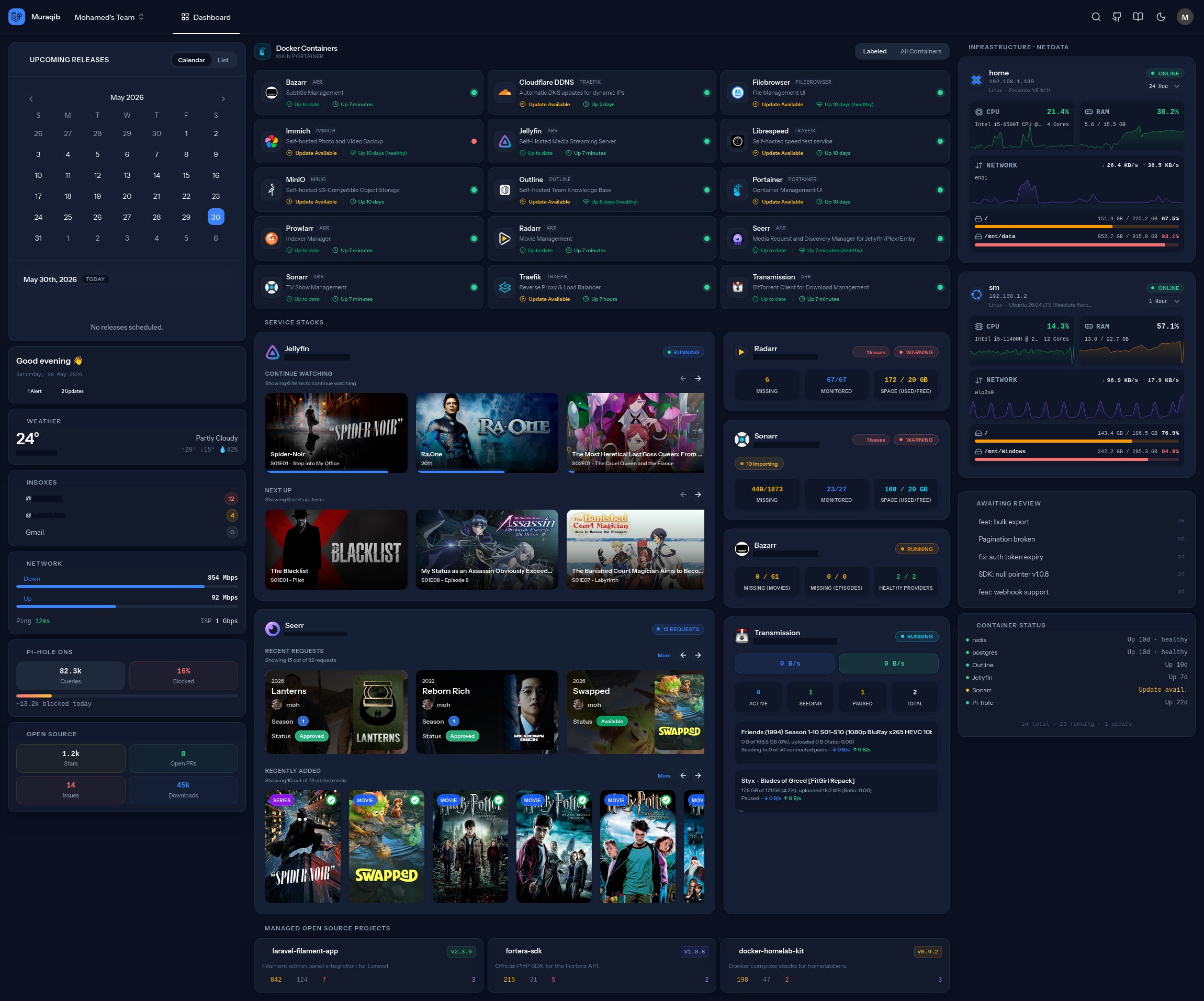
🚀 Installation
With Docker (recommended)
The image (ghcr.io/slimani-dev/muraqib) runs the web app, the queue worker, the scheduler and the SSR server; docker-compose.yml adds MariaDB, Redis and registry-api (container update checks; its image is amd64 only for now).
git clone https://github.com/slimani-dev/muraqib.git
cd muraqib
cp .env.example .env
Edit .env:
APP_KEY: generate one withdocker run --rm ghcr.io/slimani-dev/muraqib:beta php artisan key:generate --showAPP_URL: the address you'll open Muraqib atDB_PASSWORD: any strong password (the database container is created with it)ADMIN_EMAIL/ADMIN_PASSWORD: your first login (leave the password empty to have one generated and printed indocker compose logs app)
docker compose up -d
Muraqib runs on port 8080 (change it with MURAQIB_PORT). The first start runs the migrations and creates your admin account.
Manual
Prerequisites: PHP 8.4+ (with intl), Composer, Node.js 22 with pnpm, a database (SQLite, MySQL/MariaDB or PostgreSQL), Redis (recommended), and a running registry-api for container update checks (set REGISTRY_API_URL, default http://localhost:8080).
git clone https://github.com/slimani-dev/muraqib.git
cd muraqib
composer install
pnpm install
cp .env.example .env
php artisan key:generate
Set your database, ADMIN_EMAIL and ADMIN_PASSWORD in .env, then:
php artisan migrate --seed   # creates your admin account
pnpm run build:ssr           # client and server-side rendering bundles
Keep these running (e.g. with Supervisor or systemd):
php artisan queue:work --queue=high,default,low   # background jobs (repository syncs, ...)
php artisan schedule:work                          # every-30-minute syncs
php artisan inertia:start-ssr                      # server-side rendering (or set INERTIA_SSR_ENABLED=false)
For development, php artisan dev starts the Vite dev server, the queue worker, the scheduler and the log viewer together.
🛠️ Configuration
Accounts
There's no public sign-up. Your first admin comes from ADMIN_EMAIL / ADMIN_PASSWORD; everyone else is added in the admin panel under Users. Only admins can open the admin panel (/admin), where integrations and credentials live. Change the seeded password after your first login and turn on two-factor authentication.
Integrations
Everything is added in the admin panel:
- Cloudflare, Portainer, Netdata: their own sections.
- Media Services: New → pick the type (Jellyfin, Seerr, Radarr, Sonarr, Bazarr, Transmission). Add a public status URL to get a status dot; headers for the status check stay on the server.
- Git Accounts, then Repositories: add an account per host (a read token is recommended; GitHub allows 60 unauthenticated requests an hour), then the repositories to watch. Mark your own as Managed. The GitHub inbox needs a classic token with the
notificationsorreposcope.
API keys, tokens and passwords are stored encrypted with your APP_KEY and never sent to the browser.
Weather
In the admin panel under Settings → Weather: the location (forecasts come from Open-Meteo, no key needed) and an optional Unsplash key for a matching background photo.
Upgrading
Media services used to be configured in .env (JELLYFIN_URL, RADARR_API_KEY, ...). Run php artisan media:import-env once, then remove those lines.
🧪 Testing
php artisan test --compact
Some integration tests hit live Cloudflare/Portainer/Netdata APIs. They are skipped unless you copy .env.testing.example to .env.testing and fill in test credentials.
🔒 Security
Please report vulnerabilities privately; see SECURITY.md.
🤝 Contributing
We welcome contributions! Please see CONTRIBUTING.md for details on how to submit pull requests, report issues, and suggest improvements.
- Fork the Project
- Create your Feature Branch (
git checkout -b feature/AmazingFeature) - Commit your Changes (
git commit -m 'Add some AmazingFeature') - Push to the Branch (
git push origin feature/AmazingFeature) - Open a Pull Request
📄 License
This project is open-sourced software licensed under the MIT license.
Similar repos


Languages
PHP
55.6%
Vue
35.5%
TypeScript
4.6%
Python
3.2%
A unified, developer-first homelab dashboard. Monitor and orchestrate your infrastructure, containers, and media from a single pane of glass.
PHP
125
9 commits
updated Sep 29, 2026
See what people are saying
README
Muraqib
[!CAUTION] This is NOT a production-ready release. Muraqib is still a work in progress (beta).
Features change, data migrations may break, and security has not been audited. Muraqib stores credentials for your infrastructure (Cloudflare, Portainer, media apps, Git hosts), so only run it if you really know what you are doing, keep it off the public internet (VPN or an access layer in front), and keep backups.
The Ultimate Sentinel for your Cloud & Infrastructure.
Features • Installation • Screenshots • Contributing • License
📖 About Muraqib
Muraqib (meaning "Observer" or "Supervisor") is a cutting-edge centralized dashboard designed to unify your infrastructure management. Built on the robust Laravel 13 framework and energized by Filament 5, Muraqib provides a single pane of glass for monitoring servers, managing cloud access, and orchestrating containerized environments.
Stop juggling multiple portals. Monitor your Netdata instances, manage Cloudflare Zero Trust policies, and oversee Portainer stacks from one beautiful, responsive interface.
✨ Key Features
🧩 A dashboard you arrange yourself
- Pages: as many dashboard pages as you like, shown as tabs in the header (the default Dashboard page can be renamed, never deleted).
- Edit mode: drag widgets from the widget catalog into the left, middle or right zone; give each 1, 2 or 3 columns and a height; group them in sections or tabbed sections with a default tab.
- Responsive widgets: every widget has a 3-column, 2-column and 1-column (mobile) layout and picks the one that fits.
- Phones: the zones become full-width panels you swipe between, with a bottom bar for pages, team, appearance and account.
- Shared per team: owners and admins arrange the dashboard; members see it.
🛡️ Cloudflare Zero Trust
- Access applications, policies and service tokens, tunnels and ingress rules, synced with the Cloudflare API.
📊 Netdata
- CPU, RAM, network and disk for every Netdata server, with charts that lay themselves out for the space they get, and a network speed widget with latency.
🐳 Portainer & Docker
- Stacks and containers from your Portainer instances, update checks against the registries, and a container status widget that puts problems first.
- Update checks use registry-api, a small companion service that reads tags and digests from Docker Hub, GHCR and other registries.
🎬 Media stack
- Jellyfin, Seerr, Radarr, Sonarr, Bazarr and Transmission (several of each if you like), with a status dot per service and a combined release calendar.
🧑💻 Repositories and GitHub
- Watch repositories on GitHub, GitLab, Gitea, Forgejo, Codeberg and Bitbucket: stars, forks, open PRs and issues, latest release, CI status, and Packagist / npm downloads, synced every 30 minutes.
- Widgets for your managed repos, awaiting review, recent issues, releases, CI, stars & downloads trends, your GitHub contribution calendar and your GitHub inbox (mark as read or done, unsubscribe, save).
⚡ Stack
- Laravel 13, Filament 5 for everything you manage, Inertia 3 + Vue 3 for the dashboard, Tailwind CSS 4, server-side rendering, Redis queues and caching.
📸 Screenshots
🚀 Installation
With Docker (recommended)
The image (ghcr.io/slimani-dev/muraqib) runs the web app, the queue worker, the scheduler and the SSR server; docker-compose.yml adds MariaDB, Redis and registry-api (container update checks; its image is amd64 only for now).
git clone https://github.com/slimani-dev/muraqib.git
cd muraqib
cp .env.example .env
Edit .env:
APP_KEY: generate one withdocker run --rm ghcr.io/slimani-dev/muraqib:beta php artisan key:generate --showAPP_URL: the address you'll open Muraqib atDB_PASSWORD: any strong password (the database container is created with it)ADMIN_EMAIL/ADMIN_PASSWORD: your first login (leave the password empty to have one generated and printed indocker compose logs app)
docker compose up -d
Muraqib runs on port 8080 (change it with MURAQIB_PORT). The first start runs the migrations and creates your admin account.
Manual
Prerequisites: PHP 8.4+ (with intl), Composer, Node.js 22 with pnpm, a database (SQLite, MySQL/MariaDB or PostgreSQL), Redis (recommended), and a running registry-api for container update checks (set REGISTRY_API_URL, default http://localhost:8080).
git clone https://github.com/slimani-dev/muraqib.git
cd muraqib
composer install
pnpm install
cp .env.example .env
php artisan key:generate
Set your database, ADMIN_EMAIL and ADMIN_PASSWORD in .env, then:
php artisan migrate --seed   # creates your admin account
pnpm run build:ssr           # client and server-side rendering bundles
Keep these running (e.g. with Supervisor or systemd):
php artisan queue:work --queue=high,default,low   # background jobs (repository syncs, ...)
php artisan schedule:work                          # every-30-minute syncs
php artisan inertia:start-ssr                      # server-side rendering (or set INERTIA_SSR_ENABLED=false)
For development, php artisan dev starts the Vite dev server, the queue worker, the scheduler and the log viewer together.
🛠️ Configuration
Accounts
There's no public sign-up. Your first admin comes from ADMIN_EMAIL / ADMIN_PASSWORD; everyone else is added in the admin panel under Users. Only admins can open the admin panel (/admin), where integrations and credentials live. Change the seeded password after your first login and turn on two-factor authentication.
Integrations
Everything is added in the admin panel:
- Cloudflare, Portainer, Netdata: their own sections.
- Media Services: New → pick the type (Jellyfin, Seerr, Radarr, Sonarr, Bazarr, Transmission). Add a public status URL to get a status dot; headers for the status check stay on the server.
- Git Accounts, then Repositories: add an account per host (a read token is recommended; GitHub allows 60 unauthenticated requests an hour), then the repositories to watch. Mark your own as Managed. The GitHub inbox needs a classic token with the
notificationsorreposcope.
API keys, tokens and passwords are stored encrypted with your APP_KEY and never sent to the browser.
Weather
In the admin panel under Settings → Weather: the location (forecasts come from Open-Meteo, no key needed) and an optional Unsplash key for a matching background photo.
Upgrading
Media services used to be configured in .env (JELLYFIN_URL, RADARR_API_KEY, ...). Run php artisan media:import-env once, then remove those lines.
🧪 Testing
php artisan test --compact
Some integration tests hit live Cloudflare/Portainer/Netdata APIs. They are skipped unless you copy .env.testing.example to .env.testing and fill in test credentials.
🔒 Security
Please report vulnerabilities privately; see SECURITY.md.
🤝 Contributing
We welcome contributions! Please see CONTRIBUTING.md for details on how to submit pull requests, report issues, and suggest improvements.
- Fork the Project
- Create your Feature Branch (
git checkout -b feature/AmazingFeature) - Commit your Changes (
git commit -m 'Add some AmazingFeature') - Push to the Branch (
git push origin feature/AmazingFeature) - Open a Pull Request
📄 License
This project is open-sourced software licensed under the MIT license.
Similar repos
Languages
PHP
55.6%
Vue
35.5%
TypeScript
4.6%
Python
3.2%