
离线密码管理器 · Offline password manager (Electron, Argon2id + AES-256-GCM)
See the codeSee what people are saying
README
ChronoKey
A fully local, offline password manager.
Features
Implemented
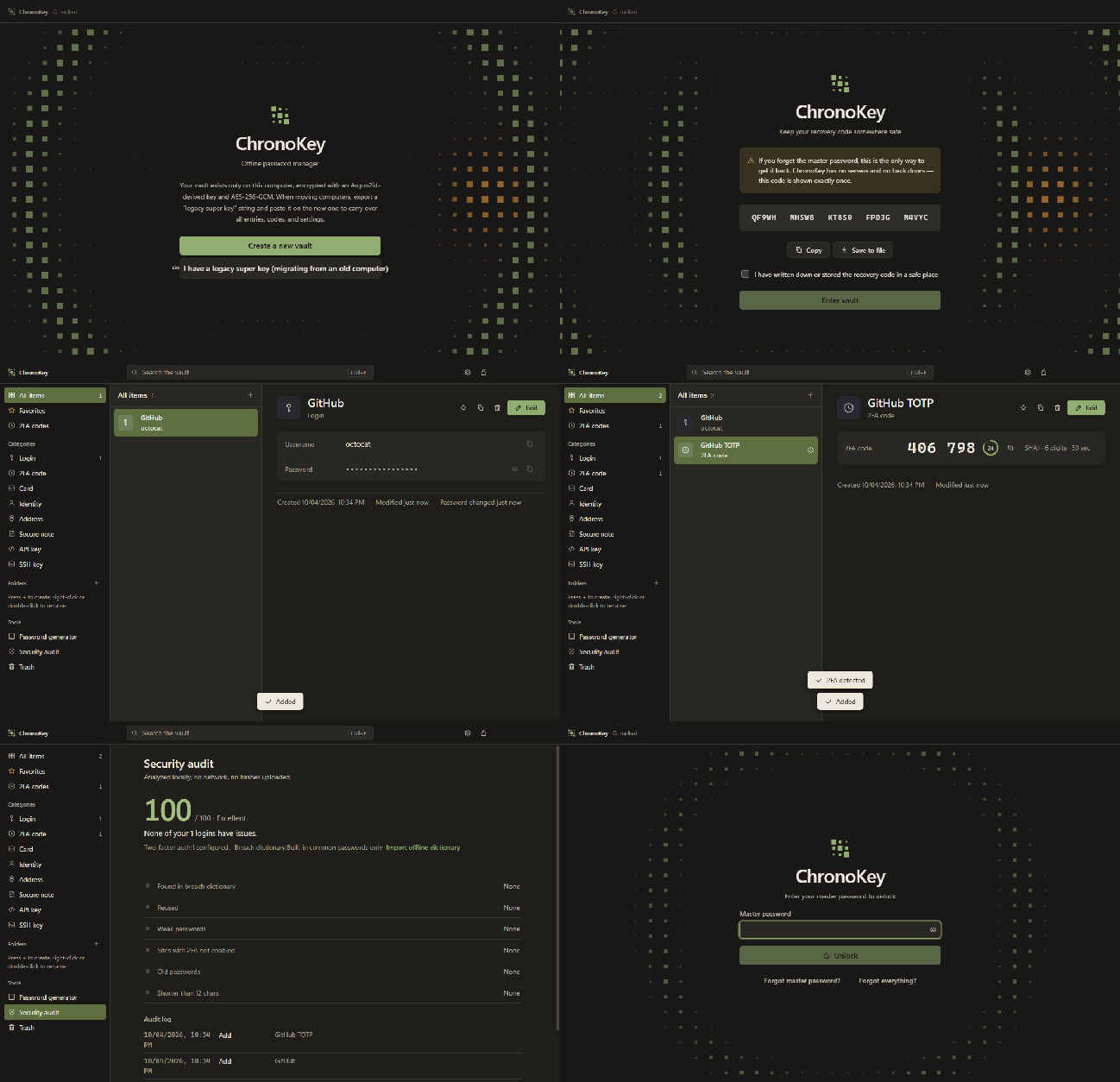
- Fully Local Encryption — All data stored locally, encrypted with Argon2id + AES-256-GCM
- History Super Key — Export your entire vault and settings as a single key string for manual migration to a new computer
- 2FA/TOTP — Built-in RFC 6238 TOTP generator with QR code scanning and otpauth URI support
- Password Generator — Random passwords, passphrases, and PINs using cryptographically secure random sources
- Strength Estimation — Real-time detection of weak passwords, dictionary words, keyboard patterns, and common patterns
- Security Audit — Scan for weak passwords, duplicate passwords, and accounts missing 2FA
- Multiple Item Types — Login, TOTP, credit card, identity, address, note, API key, SSH key
- SSH Key Generation — Generate OpenSSH ed25519 key pairs
- Version History — Each item retains up to 15 historical versions, with rollback
- Trash — Soft delete; restore items or empty the trash
- Folder Organization — Custom folders; right-click or double-click to rename
- Tag System — Multi-tag classification
- Full-text Search — Fast search (secret fields excluded for privacy)
- Import/Export — CSV, Bitwarden JSON, KeePass XML, ChronoKey JSON
- Recovery Code — 25-character Crockford base32 encoded recovery key
- Auto-lock — Locks on idle, sleep, or screen lock
- Clipboard Protection — Auto-clear sensitive clipboard content (default 20s)
- Portable Mode — Place a
ChronoKeyDatafolder next to the executable for portable data - Vault Reset — If you forget both the master password and recovery code, delete the current vault and start over
- Light/Dark Theme — Follow system or toggle manually
- Multi-language UI (i18n) — Simplified Chinese, English, and Russian built in; 13 more languages (Deutsch, Français, Español, Português, Italiano, Nederlands, Polski, Українська, Türkçe, 日本語, 한국어, Tiếng Việt, Bahasa Indonesia) ship as language packs in the repo's
locales/folder — pick one in the installer and it downloads together with the app, or drop a pack intolocales/next to the app manually. Switch under Settings → Appearance; every installed language is listed there. - Window Controls Overlay — Windows 11 native titlebar buttons with snap layouts
- Fully Offline — Zero network permissions; works completely offline behind a firewall
Planned (Not Yet Implemented)
- Browser extension autofill
- Global hotkeys
- Windows Hello / Touch ID / biometric unlock
- YubiKey / hardware key support
- Shamir secret sharing recovery
- Command-line interface (CLI)
- Plugin system
- Passkey (WebAuthn)
Design Philosophy
No Server Architecture
ChronoKey does not need and does not provide any server functionality:
- No cloud sync
- No automatic multi-device sync
- No online breach monitoring (HIBP)
- No shared vaults
- No team collaboration
- No account system
- No subscription validation
- No online update checks
Multi-device use is achieved through manual file syncing:
- USB flash drive
- Syncthing
- Cloud drive folder (OneDrive/iCloud/Dropbox)
- History Super Key copy-paste
Security Design
Encryption Scheme:
- Key Derivation: Argon2id (m=65536 KiB, t=3, p=1)
- Master Password: Minimum 10 characters, strength score ≥ 2/4
- Data Encryption: AES-256-GCM + AAD context binding
- Key Wrapping: Random 32-byte DEK, wrapped separately by the master password and the recovery code
- Recovery Code: 25-character Crockford base32, offline storage
Electron Security:
contextIsolation: truesandbox: truenodeIntegration: false- CSP:
connect-src 'none' - All network requests blocked by
webRequest.onBeforeRequest - Content protection (screenshot / screen-recording protection)
- The main process holds the DEK; the renderer never sees it
Threat Model Boundaries (Honest Security Claims):
Protects Against:
- Disk theft (files are encrypted)
- Network eavesdropping (no network communication)
- Malicious websites / browser exploits (sandbox isolation)
- Clipboard residue (auto-clear)
- Screenshots / screen recording (content protection)
Does Not Protect Against:
- OS-level malware (keyloggers, memory scanning)
- Cold-boot attacks on physical access
- Users choosing a weak master password
- Physical disclosure of the recovery code
- Unaudited code (this project has not undergone a third-party security audit)
History Super Key Format
Format: CK1.<base64url(header + iv + tag + ciphertext)>.<crc32>
Header (27 bytes):
CKSK             Magic (4 bytes)
0x01             Version (1 byte)
m,t,p            Argon2id params (6 bytes: u32 + u8 + u8)
salt             Salt (16 bytes)
Payload (gzip):
{
  "app": "ChronoKey",
  "kind": "history-super-key",
  "version": 1,
  "exportedAt": "2026-10-01T00:00:00.000Z",
  "data": { ... }
}
Merge Rules:
- Same-ID item: newer
updatedAtwins - Old version enters the
versionsarray - Folders, tags: union
- Audit log: append
Keyboard Shortcuts
| Key | Function |
|---|---|
Ctrl/⌘ + F | Focus search box |
Ctrl/⌘ + K | Focus search box (alternative) |
Ctrl/⌘ + N | New item |
Ctrl/⌘ + L | Lock vault |
Ctrl/⌘ + , | Open settings |
Ctrl/⌘ + G | Open password generator |
Ctrl/⌘ + S | Save item (in editor) |
Esc | Close modal |
↑/↓ | List navigation |
Build & Run
Development Mode
npm install
npm run dev        # Start Vite dev server (http://localhost:5173)
In another terminal:
npm run electron:dev
Or visit http://localhost:5173 in a browser (uses demo data, password "demo").
Testing
npm test           # Run all unit tests
npm run test:electron  # Electron integration test
Packaging
npm run dist # Build the Windows x64 portable zip: release/ChronoKey-<version>-win-x64.zip
Installer (ChronoKeySetup.exe)
installer/ holds a small online installer / uninstaller (WinForms, .NET Framework 4.8, built into Windows 10/11):
- Choose an install location (default
%LOCALAPPDATA%\Programs\ChronoKey, no admin rights needed) - Download the zip named in
latest.jsonfrom GitHub Releases, with progress, speed and time remaining - Verify SHA-256, extract, create Start Menu / desktop shortcuts, and register in Installed Apps
- Pick the app language on the first screen — built-in Chinese / English / Russian, any other language from
languages.jsondownloads together with the app intolocales\ - Clicking Done deletes the installer itself;
Uninstall.exein the install folder removes the app (vault data can be kept)
Build by running installer\build.cmd (uses the csc that ships with Windows, no SDK). Icons are generated by installer/MakeIcon.cs.
Portable Mode
Create a ChronoKeyData folder in the same directory as the executable, and data will be saved there instead of the user directory. Suitable for USB flash drives.
Tech Stack
- Electron 44.5.1
- React 19.3.0
- Vite 8.3.1
- hash-wasm 4.12.0 (Argon2id)
- jsQR 1.4.0
- electron-builder 26.15.3
Color Palette
"Washi × Moss" from NIPPON COLORS:
- Willow #91AD70 (primary)
- Moss #838A2D
- Birch #B54434 (danger/warning)
- Withered Leaf #E2943B
- Matcha #B4A582
- Toishi #D7B98E
- Ink #1C1C1C
All text contrast ≥ 4.5:1 (WCAG AA)
Why the Crypto Code Is Open Source
The encryption code (electron/crypto.cjs, electron/vault.cjs) is fully open source, on purpose:
- It uses only public, audited standard algorithms: Argon2id (RFC 9106), AES-256-GCM, and the OS CSPRNG. Nothing home-grown.
- The code contains no keys, backdoors, or secret parameters. Vault security depends only on your master password and recovery code.
- Per Kerckhoffs's principle, publishing the implementation does not weaken it; it lets anyone check it for flaws. A closed-source password manager cannot be verified.
The only secrets are your master password, recovery code, and super-key passphrase — and they never leave your computer. Please report security issues privately via GitHub (Security → Report a vulnerability), not as public issues.
License
MIT License — see LICENSE
Credits
- EFF Large Wordlist (passphrases)
- NIPPON COLORS (color inspiration)
- The Electron team & Anthropic Claude
Security Disclaimer: This project has not undergone third-party security audits. Password managers should be used with an understanding of their threat model. If you discover a security issue, please disclose it responsibly.
Similar repos


Languages
JavaScript
76.4%
C#
16.4%
CSS
7.1%
离线密码管理器 · Offline password manager (Electron, Argon2id + AES-256-GCM)
See the codeSee what people are saying
README
ChronoKey
A fully local, offline password manager.
Features
Implemented
- Fully Local Encryption — All data stored locally, encrypted with Argon2id + AES-256-GCM
- History Super Key — Export your entire vault and settings as a single key string for manual migration to a new computer
- 2FA/TOTP — Built-in RFC 6238 TOTP generator with QR code scanning and otpauth URI support
- Password Generator — Random passwords, passphrases, and PINs using cryptographically secure random sources
- Strength Estimation — Real-time detection of weak passwords, dictionary words, keyboard patterns, and common patterns
- Security Audit — Scan for weak passwords, duplicate passwords, and accounts missing 2FA
- Multiple Item Types — Login, TOTP, credit card, identity, address, note, API key, SSH key
- SSH Key Generation — Generate OpenSSH ed25519 key pairs
- Version History — Each item retains up to 15 historical versions, with rollback
- Trash — Soft delete; restore items or empty the trash
- Folder Organization — Custom folders; right-click or double-click to rename
- Tag System — Multi-tag classification
- Full-text Search — Fast search (secret fields excluded for privacy)
- Import/Export — CSV, Bitwarden JSON, KeePass XML, ChronoKey JSON
- Recovery Code — 25-character Crockford base32 encoded recovery key
- Auto-lock — Locks on idle, sleep, or screen lock
- Clipboard Protection — Auto-clear sensitive clipboard content (default 20s)
- Portable Mode — Place a
ChronoKeyDatafolder next to the executable for portable data - Vault Reset — If you forget both the master password and recovery code, delete the current vault and start over
- Light/Dark Theme — Follow system or toggle manually
- Multi-language UI (i18n) — Simplified Chinese, English, and Russian built in; 13 more languages (Deutsch, Français, Español, Português, Italiano, Nederlands, Polski, Українська, Türkçe, 日本語, 한국어, Tiếng Việt, Bahasa Indonesia) ship as language packs in the repo's
locales/folder — pick one in the installer and it downloads together with the app, or drop a pack intolocales/next to the app manually. Switch under Settings → Appearance; every installed language is listed there. - Window Controls Overlay — Windows 11 native titlebar buttons with snap layouts
- Fully Offline — Zero network permissions; works completely offline behind a firewall
Planned (Not Yet Implemented)
- Browser extension autofill
- Global hotkeys
- Windows Hello / Touch ID / biometric unlock
- YubiKey / hardware key support
- Shamir secret sharing recovery
- Command-line interface (CLI)
- Plugin system
- Passkey (WebAuthn)
Design Philosophy
No Server Architecture
ChronoKey does not need and does not provide any server functionality:
- No cloud sync
- No automatic multi-device sync
- No online breach monitoring (HIBP)
- No shared vaults
- No team collaboration
- No account system
- No subscription validation
- No online update checks
Multi-device use is achieved through manual file syncing:
- USB flash drive
- Syncthing
- Cloud drive folder (OneDrive/iCloud/Dropbox)
- History Super Key copy-paste
Security Design
Encryption Scheme:
- Key Derivation: Argon2id (m=65536 KiB, t=3, p=1)
- Master Password: Minimum 10 characters, strength score ≥ 2/4
- Data Encryption: AES-256-GCM + AAD context binding
- Key Wrapping: Random 32-byte DEK, wrapped separately by the master password and the recovery code
- Recovery Code: 25-character Crockford base32, offline storage
Electron Security:
contextIsolation: truesandbox: truenodeIntegration: false- CSP:
connect-src 'none' - All network requests blocked by
webRequest.onBeforeRequest - Content protection (screenshot / screen-recording protection)
- The main process holds the DEK; the renderer never sees it
Threat Model Boundaries (Honest Security Claims):
Protects Against:
- Disk theft (files are encrypted)
- Network eavesdropping (no network communication)
- Malicious websites / browser exploits (sandbox isolation)
- Clipboard residue (auto-clear)
- Screenshots / screen recording (content protection)
Does Not Protect Against:
- OS-level malware (keyloggers, memory scanning)
- Cold-boot attacks on physical access
- Users choosing a weak master password
- Physical disclosure of the recovery code
- Unaudited code (this project has not undergone a third-party security audit)
History Super Key Format
Format: CK1.<base64url(header + iv + tag + ciphertext)>.<crc32>
Header (27 bytes):
CKSK             Magic (4 bytes)
0x01             Version (1 byte)
m,t,p            Argon2id params (6 bytes: u32 + u8 + u8)
salt             Salt (16 bytes)
Payload (gzip):
{
  "app": "ChronoKey",
  "kind": "history-super-key",
  "version": 1,
  "exportedAt": "2026-10-01T00:00:00.000Z",
  "data": { ... }
}
Merge Rules:
- Same-ID item: newer
updatedAtwins - Old version enters the
versionsarray - Folders, tags: union
- Audit log: append
Keyboard Shortcuts
| Key | Function |
|---|---|
Ctrl/⌘ + F | Focus search box |
Ctrl/⌘ + K | Focus search box (alternative) |
Ctrl/⌘ + N | New item |
Ctrl/⌘ + L | Lock vault |
Ctrl/⌘ + , | Open settings |
Ctrl/⌘ + G | Open password generator |
Ctrl/⌘ + S | Save item (in editor) |
Esc | Close modal |
↑/↓ | List navigation |
Build & Run
Development Mode
npm install
npm run dev        # Start Vite dev server (http://localhost:5173)
In another terminal:
npm run electron:dev
Or visit http://localhost:5173 in a browser (uses demo data, password "demo").
Testing
npm test           # Run all unit tests
npm run test:electron  # Electron integration test
Packaging
npm run dist # Build the Windows x64 portable zip: release/ChronoKey-<version>-win-x64.zip
Installer (ChronoKeySetup.exe)
installer/ holds a small online installer / uninstaller (WinForms, .NET Framework 4.8, built into Windows 10/11):
- Choose an install location (default
%LOCALAPPDATA%\Programs\ChronoKey, no admin rights needed) - Download the zip named in
latest.jsonfrom GitHub Releases, with progress, speed and time remaining - Verify SHA-256, extract, create Start Menu / desktop shortcuts, and register in Installed Apps
- Pick the app language on the first screen — built-in Chinese / English / Russian, any other language from
languages.jsondownloads together with the app intolocales\ - Clicking Done deletes the installer itself;
Uninstall.exein the install folder removes the app (vault data can be kept)
Build by running installer\build.cmd (uses the csc that ships with Windows, no SDK). Icons are generated by installer/MakeIcon.cs.
Portable Mode
Create a ChronoKeyData folder in the same directory as the executable, and data will be saved there instead of the user directory. Suitable for USB flash drives.
Tech Stack
- Electron 44.5.1
- React 19.3.0
- Vite 8.3.1
- hash-wasm 4.12.0 (Argon2id)
- jsQR 1.4.0
- electron-builder 26.15.3
Color Palette
"Washi × Moss" from NIPPON COLORS:
- Willow #91AD70 (primary)
- Moss #838A2D
- Birch #B54434 (danger/warning)
- Withered Leaf #E2943B
- Matcha #B4A582
- Toishi #D7B98E
- Ink #1C1C1C
All text contrast ≥ 4.5:1 (WCAG AA)
Why the Crypto Code Is Open Source
The encryption code (electron/crypto.cjs, electron/vault.cjs) is fully open source, on purpose:
- It uses only public, audited standard algorithms: Argon2id (RFC 9106), AES-256-GCM, and the OS CSPRNG. Nothing home-grown.
- The code contains no keys, backdoors, or secret parameters. Vault security depends only on your master password and recovery code.
- Per Kerckhoffs's principle, publishing the implementation does not weaken it; it lets anyone check it for flaws. A closed-source password manager cannot be verified.
The only secrets are your master password, recovery code, and super-key passphrase — and they never leave your computer. Please report security issues privately via GitHub (Security → Report a vulnerability), not as public issues.
License
MIT License — see LICENSE
Credits
- EFF Large Wordlist (passphrases)
- NIPPON COLORS (color inspiration)
- The Electron team & Anthropic Claude
Security Disclaimer: This project has not undergone third-party security audits. Password managers should be used with an understanding of their threat model. If you discover a security issue, please disclose it responsibly.
Similar repos
Languages
JavaScript
76.4%
C#
16.4%
CSS
7.1%