
Two minutes on a screen, an hour outside: an offline photo scavenger hunt powered by Gemma 4 + Ollama. Hacktoberfest 2026 Touch Grass.
Python
0
2 commits
updated Oct 6, 2026
See what people are saying
README
Outside Quest 🌿
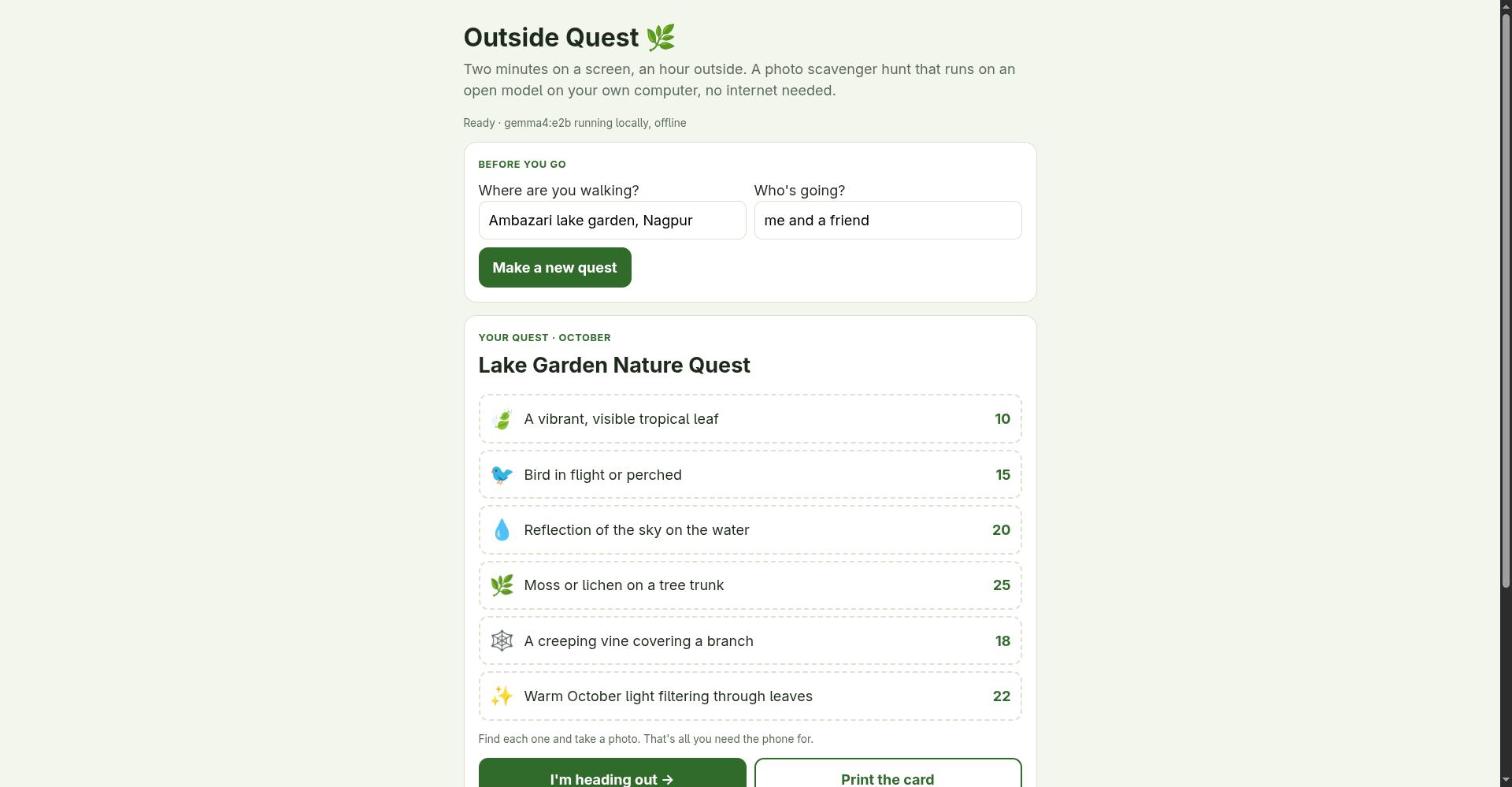
Two minutes on a screen, an hour outside. An offline photo scavenger hunt powered by Google's open-weight Gemma 4, running on your own computer with Ollama.
- Before you go: tell it where you're walking. Gemma writes a 6-item quest card that fits the real local season ("a seed pod on the ground" in tropical Nagpur in October, "crimson leaves under an oak" in New York). Print it or glance at it once.
- On the walk: phone in your pocket. You only take it out to snap a photo of each find.
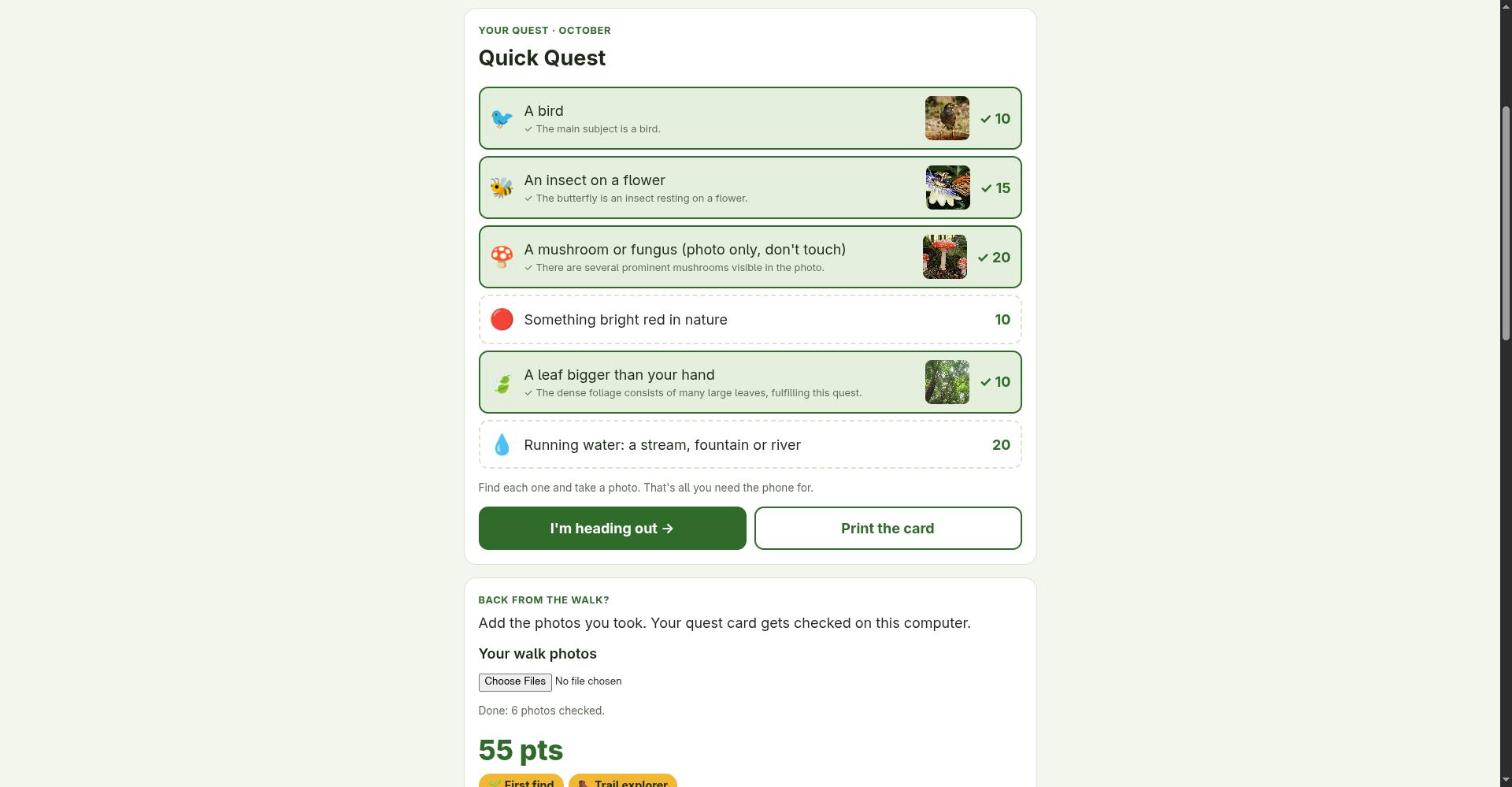
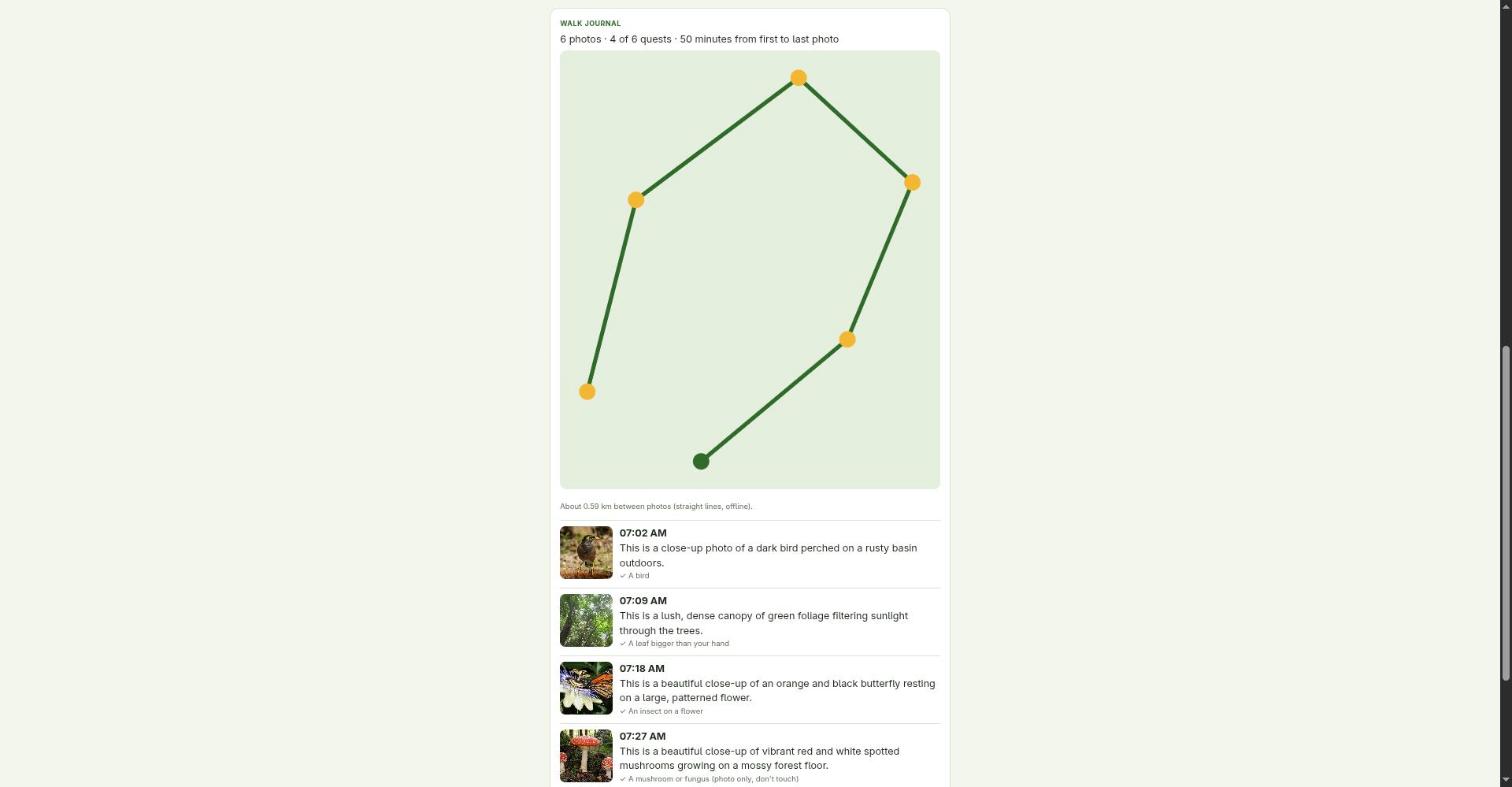
- Back home: drop in your photos. Gemma checks which quests each photo completes, with the visible evidence, and builds a walk journal: a timeline from the photos' timestamps and a little route map from their GPS tags.
No account, no upload, no internet needed. Your photos (and their location data) never leave the computer.
Run it
ollama pull gemma4:e2b          # ~4.6 GB; gemma4:e4b also works if you have the memory
pip install -r requirements.txt # Pillow, for EXIF + resizing
python3 server.py               # open http://127.0.0.1:8777
Tested on a laptop with a 6 GB GTX 1660 Ti: a quest card takes ~30 s, checking a photo ~25-35 s.
Settings: QUEST_MODEL, QUEST_OLLAMA_URL, QUEST_HOST, QUEST_PORT.
Durable mode (optional): Temporal
Checking photos is slow on a laptop (~30 s each), so a 40-photo walk takes about 20 minutes. In the plain mode the browser loops over the photos, and closing the tab, the laptop sleeping, or Ollama running out of memory loses the rest. With a local Temporal server, each walk becomes a workflow and each photo an activity:
temporal server start-dev --db-filename ~/.outside-quest/temporal.db   # open source, runs locally
python3 server.py                                                        # detects it: "durable checking via Temporal"
- Photos are saved to
~/.outside-quest/walks/first, so you can close the tab right after uploading. - A failed model call (Ollama down, out of memory, broken JSON) is retried with backoff (5 s → 2 min, 30 attempts).
- Kill the server mid-walk and start it again: the workflow continues from the next unchecked photo, and the page picks the walk back up when you reopen it. Each photo's answer is cached, so nothing is checked twice.
Tested by stopping Ollama and then killing the app server in the middle of a 6-photo walk. The red bar is the photo that failed while Ollama was down; attempt 4 succeeded once it was back, and all 6 photos were checked:

Without Temporal running, the app works exactly as before.
Photos without location
Messaging apps such as WhatsApp strip EXIF data, and iPhone sharing can leave location out. The journal now says so ("no location in 2 of 5 photos") instead of silently showing no map. Copy originals over USB or AirDrop.
Why a scavenger hunt and not a species identifier
I first built a plant/bird identifier. Then I tested it. On six photos, gemma4:e2b called a Common Myna a
"Jackdaw" with high confidence, and gemma4:e4b called it a "Weaver Bird", also with high confidence.
Neither named the Monarch butterfly or the neem tree; asking for a top-3 list didn't fix it. A tool that tells
you the wrong bird with confidence is worse than no tool.
But both models were reliably right about the coarse question: is there a bird? a butterfly on a flower? a mushroom? a storm cloud? So the app asks the model only what small open models are good at, and leaves the naming to you and a field guide. On the six test photos, every main subject was matched to the right quest.
Safety, in code
Quests written by the model pass through plain-code filters before you see them:
- anything involving climbing, water entry, touching, picking, eating, feeding or chasing animals, roads, railway tracks, private land or going out at night is dropped and replaced from a safe built-in pool;
- mushrooms, berries, nests and eggs always get "(photo only, don't touch)" added;
- if the model is down or returns junk, the card is filled from the same safe pool.
A completed quest must come with a non-empty description of the visible evidence, and quest IDs are constrained with a JSON schema, so the model can't invent quests or award points without saying why.
How it's built
server.py: Python standard library plus Pillow. Two endpoints:/api/quests(structured-output quest card) and/api/check(reads EXIF time + GPS, resizes to 1024 px, asks Gemma which quests the photo completes).durable.py: optional Temporal workflow (CheckWalk) and activity (check_one), with a worker that runs inside the server.static/index.html: one file, no framework. Quest card, a full-screen "phone away" timer, results board, badges, journal and an SVG route drawn from the photos' coordinates (no map tiles, so it works offline).
Sample photos
samples/ holds six Wikimedia Commons photos used for testing (credits in samples/CREDITS.md).
samples/demo-walk/ holds the same photos with made-up timestamps and GPS points, only to demo the journal.
License
MIT
Similar repos


Two minutes on a screen, an hour outside: an offline photo scavenger hunt powered by Gemma 4 + Ollama. Hacktoberfest 2026 Touch Grass.
Python
0
2 commits
updated Oct 6, 2026
See what people are saying
README
Outside Quest 🌿
Two minutes on a screen, an hour outside. An offline photo scavenger hunt powered by Google's open-weight Gemma 4, running on your own computer with Ollama.
- Before you go: tell it where you're walking. Gemma writes a 6-item quest card that fits the real local season ("a seed pod on the ground" in tropical Nagpur in October, "crimson leaves under an oak" in New York). Print it or glance at it once.
- On the walk: phone in your pocket. You only take it out to snap a photo of each find.
- Back home: drop in your photos. Gemma checks which quests each photo completes, with the visible evidence, and builds a walk journal: a timeline from the photos' timestamps and a little route map from their GPS tags.
No account, no upload, no internet needed. Your photos (and their location data) never leave the computer.
Run it
ollama pull gemma4:e2b          # ~4.6 GB; gemma4:e4b also works if you have the memory
pip install -r requirements.txt # Pillow, for EXIF + resizing
python3 server.py               # open http://127.0.0.1:8777
Tested on a laptop with a 6 GB GTX 1660 Ti: a quest card takes ~30 s, checking a photo ~25-35 s.
Settings: QUEST_MODEL, QUEST_OLLAMA_URL, QUEST_HOST, QUEST_PORT.
Durable mode (optional): Temporal
Checking photos is slow on a laptop (~30 s each), so a 40-photo walk takes about 20 minutes. In the plain mode the browser loops over the photos, and closing the tab, the laptop sleeping, or Ollama running out of memory loses the rest. With a local Temporal server, each walk becomes a workflow and each photo an activity:
temporal server start-dev --db-filename ~/.outside-quest/temporal.db   # open source, runs locally
python3 server.py                                                        # detects it: "durable checking via Temporal"
- Photos are saved to
~/.outside-quest/walks/first, so you can close the tab right after uploading. - A failed model call (Ollama down, out of memory, broken JSON) is retried with backoff (5 s → 2 min, 30 attempts).
- Kill the server mid-walk and start it again: the workflow continues from the next unchecked photo, and the page picks the walk back up when you reopen it. Each photo's answer is cached, so nothing is checked twice.
Tested by stopping Ollama and then killing the app server in the middle of a 6-photo walk. The red bar is the photo that failed while Ollama was down; attempt 4 succeeded once it was back, and all 6 photos were checked:
Without Temporal running, the app works exactly as before.
Photos without location
Messaging apps such as WhatsApp strip EXIF data, and iPhone sharing can leave location out. The journal now says so ("no location in 2 of 5 photos") instead of silently showing no map. Copy originals over USB or AirDrop.
Why a scavenger hunt and not a species identifier
I first built a plant/bird identifier. Then I tested it. On six photos, gemma4:e2b called a Common Myna a
"Jackdaw" with high confidence, and gemma4:e4b called it a "Weaver Bird", also with high confidence.
Neither named the Monarch butterfly or the neem tree; asking for a top-3 list didn't fix it. A tool that tells
you the wrong bird with confidence is worse than no tool.
But both models were reliably right about the coarse question: is there a bird? a butterfly on a flower? a mushroom? a storm cloud? So the app asks the model only what small open models are good at, and leaves the naming to you and a field guide. On the six test photos, every main subject was matched to the right quest.
Safety, in code
Quests written by the model pass through plain-code filters before you see them:
- anything involving climbing, water entry, touching, picking, eating, feeding or chasing animals, roads, railway tracks, private land or going out at night is dropped and replaced from a safe built-in pool;
- mushrooms, berries, nests and eggs always get "(photo only, don't touch)" added;
- if the model is down or returns junk, the card is filled from the same safe pool.
A completed quest must come with a non-empty description of the visible evidence, and quest IDs are constrained with a JSON schema, so the model can't invent quests or award points without saying why.
How it's built
server.py: Python standard library plus Pillow. Two endpoints:/api/quests(structured-output quest card) and/api/check(reads EXIF time + GPS, resizes to 1024 px, asks Gemma which quests the photo completes).durable.py: optional Temporal workflow (CheckWalk) and activity (check_one), with a worker that runs inside the server.static/index.html: one file, no framework. Quest card, a full-screen "phone away" timer, results board, badges, journal and an SVG route drawn from the photos' coordinates (no map tiles, so it works offline).
Sample photos
samples/ holds six Wikimedia Commons photos used for testing (credits in samples/CREDITS.md).
samples/demo-walk/ holds the same photos with made-up timestamps and GPS points, only to demo the journal.
License
MIT