
README
TorchSharpVisual


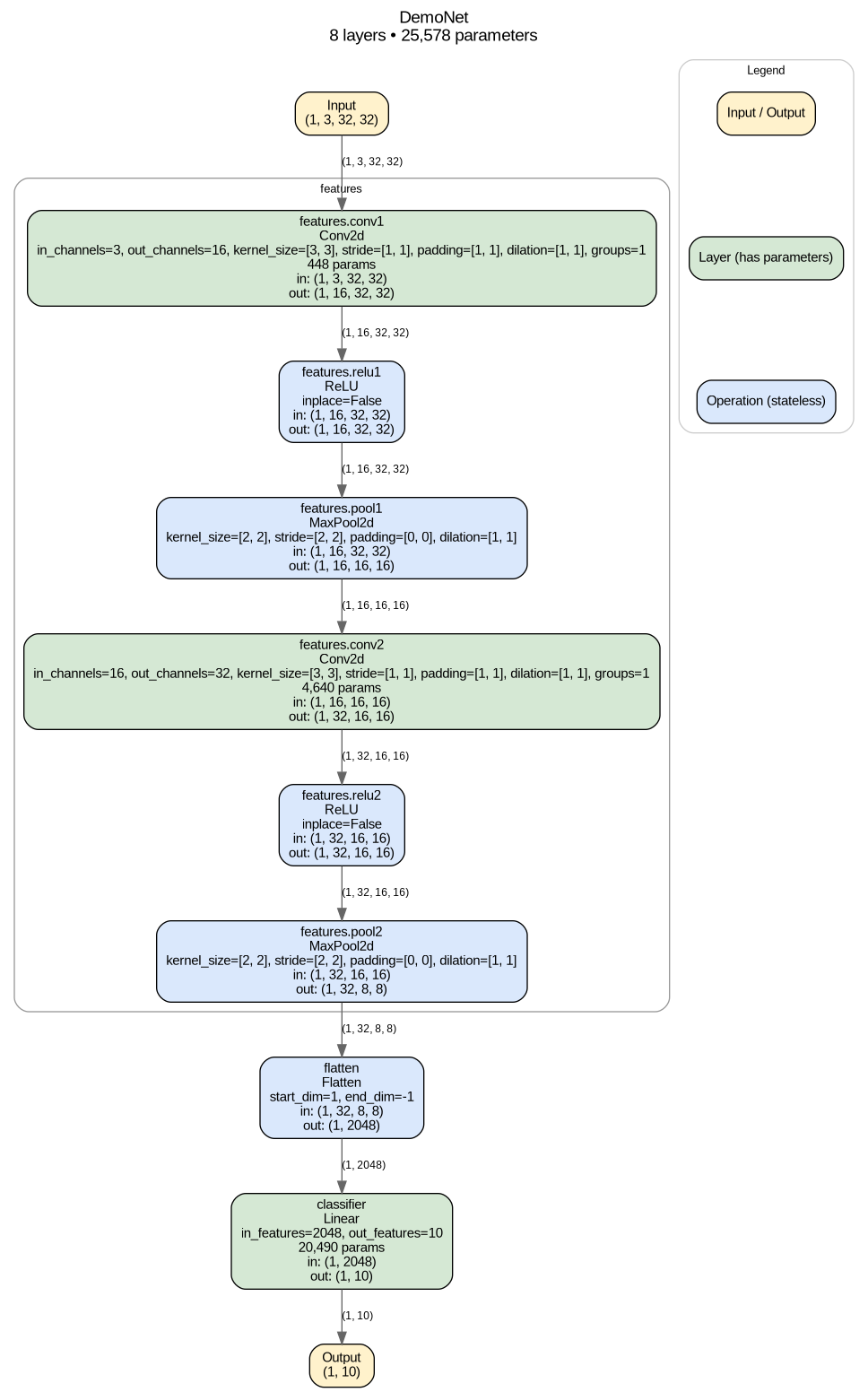
TorchSharpVisual draws clean, color-coded architecture diagrams for TorchSharp models — the same idea as Python's torchview and visualkeras, but for .NET.
Give it a model and an input shape, and it hands back a PNG, SVG, or raw Graphviz .dot file showing every layer, how data actually flows between them (including branches and merges, not just a straight chain), the parameter count and tensor shape at each step, and a summary of the whole model.
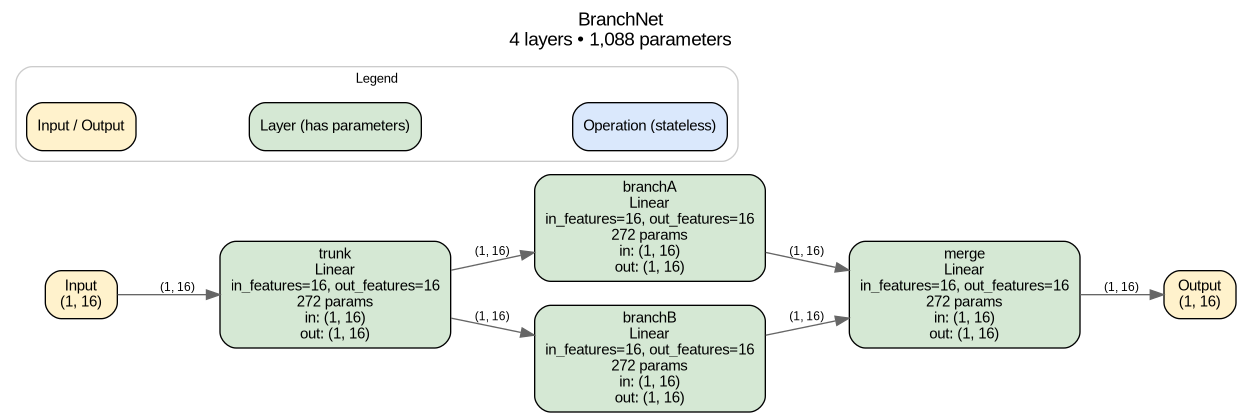
Branching models — a shared trunk feeding parallel branches that merge back together — are diagrammed correctly too, not flattened into a misleading straight line:
Features
- 🔍 Automatic inspection — recursively walks a model's sub-modules, no manual annotation needed.
- 📐 Real shapes, not guesses — runs one dummy forward pass and records the actual tensor shape flowing into and out of every layer.
- 🔀 Real dataflow, not just execution order — edges are built from actual tensor identity, so a shared trunk feeding multiple branches is drawn as a genuine fork, not a misleading straight chain (see How it works for the one topology this can't see).
- 🧮 Parameter counts — every layer reports its learnable parameter count, and each diagram gets a summary header with the model's total layer and parameter counts.
- 🎨 Color-coded by role so a diagram reads at a glance:
- 🟡 Amber — the input/output tensors
- 🟢 Green — layers with learnable parameters (
Linear,Conv2d,BatchNorm2d, …) - 🔵 Blue — stateless operations (
ReLU,Softmax,MaxPool2d,Flatten, …) - A legend explaining this is drawn on the diagram itself by default.
- 📦 Groups nested containers — a
Sequentialblock nested inside a bigger model is drawn as a labeled cluster, so structure stays visible. - ⚙️ Configurable rendering — top-to-bottom or left-to-right layout, DPI, font, and toggles for the legend/parameter counts/summary header via
RenderOptions. - 🖼️ PNG, SVG, or raw DOT — render an image via your local Graphviz install, or grab the
.dotsource directly with zero external dependencies. - 🧩 One-line API —
model.DrawGraph(...)and you're done.
Installation
dotnet add package TorchSharpVisual
You'll also need Graphviz installed if you want PNG/SVG output (raw .dot output has no external dependency):
# Ubuntu/Debian
sudo apt-get update && sudo apt-get install -y graphviz

# macOS
brew install graphviz

# Windows
choco install graphviz
Verify it's on PATH:
dot -V
Quick start
using TorchSharp;
using TorchSharpVisual.Extensions;
using static TorchSharp.torch;

// Any TorchSharp nn.Module<Tensor, Tensor> — Sequential or a custom class.
var model = nn.Sequential(
    ("conv1", nn.Conv2d(3, 16, kernel_size: 3, padding: 1)),
    ("relu1", nn.ReLU()),
    ("pool1", nn.MaxPool2d(kernel_size: 2)),
    ("flatten", nn.Flatten()),
    ("fc", nn.Linear(16 * 16 * 16, 10)));

model.DrawGraph(inputShape: new long[] { 1, 3, 32, 32 }, fileName: "architecture.png");
That's it — architecture.png now shows the full model, labeled with layer names, types, parameter counts, and tensor shapes at every step, plus a summary header and legend.
Other useful calls:
// SVG instead of PNG — same call, different extension.
model.DrawGraph(inputShape: new long[] { 1, 3, 32, 32 }, fileName: "architecture.svg");

// Raw Graphviz DOT source, no Graphviz install required.
model.DrawGraph(inputShape: new long[] { 1, 3, 32, 32 }, fileName: "architecture.dot");
string dot = model.ToDotGraph(inputShape: new long[] { 1, 3, 32, 32 });

// Give the diagram a friendlier title than the C# class name.
model.DrawGraph(inputShape: new long[] { 1, 3, 32, 32 }, fileName: "architecture.png", modelName: "MyConvNet");

// Customize layout and what gets shown.
model.DrawGraph(
    inputShape: new long[] { 1, 3, 32, 32 },
    fileName: "architecture.png",
    options: new RenderOptions
    {
        LayoutDirection = GraphLayoutDirection.LeftToRight,
        ShowLegend = false,
        ShowParameterCounts = true,
        Dpi = 150,
    });
See samples/TorchSharpVisual.Sample for a runnable console app covering a Sequential conv net, a
custom multi-layer classifier, and a branching (fork/join) model:
dotnet run --project samples/TorchSharpVisual.Sample
How it works
TorchSharpVisual.Extractors.TorchSharpExtractorrecursively walks the model's sub-modules (named_modules()), finds the "leaf" layers (the ones that actually do work), and attaches a forward hook to each. It then runs a single dummy forward pass with a zero-filled tensor of the shape you gave it.- As each hook fires, it records that layer's parameter count and the shape of the tensor flowing in and out — and, crucially, it looks up which earlier layer actually produced the exact tensor object it just received, using reference identity rather than assuming a straight chain. That's what lets a shared trunk feeding two sibling branches show up as a real fork instead of a fictitious
branchA → branchBline. When a tensor arrives that no tracked layer produced directly (typically because it passed through a raw tensor operation between modules, like a residual+), the extractor falls back to connecting from whichever layers are still "dangling" — produced a tensor nothing has claimed yet — which recovers the common merge/fan-in case. - That trace is turned into a plain
TorchSharpVisual.Core.Graph— a list ofNodes (tensors and layers, with shapes and parameter counts) andEdges (the tensor flow between them) — with no Graphviz or TorchSharp types leaking through. TorchSharpVisual.Renderers.DotRendererturns the graph into Graphviz DOT syntax: colors each node by itsNodeKind, groups nested containers into clusters, adds the legend and summary header, and — for.png/.svg— shells out to your localdotexecutable to render the image.TorchSharpVisual.Extensions.ModuleExtensionswraps steps 1–4 into the one-linemodel.DrawGraph(...)/model.ToDotGraph(...)calls shown above.
Known limitation: this only supports models whose forward pass takes a single Tensor and returns a single Tensor end to end (the overwhelming majority of Sequential stacks and custom feed-forward/convolutional networks — including branching ones, as above). And because dataflow is tracked by watching module calls rather than tracing the model's actual computation graph, a skip connection that stashes a tensor and reuses it much later — after it's already been consumed elsewhere in a way that "claims" it — can't be reconstructed; that one topology needs true autograd-graph tracing, which is on the roadmap (see CONTRIBUTING.md).
Project layout
src/TorchSharpVisual/
  Core/          Graph, Node, Edge — the plain data model for a diagram
  Extractors/    TorchSharpExtractor — inspects a model and builds a Graph via tensor-identity tracking
  Renderers/     DotRenderer, RenderOptions — turns a Graph into Graphviz DOT / PNG / SVG
  Extensions/    ModuleExtensions — the model.DrawGraph(...) convenience API
tests/TorchSharpVisual.Tests/
  Unit tests covering extraction (Sequential, custom multi-layer, Conv2d, nested containers,
  branching/fan-out/fan-in, parameter counts) and rendering (DOT syntax, color scheme, legend,
  render options, PNG/SVG generation via Graphviz).
samples/TorchSharpVisual.Sample/
  A runnable console app demonstrating the library on real model shapes.
Running the tests
dotnet test
The rendering tests shell out to a real dot executable, so Graphviz needs to be installed to run the full suite (see Installation). CI runs the full build (warnings as errors), test suite, and sample app on every push — see .github/workflows/ci.yml.
Contributing
Issues and pull requests are welcome — see CONTRIBUTING.md for how to get set up and a list of ideas (multi-input/output models, more layer attributes, additional themes, folding repeated blocks). See CHANGELOG.md for release history.
License
Contributors

5 commits
See what people are saying
Similar repos


Languages
C#
100.0%
README
TorchSharpVisual
TorchSharpVisual draws clean, color-coded architecture diagrams for TorchSharp models — the same idea as Python's torchview and visualkeras, but for .NET.
Give it a model and an input shape, and it hands back a PNG, SVG, or raw Graphviz .dot file showing every layer, how data actually flows between them (including branches and merges, not just a straight chain), the parameter count and tensor shape at each step, and a summary of the whole model.
Branching models — a shared trunk feeding parallel branches that merge back together — are diagrammed correctly too, not flattened into a misleading straight line:
Features
- 🔍 Automatic inspection — recursively walks a model's sub-modules, no manual annotation needed.
- 📐 Real shapes, not guesses — runs one dummy forward pass and records the actual tensor shape flowing into and out of every layer.
- 🔀 Real dataflow, not just execution order — edges are built from actual tensor identity, so a shared trunk feeding multiple branches is drawn as a genuine fork, not a misleading straight chain (see How it works for the one topology this can't see).
- 🧮 Parameter counts — every layer reports its learnable parameter count, and each diagram gets a summary header with the model's total layer and parameter counts.
- 🎨 Color-coded by role so a diagram reads at a glance:
- 🟡 Amber — the input/output tensors
- 🟢 Green — layers with learnable parameters (
Linear,Conv2d,BatchNorm2d, …) - 🔵 Blue — stateless operations (
ReLU,Softmax,MaxPool2d,Flatten, …) - A legend explaining this is drawn on the diagram itself by default.
- 📦 Groups nested containers — a
Sequentialblock nested inside a bigger model is drawn as a labeled cluster, so structure stays visible. - ⚙️ Configurable rendering — top-to-bottom or left-to-right layout, DPI, font, and toggles for the legend/parameter counts/summary header via
RenderOptions. - 🖼️ PNG, SVG, or raw DOT — render an image via your local Graphviz install, or grab the
.dotsource directly with zero external dependencies. - 🧩 One-line API —
model.DrawGraph(...)and you're done.
Installation
dotnet add package TorchSharpVisual
You'll also need Graphviz installed if you want PNG/SVG output (raw .dot output has no external dependency):
# Ubuntu/Debian
sudo apt-get update && sudo apt-get install -y graphviz

# macOS
brew install graphviz

# Windows
choco install graphviz
Verify it's on PATH:
dot -V
Quick start
using TorchSharp;
using TorchSharpVisual.Extensions;
using static TorchSharp.torch;

// Any TorchSharp nn.Module<Tensor, Tensor> — Sequential or a custom class.
var model = nn.Sequential(
    ("conv1", nn.Conv2d(3, 16, kernel_size: 3, padding: 1)),
    ("relu1", nn.ReLU()),
    ("pool1", nn.MaxPool2d(kernel_size: 2)),
    ("flatten", nn.Flatten()),
    ("fc", nn.Linear(16 * 16 * 16, 10)));

model.DrawGraph(inputShape: new long[] { 1, 3, 32, 32 }, fileName: "architecture.png");
That's it — architecture.png now shows the full model, labeled with layer names, types, parameter counts, and tensor shapes at every step, plus a summary header and legend.
Other useful calls:
// SVG instead of PNG — same call, different extension.
model.DrawGraph(inputShape: new long[] { 1, 3, 32, 32 }, fileName: "architecture.svg");

// Raw Graphviz DOT source, no Graphviz install required.
model.DrawGraph(inputShape: new long[] { 1, 3, 32, 32 }, fileName: "architecture.dot");
string dot = model.ToDotGraph(inputShape: new long[] { 1, 3, 32, 32 });

// Give the diagram a friendlier title than the C# class name.
model.DrawGraph(inputShape: new long[] { 1, 3, 32, 32 }, fileName: "architecture.png", modelName: "MyConvNet");

// Customize layout and what gets shown.
model.DrawGraph(
    inputShape: new long[] { 1, 3, 32, 32 },
    fileName: "architecture.png",
    options: new RenderOptions
    {
        LayoutDirection = GraphLayoutDirection.LeftToRight,
        ShowLegend = false,
        ShowParameterCounts = true,
        Dpi = 150,
    });
See samples/TorchSharpVisual.Sample for a runnable console app covering a Sequential conv net, a
custom multi-layer classifier, and a branching (fork/join) model:
dotnet run --project samples/TorchSharpVisual.Sample
How it works
TorchSharpVisual.Extractors.TorchSharpExtractorrecursively walks the model's sub-modules (named_modules()), finds the "leaf" layers (the ones that actually do work), and attaches a forward hook to each. It then runs a single dummy forward pass with a zero-filled tensor of the shape you gave it.- As each hook fires, it records that layer's parameter count and the shape of the tensor flowing in and out — and, crucially, it looks up which earlier layer actually produced the exact tensor object it just received, using reference identity rather than assuming a straight chain. That's what lets a shared trunk feeding two sibling branches show up as a real fork instead of a fictitious
branchA → branchBline. When a tensor arrives that no tracked layer produced directly (typically because it passed through a raw tensor operation between modules, like a residual+), the extractor falls back to connecting from whichever layers are still "dangling" — produced a tensor nothing has claimed yet — which recovers the common merge/fan-in case. - That trace is turned into a plain
TorchSharpVisual.Core.Graph— a list ofNodes (tensors and layers, with shapes and parameter counts) andEdges (the tensor flow between them) — with no Graphviz or TorchSharp types leaking through. TorchSharpVisual.Renderers.DotRendererturns the graph into Graphviz DOT syntax: colors each node by itsNodeKind, groups nested containers into clusters, adds the legend and summary header, and — for.png/.svg— shells out to your localdotexecutable to render the image.TorchSharpVisual.Extensions.ModuleExtensionswraps steps 1–4 into the one-linemodel.DrawGraph(...)/model.ToDotGraph(...)calls shown above.
Known limitation: this only supports models whose forward pass takes a single Tensor and returns a single Tensor end to end (the overwhelming majority of Sequential stacks and custom feed-forward/convolutional networks — including branching ones, as above). And because dataflow is tracked by watching module calls rather than tracing the model's actual computation graph, a skip connection that stashes a tensor and reuses it much later — after it's already been consumed elsewhere in a way that "claims" it — can't be reconstructed; that one topology needs true autograd-graph tracing, which is on the roadmap (see CONTRIBUTING.md).
Project layout
src/TorchSharpVisual/
  Core/          Graph, Node, Edge — the plain data model for a diagram
  Extractors/    TorchSharpExtractor — inspects a model and builds a Graph via tensor-identity tracking
  Renderers/     DotRenderer, RenderOptions — turns a Graph into Graphviz DOT / PNG / SVG
  Extensions/    ModuleExtensions — the model.DrawGraph(...) convenience API
tests/TorchSharpVisual.Tests/
  Unit tests covering extraction (Sequential, custom multi-layer, Conv2d, nested containers,
  branching/fan-out/fan-in, parameter counts) and rendering (DOT syntax, color scheme, legend,
  render options, PNG/SVG generation via Graphviz).
samples/TorchSharpVisual.Sample/
  A runnable console app demonstrating the library on real model shapes.
Running the tests
dotnet test
The rendering tests shell out to a real dot executable, so Graphviz needs to be installed to run the full suite (see Installation). CI runs the full build (warnings as errors), test suite, and sample app on every push — see .github/workflows/ci.yml.
Contributing
Issues and pull requests are welcome — see CONTRIBUTING.md for how to get set up and a list of ideas (multi-input/output models, more layer attributes, additional themes, folding repeated blocks). See CHANGELOG.md for release history.
License
See what people are saying
Similar repos
Contributors
5 commits
Languages
C#
100.0%