
An early-stage native Android app for on-device Word/Excel/PowerPoint editing via structured AI tools, cloud or fully offline.
C#
2
6 commits
updated Aug 13, 2026
README
OfficeGemma
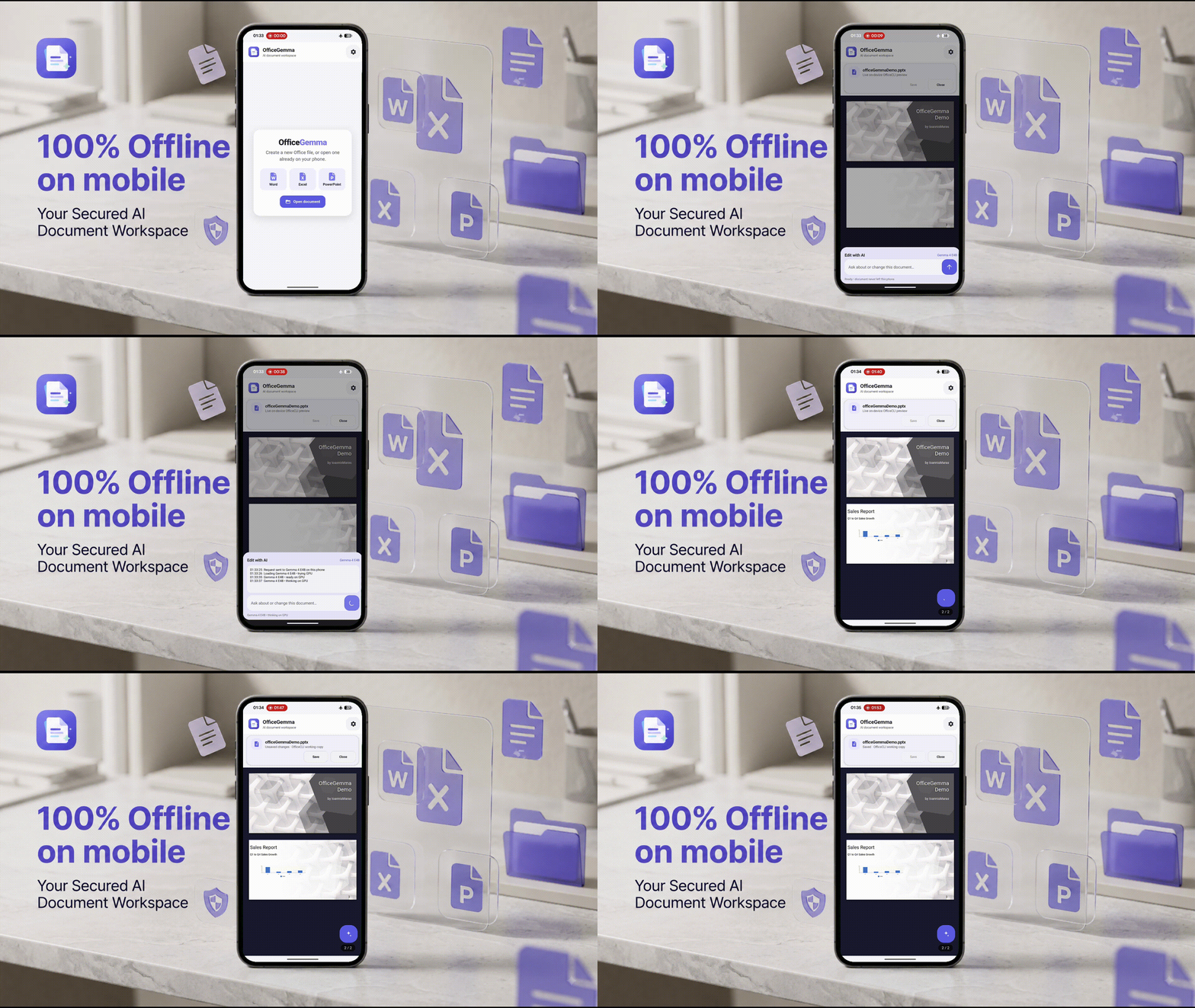
OfficeGemma is an early proof of concept for a native Android app that opens, edits, and renders real Word, Excel, and PowerPoint files entirely on-device — no backend, no MCP stdio, no subprocess, no localhost server. An AI agent (cloud or fully offline) edits the open document through a small set of structured tools; it never runs shell commands and never touches the filesystem beyond the document itself.
This is a glimpse of where on-device document editing is headed, not a finished product. It genuinely works end to end, but the results are closer to a rough sketch than a polished document — the agent is explicitly told to keep edits simple rather than pretty — and the local model still fumbles tool calls often enough that you'll notice. See Status below before you point it at a file you care about.
How it works
- You pick a
.docx/.xlsx/.pptxfrom Android's document picker. The app copies it into app-private storage and opens it through an in-process document engine — the same engine renders it to HTML for a live preview inside a WebView, patched in place on every edit (not a full reload). - An AI agent — cloud or on-device — edits the document through structured
tools (
document_outline,document_get,document_query,document_set,document_add,document_remove,document_batch). These are the only way the model can touch the document; there is no shell, no subprocess, no arbitrary file access. - Two interchangeable AI providers, switchable any time in Settings:
- OpenAI Cloud — the Responses API with a configurable HTTPS base URL, model, reasoning effort, and an in-memory-only API key.
- Gemma Local — runs fully offline via Google's LiteRT-LM Android runtime. Two downloadable models are selectable: Gemma 4 E2B (fine-tuned for this tool-calling schema, smaller/faster) and Gemma 4 E4B (larger base model, not yet fine-tuned). Downloads are resumable and verified by size and SHA-256 before use.
Status: early and rough
This is a 0.1.0, actively-developed proof of concept, not a finished
product. It is a demonstration that on-device document editing by an LLM
is possible and can be made reasonably safe (structured tools only, no
shell, no arbitrary file access) — it is not yet something to rely on.
Known rough edges:
- Output is intentionally plain, not polished. The agent is prompted to produce "a quick sketch, not a polished design" and to skip manual positions, colors, and styling unless asked. Don't expect presentation-ready layouts — expect a correct but plain first draft.
- The on-device model makes mistakes. The Gemma 4 E2B fine-tune (see
finetuning/) is a work in progress; expect tool-calling errors, dropped requests, or the agent giving up mid-task, especially on smaller/older devices or with anything but simple requests. The Gemma 4 E4B option is an even rawer base model with no fine-tuning for this tool schema yet. - No undo. The app edits a private copy of your file (the original picked from storage is left alone), but there is no in-app undo/redo — if the agent makes a bad edit, your recovery path is re-importing the original, not stepping backward.
- Lightly tested. This has only run on a handful of physical devices. Wide device/Android-version coverage, and coverage of unusual/large documents, hasn't happened yet.
- Not distributed anywhere. No Play Store listing, no signed release channel, no auto-update — building and installing it yourself (below) is the only way to run it right now.
- The document engine is pulled in via a temporary fork. OfficeGemma is a
thin Android/UI layer over an OfficeCLI-style document engine
(
officecli.mobilecore, a wrapper over the OfficeCLI engine). Neitherofficecli.mobilecorenor the Android multi-targeting change toofficecliitself has been accepted upstream yet, so this repo vendors them via a git submodule atvendor/OfficeCLI— a fork (IoannisMaras/OfficeCLI-android, branchfeat/android-multitargeting) pinned by commit. Once the PR toiOfficeAI/OfficeCLIis opened and merged, the submodule should be repointed at upstreammain(or replaced with a published NuGet package) and the fork retired. Clone withgit clone --recurse-submodules, or rungit submodule update --initafter a plain clone. - Branding (app icon, logo) is still being iterated on — see
assets/.
Requirements
- .NET 10 SDK with the Android workload
- Android SDK (set
$env:LOCALAPPDATA\Android\Sdkor pass-AndroidSdkto the build script) - A connected Android device or emulator (API 24+) for running the app
Building and running
Clone with submodules (or run git submodule update --init after a plain
clone):
git clone --recurse-submodules <this repo's URL>
Restore, then build. A plain dotnet build's implicit restore parallelizes
project restores and can race on a clean checkout, missing the vendored
submodule's opt-in Android target across two levels of project references
(seen intermittently, not on every clean checkout) — restore first,
explicitly, with parallel restore off:
dotnet restore src\OfficeCliMobile.Android\OfficeCliMobile.Android.csproj `
  -p:AndroidSdkDirectory=$env:LOCALAPPDATA\Android\Sdk `
  -p:IncludeAndroidTarget=true `
  -p:RestoreDisableParallel=true
dotnet build src\OfficeCliMobile.Android\OfficeCliMobile.Android.csproj `
  -p:AndroidSdkDirectory=$env:LOCALAPPDATA\Android\Sdk `
  -p:IncludeAndroidTarget=true `
  --no-restore
IncludeAndroidTarget=true opts the vendored officecli/officecli.mobilecore
submodule into its net10.0-android target, which is off by default so the
upstream desktop CLI's own build/publish/CI is unaffected (see
vendor/OfficeCLI). Run the restore once; run-android-native.ps1
below re-restores itself the same way for every later build.
Full build, install, and launch on a connected device:
.\run-android-native.ps1
By default this does a fast incremental deploy (assemblies only — requires the app to already be installed once). Useful flags:
-Standalone— full standalone build and signed-APK install (adb install -r --no-incremental); required after any native/AOT- affecting change, since fast deployment loads assemblies outside the APK.-InstallOnly— reinstall the last build without rebuilding.-RestartOnly— force-stop and relaunch without building or installing.-Fast— explicit fast incremental deploy (the default when no other flag is passed).
The script requires exactly one authorized adb-connected device.
Project structure
OfficeGemma/
├── src/OfficeCliMobile.Android/         the app: UI, agent orchestration, LiteRT-LM runtime
│   ├── MainActivity.cs                  fields + activity lifecycle only (no XML layouts)
│   ├── MainActivity.UiKit.cs            generic view-builder atoms (Row, Label, buttons, Dp, ...)
│   ├── MainActivity.Workspace.cs        app bar, document bar, AI bubble, empty state
│   ├── MainActivity.Assistant.cs        "Edit with AI" sheet, agent run + log
│   ├── MainActivity.Document.cs         open/create/save/close, WebView link handling
│   ├── MainActivity.Settings.cs         the Settings sheet
│   ├── OnDeviceDocumentAgent.cs         agent loop (cloud provider), tool execution/verification
│   ├── OnDeviceDocumentAgent.ToolSchema.cs   system prompt + tool schema/descriptions
│   ├── GemmaLocalRuntime.cs             on-device Gemma via LiteRT-LM, tool-call bridging
│   ├── GemmaModelManager.cs             resumable/verified model download, model catalog
│   ├── DiagnosticLog.cs                 bounded, redacted local diagnostic log
│   └── Resources/                       Material3 theme, icons, adaptive launcher icon
├── assets/                              logo/branding source files
├── docs/screenshots/                    app screenshots
├── finetuning/                          status of the Gemma tool-calling fine-tune
├── vendor/OfficeCLI/                     git submodule: the document engine (see "Status")
└── run-android-native.ps1               build/install/launch script
Contributing
See CONTRIBUTING.md — it points at where help actually matters right now (upstreaming the OfficeCLI fork, the Gemma fine-tune, device testing) instead of prescribing process.
License
Apache License 2.0 — see LICENSE.
Similar repos


An early-stage native Android app for on-device Word/Excel/PowerPoint editing via structured AI tools, cloud or fully offline.
C#
2
6 commits
updated Aug 13, 2026
README
OfficeGemma
OfficeGemma is an early proof of concept for a native Android app that opens, edits, and renders real Word, Excel, and PowerPoint files entirely on-device — no backend, no MCP stdio, no subprocess, no localhost server. An AI agent (cloud or fully offline) edits the open document through a small set of structured tools; it never runs shell commands and never touches the filesystem beyond the document itself.
This is a glimpse of where on-device document editing is headed, not a finished product. It genuinely works end to end, but the results are closer to a rough sketch than a polished document — the agent is explicitly told to keep edits simple rather than pretty — and the local model still fumbles tool calls often enough that you'll notice. See Status below before you point it at a file you care about.
How it works
- You pick a
.docx/.xlsx/.pptxfrom Android's document picker. The app copies it into app-private storage and opens it through an in-process document engine — the same engine renders it to HTML for a live preview inside a WebView, patched in place on every edit (not a full reload). - An AI agent — cloud or on-device — edits the document through structured
tools (
document_outline,document_get,document_query,document_set,document_add,document_remove,document_batch). These are the only way the model can touch the document; there is no shell, no subprocess, no arbitrary file access. - Two interchangeable AI providers, switchable any time in Settings:
- OpenAI Cloud — the Responses API with a configurable HTTPS base URL, model, reasoning effort, and an in-memory-only API key.
- Gemma Local — runs fully offline via Google's LiteRT-LM Android runtime. Two downloadable models are selectable: Gemma 4 E2B (fine-tuned for this tool-calling schema, smaller/faster) and Gemma 4 E4B (larger base model, not yet fine-tuned). Downloads are resumable and verified by size and SHA-256 before use.
Status: early and rough
This is a 0.1.0, actively-developed proof of concept, not a finished
product. It is a demonstration that on-device document editing by an LLM
is possible and can be made reasonably safe (structured tools only, no
shell, no arbitrary file access) — it is not yet something to rely on.
Known rough edges:
- Output is intentionally plain, not polished. The agent is prompted to produce "a quick sketch, not a polished design" and to skip manual positions, colors, and styling unless asked. Don't expect presentation-ready layouts — expect a correct but plain first draft.
- The on-device model makes mistakes. The Gemma 4 E2B fine-tune (see
finetuning/) is a work in progress; expect tool-calling errors, dropped requests, or the agent giving up mid-task, especially on smaller/older devices or with anything but simple requests. The Gemma 4 E4B option is an even rawer base model with no fine-tuning for this tool schema yet. - No undo. The app edits a private copy of your file (the original picked from storage is left alone), but there is no in-app undo/redo — if the agent makes a bad edit, your recovery path is re-importing the original, not stepping backward.
- Lightly tested. This has only run on a handful of physical devices. Wide device/Android-version coverage, and coverage of unusual/large documents, hasn't happened yet.
- Not distributed anywhere. No Play Store listing, no signed release channel, no auto-update — building and installing it yourself (below) is the only way to run it right now.
- The document engine is pulled in via a temporary fork. OfficeGemma is a
thin Android/UI layer over an OfficeCLI-style document engine
(
officecli.mobilecore, a wrapper over the OfficeCLI engine). Neitherofficecli.mobilecorenor the Android multi-targeting change toofficecliitself has been accepted upstream yet, so this repo vendors them via a git submodule atvendor/OfficeCLI— a fork (IoannisMaras/OfficeCLI-android, branchfeat/android-multitargeting) pinned by commit. Once the PR toiOfficeAI/OfficeCLIis opened and merged, the submodule should be repointed at upstreammain(or replaced with a published NuGet package) and the fork retired. Clone withgit clone --recurse-submodules, or rungit submodule update --initafter a plain clone. - Branding (app icon, logo) is still being iterated on — see
assets/.
Requirements
- .NET 10 SDK with the Android workload
- Android SDK (set
$env:LOCALAPPDATA\Android\Sdkor pass-AndroidSdkto the build script) - A connected Android device or emulator (API 24+) for running the app
Building and running
Clone with submodules (or run git submodule update --init after a plain
clone):
git clone --recurse-submodules <this repo's URL>
Restore, then build. A plain dotnet build's implicit restore parallelizes
project restores and can race on a clean checkout, missing the vendored
submodule's opt-in Android target across two levels of project references
(seen intermittently, not on every clean checkout) — restore first,
explicitly, with parallel restore off:
dotnet restore src\OfficeCliMobile.Android\OfficeCliMobile.Android.csproj `
  -p:AndroidSdkDirectory=$env:LOCALAPPDATA\Android\Sdk `
  -p:IncludeAndroidTarget=true `
  -p:RestoreDisableParallel=true
dotnet build src\OfficeCliMobile.Android\OfficeCliMobile.Android.csproj `
  -p:AndroidSdkDirectory=$env:LOCALAPPDATA\Android\Sdk `
  -p:IncludeAndroidTarget=true `
  --no-restore
IncludeAndroidTarget=true opts the vendored officecli/officecli.mobilecore
submodule into its net10.0-android target, which is off by default so the
upstream desktop CLI's own build/publish/CI is unaffected (see
vendor/OfficeCLI). Run the restore once; run-android-native.ps1
below re-restores itself the same way for every later build.
Full build, install, and launch on a connected device:
.\run-android-native.ps1
By default this does a fast incremental deploy (assemblies only — requires the app to already be installed once). Useful flags:
-Standalone— full standalone build and signed-APK install (adb install -r --no-incremental); required after any native/AOT- affecting change, since fast deployment loads assemblies outside the APK.-InstallOnly— reinstall the last build without rebuilding.-RestartOnly— force-stop and relaunch without building or installing.-Fast— explicit fast incremental deploy (the default when no other flag is passed).
The script requires exactly one authorized adb-connected device.
Project structure
OfficeGemma/
├── src/OfficeCliMobile.Android/         the app: UI, agent orchestration, LiteRT-LM runtime
│   ├── MainActivity.cs                  fields + activity lifecycle only (no XML layouts)
│   ├── MainActivity.UiKit.cs            generic view-builder atoms (Row, Label, buttons, Dp, ...)
│   ├── MainActivity.Workspace.cs        app bar, document bar, AI bubble, empty state
│   ├── MainActivity.Assistant.cs        "Edit with AI" sheet, agent run + log
│   ├── MainActivity.Document.cs         open/create/save/close, WebView link handling
│   ├── MainActivity.Settings.cs         the Settings sheet
│   ├── OnDeviceDocumentAgent.cs         agent loop (cloud provider), tool execution/verification
│   ├── OnDeviceDocumentAgent.ToolSchema.cs   system prompt + tool schema/descriptions
│   ├── GemmaLocalRuntime.cs             on-device Gemma via LiteRT-LM, tool-call bridging
│   ├── GemmaModelManager.cs             resumable/verified model download, model catalog
│   ├── DiagnosticLog.cs                 bounded, redacted local diagnostic log
│   └── Resources/                       Material3 theme, icons, adaptive launcher icon
├── assets/                              logo/branding source files
├── docs/screenshots/                    app screenshots
├── finetuning/                          status of the Gemma tool-calling fine-tune
├── vendor/OfficeCLI/                     git submodule: the document engine (see "Status")
└── run-android-native.ps1               build/install/launch script
Contributing
See CONTRIBUTING.md — it points at where help actually matters right now (upstreaming the OfficeCLI fork, the Gemma fine-tune, device testing) instead of prescribing process.
License
Apache License 2.0 — see LICENSE.