This project benchmarks large language models (LLMs) on their ability to use tools effectively in a multi-hop, multi-turn, multi-source/tool question answering agentic setting. The agent operates in a gym-style MDP environment, solving tasks by invoking tools at each step and producing a final answer through a FINAL action.
To get started, create a Python environment and install the necessary dependencies.
conda create -n AgenticAI python=3.11
conda activate AgenticAI
pip install -r requirements.txt
This will install all required packages for running the agentic pipeline, including support for LoRA training, multi-turn inference, DeepSpeed, and more.
If you intend to tune granite 4, you will also need to install the following packages from source (not PyPi)
git clone [email protected]:Dao-AILab/causal-conv1d.git
cd causal-conv1d
pip install .
cd ..
git clone [email protected]:state-spaces/mamba.git
cd mamba
pip install -e .
The agent acts as a decision-making policy in an MDP, invoking one tool per step, and emitting a FINAL action with the answer when complete.
📚 Amongst the tools available which are mostly API endpoints in M3, there is a Special Tool: retrieve_documents (name defined at constants.py)
A core tool that allows the agent to query a knowledge base. Required arguments:
collection: Name of the document collection (e.g., "clapnq-company_docs")query: The query string to retrieve relevant documentstop_k: We can consider top_k as a predicted argument to have the agent even reason over document collection. What combination of query and top_k fetches the ground-truth document in order to optimise the query. Currently, "top_k" is kept constant and provided in the config file.Example tool call:
{
  "tool_name": "retrieve_documents",
  "args": {
    "collection": "clapnq-company_docs",
    "query": "What is the employee leave policy for 2025?"
  }
}
es_cert at the root directory. Set username, password as ES_USERNAME , ES_PASSWORD and ES_HOSTNAME in the .env.env at the root directory
RITS_API_KEY: API key to use language models via RITSHF_TOKEN: Huggingface tokenThe parameters for governing the structure and behavior of the agent and its task environment are defined in:
📄 configs/infer_agent.json
| Key | Description |
|---|---|
path_to_env_data | Path to .json file containing environment task data |
env_subdomain_mode | One of: rest, slot_filling, selection — controls API tool granularity |
env_scenario | One of: rag_before_api, api_before_rag — controls G.T. tool call ordering |
db_config | Configuration for document collection/index usage (retrieve_documents) |
api_config | Configuration for the REST API tool endpoints |
horizon | Max number of steps the agent can take before the episode ends |
overseer_model_name_or_path | RITS Model to serve as an overseer (corresponding prompt in overseer.py) |
scorer_model_name_or_path | RITS Model to serve as an final answer evaluator (corresponding prompt in answer_matcher_binary.py) |
expert_model_name_or_path | RITS Model to serve for expert intervention (corresponding prompt in observation_witness.py) |
resume_instance | Resume run specific parameter. ID of environment instance to resume from. See index at the last Environment Instantiated message in log file to find it |
path_to_prev_run_dir | Resume run specific parameter. Directory where previous run's trajectories are saved at |
include_thoughts | Boolean toggle to include or exclude thoughts from the final trajectories. Useful to generate data to train SFT with and without thoughts. |
Here's how the expert intervention mechanism works:
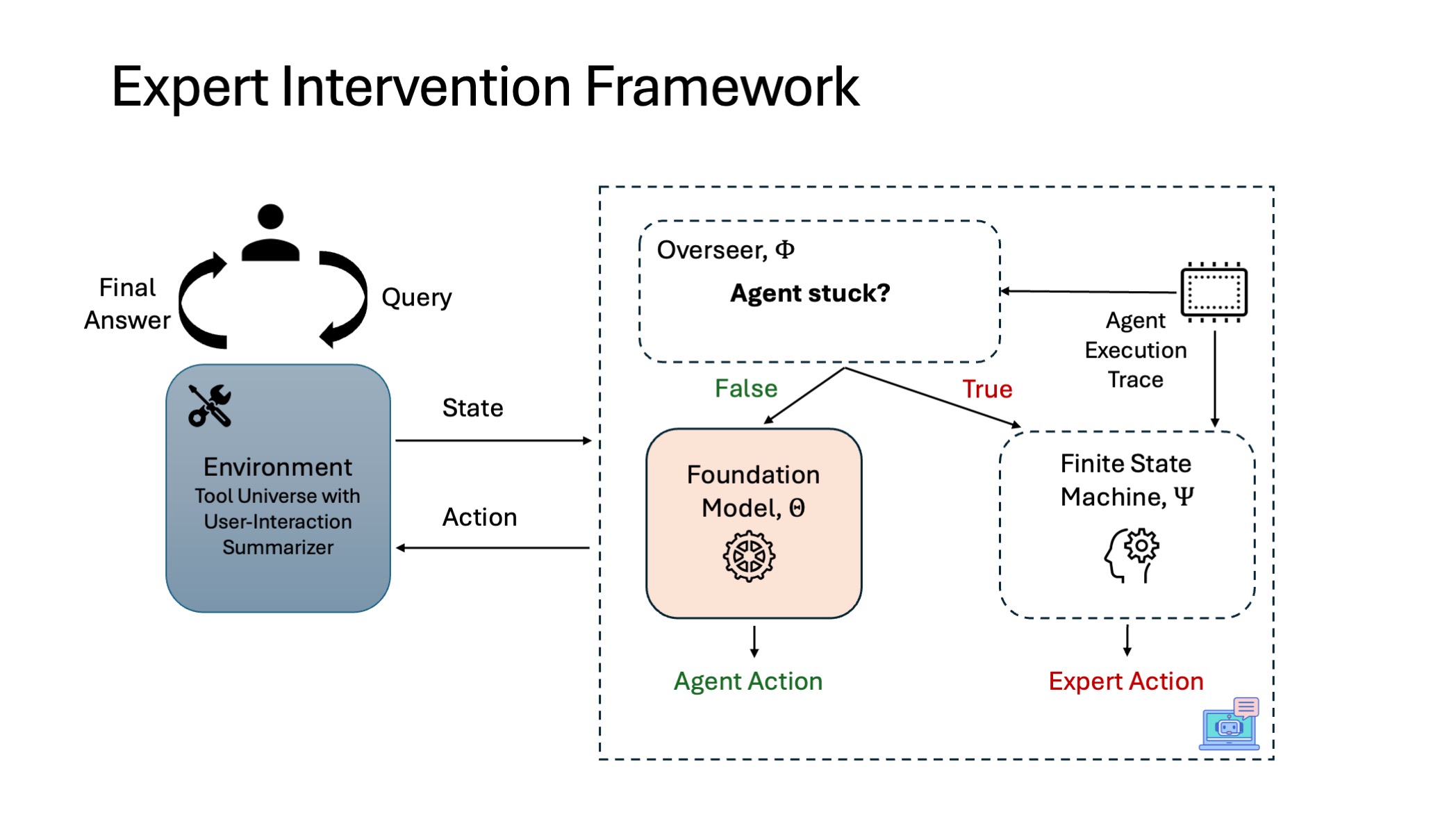
The framework supports various expert-assisted settings for supervising or augmenting agent decisions.
Controls if and how the expert (which has access to ground-truth trajectories) is used. Set via expert_assist_mode:
| Mode | Description |
|---|---|
None | Agent operates independently throughout |
ground_truth | Expert solves the entire task (for generating LLM-agnostic supervision data) |
ground_truth_non_live | Same as above, but uses the raw input files as GT reference instead of calling the Tools/Retrievers |
random | Coin flip based on expert_assist_random_epsilon decides if expert steps in |
informed | Expert intervenes based on whether the agent is stuck or repeatedly failing |
Additional expert parameters for the case when expert_mode is set to informed:
| Key | Description |
|---|---|
save_alternate_trace | (bool) Whether to save alternate actions either by agent or expert at various branching points in trajectory. To collect preference data, set to true |
expert_assist_random_epsilon | Probability of expert intervention in random mode |
expert_assist_init_limit | (Positive int) Steps agent is allowed to act unaided initially |
expert_assist_recent_limit | (Negative int) Number of past steps to monitor for repeated failure |
Note: Collecting preference data by enabling expert intervention only collects the chosen and rejected samples at step-level.
Future Work: Expand get_alternate_action_trace() function in run.py to collect complete alternate trajectories starting at given state by recursively expanding akin to traversing possible paths in a binary tree
The agent operates within configurable environment scenarios that define both tool availability and tool usage constraints. These scenarios determine how the agent interacts with tools while attempting to solve a task.
Where to specify? They must be provided for each sample/environment instance within the path_to_env_data. See env.reset() for further information on how it is loaded.
tool_availability)Specifies which tools are available to the agent during inference:
| Setting | Description |
|---|---|
only_rag | Only the Retriever (retrieve_documents) tool is available |
only_api | Only API tools are available |
both_api_rag (default) | Both Retriever and API tools are available |
neither_api_rag | No tools are available; agent must reason without external tools |
tool_usage)A textual constraint that defines policies on tool invocation for specific subdomains or document collections. For example, it can restrict the agent from using the retriever on certain collections or the API in specific subdomains.
"" (no restrictions)"Do not use the tool $retrieve_documents$ for the domain dealing with company documents."If the agent requires a tool that is made unavailable (either through tool_availability or tool_usage), it is expected to:
Acknowledge its inability to gather the necessary information and terminate with a
FINALaction indicating that it cannot answer the query due to tool limitations.
This ensures clarity in evaluation and enables benchmarking tool-dependency across models.
The following models are supported as agents:
| Model Name | Chat Template | Cutoff Len | Notes |
|---|---|---|---|
mistralai/mixtral-8x22B-instruct-v0.1 | teacher_rits | 65536 | Supported via RITS |
mistralai/Mistral-7B-Instruct-v0.3 | student_mistral | 32768 | Supported via HF |
Qwen/Qwen3-8B | student_qwen3 | 40960 | Supported via HF |
ibm-granite/granite-3.3-8b-instruct | student_granite3 | 131072 | Supported via HF |
Set the parameters for the agentic model to use via the key:
{
  "agent_model_name_or_path": "mistralai/Mistral-7B-Instruct-v0.3",
  "agent_template": "teacher_rits",
  "is_hf_agent": false,
  "temperature": 0.0,
  "max_new_tokens": 4096
}
Description of other parameters configuring model and its behaviour:
is_hf_agent: Boolean whether the LLM to be used for the agent is provided by Huggingface or RITSagent_template: One of student_mistral, student_qwen3, student_granite3, teacher_ritsmax_new_tokens: Number of tokens to generatetemperature: Sampling temperaturepath_to_hf_config: Path to json file specifying other parameters for running the HF modelTraining data is generated in two stages, both designed to provide supervision signals for learning i.e. supervised fine-tuning (SFT) and preference modeling (DPO). Each step of each trajectory is annotated with a reward category, for GRPO like training methods.
Here’s a clear and well-structured “📦 Data Generation” section for your README:
Before generating any data, begin by parsing the raw environment data into a pipeline-consumable format.
📄 Refer to the README in the ground_truth directory for details on how to generate this preprocessed format.
Set the following configuration in configs/infer_agent.json:
{"expert_mode": "ground_truth"}
This will run the expert policy to solve each task fully, producing gold-standard trajectories used for supervised fine-tuning (SFT).
📁 Output: Trajectories in a standardized format, one per task instance
Set the following configuration in configs/infer_agent.json:
{"expert_mode": "informed"}
In this mode, the agent interacts with the environment, and the expert intervenes when necessary (e.g., if the agent is stuck or making repeated errors). This generates step-level preference data, based on whether the agent or the expert took the action.
⚙️ You must ensure the underlying LLM agent is set up correctly:
model_name_or_path and chat_template[Future Work]: Work in progress to generate preference data at trajectory level by comparing trajectories of two separate agents (one better than other) here at create_pref_trajectories_for_dpo.py. For this we need trajectories from two separate agents.
If using the CCC cluster, set ENV_NAME, ROOT_DIR and HF_CACHE_DIR in the shell script, and then you can launch the data generation using the provided shell script:
bsub < ./ccc_scripts/infer_agent.lsf.sh
Example Usage:
# Assign arguments to variables
ENV_NAME="AgenticAI"
ROOT_DIR="/u/aj05/project/Code"
HF_CACHE_DIR="/u/aj05/project/hf_cache"
bsub < ./ccc_scripts/infer_agent.lsf.sh
Otherwise, run the entry point directly:
python run.py
Ensure that your configs/infer_agent.json is correctly populated before running. The run results i.e. trajectories will be generated and saved in the logging/<curr_date_time>/trajectories with corresponding metadata.
| Field Name | Explanation |
|---|---|
sample_id | sample ID of the environment instance (not the same as actual data's sample IDs) |
truncated | Whether the agent run was truncated by the environment because it exceeded max steps |
terminated | Whether the agent run was terminated by the environment |
success | Whether the agent successfully completed the task (determined by LLMasJudge) |
total_time_steps | Number of time-steps the agent ran for (across multi-turns) |
expert_assistance | Parameters with which expert assistance was configured |
expert_assistance/tracker | For each step, whether the action was taken by expert (1) or agent (0) |
To train the agentic framework, we use LoRA-based parameter-efficient fine-tuning of foundation models, optimizing for tool-use behavior grounded in expert demonstrations.
All training configurations are specified in
📄 config_files/train_lora.json
The training script is:
📄 tune.py
config_files/train_lora.json)Note the configuration parameters specified in config_files/train_lora.json overrides the default values specified for the same at hparams which is an extensive suite of hyper-params configuring the model training/evaluation.
Below we discuss the key ones:-
| Key | Description |
|---|---|
model_name_or_path | Hugging Face model ID or local checkpoint path |
adapter_name_or_path | Path to the adapter weights. Use it to point to LoRA weights (typically the directory ending with final/PEFT/) warmed up with SFT to further resume training for DPO/GRPO etc. |
To optimise memory footprint and training time, we have set the following additional params: flash_attn = fa2, disable_gradient_checkpointing = false, enable_liger_kernel = true
| Key | Description |
|---|---|
template | The template used to prompt the model |
cutoff_len | The max length before truncating the input length (set to max length model supports, refer here ) |
dataset_dir | Path to the folder containing the datasets. Point this to root directory where data from different domains are present |
dataset | list of the name of dataset(s) to use for training. Point this to domain names present as separate folders in dataset_dir |
mask_history | Whether or not to mask the history and train on the last step only. For SFT set to False to train on complete trajectory. For DPO (step-level), set to True to train on preference pairs only at step-level |
DPO-specific parameters that are unique to our use-case are:
preference_granularity: step (collected using single agent) or trajectory (collected using multiple agents). Default set to stepmask_suboptimal_traces: Whether to mask suboptimal traces in preference samples. Used with trajectory-level preference granularity| Key | Description |
|---|---|
finetuning_type | Which fine-tuning method to use. lora preferred. |
lora_rank, lora_alpha, lora_dropout | LoRA rank, scaling factor and dropout |
create_new_adapter | Whether or not to create a new adapter with randomly initialized weight. Setting it to false will update the same adapter specified via adapter_name_or_path. For instance, do this when we want DPO to update same weights tuned by SFT warmup. |
stage | Fine-tuning stage. We currently support sft and dpo |
For DPO, the additional params that need to specified are pref_loss, pref_beta, ref_model, ref_model_adapters. We have implemented support for a wide range of preference losses.
| Key | Description |
|---|---|
deepspeed | Path to the corresponding DeepSpeed stage config .json |
per_device_train_batch_size | Batch size per GPU |
gradient_accumulation_steps | To simulate larger effective batch sizes |
learning_rate | LoRA tuning learning rate |
report_to | The list of integrations to report the results. If set to ["wandb"], make sure you have logged into your wandb account (Refer this) |
We support multi-GPU distributed training via Hugging Face Accelerate and DeepSpeed, using:
| File Location | Description |
|---|---|
config_files/train_lora.json | Main training configuration |
config_files/training/multi_gpu_ds_stage2.yml | Accelerate YAML config for DeepSpeed Stage 2 |
config_files/training/zero_stage2_config.json | DeepSpeed Stage 2 config file |
config_files/training/multi_gpu_ds_stage3.yml | Accelerate YAML config for DeepSpeed Stage 3 |
config_files/training/zero_stage3_config.json | DeepSpeed Stage 3 config file |
⚠️ Important:
deepspeed key inside train_lora.json--config_file (Accelerate YAML) when launching trainingnum_processes field in Accelerate YAML file must be set to number of available GPUsIf using the CCC cluster, set ENV_NAME, ROOT_DIR and HF_CACHE_DIR in the shell script, and then you can launch the training using the provided shell script:
bsub < ./ccc_scripts/train_multi_gpu.lsf.sh
Otherwise, run the entry point directly
accelerate launch --config_file config_files/training/multi_gpu_ds_stage3.yml tune.py
deepspeed to null and use a basic accelerate config setupTo evaluate an agent on held-out test data, you can reuse the same pipeline used for training data generation.
Use the same entry point:
python run.py
But with the following configuration changes in
📄 configs/infer_agent.json:
| Parameter | Description |
|---|---|
expert_mode | Set to null → agent operates independently without expert intervention |
path_to_env_data | Path to the test dataset JSON file |
For evaluating a base Hugging Face model:
is_hf_agent = truepath_to_hf_config to:
📄 ./config_files/infer_base.jsonFor evaluating trained models:
is_hf_agent = truepath_to_hf_config to:
📄 ./config_files/infer_lora.jsoninfer_lora.json, set:{"adapter_name_or_path": "<path_to_trained_model>"}
This loads your fine-tuned weights via PEFT LoRA.
After evaluation, the following will be generated:
The output format mirrors that of the training data generation pipeline, ensuring compatibility for post-hoc analysis or visualization.
This project benchmarks large language models (LLMs) on their ability to use tools effectively in a multi-hop, multi-turn, multi-source/tool question answering agentic setting. The agent operates in a gym-style MDP environment, solving tasks by invoking tools at each step and producing a final answer through a FINAL action.
To get started, create a Python environment and install the necessary dependencies.
conda create -n AgenticAI python=3.11
conda activate AgenticAI
pip install -r requirements.txt
This will install all required packages for running the agentic pipeline, including support for LoRA training, multi-turn inference, DeepSpeed, and more.
If you intend to tune granite 4, you will also need to install the following packages from source (not PyPi)
git clone [email protected]:Dao-AILab/causal-conv1d.git
cd causal-conv1d
pip install .
cd ..
git clone [email protected]:state-spaces/mamba.git
cd mamba
pip install -e .
The agent acts as a decision-making policy in an MDP, invoking one tool per step, and emitting a FINAL action with the answer when complete.
📚 Amongst the tools available which are mostly API endpoints in M3, there is a Special Tool: retrieve_documents (name defined at constants.py)
A core tool that allows the agent to query a knowledge base. Required arguments:
collection: Name of the document collection (e.g., "clapnq-company_docs")query: The query string to retrieve relevant documentstop_k: We can consider top_k as a predicted argument to have the agent even reason over document collection. What combination of query and top_k fetches the ground-truth document in order to optimise the query. Currently, "top_k" is kept constant and provided in the config file.Example tool call:
{
  "tool_name": "retrieve_documents",
  "args": {
    "collection": "clapnq-company_docs",
    "query": "What is the employee leave policy for 2025?"
  }
}
es_cert at the root directory. Set username, password as ES_USERNAME , ES_PASSWORD and ES_HOSTNAME in the .env.env at the root directory
RITS_API_KEY: API key to use language models via RITSHF_TOKEN: Huggingface tokenThe parameters for governing the structure and behavior of the agent and its task environment are defined in:
📄 configs/infer_agent.json
| Key | Description |
|---|---|
path_to_env_data | Path to .json file containing environment task data |
env_subdomain_mode | One of: rest, slot_filling, selection — controls API tool granularity |
env_scenario | One of: rag_before_api, api_before_rag — controls G.T. tool call ordering |
db_config | Configuration for document collection/index usage (retrieve_documents) |
api_config | Configuration for the REST API tool endpoints |
horizon | Max number of steps the agent can take before the episode ends |
overseer_model_name_or_path | RITS Model to serve as an overseer (corresponding prompt in overseer.py) |
scorer_model_name_or_path | RITS Model to serve as an final answer evaluator (corresponding prompt in answer_matcher_binary.py) |
expert_model_name_or_path | RITS Model to serve for expert intervention (corresponding prompt in observation_witness.py) |
resume_instance | Resume run specific parameter. ID of environment instance to resume from. See index at the last Environment Instantiated message in log file to find it |
path_to_prev_run_dir | Resume run specific parameter. Directory where previous run's trajectories are saved at |
include_thoughts | Boolean toggle to include or exclude thoughts from the final trajectories. Useful to generate data to train SFT with and without thoughts. |
Here's how the expert intervention mechanism works:
The framework supports various expert-assisted settings for supervising or augmenting agent decisions.
Controls if and how the expert (which has access to ground-truth trajectories) is used. Set via expert_assist_mode:
| Mode | Description |
|---|---|
None | Agent operates independently throughout |
ground_truth | Expert solves the entire task (for generating LLM-agnostic supervision data) |
ground_truth_non_live | Same as above, but uses the raw input files as GT reference instead of calling the Tools/Retrievers |
random | Coin flip based on expert_assist_random_epsilon decides if expert steps in |
informed | Expert intervenes based on whether the agent is stuck or repeatedly failing |
Additional expert parameters for the case when expert_mode is set to informed:
| Key | Description |
|---|---|
save_alternate_trace | (bool) Whether to save alternate actions either by agent or expert at various branching points in trajectory. To collect preference data, set to true |
expert_assist_random_epsilon | Probability of expert intervention in random mode |
expert_assist_init_limit | (Positive int) Steps agent is allowed to act unaided initially |
expert_assist_recent_limit | (Negative int) Number of past steps to monitor for repeated failure |
Note: Collecting preference data by enabling expert intervention only collects the chosen and rejected samples at step-level.
Future Work: Expand get_alternate_action_trace() function in run.py to collect complete alternate trajectories starting at given state by recursively expanding akin to traversing possible paths in a binary tree
The agent operates within configurable environment scenarios that define both tool availability and tool usage constraints. These scenarios determine how the agent interacts with tools while attempting to solve a task.
Where to specify? They must be provided for each sample/environment instance within the path_to_env_data. See env.reset() for further information on how it is loaded.
tool_availability)Specifies which tools are available to the agent during inference:
| Setting | Description |
|---|---|
only_rag | Only the Retriever (retrieve_documents) tool is available |
only_api | Only API tools are available |
both_api_rag (default) | Both Retriever and API tools are available |
neither_api_rag | No tools are available; agent must reason without external tools |
tool_usage)A textual constraint that defines policies on tool invocation for specific subdomains or document collections. For example, it can restrict the agent from using the retriever on certain collections or the API in specific subdomains.
"" (no restrictions)"Do not use the tool $retrieve_documents$ for the domain dealing with company documents."If the agent requires a tool that is made unavailable (either through tool_availability or tool_usage), it is expected to:
Acknowledge its inability to gather the necessary information and terminate with a
FINALaction indicating that it cannot answer the query due to tool limitations.
This ensures clarity in evaluation and enables benchmarking tool-dependency across models.
The following models are supported as agents:
| Model Name | Chat Template | Cutoff Len | Notes |
|---|---|---|---|
mistralai/mixtral-8x22B-instruct-v0.1 | teacher_rits | 65536 | Supported via RITS |
mistralai/Mistral-7B-Instruct-v0.3 | student_mistral | 32768 | Supported via HF |
Qwen/Qwen3-8B | student_qwen3 | 40960 | Supported via HF |
ibm-granite/granite-3.3-8b-instruct | student_granite3 | 131072 | Supported via HF |
Set the parameters for the agentic model to use via the key:
{
  "agent_model_name_or_path": "mistralai/Mistral-7B-Instruct-v0.3",
  "agent_template": "teacher_rits",
  "is_hf_agent": false,
  "temperature": 0.0,
  "max_new_tokens": 4096
}
Description of other parameters configuring model and its behaviour:
is_hf_agent: Boolean whether the LLM to be used for the agent is provided by Huggingface or RITSagent_template: One of student_mistral, student_qwen3, student_granite3, teacher_ritsmax_new_tokens: Number of tokens to generatetemperature: Sampling temperaturepath_to_hf_config: Path to json file specifying other parameters for running the HF modelTraining data is generated in two stages, both designed to provide supervision signals for learning i.e. supervised fine-tuning (SFT) and preference modeling (DPO). Each step of each trajectory is annotated with a reward category, for GRPO like training methods.
Here’s a clear and well-structured “📦 Data Generation” section for your README:
Before generating any data, begin by parsing the raw environment data into a pipeline-consumable format.
📄 Refer to the README in the ground_truth directory for details on how to generate this preprocessed format.
Set the following configuration in configs/infer_agent.json:
{"expert_mode": "ground_truth"}
This will run the expert policy to solve each task fully, producing gold-standard trajectories used for supervised fine-tuning (SFT).
📁 Output: Trajectories in a standardized format, one per task instance
Set the following configuration in configs/infer_agent.json:
{"expert_mode": "informed"}
In this mode, the agent interacts with the environment, and the expert intervenes when necessary (e.g., if the agent is stuck or making repeated errors). This generates step-level preference data, based on whether the agent or the expert took the action.
⚙️ You must ensure the underlying LLM agent is set up correctly:
model_name_or_path and chat_template[Future Work]: Work in progress to generate preference data at trajectory level by comparing trajectories of two separate agents (one better than other) here at create_pref_trajectories_for_dpo.py. For this we need trajectories from two separate agents.
If using the CCC cluster, set ENV_NAME, ROOT_DIR and HF_CACHE_DIR in the shell script, and then you can launch the data generation using the provided shell script:
bsub < ./ccc_scripts/infer_agent.lsf.sh
Example Usage:
# Assign arguments to variables
ENV_NAME="AgenticAI"
ROOT_DIR="/u/aj05/project/Code"
HF_CACHE_DIR="/u/aj05/project/hf_cache"
bsub < ./ccc_scripts/infer_agent.lsf.sh
Otherwise, run the entry point directly:
python run.py
Ensure that your configs/infer_agent.json is correctly populated before running. The run results i.e. trajectories will be generated and saved in the logging/<curr_date_time>/trajectories with corresponding metadata.
| Field Name | Explanation |
|---|---|
sample_id | sample ID of the environment instance (not the same as actual data's sample IDs) |
truncated | Whether the agent run was truncated by the environment because it exceeded max steps |
terminated | Whether the agent run was terminated by the environment |
success | Whether the agent successfully completed the task (determined by LLMasJudge) |
total_time_steps | Number of time-steps the agent ran for (across multi-turns) |
expert_assistance | Parameters with which expert assistance was configured |
expert_assistance/tracker | For each step, whether the action was taken by expert (1) or agent (0) |
To train the agentic framework, we use LoRA-based parameter-efficient fine-tuning of foundation models, optimizing for tool-use behavior grounded in expert demonstrations.
All training configurations are specified in
📄 config_files/train_lora.json
The training script is:
📄 tune.py
config_files/train_lora.json)Note the configuration parameters specified in config_files/train_lora.json overrides the default values specified for the same at hparams which is an extensive suite of hyper-params configuring the model training/evaluation.
Below we discuss the key ones:-
| Key | Description |
|---|---|
model_name_or_path | Hugging Face model ID or local checkpoint path |
adapter_name_or_path | Path to the adapter weights. Use it to point to LoRA weights (typically the directory ending with final/PEFT/) warmed up with SFT to further resume training for DPO/GRPO etc. |
To optimise memory footprint and training time, we have set the following additional params: flash_attn = fa2, disable_gradient_checkpointing = false, enable_liger_kernel = true
| Key | Description |
|---|---|
template | The template used to prompt the model |
cutoff_len | The max length before truncating the input length (set to max length model supports, refer here ) |
dataset_dir | Path to the folder containing the datasets. Point this to root directory where data from different domains are present |
dataset | list of the name of dataset(s) to use for training. Point this to domain names present as separate folders in dataset_dir |
mask_history | Whether or not to mask the history and train on the last step only. For SFT set to False to train on complete trajectory. For DPO (step-level), set to True to train on preference pairs only at step-level |
DPO-specific parameters that are unique to our use-case are:
preference_granularity: step (collected using single agent) or trajectory (collected using multiple agents). Default set to stepmask_suboptimal_traces: Whether to mask suboptimal traces in preference samples. Used with trajectory-level preference granularity| Key | Description |
|---|---|
finetuning_type | Which fine-tuning method to use. lora preferred. |
lora_rank, lora_alpha, lora_dropout | LoRA rank, scaling factor and dropout |
create_new_adapter | Whether or not to create a new adapter with randomly initialized weight. Setting it to false will update the same adapter specified via adapter_name_or_path. For instance, do this when we want DPO to update same weights tuned by SFT warmup. |
stage | Fine-tuning stage. We currently support sft and dpo |
For DPO, the additional params that need to specified are pref_loss, pref_beta, ref_model, ref_model_adapters. We have implemented support for a wide range of preference losses.
| Key | Description |
|---|---|
deepspeed | Path to the corresponding DeepSpeed stage config .json |
per_device_train_batch_size | Batch size per GPU |
gradient_accumulation_steps | To simulate larger effective batch sizes |
learning_rate | LoRA tuning learning rate |
report_to | The list of integrations to report the results. If set to ["wandb"], make sure you have logged into your wandb account (Refer this) |
We support multi-GPU distributed training via Hugging Face Accelerate and DeepSpeed, using:
| File Location | Description |
|---|---|
config_files/train_lora.json | Main training configuration |
config_files/training/multi_gpu_ds_stage2.yml | Accelerate YAML config for DeepSpeed Stage 2 |
config_files/training/zero_stage2_config.json | DeepSpeed Stage 2 config file |
config_files/training/multi_gpu_ds_stage3.yml | Accelerate YAML config for DeepSpeed Stage 3 |
config_files/training/zero_stage3_config.json | DeepSpeed Stage 3 config file |
⚠️ Important:
deepspeed key inside train_lora.json--config_file (Accelerate YAML) when launching trainingnum_processes field in Accelerate YAML file must be set to number of available GPUsIf using the CCC cluster, set ENV_NAME, ROOT_DIR and HF_CACHE_DIR in the shell script, and then you can launch the training using the provided shell script:
bsub < ./ccc_scripts/train_multi_gpu.lsf.sh
Otherwise, run the entry point directly
accelerate launch --config_file config_files/training/multi_gpu_ds_stage3.yml tune.py
deepspeed to null and use a basic accelerate config setupTo evaluate an agent on held-out test data, you can reuse the same pipeline used for training data generation.
Use the same entry point:
python run.py
But with the following configuration changes in
📄 configs/infer_agent.json:
| Parameter | Description |
|---|---|
expert_mode | Set to null → agent operates independently without expert intervention |
path_to_env_data | Path to the test dataset JSON file |
For evaluating a base Hugging Face model:
is_hf_agent = truepath_to_hf_config to:
📄 ./config_files/infer_base.jsonFor evaluating trained models:
is_hf_agent = truepath_to_hf_config to:
📄 ./config_files/infer_lora.jsoninfer_lora.json, set:{"adapter_name_or_path": "<path_to_trained_model>"}
This loads your fine-tuned weights via PEFT LoRA.
After evaluation, the following will be generated:
The output format mirrors that of the training data generation pipeline, ensuring compatibility for post-hoc analysis or visualization.



