Free, Micro AI Code Reviews That Run on Git Commit
See the code| 🇩🇰 Dansk | 🇪🇸 Español | 🇮🇷 Farsi | 🇫🇮 Suomi | 🇯🇵 日本語 | 🇳🇴 Norsk | 🇵🇹 Português | 🇷🇺 Русский | 🇦🇱 Shqip | 🇨🇳 中文 | 🇮🇳 हिन्दी |






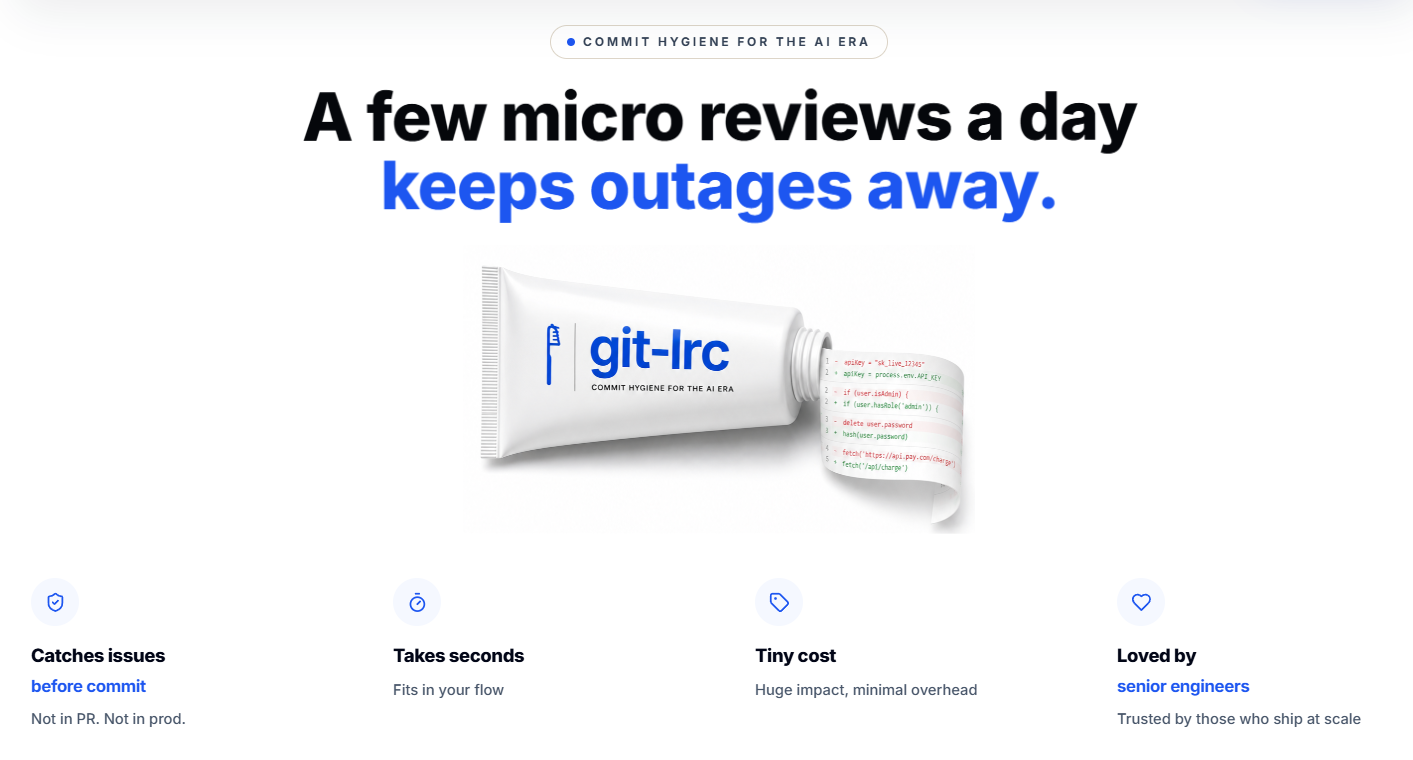
GenAI today is a race car without brakes. It accelerates fast -- you describe something, and large blocks of code appear instantly. But AI agents silently break things: they remove logic, relax constraints, introduce expensive cloud calls, leak credentials, and change behavior -- without telling you. You often find out in production.
git-lrc is your braking system. It hooks into git commit and runs an AI review on every diff before it lands. 60-second setup. Completely free.
In short, git-lrc helps Prevent Outages, Breaches, and Technical Debt Before They Happen
At a glance: 10 risk categories · 100+ failure patterns tracked · every commit scanned automatically.
# Try it now (Linux/macOS)
curl -L https://hexmos.com/ipm-install | bash && ipm i HexmosTech/git-lrc
Windows, alternative installs, and full setup walkthrough: see Get Started.
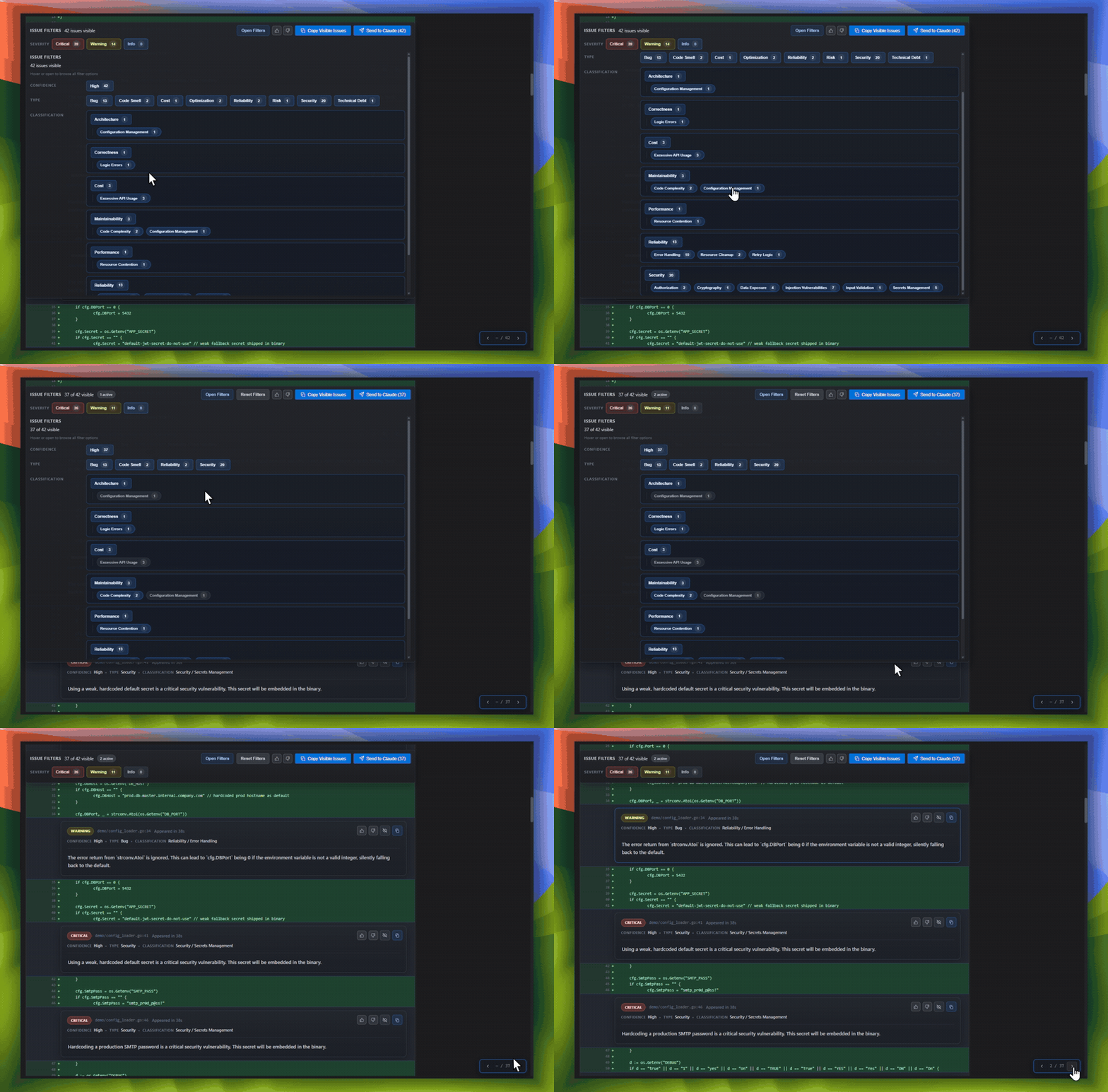
A wall of inline comments is hard to triage. The Issue Navigator turns every review into a structured, filterable view across 10 risk categories and 100+ patterns — so you can see exactly what's wrong, ranked by how much it can hurt you.
Every completed review also generates a short slide deck — a 60-second summary of what changed, why, and what risks were flagged, without anyone having to write it.
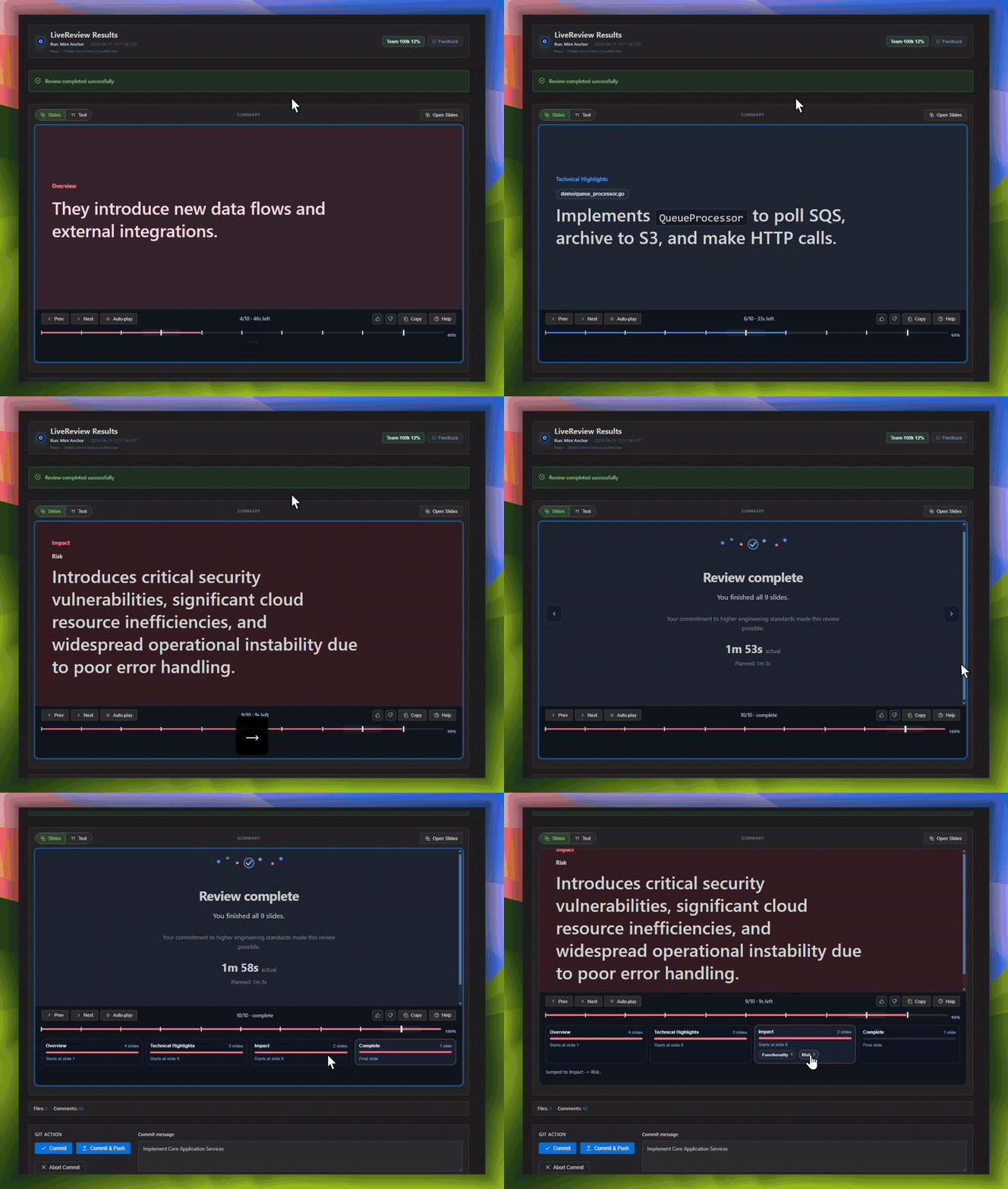
For onboarding new engineers, post-incident reviews, or just remembering why a change was made six months ago, this is the fastest way to get oriented — without re-reading the diff.
See git-lrc catch serious security issues such as leaked credentials, expensive cloud operations, and sensitive material in log statements
https://github.com/user-attachments/assets/cc4aa598-a7e3-4a1d-998c-9f2ba4b4c66e
git-lrc plugs into the one workflow step every team already shares.# Linux/macOS
curl -L https://hexmos.com/ipm-install | bash && ipm i HexmosTech/git-lrc
# Windows
iwr https://hexmos.com/ipm-install-ps | iex; ipm i HexmosTech/git-lrc
Linux / macOS:
curl -fsSL https://hexmos.com/lrc-install.sh | bash
Windows (PowerShell):
iwr -useb https://hexmos.com/lrc-install.ps1 | iex
curl -fsSL https://git.new/lrc-install | bash
Binary installed. Hooks set up globally. Done.
Installing git-lrc also gives you claude-lrc -- the same review, vouch, and skip workflow, available as slash commands right inside Claude Code. No separate install, no leaving the chat.
| What you want | How |
|---|---|
| Natural language | review with lrc |
| Slash command | /lrc:review |
| Quality vouch | /lrc:vouch |
| Intentional bypass | /lrc:skip |
Use git-lrc when you want editor-independent, commit-time enforcement across repos and tools. Use claude-lrc when you want natural-language and slash-command control directly inside Claude Code.
git lrc setup
Here's a quick video of how setup works:
https://github.com/user-attachments/assets/392a4605-6e45-42ad-b2d9-6435312444b5
Two steps, both open in your browser:
~1 minute. One-time setup, machine-wide. After this, every git repo on your machine triggers review on commit. No per-repo config needed.
Predictable, LOC-based. 30k LOC free every month. Premium starts at $32 for 100k LOC. No headcount based pricing, scales with workload.
| Tier | What you get | Notes |
|---|---|---|
| 1. Free Individual | Install git-lrc and start with 30k LOC per month | Bring your own AI keys. Keep git-lrc and the VS Code extension. |
| 2. Premium | Upgrade when 30k LOC is not enough | Starts at $32 for 100k LOC. Scales by workload, not by seat. |
| 3. Enterprise | Move further for privacy and deployment control | Self-hosting, SSO, custom domains, and tighter data control. |
No credit card required for the free tier. See the full pricing page for details.
git add .
git commit -m "add payment validation"
# review launches automatically before the commit goes through
git add .
git lrc review          # run AI review first
# or: git lrc review --vouch   # vouch personally, skip AI
# or: git lrc review --skip    # skip review entirely
git commit -m "add payment validation"
Either way, a web UI opens in your browser.
https://github.com/user-attachments/assets/ae063e39-379f-4815-9954-f0e2ab5b9cde
https://github.com/user-attachments/assets/b579d7c6-bdf6-458b-b446-006ca41fe47d
| Action | What happens |
|---|---|
| Commit | Accept and commit the reviewed changes |
| Commit & Push | Commit and push to remote in one step |
| Skip | Abort the commit — go fix issues first |
📎 Screenshot: Pre-commit bar showing Commit / Commit & Push / Skip buttons
Typical workflow with AI-generated code:
git add . → git lrc review — AI flags issuesgit add . → git lrc review — AI reviews againgit lrc review --vouch → git commit — you vouch and commitEach git lrc review is an iteration. The tool tracks how many iterations you did and what percentage of the diff was AI-reviewed (coverage).
Once you've iterated enough and you're satisfied with the code:
git lrc review --vouch
This says: "I've reviewed this — through AI iterations or personally — and I take responsibility." No AI review runs, but coverage stats from prior iterations are recorded.
Just want to commit without review or responsibility attestation?
git lrc review --skip
No AI review. No personal attestation. The git log will record skipped.
Coding agents (Claude Code, Cursor, etc.) shouldn't sit and wait for a
browser-based review UI. --agent-mode runs a real AI review non-interactively
and reports the findings as JSON:
git add .
git lrc review --agent-mode
git commit -m "add payment validation"
--agent-mode bundles: no browser/TUI, JSON output, and staged-diff scope
(commit/range reviews still take priority if you pass --commit/--range
explicitly). If the review completes, it records an agent-reviewed
attestation — distinct from skipped (no AI review ran at all) and vouched
(a human approved without AI) — so the following git commit proceeds
without a separate --skip/--vouch step. If the review fails (network,
quota, timeout), no attestation is written, so git commit safely falls back
to a normal review/skip/vouch decision instead of silently proceeding.
Like a normal git lrc review, you can run --agent-mode more than once
before committing (e.g. after fixing flagged issues) — the tool still tracks
iterations and prior-coverage credit the same way it does for review/vouch.
Huge diffs are hard to triage — 500 lines across 10 files, and every hunk looks equally important. The Risk-Scored View ranks every hunk by blast radius (how far a mistake could ripple through the codebase) and customer impact potential (how close it is to a production-facing surface), so the riskiest changes are always first.
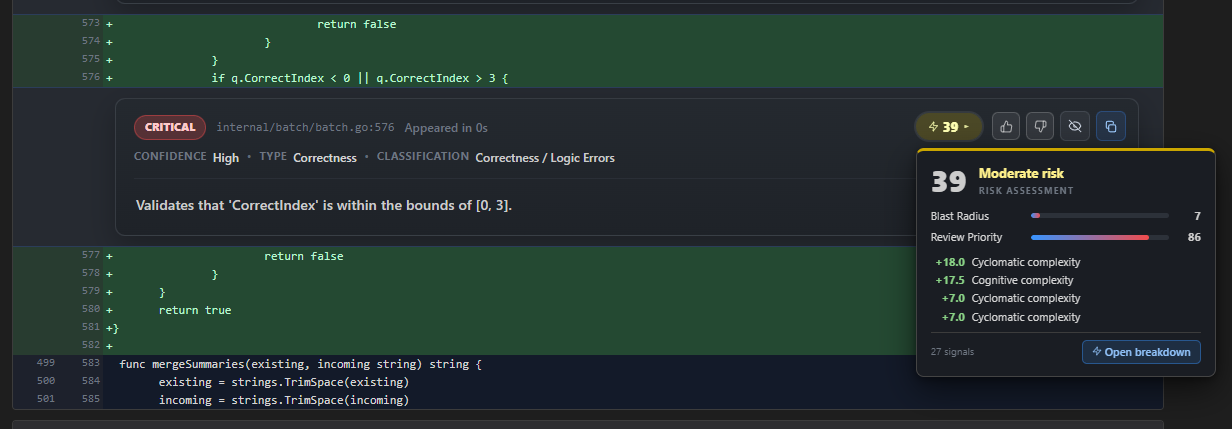
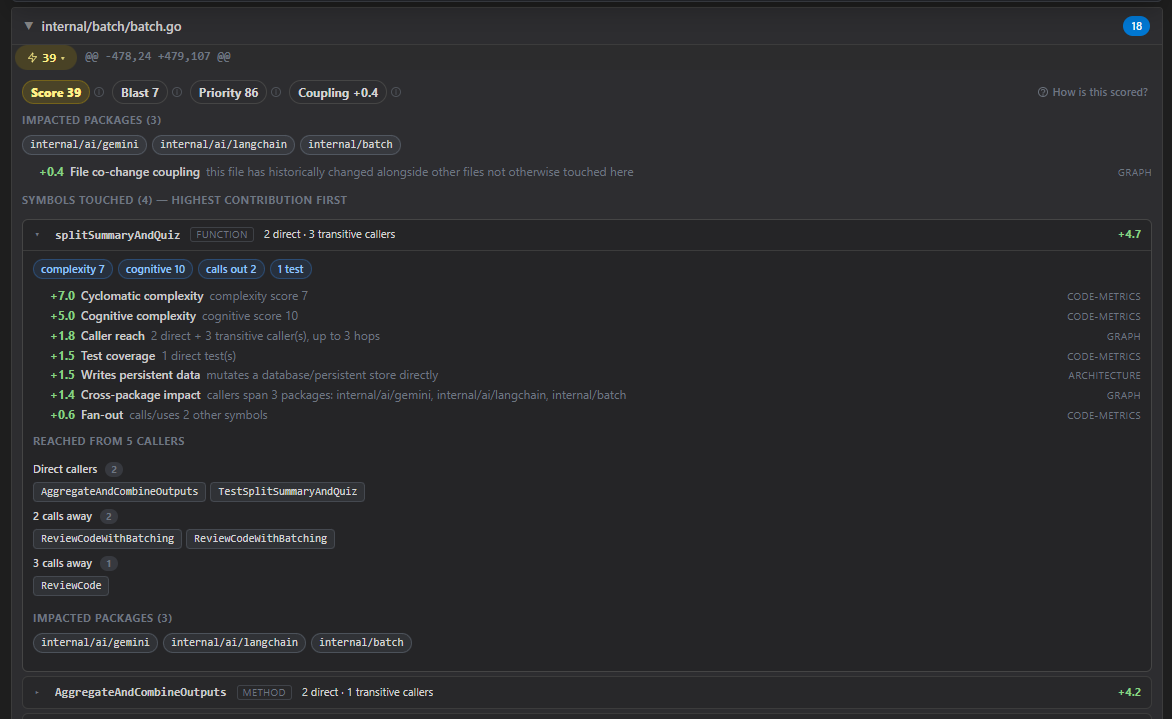
Every hunk gets two independent 0-100 scores, each built from labeled Signals:
Blast Radius — how far the change can propagate:
Review Priority — how much attention this hunk needs:
Combined blends Blast Radius and Review Priority at 60/40 into the final ranking number used for sorting.
Scoring runs locally against a codebase-memory-mcp
knowledge graph, concurrently with the server-side AI review — neither waits for the other.
The engine binary is auto-installed into ~/.lrc/bin only (no PATH edits, no agent-config
changes). Manage it any time with:
git lrc graph install    # install/update the engine
git lrc graph status     # binary path, version, indexed projects
git lrc graph uninstall  # remove it
The first review in a repository indexes it automatically (larger repos take a few minutes,
during which the review proceeds normally and scores appear when ready); subsequent reviews
refresh the index incrementally in about a second. Reviews work exactly as before without
the engine — scoring stays off. Disable explicitly with --blast-radius=false.
Every commit gets a review status line appended to its git log message:
LiveReview Pre-Commit Check: ran (iter:3, coverage:85%)
LiveReview Pre-Commit Check: vouched (iter:2, coverage:50%)
LiveReview Pre-Commit Check: skipped
iter — number of review cycles before committing. iter:3 = three rounds of review → fix → review.coverage — percentage of the final diff already AI-reviewed in prior iterations. coverage:85% = only 15% of the code is unreviewed.Your team sees exactly which commits were reviewed, vouched, or skipped — right in git log.
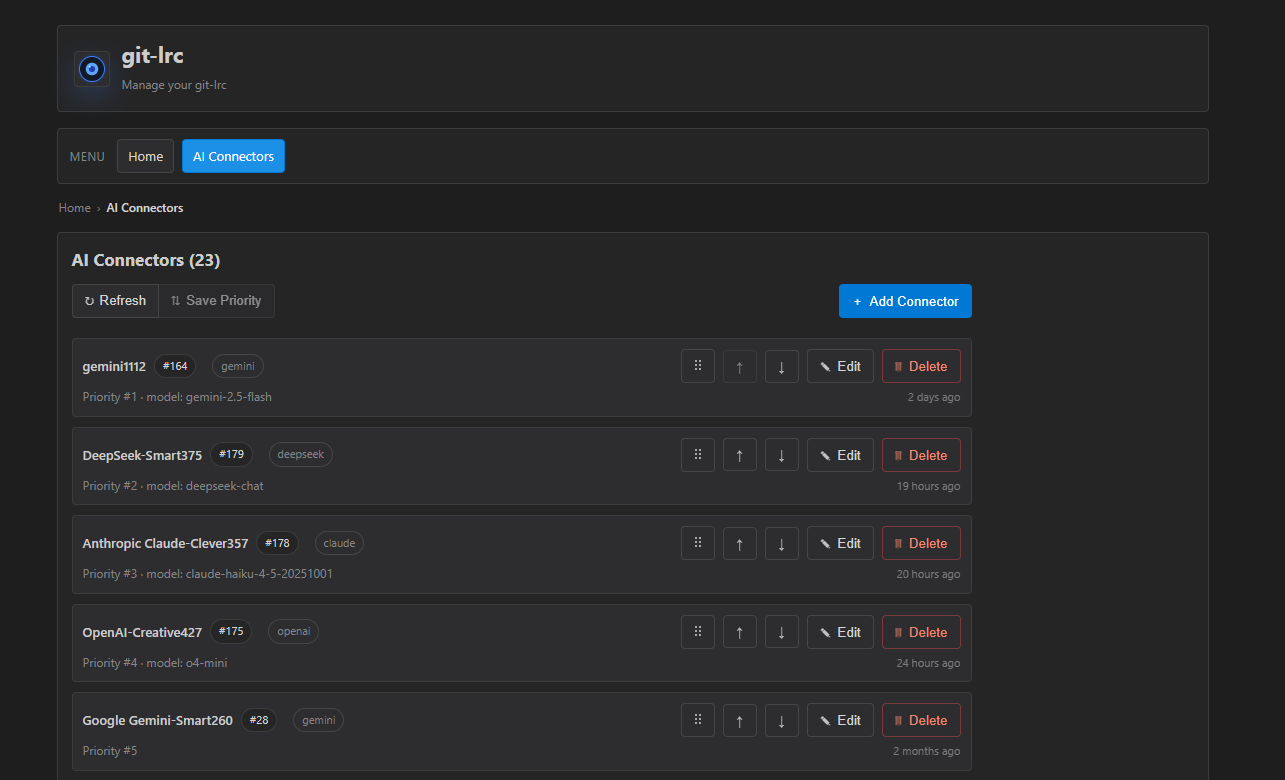
In addition to the default Gemini setup, you can bring your own API keys for:
Use:
lrc ui
From the UI, you can:
By default, the first connector in the list is used for reviews.
We also support:
To configure:
Anthropic Compatible API connector from the UI.gw.claudeapi.com) or entering a custom URL.Setup guide: Using ClaudeAPI with git-lrc
We also support:

To configure:
Atlas Cloud connector from the UI.deepseek-ai/deepseek-v4-flash).A good reviewer doesn't just know your language and framework — it knows your repository: which patterns your team prefers, which dependencies are off-limits, and which shortcuts are fine here but wouldn't be elsewhere. Most of that knowledge never makes it into docs, which is why AI review can feel like feedback from a new hire.
git-lrc lets you write that knowledge down once, in a .lrc/ directory at
the root of your repo, version-controlled like everything else:
lrc config init
.lrc/
├── README.md            # explains this setup
├── ignore                # files/paths the reviewer should never see
└── rules/
    ├── INSTRUCTIONS.md   # read first — your most important guidance
    ├── design.md
    ├── security.md
    └── style.md          # add as many *.md files as you need
rules/*.md — short notes on how your team works, e.g. "Prefer direct
SQL over ORM abstractions" or "Avoid new infrastructure dependencies."
INSTRUCTIONS.md is read first; every other file follows in order. All of
it is combined into one set of instructions sent to the reviewer.ignore — gitignore-style patterns for files the reviewer should skip
entirely (generated code, vendored files, etc.). Ignored files aren't sent
to the AI and don't count toward billable lines.policy/ — (TODO, not yet enforced) machine-readable settings, such
as which tools the reviewer is allowed to use.The rules/ bundle is capped at 3000 characters. That's on purpose — a
twenty-page style guide gets skimmed, by humans and AI alike. A handful of
sentences that repeatedly change a review's outcome are worth far more than a
full manual:
lrc config check    # validate rules, ignore patterns, and bundle size — offline
lrc config preview  # show the exact instructions that will be sent to the reviewer
If it's sent to the model, you can see it first.
Every review is checked against 10 risk categories and 100+ specific failure patterns, grouped into three pillars: what takes down production, what ends up in a disclosure letter, and what slows every future release. Expand any pillar, then any category, to see the exact patterns and why each one matters.
| Review | Vouch | Skip | |
|---|---|---|---|
| AI reviews the diff? | Yes | No | No |
| Takes responsibility? | Yes | Yes, explicitly | No |
| Tracks iterations? | Yes | Records prior coverage | No |
| Git log message | ran (iter:N, coverage:X%) | vouched (iter:N, coverage:X%) | skipped |
| When to use | Each review cycle | Done iterating, ready to commit | Not reviewing this commit |
Review is the default. AI analyzes your staged diff and gives inline feedback. Each review is one iteration in the change–review cycle.
Vouch means you're explicitly taking responsibility for this commit. Typically used after multiple review iterations — you've gone back and forth, fixed issues, and are now satisfied. The AI doesn't run again, but your prior iteration and coverage stats are recorded.
Skip means you're not reviewing this particular commit. Maybe it's trivial, maybe it's not critical — the reason is yours. The git log simply records skipped.
Because that is already late. If a bug or low-value mistake survives until PR review, you have already committed it, pushed it, and asked teammates to look at something you could have corrected yourself earlier. That leaves a record of faulty code and draws shared attention to avoidable cleanup. git-lrc moves that feedback to commit-time, when context is still fresh and fixes are still cheap.
IDE extensions help, but they are not a reliable enforcement point. A developer can skip them, disable them, or use another editor entirely. That makes them useful convenience tooling, not a universal review trigger.
Commit-time is early enough to stop faulty code before it becomes part of permanent git history, but late enough to be dependable because every engineer has to commit. It gives you a reliable checkpoint without forcing one IDE, one AI assistant, or extra manual discipline.
git-lrc uses Google's Gemini API by default for AI reviews, and also supports BYOK connectors (OpenAI, Claude, DeepSeek, OpenRouter) — see Bring Your Own AI Connector (BYOK). Gemini offers a generous free tier. You bring your own API key(s) — there's no middleman billing. The LiveReview cloud service that coordinates reviews is free for individual developers.
You can connect Gemini (default), OpenAI, Claude, DeepSeek, and OpenRouter.
Manage connectors from:
lrc ui
Open:
lrc ui
Then reorder your connector list. The first connector is used by default when a review runs.
Yes. Run lrc ui anytime to re-authenticate, add/remove connectors, and update connector priority.
Only the staged diff is analyzed. No full repository context is uploaded, and diffs are not stored after review.
git lrc hooks disable   # disable for current repo
git lrc hooks enable    # re-enable later
git lrc review --commit HEAD       # review the last commit
git lrc review --commit HEAD~3..HEAD  # review a range
| Command | Description |
|---|---|
lrc setup | Guided onboarding and initial auth/config |
lrc ui | Open local UI to re-auth, manage BYOK connectors, priority |
lrc or lrc review | Run a review with sensible defaults |
lrc review --staged | Review staged changes only |
lrc review --commit HEAD | Review a specific commit |
lrc review --commit HEAD~3..HEAD | Review a commit range |
lrc review --range HEAD~1..HEAD | Review a git diff range (working/staged override) |
lrc review --vouch | Vouch — skip AI, take personal responsibility |
lrc review --skip | Skip review for this commit |
lrc review --agent-mode | Non-interactive AI review for coding agents/CI (JSON output, auto-attests as agent-reviewed on completion) |
lrc hooks install | Install global hook dispatcher |
lrc hooks uninstall | Remove global hook dispatcher and managed scripts |
lrc hooks enable | Enable hooks for current repo |
lrc hooks disable | Disable hooks for current repo |
lrc hooks status | Show hook status for current repo |
lrc self-update | Update to latest version |
lrc version | Show version info |
Tip:
git lrc <command>andlrc <command>are interchangeable.
git-lrc is completely free. No credit card. No trial. No catch.
If it helps you — share it with your developer friends. The more people review AI-generated code, the fewer bugs make it to production.
⭐ Star this repo to help others discover it.
Pick the right place based on what you need:
git-lrc is distributed under a modified variant of Sustainable Use License (SUL).
[!NOTE]
What this means:
- ✅ Source Available — Full source code is available for self-hosting
- ✅ Business Use Allowed — Use LiveReview for your internal business operations
- ✅ Modifications Allowed — Customize for your own use
- ❌ No Resale — Cannot be resold or offered as a competing service
- ❌ No Redistribution — Cannot redistribute modified versions commercially
This license ensures LiveReview remains sustainable while giving you full access to self-host and customize for your needs.
For detailed terms, examples of permitted and prohibited uses, and definitions, see the full LICENSE.md.
Using
git-lrcsolo? Great. Building with a team? Check out LiveReview — the full suite for team-wide AI code review, with dashboards, org-level policies, and review analytics. Everythinggit-lrcdoes, plus team coordination.
214 followers · starred Apr 2026
243 followers · starred Jul 2026
85 followers · starred Mar 2026
1,027 followers · starred Apr 2026
Free, Micro AI Code Reviews That Run on Git Commit
See the code| 🇩🇰 Dansk | 🇪🇸 Español | 🇮🇷 Farsi | 🇫🇮 Suomi | 🇯🇵 日本語 | 🇳🇴 Norsk | 🇵🇹 Português | 🇷🇺 Русский | 🇦🇱 Shqip | 🇨🇳 中文 | 🇮🇳 हिन्दी |
GenAI today is a race car without brakes. It accelerates fast -- you describe something, and large blocks of code appear instantly. But AI agents silently break things: they remove logic, relax constraints, introduce expensive cloud calls, leak credentials, and change behavior -- without telling you. You often find out in production.
git-lrc is your braking system. It hooks into git commit and runs an AI review on every diff before it lands. 60-second setup. Completely free.
In short, git-lrc helps Prevent Outages, Breaches, and Technical Debt Before They Happen
At a glance: 10 risk categories · 100+ failure patterns tracked · every commit scanned automatically.
# Try it now (Linux/macOS)
curl -L https://hexmos.com/ipm-install | bash && ipm i HexmosTech/git-lrc
Windows, alternative installs, and full setup walkthrough: see Get Started.
A wall of inline comments is hard to triage. The Issue Navigator turns every review into a structured, filterable view across 10 risk categories and 100+ patterns — so you can see exactly what's wrong, ranked by how much it can hurt you.
Every completed review also generates a short slide deck — a 60-second summary of what changed, why, and what risks were flagged, without anyone having to write it.
For onboarding new engineers, post-incident reviews, or just remembering why a change was made six months ago, this is the fastest way to get oriented — without re-reading the diff.
See git-lrc catch serious security issues such as leaked credentials, expensive cloud operations, and sensitive material in log statements
https://github.com/user-attachments/assets/cc4aa598-a7e3-4a1d-998c-9f2ba4b4c66e
git-lrc plugs into the one workflow step every team already shares.# Linux/macOS
curl -L https://hexmos.com/ipm-install | bash && ipm i HexmosTech/git-lrc
# Windows
iwr https://hexmos.com/ipm-install-ps | iex; ipm i HexmosTech/git-lrc
Linux / macOS:
curl -fsSL https://hexmos.com/lrc-install.sh | bash
Windows (PowerShell):
iwr -useb https://hexmos.com/lrc-install.ps1 | iex
curl -fsSL https://git.new/lrc-install | bash
Binary installed. Hooks set up globally. Done.
Installing git-lrc also gives you claude-lrc -- the same review, vouch, and skip workflow, available as slash commands right inside Claude Code. No separate install, no leaving the chat.
| What you want | How |
|---|---|
| Natural language | review with lrc |
| Slash command | /lrc:review |
| Quality vouch | /lrc:vouch |
| Intentional bypass | /lrc:skip |
Use git-lrc when you want editor-independent, commit-time enforcement across repos and tools. Use claude-lrc when you want natural-language and slash-command control directly inside Claude Code.
git lrc setup
Here's a quick video of how setup works:
https://github.com/user-attachments/assets/392a4605-6e45-42ad-b2d9-6435312444b5
Two steps, both open in your browser:
~1 minute. One-time setup, machine-wide. After this, every git repo on your machine triggers review on commit. No per-repo config needed.
Predictable, LOC-based. 30k LOC free every month. Premium starts at $32 for 100k LOC. No headcount based pricing, scales with workload.
| Tier | What you get | Notes |
|---|---|---|
| 1. Free Individual | Install git-lrc and start with 30k LOC per month | Bring your own AI keys. Keep git-lrc and the VS Code extension. |
| 2. Premium | Upgrade when 30k LOC is not enough | Starts at $32 for 100k LOC. Scales by workload, not by seat. |
| 3. Enterprise | Move further for privacy and deployment control | Self-hosting, SSO, custom domains, and tighter data control. |
No credit card required for the free tier. See the full pricing page for details.
git add .
git commit -m "add payment validation"
# review launches automatically before the commit goes through
git add .
git lrc review          # run AI review first
# or: git lrc review --vouch   # vouch personally, skip AI
# or: git lrc review --skip    # skip review entirely
git commit -m "add payment validation"
Either way, a web UI opens in your browser.
https://github.com/user-attachments/assets/ae063e39-379f-4815-9954-f0e2ab5b9cde
https://github.com/user-attachments/assets/b579d7c6-bdf6-458b-b446-006ca41fe47d
| Action | What happens |
|---|---|
| Commit | Accept and commit the reviewed changes |
| Commit & Push | Commit and push to remote in one step |
| Skip | Abort the commit — go fix issues first |
📎 Screenshot: Pre-commit bar showing Commit / Commit & Push / Skip buttons
Typical workflow with AI-generated code:
git add . → git lrc review — AI flags issuesgit add . → git lrc review — AI reviews againgit lrc review --vouch → git commit — you vouch and commitEach git lrc review is an iteration. The tool tracks how many iterations you did and what percentage of the diff was AI-reviewed (coverage).
Once you've iterated enough and you're satisfied with the code:
git lrc review --vouch
This says: "I've reviewed this — through AI iterations or personally — and I take responsibility." No AI review runs, but coverage stats from prior iterations are recorded.
Just want to commit without review or responsibility attestation?
git lrc review --skip
No AI review. No personal attestation. The git log will record skipped.
Coding agents (Claude Code, Cursor, etc.) shouldn't sit and wait for a
browser-based review UI. --agent-mode runs a real AI review non-interactively
and reports the findings as JSON:
git add .
git lrc review --agent-mode
git commit -m "add payment validation"
--agent-mode bundles: no browser/TUI, JSON output, and staged-diff scope
(commit/range reviews still take priority if you pass --commit/--range
explicitly). If the review completes, it records an agent-reviewed
attestation — distinct from skipped (no AI review ran at all) and vouched
(a human approved without AI) — so the following git commit proceeds
without a separate --skip/--vouch step. If the review fails (network,
quota, timeout), no attestation is written, so git commit safely falls back
to a normal review/skip/vouch decision instead of silently proceeding.
Like a normal git lrc review, you can run --agent-mode more than once
before committing (e.g. after fixing flagged issues) — the tool still tracks
iterations and prior-coverage credit the same way it does for review/vouch.
Huge diffs are hard to triage — 500 lines across 10 files, and every hunk looks equally important. The Risk-Scored View ranks every hunk by blast radius (how far a mistake could ripple through the codebase) and customer impact potential (how close it is to a production-facing surface), so the riskiest changes are always first.
Every hunk gets two independent 0-100 scores, each built from labeled Signals:
Blast Radius — how far the change can propagate:
Review Priority — how much attention this hunk needs:
Combined blends Blast Radius and Review Priority at 60/40 into the final ranking number used for sorting.
Scoring runs locally against a codebase-memory-mcp
knowledge graph, concurrently with the server-side AI review — neither waits for the other.
The engine binary is auto-installed into ~/.lrc/bin only (no PATH edits, no agent-config
changes). Manage it any time with:
git lrc graph install    # install/update the engine
git lrc graph status     # binary path, version, indexed projects
git lrc graph uninstall  # remove it
The first review in a repository indexes it automatically (larger repos take a few minutes,
during which the review proceeds normally and scores appear when ready); subsequent reviews
refresh the index incrementally in about a second. Reviews work exactly as before without
the engine — scoring stays off. Disable explicitly with --blast-radius=false.
Every commit gets a review status line appended to its git log message:
LiveReview Pre-Commit Check: ran (iter:3, coverage:85%)
LiveReview Pre-Commit Check: vouched (iter:2, coverage:50%)
LiveReview Pre-Commit Check: skipped
iter — number of review cycles before committing. iter:3 = three rounds of review → fix → review.coverage — percentage of the final diff already AI-reviewed in prior iterations. coverage:85% = only 15% of the code is unreviewed.Your team sees exactly which commits were reviewed, vouched, or skipped — right in git log.
In addition to the default Gemini setup, you can bring your own API keys for:
Use:
lrc ui
From the UI, you can:
By default, the first connector in the list is used for reviews.
We also support:
To configure:
Anthropic Compatible API connector from the UI.gw.claudeapi.com) or entering a custom URL.Setup guide: Using ClaudeAPI with git-lrc
We also support:
To configure:
Atlas Cloud connector from the UI.deepseek-ai/deepseek-v4-flash).A good reviewer doesn't just know your language and framework — it knows your repository: which patterns your team prefers, which dependencies are off-limits, and which shortcuts are fine here but wouldn't be elsewhere. Most of that knowledge never makes it into docs, which is why AI review can feel like feedback from a new hire.
git-lrc lets you write that knowledge down once, in a .lrc/ directory at
the root of your repo, version-controlled like everything else:
lrc config init
.lrc/
├── README.md            # explains this setup
├── ignore                # files/paths the reviewer should never see
└── rules/
    ├── INSTRUCTIONS.md   # read first — your most important guidance
    ├── design.md
    ├── security.md
    └── style.md          # add as many *.md files as you need
rules/*.md — short notes on how your team works, e.g. "Prefer direct
SQL over ORM abstractions" or "Avoid new infrastructure dependencies."
INSTRUCTIONS.md is read first; every other file follows in order. All of
it is combined into one set of instructions sent to the reviewer.ignore — gitignore-style patterns for files the reviewer should skip
entirely (generated code, vendored files, etc.). Ignored files aren't sent
to the AI and don't count toward billable lines.policy/ — (TODO, not yet enforced) machine-readable settings, such
as which tools the reviewer is allowed to use.The rules/ bundle is capped at 3000 characters. That's on purpose — a
twenty-page style guide gets skimmed, by humans and AI alike. A handful of
sentences that repeatedly change a review's outcome are worth far more than a
full manual:
lrc config check    # validate rules, ignore patterns, and bundle size — offline
lrc config preview  # show the exact instructions that will be sent to the reviewer
If it's sent to the model, you can see it first.
Every review is checked against 10 risk categories and 100+ specific failure patterns, grouped into three pillars: what takes down production, what ends up in a disclosure letter, and what slows every future release. Expand any pillar, then any category, to see the exact patterns and why each one matters.
| Review | Vouch | Skip | |
|---|---|---|---|
| AI reviews the diff? | Yes | No | No |
| Takes responsibility? | Yes | Yes, explicitly | No |
| Tracks iterations? | Yes | Records prior coverage | No |
| Git log message | ran (iter:N, coverage:X%) | vouched (iter:N, coverage:X%) | skipped |
| When to use | Each review cycle | Done iterating, ready to commit | Not reviewing this commit |
Review is the default. AI analyzes your staged diff and gives inline feedback. Each review is one iteration in the change–review cycle.
Vouch means you're explicitly taking responsibility for this commit. Typically used after multiple review iterations — you've gone back and forth, fixed issues, and are now satisfied. The AI doesn't run again, but your prior iteration and coverage stats are recorded.
Skip means you're not reviewing this particular commit. Maybe it's trivial, maybe it's not critical — the reason is yours. The git log simply records skipped.
Because that is already late. If a bug or low-value mistake survives until PR review, you have already committed it, pushed it, and asked teammates to look at something you could have corrected yourself earlier. That leaves a record of faulty code and draws shared attention to avoidable cleanup. git-lrc moves that feedback to commit-time, when context is still fresh and fixes are still cheap.
IDE extensions help, but they are not a reliable enforcement point. A developer can skip them, disable them, or use another editor entirely. That makes them useful convenience tooling, not a universal review trigger.
Commit-time is early enough to stop faulty code before it becomes part of permanent git history, but late enough to be dependable because every engineer has to commit. It gives you a reliable checkpoint without forcing one IDE, one AI assistant, or extra manual discipline.
git-lrc uses Google's Gemini API by default for AI reviews, and also supports BYOK connectors (OpenAI, Claude, DeepSeek, OpenRouter) — see Bring Your Own AI Connector (BYOK). Gemini offers a generous free tier. You bring your own API key(s) — there's no middleman billing. The LiveReview cloud service that coordinates reviews is free for individual developers.
You can connect Gemini (default), OpenAI, Claude, DeepSeek, and OpenRouter.
Manage connectors from:
lrc ui
Open:
lrc ui
Then reorder your connector list. The first connector is used by default when a review runs.
Yes. Run lrc ui anytime to re-authenticate, add/remove connectors, and update connector priority.
Only the staged diff is analyzed. No full repository context is uploaded, and diffs are not stored after review.
git lrc hooks disable   # disable for current repo
git lrc hooks enable    # re-enable later
git lrc review --commit HEAD       # review the last commit
git lrc review --commit HEAD~3..HEAD  # review a range
| Command | Description |
|---|---|
lrc setup | Guided onboarding and initial auth/config |
lrc ui | Open local UI to re-auth, manage BYOK connectors, priority |
lrc or lrc review | Run a review with sensible defaults |
lrc review --staged | Review staged changes only |
lrc review --commit HEAD | Review a specific commit |
lrc review --commit HEAD~3..HEAD | Review a commit range |
lrc review --range HEAD~1..HEAD | Review a git diff range (working/staged override) |
lrc review --vouch | Vouch — skip AI, take personal responsibility |
lrc review --skip | Skip review for this commit |
lrc review --agent-mode | Non-interactive AI review for coding agents/CI (JSON output, auto-attests as agent-reviewed on completion) |
lrc hooks install | Install global hook dispatcher |
lrc hooks uninstall | Remove global hook dispatcher and managed scripts |
lrc hooks enable | Enable hooks for current repo |
lrc hooks disable | Disable hooks for current repo |
lrc hooks status | Show hook status for current repo |
lrc self-update | Update to latest version |
lrc version | Show version info |
Tip:
git lrc <command>andlrc <command>are interchangeable.
git-lrc is completely free. No credit card. No trial. No catch.
If it helps you — share it with your developer friends. The more people review AI-generated code, the fewer bugs make it to production.
⭐ Star this repo to help others discover it.
Pick the right place based on what you need:
git-lrc is distributed under a modified variant of Sustainable Use License (SUL).
[!NOTE]
What this means:
- ✅ Source Available — Full source code is available for self-hosting
- ✅ Business Use Allowed — Use LiveReview for your internal business operations
- ✅ Modifications Allowed — Customize for your own use
- ❌ No Resale — Cannot be resold or offered as a competing service
- ❌ No Redistribution — Cannot redistribute modified versions commercially
This license ensures LiveReview remains sustainable while giving you full access to self-host and customize for your needs.
For detailed terms, examples of permitted and prohibited uses, and definitions, see the full LICENSE.md.
Using
git-lrcsolo? Great. Building with a team? Check out LiveReview — the full suite for team-wide AI code review, with dashboards, org-level policies, and review analytics. Everythinggit-lrcdoes, plus team coordination.
214 followers · starred Apr 2026
243 followers · starred Jul 2026
85 followers · starred Mar 2026
1,027 followers · starred Apr 2026



