基于 Zotero-Arxiv-Daily 的多模态科研智能助手 - 2025 AI+科研创新赛道参赛作品
Python
2
124 commits
updated Dec 8, 2025

Zotero-arXiv-Daily-Pro 是一个基于 GitHub Actions 的自动化学术论文推荐系统。它根据您的 Zotero 文献库内容,利用语义相似度算法从 arXiv 上筛选出与您研究方向最相关的新论文,并通过邮件发送每日推荐。
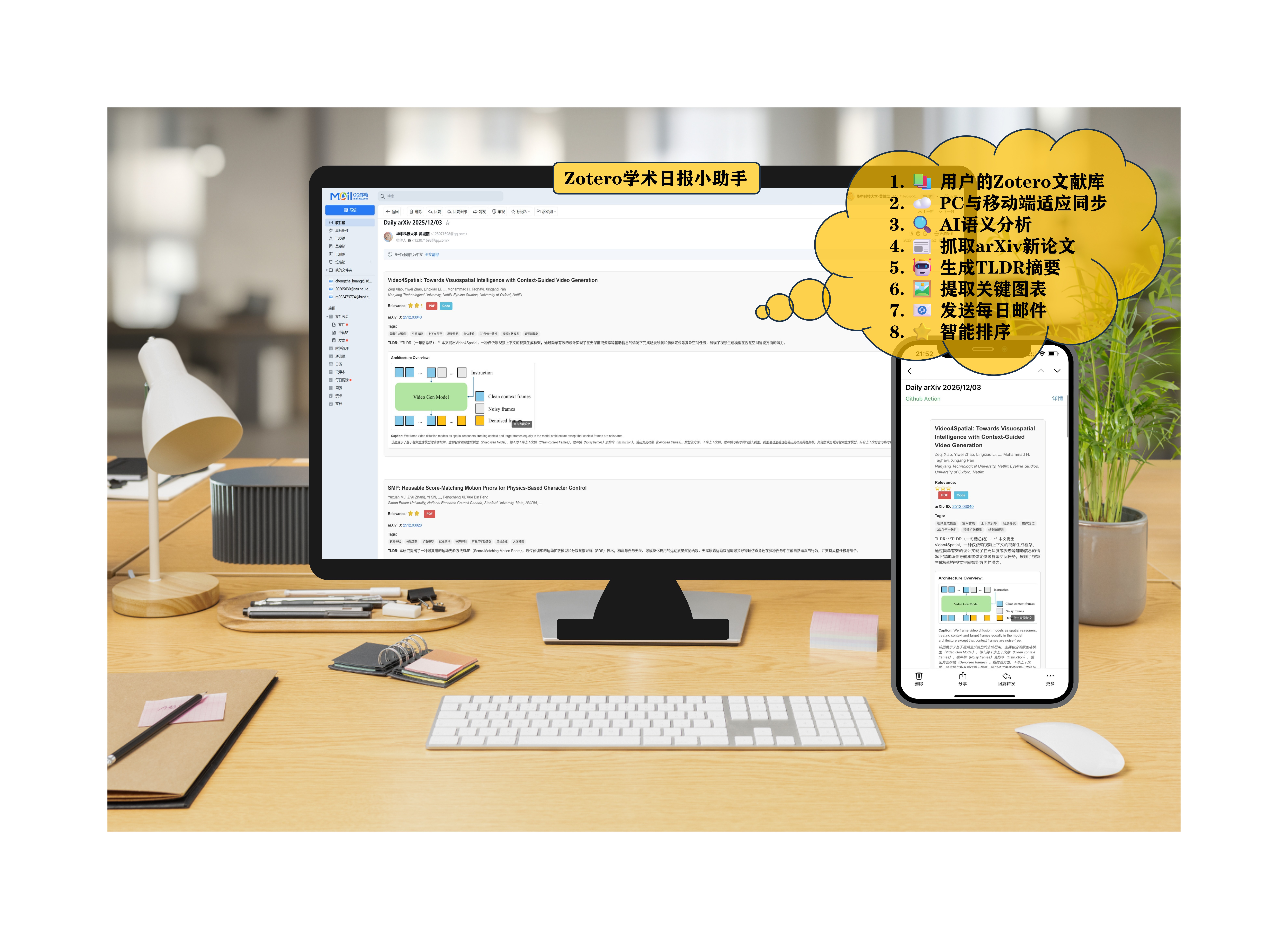
演示视频
观看完整演示视频了解系统功能: Zotero学术日报小助手演示视频.mp4
基于 sentence-transformers 的语义相似度计算:
GIST-small-Embedding-v0 模型生成论文向量weight = 1 / (1 + log10(rank + 1))邮件效果示例
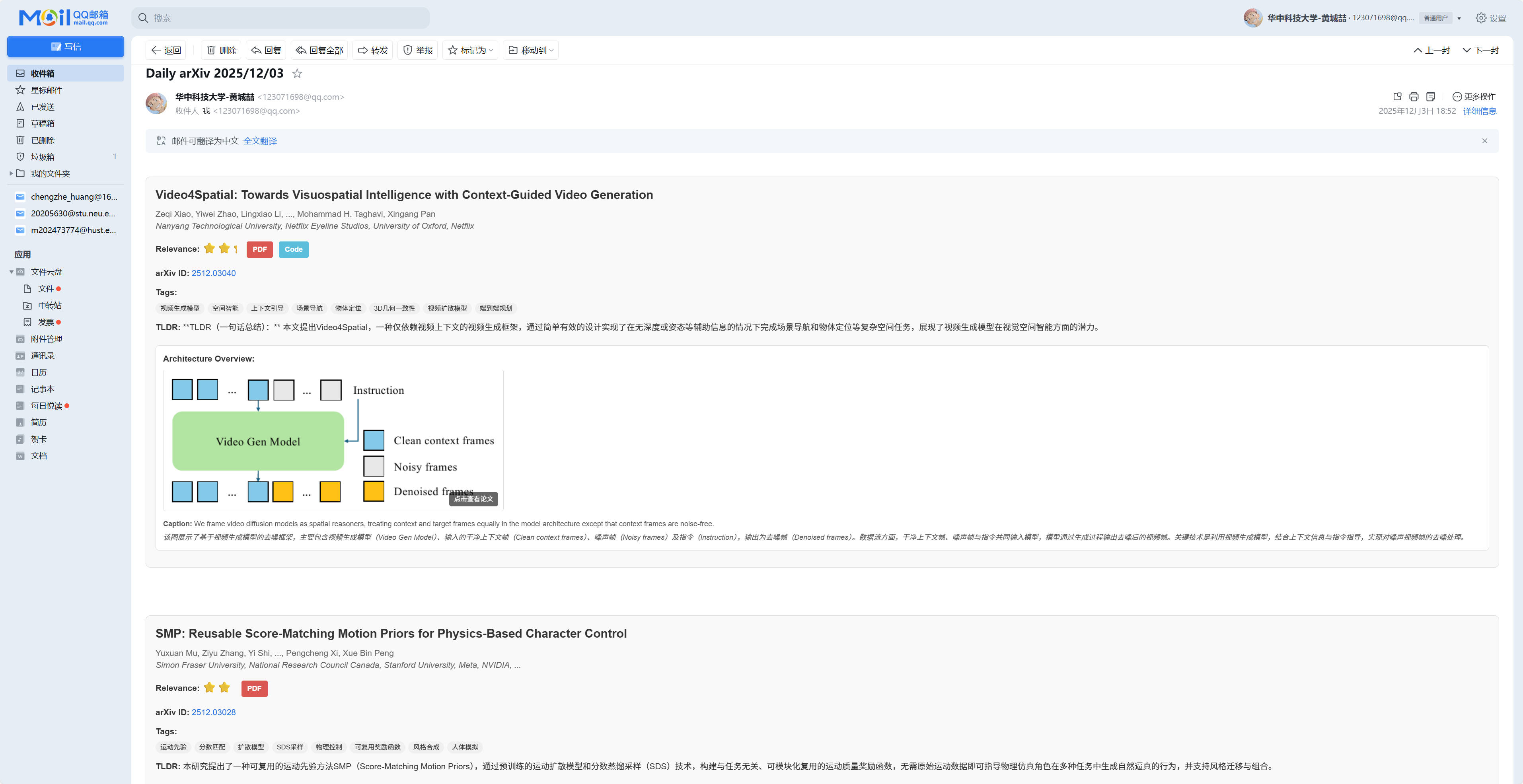
PC端邮件展示效果
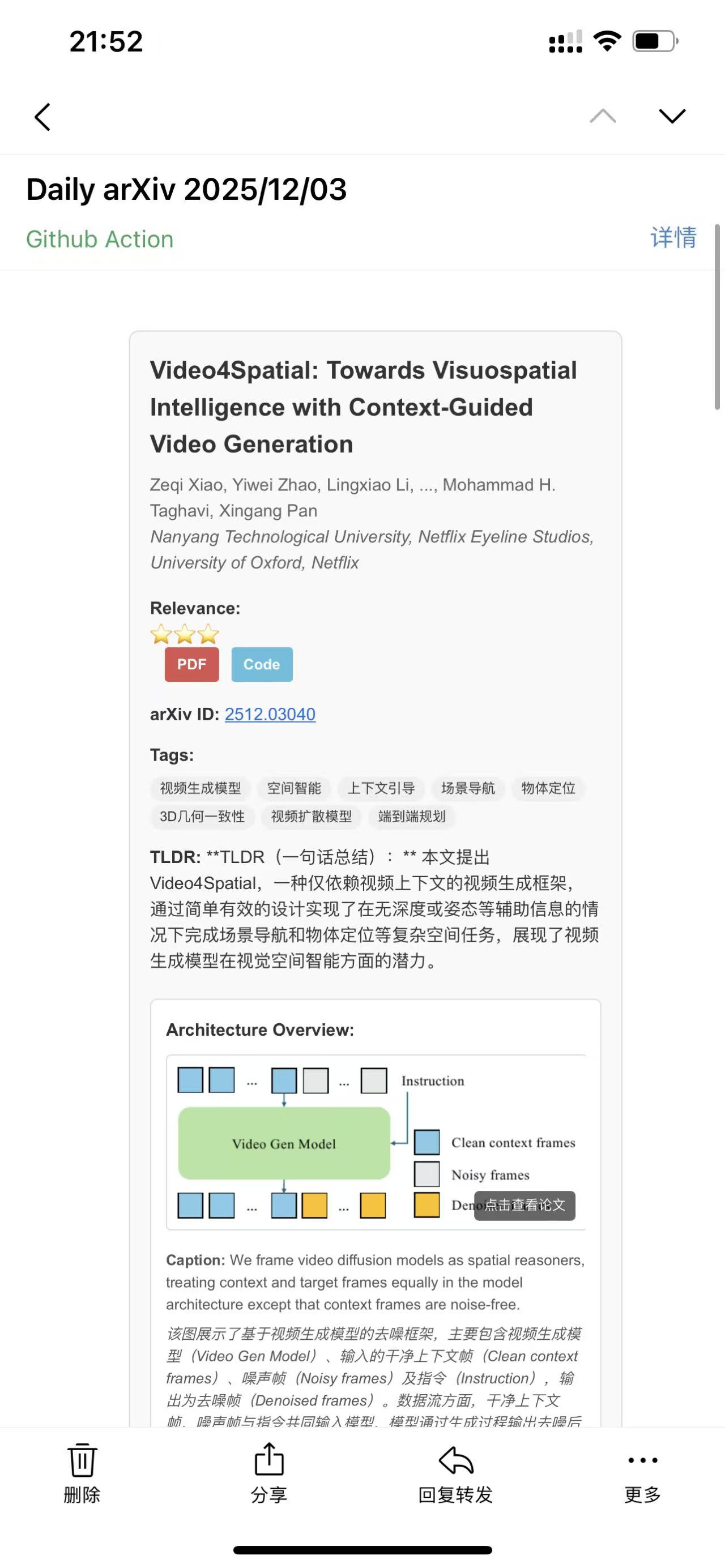
手机端邮件展示效果
使用 gitignore 风格的规则过滤 Zotero 集合:
# 排除整个 AI Agent 集合
AI Agent/

# 排除所有名为 survey 的子集合
**/survey

# 但保留 LLM/survey 集合
!LLM/survey
Fork 本仓库
点击页面右上角的 Fork 按钮
设置环境变量
进入 Settings > Secrets and variables > Actions > New repository secret
添加以下必需的 Secrets:
| 变量名 | 必需 | 类型 | 说明 | 示例 |
|---|---|---|---|---|
ZOTERO_ID | ✅ | str | Zotero 用户 ID(不是用户名,而是一串数字)。从这里获取,位置见此截图。 | 12345678 |
ZOTERO_KEY | ✅ | str | Zotero API Key(具有只读权限)。从这里创建。 | AB5tZ877P2j7Sm2M |
ARXIV_QUERY | ✅ | str | arXiv 论文类别。使用 + 连接多个类别。从这里查找您研究领域的缩写。 | cs.AI+cs.CV+cs.LG+cs.CL |
SMTP_SERVER | ✅ | str | SMTP 服务器地址。建议使用专用邮箱。咨询您的邮箱服务商(Gmail、QQ、Outlook等)。 | smtp.gmail.com |
SMTP_PORT | ✅ | int | SMTP 服务器端口。 | 465 |
SENDER | ✅ | str | 发件邮箱地址。 | [email protected] |
SENDER_PASSWORD | ✅ | str | 邮箱密码。注意:这不一定是登录密码,而是 SMTP 服务的授权码。咨询您的邮箱服务商。 | abcdefghijklmn |
RECEIVER | ✅ | str | 收件邮箱地址。 | [email protected] |
📌 更多配置说明:详见下方 API 配置获取指南
测试运行
进入 Actions > Test-Workflow > Run workflow
测试工作流会获取 5 篇论文用于验证配置
查看结果
检查 Actions 运行日志和接收邮箱
# 克隆仓库
git clone https://github.com/YOUR_USERNAME/Zotero-Arxiv-Daily-Pro.git
cd Zotero-Arxiv-Daily-Pro

# 安装依赖(需要 uv)
curl -LsSf https://astral.sh/uv/install.sh | sh
uv sync

# 配置环境变量
cp .env.example .env
# 编辑 .env 填入您的配置

# 运行
uv run main.py

# 调试模式(仅处理 5 篇论文)
uv run main.py --debug
ZOTERO_ID)Arxiv Dailysmtp.qq.com:465smtp.163.com:465免费推荐:SiliconFlow
Qwen/Qwen2.5-7B-Instructhttps://api.siliconflow.cn/v1其他选择:
如需启用论文图表提取功能:
ENABLE_IMAGE_EXTRACTION=TrueMINERU_TOKENMAX_IMAGES_PER_PAPER(默认3)默认每天 UTC 22:00 自动运行主工作流。修改运行时间:
# .github/workflows/main.yml
on:
  schedule:
    - cron: '0 22 * * *'  # 修改为您需要的时间
Send-emails-daily - 获取昨日新论文Test-Workflow - 固定获取 5 篇论文在 Settings > Secrets and variables > Actions > Variables 中添加(可选配置):
| 变量名 | 必需 | 类型 | 说明 | 默认值 |
|---|---|---|---|---|
MAX_PAPER_NUM | int | 邮件中显示的最大论文数。此值直接影响执行时间(每篇约70秒生成TLDR)。-1 表示显示所有检索到的论文。 | -1 | |
SEND_EMPTY | bool | 当没有新论文时是否发送空邮件。 | False | |
LANGUAGE | str | TLDR 的语言(直接嵌入到 LLM prompt 中)。 | English | |
USE_LLM_API | bool | 是否使用云端 LLM API。设为 True 使用 API,False 使用本地 LLM。 | False | |
OPENAI_API_KEY | str | 使用 LLM API 时的密钥。可在 SiliconFlow 获取免费 API。 | - | |
OPENAI_API_BASE | str | LLM API 的基础 URL。未填写时默认为 OpenAI URL。 | https://api.openai.com/v1 | |
MODEL_NAME | str | LLM 模型名称。未填写时默认为 gpt-4o。使用 SiliconFlow 时推荐 Qwen/Qwen2.5-7B-Instruct。 | gpt-4o | |
ZOTERO_IGNORE | str | gitignore 风格的 Zotero 集合过滤规则(每行一条)。了解更多:gitignore。 | - | |
ENABLE_IMAGE_EXTRACTION | bool | 是否启用图片提取功能。 | False | |
MINERU_TOKEN | str | MinerU API Token(启用图片提取时需要)。 | - | |
MAX_IMAGES_PER_PAPER | int | 每篇论文最多提取的图片数。 | 3 |
# 构建镜像
docker build -t zotero-arxiv-daily .

# 运行容器
docker run --env-file .env zotero-arxiv-daily

# 或使用 docker-compose
docker-compose up
使用 cron(Linux/macOS):
# 编辑 crontab
crontab -e

# 添加定时任务(每天早上 6 点运行)
0 6 * * * cd /path/to/Zotero-Arxiv-Daily-Pro && /path/to/uv run main.py
ArxivPaper 类论文对象封装,提供延迟加载属性。
from paper import ArxivPaper
import arxiv

# 创建论文对象
search = arxiv.Search(id_list=["2301.00001"])
result = next(search.results())
paper = ArxivPaper(result)

# 访问基本属性
print(paper.title)          # 论文标题
print(paper.abstract)       # 摘要
print(paper.authors)        # 作者列表
print(paper.pdf_url)        # PDF 链接

# 访问延迟加载属性(首次访问时计算)
print(paper.tldr)           # LLM 生成的 TLDR
print(paper.tex)            # LaTeX 源码
print(paper.affiliations)   # 作者机构列表
print(paper.code_url)       # 代码仓库链接
关键方法:
get_tex(): 下载并解析 LaTeX 源码get_tldr(llm, language='English'): 生成 TLDRget_affiliations(llm): 提取作者机构get_code_url(): 查找代码链接LLM 抽象层统一的 LLM 接口,支持本地模型和 API。
from llm import LLM

# 本地模型
llm = LLM(use_api=False)

# API 模式
llm = LLM(
    use_api=True,
    api_key="your-api-key",
    base_url="https://api.siliconflow.cn/v1",
    model_name="Qwen/Qwen2.5-7B-Instruct"
)

# 调用
response = llm(
    prompt="Summarize this paper:",
    max_tokens=100,
    temperature=0.7
)
全局单例:
from llm import GLOBAL_LLM

# 使用全局 LLM 实例
response = GLOBAL_LLM("Your prompt")
rerank_paper 推荐算法基于语义相似度的论文重排序。
from recommender import rerank_paper

# zotero_corpus: List[Dict] - Zotero 文献库
# papers: List[ArxivPaper] - 待排序的论文
# max_paper_num: int - 最多返回的论文数

ranked_papers = rerank_paper(
    zotero_corpus=zotero_corpus,
    papers=arxiv_papers,
    max_paper_num=50
)
算法细节:
avsolatorio/GIST-small-Embedding-v0 嵌入模型w = 1 / (1 + log10(i + 1))MinerUExtractor 图片提取集成 MinerU API 提取 PDF 图表。
from image_analyzer import MinerUExtractor, ImageImportanceAnalyzer

# 初始化提取器
extractor = MinerUExtractor(token="your-mineru-token")

# 提取图片
images = extractor.extract_images_from_pdf(
    pdf_url="https://arxiv.org/pdf/2301.00001.pdf",
    max_images=5
)

# 图片重要性分析
analyzer = ImageImportanceAnalyzer()
for img_path in image_paths:
    score, reason = analyzer.analyze_image(img_path)
    print(f"Score: {score}, Reason: {reason}")
from construct_email import render_email, send_email

# 渲染邮件
html_content = render_email(
    papers=ranked_papers,
    scores=[0.85, 0.78, 0.72],
    llm=llm,
    enable_images=True,
    enable_code_links=True
)

# 发送邮件
send_email(
    smtp_server="smtp.gmail.com",
    smtp_port=465,
    sender="[email protected]",
    password="password",
    receiver="[email protected]",
    subject="Daily arXiv 2025/12/03",
    html_content=html_content
)
import os
from pyzotero import zotero
import arxiv
from paper import ArxivPaper
from recommender import rerank_paper
from llm import LLM

# 1. 获取 Zotero 文献库
zot = zotero.Zotero(
    library_id=os.getenv('ZOTERO_ID'),
    library_type='user',
    api_key=os.getenv('ZOTERO_KEY')
)
items = zot.everything(zot.items(itemType='journalArticle'))
zotero_corpus = [
    {"title": item['data']['title'], "abstract": item['data'].get('abstractNote', '')}
    for item in items if item['data'].get('abstractNote')
]

# 2. 获取 arXiv 新论文
query = "cat:cs.AI OR cat:cs.CV OR cat:cs.LG"
search = arxiv.Search(query=query, max_results=100, sort_by=arxiv.SortCriterion.SubmittedDate)
papers = [ArxivPaper(result) for result in search.results()]

# 3. 重排序
ranked_papers = rerank_paper(zotero_corpus, papers, max_paper_num=20)

# 4. 生成 TLDR
llm = LLM(use_api=False)
for paper in ranked_papers[:5]:
    print(f"\nTitle: {paper.title}")
    print(f"TLDR: {paper.get_tldr(llm, language='Chinese')}")
from image_analyzer import MinerUExtractor, ImageImportanceAnalyzer
import os

extractor = MinerUExtractor(token=os.getenv('MINERU_TOKEN'))
analyzer = ImageImportanceAnalyzer()

papers = [...]  # ArxivPaper 对象列表

for paper in papers:
    print(f"Processing: {paper.title}")

    # 提取图片
    images = extractor.extract_images_from_pdf(
        pdf_url=paper.pdf_url,
        max_images=10
    )

    # 分析重要性
    scored_images = []
    for img in images:
        score, reason = analyzer.analyze_image(img['path'])
        scored_images.append({
            'path': img['path'],
            'score': score,
            'reason': reason
        })

    # 排序并选择 top 3
    top_images = sorted(scored_images, key=lambda x: x['score'], reverse=True)[:3]
    print(f"Top images: {[img['reason'] for img in top_images]}")
from gitignore_parser import parse_gitignore
import os

# 创建过滤规则文件
rules = """
# 排除综述类论文
**/survey
**/review

# 排除特定领域
Robotics/
Hardware/

# 但保留某些子集合
!LLM/survey
!Vision/review
"""

# 保存到文件
with open('.zotero_ignore', 'w') as f:
    f.write(rules)

# 使用过滤器
matcher = parse_gitignore('.zotero_ignore')

# 过滤 Zotero 集合
filtered_items = [
    item for item in zotero_items
    if not matcher(item['collection_path'])
]
from llm import LLM

# OpenAI
llm_openai = LLM(
    use_api=True,
    api_key=os.getenv('OPENAI_API_KEY'),
    base_url="https://api.openai.com/v1",
    model_name="gpt-4o"
)

# SiliconFlow (免费)
llm_silicon = LLM(
    use_api=True,
    api_key=os.getenv('SILICONFLOW_API_KEY'),
    base_url="https://api.siliconflow.cn/v1",
    model_name="Qwen/Qwen2.5-7B-Instruct"
)

# Ollama (本地)
llm_ollama = LLM(
    use_api=True,
    api_key="ollama",
    base_url="http://localhost:11434/v1",
    model_name="qwen2.5:7b"
)

# 使用
paper = ArxivPaper(...)
tldr = paper.get_tldr(llm_silicon, language='Chinese')
以下是所有可配置的环境变量(在 GitHub Actions 中配置为 Secrets 或 Variables):
| 变量名 | 必需 | 类型 | 说明 | 默认值 |
|---|---|---|---|---|
ZOTERO_ID | ✅ | str | Zotero 用户 ID(数字串)。获取方式 | - |
ZOTERO_KEY | ✅ | str | Zotero API Key(只读权限)。获取方式 | - |
ARXIV_QUERY | ✅ | str | arXiv 类别查询(用 + 连接)。类别列表 | - |
SMTP_SERVER | ✅ | str | SMTP 服务器地址。配置说明 | - |
SMTP_PORT | ✅ | int | SMTP 端口(SSL: 465, TLS: 587) | - |
SENDER | ✅ | str | 发件邮箱地址 | - |
SENDER_PASSWORD | ✅ | str | 邮箱 SMTP 授权码(非登录密码) | - |
RECEIVER | ✅ | str | 收件邮箱地址 | - |
MAX_PAPER_NUM | int | 最多推荐论文数(影响执行时间)。-1 表示全部 | -1 | |
SEND_EMPTY | bool | 无新论文时是否发送空邮件 | False | |
LANGUAGE | str | TLDR 生成语言(嵌入 prompt) | English | |
USE_LLM_API | bool | 使用云端 API(True)或本地 LLM(False) | False | |
OPENAI_API_KEY | str | LLM API 密钥。免费获取 | - | |
OPENAI_API_BASE | str | LLM API URL | https://api.openai.com/v1 | |
MODEL_NAME | str | LLM 模型名称 | gpt-4o | |
ZOTERO_IGNORE | str | Zotero 集合过滤规则(gitignore 风格,每行一条) | - | |
ENABLE_IMAGE_EXTRACTION | bool | 启用 MinerU 图片提取 | False | |
MINERU_TOKEN | str | MinerU API Token | - | |
MAX_IMAGES_PER_PAPER | int | 每篇论文最多提取图片数 | 3 |
访问 arXiv Category Taxonomy 查看完整列表。
常用类别:
cs.AI - Artificial Intelligencecs.CL - Computation and Language (NLP)cs.CV - Computer Visioncs.LG - Machine Learningcs.RO - Roboticsstat.ML - Machine Learning (Statistics)| 邮箱服务商 | SMTP 服务器 | 端口 | 说明 |
|---|---|---|---|
| Gmail | smtp.gmail.com | 465 (SSL) / 587 (TLS) | 需要开启"应用专用密码" |
| QQ 邮箱 | smtp.qq.com | 465 (SSL) / 587 (TLS) | 使用"授权码" |
| 163 邮箱 | smtp.163.com | 465 (SSL) / 994 (SSL) | 使用"授权码" |
| Outlook | smtp-mail.outlook.com | 587 (TLS) | 使用邮箱密码 |
排查步骤:
原因:每篇论文生成 TLDR 约需 70 秒(使用本地 LLM)
解决方案:
MAX_PAPER_NUM 限制论文数量(推荐 20-50)USE_LLM_API=True 切换到 API 模式(更快)User ID 位于同一页面顶部(一串数字)
本地模型:
API 模式:
编辑 construct_email.py 中的 HTML 模板:
# 修改邮件样式
html_content = f"""
<html>
<head>
    <style>
        /* 在这里自定义 CSS */
        body {{ font-family: Arial, sans-serif; }}
        .paper-card {{ background: #f0f0f0; padding: 20px; }}
    </style>
</head>
<body>
    <!-- 自定义邮件内容 -->
</body>
</html>
"""
检查清单:
MINERU_TOKEN 环境变量设置 ZOTERO_IGNORE 仓库变量:
# 排除整个集合
AI Agent/
Robotics/

# 排除所有名为 "survey" 的子集合
**/survey

# 使用通配符
**/old-papers

# 例外规则(保留)
!Important/survey
Zotero-Arxiv-Daily-Pro/
├── main.py                    # 主入口
├── paper.py                   # ArxivPaper 类
├── recommender.py             # 推荐算法
├── llm.py                     # LLM 抽象层
├── construct_email.py         # 邮件渲染和发送
├── image_analyzer.py          # MinerU 图片分析
├── extract_mineru_images.py   # 图片提取脚本
├── pyproject.toml             # 项目依赖
├── .env.example               # 环境变量模板
├── .github/workflows/         # GitHub Actions 工作流
│   ├── main.yml              # 主工作流
│   └── test.yml              # 测试工作流
├── assets/                    # 静态资源
├── docs/                      # 文档(即将创建)
└── README.md                  # 本文件
Fork 并克隆仓库
git clone https://github.com/YOUR_USERNAME/Zotero-Arxiv-Daily-Pro.git
cd Zotero-Arxiv-Daily-Pro
创建功能分支
git checkout -b feature/your-feature-name
安装开发依赖
uv sync --dev
开发并测试
# 使用调试模式快速测试
uv run main.py --debug
提交 Pull Request
dev 分支# 运行测试
uv run pytest
# 代码格式检查
uv run ruff check .
# 类型检查
uv run mypy .
MAX_PAPER_NUM(推荐 20-50)n_gpu_layers)max_tokens, temperature)本项目采用 AGPLv3 许可证。详见 LICENSE 文件。
本项目基于 TideDra/zotero-arxiv-daily 进行改进和扩展。
感谢原作者 @TideDra 提供的优秀基础框架!原项目实现了基于 Zotero 文献库的 arXiv 论文推荐核心功能,为本项目奠定了坚实的基础。
在原项目基础上的主要改进:
感谢以下项目和服务:
感谢所有为本项目做出贡献的开发者!
基于 Zotero-Arxiv-Daily 的多模态科研智能助手 - 2025 AI+科研创新赛道参赛作品
Python
2
124 commits
updated Dec 8, 2025
Zotero-arXiv-Daily-Pro 是一个基于 GitHub Actions 的自动化学术论文推荐系统。它根据您的 Zotero 文献库内容,利用语义相似度算法从 arXiv 上筛选出与您研究方向最相关的新论文,并通过邮件发送每日推荐。
演示视频
观看完整演示视频了解系统功能: Zotero学术日报小助手演示视频.mp4
基于 sentence-transformers 的语义相似度计算:
GIST-small-Embedding-v0 模型生成论文向量weight = 1 / (1 + log10(rank + 1))邮件效果示例
PC端邮件展示效果
手机端邮件展示效果
使用 gitignore 风格的规则过滤 Zotero 集合:
# 排除整个 AI Agent 集合
AI Agent/

# 排除所有名为 survey 的子集合
**/survey

# 但保留 LLM/survey 集合
!LLM/survey
Fork 本仓库
点击页面右上角的 Fork 按钮
设置环境变量
进入 Settings > Secrets and variables > Actions > New repository secret
添加以下必需的 Secrets:
| 变量名 | 必需 | 类型 | 说明 | 示例 |
|---|---|---|---|---|
ZOTERO_ID | ✅ | str | Zotero 用户 ID(不是用户名,而是一串数字)。从这里获取,位置见此截图。 | 12345678 |
ZOTERO_KEY | ✅ | str | Zotero API Key(具有只读权限)。从这里创建。 | AB5tZ877P2j7Sm2M |
ARXIV_QUERY | ✅ | str | arXiv 论文类别。使用 + 连接多个类别。从这里查找您研究领域的缩写。 | cs.AI+cs.CV+cs.LG+cs.CL |
SMTP_SERVER | ✅ | str | SMTP 服务器地址。建议使用专用邮箱。咨询您的邮箱服务商(Gmail、QQ、Outlook等)。 | smtp.gmail.com |
SMTP_PORT | ✅ | int | SMTP 服务器端口。 | 465 |
SENDER | ✅ | str | 发件邮箱地址。 | [email protected] |
SENDER_PASSWORD | ✅ | str | 邮箱密码。注意:这不一定是登录密码,而是 SMTP 服务的授权码。咨询您的邮箱服务商。 | abcdefghijklmn |
RECEIVER | ✅ | str | 收件邮箱地址。 | [email protected] |
📌 更多配置说明:详见下方 API 配置获取指南
测试运行
进入 Actions > Test-Workflow > Run workflow
测试工作流会获取 5 篇论文用于验证配置
查看结果
检查 Actions 运行日志和接收邮箱
# 克隆仓库
git clone https://github.com/YOUR_USERNAME/Zotero-Arxiv-Daily-Pro.git
cd Zotero-Arxiv-Daily-Pro

# 安装依赖(需要 uv)
curl -LsSf https://astral.sh/uv/install.sh | sh
uv sync

# 配置环境变量
cp .env.example .env
# 编辑 .env 填入您的配置

# 运行
uv run main.py

# 调试模式(仅处理 5 篇论文)
uv run main.py --debug
ZOTERO_ID)Arxiv Dailysmtp.qq.com:465smtp.163.com:465免费推荐:SiliconFlow
Qwen/Qwen2.5-7B-Instructhttps://api.siliconflow.cn/v1其他选择:
如需启用论文图表提取功能:
ENABLE_IMAGE_EXTRACTION=TrueMINERU_TOKENMAX_IMAGES_PER_PAPER(默认3)默认每天 UTC 22:00 自动运行主工作流。修改运行时间:
# .github/workflows/main.yml
on:
  schedule:
    - cron: '0 22 * * *'  # 修改为您需要的时间
Send-emails-daily - 获取昨日新论文Test-Workflow - 固定获取 5 篇论文在 Settings > Secrets and variables > Actions > Variables 中添加(可选配置):
| 变量名 | 必需 | 类型 | 说明 | 默认值 |
|---|---|---|---|---|
MAX_PAPER_NUM | int | 邮件中显示的最大论文数。此值直接影响执行时间(每篇约70秒生成TLDR)。-1 表示显示所有检索到的论文。 | -1 | |
SEND_EMPTY | bool | 当没有新论文时是否发送空邮件。 | False | |
LANGUAGE | str | TLDR 的语言(直接嵌入到 LLM prompt 中)。 | English | |
USE_LLM_API | bool | 是否使用云端 LLM API。设为 True 使用 API,False 使用本地 LLM。 | False | |
OPENAI_API_KEY | str | 使用 LLM API 时的密钥。可在 SiliconFlow 获取免费 API。 | - | |
OPENAI_API_BASE | str | LLM API 的基础 URL。未填写时默认为 OpenAI URL。 | https://api.openai.com/v1 | |
MODEL_NAME | str | LLM 模型名称。未填写时默认为 gpt-4o。使用 SiliconFlow 时推荐 Qwen/Qwen2.5-7B-Instruct。 | gpt-4o | |
ZOTERO_IGNORE | str | gitignore 风格的 Zotero 集合过滤规则(每行一条)。了解更多:gitignore。 | - | |
ENABLE_IMAGE_EXTRACTION | bool | 是否启用图片提取功能。 | False | |
MINERU_TOKEN | str | MinerU API Token(启用图片提取时需要)。 | - | |
MAX_IMAGES_PER_PAPER | int | 每篇论文最多提取的图片数。 | 3 |
# 构建镜像
docker build -t zotero-arxiv-daily .

# 运行容器
docker run --env-file .env zotero-arxiv-daily

# 或使用 docker-compose
docker-compose up
使用 cron(Linux/macOS):
# 编辑 crontab
crontab -e

# 添加定时任务(每天早上 6 点运行)
0 6 * * * cd /path/to/Zotero-Arxiv-Daily-Pro && /path/to/uv run main.py
ArxivPaper 类论文对象封装,提供延迟加载属性。
from paper import ArxivPaper
import arxiv

# 创建论文对象
search = arxiv.Search(id_list=["2301.00001"])
result = next(search.results())
paper = ArxivPaper(result)

# 访问基本属性
print(paper.title)          # 论文标题
print(paper.abstract)       # 摘要
print(paper.authors)        # 作者列表
print(paper.pdf_url)        # PDF 链接

# 访问延迟加载属性(首次访问时计算)
print(paper.tldr)           # LLM 生成的 TLDR
print(paper.tex)            # LaTeX 源码
print(paper.affiliations)   # 作者机构列表
print(paper.code_url)       # 代码仓库链接
关键方法:
get_tex(): 下载并解析 LaTeX 源码get_tldr(llm, language='English'): 生成 TLDRget_affiliations(llm): 提取作者机构get_code_url(): 查找代码链接LLM 抽象层统一的 LLM 接口,支持本地模型和 API。
from llm import LLM

# 本地模型
llm = LLM(use_api=False)

# API 模式
llm = LLM(
    use_api=True,
    api_key="your-api-key",
    base_url="https://api.siliconflow.cn/v1",
    model_name="Qwen/Qwen2.5-7B-Instruct"
)

# 调用
response = llm(
    prompt="Summarize this paper:",
    max_tokens=100,
    temperature=0.7
)
全局单例:
from llm import GLOBAL_LLM

# 使用全局 LLM 实例
response = GLOBAL_LLM("Your prompt")
rerank_paper 推荐算法基于语义相似度的论文重排序。
from recommender import rerank_paper

# zotero_corpus: List[Dict] - Zotero 文献库
# papers: List[ArxivPaper] - 待排序的论文
# max_paper_num: int - 最多返回的论文数

ranked_papers = rerank_paper(
    zotero_corpus=zotero_corpus,
    papers=arxiv_papers,
    max_paper_num=50
)
算法细节:
avsolatorio/GIST-small-Embedding-v0 嵌入模型w = 1 / (1 + log10(i + 1))MinerUExtractor 图片提取集成 MinerU API 提取 PDF 图表。
from image_analyzer import MinerUExtractor, ImageImportanceAnalyzer

# 初始化提取器
extractor = MinerUExtractor(token="your-mineru-token")

# 提取图片
images = extractor.extract_images_from_pdf(
    pdf_url="https://arxiv.org/pdf/2301.00001.pdf",
    max_images=5
)

# 图片重要性分析
analyzer = ImageImportanceAnalyzer()
for img_path in image_paths:
    score, reason = analyzer.analyze_image(img_path)
    print(f"Score: {score}, Reason: {reason}")
from construct_email import render_email, send_email

# 渲染邮件
html_content = render_email(
    papers=ranked_papers,
    scores=[0.85, 0.78, 0.72],
    llm=llm,
    enable_images=True,
    enable_code_links=True
)

# 发送邮件
send_email(
    smtp_server="smtp.gmail.com",
    smtp_port=465,
    sender="[email protected]",
    password="password",
    receiver="[email protected]",
    subject="Daily arXiv 2025/12/03",
    html_content=html_content
)
import os
from pyzotero import zotero
import arxiv
from paper import ArxivPaper
from recommender import rerank_paper
from llm import LLM

# 1. 获取 Zotero 文献库
zot = zotero.Zotero(
    library_id=os.getenv('ZOTERO_ID'),
    library_type='user',
    api_key=os.getenv('ZOTERO_KEY')
)
items = zot.everything(zot.items(itemType='journalArticle'))
zotero_corpus = [
    {"title": item['data']['title'], "abstract": item['data'].get('abstractNote', '')}
    for item in items if item['data'].get('abstractNote')
]

# 2. 获取 arXiv 新论文
query = "cat:cs.AI OR cat:cs.CV OR cat:cs.LG"
search = arxiv.Search(query=query, max_results=100, sort_by=arxiv.SortCriterion.SubmittedDate)
papers = [ArxivPaper(result) for result in search.results()]

# 3. 重排序
ranked_papers = rerank_paper(zotero_corpus, papers, max_paper_num=20)

# 4. 生成 TLDR
llm = LLM(use_api=False)
for paper in ranked_papers[:5]:
    print(f"\nTitle: {paper.title}")
    print(f"TLDR: {paper.get_tldr(llm, language='Chinese')}")
from image_analyzer import MinerUExtractor, ImageImportanceAnalyzer
import os

extractor = MinerUExtractor(token=os.getenv('MINERU_TOKEN'))
analyzer = ImageImportanceAnalyzer()

papers = [...]  # ArxivPaper 对象列表

for paper in papers:
    print(f"Processing: {paper.title}")

    # 提取图片
    images = extractor.extract_images_from_pdf(
        pdf_url=paper.pdf_url,
        max_images=10
    )

    # 分析重要性
    scored_images = []
    for img in images:
        score, reason = analyzer.analyze_image(img['path'])
        scored_images.append({
            'path': img['path'],
            'score': score,
            'reason': reason
        })

    # 排序并选择 top 3
    top_images = sorted(scored_images, key=lambda x: x['score'], reverse=True)[:3]
    print(f"Top images: {[img['reason'] for img in top_images]}")
from gitignore_parser import parse_gitignore
import os

# 创建过滤规则文件
rules = """
# 排除综述类论文
**/survey
**/review

# 排除特定领域
Robotics/
Hardware/

# 但保留某些子集合
!LLM/survey
!Vision/review
"""

# 保存到文件
with open('.zotero_ignore', 'w') as f:
    f.write(rules)

# 使用过滤器
matcher = parse_gitignore('.zotero_ignore')

# 过滤 Zotero 集合
filtered_items = [
    item for item in zotero_items
    if not matcher(item['collection_path'])
]
from llm import LLM

# OpenAI
llm_openai = LLM(
    use_api=True,
    api_key=os.getenv('OPENAI_API_KEY'),
    base_url="https://api.openai.com/v1",
    model_name="gpt-4o"
)

# SiliconFlow (免费)
llm_silicon = LLM(
    use_api=True,
    api_key=os.getenv('SILICONFLOW_API_KEY'),
    base_url="https://api.siliconflow.cn/v1",
    model_name="Qwen/Qwen2.5-7B-Instruct"
)

# Ollama (本地)
llm_ollama = LLM(
    use_api=True,
    api_key="ollama",
    base_url="http://localhost:11434/v1",
    model_name="qwen2.5:7b"
)

# 使用
paper = ArxivPaper(...)
tldr = paper.get_tldr(llm_silicon, language='Chinese')
以下是所有可配置的环境变量(在 GitHub Actions 中配置为 Secrets 或 Variables):
| 变量名 | 必需 | 类型 | 说明 | 默认值 |
|---|---|---|---|---|
ZOTERO_ID | ✅ | str | Zotero 用户 ID(数字串)。获取方式 | - |
ZOTERO_KEY | ✅ | str | Zotero API Key(只读权限)。获取方式 | - |
ARXIV_QUERY | ✅ | str | arXiv 类别查询(用 + 连接)。类别列表 | - |
SMTP_SERVER | ✅ | str | SMTP 服务器地址。配置说明 | - |
SMTP_PORT | ✅ | int | SMTP 端口(SSL: 465, TLS: 587) | - |
SENDER | ✅ | str | 发件邮箱地址 | - |
SENDER_PASSWORD | ✅ | str | 邮箱 SMTP 授权码(非登录密码) | - |
RECEIVER | ✅ | str | 收件邮箱地址 | - |
MAX_PAPER_NUM | int | 最多推荐论文数(影响执行时间)。-1 表示全部 | -1 | |
SEND_EMPTY | bool | 无新论文时是否发送空邮件 | False | |
LANGUAGE | str | TLDR 生成语言(嵌入 prompt) | English | |
USE_LLM_API | bool | 使用云端 API(True)或本地 LLM(False) | False | |
OPENAI_API_KEY | str | LLM API 密钥。免费获取 | - | |
OPENAI_API_BASE | str | LLM API URL | https://api.openai.com/v1 | |
MODEL_NAME | str | LLM 模型名称 | gpt-4o | |
ZOTERO_IGNORE | str | Zotero 集合过滤规则(gitignore 风格,每行一条) | - | |
ENABLE_IMAGE_EXTRACTION | bool | 启用 MinerU 图片提取 | False | |
MINERU_TOKEN | str | MinerU API Token | - | |
MAX_IMAGES_PER_PAPER | int | 每篇论文最多提取图片数 | 3 |
访问 arXiv Category Taxonomy 查看完整列表。
常用类别:
cs.AI - Artificial Intelligencecs.CL - Computation and Language (NLP)cs.CV - Computer Visioncs.LG - Machine Learningcs.RO - Roboticsstat.ML - Machine Learning (Statistics)| 邮箱服务商 | SMTP 服务器 | 端口 | 说明 |
|---|---|---|---|
| Gmail | smtp.gmail.com | 465 (SSL) / 587 (TLS) | 需要开启"应用专用密码" |
| QQ 邮箱 | smtp.qq.com | 465 (SSL) / 587 (TLS) | 使用"授权码" |
| 163 邮箱 | smtp.163.com | 465 (SSL) / 994 (SSL) | 使用"授权码" |
| Outlook | smtp-mail.outlook.com | 587 (TLS) | 使用邮箱密码 |
排查步骤:
原因:每篇论文生成 TLDR 约需 70 秒(使用本地 LLM)
解决方案:
MAX_PAPER_NUM 限制论文数量(推荐 20-50)USE_LLM_API=True 切换到 API 模式(更快)User ID 位于同一页面顶部(一串数字)
本地模型:
API 模式:
编辑 construct_email.py 中的 HTML 模板:
# 修改邮件样式
html_content = f"""
<html>
<head>
    <style>
        /* 在这里自定义 CSS */
        body {{ font-family: Arial, sans-serif; }}
        .paper-card {{ background: #f0f0f0; padding: 20px; }}
    </style>
</head>
<body>
    <!-- 自定义邮件内容 -->
</body>
</html>
"""
检查清单:
MINERU_TOKEN 环境变量设置 ZOTERO_IGNORE 仓库变量:
# 排除整个集合
AI Agent/
Robotics/

# 排除所有名为 "survey" 的子集合
**/survey

# 使用通配符
**/old-papers

# 例外规则(保留)
!Important/survey
Zotero-Arxiv-Daily-Pro/
├── main.py                    # 主入口
├── paper.py                   # ArxivPaper 类
├── recommender.py             # 推荐算法
├── llm.py                     # LLM 抽象层
├── construct_email.py         # 邮件渲染和发送
├── image_analyzer.py          # MinerU 图片分析
├── extract_mineru_images.py   # 图片提取脚本
├── pyproject.toml             # 项目依赖
├── .env.example               # 环境变量模板
├── .github/workflows/         # GitHub Actions 工作流
│   ├── main.yml              # 主工作流
│   └── test.yml              # 测试工作流
├── assets/                    # 静态资源
├── docs/                      # 文档(即将创建)
└── README.md                  # 本文件
Fork 并克隆仓库
git clone https://github.com/YOUR_USERNAME/Zotero-Arxiv-Daily-Pro.git
cd Zotero-Arxiv-Daily-Pro
创建功能分支
git checkout -b feature/your-feature-name
安装开发依赖
uv sync --dev
开发并测试
# 使用调试模式快速测试
uv run main.py --debug
提交 Pull Request
dev 分支# 运行测试
uv run pytest
# 代码格式检查
uv run ruff check .
# 类型检查
uv run mypy .
MAX_PAPER_NUM(推荐 20-50)n_gpu_layers)max_tokens, temperature)本项目采用 AGPLv3 许可证。详见 LICENSE 文件。
本项目基于 TideDra/zotero-arxiv-daily 进行改进和扩展。
感谢原作者 @TideDra 提供的优秀基础框架!原项目实现了基于 Zotero 文献库的 arXiv 论文推荐核心功能,为本项目奠定了坚实的基础。
在原项目基础上的主要改进:
感谢以下项目和服务:
感谢所有为本项目做出贡献的开发者!






