
See what people are saying (1)
README

The harness for System One models.




Turn a System One decision model into an agent loop. System One Harness observes an environment, compiles its finite action space into typed questions, gates each decision by confidence, executes the chosen action, and records the complete trace.
One model call per step. No generated actions. A probability on every transition.
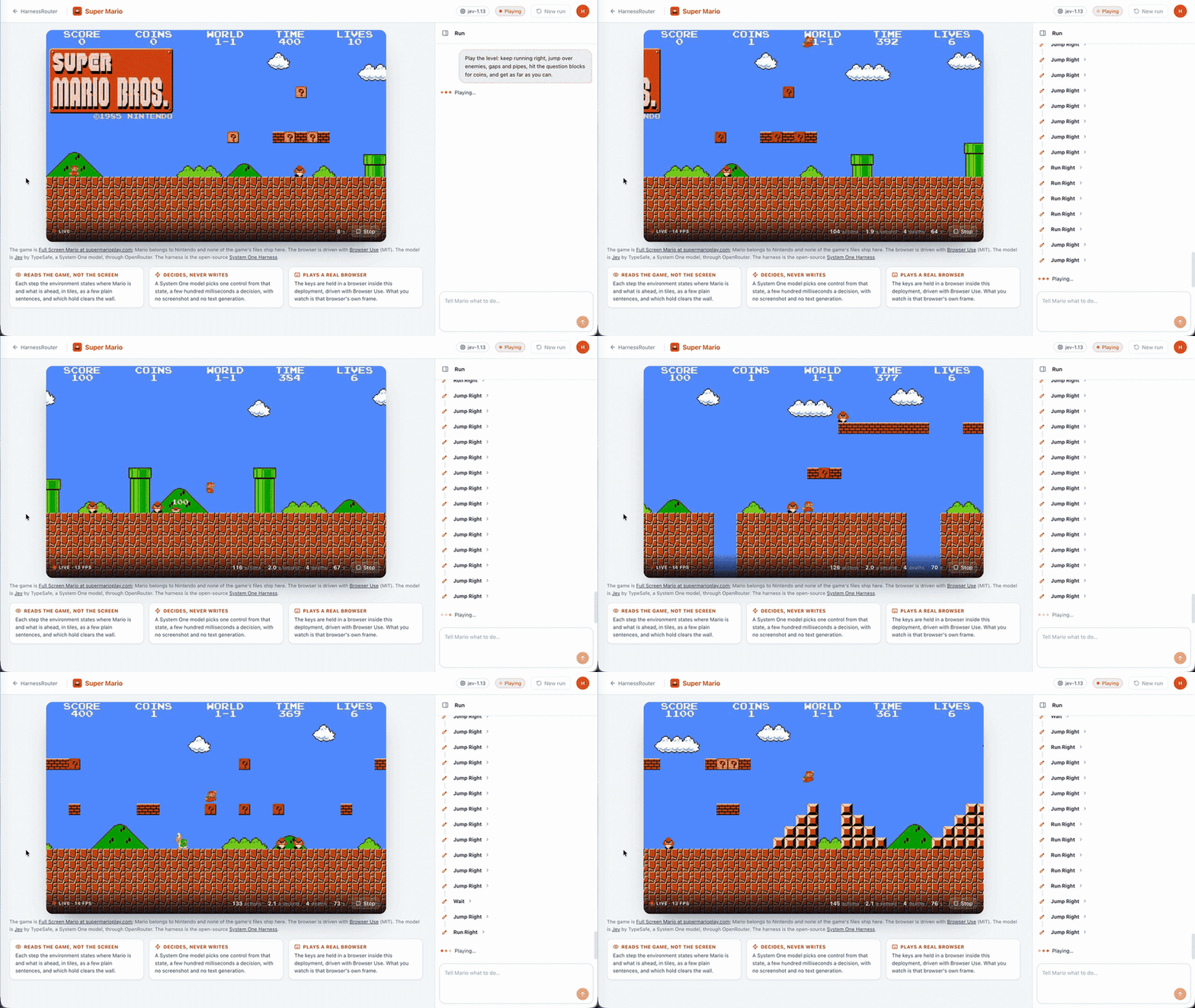
Jev playing a live browser game through System One Harness — one typed decision per step, with no generated control text.
The first supported model is Jev by TypeSafe, available through OpenRouter or TypeSafe directly.

[!TIP] Start here: Run the example · Understand the loop · Connect an environment · Read the design
Quickstart
git clone https://github.com/HarnessRouter/SystemOneHarness.git
cd SystemOneHarness
pip install -e .

export OPENROUTER_API_KEY=sk-or-...   # or TYPESAFE_API_KEY=...
s1 run --env order:ship_fastest_gift
This runs the built-in order fulfilment environment against the live model:
goal: Order B-220 is a gift: note it, then ship it by the fastest carrier.
model: ~typesafe/jev-latest
    0  add_note(note='gift')              p=0.96  241 ms
    1  pick_item(item='scarf')            p=1.00  269 ms
    2  pack()                             p=0.99  166 ms
    3  choose_carrier(carrier='express')  p=0.98  151 ms
    4  ship()                             p=0.93  152 ms

status=completed reason=environment_terminal steps=5 wall=0.98s cost=$0.000208
Each step shows the selected action, its weakest required probability, and the model round trip. The final line records how the run ended, how long it took, and what it cost.
What it provides
| Finite actions | The model chooses only from actions and parameter values declared by the environment. |
| Confidence gates | Read, write, and destructive actions can require different probability thresholds. |
| Explicit outcomes | Every run ends as completed, incomplete, failed, or cancelled with a structured reason. |
| Complete traces | State, questions, distributions, verdicts, results, latency, and usage are recorded step by step. |
| Pluggable environments | Drive Python processes, MCP servers, or web pages with the same controller. |
| UHP compatibility | Serve the loop through the Unified Harness Protocol for streaming, continuation, cancellation, and discovery. |
Real-time environments
Games, live feeds, and other moving environments can return "realtime": true. The controller then treats a refused or repeated decision as a clock tick, keeps the model's history short, and lets the last action remain active until it changes.
How it works
            ┌──────────────────────────────────────────────────────────┐
            │                        controller                        │
 goal ────► │ observe ─► compile ─► encode ─► decide ─► gate ─► execute │ ────► trace
            │    ▲                                           │         │
            │    └────────────── environment ◄───────────────┘         │
            └──────────────────────────────────────────────────────────┘
- Observe. The environment reports text, structured fields, candidates, and terminal state.
- Compile. The available actions become typed
choice,noul, andscorequestions. - Encode. Goal, observation, bounded history, and memory become a state within the model budget.
- Decide. The model answers the action, its parameters, and the goal check in one request.
- Gate. The weakest required probability must clear the selected action's risk threshold.
- Execute. The environment applies the action and returns the next state.
finish and escalate are actions, not generated prose. The controller always knows why it stopped.
Read the measured design and architecture →
Connect an environment
Choose the smallest boundary that fits your system.
| Environment | Use it when | Start with |
|---|---|---|
| Action space + process | You own a local program or service loop. | s1 run --actions actions.yaml --env-cmd "python3 env.py" --goal "..." |
| MCP server | Your tools already expose enumerable inputs over MCP. | s1 run --mcp "python -m your_server" --goal "..." |
| Browser | The task is expressed through DOM controls in Chrome. | s1 run --browser --headless --start-url https://example.com --goal "..." |
| Python | You want an in-process integration. | Subclass Environment and implement observe() and execute(). |
Declare an action space
An action space is YAML or the same structure in Python. Every parameter must be enumerable.
instructions: >-
  Move the order to shipped, or cancel it when the goal says so.

actions:
  choose_carrier:
    description: Select a carrier for the packed order.
    risk: write
    params:
      carrier:
        from: available_carriers
  ship:
    description: Hand the packed order to the selected carrier.
    risk: destructive

gate:
  read: 0.5
  write: 0.6
  destructive: 0.8
  finish: 0.5
Parameters can use fixed choices, observation candidates, a boolean flag, or ordered levels. Free text is rejected because a System One model does not generate text.
Use an MCP server
The harness lists an MCP server's tools, compiles supported schemas into actions, and explains every unsupported tool instead of silently dropping it.
pip install -e ".[mcp]"
s1 tools --mcp "python -m systemone_harness.envs.order_mcp"
s1 run --mcp "python -m systemone_harness.envs.order_mcp --scenario ship_fastest_gift" \
  --goal "Order B-220 is a gift. Ship it by the fastest carrier."
An observe tool provides state. An optional reset tool starts a run. Every other compatible tool becomes an action. MCP annotations determine whether the action is read, write, or destructive.
Drive a browser
The browser environment uses Browser Use to turn visible DOM controls into a finite action space. Text comes from named values supplied by the caller. The model chooses values by name and never writes them.
pip install -e ".[browser]"
s1 run --browser --headless --start-url https://example.com/book \
  --text name=Customer --text email=user@example.com \
  --goal "Book a table at 19:30 with a window seat."
Browser setup, measurements, and limits →
Serve over UHP
Expose any configured loop as a Unified Harness Protocol server:
export OPENROUTER_API_KEY=sk-or-...
s1 serve --api-key choose-a-secret --port 8710
input                  → goal
function_call          → selected action
function_call_output   → environment result
reasoning              → distribution and gate verdict
previous_response_id   → continued environment and history
Streaming emits each item as it happens. Cancellation lets the current model step finish and records it. The included report passes all 40 checks in the UHP core conformance class.
Measured, not implied
Five live runs per scenario on 2026-09-19 with typesafe/jev-1.13-20260917 through OpenRouter:
| Scenario | Goal met | Mean steps | Mean model latency | Mean wall time | Cost per run |
|---|---|---|---|---|---|
| Ship by cheapest carrier | 5/5 | 6.0 | 241 ms | 1.45 s | $0.000265 |
| Ship fastest and add gift note | 5/5 | 5.0 | 199 ms | 0.99 s | $0.000214 |
| Cancel a fraudulent order | 5/5 | 1.0 | 197 ms | 0.20 s | $0.000044 |
The benchmark proves the controller, compiler, gate, and model can complete these small deterministic tasks. It does not claim the same result for ambiguous state, arithmetic, dates, or long irrelevant context.
Inspect the raw benchmark rows →
Command line
s1 run    Run one goal against a built-in, process, MCP, or browser environment
s1 tools  Inspect how an MCP server compiles into supported actions
s1 serve  Expose a configured loop as a UHP server
s1 bench  Run the built-in live benchmark
Use s1 <command> --help for every option. Add --json trace.json to run, tools, or bench when you need machine-readable output.
Test
pip install -e . pytest
pytest -q tests
The suite covers action compilation, unsupported inputs, state truncation, confidence gates, every terminal reason, cancellation, continuation, MCP, browser actions, and the UHP server. Recorded model answers keep the default suite deterministic and keyless.
Project status
| Version | 0.3.1 |
| Models | Jev through OpenRouter or TypeSafe directly |
| UHP | core, 40 of 40 checks |
| Environments | Python, stdio, MCP, browser, and real-time loops |
| Python | 3.10 or newer |
Next milestones are a systemone base in HarnessRouter, skills as loadable actions, the Chrome side panel as a plain UHP client, and the UHP extended conformance class.
Resources
| Goal | Resource |
|---|---|
| Understand the model and architecture | Design of record |
| Configure the browser environment | Browser guide |
| Try the protocol client | Chrome extension |
| Review benchmark evidence | Benchmark report |
| Review protocol evidence | UHP conformance report |
License
System One Harness is licensed under Apache 2.0.
Contributors

9 commits

5 commits
Similar repos


Languages
Python
95.6%
JavaScript
3.0%
See what people are saying (1)
README
The harness for System One models.
Turn a System One decision model into an agent loop. System One Harness observes an environment, compiles its finite action space into typed questions, gates each decision by confidence, executes the chosen action, and records the complete trace.
One model call per step. No generated actions. A probability on every transition.
Jev playing a live browser game through System One Harness — one typed decision per step, with no generated control text.
The first supported model is Jev by TypeSafe, available through OpenRouter or TypeSafe directly.
[!TIP] Start here: Run the example · Understand the loop · Connect an environment · Read the design
Quickstart
git clone https://github.com/HarnessRouter/SystemOneHarness.git
cd SystemOneHarness
pip install -e .

export OPENROUTER_API_KEY=sk-or-...   # or TYPESAFE_API_KEY=...
s1 run --env order:ship_fastest_gift
This runs the built-in order fulfilment environment against the live model:
goal: Order B-220 is a gift: note it, then ship it by the fastest carrier.
model: ~typesafe/jev-latest
    0  add_note(note='gift')              p=0.96  241 ms
    1  pick_item(item='scarf')            p=1.00  269 ms
    2  pack()                             p=0.99  166 ms
    3  choose_carrier(carrier='express')  p=0.98  151 ms
    4  ship()                             p=0.93  152 ms

status=completed reason=environment_terminal steps=5 wall=0.98s cost=$0.000208
Each step shows the selected action, its weakest required probability, and the model round trip. The final line records how the run ended, how long it took, and what it cost.
What it provides
| Finite actions | The model chooses only from actions and parameter values declared by the environment. |
| Confidence gates | Read, write, and destructive actions can require different probability thresholds. |
| Explicit outcomes | Every run ends as completed, incomplete, failed, or cancelled with a structured reason. |
| Complete traces | State, questions, distributions, verdicts, results, latency, and usage are recorded step by step. |
| Pluggable environments | Drive Python processes, MCP servers, or web pages with the same controller. |
| UHP compatibility | Serve the loop through the Unified Harness Protocol for streaming, continuation, cancellation, and discovery. |
Real-time environments
Games, live feeds, and other moving environments can return "realtime": true. The controller then treats a refused or repeated decision as a clock tick, keeps the model's history short, and lets the last action remain active until it changes.
How it works
            ┌──────────────────────────────────────────────────────────┐
            │                        controller                        │
 goal ────► │ observe ─► compile ─► encode ─► decide ─► gate ─► execute │ ────► trace
            │    ▲                                           │         │
            │    └────────────── environment ◄───────────────┘         │
            └──────────────────────────────────────────────────────────┘
- Observe. The environment reports text, structured fields, candidates, and terminal state.
- Compile. The available actions become typed
choice,noul, andscorequestions. - Encode. Goal, observation, bounded history, and memory become a state within the model budget.
- Decide. The model answers the action, its parameters, and the goal check in one request.
- Gate. The weakest required probability must clear the selected action's risk threshold.
- Execute. The environment applies the action and returns the next state.
finish and escalate are actions, not generated prose. The controller always knows why it stopped.
Read the measured design and architecture →
Connect an environment
Choose the smallest boundary that fits your system.
| Environment | Use it when | Start with |
|---|---|---|
| Action space + process | You own a local program or service loop. | s1 run --actions actions.yaml --env-cmd "python3 env.py" --goal "..." |
| MCP server | Your tools already expose enumerable inputs over MCP. | s1 run --mcp "python -m your_server" --goal "..." |
| Browser | The task is expressed through DOM controls in Chrome. | s1 run --browser --headless --start-url https://example.com --goal "..." |
| Python | You want an in-process integration. | Subclass Environment and implement observe() and execute(). |
Declare an action space
An action space is YAML or the same structure in Python. Every parameter must be enumerable.
instructions: >-
  Move the order to shipped, or cancel it when the goal says so.

actions:
  choose_carrier:
    description: Select a carrier for the packed order.
    risk: write
    params:
      carrier:
        from: available_carriers
  ship:
    description: Hand the packed order to the selected carrier.
    risk: destructive

gate:
  read: 0.5
  write: 0.6
  destructive: 0.8
  finish: 0.5
Parameters can use fixed choices, observation candidates, a boolean flag, or ordered levels. Free text is rejected because a System One model does not generate text.
Use an MCP server
The harness lists an MCP server's tools, compiles supported schemas into actions, and explains every unsupported tool instead of silently dropping it.
pip install -e ".[mcp]"
s1 tools --mcp "python -m systemone_harness.envs.order_mcp"
s1 run --mcp "python -m systemone_harness.envs.order_mcp --scenario ship_fastest_gift" \
  --goal "Order B-220 is a gift. Ship it by the fastest carrier."
An observe tool provides state. An optional reset tool starts a run. Every other compatible tool becomes an action. MCP annotations determine whether the action is read, write, or destructive.
Drive a browser
The browser environment uses Browser Use to turn visible DOM controls into a finite action space. Text comes from named values supplied by the caller. The model chooses values by name and never writes them.
pip install -e ".[browser]"
s1 run --browser --headless --start-url https://example.com/book \
  --text name=Customer --text email=user@example.com \
  --goal "Book a table at 19:30 with a window seat."
Browser setup, measurements, and limits →
Serve over UHP
Expose any configured loop as a Unified Harness Protocol server:
export OPENROUTER_API_KEY=sk-or-...
s1 serve --api-key choose-a-secret --port 8710
input                  → goal
function_call          → selected action
function_call_output   → environment result
reasoning              → distribution and gate verdict
previous_response_id   → continued environment and history
Streaming emits each item as it happens. Cancellation lets the current model step finish and records it. The included report passes all 40 checks in the UHP core conformance class.
Measured, not implied
Five live runs per scenario on 2026-09-19 with typesafe/jev-1.13-20260917 through OpenRouter:
| Scenario | Goal met | Mean steps | Mean model latency | Mean wall time | Cost per run |
|---|---|---|---|---|---|
| Ship by cheapest carrier | 5/5 | 6.0 | 241 ms | 1.45 s | $0.000265 |
| Ship fastest and add gift note | 5/5 | 5.0 | 199 ms | 0.99 s | $0.000214 |
| Cancel a fraudulent order | 5/5 | 1.0 | 197 ms | 0.20 s | $0.000044 |
The benchmark proves the controller, compiler, gate, and model can complete these small deterministic tasks. It does not claim the same result for ambiguous state, arithmetic, dates, or long irrelevant context.
Inspect the raw benchmark rows →
Command line
s1 run    Run one goal against a built-in, process, MCP, or browser environment
s1 tools  Inspect how an MCP server compiles into supported actions
s1 serve  Expose a configured loop as a UHP server
s1 bench  Run the built-in live benchmark
Use s1 <command> --help for every option. Add --json trace.json to run, tools, or bench when you need machine-readable output.
Test
pip install -e . pytest
pytest -q tests
The suite covers action compilation, unsupported inputs, state truncation, confidence gates, every terminal reason, cancellation, continuation, MCP, browser actions, and the UHP server. Recorded model answers keep the default suite deterministic and keyless.
Project status
| Version | 0.3.1 |
| Models | Jev through OpenRouter or TypeSafe directly |
| UHP | core, 40 of 40 checks |
| Environments | Python, stdio, MCP, browser, and real-time loops |
| Python | 3.10 or newer |
Next milestones are a systemone base in HarnessRouter, skills as loadable actions, the Chrome side panel as a plain UHP client, and the UHP extended conformance class.
Resources
| Goal | Resource |
|---|---|
| Understand the model and architecture | Design of record |
| Configure the browser environment | Browser guide |
| Try the protocol client | Chrome extension |
| Review benchmark evidence | Benchmark report |
| Review protocol evidence | UHP conformance report |
License
System One Harness is licensed under Apache 2.0.
Similar repos
Contributors
9 commits
5 commits
Languages
Python
95.6%
JavaScript
3.0%