A high-performance Claude Code statusline tool written in Rust with Git integration, usage tracking, interactive TUI configuration, and Claude Code enhancement utilities.

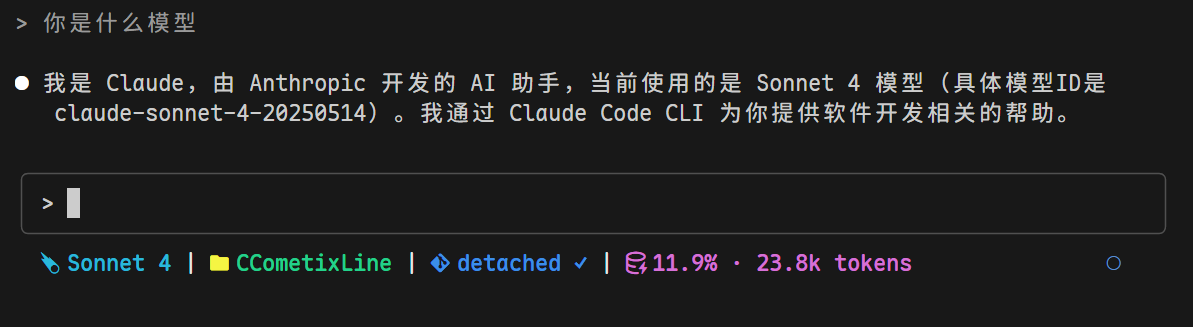
The statusline shows: Model | Directory | Git Branch Status | Context Window Information
Install via npm (works on all platforms):
# Install globally
npm install -g @cometix/ccline

# Or using yarn
yarn global add @cometix/ccline

# Or using pnpm
pnpm add -g @cometix/ccline
Use npm mirror for faster download:
npm install -g @cometix/ccline --registry https://registry.npmmirror.com
After installation:
ccline is available everywhereccline -c to open configuration panel for theme selectionAdd to your Claude Code settings.json:
Cross-Platform (Recommended)
{
  "statusLine": {
    "type": "command",
    "command": "~/.claude/ccline/ccline",
    "padding": 0
  }
}
Note for Windows users: Starting from Claude Code v2.1.47+, Unix-style path parsing is supported on Windows. The
~symbol is automatically expanded to your user home directory. Do not use%USERPROFILE%- it no longer works reliably in v2.1.47+.
- Recommended:
~/.claude/ccline/ccline(works on all platforms)- Alternative:
"ccline"(requires npm global installation)
Fallback (npm installation):
{
  "statusLine": {
    "type": "command",
    "command": "ccline",
    "padding": 0
  }
}
Use this if npm global installation is available in PATH
npm update -g @cometix/ccline
Alternatively, download from Releases:
mkdir -p ~/.claude/ccline
wget https://github.com/Haleclipse/CCometixLine/releases/latest/download/ccline-linux-x64.tar.gz
tar -xzf ccline-linux-x64.tar.gz
cp ccline ~/.claude/ccline/
chmod +x ~/.claude/ccline/ccline
Requires: Ubuntu 22.04+, CentOS 9+, Debian 11+, RHEL 9+ (glibc 2.35+)
mkdir -p ~/.claude/ccline
wget https://github.com/Haleclipse/CCometixLine/releases/latest/download/ccline-linux-x64-static.tar.gz
tar -xzf ccline-linux-x64-static.tar.gz
cp ccline ~/.claude/ccline/
chmod +x ~/.claude/ccline/ccline
Works on any Linux distribution (static, no dependencies)
mkdir -p ~/.claude/ccline
wget https://github.com/Haleclipse/CCometixLine/releases/latest/download/ccline-macos-x64.tar.gz
tar -xzf ccline-macos-x64.tar.gz
cp ccline ~/.claude/ccline/
chmod +x ~/.claude/ccline/ccline
mkdir -p ~/.claude/ccline
wget https://github.com/Haleclipse/CCometixLine/releases/latest/download/ccline-macos-arm64.tar.gz
tar -xzf ccline-macos-arm64.tar.gz
cp ccline ~/.claude/ccline/
chmod +x ~/.claude/ccline/ccline
# Create directory and download
New-Item -ItemType Directory -Force -Path "$env:USERPROFILE\.claude\ccline"
Invoke-WebRequest -Uri "https://github.com/Haleclipse/CCometixLine/releases/latest/download/ccline-windows-x64.zip" -OutFile "ccline-windows-x64.zip"
Expand-Archive -Path "ccline-windows-x64.zip" -DestinationPath "."
Move-Item "ccline.exe" "$env:USERPROFILE\.claude\ccline\"
git clone https://github.com/Haleclipse/CCometixLine.git
cd CCometixLine
cargo build --release

# Linux/macOS
mkdir -p ~/.claude/ccline
cp target/release/ccometixline ~/.claude/ccline/ccline
chmod +x ~/.claude/ccline/ccline

# Windows (PowerShell)
New-Item -ItemType Directory -Force -Path "$env:USERPROFILE\.claude\ccline"
copy target\release\ccometixline.exe "$env:USERPROFILE\.claude\ccline\ccline.exe"
# Temporarily use specific theme (overrides config file)
ccline --theme cometix
ccline --theme minimal
ccline --theme gruvbox
ccline --theme nord
ccline --theme powerline-dark

# Or use custom theme files from ~/.claude/ccline/themes/
ccline --theme my-custom-theme
# Disable context warnings and enable verbose mode
ccline --patch /path/to/claude-code/cli.js

# Example for common installation
ccline --patch ~/.local/share/fnm/node-versions/v24.4.1/installation/lib/node_modules/@anthropic-ai/claude-code/cli.js
Displays: Directory | Git Branch Status | Model | Context Window
✓ Clean, ● Dirty, ⚠ Conflicts↑n Ahead, ↓n BehindShows simplified Claude model names:
claude-3-5-sonnet → Sonnet 3.5claude-4-sonnet → Sonnet 4Token usage percentage based on transcript analysis with context limit tracking.
CCometixLine supports full configuration via TOML files and interactive TUI:
~/.claude/ccline/config.tomlccline --config for real-time editing with preview~/.claude/ccline/themes/*.toml for custom themesccline --init creates default configurationAll segments are configurable with:
Supported segments: Directory, Git, Model, Usage, Time, Cost, OutputStyle
models.toml)Location: ~/.claude/ccline/models.toml (auto-created on first run)
This file configures how model IDs are displayed and their context window limits. Claude models (Sonnet, Opus, Haiku) are automatically recognized with version extraction — you only need this file for overrides or third-party models.
# Model entries: simple substring matching on the model ID
# These take priority over built-in Claude model recognition
[[models]]
pattern = "glm-4.5"
display_name = "GLM-4.5"
context_limit = 128000

[[models]]
pattern = "kimi-k2"
display_name = "Kimi K2"
context_limit = 128000

# Context modifiers: matched independently and composable with model entries
# Overrides context_limit and appends display_suffix to the display name
# e.g., model "Opus 4" + modifier " 1M" = "Opus 4 1M"
[[context_modifiers]]
pattern = "[1m]"
display_suffix = " 1M"
context_limit = 1000000
# Build development version
cargo build

# Run tests
cargo test

# Build optimized release
cargo build --release
Contributions are welcome! Please feel free to submit issues or pull requests.
This project is licensed under the MIT License.
152 followers · starred Aug 2025
730 followers · starred Feb 2026
820 followers · starred Oct 2025
240 followers · starred Aug 2025
A high-performance Claude Code statusline tool written in Rust with Git integration, usage tracking, interactive TUI configuration, and Claude Code enhancement utilities.
The statusline shows: Model | Directory | Git Branch Status | Context Window Information
Install via npm (works on all platforms):
# Install globally
npm install -g @cometix/ccline

# Or using yarn
yarn global add @cometix/ccline

# Or using pnpm
pnpm add -g @cometix/ccline
Use npm mirror for faster download:
npm install -g @cometix/ccline --registry https://registry.npmmirror.com
After installation:
ccline is available everywhereccline -c to open configuration panel for theme selectionAdd to your Claude Code settings.json:
Cross-Platform (Recommended)
{
  "statusLine": {
    "type": "command",
    "command": "~/.claude/ccline/ccline",
    "padding": 0
  }
}
Note for Windows users: Starting from Claude Code v2.1.47+, Unix-style path parsing is supported on Windows. The
~symbol is automatically expanded to your user home directory. Do not use%USERPROFILE%- it no longer works reliably in v2.1.47+.
- Recommended:
~/.claude/ccline/ccline(works on all platforms)- Alternative:
"ccline"(requires npm global installation)
Fallback (npm installation):
{
  "statusLine": {
    "type": "command",
    "command": "ccline",
    "padding": 0
  }
}
Use this if npm global installation is available in PATH
npm update -g @cometix/ccline
Alternatively, download from Releases:
mkdir -p ~/.claude/ccline
wget https://github.com/Haleclipse/CCometixLine/releases/latest/download/ccline-linux-x64.tar.gz
tar -xzf ccline-linux-x64.tar.gz
cp ccline ~/.claude/ccline/
chmod +x ~/.claude/ccline/ccline
Requires: Ubuntu 22.04+, CentOS 9+, Debian 11+, RHEL 9+ (glibc 2.35+)
mkdir -p ~/.claude/ccline
wget https://github.com/Haleclipse/CCometixLine/releases/latest/download/ccline-linux-x64-static.tar.gz
tar -xzf ccline-linux-x64-static.tar.gz
cp ccline ~/.claude/ccline/
chmod +x ~/.claude/ccline/ccline
Works on any Linux distribution (static, no dependencies)
mkdir -p ~/.claude/ccline
wget https://github.com/Haleclipse/CCometixLine/releases/latest/download/ccline-macos-x64.tar.gz
tar -xzf ccline-macos-x64.tar.gz
cp ccline ~/.claude/ccline/
chmod +x ~/.claude/ccline/ccline
mkdir -p ~/.claude/ccline
wget https://github.com/Haleclipse/CCometixLine/releases/latest/download/ccline-macos-arm64.tar.gz
tar -xzf ccline-macos-arm64.tar.gz
cp ccline ~/.claude/ccline/
chmod +x ~/.claude/ccline/ccline
# Create directory and download
New-Item -ItemType Directory -Force -Path "$env:USERPROFILE\.claude\ccline"
Invoke-WebRequest -Uri "https://github.com/Haleclipse/CCometixLine/releases/latest/download/ccline-windows-x64.zip" -OutFile "ccline-windows-x64.zip"
Expand-Archive -Path "ccline-windows-x64.zip" -DestinationPath "."
Move-Item "ccline.exe" "$env:USERPROFILE\.claude\ccline\"
git clone https://github.com/Haleclipse/CCometixLine.git
cd CCometixLine
cargo build --release

# Linux/macOS
mkdir -p ~/.claude/ccline
cp target/release/ccometixline ~/.claude/ccline/ccline
chmod +x ~/.claude/ccline/ccline

# Windows (PowerShell)
New-Item -ItemType Directory -Force -Path "$env:USERPROFILE\.claude\ccline"
copy target\release\ccometixline.exe "$env:USERPROFILE\.claude\ccline\ccline.exe"
# Temporarily use specific theme (overrides config file)
ccline --theme cometix
ccline --theme minimal
ccline --theme gruvbox
ccline --theme nord
ccline --theme powerline-dark

# Or use custom theme files from ~/.claude/ccline/themes/
ccline --theme my-custom-theme
# Disable context warnings and enable verbose mode
ccline --patch /path/to/claude-code/cli.js

# Example for common installation
ccline --patch ~/.local/share/fnm/node-versions/v24.4.1/installation/lib/node_modules/@anthropic-ai/claude-code/cli.js
Displays: Directory | Git Branch Status | Model | Context Window
✓ Clean, ● Dirty, ⚠ Conflicts↑n Ahead, ↓n BehindShows simplified Claude model names:
claude-3-5-sonnet → Sonnet 3.5claude-4-sonnet → Sonnet 4Token usage percentage based on transcript analysis with context limit tracking.
CCometixLine supports full configuration via TOML files and interactive TUI:
~/.claude/ccline/config.tomlccline --config for real-time editing with preview~/.claude/ccline/themes/*.toml for custom themesccline --init creates default configurationAll segments are configurable with:
Supported segments: Directory, Git, Model, Usage, Time, Cost, OutputStyle
models.toml)Location: ~/.claude/ccline/models.toml (auto-created on first run)
This file configures how model IDs are displayed and their context window limits. Claude models (Sonnet, Opus, Haiku) are automatically recognized with version extraction — you only need this file for overrides or third-party models.
# Model entries: simple substring matching on the model ID
# These take priority over built-in Claude model recognition
[[models]]
pattern = "glm-4.5"
display_name = "GLM-4.5"
context_limit = 128000

[[models]]
pattern = "kimi-k2"
display_name = "Kimi K2"
context_limit = 128000

# Context modifiers: matched independently and composable with model entries
# Overrides context_limit and appends display_suffix to the display name
# e.g., model "Opus 4" + modifier " 1M" = "Opus 4 1M"
[[context_modifiers]]
pattern = "[1m]"
display_suffix = " 1M"
context_limit = 1000000
# Build development version
cargo build

# Run tests
cargo test

# Build optimized release
cargo build --release
Contributions are welcome! Please feel free to submit issues or pull requests.
This project is licensed under the MIT License.
152 followers · starred Aug 2025
730 followers · starred Feb 2026
820 followers · starred Oct 2025
240 followers · starred Aug 2025