
Your Claude Code status line, in the desktop app too.
See the codeSee what people are saying
README
statusline-anywhere
Your Claude Code status line, in the desktop app too.
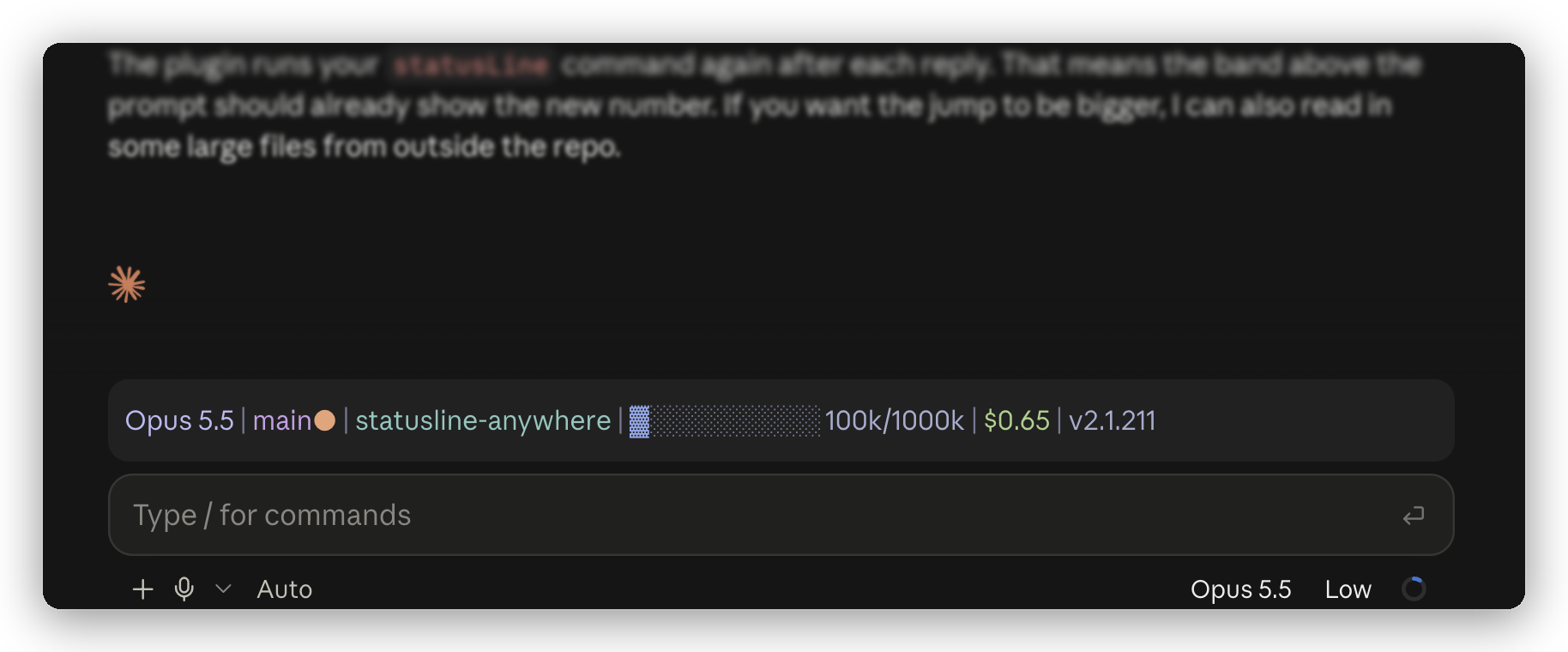
Catppuccin Frappé from statuslin.es, running in Claude Desktop with statusline-anywhere.
Claude Desktop doesn't draw custom status lines
(#41456). This plugin does. It runs the
statusLine command you already have and shows the output above the prompt, in color.
Install
-
Paste this into a terminal:
claude plugin marketplace add NathanAB/statusline-anywhere && claude plugin install statusline-anywhere@statusline-anywhere -
Open a new Code session in Claude Desktop. Your status line is above the prompt.
That's it. You need Claude Code 2.1.286 or later and a status line. No status line yet? Pick one from statuslin.es.
Install from inside Claude Code instead
/plugin marketplace add NathanAB/statusline-anywhere
/plugin install statusline-anywhere@statusline-anywhere
/reload-plugins
To remove it: claude plugin uninstall statusline-anywhere@statusline-anywhere
How it works
- It runs your
statusLinecommand with the same kind of JSON Claude Code sends, so the script you already use works as it is. - It only draws outside the terminal. In a terminal, Claude Code already shows your status line, so the plugin stays out of the way.
- It refreshes when a session starts, after each reply, and every 60 seconds, or every
refreshIntervalseconds if you set one.
What your script receives
Claude Code sends status line scripts a JSON object on stdin. statusline-anywhere builds the same object from what a plugin can see:
session_idtranscript_pathcwdmodel(id,display_name)workspace(current_dir,project_dir)versioncost(total_cost_usd,total_duration_ms)context_window(total_input_tokens,context_window_size,used_percentage,remaining_percentage)exceeds_200k_tokensrate_limits(five_hour,seven_day,spend_limit)
A plugin can't see everything Claude Code can. These fields are missing: lines changed, PR, vim mode, prompt cache, effort and output style. If your status line shows one of them, that part stays blank in Desktop. Claude Code also leaves out fields it has no value for, so scripts that follow its docs already handle a missing field.
What it does on your machine
It runs your status line command as you, which is what Claude Code does with it in a terminal. Beyond that, it only reads your settings and session info, and draws. The plugin itself makes no network requests and writes no files.
claude plugin validate lists its full footprint: $.settings.read, $.session.* reads,
$.env.get for HOME and CLAUDE_CONFIG_DIR, $.process.run, $.clock, and drawing.
Limits
- Not on Windows yet. It runs your command through
sh. - Links aren't clickable. Links in your status line show as plain text.
- Another plugin can take the spot. If a second plugin also draws above the prompt, only one of them shows.
Develop
statusline-anywhere is a Claude Code mod. Use Claude Code 2.1.286 or later.
claude plugin validate .
claude plugin test
To try a change in a session, run claude --plugin-dir ..
To type-check, load the plugin once with --plugin-dir so Claude Code writes its types to
.claude-plugin/types/. Then run npx tsc -p .claude-plugin/types/tsconfig.json.
License
MIT. Made by statuslin.es, the gallery of Claude Code status lines.
Similar repos


Languages
TypeScript
100.0%
Your Claude Code status line, in the desktop app too.
See the codeSee what people are saying
README
statusline-anywhere
Your Claude Code status line, in the desktop app too.
Catppuccin Frappé from statuslin.es, running in Claude Desktop with statusline-anywhere.
Claude Desktop doesn't draw custom status lines
(#41456). This plugin does. It runs the
statusLine command you already have and shows the output above the prompt, in color.
Install
-
Paste this into a terminal:
claude plugin marketplace add NathanAB/statusline-anywhere && claude plugin install statusline-anywhere@statusline-anywhere -
Open a new Code session in Claude Desktop. Your status line is above the prompt.
That's it. You need Claude Code 2.1.286 or later and a status line. No status line yet? Pick one from statuslin.es.
Install from inside Claude Code instead
/plugin marketplace add NathanAB/statusline-anywhere
/plugin install statusline-anywhere@statusline-anywhere
/reload-plugins
To remove it: claude plugin uninstall statusline-anywhere@statusline-anywhere
How it works
- It runs your
statusLinecommand with the same kind of JSON Claude Code sends, so the script you already use works as it is. - It only draws outside the terminal. In a terminal, Claude Code already shows your status line, so the plugin stays out of the way.
- It refreshes when a session starts, after each reply, and every 60 seconds, or every
refreshIntervalseconds if you set one.
What your script receives
Claude Code sends status line scripts a JSON object on stdin. statusline-anywhere builds the same object from what a plugin can see:
session_idtranscript_pathcwdmodel(id,display_name)workspace(current_dir,project_dir)versioncost(total_cost_usd,total_duration_ms)context_window(total_input_tokens,context_window_size,used_percentage,remaining_percentage)exceeds_200k_tokensrate_limits(five_hour,seven_day,spend_limit)
A plugin can't see everything Claude Code can. These fields are missing: lines changed, PR, vim mode, prompt cache, effort and output style. If your status line shows one of them, that part stays blank in Desktop. Claude Code also leaves out fields it has no value for, so scripts that follow its docs already handle a missing field.
What it does on your machine
It runs your status line command as you, which is what Claude Code does with it in a terminal. Beyond that, it only reads your settings and session info, and draws. The plugin itself makes no network requests and writes no files.
claude plugin validate lists its full footprint: $.settings.read, $.session.* reads,
$.env.get for HOME and CLAUDE_CONFIG_DIR, $.process.run, $.clock, and drawing.
Limits
- Not on Windows yet. It runs your command through
sh. - Links aren't clickable. Links in your status line show as plain text.
- Another plugin can take the spot. If a second plugin also draws above the prompt, only one of them shows.
Develop
statusline-anywhere is a Claude Code mod. Use Claude Code 2.1.286 or later.
claude plugin validate .
claude plugin test
To try a change in a session, run claude --plugin-dir ..
To type-check, load the plugin once with --plugin-dir so Claude Code writes its types to
.claude-plugin/types/. Then run npx tsc -p .claude-plugin/types/tsconfig.json.
License
MIT. Made by statuslin.es, the gallery of Claude Code status lines.
Similar repos
Languages
TypeScript
100.0%