AutoSwarm: Automating Agent Swarms — Self-Built, Self-Run, Self-Grown
Python
1,852
107 commits
updated Oct 17, 2026
English | 简体中文
🏗️ Self-Built — Fully automated to recruit role-specific AI employees and build the org.
⚙️ Self-Run — Fully automated to assign tasks, drive handoffs, and keep moving toward your goal.
🌱 Self-Grown — Learns from every task, builds organizational memory, always delivers smarter.






0.2.4b4 and openJiuwen 0.1.16 versions.AutoSwarm covers nine core verticals — from AI development and software engineering to finance, sales, media, e-commerce, and education. Whatever the industry, AutoSwarm assembles the right team and delivers end-to-end.
|
🤖 AI Tech & Research Model training & evaluation, Agent development, LLM apps & AI infrastructure |
💻 Software Development Android apps, SaaS MVPs, websites, mini programs & game development |
📈 Financial Investment Investment memos, market maps, due diligence & IC decision packages |
|
🚀 Sales Growth
Outbound sales, deal strategy, proposals & channel expansion |
🎬 Content & Media
Video production, short-form content, scripts, storyboards & multi-platform cuts |
🤝 Industry Assistants
Copilots for support, real estate, legal intake, HR onboarding, retail |
|
🧾 Accounting & Finance
Bookkeeping, financial reporting, tax compliance, budgeting & risk review |
🛍️ Brand & E-commerce
Brand planning, product selection, store ops, user growth & retention |
🎓 Education & Training
Curriculum design, knowledge base, learner management & content production |

🎬 Video Production |
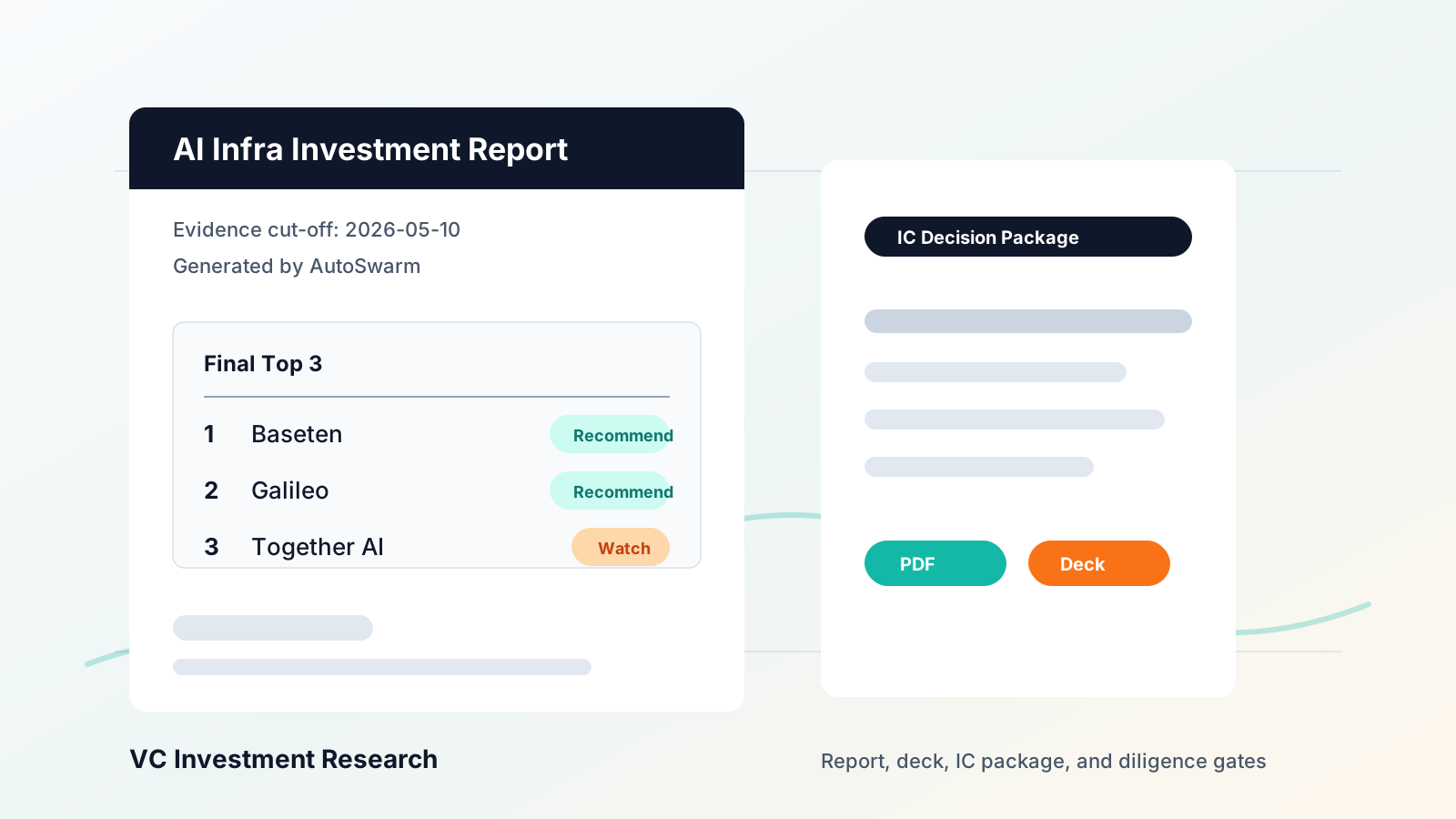
📈 Investment Research |
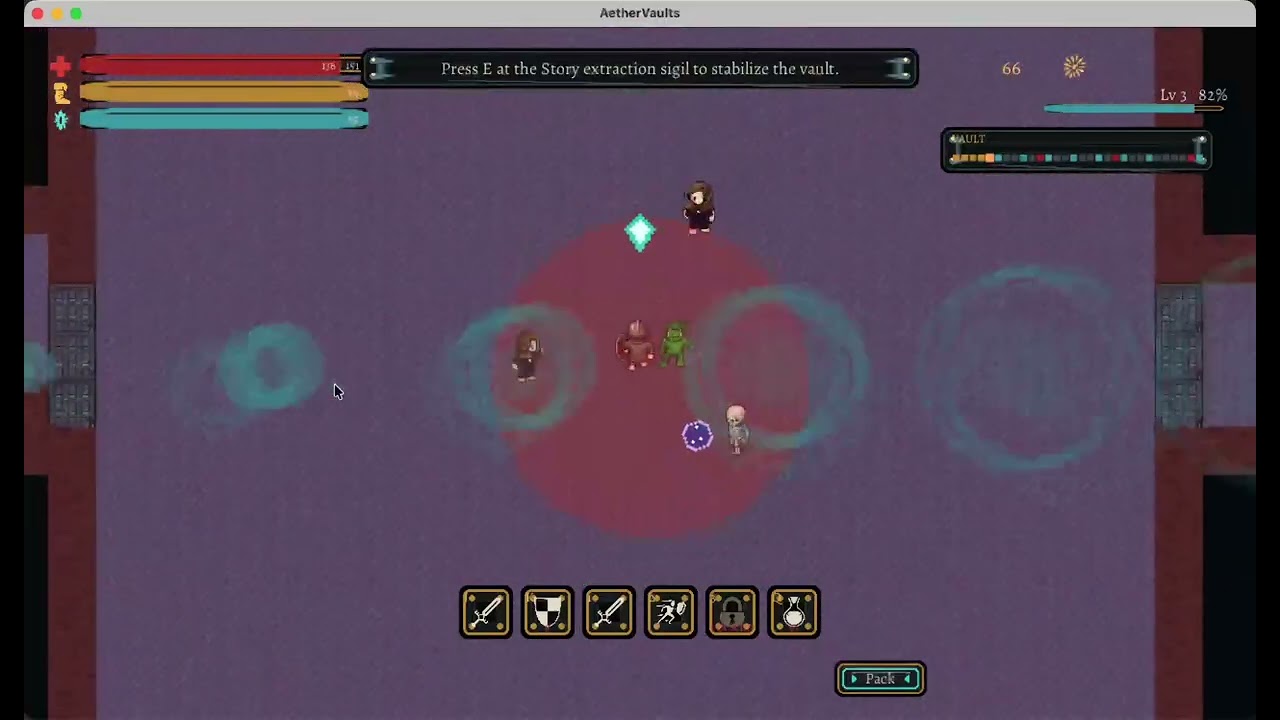
🎮 Game Prototype |
AutoSwarm assembles a AI company around complex, real-world tasks — through three tightly coupled mechanisms: Self-Built staffs the organisation, Self-Run executes the work, and Self-Grown learns from the outcome.
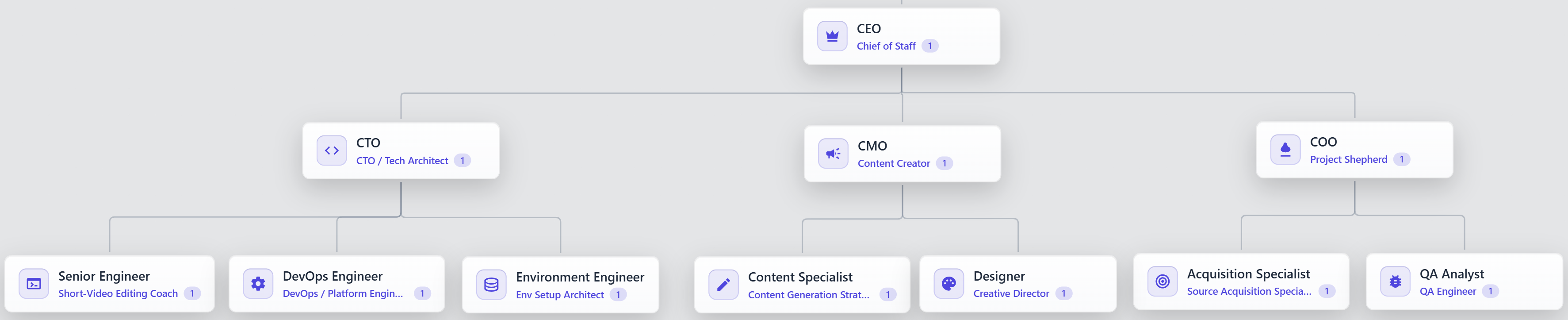
1. Self-Built — Staffing the Organisation
Before any work begins, the right people must be in place. Given a goal, AutoSwarm:
💡 Experienced employees carry accumulated context; fresh hires offer a clean slate when a role demands it.
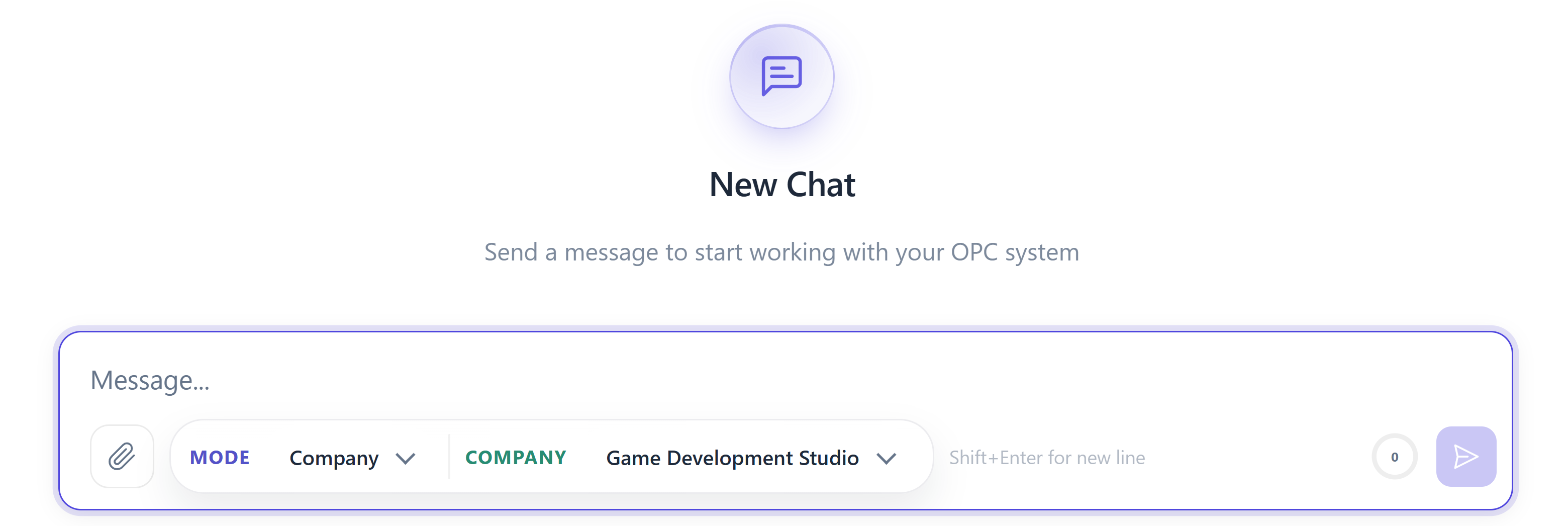
Before sending the first message, choose Mode → Company and use the Company selector:
The choice is saved with the chat, survives reloads and is locked after the first message. Existing chats default to fixed organizations. CLI staffing cards still accept auto team for combined formation/recruitment and auto recruit for existing-role staffing. Formation and recruitment use the selected execution agent. External agents plan in separate temporary workspaces; Codex uses a read-only sandbox. Team size is a qualitative agent decision, not a guarantee of optimality; existing organization configurations are preserved.
The chat's Agent handles formation, recruitment and default execution. Each role's Execution Agent can override its execution backend, saved per project and organization. Codex uses its own model configuration and runs Company work in a workspace sandbox with task-bound collaboration. An explicitly selected agent that is unavailable or lacks Company isolation support fails visibly rather than silently switching to Native or another agent. Stop/resume preserves explicit choices too.
Approved adaptive hires are persisted and remain available for reuse in later adaptive runs from the same source organization and project, alongside their relevant experience.
Adaptive teams are temporary by default: their runtime snapshots support conversation follow-ups and recovery, but do not appear in the saved organization picker. Only explicitly saved architectures become reusable organizations.
Formation and automatic recruitment impose no extra fixed planning deadline or correction quota. Data validation feedback goes back to the selected agent for correction; the framework does not rewrite the team or substitute heuristic staffing decisions. Users can stop planning, and agent or provider failures are reported explicitly.
⚙️ 2. Self-Run — Executing the Work
With the team assembled, Self-Run orchestrates its members toward a finished deliverable. The central challenge is not raw execution but efficient collaboration under uncertainty, which manifests in two distinct problems.
🔀 Dynamic collaboration orchestration. Real work cannot be fully planned upfront. AutoSwarm addresses this through a work-item state machine, where each item's phase determines:
A manager decomposes items, assigns, and reviews results — accepting, reworking, or escalating — across five modes: execute, delegate, review, integrate, and rework. Decomposition defines a dependency DAG, so:
🔗 Dependency resolution and rejection propagate as structured phase transitions, eliminating ad-hoc coordination.
🛡️ Handling blockers surfacing mid-run. Not all obstacles are visible upfront. AutoSwarm resolves them at two levels:
🖥️ The kanban and office views render this orchestration in real time.
🌱 3. Self-Grown — Learning from the Run
Execution generates raw experience; Self-Grown turns it into lasting improvement, guided by two principles.
🏅 Attributing outcomes to the right roles. Crediting the whole company teaches nothing. Instead, AutoSwarm:
📖 Distilling trajectories into knowledge. Execution traces are too noisy to learn from. AutoSwarm therefore:
Org -> Team edits the company architecture and roles.Org -> Employees hires talent into vacant roles.Team Roster -> Deploy turns a hired employee into a visible office agent.Agents and the Execution Progress panel show which role is active, which work item it owns, and which execution agent is doing the concrete work.uv is the recommended setup path for AutoSwarm. It can install/manage Python, create the project virtualenv, and run commands against that environment without mixing AutoSwarm dependencies into your global Python.
AutoSwarm was previously named OpenOPC. The primary command is now autoswarm; opc remains an alias. The opc Python package, .opc/ data directory, OPC_HOME, and existing project/session identifiers stay compatible. Existing checkouts and workspaces can keep their current directory names; reinstall the editable package to enable the new command.
AutoSwarm requires Python >=3.10; the examples below use Python 3.12.
For direct one-off work, AutoSwarm also includes Task Mode, a LobeChat-like single-agent workspace using AutoSwarm Native, Codex, Claude Code, Cursor, or OpenCode.
macOS
# Install uv with Homebrew, or use the official standalone installer.
brew install uv
# curl -LsSf https://astral.sh/uv/install.sh | sh

cd /path/to/AutoSwarm
uv python install 3.12
uv venv --python 3.12
source .venv/bin/activate
Linux
curl -LsSf https://astral.sh/uv/install.sh | sh
source "$HOME/.local/bin/env"

cd /path/to/AutoSwarm
uv python install 3.12
uv venv --python 3.12
source .venv/bin/activate
Windows PowerShell
powershell -ExecutionPolicy ByPass -c "irm https://astral.sh/uv/install.ps1 | iex"

cd C:\path\to\AutoSwarm
uv python install 3.12
uv venv --python 3.12
.\.venv\Scripts\Activate.ps1
Windows Command Prompt
winget install --id=astral-sh.uv -e
:: Or run the standalone installer from cmd:
:: powershell -ExecutionPolicy ByPass -c "irm https://astral.sh/uv/install.ps1 | iex"

cd C:\path\to\AutoSwarm
uv python install 3.12
uv venv --python 3.12
.venv\Scripts\activate.bat
# Install AutoSwarm into the uv-managed environment
uv pip install -e .

# Optional but recommended for browser tools
uv run python -m playwright install chromium

# Initialize local config, memory, skills, projects, and workspace folders
uv run autoswarm init

# Add an API key in .opc/config/llm_config.yaml
# or configure the env var named by llm.api_key_env.

# Launch the browser UI
uv run autoswarm ui
Open http://localhost:8765 by default.
# Interactive CLI
uv run autoswarm chat -p demo

# One-shot task mode
uv run autoswarm chat -p demo --mode task --agent codex "Refactor this module and run focused tests"

# Company mode with the built-in Corporate architecture
uv run autoswarm chat -p demo --mode company --company-profile corporate "Plan, implement, review, and document this feature"

# Non-interactive scripting / CI style usage
uv run autoswarm exec -p demo --mode task --agent native --json "Summarize the current repo status"
>=3.10. Current required dependencies do not all publish Python 3.9-compatible releases.uv is recommended for local development and release testing. If you prefer classic pip, create and activate a Python >=3.10 virtualenv, then run python -m pip install -e ..uv run ....uv installation and Python management docs for alternative package managers and managed Python details.>=18 is needed when the Office UI frontend must be built.autoswarm ui auto-installs missing aiohttp / aiosqlite and auto-builds the frontend if needed.autoswarm init --no-external-agent-preflight to skip the first-run external-agent checks.python -m playwright install chromium before asking agents to browse pages.python -m pip install -e .
python -m pytest
cd opc/plugins/office_ui/frontend_src
npm install
npm run typecheck
npm run build
The frontend build output is served from opc/plugins/office_ui/frontend_dist/.
Start it with:
autoswarm ui
autoswarm ui --port 9000 --project demo
autoswarm ui --rebuild
The compatible opc ui command uses the same configuration, projects, and sessions.
Scroll horizontally to browse the Office UI walkthrough. Each screenshot keeps its short guide text attached.
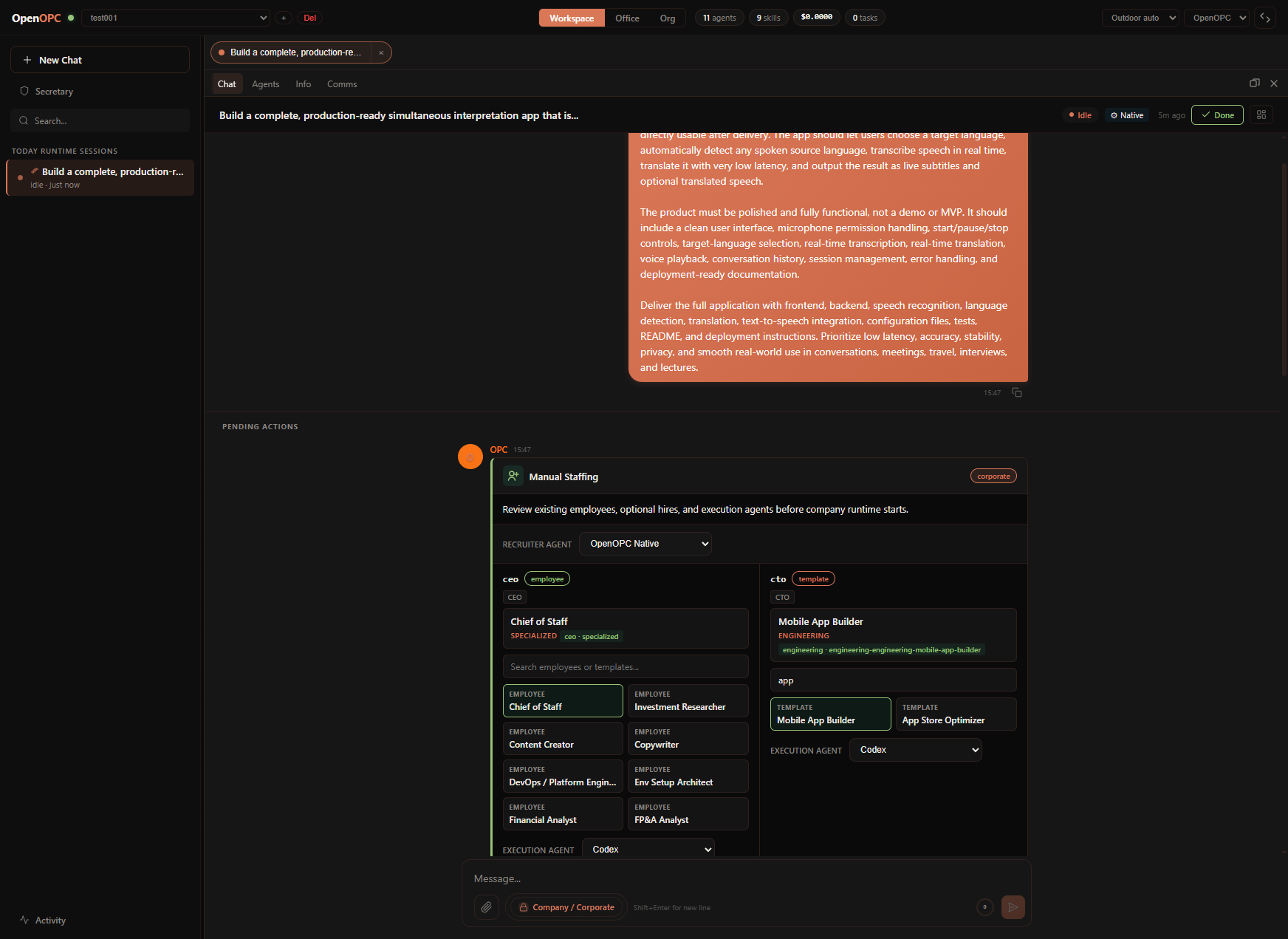 Workspace And Setup. Choose or create a project, start
 New Chat, then select Company or Task plus the matching organization or agent. In Company Mode, pick role employees and execution agents, or let AutoSwarm auto-recruit.
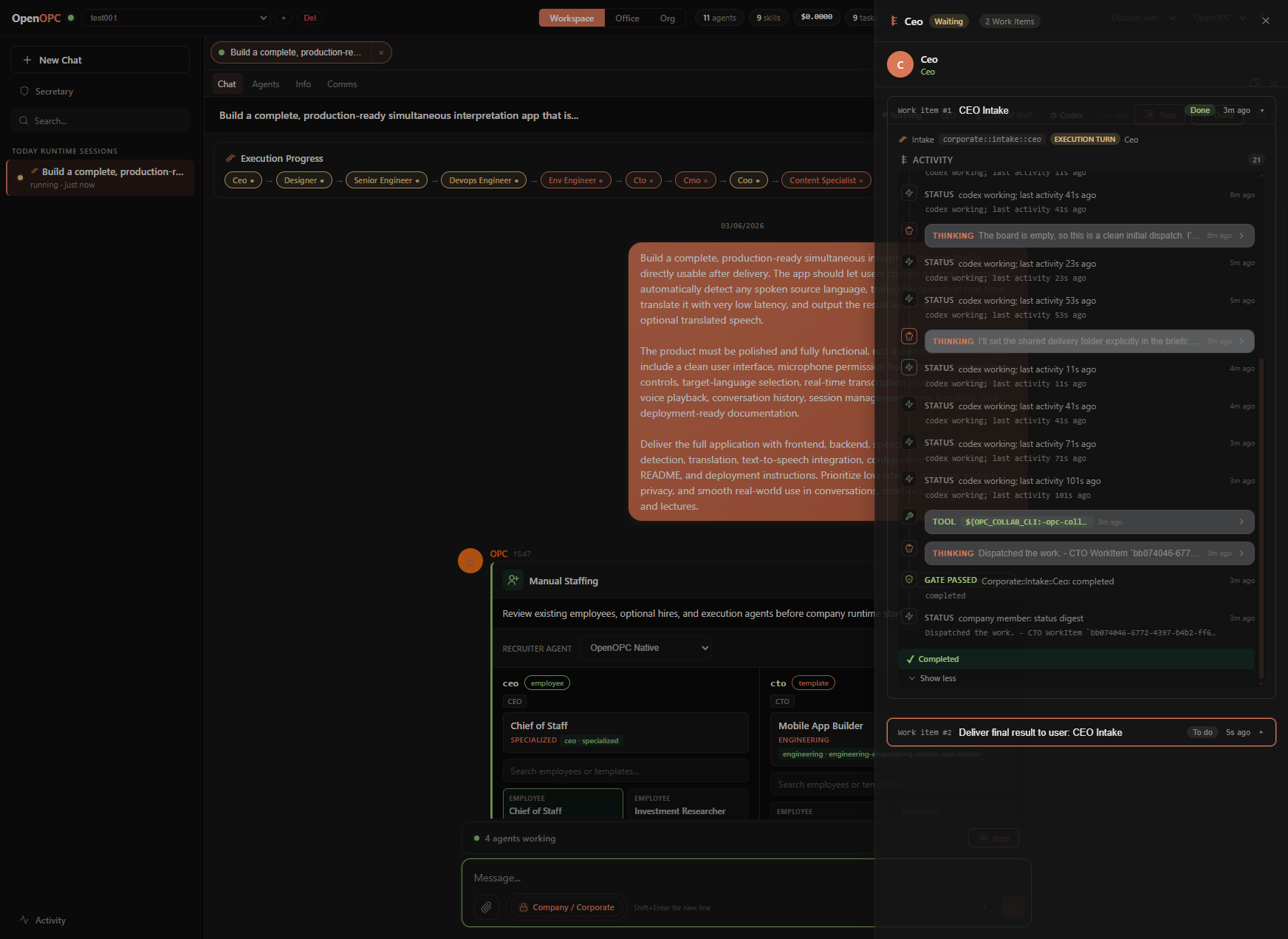 Execution Progress. Track every role's state, then click a role or work item to inspect detailed execution records, tool activity, handoffs, reviews, and runtime metadata.
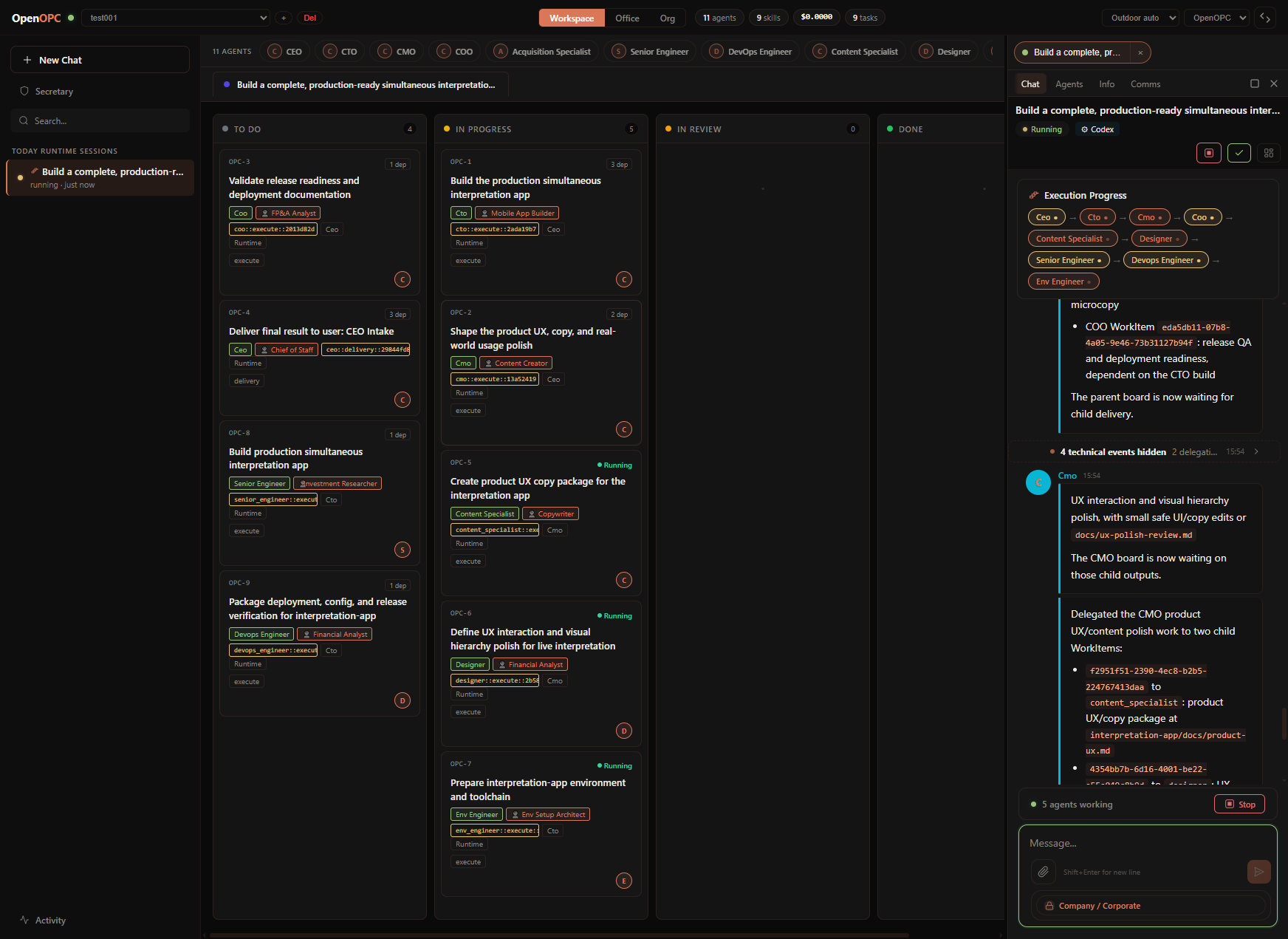 Kanban. Supervise each agent's concrete tasks and work items as they move through planning, execution, review, blockers, and completion.
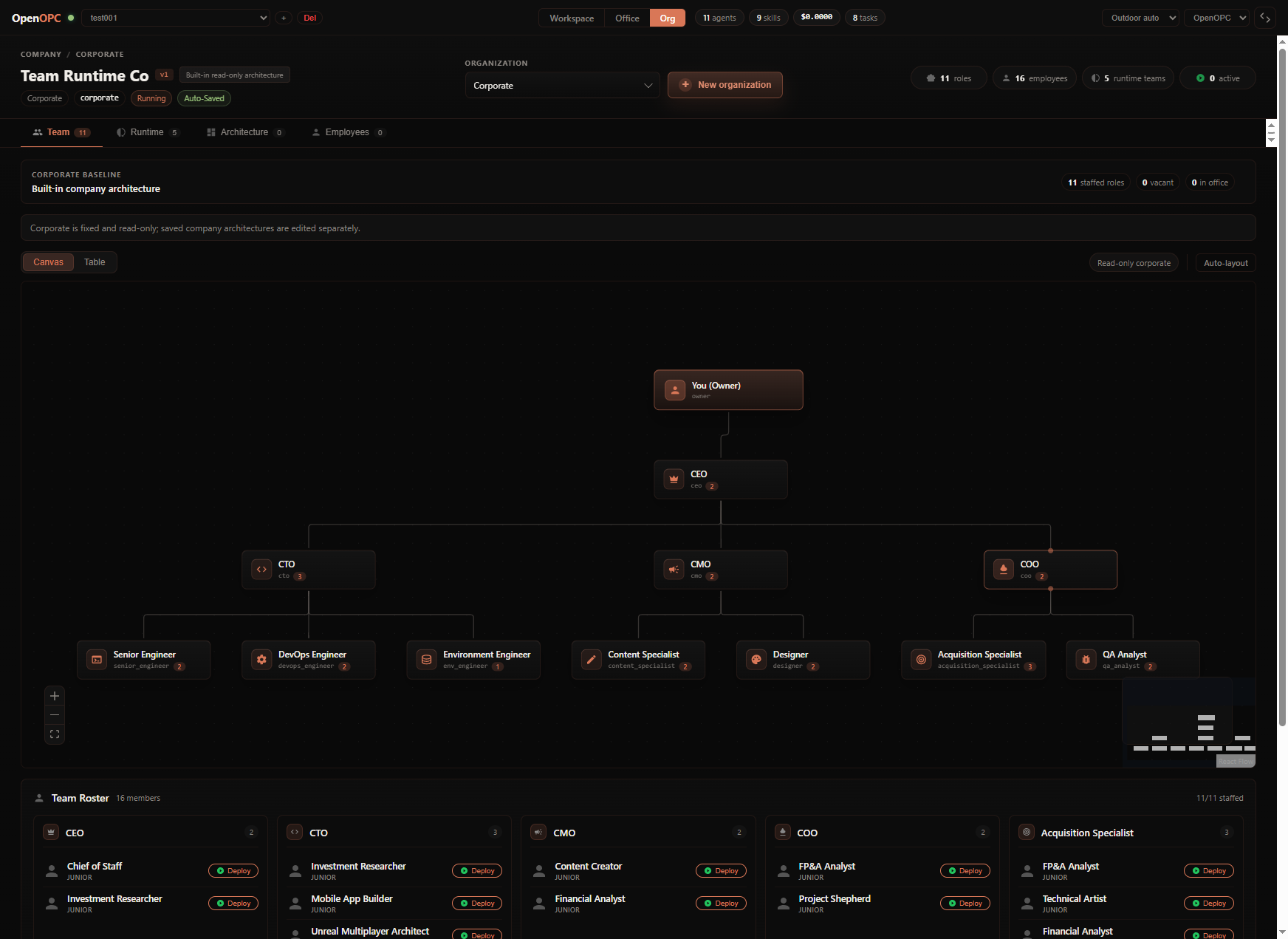 Org Control. Tune existing organizations, adjust roles and reporting lines, review runtime policy, or create a new organization.
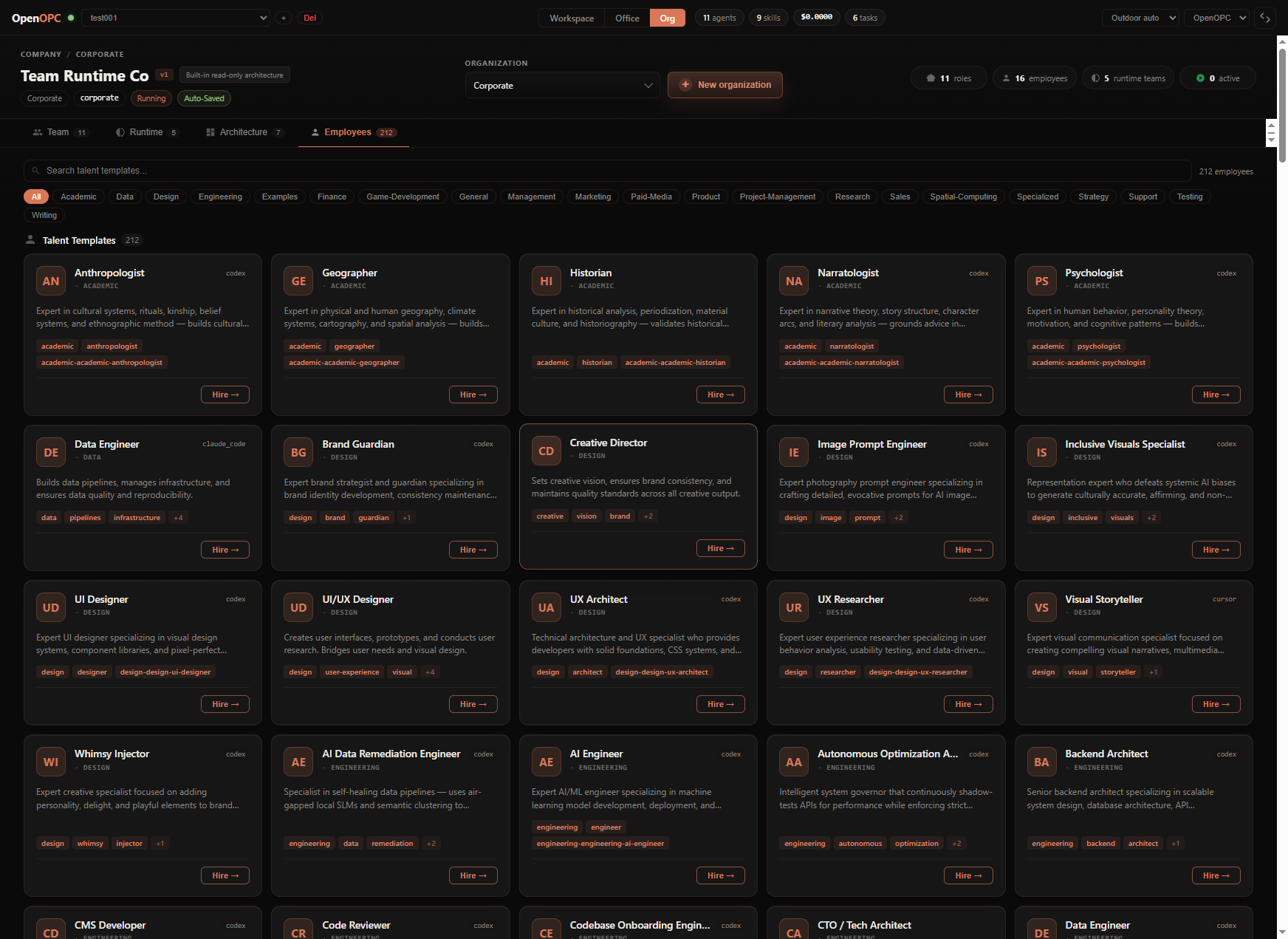 Talent Market. Browse talent templates, inspect candidate details, and recruit employees into vacant roles when the company needs more capability.
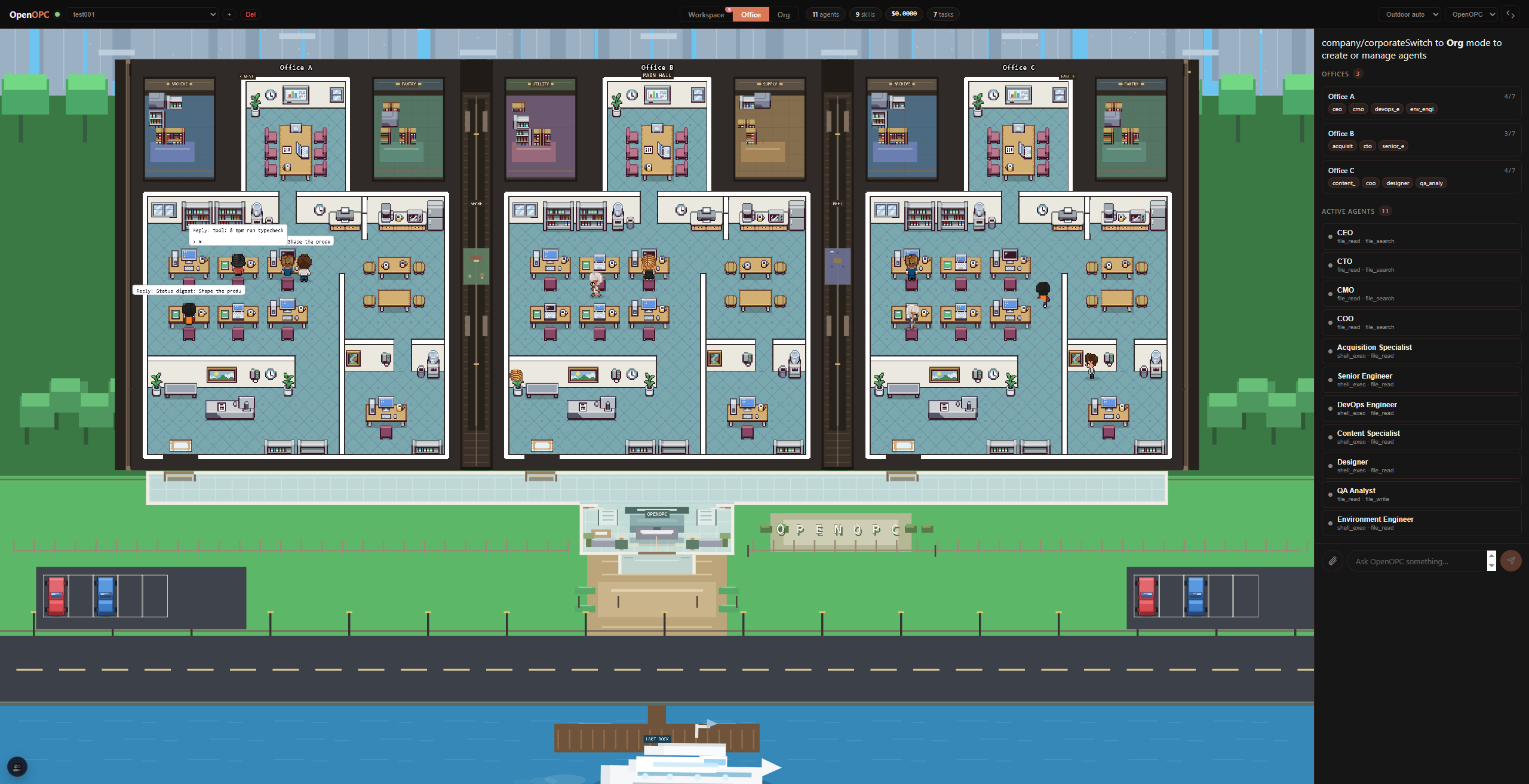 Office View. Watch the organization as an animated office, with each role/agent showing status, current task, active tool, seat, and runtime activity.
The Office UI has three primary pages:
| Page | What you do there |
|---|---|
| Workspace | Main working surface: session list, kanban board, chat, task details, role progress, comms, and team cockpit. |
| Office | Visual office map: agents appear as characters, can be selected, moved, assigned to seats, and inspected. |
| Org | Company architecture: switch corporate/saved orgs, create new organizations, edit roles, hire talent, apply architecture presets, and import/export configs. |
The Workspace page is the default screen.
| Area | What to look for |
|---|---|
| Left sidebar | Project sessions, activity, unread counts, and new chat creation. |
| Center board | Kanban cards. In Task Mode, a card is normally one task-backed chat session. In Company Mode, the board follows the selected runtime session and shows delegated work items. |
| Right panel | Context panel with tabs such as Chat, Agents, Info, Comms, and Team. Collapse, resize, or maximize it while work is running. |
| Composer | Send messages, attach files, choose mode, choose company architecture, and in Task Mode choose the execution agent. |
New Chat.Task or Company.AutoSwarm Native, Codex, Claude Code, Cursor, or OpenCode.Corporate or a saved org architecture.Once the first message is sent, the mode and task agent are locked for that chat. Use the locked-mode popover to continue in a new chat with a different mode.
Company Mode turns one brief into a runtime session plus role-owned work items.
| Tab | What it shows |
|---|---|
Chat | Parent conversation, final responses, runtime progress cards, checkpoint replies, stop/continue/done controls, and links into work-item execution. |
Agents | Role rollup: active/waiting/pending/done roles, current tool, role work items, filters, search, and links to detailed execution progress. |
Info | Status, assignees, role identity, employee assignment, selected execution agent, timing, and developer details. |
Comms | Role inboxes, unread/read/sent messages, meetings, decisions, and recent communication failures. |
Team | Runtime cockpit: teams, seats, approvals, unread communication, run state, and stop controls for the current run. |
To inspect the detailed workflow for a role, open a company-mode session and click a role/work item in the Chat progress card or Agents tab. The Execution Progress panel shows each work item, its status, activity sections, tool progress, handoffs, review targets, and execution turn metadata.
Todo, start them, and inspect each task from the right panel.Use the Office page when you want a visual view of the running team.
.opc/ui_state.db.The Org page is where company structure becomes runnable.
| Sub-tab | Purpose |
|---|---|
Team | View/edit the role graph, table, role inspector, roster, saved org selector, export package flow, and deploy hired employees to the office. |
Runtime | Tune runtime teams, seats, final decider, delegation strategy, and runtime policy. Corporate is read-only; saved orgs are editable. |
Architecture | Browse built-in architecture presets, preview/apply packages, manage installed packages, and import/export YAML. |
Employees | Search talent templates, view details, hire into vacant roles, and staff the company. |
To create a new company: open Org, click New organization, enter a name, add at least two members with responsibilities and reporting lines, review, and create. AutoSwarm saves it automatically and switches the composer to Company / <your org>.
To recruit: import talent templates first, then open Org -> Employees, search a template, click Hire, choose a vacant role, and deploy the employee from Team Roster if you want it visible in the Office page.
autoswarm talent import /path/to/agency-agents
To refresh this repository's talent catalog without saving company configuration, run PYTHONPATH=. python scripts/sync_agency_talent.py /path/to/agency-agents --opc-home .opc. It updates matching source templates, adds new ones and records the source revision and content hashes. Local custom templates are retained; example workflows and organizational playbooks are excluded from recruitment imports.
AutoSwarm separates runtime/config state from deliverable workspace files.
| Path | Meaning |
|---|---|
.opc/config/ | Local config copied from config/ by autoswarm init. |
.opc/memory/ | Global and project markdown memory. |
.opc/projects/<project>/ | Project runtime metadata and task stores. |
.opc/ui_state.db | Office UI chat, channels, and visual agent state. |
../<repo-name>_workplace/<project>/ | Default project workplace. Agents should write durable project files here. |
../<repo-name>_workplace/<project>/.opc-comms/ | Internal company-mode comms mailboxes, meetings, and tool-result scratch space. |
<repo-name> is the existing checkout directory name, such as OpenOPC or AutoSwarm.
Set OPC_HOME=/path/to/opc-home if you want config and runtime state outside the repo.
AutoSwarm exposes both high-level natural-language commands and lower-level UI/service commands.
Conceptually AutoSwarm has two execution modes: task and company. Some lower-level CLI/service commands still expose org as a compatibility selector for Company Mode with a saved organization architecture; in the UI this appears as Company plus an architecture choice.
# Chat
autoswarm chat
autoswarm chat -p demo --mode task --agent native "Inspect the failing tests"
autoswarm chat -p demo --mode company --company-profile corporate "Ship this change with review"

# Scriptable execution
autoswarm exec -p demo --mode task --agent codex --stream-json "Run the migration check"
autoswarm exec -p demo --mode company --company-profile corporate "Draft the research report"

# Project lifecycle
autoswarm project list
autoswarm project create demo
autoswarm project switch demo

# Sessions
autoswarm session list -p demo
autoswarm session create "New feature" -p demo --mode company
autoswarm session send <task_id> "Continue with implementation" -p demo
autoswarm session stop <task_id> -p demo
autoswarm session continue <task_id> "Proceed after review" -p demo

# Runtime inspection
autoswarm runtime status -p demo
autoswarm runtime logs <task_id> -p demo
autoswarm work-item list -p demo
autoswarm work-item show <work_item_id> -p demo
autoswarm comms state <task_id> -p demo

# Recruitment
autoswarm talent import /path/to/agency-agents
autoswarm talent hire <template_id> <role_id> -p demo
Run autoswarm chat, then use slash commands:
/status
/mode task
/mode company corporate
/agent codex
/project switch demo
/session list
/runtime --full
/logs <task_id> --full
/comms <task_id> --full
/org
/talent list
/market list
See docs/cli-chat-slash.md for the full command table.
| Group | Examples |
|---|---|
autoswarm project | list, show, create, switch, rename, delete --yes |
autoswarm session | list, create, show, config, send, rename, delete --yes, stop, continue, resume, complete |
autoswarm mode | show, set task, set company --profile corporate, set org --org <id> for a saved-org company run |
autoswarm kanban | view, task create, task update, task move, task assign, task status, task delete --yes |
autoswarm agent | list, create, create-from-template, import-employee, detail, move, delete --yes |
autoswarm org | info, export, import, saved list/save/load/delete, role add/update/bulk-add/delete, policy update, strategy update, reset --yes |
autoswarm talent | list, employees, import, hire, scan, import-selected, employee-detail, import-agent |
autoswarm market | presets, browse, preview, apply-preset, export, install, list, uninstall --yes |
autoswarm runtime | status, checkpoints, logs, run |
autoswarm permissions | Show the Native default, or `set read-only |
autoswarm channels | status, login, start, stop |
Most service-style commands accept --project/-p and --json.
For saved organization architectures, some CLI/service commands currently use org as a compatibility selector even though the conceptual runtime is still Company Mode:
autoswarm exec -p demo --mode org --org hku_research_lab "Draft the research report"
autoswarm session create "Research sprint" -p demo --mode org --org hku_research_lab
Run autoswarm init once from the repo root. It creates .opc/, copies the template config from config/, creates memory/skills/log folders, and optionally creates the first project.
Project-local .opc/config files can select local executables, remote endpoints, and credential sources. AutoSwarm therefore asks for workspace trust before loading an existing project's config; non-interactive commands fail closed. Review the files, then use autoswarm trust add /path/to/workspace. Trust is bound to fingerprints of the security-relevant source files and their normalized effective authority, so changes to system, LLM, agent, or channel configuration require renewal. Legacy path-only records also require one renewal. Use autoswarm trust list and autoswarm trust remove /path/to/workspace to inspect or revoke the user-owned decision. A workspace initialized by autoswarm init is trusted automatically at creation time.
AutoSwarm exposes two choices in both Task and Company modes:
jiuwen.jiuwenswarm.JiuwenSwarm reads ~/.jiuwenswarm/config/.env; it does not automatically read AutoSwarm's .opc/config/llm_config.yaml. You may reuse the same provider credentials, but the model name must support JiuwenSwarm agent requests. For example, Volcengine Ark Agent Plan uses:
API_BASE="https://ark.cn-beijing.volces.com/api/plan/v3"
API_KEY="<your API key>"
MODEL_NAME="ark-code-latest"
MODEL_PROVIDER="OpenAI"
JiuwenSwarm requires Python 3.11–3.13. Install the verified JiuwenSwarm
0.2.4b4 / openJiuwen 0.1.16 combination and the AutoSwarm Gateway adapter
from the AutoSwarm repository root.
macOS / Linux:
python -m pip install -e ".[jiuwen]"
uv tool install --force --python 3.12 \
  --overrides docs/jiuwen-openjiuwen-overrides.txt \
  "https://github.com/openJiuwen-ai/jiuwenswarm/archive/ec305b70bf4a82f3603ea1a7b3ddc212386662df.tar.gz"
jiuwenswarm-init
chmod 600 ~/.jiuwenswarm/config/.env
jiuwenswarm-start app
autoswarm agents preflight jiuwen
autoswarm agents preflight jiuwenswarm
autoswarm exec --mode task --agent jiuwen "Handle this task"
autoswarm exec --mode task --agent jiuwenswarm "Have one Team handle this task"
Windows PowerShell / Command Prompt (no chmod step):
py -3.12 -m pip install -e ".[jiuwen]"
uv tool install --force --python 3.12 `
  --overrides docs/jiuwen-openjiuwen-overrides.txt `
  "https://github.com/openJiuwen-ai/jiuwenswarm/archive/ec305b70bf4a82f3603ea1a7b3ddc212386662df.tar.gz"
jiuwenswarm-init
jiuwenswarm-start app
autoswarm agents preflight jiuwen
autoswarm agents preflight jiuwenswarm
jiuwenswarm-start app stays in the foreground; keep that terminal open while
using AutoSwarm.
On Windows the Jiuwen configuration is normally stored under
%USERPROFILE%\.jiuwenswarm\config\.env; on macOS/Linux it is under
~/.jiuwenswarm/config/.env. AutoSwarm reads Jiuwen's persisted custom Gateway
port, so both sides continue to use the same endpoint. Set
JIUWENSWARM_GATEWAY_URL or a non-default gateway_url in
.opc/config/agent_config.yaml only for an intentional remote/custom endpoint.
AutoSwarm supports JiuwenSwarm-single and JiuwenSwarm-team in both Task and Company modes on Windows, macOS, and Linux. Company communication uses the same protected workspace boundary on every platform: POSIX directory handles on macOS/Linux and native handle-relative, reparse-point-safe access on Windows. Windows workspaces must be local; UNC/network-share workspaces fail closed because they cannot provide the same boundary guarantees.
Choose the execution agent in Staffing / Recruitment Review, or under Company → Org → role → Runtime.
The parent manager receives a capability summary compiled from the covered roles, skills, tools, and deliverables. JiuwenSwarm-team decides how work is divided internally.
When JiuwenSwarm-team emits its official Team events, Execution Progress still shows one organizational node and one AutoSwarm WorkItem executor. Its second line summarizes the observed internal run, for example 3 members · 2 active · Leader synthesizing. Select that node to open Team Activity:
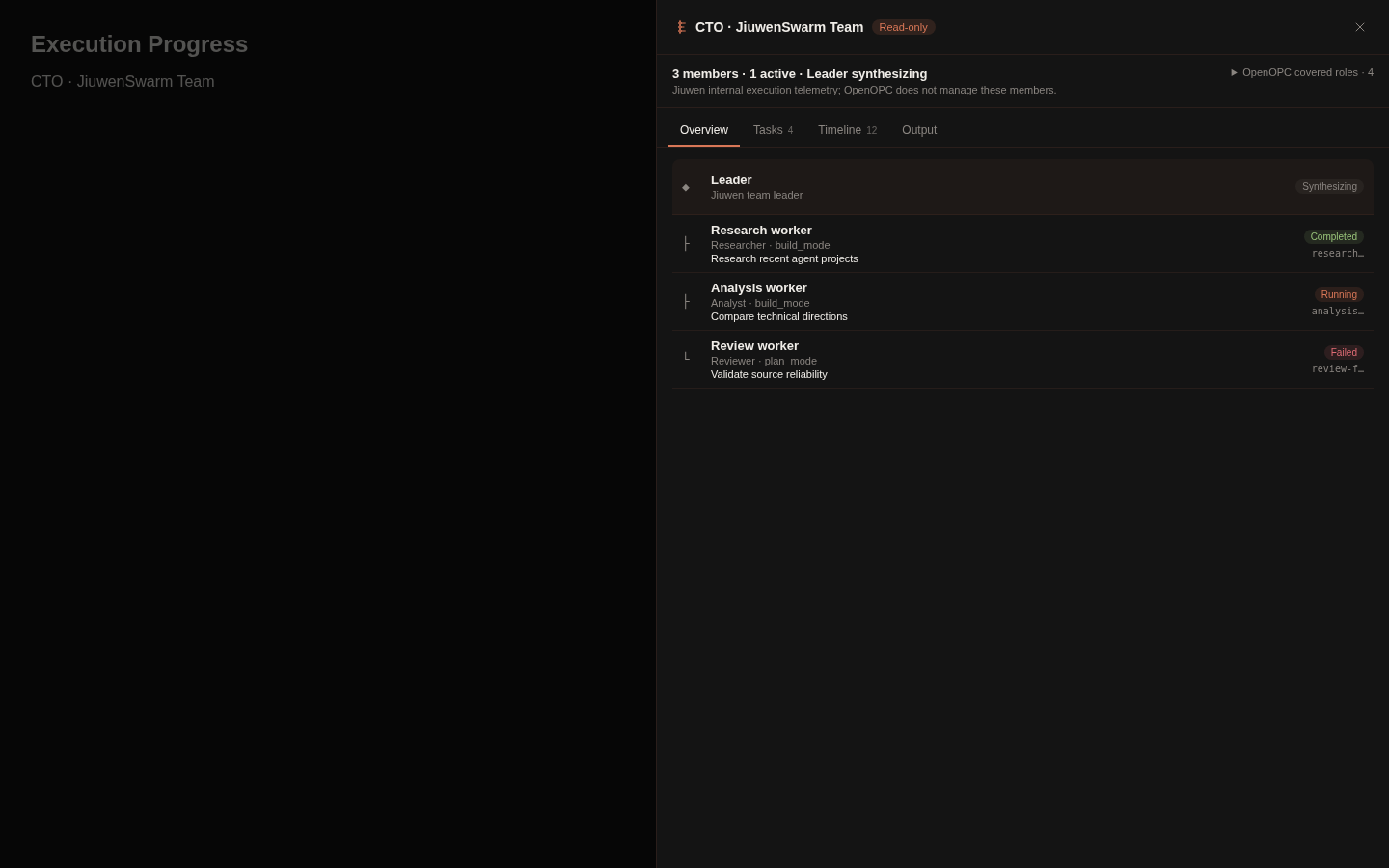
todo_create, task_tool, covered_role_ids, and natural-language claims never create Team rows. Team telemetry never creates an AutoSwarm Agent, Session, WorkItem, or main Kanban card, and never changes WorkItem progress, review, permissions, or scheduling.This view observes Jiuwen's existing /tui stream only. It does not modify the Jiuwen harness or open another control connection.
| File | Purpose |
|---|---|
.opc/config/llm_config.yaml | Default model, LiteLLM/OpenRouter-compatible API base, API key, env var indirection, routing, fallback, temperature, token limit. |
.opc/config/system_config.yaml | Runtime behavior, browser tools, native runtime, compaction, verification, permissions, sandbox, and safety settings. |
.opc/config/agent_config.yaml | External agent command paths, preferred order, model flags, session modes, timeouts, approval modes, and native subagent profiles. |
.opc/config/channel_config.yaml | External messaging providers and credentials. Inbound sender lists are deny-by-default. |
.opc/config/company_corporate_config.yaml | Built-in corporate company architecture template. |
.opc/config/company_orgs/org_<id>_config.yaml | Saved custom company architectures used by Company Mode. |
.opc/config/org_index.yaml | Active saved company architecture selector. |
After autoswarm init, edit .opc/config/llm_config.yaml in the repo-local AutoSwarm home. If you set OPC_HOME, edit $OPC_HOME/config/llm_config.yaml instead.
The template leaves secrets empty. Write your key directly into the file:
llm:
  default_model: "openai/gpt-5.4"
  api_base: "https://openrouter.ai/api/v1"
  api_key: "sk-or-v1-..."   # your OpenRouter (or other provider) API key

  max_tokens: 32768         # max output tokens per request; lower it if your
                            # model's output cap is smaller
  # context_window: 128000  # total input window. Usually auto-detected via
                            # litellm; unmapped models fall back to 128000.
                            # Uncomment and set only when the fallback is
                            # wrong for your model.
Then verify with autoswarm status.
If you prefer not to store the key in the file, leave api_key empty and set api_key_env to the name of an environment variable that holds it (e.g. api_key_env: "OPENROUTER_API_KEY").
AutoSwarm Native has three permission levels. Set the default copied into each new session in .opc/config/system_config.yaml:
autonomy:
  native_approval_level: auto   # read-only | auto | full-access
| Level | Runs automatically | Asks first | Sandbox |
|---|---|---|---|
read-only | Local reads and side-effect-free internal tools | Writes, processes that may write, network, external effects, and outside access | Read-only, offline |
auto | Reads, workspace edits, commands, and tests | Network, workspace-external access/effects, and explicit safety rules | Workspace-write, offline |
full-access | All registered Native tools | No Native tool approval prompts | Off |
Use the Permissions selector beside Mode/Agent in the UI, including while a session is running. Changes take effect at the next tool call; already-open approval requests are not replayed or auto-approved. The same setting is available from the CLI:
autoswarm permissions
autoswarm permissions set auto
autoswarm chat --approval-level read-only
autoswarm exec --approval-level full-access "Run the task"
autoswarm session config <task-id> --approval-level auto
Interactive chat supports /permissions and /permissions read-only|auto|full-access; autoswarm status and /status show the effective level and sandbox. A new session freezes the current default. Native subagents and all Native Company roles inherit the root session level, while different projects and sessions remain isolated.
Changing the default through the UI or autoswarm permissions set atomically refreshes the trust fingerprint of an already trusted workspace. If you edit .opc/config/*.yaml by hand, review the change and run autoswarm trust add <workspace> as usual.
When a call asks, approval cards retain once/session/project/global scopes; no grant can override an explicit deny. Default in the UI changes only future sessions.
full-access bypasses only Native tool permission prompts. Organization reviews, hiring decisions, user questions, Company WorkItem gates, controller ownership, durable effect fences, and explicit deny rules remain active. This setting does not control Codex, Claude Code, JiuwenSwarm-single, JiuwenSwarm-team, or any other external harness; their approval and sandbox settings remain independent. Legacy Native risk settings are read once for migration, then native_approval_level is authoritative.
Task Mode can explicitly select an execution agent:
autoswarm chat -p demo --mode task --agent codex "Implement the change"
Available values are native, codex, claude_code, cursor, opencode, jiuwen (JiuwenSwarm-single), and jiuwenswarm (JiuwenSwarm-team). See JiuwenSwarm setup and role behavior.
pip install -e .[channels-feishu]
autoswarm init
autoswarm channels login feishu
Edit .opc/config/channel_config.yaml:
channels:
  feishu:
    enabled: true
    app_id: "cli_xxx"
    app_secret: "..."
    encrypt_key: ""
    verification_token: ""
    react_emoji: THUMBSUP
    allow_from:
      - "ou_xxx"
Then:
autoswarm channels status
autoswarm channels start -p demo
# or run the long-lived engine + channel runtime:
autoswarm run -p demo
Feishu uses the lark-oapi WebSocket client. app_id and app_secret are required; encrypt_key and verification_token are optional unless your tenant/app configuration requires them. Keep allow_from explicit; an empty list denies all inbound messages.
| Provider | Install extra | Runtime | Required fields |
|---|---|---|---|
| Telegram | channels-telegram | polling | token |
| Slack | channels-slack | socket | bot_token, app_token |
| Discord | channels-discord | socket | token |
| DingTalk | channels-dingtalk | socket | client_id, client_secret |
channels-email | polling | IMAP/SMTP fields, consent_granted | |
| Matrix | channels-matrix | sync/polling | homeserver, access_token, user_id |
channels-qq | socket | app_id, secret | |
channels-whatsapp | bridge | bridge_url | |
| Mochat | channels-mochat | bridge | base_url, claw_token, agent_user_id |
Useful commands:
autoswarm channels login slack
autoswarm channels status
autoswarm channels start -p demo
autoswarm channels stop
autoswarm run -p demo
See docs/channels.md and docs/channel-bridges.md.
Browser tools:
python -m playwright install chromium
Configure launch behavior in .opc/config/system_config.yaml:
system:
  browser:
    mode: embedded   # embedded | chrome | auto
    headless: true
    chrome_channel: chrome
    user_data_dir: ""
Native browser tools include browser_navigate, browser_snapshot, browser_click, browser_type, browser_wait_for, browser_scroll, browser_select_option, browser_evaluate, browser_take_screenshot, and browser_close.
MCP servers can be added under mcp_servers in system_config.yaml. Local servers use stdio commands; remote servers use HTTP/SSE-style URLs. Discovered tools are registered with a server prefix to avoid collisions.
autoswarm ui --rebuild
If the browser still shows stale UI state, hard refresh the page. If a previous process died mid-run, restart autoswarm ui first so in-memory locks are released.
Start with a server restart and browser hard refresh. If persisted task state is still dirty, use the reset helper:
python scripts/reset_stuck_task.py --project <project> --session <session_id> --apply
python scripts/reset_stuck_task.py --all --apply
Run:
autoswarm status
Check .opc/config/agent_config.yaml for command names such as codex, claude, cursor-agent, opencode, and jiuwenswarm. Gateway mode also requires a running jiuwenswarm-start service; use autoswarm agents preflight jiuwen to verify it.
Check:
pip install -e .[channels-feishu].enabled: true.allow_from contains the sender IDs you expect.autoswarm channels status reports the provider as configured and available.Everything AutoSwarm builds is yours to keep, reuse, and share — organizations, employees, talent templates, skills, and channels are just files. Import a popular talent library, reuse a team across projects, or package a whole company as a shareable .opcpkg.
# Hire from a talent library (e.g. agency-agents) into a role
autoswarm talent import /path/to/agency-agents
autoswarm talent hire <template_id> <role_id> -p demo

# Reuse or share a whole organization
autoswarm org export --json > my-org.yaml
autoswarm market export --id hku_lab --name "HKU Lab" --output-dir packages
autoswarm market install packages/hku_lab.opcpkg
AutoSwarm is moving quickly. The areas below reflect active development priorities — each grounded in real gaps identified during early usage.
| Area | Planned direction |
|---|---|
| Role-level skills | Role config already carries skill_refs, and the Org UI surfaces skill metadata today. The next step is letting users select which skills mount to which roles directly from the Org page — feeding into a broader self-evolving skill ecosystem. |
| Secretary settings | The secretary will grow into a stronger configuration and memory steward: owning AutoSwarm system memory, analysing and comparing projects, and providing guided setup for AutoSwarm YAML configuration. |
| Company-mode channels | External channels will evolve beyond simple chat entrypoints into richer company-mode workflows — with role-aware notifications, structured approvals, and cross-platform collaboration. |
| CLI parity | The CLI is functional today, but the Office UI remains the more complete surface. Upcoming work targets org editing, company-mode inspection, failure recovery, and long-running runtime control from the terminal. |
| TUI | A full terminal UI is under consideration once CLI parity matures. The Office UI remains the primary interface in the meantime. |
| Market and presets | More architecture presets, recruitable talent packs, import/export workflows, and a package marketplace for sharing and discovering community-built components. |
| Runtime polish | Continued improvements to recovery, checkpointing, execution-progress visibility, and visual documentation — making long company runs more observable and resilient. |
AutoSwarm is built with gratitude for several open-source projects that helped shape its agent design, skill structure, and talent template ecosystem:
agency-agents.SKILL.md-style organization.
❤️ Thanks for visiting ✨ AutoSwarm!
46 followers · starred Sep 2026
603 followers · starred Jul 2026
220 followers · starred Jul 2026
367 followers · starred Jul 2026
AutoSwarm: Automating Agent Swarms — Self-Built, Self-Run, Self-Grown
Python
1,852
107 commits
updated Oct 17, 2026
English | 简体中文
🏗️ Self-Built — Fully automated to recruit role-specific AI employees and build the org.
⚙️ Self-Run — Fully automated to assign tasks, drive handoffs, and keep moving toward your goal.
🌱 Self-Grown — Learns from every task, builds organizational memory, always delivers smarter.
0.2.4b4 and openJiuwen 0.1.16 versions.AutoSwarm covers nine core verticals — from AI development and software engineering to finance, sales, media, e-commerce, and education. Whatever the industry, AutoSwarm assembles the right team and delivers end-to-end.
|
🤖 AI Tech & Research Model training & evaluation, Agent development, LLM apps & AI infrastructure |
💻 Software Development Android apps, SaaS MVPs, websites, mini programs & game development |
📈 Financial Investment Investment memos, market maps, due diligence & IC decision packages |
|
🚀 Sales Growth
Outbound sales, deal strategy, proposals & channel expansion |
🎬 Content & Media
Video production, short-form content, scripts, storyboards & multi-platform cuts |
🤝 Industry Assistants
Copilots for support, real estate, legal intake, HR onboarding, retail |
|
🧾 Accounting & Finance
Bookkeeping, financial reporting, tax compliance, budgeting & risk review |
🛍️ Brand & E-commerce
Brand planning, product selection, store ops, user growth & retention |
🎓 Education & Training
Curriculum design, knowledge base, learner management & content production |
|
🎬 Video Production |
📈 Investment Research |
🎮 Game Prototype |
AutoSwarm assembles a AI company around complex, real-world tasks — through three tightly coupled mechanisms: Self-Built staffs the organisation, Self-Run executes the work, and Self-Grown learns from the outcome.
1. Self-Built — Staffing the Organisation
Before any work begins, the right people must be in place. Given a goal, AutoSwarm:
💡 Experienced employees carry accumulated context; fresh hires offer a clean slate when a role demands it.
Before sending the first message, choose Mode → Company and use the Company selector:
The choice is saved with the chat, survives reloads and is locked after the first message. Existing chats default to fixed organizations. CLI staffing cards still accept auto team for combined formation/recruitment and auto recruit for existing-role staffing. Formation and recruitment use the selected execution agent. External agents plan in separate temporary workspaces; Codex uses a read-only sandbox. Team size is a qualitative agent decision, not a guarantee of optimality; existing organization configurations are preserved.
The chat's Agent handles formation, recruitment and default execution. Each role's Execution Agent can override its execution backend, saved per project and organization. Codex uses its own model configuration and runs Company work in a workspace sandbox with task-bound collaboration. An explicitly selected agent that is unavailable or lacks Company isolation support fails visibly rather than silently switching to Native or another agent. Stop/resume preserves explicit choices too.
Approved adaptive hires are persisted and remain available for reuse in later adaptive runs from the same source organization and project, alongside their relevant experience.
Adaptive teams are temporary by default: their runtime snapshots support conversation follow-ups and recovery, but do not appear in the saved organization picker. Only explicitly saved architectures become reusable organizations.
Formation and automatic recruitment impose no extra fixed planning deadline or correction quota. Data validation feedback goes back to the selected agent for correction; the framework does not rewrite the team or substitute heuristic staffing decisions. Users can stop planning, and agent or provider failures are reported explicitly.
⚙️ 2. Self-Run — Executing the Work
With the team assembled, Self-Run orchestrates its members toward a finished deliverable. The central challenge is not raw execution but efficient collaboration under uncertainty, which manifests in two distinct problems.
🔀 Dynamic collaboration orchestration. Real work cannot be fully planned upfront. AutoSwarm addresses this through a work-item state machine, where each item's phase determines:
A manager decomposes items, assigns, and reviews results — accepting, reworking, or escalating — across five modes: execute, delegate, review, integrate, and rework. Decomposition defines a dependency DAG, so:
🔗 Dependency resolution and rejection propagate as structured phase transitions, eliminating ad-hoc coordination.
🛡️ Handling blockers surfacing mid-run. Not all obstacles are visible upfront. AutoSwarm resolves them at two levels:
🖥️ The kanban and office views render this orchestration in real time.
🌱 3. Self-Grown — Learning from the Run
Execution generates raw experience; Self-Grown turns it into lasting improvement, guided by two principles.
🏅 Attributing outcomes to the right roles. Crediting the whole company teaches nothing. Instead, AutoSwarm:
📖 Distilling trajectories into knowledge. Execution traces are too noisy to learn from. AutoSwarm therefore:
Org -> Team edits the company architecture and roles.Org -> Employees hires talent into vacant roles.Team Roster -> Deploy turns a hired employee into a visible office agent.Agents and the Execution Progress panel show which role is active, which work item it owns, and which execution agent is doing the concrete work.uv is the recommended setup path for AutoSwarm. It can install/manage Python, create the project virtualenv, and run commands against that environment without mixing AutoSwarm dependencies into your global Python.
AutoSwarm was previously named OpenOPC. The primary command is now autoswarm; opc remains an alias. The opc Python package, .opc/ data directory, OPC_HOME, and existing project/session identifiers stay compatible. Existing checkouts and workspaces can keep their current directory names; reinstall the editable package to enable the new command.
AutoSwarm requires Python >=3.10; the examples below use Python 3.12.
For direct one-off work, AutoSwarm also includes Task Mode, a LobeChat-like single-agent workspace using AutoSwarm Native, Codex, Claude Code, Cursor, or OpenCode.
macOS
# Install uv with Homebrew, or use the official standalone installer.
brew install uv
# curl -LsSf https://astral.sh/uv/install.sh | sh

cd /path/to/AutoSwarm
uv python install 3.12
uv venv --python 3.12
source .venv/bin/activate
Linux
curl -LsSf https://astral.sh/uv/install.sh | sh
source "$HOME/.local/bin/env"

cd /path/to/AutoSwarm
uv python install 3.12
uv venv --python 3.12
source .venv/bin/activate
Windows PowerShell
powershell -ExecutionPolicy ByPass -c "irm https://astral.sh/uv/install.ps1 | iex"

cd C:\path\to\AutoSwarm
uv python install 3.12
uv venv --python 3.12
.\.venv\Scripts\Activate.ps1
Windows Command Prompt
winget install --id=astral-sh.uv -e
:: Or run the standalone installer from cmd:
:: powershell -ExecutionPolicy ByPass -c "irm https://astral.sh/uv/install.ps1 | iex"

cd C:\path\to\AutoSwarm
uv python install 3.12
uv venv --python 3.12
.venv\Scripts\activate.bat
# Install AutoSwarm into the uv-managed environment
uv pip install -e .

# Optional but recommended for browser tools
uv run python -m playwright install chromium

# Initialize local config, memory, skills, projects, and workspace folders
uv run autoswarm init

# Add an API key in .opc/config/llm_config.yaml
# or configure the env var named by llm.api_key_env.

# Launch the browser UI
uv run autoswarm ui
Open http://localhost:8765 by default.
# Interactive CLI
uv run autoswarm chat -p demo

# One-shot task mode
uv run autoswarm chat -p demo --mode task --agent codex "Refactor this module and run focused tests"

# Company mode with the built-in Corporate architecture
uv run autoswarm chat -p demo --mode company --company-profile corporate "Plan, implement, review, and document this feature"

# Non-interactive scripting / CI style usage
uv run autoswarm exec -p demo --mode task --agent native --json "Summarize the current repo status"
>=3.10. Current required dependencies do not all publish Python 3.9-compatible releases.uv is recommended for local development and release testing. If you prefer classic pip, create and activate a Python >=3.10 virtualenv, then run python -m pip install -e ..uv run ....uv installation and Python management docs for alternative package managers and managed Python details.>=18 is needed when the Office UI frontend must be built.autoswarm ui auto-installs missing aiohttp / aiosqlite and auto-builds the frontend if needed.autoswarm init --no-external-agent-preflight to skip the first-run external-agent checks.python -m playwright install chromium before asking agents to browse pages.python -m pip install -e .
python -m pytest
cd opc/plugins/office_ui/frontend_src
npm install
npm run typecheck
npm run build
The frontend build output is served from opc/plugins/office_ui/frontend_dist/.
Start it with:
autoswarm ui
autoswarm ui --port 9000 --project demo
autoswarm ui --rebuild
The compatible opc ui command uses the same configuration, projects, and sessions.
Scroll horizontally to browse the Office UI walkthrough. Each screenshot keeps its short guide text attached.
Workspace And Setup. Choose or create a project, start New Chat, then select Company or Task plus the matching organization or agent. In Company Mode, pick role employees and execution agents, or let AutoSwarm auto-recruit.
Execution Progress. Track every role's state, then click a role or work item to inspect detailed execution records, tool activity, handoffs, reviews, and runtime metadata.
Kanban. Supervise each agent's concrete tasks and work items as they move through planning, execution, review, blockers, and completion.
Org Control. Tune existing organizations, adjust roles and reporting lines, review runtime policy, or create a new organization.
Talent Market. Browse talent templates, inspect candidate details, and recruit employees into vacant roles when the company needs more capability.
Office View. Watch the organization as an animated office, with each role/agent showing status, current task, active tool, seat, and runtime activity.
The Office UI has three primary pages:
| Page | What you do there |
|---|---|
| Workspace | Main working surface: session list, kanban board, chat, task details, role progress, comms, and team cockpit. |
| Office | Visual office map: agents appear as characters, can be selected, moved, assigned to seats, and inspected. |
| Org | Company architecture: switch corporate/saved orgs, create new organizations, edit roles, hire talent, apply architecture presets, and import/export configs. |
The Workspace page is the default screen.
| Area | What to look for |
|---|---|
| Left sidebar | Project sessions, activity, unread counts, and new chat creation. |
| Center board | Kanban cards. In Task Mode, a card is normally one task-backed chat session. In Company Mode, the board follows the selected runtime session and shows delegated work items. |
| Right panel | Context panel with tabs such as Chat, Agents, Info, Comms, and Team. Collapse, resize, or maximize it while work is running. |
| Composer | Send messages, attach files, choose mode, choose company architecture, and in Task Mode choose the execution agent. |
New Chat.Task or Company.AutoSwarm Native, Codex, Claude Code, Cursor, or OpenCode.Corporate or a saved org architecture.Once the first message is sent, the mode and task agent are locked for that chat. Use the locked-mode popover to continue in a new chat with a different mode.
Company Mode turns one brief into a runtime session plus role-owned work items.
| Tab | What it shows |
|---|---|
Chat | Parent conversation, final responses, runtime progress cards, checkpoint replies, stop/continue/done controls, and links into work-item execution. |
Agents | Role rollup: active/waiting/pending/done roles, current tool, role work items, filters, search, and links to detailed execution progress. |
Info | Status, assignees, role identity, employee assignment, selected execution agent, timing, and developer details. |
Comms | Role inboxes, unread/read/sent messages, meetings, decisions, and recent communication failures. |
Team | Runtime cockpit: teams, seats, approvals, unread communication, run state, and stop controls for the current run. |
To inspect the detailed workflow for a role, open a company-mode session and click a role/work item in the Chat progress card or Agents tab. The Execution Progress panel shows each work item, its status, activity sections, tool progress, handoffs, review targets, and execution turn metadata.
Todo, start them, and inspect each task from the right panel.Use the Office page when you want a visual view of the running team.
.opc/ui_state.db.The Org page is where company structure becomes runnable.
| Sub-tab | Purpose |
|---|---|
Team | View/edit the role graph, table, role inspector, roster, saved org selector, export package flow, and deploy hired employees to the office. |
Runtime | Tune runtime teams, seats, final decider, delegation strategy, and runtime policy. Corporate is read-only; saved orgs are editable. |
Architecture | Browse built-in architecture presets, preview/apply packages, manage installed packages, and import/export YAML. |
Employees | Search talent templates, view details, hire into vacant roles, and staff the company. |
To create a new company: open Org, click New organization, enter a name, add at least two members with responsibilities and reporting lines, review, and create. AutoSwarm saves it automatically and switches the composer to Company / <your org>.
To recruit: import talent templates first, then open Org -> Employees, search a template, click Hire, choose a vacant role, and deploy the employee from Team Roster if you want it visible in the Office page.
autoswarm talent import /path/to/agency-agents
To refresh this repository's talent catalog without saving company configuration, run PYTHONPATH=. python scripts/sync_agency_talent.py /path/to/agency-agents --opc-home .opc. It updates matching source templates, adds new ones and records the source revision and content hashes. Local custom templates are retained; example workflows and organizational playbooks are excluded from recruitment imports.
AutoSwarm separates runtime/config state from deliverable workspace files.
| Path | Meaning |
|---|---|
.opc/config/ | Local config copied from config/ by autoswarm init. |
.opc/memory/ | Global and project markdown memory. |
.opc/projects/<project>/ | Project runtime metadata and task stores. |
.opc/ui_state.db | Office UI chat, channels, and visual agent state. |
../<repo-name>_workplace/<project>/ | Default project workplace. Agents should write durable project files here. |
../<repo-name>_workplace/<project>/.opc-comms/ | Internal company-mode comms mailboxes, meetings, and tool-result scratch space. |
<repo-name> is the existing checkout directory name, such as OpenOPC or AutoSwarm.
Set OPC_HOME=/path/to/opc-home if you want config and runtime state outside the repo.
AutoSwarm exposes both high-level natural-language commands and lower-level UI/service commands.
Conceptually AutoSwarm has two execution modes: task and company. Some lower-level CLI/service commands still expose org as a compatibility selector for Company Mode with a saved organization architecture; in the UI this appears as Company plus an architecture choice.
# Chat
autoswarm chat
autoswarm chat -p demo --mode task --agent native "Inspect the failing tests"
autoswarm chat -p demo --mode company --company-profile corporate "Ship this change with review"

# Scriptable execution
autoswarm exec -p demo --mode task --agent codex --stream-json "Run the migration check"
autoswarm exec -p demo --mode company --company-profile corporate "Draft the research report"

# Project lifecycle
autoswarm project list
autoswarm project create demo
autoswarm project switch demo

# Sessions
autoswarm session list -p demo
autoswarm session create "New feature" -p demo --mode company
autoswarm session send <task_id> "Continue with implementation" -p demo
autoswarm session stop <task_id> -p demo
autoswarm session continue <task_id> "Proceed after review" -p demo

# Runtime inspection
autoswarm runtime status -p demo
autoswarm runtime logs <task_id> -p demo
autoswarm work-item list -p demo
autoswarm work-item show <work_item_id> -p demo
autoswarm comms state <task_id> -p demo

# Recruitment
autoswarm talent import /path/to/agency-agents
autoswarm talent hire <template_id> <role_id> -p demo
Run autoswarm chat, then use slash commands:
/status
/mode task
/mode company corporate
/agent codex
/project switch demo
/session list
/runtime --full
/logs <task_id> --full
/comms <task_id> --full
/org
/talent list
/market list
See docs/cli-chat-slash.md for the full command table.
| Group | Examples |
|---|---|
autoswarm project | list, show, create, switch, rename, delete --yes |
autoswarm session | list, create, show, config, send, rename, delete --yes, stop, continue, resume, complete |
autoswarm mode | show, set task, set company --profile corporate, set org --org <id> for a saved-org company run |
autoswarm kanban | view, task create, task update, task move, task assign, task status, task delete --yes |
autoswarm agent | list, create, create-from-template, import-employee, detail, move, delete --yes |
autoswarm org | info, export, import, saved list/save/load/delete, role add/update/bulk-add/delete, policy update, strategy update, reset --yes |
autoswarm talent | list, employees, import, hire, scan, import-selected, employee-detail, import-agent |
autoswarm market | presets, browse, preview, apply-preset, export, install, list, uninstall --yes |
autoswarm runtime | status, checkpoints, logs, run |
autoswarm permissions | Show the Native default, or `set read-only |
autoswarm channels | status, login, start, stop |
Most service-style commands accept --project/-p and --json.
For saved organization architectures, some CLI/service commands currently use org as a compatibility selector even though the conceptual runtime is still Company Mode:
autoswarm exec -p demo --mode org --org hku_research_lab "Draft the research report"
autoswarm session create "Research sprint" -p demo --mode org --org hku_research_lab
Run autoswarm init once from the repo root. It creates .opc/, copies the template config from config/, creates memory/skills/log folders, and optionally creates the first project.
Project-local .opc/config files can select local executables, remote endpoints, and credential sources. AutoSwarm therefore asks for workspace trust before loading an existing project's config; non-interactive commands fail closed. Review the files, then use autoswarm trust add /path/to/workspace. Trust is bound to fingerprints of the security-relevant source files and their normalized effective authority, so changes to system, LLM, agent, or channel configuration require renewal. Legacy path-only records also require one renewal. Use autoswarm trust list and autoswarm trust remove /path/to/workspace to inspect or revoke the user-owned decision. A workspace initialized by autoswarm init is trusted automatically at creation time.
AutoSwarm exposes two choices in both Task and Company modes:
jiuwen.jiuwenswarm.JiuwenSwarm reads ~/.jiuwenswarm/config/.env; it does not automatically read AutoSwarm's .opc/config/llm_config.yaml. You may reuse the same provider credentials, but the model name must support JiuwenSwarm agent requests. For example, Volcengine Ark Agent Plan uses:
API_BASE="https://ark.cn-beijing.volces.com/api/plan/v3"
API_KEY="<your API key>"
MODEL_NAME="ark-code-latest"
MODEL_PROVIDER="OpenAI"
JiuwenSwarm requires Python 3.11–3.13. Install the verified JiuwenSwarm
0.2.4b4 / openJiuwen 0.1.16 combination and the AutoSwarm Gateway adapter
from the AutoSwarm repository root.
macOS / Linux:
python -m pip install -e ".[jiuwen]"
uv tool install --force --python 3.12 \
  --overrides docs/jiuwen-openjiuwen-overrides.txt \
  "https://github.com/openJiuwen-ai/jiuwenswarm/archive/ec305b70bf4a82f3603ea1a7b3ddc212386662df.tar.gz"
jiuwenswarm-init
chmod 600 ~/.jiuwenswarm/config/.env
jiuwenswarm-start app
autoswarm agents preflight jiuwen
autoswarm agents preflight jiuwenswarm
autoswarm exec --mode task --agent jiuwen "Handle this task"
autoswarm exec --mode task --agent jiuwenswarm "Have one Team handle this task"
Windows PowerShell / Command Prompt (no chmod step):
py -3.12 -m pip install -e ".[jiuwen]"
uv tool install --force --python 3.12 `
  --overrides docs/jiuwen-openjiuwen-overrides.txt `
  "https://github.com/openJiuwen-ai/jiuwenswarm/archive/ec305b70bf4a82f3603ea1a7b3ddc212386662df.tar.gz"
jiuwenswarm-init
jiuwenswarm-start app
autoswarm agents preflight jiuwen
autoswarm agents preflight jiuwenswarm
jiuwenswarm-start app stays in the foreground; keep that terminal open while
using AutoSwarm.
On Windows the Jiuwen configuration is normally stored under
%USERPROFILE%\.jiuwenswarm\config\.env; on macOS/Linux it is under
~/.jiuwenswarm/config/.env. AutoSwarm reads Jiuwen's persisted custom Gateway
port, so both sides continue to use the same endpoint. Set
JIUWENSWARM_GATEWAY_URL or a non-default gateway_url in
.opc/config/agent_config.yaml only for an intentional remote/custom endpoint.
AutoSwarm supports JiuwenSwarm-single and JiuwenSwarm-team in both Task and Company modes on Windows, macOS, and Linux. Company communication uses the same protected workspace boundary on every platform: POSIX directory handles on macOS/Linux and native handle-relative, reparse-point-safe access on Windows. Windows workspaces must be local; UNC/network-share workspaces fail closed because they cannot provide the same boundary guarantees.
Choose the execution agent in Staffing / Recruitment Review, or under Company → Org → role → Runtime.
The parent manager receives a capability summary compiled from the covered roles, skills, tools, and deliverables. JiuwenSwarm-team decides how work is divided internally.
When JiuwenSwarm-team emits its official Team events, Execution Progress still shows one organizational node and one AutoSwarm WorkItem executor. Its second line summarizes the observed internal run, for example 3 members · 2 active · Leader synthesizing. Select that node to open Team Activity:
todo_create, task_tool, covered_role_ids, and natural-language claims never create Team rows. Team telemetry never creates an AutoSwarm Agent, Session, WorkItem, or main Kanban card, and never changes WorkItem progress, review, permissions, or scheduling.This view observes Jiuwen's existing /tui stream only. It does not modify the Jiuwen harness or open another control connection.
| File | Purpose |
|---|---|
.opc/config/llm_config.yaml | Default model, LiteLLM/OpenRouter-compatible API base, API key, env var indirection, routing, fallback, temperature, token limit. |
.opc/config/system_config.yaml | Runtime behavior, browser tools, native runtime, compaction, verification, permissions, sandbox, and safety settings. |
.opc/config/agent_config.yaml | External agent command paths, preferred order, model flags, session modes, timeouts, approval modes, and native subagent profiles. |
.opc/config/channel_config.yaml | External messaging providers and credentials. Inbound sender lists are deny-by-default. |
.opc/config/company_corporate_config.yaml | Built-in corporate company architecture template. |
.opc/config/company_orgs/org_<id>_config.yaml | Saved custom company architectures used by Company Mode. |
.opc/config/org_index.yaml | Active saved company architecture selector. |
After autoswarm init, edit .opc/config/llm_config.yaml in the repo-local AutoSwarm home. If you set OPC_HOME, edit $OPC_HOME/config/llm_config.yaml instead.
The template leaves secrets empty. Write your key directly into the file:
llm:
  default_model: "openai/gpt-5.4"
  api_base: "https://openrouter.ai/api/v1"
  api_key: "sk-or-v1-..."   # your OpenRouter (or other provider) API key

  max_tokens: 32768         # max output tokens per request; lower it if your
                            # model's output cap is smaller
  # context_window: 128000  # total input window. Usually auto-detected via
                            # litellm; unmapped models fall back to 128000.
                            # Uncomment and set only when the fallback is
                            # wrong for your model.
Then verify with autoswarm status.
If you prefer not to store the key in the file, leave api_key empty and set api_key_env to the name of an environment variable that holds it (e.g. api_key_env: "OPENROUTER_API_KEY").
AutoSwarm Native has three permission levels. Set the default copied into each new session in .opc/config/system_config.yaml:
autonomy:
  native_approval_level: auto   # read-only | auto | full-access
| Level | Runs automatically | Asks first | Sandbox |
|---|---|---|---|
read-only | Local reads and side-effect-free internal tools | Writes, processes that may write, network, external effects, and outside access | Read-only, offline |
auto | Reads, workspace edits, commands, and tests | Network, workspace-external access/effects, and explicit safety rules | Workspace-write, offline |
full-access | All registered Native tools | No Native tool approval prompts | Off |
Use the Permissions selector beside Mode/Agent in the UI, including while a session is running. Changes take effect at the next tool call; already-open approval requests are not replayed or auto-approved. The same setting is available from the CLI:
autoswarm permissions
autoswarm permissions set auto
autoswarm chat --approval-level read-only
autoswarm exec --approval-level full-access "Run the task"
autoswarm session config <task-id> --approval-level auto
Interactive chat supports /permissions and /permissions read-only|auto|full-access; autoswarm status and /status show the effective level and sandbox. A new session freezes the current default. Native subagents and all Native Company roles inherit the root session level, while different projects and sessions remain isolated.
Changing the default through the UI or autoswarm permissions set atomically refreshes the trust fingerprint of an already trusted workspace. If you edit .opc/config/*.yaml by hand, review the change and run autoswarm trust add <workspace> as usual.
When a call asks, approval cards retain once/session/project/global scopes; no grant can override an explicit deny. Default in the UI changes only future sessions.
full-access bypasses only Native tool permission prompts. Organization reviews, hiring decisions, user questions, Company WorkItem gates, controller ownership, durable effect fences, and explicit deny rules remain active. This setting does not control Codex, Claude Code, JiuwenSwarm-single, JiuwenSwarm-team, or any other external harness; their approval and sandbox settings remain independent. Legacy Native risk settings are read once for migration, then native_approval_level is authoritative.
Task Mode can explicitly select an execution agent:
autoswarm chat -p demo --mode task --agent codex "Implement the change"
Available values are native, codex, claude_code, cursor, opencode, jiuwen (JiuwenSwarm-single), and jiuwenswarm (JiuwenSwarm-team). See JiuwenSwarm setup and role behavior.
pip install -e .[channels-feishu]
autoswarm init
autoswarm channels login feishu
Edit .opc/config/channel_config.yaml:
channels:
  feishu:
    enabled: true
    app_id: "cli_xxx"
    app_secret: "..."
    encrypt_key: ""
    verification_token: ""
    react_emoji: THUMBSUP
    allow_from:
      - "ou_xxx"
Then:
autoswarm channels status
autoswarm channels start -p demo
# or run the long-lived engine + channel runtime:
autoswarm run -p demo
Feishu uses the lark-oapi WebSocket client. app_id and app_secret are required; encrypt_key and verification_token are optional unless your tenant/app configuration requires them. Keep allow_from explicit; an empty list denies all inbound messages.
| Provider | Install extra | Runtime | Required fields |
|---|---|---|---|
| Telegram | channels-telegram | polling | token |
| Slack | channels-slack | socket | bot_token, app_token |
| Discord | channels-discord | socket | token |
| DingTalk | channels-dingtalk | socket | client_id, client_secret |
channels-email | polling | IMAP/SMTP fields, consent_granted | |
| Matrix | channels-matrix | sync/polling | homeserver, access_token, user_id |
channels-qq | socket | app_id, secret | |
channels-whatsapp | bridge | bridge_url | |
| Mochat | channels-mochat | bridge | base_url, claw_token, agent_user_id |
Useful commands:
autoswarm channels login slack
autoswarm channels status
autoswarm channels start -p demo
autoswarm channels stop
autoswarm run -p demo
See docs/channels.md and docs/channel-bridges.md.
Browser tools:
python -m playwright install chromium
Configure launch behavior in .opc/config/system_config.yaml:
system:
  browser:
    mode: embedded   # embedded | chrome | auto
    headless: true
    chrome_channel: chrome
    user_data_dir: ""
Native browser tools include browser_navigate, browser_snapshot, browser_click, browser_type, browser_wait_for, browser_scroll, browser_select_option, browser_evaluate, browser_take_screenshot, and browser_close.
MCP servers can be added under mcp_servers in system_config.yaml. Local servers use stdio commands; remote servers use HTTP/SSE-style URLs. Discovered tools are registered with a server prefix to avoid collisions.
autoswarm ui --rebuild
If the browser still shows stale UI state, hard refresh the page. If a previous process died mid-run, restart autoswarm ui first so in-memory locks are released.
Start with a server restart and browser hard refresh. If persisted task state is still dirty, use the reset helper:
python scripts/reset_stuck_task.py --project <project> --session <session_id> --apply
python scripts/reset_stuck_task.py --all --apply
Run:
autoswarm status
Check .opc/config/agent_config.yaml for command names such as codex, claude, cursor-agent, opencode, and jiuwenswarm. Gateway mode also requires a running jiuwenswarm-start service; use autoswarm agents preflight jiuwen to verify it.
Check:
pip install -e .[channels-feishu].enabled: true.allow_from contains the sender IDs you expect.autoswarm channels status reports the provider as configured and available.Everything AutoSwarm builds is yours to keep, reuse, and share — organizations, employees, talent templates, skills, and channels are just files. Import a popular talent library, reuse a team across projects, or package a whole company as a shareable .opcpkg.
# Hire from a talent library (e.g. agency-agents) into a role
autoswarm talent import /path/to/agency-agents
autoswarm talent hire <template_id> <role_id> -p demo

# Reuse or share a whole organization
autoswarm org export --json > my-org.yaml
autoswarm market export --id hku_lab --name "HKU Lab" --output-dir packages
autoswarm market install packages/hku_lab.opcpkg
AutoSwarm is moving quickly. The areas below reflect active development priorities — each grounded in real gaps identified during early usage.
| Area | Planned direction |
|---|---|
| Role-level skills | Role config already carries skill_refs, and the Org UI surfaces skill metadata today. The next step is letting users select which skills mount to which roles directly from the Org page — feeding into a broader self-evolving skill ecosystem. |
| Secretary settings | The secretary will grow into a stronger configuration and memory steward: owning AutoSwarm system memory, analysing and comparing projects, and providing guided setup for AutoSwarm YAML configuration. |
| Company-mode channels | External channels will evolve beyond simple chat entrypoints into richer company-mode workflows — with role-aware notifications, structured approvals, and cross-platform collaboration. |
| CLI parity | The CLI is functional today, but the Office UI remains the more complete surface. Upcoming work targets org editing, company-mode inspection, failure recovery, and long-running runtime control from the terminal. |
| TUI | A full terminal UI is under consideration once CLI parity matures. The Office UI remains the primary interface in the meantime. |
| Market and presets | More architecture presets, recruitable talent packs, import/export workflows, and a package marketplace for sharing and discovering community-built components. |
| Runtime polish | Continued improvements to recovery, checkpointing, execution-progress visibility, and visual documentation — making long company runs more observable and resilient. |
AutoSwarm is built with gratitude for several open-source projects that helped shape its agent design, skill structure, and talent template ecosystem:
agency-agents.SKILL.md-style organization.
❤️ Thanks for visiting ✨ AutoSwarm!
46 followers · starred Sep 2026
603 followers · starred Jul 2026
220 followers · starred Jul 2026
367 followers · starred Jul 2026



