An ultra-fast, multi-threaded Rust tool by Guruteja Reddy to restore Google Photos Takeout metadata, fix EXIF timestamps, and re-embed JSON sidecar files.
Rust
25
103 commits
updated Oct 14, 2026



Developed by Guruteja Reddy N (@GurutejaReddy-04), Takeout Restorer is an ultra-fast, multi-threaded desktop utility and command-line tool written in Rust designed to fix Google Takeout photo and video archives.
A high-performance, cross-platform Rust utility that re-embeds Google Photos Takeout metadata (EXIF, GPS, timestamps) back into original media files.
When you download your photo library from Google Photos Takeout, Google separates metadata from your actual photos and videos:
.json sidecar files.IMG_20210503_120000(1).jpg becomes IMG_20210503_120000(.json), causing standard metadata fixers to fail.Takeout Restorer solves this by matching sidecar JSONs to media files (handling truncated filenames, duplicate indexing, and nested album directories), re-embedding EXIF metadata via ExifTool, correcting misnamed file extensions via magic-byte inspection, and restoring original filesystem timestamps.
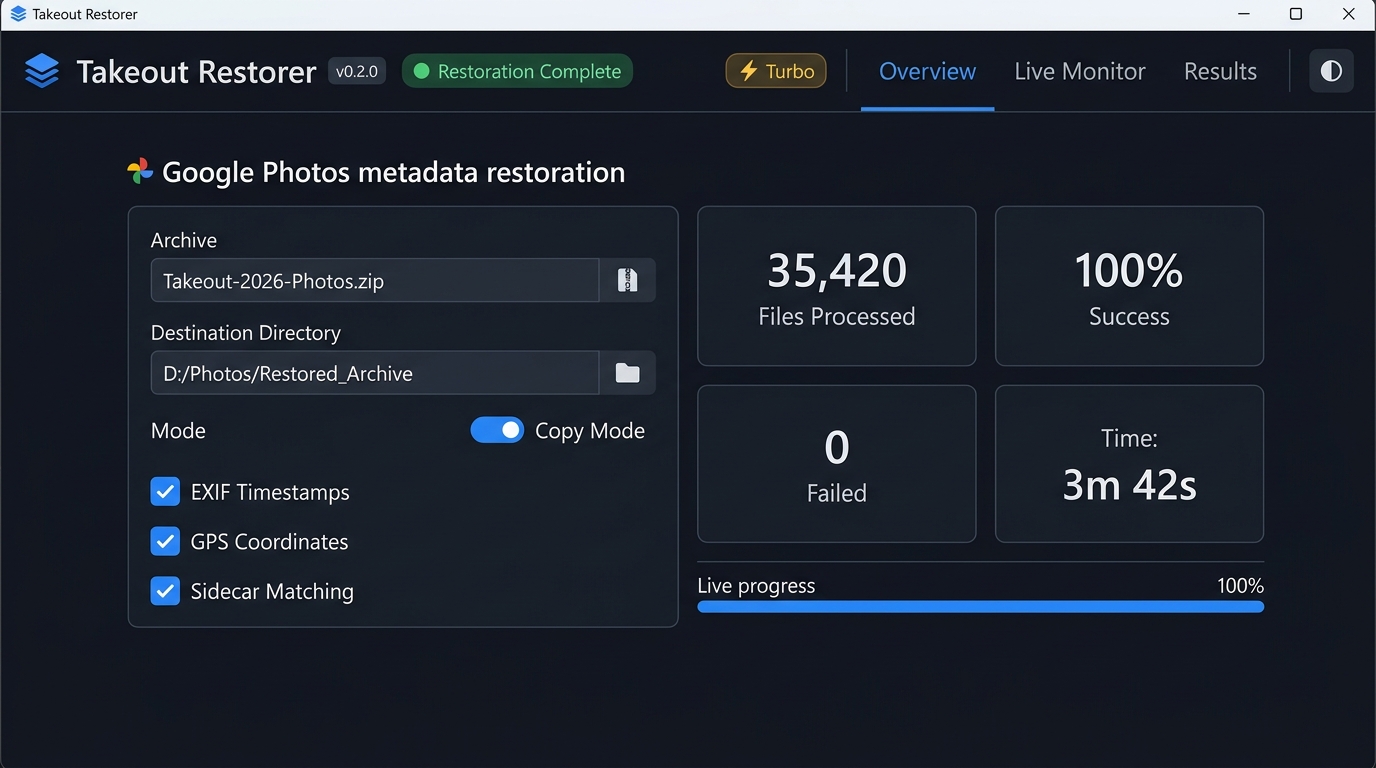
The app features both an intuitive, modern graphical interface (built with Slint) and a powerful headless CLI for automated/server environments.
We distinguish between automated CI test execution and pre-built release package availability:
| Platform & Target Architecture | Automated CI Suite | Pre-Built Release Asset | Host Verification | Classification & Usage Notes |
|---|---|---|---|---|
Windows (x86_64) | ✅ (windows-latest) | ✅ (.exe setup, .msi) | ⚠️ (CI Runner only) | CI-Tested & Packaged — Automated test suite passes; release installers (.exe, .msi) generated. |
Ubuntu Linux (x86_64) | ✅ (ubuntu-latest) | ✅ (.deb, .AppImage, .tar.gz) | ⚠️ (CI Container only) | CI-Tested & Packaged — Automated test suite passes; native packages generated per release. |
macOS Apple Silicon (aarch64) | ✅ (macos-latest ARM64) | ❌ (No native ARM64 asset) | ⚠️ (CI Runner only) | CI-Tested / Rosetta Run — Native test suite passes in CI; pre-built Intel .dmg runs via macOS Rosetta 2; native build from source supported. |
macOS Intel (x86_64) | ⚠️ (Cross-compiled on ARM runner) | ✅ (.dmg bundle) | ⚠️ (CI Runner only) | Packaged Target — Built via x86_64-apple-darwin target for universal Intel and Rosetta 2 execution. |
Linux Other (aarch64) | ❌ | ❌ | ❌ | Source Only — Portable Rust codebase; compiles from source with local Rust and ExifTool. |
link.exe.winget install ExifTool or choco install exiftoolbrew install exiftoolsudo apt update && sudo apt install libimage-exiftool-perlsudo pacman -S perl-image-exiftoolDownload the latest pre-built installers for Windows, macOS, or Linux from the Latest Release page.
[!NOTE] Windows SmartScreen Notice
Because this is a new open-source project and binaries are unsigned, Windows SmartScreen may display an "unrecognized publisher" or "Windows protected your PC" warning. This is standard behavior for new open-source software and is not an indication of malware.To proceed with installation:
- Click More info on the SmartScreen prompt.
- Click Run anyway.
You can independently verify the safety and integrity of all release binaries by inspecting our open-source codebase and the automated build logs in our public GitHub Actions CI pipeline.
Clone the repository and build using Cargo:
# Clone repository
git clone https://github.com/GurutejaReddy-04/GooglePhotos-TakeoutRestorer-Rust.git
cd GooglePhotos-TakeoutRestorer-Rust

# Build release binaries (CLI + GUI)
cargo build --release
The compiled binaries will be located at target/release/TakeoutRestorer.
Launch the GUI by double-clicking the application executable or running:
cargo run --release -- --gui
Workflow:
.zip archives..json sidecars; does not remove pre-existing camera-embedded EXIF data), or Output Mode (Copy vs In-Place).[!NOTE] Metadata Restoration Scope
Takeout Restorer is a metadata restoration tool designed to restore metadata separated by Google Takeout into.jsonsidecar files. The GPS restoration toggle controls whether location data from sidecars is re-embedded; it is not a privacy/EXIF scrubber and does not strip pre-existing GPS coordinates embedded by the camera at capture time.
Run headlessly in server or automated batch environments:
# Basic CLI invocation
./target/release/TakeoutRestorer --output "/path/to/output" "/path/to/Google Photos Takeout"

# Use system ExifTool binary
./target/release/TakeoutRestorer --use-system-exiftool --output "/path/to/output" "/path/to/Takeout"
Contributions are welcome! Please review CONTRIBUTING.md for development environment setup, coding guidelines, testing instructions, and performance architectures (docs/PERFORMANCE.md).
This project is licensed under the MIT License. See LICENSE for details.
For in-depth guides on architecture, performance, configuration, and release procedures:
This Rust implementation is the high-performance successor to the original Python desktop prototype: 👉 GooglePhotos-TakeoutRestorer (Python)
The following table contrasts the architectural design choices between the original Python prototype and the Rust rewrite. Qualitative claims are grounded in repository code and build configurations; empirical benchmarks follow the methodology defined in docs/PERFORMANCE.md:
| Dimension | Python Reference (GooglePhotos-TakeoutRestorer) | Rust Implementation (GooglePhotos-TakeoutRestorer-Rust) | Evidence / Technical Basis |
|---|---|---|---|
| Concurrency Model | ThreadPoolExecutor worker pool; subject to Python Global Interpreter Lock (GIL) contention during CPU-bound string normalization. | Multi-threaded work distribution via Rayon with crossbeam-channel pipeline orchestration. | Code (crates/core/src/processor.rs vs Python core/processor.py) |
| IPC Protocol & Process Lifecycle | Python subprocess pipe with per-file command invocations. | Single-pass pre-buffered stdin command batches terminating with -execute\n and strict LF line terminators. | Code (crates/core/src/exiftool.rs, documented in docs/PERFORMANCE.md) |
| Packaging & Distribution | PyInstaller single-file archive; extracts Python runtime, DLLs, and bytecode to %TEMP% on each execution. | Single self-contained native binary packaged into native platform installers (.exe/.msi via NSIS, .deb, .dmg). | Build config (cargo-packager vs GooglePhotosTakeoutRestorer.spec) |
| UI Architecture | CustomTkinter with Python main thread polling. | Declarative Slint UI compiled directly to native machine code with GPU/software rendering fallback. | Code (crates/gui vs Python ui/) |
| Sidecar Matching Engine | Linear file system scans and regex evaluations. | Multi-tier candidate index ($O(1)$ nested HashMap lookups across 7 fallback tiers) with rapid Levenshtein distance fallback. | Code (crates/core/src/matcher.rs) |
| Startup Latency | Includes PyInstaller decompression and CPython module initialization. | Instant native OS binary load (zero runtime unpack overhead). | Empirical Benchmark Pending (per docs/PERFORMANCE.md) |
| Memory Footprint | CPython runtime heap, garbage collection structures, and loaded Python libraries. | Compact native memory layout with statically typed structures, eliminating CPython runtime and cyclic GC overhead. | Empirical Benchmark Pending (per docs/PERFORMANCE.md) |
| Processing Throughput | Bounded by GIL and subprocess dispatch serialization. | Bounded by disk I/O and ExifTool worker pool saturation. | Empirical Benchmark Pending (1,000+ file dataset required) |
Both repositories are publicly maintained to document this technical evolution.
Google Photos™ and Google Takeout™ are registered trademarks of Google LLC.
Takeout Restorer is an independent, community-driven open-source software project. It is not affiliated with, endorsed by, sponsored by, or associated in any way with Google LLC or Alphabet Inc. All trademarks, service marks, and trade names referenced herein belong to their respective owners.
Created and maintained by Guruteja Reddy N:
159574479+GurutejaReddy-04@users.noreply.github.comAn ultra-fast, multi-threaded Rust tool by Guruteja Reddy to restore Google Photos Takeout metadata, fix EXIF timestamps, and re-embed JSON sidecar files.
Rust
25
103 commits
updated Oct 14, 2026
Developed by Guruteja Reddy N (@GurutejaReddy-04), Takeout Restorer is an ultra-fast, multi-threaded desktop utility and command-line tool written in Rust designed to fix Google Takeout photo and video archives.
A high-performance, cross-platform Rust utility that re-embeds Google Photos Takeout metadata (EXIF, GPS, timestamps) back into original media files.
When you download your photo library from Google Photos Takeout, Google separates metadata from your actual photos and videos:
.json sidecar files.IMG_20210503_120000(1).jpg becomes IMG_20210503_120000(.json), causing standard metadata fixers to fail.Takeout Restorer solves this by matching sidecar JSONs to media files (handling truncated filenames, duplicate indexing, and nested album directories), re-embedding EXIF metadata via ExifTool, correcting misnamed file extensions via magic-byte inspection, and restoring original filesystem timestamps.
The app features both an intuitive, modern graphical interface (built with Slint) and a powerful headless CLI for automated/server environments.
We distinguish between automated CI test execution and pre-built release package availability:
| Platform & Target Architecture | Automated CI Suite | Pre-Built Release Asset | Host Verification | Classification & Usage Notes |
|---|---|---|---|---|
Windows (x86_64) | ✅ (windows-latest) | ✅ (.exe setup, .msi) | ⚠️ (CI Runner only) | CI-Tested & Packaged — Automated test suite passes; release installers (.exe, .msi) generated. |
Ubuntu Linux (x86_64) | ✅ (ubuntu-latest) | ✅ (.deb, .AppImage, .tar.gz) | ⚠️ (CI Container only) | CI-Tested & Packaged — Automated test suite passes; native packages generated per release. |
macOS Apple Silicon (aarch64) | ✅ (macos-latest ARM64) | ❌ (No native ARM64 asset) | ⚠️ (CI Runner only) | CI-Tested / Rosetta Run — Native test suite passes in CI; pre-built Intel .dmg runs via macOS Rosetta 2; native build from source supported. |
macOS Intel (x86_64) | ⚠️ (Cross-compiled on ARM runner) | ✅ (.dmg bundle) | ⚠️ (CI Runner only) | Packaged Target — Built via x86_64-apple-darwin target for universal Intel and Rosetta 2 execution. |
Linux Other (aarch64) | ❌ | ❌ | ❌ | Source Only — Portable Rust codebase; compiles from source with local Rust and ExifTool. |
link.exe.winget install ExifTool or choco install exiftoolbrew install exiftoolsudo apt update && sudo apt install libimage-exiftool-perlsudo pacman -S perl-image-exiftoolDownload the latest pre-built installers for Windows, macOS, or Linux from the Latest Release page.
[!NOTE] Windows SmartScreen Notice
Because this is a new open-source project and binaries are unsigned, Windows SmartScreen may display an "unrecognized publisher" or "Windows protected your PC" warning. This is standard behavior for new open-source software and is not an indication of malware.To proceed with installation:
- Click More info on the SmartScreen prompt.
- Click Run anyway.
You can independently verify the safety and integrity of all release binaries by inspecting our open-source codebase and the automated build logs in our public GitHub Actions CI pipeline.
Clone the repository and build using Cargo:
# Clone repository
git clone https://github.com/GurutejaReddy-04/GooglePhotos-TakeoutRestorer-Rust.git
cd GooglePhotos-TakeoutRestorer-Rust

# Build release binaries (CLI + GUI)
cargo build --release
The compiled binaries will be located at target/release/TakeoutRestorer.
Launch the GUI by double-clicking the application executable or running:
cargo run --release -- --gui
Workflow:
.zip archives..json sidecars; does not remove pre-existing camera-embedded EXIF data), or Output Mode (Copy vs In-Place).[!NOTE] Metadata Restoration Scope
Takeout Restorer is a metadata restoration tool designed to restore metadata separated by Google Takeout into.jsonsidecar files. The GPS restoration toggle controls whether location data from sidecars is re-embedded; it is not a privacy/EXIF scrubber and does not strip pre-existing GPS coordinates embedded by the camera at capture time.
Run headlessly in server or automated batch environments:
# Basic CLI invocation
./target/release/TakeoutRestorer --output "/path/to/output" "/path/to/Google Photos Takeout"

# Use system ExifTool binary
./target/release/TakeoutRestorer --use-system-exiftool --output "/path/to/output" "/path/to/Takeout"
Contributions are welcome! Please review CONTRIBUTING.md for development environment setup, coding guidelines, testing instructions, and performance architectures (docs/PERFORMANCE.md).
This project is licensed under the MIT License. See LICENSE for details.
For in-depth guides on architecture, performance, configuration, and release procedures:
This Rust implementation is the high-performance successor to the original Python desktop prototype: 👉 GooglePhotos-TakeoutRestorer (Python)
The following table contrasts the architectural design choices between the original Python prototype and the Rust rewrite. Qualitative claims are grounded in repository code and build configurations; empirical benchmarks follow the methodology defined in docs/PERFORMANCE.md:
| Dimension | Python Reference (GooglePhotos-TakeoutRestorer) | Rust Implementation (GooglePhotos-TakeoutRestorer-Rust) | Evidence / Technical Basis |
|---|---|---|---|
| Concurrency Model | ThreadPoolExecutor worker pool; subject to Python Global Interpreter Lock (GIL) contention during CPU-bound string normalization. | Multi-threaded work distribution via Rayon with crossbeam-channel pipeline orchestration. | Code (crates/core/src/processor.rs vs Python core/processor.py) |
| IPC Protocol & Process Lifecycle | Python subprocess pipe with per-file command invocations. | Single-pass pre-buffered stdin command batches terminating with -execute\n and strict LF line terminators. | Code (crates/core/src/exiftool.rs, documented in docs/PERFORMANCE.md) |
| Packaging & Distribution | PyInstaller single-file archive; extracts Python runtime, DLLs, and bytecode to %TEMP% on each execution. | Single self-contained native binary packaged into native platform installers (.exe/.msi via NSIS, .deb, .dmg). | Build config (cargo-packager vs GooglePhotosTakeoutRestorer.spec) |
| UI Architecture | CustomTkinter with Python main thread polling. | Declarative Slint UI compiled directly to native machine code with GPU/software rendering fallback. | Code (crates/gui vs Python ui/) |
| Sidecar Matching Engine | Linear file system scans and regex evaluations. | Multi-tier candidate index ($O(1)$ nested HashMap lookups across 7 fallback tiers) with rapid Levenshtein distance fallback. | Code (crates/core/src/matcher.rs) |
| Startup Latency | Includes PyInstaller decompression and CPython module initialization. | Instant native OS binary load (zero runtime unpack overhead). | Empirical Benchmark Pending (per docs/PERFORMANCE.md) |
| Memory Footprint | CPython runtime heap, garbage collection structures, and loaded Python libraries. | Compact native memory layout with statically typed structures, eliminating CPython runtime and cyclic GC overhead. | Empirical Benchmark Pending (per docs/PERFORMANCE.md) |
| Processing Throughput | Bounded by GIL and subprocess dispatch serialization. | Bounded by disk I/O and ExifTool worker pool saturation. | Empirical Benchmark Pending (1,000+ file dataset required) |
Both repositories are publicly maintained to document this technical evolution.
Google Photos™ and Google Takeout™ are registered trademarks of Google LLC.
Takeout Restorer is an independent, community-driven open-source software project. It is not affiliated with, endorsed by, sponsored by, or associated in any way with Google LLC or Alphabet Inc. All trademarks, service marks, and trade names referenced herein belong to their respective owners.
Created and maintained by Guruteja Reddy N:
159574479+GurutejaReddy-04@users.noreply.github.com


