
GitDocket keeps project documentation and work tracking together as linked Markdown, with a CLI and local web interface for humans and coding agents.
See the codeSee what people are saying
README
GitDocket
Keep your project’s docs, tasks, and decisions together in Git, so your coding agent can pick up where you left off.
Ask your agent to make a change, check the result, and update the relevant docs. For example, a contributor-guide task can record why documentation links should work offline. The next session can use that decision when adding a troubleshooting guide.
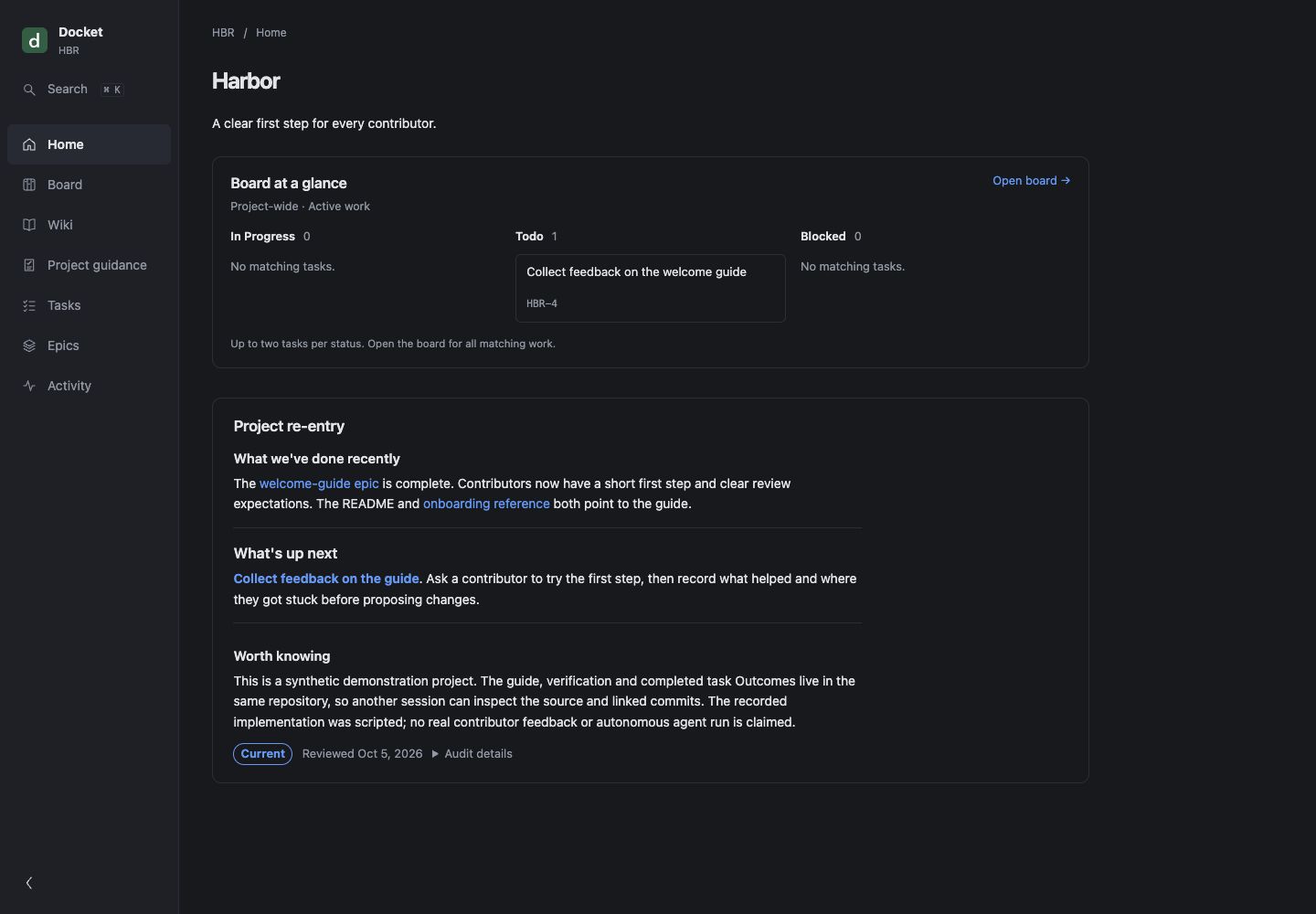
Browse project docs, see what is ready next, and review completed work in the local web interface. Your agent uses editable workflows stored in the same repository. GitDocket runs locally and needs no hosted account.
GitDocket 0.6.4 is a preview. File formats and commands may still change.
Install
Install with Homebrew:
brew install gitdocket/tap/gitdocket
docket --version
docket-mcp --version
You need Homebrew and Git on macOS 15+ or supported glibc Linux, on ARM64 or x64. See supported platforms, updates and migration.
If you already use Node 22 or later, npm is a supported alternative:
npm install -g --include=optional @gitdocket/cli @gitdocket/mcp
Keep optional dependencies enabled. See npm and npx details.
Quickstart
From the repository you want to track:
docket init
docket overview
docket serve
docket init creates a docket/ folder for project knowledge and work, plus instructions for your agent. Existing files stay in place; you can add your existing docs gradually.
docket serve opens a web interface on your own computer. Keep it on loopback: the server has no authentication or TLS. See local-server safety.
To install native guidance for a supported coding agent:
docket init --agent cursor
docket init --agent codex
docket init --agent claude
For Cursor, enable Docket once in Customize → MCPs after initialization. Open a fresh agent session and ask it to create and complete one small task. The one-task walkthrough shows what to ask, how to review the result, and how to use a recorded decision in the next session. Use epics for larger outcomes.
What is in a bundle?
A bundle is a folder of linked Markdown: documentation, decisions, tasks, epics, and agent workflows. Tasks store their status and dependencies in frontmatter. A task becomes ready when it is todo and all its dependencies are done.
The basic example is a complete synthetic bundle. See Getting started, Everyday use, Concepts, CLI reference, local-server safety, and agent integration.
Make your process part of the project
Workflow extensions let your team reuse its steps for planning, building, and reviewing a change. Save templates and checks in your repository, and use tools already connected to your agent. Start with one task and add a workflow when you need it.
In the Beacon walkthrough, an agent prepares an export proposal, implements the accepted scope, records verification and leaves a decision that a fresh session uses to plan import. Read the workflow overview and reference to adopt or author a package. The walkthrough lists the example app’s setup requirements.
Stability and upgrades
GitDocket is in preview. After updating the application, run docket upgrade --dry-run in each project to review changes to its supplied workflows. Run docket upgrade to apply them, then resolve any conflicts with your customizations.
Telemetry
Telemetry is local only and off by default. Collection requires explicitly running docket telemetry enable for each checkout. Observations stay on your computer, outside your repository; GitDocket never uploads them. Run docket telemetry disable to stop collection or docket telemetry delete to remove the current checkout's enrollment and recorded data.
Contributing and security
Trying GitDocket? Share what helped or where you got stuck—rough impressions and quick notes are welcome. GitHub sign-in is required. You do not need a diagnosis or a reproducible example to share feedback. Keep private project content, credentials and personal details out of public issues. See CONTRIBUTING.md for optional bug-report details and the release notes for changes.
This public repository is release-fed from a private canonical development repository. Source pull requests are not accepted during the first preview because an inbound synchronization workflow does not yet exist.
Please do not report vulnerabilities in a public issue. Use the repository’s private vulnerability-reporting form described in SECURITY.md.
License
Apache-2.0. See LICENSE.
Similar repos


GitDocket keeps project documentation and work tracking together as linked Markdown, with a CLI and local web interface for humans and coding agents.
See the codeSee what people are saying
README
GitDocket
Keep your project’s docs, tasks, and decisions together in Git, so your coding agent can pick up where you left off.
Ask your agent to make a change, check the result, and update the relevant docs. For example, a contributor-guide task can record why documentation links should work offline. The next session can use that decision when adding a troubleshooting guide.
Browse project docs, see what is ready next, and review completed work in the local web interface. Your agent uses editable workflows stored in the same repository. GitDocket runs locally and needs no hosted account.
GitDocket 0.6.4 is a preview. File formats and commands may still change.
Install
Install with Homebrew:
brew install gitdocket/tap/gitdocket
docket --version
docket-mcp --version
You need Homebrew and Git on macOS 15+ or supported glibc Linux, on ARM64 or x64. See supported platforms, updates and migration.
If you already use Node 22 or later, npm is a supported alternative:
npm install -g --include=optional @gitdocket/cli @gitdocket/mcp
Keep optional dependencies enabled. See npm and npx details.
Quickstart
From the repository you want to track:
docket init
docket overview
docket serve
docket init creates a docket/ folder for project knowledge and work, plus instructions for your agent. Existing files stay in place; you can add your existing docs gradually.
docket serve opens a web interface on your own computer. Keep it on loopback: the server has no authentication or TLS. See local-server safety.
To install native guidance for a supported coding agent:
docket init --agent cursor
docket init --agent codex
docket init --agent claude
For Cursor, enable Docket once in Customize → MCPs after initialization. Open a fresh agent session and ask it to create and complete one small task. The one-task walkthrough shows what to ask, how to review the result, and how to use a recorded decision in the next session. Use epics for larger outcomes.
What is in a bundle?
A bundle is a folder of linked Markdown: documentation, decisions, tasks, epics, and agent workflows. Tasks store their status and dependencies in frontmatter. A task becomes ready when it is todo and all its dependencies are done.
The basic example is a complete synthetic bundle. See Getting started, Everyday use, Concepts, CLI reference, local-server safety, and agent integration.
Make your process part of the project
Workflow extensions let your team reuse its steps for planning, building, and reviewing a change. Save templates and checks in your repository, and use tools already connected to your agent. Start with one task and add a workflow when you need it.
In the Beacon walkthrough, an agent prepares an export proposal, implements the accepted scope, records verification and leaves a decision that a fresh session uses to plan import. Read the workflow overview and reference to adopt or author a package. The walkthrough lists the example app’s setup requirements.
Stability and upgrades
GitDocket is in preview. After updating the application, run docket upgrade --dry-run in each project to review changes to its supplied workflows. Run docket upgrade to apply them, then resolve any conflicts with your customizations.
Telemetry
Telemetry is local only and off by default. Collection requires explicitly running docket telemetry enable for each checkout. Observations stay on your computer, outside your repository; GitDocket never uploads them. Run docket telemetry disable to stop collection or docket telemetry delete to remove the current checkout's enrollment and recorded data.
Contributing and security
Trying GitDocket? Share what helped or where you got stuck—rough impressions and quick notes are welcome. GitHub sign-in is required. You do not need a diagnosis or a reproducible example to share feedback. Keep private project content, credentials and personal details out of public issues. See CONTRIBUTING.md for optional bug-report details and the release notes for changes.
This public repository is release-fed from a private canonical development repository. Source pull requests are not accepted during the first preview because an inbound synchronization workflow does not yet exist.
Please do not report vulnerabilities in a public issue. Use the repository’s private vulnerability-reporting form described in SECURITY.md.
License
Apache-2.0. See LICENSE.