This project is the AI Service for Food Ordering System. The chatbot also receives chat through users' voice.
Python
0
46 commits
updated May 3, 2026
AI Service for a food ordering application — Multi-Agent Chatbot & Vietnamese Speech-to-Text.
This project provides two core services:
voice-chatbot/
├── docker/
│   ├── Dockerfile
│   └── docker-compose.yml
├── main.py                          # Entry point — FastAPI application
├── pyproject.toml                   # Dependencies & project metadata
├── .env                             # Environment variables (API keys, config)
├── .env.example                     # Template for .env
├── scripts/
│   ├── export_graph.py              # Export LangGraph architecture as PNG
│   └── redeploy.sh                  # Rebuild + redeploy Docker Compose
├── statics/                         # Architecture diagrams
│   ├── overview_graph.png
│   └── detailed_graph.png
└── src/                             # Main source code
    ├── __init__.py
    ├── config.py                    # Settings (LLM, DB, VAD, Server)
    ├── database.py                  # MySQL async connection
    ├── agents/                      # 🤖 Multi-Agent System (LangGraph)
    ├── teams/                       # 👥 Team routers
    ├── api/                         # 🌐 FastAPI Routes & Schemas
    ├── speech/                      # 🎙️ Speech Processing Pipeline
    └── tools/                       # 🔧 Agent tools
git clone <repo-url>
cd voice-chatbot
cp .env.example .env
# Edit .env and fill in your OPENROUTER_API_KEY (or Ollama config)
uv sync
uv run uvicorn main:app --host localhost --port 8001 > api.log 2>&1
Server runs at: http://localhost:8001
cp .env.example .env
# Set DB_* and MYSQL_ROOT_PASSWORD values
./scripts/redeploy.sh
Docker Compose automatically enables Redis (overrides REDIS_ENABLED=true) for chat history.
Rebuild and redeploy quickly:
bash scripts/redeploy.sh
| URL | Description |
|---|---|
http://localhost:8000/docs | Swagger UI (interactive testing) |
http://localhost:8000/redoc | ReDoc (readable documentation) |
http://localhost:8000/health | Health check |
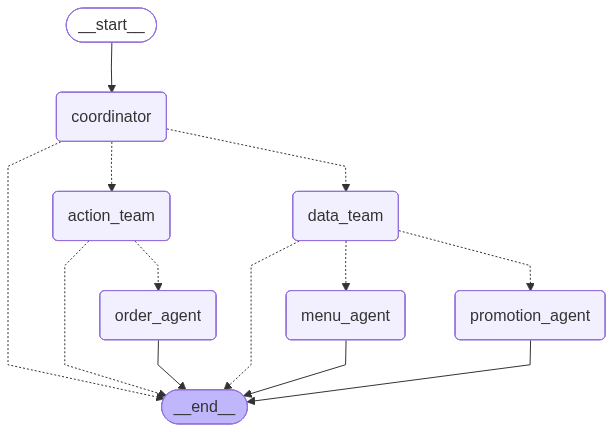
How it works: Every user message goes to the Coordinator first. The Coordinator routes to one of two teams:
- data_team for information lookup (menu, promotions, coupons)
- action_team for ordering actions (cart updates, checkout)
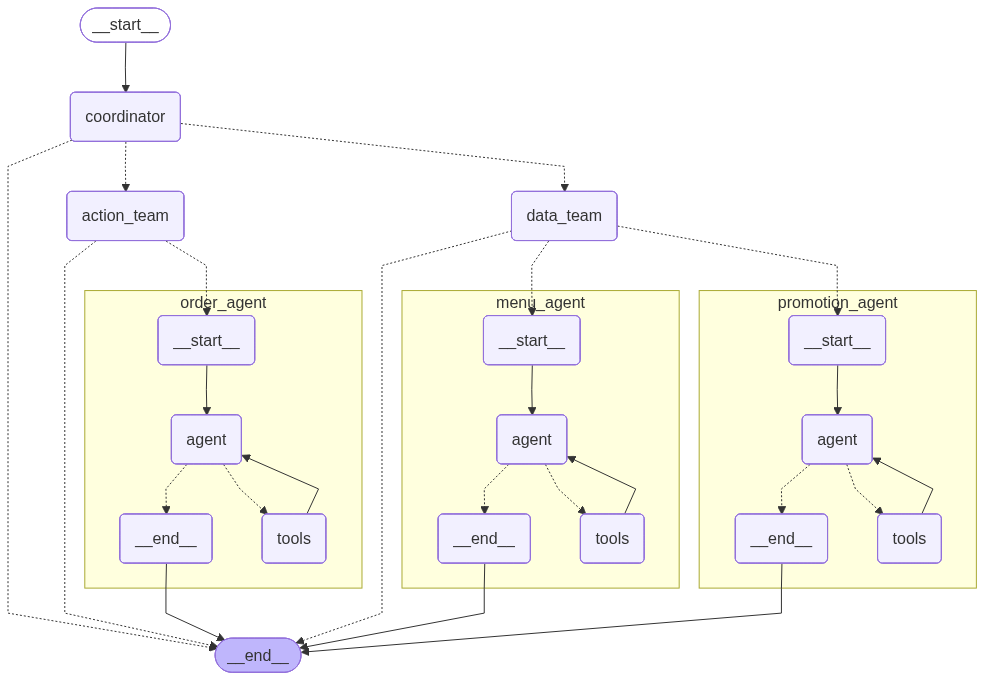
Team routers then select the correct leaf agent. Each leaf agent is a ReAct agent (Reason + Act loop) that calls tools and returns to
__end__.
User: "Thêm 2 tô phở bò vào giỏ hàng"
  │
  ▼
Coordinator (LLM analyzes intent)
  → Returns: {"next": "action_team", "response": ""}
  │
  ▼
Action Team Router
  → Returns: {"next": "order_agent", "response": ""}
  │
  ▼
Order Agent (ReAct loop)
  → Thinks: "User wants to add pho to cart, I need to call add_to_cart"
  → Calls: add_to_cart(session_id="user-123", dish_name="Phở bò", quantity=2)
  → Observes: "Added 2x Phở bò to cart. Total: 90,000đ"
  → Responds: "Đã thêm 2 tô Phở bò vào giỏ hàng! Tổng: 90.000đ"
  │
  ▼
Response returned to user
┌─────────────┐    ┌───────────┐    ┌─────────────┐    ┌────────────┐    ┌───────────┐
│ Audio Input │───▶│ Silero VAD│───▶│ ChunkFormer │───▶│    LLM     │───▶│  Output   │
│             │    │           │    │    ASR      │    │ Correction │    │   Text    │
│ WAV/MP3/    │    │ Filter    │    │ Vietnamese  │    │ Fix typos  │    │ Corrected │
│ OGG/FLAC    │    │ speech    │    │ recognition │    │ and accents│    │ Vietnamese│
└─────────────┘    └───────────┘    └─────────────┘    └────────────┘    └───────────┘
Important: This is a batch processing pipeline. The mobile app records the complete audio first, then sends the entire file to the server. The server processes the whole file at once (not real-time/streaming). This means the user must finish speaking before the transcription begins.
| Method | Endpoint | Description |
|---|---|---|
GET | / | Service info & status |
GET | /health | Detailed health check |
POST /api/chat — Text ChatSend a text message and receive an AI response through the multi-agent system.
Request:
{
  "message": "Cho tôi xem menu",
  "session_id": "user-123"        // optional — auto-generated if omitted
}
Response:
{
  "response": "Dạ, nhà hàng có các danh mục: Phở, Bún, Cơm, Bánh...",
  "session_id": "user-123"
}
| Request Field | Type | Required | Description |
|---|---|---|---|
message | string | ✅ | User message |
session_id | string | ❌ | Session ID for multi-turn context |
| Response Field | Type | Description |
|---|---|---|
response | string | AI assistant's reply |
session_id | string | Session ID used |
curl -X POST http://localhost:8000/api/chat \
  -H "Content-Type: application/json" \
  -d '{"message": "Cho tôi xem menu", "session_id": "user-123"}'
POST /api/chat/stream — Streaming Chat (SSE)Same as /api/chat but returns Server-Sent Events with JSON payloads.
Request: Same as /api/chat
Response: text/event-stream
event: meta
data: {"session_id": "user-123", "request_id": "req-abc"}
event: token
data: {"text": "Dạ,"}
event: token
data: {"text": " nhà hàng"}
event: final
data: {"response": "Dạ, nhà hàng có các danh mục...", "action": "None", "action_data": null, "session_id": "user-123"}
event: done
data: {"done": true}
curl -N -X POST http://localhost:8000/api/chat/stream \
  -H "Content-Type: application/json" \
  -d '{"message": "Tìm món phở", "session_id": "user-123"}'
POST /api/speech-to-text — Speech to TextUpload a complete audio file and receive transcribed Vietnamese text. Pipeline: VAD → ASR → LLM Correction.
Request: multipart/form-data
| Field | Type | Required | Description |
|---|---|---|---|
audio | file | ✅ | Audio file (WAV, MP3, OGG, FLAC) |
Response:
{
  "original_text": "cho toi xem men u",
  "corrected_text": "Cho tôi xem menu"
}
| Response Field | Type | Description |
|---|---|---|
original_text | string | Raw ASR output (before correction) |
corrected_text | string | Text after LLM spelling correction |
curl -X POST http://localhost:8000/api/speech-to-text \
  -F "[email protected]"
POST /api/voice-chat — Voice Chat (STT + Chatbot)Upload audio → transcribe → send to chatbot → return both transcript and AI response.
Request: multipart/form-data
| Field | Type | Required | Description |
|---|---|---|---|
audio | file | ✅ | Audio file (WAV, MP3, OGG, FLAC) |
session_id | string | ❌ | Session ID for cart persistence |
Response:
{
  "original_text": "cho toi xem men u",
  "corrected_text": "Cho tôi xem menu",
  "response": "Dạ, nhà hàng có các danh mục: Phở, Bún, Cơm, Bánh...",
  "session_id": "user-123"
}
| Response Field | Type | Description |
|---|---|---|
original_text | string | Raw ASR output |
corrected_text | string | Corrected transcription |
response | string | AI chatbot's reply |
session_id | string | Session ID used |
curl -X POST http://localhost:8000/api/voice-chat \
  -F "[email protected]" \
  -F "session_id=user-123"
POST /api/voice-chat/stream — Voice Chat Streaming (SSE)Stream progress + chatbot tokens while processing a voice request.
Request: multipart/form-data (same as /api/voice-chat)
Response: text/event-stream
event: meta
data: {"session_id": "user-123", "request_id": "req-abc"}
event: progress
data: {"stage": "asr", "status": "start"}
event: progress
data: {"stage": "asr", "status": "done"}
event: progress
data: {"stage": "correction", "status": "done"}
event: token
data: {"text": "Dạ,"}
event: final
data: {"original_text": "cho toi xem menu", "corrected_text": "Cho toi xem menu", "response": "Dạ, nhà hàng có các danh mục...", "action": "None", "action_data": null, "session_id": "user-123"}
event: done
data: {"done": true}
curl -N -X POST http://localhost:8000/api/voice-chat/stream \
  -F "[email protected]" \
  -F "session_id=user-123"
Mobile App
    │
    ├── Text Mode ──────────────────────────────────────────────┐
    │   User types message                                      │
    │   POST /api/chat {message, session_id}                    │
    │       │                                                   │
    │       ▼                                                   │
    │   LangGraph Chatbot                                       │
    │       Coordinator → Agent → Tools → Response              │
    │       │                                                   │
    │       ▼                                                   │
    │   Return {response, session_id}                           │
    │                                                           │
    ├── Voice Mode ─────────────────────────────────────────────┤
    │   User records complete audio                             │
    │   POST /api/voice-chat (audio file + session_id)          │
    │       │                                                   │
    │       ▼                                                   │
    │   [1] Silero VAD → filter speech segments                 │
    │   [2] ChunkFormer ASR → transcribe to text                │
    │   [3] LLM Correction → fix spelling                       │
    │   [4] LangGraph Chatbot → generate response               │
    │       │                                                   │
    │       ▼                                                   │
    │   Return {original_text, corrected_text,                  │
    │           response, session_id}                           │
    │                                                           │
    └── STT Only ───────────────────────────────────────────────┤
        User records audio                                      │
        POST /api/speech-to-text (audio file)                   │
            │                                                   │
            ▼                                                   │
        [1] Silero VAD → [2] ASR → [3] LLM Correction          │
            │                                                   │
            ▼                                                   │
        Return {original_text, corrected_text}                  │
                                                                │
────────────────────────────────────────────────────────────────┘
| Variable | Description | Default |
|---|---|---|
LLM_PROVIDER | openrouter or ollama | ollama |
OPENROUTER_API_KEY | API key from openrouter.ai | (required) |
OPENROUTER_BASE_URL | OpenRouter API base URL | https://openrouter.ai/api/v1 |
LLM_MODEL | Model ID for the chatbot | openai/gpt-4o |
CORRECTION_LLM_PROVIDER | Provider for ASR correction | ollama |
CORRECTION_MODEL | Model for STT correction | llama3 |
| Variable | Description | Default |
|---|---|---|
OLLAMA_API_KEY | API key/token for Ollama gateway (if required) | (empty) |
OLLAMA_BASE_URL | Ollama server URL | http://localhost:11434 |
OLLAMA_MODEL | Model name on Ollama | llama3 |
| Variable | Description | Default |
|---|---|---|
VAD_ENABLED | Enable/disable Silero VAD | true |
| Variable | Description | Default |
|---|---|---|
ASR_MAX_WORKERS | Number of ASR worker threads | 4 |
CART_TTL_SECONDS | Expiration time for in-memory carts (seconds) | 3600 |
MODEL_PRELOAD_ON_STARTUP | Preload ASR/VAD models at startup | false |
LOG_LEVEL | App log level (DEBUG, INFO, WARNING, ERROR) | INFO |
| Variable | Description | Default |
|---|---|---|
REDIS_ENABLED | Enable Redis-backed chat history | false |
REDIS_URL | Redis connection URL | redis://redis:6379/0 |
REDIS_TTL_SECONDS | History TTL in seconds | 3600 |
| Variable | Description | Default |
|---|---|---|
DB_HOST | MySQL host | (empty) |
DB_PORT | MySQL port | 3306 |
DB_USER | MySQL username | (empty) |
DB_PASSWORD | MySQL password | (empty) |
DB_NAME | Database name | (empty) |
Note: Set
DB_*to connect the service to MySQL. If these are empty, database-backed features will be unavailable.
| Variable | Description | Default |
|---|---|---|
HOST | Server bind address | 0.0.0.0 |
PORT | Server port | 8000 |
| Variable | Description | Default |
|---|---|---|
HF_HOME | HuggingFace cache root (ChunkFormer files) | (system default) |
TORCH_HOME | Torch Hub cache root (Silero VAD files) | (system default) |
AI models are downloaded automatically on first STT request and cached at:
| Model | Cache Directory |
|---|---|
| ChunkFormer (ASR) | ~/.cache/huggingface/hub/ |
| Silero VAD | ~/.cache/torch/hub/ |
No HuggingFace token required — all models are public.
When caches already exist, the service reuses local files and avoids downloading again.
Install Ollama and pull a model:
ollama pull llama3
Update .env:
LLM_PROVIDER=ollama
OLLAMA_BASE_URL=http://localhost:11434
OLLAMA_MODEL=llama3
CORRECTION_LLM_PROVIDER=ollama
CORRECTION_MODEL=llama3
ASR automatically uses MPS (Apple GPU) — no extra config needed.
.envsrc/tools/menu_tools.py, src/tools/promo_tools.py)After starting the server, open http://localhost:8000/docs:
POST /api/chat → {"message": "Xin chào"}{"message": "Cho tôi xem menu"}{"message": "Thêm 2 tô phở bò vào giỏ hàng"}{"message": "Xem giỏ hàng của tôi"}{"message": "Có khuyến mãi gì không?"}POST /api/speech-to-text| Component | Technology |
|---|---|
| Web Framework | FastAPI + Uvicorn |
| Multi-Agent System | LangGraph + LangChain |
| LLM Provider | OpenRouter / Ollama |
| Vietnamese ASR | ChunkFormer (khanhld/chunkformer-ctc-large-vie) |
| Voice Activity Detection | Silero VAD |
| Database | MySQL + SQLAlchemy + aiomysql |
| Package Manager | uv |
uv run python scripts/export_graph.py
Exports two PNG files to statics/:
overview_graph.png — high-level agent routingdetailed_graph.png — internal ReAct loops (x-ray view)This project is the AI Service for Food Ordering System. The chatbot also receives chat through users' voice.
Python
0
46 commits
updated May 3, 2026
AI Service for a food ordering application — Multi-Agent Chatbot & Vietnamese Speech-to-Text.
This project provides two core services:
voice-chatbot/
├── docker/
│   ├── Dockerfile
│   └── docker-compose.yml
├── main.py                          # Entry point — FastAPI application
├── pyproject.toml                   # Dependencies & project metadata
├── .env                             # Environment variables (API keys, config)
├── .env.example                     # Template for .env
├── scripts/
│   ├── export_graph.py              # Export LangGraph architecture as PNG
│   └── redeploy.sh                  # Rebuild + redeploy Docker Compose
├── statics/                         # Architecture diagrams
│   ├── overview_graph.png
│   └── detailed_graph.png
└── src/                             # Main source code
    ├── __init__.py
    ├── config.py                    # Settings (LLM, DB, VAD, Server)
    ├── database.py                  # MySQL async connection
    ├── agents/                      # 🤖 Multi-Agent System (LangGraph)
    ├── teams/                       # 👥 Team routers
    ├── api/                         # 🌐 FastAPI Routes & Schemas
    ├── speech/                      # 🎙️ Speech Processing Pipeline
    └── tools/                       # 🔧 Agent tools
git clone <repo-url>
cd voice-chatbot
cp .env.example .env
# Edit .env and fill in your OPENROUTER_API_KEY (or Ollama config)
uv sync
uv run uvicorn main:app --host localhost --port 8001 > api.log 2>&1
Server runs at: http://localhost:8001
cp .env.example .env
# Set DB_* and MYSQL_ROOT_PASSWORD values
./scripts/redeploy.sh
Docker Compose automatically enables Redis (overrides REDIS_ENABLED=true) for chat history.
Rebuild and redeploy quickly:
bash scripts/redeploy.sh
| URL | Description |
|---|---|
http://localhost:8000/docs | Swagger UI (interactive testing) |
http://localhost:8000/redoc | ReDoc (readable documentation) |
http://localhost:8000/health | Health check |
How it works: Every user message goes to the Coordinator first. The Coordinator routes to one of two teams:
- data_team for information lookup (menu, promotions, coupons)
- action_team for ordering actions (cart updates, checkout)
Team routers then select the correct leaf agent. Each leaf agent is a ReAct agent (Reason + Act loop) that calls tools and returns to
__end__.
User: "Thêm 2 tô phở bò vào giỏ hàng"
  │
  ▼
Coordinator (LLM analyzes intent)
  → Returns: {"next": "action_team", "response": ""}
  │
  ▼
Action Team Router
  → Returns: {"next": "order_agent", "response": ""}
  │
  ▼
Order Agent (ReAct loop)
  → Thinks: "User wants to add pho to cart, I need to call add_to_cart"
  → Calls: add_to_cart(session_id="user-123", dish_name="Phở bò", quantity=2)
  → Observes: "Added 2x Phở bò to cart. Total: 90,000đ"
  → Responds: "Đã thêm 2 tô Phở bò vào giỏ hàng! Tổng: 90.000đ"
  │
  ▼
Response returned to user
┌─────────────┐    ┌───────────┐    ┌─────────────┐    ┌────────────┐    ┌───────────┐
│ Audio Input │───▶│ Silero VAD│───▶│ ChunkFormer │───▶│    LLM     │───▶│  Output   │
│             │    │           │    │    ASR      │    │ Correction │    │   Text    │
│ WAV/MP3/    │    │ Filter    │    │ Vietnamese  │    │ Fix typos  │    │ Corrected │
│ OGG/FLAC    │    │ speech    │    │ recognition │    │ and accents│    │ Vietnamese│
└─────────────┘    └───────────┘    └─────────────┘    └────────────┘    └───────────┘
Important: This is a batch processing pipeline. The mobile app records the complete audio first, then sends the entire file to the server. The server processes the whole file at once (not real-time/streaming). This means the user must finish speaking before the transcription begins.
| Method | Endpoint | Description |
|---|---|---|
GET | / | Service info & status |
GET | /health | Detailed health check |
POST /api/chat — Text ChatSend a text message and receive an AI response through the multi-agent system.
Request:
{
  "message": "Cho tôi xem menu",
  "session_id": "user-123"        // optional — auto-generated if omitted
}
Response:
{
  "response": "Dạ, nhà hàng có các danh mục: Phở, Bún, Cơm, Bánh...",
  "session_id": "user-123"
}
| Request Field | Type | Required | Description |
|---|---|---|---|
message | string | ✅ | User message |
session_id | string | ❌ | Session ID for multi-turn context |
| Response Field | Type | Description |
|---|---|---|
response | string | AI assistant's reply |
session_id | string | Session ID used |
curl -X POST http://localhost:8000/api/chat \
  -H "Content-Type: application/json" \
  -d '{"message": "Cho tôi xem menu", "session_id": "user-123"}'
POST /api/chat/stream — Streaming Chat (SSE)Same as /api/chat but returns Server-Sent Events with JSON payloads.
Request: Same as /api/chat
Response: text/event-stream
event: meta
data: {"session_id": "user-123", "request_id": "req-abc"}
event: token
data: {"text": "Dạ,"}
event: token
data: {"text": " nhà hàng"}
event: final
data: {"response": "Dạ, nhà hàng có các danh mục...", "action": "None", "action_data": null, "session_id": "user-123"}
event: done
data: {"done": true}
curl -N -X POST http://localhost:8000/api/chat/stream \
  -H "Content-Type: application/json" \
  -d '{"message": "Tìm món phở", "session_id": "user-123"}'
POST /api/speech-to-text — Speech to TextUpload a complete audio file and receive transcribed Vietnamese text. Pipeline: VAD → ASR → LLM Correction.
Request: multipart/form-data
| Field | Type | Required | Description |
|---|---|---|---|
audio | file | ✅ | Audio file (WAV, MP3, OGG, FLAC) |
Response:
{
  "original_text": "cho toi xem men u",
  "corrected_text": "Cho tôi xem menu"
}
| Response Field | Type | Description |
|---|---|---|
original_text | string | Raw ASR output (before correction) |
corrected_text | string | Text after LLM spelling correction |
curl -X POST http://localhost:8000/api/speech-to-text \
  -F "[email protected]"
POST /api/voice-chat — Voice Chat (STT + Chatbot)Upload audio → transcribe → send to chatbot → return both transcript and AI response.
Request: multipart/form-data
| Field | Type | Required | Description |
|---|---|---|---|
audio | file | ✅ | Audio file (WAV, MP3, OGG, FLAC) |
session_id | string | ❌ | Session ID for cart persistence |
Response:
{
  "original_text": "cho toi xem men u",
  "corrected_text": "Cho tôi xem menu",
  "response": "Dạ, nhà hàng có các danh mục: Phở, Bún, Cơm, Bánh...",
  "session_id": "user-123"
}
| Response Field | Type | Description |
|---|---|---|
original_text | string | Raw ASR output |
corrected_text | string | Corrected transcription |
response | string | AI chatbot's reply |
session_id | string | Session ID used |
curl -X POST http://localhost:8000/api/voice-chat \
  -F "[email protected]" \
  -F "session_id=user-123"
POST /api/voice-chat/stream — Voice Chat Streaming (SSE)Stream progress + chatbot tokens while processing a voice request.
Request: multipart/form-data (same as /api/voice-chat)
Response: text/event-stream
event: meta
data: {"session_id": "user-123", "request_id": "req-abc"}
event: progress
data: {"stage": "asr", "status": "start"}
event: progress
data: {"stage": "asr", "status": "done"}
event: progress
data: {"stage": "correction", "status": "done"}
event: token
data: {"text": "Dạ,"}
event: final
data: {"original_text": "cho toi xem menu", "corrected_text": "Cho toi xem menu", "response": "Dạ, nhà hàng có các danh mục...", "action": "None", "action_data": null, "session_id": "user-123"}
event: done
data: {"done": true}
curl -N -X POST http://localhost:8000/api/voice-chat/stream \
  -F "[email protected]" \
  -F "session_id=user-123"
Mobile App
    │
    ├── Text Mode ──────────────────────────────────────────────┐
    │   User types message                                      │
    │   POST /api/chat {message, session_id}                    │
    │       │                                                   │
    │       ▼                                                   │
    │   LangGraph Chatbot                                       │
    │       Coordinator → Agent → Tools → Response              │
    │       │                                                   │
    │       ▼                                                   │
    │   Return {response, session_id}                           │
    │                                                           │
    ├── Voice Mode ─────────────────────────────────────────────┤
    │   User records complete audio                             │
    │   POST /api/voice-chat (audio file + session_id)          │
    │       │                                                   │
    │       ▼                                                   │
    │   [1] Silero VAD → filter speech segments                 │
    │   [2] ChunkFormer ASR → transcribe to text                │
    │   [3] LLM Correction → fix spelling                       │
    │   [4] LangGraph Chatbot → generate response               │
    │       │                                                   │
    │       ▼                                                   │
    │   Return {original_text, corrected_text,                  │
    │           response, session_id}                           │
    │                                                           │
    └── STT Only ───────────────────────────────────────────────┤
        User records audio                                      │
        POST /api/speech-to-text (audio file)                   │
            │                                                   │
            ▼                                                   │
        [1] Silero VAD → [2] ASR → [3] LLM Correction          │
            │                                                   │
            ▼                                                   │
        Return {original_text, corrected_text}                  │
                                                                │
────────────────────────────────────────────────────────────────┘
| Variable | Description | Default |
|---|---|---|
LLM_PROVIDER | openrouter or ollama | ollama |
OPENROUTER_API_KEY | API key from openrouter.ai | (required) |
OPENROUTER_BASE_URL | OpenRouter API base URL | https://openrouter.ai/api/v1 |
LLM_MODEL | Model ID for the chatbot | openai/gpt-4o |
CORRECTION_LLM_PROVIDER | Provider for ASR correction | ollama |
CORRECTION_MODEL | Model for STT correction | llama3 |
| Variable | Description | Default |
|---|---|---|
OLLAMA_API_KEY | API key/token for Ollama gateway (if required) | (empty) |
OLLAMA_BASE_URL | Ollama server URL | http://localhost:11434 |
OLLAMA_MODEL | Model name on Ollama | llama3 |
| Variable | Description | Default |
|---|---|---|
VAD_ENABLED | Enable/disable Silero VAD | true |
| Variable | Description | Default |
|---|---|---|
ASR_MAX_WORKERS | Number of ASR worker threads | 4 |
CART_TTL_SECONDS | Expiration time for in-memory carts (seconds) | 3600 |
MODEL_PRELOAD_ON_STARTUP | Preload ASR/VAD models at startup | false |
LOG_LEVEL | App log level (DEBUG, INFO, WARNING, ERROR) | INFO |
| Variable | Description | Default |
|---|---|---|
REDIS_ENABLED | Enable Redis-backed chat history | false |
REDIS_URL | Redis connection URL | redis://redis:6379/0 |
REDIS_TTL_SECONDS | History TTL in seconds | 3600 |
| Variable | Description | Default |
|---|---|---|
DB_HOST | MySQL host | (empty) |
DB_PORT | MySQL port | 3306 |
DB_USER | MySQL username | (empty) |
DB_PASSWORD | MySQL password | (empty) |
DB_NAME | Database name | (empty) |
Note: Set
DB_*to connect the service to MySQL. If these are empty, database-backed features will be unavailable.
| Variable | Description | Default |
|---|---|---|
HOST | Server bind address | 0.0.0.0 |
PORT | Server port | 8000 |
| Variable | Description | Default |
|---|---|---|
HF_HOME | HuggingFace cache root (ChunkFormer files) | (system default) |
TORCH_HOME | Torch Hub cache root (Silero VAD files) | (system default) |
AI models are downloaded automatically on first STT request and cached at:
| Model | Cache Directory |
|---|---|
| ChunkFormer (ASR) | ~/.cache/huggingface/hub/ |
| Silero VAD | ~/.cache/torch/hub/ |
No HuggingFace token required — all models are public.
When caches already exist, the service reuses local files and avoids downloading again.
Install Ollama and pull a model:
ollama pull llama3
Update .env:
LLM_PROVIDER=ollama
OLLAMA_BASE_URL=http://localhost:11434
OLLAMA_MODEL=llama3
CORRECTION_LLM_PROVIDER=ollama
CORRECTION_MODEL=llama3
ASR automatically uses MPS (Apple GPU) — no extra config needed.
.envsrc/tools/menu_tools.py, src/tools/promo_tools.py)After starting the server, open http://localhost:8000/docs:
POST /api/chat → {"message": "Xin chào"}{"message": "Cho tôi xem menu"}{"message": "Thêm 2 tô phở bò vào giỏ hàng"}{"message": "Xem giỏ hàng của tôi"}{"message": "Có khuyến mãi gì không?"}POST /api/speech-to-text| Component | Technology |
|---|---|
| Web Framework | FastAPI + Uvicorn |
| Multi-Agent System | LangGraph + LangChain |
| LLM Provider | OpenRouter / Ollama |
| Vietnamese ASR | ChunkFormer (khanhld/chunkformer-ctc-large-vie) |
| Voice Activity Detection | Silero VAD |
| Database | MySQL + SQLAlchemy + aiomysql |
| Package Manager | uv |
uv run python scripts/export_graph.py
Exports two PNG files to statics/:
overview_graph.png — high-level agent routingdetailed_graph.png — internal ReAct loops (x-ray view)


