AutoPWN Suite is a project for scanning vulnerabilities and exploiting systems automatically.
See the codeAutoPWN Suite is a project for scanning vulnerabilities and exploiting systems automatically.





|
|
Security Badges |

Install Nmap and Python 3.10 or newer, then get the source (see Installation for Linux, Docker and other options):
git clone https://github.com/GamehunterKaan/AutoPWN-Suite.git
cd AutoPWN-Suite
pip install -r requirements.txt
Scan a host or network that you are authorized to test:
python autopwn.py -t <target ip address>
Or start the web dashboard, then sign in with the admin account whose
random password is printed once in the terminal on first launch:
python autopwn.py --web
Use -h for all options. Report problems through support and
vulnerabilities privately through the security policy.
AutoPWN Suite is an operator-controlled scanner that runs with your privileges and stores integration credentials in plaintext JSON. Scan only systems you are authorized to test, do not expose the dashboard to the public internet, keep it behind HTTPS and trusted network controls, and verify releases before use. See the security policy for reporting, response times and deployment guidance.
The badges at the top show the status that OpenSSF Best Practices project 15518 reports for the Best Practices levels and the OpenSSF Baseline levels. They are updated by OpenSSF, not by this repository. The roadmap lists planned work and non-goals, and the continuity plan describes maintainer succession.
Project documentation: build from source, dependency management, architecture, interfaces, governance, changelog, release verification, and security policy, support lifecycle, threat model, secret management, and security checks, roadmap, access continuity, accessibility and internationalization.
AutoPWN Suite includes a built-in web dashboard for managing scans from your browser.
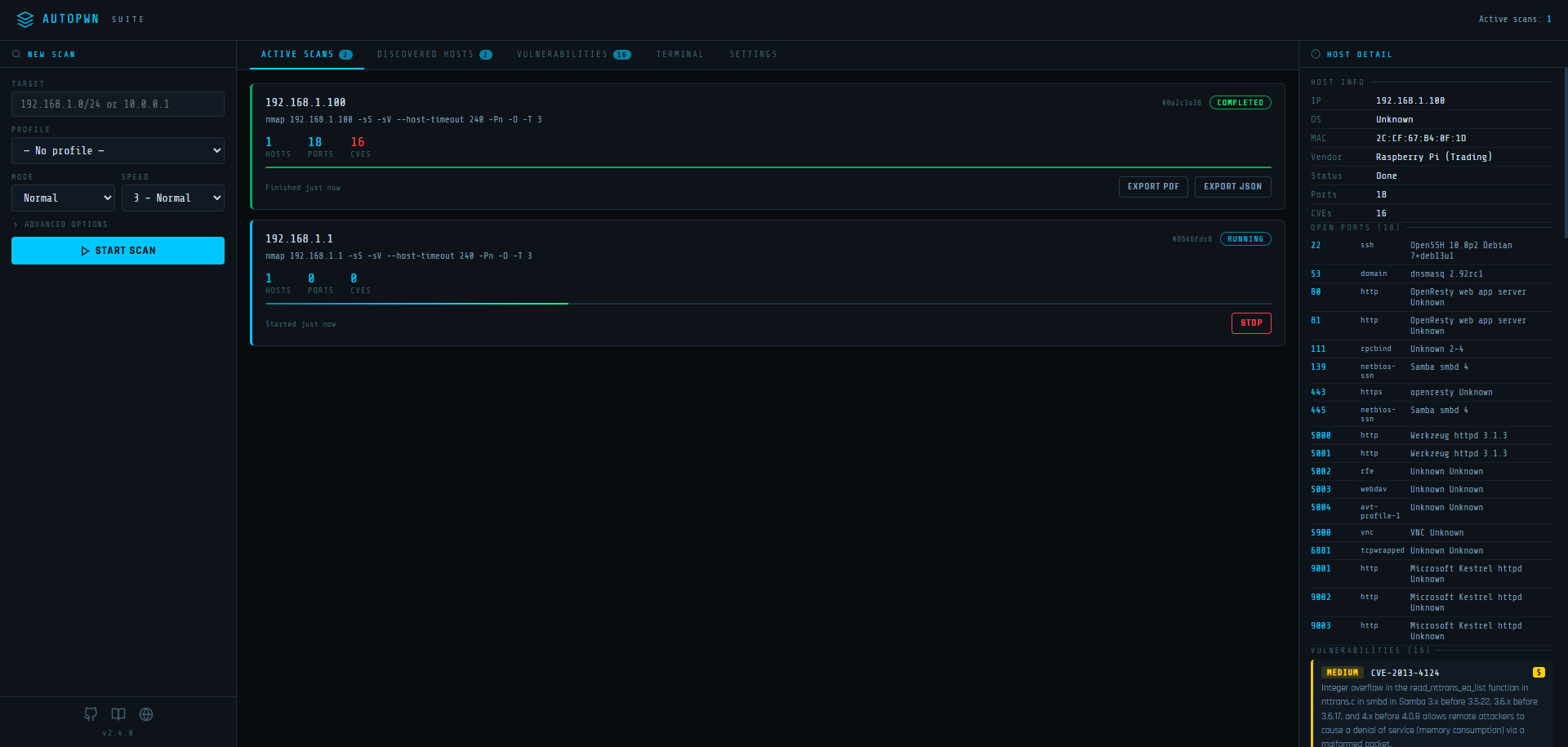
Signing in. The dashboard requires a login. On first launch the server creates an admin
account with a random password and prints both once in the terminal; only a scrypt hash of the
password is stored in web_ui_auth.json (inside AUTOPWN_DATA_DIR, or the modules directory by
default). Change the username and password after signing in under Settings → Account. If you
forget the password, run python autopwn.py --web-reset-account on the server to restore admin
with a new random password and sign out all sessions. Remote access requires HTTPS (or set
AUTOPWN_WEB_SECURE_COOKIE=1 behind a TLS-terminating proxy); localhost works over plain HTTP.
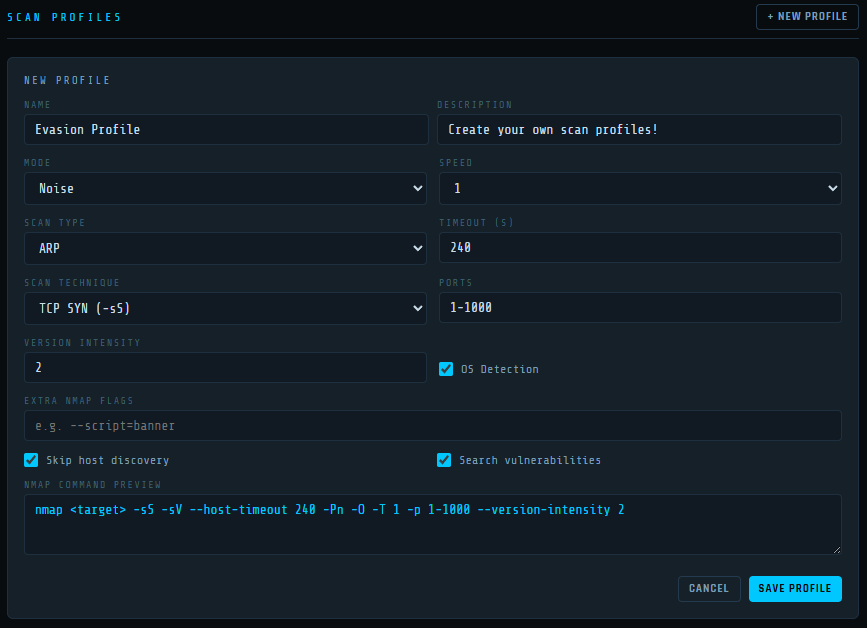
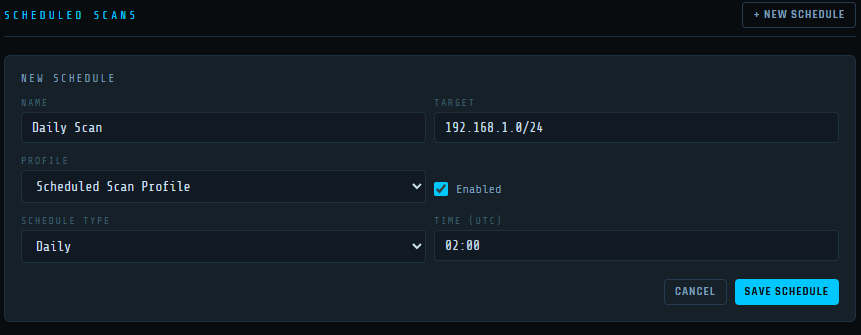
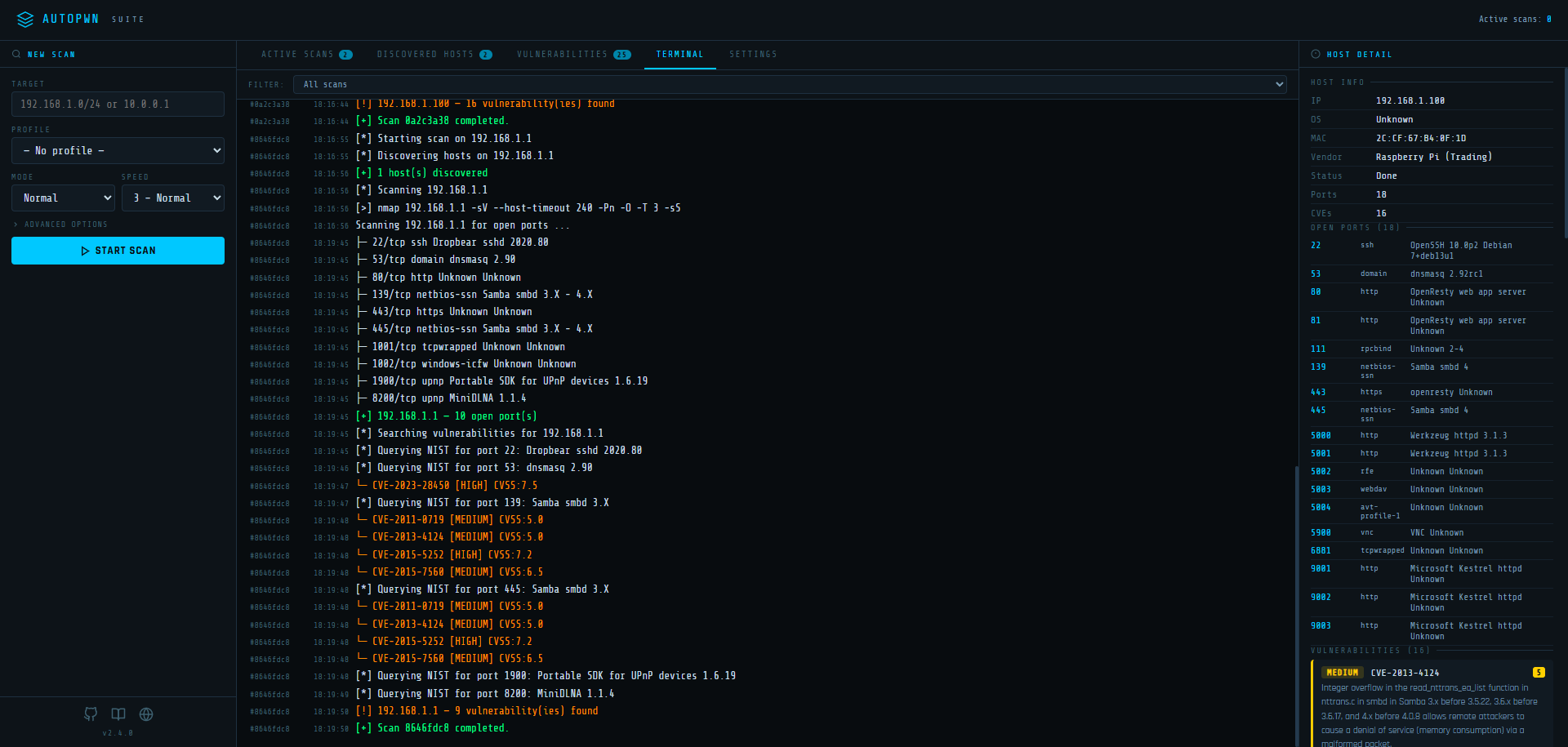
AutoPWN Suite uses nmap TCP-SYN scan to enumerate the host and detect the version of software running on it. After gathering enough information about the host, AutoPWN Suite automatically generates a list of keywords to search the NIST vulnerability database.
The CLI, Python API and dashboard use the project's modules/nmap_backend.py adapter
to run the system Nmap executable directly and parse its
XML output with Python's standard library.
Install Nmap and make sure nmap is on PATH; no Python Nmap wrapper is required.
Host discovery, TCP/UDP services, OS/vendor detection, custom Nmap flags and NSE
results are supported. Dashboard scans retain live progress and cancellation.
The adapter also exposes complete raw XML, CPE identifiers and nested NSE tables
for callers that need more detail, and rejects failed or incomplete XML output.
python -m pytest checks dependency declarations, XML parsing and process cleanup.
With Nmap installed, the suite also scans temporary loopback HTTP/TLS services through
the CLI, Python API and dashboard, and checks IPv6 when available. These live cases
are skipped when the executable is missing; the parser and process tests still run.
Poetry CI installs system Nmap so the live checks run there too.
The CLI's existing web vulnerability prompt runs directory discovery and passive header/cookie checks even on sites with no query inputs. When port results are available it checks each detected TCP HTTP(S) service, including nonstandard ports; otherwise it tries the host's default web ports. The crawler follows same-origin links and discovers GET forms, preserving blank inputs, repeated parameter names and other query values. It skips POST forms, password forms and uploads. The default crawl limits are 250 pages, 1,000 discovered URLs and five levels of links; reaching a limit is reported as limited coverage.
SQLi and LFI checks compare against the original response and repeat promising probes before reporting new database errors or Unix/Windows file signatures. Reflected XSS checks require an unescaped payload in a script element or HTML event handler in an HTML response; JSON, plain text, comments and inactive HTML contexts are excluded. Browser execution and CSP bypass are not verified, so injection findings remain candidates requiring review. Directory hits are observations, with random missing-path controls suppressing soft 404 pages and blanket login redirects. A protected path is not itself a vulnerability.
Configuration checks report advisories for missing/invalid nosniff, HTML CSP and framing
protection, HTTPS hostname HSTS, and cookie Secure/HttpOnly/SameSite flags. Cookie values are
excluded from these advisories. Recommendations follow the
OWASP HTTP Headers Cheat Sheet.
They describe the response observed, not a complete configuration audit.
Additional application checks include:
null origins test credential permission. Public
wildcard access alone is not reported as a vulnerability. Wildcard-plus-credentials produces a
configuration advisory because browsers reject credentialed reads. Actual authenticated data
exposure is not verified.Location destinations; those destinations are never
visited..netrc authentication is
suppressed for the additional diagnostic probes.cryptography.All HTTP checks share a default budget of 10,000 requests per web endpoint, including discovery, crawling and injection probes. Injection and additional checks sample at most 100 discovered URLs per check family, with at most five parameters per URL. HTTP method checks run on the starting endpoint. TLS handshakes run separately. Reaching these limits is logged as limited coverage. Response bodies are read as prefixes capped at 1 MiB and connections are closed; file contents are not written to disk. Testing guidance follows the OWASP Web Security Testing Guide.
Requests have a default 10-second network-I/O deadline and at most three followed redirects.
The deadline interrupts slow response headers and bodies, including incomplete chunks;
Stop also interrupts active reads. OS DNS resolution is outside this deadline.
Diagnostic HTTP uses private anonymous sessions, ignoring .netrc and environment proxies;
operator credentials and cookies are not attached. Redirects are checked
before following them; injection probes cannot leave the target origin. Initial endpoint
discovery also permits the same hostname's HTTP port 80 to upgrade to HTTPS port 443.
Self-signed HTTPS targets remain supported for application probes; TLS findings report certificate
and trust problems separately.
Offline mode continues to disable web probes.
Module callers can supply a host, host:port, IPv6 address or explicit application URL:
from modules.web.webvuln import webvuln

findings = webvuln("https://example.com:8443/app/", log, console)
Each returned finding contains type, url, parameter, severity, confidence, evidence,
an ID, timestamp, detection/impact/remediation context, captured exchanges and a reproduction plan.
Sensitive query values and URL credentials are redacted. Captured exchanges include request roles,
diagnostic headers, status, response-prefix hash/size, latency and truncation state; response bodies
and cookie values are omitted. The CLI prints these results through its existing console/export flow.
Website checks verify the target's TLS certificate by default. A target with a self-signed, expired or
otherwise untrusted certificate is skipped with a warning that explains why. For systems you trust, such as lab
machines, opt out explicitly with --insecure-tls (or insecure_tls = true in the [AUTOPWN] configuration
section, or Accept untrusted certificates in the dashboard's web controls). Proof-of-concept scripts record
the choice made for the scan that produced them. The TLS check still reports the target's certificate problems.
NVD API keys, SMTP passwords and webhook URLs can be kept in their own files instead of command-line arguments,
configuration or the dashboard settings file. Point the matching variable at a one-line, owner-readable file
(Docker and Kubernetes secrets work directly): AUTOPWN_NIST_API_KEY_FILE, AUTOPWN_SMTP_PASSWORD_FILE and
AUTOPWN_WEBHOOK_URL_FILE. Files are re-read when used, so a credential can be replaced without restarting or
editing configuration; values from files are never written to the dashboard settings.
Enable Web checks in the scan form. Use Network + selected web checks to check detected HTTP(S) services after Nmap, or Website only to enter an application URL without requiring Nmap or CVE lookup. Expand Select checks to choose among all 13 check groups. The Light preset selects headers/cookies and TLS; All selects every group. Expand Speed, limits & crawl to control web request pacing, the HTTP request budget, timeout, crawl pages/URLs/depth, endpoints per injection/check family, parameters and response size cap. Save the same controls in a profile and use that profile for scheduled scans. Saved profiles retain their explicit limits when defaults change. Adjustable upper bounds are 50,000 requests, 2,000 pages, 10,000 URLs, depth 10 and 1,000 probe endpoints. Larger scans take longer and send more requests; reaching any configured limit still reports incomplete coverage.
Web speed is independent of Nmap speed: 0–5 adds minimum delays of 5 seconds, 2 seconds, 500 ms, 100 ms, 25 ms or no delay between request starts. Minimum request delay can increase that delay; timeout controls both HTTP requests and TLS connections. These settings are saved with profiles and used by scheduled scans.
Use Resume on an incomplete, stopped or failed scan, or Resume scan in its web coverage card. Review the suggested speed and limits, then resume the same job. Completed checks, findings, crawl results, Nmap observations and successful CVE lookups are retained. Unfinished web checks get fresh request, page, endpoint and per-URL parameter budgets for each attempt; completed inputs and directory paths are skipped. Discovery, parameter and response caps that blocked the last attempt are increased in the suggested settings, within the supported bounds. Interrupted inputs and failed checks are retried. Completion means the selected checks finished; unreachable pages, response caps and unavailable local TLS capabilities can still leave coverage partial. Resuming keeps the original target and selected checks. Start a new scan to change either.
The Web Security tab prioritizes severity and supports search and confidence/severity/scan filters. Coverage cards show enabled checks, request counts and incomplete-check reasons. Select a finding for:
Downloading or viewing a PoC does not contact the target. Verify evidence explicitly replays only
the stored same-origin plan, without authentication cookies, redirects or arbitrary supplied code.
When detection followed validated same-origin redirects, its PoCs replay the final recorded URLs
directly; the evidence keeps the intermediate redirect exchanges.
Python verification compares baseline/probe evidence and returns reproduced, not reproduced or
inconclusive, with redacted response metadata. Run a downloaded Python PoC after installing
requests and cryptography; restore any REDACTED query inputs locally first. The dashboard refuses
server replay when local input is required. Browser PoCs require an explicit test click; use a
controlled separate origin and an appropriate browser session to assess CORS or XSS behavior.
Evidence reproduction does not establish database access, browser execution, authenticated data
exposure or other full exploit impact.
The dashboard keeps scan findings and resume checkpoints in memory for the current process. Checkpoints are private and are not included in exports; restarting the dashboard discards them. Export report saves filtered findings with their full evidence and verification history as JSON. Scan JSON exports include web findings/coverage, and scan PDF exports include their evidence/remediation summaries. Export results before restarting the dashboard. Offline mode disables web scans and verification while allowing existing findings and PoCs to be viewed or exported.
AutoPWN can keep a portable local mirror of the NIST NVD JSON 2.0 feeds.
These are CVE records (descriptions, CVSS scores, affected-product configurations and references),
not exploit programs. The small NIST .meta files describe feed freshness, size and checksums;
downloading only those files is insufficient for vulnerability detection.
On a connected machine, explicitly download the database:
python autopwn.py --update-vuln-db
python autopwn.py --vuln-db-status
The first download covers all yearly feeds from 2002 through the current year, including
older CVEs contained in the 2002 feed. Allow several minutes and several GB of free disk space
for the database, feed processing and a temporary update copy. No NIST API key is required for
feed downloads. Repeat --update-vuln-db whenever you want fresh data. Each update checks every
year's metadata and downloads only changed yearly feeds, so updates also cover long periods
without internet. Checksums and record counts are verified before publishing the new database;
a failed or interrupted update preserves the previous database. Concurrent updates are rejected.
An update may need to be retried after active scans finish if the operating system locks the database file.
Run an airgapped scan with an explicit target:
python autopwn.py --offline -t 192.168.1.0/24 -y
python autopwn.py --web --offline
Offline mode uses local CVE lookups, skips internet connectivity checks, exploit downloads, web application probes, automatic Nmap installation and email/webhook delivery, and disables Nmap reverse DNS. Nmap still communicates with the requested scan targets. Use IP addresses and locally installed Nmap scripts; user-supplied hostnames or scripts may have their own network requirements. Install Python dependencies and Nmap before disconnecting, or transfer installation packages from a connected machine. The dashboard uses local assets and system fonts.
The default --vuln-source auto tries online NVD lookups and falls back to a ready local database
if NVD is unavailable, staying local for the rest of that scan. --vuln-source online requires
online lookups. Use --offline (or --vuln-source offline) to avoid trying NVD at all.
Missing or invalid local data fails explicitly rather than reporting a clean vulnerability scan.
Stored data remains usable without an expiry; its update time is shown in scan logs and dashboard
results. Offline matching uses description keyword prefixes, with all query terms required,
and keeps versions such as 10.1.18 distinct from a query for 1.1. As with online keyword scans,
findings are possible vulnerabilities, not proof of exploitability or exact version applicability.
In the dashboard, Settings → Offline vulnerability database provides manual Download/Update,
progress, CVE count, update time and an Export for airgapped system link. Select the vulnerability
data source in New Scan or save it in a scan profile for scheduled scans. Starting the server
with --offline forces every scan to use local data and blocks downloads and test notifications.
The Offline mode — whole dashboard toggle in Settings saves this preference across restarts
and overrides the source for all new and scheduled scans. It also blocks downloads and notifications.
Turn it off when you want to download updates. Finish or stop active online scans and let any database
update or pending notification finish before turning it on. A server started with --offline keeps offline mode enforced.
The default file is modules/vulnerabilities.sqlite3, or AUTOPWN_DATA_DIR/vulnerabilities.sqlite3
when that environment variable is set. Copy this single file to the airgapped machine's data
directory, or select its location explicitly:
python autopwn.py --offline --vuln-db /media/transfer/vulnerabilities.sqlite3 -t 192.168.1.10
python autopwn.py --web --offline --vuln-db /media/transfer/vulnerabilities.sqlite3
The database contains public vulnerability data, without scan targets, credentials or exploit files.
It is portable between platforms. Configuration files also support offline, vulnerability_source
and vuln_db in [AUTOPWN]. Python callers can use
AutoScanner().scan("192.168.1.10", offline=True, vuln_db="/path/vulnerabilities.sqlite3").
AutoPWN Suite has a very user friendly easy to read output.

git clone https://github.com/GamehunterKaan/AutoPWN-Suite.git
cd AutoPWN-Suite
pip install -r requirements.txt
For a system-wide installation on Linux (which requires root privileges), use the provided installation script. (Recommended)
# Install as root
sudo bash install.sh
# Uninstall
sudo bash uninstall.sh
You can clone the repo and create a virtual environment. This installation method can be used for non-root installation in Linux.
git clone https://github.com/GamehunterKaan/AutoPWN-Suite.git
cd AutoPWN-Suite
python3 -m venv .venv
source .venv/bin/activate
pip install -r requirements.txt
The fastest way to get the web UI running. Download the docker-compose.yml file and run:
docker compose up -d
The web UI will be available at http://localhost:8080.
Edit docker-compose.yml to change host, port or data directory:
environment:
  - AUTOPWN_DATA_DIR=/data        # Where settings/profiles/schedules are stored
  - AUTOPWN_WEB_HOST=127.0.0.1   # Listen address (loopback by default)
  - AUTOPWN_WEB_PORT=8080        # Listen port
Note: Host networking (
network_mode: host) is required for nmap to discover and scan devices on your local network.
You can also run the CLI via Docker:
docker run -it --net=host gamehunterkaan/autopwn-suite -t 192.168.1.0/24 -y
You can use Google Cloud Shell.

Running with root privileges (sudo) is always recommended.
autopwn-suite -y
autopwn-suite -t <target ip address>
autopwn-suite -s <1, 2, 3, 4, 5>
autopwn-suite -m <evade, noise, normal>
For more details about usage and flags use -h flag.
autopwn-suite --daemon-install
Launch the web dashboard:
autopwn-suite --web
The dashboard listens on 127.0.0.1 by default. With a custom host and port:
autopwn-suite --web --web-host 0.0.0.0 --web-port 3000
Listening beyond localhost exposes the sign-in page to the network. Remote clients must then use HTTPS (terminate TLS in a reverse proxy, set AUTOPWN_WEB_SECURE_COOKIE=1, and firewall the service). Inside containers, publish the port to loopback only (-p 127.0.0.1:8080:8080).
The web UI exposes a full REST API:
| Method | Endpoint | Description |
|---|---|---|
GET | /api/scans | List all scan jobs |
POST | /api/scan/start | Start a new scan |
POST | /api/scan/stop | Stop a running scan |
GET | /api/hosts | All discovered hosts (merged) |
GET | /api/log | Log history |
GET | /api/events | SSE event stream |
GET | /api/web/catalog | Web check names, default controls, bounds and offline state |
GET | /api/web/findings | Web finding summaries across current scans |
GET | /api/web/findings/<scan_id>/<finding_id> | Complete finding, evidence and verification history |
GET | /api/web/findings/<scan_id>/<finding_id>/poc?format=python | Download a PoC; formats: python, curl, html, json |
POST | /api/web/findings/<scan_id>/<finding_id>/verify | Explicitly replay the stored plan; send an empty JSON object |
GET | /api/settings | Get all settings |
PUT | /api/settings | Update settings |
GET | /api/profiles | List scan profiles |
POST | /api/profiles | Create a profile |
PUT | /api/profiles/<id> | Update a profile |
DELETE | /api/profiles/<id> | Delete a profile |
GET | /api/schedules | List scheduled scans |
POST | /api/schedules | Create a schedule |
PUT | /api/schedules/<id> | Update a schedule |
DELETE | /api/schedules/<id> | Delete a schedule |
from api import AutoScanner

scanner = AutoScanner()
json_results = scanner.scan("192.168.0.1")
scanner.save_to_file("autopwn.json")
Use Poetry 2.5.1 to install dependencies and run tests. This is the version
required by pyproject.toml, pinned in CI, and used to generate poetry.lock.
pipx install poetry==2.5.1
poetry install
After changing dependencies, run poetry lock with Poetry 2.5.1 and commit
pyproject.toml and poetry.lock together. This retains already locked versions
unless their constraints require a change. Use poetry check --lock to verify
that the lockfile matches the project; CI runs the same check before installation.
# Run all tests with coverage
poetry run test

# Run tests without coverage
poetry run test --no-cov

# Run only unit tests
poetry run test -m unit

# Run only integration tests
poetry run test -m integration

# Run tests excluding slow tests
poetry run test -m "not slow"
docker build --tag autopwn-suite:local .
See Build from source for prerequisites, package builds and running the locally built image. The Compose file runs a published image.
I would be glad if you are willing to contribute this project. I am looking forward to merge your pull request unless its something that is not needed or just a personal preference. Also minor changes and bug fixes will not be merged. Please create an issue for those and I will do it myself. Click here for more info!
AutoPWN Suite is licensed under the Apache License 2.0. See NOTICE for attribution.
Third-party dependencies are covered by their own licenses.
This tool is intended for authorized security testing only. You are responsible for complying with all applicable laws.
Having trouble using this tool? You can create an issue.
Overall
Maintained
Code review
Contributors
PyPI
Latest release
Releases this year
181 followers · starred Mar 2024
3 followers · starred Jun 2022
6 followers · starred Jun 2022
AutoPWN Suite is a project for scanning vulnerabilities and exploiting systems automatically.
See the codeAutoPWN Suite is a project for scanning vulnerabilities and exploiting systems automatically.
|
|
|
Security Badges |
Install Nmap and Python 3.10 or newer, then get the source (see Installation for Linux, Docker and other options):
git clone https://github.com/GamehunterKaan/AutoPWN-Suite.git
cd AutoPWN-Suite
pip install -r requirements.txt
Scan a host or network that you are authorized to test:
python autopwn.py -t <target ip address>
Or start the web dashboard, then sign in with the admin account whose
random password is printed once in the terminal on first launch:
python autopwn.py --web
Use -h for all options. Report problems through support and
vulnerabilities privately through the security policy.
AutoPWN Suite is an operator-controlled scanner that runs with your privileges and stores integration credentials in plaintext JSON. Scan only systems you are authorized to test, do not expose the dashboard to the public internet, keep it behind HTTPS and trusted network controls, and verify releases before use. See the security policy for reporting, response times and deployment guidance.
The badges at the top show the status that OpenSSF Best Practices project 15518 reports for the Best Practices levels and the OpenSSF Baseline levels. They are updated by OpenSSF, not by this repository. The roadmap lists planned work and non-goals, and the continuity plan describes maintainer succession.
Project documentation: build from source, dependency management, architecture, interfaces, governance, changelog, release verification, and security policy, support lifecycle, threat model, secret management, and security checks, roadmap, access continuity, accessibility and internationalization.
AutoPWN Suite includes a built-in web dashboard for managing scans from your browser.
Signing in. The dashboard requires a login. On first launch the server creates an admin
account with a random password and prints both once in the terminal; only a scrypt hash of the
password is stored in web_ui_auth.json (inside AUTOPWN_DATA_DIR, or the modules directory by
default). Change the username and password after signing in under Settings → Account. If you
forget the password, run python autopwn.py --web-reset-account on the server to restore admin
with a new random password and sign out all sessions. Remote access requires HTTPS (or set
AUTOPWN_WEB_SECURE_COOKIE=1 behind a TLS-terminating proxy); localhost works over plain HTTP.
AutoPWN Suite uses nmap TCP-SYN scan to enumerate the host and detect the version of software running on it. After gathering enough information about the host, AutoPWN Suite automatically generates a list of keywords to search the NIST vulnerability database.
The CLI, Python API and dashboard use the project's modules/nmap_backend.py adapter
to run the system Nmap executable directly and parse its
XML output with Python's standard library.
Install Nmap and make sure nmap is on PATH; no Python Nmap wrapper is required.
Host discovery, TCP/UDP services, OS/vendor detection, custom Nmap flags and NSE
results are supported. Dashboard scans retain live progress and cancellation.
The adapter also exposes complete raw XML, CPE identifiers and nested NSE tables
for callers that need more detail, and rejects failed or incomplete XML output.
python -m pytest checks dependency declarations, XML parsing and process cleanup.
With Nmap installed, the suite also scans temporary loopback HTTP/TLS services through
the CLI, Python API and dashboard, and checks IPv6 when available. These live cases
are skipped when the executable is missing; the parser and process tests still run.
Poetry CI installs system Nmap so the live checks run there too.
The CLI's existing web vulnerability prompt runs directory discovery and passive header/cookie checks even on sites with no query inputs. When port results are available it checks each detected TCP HTTP(S) service, including nonstandard ports; otherwise it tries the host's default web ports. The crawler follows same-origin links and discovers GET forms, preserving blank inputs, repeated parameter names and other query values. It skips POST forms, password forms and uploads. The default crawl limits are 250 pages, 1,000 discovered URLs and five levels of links; reaching a limit is reported as limited coverage.
SQLi and LFI checks compare against the original response and repeat promising probes before reporting new database errors or Unix/Windows file signatures. Reflected XSS checks require an unescaped payload in a script element or HTML event handler in an HTML response; JSON, plain text, comments and inactive HTML contexts are excluded. Browser execution and CSP bypass are not verified, so injection findings remain candidates requiring review. Directory hits are observations, with random missing-path controls suppressing soft 404 pages and blanket login redirects. A protected path is not itself a vulnerability.
Configuration checks report advisories for missing/invalid nosniff, HTML CSP and framing
protection, HTTPS hostname HSTS, and cookie Secure/HttpOnly/SameSite flags. Cookie values are
excluded from these advisories. Recommendations follow the
OWASP HTTP Headers Cheat Sheet.
They describe the response observed, not a complete configuration audit.
Additional application checks include:
null origins test credential permission. Public
wildcard access alone is not reported as a vulnerability. Wildcard-plus-credentials produces a
configuration advisory because browsers reject credentialed reads. Actual authenticated data
exposure is not verified.Location destinations; those destinations are never
visited..netrc authentication is
suppressed for the additional diagnostic probes.cryptography.All HTTP checks share a default budget of 10,000 requests per web endpoint, including discovery, crawling and injection probes. Injection and additional checks sample at most 100 discovered URLs per check family, with at most five parameters per URL. HTTP method checks run on the starting endpoint. TLS handshakes run separately. Reaching these limits is logged as limited coverage. Response bodies are read as prefixes capped at 1 MiB and connections are closed; file contents are not written to disk. Testing guidance follows the OWASP Web Security Testing Guide.
Requests have a default 10-second network-I/O deadline and at most three followed redirects.
The deadline interrupts slow response headers and bodies, including incomplete chunks;
Stop also interrupts active reads. OS DNS resolution is outside this deadline.
Diagnostic HTTP uses private anonymous sessions, ignoring .netrc and environment proxies;
operator credentials and cookies are not attached. Redirects are checked
before following them; injection probes cannot leave the target origin. Initial endpoint
discovery also permits the same hostname's HTTP port 80 to upgrade to HTTPS port 443.
Self-signed HTTPS targets remain supported for application probes; TLS findings report certificate
and trust problems separately.
Offline mode continues to disable web probes.
Module callers can supply a host, host:port, IPv6 address or explicit application URL:
from modules.web.webvuln import webvuln

findings = webvuln("https://example.com:8443/app/", log, console)
Each returned finding contains type, url, parameter, severity, confidence, evidence,
an ID, timestamp, detection/impact/remediation context, captured exchanges and a reproduction plan.
Sensitive query values and URL credentials are redacted. Captured exchanges include request roles,
diagnostic headers, status, response-prefix hash/size, latency and truncation state; response bodies
and cookie values are omitted. The CLI prints these results through its existing console/export flow.
Website checks verify the target's TLS certificate by default. A target with a self-signed, expired or
otherwise untrusted certificate is skipped with a warning that explains why. For systems you trust, such as lab
machines, opt out explicitly with --insecure-tls (or insecure_tls = true in the [AUTOPWN] configuration
section, or Accept untrusted certificates in the dashboard's web controls). Proof-of-concept scripts record
the choice made for the scan that produced them. The TLS check still reports the target's certificate problems.
NVD API keys, SMTP passwords and webhook URLs can be kept in their own files instead of command-line arguments,
configuration or the dashboard settings file. Point the matching variable at a one-line, owner-readable file
(Docker and Kubernetes secrets work directly): AUTOPWN_NIST_API_KEY_FILE, AUTOPWN_SMTP_PASSWORD_FILE and
AUTOPWN_WEBHOOK_URL_FILE. Files are re-read when used, so a credential can be replaced without restarting or
editing configuration; values from files are never written to the dashboard settings.
Enable Web checks in the scan form. Use Network + selected web checks to check detected HTTP(S) services after Nmap, or Website only to enter an application URL without requiring Nmap or CVE lookup. Expand Select checks to choose among all 13 check groups. The Light preset selects headers/cookies and TLS; All selects every group. Expand Speed, limits & crawl to control web request pacing, the HTTP request budget, timeout, crawl pages/URLs/depth, endpoints per injection/check family, parameters and response size cap. Save the same controls in a profile and use that profile for scheduled scans. Saved profiles retain their explicit limits when defaults change. Adjustable upper bounds are 50,000 requests, 2,000 pages, 10,000 URLs, depth 10 and 1,000 probe endpoints. Larger scans take longer and send more requests; reaching any configured limit still reports incomplete coverage.
Web speed is independent of Nmap speed: 0–5 adds minimum delays of 5 seconds, 2 seconds, 500 ms, 100 ms, 25 ms or no delay between request starts. Minimum request delay can increase that delay; timeout controls both HTTP requests and TLS connections. These settings are saved with profiles and used by scheduled scans.
Use Resume on an incomplete, stopped or failed scan, or Resume scan in its web coverage card. Review the suggested speed and limits, then resume the same job. Completed checks, findings, crawl results, Nmap observations and successful CVE lookups are retained. Unfinished web checks get fresh request, page, endpoint and per-URL parameter budgets for each attempt; completed inputs and directory paths are skipped. Discovery, parameter and response caps that blocked the last attempt are increased in the suggested settings, within the supported bounds. Interrupted inputs and failed checks are retried. Completion means the selected checks finished; unreachable pages, response caps and unavailable local TLS capabilities can still leave coverage partial. Resuming keeps the original target and selected checks. Start a new scan to change either.
The Web Security tab prioritizes severity and supports search and confidence/severity/scan filters. Coverage cards show enabled checks, request counts and incomplete-check reasons. Select a finding for:
Downloading or viewing a PoC does not contact the target. Verify evidence explicitly replays only
the stored same-origin plan, without authentication cookies, redirects or arbitrary supplied code.
When detection followed validated same-origin redirects, its PoCs replay the final recorded URLs
directly; the evidence keeps the intermediate redirect exchanges.
Python verification compares baseline/probe evidence and returns reproduced, not reproduced or
inconclusive, with redacted response metadata. Run a downloaded Python PoC after installing
requests and cryptography; restore any REDACTED query inputs locally first. The dashboard refuses
server replay when local input is required. Browser PoCs require an explicit test click; use a
controlled separate origin and an appropriate browser session to assess CORS or XSS behavior.
Evidence reproduction does not establish database access, browser execution, authenticated data
exposure or other full exploit impact.
The dashboard keeps scan findings and resume checkpoints in memory for the current process. Checkpoints are private and are not included in exports; restarting the dashboard discards them. Export report saves filtered findings with their full evidence and verification history as JSON. Scan JSON exports include web findings/coverage, and scan PDF exports include their evidence/remediation summaries. Export results before restarting the dashboard. Offline mode disables web scans and verification while allowing existing findings and PoCs to be viewed or exported.
AutoPWN can keep a portable local mirror of the NIST NVD JSON 2.0 feeds.
These are CVE records (descriptions, CVSS scores, affected-product configurations and references),
not exploit programs. The small NIST .meta files describe feed freshness, size and checksums;
downloading only those files is insufficient for vulnerability detection.
On a connected machine, explicitly download the database:
python autopwn.py --update-vuln-db
python autopwn.py --vuln-db-status
The first download covers all yearly feeds from 2002 through the current year, including
older CVEs contained in the 2002 feed. Allow several minutes and several GB of free disk space
for the database, feed processing and a temporary update copy. No NIST API key is required for
feed downloads. Repeat --update-vuln-db whenever you want fresh data. Each update checks every
year's metadata and downloads only changed yearly feeds, so updates also cover long periods
without internet. Checksums and record counts are verified before publishing the new database;
a failed or interrupted update preserves the previous database. Concurrent updates are rejected.
An update may need to be retried after active scans finish if the operating system locks the database file.
Run an airgapped scan with an explicit target:
python autopwn.py --offline -t 192.168.1.0/24 -y
python autopwn.py --web --offline
Offline mode uses local CVE lookups, skips internet connectivity checks, exploit downloads, web application probes, automatic Nmap installation and email/webhook delivery, and disables Nmap reverse DNS. Nmap still communicates with the requested scan targets. Use IP addresses and locally installed Nmap scripts; user-supplied hostnames or scripts may have their own network requirements. Install Python dependencies and Nmap before disconnecting, or transfer installation packages from a connected machine. The dashboard uses local assets and system fonts.
The default --vuln-source auto tries online NVD lookups and falls back to a ready local database
if NVD is unavailable, staying local for the rest of that scan. --vuln-source online requires
online lookups. Use --offline (or --vuln-source offline) to avoid trying NVD at all.
Missing or invalid local data fails explicitly rather than reporting a clean vulnerability scan.
Stored data remains usable without an expiry; its update time is shown in scan logs and dashboard
results. Offline matching uses description keyword prefixes, with all query terms required,
and keeps versions such as 10.1.18 distinct from a query for 1.1. As with online keyword scans,
findings are possible vulnerabilities, not proof of exploitability or exact version applicability.
In the dashboard, Settings → Offline vulnerability database provides manual Download/Update,
progress, CVE count, update time and an Export for airgapped system link. Select the vulnerability
data source in New Scan or save it in a scan profile for scheduled scans. Starting the server
with --offline forces every scan to use local data and blocks downloads and test notifications.
The Offline mode — whole dashboard toggle in Settings saves this preference across restarts
and overrides the source for all new and scheduled scans. It also blocks downloads and notifications.
Turn it off when you want to download updates. Finish or stop active online scans and let any database
update or pending notification finish before turning it on. A server started with --offline keeps offline mode enforced.
The default file is modules/vulnerabilities.sqlite3, or AUTOPWN_DATA_DIR/vulnerabilities.sqlite3
when that environment variable is set. Copy this single file to the airgapped machine's data
directory, or select its location explicitly:
python autopwn.py --offline --vuln-db /media/transfer/vulnerabilities.sqlite3 -t 192.168.1.10
python autopwn.py --web --offline --vuln-db /media/transfer/vulnerabilities.sqlite3
The database contains public vulnerability data, without scan targets, credentials or exploit files.
It is portable between platforms. Configuration files also support offline, vulnerability_source
and vuln_db in [AUTOPWN]. Python callers can use
AutoScanner().scan("192.168.1.10", offline=True, vuln_db="/path/vulnerabilities.sqlite3").
AutoPWN Suite has a very user friendly easy to read output.
git clone https://github.com/GamehunterKaan/AutoPWN-Suite.git
cd AutoPWN-Suite
pip install -r requirements.txt
For a system-wide installation on Linux (which requires root privileges), use the provided installation script. (Recommended)
# Install as root
sudo bash install.sh
# Uninstall
sudo bash uninstall.sh
You can clone the repo and create a virtual environment. This installation method can be used for non-root installation in Linux.
git clone https://github.com/GamehunterKaan/AutoPWN-Suite.git
cd AutoPWN-Suite
python3 -m venv .venv
source .venv/bin/activate
pip install -r requirements.txt
The fastest way to get the web UI running. Download the docker-compose.yml file and run:
docker compose up -d
The web UI will be available at http://localhost:8080.
Edit docker-compose.yml to change host, port or data directory:
environment:
  - AUTOPWN_DATA_DIR=/data        # Where settings/profiles/schedules are stored
  - AUTOPWN_WEB_HOST=127.0.0.1   # Listen address (loopback by default)
  - AUTOPWN_WEB_PORT=8080        # Listen port
Note: Host networking (
network_mode: host) is required for nmap to discover and scan devices on your local network.
You can also run the CLI via Docker:
docker run -it --net=host gamehunterkaan/autopwn-suite -t 192.168.1.0/24 -y
You can use Google Cloud Shell.
Running with root privileges (sudo) is always recommended.
autopwn-suite -y
autopwn-suite -t <target ip address>
autopwn-suite -s <1, 2, 3, 4, 5>
autopwn-suite -m <evade, noise, normal>
For more details about usage and flags use -h flag.
autopwn-suite --daemon-install
Launch the web dashboard:
autopwn-suite --web
The dashboard listens on 127.0.0.1 by default. With a custom host and port:
autopwn-suite --web --web-host 0.0.0.0 --web-port 3000
Listening beyond localhost exposes the sign-in page to the network. Remote clients must then use HTTPS (terminate TLS in a reverse proxy, set AUTOPWN_WEB_SECURE_COOKIE=1, and firewall the service). Inside containers, publish the port to loopback only (-p 127.0.0.1:8080:8080).
The web UI exposes a full REST API:
| Method | Endpoint | Description |
|---|---|---|
GET | /api/scans | List all scan jobs |
POST | /api/scan/start | Start a new scan |
POST | /api/scan/stop | Stop a running scan |
GET | /api/hosts | All discovered hosts (merged) |
GET | /api/log | Log history |
GET | /api/events | SSE event stream |
GET | /api/web/catalog | Web check names, default controls, bounds and offline state |
GET | /api/web/findings | Web finding summaries across current scans |
GET | /api/web/findings/<scan_id>/<finding_id> | Complete finding, evidence and verification history |
GET | /api/web/findings/<scan_id>/<finding_id>/poc?format=python | Download a PoC; formats: python, curl, html, json |
POST | /api/web/findings/<scan_id>/<finding_id>/verify | Explicitly replay the stored plan; send an empty JSON object |
GET | /api/settings | Get all settings |
PUT | /api/settings | Update settings |
GET | /api/profiles | List scan profiles |
POST | /api/profiles | Create a profile |
PUT | /api/profiles/<id> | Update a profile |
DELETE | /api/profiles/<id> | Delete a profile |
GET | /api/schedules | List scheduled scans |
POST | /api/schedules | Create a schedule |
PUT | /api/schedules/<id> | Update a schedule |
DELETE | /api/schedules/<id> | Delete a schedule |
from api import AutoScanner

scanner = AutoScanner()
json_results = scanner.scan("192.168.0.1")
scanner.save_to_file("autopwn.json")
Use Poetry 2.5.1 to install dependencies and run tests. This is the version
required by pyproject.toml, pinned in CI, and used to generate poetry.lock.
pipx install poetry==2.5.1
poetry install
After changing dependencies, run poetry lock with Poetry 2.5.1 and commit
pyproject.toml and poetry.lock together. This retains already locked versions
unless their constraints require a change. Use poetry check --lock to verify
that the lockfile matches the project; CI runs the same check before installation.
# Run all tests with coverage
poetry run test

# Run tests without coverage
poetry run test --no-cov

# Run only unit tests
poetry run test -m unit

# Run only integration tests
poetry run test -m integration

# Run tests excluding slow tests
poetry run test -m "not slow"
docker build --tag autopwn-suite:local .
See Build from source for prerequisites, package builds and running the locally built image. The Compose file runs a published image.
I would be glad if you are willing to contribute this project. I am looking forward to merge your pull request unless its something that is not needed or just a personal preference. Also minor changes and bug fixes will not be merged. Please create an issue for those and I will do it myself. Click here for more info!
AutoPWN Suite is licensed under the Apache License 2.0. See NOTICE for attribution.
Third-party dependencies are covered by their own licenses.
This tool is intended for authorized security testing only. You are responsible for complying with all applicable laws.
Having trouble using this tool? You can create an issue.
Overall
Maintained
Code review
Contributors
PyPI
Latest release
Releases this year
181 followers · starred Mar 2024
3 followers · starred Jun 2022
6 followers · starred Jun 2022



