Benchmark for LLM-based Agents in Computational Biology
See the codeBixBench is a benchmark designed to evaluate AI agents on real-world bioinformatics tasks. This benchmark tests AI agents' ability to:
BixBench presents AI agents with open-ended or multiple-choice tasks, requiring them to navigate datasets, execute code (Python, R, Bash), generate scientific hypotheses, and validate them. The dataset contains 205 questions derived from 60 real-world, published Jupyter notebooks and related data (capsules).
You can find the BixBench dataset on Hugging Face, read details in the paper, and read our blog post announcement.
This repository enables three separate functions:
To set up the repository, first clone it and install the dependencies:
# Clone the repository
git clone https://github.com/Future-House/BixBench.git
cd BixBench

# Install dependencies
pip install -e .  # or `uv sync` if you are using uv
Next, you will need to be able to access the BixBench dataset. To do this, you will have to authenticate with Hugging Face:
# Authenticate with Hugging Face
huggingface-cli login
See the Hugging Face CLI for how to get started with the Hugging Face CLI and Hugging Face Security Tokens for more information on how to create a token.
Finally, the agent executes its data analysis code in a containerized environment. So to run it, you will need to pull the docker image:
# Pull the docker image
docker pull futurehouse/bixbench:aviary-notebook-env
See Docker's Getting Started Guide for instructions on how to set up Docker.
For quick reproduction of BixBench results, we provide automated scripts that handle the entire evaluation pipeline:
# Run zero-shot evaluations and grading (fastest)
bash scripts/run_zeroshot.sh

# Run agentic evaluations with multiple replicas (takes 24-48 hours)
bash scripts/run_agentic.sh
# Generate trajectories with specific configuration
python bixbench/generate_trajectories.py --config_file bixbench/run_configuration/4o_image.yaml

# Run postprocessing to generate results
python bixbench/postprocessing.py --config_file bixbench/run_configuration/v1.5_paper_results.yaml
⚠️ Note: The automated agentic evaluation script will run multiple models (GPT-4o, Claude) across 5 replicas each, which requires significant API credits and 24-48 hours to complete.
We support all LLMs that are supported by litellm. Create a .env file with the API keys for the LLMs you want to evaluate. For example:
OPENAI_API_KEY = "your-openai-api-key"
ANTHROPIC_API_KEY = "your-anthropic-api-key"
BixBench evaluates agents' ability to create complex Jupyter notebooks for real-world bioinformatics research questions. To evaluate an LLM on BixBench we separate the process into two steps:
BixBench evaluates agents' ability to create complex Jupyter notebooks for real-world bioinformatics research questions. To generate these trajectories, it's as simple as configuring a YAML file and running the following command:
python bixbench/generate_trajectories.py --config_file bixbench/run_configuration/generate_trajectories.yaml
This will:
Trajectories are saved in the specified trajectories_dir in the YAML file as json files (default is data/trajectories/).
Edit or create a new YAML file to modify:
To use your own agent, use the generate_trajectories.py script by editing the custom_rollout function to generate trajectories in the same format as the BixBench trajectories, then use the postprocessing.py script to evaluate your agent's performance.
Similarly, to evaluate the trajectories, we use the postprocessing.py script alongside a YAML configuration file:
python bixbench/postprocessing.py --config_file bixbench/run_configuration/postprocessing.yaml
This script will:
The script will save the evaluation dataframe as a CSV file in the bixbench_results/ directory as well as the plots.
You can run zero-shot evaluations using the generate_zeroshot_evals.py script and then grade the responses using the grade_outputs.py script. These two scripts:
The scripts can be configured to run with open-ended questions, multiple-choice questions (with or without a refusal option), different models, and different temperatures. To explore the different options, run the scripts with the --help flag.
python generate_zeroshot_evals.py \
    --answer-mode "mcq" \
    --model "gpt-4o" \
    --with-refusal
python grade_outputs.py \
    --input-file path/to/zeroshot.csv \
    --answer-mode "mcq"
For the latest BixBench v1.5 results using the enhanced 205-question dataset, use the automated scripts or the v1.5 configuration:
# Complete reproduction using automation scripts
bash scripts/run_zeroshot.sh  # Zero-shot baselines
bash scripts/run_agentic.sh   # Agentic evaluations (24-48 hours)
# Generate v1.5 results
python bixbench/postprocessing.py --config_file bixbench/run_configuration/v1.5_paper_results.yaml
The v1.5 configuration includes:
bixbench-v1.5_results/ directory structureTo replicate the original BixBench paper results, you can download the raw data from 2,120 trajectories and its respective postprocessed evaluation dataframe:
wget https://storage.googleapis.com/bixbench-results/raw_trajectory_data.csv -P bixbench_results/
wget https://storage.googleapis.com/bixbench-results/eval_df.csv -P bixbench_results/
You can then run the postprocessing script to generate the evaluation dataframe and analysis plots using the original configuration file:
python bixbench/postprocessing.py --config_file bixbench/run_configuration/bixbench_paper_results.yaml
The evaluation process will generate the following comparative visualizations:
v1.5 Results:
You will see the following figures from the paper:
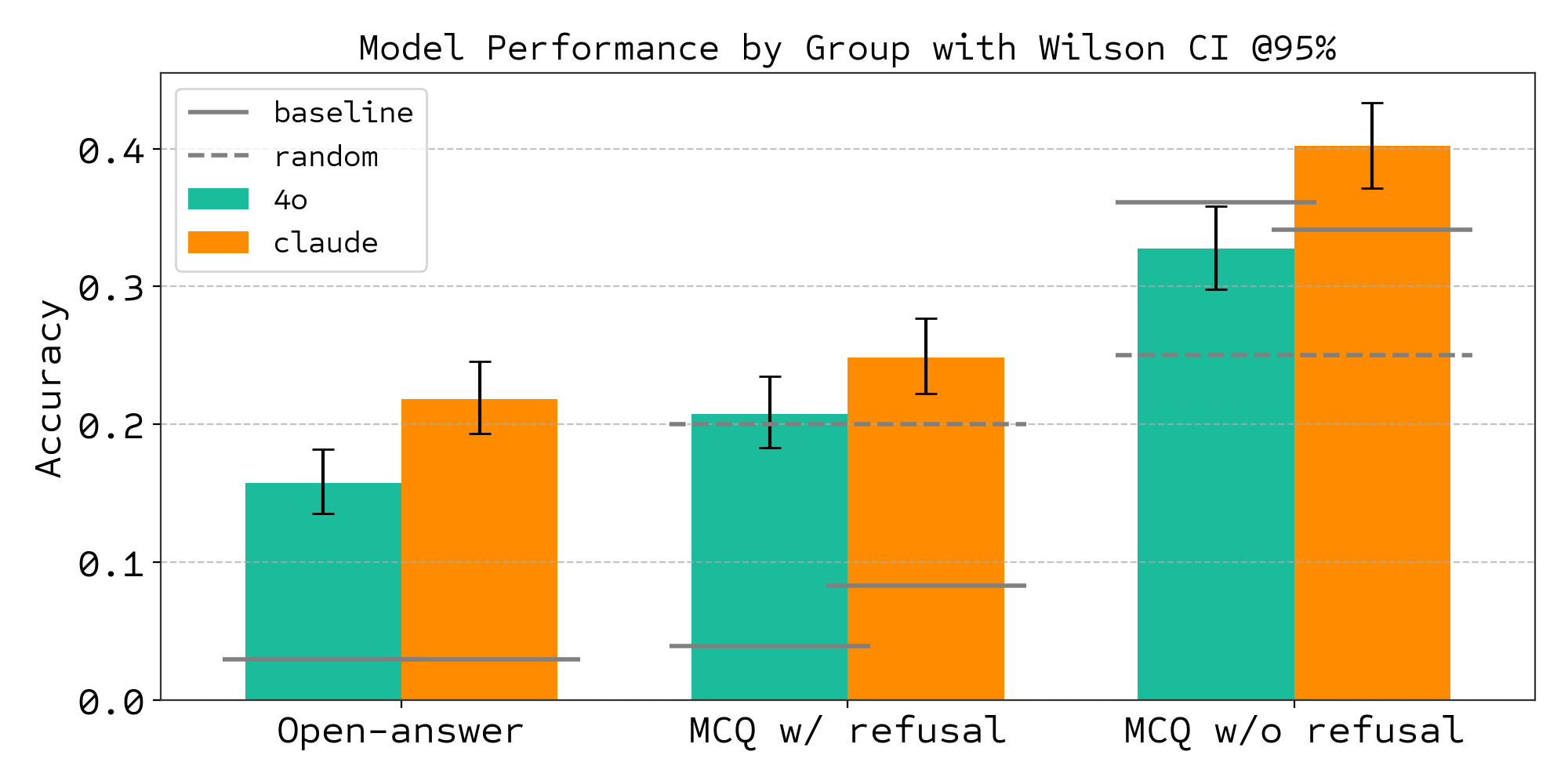
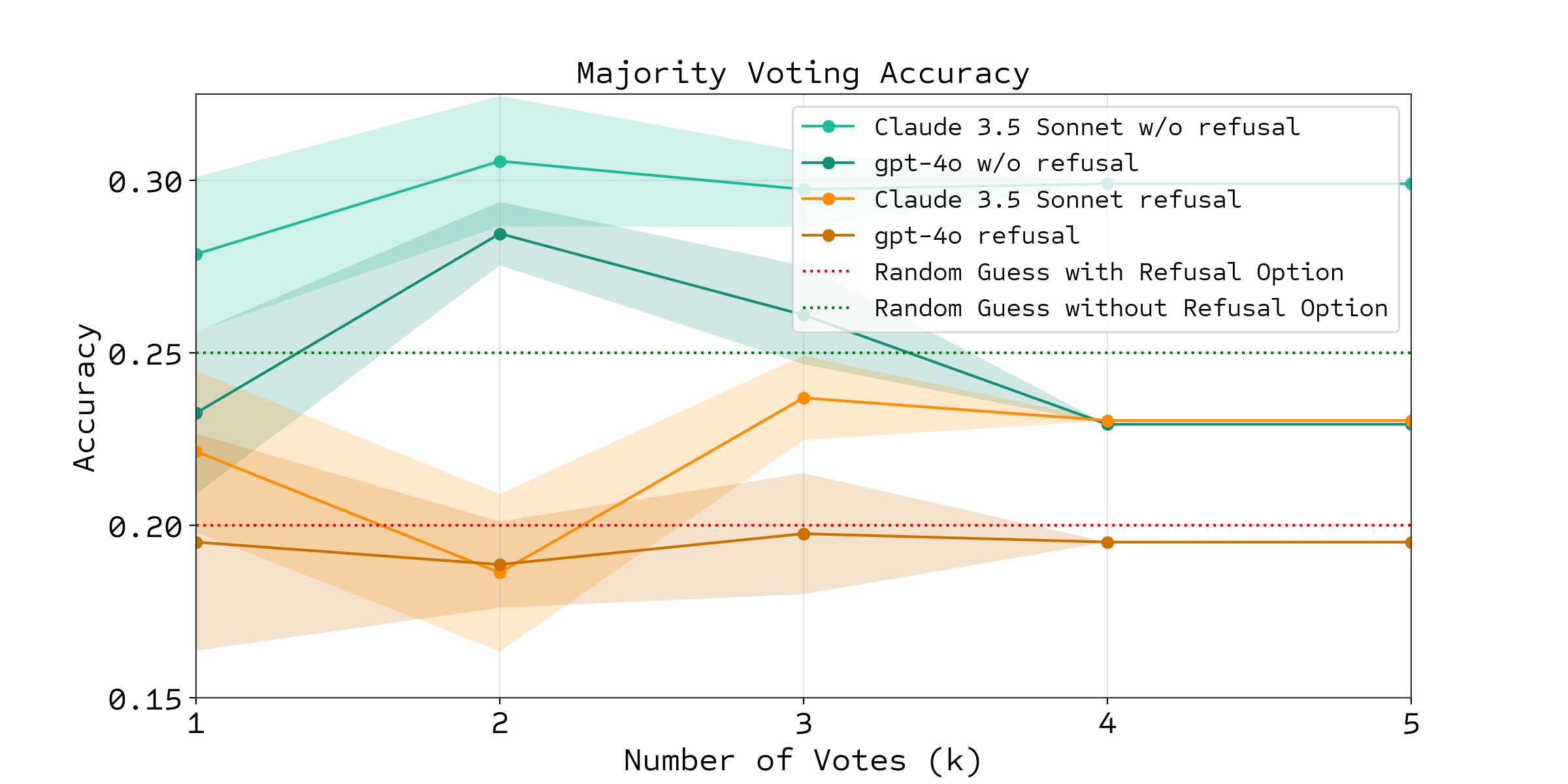
Original Results:
bixbench_results/bixbench_results_comparison.png - Original performance comparisonbixbench_results/majority_vote_accuracy_refusal_option_comparison.png - Original majority vote analysisrun_agentic.sh) will incur significant API costs as it runs 5 replicas across multiple model configurations (GPT-4o, Claude-3.5-Sonnet). Estimate your costs before running.run_zeroshot.sh) for faster results if you only need baseline comparisons.USE_DOCKER=true). Be sure to pull the Docker image as described in the Installation section. If you would like to use a local Jupyter kernel, set use_docker to false in the notebook section of the configuration file.bixbench-v1.5_results/ while manual configurations may use bixbench_results/ or other directories as specified in the YAML files.BixBench is the product of a collaboration between FutureHouse and ScienceMachine.
615 followers · starred Mar 2025
219 followers · starred Mar 2025
67 followers · starred Jun 2026
11 followers · starred Mar 2026
Benchmark for LLM-based Agents in Computational Biology
See the codeBixBench is a benchmark designed to evaluate AI agents on real-world bioinformatics tasks. This benchmark tests AI agents' ability to:
BixBench presents AI agents with open-ended or multiple-choice tasks, requiring them to navigate datasets, execute code (Python, R, Bash), generate scientific hypotheses, and validate them. The dataset contains 205 questions derived from 60 real-world, published Jupyter notebooks and related data (capsules).
You can find the BixBench dataset on Hugging Face, read details in the paper, and read our blog post announcement.
This repository enables three separate functions:
To set up the repository, first clone it and install the dependencies:
# Clone the repository
git clone https://github.com/Future-House/BixBench.git
cd BixBench

# Install dependencies
pip install -e .  # or `uv sync` if you are using uv
Next, you will need to be able to access the BixBench dataset. To do this, you will have to authenticate with Hugging Face:
# Authenticate with Hugging Face
huggingface-cli login
See the Hugging Face CLI for how to get started with the Hugging Face CLI and Hugging Face Security Tokens for more information on how to create a token.
Finally, the agent executes its data analysis code in a containerized environment. So to run it, you will need to pull the docker image:
# Pull the docker image
docker pull futurehouse/bixbench:aviary-notebook-env
See Docker's Getting Started Guide for instructions on how to set up Docker.
For quick reproduction of BixBench results, we provide automated scripts that handle the entire evaluation pipeline:
# Run zero-shot evaluations and grading (fastest)
bash scripts/run_zeroshot.sh

# Run agentic evaluations with multiple replicas (takes 24-48 hours)
bash scripts/run_agentic.sh
# Generate trajectories with specific configuration
python bixbench/generate_trajectories.py --config_file bixbench/run_configuration/4o_image.yaml

# Run postprocessing to generate results
python bixbench/postprocessing.py --config_file bixbench/run_configuration/v1.5_paper_results.yaml
⚠️ Note: The automated agentic evaluation script will run multiple models (GPT-4o, Claude) across 5 replicas each, which requires significant API credits and 24-48 hours to complete.
We support all LLMs that are supported by litellm. Create a .env file with the API keys for the LLMs you want to evaluate. For example:
OPENAI_API_KEY = "your-openai-api-key"
ANTHROPIC_API_KEY = "your-anthropic-api-key"
BixBench evaluates agents' ability to create complex Jupyter notebooks for real-world bioinformatics research questions. To evaluate an LLM on BixBench we separate the process into two steps:
BixBench evaluates agents' ability to create complex Jupyter notebooks for real-world bioinformatics research questions. To generate these trajectories, it's as simple as configuring a YAML file and running the following command:
python bixbench/generate_trajectories.py --config_file bixbench/run_configuration/generate_trajectories.yaml
This will:
Trajectories are saved in the specified trajectories_dir in the YAML file as json files (default is data/trajectories/).
Edit or create a new YAML file to modify:
To use your own agent, use the generate_trajectories.py script by editing the custom_rollout function to generate trajectories in the same format as the BixBench trajectories, then use the postprocessing.py script to evaluate your agent's performance.
Similarly, to evaluate the trajectories, we use the postprocessing.py script alongside a YAML configuration file:
python bixbench/postprocessing.py --config_file bixbench/run_configuration/postprocessing.yaml
This script will:
The script will save the evaluation dataframe as a CSV file in the bixbench_results/ directory as well as the plots.
You can run zero-shot evaluations using the generate_zeroshot_evals.py script and then grade the responses using the grade_outputs.py script. These two scripts:
The scripts can be configured to run with open-ended questions, multiple-choice questions (with or without a refusal option), different models, and different temperatures. To explore the different options, run the scripts with the --help flag.
python generate_zeroshot_evals.py \
    --answer-mode "mcq" \
    --model "gpt-4o" \
    --with-refusal
python grade_outputs.py \
    --input-file path/to/zeroshot.csv \
    --answer-mode "mcq"
For the latest BixBench v1.5 results using the enhanced 205-question dataset, use the automated scripts or the v1.5 configuration:
# Complete reproduction using automation scripts
bash scripts/run_zeroshot.sh  # Zero-shot baselines
bash scripts/run_agentic.sh   # Agentic evaluations (24-48 hours)
# Generate v1.5 results
python bixbench/postprocessing.py --config_file bixbench/run_configuration/v1.5_paper_results.yaml
The v1.5 configuration includes:
bixbench-v1.5_results/ directory structureTo replicate the original BixBench paper results, you can download the raw data from 2,120 trajectories and its respective postprocessed evaluation dataframe:
wget https://storage.googleapis.com/bixbench-results/raw_trajectory_data.csv -P bixbench_results/
wget https://storage.googleapis.com/bixbench-results/eval_df.csv -P bixbench_results/
You can then run the postprocessing script to generate the evaluation dataframe and analysis plots using the original configuration file:
python bixbench/postprocessing.py --config_file bixbench/run_configuration/bixbench_paper_results.yaml
The evaluation process will generate the following comparative visualizations:
v1.5 Results:
You will see the following figures from the paper:
Original Results:
bixbench_results/bixbench_results_comparison.png - Original performance comparisonbixbench_results/majority_vote_accuracy_refusal_option_comparison.png - Original majority vote analysisrun_agentic.sh) will incur significant API costs as it runs 5 replicas across multiple model configurations (GPT-4o, Claude-3.5-Sonnet). Estimate your costs before running.run_zeroshot.sh) for faster results if you only need baseline comparisons.USE_DOCKER=true). Be sure to pull the Docker image as described in the Installation section. If you would like to use a local Jupyter kernel, set use_docker to false in the notebook section of the configuration file.bixbench-v1.5_results/ while manual configurations may use bixbench_results/ or other directories as specified in the YAML files.BixBench is the product of a collaboration between FutureHouse and ScienceMachine.
615 followers · starred Mar 2025
219 followers · starred Mar 2025
67 followers · starred Jun 2026
11 followers · starred Mar 2026







