
README
Artifact-Bench: Evaluating MLLMs on Detecting and Assessing the Artifacts of AI-Generated Videos
📄 Paper | 🤗 Artifact-Bench Dataset
🔍 Benchmark Overview
Artifact-Bench is a comprehensive benchmark for evaluating whether Multimodal Large Language Models (MLLMs) can truly detect and reason about the artifacts of AI-generated videos. Instead of focusing only on semantic understanding, Artifact-Bench emphasizes artifact-aware realism perception and fine-grained video analysis.
-
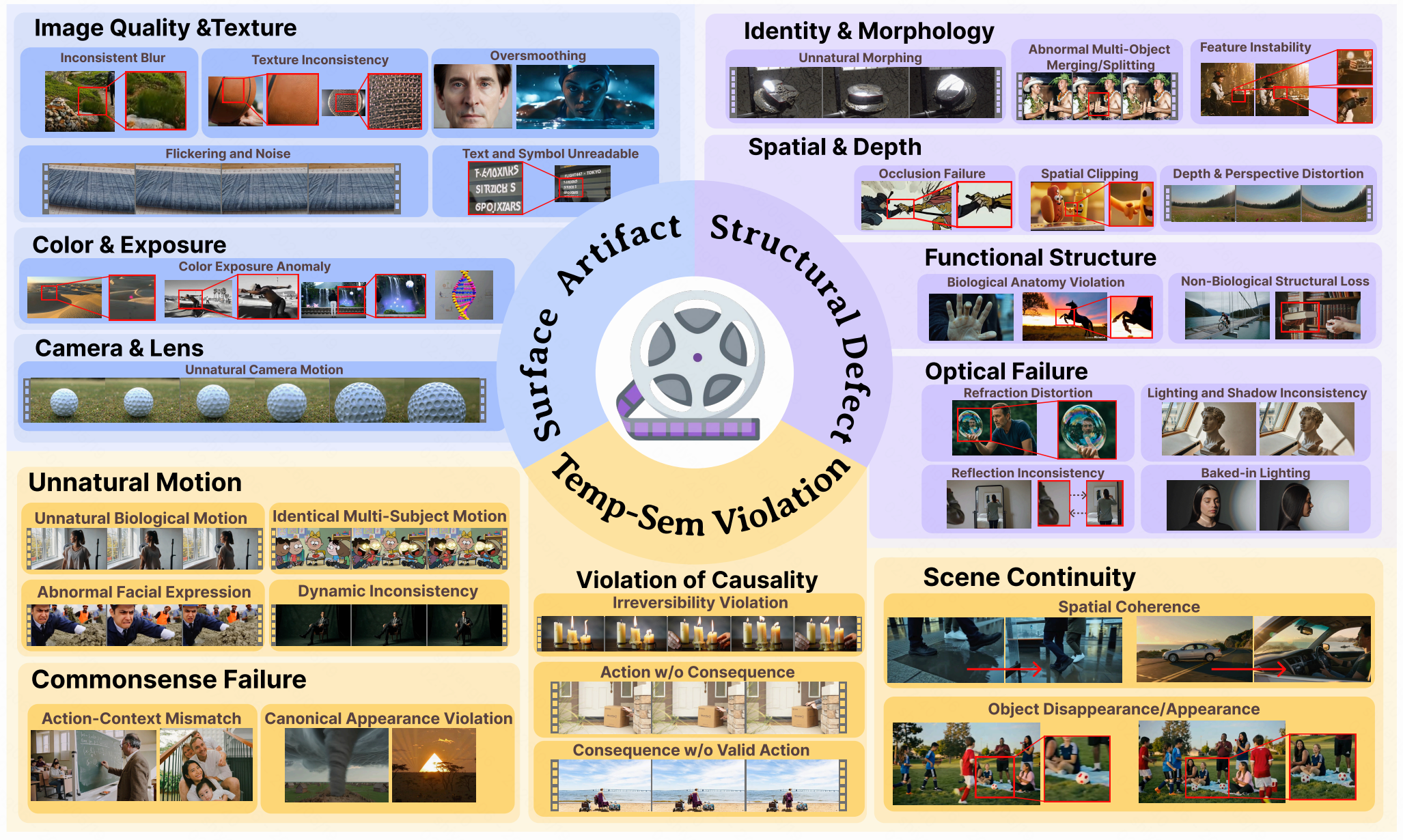
Artifact Taxonomy
-
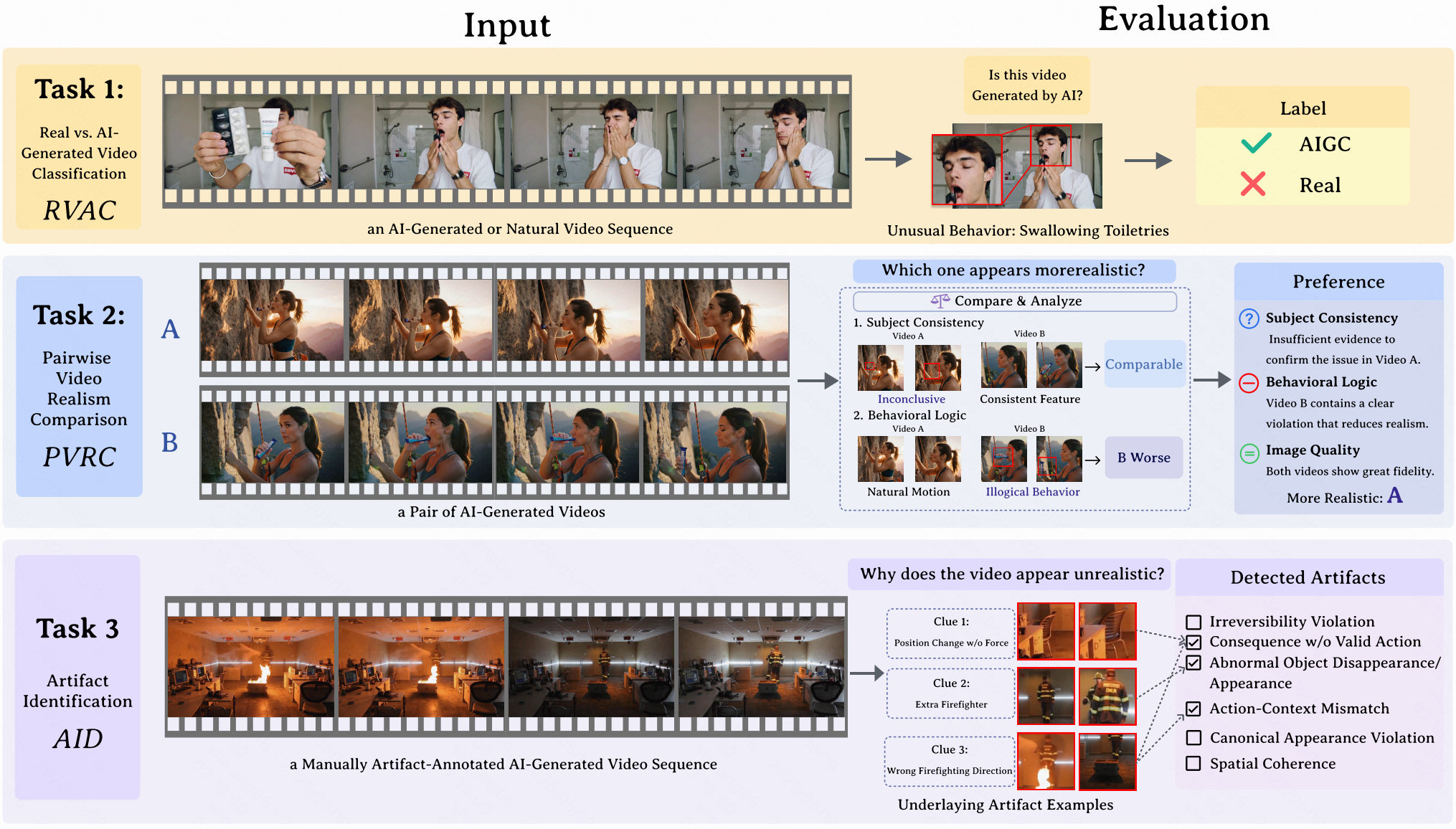
Artifact-Bench Tasks
-
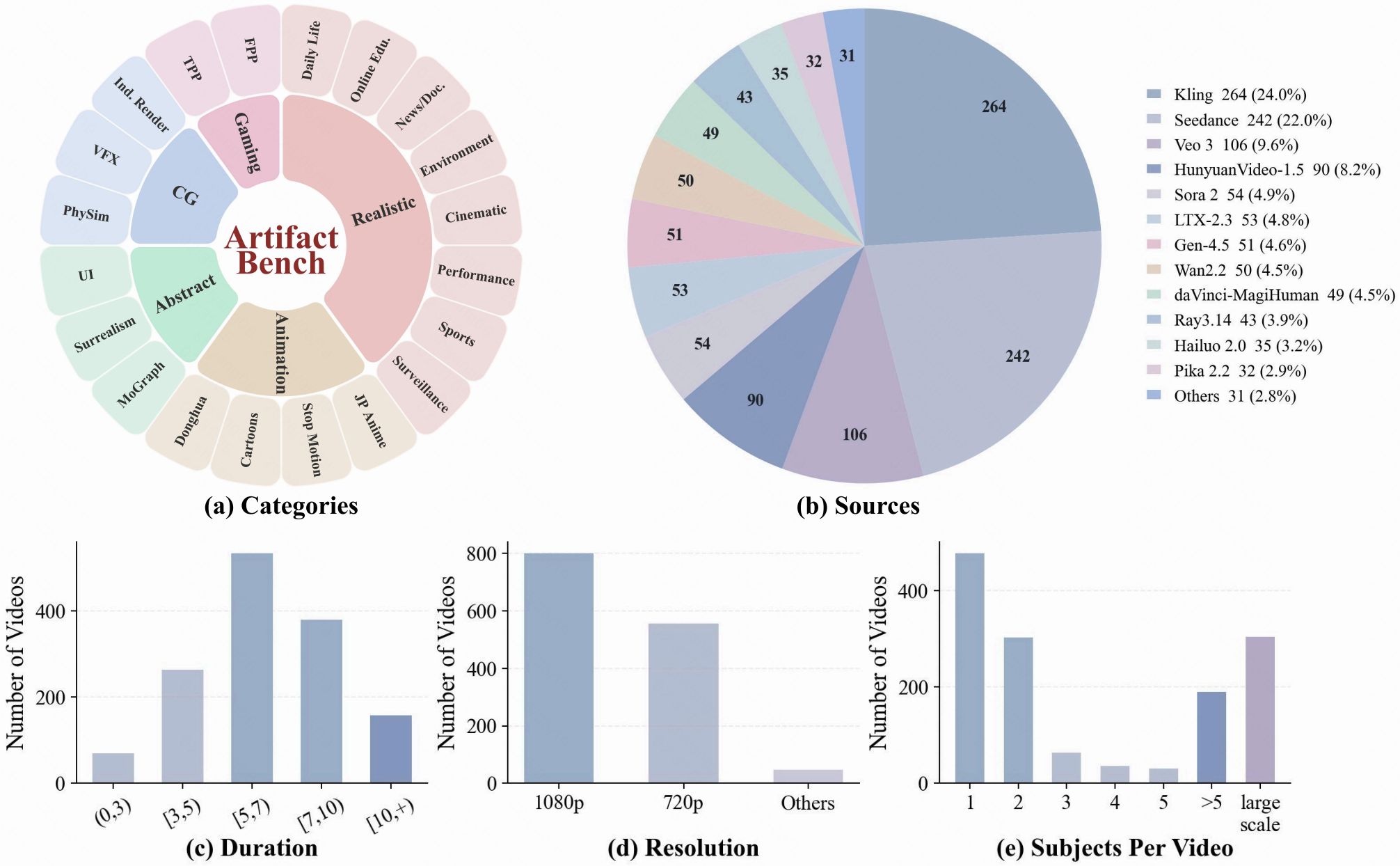
Statistics of Artifact-Bench
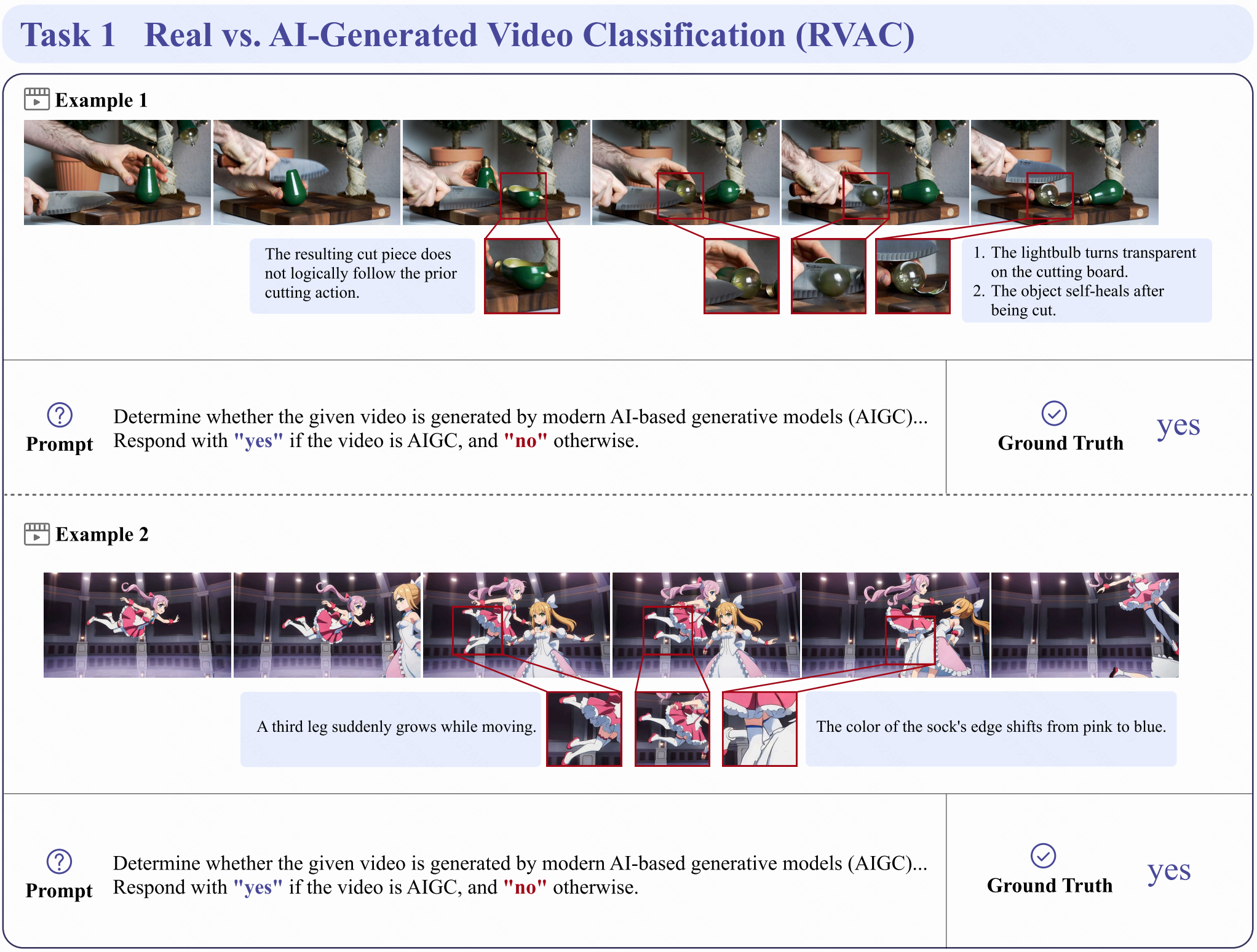
💡 Representive Examples of Each Task
Task 1: Real vs. AI-Generated Video Classification (RVAC)
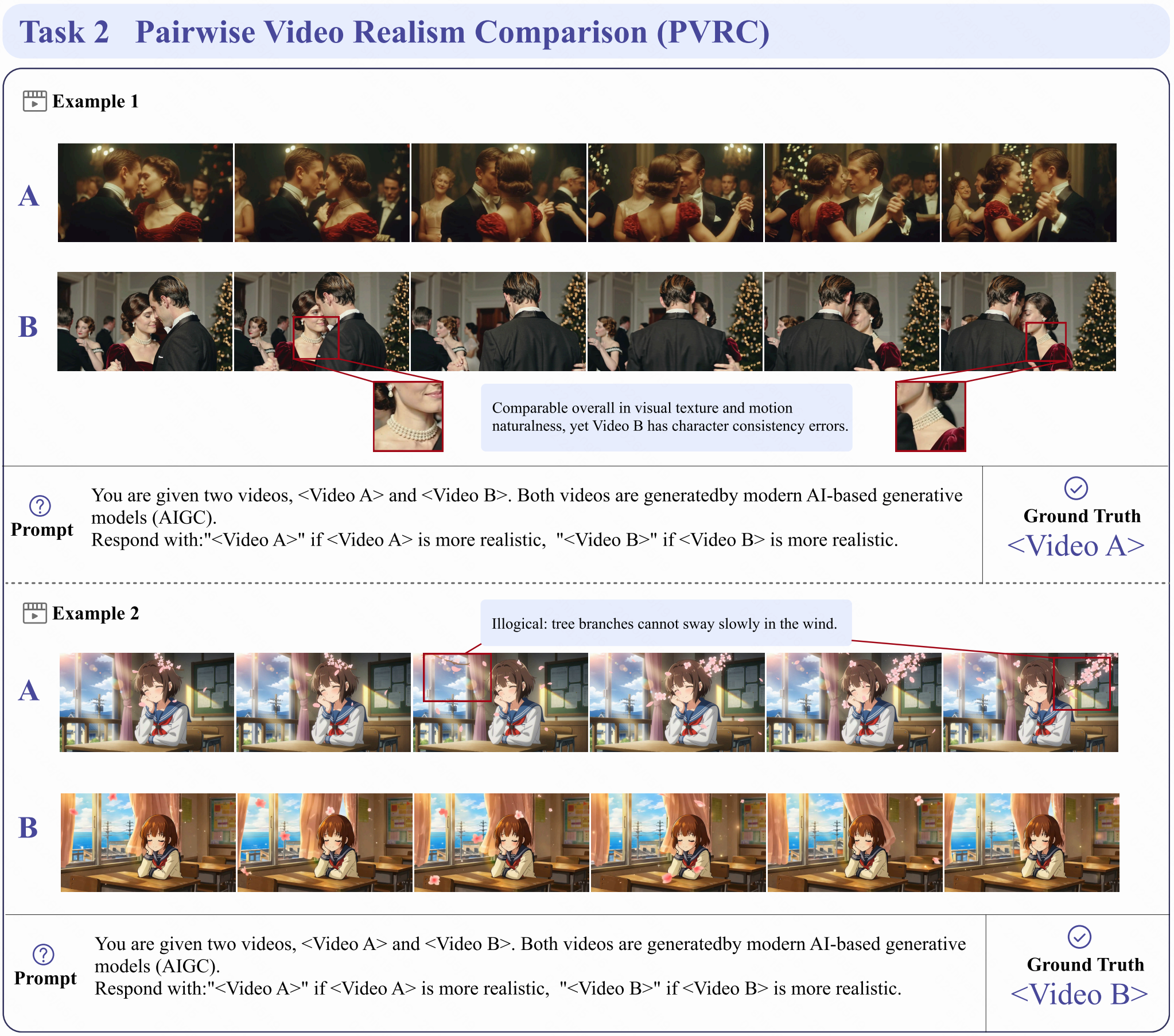
Task 2: Pairwise Video Realism Comparison (PVRC)
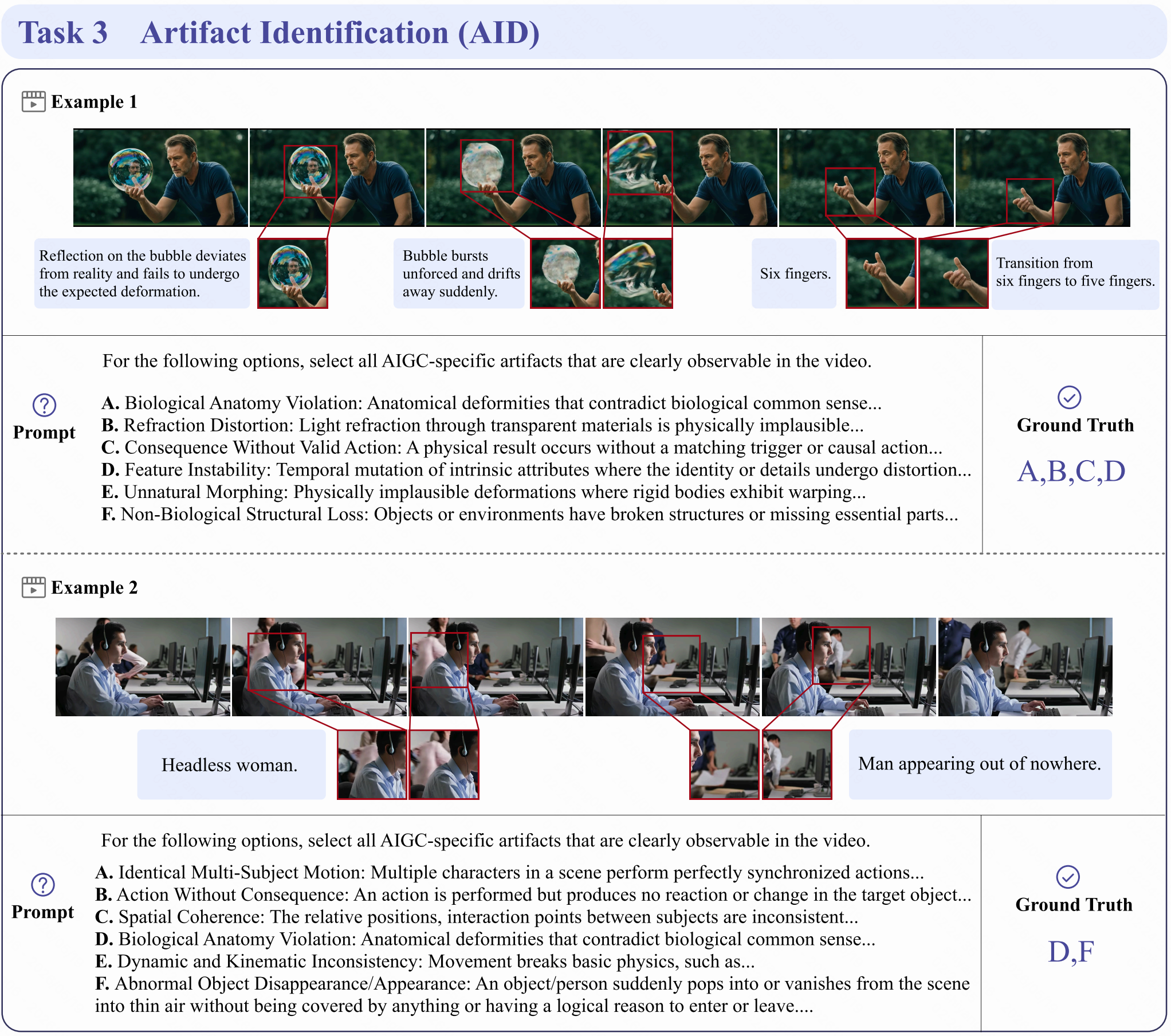
Task 3: Artifact Identification (AID)
✨ Evaluation Pipeline
This repository provides a lightweight evaluation pipeline for running Qwen3-VL on Artifact-Bench and post-processing model responses into task-level answers.
📍 1. Prepare Data
Download the Artifact-Bench videos from the 🤗 Artifact-Bench-HF, and keep the downloaded dataset folders in the released structure.
We provide the input metadata files for all three tasks in task/:
task/task1_meta.jsonl: Real vs. AI-Generated Video Classification (RVAC)task/task2_meta.jsonl: Pairwise Video Realism Comparison (PVRC)task/task3_meta.jsonl: Artifact Identification (AID)
Each line is one evaluation sample. The released metadata files contain
task_type, sample_id, video_path, answer, and level; Task 3 also
contains the candidate artifact option list.
The video_path values in these JSONL files are passed directly to the video
processor. Please run the commands from a directory where these paths are valid,
or replace video_path with absolute paths before inference.
📍 2. Run Qwen3-VL Inference
Run inference for all three tasks:
python eval/infer_qwen3_vl.py \
  --model-path Qwen/Qwen3-VL-8B-Instruct \
  --task-dir task \
  --output-dir results \
  --gpu-ids 0 \
  --fps 5
Useful options:
--gpu-ids 0,1,2,3: run multi-GPU inference with one worker per GPU.--task-ids 1,2,3: select which tasks to evaluate.--max-new-tokens 8192: control the maximum generation length.--model-name qwen3_vl_8b: store a readable model name ineval_info.--attn-implementation sdpa: use PyTorch SDPA instead of FlashAttention.
The output JSONL keeps the original sample fields and adds:
{"model_response": "yes", "eval_info": {"model": "Qwen3-VL-8B-Instruct", "fps": 5}}
If a sample fails, the script records infer_error and continues. Re-running
the same command will skip already completed samples in the output file.
📍 3. Parse Responses and Compute Accuracy
After inference, normalize model responses into final task answers:
python eval/result_process.py \
  --input-dir results \
  --output-dir results
result_process.py applies rule-based answer extraction by default:
- Task 1:
yesorno - Task 2:
<Video A>or<Video B> - Task 3: option letters such as
A,C,E
If the input samples contain answer, the script also writes correct for
each sample and reports accuracy in the summary JSON.
In our paper, we use Gemini 3 Flash for answer extraction and parsing. We
recommend using Gemini 3 Flash through an OpenAI-compatible API endpoint for
better reproducibility, especially when model responses contain long-form
reasoning:
export OPENAI_API_KEY=your_api_key

python eval/result_process.py \
  --input-dir results \
  --output-dir results \
  --parser-model gemini-3-flash \
  --base-url your_openai_compatible_base_url
By default, the parser model is only called when rule parsing returns
Invalid. Add --llm-on-all if you want to parse every sample with the LLM.
🔖 Dataset License
License:
Artifact-Bench is only used for academic research. Commercial use in any form is prohibited.
The copyright of all videos belongs to the video owners.
If there is any infringement in Artifact-Bench, please email frankyang1517@gmail.com and we will remove it immediately.
Without prior approval, you cannot distribute, publish, copy, disseminate, or modify Artifact-Bench in whole or in part.
You must strictly comply with the above restrictions.
Please send an email to frankyang1517@gmail.com. 🌟
📚 Citation
@misc{tang2026artifactbenchevaluatingmllmsdetecting,
      title={Artifact-Bench: Evaluating MLLMs on Detecting and Assessing the Artifacts of AI-Generated Videos},
      author={Yuqi Tang and Yang Shi and Zhuoran Zhang and Qixun Wang and Xuehai Bai and Yue Ding and Ruizhe Chen and Bohan Zeng and Xinlong Chen and Xuanyu Zhu and Bozhou Li and Yuran Wang and Yifan Dai and Chengzhuo Tong and Xinyu Liu and Yiyan Ji and Yujie Wei and Yuhao Dong and Shilin Yan and Fengxiang Wang and Yi-Fan Zhang and Haotian Wang and Yuanxing Zhang and Pengfei Wan},
      year={2026},
      eprint={2605.18984},
      archivePrefix={arXiv},
      primaryClass={cs.CV},
      url={https://arxiv.org/abs/2605.18984},
}
Contributors

25 commits
Similar repos






Languages
Python
100.0%
README
Artifact-Bench: Evaluating MLLMs on Detecting and Assessing the Artifacts of AI-Generated Videos
📄 Paper | 🤗 Artifact-Bench Dataset
🔍 Benchmark Overview
Artifact-Bench is a comprehensive benchmark for evaluating whether Multimodal Large Language Models (MLLMs) can truly detect and reason about the artifacts of AI-generated videos. Instead of focusing only on semantic understanding, Artifact-Bench emphasizes artifact-aware realism perception and fine-grained video analysis.
-
Artifact Taxonomy
-
Artifact-Bench Tasks
-
Statistics of Artifact-Bench
💡 Representive Examples of Each Task
Task 1: Real vs. AI-Generated Video Classification (RVAC)
Task 2: Pairwise Video Realism Comparison (PVRC)
Task 3: Artifact Identification (AID)
✨ Evaluation Pipeline
This repository provides a lightweight evaluation pipeline for running Qwen3-VL on Artifact-Bench and post-processing model responses into task-level answers.
📍 1. Prepare Data
Download the Artifact-Bench videos from the 🤗 Artifact-Bench-HF, and keep the downloaded dataset folders in the released structure.
We provide the input metadata files for all three tasks in task/:
task/task1_meta.jsonl: Real vs. AI-Generated Video Classification (RVAC)task/task2_meta.jsonl: Pairwise Video Realism Comparison (PVRC)task/task3_meta.jsonl: Artifact Identification (AID)
Each line is one evaluation sample. The released metadata files contain
task_type, sample_id, video_path, answer, and level; Task 3 also
contains the candidate artifact option list.
The video_path values in these JSONL files are passed directly to the video
processor. Please run the commands from a directory where these paths are valid,
or replace video_path with absolute paths before inference.
📍 2. Run Qwen3-VL Inference
Run inference for all three tasks:
python eval/infer_qwen3_vl.py \
  --model-path Qwen/Qwen3-VL-8B-Instruct \
  --task-dir task \
  --output-dir results \
  --gpu-ids 0 \
  --fps 5
Useful options:
--gpu-ids 0,1,2,3: run multi-GPU inference with one worker per GPU.--task-ids 1,2,3: select which tasks to evaluate.--max-new-tokens 8192: control the maximum generation length.--model-name qwen3_vl_8b: store a readable model name ineval_info.--attn-implementation sdpa: use PyTorch SDPA instead of FlashAttention.
The output JSONL keeps the original sample fields and adds:
{"model_response": "yes", "eval_info": {"model": "Qwen3-VL-8B-Instruct", "fps": 5}}
If a sample fails, the script records infer_error and continues. Re-running
the same command will skip already completed samples in the output file.
📍 3. Parse Responses and Compute Accuracy
After inference, normalize model responses into final task answers:
python eval/result_process.py \
  --input-dir results \
  --output-dir results
result_process.py applies rule-based answer extraction by default:
- Task 1:
yesorno - Task 2:
<Video A>or<Video B> - Task 3: option letters such as
A,C,E
If the input samples contain answer, the script also writes correct for
each sample and reports accuracy in the summary JSON.
In our paper, we use Gemini 3 Flash for answer extraction and parsing. We
recommend using Gemini 3 Flash through an OpenAI-compatible API endpoint for
better reproducibility, especially when model responses contain long-form
reasoning:
export OPENAI_API_KEY=your_api_key

python eval/result_process.py \
  --input-dir results \
  --output-dir results \
  --parser-model gemini-3-flash \
  --base-url your_openai_compatible_base_url
By default, the parser model is only called when rule parsing returns
Invalid. Add --llm-on-all if you want to parse every sample with the LLM.
🔖 Dataset License
License:
Artifact-Bench is only used for academic research. Commercial use in any form is prohibited.
The copyright of all videos belongs to the video owners.
If there is any infringement in Artifact-Bench, please email frankyang1517@gmail.com and we will remove it immediately.
Without prior approval, you cannot distribute, publish, copy, disseminate, or modify Artifact-Bench in whole or in part.
You must strictly comply with the above restrictions.
Please send an email to frankyang1517@gmail.com. 🌟
📚 Citation
@misc{tang2026artifactbenchevaluatingmllmsdetecting,
      title={Artifact-Bench: Evaluating MLLMs on Detecting and Assessing the Artifacts of AI-Generated Videos},
      author={Yuqi Tang and Yang Shi and Zhuoran Zhang and Qixun Wang and Xuehai Bai and Yue Ding and Ruizhe Chen and Bohan Zeng and Xinlong Chen and Xuanyu Zhu and Bozhou Li and Yuran Wang and Yifan Dai and Chengzhuo Tong and Xinyu Liu and Yiyan Ji and Yujie Wei and Yuhao Dong and Shilin Yan and Fengxiang Wang and Yi-Fan Zhang and Haotian Wang and Yuanxing Zhang and Pengfei Wan},
      year={2026},
      eprint={2605.18984},
      archivePrefix={arXiv},
      primaryClass={cs.CV},
      url={https://arxiv.org/abs/2605.18984},
}
Similar repos
Contributors
25 commits
Languages
Python
100.0%