Scalable 3D generative AI backend, with a collection of popular 3D AIGC models (ImageTo3D, TextTo3D, AutoRig, Mesh Segmentation, Mesh Painting, Mesh Editing etc.), all ported to API-ready services. Ready-to-use docker available.
Python
57
14 commits
updated Feb 6, 2026




A self-hosted, comprehensive and scalable FastAPI backend server framework for 3D generative AI models, with all of them ported to API-ready inference services
The system is powered with GPU resource management, concurrent and VRAM-aware GPU scheduling. It can be used together with Open3DStudio, an open-source replicate of TripoStudio.
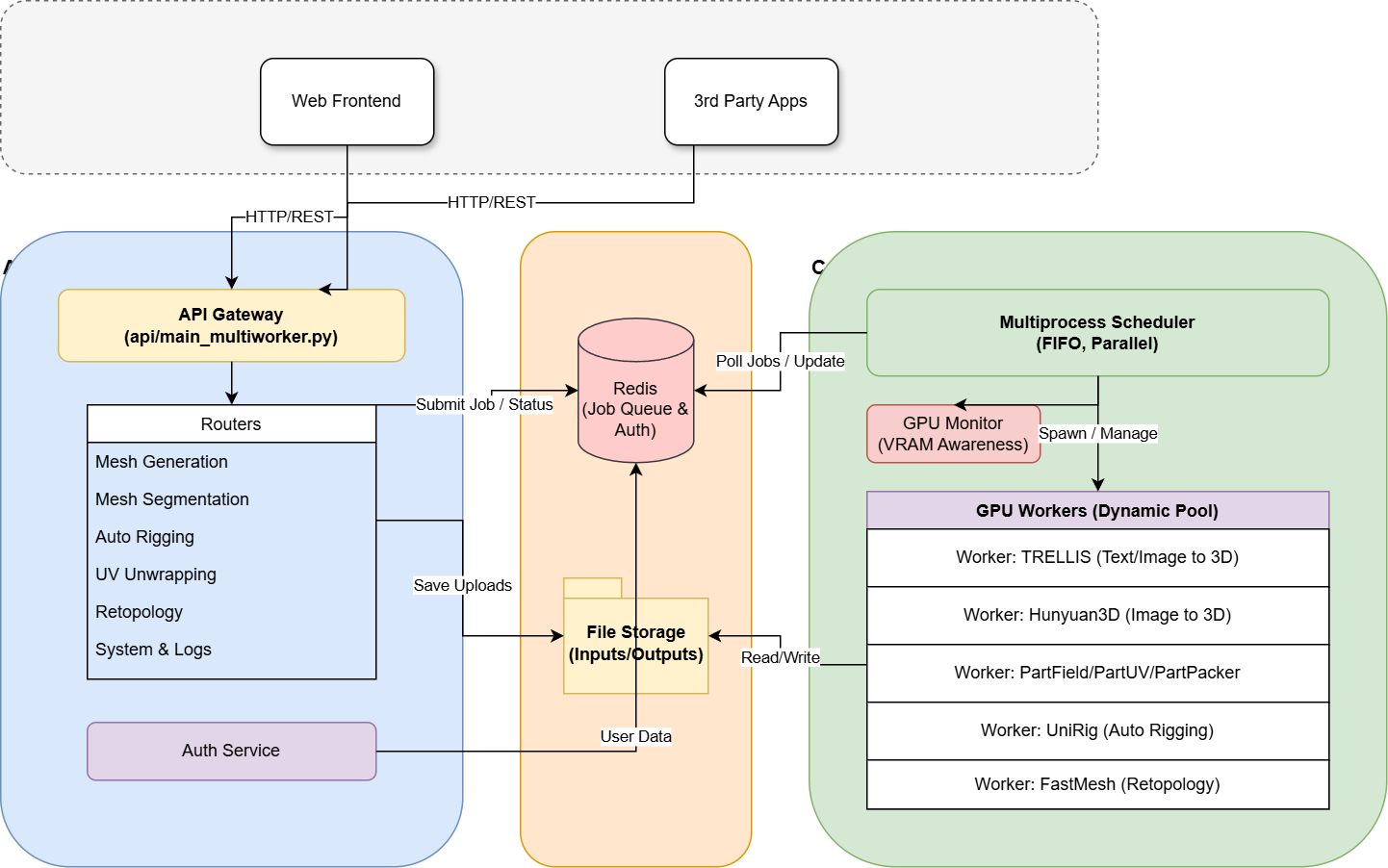

The VRAM requirement is from the pytest results, tested on a single 4090 GPU.
| Model | Input | Output | VRAM | Features |
|---|---|---|---|---|
| TRELLIS | Text/Image | Textured Mesh | 12GB | Medium-quality, geometry & texture |
| Hunyuan3D-2.1 | Image | Raw Mesh | 8GB | Fast, medium quality, geometry only |
| Hunyuan3D-2.1 | Image | Textured Mesh | 19GB | Medium-quality, geometry & texture |
| TRELLIS.2 | Image | Textured Mesh | 24GB | High-quality textured geometry |
| UltraShape | Image | Textured Mesh | 25GB | High-quality textured geometry |
| PartPacker | Image | Raw Mesh | 10GB | Part-Level, geometry only |
| Model | Input | Output | VRAM | Features |
|---|---|---|---|---|
| UniRig | Mesh | Rigged Mesh | 9GB | Automatic skeleton generation |
| Model | Input | Output | VRAM | Features |
|---|---|---|---|---|
| PartField | Mesh | Segmented Mesh | 4GB | Semantic part segmentation |
| P3SAM | Mesh | Segmented Mesh | 48GB | Semantic part segmentation |
| Model | Input | Output | VRAM | Features |
|---|---|---|---|---|
| TRELLIS Paint | Text/Image + Mesh | Textured Mesh | 8GB/4GB | Text/image-guided painting |
| Hunyuan3D-2.1 Paint | Mesh + Image | Textured Mesh | 12GB | High-quality texture synthesis, PBR |
| Model | Input | Output | VRAM | Features |
|---|---|---|---|---|
| FastMesh | Dense Mesh | Low Poly Mesh | 16G/24(1k/4k) | Fast Artist Mesh Generation |
| Model | Input | Output | VRAM | Features |
|---|---|---|---|---|
| PartUV | Mesh | Mesh w/ UV | 7GB | Part-Based UV Unwrapping |
| Model | Input | Output | VRAM | Features |
|---|---|---|---|---|
| VoxHammer (Text) | Mesh + Text Prompts | Edited Mesh | 40GB | Text-guided local mesh editing |
| VoxHammer (Image) | Mesh + Reference Images | Edited Mesh | 40GB | Image-guided local mesh editing |
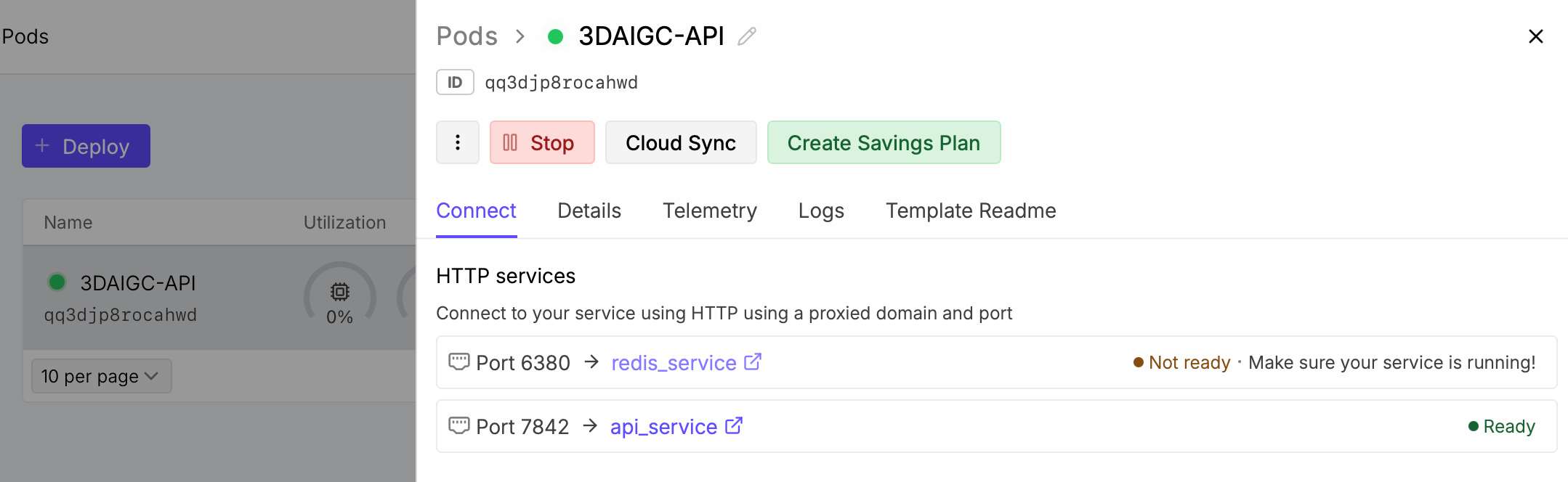
Use the cloud compute provided by RunPod to deploy your own backend with a single click. I have provided the runpod template here
How-To: Select the template --> Select a machine based on your use-case --> Deploy On-Demand. After runpod setups the template, you can see a http service marked as ready. Then copy the url and setup in the Open3DStudio's settings tab.
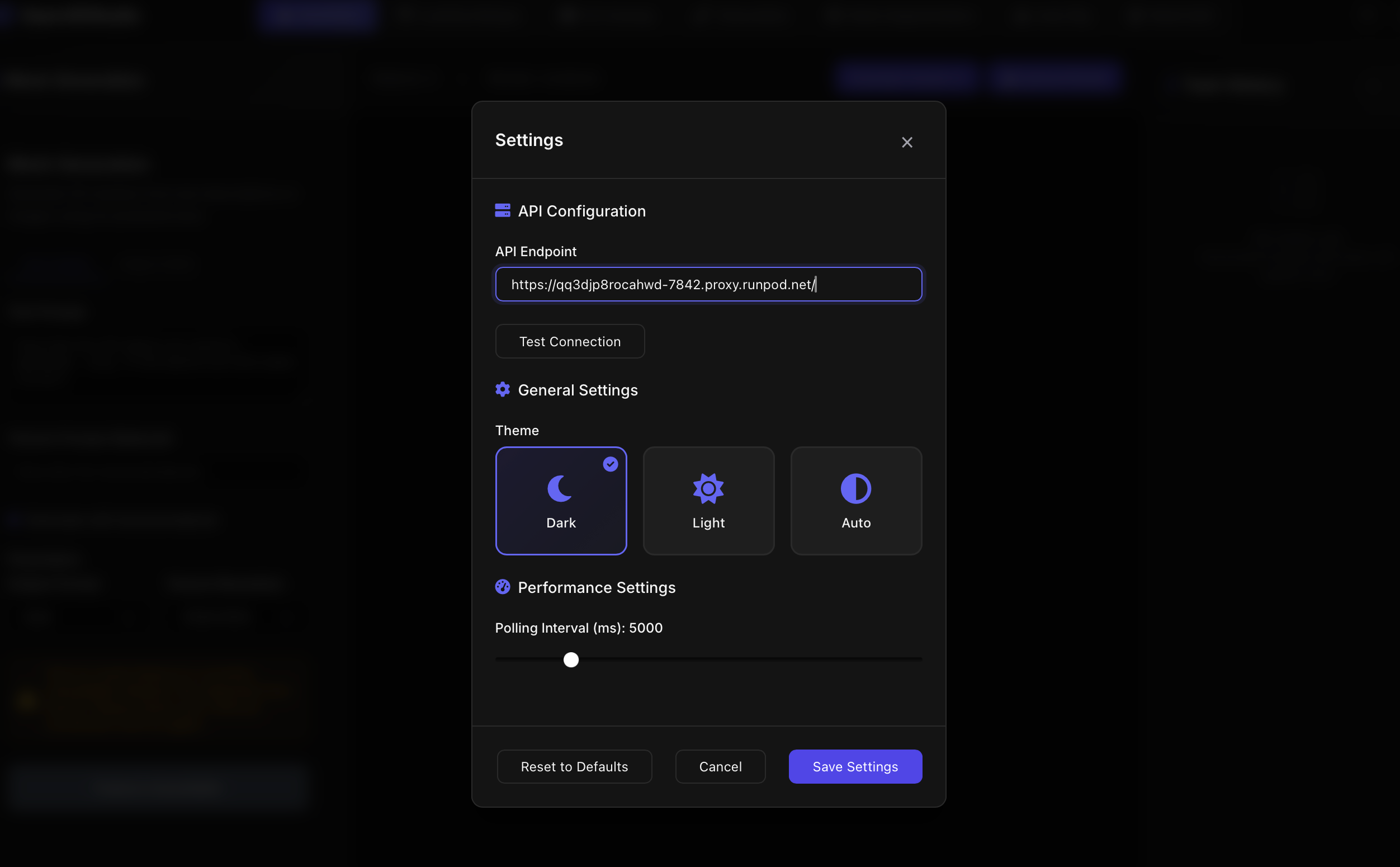
If desired, you can setup your huggingface token via the environment variable HUGGIINGFACE_TOKEN for the downloading of some gated models(e.g. DINO-V3, RemBG). And you can setup P3D_USER_AUTH_ENABLED to enable authentification.
If you don't have a RunPod account yet, you can use my Referral Link to support this project :)
# start up the service in the background
# docker will check local images -> pull images -> build
docker compose up -d
# force build
docker compose up --build

# enable the user management
P3D_USER_AUTH_ENABLED=True docker compose up -d
# clone this repo recursively
# notice that the support of a number of models is based on MY FORK TO add API-READY interfaces
git clone --recurse-submodules https://github.com/FishWoWater/3DAIGC-API.git
cd 3DAIGC-API
# on linux
chmod +x install.sh
./scripts/install.sh
# on windows (still base on trellisv1)
.\scripts\install.bat
The installation script will:
# on linux
chmod +x download_models.sh
# download specific model(s)
./scripts/download_models.sh -m partfield,trellis
# Verify all existing models
./scripts/download_models.sh -v
# Show help
./scripts/download_models.sh -h
# List available models
./scripts/download_models.sh --list

# on windows, simiarly
.\scripts\download_models.bat
chmod a+x ./scripts/run_multiwork.sh
./scripts/run_multiworker.sh
The server will be available at http://localhost:7842 by default.
Once the server is running, visit:
http://localhost:7842/docshttp://localhost:7842/redoc# check system status
curl -X GET "http://localhost:7842/api/v1/system/status/"
# check available features
curl -X GET "http://localhost:7842/api/v1/system/features"
# check available models
curl -X GET "http://localhost:7842/api/v1/system/models"
# user register
curl -X POST http://localhost:7842/api/v1/users/register \
  -H "Content-Type: application/json" \
  -d '{"username":"alice","email":"[email protected]","password":"secret123"}'
# login and get token
TOKEN=$(curl -s -X POST http://localhost:7842/api/v1/users/login \
  -H "Content-Type: application/json" \
  -d '{"username":"alice","password":"secret123"}' | jq -r '.token')

echo "Your token: $TOKEN"
# 1. Submit job
curl -X POST "http://localhost:7842/api/v1/mesh-generation/text-to-textured-mesh" \
  -H "Content-Type: application/json" \
  -d '{
    "text_prompt": "A cute robot cat",
    "output_format": "glb",
    "model_preference": "trellis_text_to_textured_mesh"
  }'
# Response: {"job_id": "job_789012", "status": "queued", "message": "..."}
# 2. Check job status
curl "http://localhost:7842/api/v1/system/jobs/job_789012"
# 1. Upload image file
curl -X POST "http://localhost:7842/api/v1/file-upload/image" \
  -F "file=@/path/to/your/image.jpg"
# Response: {"file_id": "abc123def456", "filename": "image.jpg", ...}

# 2. Generate textured mesh using file ID
curl -X POST "http://localhost:7842/api/v1/mesh-generation/image-to-textured-mesh" \
  -H "Content-Type: application/json" \
  -d '{
    "image_file_id": "abc123def456",
    "texture_resolution": 1024,
    "output_format": "glb",
    "model_preference": "trellis_image_to_textured_mesh"
  }'
# 1. Upload mesh file
curl -X POST "http://localhost:7842/api/v1/file-upload/mesh" \
  -F "file=@/path/to/mesh.glb"
# Response: {"file_id": "mesh_abc123", ...}
# 2. Segment mesh
curl -X POST "http://localhost:7842/api/v1/mesh-segmentation/segment-mesh" \
  -H "Content-Type: application/json" \
  -d '{
    "mesh_file_id": "mesh_abc123",
    "num_parts": 8,
    "output_format": "glb",
    "model_preference": "partfield_mesh_segmentation"
  }'
# 3. Download segmented result
curl "http://localhost:7842/api/v1/system/jobs/{job_id}/download" \
  -o "segmented.glb"
# 1. Upload mesh file
curl -X POST "http://localhost:7842/api/v1/file-upload/mesh" \
  -F "file=@/path/to/character.glb"
# Response: {"file_id": "char_xyz789", ...}
# 2. Generate rig
curl -X POST "http://localhost:7842/api/v1/auto-rigging/generate-rig" \
  -H "Content-Type: application/json" \
  -d '{
    "mesh_file_id": "char_xyz789",
    "rig_mode": "skeleton",
    "output_format": "fbx",
    "model_preference": "unirig_auto_rig"
  }'
# 3. Download rigged mesh
curl "http://localhost:7842/api/v1/system/jobs/{job_id}/download" \
  -o "rigged_character.fbx"
# 1. Upload mesh file
curl -X POST "http://localhost:7842/api/v1/file-upload/mesh" \
  -F "file=@/path/to/high_res_mesh.obj"
# Response: {"file_id": "mesh_abc123", ...}

# 2. Retopologize mesh (V1K variant for ~1000 vertices)
curl -X POST "http://localhost:7842/api/v1/mesh-retopology/retopologize-mesh" \
  -H "Content-Type: application/json" \
  -d '{
    "mesh_file_id": "mesh_abc123",
    "model_preference": "fastmesh_v1k_retopology",
    "output_format": "obj",
    "seed": 42
  }'
# Response: {"job_id": "retopo_job_123", ...}

# Alternative: Use V4K variant for ~4000 vertices
curl -X POST "http://localhost:7842/api/v1/mesh-retopology/retopologize-mesh" \
  -H "Content-Type: application/json" \
  -d '{
    "mesh_file_id": "mesh_abc123",
    "model_preference": "fastmesh_v4k_retopology",
    "output_format": "obj"
  }'

# 3. Download retopologized mesh
curl "http://localhost:7842/api/v1/system/jobs/{job_id}/download" \
  -o "retopo_mesh.obj"

# 4. Check available retopology models
curl "http://localhost:7842/api/v1/mesh-retopology/available-models"
# 1. Upload mesh file (must be without UV coordinates)
curl -X POST "http://localhost:7842/api/v1/file-upload/mesh" \
  -F "file=@/path/to/mesh_no_uv.obj"
# Response: {"file_id": "mesh_xyz456", ...}

# 2. Generate UV coordinates
curl -X POST "http://localhost:7842/api/v1/mesh-uv-unwrapping/unwrap-mesh" \
  -H "Content-Type: application/json" \
  -d '{
    "mesh_file_id": "mesh_xyz456",
    "distortion_threshold": 1.25,
    "pack_method": "blender",
    "save_individual_parts": true,
    "output_format": "obj",
    "model_preference": "partuv_uv_unwrapping"
  }'
# Response: {"job_id": "uv_job_456", ...}

# Alternative: Skip UV packing for faster processing
curl -X POST "http://localhost:7842/api/v1/mesh-uv-unwrapping/unwrap-mesh" \
  -H "Content-Type: application/json" \
  -d '{
    "mesh_file_id": "mesh_xyz456",
    "distortion_threshold": 1.5,
    "pack_method": "none",
    "save_individual_parts": false,
    "output_format": "obj"
  }'

# 3. Download mesh with UV coordinates
curl "http://localhost:7842/api/v1/system/jobs/{job_id}/download" \
  -o "mesh_with_uv.obj"

# 4. Check available packing methods
curl "http://localhost:7842/api/v1/mesh-uv-unwrapping/pack-methods"
# 1. Upload image file
curl -X POST "http://localhost:7842/api/v1/file-upload/image" \
  -F "file=@/path/to/image.jpg"
# Response: {"file_id": "img_abc123", ...}

# 2. Generate refined mesh using UltraShape
curl -X POST "http://localhost:7842/api/v1/mesh-generation/image-to-raw-mesh" \
  -H "Content-Type: application/json" \
  -d '{
    "image_file_id": "img_abc123",
    "output_format": "glb",
    "model_preference": "ultrashape_image_to_raw_mesh",
    "num_inference_steps": 50,
    "num_latents": 32768,
    "octree_res": 1024,
    "seed": 42
  }'
# Response: {"job_id": "ultra_job_123", ...}

# 3. Download refined mesh
curl "http://localhost:7842/api/v1/system/jobs/ultra_job_123/download" \
  -o "refined_mesh.glb"
# 1. Upload mesh file
curl -X POST "http://localhost:7842/api/v1/file-upload/mesh" \
  -F "file=@/path/to/mesh.glb"
# Response: {"file_id": "mesh_xyz", ...}

# 2. Edit mesh with text guidance (bounding box mask)
curl -X POST "http://localhost:7842/api/v1/mesh-editing/text-mesh-editing" \
  -H "Content-Type: application/json" \
  -d '{
    "mesh_file_id": "mesh_xyz",
    "mask_bbox": {
      "center": [0.0, 0.5, 0.0],
      "dimensions": [0.3, 0.3, 0.3]
    },
    "source_prompt": "dragon head",
    "target_prompt": "dragon head with horns",
    "num_views": 150,
    "resolution": 512,
    "output_format": "glb",
    "model_preference": "voxhammer_text_mesh_editing"
  }'
# Response: {"job_id": "edit_job_123", ...}

# Alternative: Use ellipsoid mask
curl -X POST "http://localhost:7842/api/v1/mesh-editing/text-mesh-editing" \
  -H "Content-Type: application/json" \
  -d '{
    "mesh_file_id": "mesh_xyz",
    "mask_ellipsoid": {
      "center": [0.0, 0.3, 0.0],
      "radii": [0.2, 0.2, 0.2]
    },
    "source_prompt": "smooth surface",
    "target_prompt": "textured surface",
    "model_preference": "voxhammer_text_mesh_editing"
  }'

# 3. Download edited mesh
curl "http://localhost:7842/api/v1/system/jobs/edit_job_123/download" \
  -o "edited_mesh.glb"

# 4. Check supported mask types
curl "http://localhost:7842/api/v1/mesh-editing/supported-masks"
# 1. Upload mesh and reference images
curl -X POST "http://localhost:7842/api/v1/file-upload/mesh" \
  -F "[email protected]"
# Response: {"file_id": "mesh_abc", ...}

curl -X POST "http://localhost:7842/api/v1/file-upload/image" \
  -F "file=@source_render.png"
# Response: {"file_id": "src_img", ...}

curl -X POST "http://localhost:7842/api/v1/file-upload/image" \
  -F "file=@target_edit.png"
# Response: {"file_id": "tgt_img", ...}

curl -X POST "http://localhost:7842/api/v1/file-upload/image" \
  -F "file=@2d_mask.png"
# Response: {"file_id": "mask_img", ...}

# 2. Edit mesh with image guidance
curl -X POST "http://localhost:7842/api/v1/mesh-editing/image-mesh-editing" \
  -H "Content-Type: application/json" \
  -d '{
    "mesh_file_id": "mesh_abc",
    "source_image_file_id": "src_img",
    "target_image_file_id": "tgt_img",
    "mask_image_file_id": "mask_img",
    "mask_bbox": {
      "center": [0.0, 0.5, 0.0],
      "dimensions": [0.4, 0.4, 0.4]
    },
    "num_views": 150,
    "resolution": 512,
    "model_preference": "voxhammer_image_mesh_editing"
  }'

# 3. Download edited mesh
curl "http://localhost:7842/api/v1/system/jobs/{job_id}/download" \
  -o "edited_mesh.glb"
Directly test the adapters (no need to start up the server)
# test all the adapters
python tests/run_adapter_tests.py
# test some specific adapter e.g. testing trellis
PYTHONPATH=. pytest tests/test_adapters/test_trellis_adapter.py -v -s -r s
Once the server is up, you can query the system-level information
# Test basic api endpoints
pytest tests/test_basic_endpoints.py -v -s -r s
# Run the on-demand multiprocesing scheduler
python tests/test_on_demand_scheduler.py
Or test the integration of each module
# submit a job, wait until finished, next job
python tests/run_test_client.py --server-url http://localhost:7842 \
  --timeout 600 --poll-interval 25 --output-dir test_results.sequential --sequential

# submit all the jobs at once, then monitor all of them (default behavoir)
# timeout larger to cover all the jobs
python tests/run_test_client.py --server-url http://localhost:7842 \
  --timeout 3600 --poll-interval 30 --output-dir test_results.concurrent
The tests based on curl is also provided at curl_tests
3DAIGC-API/
├── api/                   # FastAPI application
│   ├── main.py            # Entry point
│   └── routers/           # API endpoints
├── adapters/              # Model adapters
├── core/                  # Core framework
│   ├── scheduler/         # GPU scheduling
│   └── models/            # Model abstractions
├── config/                # Configuration files
├── tests/                 # Test suites
├── thirdparty/            # Third-party models
└── utils/                 # Utilities
adapters/ following the base interfaceconfig/models.yaml and model factory core/scheduler/model_factory.pytestsThe system supports optional user authentication and job isolation. When disabled (default), all clients can see all jobs. When enabled, users can only see their own jobs.
# Enable `user_auth_enabled` under `config/system.yaml`
uvicorn api.main_multiworker:app --workers 4

# Create first admin user (when auth is enabled)
python scripts/create_admin_user.py
Key Features:
For full documentation, see User Management Guide.
This project is licensed under the Apache License 2.0 - see the LICENSE file for details. Notice that each algorithm HAS ITS OWN LICENSE, please check them carefully if needed.
Special thanks to the authors and contributors of all integrated models and the open-source community.
Scalable 3D generative AI backend, with a collection of popular 3D AIGC models (ImageTo3D, TextTo3D, AutoRig, Mesh Segmentation, Mesh Painting, Mesh Editing etc.), all ported to API-ready services. Ready-to-use docker available.
Python
57
14 commits
updated Feb 6, 2026
A self-hosted, comprehensive and scalable FastAPI backend server framework for 3D generative AI models, with all of them ported to API-ready inference services
The system is powered with GPU resource management, concurrent and VRAM-aware GPU scheduling. It can be used together with Open3DStudio, an open-source replicate of TripoStudio.
The VRAM requirement is from the pytest results, tested on a single 4090 GPU.
| Model | Input | Output | VRAM | Features |
|---|---|---|---|---|
| TRELLIS | Text/Image | Textured Mesh | 12GB | Medium-quality, geometry & texture |
| Hunyuan3D-2.1 | Image | Raw Mesh | 8GB | Fast, medium quality, geometry only |
| Hunyuan3D-2.1 | Image | Textured Mesh | 19GB | Medium-quality, geometry & texture |
| TRELLIS.2 | Image | Textured Mesh | 24GB | High-quality textured geometry |
| UltraShape | Image | Textured Mesh | 25GB | High-quality textured geometry |
| PartPacker | Image | Raw Mesh | 10GB | Part-Level, geometry only |
| Model | Input | Output | VRAM | Features |
|---|---|---|---|---|
| UniRig | Mesh | Rigged Mesh | 9GB | Automatic skeleton generation |
| Model | Input | Output | VRAM | Features |
|---|---|---|---|---|
| PartField | Mesh | Segmented Mesh | 4GB | Semantic part segmentation |
| P3SAM | Mesh | Segmented Mesh | 48GB | Semantic part segmentation |
| Model | Input | Output | VRAM | Features |
|---|---|---|---|---|
| TRELLIS Paint | Text/Image + Mesh | Textured Mesh | 8GB/4GB | Text/image-guided painting |
| Hunyuan3D-2.1 Paint | Mesh + Image | Textured Mesh | 12GB | High-quality texture synthesis, PBR |
| Model | Input | Output | VRAM | Features |
|---|---|---|---|---|
| FastMesh | Dense Mesh | Low Poly Mesh | 16G/24(1k/4k) | Fast Artist Mesh Generation |
| Model | Input | Output | VRAM | Features |
|---|---|---|---|---|
| PartUV | Mesh | Mesh w/ UV | 7GB | Part-Based UV Unwrapping |
| Model | Input | Output | VRAM | Features |
|---|---|---|---|---|
| VoxHammer (Text) | Mesh + Text Prompts | Edited Mesh | 40GB | Text-guided local mesh editing |
| VoxHammer (Image) | Mesh + Reference Images | Edited Mesh | 40GB | Image-guided local mesh editing |
Use the cloud compute provided by RunPod to deploy your own backend with a single click. I have provided the runpod template here
How-To: Select the template --> Select a machine based on your use-case --> Deploy On-Demand. After runpod setups the template, you can see a http service marked as ready. Then copy the url and setup in the Open3DStudio's settings tab.
If desired, you can setup your huggingface token via the environment variable HUGGIINGFACE_TOKEN for the downloading of some gated models(e.g. DINO-V3, RemBG). And you can setup P3D_USER_AUTH_ENABLED to enable authentification.
If you don't have a RunPod account yet, you can use my Referral Link to support this project :)
# start up the service in the background
# docker will check local images -> pull images -> build
docker compose up -d
# force build
docker compose up --build

# enable the user management
P3D_USER_AUTH_ENABLED=True docker compose up -d
# clone this repo recursively
# notice that the support of a number of models is based on MY FORK TO add API-READY interfaces
git clone --recurse-submodules https://github.com/FishWoWater/3DAIGC-API.git
cd 3DAIGC-API
# on linux
chmod +x install.sh
./scripts/install.sh
# on windows (still base on trellisv1)
.\scripts\install.bat
The installation script will:
# on linux
chmod +x download_models.sh
# download specific model(s)
./scripts/download_models.sh -m partfield,trellis
# Verify all existing models
./scripts/download_models.sh -v
# Show help
./scripts/download_models.sh -h
# List available models
./scripts/download_models.sh --list

# on windows, simiarly
.\scripts\download_models.bat
chmod a+x ./scripts/run_multiwork.sh
./scripts/run_multiworker.sh
The server will be available at http://localhost:7842 by default.
Once the server is running, visit:
http://localhost:7842/docshttp://localhost:7842/redoc# check system status
curl -X GET "http://localhost:7842/api/v1/system/status/"
# check available features
curl -X GET "http://localhost:7842/api/v1/system/features"
# check available models
curl -X GET "http://localhost:7842/api/v1/system/models"
# user register
curl -X POST http://localhost:7842/api/v1/users/register \
  -H "Content-Type: application/json" \
  -d '{"username":"alice","email":"[email protected]","password":"secret123"}'
# login and get token
TOKEN=$(curl -s -X POST http://localhost:7842/api/v1/users/login \
  -H "Content-Type: application/json" \
  -d '{"username":"alice","password":"secret123"}' | jq -r '.token')

echo "Your token: $TOKEN"
# 1. Submit job
curl -X POST "http://localhost:7842/api/v1/mesh-generation/text-to-textured-mesh" \
  -H "Content-Type: application/json" \
  -d '{
    "text_prompt": "A cute robot cat",
    "output_format": "glb",
    "model_preference": "trellis_text_to_textured_mesh"
  }'
# Response: {"job_id": "job_789012", "status": "queued", "message": "..."}
# 2. Check job status
curl "http://localhost:7842/api/v1/system/jobs/job_789012"
# 1. Upload image file
curl -X POST "http://localhost:7842/api/v1/file-upload/image" \
  -F "file=@/path/to/your/image.jpg"
# Response: {"file_id": "abc123def456", "filename": "image.jpg", ...}

# 2. Generate textured mesh using file ID
curl -X POST "http://localhost:7842/api/v1/mesh-generation/image-to-textured-mesh" \
  -H "Content-Type: application/json" \
  -d '{
    "image_file_id": "abc123def456",
    "texture_resolution": 1024,
    "output_format": "glb",
    "model_preference": "trellis_image_to_textured_mesh"
  }'
# 1. Upload mesh file
curl -X POST "http://localhost:7842/api/v1/file-upload/mesh" \
  -F "file=@/path/to/mesh.glb"
# Response: {"file_id": "mesh_abc123", ...}
# 2. Segment mesh
curl -X POST "http://localhost:7842/api/v1/mesh-segmentation/segment-mesh" \
  -H "Content-Type: application/json" \
  -d '{
    "mesh_file_id": "mesh_abc123",
    "num_parts": 8,
    "output_format": "glb",
    "model_preference": "partfield_mesh_segmentation"
  }'
# 3. Download segmented result
curl "http://localhost:7842/api/v1/system/jobs/{job_id}/download" \
  -o "segmented.glb"
# 1. Upload mesh file
curl -X POST "http://localhost:7842/api/v1/file-upload/mesh" \
  -F "file=@/path/to/character.glb"
# Response: {"file_id": "char_xyz789", ...}
# 2. Generate rig
curl -X POST "http://localhost:7842/api/v1/auto-rigging/generate-rig" \
  -H "Content-Type: application/json" \
  -d '{
    "mesh_file_id": "char_xyz789",
    "rig_mode": "skeleton",
    "output_format": "fbx",
    "model_preference": "unirig_auto_rig"
  }'
# 3. Download rigged mesh
curl "http://localhost:7842/api/v1/system/jobs/{job_id}/download" \
  -o "rigged_character.fbx"
# 1. Upload mesh file
curl -X POST "http://localhost:7842/api/v1/file-upload/mesh" \
  -F "file=@/path/to/high_res_mesh.obj"
# Response: {"file_id": "mesh_abc123", ...}

# 2. Retopologize mesh (V1K variant for ~1000 vertices)
curl -X POST "http://localhost:7842/api/v1/mesh-retopology/retopologize-mesh" \
  -H "Content-Type: application/json" \
  -d '{
    "mesh_file_id": "mesh_abc123",
    "model_preference": "fastmesh_v1k_retopology",
    "output_format": "obj",
    "seed": 42
  }'
# Response: {"job_id": "retopo_job_123", ...}

# Alternative: Use V4K variant for ~4000 vertices
curl -X POST "http://localhost:7842/api/v1/mesh-retopology/retopologize-mesh" \
  -H "Content-Type: application/json" \
  -d '{
    "mesh_file_id": "mesh_abc123",
    "model_preference": "fastmesh_v4k_retopology",
    "output_format": "obj"
  }'

# 3. Download retopologized mesh
curl "http://localhost:7842/api/v1/system/jobs/{job_id}/download" \
  -o "retopo_mesh.obj"

# 4. Check available retopology models
curl "http://localhost:7842/api/v1/mesh-retopology/available-models"
# 1. Upload mesh file (must be without UV coordinates)
curl -X POST "http://localhost:7842/api/v1/file-upload/mesh" \
  -F "file=@/path/to/mesh_no_uv.obj"
# Response: {"file_id": "mesh_xyz456", ...}

# 2. Generate UV coordinates
curl -X POST "http://localhost:7842/api/v1/mesh-uv-unwrapping/unwrap-mesh" \
  -H "Content-Type: application/json" \
  -d '{
    "mesh_file_id": "mesh_xyz456",
    "distortion_threshold": 1.25,
    "pack_method": "blender",
    "save_individual_parts": true,
    "output_format": "obj",
    "model_preference": "partuv_uv_unwrapping"
  }'
# Response: {"job_id": "uv_job_456", ...}

# Alternative: Skip UV packing for faster processing
curl -X POST "http://localhost:7842/api/v1/mesh-uv-unwrapping/unwrap-mesh" \
  -H "Content-Type: application/json" \
  -d '{
    "mesh_file_id": "mesh_xyz456",
    "distortion_threshold": 1.5,
    "pack_method": "none",
    "save_individual_parts": false,
    "output_format": "obj"
  }'

# 3. Download mesh with UV coordinates
curl "http://localhost:7842/api/v1/system/jobs/{job_id}/download" \
  -o "mesh_with_uv.obj"

# 4. Check available packing methods
curl "http://localhost:7842/api/v1/mesh-uv-unwrapping/pack-methods"
# 1. Upload image file
curl -X POST "http://localhost:7842/api/v1/file-upload/image" \
  -F "file=@/path/to/image.jpg"
# Response: {"file_id": "img_abc123", ...}

# 2. Generate refined mesh using UltraShape
curl -X POST "http://localhost:7842/api/v1/mesh-generation/image-to-raw-mesh" \
  -H "Content-Type: application/json" \
  -d '{
    "image_file_id": "img_abc123",
    "output_format": "glb",
    "model_preference": "ultrashape_image_to_raw_mesh",
    "num_inference_steps": 50,
    "num_latents": 32768,
    "octree_res": 1024,
    "seed": 42
  }'
# Response: {"job_id": "ultra_job_123", ...}

# 3. Download refined mesh
curl "http://localhost:7842/api/v1/system/jobs/ultra_job_123/download" \
  -o "refined_mesh.glb"
# 1. Upload mesh file
curl -X POST "http://localhost:7842/api/v1/file-upload/mesh" \
  -F "file=@/path/to/mesh.glb"
# Response: {"file_id": "mesh_xyz", ...}

# 2. Edit mesh with text guidance (bounding box mask)
curl -X POST "http://localhost:7842/api/v1/mesh-editing/text-mesh-editing" \
  -H "Content-Type: application/json" \
  -d '{
    "mesh_file_id": "mesh_xyz",
    "mask_bbox": {
      "center": [0.0, 0.5, 0.0],
      "dimensions": [0.3, 0.3, 0.3]
    },
    "source_prompt": "dragon head",
    "target_prompt": "dragon head with horns",
    "num_views": 150,
    "resolution": 512,
    "output_format": "glb",
    "model_preference": "voxhammer_text_mesh_editing"
  }'
# Response: {"job_id": "edit_job_123", ...}

# Alternative: Use ellipsoid mask
curl -X POST "http://localhost:7842/api/v1/mesh-editing/text-mesh-editing" \
  -H "Content-Type: application/json" \
  -d '{
    "mesh_file_id": "mesh_xyz",
    "mask_ellipsoid": {
      "center": [0.0, 0.3, 0.0],
      "radii": [0.2, 0.2, 0.2]
    },
    "source_prompt": "smooth surface",
    "target_prompt": "textured surface",
    "model_preference": "voxhammer_text_mesh_editing"
  }'

# 3. Download edited mesh
curl "http://localhost:7842/api/v1/system/jobs/edit_job_123/download" \
  -o "edited_mesh.glb"

# 4. Check supported mask types
curl "http://localhost:7842/api/v1/mesh-editing/supported-masks"
# 1. Upload mesh and reference images
curl -X POST "http://localhost:7842/api/v1/file-upload/mesh" \
  -F "[email protected]"
# Response: {"file_id": "mesh_abc", ...}

curl -X POST "http://localhost:7842/api/v1/file-upload/image" \
  -F "file=@source_render.png"
# Response: {"file_id": "src_img", ...}

curl -X POST "http://localhost:7842/api/v1/file-upload/image" \
  -F "file=@target_edit.png"
# Response: {"file_id": "tgt_img", ...}

curl -X POST "http://localhost:7842/api/v1/file-upload/image" \
  -F "file=@2d_mask.png"
# Response: {"file_id": "mask_img", ...}

# 2. Edit mesh with image guidance
curl -X POST "http://localhost:7842/api/v1/mesh-editing/image-mesh-editing" \
  -H "Content-Type: application/json" \
  -d '{
    "mesh_file_id": "mesh_abc",
    "source_image_file_id": "src_img",
    "target_image_file_id": "tgt_img",
    "mask_image_file_id": "mask_img",
    "mask_bbox": {
      "center": [0.0, 0.5, 0.0],
      "dimensions": [0.4, 0.4, 0.4]
    },
    "num_views": 150,
    "resolution": 512,
    "model_preference": "voxhammer_image_mesh_editing"
  }'

# 3. Download edited mesh
curl "http://localhost:7842/api/v1/system/jobs/{job_id}/download" \
  -o "edited_mesh.glb"
Directly test the adapters (no need to start up the server)
# test all the adapters
python tests/run_adapter_tests.py
# test some specific adapter e.g. testing trellis
PYTHONPATH=. pytest tests/test_adapters/test_trellis_adapter.py -v -s -r s
Once the server is up, you can query the system-level information
# Test basic api endpoints
pytest tests/test_basic_endpoints.py -v -s -r s
# Run the on-demand multiprocesing scheduler
python tests/test_on_demand_scheduler.py
Or test the integration of each module
# submit a job, wait until finished, next job
python tests/run_test_client.py --server-url http://localhost:7842 \
  --timeout 600 --poll-interval 25 --output-dir test_results.sequential --sequential

# submit all the jobs at once, then monitor all of them (default behavoir)
# timeout larger to cover all the jobs
python tests/run_test_client.py --server-url http://localhost:7842 \
  --timeout 3600 --poll-interval 30 --output-dir test_results.concurrent
The tests based on curl is also provided at curl_tests
3DAIGC-API/
├── api/                   # FastAPI application
│   ├── main.py            # Entry point
│   └── routers/           # API endpoints
├── adapters/              # Model adapters
├── core/                  # Core framework
│   ├── scheduler/         # GPU scheduling
│   └── models/            # Model abstractions
├── config/                # Configuration files
├── tests/                 # Test suites
├── thirdparty/            # Third-party models
└── utils/                 # Utilities
adapters/ following the base interfaceconfig/models.yaml and model factory core/scheduler/model_factory.pytestsThe system supports optional user authentication and job isolation. When disabled (default), all clients can see all jobs. When enabled, users can only see their own jobs.
# Enable `user_auth_enabled` under `config/system.yaml`
uvicorn api.main_multiworker:app --workers 4

# Create first admin user (when auth is enabled)
python scripts/create_admin_user.py
Key Features:
For full documentation, see User Management Guide.
This project is licensed under the Apache License 2.0 - see the LICENSE file for details. Notice that each algorithm HAS ITS OWN LICENSE, please check them carefully if needed.
Special thanks to the authors and contributors of all integrated models and the open-source community.





