A software that can tell you any story of any kind of media(movies, books, animes, games,...)
TypeScript
11
7 commits
updated Oct 19, 2026
Type the name of any work — a game, film, anime, series, book or comic — and Storyteller rebuilds its entire story as an interactive, clickable map of chapters. It works with no AI at all, straight from open sources, and can use AI as an optional upgrade.





Features · Engines · Demo · How it works · Install · Architecture · Roadmap
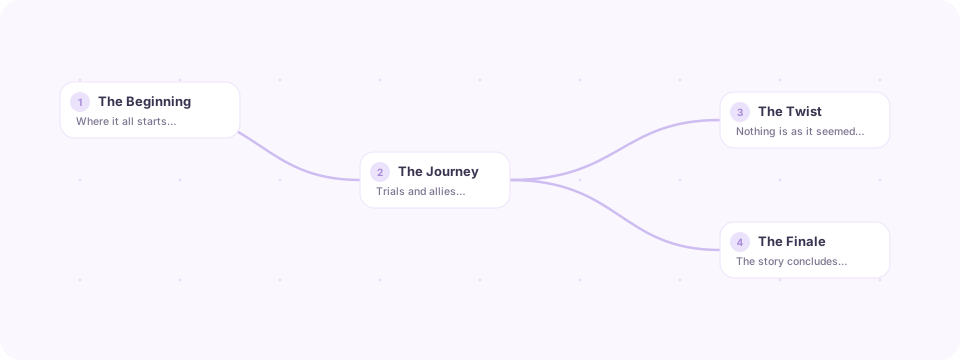
Most summaries dump an entire plot into one wall of text. Storyteller instead turns a story into a map you can walk through:
It's a polished, minimalist desktop app with pastel theming. No account and no key are needed: AI is an optional engine you can switch on at any time, with your own OpenAI key or a free local model.
Pick one from the engine button in the top bar. All three use the open sources for posters, cast, franchise links and images.
| Engine | Needs | What happens |
|---|---|---|
| 📚 Sources (default) | nothing | The plot is scraped from Wikipedia (your language first, English as fallback), Fandom wikis and TVMaze/AniList, then split into chapters locally: by the article's own sub-headings when it has them, otherwise into balanced chunks titled by the names that are distinctive to each (e.g. "Mann & KIPP"). Q&A is a local BM25 search over the story text. |
| 🧩 Sources + AI | key or local model | The scraped plot is handed to the model as numbered source passages. It restructures and translates real plot text instead of recalling it, and each chapter is narrated from the passages it cites, so far fewer events are invented. |
| ✨ AI only | key or local model | The model tells the story from its own knowledge. Useful for obscure works with no wiki plot. |
Even in Sources mode you can press Retell with AI on a single chapter, and questions switch to AI answers when an AI engine is selected. If the AI fails (quota, no connection), questions fall back to the local search instead of showing an error.
| Feature | Description | |
|---|---|---|
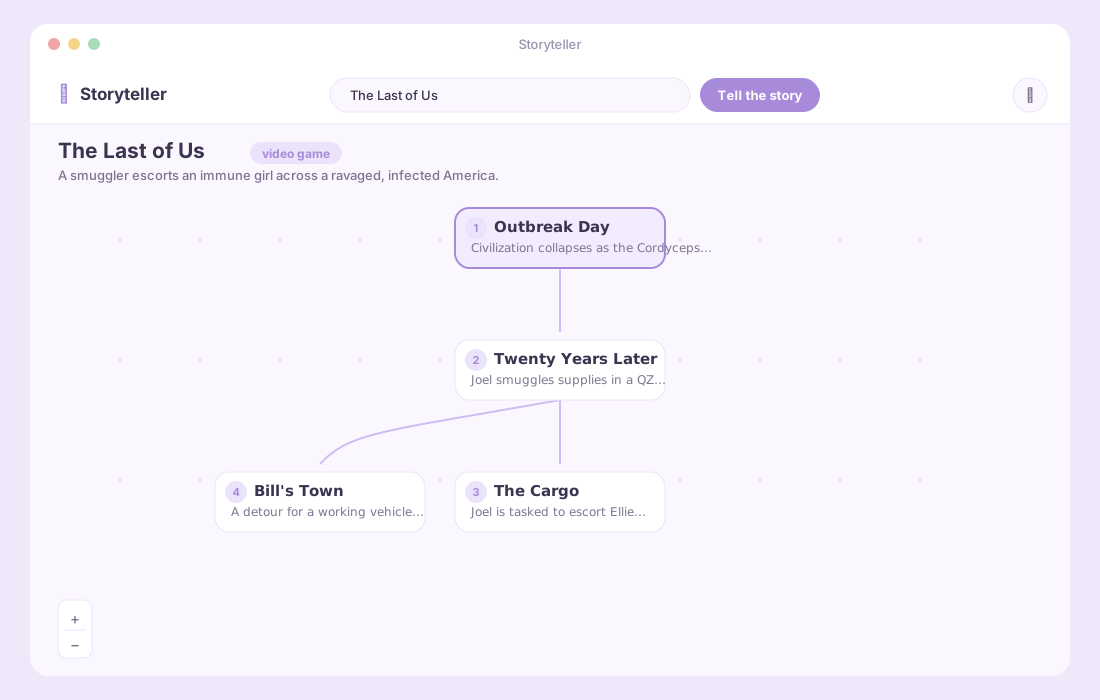
| 🌳 | Story as a map | Any work's full plot as an ordered, clickable chapter graph. Linear stories use a serpentine layout so 15 chapters fit one screen; branching ones use a tidy tree. Mini-map, zoom and auto-centering on the open chapter. |
| 🔎 | Smart search | Search-as-you-type over Wikipedia with covers and descriptions, typo correction ("Hollow Knigt"), creative works ranked above look-alike pages, and an English fallback. |
| 📺 | Series and anime | Seasons with every episode summary and still (TVMaze). Seasons in your language's Wikipedia get their episode lists attached; 60-episode anime seasons are split into readable blocks. |
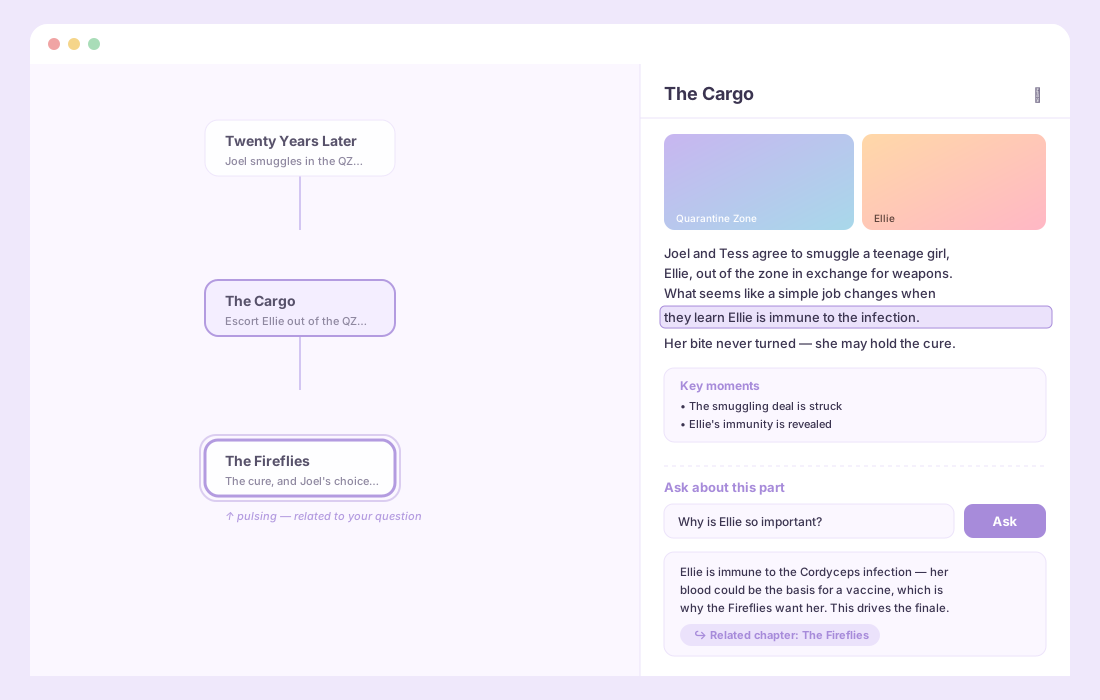
| 💬 | Ask inside any chapter | Answers highlight the exact passage, link to the related chapter and list other chapters that mention it. Works offline. |
| 📖 | Reader mode | The whole story as one continuous text with a table of contents; chapters are marked read as you scroll. |
| 👥 | Characters | Cast with photos and performers (AniList, TVMaze, Wikidata + Wikipedia), ranked by how often the story mentions them. One click shows the chapters they appear in. |
| ℹ️ | About the work | Year, creators, genres, score, prequels / sequels / adaptations you can open directly, other matches for ambiguous titles, and a switch to rebuild the chapters from another plot source. |
| 📚 | Library and progress | Every story is saved locally with reading progress, favorites and the last chapter. AI stories reopen without spending tokens. |
| 🙈 | Spoiler shield | Blurs the summaries of chapters you haven't read yet. |
| 🔍 | Find in story | Filter the map and the reader by any word or character name. |
| 🔊 | Read aloud | Listen to a chapter with your system voices (offline). |
| 📤 | Export and import | Markdown, PDF, or a Storyteller file you can share and import back. |
| 🖼️ | Story images | Fandom screenshots of the actual scenes, plus Wikipedia/Commons images that must name what was searched for. Click to enlarge. |
| 🎨 | Seven themes + system | Lavender, Mint, Peach, Sky, Rose, and the dark Dusk and Night — or follow the OS. Sans or serif reading font, adjustable text size. |
| 🌐 | Seven interface languages | Starts in English; switch to Português (Brasil), Español, Français, Deutsch, Italiano or 日本語 on the welcome screen or in Settings. Stories follow the interface language unless you pick another one. |
| 🤖 | Any OpenAI-compatible model | OpenAI, or a local server such as Ollama or LM Studio (any /v1 endpoint). Reasoning models (o-series, gpt-5) are supported. |
| ⌨️ | Keyboard first | Ctrl K or / to search, ← → (or J K) between chapters, Esc to close. |
| 🔐 | Local-first and private | Your key is encrypted by the OS and never reaches the UI process. Source lookups are cached for a week, so saved stories open offline. |
The screens below are rendered mockups of the actual UI.

sequenceDiagram
    actor User
    participant UI as Renderer (React)
    participant Main as Main process
    participant Src as Wikipedia · Wikidata · Fandom · TVMaze · AniList
    participant AI as AI (optional)

    User->>UI: Type a title (suggestions from Wikipedia)
    UI->>Main: buildOutline(query)
    Main->>Src: Resolve the work (Wikidata id), fetch plot, cast, links
    Src-->>Main: Plot sections, episodes, characters, metadata
    alt Sources engine
        Main->>Main: Split the plot into chapters, title them, attach episodes and images
    else Sources + AI
        Main->>AI: Restructure these numbered source passages into chapters
        AI-->>Main: Chapters citing the passages they use
    else AI only
        Main->>AI: Reconstruct the story from memory
    end
    Main-->>UI: Outline (+ poster, cast, related works)

    User->>UI: Open a chapter
    UI->>Main: buildNode(outline, id)
    Main-->>UI: Text, key moments, images, episodes

    User->>UI: Ask a question
    UI->>Main: ask(outline, id, chapter texts, question)
    Main->>Main: BM25 search over every sentence of the story
    opt AI engine selected
        Main->>AI: Answer using these passages as evidence
    end
    Main-->>UI: Answer, passage to highlight, related chapters
Why the Wikidata id matters. A title like Dune is ambiguous; the Wikidata item is not. Once it's known, Storyteller gets the exact article in every language and exact TVMaze, AniList, IMDb and Fandom ids, so later lookups never guess.
Why a tree (and not a flat list)? Stories rarely move in a perfectly straight line. Outlines are normalized into a valid tree: unique ids, one root, and a parent always placed before its child, which rules out cycles and dangling links even when a model returns a malformed graph.
Get the file for your system from the Releases page:
| Platform | File | First launch |
|---|---|---|
| Windows 10/11 | Storyteller-x.y.z-windows-setup.exe | SmartScreen may warn (unsigned build) → More info → Run anyway. |
| macOS Apple Silicon / Intel | Storyteller-x.y.z-mac-arm64.dmg / -mac-x64.dmg | Drag to Applications, then right-click → Open. If it still refuses: xattr -cr /Applications/Storyteller.app. |
| Linux | Storyteller-x.y.z-linux-x86_64.AppImage or -linux-amd64.deb | chmod +x the AppImage, or sudo apt install ./Storyteller-*.deb. |
| Android 7.0+ | Storyteller-x.y.z-android.apk | Allow installing from your browser / file manager when asked. |
Then pick Without AI to start right away, or With AI to connect an OpenAI key or a local model.
Prerequisites: Node.js 22+ and npm. For Android, also JDK 21 and the Android SDK (Android Studio installs both).
git clone https://github.com/Ernani1234/storyteller.git
cd storyteller
npm install

npm run dev            # desktop app with hot reload
npm run dist           # installer for the system you're on → release/
npm run android:apk    # Android APK → release/
The same React UI runs everywhere. On desktop it talks to Electron's main process; on Android (and in a browser) the core runs inside the page through Capacitor, with the library in IndexedDB.
| Script | What it does |
|---|---|
npm run dev | Launch the desktop app with hot reloading. |
npm run typecheck | Type-check main, core, preload and renderer. |
npm run build | Type-check, then bundle main / preload / renderer. |
npm run icon | Rasterize build/icon.svg → icon.ico + icon.png. |
npm run icon:android | Regenerate Android launcher icons and splash screens. |
npm run dist | Installer for the current OS (dist:win, dist:mac, dist:linux to pick one). |
npm run dist:dir | Unpacked app folder, no installer. |
npm run build:mobile | Build the UI for Android / browsers into out/mobile. |
npm run preview:mobile | Serve that build locally (try it in a phone-sized window). |
npm run android:apk | Build the Android release APK (android:apk:debug for a debug one). |
npm run android:open | Open the Android project in Android Studio. |
macOS builds need a Mac and Linux builds need Linux; the release workflow builds all four platforms on GitHub Actions.
Push a version tag and GitHub Actions builds Windows, macOS, Linux and Android and attaches everything to a new release:
npm version 2.1.0   # bumps package.json (Android reads its version from there)
git push --follow-tags
Signed Android updates (recommended). Without a key, the APK is signed with a throwaway debug key, so each release has to be uninstalled before installing the next. Create one release key and add it as repository secrets once:
keytool -genkeypair -v -keystore storyteller-release.jks -alias storyteller \
  -keyalg RSA -keysize 2048 -validity 10000
base64 -w0 storyteller-release.jks   # → secret ANDROID_KEYSTORE_BASE64
Also add ANDROID_KEYSTORE_PASSWORD, ANDROID_KEY_ALIAS (storyteller) and ANDROID_KEY_PASSWORD. Keep the .jks file safe and out of the repository: losing it means users must reinstall.
Everything lives in Settings (the sliders icon, top-right):
http://localhost:11434/v1 for Ollama), model with List my models, and Test connection.On desktop the main process owns the API key and every network call; the renderer never sees the key and talks to main only through a typed, context-isolated, sandboxed bridge. On Android the same core runs inside the app's WebView behind the same bridge interface, with requests going through Capacitor's native HTTP.
graph TD
    subgraph Renderer["🖥️ Renderer — React + reactflow"]
        A[App.tsx] --> T["StoryTree · ReaderView"]
        A --> P["NodePanel · Q&A"]
        A --> C["CharactersView · InfoView"]
        A --> H["Home · library"]
        A --> S["SettingsModal · themes · i18n"]
    end

    subgraph Bridge["🔒 Preload — sandboxed IPC"]
        B[window.storyteller]
    end

    subgraph Mainp["⚙️ Main process — Node"]
        E[engine.ts] --> SC[scraper.ts]
        E --> AIm[ai.ts]
        E --> Q[qa.ts]
        SC --> SRC["sources/ — wikipedia · wikidata · fandom · tvmaze · anilist"]
        SRC --> HT["http.ts · cache"]
        L["library.ts"]
        X["export.ts"]
        ST["store.ts · safeStorage"]
    end

    Renderer <--> Bridge
    Bridge <--> Mainp
    AIm -->|chat completions| OpenAI[(OpenAI / local model)]
    HT --> Web[(Open sources)]
    L --> Disk[(Local app data)]
storyteller/
├─ build/icon.svg               # source app icon → rasterized to .ico/.png
├─ docs/assets/                 # README artwork
├─ scripts/generate-icon.mjs    # SVG → multi-size .ico
├─ src/
│  ├─ core/                     # runs on every platform (no Node or Electron APIs)
│  │  ├─ engine.ts              #   picks Sources / Sources + AI / AI only
│  │  ├─ scraper.ts             #   sources → chapters (no AI)
│  │  ├─ ai.ts                  #   OpenAI-compatible calls, grounding, JSON repair
│  │  ├─ qa.ts                  #   offline answers (BM25 over sentences)
│  │  ├─ library.ts             #   saved stories + progress
│  │  ├─ exporting.ts           #   Markdown / HTML / JSON, import validation
│  │  ├─ http.ts · images.ts    #   fetch with cache and retry, chapter images
│  │  ├─ config.ts              #   what each host plugs in (settings, storage)
│  │  └─ sources/               #   wikipedia, wikidata, fandom, tvmaze, anilist, html
│  ├─ main/                     # Electron host: window, IPC, files, OS-encrypted key, PDF
│  ├─ preload/index.ts          # typed contextBridge API (desktop)
│  ├─ renderer/src/
│  │  ├─ App.tsx
│  │  ├─ components/            #   StoryTree, NodePanel, ReaderView, CharactersView, InfoView, Home…
│  │  ├─ platform/              #   Android / browser host: IndexedDB, share sheet, back button
│  │  ├─ lib/                   #   layout (tree + serpentine), tts, scroll
│  │  ├─ i18n/                  #   en (keys) + pt, es, fr, de, it, ja
│  │  └─ themes.ts
│  └─ shared/                   # types, the bridge API, text and tree utilities
├─ android/                     # Capacitor Android project
├─ capacitor.config.json
├─ vite.mobile.config.ts        # UI build for Android / browsers
├─ .github/workflows/release.yml
└─ electron-builder.yml
| Layer | Tech |
|---|---|
| Desktop shell | Electron 31 + electron-vite |
| UI | React 18, reactflow for the map |
| Language | TypeScript 5 (strict) |
| Sources | Wikipedia (TextExtracts), Wikidata, Fandom (MediaWiki API), TVMaze, AniList — no keys required |
| AI (optional) | OpenAI SDK against OpenAI or any compatible server |
| Persistence | electron-store + Electron safeStorage, JSON library files |
| Packaging | electron-builder (NSIS), sharp for icons |
sk-…a1b2.http(s).Contributions are welcome! Open an issue to discuss a change, or send a PR. Please run npm run build (type-check + bundle) before submitting.
MIT © Ernani Neto
A software that can tell you any story of any kind of media(movies, books, animes, games,...)
TypeScript
11
7 commits
updated Oct 19, 2026
Type the name of any work — a game, film, anime, series, book or comic — and Storyteller rebuilds its entire story as an interactive, clickable map of chapters. It works with no AI at all, straight from open sources, and can use AI as an optional upgrade.
Features · Engines · Demo · How it works · Install · Architecture · Roadmap
Most summaries dump an entire plot into one wall of text. Storyteller instead turns a story into a map you can walk through:
It's a polished, minimalist desktop app with pastel theming. No account and no key are needed: AI is an optional engine you can switch on at any time, with your own OpenAI key or a free local model.
Pick one from the engine button in the top bar. All three use the open sources for posters, cast, franchise links and images.
| Engine | Needs | What happens |
|---|---|---|
| 📚 Sources (default) | nothing | The plot is scraped from Wikipedia (your language first, English as fallback), Fandom wikis and TVMaze/AniList, then split into chapters locally: by the article's own sub-headings when it has them, otherwise into balanced chunks titled by the names that are distinctive to each (e.g. "Mann & KIPP"). Q&A is a local BM25 search over the story text. |
| 🧩 Sources + AI | key or local model | The scraped plot is handed to the model as numbered source passages. It restructures and translates real plot text instead of recalling it, and each chapter is narrated from the passages it cites, so far fewer events are invented. |
| ✨ AI only | key or local model | The model tells the story from its own knowledge. Useful for obscure works with no wiki plot. |
Even in Sources mode you can press Retell with AI on a single chapter, and questions switch to AI answers when an AI engine is selected. If the AI fails (quota, no connection), questions fall back to the local search instead of showing an error.
| Feature | Description | |
|---|---|---|
| 🌳 | Story as a map | Any work's full plot as an ordered, clickable chapter graph. Linear stories use a serpentine layout so 15 chapters fit one screen; branching ones use a tidy tree. Mini-map, zoom and auto-centering on the open chapter. |
| 🔎 | Smart search | Search-as-you-type over Wikipedia with covers and descriptions, typo correction ("Hollow Knigt"), creative works ranked above look-alike pages, and an English fallback. |
| 📺 | Series and anime | Seasons with every episode summary and still (TVMaze). Seasons in your language's Wikipedia get their episode lists attached; 60-episode anime seasons are split into readable blocks. |
| 💬 | Ask inside any chapter | Answers highlight the exact passage, link to the related chapter and list other chapters that mention it. Works offline. |
| 📖 | Reader mode | The whole story as one continuous text with a table of contents; chapters are marked read as you scroll. |
| 👥 | Characters | Cast with photos and performers (AniList, TVMaze, Wikidata + Wikipedia), ranked by how often the story mentions them. One click shows the chapters they appear in. |
| ℹ️ | About the work | Year, creators, genres, score, prequels / sequels / adaptations you can open directly, other matches for ambiguous titles, and a switch to rebuild the chapters from another plot source. |
| 📚 | Library and progress | Every story is saved locally with reading progress, favorites and the last chapter. AI stories reopen without spending tokens. |
| 🙈 | Spoiler shield | Blurs the summaries of chapters you haven't read yet. |
| 🔍 | Find in story | Filter the map and the reader by any word or character name. |
| 🔊 | Read aloud | Listen to a chapter with your system voices (offline). |
| 📤 | Export and import | Markdown, PDF, or a Storyteller file you can share and import back. |
| 🖼️ | Story images | Fandom screenshots of the actual scenes, plus Wikipedia/Commons images that must name what was searched for. Click to enlarge. |
| 🎨 | Seven themes + system | Lavender, Mint, Peach, Sky, Rose, and the dark Dusk and Night — or follow the OS. Sans or serif reading font, adjustable text size. |
| 🌐 | Seven interface languages | Starts in English; switch to Português (Brasil), Español, Français, Deutsch, Italiano or 日本語 on the welcome screen or in Settings. Stories follow the interface language unless you pick another one. |
| 🤖 | Any OpenAI-compatible model | OpenAI, or a local server such as Ollama or LM Studio (any /v1 endpoint). Reasoning models (o-series, gpt-5) are supported. |
| ⌨️ | Keyboard first | Ctrl K or / to search, ← → (or J K) between chapters, Esc to close. |
| 🔐 | Local-first and private | Your key is encrypted by the OS and never reaches the UI process. Source lookups are cached for a week, so saved stories open offline. |
The screens below are rendered mockups of the actual UI.
sequenceDiagram
    actor User
    participant UI as Renderer (React)
    participant Main as Main process
    participant Src as Wikipedia · Wikidata · Fandom · TVMaze · AniList
    participant AI as AI (optional)

    User->>UI: Type a title (suggestions from Wikipedia)
    UI->>Main: buildOutline(query)
    Main->>Src: Resolve the work (Wikidata id), fetch plot, cast, links
    Src-->>Main: Plot sections, episodes, characters, metadata
    alt Sources engine
        Main->>Main: Split the plot into chapters, title them, attach episodes and images
    else Sources + AI
        Main->>AI: Restructure these numbered source passages into chapters
        AI-->>Main: Chapters citing the passages they use
    else AI only
        Main->>AI: Reconstruct the story from memory
    end
    Main-->>UI: Outline (+ poster, cast, related works)

    User->>UI: Open a chapter
    UI->>Main: buildNode(outline, id)
    Main-->>UI: Text, key moments, images, episodes

    User->>UI: Ask a question
    UI->>Main: ask(outline, id, chapter texts, question)
    Main->>Main: BM25 search over every sentence of the story
    opt AI engine selected
        Main->>AI: Answer using these passages as evidence
    end
    Main-->>UI: Answer, passage to highlight, related chapters
Why the Wikidata id matters. A title like Dune is ambiguous; the Wikidata item is not. Once it's known, Storyteller gets the exact article in every language and exact TVMaze, AniList, IMDb and Fandom ids, so later lookups never guess.
Why a tree (and not a flat list)? Stories rarely move in a perfectly straight line. Outlines are normalized into a valid tree: unique ids, one root, and a parent always placed before its child, which rules out cycles and dangling links even when a model returns a malformed graph.
Get the file for your system from the Releases page:
| Platform | File | First launch |
|---|---|---|
| Windows 10/11 | Storyteller-x.y.z-windows-setup.exe | SmartScreen may warn (unsigned build) → More info → Run anyway. |
| macOS Apple Silicon / Intel | Storyteller-x.y.z-mac-arm64.dmg / -mac-x64.dmg | Drag to Applications, then right-click → Open. If it still refuses: xattr -cr /Applications/Storyteller.app. |
| Linux | Storyteller-x.y.z-linux-x86_64.AppImage or -linux-amd64.deb | chmod +x the AppImage, or sudo apt install ./Storyteller-*.deb. |
| Android 7.0+ | Storyteller-x.y.z-android.apk | Allow installing from your browser / file manager when asked. |
Then pick Without AI to start right away, or With AI to connect an OpenAI key or a local model.
Prerequisites: Node.js 22+ and npm. For Android, also JDK 21 and the Android SDK (Android Studio installs both).
git clone https://github.com/Ernani1234/storyteller.git
cd storyteller
npm install

npm run dev            # desktop app with hot reload
npm run dist           # installer for the system you're on → release/
npm run android:apk    # Android APK → release/
The same React UI runs everywhere. On desktop it talks to Electron's main process; on Android (and in a browser) the core runs inside the page through Capacitor, with the library in IndexedDB.
| Script | What it does |
|---|---|
npm run dev | Launch the desktop app with hot reloading. |
npm run typecheck | Type-check main, core, preload and renderer. |
npm run build | Type-check, then bundle main / preload / renderer. |
npm run icon | Rasterize build/icon.svg → icon.ico + icon.png. |
npm run icon:android | Regenerate Android launcher icons and splash screens. |
npm run dist | Installer for the current OS (dist:win, dist:mac, dist:linux to pick one). |
npm run dist:dir | Unpacked app folder, no installer. |
npm run build:mobile | Build the UI for Android / browsers into out/mobile. |
npm run preview:mobile | Serve that build locally (try it in a phone-sized window). |
npm run android:apk | Build the Android release APK (android:apk:debug for a debug one). |
npm run android:open | Open the Android project in Android Studio. |
macOS builds need a Mac and Linux builds need Linux; the release workflow builds all four platforms on GitHub Actions.
Push a version tag and GitHub Actions builds Windows, macOS, Linux and Android and attaches everything to a new release:
npm version 2.1.0   # bumps package.json (Android reads its version from there)
git push --follow-tags
Signed Android updates (recommended). Without a key, the APK is signed with a throwaway debug key, so each release has to be uninstalled before installing the next. Create one release key and add it as repository secrets once:
keytool -genkeypair -v -keystore storyteller-release.jks -alias storyteller \
  -keyalg RSA -keysize 2048 -validity 10000
base64 -w0 storyteller-release.jks   # → secret ANDROID_KEYSTORE_BASE64
Also add ANDROID_KEYSTORE_PASSWORD, ANDROID_KEY_ALIAS (storyteller) and ANDROID_KEY_PASSWORD. Keep the .jks file safe and out of the repository: losing it means users must reinstall.
Everything lives in Settings (the sliders icon, top-right):
http://localhost:11434/v1 for Ollama), model with List my models, and Test connection.On desktop the main process owns the API key and every network call; the renderer never sees the key and talks to main only through a typed, context-isolated, sandboxed bridge. On Android the same core runs inside the app's WebView behind the same bridge interface, with requests going through Capacitor's native HTTP.
graph TD
    subgraph Renderer["🖥️ Renderer — React + reactflow"]
        A[App.tsx] --> T["StoryTree · ReaderView"]
        A --> P["NodePanel · Q&A"]
        A --> C["CharactersView · InfoView"]
        A --> H["Home · library"]
        A --> S["SettingsModal · themes · i18n"]
    end

    subgraph Bridge["🔒 Preload — sandboxed IPC"]
        B[window.storyteller]
    end

    subgraph Mainp["⚙️ Main process — Node"]
        E[engine.ts] --> SC[scraper.ts]
        E --> AIm[ai.ts]
        E --> Q[qa.ts]
        SC --> SRC["sources/ — wikipedia · wikidata · fandom · tvmaze · anilist"]
        SRC --> HT["http.ts · cache"]
        L["library.ts"]
        X["export.ts"]
        ST["store.ts · safeStorage"]
    end

    Renderer <--> Bridge
    Bridge <--> Mainp
    AIm -->|chat completions| OpenAI[(OpenAI / local model)]
    HT --> Web[(Open sources)]
    L --> Disk[(Local app data)]
storyteller/
├─ build/icon.svg               # source app icon → rasterized to .ico/.png
├─ docs/assets/                 # README artwork
├─ scripts/generate-icon.mjs    # SVG → multi-size .ico
├─ src/
│  ├─ core/                     # runs on every platform (no Node or Electron APIs)
│  │  ├─ engine.ts              #   picks Sources / Sources + AI / AI only
│  │  ├─ scraper.ts             #   sources → chapters (no AI)
│  │  ├─ ai.ts                  #   OpenAI-compatible calls, grounding, JSON repair
│  │  ├─ qa.ts                  #   offline answers (BM25 over sentences)
│  │  ├─ library.ts             #   saved stories + progress
│  │  ├─ exporting.ts           #   Markdown / HTML / JSON, import validation
│  │  ├─ http.ts · images.ts    #   fetch with cache and retry, chapter images
│  │  ├─ config.ts              #   what each host plugs in (settings, storage)
│  │  └─ sources/               #   wikipedia, wikidata, fandom, tvmaze, anilist, html
│  ├─ main/                     # Electron host: window, IPC, files, OS-encrypted key, PDF
│  ├─ preload/index.ts          # typed contextBridge API (desktop)
│  ├─ renderer/src/
│  │  ├─ App.tsx
│  │  ├─ components/            #   StoryTree, NodePanel, ReaderView, CharactersView, InfoView, Home…
│  │  ├─ platform/              #   Android / browser host: IndexedDB, share sheet, back button
│  │  ├─ lib/                   #   layout (tree + serpentine), tts, scroll
│  │  ├─ i18n/                  #   en (keys) + pt, es, fr, de, it, ja
│  │  └─ themes.ts
│  └─ shared/                   # types, the bridge API, text and tree utilities
├─ android/                     # Capacitor Android project
├─ capacitor.config.json
├─ vite.mobile.config.ts        # UI build for Android / browsers
├─ .github/workflows/release.yml
└─ electron-builder.yml
| Layer | Tech |
|---|---|
| Desktop shell | Electron 31 + electron-vite |
| UI | React 18, reactflow for the map |
| Language | TypeScript 5 (strict) |
| Sources | Wikipedia (TextExtracts), Wikidata, Fandom (MediaWiki API), TVMaze, AniList — no keys required |
| AI (optional) | OpenAI SDK against OpenAI or any compatible server |
| Persistence | electron-store + Electron safeStorage, JSON library files |
| Packaging | electron-builder (NSIS), sharp for icons |
sk-…a1b2.http(s).Contributions are welcome! Open an issue to discuss a change, or send a PR. Please run npm run build (type-check + bundle) before submitting.
MIT © Ernani Neto