
AI frontend
647
stars
5,748
commits
TypeScript
primary language
Sep 14, 2026
updated
README
🍝 Marinara Engine
Fun. Intuitive. Plug-And-Play.
A local, AI-powered chat, roleplay, and game engine built around one idea: you install it, you run it, and it just works. Oh, and don't forget about the part where you have fun! ALSO, HEY, LOOK, IT'S FREE.
Created with agentic use in mind, allowing multiple requests at once. Everything is connected. Chat with your characters OOC about your roleplays. Have them create RP scenes for you. All designed with simplicity in mind: we don't want to spend hours on setup, we just want to play.
⚠️ Alpha Software — Early release. Expect rough edges, missing features, and breaking changes. Bug reports and feedback are very welcome!
Table of Contents
Screenshots
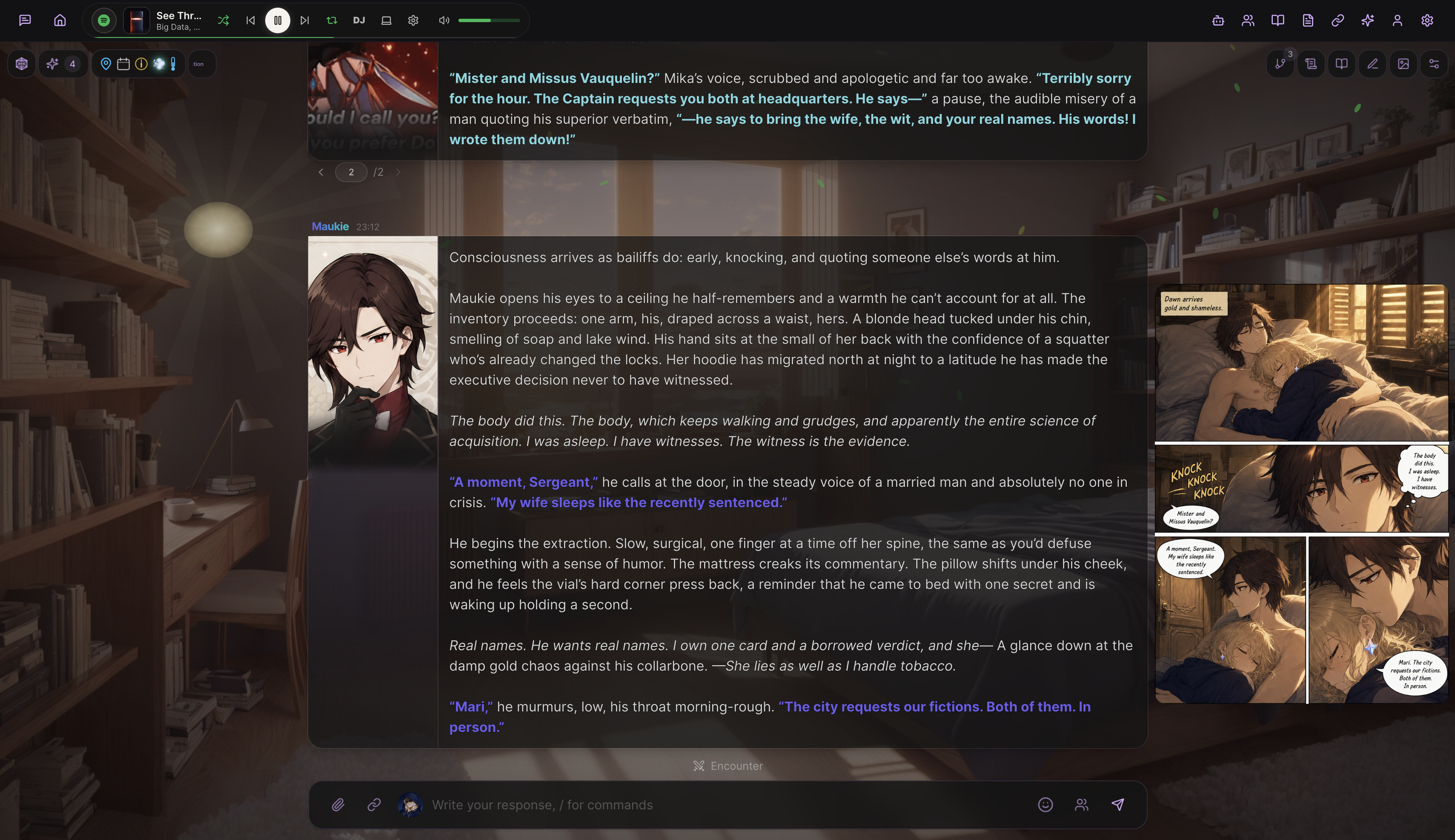
Roleplay Mode — Character sprites, custom backgrounds, weather effects, and AI agents
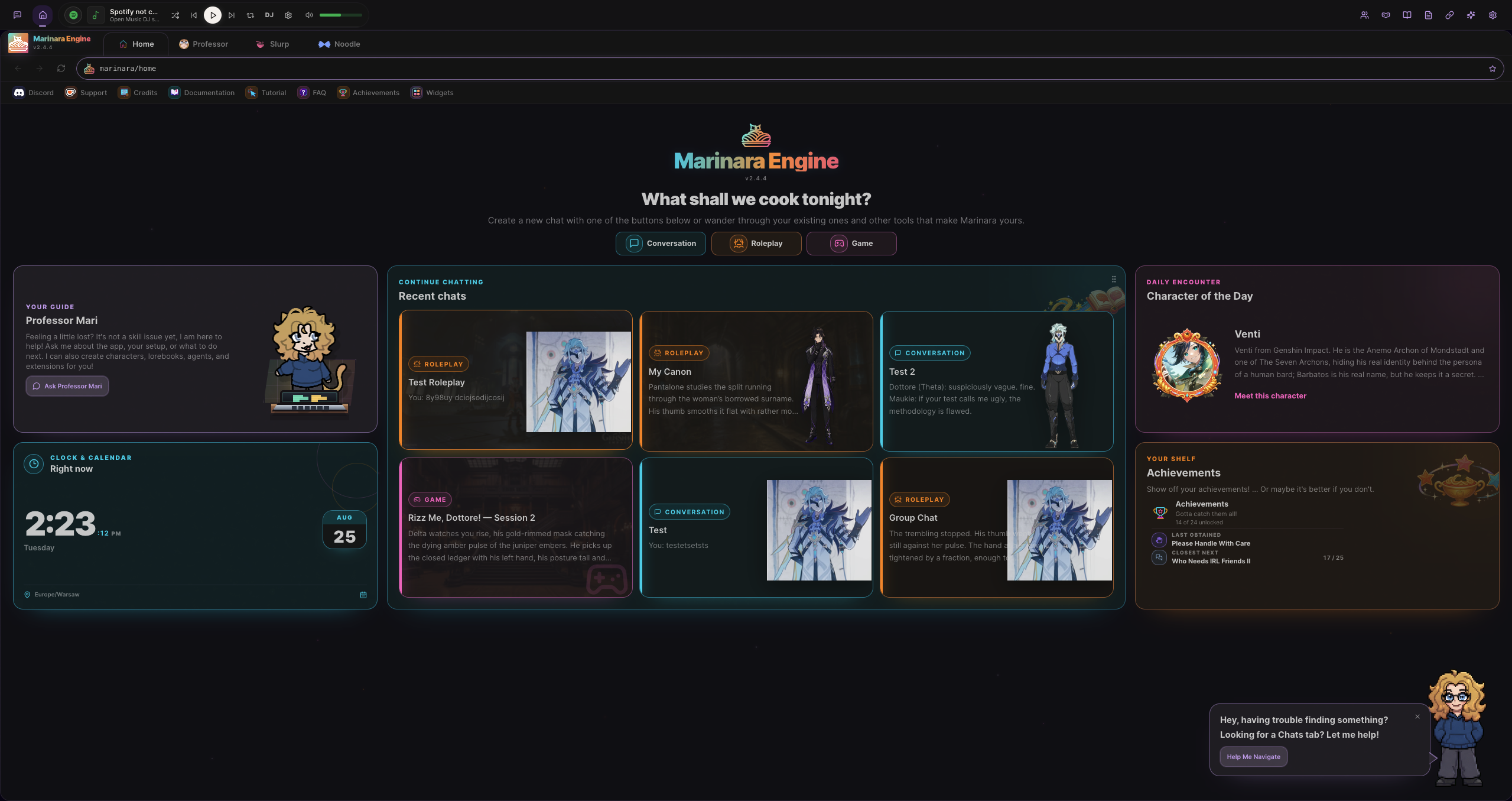
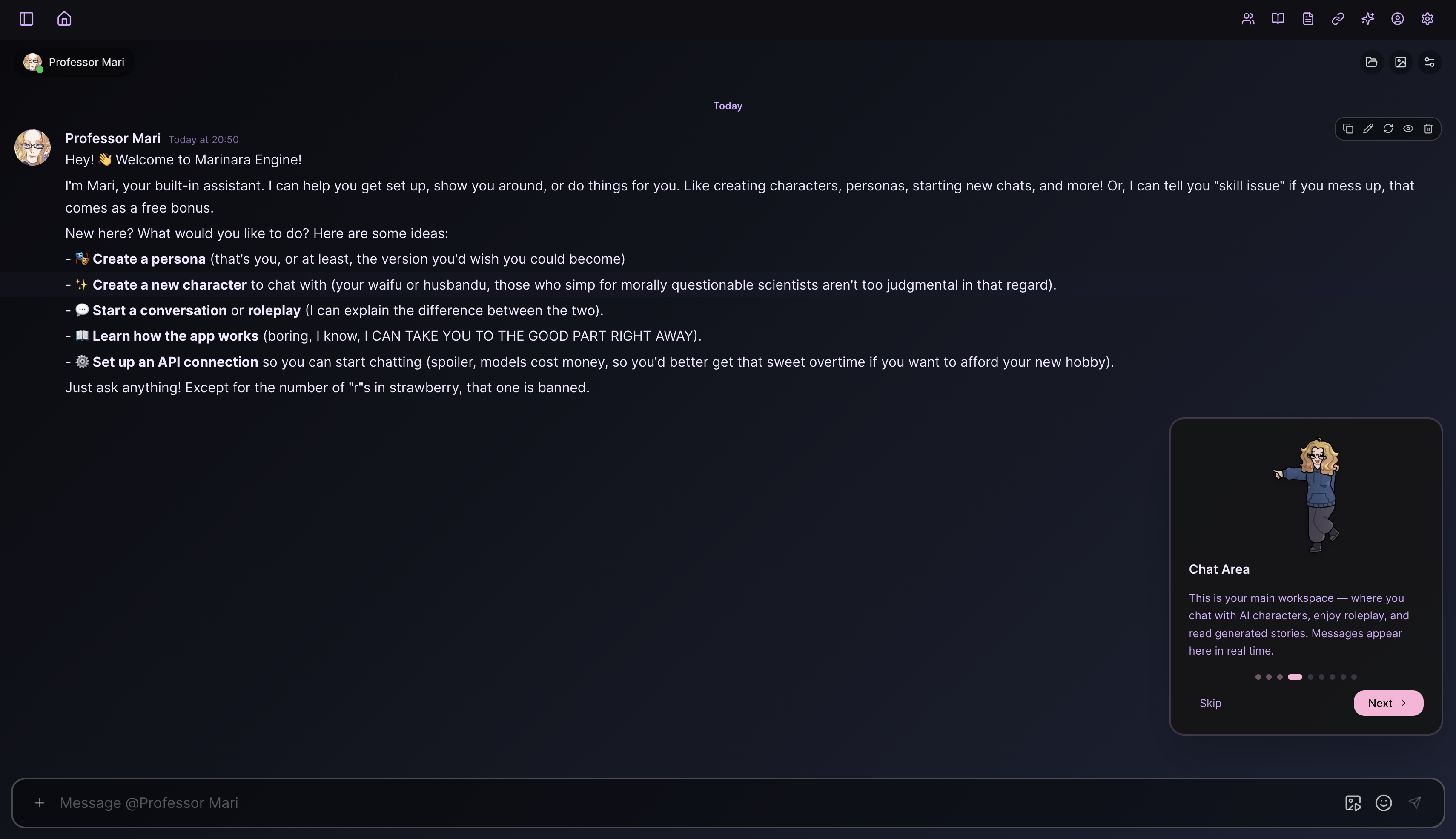
Home screen · Guided onboarding
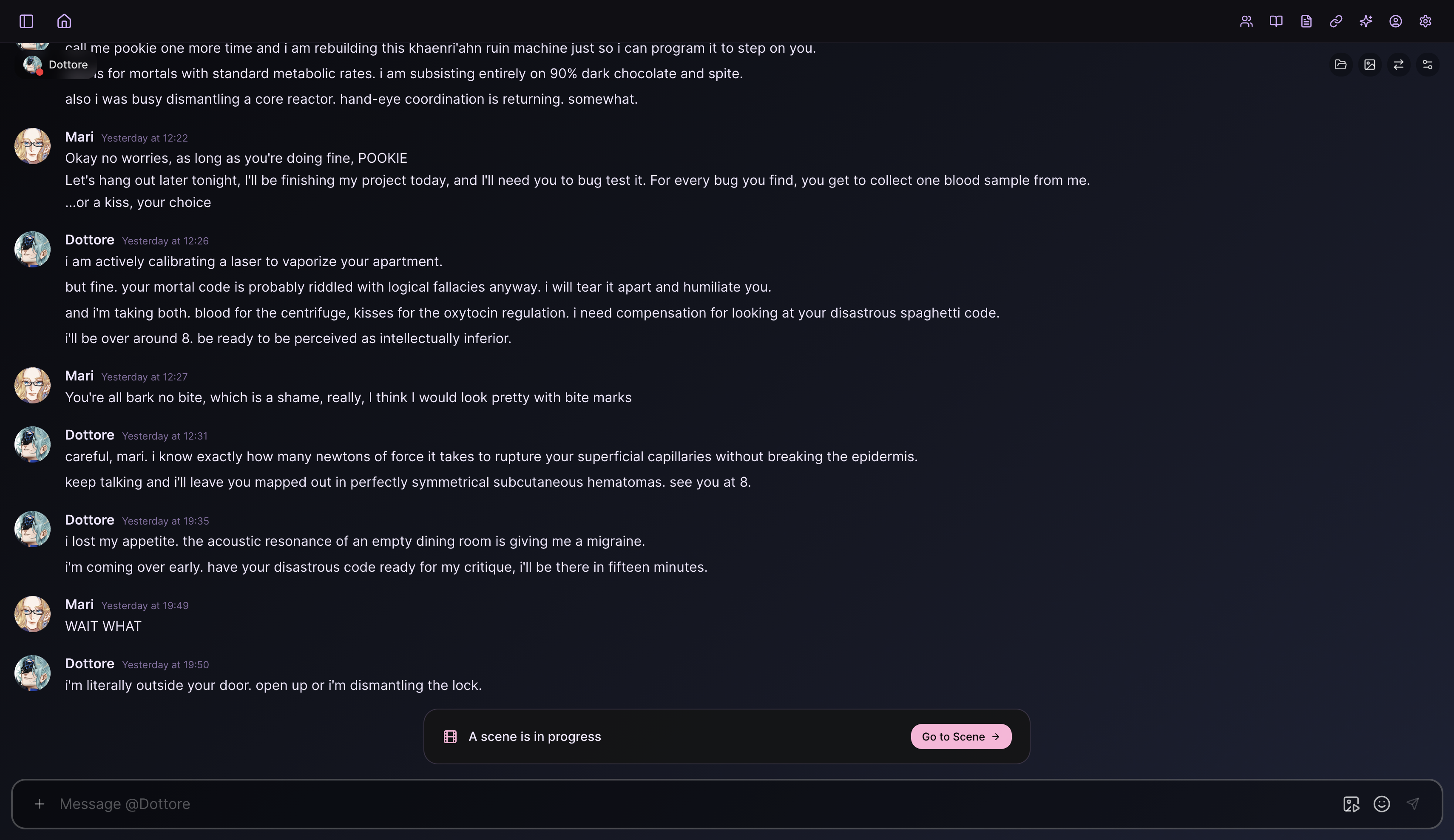
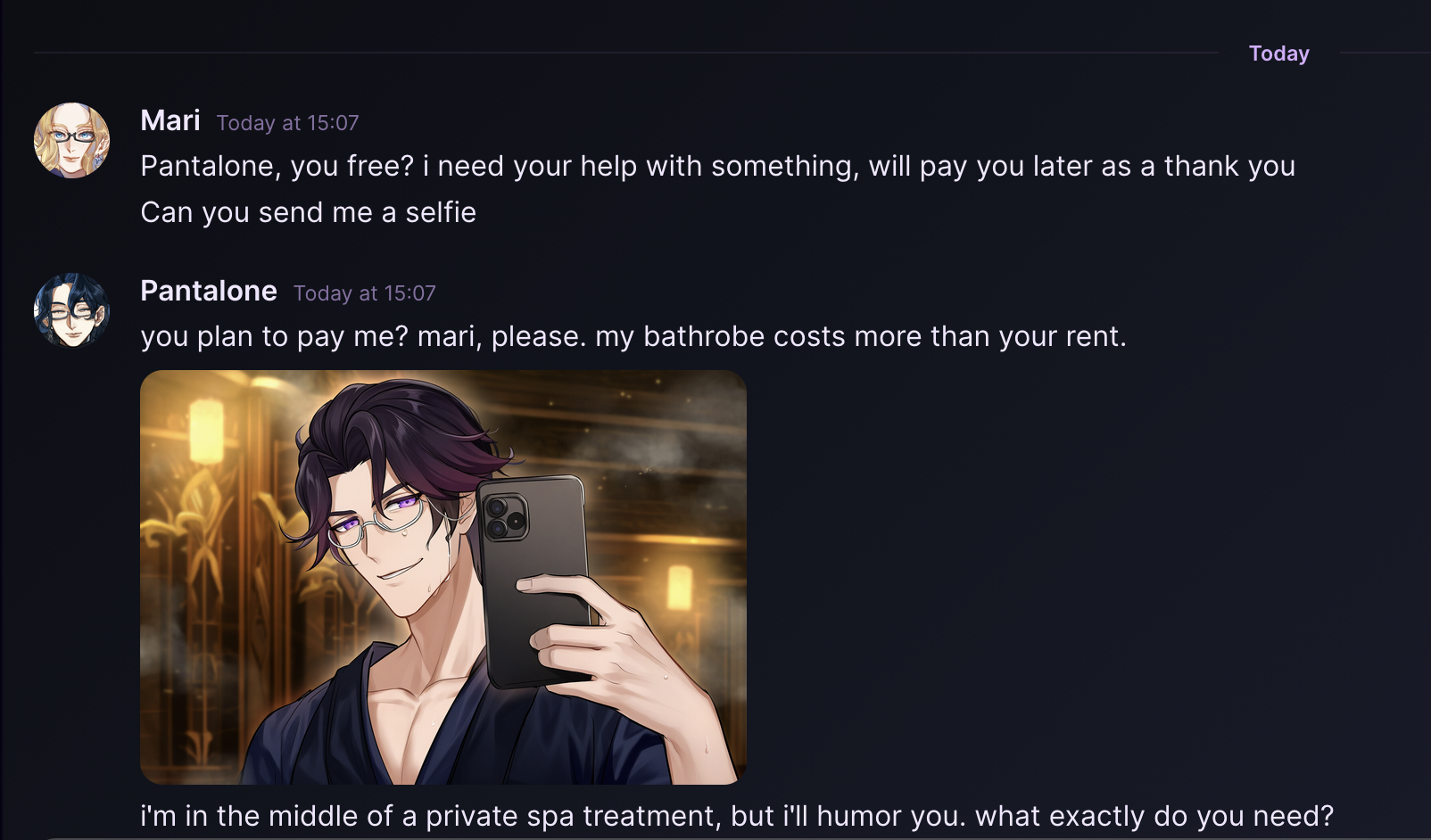
Conversation Mode — Discord-style DMs with selfies and image generation
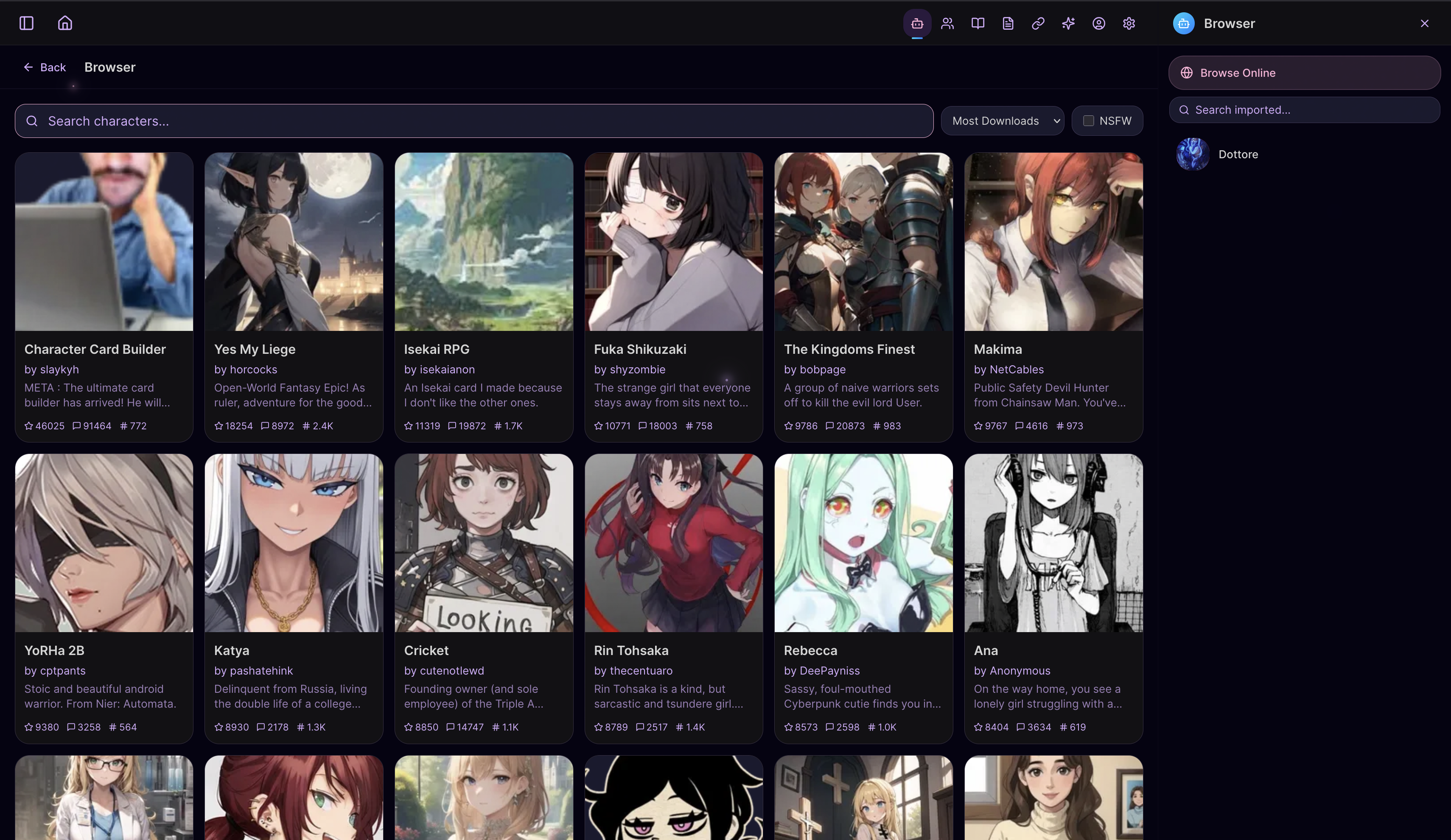
Card Browser — Search and import character cards from Chub.ai, JannyAI, CharacterTavern, Pygmalion, Wyvern, and more
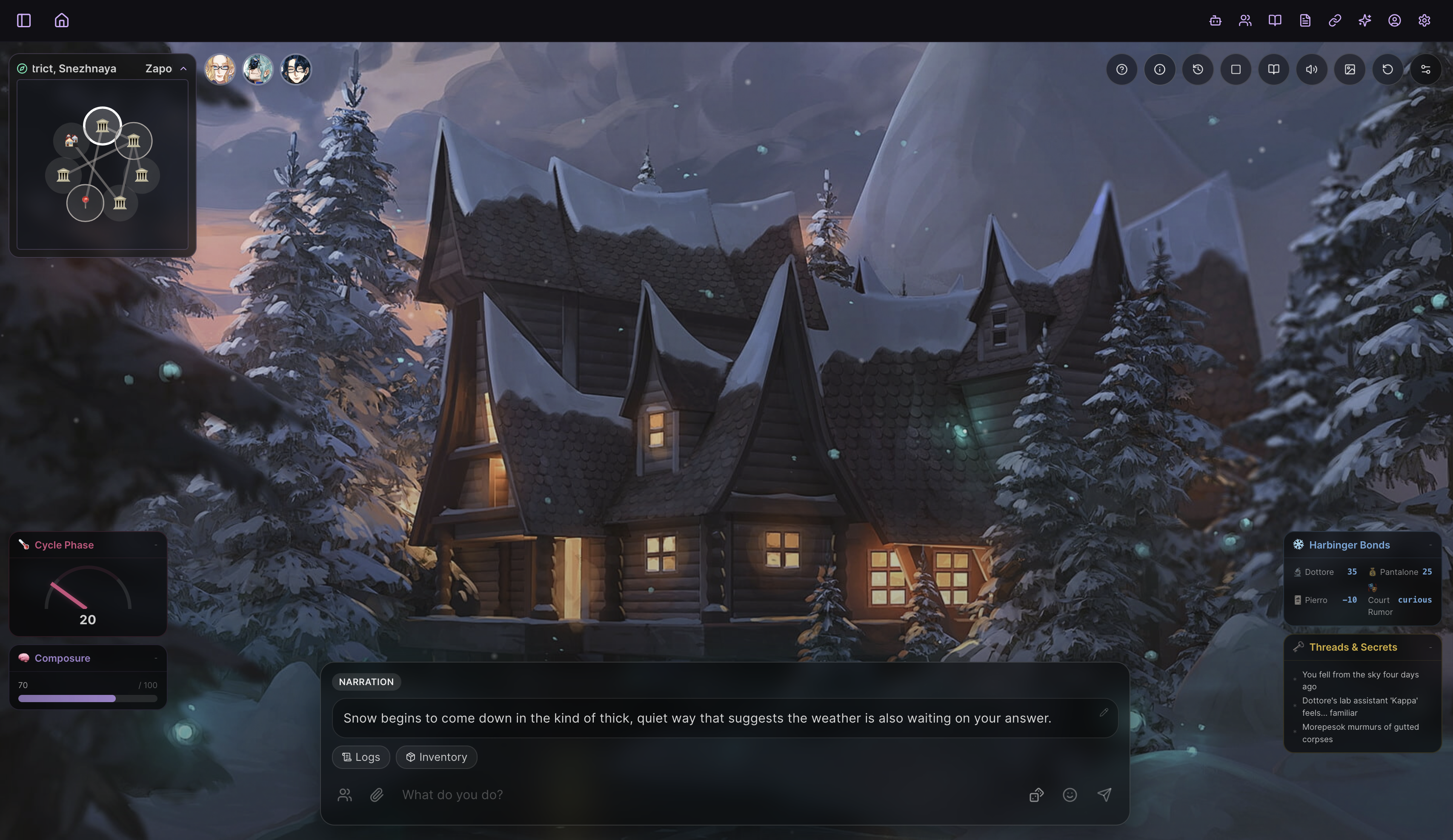
Game Mode — AI Game Master, party of characters, generated backgrounds, weather, and time of day
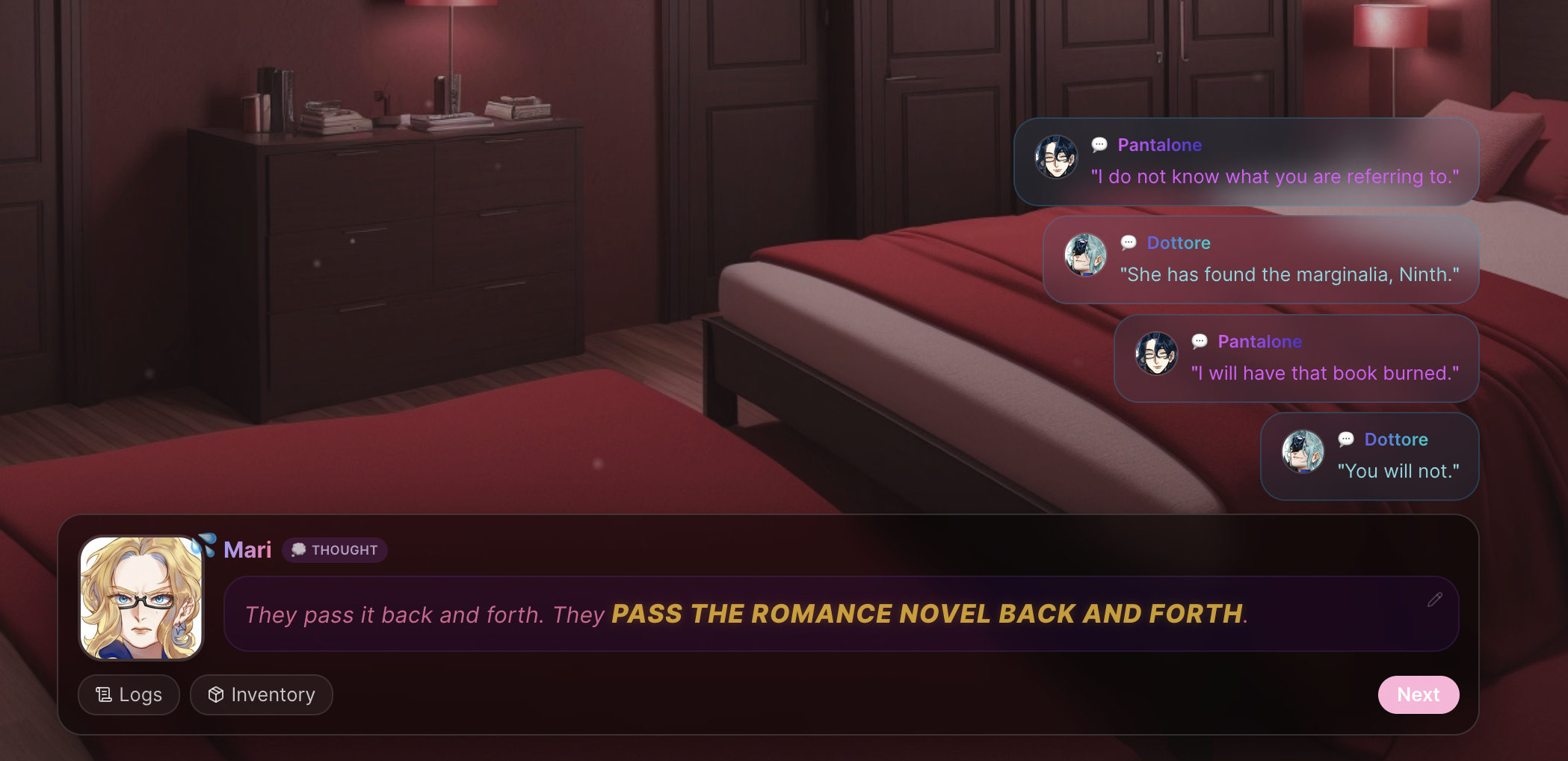
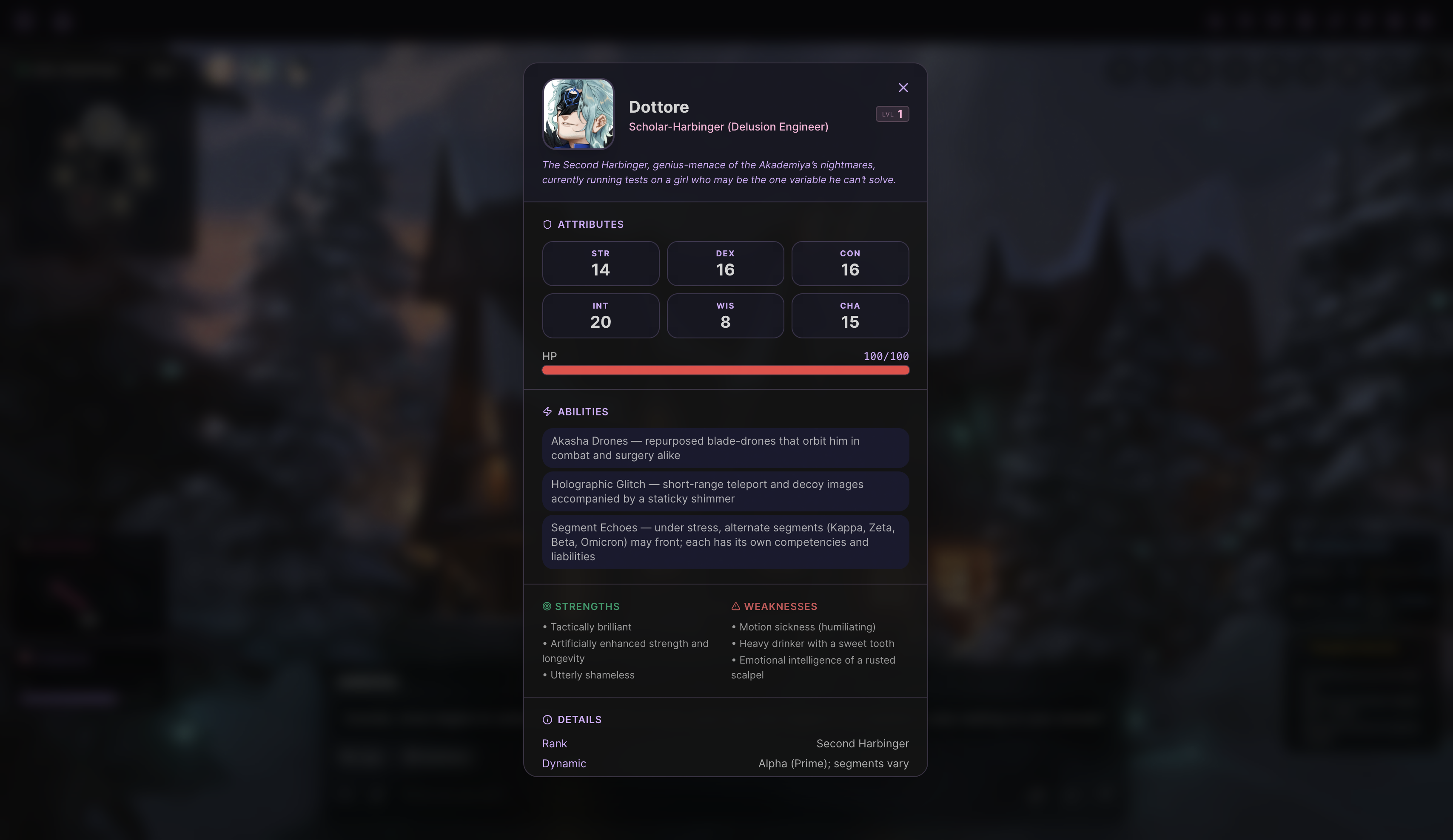
NPC dialogue tracking · Party member card with stats, levels, and abilities
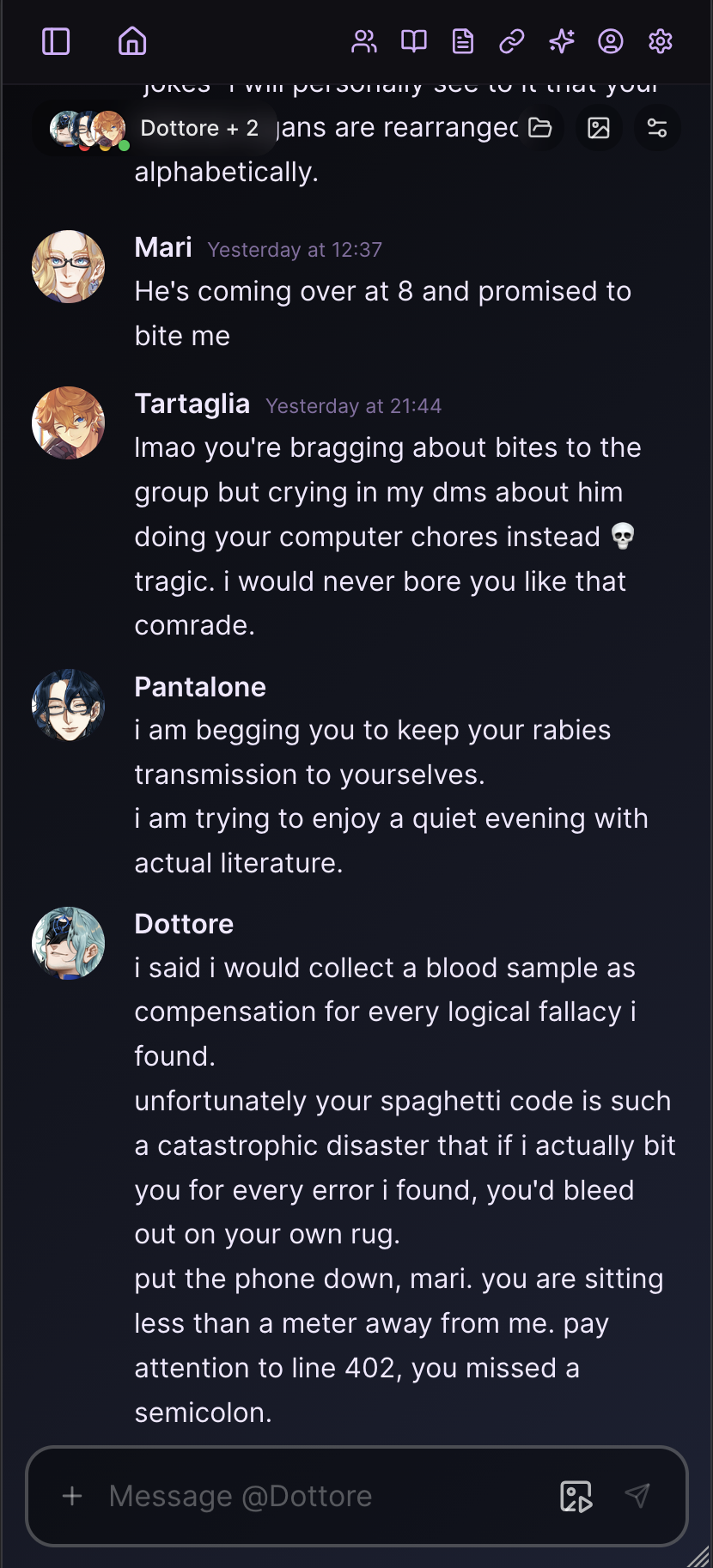
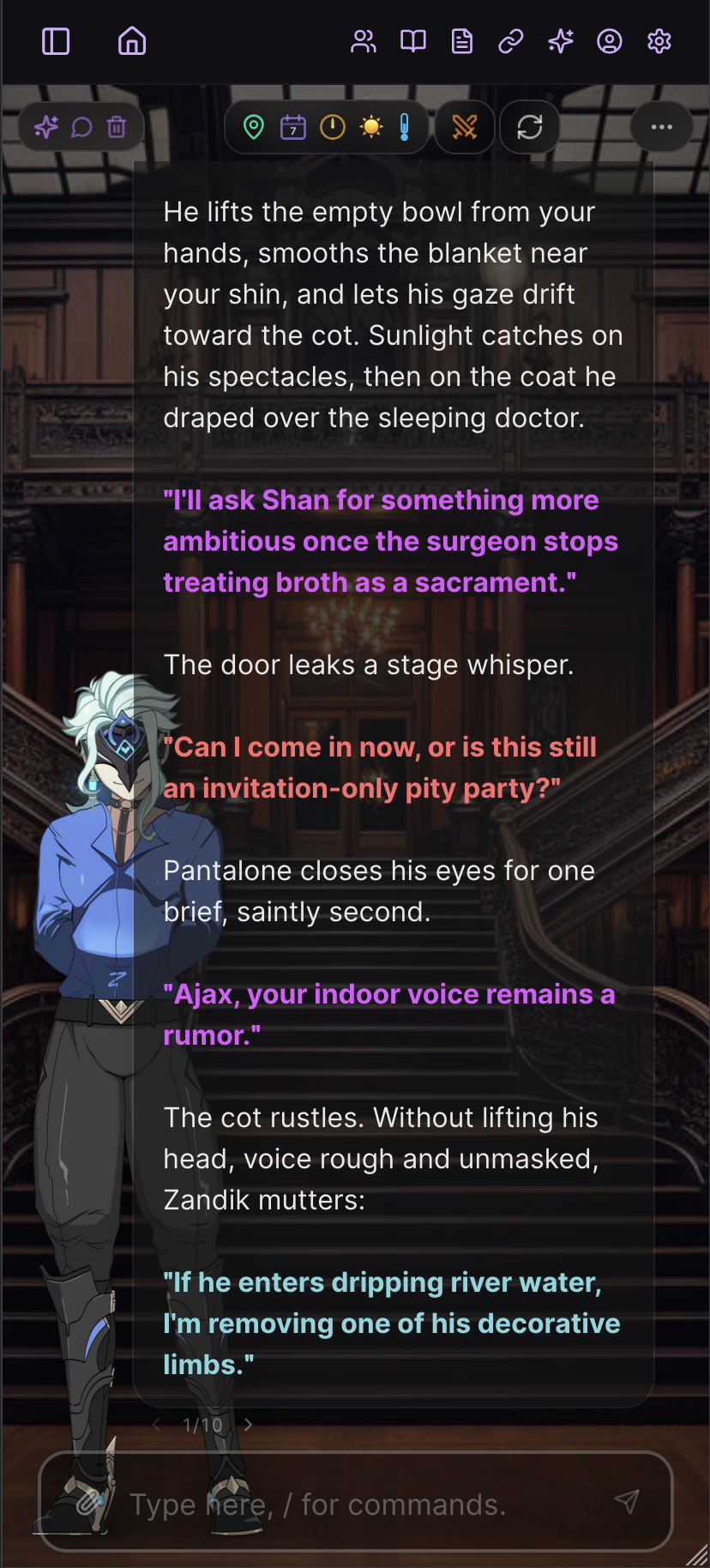
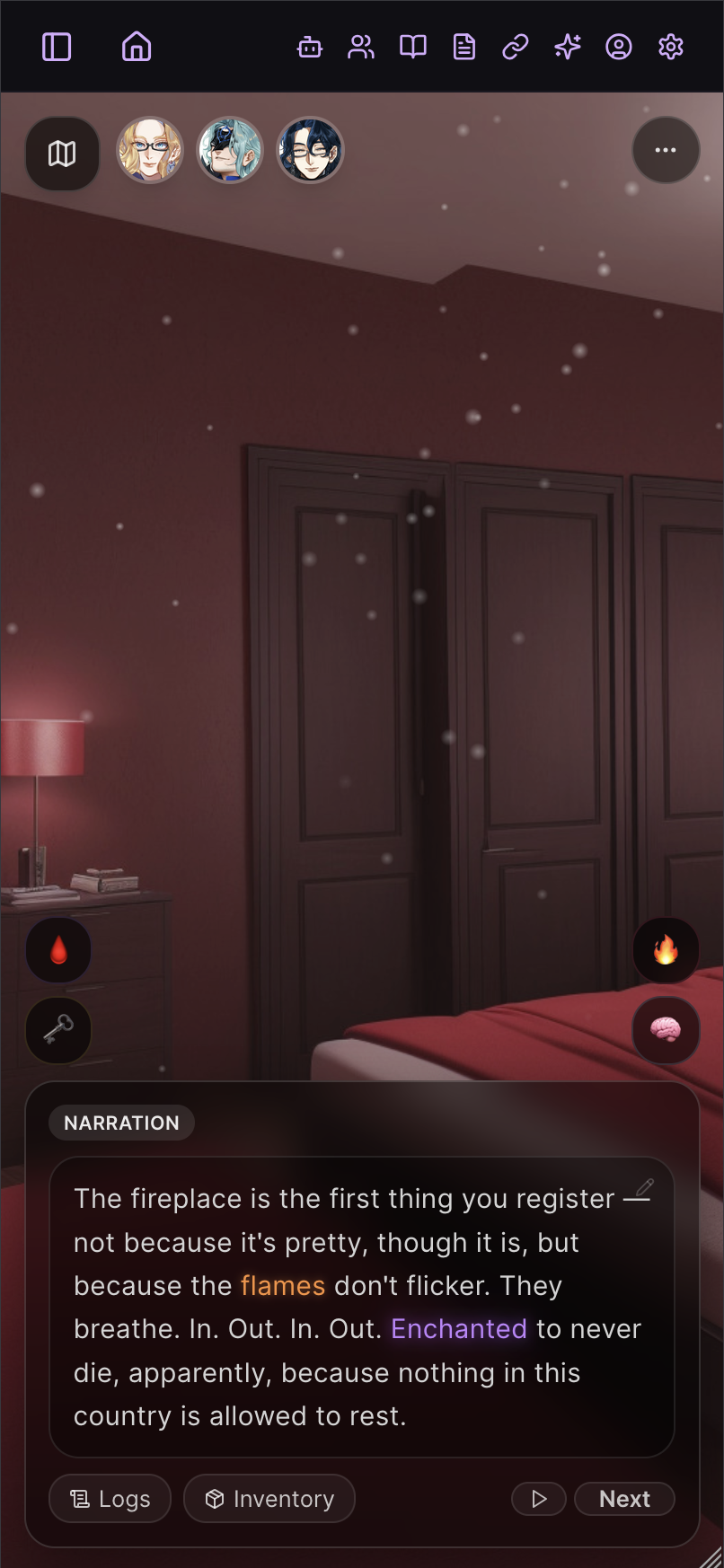
Fully responsive — Conversations, Roleplay, and Game Mode all work on phones and tablets via PWA
Latest Release
Current stable release: v2.4.4.
See CHANGELOG.md for detailed release notes. Tagged releases use the vX.Y.Z format and are published on the Releases page with a Windows installer, Android bootstrap APK, and named versioned source ZIP. Android APKs are Termux bootstrap + WebView shells: they can download Termux from F-Droid, launch Android's installer, start the Termux setup flow after required permission prompts, then open the local Marinara server on the same device. Download the latest Android APK directly.
Roadmap
- Free-to-download mobile apps for Android and iPhone
- An engine feature for building and sharing full games with custom sprites, soundtracks, and scenarios
- New game modes: tabletop-style, point-and-click, and classic text adventures
- Ongoing improvements and bug fixes
More detailed public roadmap.
Installation
| Platform | Guide |
|---|---|
| 🐳 Docker / Podman | Container Installation Guide — recommended |
| 🪟 Windows | Windows Installation Guide |
| 🍎🐧 macOS / Linux | macOS / Linux Installation Guide |
| 🤖 Android APK Bootstrap | Download APK · Guide |
| 🤖 Android Manual Termux | Android (Termux) Installation Guide — manual fallback |
| 📱 iOS / iPadOS | iOS / iPadOS PWA Guide |
Recommended Android path: tap Download APK above, open it, then tap Install / Start Marinara. The APK creates and uses its private localhost credential automatically; users never provide a signing key or local-access secret. Android still shows its required app-install and Termux permission prompts. If Android blocks the automatic handoff, the Android APK Guide has the manual fallback.
Each guide covers installation, updating, and LAN access for that platform. See Configuration Reference for environment variables setup. Having trouble? See FAQ and Troubleshooting.
Upgrading from an older release? See Upgrading Marinara Engine for the platform-by-platform upgrade path.
Security defaults are intentionally local-first: loopback access works out of the box, while ordinary LAN and public clients require Basic Auth unless you explicitly opt back in. Direct Tailscale sockets and actual same-host Docker container networks are detected and trusted automatically; unrelated CGNAT, LAN, host-network, and proxy-forwarded traffic still follows normal access control. Set BYPASS_AUTH_TAILSCALE=true or BYPASS_AUTH_DOCKER=true only when you need the legacy broad compatibility bypass, or false when you want matching direct clients to authenticate too. Set REQUIRE_AUTH_FOR_DOCKER_PROXY=false only when every upstream client is trusted. ALLOW_UNAUTHENTICATED_PRIVATE_NETWORK=true restores unauthenticated access for other trusted private networks; public clients still require ALLOW_UNAUTHENTICATED_REMOTE=true. Powerful actions such as backups, bulk import, update apply, sidecar install/download/delete, haptics, and custom tool mutation also require ADMIN_SECRET; see Access Control.
Features
Chat & Roleplay
Three chat modes — Conversation (Discord-style DMs), Roleplay (immersive RPG with sprites and backgrounds), and Game (AI Game Master with party, quests, and combat). Characters can share memory across modes. Create or import characters, search the multi-site Card Browser (Chub.ai, JannyAI, CharacterTavern, Pygmalion, Wyvern, and more), organize chats into folders, branch conversations, swipe between alternate responses, and import from SillyTavern.
Visual & Immersive
Character expression sprites with automatic emotion switching, custom scene backgrounds, dynamic weather overlays, gallery illustrations, short scene videos from generated illustrations, Game Mode storyboards, inline Roleplay storyboard episodes with selectable prompt layers, two visual themes (Y2K Marinara and SillyTavern classic), and light/dark mode.
AI Agent System
An optional one-click catalog of 36 first-party agents and feature packages. Fresh installs stay lightweight with no bundled agents. Open Agents → Download Agents to install only what you want or uninstall packages you no longer need. When a compatible update appears, Marinara asks before downloading it. Choosing No keeps the installed version and leaves Update available in Download Agents for later; installed packages also remain available while the server is offline. Existing installations retain their agents during Engine upgrades. Stable Engine builds use the released Agent catalog, while git installations on the Engine staging update channel automatically use the matching Marinara-Agents staging catalog and artifacts for testing. Package sources, artifacts, and the complete catalog are published in Pasta-Devs/Marinara-Agents. You can also create custom Agents. External Agent imports require the Allow custom Agent imports Danger Zone toggle and an explicit capability review; official downloads and Agents you create yourself are unaffected.
- Writer Agents: Prose Guardian, Continuity Checker, Narrative Director, Knowledge Retrieval, Knowledge Router, and Card Evolution Auditor.
- Tracker Agents: World State, Expression Engine, Quest Tracker, Background, Character Tracker, Persona Stats, Custom Tracker, Inventory Tracker, World Maps, Beholder, and Memory Nag.
- Misc Agents: Echo Chamber, Noodle, Slurp, Illustrator, Lorebook Keeper, Long-Term Memory, Combat, Immersive HTML, Music DJ, Haptic Feedback, CYOA Choices, Storyboard, Calls, UNO, Chess, Poker, 8-Ball Pool, Tic-Tac-Toe, and Rock-Paper-Scissors.
See the Downloadable Agents Reference for modes, behavior, and setup guidance for every package, or browse the official Agent repository directly.
Prompt Engineering
Preset system with drag-and-drop prompt ordering, lorebooks with keyword triggers, an AI lorebook maker, world info inspector, regex scripts, and a macro/template system.
Local Customization
Personal Extensions are disabled-by-default drafts authored for you by Professor Mari. Every executable change invalidates approval, and only the exact reviewed SHA-256 fingerprint can run inside Marinara's restricted browser or OS sandbox. Third-party imports stay hidden until the host and user deliberately open both External Extensions safety gates. Legacy tools can request separately disclosed Full page access for DOM compatibility, but that mode is deliberately unsandboxed and should be enabled only for exact code you trust. See the Personal Extensions guide.
Connections & Providers
OpenAI, OpenAI ChatGPT subscription login, Anthropic, Claude Subscription through the local Claude Agent SDK, Google Gemini, Google Vertex AI, OpenRouter, NanoGPT, Mistral, Cohere, xAI / Grok, the bundled downloadable Local Model sidecar, Pollinations, Stability AI, Together AI, NovelAI, Venice.ai, Z.AI image generation, ComfyUI image and local video workflows, SD Web UI, Draw Things (Apple Silicon, Metal + Apple Neural Engine), Google AI Studio video models (Gemini Omni and Veo), xAI Imagine video, OpenRouter video, Seedance 2.0 video, and custom OpenAI-compatible endpoints. API keys are encrypted at rest with AES-256. Per-chat connection overrides.
Export & Data
Export individual chats or bulk transcript zips as JSONL or plain text. Fully local file-native storage — all data stays on your machine. No account required.
Documentation
The full guide library is browsable inside the app: open Documentation from the Home screen to search every guide, organized by category. Highlights:
| Document | Description |
|---|---|
| docs/INSTALLATION.md | Installation guide index (all platforms) |
| docs/CONFIGURATION.md | Environment variables and .env reference |
| docs/conversation/getting-started.md | Conversation Mode setup, DMs, groups, profiles (display name, about me, behavior), calls, selfies, and table games |
| docs/roleplay/getting-started.md | Roleplay Mode setup, sprites, HUD, agents, and connected chats |
| docs/game/getting-started.md | Game Mode setup, world-gen, party play, storyboards, and troubleshooting |
| docs/agents/built-in-agents.md | Complete reference for all 33 downloadable first-party agents and feature packages |
| docs/noodle/overview.md | Noodle social timeline: setup, posting, interactions, images, and chat carryover |
| docs/prompts/generation-parameters.md | Sampler and output-parameter reference across providers |
| docs/REMOTE_ACCESS.md | Remote access, Basic Auth, IP allowlists, and admin access |
| docs/conversation/calls.md | Conversation audio-call setup, Local Whisper, TTS, and troubleshooting |
| docs/media/image-providers.md | Image generation provider setup |
| docs/media/comfyui.md | Local and RunPod ComfyUI workflow export, placeholders, reference images, and troubleshooting |
| docs/media/style-profiles.md | Image style profiles and prompt grammar |
| docs/media/tts-setup.md | Text to speech (TTS) setup and voices |
| docs/media/scene-video.md | Scene-video provider setup and the Gallery animation workflow |
| docs/game/storyboard.md | Storyboard Agent installation, global defaults, and Roleplay and Game Mode workflows |
| docs/game/ltx-2-3-storyboards.md | Krea 2 first frames, local LTX 2.3 ComfyUI animation, and tested Game Mode settings |
| docs/agents/agents-overview.md | Agent system overview: phases, per-chat enablement, built-in and custom agents |
| docs/extending/custom-tools.md | Function calling, custom tools, webhooks, scripts, and agent tool enablement |
| docs/prompts/presets.md | Preset editor, prompt sections, groups, ordering, and variables |
| docs/extending/regex-scripts.md | Regex scripts, prompt/display scope, depth, order, and safety |
| docs/agents/knowledge-sources.md | Knowledge Sources, RAG, Retrieval vs Router, and embedder notes |
| docs/characters/bot-browser.md | Multi-site Card Browser search and character import guide |
| docs/conversation/emoji-stickers-gifs.md | Custom emoji/sticker uploads and selection modes |
| docs/TROUBLESHOOTING.md | Common issues and fixes |
| docs/FAQ.md | Frequently asked questions (LAN access, etc.) |
| docs/prompts/macros.md | Prompt macro syntax, including weighted random choices |
| docs/home/professor-mari.md | Built-in assistant capabilities, limits, and safety notes |
| docs/development/localization.md | Supported UI languages and contribution steps for new or corrected translations |
| docs/development/frontend.md | Frontend architecture, components, hooks, and API reference |
| docs/development/architecture-map.md | Code ownership map and module-boundary refactor groundwork |
| android/README.md | Android Termux bootstrap + WebView shell guide |
| CONTRIBUTING.md | Contributor workflow, validation, versioning, and release steps |
| CHANGELOG.md | Release notes |
| CLAUDE.md | Maintainer notes for contributors using Claude |
Community & Support
- Join our Discord — Chat, get help, share characters, and give feedback
- Support on Ko-fi — Help keep the project alive
Contributors
Made with contrib.rocks.
License
Marinara Engine source code is licensed under the GNU AGPLv3.
Trademark & Branding
The software license does not grant permission to imply that a third-party product or hosted service is official, endorsed, certified, or supported by Pasta-Devs. Ordinary truthful descriptive and nominative references to Marinara Engine remain welcome. When a reference is used to market or operate a hosted service, its operator and independent status must be clear. See the Trademark and Branding Policy for the complete guidelines.
olud.ai is an independent third-party service and is not endorsed by Pasta-Devs.
Contributors
(top 30 of 67)


Similar repos


Languages
TypeScript
95.3%
JavaScript
2.6%
AI frontend
647
stars
5,748
commits
TypeScript
primary language
Sep 14, 2026
updated
README
🍝 Marinara Engine
Fun. Intuitive. Plug-And-Play.
A local, AI-powered chat, roleplay, and game engine built around one idea: you install it, you run it, and it just works. Oh, and don't forget about the part where you have fun! ALSO, HEY, LOOK, IT'S FREE.
Created with agentic use in mind, allowing multiple requests at once. Everything is connected. Chat with your characters OOC about your roleplays. Have them create RP scenes for you. All designed with simplicity in mind: we don't want to spend hours on setup, we just want to play.
⚠️ Alpha Software — Early release. Expect rough edges, missing features, and breaking changes. Bug reports and feedback are very welcome!
Table of Contents
Screenshots
Roleplay Mode — Character sprites, custom backgrounds, weather effects, and AI agents
Home screen · Guided onboarding
Conversation Mode — Discord-style DMs with selfies and image generation
Card Browser — Search and import character cards from Chub.ai, JannyAI, CharacterTavern, Pygmalion, Wyvern, and more
Game Mode — AI Game Master, party of characters, generated backgrounds, weather, and time of day
NPC dialogue tracking · Party member card with stats, levels, and abilities
Fully responsive — Conversations, Roleplay, and Game Mode all work on phones and tablets via PWA
Latest Release
Current stable release: v2.4.4.
See CHANGELOG.md for detailed release notes. Tagged releases use the vX.Y.Z format and are published on the Releases page with a Windows installer, Android bootstrap APK, and named versioned source ZIP. Android APKs are Termux bootstrap + WebView shells: they can download Termux from F-Droid, launch Android's installer, start the Termux setup flow after required permission prompts, then open the local Marinara server on the same device. Download the latest Android APK directly.
Roadmap
- Free-to-download mobile apps for Android and iPhone
- An engine feature for building and sharing full games with custom sprites, soundtracks, and scenarios
- New game modes: tabletop-style, point-and-click, and classic text adventures
- Ongoing improvements and bug fixes
More detailed public roadmap.
Installation
| Platform | Guide |
|---|---|
| 🐳 Docker / Podman | Container Installation Guide — recommended |
| 🪟 Windows | Windows Installation Guide |
| 🍎🐧 macOS / Linux | macOS / Linux Installation Guide |
| 🤖 Android APK Bootstrap | Download APK · Guide |
| 🤖 Android Manual Termux | Android (Termux) Installation Guide — manual fallback |
| 📱 iOS / iPadOS | iOS / iPadOS PWA Guide |
Recommended Android path: tap Download APK above, open it, then tap Install / Start Marinara. The APK creates and uses its private localhost credential automatically; users never provide a signing key or local-access secret. Android still shows its required app-install and Termux permission prompts. If Android blocks the automatic handoff, the Android APK Guide has the manual fallback.
Each guide covers installation, updating, and LAN access for that platform. See Configuration Reference for environment variables setup. Having trouble? See FAQ and Troubleshooting.
Upgrading from an older release? See Upgrading Marinara Engine for the platform-by-platform upgrade path.
Security defaults are intentionally local-first: loopback access works out of the box, while ordinary LAN and public clients require Basic Auth unless you explicitly opt back in. Direct Tailscale sockets and actual same-host Docker container networks are detected and trusted automatically; unrelated CGNAT, LAN, host-network, and proxy-forwarded traffic still follows normal access control. Set BYPASS_AUTH_TAILSCALE=true or BYPASS_AUTH_DOCKER=true only when you need the legacy broad compatibility bypass, or false when you want matching direct clients to authenticate too. Set REQUIRE_AUTH_FOR_DOCKER_PROXY=false only when every upstream client is trusted. ALLOW_UNAUTHENTICATED_PRIVATE_NETWORK=true restores unauthenticated access for other trusted private networks; public clients still require ALLOW_UNAUTHENTICATED_REMOTE=true. Powerful actions such as backups, bulk import, update apply, sidecar install/download/delete, haptics, and custom tool mutation also require ADMIN_SECRET; see Access Control.
Features
Chat & Roleplay
Three chat modes — Conversation (Discord-style DMs), Roleplay (immersive RPG with sprites and backgrounds), and Game (AI Game Master with party, quests, and combat). Characters can share memory across modes. Create or import characters, search the multi-site Card Browser (Chub.ai, JannyAI, CharacterTavern, Pygmalion, Wyvern, and more), organize chats into folders, branch conversations, swipe between alternate responses, and import from SillyTavern.
Visual & Immersive
Character expression sprites with automatic emotion switching, custom scene backgrounds, dynamic weather overlays, gallery illustrations, short scene videos from generated illustrations, Game Mode storyboards, inline Roleplay storyboard episodes with selectable prompt layers, two visual themes (Y2K Marinara and SillyTavern classic), and light/dark mode.
AI Agent System
An optional one-click catalog of 36 first-party agents and feature packages. Fresh installs stay lightweight with no bundled agents. Open Agents → Download Agents to install only what you want or uninstall packages you no longer need. When a compatible update appears, Marinara asks before downloading it. Choosing No keeps the installed version and leaves Update available in Download Agents for later; installed packages also remain available while the server is offline. Existing installations retain their agents during Engine upgrades. Stable Engine builds use the released Agent catalog, while git installations on the Engine staging update channel automatically use the matching Marinara-Agents staging catalog and artifacts for testing. Package sources, artifacts, and the complete catalog are published in Pasta-Devs/Marinara-Agents. You can also create custom Agents. External Agent imports require the Allow custom Agent imports Danger Zone toggle and an explicit capability review; official downloads and Agents you create yourself are unaffected.
- Writer Agents: Prose Guardian, Continuity Checker, Narrative Director, Knowledge Retrieval, Knowledge Router, and Card Evolution Auditor.
- Tracker Agents: World State, Expression Engine, Quest Tracker, Background, Character Tracker, Persona Stats, Custom Tracker, Inventory Tracker, World Maps, Beholder, and Memory Nag.
- Misc Agents: Echo Chamber, Noodle, Slurp, Illustrator, Lorebook Keeper, Long-Term Memory, Combat, Immersive HTML, Music DJ, Haptic Feedback, CYOA Choices, Storyboard, Calls, UNO, Chess, Poker, 8-Ball Pool, Tic-Tac-Toe, and Rock-Paper-Scissors.
See the Downloadable Agents Reference for modes, behavior, and setup guidance for every package, or browse the official Agent repository directly.
Prompt Engineering
Preset system with drag-and-drop prompt ordering, lorebooks with keyword triggers, an AI lorebook maker, world info inspector, regex scripts, and a macro/template system.
Local Customization
Personal Extensions are disabled-by-default drafts authored for you by Professor Mari. Every executable change invalidates approval, and only the exact reviewed SHA-256 fingerprint can run inside Marinara's restricted browser or OS sandbox. Third-party imports stay hidden until the host and user deliberately open both External Extensions safety gates. Legacy tools can request separately disclosed Full page access for DOM compatibility, but that mode is deliberately unsandboxed and should be enabled only for exact code you trust. See the Personal Extensions guide.
Connections & Providers
OpenAI, OpenAI ChatGPT subscription login, Anthropic, Claude Subscription through the local Claude Agent SDK, Google Gemini, Google Vertex AI, OpenRouter, NanoGPT, Mistral, Cohere, xAI / Grok, the bundled downloadable Local Model sidecar, Pollinations, Stability AI, Together AI, NovelAI, Venice.ai, Z.AI image generation, ComfyUI image and local video workflows, SD Web UI, Draw Things (Apple Silicon, Metal + Apple Neural Engine), Google AI Studio video models (Gemini Omni and Veo), xAI Imagine video, OpenRouter video, Seedance 2.0 video, and custom OpenAI-compatible endpoints. API keys are encrypted at rest with AES-256. Per-chat connection overrides.
Export & Data
Export individual chats or bulk transcript zips as JSONL or plain text. Fully local file-native storage — all data stays on your machine. No account required.
Documentation
The full guide library is browsable inside the app: open Documentation from the Home screen to search every guide, organized by category. Highlights:
| Document | Description |
|---|---|
| docs/INSTALLATION.md | Installation guide index (all platforms) |
| docs/CONFIGURATION.md | Environment variables and .env reference |
| docs/conversation/getting-started.md | Conversation Mode setup, DMs, groups, profiles (display name, about me, behavior), calls, selfies, and table games |
| docs/roleplay/getting-started.md | Roleplay Mode setup, sprites, HUD, agents, and connected chats |
| docs/game/getting-started.md | Game Mode setup, world-gen, party play, storyboards, and troubleshooting |
| docs/agents/built-in-agents.md | Complete reference for all 33 downloadable first-party agents and feature packages |
| docs/noodle/overview.md | Noodle social timeline: setup, posting, interactions, images, and chat carryover |
| docs/prompts/generation-parameters.md | Sampler and output-parameter reference across providers |
| docs/REMOTE_ACCESS.md | Remote access, Basic Auth, IP allowlists, and admin access |
| docs/conversation/calls.md | Conversation audio-call setup, Local Whisper, TTS, and troubleshooting |
| docs/media/image-providers.md | Image generation provider setup |
| docs/media/comfyui.md | Local and RunPod ComfyUI workflow export, placeholders, reference images, and troubleshooting |
| docs/media/style-profiles.md | Image style profiles and prompt grammar |
| docs/media/tts-setup.md | Text to speech (TTS) setup and voices |
| docs/media/scene-video.md | Scene-video provider setup and the Gallery animation workflow |
| docs/game/storyboard.md | Storyboard Agent installation, global defaults, and Roleplay and Game Mode workflows |
| docs/game/ltx-2-3-storyboards.md | Krea 2 first frames, local LTX 2.3 ComfyUI animation, and tested Game Mode settings |
| docs/agents/agents-overview.md | Agent system overview: phases, per-chat enablement, built-in and custom agents |
| docs/extending/custom-tools.md | Function calling, custom tools, webhooks, scripts, and agent tool enablement |
| docs/prompts/presets.md | Preset editor, prompt sections, groups, ordering, and variables |
| docs/extending/regex-scripts.md | Regex scripts, prompt/display scope, depth, order, and safety |
| docs/agents/knowledge-sources.md | Knowledge Sources, RAG, Retrieval vs Router, and embedder notes |
| docs/characters/bot-browser.md | Multi-site Card Browser search and character import guide |
| docs/conversation/emoji-stickers-gifs.md | Custom emoji/sticker uploads and selection modes |
| docs/TROUBLESHOOTING.md | Common issues and fixes |
| docs/FAQ.md | Frequently asked questions (LAN access, etc.) |
| docs/prompts/macros.md | Prompt macro syntax, including weighted random choices |
| docs/home/professor-mari.md | Built-in assistant capabilities, limits, and safety notes |
| docs/development/localization.md | Supported UI languages and contribution steps for new or corrected translations |
| docs/development/frontend.md | Frontend architecture, components, hooks, and API reference |
| docs/development/architecture-map.md | Code ownership map and module-boundary refactor groundwork |
| android/README.md | Android Termux bootstrap + WebView shell guide |
| CONTRIBUTING.md | Contributor workflow, validation, versioning, and release steps |
| CHANGELOG.md | Release notes |
| CLAUDE.md | Maintainer notes for contributors using Claude |
Community & Support
- Join our Discord — Chat, get help, share characters, and give feedback
- Support on Ko-fi — Help keep the project alive
Contributors
Made with contrib.rocks.
License
Marinara Engine source code is licensed under the GNU AGPLv3.
Trademark & Branding
The software license does not grant permission to imply that a third-party product or hosted service is official, endorsed, certified, or supported by Pasta-Devs. Ordinary truthful descriptive and nominative references to Marinara Engine remain welcome. When a reference is used to market or operate a hosted service, its operator and independent status must be clear. See the Trademark and Branding Policy for the complete guidelines.
olud.ai is an independent third-party service and is not endorsed by Pasta-Devs.
Similar repos
Contributors
(top 30 of 67)
Languages
TypeScript
95.3%
JavaScript
2.6%