Open framework for confidential AI
See the code



Original Contributors: Hang Yin, Kevin Wang, Andrew Miller
dstack is the open framework for confidential AI — deploy AI applications with cryptographic privacy guarantees.
AI providers ask users to trust them with sensitive data. But trust doesn't scale, and trust can't be verified. With dstack, your containers run inside confidential VMs (Intel TDX) with native support for NVIDIA Confidential Computing (H100, Blackwell). Users can cryptographically verify exactly what's running: private AI with your existing Docker workflow.
| Platform | Status | Attestation |
|---|---|---|
| Bare metal TDX | Available | TDX |
| Bare metal AMD SEV-SNP | Host support; requires an SNP-capable guest image | SEV-SNP |
| Phala Cloud | Available | TDX |
| GCP Confidential VMs | Available | TDX + TPM |
| AWS Nitro Enclaves | Available | NSM |
Zero friction onboarding
Hardware-rooted security
Trustless operations
Try it now: Chat with LLMs running in TEE at chat.redpill.ai. Click the shield icon to verify attestations from Intel TDX and NVIDIA GPUs.
Deploy your own:
# docker-compose.yaml
services:
  vllm:
    image: vllm/vllm-openai:latest
    runtime: nvidia
    command: --model Qwen/Qwen2.5-7B-Instruct
    ports:
      - "8000:8000"
Deploy to a self-hosted TDX machine with the dstackup install -> dstack deploy workflow, or use Phala Cloud for managed infrastructure. AMD SEV-SNP hosts use the same workflow when the selected guest image includes digest.txt.
Setting up dstack on your own hardware? Start with the self-hosted quick onboarding guide
Building or customizing the guest OS itself? Follow the guest-OS build guide.
Developing without TEE hardware? Use a development image with no-TEE mode and swtpm.
dstack/  Core services, Rust crates, host and guest runtime code
sdk/     Stable public SDK paths
os/      Guest-OS payload, image contract, and build backends
docs/    User and operator documentation
tools/   Standalone development and security tools
The default and recommended OS backend is mkosi under os/mkosi/. The Yocto
backend under os/yocto/ is deprecated and kept only to rebuild existing
images; do not use it for new work. Shared rootfs payload and release assembly
stay outside the backends so they are not duplicated. See
os/README.md.
Scripts follow the same ownership boundaries: component-specific helpers stay
beside their component under dstack/; files installed into every guest live
in os/common/rootfs/; backend-neutral image tooling lives in os/image/;
mkosi-only helpers live in os/mkosi/scripts/ (deprecated Yocto-only helpers
in os/yocto/scripts/); and repository-wide standalone utilities live in
tools/.
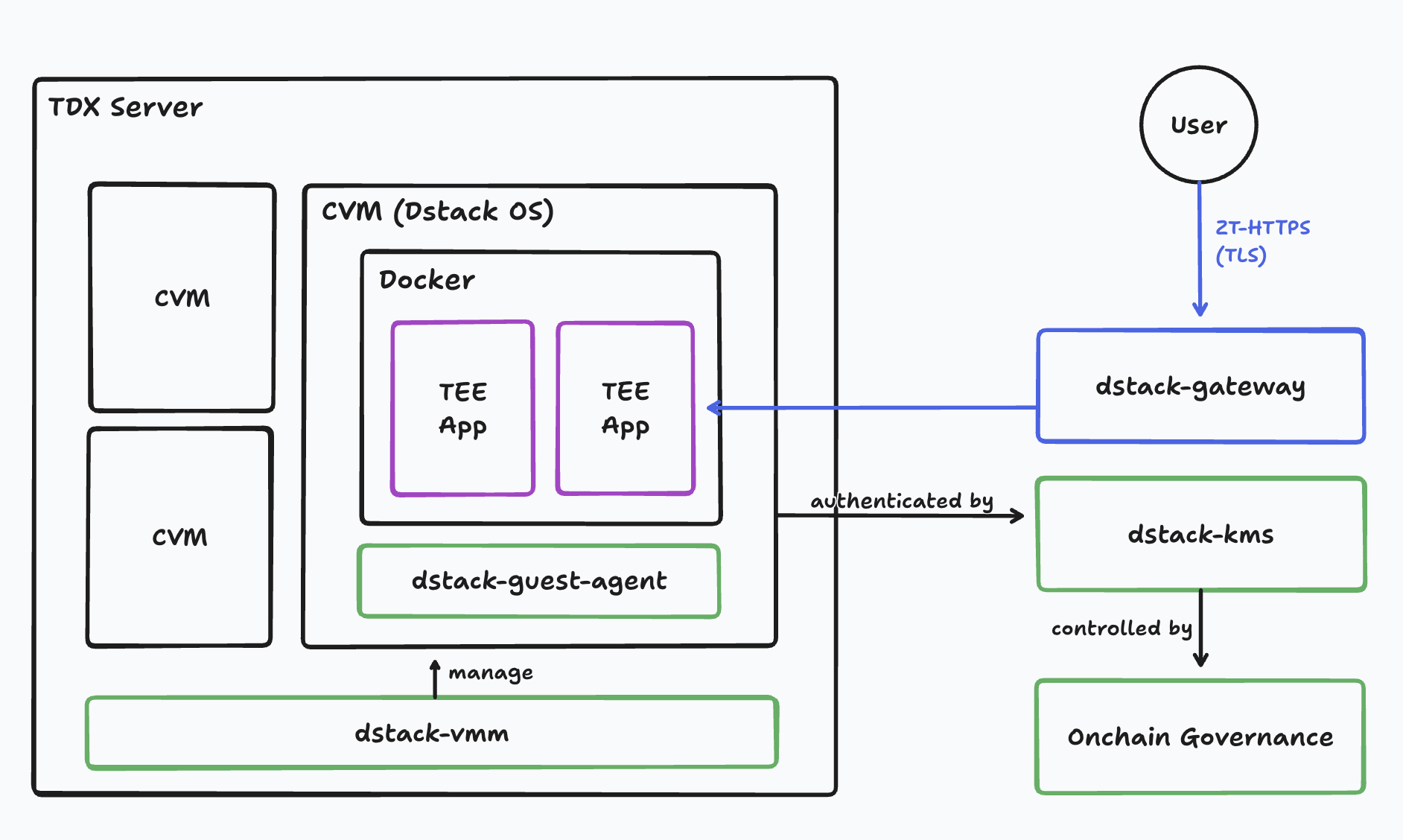
Your container runs inside a Confidential VM, such as Intel TDX or AMD SEV-SNP, with optional GPU isolation via NVIDIA Confidential Computing. The CPU TEE protects application logic; the GPU TEE protects model weights and inference data.
Core components:
Guest Agent: Runs inside each CVM. Generates TDX attestation quotes so users can verify exactly what's running. Provisions per-app cryptographic keys from KMS. Encrypts local storage. Apps interact via /var/run/dstack.sock.
KMS: Runs in its own TEE. Verifies TDX quotes before releasing keys. Enforces authorization policies defined in on-chain smart contracts — operators cannot bypass these checks. Derives deterministic keys bound to each app's attested identity.
Gateway: Terminates TLS at the edge and provisions ACME certificates automatically. Routes traffic to CVMs. All internal communication uses RA-TLS for mutual attestation.
VMM: Runs on bare-metal TDX hosts. Parses docker-compose files directly — no app changes needed. Boots CVMs from a reproducible OS image. Allocates CPU, memory, and confidential GPU resources.
Security docs are linked here so deployers and reviewers can quickly find the trust model, production guidance, audit, and the status of already-answered public findings.
Please do not disclose exploitable vulnerabilities in public GitHub issues. Use the private reporting path in SECURITY.md.
Apps communicate with the guest agent via HTTP over /var/run/dstack.sock. Use the HTTP API directly with curl, or use a language SDK:
| Language | Install | Docs |
|---|---|---|
| Python | pip install dstack-sdk | README |
| TypeScript | npm install @phala/dstack-sdk | README |
| Rust | cargo add dstack-sdk | README |
| Go | go get github.com/Dstack-TEE/dstack/sdk/go | README |
For Developers
For Operators
Reference
You can — but you'll build everything yourself: attestation verification, key management, Docker orchestration, certificate provisioning, and governance. dstack provides all of this out of the box.
| Approach | Docker native | GPU TEE | Key management | Attestation tooling | Open source |
|---|---|---|---|---|---|
| dstack | ✓ | ✓ | ✓ | ✓ | ✓ |
| AWS Nitro Enclaves | - | - | Manual | Manual | - |
| Azure Confidential VMs | - | Preview | Manual | Manual | - |
| GCP Confidential Computing | - | - | Manual | Manual | - |
Cloud providers give you the hardware primitive. dstack gives you the full stack: reproducible OS images, automatic attestation, per-app key derivation, TLS certificates, and smart contract governance. No vendor lock-in.
SGX requires porting applications to enclaves. dstack uses full-VM isolation (Intel TDX) — bring your Docker containers as-is. Plus GPU TEE support that SGX doesn't offer.
Minimal. Intel TDX adds ~2-5% overhead for CPU workloads. NVIDIA Confidential Computing has negligible impact on GPU inference. The main cost is memory encryption, which is hardware-accelerated on supported CPUs.
Yes. dstack powers production AI infrastructure at OpenRouter and NEAR AI. The framework has been audited by zkSecurity and is a Linux Foundation Confidential Computing Consortium project.
Yes. dstack runs on supported TEE-capable servers, including Intel TDX-capable hardware. See the deployment guide for self-hosting instructions. You can also use Phala Cloud for managed infrastructure.
Your app exposes attestation quotes via the SDK. Users verify these quotes using dstack-verifier, dcap-qvl, or the Trust Center. See the verification guide for details.
dstack is a Linux Foundation Confidential Computing Consortium open source project.
Telegram · GitHub Discussions · Examples
For enterprise support and licensing, book a call or email us at [email protected].
If you use dstack in your research, please cite:
@article{zhou2025dstack,
  title={Dstack: A Zero Trust Framework for Confidential Containers},
  author={Zhou, Shunfan and Wang, Kevin and Yin, Hang},
  journal={arXiv preprint arXiv:2509.11555},
  year={2025}
}
Logo and branding assets: dstack-logo-kit
The dstack-owned source, SDKs, documentation, tools, guest OS backend, and
image-assembly code are Apache-2.0. Embedded and third-party components retain
their own license declarations and notices. See file-level SPDX declarations
and REUSE.toml for the exact scope.
Open framework for confidential AI
See the code
Original Contributors: Hang Yin, Kevin Wang, Andrew Miller
dstack is the open framework for confidential AI — deploy AI applications with cryptographic privacy guarantees.
AI providers ask users to trust them with sensitive data. But trust doesn't scale, and trust can't be verified. With dstack, your containers run inside confidential VMs (Intel TDX) with native support for NVIDIA Confidential Computing (H100, Blackwell). Users can cryptographically verify exactly what's running: private AI with your existing Docker workflow.
| Platform | Status | Attestation |
|---|---|---|
| Bare metal TDX | Available | TDX |
| Bare metal AMD SEV-SNP | Host support; requires an SNP-capable guest image | SEV-SNP |
| Phala Cloud | Available | TDX |
| GCP Confidential VMs | Available | TDX + TPM |
| AWS Nitro Enclaves | Available | NSM |
Zero friction onboarding
Hardware-rooted security
Trustless operations
Try it now: Chat with LLMs running in TEE at chat.redpill.ai. Click the shield icon to verify attestations from Intel TDX and NVIDIA GPUs.
Deploy your own:
# docker-compose.yaml
services:
  vllm:
    image: vllm/vllm-openai:latest
    runtime: nvidia
    command: --model Qwen/Qwen2.5-7B-Instruct
    ports:
      - "8000:8000"
Deploy to a self-hosted TDX machine with the dstackup install -> dstack deploy workflow, or use Phala Cloud for managed infrastructure. AMD SEV-SNP hosts use the same workflow when the selected guest image includes digest.txt.
Setting up dstack on your own hardware? Start with the self-hosted quick onboarding guide
Building or customizing the guest OS itself? Follow the guest-OS build guide.
Developing without TEE hardware? Use a development image with no-TEE mode and swtpm.
dstack/  Core services, Rust crates, host and guest runtime code
sdk/     Stable public SDK paths
os/      Guest-OS payload, image contract, and build backends
docs/    User and operator documentation
tools/   Standalone development and security tools
The default and recommended OS backend is mkosi under os/mkosi/. The Yocto
backend under os/yocto/ is deprecated and kept only to rebuild existing
images; do not use it for new work. Shared rootfs payload and release assembly
stay outside the backends so they are not duplicated. See
os/README.md.
Scripts follow the same ownership boundaries: component-specific helpers stay
beside their component under dstack/; files installed into every guest live
in os/common/rootfs/; backend-neutral image tooling lives in os/image/;
mkosi-only helpers live in os/mkosi/scripts/ (deprecated Yocto-only helpers
in os/yocto/scripts/); and repository-wide standalone utilities live in
tools/.
Your container runs inside a Confidential VM, such as Intel TDX or AMD SEV-SNP, with optional GPU isolation via NVIDIA Confidential Computing. The CPU TEE protects application logic; the GPU TEE protects model weights and inference data.
Core components:
Guest Agent: Runs inside each CVM. Generates TDX attestation quotes so users can verify exactly what's running. Provisions per-app cryptographic keys from KMS. Encrypts local storage. Apps interact via /var/run/dstack.sock.
KMS: Runs in its own TEE. Verifies TDX quotes before releasing keys. Enforces authorization policies defined in on-chain smart contracts — operators cannot bypass these checks. Derives deterministic keys bound to each app's attested identity.
Gateway: Terminates TLS at the edge and provisions ACME certificates automatically. Routes traffic to CVMs. All internal communication uses RA-TLS for mutual attestation.
VMM: Runs on bare-metal TDX hosts. Parses docker-compose files directly — no app changes needed. Boots CVMs from a reproducible OS image. Allocates CPU, memory, and confidential GPU resources.
Security docs are linked here so deployers and reviewers can quickly find the trust model, production guidance, audit, and the status of already-answered public findings.
Please do not disclose exploitable vulnerabilities in public GitHub issues. Use the private reporting path in SECURITY.md.
Apps communicate with the guest agent via HTTP over /var/run/dstack.sock. Use the HTTP API directly with curl, or use a language SDK:
| Language | Install | Docs |
|---|---|---|
| Python | pip install dstack-sdk | README |
| TypeScript | npm install @phala/dstack-sdk | README |
| Rust | cargo add dstack-sdk | README |
| Go | go get github.com/Dstack-TEE/dstack/sdk/go | README |
For Developers
For Operators
Reference
You can — but you'll build everything yourself: attestation verification, key management, Docker orchestration, certificate provisioning, and governance. dstack provides all of this out of the box.
| Approach | Docker native | GPU TEE | Key management | Attestation tooling | Open source |
|---|---|---|---|---|---|
| dstack | ✓ | ✓ | ✓ | ✓ | ✓ |
| AWS Nitro Enclaves | - | - | Manual | Manual | - |
| Azure Confidential VMs | - | Preview | Manual | Manual | - |
| GCP Confidential Computing | - | - | Manual | Manual | - |
Cloud providers give you the hardware primitive. dstack gives you the full stack: reproducible OS images, automatic attestation, per-app key derivation, TLS certificates, and smart contract governance. No vendor lock-in.
SGX requires porting applications to enclaves. dstack uses full-VM isolation (Intel TDX) — bring your Docker containers as-is. Plus GPU TEE support that SGX doesn't offer.
Minimal. Intel TDX adds ~2-5% overhead for CPU workloads. NVIDIA Confidential Computing has negligible impact on GPU inference. The main cost is memory encryption, which is hardware-accelerated on supported CPUs.
Yes. dstack powers production AI infrastructure at OpenRouter and NEAR AI. The framework has been audited by zkSecurity and is a Linux Foundation Confidential Computing Consortium project.
Yes. dstack runs on supported TEE-capable servers, including Intel TDX-capable hardware. See the deployment guide for self-hosting instructions. You can also use Phala Cloud for managed infrastructure.
Your app exposes attestation quotes via the SDK. Users verify these quotes using dstack-verifier, dcap-qvl, or the Trust Center. See the verification guide for details.
dstack is a Linux Foundation Confidential Computing Consortium open source project.
Telegram · GitHub Discussions · Examples
For enterprise support and licensing, book a call or email us at [email protected].
If you use dstack in your research, please cite:
@article{zhou2025dstack,
  title={Dstack: A Zero Trust Framework for Confidential Containers},
  author={Zhou, Shunfan and Wang, Kevin and Yin, Hang},
  journal={arXiv preprint arXiv:2509.11555},
  year={2025}
}
Logo and branding assets: dstack-logo-kit
The dstack-owned source, SDKs, documentation, tools, guest OS backend, and
image-assembly code are Apache-2.0. Embedded and third-party components retain
their own license declarations and notices. See file-level SPDX declarations
and REUSE.toml for the exact scope.



