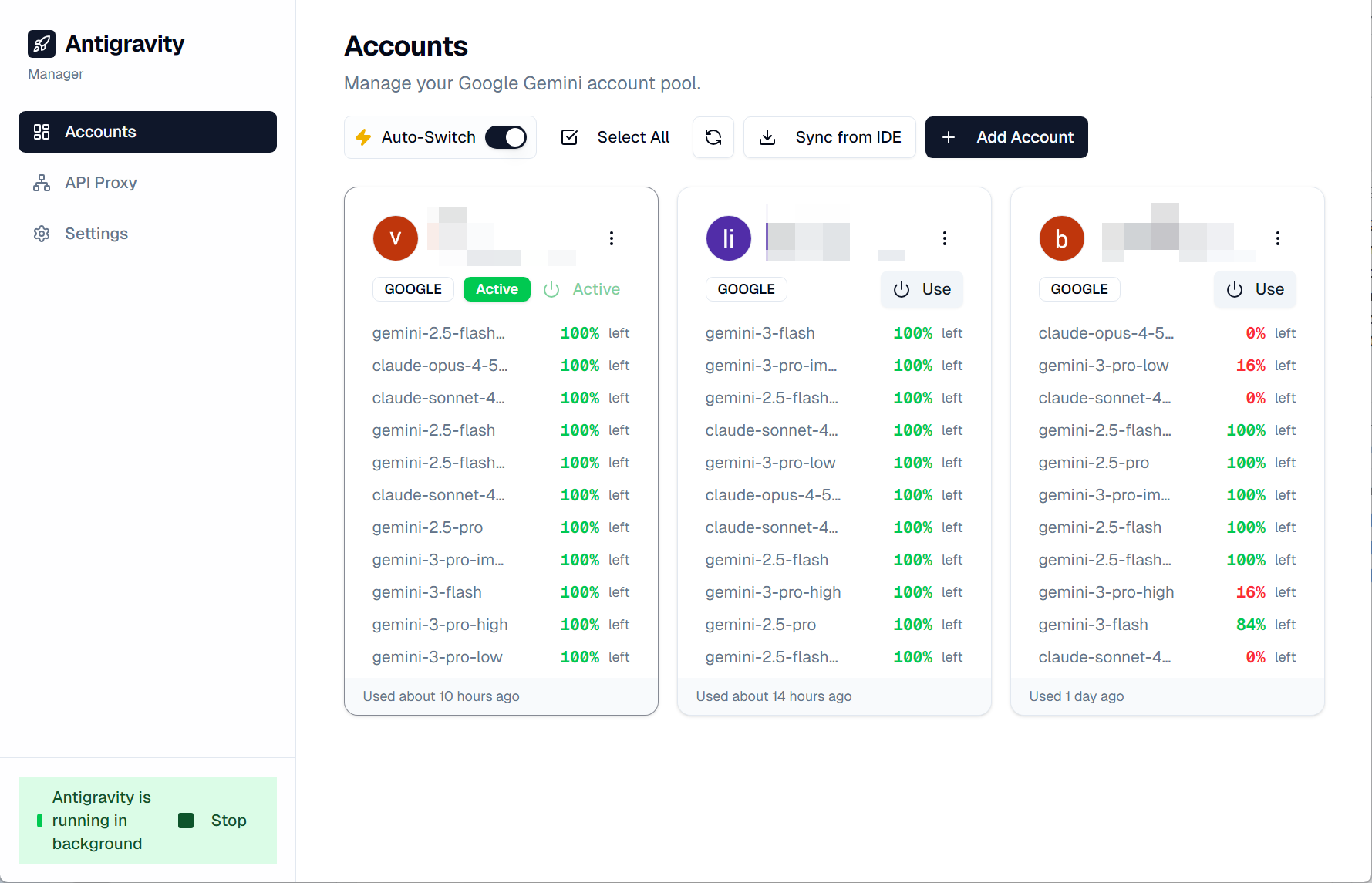
Antigravity Manager is a powerful Electron-based application designed to manage accounts and processes for the Antigravity application. It provides a seamless interface for switching accounts, backing up progress, and controlling the application lifecycle.
TypeScript
2,380
464 commits
updated Oct 14, 2026

🚀 Professional multi-account manager for Google Gemini & Claude AI
English | 简体中文










When using Antigravity IDE, have you ever encountered these problems?
Antigravity Manager is here to solve these problems! It's a professional Electron desktop app that helps you:
[!WARNING] Account risks when using the reverse proxy
Since February, Google has intensified enforcement. Simply switching accounts with this software will not affect your Google account. However, using it as a reverse proxy or for similar purposes violates Google's Terms of Service and may result in account suspension.
Only use accounts you can afford to lose.
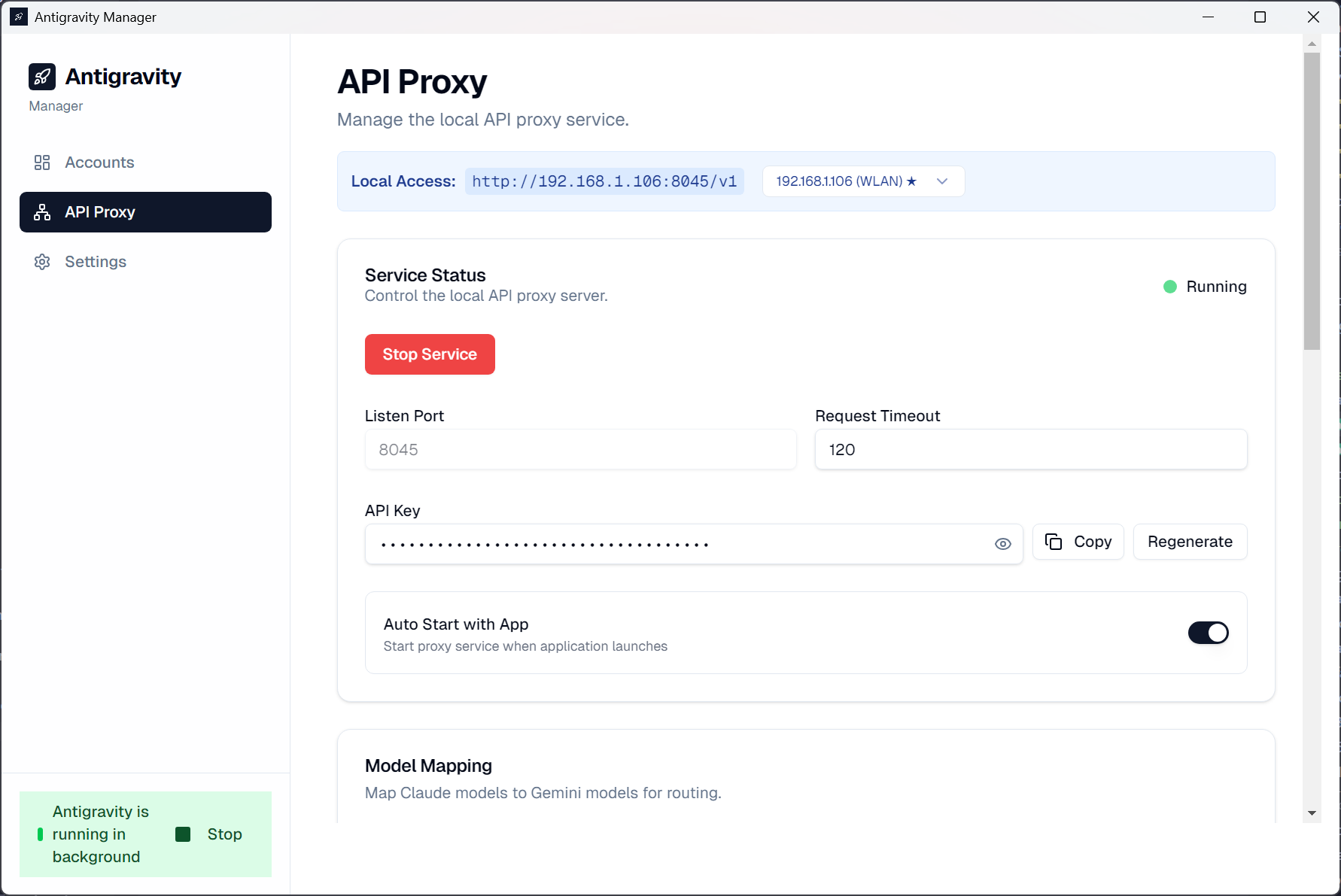
The first time you click Start Service on the API Proxy page, you must acknowledge this warning before the service starts. Cancelling or closing the dialog does not start the proxy.
☁️ Cloud Account Pool
|
📊 Real-time Quota Monitoring
|
🔄 Intelligent Auto-Switching
|
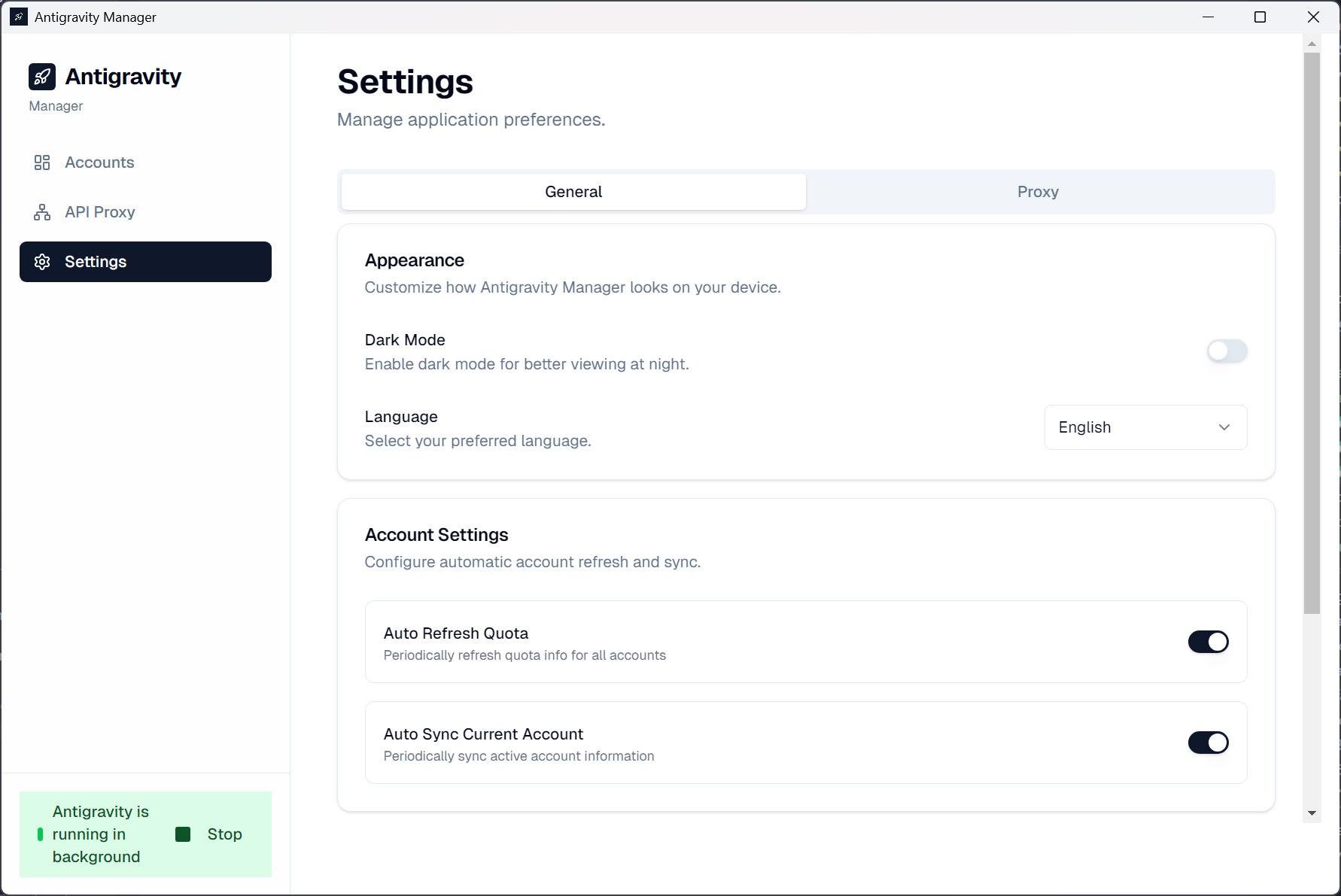
🔐 Security First
|
💾 Account Backup
|
⚙️ Process Control
|
🔌 Local API Proxy
|
🛠️ Developer Tools
|
state.vscdb
Download the latest release for your platform from the Releases page.
| Platform | Download |
|---|---|
| Windows (x64/ARM64) | .exe installer |
| macOS | .dmg installer |
| Linux | .deb / .rpm |
| Arch Linux (AUR) | yay -S antigravity-manager-bin |
| NixOS / Nix | nix run github:Draculabo/AntigravityManager |
You can integrate Antigravity Manager into your Nix configuration using the provided flake.
Add the flake to your flake.nix inputs:
inputs = {
  nixpkgs.url = "github:nixos/nixpkgs/nixos-unstable";
  antigravity-manager.url = "github:Draculabo/AntigravityManager";
};
To integrate with your system, add antigravity-manager.overlays.default to your nixpkgs.overlays. This ensures the package is correctly built against your own nixpkgs instance and respects your global configuration.
# Add to your NixOS/Home Manager configuration
{
  nixpkgs.overlays = [ inputs.antigravity-manager.overlays.default ];

  # Antigravity Manager has an unfree license (cc-by-nc-sa-40)
  nixpkgs.config.allowUnfree = true;

  environment.systemPackages = [
    pkgs.antigravity-manager
  ];
}
If you're using the overlay above, you can simply add it to your devShell:
devShells.default = pkgs.mkShell {
  packages = [
    pkgs.antigravity-manager
  ];
};
[!NOTE] Since the package is unfree, you must have
allowUnfree = true;enabled in yournixpkgsconfiguration for it to evaluate correctly.
# Clone the repository
git clone https://github.com/Draculabo/AntigravityManager.git
cd AntigravityManager

# Install dependencies
npm install

# Start development
npm start

# Build for production
npm run make
| Category | Technologies |
|---|---|
| Core | Electron, React, TypeScript |
| Build Tool | Vite |
| Styling | TailwindCSS, Shadcn UI |
| State | TanStack Query, TanStack Router |
| Database | Better-SQLite3 |
| Testing | Vitest, Playwright |
| Command | Description |
|---|---|
npm start | Start the app in development mode |
npm run lint | Run ESLint to check for code issues |
npm run format:write | Format code with Prettier |
npm run test:unit | Run unit tests with Vitest |
npm run test:e2e | Run E2E tests with Playwright |
npm run test:all | Run all tests |
npm run type-check | Run TypeScript type checking |
npm run make | Build production packages |
AntigravityManager/
├── src/
│   ├── main.ts          # Electron main process
│   ├── preload.ts       # Preload script
│   ├── renderer/        # React renderer process
│   ├── ipc/             # IPC communication handlers
│   └── server/          # Built-in server
├── docs/                # Documentation and assets
└── .github/             # GitHub configuration
If you want to inspect Antigravity or Antigravity Manager traffic with Proxyman, start here:
Please check:
npm installnode_modules and reinstallingThis is a common macOS security behavior, usually when the app is unsigned or run directly from Downloads. This is a temporary workaround for personal use:
/Applicationssudo xattr -dr com.apple.quarantine "/Applications/Antigravity Manager.app"
codesign --force --deep --sign - "/Applications/Antigravity Manager.app"
Reopen the app and allow Keychain access if prompted.
Please submit issues or suggestions via GitHub Issues.
Contributions are welcome! Please read CONTRIBUTING.md for details.
We follow the Contributor Covenant Code of Conduct.
[!WARNING] For Educational Purposes Only
This project is intended solely for educational and research purposes. It is provided "as-is" without any warranty. Commercial use is strictly prohibited.
By using this software, you agree that you will not use it for any commercial purposes, and you are solely responsible for ensuring your use complies with all applicable laws and regulations. The authors and contributors are not responsible for any misuse or damages arising from the use of this software.
If this project helps you, please give it a ⭐ Star!
45 followers · starred Apr 2026
1,258 followers · starred Jan 2026
0 followers · starred Mar 2026
53 followers · starred Feb 2026
Antigravity Manager is a powerful Electron-based application designed to manage accounts and processes for the Antigravity application. It provides a seamless interface for switching accounts, backing up progress, and controlling the application lifecycle.
TypeScript
2,380
464 commits
updated Oct 14, 2026
🚀 Professional multi-account manager for Google Gemini & Claude AI
English | 简体中文
When using Antigravity IDE, have you ever encountered these problems?
Antigravity Manager is here to solve these problems! It's a professional Electron desktop app that helps you:
[!WARNING] Account risks when using the reverse proxy
Since February, Google has intensified enforcement. Simply switching accounts with this software will not affect your Google account. However, using it as a reverse proxy or for similar purposes violates Google's Terms of Service and may result in account suspension.
Only use accounts you can afford to lose.
The first time you click Start Service on the API Proxy page, you must acknowledge this warning before the service starts. Cancelling or closing the dialog does not start the proxy.
☁️ Cloud Account Pool
|
📊 Real-time Quota Monitoring
|
🔄 Intelligent Auto-Switching
|
🔐 Security First
|
💾 Account Backup
|
⚙️ Process Control
|
🔌 Local API Proxy
|
🛠️ Developer Tools
|
state.vscdb
Download the latest release for your platform from the Releases page.
| Platform | Download |
|---|---|
| Windows (x64/ARM64) | .exe installer |
| macOS | .dmg installer |
| Linux | .deb / .rpm |
| Arch Linux (AUR) | yay -S antigravity-manager-bin |
| NixOS / Nix | nix run github:Draculabo/AntigravityManager |
You can integrate Antigravity Manager into your Nix configuration using the provided flake.
Add the flake to your flake.nix inputs:
inputs = {
  nixpkgs.url = "github:nixos/nixpkgs/nixos-unstable";
  antigravity-manager.url = "github:Draculabo/AntigravityManager";
};
To integrate with your system, add antigravity-manager.overlays.default to your nixpkgs.overlays. This ensures the package is correctly built against your own nixpkgs instance and respects your global configuration.
# Add to your NixOS/Home Manager configuration
{
  nixpkgs.overlays = [ inputs.antigravity-manager.overlays.default ];

  # Antigravity Manager has an unfree license (cc-by-nc-sa-40)
  nixpkgs.config.allowUnfree = true;

  environment.systemPackages = [
    pkgs.antigravity-manager
  ];
}
If you're using the overlay above, you can simply add it to your devShell:
devShells.default = pkgs.mkShell {
  packages = [
    pkgs.antigravity-manager
  ];
};
[!NOTE] Since the package is unfree, you must have
allowUnfree = true;enabled in yournixpkgsconfiguration for it to evaluate correctly.
# Clone the repository
git clone https://github.com/Draculabo/AntigravityManager.git
cd AntigravityManager

# Install dependencies
npm install

# Start development
npm start

# Build for production
npm run make
| Category | Technologies |
|---|---|
| Core | Electron, React, TypeScript |
| Build Tool | Vite |
| Styling | TailwindCSS, Shadcn UI |
| State | TanStack Query, TanStack Router |
| Database | Better-SQLite3 |
| Testing | Vitest, Playwright |
| Command | Description |
|---|---|
npm start | Start the app in development mode |
npm run lint | Run ESLint to check for code issues |
npm run format:write | Format code with Prettier |
npm run test:unit | Run unit tests with Vitest |
npm run test:e2e | Run E2E tests with Playwright |
npm run test:all | Run all tests |
npm run type-check | Run TypeScript type checking |
npm run make | Build production packages |
AntigravityManager/
├── src/
│   ├── main.ts          # Electron main process
│   ├── preload.ts       # Preload script
│   ├── renderer/        # React renderer process
│   ├── ipc/             # IPC communication handlers
│   └── server/          # Built-in server
├── docs/                # Documentation and assets
└── .github/             # GitHub configuration
If you want to inspect Antigravity or Antigravity Manager traffic with Proxyman, start here:
Please check:
npm installnode_modules and reinstallingThis is a common macOS security behavior, usually when the app is unsigned or run directly from Downloads. This is a temporary workaround for personal use:
/Applicationssudo xattr -dr com.apple.quarantine "/Applications/Antigravity Manager.app"
codesign --force --deep --sign - "/Applications/Antigravity Manager.app"
Reopen the app and allow Keychain access if prompted.
Please submit issues or suggestions via GitHub Issues.
Contributions are welcome! Please read CONTRIBUTING.md for details.
We follow the Contributor Covenant Code of Conduct.
[!WARNING] For Educational Purposes Only
This project is intended solely for educational and research purposes. It is provided "as-is" without any warranty. Commercial use is strictly prohibited.
By using this software, you agree that you will not use it for any commercial purposes, and you are solely responsible for ensuring your use complies with all applicable laws and regulations. The authors and contributors are not responsible for any misuse or damages arising from the use of this software.
If this project helps you, please give it a ⭐ Star!
45 followers · starred Apr 2026
1,258 followers · starred Jan 2026
0 followers · starred Mar 2026
53 followers · starred Feb 2026



